How to Track Rankings with Search Console

Google now blocks third-party organic rank-tracking tools. Here’s how to monitor rankings in Search Console.

1. Enable the ‘Average position’ option

By default, rankings do not show in Search Console’s “Performance” reports. To enable, click the “Average position” option on top of the Performance graph. Once checked, see your site’s position for each search query.

Screenshot of Search Console Performance graph

Click the “Average position” option at the top of the Performance graph.

2. Understand ‘Average position’

Google’s “Average position” can be confusing. Occasionally the average position shows, say, “1” or “2,” and yet there’s no actual traffic for the query. That’s because Google’s search results are dynamic and personalized, resulting in:

  • Fresh content temporarily at the top of search results.
  • A page at the top for searchers who recently visited it.

In those examples, ranking “1” or “2” in the Performance graph is typically short-lived.

Screenshot of Performance graph showing a brief spike in rankings

Ranking “1” or “2” in the Performance graph is often short-lived.

3. Exclude branded search

Create a filter to exclude brand name queries from reports of organic search rankings.

  • Click a “filter” icon above the reports.
  • Select “Top queries.”
  • Choose “Does not contain” in the drop-down.
  • Type your brand name and click “Done.”
Screenshot of Search Console page showing the filter

Filter brand queries from appearing in ranking reports.

4. Limit reports

By default, the “Average position” report lists all URLs. To analyze specific pages:

  • Click “Add filter” above the Performance graph.
  • Select “Page.”
  • Choose “URL containing” from the drop-down.
  • Paste the URL string (excluding the domain name) and click “Apply.”

The Performance reports will now include only pages containing that URL string.

Screenshot showing the filter to specify specific pages

Add a filter to analyze specific pages in the reports.

5. Export ranking data

Search Console retains data for 16 months. To access beyond that period, regularly export your reports.

Search Console can directly export data to Google Sheets, including the average positions and clicks for a given period. Unfortunately, the exports are not particularly useful as they do not include the URLs that rank for those queries.

Search Analytics for” is a Google Workspace app that exports Search Console data, including the query and the ranking URL, into Sheets.

“Search Analytics for” can export data with the ranking URL into Sheets.

To create an export:

  • Install the app.
  • Open a new Google Sheet.
  • Click “Extensions.”
  • Click “Search Analytics for Sheets” from the list.
  • Click “Open sidebar.”
  • Select the date range and add “Query” and “Page” in “Group by.”

Optionally add more filters. The screenshot below limits a report to search queries that include “free.”

Select the date range and add “Query” and “Page” in “Group by.”

The filters are the same as native Search Console versions, such as (i) limiting exports by any keyword in queries or URLs, (ii) excluding queries with a certain word, and (iii) restricting data to a country or device.

Additionally, the app provides automated backups, each in a new tab. The app’s free plan allows unlimited backup requests of 25,000 rows each — more than enough for most sites.

TikTok Alternatives for Brands and Merchants

TikTok is back, isn’t it? After pulling down service yesterday (Sunday) morning, TikTok restored it in the afternoon with the notice, “As a result of President Trump’s efforts, TikTok is back in the U.S.!”

TikTok notice on Jan. 19, 2025

On Friday, the Supreme Court upheld the law requiring the owner of TikTok, China-based ByteDance, to sell its U.S. operations to avoid a U.S. ban. The law went into effect on Sunday.

By midmorning on Sunday, Trump posted on his Truth Social platform, “I will issue an executive order on Monday to extend the period of time before the law’s prohibitions take effect, so that we can make a deal to protect our national security.”

While President Trump’s executive order on Monday should stop the enforcement of the ban, the liability of third parties, such as hosting platforms or app stores, is unclear. Justice Sonia Sotomayor stated during the Supreme Court hearings, “Whatever the new president does doesn’t change that reality for these companies.”

Regardless, brands and merchants have options for social commerce. Here is a list of TikTok alternatives featuring short video and live-streaming formats. Some have monetization features, and others have full ecommerce functionality similar to TikTok Shop.

TikTok Alternatives

RedNote is a China-based lifestyle and social networking app popular for product recommendations and tips on beauty, fashion, and travel. RedNote (i.e., “Xiaohongshu”) is designed for shopping. Products can be tagged within posts, making it easy for followers to click and purchase within the app. RedNote features a discovery search for lifestyle content, notes for blogging, a split-screen for collaboration, video and live-streaming content, and integrated ecommerce functionality. RedNote is currently the number 1 social networking app in Apple’s App Store. RedNote says its network supports 300 million users per month.

Home page of RedNote

RedNote

Instagram Reels stands to gain the most users from any sustained TikTok shutdown, as the Meta app already dominates the social media landscape. Users can use Reels to create multi-clip videos up to 90 seconds and add text, augmented-reality filters, and audio. Users can start live-streaming by swiping right in the feed and then scrolling to Live. Users can also use Shops to open a storefront on a business profile, along with product tags to distribute shoppable content.

Amazon Live enables brands and creators to produce shoppable live and on-demand videos that span multiple categories, including home, beauty, electronics, and shopping events like Prime Day, Black Friday, and Cyber Monday. Streams on Amazon Live can appear on the Amazon home page, in the “Amazon Live” section of the website, or on a seller’s or influencer’s storefront. Products featured in Amazon Live will appear in a carousel at the bottom of the stream. Any registered brand partner is eligible to stream using the Amazon Live Creator app. These livestreams will appear on a brand’s Amazon Store for 30 days and can be viewed live and on-demand on Amazon.com/live.

Flip is a social shopping app to discover products from brands. U.S. direct-to-consumer companies can apply to join the exclusive list of sellers and integrate an existing ecommerce platform with Flip to sync a product catalog. Users can also become creators and earn money by sharing their shopping experiences. Flip charges a percentage fee on all sales generated through the platform. The fee is based on the product category.

Home page of Flip

Flip

YouTube Shopping allows eligible creators to showcase their products and branded merchandise. Viewers can browse and buy products from the channel’s store, in video descriptions, and in collections — as well via a shopping button in videos, shorts, and livestreams. Creators can showcase products by linking to their channel store or creating and sharing Shopping Collections, which will appear in a creator’s product list, store tab, and video description.

Whatnot is a social marketplace for selling products via live-streamed auctions. During a livestream, sellers can list items (i) for auction, (ii) in their Buy It Now store, or (iii) as giveaways. Users can attend live auctions and deep dive with other collectors and like-minded shoppers. Sellers have several tools for livestreams, including Zoom, Facecam, and a randomizer spin wheel for offering promotions and driving engagement. Sellers can access performance analytics.

Clapper is a short-form video and live-streaming app to provide authentic communication and expression. Use the Duet Live feature to bring on a follower and interact in real-time, and use the radio feature for an audio-only room of up to 2,000 listeners and 20 speakers. Create a group community of fans to interact with. The Clapper Shop allows creators to list and sell products. Add and promote your product, and it will appear on the livestream screen for anyone to buy.

Fanbase is an ad-free social hub for creators to generate subscription revenue by sharing posts, short- and long-form videos, stories, and live audio and video streaming. Fanbase offers a 3-step tool to help TikTok creators migrate their content. Post exclusive content available to monthly subscribers for prices ranging from $2.99 to $99. Users discover content through trending topics, interests, and favorited creators. Users can also join livestreams and chat with others or head into the audio rooms.

Home page of Fanbase

Fanbase

Likee is a platform for sharing short-form videos and livestreams. Likee features augmented-reality filters to apply in videos and livestreams, editing effects, and an extensive music library. Creators can monetize content through SuperLikes and establish SuperFollow subscribers with customizable monthly subscription prices. Likee says it has over 150 million monthly active users worldwide.

Triller is a video-sharing social networking app similar to TikTok’s music-sharing core. Utilizing Triller’s auto-editing algorithm, creators can shoot a few takes, tap the “Next” button, apply 100-plus video filters, and add music. The platform will then combine it all into a shareable video. Creators can also produce live video streams. Users can share or distribute via Instagram, Facebook, X, SMS, and email. Triller does not have monetization or ecommerce functionality, but it has launched a SaveMyTikToks.com website to help creators back up content by migrating it to Triller.

Neptune is a soon-to-be-released social networking and video-sharing beta app for creators and community-centric connections. Neptune features (i) a customizable algorithm that allows users to tailor their experience for relevant content and (ii) ghost metrics that measure the quality of content instead of just follower counts. Neptune maintains it will help users develop lasting connections. Neptune also claims that its monetization will be transparent and equitable to creators. Register to get access to the beta launch.

CommentSold is a live-selling social-commerce platform similar to a TikTok Shop. Merchants can start a live-selling broadcast and distribute it simultaneously to their social networks (Facebook, Instagram, TikTok), website, mobile app, and Shopify store. CommentSold’s features include (i) automatically generated video content for products with live selling segments, (ii) actionable data insights on inventory, customers, and finances, and (iii) expert guidance from strategists. Shoppers comment “Sold” or click the product highlighted on a live video to add it to their cart without leaving the stream. Sellers create shoppable videos with PopClips, which highlight and tag up to five products per video.

Home page of CommentSold

CommentSold

AI Search Optimization: Make Your Structured Data Accessible via @sejournal, @MattGSouthern

A recent investigation has uncovered a problem for websites relying on JavaScript for structured data.

This data, often in JSON-LD format, is difficult for AI crawlers to access if not in the initial HTML response.

Crawlers like GPTBot (used by ChatGPT), ClaudeBot, and PerplexityBot can’t execute JavaScript and miss any structured data added later.

This creates challenges for websites using tools like Google Tag Manager (GTM) to insert JSON-LD on the client side, as many AI crawlers can’t read dynamically generated content.

Key Findings About JSON-LD & AI Crawlers

Elie Berreby, the founder of SEM King, examined what happens when JSON-LD is added using Google Tag Manager (GTM) without server-side rendering (SSR).

He found out why this type of structured data is often not seen by AI crawlers:

  1. Initial HTML Load: When a crawler requests a webpage, the server returns the first HTML version. If structured data is added with JavaScript, it won’t be in this initial response.
  2. Client-Side JavaScript Execution: JavaScript runs in the browser and changes the Document Object Model (DOM) for users. At this stage, GTM can add JSON-LD to the DOM.
  3. Crawlers Without JavaScript Rendering: AI crawlers that can’t run JavaScript cannot see changes in the DOM. This means they miss any JSON-LD added after the page loads.

In summary, structured data added only through client-side JavaScript is invisible to most AI crawlers.

Why Traditional Search Engines Are Different

Traditional search crawlers like Googlebot can read JavaScript and process changes made to a webpage after it loads, including JSON-LD data injected by Google Tag Manager (GTM).

In contrast, many AI crawlers can’t read JavaScript and only see the raw HTML from the server. As a result, they miss dynamically added content, like JSON-LD.

Google’s Warning on Overusing JavaScript

This challenge ties into a broader warning from Google about the overuse of JavaScript.

In a recent podcast, Google’s Search Relations team discussed the growing reliance on JavaScript. While it enables dynamic features, it’s not always ideal for essential SEO elements like structured data.

Martin Splitt, Google’s Search Developer Advocate, explained that websites range from simple pages to complex applications. It’s important to balance JavaScript use with making key content available in the initial HTML.

John Mueller, another Google Search Advocate, agreed, noting that developers often turn to JavaScript when simpler options, like static HTML, would be more effective.

What To Do Instead

Developers and SEO professionals should ensure structured data is accessible to all crawlers to avoid issues with AI search crawlers.

Here are some key strategies:

  1. Server-Side Rendering (SSR): Render pages on the server to include structured data in the initial HTML response.
  2. Static HTML: Use schema markup directly in the HTML to limit reliance on JavaScript.
  3. Prerendering: Offer prerendered pages where JavaScript has already been executed, providing crawlers with fully rendered HTML.

These approaches align with Google’s advice to prioritize HTML-first development and include important content like structured data in the initial server response.

Why This Matters

AI crawlers will only grow in importance, and they play by different rules than traditional search engines.

If your site depends on GTM or other client-side JavaScript for structured data, you’re missing out on opportunities to rank in AI-driven search results.

By shifting to server-side or static solutions, you can future-proof your site and ensure visibility in traditional and AI searches.


Featured Image: nexusby/Shutterstock

TikTok Ban Sparks 5000% Surge In Alternative App Searches via @sejournal, @MattGSouthern

The recent TikTok ban drama in the U.S. has caused a surge in search activity as people look for answers, alternatives, and workarounds.

The app temporarily shut down over the weekend and was restored after President-elect Donald Trump announced a 90-day extension. This led to a notable rise in search interest.

An SEO consultant named Sobhi Smat compiled a collection of search data and shared it on LinkedIn.

Here’s what the data shows about people’s reactions and what it means for marketers.

The Context: TikTok’s Uncertain Future

On January 17, the U.S. Supreme Court upheld PAFACA. The original deadline for compliance was January 19.

In response, on January 18, TikTok began shutting down its services in the U.S., removing the app from app stores and displaying service discontinuation notices.

On January 19, President-elect Donald Trump announced plans for a 90-day extension via executive order, allowing TikTok to restore operations while negotiations continue temporarily.

Search Behavior: Three Key Trends Emerge

Analysis of Google search data from January 1 to January 16 reveals three dominant categories of search behavior related to the TikTok ban:

  1. Staying Informed
  2. Exploring Alternatives
  3. Circumventing the Ban

1. Staying Informed

One of the largest spikes in search activity was caused by people trying to understand the reasons behind the ban and stay informed about recent developments.

Queries like “TikTok ban update,” “Supreme Court ruling on TikTok,” and “Is the TikTok ban extended?” saw a breakout, with search interest increasing by over 5000%.

2. Exploring TikTok Alternatives: A Battle for User Attention

As fears of TikTok’s potential shutdown grew, people turned to Google to explore alternative platforms.

The search term “TikTok alternatives” saw explosive growth, alongside interest in specific apps such as RedNote, Lemon8, Clapper, and Fanbase.

RedNote: The Rising Star

Among alternatives, RedNote attracted the most attention, with breakout search terms like “What is RedNote?”, “Is RedNote safe?”, and “TikTok vs RedNote”.

However, RedNote’s surge in popularity exposed its challenges, particularly in delivering high-quality English-language content and addressing translation issues. This led to a related search spike for “Chinese to English translation.”

Other Notable Alternatives

Other apps like Lemon8, Clapper, and Fanbase also saw increased search interest:

  • Lemon8: Questions included ” What is the Lemon8 app?” and “WWill Lemon8 be banned, too? “
  • Clapper: Searches like “what is Clapper social media” and “is Clapper safe” highlighted curiosity about this lesser-known platform.
  • Fanbase: Users searched for “how to invest in Fanbase” and “Isaac Hayes Fanbase app,” showing interest in the app’s unique monetization features.

3. Circumventing the Ban

Another trend involved users searching for ways to continue accessing TikTok despite the shutdown.

Queries like “Can I use TikTok with VPN?” “How to change location on TikTok?” and “VPN for TikTok?” spiked dramatically.

The interest in VPNs shows TikTok’s user base is determined to bypass restrictions and maintain access to the platform.

Deletion Trends

While people explored TikTok replacements, search trends indicate they were quickly disappointed.

A spike in searches like “how to delete RedNote account” and “delete Lemon8 app” suggests that not all alternatives met user expectations.

Potential Buyers

Search trends also reflect public curiosity about potential U.S. buyers, with queries mentioning various high-profile figures, including Mr. Beast, Elon Musk, and even Dolly Parton.

This aligns with the legislative requirement for ByteDance to sell to a U.S. company or cease operations.

What This Means for Marketers

For digital marketers, current events show that relying on one platform is risky.

Marketers should monitor these developments closely whether TikTok is sold, banned, or granted an extension.

This situation is a reminder of how legislative actions can influence online behavior and disrupt the market.


Featured Image: RKY Photo/Shutterstock

Website Migration SEO Best Practices To Preserve Rankings And Avoid Common Pitfalls via @sejournal, @AdamHeitzman

There are several reasons to migrate your website. They might be to enhance website security through another hosting provider, update your brand image, or improve your user experience.

Whatever the reason, you’ll need to follow a migration process that allows you to update your site without compromising your SEO rankings, traffic, and revenue.

Many SEO professionals face a common fear when it comes to website migration: the loss of valuable traffic, rankings, and users during the transition.

A migration strategy prevents data loss, performance dips, and downtime when you move your site to a new domain, hosting platform, or CMS.

In this guide, I’ll walk you through the 16 best practices for a successful website migration.

The Website Migration Process: A 16-Step Checklist

I’ll break down all the tasks into three phases: planning, pre-migration, and post-migration phase.

Phase 1: Planning

As with any multi-dimensional project, your website migration needs thorough planning. Complete these steps before you begin development:

1. Define Project Scope

First, take inventory of all your webpages. What are you trying to achieve with the migration, and how much of the site will it affect?

Your website migration is set to fail if you don’t have a well-defined goal and scope.

2. Set Migration Team And Responsibilities

Who will lead the project? The in-house SEO team or an outsourced SEO agency?

If you’re managing the project internally, be sure to set up a project management framework so everyone can keep tabs on tasks that belong to them.

3. Manage Cross-Department And Stakeholder Expectations

Which other departments will the project impact? Identify all stakeholders involved in the migration process.

Alongside the SEO and dev teams, this often includes designers, IT staff, quality assurance testers, content managers, product designers, and marketers.

It all depends on what your company is and how many department needs to be involved in an activity like website migration.

You can schedule a meeting to explain why you need it and what you aim to achieve. This is also an excellent opportunity to gather feedback on their specific needs, which could help you choose a better domain (or CMS) that serves your future needs.

Tip: Be transparent about the migration process and what they should expect in terms of functionality, design, and performance.

4. Define Your Timelines And Launch Date

Ideally, your new site should go live when site traffic is at its lowest, and your team has the capacity to respond to any unforeseen hiccups.

Choose a day that has the least impact on your business. This can be during off-hours or when you have little to no low business activity.

You can also do it batch by batch rather than migrate all your pages at once.

Phase 2: Pre-Migration Stage

This is an extension of the planning stage. It’s where you set the foundation for a smooth transition and minimize during or post-migration risks.

5. Run A Detailed Risk Assessment

Audit your webpages to spot potential issues before, during, and after migration. This could be traffic loss, disrupted user flow, broken links, or other technical SEO issues.

Rank these risks by their impact on your business using a simple low-medium-high scale, then tackle the most critical first.

Then, create an effective mitigation plan to minimize the severity of the risks. Some effective techniques are:

  • Backup all content, meta-data, and configurations before migration.
  • Use a risk assessment matrix to measure the risks involved in the website migration process and its impact on your business goals.
  • Use a staging environment to test changes before it goes live.
  • Implement 301 redirects for all the changed URLs to maintain their SEO value.

6. Define Performance Benchmarks And Set Up Tracking

Build a detailed picture of your site’s existing performance so you have something to compare your new site with.

At this stage, it’s a good idea to back up your existing site in case you need to restore it during the migration process. You’ll want to pull benchmark data for the following:

  • Core Web Vitals: Use Google’s PageSpeedInsights to measure metrics like loading speed, user interactivity, and visual stability.
  • Server Response Time: Tools like GTMetrix let you see vitals such as the time to first byte (TTFB) and the overall performance of your website server.
  • Database Performance Metrics: Analyze database performance to ensure that it can handle the expected traffic loads post-migration. This may require reviewing query execution times, indexing, etc.
  • Usability Testing: Manually check out all the key areas (conversion elements) to ensure they’re working effectively. You can run A/B tests to identify conversion-deficient areas or pain points that need to be addressed in the new design.
  • Overall Website Performance: Use Google Analytics, Search Console, or third-party tools like Ahrefs to evaluate your current organic traffic, rankings, indexed pages, crawl errors, indexing rate, and backlinks.

In addition to benchmarking, this is a good time to double-check that you’re tracking all your target keywords in your rank-tracking tool.

This is (very) important as it helps you know how much traffic/rankings you lost/gained after the migration.

7. Ensure Dev and SEO Are Aligned On Performance

If your migration involves a technical overhaul (a CMS change, server migration, or redesign), let your developers know the SEO performance metrics that are important to you. This helps minimize the migration’s impact on your SEO performance.

These migrations might require a complete mapping of old URLs to new ones – give these details to your developers, as missing redirects will tank your rankings and affect organic traffic.

Other issues to look out for are:

Ideally, review your entire SEO performance before and after the migration is complete so that you can compare results.

8. Document Everything

Document all your active server settings and configurations before you migrate your website. This includes the details about the DNS settings, CDN configurations, and hosting environment.

Server documentation has several benefits:

  • It ensures the new server environment mirrors the old one and reduces the risks of inconsistencies that may cause performance issues.
  • If any problems arise post-migration, detailed server documentation makes it easier for relevant teams to find, diagnose, and resolve them.
  • It acts as a comprehensive reference for future migrations or server updates.

Configuration management tools like Ansible, Puppet, or Terraform are popular tools for documenting server configurations in a reusable, readable, and version-controlled format.

Version control tools like Git can also be used to track changes made and collaborate effectively with teams during the migration.

9. Set Up A Testing Environment

It’s best to develop your site in a closed testing environment on a separate server to verify the new site functions properly before launching. This is called a staging website.

It is a clone of your website where you can try out all functionalities – themes, calls to action,  plugins, etc. – without disrupting operations on the live website.

A staging website also allows you to identify and fix any potential issues or conflicts before the migration process.

Of course, you’ll need to block public access to the testing environment and prevent search engines from indexing your new pages too soon.

You can either create a robot.txt file to block search engines like Google, add the noindex tag to your new URLs, or set up password protection (.htpasswd).

It looks like this:

Once you have this all set up, run a technical SEO audit on the staging site to find and fix issues before migrating to your live site.

Watch out for little foxes like broken site links, missing alt-texts, meta titles, duplicate URLs, etc., and fix them before migrating to your live website.

Third-party SEO tools like Ahrefs, Semrush, or Screaming Frog can help you achieve this.

Tip: Ensure you have a recent backup of your website after the clone. This way, you have a version to revert to if needed.

10. Conduct A Content Inventory

Now, it’s time to build a complete overview of your existing content and pages.

A content inventory lets you identify if anything goes missing during the migration. Moreover, creating a list of URLs will draw your attention to any existing bugs (like broken links or bad redirects) for you to address before the migration.

You can use a combination of methods to create a comprehensive list of your pages and content assets, such as:

  • Pulling all your URLs with a site crawler.
  • Downloading page data from your CMS.
  • Exporting URLs from Google Search Console.

Don’t forget that site crawlers don’t always pick up orphan pages in a standard crawl if they are not linked internally.

Also, be sure to identify your most valuable pages when assembling your list of URLs. High-value pages are pages with high-intent content, high conversion rates, high traffic levels, and quality backlinks.

This data helps you know which pages to prioritize for minimal impact during the migration.

Finally, if you plan to add additional pages and categories to your new site, this is the time to check that they can fit into your existing architecture. If not, you may need to reconsider your website structure.

Tip: Use a visual sitemap to visualize your current website architecture and find gaps in your content strategy that need to be filled.

Again, ensure you’re tracking the keywords your high-value pages are ranking for. As mentioned above, this helps you to benchmark your performance before and after the migration process.

11. Create A Redirect Map

Next, use your URL list to determine the pages to move to the new site, which ones you can merge, and the ones to drop.

Use redirect links to connect your old content and the new one. So, when users try to access the content on your old page, they’re automatically redirected to the latest version of it.

For your redirect plan, start with the most important pages you identified in the previous step.

Implement a 301 redirect for each page you’re moving to the new site. For context, a 301 redirect indicates that a page has been moved permanently from one URL to another. The authority on the old page is also transferred to the new site.

Technically, your URLs should point to the most relevant page on the new site. For example, let’s assume you have a website (example.com) and want to redirect to a new location:

  • Old URL: example.com/old-page
  • New URL: example.com/new-page

In this case, you’ll set up a 301 redirect from “example.com/old-page” to “example.com/new-page.”

Also, avoid redirecting old URLs to your new homepage. This can result in soft 404 errors, which will dilute overall link equity and harm your rankings.

Instead, if you can’t identify an appropriate new page to point to, either create a new page or remove your old URL.

Using our previous example, let’s say you have another URL (example.com/blog); you need to redirect it to the newer version of the page (example.com/new-page/blog).

  • Old URL: example.com/blog
  • New URL: example.com/new-page/blog

Then: “example.com/new-page/blog” should 301 redirect to “example.com/new-page.”

This way, each domain is redirected to the most relevant page on your website.

When you’ve completed your redirect map, share a list of your new URLs with your broader marketing team so they can update their campaign links once the new site launches.

Tip: Cross-check your redirects on your staging website to be sure they’re not redirecting to another URL that’s redirected.

This is called chain redirects, and it confuses search engine bots when they try to crawl and index the page.

For best results, ensure your redirects are one-to-one and are ideally not going through redirect chains.

12. Run Pre-Launch Checks

Before launching your new site, you’ll need to run various checks in your testing environment to ensure the new site functions as expected.

Work with your SEO team to confirm if the following elements meet the required standards:

  • Test Redirects: Ensure that all redirects are correctly implemented and functioning properly. This includes checking the 301 redirects from the old URLs to the new ones to avoid redirect chains or soft 404s.
  • XML Sitemap: Verify that the new site contains a valid XML sitemap. Use tools like XML Sitemap Validator to check for errors and compliance with search engine requirements.
  • Robots.txt File: If you’ve added a robots.txt file in the staging file, reconfigure it to include pages you want to index on the search engines.
  • URL Structure: Review the URLs to ensure they’re optimized with relevant keywords and follow SEO best practices.
  • Canonical URLs: Do all your canonical URLs point to the relevant variant of the page? Consolidate any duplicates to maintain a clear content hierarchy.
  • Structured Data: Implement structured data (Schema markup) to help search engines understand your pages’ content and deliver rich results to users.
  • Status Codes: Check the HTTP status code for all pages to ensure they return the correct responses. Address any 404 errors or other related issues immediately.
  • Internal Linking: Internal links create connections between your webpages and distribute link equity. Review all internal links to ensure that they are intact and redirect users to the right content.
  • Title Tags, Header Tags, And Meta Descriptions: Are they optimized for the right keywords? Do they follow SEO best practices? Review and update them accordingly.

Tip: Use third-party SEO tools like Ahrefs or Semrush to run a quick audit of your website to find any SEO issues that will become roadblocks during and after migration.

Phase 3: Launch

Now that you’ve crossed all your Ts and dotted your Is, you can proceed to launch your website.

13. Launch And Promote Your New Site

When your site goes live, you’ll need to lift any user and search engine restrictions you set up during the development phase. Remember, the quicker you implement the migration, the better.

Your site will temporarily go offline during the migration, so minimizing downtime will reduce the impact on traffic and revenue.

Remove all the limitations you’ve placed on the staging site so that search engines and users can access it. This includes robots.txt disallows, no index tags, and password protection.

Also, ensure your DNS records point to the right servers after migration.

It’s also a good idea to plan PPC campaigns to coincide with the site launch. Not only will this spread the word about your new site, but it can also help make up for the short-term organic traffic dips you experienced during the migration process.

Phase 4: Post-Migration

Lastly, re-check all the changes to ensure everything is working as intended. Sometimes, the migration may not go as planned, and this is where you decide whether to tweak your edits or roll back to the previous website.

Let’s run through a few of the vitals:

14. Optimize Your Website Performance

Monitor the new website closely to verify if everything is working as it should and check critical aspects of the site, including your new robot.txt file, XML sitemap, redirects, usability, and analytics.

Also, check your website performance compared with your old site. It’s natural to experience a dip in performance for a while, but as the weeks go by, your rankings and traffic should return to their original levels.

To optimize your website:

  • Use website caching to store content/data so users can access it faster.
  • Use a CDN (Content Delivery Network) to reduce latency and improve content delivery time.

For best results, minify your JavaScript, CSS, and HTML files to improve Content Delivery Network (CDN) performance. You can also use IPV6 (Internet Protocol version 6) to improve routing efficiency and reduce content delivery times.

  • Optimize your database systems to improve query speed, user experience, and overall website performance. Best practices such as proper indexing, data tables optimization, query structuring, materialized views, vertical scaling, etc., can help the database handle complex requests without downtime.

Learn more about database performance tuning.

15. Update Technical Documentation

Now that you’ve launched your website, you need to revise your technical documents to ensure it’s accurate and up-to-date.

This documentation guides the migration process and can mitigate risks such as duplicate/lost content, missing/broken links, etc.

Also, it allows for faster collaboration between cross-functional teams and stakeholders. Your documentation should include:

  • A spreadsheet or map of your 301 redirects, including the old and new links.
  • An updated XML sitemap that lists all necessary pages. This is important for search engine indexing.
  • Title tags and meta descriptions for all pages on your site.
  • A report showing performance metrics before and after the migration. You can also add your primary keyword rankings as well.
  • The state of your robots.txt file to ensure only the right pages are indexed on the search results.

16. Implement Basic Maintenance Practices

Lastly, set preventive maintenance practices to keep your website functioning properly after the backup. This helps you catch and resolve potential issues before they become a bigger problem.

Use third-party SEO tools like Google Search Console, Screaming Frog, Ahrefs, and Semrush as monitoring systems to track your performance metrics and detect anomalies that affect web performance.

These tools also give insight into your user activity on your website and your overall performance strength on the search results.

Tip: Since migration impacts search and user experience, recrawl your new site to ensure it’s performing as required. And if your key performance indicators (KPIs) don’t improve, troubleshoot the causes. These could include:

  • Pages on your old site are still being indexed.
  • Slow load times.
  • Bad redirects.
  • Missing internal links.

Activate specific alerts on Google Search Console to highlight issues that could affect performance so you can fix them as soon as they occur.

Final Thoughts

Website migration can be a complex undertaking.

Following the above steps will set you up for success and allow you to prepare, execute, and monitor your migration while minimizing associated risks.

More Resources:


Featured Image: Sammby/Shutterstock

FTC: GoDaddy Hosting Was “Blind” To Security Threats via @sejournal, @martinibuster

The United States Federal Trade Commission (FTC) charged GoDaddy with violations of the Federal Trade Commission Act for allegedly maintaining “unreasonable” security practices that led to multiple security breaches. The FTC’s proposed settlement order will require GoDaddy to take reasonable steps to tighten security and engage third-party security assessments.

FTC Charged GoDaddy With Security Failures

The FTC complaint charged GoDaddy with misrepresenting itself as a secure web host through marketing on its website, in emails and it’s “Trust Center”, alleging that GoDaddy provided customers with “lax data security” in its web hosting environment.

The FTC complaint (PDF) stated:

“Since at least 2015, GoDaddy has marketed itself as a secure choice for customers to host their websites, touting its commitment to data security and careful threat monitoring practices in multiple locations, including its main website for hosting services, its “Trust Center,” and in email and online marketing.

In fact, GoDaddy’s data security program was unreasonable for a company of its size and complexity. Despite its representations, GoDaddy was blind to vulnerabilities and threats in its hosting environment. Since 2018, GoDaddy has violated Section 5 of the FTC Act by failing to implement standard security tools and practices to protect the environment where it hosts customers’ websites and data, and to monitor it for security threats.”

Proposed Settlement

The FTC is proposing that GoDaddy implement a security program to settle charges that it failed to secure its web hosting services, endangering their customers and the people who visited their customer’s compromised websites during major security breaches between 2019 and 2022.

The settlement proposes the following to settle the charges with GoDaddy:

“Prohibit GoDaddy from making misrepresentations about its security and the extent to which it complies with any privacy or security program sponsored by a government, self-regulatory, or standard-setting organization, including the EU-U.S. and Swiss-U.S. Privacy Shield Frameworks;

Require GoDaddy to establish and implement a comprehensive information-security program that protects the security, confidentiality, and integrity of its website-hosting services; and

Mandate that GoDaddy hire an independent third-party assessor who conducts an initial and biennial review of its information-security program.”

Read the FTC statement:

FTC Takes Action Against GoDaddy for Alleged Lax Data Security for Its Website Hosting Services

Featured Image by Shutterstock/Photo For Everything

OpenAI Secretly Funded Benchmarking Dataset Linked To o3 Model via @sejournal, @martinibuster

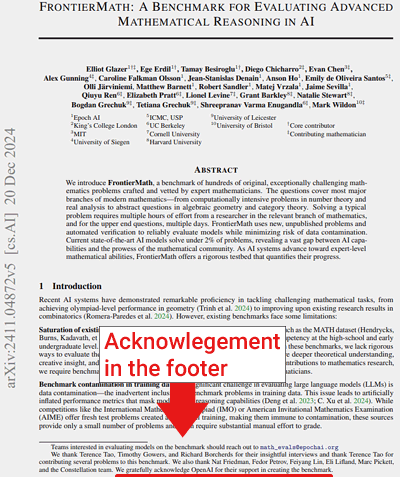
Revelations that OpenAI secretly funded and had access to the FrontierMath benchmarking dataset are raising concerns about whether it was used to train its reasoning o3 AI reasoning model, and the validity of the model’s high scores.

In addition to accessing the benchmarking dataset, OpenAI funded its creation, a fact that was withheld from the mathematicians who contributed to developing FrontierMath. Epoch AI belatedly disclosed OpenAI’s funding only in the final paper published on Arxiv.org, which announced the benchmark. Earlier versions of the paper omitted any mention of OpenAI’s involvement.

Screenshot Of FrontierMath Paper

Closeup Of Acknowledgement

Previous Version Of Paper That Lacked Acknowledgement

OpenAI 03 Model Scored Highly On FrontierMath Benchmark

The news of OpenAI’s secret involvement are raising questions about the high scores achieved by  the o3 reasoning AI model and causing disappointment with the FrontierMath project. Epoch AI responded with transparency about what happened and what they’re doing to check if the o3 model was trained with the FrontierMath dataset.

Giving OpenAI access to the dataset was unexpected because the whole point of it is to  test AI models but that can’t be done if the models know the questions and answers beforehand.

A post in the r/singularity subreddit expressed this disappointment and cited a document that claimed that the mathematicians didn’t know about OpenAI’s involvement:

“Frontier Math, the recent cutting-edge math benchmark, is funded by OpenAI. OpenAI allegedly has access to the problems and solutions. This is disappointing because the benchmark was sold to the public as a means to evaluate frontier models, with support from renowned mathematicians. In reality, Epoch AI is building datasets for OpenAI. They never disclosed any ties with OpenAI before.”

The Reddit discussion cited a publication that revealed OpenAI’s deeper involvement:

“The mathematicians creating the problems for FrontierMath were not (actively)[2] communicated to about funding from OpenAI.

…Now Epoch AI or OpenAI don’t say publicly that OpenAI has access to the exercises or answers or solutions. I have heard second-hand that OpenAI does have access to exercises and answers and that they use them for validation.”

Tamay Besiroglu (LinkedIn Profile), associated director at Epoch AI, acknowledged that OpenAI had access to the datasets but also asserted that there was a “holdout” dataset that OpenAI didn’t have access to.

He wrote in the cited document:

“Tamay from Epoch AI here.

We made a mistake in not being more transparent about OpenAI’s involvement. We were restricted from disclosing the partnership until around the time o3 launched, and in hindsight we should have negotiated harder for the ability to be transparent to the benchmark contributors as soon as possible. Our contract specifically prevented us from disclosing information about the funding source and the fact that OpenAI has data access to much but not all of the dataset. We own this error and are committed to doing better in the future.

Regarding training usage: We acknowledge that OpenAI does have access to a large fraction of FrontierMath problems and solutions, with the exception of a unseen-by-OpenAI hold-out set that enables us to independently verify model capabilities. However, we have a verbal agreement that these materials will not be used in model training.

OpenAI has also been fully supportive of our decision to maintain a separate, unseen holdout set—an extra safeguard to prevent overfitting and ensure accurate progress measurement. From day one, FrontierMath was conceived and presented as an evaluation tool, and we believe these arrangements reflect that purpose. “

More Facts About OpenAI & FrontierMath Revealed

Elliot Glazer (LinkedIn profile/Reddit profile), the lead mathematician at Epoch AI confirmed that OpenAI has the dataset and that they were allowed to use it to evaluate OpenAI’s o3 large language model, which is their next state of the art AI that’s referred to as a reasoning AI model. He offered his opinion that the high scores obtained by the o3 model are “legit” and that Epoch AI is conducting an independent evaluation to determine whether or not o3 had access to the FrontierMath dataset for training, which could cast the model’s high scores in a different light.

He wrote:

“Epoch’s lead mathematician here. Yes, OAI funded this and has the dataset, which allowed them to evaluate o3 in-house. We haven’t yet independently verified their 25% claim. To do so, we’re currently developing a hold-out dataset and will be able to test their model without them having any prior exposure to these problems.

My personal opinion is that OAI’s score is legit (i.e., they didn’t train on the dataset), and that they have no incentive to lie about internal benchmarking performances. However, we can’t vouch for them until our independent evaluation is complete.”

Glazer had also shared that Epoch AI was going to test o3 using a “holdout” dataset that OpenAI didn’t have access to, saying:

“We’re going to evaluate o3 with OAI having zero prior exposure to the holdout problems. This will be airtight.”

Another post on Reddit by Glazer described how the “holdout set” was created:

“We’ll describe the process more clearly when the holdout set eval is actually done, but we’re choosing the holdout problems at random from a larger set which will be added to FrontierMath. The production process is otherwise identical to how it’s always been.”

Waiting For Answers

That’s where the drama stands until the Epoch AI evaluation is completed which will indicate whether or not OpenAI had trained their AI reasoning model with the dataset or only used it for benchmarking it.

Featured Image by Shutterstock/Antonello Marangi

Squarespace’s Tools Aid Ecommerce Novices

New ecommerce entrepreneurs are not typically software engineers or graphic designers. Many online stores therefore look alike, since founders, as skilled as they are, rely on basic templates.

Content management systems and ecommerce platforms provide flexible and customizable theme options, but most require development or design expertise.

Some platforms — Shopify and others — allow users who can write code to manipulate themes to a single pixel. Conversely, exceptional site design tools such as Webflow don’t require code but still have a steep learning curve with complex Figma- or Photoshop-like interfaces.

Squarespace

Entrepreneurs may not think of Squarespace when opening an online shop, but I recently worked with the platform and concluded two helpful features — Blueprint AI and the grid-based editor — make it a “just right” solution for founders with limited products who want much visual control.

Blueprint AI

Squarespace launched Blueprint AI last year to assist merchants in building a semi-custom website. The AI guides the user through a series of questions, designing the website as it goes.

The process is interactive, real-time, and editable, generating an attractive and branded site.

Screenshot of the Squarespace page for selecting a template or the Blueprint AI tool.

Squarespace offers templates and a guided design option called Blueprint AI.

Here is a glimpse into the process.

First, Blueprint AI wants to know the name of the business and its personality. I called this example “Latin Quote Art Shop” and chose the brand personality as “Bold,” one of seven options.

  • Professional
  • Playful
  • Sophisticated
  • Friendly
  • Bold
  • Quirky
  • Innovative

Next, I selected sections for the home page and chose each layout. My Latin quotes example will have an introduction and a product area, among other sections.

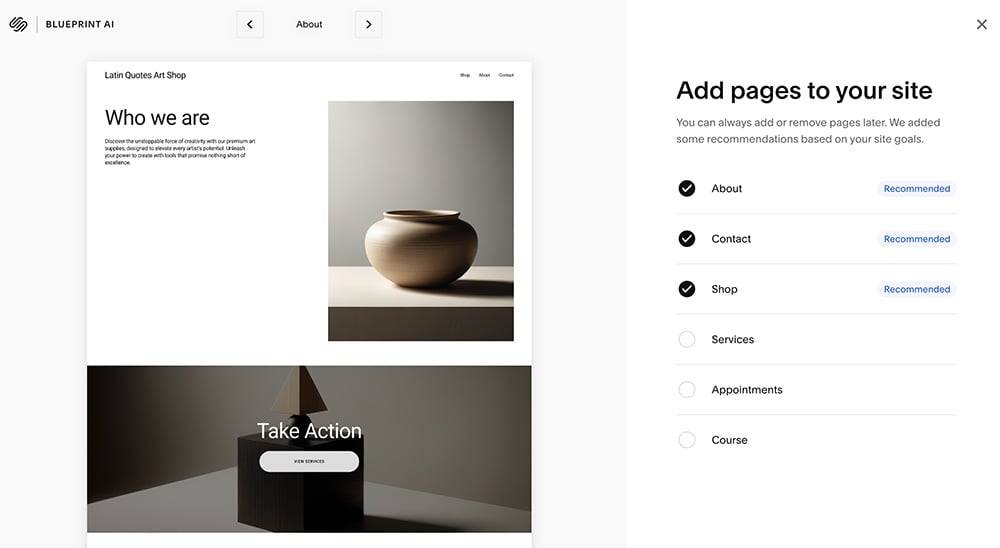
Users can add pages during the guided Blueprint AI design or later.

It is easy to add pages after Blueprint AI builds its initial design. For example, I could add a “shop” page containing the product catalog and pages for “about” and “contact.”

Blueprint AI offers a limited selection of color palettes organized with labels from the brand personality. This step was disappointing given the capabilities of generative AI, which could easily provide more colors and even suggest them based on text descriptions.

The color palette is limited but easy to use.

Next, I selected a font from a tiny list, confirming again that Blueprint AI is a guided tool, not generative.

The tool, however, becomes part of the Squarespace editor. For example, Blueprint AI surmised my Latin Quotes Art Shop offered art supplies because it recommended the headline “Unleash your inner artist.” But the shop’s purpose was to sell wall art featuring Latin quotes.

Screenshot of the text-prompt page in Blueprint AI

Once in the editor, a user can prompt Blueprint AI to generate text.

I then prompted, “Write a blurb about the Latin Quote Art Shop, which sells framed wall art that features famous Latin quotes like “Aut viam inveniam aut faciam” and nine iterations. The AI eventually produced “Let words inspire.”

Squarespace editor

The second impressive feature was the Squarespace editor. In 2020, Squarespace updated the tool and released the Fluid Engine component.

Fluid Engine has many options for colors and layouts, but its grid system might be the most helpful.

A user can select, drag, and resize any element or section of a page and have it “snap” to the grid. The resulting layout will automatically fit desktop and mobile layouts, precisely positioned.

Screenshot of the Squarespace design grid system

The underlying design grid is simple and useful.

I routinely work in multiple ecommerce platforms — Shopify, WordPress, Ghost, Wix, others. The Squarespace editor is among the best.

The Squarespace editor produces layouts that are both unique and conventional.

Just Right

In short, Squarespace may be a “just right” fit for ecommerce startups needing a lot of visual control for a limited product catalog. The platform’s AI tool and snap-in-place grid are much easier than code-based theme modifiers or complicated editors.

What to expect from Neuralink in 2025

MIT Technology Review’s What’s Next series looks across industries, trends, and technologies to give you a first look at the future. You can read the rest of them here.

In November, a young man named Noland Arbaugh announced he’d be livestreaming from his home for three days straight. His broadcast was in some ways typical fare: a backyard tour, video games, meet mom.

The difference is that Arbaugh, who is paralyzed, has thin electrode-studded wires installed in his brain, which he used to move a computer mouse on a screen, click menus, and play chess. The implant, called N1, was installed last year by neurosurgeons working with Neuralink, Elon Musk’s brain-interface company.

The possibility of listening to neurons and using their signals to move a computer cursor was first demonstrated more than 20 years ago in a lab setting. Now, Arbaugh’s livestream is an indicator that Neuralink is a whole lot closer to creating a plug-and-play experience that can restore people’s daily ability to roam the web and play games, giving them what the company has called “digital freedom.”

But this is not yet a commercial product. The current studies are small-scale—they are true experiments, explorations of how the device works and how it can be improved. For instance, at some point last year, more than half the electrode-studded “threads” inserted into Aurbaugh’s brain retracted, and his control over the device worsened; Neuralink rushed to implement fixes so he could use his remaining electrodes to move the mouse.

Neuralink did not reply to emails seeking comment, but here is what our analysis of its public statements leads us to expect from the company in 2025.

More patients

How many people will get these implants? Elon Musk keeps predicting huge numbers. In August, he posted on X: “If all goes well, there will be hundreds of people with Neuralinks within a few years, maybe tens of thousands within five years, millions within 10 years.”

In reality, the actual pace is slower—a lot slower. That’s because in a study of a novel device, it’s typical for the first patients to be staged months apart, to allow time to monitor for problems. 

Neuralink has publicly announced that two people have received an implant: Arbaugh and a man referred to only as “Alex,” who received his in July or August. 

Then, on January 8, Musk disclosed during an online interview that there was now a third person with an implant. “We’ve got now three patients, three humans with Neuralinks implanted, and they are all working …well,” Musk said. During 2025, he added, “we expect to hopefully do, I don’t know, 20 or 30 patients.”  

Barring major setbacks, expect the pace of implants to increase—although perhaps not as fast as Musk says. In November, Neuralink updated its US trial listing to include space for five volunteers (up from three), and it also opened a trial in Canada with room for six. Considering these two studies only, Neuralink would carry out at least two more implants by the end of 2025 and eight by the end of 2026.

However, by opening further international studies, Neuralink could increase the pace of the experiments.

Better control

So how good is Arbaugh’s control over the mouse? You can get an idea by trying a game called Webgrid, where you try to click quickly on a moving target. The program translates your speed into a measure of information transfer: bits per second. 

Neuralink claims Arbaugh reached a rate of over nine bits per second, doubling the old brain-interface record. The median able-bodied user scores around 10 bits per second, according to Neuralink.

And yet during his livestream, Arbaugh complained that his mouse control wasn’t very good because his “model” was out of date. It was a reference to how his imagined physical movements get mapped to mouse movements. That mapping degrades over hours and days, and to recalibrate it, he has said, he spends as long as 45 minutes doing a set of retraining tasks on his monitor, such as imagining moving a dot from a center point to the edge of a circle.

Noland Arbaugh stops to calibrate during a livestream on X
@MODDEDQUAD VIA X

Improving the software that sits between Arbaugh’s brain and the mouse is a big area of focus for Neuralink—one where the company is still experimenting and making significant changes. Among the goals: cutting the recalibration time to a few minutes. “We want them to feel like they are in the F1 [Formula One] car, not the minivan,” Bliss Chapman, who leads the BCI software team, told the podcaster Lex Fridman last year.

Device changes

Before Neuralink ever seeks approval to sell its brain interface, it will have to lock in a final device design that can be tested in a “pivotal trial” involving perhaps 20 to 40 patients, to show it really works as intended. That type of study could itself take a year or two to carry out and hasn’t yet been announced.

In fact, Neuralink is still tweaking its implant in significant ways—for instance, by trying to increase the number of electrodes or extend the battery life. This month, Musk said the next human tests would be using an “upgraded Neuralink device.”

The company is also still developing the surgical robot, called R1, that’s used to implant the device. It functions like a sewing machine: A surgeon uses R1 to thread the electrode wires into people’s brains. According to Neuralink’s job listings, improving the R1 robot and making the implant process entirely automatic is a major goal of the company. That’s partly to meet Musk’s predictions of a future where millions of people have an implant, since there wouldn’t be enough neurosurgeons in the world to put them all in manually. 

“We want to get to the point where it’s one click,” Neuralink president Dongjin Seo told Fridman last year.

Robot arm

Late last year, Neuralink opened a companion study through which it says some of its existing implant volunteers will get to try using their brain activity to control not only a computer mouse but other types of external devices, including an “assistive robotic arm.”

We haven’t yet seen what Neuralink’s robotic arm looks like—whether it’s a tabletop research device or something that could be attached to a wheelchair and used at home to complete daily tasks.

But it’s clear such a device could be helpful. During Aurbaugh’s livestream he frequently asked other people to do simple things for him, like brush his hair or put on his hat.

Arbaugh demonstrates the use of Imagined Movement Control.
@MODDEDQUAD VIA X

And using brains to control robots is definitely possible—although so far only in a controlled research setting. In tests using a different brain implant, carried out at the University of Pittsburgh in 2012, a paralyzed woman named Jan Scheuermann was able to use a robot arm to stack blocks and plastic cups about as well as a person who’d had a severe stroke—impressive, since she couldn’t actually move her own limbs.

There are several practical obstacles to using a robot arm at home. One is developing a robot that’s safe and useful. Another, as noted by Wired, is that the calibration steps to maintain control over an arm that can make 3D movements and grasp objects could be onerous and time consuming.

Vision implant

In September, Neuralink said it had received “breakthrough device designation” from the FDA for a version of its implant that could be used to restore limited vision to blind people. The system, which it calls Blindsight, would work by sending electrical impulses directly into a volunteer’s visual cortex, producing spots of light called phosphenes. If there are enough spots, they can be organized into a simple, pixelated form of vision, as previously demonstrated by academic researchers.

The FDA designation is not the same as permission to start the vision study. Instead, it’s a promise by the agency to speed up review steps, including agreements around what a trial should look like. Right now, it’s impossible to guess when a Neuralink vision trial could start, but it won’t necessarily be this year. 

More money

Neuralink last raised money in 2023, collecting around $325 million from investors in a funding round that valued the company at over $3 billion, according to Pitchbook. Ryan Tanaka, who publishes a podcast about the company, Neura Pod, says he thinks Neuralink will raise more money this year and that the valuation of the private company could double.

Fighting regulators

Neuralink has attracted plenty of scrutiny from news reporters, animal-rights campaigners, and even fraud investigators at the Securities and Exchange Commission. Many of the questions surround its treatment of test animals and whether it rushed to try the implant in people.

More recently, Musk has started using his X platform to badger and bully heads of state and was named by Donald Trump to co-lead a so-called Department of Government Efficiency, which Musk says will “get rid of nonsensical regulations” and potentially gut some DC agencies. 

During 2025, watch for whether Musk uses his digital bullhorn to give health regulators pointed feedback on how they’re handling Neuralink.

Other efforts

Don’t forget that Neuralink isn’t the only company working on brain implants. A company called Synchron has one that’s inserted into the brain through a blood vessel, which it’s also testing in human trials of brain control over computers. Other companies, including Paradromics, Precision Neuroscience, and BlackRock Neurotech, are also developing advanced brain-computer interfaces.

Special thanks to Ryan Tanaka of Neura Pod for pointing us to Neuralink’s public announcements and projections.

Interest in nuclear power is surging. Is it enough to build new reactors?

This article is from The Spark, MIT Technology Review’s weekly climate newsletter. To receive it in your inbox every Wednesday, sign up here.

Lately, the vibes have been good for nuclear power. Public support is building, and public and private funding have made the technology more economical in key markets. There’s also a swell of interest from major companies looking to power their data centers. 

These shifts have been great for existing nuclear plants. We’re seeing efforts to boost their power output, extend the lifetime of old reactors, and even reopen facilities that have shut down. That’s good news for climate action, because nuclear power plants produce consistent electricity with very low greenhouse-gas emissions.

I covered all these trends in my latest story, which digs into what’s next for nuclear power in 2025 and beyond. But as I spoke with experts, one central question kept coming up for me: Will all of this be enough to actually get new reactors built?

To zoom in on some of these trends, let’s take a look at the US, which has the largest fleet of nuclear reactors in the world (and the oldest, with an average age of over 42 years).

In recent years we’ve seen a steady improvement in public support for nuclear power in the US. Today, around 56% of Americans support more nuclear power, up from 43% in 2020, according to a Pew Research poll.

The economic landscape has also shifted in favor of the technology. The Inflation Reduction Act of 2022 includes tax credits specifically for operating nuclear plants, aimed at keeping them online. Qualifying plants can receive up to $15 per megawatt-hour, provided they meet certain labor requirements. (For context, in 2021, its last full year of operation, Palisades in Michigan generated over 7 million megawatt-hours.) 

Big Tech has also provided an economic boost for the industry—tech giants like Microsoft, Meta, Google, and Amazon are all making deals to get in on nuclear.

These developments have made existing (or recently closed) nuclear power plants a hot commodity. Plants that might have been candidates for decommissioning just a few years ago are now candidates for license extension. Plants that have already shut down are seeing a potential second chance at life.

There’s also the potential to milk more power out of existing facilities through changes called uprates, which basically allow existing facilities to produce more energy by tweaking existing instruments and power generation systems. The US Nuclear Regulatory Commission has approved uprates totaling six gigawatts over the past two decades. That’s a small but certainly significant fraction of the roughly 97 gigawatts of nuclear on the grid today. 

Any reactors kept online, reopened, or ramped up spell good news for emissions. But expanding the nuclear fleet in the US will require not just making the most of existing assets, but building new reactors. 

We’ll probably also need new reactors just to maintain the current fleet, since so many reactors are scheduled to be retired in the next couple of decades. Will the enthusiasm for keeping old plants running also translate into building new ones? 

In much of the world (China being a notable exception), building new nuclear capacity has historically been expensive and slow. It’s easy to point at Plant Vogtle in the US: The third and fourth reactors at that facility began construction in 2009. They were originally scheduled to start up in 2016 and 2017, at a cost of around $14 billion. They actually came online in 2023 and 2024, and the total cost of the project was north of $30 billion.

Some advanced technology has promised to fix the problems in nuclear power. Small modular reactors could help cut cost and construction times, and next-generation reactors promise safety and efficiency improvements that could translate to cheaper, quicker construction. Realistically, though, getting these first-of-their-kind projects off the ground will still require a lot of money and a sustained commitment to making them happen. “The next four years are make or break for advanced nuclear,” says Jessica Lovering, cofounder at the Good Energy Collective, a policy research organization that advocates for the use of nuclear energy.  

There are a few factors that could help the progress we’ve seen recently in nuclear extend to new builds. For one, public support from the US Department of Energy includes not only tax credits but public loans and grants for demonstration projects, which can be a key stepping stone to commercial plants that generate electricity for the grid. 

Changes to the regulatory process could also help. The Advance Act, passed in 2024, aims at sprucing up the Nuclear Regulatory Commission (NRC) in the hopes of making the approval process more efficient (currently, it can take up to five years to complete). 

“If you can see the NRC really start to modernize toward a more efficient, effective, and predictable regulator, it really helps the case for a lot of these commercial projects, because the NRC will no longer be seen as this barrier to innovation,” says Patrick White, research director at the Nuclear Innovation Alliance, a nonprofit think tank. We should start to see changes from that legislation this year, though what happens could depend on the Trump administration.

The next few years are crucial for next-generation nuclear technology, and how the industry fares between now and the end of the decade could be very telling when it comes to how big a role this technology plays in our longer-term efforts to decarbonize energy. 


Now read the rest of The Spark

Related reading

For more on what’s next for nuclear power, check out my latest story.

One key trend I’m following is efforts to reopen shuttered nuclear plants. Here’s how to do it.  

Kairos Power is working to build molten-salt-cooled reactors, and we named the company to our list of 10 Climate Tech Companies to watch in 2024.  

Another thing 

Devastating wildfires have been ravaging Southern California. Here’s a roundup of some key stories about the blazes. 

→ Strong winds have continued this week, bringing with them the threat of new fires. Here’s a page with live updates on the latest. (Washington Post)

→ Officials are scouring the spot where the deadly Palisades fire started to better understand how it was sparked. (New York Times)

→ Climate change didn’t directly start the fires, but global warming did contribute to how intensely they burned and how quickly they spread. (Axios

→The LA fires show that controlled burns aren’t a cure-all when it comes to preventing wildfires. (Heatmap News)

→ Seawater is a last resort when it comes to fighting fires, since it’s corrosive and can harm the environment when dumped on a blaze. (Wall Street Journal)

Keeping up with climate  

US emissions cuts stalled last year, despite strong growth in renewables. The cause: After staying flat or falling for two decades, electricity demand is rising. (New York Times)

With Donald Trump set to take office in the US next week, many are looking to state governments as a potential seat of climate action. Here’s what to look for in states including Texas, California, and Massachusetts. (Inside Climate News)

The US could see as many as 80 new gas-fired power plants built by 2030. The surge comes as demand for power from data centers, including those powering AI, is ballooning. (Financial Times)

Global sales of EVs and plug-in hybrids were up 25% in 2024 from the year before. China, the world’s largest EV market, is a major engine behind the growth. (Reuters)

A massive plant to produce low-emissions steel could be in trouble. Steelmaker SSAB has pulled out of talks on federal funding for a plant in Mississippi. (Canary Media)

Some solar panel companies have turned to door-to-door sales. Things aren’t always so sunny for those involved. (Wired)