Brooke Osmundson, Director of Growth Marketing, Smith Micro Software, Inc.
Kirk Williams, Founder & Owner, ZATO PPC Marketing.
Ben Wood, Performance Director, Hallam.
Here’s a bit about what they said.
Platforms Are All-In On AI
The loss of fine controls that many PPC experts predicted to come with generative AI integration seems to have gone ahead, with many platforms pushing advertisers to use new AI products.
Based on how much the major platforms are spending on AI technology, these algorithm-based campaigns and generative AI-based creative features are likely to continue the march forward.
This is good news in some ways and not so much in others. There will be plenty of opportunities for PPC marketers to remove repetitive and time-consuming tasks from workflows. However, it may become more difficult to assert human control and maintain human insights about your audience through the messaging.
AI can power stronger personalization, but you also must be careful where it might mix with privacy concerns.
Privacy And Third-Party Cookies Are Messy
Privacy has been one of the most frustrating and confusing developments over the last year. Google’s approach to deprecating third-party cookies feels like it’s sitting in a field plucking the petals off a daisy – “I love third-party cookies, I love them not.”
For now, Google Chrome is keeping third-party cookies, but that doesn’t mean all is well. Privacy regulations and expended user controls will likely erode the viability of third-party data as time goes on.
Many PPC marketers are looking for ways to build closer relationships with audiences, gain vital opt-in first-party data, and leave third-party tracking behind. Just because it isn’t going away yet doesn’t mean it’s here to stay.
The good news is that many of the experts agree in their approach to these core issues.
In the ebook, you can discover which potential uses of AI they lean into and which they view with skepticism. You can also find out how they view data sources and audience cultivation.
There are many more insights, as well, about new networks and omni-channel strategies, tracking behavior, and other topics.
For those of us working within strict industries, managing paid media campaigns involves added layers of work that may not be included in less regulated companies.
Healthcare, finance, and political organizations are potential examples here, although many industries have their own quirks both in internal policies and ad platform restrictions.
According to EMARKETER, in 2023, the financial services industry made up 11.4% of U.S. digital ad spend, while healthcare & pharma entailed 7.3%.
With these highly regulated industries entailing close to 20% of spend together (not counting other categories), that means many paid search marketers have touched or will touch campaigns in these areas at some point in their career.
In order to manage campaigns successfully in these niches, you need to think about both how to efficiently work through processes in your own organization to ensure assets are approved and ready in a timely manner, as well as know what to expect after setting your campaigns live in the platforms.
In this article, I’ll share a few tips to help, applicable both to those in-house at highly regulated organizations and to agency partners managing ads.
Plan Ahead
Work the expected timeline for approvals and edits into your planning for a campaign, and be realistic about how long it could take.
When ad graphics need to be designed and also go through compliance and legal review, you can’t promise to have a campaign active in a week.
Think through all the pieces you need to build out a set of campaigns:
Documentation of targeting criteria, if that needs to be approved.
Then, you can work through a conservative schedule for the creation of each of these items, as well as planning to submit for approval and allowing additional time for edits and final approval.
Additionally, think through other items that may be outside of your immediate control as a paid search manager, such as landing page development and additional approvals needed for that.
Document Ad Formats & Use Consistent Templates
Often, the individuals within your organization reviewing your paid media assets are not at an “in the weeds” level understanding of how ads will display.
You can make the process smoother both for them and for yourself by clearly documenting individual ad formats and explaining nuances such as character limits and responsive ad functionality.
Provide screenshots of possible ways that ads can display and provide links to platform previews where relevant.
Building out an ad without activating it can provide an option to view it in multiple potential formats, especially for ad types like responsive display ads and Google Demand Gen that can appear in many different layouts.
Meta’s Creative Hub is also a useful tool to build out sample ads and grab screenshots.
Set up templates that you can use in the future, including guidelines directly in the documents, as well as formulas to flag issues such as going over character count.
These can be created in Excel documents, shared Google Docs, or proprietary tools within your organization.
Approve Multiple Variants At Once
In organizations where the wheels of internal approvals move slowly, getting multiple text and image variants approved at once can help ease the process of updating ads in the future.
This process may require some extra work upfront but will allow for more efficiency over time.
For instance, you may launch a Meta campaign using one text variant and four image variants.
When you’ve reached significance and are ready to move on to the next test, you can choose the best image and test it with multiple text variants.
Having those text variants approved ahead of time will allow flexibility in being able to roll out this next initiative immediately when the prior test has wrapped up instead of having to wait for additional approval.
Use Pinned Headlines And Descriptions
Often, regulated industries require you to include a precisely worded disclaimer in ad copy. Pinned assets in responsive search ads are your friend here, as you can ensure that they will always show.
Use the first or second headline position or the first description position, as beyond that, assets may be cut off.
To pin an asset in a Google Ads search campaign, click the thumbtack symbol that appears when you mouse over a headline or description field.
You can then select the number position to pin it to (1, 2, etc.). Note that if you pin multiple assets to the same position, Google may pick any of those assets to show.
Screenshot from Google Ads, September 2024
Unfortunately, campaign types such as Performance Max, Demand Gen, and Display don’t allow you to pin headlines, so you’ll need to be more careful in providing copy that contains your desired disclaimers for those formats, or you may decide they are not workable with your requirements.
You can also discuss allowing for a “one-click rule” that doesn’t require a disclaimer in ad copy as long as it appears on the landing page when users click through.
Review Automatic Optimizations & Recommendations
When every word of your ad copy needs to be approved by your organization to run, you need to be particularly careful about features such as Google’s automatically created assets, which can insert text you didn’t want in your ads.
Be sure to turn these off for each campaign, before your boss or client contacts see them applied in the wild.
To do so in bulk, go to the Campaigns section and navigate to Settings. Select all campaigns.
Screenshot from Google Ads, September 2024
Click the Edit dropdown and scroll until you find “Change automatically created assets settings.” You’ll then see the form below, where you can select “Off” and optionally provide a reason to give Google feedback.
Screenshot from Google Ads, September 2024
Additionally, watch for settings that modify images in unexpected ways, such as Meta’s image optimization features, which can result in unapproved graphic variants being out in the wild or even the addition of animation and music.
Look for the Advantage+ Creative section in ad set settings, and you’ll see an option to edit and turn off unwanted variations.
Screenshot from author, September 2024
In general, be mindful that platforms are constantly testing new ways to automatically optimize and add assets. Watch for updated settings and checkboxes that you may not have seen before.
Familiarize Yourself With Industry-Specific Guidelines
Ad platforms often have their own stricter guidelines for sensitive industries, and you’ll need to be aware of what ad content and targeting settings can trigger disapprovals.
For instance, Google does not allow certain demographic targeting for finance or healthcare. Remarketing is also banned for some industries.
On the Meta Ads front, housing, credit, and employment ads are particularly restricted, with limitations on available targeting criteria. Political ads also require a verification process before being approved to run.
You can keep up with these updates in a variety of ways:
Visit ad platform support pages, where they will provide updates on upcoming policy changes. Here are a few links to current policy resources, each of which outlines technicalities for restricted content:
If you have platform reps, they can share additional guidance, often with more detailed documentation not publicly available on the web, and can reach out to internal contacts to clarify specific questions you may have.
While it’s not the ideal path to go, you’ll inevitably learn do’s and don’ts for your industry through trial and error as ads and campaigns are flagged in your accounts. Be sure to make note of disapprovals you’ve encountered and how they were resolved.
Often, ad platforms will provide a notice in the platform showing the specific policy violation or restriction that’s triggered for your ads.
However, particularly in sensitive niches, there are cases where ads may not run or be limited from running without clear notice.
In these cases, it’s helpful both to be as familiar with policies as possible when negotiating with support, as well as working directly with a platform rep if possible.
Use The Ad Platform Appeal Process
If you’ve complied with ad platform policy for your industry but are still facing disapproval issues, you can generally appeal for support.
The Google Ads Policy Center (Tools > Troubleshooting > Policy Manager) offers a hub where you can track the status of appeals, and other major platforms also offer options to monitor the status of appeals.
This is also an area where reps can sometimes be helpful in pushing through ad reviews or providing feedback that’s not showing in the ad platform interface.
Start Adapting Your Approach
If you’re managing PPC campaigns for a highly regulated industry, think through these tips to see where they can help improve your processes.
Do you have the internal steps for campaign planning, approval, and execution documented?
Are you fully familiar with how the ad platforms approach your industry?
Take the steps to meet with your team or client and determine how you can apply these tips.
This post was sponsored by JetOctopus. The opinions expressed in this article are the sponsor’s own.
When you’re taking on large-scale projects or working with extensive websites with hundreds to thousands of pages, you must leverage advanced technical SEO techniques.
Large websites come with challenges such as vast site architectures, dynamic content, and the higher-stakes competition in maintaining rankings.F
Leveling up your team’s technical SEO chops can help you establish a stronger value proposition, ensuring your clients gain that extra initial edge and choose to continue growing with your agency.
With this in mind, here’s a concise checklist covering the most important nuances of advanced technical SEO that can lead your clients to breakthrough performance in the SERPs.
1. Advanced Indexing And Crawl Control
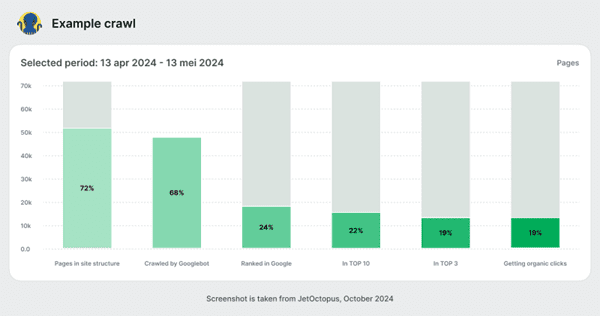
Optimizing search engine crawl and indexation is foundational for effective technical SEO. Managing your crawl budget effectively begins with log file analysis—a technique that offers direct insights into how search engines interact with your clients’ websites.
A log file analysis helps:
Crawl Budget Management: Essential for ensuring Googlebot crawls and indexes your most valuable pages. Log file analysis indicates how many pages are crawled daily and whether important sections are missed.
Identifying Non-Crawled Pages: Identifies pages Googlebot misses due to issues like slow loading times, poor internal linking, or unappealing content, giving you clear insights into necessary improvements.
Understand Googlebot Behavior: Know what Googlebot actually crawls on a daily basis. Spikes in the crawl budget may signal technical issues on your website, like auto-generated thin, trashy pages, etc.
For this, integrating your SEO log analyzer data with GSC crawl data provides a complete view of site functionality and search engine interactions, enhancing your ability to guide crawler behavior.
Next, structure robots.txt to exclude search engines from admin areas or low-value add-ons while ensuring they can access and index primary content. Or, use the x-robots-tag—an HTTP header—to control indexing at a more granular level than robots.txt. It is particularly useful for non-HTML files like images or PDFs, where robot meta tags can’t be used.
For large websites, the approach with sitemaps is different from what you may have experienced. It almost doesn’t make sense to put millions of URLs in the sitemaps and want Googlebot to crawl them. Instead, do this: generate sitemaps with new products, categories, and pages on a daily basis. It will help Googlebot to find new content and make your sitemaps more efficient. For instance, DOM.RIA, a Ukrainian real estate marketplace, implemented a strategy that included creating mini-sitemaps for each city directory to improve indexing. This approach significantly increased Googlebot visits (by over 200% for key pages), leading to enhanced content visibility and click-through rates from the SERPs.
2. Site Architecture And Navigation
An intuitive site structure aids both users and search engine crawlers in navigating the site efficiently, enhancing overall SEO performance.
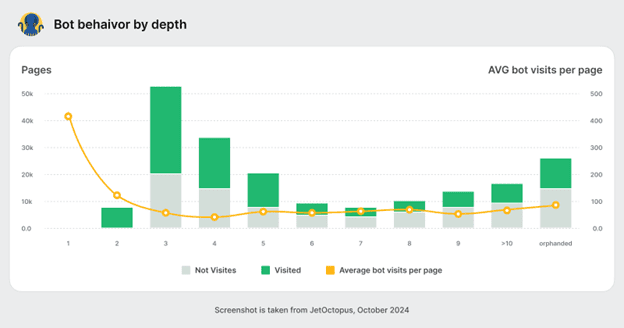
Specifically, a flat site architecture minimizes the number of clicks required to reach any page on your site, making it easier for search engines to crawl and index your content. It enhances site crawling efficiency by reducing the depth of important content. This improves the visibility of more pages in search engine indexes.
So, organize (or restructure) content with a shallow hierarchy, as this facilitates quicker access and better link equity distribution across your site.
For enterprise eCommerce clients, in particular, ensure proper handling of dynamic parameters in URLs. Use the rel=”canonical” link element to direct search engines to the original page, avoiding parameters that can result in duplicates.
Similarly, product variations (such as color and size) can create multiple URLs with similar content. It depends on the particular case, but the general rule is to apply the canonical tag to the preferred URL version of a product page to ensure all variations point back to the primary URL for indexing. If there is a significant number of such pages where Google ignores non-canonical content and puts them in the index, consider reviewing the canonicalization approach on the website.
3. JavaScript SEO
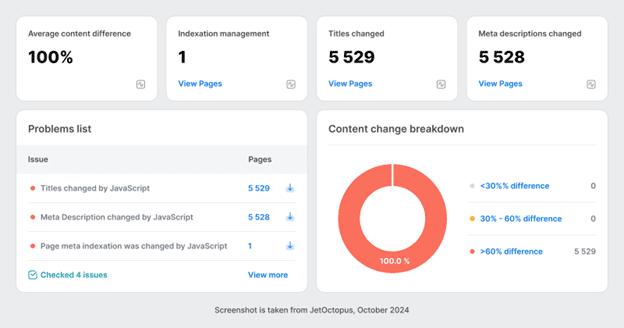
As you know, JavaScript (JS) is crucial in modern web development, enhancing site interactivity and functionality but introducing unique SEO challenges. Even if you’re not directly involved in development, ensuring effective JavaScript SEO is important.
The foremost consideration in this regard is critical rendering path optimization — wait, what’s that?
The critical rendering path refers to the sequence of steps the browser must take to convert HTML, CSS, and JavaScript into a rendered web page. Optimizing this path is crucial for improving the speed at which a page becomes visible to users.
Here’s how to do it:
Reduce the number and size of the resources required to display initial content.
Minify JavaScript files to reduce their load time.
Prioritize loading of above-the-fold content to speed up page render times.
If you’re dealing with Single Page Applications (SPAs), which rely on JavaScript for dynamic content loading, then you might need to fix:
Indexing Issues: Since content is loaded dynamically, search engines might see a blank page. Implement Server-Side Rendering (SSR) to ensure content is visible to search engines upon page load.
Navigation Problems: Traditional link-based navigation is often absent in SPAs, affecting how search engines understand site structure. Use the HTML5 History API to maintain traditional navigation functionality and improve crawlability.
Dynamic rendering is another technique useful for JavaScript-heavy sites, serving static HTML versions to search engines while presenting interactive versions to users.
However, ensure the browser console shows no errors, confirming the page is fully rendered with all necessary content. Also, verify that pages load quickly, ideally under a couple of seconds or so, to prevent user frustration (nobody likes a prolonged loading spinner) and reduce bounce rates.
Employ tools like GSC and Lighthouse to test and monitor your site’s rendering and web vitals performance. Regularly check that the rendered content matches what users see to ensure consistency in what search engines index.
4. Optimizing For Seasonal Trends
In the retail eCommerce space, seasonal trends influence consumer behavior and, consequently, search queries.
So, for these projects, you must routinely adapt your SEO strategies to stay on par with any product line updates.
Seasonal product variations—such as holiday-specific items or summer/winter editions—require special attention to ensure they are visible at the right times:
Timely Content Updates: Update product descriptions, meta tags, and content with seasonal keywords well before the season begins.
Seasonal Landing Pages: Create and optimize dedicated landing pages for seasonal products, ensuring they link appropriately to main product categories.
Ongoing Keyword Research: Continually perform keyword research to capture evolving consumer interests and optimize new product categories accordingly.
Technical SEO: Regularly check for crawl errors, ensure fast load times, and confirm that new pages are mobile-friendly and accessible.
On the flip side, managing discontinued products or outdated pages is just as crucial in maintaining site quality and retaining SEO value:
Evaluate Page Value: Conduct regular content audits to assess whether a page still holds value. If a page hasn’t received any traffic or a bot hit in the last half-year, it might not be worth keeping.
301 Redirects: Use 301 redirects to transfer SEO value from outdated pages to relevant existing content.
Prune Content: Remove or consolidate underperforming content to focus authority on more impactful pages, enhancing site structure and UX.
Informative Out-of-Stock Pages: Keep pages for seasonally unavailable products informative, providing availability dates or links to related products.
Put simply, optimizing for seasonal trends means preparing for high-traffic periods and effectively managing the transition periods. This supports sustained SEO performance and a streamlined site experience for your clients.
5. Structured Data And Schema Implementation
Structured data via schema.org markup is a powerful tool to enhance a site’s SERP visibility and boost CTR through rich snippets.
Advanced schema markup goes beyond basic implementation, allowing you to present more detailed and specific information in SERPs. Consider these schema markups in your next client campaign:
Nested Schema: Utilize nested schema objects to provide more detailed information. For example, a Product schema can include nested Offer and Review schemas to display prices and reviews in search results.
Event Schema: For clients promoting events, implementing an Event schema with nested attributes like startDate, endDate, location, and offers can help in displaying rich snippets that show event details directly in SERPs.
FAQ and How-To Pages: Implement FAQPage and HowTo schemas on relevant pages to provide direct answers in search results.
Ratings, Reviews, and Prices: Implement the AggregateRating and Review schema on product pages to display star ratings and reviews. Use the Offer schema to specify pricing information, making the listings more attractive to potential buyers.
Availability Status: Use the ItemAvailability schema to display stock status, which can increase the urgency and likelihood of a purchase from SERPs.
Blog Enhancements: For content-heavy sites, use Article schema with properties like headline, author, and datePublished to enhance the display of blog articles.
Use Google’s Structured Data Testing Tool tool to test your pages’ structured data and identify any errors/warnings in your schema implementation. Also, use Google’s Rich Results Test to get feedback on how your page may appear in SERPs with the implemented structured data.
Conclusion
Considering their long SEO history and legacy, enterprise-level websites require more profound analysis from different perspectives.
We hope this mini checklist serves as a starting point for your team to take a fresh look into your new and existing customers and help deliver great SEO results.
Microsoft Ads made some significant enhancements for ads in Copilot last week.
Not only have they made updates to the Copilot user experience, they’ve integrated more AI features for advertisers within Microsoft Ads.
These updates continue to shape how users interact with Copilot and how advertisers interact with the Microsoft Ads platform.
Let’s take a look at the new updates rolling out.
New Streamlined Experience for Ads in Copilot
Part of the evolution of Microsoft Copilot is aiming to simplify, yet personalize, the user’s digital experience.
The update will now better depict the difference between an organic listing and a sponsored conversation within Copilot.
They’re making that happen by featuring ads in Copilot below the Copilot organic response.
To make the experience more relevant to users, there will be fewer annotations and extensions shown.
Additionally, ads will now be triggered based on the whole conversation within Copilot, not just the last prompt a user gives.
Copilot has released a feature called “ad voice” which will introduce how the ads are relevant and connected to their Copilot conversation. This is shown before an ad blocker to give the user a chance to experience the ads within the conversation.
The updated experience will roll out later this month, starting on copilot.microsoft.com, and then will expand to both iOS and Android apps, along with the experiences in Bing and Microsoft Edge.
New Generative AI Tools in Microsoft Ads Platform
On the other side of Copilot updates, there’s a few new features using Copilot’s AI technologies to help advertisers boost productivity and insights.
Diagnostics Tool
The new Diagnostics feature in Copilot for Microsoft Ads will help lend a hand to advertisers to review items like:
Campaign setup
Assess overall account health
Diagnose where to shift attention or focus to
Provide next steps on a diagnosis
This takes place within the Copilot conversation experience and is set to start piloting later this month.
It’s goal is to save advertisers time on day-to-day campaign management so they can spend more time analyzing and optimizing their accounts.
Performance Snapshot
Another new feature within Copilot for Microsoft Ads is the performance snapshot.
Similar to the diagnostics tool, advertisers will use the conversational experience to ask Copilot how their accounts are doing.
They can get insights on items like:
Summary of key insights
Account or campaign key insights
Trends
Any anomalies
And more.
The performance snapshot will also start piloting later this month, and will gradually roll out to all eligible regions when available.
Summary
Microsoft continues to develop and evolve its solutions from direct feedback from users and advertisers, which is a welcome experience for advertisers alike.
For advertisers already using Microsoft Ads, look for these key features in the upcoming weeks or months.
If you’re not currently using Microsoft Ads, it may be worth testing out a portion of your PPC budget this season to compare how its performance measures up against your Google Ads campaigns.
This is today’s edition of The Download, our weekday newsletter that provides a daily dose of what’s going on in the world of technology.
How to break free of Spotify’s algorithm
Since the heyday of radio, records, cassette tapes, and MP3 players, the branding of sound has evolved from broad genres like rock and hip-hop to “paranormal dark cabaret afternoon” and “synth space,” and streaming has become the default.
Meanwhile, the ritual of discovering something new is now neatly packaged in a 30-song playlist, refreshed weekly. The only rule in music streaming, as in any other industry these days, is personalization.
But what we’ve gained in convenience, we’ve lost in curiosity. Sure, our unlimited access lets us listen to Swedish tropical house or New Jersey hardcore, but this abundance of choice actually makes our listening experience less expansive or eclectic.
As we grow accustomed to the convenience of shuffling a generated playlist, we forget that discovering music is an active exercise. But it doesn’t have to be this way. Read the full story.
—Tiffany Ng
Tiffany’s piece is from the latest print issue of MIT Technology Review, which is celebrating 125 years of the magazine! If you don’t already, subscribe now to ensure you get hold of future copies once they land.
Roundtable: Producing climate-friendly food
Our food systems account for a major chunk of global greenhouse-gas emissions, but some businesses are attempting to develop solutions that could help address the climate impacts of agriculture. That includes two companies on the recently-announced 2024 list of MIT Technology Review’s 15 Climate Tech Companies to Watch. Pivot Bio is inventing new fertilizers, and Rumin8 is working to tackle emissions from cattle.
Join MIT Technology Review senior editor James Temple and senior reporter Casey Crownhart at 12pm ET this Thursday October 10 for a subscriber-exclusive Roundtable diving into the future of food and the climate with special guests Karsten Temme, chief innovation officer and co-founder of Pivot Bio, and Matt Callahan, co-founder and counsel of Rumin8. Register here.
The must-reads
I’ve combed the internet to find you today’s most fun/important/scary/fascinating stories about technology.
1 A deadly virus is spreading across Rwanda Marburg, which is similar to Ebola, is likely to spread to its neighboring countries. (Vox) + Rwanda has started vaccine trials to attempt to contain it. (BBC) + The risk of it spreading globally is relatively low, though. (NYT $)
2 Two American biologists have been awarded the Nobel Prize Victor Ambros and Gary Ruvkun have been honored for their microRNA research. (CNN)
3 This powerful lobbying group is challenging US child safety bills Experts are concerned it’s misusing the First Amendment to do so. (NYT $) + Silicon Valley’s lobbying power is on the ascent. (New Yorker $) + Child online safety laws will actually hurt kids, critics say. (MIT Technology Review)
4 Scammers in Southeast Asia stole up to $37 billion last year Gen AI and deepfakes mean their schemes are more convincing than ever. (Bloomberg $) + Telegram is a hotbed of criminal activity and fraud networks. (Reuters) + Five ways criminals are using AI. (MIT Technology Review)
5 How rural communities are fighting back against data centers Grassroots movements are taking back the power—and winning. (WP $) + Energy-hungry data centers are quietly moving into cities. (MIT Technology Review)
6 Viable search alternatives to Google are finally emerging After 15 years of dominance, advertisers are hungry for something different. (WSJ $) + It looks as though even more AI Google features are on their way. (Insider $) + Why Google’s AI Overviews gets things wrong. (MIT Technology Review)
7 Substack wants to expand beyond newsletters How, exactly? By becoming a means of payment for creators. (Semafor)
8 The future of search and rescue Drones can be much quicker and more thorough than human volunteers. (Wired $) + AI-directed drones could help find lost hikers faster. (MIT Technology Review)
9 Inside the last’s year wild and wacky British inventions From flatpack coffins to a downwards-facing computer monitor. (The Guardian)
10 Can robots suffer? That’s the question artist Lawrence Lek is exploring in his latest AI film. (FT $)
Quote of the day
“You don’t need to press a button to open a window. You can just open the window.”
—Adam DeMartino, cofounder of sustainable food startup Smallhold, reflects on how technology can over complicate simple ideas to the Guardian.
The big story
AI was supposed to make police bodycams better. What happened?
April 2024
When police departments first started buying and deploying bodycams in the wake of the police killing of Michael Brown in Ferguson, Missouri, a decade ago, activists hoped it would bring about real change.
Years later, despite what’s become a multibillion-dollar market for these devices, the tech is far from a panacea. Most of the vast reams of footage they generate go unwatched. Officers often don’t use them properly. And if they do finally provide video to the public, it’s often selectively edited, lacking context and failing to tell the complete story.
A handful of AI startups see this problem as an opportunity to create what are essentially bodycam-to-text programs for different players in the legal system, mining this footage for misdeeds. But like the bodycams themselves, the technology still faces procedural, legal, and cultural barriers to success. Read the full story.
—Patrick Sisson
We can still have nice things
A place for comfort, fun and distraction to brighten up your day. (Got any ideas? Drop me a line or tweet ’em at me.)
+ These chickens are well and truly getting into the Halloween spirit! + If you’re lucky enough to live anywhere near these national parks, I suggest you get yourselves down there immediately. + Don’t fight it—Mr Brightside is still a banger. + No more microtrends, I beg.
Performance fluctuations in Google Ads occur for various reasons. The causes are often challenging to pinpoint, but automated rules can help.
Google Ads automated rules send notices or implement changes based on predetermined criteria. For example, an advertiser could set a rule to schedule a campaign or receive an email when a keyword has 75 clicks and zero conversions.
Automated rules are similar to scripts but more turn-key. Scripts are more dynamic and comprehensive than rules, such as alerting when an ad group doesn’t have a responsive search ad.
To set up an automated rule, navigate to the left navigation bar and click “Tools > Bulk Actions > Automated Rules.” Then set up rules for the account, campaigns, ad groups, keywords, and more.
Here are my four top automated rules.
Disapproved Ads or Keywords
A frequent reason for performance swings is Google’s disapproval. Disapproved entities at the ad or keyword level can produce drastic changes. Google’s notification option is in the top navigation bar, but it’s easy to miss. I’ve spent hours diagnosing a performance drop only to realize it was due to a disapproved ad. Setting separate rules to notify you when an ad or keyword is disapproved is easy and saves time.
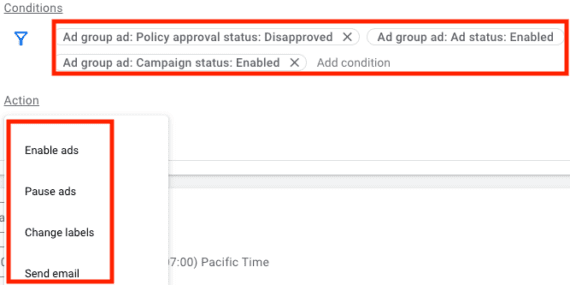
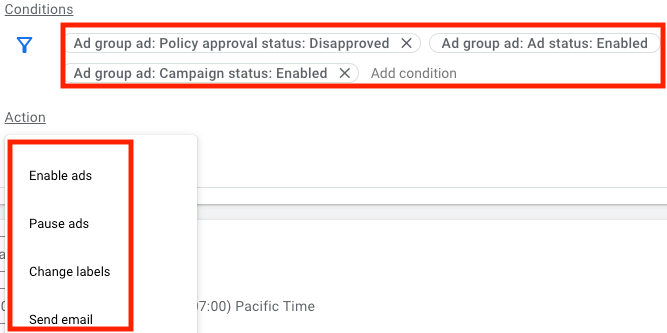
The rules can apply at the account, campaign, or ad group levels. I prefer the account level to capture all campaigns. For ad rules, set the conditions to review disapproved status for all ads in active campaigns and ad groups. You can preview a rule before saving it.
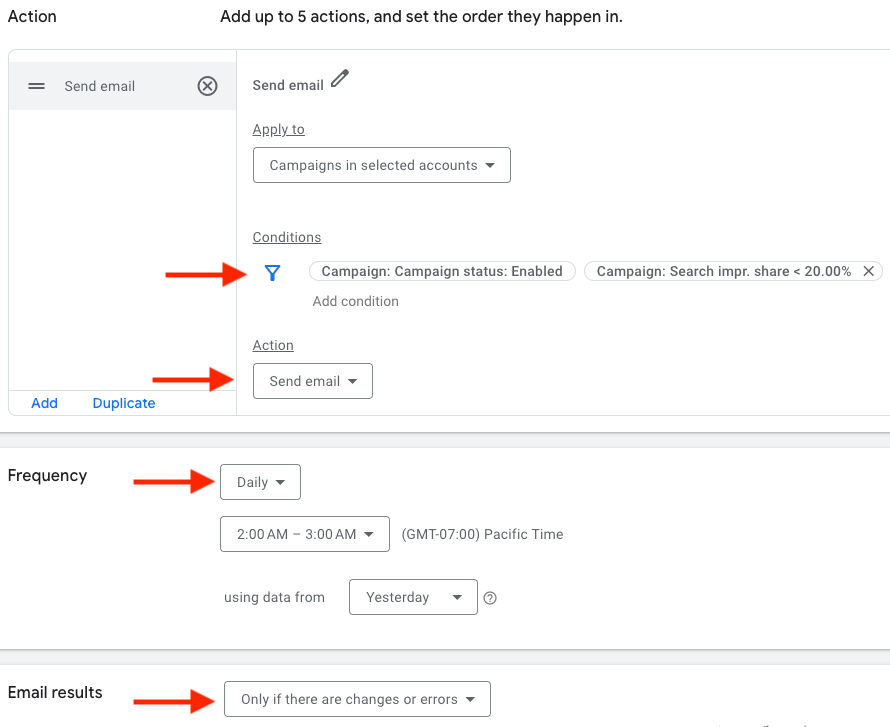
Set the condition such as “Disapproved” status and then the action such as “Send email.”
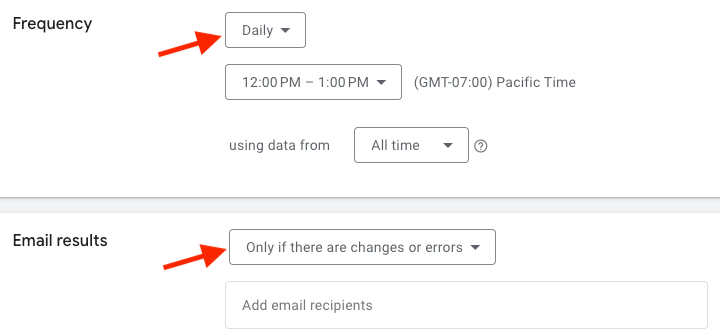
The action is to send an email. Daily emails are suitable for disapprovals — I elect to receive them only for changes or errors. Thus I’ll receive an email only when an ad is newly disapproved.
Select the email frequency and the prompt, such as “Only if there are changes or errors.”
The process for keyword disapprovals is nearly identical. The only difference is selecting “disapproval” in the keyword status reason to get alerted. Keyword-level URLs may result in disapproved links.
Limited by Budget or Bid Strategy
Monitoring restrictions for multiple campaigns and bid strategies can be challenging. For example, a profitable campaign may hit its daily budget by noon each day, or a bid strategy with a too-high ROAS target could restrict traffic. A rule can identify such limitations.
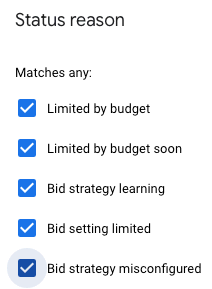
The rule is set at the campaign level and requires setting a status condition. Google provides 20 potential statuses to check, but the first five tend to be enough in my experience.
Choosing the first five statuses is likely sufficient.
The associated actions are to change budgets or send an email notification. There is no action to adjust the bid strategy. I prefer receiving a notification rather than Google automatically changing budgets. I can then view the campaigns and bid strategies and decide the next steps. As with the disapproved rule, I run the restrictions rule daily and opt to receive an email only for an issue.
Threshold Rules
Threshold rules identify ineffective tactics at any account stage. For example, a threshold rule can review all campaigns with 200 clicks and no conversions over the last 60 days, or ads with ROAS lower than the goal and a conversion rate under 1%. The possibilities are endless and depend on how you gauge performance.
Here are a couple of scenarios.
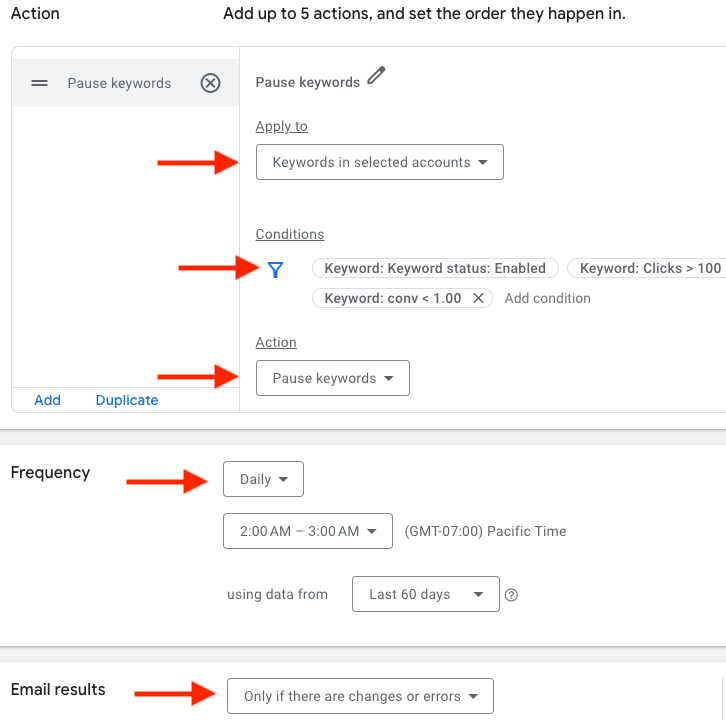
Action: Pause Keywords when “Keyword status: Enabled,” “Keyword clicks > 100,” and “Keyword conversions < 1 using data from the last 60 days.”
Set a threshold rule by designating the target, the condition, and the action. Then select the action’s frequency and prompt.
Action: Send email when “Campaign status: Enabled,” “Campaign Search impression share < 20%” using data from yesterday.
This example applies the action to “selected accounts,” sets the conditions, and chooses the action. It then shows the action’s frequency and prompt.
Remember that a metric may naturally be lower on a weekend when running rules based on yesterday’s data. For example, a campaign may have an impression share of over 20% daily except for Sunday. Thus a 20% impression rule would generate an email on Monday.
No Activity
Ad groups sometimes stop showing impressions because an ad or keyword is disapproved. Yet occasionally ads and keywords have no impressions because a negative keyword blocks traffic or Google has declined payment methods.
The solution is to create a rule for the ad group when impressions were zero the day before. No impressions do not imply an error, especially with ad groups containing low-volume keywords, but the rule at least alerts you to check.
Setting the no-activity rule at the campaign level will only notify you if an entire campaign saw zero impressions instead of individual ad groups.
I sometimes set a trigger for less-than-normal impressions. For example, if an ad group typically sees at least 50 daily impressions, I might create a rule to alert me when impressions drop below that number.
A wave of new productivity tools has launched. Most leverage recent advances in AI to get things done and supercharge a business.
Here is a list of new productivity tools for small and mid-sized businesses. Nearly all of these tools have a free plan to get started. There are tools for email marketing, audience research, project and team management, AI assistants, voice-powered dictation, and video production.
New Productivity Tools
Wispr Flow is a voice-powered dictation tool with real-time auto-edits, tone matching, and support for over 100 languages. Free up to 2,000 words per week. Premium plans start at $12 per month.
Wispr Flow
Buzzabout is a quick and easy audience research tool. Get key insights from thousands of real-time social media discussions. Use it to refine your ads, product strategy, or content. Enter a keyword and choose a data source. Free to use on Reddit. Premium plans start at $79 per month.
Seamaileris an email marketing application with a drag-and-drop editor and customizable templates. Build marketing automation and segments that connect with the right audience, personalized through behavior, preferences, or demographics. Monitor performance, segmentations, and funnels and get data-driven insights. Free up to 12,000 emails per month. Premium plans start at $8.99 per month.
Flowith is an AI tool for collaborative content generation. The AI agent, Oracle, manages complex tasks, reading your intentions and adjusting plans in real time. Interact with AI within a multi-threaded canvas, and extract and organize key insights from your data. Collaborate with your team via real-time editing and feedback tools. Starter plan is free. Premium plans start at $4.99 per month.
Flowith
Motiff is an AI-powered user-interface design platform with two primary categories. Motiff Basics includes tools for intricate designs, cloud collaboration for team projects, prototyping, and development. Motiff AI advances design capabilities, featuring an AI toolbox with reduplication and layout. Motiff AI is free for a limited time. Motiff Basics is free for up to three Motiff files. Premium plans start at $4 per month.
Jogg is a tool to convert product images into videos quickly. Choose an avatar and template from the asset library. Use the AI writer to generate different types of scripts. Use the batch mode to create videos at scale. Free for up to three videos. Premium plans start at $15 per month.
Amploo is a collaborative tool that manages projects, assets, and human-resource data in one place. Visualize projects, organize team tasks, design custom workflows, and establish feedback loops. Access a customizable sandbox to tailor workflows, dashboards, and tasks. Create a user-friendly digital environment where employees can collaborate, discuss, brainstorm, and learn. Plans start at $4 per month.
Amploo
Thunderbit is a Chrome extension that automates web tasks. Create a personalized web AI copilot. Build AI app automation by filling out a simple template. Create a new user interface for all your apps. Free up to 100 steps per month. Premium plans start at $9.90 per month.
Dubble is a Chrome extension that watches you work and creates step-by-step guides with videos and screenshots in real time. Hit record, and then perform your task. Dubble’s AI captures every click and keystroke, automatically generating detailed guides. The standard plan is free. Premium plans start at $18 per month.
Wordware is an application for teams to build AI agents. Use the editor to build, test, collaborate on, and deploy prompts and their logic. Watch live as the app you wrote runs step by step, prompting you for inputs, and showing the outputs as they’re produced. See the AI’s responses in real time and interact with the AI as it generates content. Publish a flow as a standalone app to share with anyone, anywhere. The starter plan is free. Premium plans start at $199 per month.
Wordware
Progress Planner from the co-founders of Yoast is a free WordPress plugin to prevent procrastination, plan tasks, and keep a website on track. Monitor the actions on your website, from publishing posts to updating pages, and see how they contribute to your overall site health. Use gamification with achievements and badges to motivate work. Keep content and maintenance tasks in one place.
Epsilla is a platform for building AI agents powered by private or public data. Manage the entire lifecycle of large-language-model app development, testing, and deployment. Create your own customizable AI solution to support your business. Free for one project. Premium plans start at $29 per month.
Hoop, from early Trello executives, is an AI-powered task and project management application. Hoop automatically captures tasks across meetings, chats, and emails. Tasks appear in Hoop with transcripts, summaries, and links to quickly regain context. Identify work priorities and watch as matching tasks get automatically prioritized with attached due dates. Activate focus mode to make progress on your priorities. A freemium seven-day free trial is available. The standard plan is $35 per month.
We’ll explore four key themes that can drive more successful international PPC results:
Keyword localization.
Geo-specific bid adjustments.
Market-specific creative adaptation.
Leveraging automation tools for international scaling.
1. Keyword Localization: Translating Intent, Not Just Language
Keyword localization is a cornerstone of international PPC success, but it’s often misunderstood as a simple translation exercise.
When translating keywords from one language to another, it’s not a “2+2=4” equation most of the time.
In reality, it’s much more complex.
Keyword localization involves understanding the intent behind searches and adapting keywords to match the local language, cultural context, and user behavior.
Steps To Effective Keyword Localization
Market Research: Before diving into translation, research how consumers in the target country search for products or services. This involves understanding search intent, popular terms, slang, and regional dialects.
Translation with a twist: Work with native speakers or linguists familiar with the market. Tools like Google Translate can give you a starting point, but they won’t capture cultural subtleties. Manual keyword research in local search engines is vital.
Use local search engines: Google may dominate globally, but other regions may favor different search engines. Baidu in China, Yandex in Russia, and Naver in South Korea have distinct algorithms and keyword trends. Tailor your keywords to the dominant platform in each market.
Test and optimize: International markets are fluid. What works in one month might need refinement in the next. Regularly review performance and optimize based on search trends, conversion data, and shifting customer behaviors.
For example, in Spain, the keyword “coches baratos” (cheap cars) may seem like a direct translation of its English counterpart.
However, further research might reveal that “ofertas coches” (car deals) or “vehículos económicos” (affordable vehicles) performs better depending on user intent.
2. Geo-Specific Bid Adjustments: Tailor Bids For Performance By Region
International campaigns are prone to fluctuations in performance, driven by differences in local competition, purchasing power, and user behavior.
Geo-specific bid adjustments allow you to tailor your bidding strategy to the realities of each market, maximizing return on ad spend (ROAS).
Below are some best practices for geo-specific bidding:
Analyze Regional Performance: Use data to assess performance on a country or even city level. Look for patterns like higher conversion rates in certain regions and adjust bids accordingly. This is especially important in diverse markets where sub-regions may perform differently, like the UK or Canada.
Adjust Bids Based on Currency Value and Buying Power: Regions with lower purchasing power or fluctuating currency values may require different bid strategies. In some markets, a lower cost-per-click (CPC) approach could help maintain profitability.
Consider Time Zone Differences: Adjust bids based on peak performance hours in each time zone. A broad international campaign can benefit from time-based adjustments that ensure ads show during peak periods in each country.
For instance, if your campaign targets both New York and Berlin, you may find that your peak performance hours vary drastically, necessitating different bid adjustments to maximize efficiency.
In this instance, it’s likely worth segmenting your campaigns by region to account for maximum return on investment or ROI in each region.
In larger enterprise accounts, most regions have different audience sizes, which require different budgets.
If your brand falls into that category, it may be worth creating a separate Google Ads account per region, which can roll up into one MCC account for easier management.
3. Market-Specific Creative Adaptation: Speak The Local Language Through Ad Copy
One of the most common mistakes in international PPC campaigns is failing to adapt ad creatives to local contexts.
Just as keyword localization requires cultural adaptation, ad creatives must be tuned to resonate with local audiences.
A few approaches to localized creative to think about include:
Ad Copy and Messaging: Localize ad copy to reflect cultural preferences, holidays, humor, and common phrases. Avoid literal translations that may miss the mark. Collaborate with local copywriters who understand the nuances of language and sentiment.
Visual Adaptations: Imagery that works in one region may not resonate in another. If your ad visuals feature people, clothing, or settings, make sure they align with local norms and expectations.
Calls to Action (CTAs): CTAs should be adapted based on local shopping behaviors. In some regions, urgency works well (“Buy Now”), while in others, a softer approach may perform better (“Learn More” or “Discover”).
For example, a successful ad campaign in the US using a humorous tone may need to be entirely rethought for a market like Japan, where subtlety and respect play a bigger role in advertising.
4. Leveraging Automation Tools For International Scaling
Managing international PPC campaigns across multiple markets can quickly become overwhelming.
Automation tools, both native to ad platforms and third-party solutions, can help streamline campaign management while still allowing for localized control.
Automation Tactics To Help Scale International PPC Campaigns
Smart Bidding: Utilize Google or Microsoft’s automated bidding strategies tailored to individual market performance. Smart bidding leverages machine learning to optimize bids for conversions or ROAS, adjusting bids based on real-time data.
Dynamic Search Ads (DSAs): Dynamic Search Ads can help expand your reach by automatically generating ad headlines based on your website’s content. For international campaigns, ensure that your website is properly localized to ensure the DSAs serve relevant, accurate ads.
Automated Rules and Scripts: Set up automated rules or scripts to adjust bids, pause underperforming keywords, or raise budgets during peak times. For example, you might set rules to increase bids during holidays specific to individual regions, like Singles’ Day in China or Diwali in India.
Automation tools should be used to complement your manual efforts, not replace them. While they can help manage large campaigns more efficiently, regular oversight and optimization are still essential.
A Holistic Approach To International PPC Success
Expanding into international PPC campaigns presents both challenges and opportunities.
Success depends on taking a holistic approach that incorporates keyword localization, tailored bidding strategies, localized creatives, and effective use of automation.
By adapting your strategies to each specific market, you’ll be able to tap into the unique search behaviors, cultural nuances, and competitive dynamics of global consumers.
Remember that the global PPC landscape is constantly evolving, and regular monitoring, testing, and optimization will be key to staying ahead of the competition.
Whether you’re managing campaigns in-house or as part of an agency, these best practices will help you optimize your international PPC efforts and drive better performance across borders.
The summer has just ended. Should you already start preparing for Black Friday and the holiday season? Yes! They’re the biggest sales of the year, and ranking in Google is something you take time to do. It’s never too early to start getting your deals ready. So, if you have an online shop or an ecommerce store, let’s start working on your holiday season and Black Friday SEO immediately!
Don’t forget that Black Friday (November 29, 2024) and Cyber Monday (December 2, 2024) are kicking off this year’s holiday shopping season. You can set up a lot of content for all occasions. In this post, we’ll review some things you can do to prepare!
Table of contents
Today, people are used to shopping online. It’s easy and convenient. You don’t have to travel only to find something out of stock. Plus, online stores often offer payment plans. Shopping online is so popular that online sales in the USA during the holiday season hit a record of $221 billion last year! And the numbers will only continue to rise. That’s why it’s safe to assume that people will buy many (if not most) holiday gifts online this year.
Staying on top of trends to prepare for the holiday season is good. E-commerce is still growing, and consumers expect more every year. Here are some actionable tips for the upcoming Black Friday and holiday season to improve your SEO:
Discount deals and alternative payment options (Buy now, pay later) should be part of your ecommerce strategy
Brands should provide a consistent purchasing experience across digital/online and physical stores
To minimize returns, brands should make their product pages as comprehensive as possible
Holiday season marketing campaigns should be tailored to each platform to ensure maximum effectiveness
Online is where it’s at
Of course, in-store or curbside pick-up will still prove popular. However, most people research their ecommerce purchases online – sometimes weeks in advance! So don’t be surprised when the holiday shopping season starts well before Black Friday and continues for weeks.
Extending Black Friday, Cyber Monday, and other holiday season online deals for a few days or weeks can be a good idea. This is especially true if you want to prevent huge crowds from gathering at your store on a specific day. That won’t be a good shopping experience for anyone involved, so spreading these deals over an extended time is probably better.
Start preparing in time
Dive into the data you amassed during previous Black Friday and Cyber Monday events, and see if you can come up with improvements for your holiday season SEO. Bear in mind that it takes a while for content to rank. So, to keep up with the competition, try to get your content in gear at least 45 days ahead. That’s often recommended. Of course, you can always start preparing earlier if that works better for you. Your schedule could look something like this:
45 Days in advance: Post your promotion to your website calendar and post a save-the-date post on social media and in your email newsletter).
7 Days in advance: Post upcoming events/promotions on social media and via email. Try to encourage other (small) businesses to share it with their followers.
1 Day in advance: Post an event reminder post on social media.
It’s a good rule to remember these steps and time frames. However, you can do much more than set up new pages and renew old ones. Let’s look at a few practical tips.
1. Do holiday season keyword research
Keyword research is important all year, but especially during the season when your online store starts having big sales. You have probably worked on this research previously, but now is the time to dive in again. There are always things to learn, like developments in your industry, changes in consumer behavior, or new trends and topics to discuss.
Start early with your research to give yourself enough time to produce high-quality, helpful content that helps reach those new audiences. While using generative AI tools to generate Black Friday SEO content for your ecommerce is enticing, please refrain from doing so. Generative AI can help you do your job but can’t replace your valuable insights and opinions.
2. Set up holiday season gift pages
First, we must consider what category or particular landing pages make sense for the upcoming holidays. You can always set up pages like ‘Best gifts for parents/millennials/teens’, ‘Newest deals for your 6/10/12-year-old’, and ‘Best friend/grandparents/coworker discounts’. You could also think of ‘Top 10 gifts for outdoor/skiing/parasailing enthusiasts’ and ‘Top 3 deals for stay-at-home parents’, etcetera.
To increase the chances of your gift pages ranking, boost their internal linking structure. You can also link the previous all-year holiday season pages, such as specific Christmas landing pages (‘Top 7/10/25 gifts for under the Christmas tree’) to boost these when the time has come. That could be around the 45-day mark, but we would be okay with stretching that to 60 days. You’ll need to give Google and other search engines enough time to follow your links and find your specific holiday season SEO landing pages with deals.
Social media like X and Pinterest — though this is technically a visual search engine — can play a massive role in the success of your (online) holiday season sale. Take Pinterest, for instance. Raise your hand if you or your spouse has a Pinterest Christmas wish list. Many people do. If you get your products on people’s wish lists, that can positively impact your sales.
While you’re at it, don’t forget to share your holiday season gift pages on Facebook and Instagram. In the previous section, we’ve mentioned the top 10 lists. We all know these still work pretty well on social media. Yoast SEO can help you optimize your social media posts before you share them.
Email marketing
Last but not least, remember your email marketing! For many companies, newsletters provide a steady stream of income. Be sure to plan a good campaign for your newsletters.
For example, we recommend setting up holiday gift guides and sharing these. You can create an excellent overview of many gifts that many people will enjoy. ELLE and Target have pages like that, and so do more companies.
4. Introduce new products
The holiday season is an excellent time to pitch new products. If you know of potential bestsellers for the upcoming holiday season, start writing content about these products now. You can compare it to tech sites writing about concept iPhones, features that Apple might add, etc.
The more you write about new products upfront, the more likely the sales pages for these products will rank when it matters. You should link all pages you made in advance to that one main page you’ll set up when the product is released and available to buy. Treat that page like cornerstone content.
5. Add structured data to your product pages
When adding or changing your product pages to fit the holiday season, don’t forget to optimize them. Check, for instance, whether you’ve added structured data to your product pages. Rich results that show ratings and prices can give you an edge over your competitors. Our WooCommerce SEO plugin, Local SEO plugin, or Yoast SEO for Shopify app can help you do this to improve your holiday season!
Example of a product appearing in the search results if you use structured data.
Don’t forget to optimize your product feeds for Black Friday SEO. This maximizes visibility and sales during this high-traffic online shopping period. Start by ensuring all product information, such as titles, descriptions, prices, and availability, is accurate and up-to-date. Check if the products that need them have relevant Black Friday keywords to enhance discoverability. Use high-quality, clear images to showcase your product.
Use the promotions feature in Google Merchant Center to prominently display special deals and discounts for Black Friday and Cyber Monday. This way, you’ll make your offers more attractive to potential buyers. Please update your feed regularly to reflect real-time inventory changes and fix errors to maintain product visibility.
7. Reuse content
There’s no shame in serving old wine in a new bottle. If you have a Black Friday or a Christmas gift guide for 2023, feel free to reuse it in 2024. Update the year and details like popular brands and products for that year. If the slug of your URL is /black-friday-guide-2023/, change it to /black-friday-guide-2024/ around August next year, and redirect the old URL to the new one. No need to create a new page. It would be a waste of nice inbound links not to reuse that old URL. Of course, this is even easier if you don’t include the year in the URL, so /black-friday-guide/ is also an excellent slug.
In the months before the holiday season, you could even simply repost popular posts from last year (a bit adjusted or updated if needed) on social media. Valentine’s Day might even become Secret Santa. Cyber Monday might match your child’s favorite gifts for Ramadan. These are probably small adjustments; perhaps just adding ‘this Ramadan’ to a meta description or title will do.
It’s a good idea to check and optimize your website for speed and mobile use. Trust us; you’ll get these recommendations from an SEO blog or consultant daily. And with good reason! Mobile, site speed, and user experience are essential to get people to spend money on your ecommerce business this Black Friday. When preparing your online store for the holiday sale season, this is as good a time as any to check your mobile website and site speed, and update or improve them if possible.
Investing in local SEO for Black Friday and Christmas shopping is essential for local businesses aiming to attract more customers. Begin by optimizing your Google Business Profile with accurate business information, including address, phone number, business hours, and any special Black Friday/Cyber Monday hours or promotions. Encourage satisfied customers to leave positive reviews. Use local keywords in your content, focusing on terms your community will likely search for, such as “Black Friday deals in [Your City].” Additionally, engage with your local community on social media by promoting special deals to drive more foot traffic to your store.
10. Create a measurement plan
All set? Remember to make a measurement plan to analyze your success. Write down all your plans, then think about how to track all your actions. This is key to knowing what to focus on next year. For detailed instructions on analyzing your Black Friday, Cyber Monday, or Cinco de Mayo shopping, read our post with five tips to measure your holiday sales success.
What should you do when the holiday season is over?
How do you handle the product pages of holiday gift sets after the holidays? Even if the gift set or product was a great success, and you want to offer it again next year, it’ll take a while for the page to be relevant again. What is the best way to deal with these pages in the meantime?
Our advice: Keep the pages up. However, you don’t necessarily want them visible to people browsing your site. So, have the page up without linking, then link to it again during the holiday season. This is better than deleting it and starting again.
Conclusion on holiday season SEO
In short, now’s the time to buckle down and start writing holiday gift pages and content for new products. Remember to plan your social media promotion and analytics. After all, you can never start too early when your online business depends on the holiday season. Be prepared; begin now with your SEO. Good luck with your holiday season sale!
Edwin is an experienced strategic content specialist. Before joining Yoast, he worked for a top-tier web design magazine, where he developed a keen understanding of how to create great content.