An Introduction To SEO Strategy For A Digital Presence

This edited extract is from Digital and Social Media Marketing: A Results-Driven Approach  edited by Aleksej Heinze, Gordon Fletcher, Ana Cruz, Alex Fenton ©2024 and is reproduced with permission from Routledge. The extract below was taken from the chapter Using Search Engine Optimisation to Build Trust co-authored with Aleksej Heinze, Senior Professor at KEDGE Business School, France.

The key challenge for SEO is that good rankings in SERPs are almost entirely based on each search engine’s private algorithm for identifying high-quality content and results, which is a long-term activity.

The initial formula of PageRank (Page et al. 1999) used by Google, which used links pointing to a page to rank its importance, has evolved significantly and is no longer publicly available.

All search engines regularly update their algorithms to identify high-quality, relevant content to a particular search query. Google implements around 500 – 600 changes to its algorithm each year (Gillespie 2019).

These are product updates, similar to Windows updates. Most of these changes are minor with little impact, but a few critical core updates each year will require careful review on the majority of websites since they can result in major SERP changes.

Search engines are using artificial intelligence to improve their technology to enable them to identify high-quality, relevant content and are constantly testing new ways to present users with relevant content.

The arrival of ChatGPT by Open AI in 2022 presents a rival type of offering that has shaken the foundations of the traditional search engine business model (Poola 2023).

In such a dynamic environment, it is important to keep up to date with algorithm changes.

This can be done by following the Google Search Status dashboard (Google) and SEO-related blog posts and monitoring, including the MOZ algorithm change calendar (Moz).

How Search Engines Work 

In essence, a search engine’s crawler, spider, robot or ‘bot’ discovers web page links, and then internally determines if there is value in analysing the links.

Then, the bot automatically retrieves the content behind each link (including more links). This process is called crawling.

Bots may then add the discovered pages to the search engines’s index to be retrieved when a user searches for something.

The ranking order in which the links appear in SERPs is calculated by the engine’s algorithm, which examines the relevance of the content to the query.

This relevance is determined by a combination of over 200 factors such as the visible text, keywords, the position and relationship of words, links, synonyms and semantic entities (Garg 2022).

When the user of a search engine types in a query, they are presented with a list of links to content that the engine calculates will satisfy the intent of the query – the list of results is the SERP.

Typically, the list of results that are shown in SERPs includes a mix of paid-for and organic results. Each link includes a short URL, title and description, as well as other options such as thumbnail images, videos and other related internal site links.

Search engines are constantly making changes to SERPs to improve the experience for those searching. For example, Bing includes Bing Chat, allowing responses to be offered by their AI bot.

Google introduced a knowledge graph or a summary answer box, found underneath the search box on the right of the organic search results.

The Bing Chat as well as Google knowledge graph provide a direct and relevant summary response to a query without the need for a further click to the source page (and retaining the user at the search engine).

This offering leads to so-called 0-click searches, which cannot be tracked in the data relating to a digital presence and are only seen in data that relates content visibility to SERPs.

Some Google SERP snippets can also appear as a knowledge graph (Figure 12.8) or a search snippet (Figure 12.9).
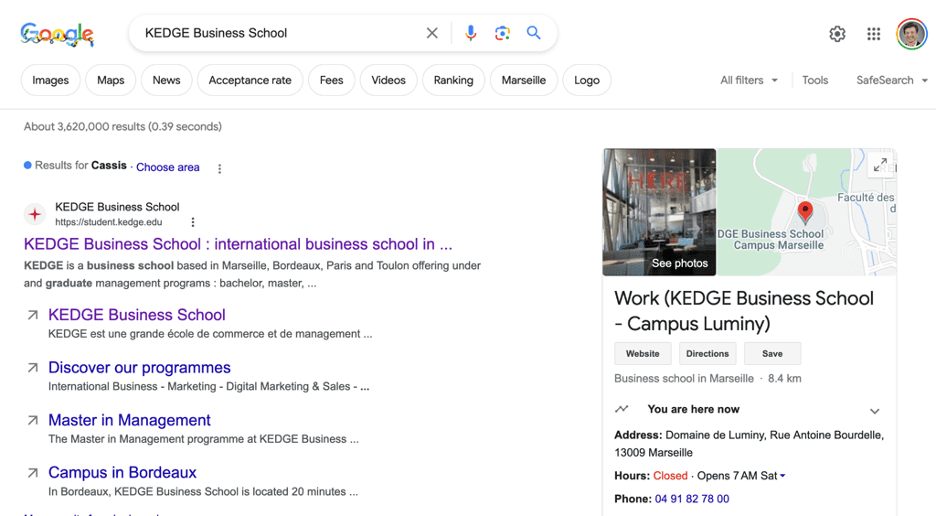
Figure 12.8: Google SERP for “KEDGE Business School” including a knowledge graph on the right-hand side of the page (Google and the Google logo are trademarks of Google LLC).Figure 12.8: Google SERP for “KEDGE Business School” including a knowledge graph on the right-hand side of the page.
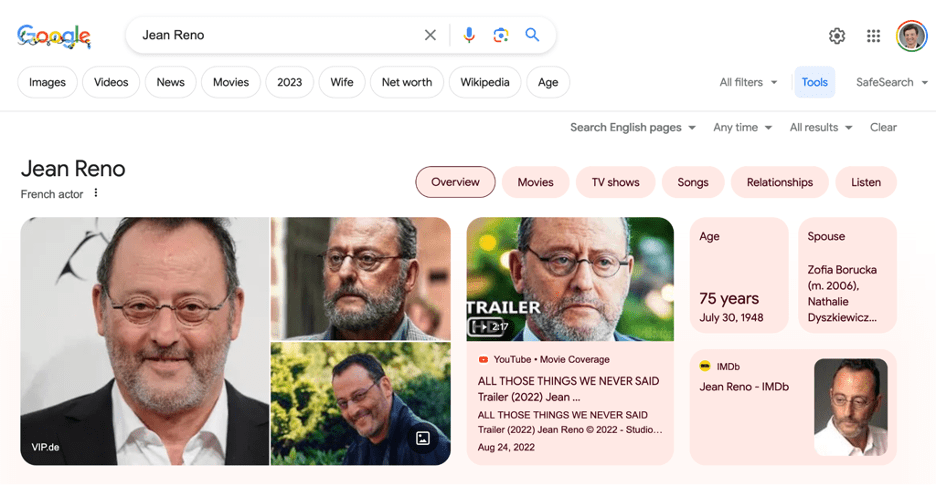
Figure 12.9: Search snippet for Jean Reno (Google and the Google logo are trademarks of Google LLC).Figure 12.9: Search snippet for Jean Reno.

The volatility of the SERPs can be evidenced by the varying results produced by the same search in different locations.

The listing for the US market (Figure 12.10) and carousel for the European market (Figure 12.11) for “best DJs” shows that geolocation increasingly comes into play in the page ranking of SERPs.

Personalisation is also relevant. For example, when a user is logged into a Google product, their browser history influences the organic SERPs. SERPs change depending on what terms are used.

This means a pluralised term produces different SERPs to searches that use the singular term.

Tools, such as those offered by Semrush, include functionality to quickly identify this form of volatility and understand sectors that are being affected by changes.
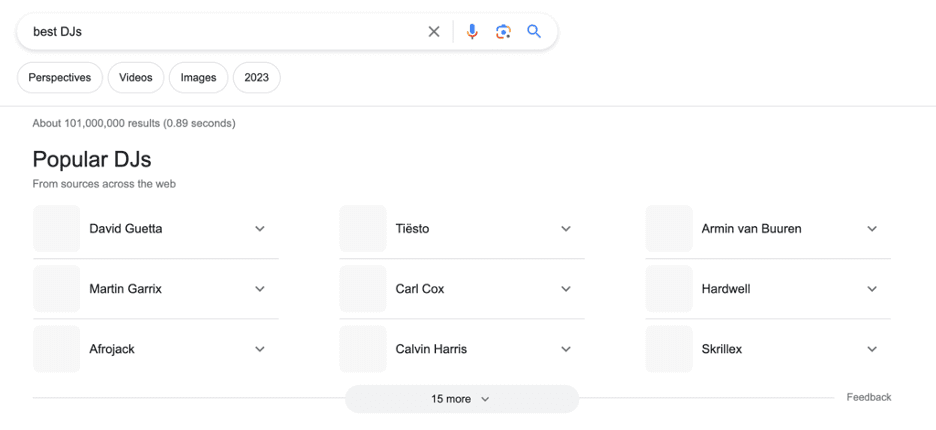
Figure 12.10: US results for “best DJs” (Google and the Google logo are trademarks of Google LLC).Figure 12.10: US results for “best DJs”
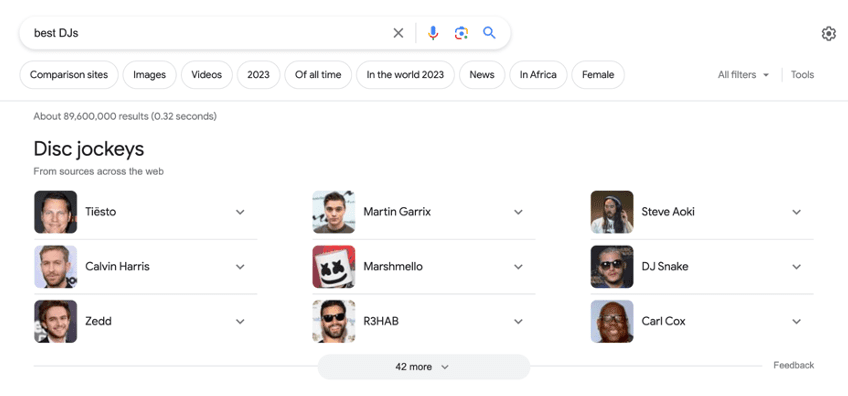
Figure 12.11: European results for “best DJs” (Google and the Google logo are trademarks of Google LLC)Figure 12.11: European results for “best DJs”

Recent innovations by Google include the search generative experience (SGE) currently being tested in the US market. This is a different search experience that is more visual and uses artificial intelligence.

The 2015 introduction of RankBrain and other algorithms means that Google now better understands human language and context.

Industry publications, including Search Engine Roundtable and Search Engine Land, keep pace with this dynamic landscape.

Implementing Search Engine Optimisation 

Identification of the most relevant search terms is the starting point for developing a website map and themes for content.

The search terms will also define the focus for individual pages and blog posts. This approach has a focus on the technical/on-page, content, and off-page aspects of the website.

Any SEO activity begins with prior knowledge of the organisation, including its objectives and targets as well as the persona that has been defined.

The initial phase of optimising a website for Google search involves:

  1. A technical and content audit.
  2. Keyword identification and analysis.
  3. Implementing any changes in the content management system (CMS) and content.
  4. Using the secure HTTPS protocol for the website.
  5. Submitting the website to Google Search Console.
  6. Submitting the website to Bing Webmaster Tools.
  7. Submitting the website to other appropriate search engines.
  8. Adding website tracking code such as Google Analytics, Hotjar or others to the website.

Summary

SEO plays a critical role in enhancing an organisation’s digital presence, and the dynamic nature of search engine algorithms provides a way to address the immediate pain touchpoints of a persona.

This focused around the imperative for organisations to offer content that not only resonates with a persona’s needs but also aligns with the evolving criteria of search engines like Google, Baidu or Bing.

This latter alignment is crucial given the stakeholder tendency to focus only on the first SERP. It is important to adhere to ethical SEO practices employing ‘White Hat SEO’ tactics that comply with search engine guidelines, as opposed to more manipulative techniques.

There is a need for continuous monitoring and reviewing of any SEO activities.

Frequently changing search engine algorithms, which now heavily incorporate AI and machine learning, means that a campaign’s parameters can change quickly. SEO is not a “set and forget” activity.

Staying informed and adapting to these changes is essential for maintaining and improving search engine rankings.

The environmental impact of digital activities should also be a consideration in SEO and wider marketing practices, optimising websites not only aligns with SEO best practices but also contributes to sustainability.

Search engines offer marketers one of the largest big data sets available to refine and target their content creation activities.

Historic search behaviours are good predictors of the future, and the use of these resources helps marketers to optimise and be better placed to offer value to their persona.


To read the book, SEJ readers have an exclusive 20% discount until the end of 2024 using the code DSMM24 at Routledge.

The book officially launches on October 7 2024 and you can attend the event with a chance to hear from some of the authors by registering through this link.

More resources:


Featured Image: Sutthiphong Chandaeng/Shutterstock

Ask An SEO: How To Stop Filter Results From Eating Crawl Budget via @sejournal, @rollerblader

Today’s Ask An SEO question comes from Michal in Bratislava, who asks:

“I have a client who has a website with filters based on a map locations. When the visitor makes a move on the map, a new URL with filters is created. They are not in the sitemap. However, there are over 700,000 URLs in the Search Console (not indexed) and eating crawl budget.

What would be the best way to get rid of these URLs? My idea is keep the base location ‘index, follow’ and newly created URLs of surrounded area with filters switch to ‘noindex, no follow’. Also mark surrounded areas with canonicals to the base location + disavow the unwanted links.”

Great question, Michal, and good news! The answer is an easy one to implement.

First, let’s look at what you’re trying and apply it to other situations like ecommerce and publishers. This way, more people can benefit. Then, go into your strategies above and end with the solution.

What Crawl Budget Is And How Parameters Are Created That Waste It

If you’re not sure what Michal is referring to with crawl budget, this is a term some SEO pros use to explain that Google and other search engines will only crawl so many pages on your website before it stops.

If your crawl budget is used on low-value, thin, or non-indexable pages, your good pages and new pages may not be found in a crawl.

If they’re not found, they may not get indexed or refreshed. If they’re not indexed, they cannot bring you SEO traffic.

This is why optimizing a crawl budget for efficiency is important.

Michal shared an example of how “thin” URLs from an SEO point of view are created as customers use filters.

The experience for the user is value-adding, but from an SEO standpoint, a location-based page would be better. This applies to ecommerce and publishers, too.

Ecommerce stores will have searches for colors like red or green and products like t-shirts and potato chips.

These create URLs with parameters just like a filter search for locations. They could also be created by using filters for size, gender, color, price, variation, compatibility, etc. in the shopping process.

The filtered results help the end user but compete directly with the collection page, and the collection would be the “non-thin” version.

Publishers have the same. Someone might be on SEJ looking for SEO or PPC in the search box and get a filtered result. The filtered result will have articles, but the category of the publication is likely the best result for a search engine.

These filtered results can be indexed because they get shared on social media or someone adds them as a comment on a blog or forum, creating a crawlable backlink. It might also be an employee in customer service responded to a question on the company blog or any other number of ways.

The goal now is to make sure search engines don’t spend time crawling the “thin” versions so you can get the most from your crawl budget.

The Difference Between Indexing And Crawling

There’s one more thing to learn before we go into the proposed ideas and solutions – the difference between indexing and crawling.

  • Crawling is the discovery of new pages within a website.
  • Indexing is adding the pages that are worthy of showing to a person using the search engine to the database of pages.

Pages can get crawled but not indexed. Indexed pages have likely been crawled and will likely get crawled again to look for updates and server responses.

But not all indexed pages will bring in traffic or hit the first page because they may not be the best possible answer for queries being searched.

Now, let’s go into making efficient use of crawl budgets for these types of solutions.

Using Meta Robots Or X Robots

The first solution Michal pointed out was an “index,follow” directive. This tells a search engine to index the page and follow the links on it. This is a good idea, but only if the filtered result is the ideal experience.

From what I can see, this would not be the case, so I would recommend making it “noindex,follow.”

Noindex would say, “This is not an official page, but hey, keep crawling my site, you’ll find good pages in here.”

And if you have your main menu and navigational internal links done correctly, the spider will hopefully keep crawling them.

Canonicals To Solve Wasted Crawl Budget

Canonical links are used to help search engines know what the official page to index is.

If a product exists in three categories on three separate URLs, only one should be “the official” version, so the two duplicates should have a canonical pointing to the official version. The official one should have a canonical link that points to itself. This applies to the filtered locations.

If the location search would result in multiple city or neighborhood pages, the result would likely be a duplicate of the official one you have in your sitemap.

Have the filtered results point a canonical back to the main page of filtering instead of being self-referencing if the content on the page stays the same as the original category.

If the content pulls in your localized page with the same locations, point the canonical to that page instead.

In most cases, the filtered version inherits the page you searched or filtered from, so that is where the canonical should point to.

If you do both noindex and have a self-referencing canonical, which is overkill, it becomes a conflicting signal.

The same applies to when someone searches for a product by name on your website. The search result may compete with the actual product or service page.

With this solution, you’re telling the spider not to index this page because it isn’t worth indexing, but it is also the official version. It doesn’t make sense to do this.

Instead, use a canonical link, as I mentioned above, or noindex the result and point the canonical to the official version.

Disavow To Increase Crawl Efficiency

Disavowing doesn’t have anything to do with crawl efficiency unless the search engine spiders are finding your “thin” pages through spammy backlinks.

The disavow tool from Google is a way to say, “Hey, these backlinks are spammy, and we don’t want them to hurt us. Please don’t count them towards our site’s authority.”

In most cases, it doesn’t matter, as Google is good at detecting spammy links and ignoring them.

You do not want to add your own site and your own URLs to the disavow tool. You’re telling Google your own site is spammy and not worth anything.

Plus, submitting backlinks to disavow won’t prevent a spider from seeing what you want and do not want to be crawled, as it is only for saying a link from another site is spammy.

Disavowing won’t help with crawl efficiency or saving crawl budget.

How To Make Crawl Budgets More Efficient

The answer is robots.txt. This is how you tell specific search engines and spiders what to crawl.

You can include the folders you want them to crawl by marketing them as “allow,” and you can say “disallow” on filtered results by disallowing the “?” or “&” symbol or whichever you use.

If some of those parameters should be crawled, add the main word like “?filter=location” or a specific parameter.

Robots.txt is how you define crawl paths and work on crawl efficiency. Once you’ve optimized that, look at your internal links. A link from one page on your site to another.

These help spiders find your most important pages while learning what each is about.

Internal links include:

  • Breadcrumbs.
  • Menu navigation.
  • Links within content to other pages.
  • Sub-category menus.
  • Footer links.

You can also use a sitemap if you have a large site, and the spiders are not finding the pages you want with priority.

I hope this helps answer your question. It is one I get a lot – you’re not the only one stuck in that situation.

More resources: 


Featured Image: Paulo Bobita/Search Engine Journal

WordPress Co-Founder & Automattic Sued For Attempted Extortion via @sejournal, @martinibuster

WP Engine, the managed web host recently banned from WordPress.org, has filed a federal lawsuit against WordPress co-founder Matt Mullenweg and Automattic, alleging attempted extortion as well as seeking relief from trademark infringement claims.

The goal of the federal lawsuit is to stop Mullenweg from continuing to “harm” WP Engine and the WordPress ecosystem as well as to hold Mullenweg and Automattic accountable for their “broken promises and malfeasance.” Malfeasance refers to wrongful or illegal conduct that may involve violations of the law or unethical actions, particularly by someone in a position of authority.

What The 98 Page Lawsuit Is About

The TL/DR of the lawsuit is that it’s “about abuse of power, extortion, and greed.” It states that the open source WordPress ecosystem was built on the promise of the freedom to create with WordPress without any constraints but that those promises were not kept and that the failure to keep those promises constituted wrongful acts, including making false statements to the IRS, among many other accusations backed up with evidence.

WP Engine made the following statement to Search Engine Journal:

“Matt Mullenweg and Automattic’s self-proclaimed scorched earth campaign against WP Engine has harmed not just our company, but the entire WordPress ecosystem. The symbiotic relationship between WordPress, its community and the businesses that invest millions to support WordPress users, and advance the ecosystem, is based on trust in the promises of openness and freedom.

Matt Mullenweg’s conduct over the last ten days has exposed significant conflicts of interests and governance issues that, if left unchecked, threaten to destroy that trust. WP Engine has no choice but to pursue these claims to protect its people, agency partners, customers, and the broader WordPress community.”

WP Engine’s lawsuit asks for judgment on these eleven points:

(1) Intentional Interference with Contractual Relations;
(2) Intentional Interference with Prospective Economic Relations;
(3) Computer Fraud and Abuse Act, 18 U.S.C. § 1030 et seq.;
(4) Attempted Extortion;
(5) Unfair Competition, Cal. Bus. Prof. Code § 17200, et seq.;
(6) Promissory Estoppel;
(7) Declaratory Judgment of Non-Infringement;
(8) Declaratory Judgment of Non-Dilution;
(9) Libel;
(10) Trade Libel; and
(11) Slander

Denial Of Trademark Infringement

The lawsuit filed by WP Engine denies the assertion by Mullenweg that the use of the word “WordPress” to refer to the open source project is subject to licensing fees, asserting that not only is the use of the name of the project legal and necessary in order to communicate information that consumers need, WP Engine asserts that the use of the name WordPress is freely used by the entire WordPress community and that said use has been condoned by the defendant Mullenweg.

Many times, lawsuits are won or lost based on the evidence provided and WP Engine’s lawsuit offers evidence to back up every allegation made against Mullenweg and Automattic.

For example, the lawsuit provides evidence that WP Engine was not misusing or infringing on the trademarks and that Mullenweg had been fully aware of WPE’s use of the challenged terms.

  • WP Engine’s membership in the ‘Five for the Future’ program is an acknowledgment that WPE was not infringing because one of the requirements of membership is to not currently be infringing on trademarks
  • Matt Mullenweg praised WP Engine on March 21, 2023 at the DE{CODE} developer conference, despite the fact that WPE used the challenged terms on their website at the time. The lawsuit quotes Mullenweg’s public statement: “vote with your wallet. So when you support companies like WPE, who don’t just provide a commercial service, but are also part of a wider open source community, you’re saying, hey, I want more of this in the world.”
  • Matt Mullenweg publicly acknowledged in an X livestream on September 26, 2024 that he knew WP Engine used the terms “for years” but that he had chosen not to take action.

Accusation Of False Statements To State Of California

The lawsuit also accuses that following the official incorporation of WordPress.org as a non-profit that Mullenweg of publicly transferred the WordPress trademark from Automattic to the non-profit WordPress Foundation but then secretly transferred it right back to Automattic through an exclusive sublicensable license which allowed Automattic to control the WordPress trademark. This contract between the WordPress Foundation and Automattic is the basis of their accusation that Mullenweg had made false statements to the state of California.

The lawsuit asserts:

“Mullenweg failed to disclose this exclusive licensing arrangement between his nonprofit (the WordPress Foundation) and his for-profit (Automattic) in the WordPress Foundation’s tax filings with the California government, claiming that there were no ‘contracts . . . between [WordPress Foundation] and any officer, director or trustee . . . or with an entity in which any such officer, director or trustee had any financial interest’ …This statement was false, given that Mullenweg was a director of the WordPress Foundation while also having a financial interest in Automattic, the entity with which the Foundation entered into a trademark license agreement—an apparent self-dealing transaction constituting inurement under federal tax law.”

Allegation: Mullenweg Made False Statements To IRS

WP Engine also states that Mullenweg has made false statements to the IRS.

The lawsuit documents the following:

“It appears Mullenweg also did not disclose the license agreement in the WordPress Foundation’s filings with the IRS, and none of WordPress Foundation’s fourteen years of publicly available federal reporting to the IRS indicates that the WordPress Foundation was compensated in any form for granting an exclusive, fully-paid, royalty-free, perpetual, irrevocable, worldwide, sublicensable license for trademarks Defendants now claim are incredibly valuable. Indeed, while the Foundation has failed to ever disclose to the IRS its ownership of the trademarks or existence of the exclusive royalty-free license to Automattic, for the past seven years Mullenweg himself executed the IRS forms on behalf of the Foundation under penalties of perjury, an apparent false certification to the IRS and public that the Foundation’s Forms 990 were true, correct, and complete.”

Additionally, the lawsuit shows that in 2011 Mullenweg filed IRS forms claiming that the non-profit WordPress Foundation only had assets of $14,071 and made no mention of assets like trademarks or other IP (intellectual property).

False Statements About Trademark Ownership

Another of the accusations made in the lawsuits is that Mullenweg had made misleading public statements asserting that the trademarks had been transferred to the non-profit WordPress foundation, even though he had secretly transferred the trademark back to Automattic through an exclusive sublicensable license. A sublicensable license is an agreement in which the original license holder (the licensor) grants a second party (the licensee) the right to grant a license to a third party (the sublicensee).

The lawsuit states:

“In 2010, in response to mounting public concern, the WordPress source code and trademarks were placed into the nonprofit WordPress Foundation (which Mullenweg created), with Mullenweg and Automattic making sweeping promises of open access for all: “Automattic has transferred the WordPress trademark to the WordPress Foundation, the nonprofit dedicated to promoting and ensuring access to WordPress and related open source projects in perpetuity. This means that the most central piece of WordPress’s identity, its name, is now fully independent from any company.” Mullenweg and Automattic reiterated this promise later, in even more forceful terms: ‘What’s important is that [] longer than I’m alive, longer than Automattic is alive, longer than any of us are alive, there is something that holds the WordPress code and trademark for the free access for the world.”

What Defendants’ statements and assurances did not disclose is that while they were publicly touting their purported good deed of moving this intellectual property away from a private company, and into the safe hands of a nonprofit, Defendants in fact had quietly transferred irrevocable, exclusive, royalty-free rights in the WordPress trademarks right back to Automattic that very same day in 2010. This meant that far from being “independent of any company” as Defendants had promised, control over the WordPress trademarks effectively never left Automattic’s hands. “

WP Engine writes that it relied on the promises made when it was founded in 2010 as a business built around WordPress, investing hundreds of millions of dollars over the past 14 years only to see WordPress turned against it by the “petulant whims” of Automattic’s CEO, Matt Mullenweg to “inflict harm” to WP Engine’s business.

Further claims are made that the request for payment of tens of millions of dollars for a trademark license (that WPE claims is not needed) came “without warning” and that they were given only 48 hours to make the decision to pay or face being banned and “publicly smeared.”

Alleges Mullenweg Controls WordPress Foundation For Self-Interest

The lawsuit also claims that the recent events at WordCamp and the days thereafter exposes that the non-profit WordPress Foundation is an entity that Mullenweg personally controls for his own and Automattic’s commercial interest.

“Mullenweg’s recent actions have exposed and highlighted his long history of obfuscating the true facts about his control and manipulation of the WordPress Foundation and wordpress.org—which he presents as a not-for-profit ‘dot-org’ enterprise, but which in fact he solely owns and directs with an iron fist to further his own commercial interests in Automattic and associated commercial businesses, to the detriment of Defendants’ competitors.”

Fallout From Lawsuit

The lawsuit was filed October 2nd and there is already a credible report that the WordPress Executive Director/General Manager, Open Source Division; Automattic, Josepha Haden Chomphosy, has resigned and will be making an announcement today October 3rd. The statement about this was posted on X by WP Tavern journalist Jeff Chandler who has been involved with WordPress since 2007.

He tweeted:

“I spoke with Josepha tonight. I can confirm that she’s no longer at Automattic.

She’s working on a statement for the community. She’s in good spirits despite the turmoil.”

Read the 98 page federal lawsuit here: (PDF)

Featured Image by Shutterstock/Billion Photos

Charts: Outlook of Global CEOs, Q3 2024

KPMG’s new “CEO Outlook” summarizes the survey results of 1,300 heads at large companies globally, including 400 in the United States, on their three-year outlook on enterprise and external economic growth. Per the report (PDF), U.S. CEOs remain optimistic about their companies’ long-term growth despite economic instability and geopolitical tensions.

Global CEO views on their organizations’ biggest risks reflect the rise of artificial intelligence technology and worldwide instability.

Also, when asked about the key trends that could hinder their organization’s success in the next three years, U.S. CEOs ranked aspects of AI as the most significant.

CEOs most commonly highlighted three key functional areas where their organizations plan to invest in generative AI over the next three years.

Google Rolls Out CrUX Vis Core Web Vitals Tool via @sejournal, @martinibuster

Google rolled out a new Core Web Vitals tool called CrUX Vis that shows you hidden patterns in performance scores and offers guidance on what to improve. The data is sourced from the CrUX dataset which is based on actual user experiences on the URLs and websites that are analyzed and explored in the new tool.

CrUX

The new tool is based on the CrUX dataset which is what the Core Web Vitals scores are based on.

Chrome’s documentation of CrUX explains:

“The Chrome User Experience Report (also known as the Chrome UX Report, or CrUX for short) is a dataset that reflects how real-world Chrome users experience popular destinations on the web.

CrUX is the official dataset of the Web Vitals program. All user-centric Core Web Vitals metrics are represented.

CrUX data is collected from real browsers around the world, based on certain browser options which determine user eligibility. A set of dimensions and metrics are collected which allow site owners to determine how users experience their sites.

The data collected by CrUX is available publicly through a number of Google tools and third-party tools and is used by Google Search to inform the page experience ranking factor.

Not all origins or pages are represented in the dataset. There are separate eligibility criteria for origins and pages, primarily that they must be publicly discoverable and there must be a large enough number of visitors in order to create a statistically significant dataset.”

Debugging Core Web Vitals

Improving website performance scores may not offer the direct ranking benefit that many SEOs and publishers hoped it would but it’s still the same critical factor to get right it’s always been. High performance scores improve earnings, ad clicks, conversions, user experience, website popularity and virtually every goal an SEO and publisher has for a site, including indirect benefits to rankings. A site can still limp along with poor performance scores but it will not be living up to its full earnings potential.

Although tools based on Chrome’s Lighthouse offer performance snapshots and estimated scores those tools were unable to provide a sense of how the site was performing over time or provide a breakout of important performance metrics to gauge whether performance is trending up or down.

CrUX Vis

Chrome’s new tool is called CrUX Vis, a data visualization tool that enables users to visualize the Chrome User Experience data (CrUX). CrUX Vis provides an entirely new way to understand website performance and gain a big picture view of what’s going on at the URL and website level (called origin).

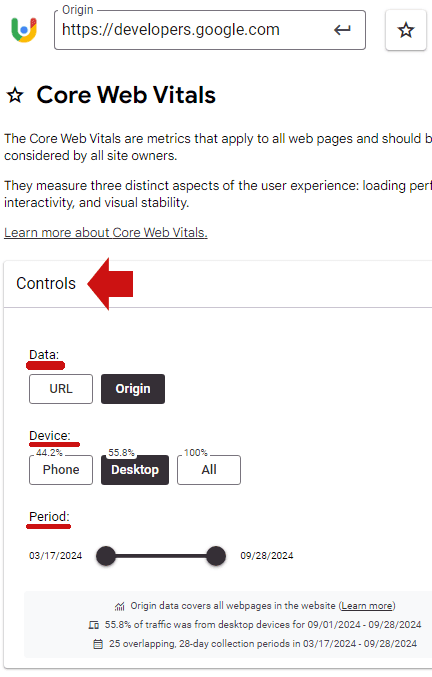
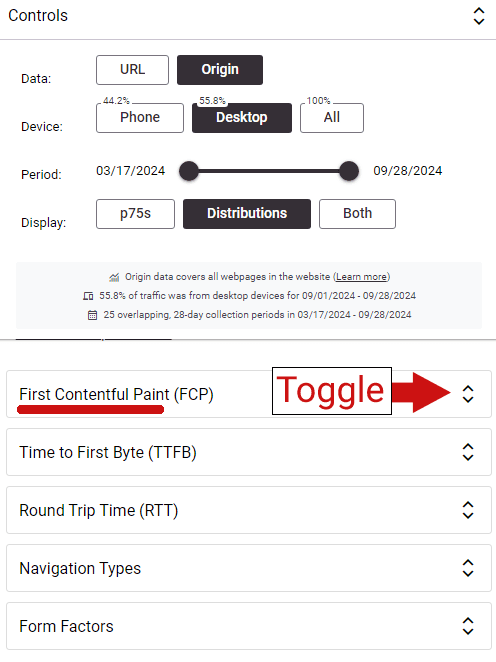
The different variables for what is visualized can be changed in the section at the top of the page called Controls, covering data, device and period.

Screenshot Of CrUX Vis Controls

Segment Data By Multiple Variables

As seen in the screenshot above, the data can be segmented in three ways:

  1. Data
    Performance scores can be viewed by origin (the entire site) or by URL
  2. Device
    Data can be segmented and visualized by mobile, data and a combined view.
  3. Period (Date Range)
    The tool currently allows data visualization by 25 overlapping time periods stretching back about six months. It currently shows performance visualizations from 3/17/2024 through 09/28/2024.

Five Views Of Metrics

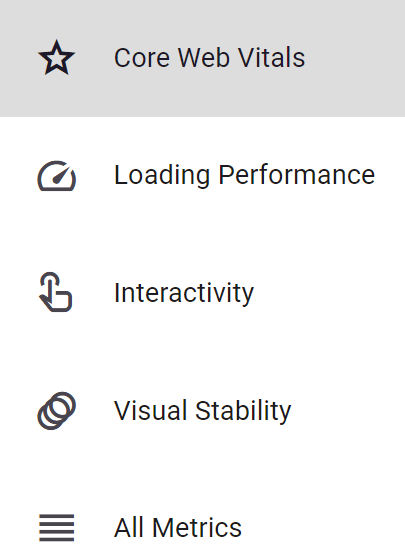
There are five ways to analyze the data, covering core web vitals, three categories of metrics and all metrics combined. These variables are accessible on left hand navigation panel on the desktop UI (user interface).

  1. Core Web Vitals
  2. Loading Performance
  3. Interactivity
  4. Visual Stability
  5. All Metrics Combined

Visualizing Data

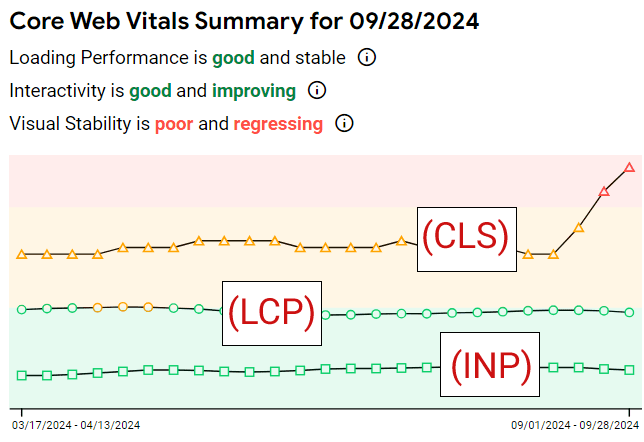
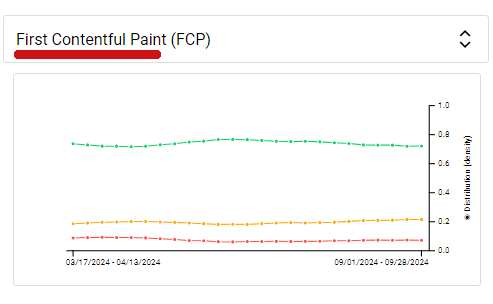
The visualization for Core Web Vitals shows a time-based trend graph that’s colored with green, yellow, and pink. Green is good and pink is not good.

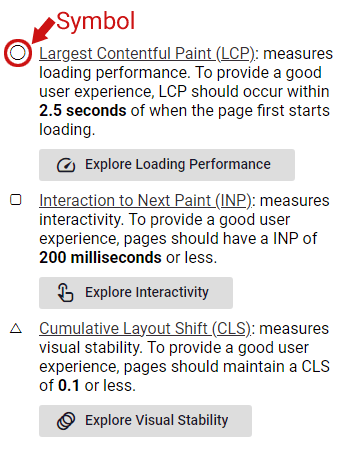
The three core web vitals are represented by a circle, squate and a triangle:

  • Circle = Largest Contentful Paint (LCP):
  • Square = Interaction to Next Paint (INP)
  • Triangle = Cumulative Layout Shift (CLS)

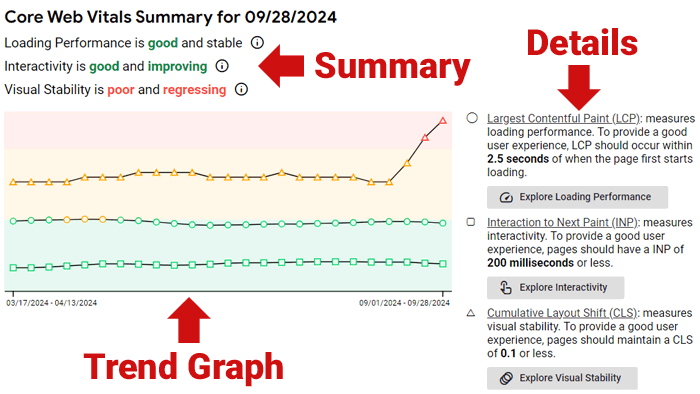
The desktop UI (user interface) shows the trend graph and a summary on the left and a text explanation on the right.

Screenshot Of User Interface

The graph offers a visual snapshot of which direction the core web vitals are moving and an explanation of the kind of trend for each metric.

The three kinds of trends are:

  1. Good And Improving
  2. Good And Stable
  3. Poor And Regressing

Screenshot Showing CWV Performance

A more comprehensive explanation of the data is to the right of the trend graph, with each metric identified by the circle, square, and triangle icons.

Screenshot Of Data Explanation

Loading Performance

Using the left hand navigation to get to the Loading Performance screen shows another trend graph that offers additional metrics related to how fast the site or URL loads.

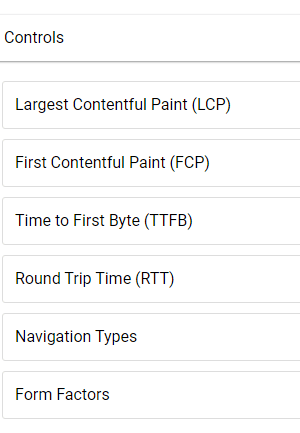
It offers the following six visualizations:

  • Largest Contentful Paint (LCP)
  • First Contentful Paint (FCP)
  • Time to First Byte (TTFB)
  • Round Trip Time (RTT)
  • Navigation Types
  • Form Factors

Screenshot Of Six Visualization Choices

There’s a toggle next to each choice:

Clicking the toggle shows the trend graph:

The rest of the choices show similar breakdowns of each kind of metric.

The new CrUX Vis tool should be useful to publishers and digital marketers who want to get an accurate measurement of website performance, visualized as a trend. It’s useful for competitior research and for website audits.

Go check it out at:

CrUX Vis

Featured Image by Shutterstock/Krakenimages.com

How To Use The New Google Ads AI Image Editor via @sejournal, @brookeosmundson

In case you missed it, Google just rolled out the AI Image Editor to support additional campaign types.

Originally launched for Performance Max campaigns, it now supports these additional types:

  • Search
  • Display
  • App
  • Demand Gen.

If you’re not familiar with the AI Image Editor tool, have no fear!

This tutorial, originally posted by Google Ads, breaks down how you can start taking advantage of the tool to save you time and money.

What Can the AI Image Editor Do?

With the help of Google AI, the image editor tool can help create new high quality image assets, as well as edit existing assets in your PPC campaigns.

When it comes to editing image assets, there’s a wide variety of features to choose from. These include:

  • Removing image background
  • Replacing image background
  • Add and erase objects and images
  • Extend images outside their existing aspect ratio.

How to Find the Google Ads AI Image Editor Tool

There are two different ways to access the AI image editor tool in Google Ads.

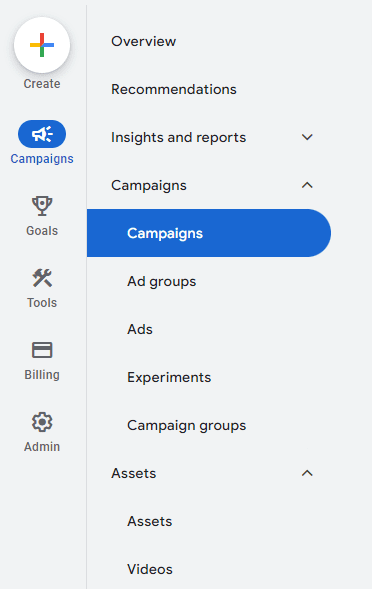
On the left-hand side of the menu, click the “+” Create button, then choose “Asset”.

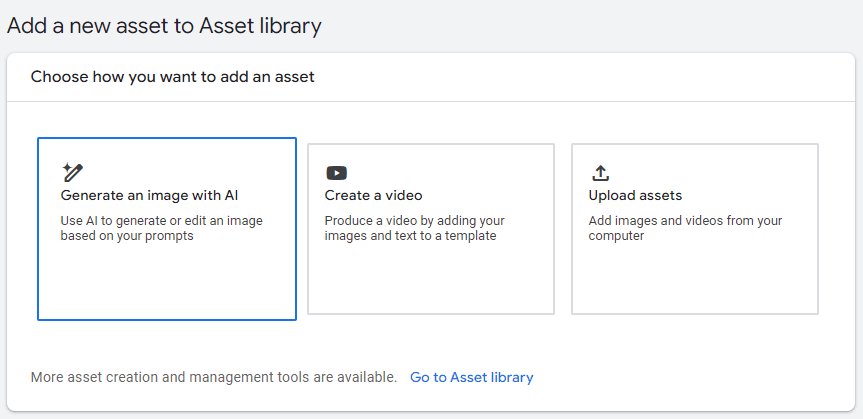
Additionally, you can click “Assets” in the left-hand menu to be taken to the Asset Library.

From there, you choose “Generate an image with AI” to get started.

AI Image Generator in Google Ads.

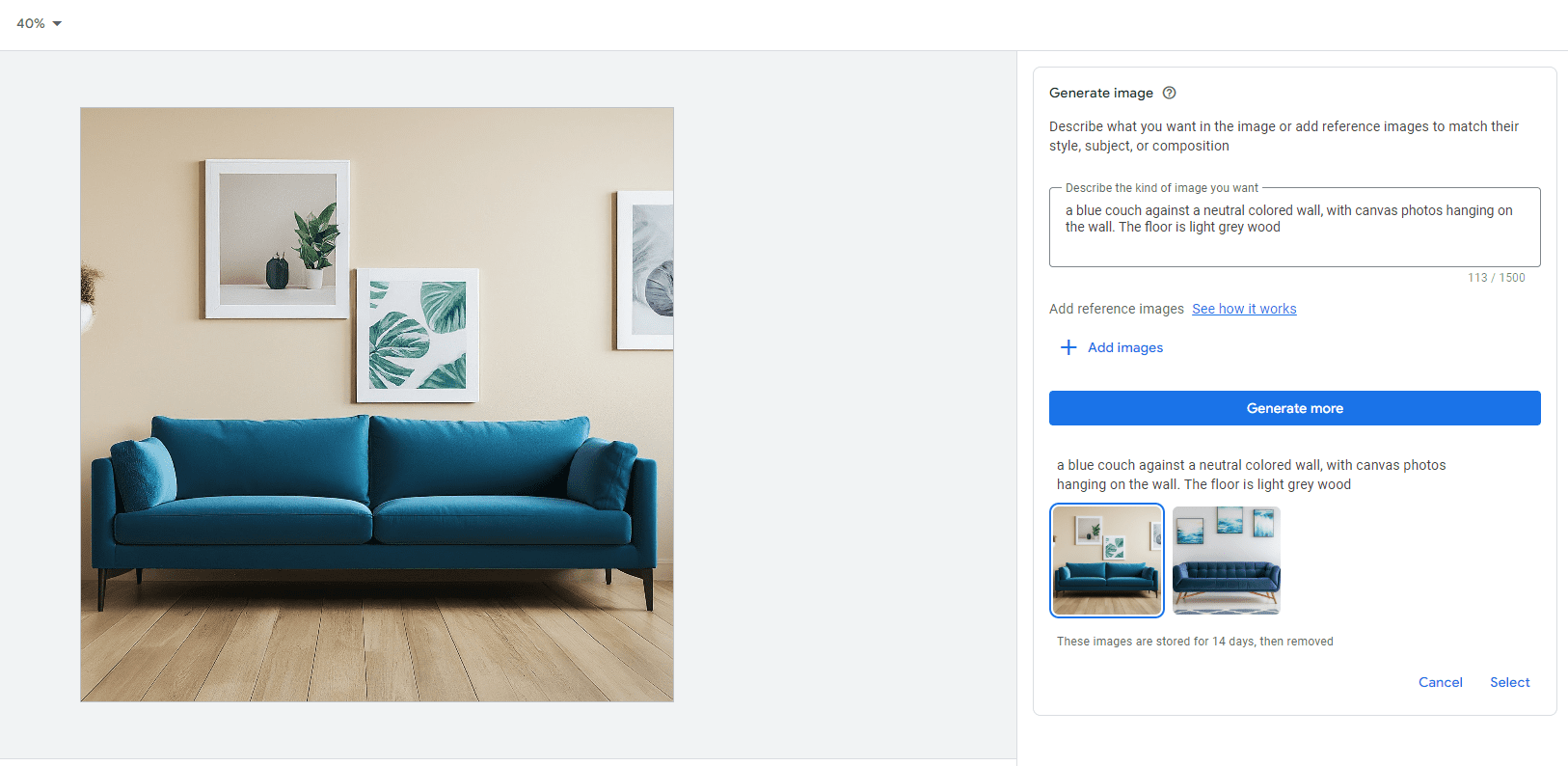
To generate a new image, you’ll need to give a description of what you want it to look like.

In the example below, I typed “A blue couch against a neutral colored wall, with canvas photos hanging on the wall. The floor is light grey wood.”

Google Ads AI Image Generator example

In the example, it generated two images to choose from, with the option to generate more.

Once you’ve selected the image you want to use, then you can get to editing more.

How to Edit Image Assets with Google AI

Now that you’ve selected your image to use, you can edit the following aspects:

  • Remove background
  • Erase object
  • Add new object
  • Replace object
  • Expand image
  • Adjust color

How to edit images in Google Ads using Google AI

Click on any of the options on the right-hand side to start editing.

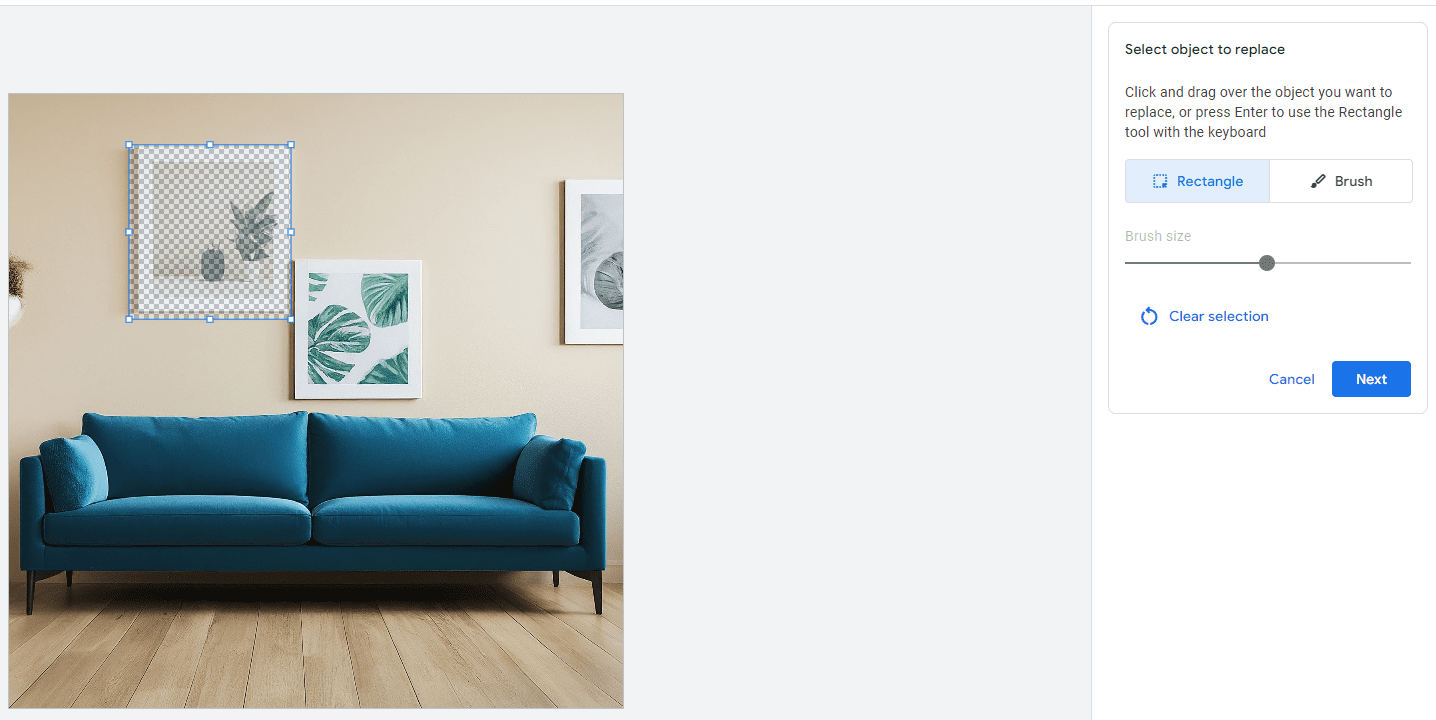
In this example, say I want to remove one of the canvas photos in the background and replace it with a clock.

First, click on “Replace object”, then click and drag over the canvas photo. Then, click “Next”.

Replace function with Google AI Image Editor tool.

Then, to replace an object, create a description of the type of object you want to replace the selected object with. Then, click “Generate”.

Continuing in this example, I wrote, “A square clock that matches the blue color couch.”

An example of an AI replaced clock within an image asset in Google Ads.

In this example, Google AI gave me three options to choose from, with the option to generate more.

You can follow these examples with the other functionalities all within the AI image editor tool.

Summary

The Google Ads AI image editor can help save advertisers time and resources with asset creation.

It gives you creative flexibility with built-in controls to ensure the images meet your level of standards and produce accurate content to complement your ads.

Now that the tool has expanded to more campaign types, it opens up new possibilities for more brands while keeping their brand identity aligned.

Will you be trying the AI image editor tool out anytime soon?

Google Phases Out Support For Noarchive Meta Tag via @sejournal, @MattGSouthern

In a recent update to its Search Central documentation, Google has officially relegated the ‘noarchive’ rule to a historical reference section.

The new text in Google’s help document reads:

“The noarchive rule is no longer used by Google Search to control whether a cached link is shown in search results, as the cached link feature no longer exists.”

This move follows Google’s earlier decision to remove the cache: search operator, which was reported last week.

Implications For Websites

While Google says websites don’t need to remove the meta tag, it noted that “other search engines and services may be using it.”

The ‘noarchive‘ tag has been a staple of SEO practices for years, allowing websites to prevent search engines from storing cached versions of their pages.

Its relegation to a historical reference highlights the dynamic nature of Google Search.

The Gradual Phasing Out of Cached Pages

This documentation update aligns with Google’s gradual phasing out of the cached page feature.

Last week, Google removed the documentation for the cache: search operator, which had allowed users to view Google’s stored version of a webpage.

At the time, Google’s Search Liaison explained on social media that the cache feature was originally intended to help users access pages when loading was unreliable.

With improvements in web technology, Google deemed the feature no longer necessary.

As an alternative, Google has begun incorporating links to the Internet Archive’s Wayback Machine in its “About this page” feature, providing searchers with a way to view historical versions of webpages.

Controlling Archiving In The Wayback Machine

The ‘noarchive’ tag doesn’t affect the Internet Archive’s Wayback Machine.

The Wayback Machine, which Google now links to in search results pages, has its own rules for archiving and exclusion.

To prevent pages from being archived by the Wayback Machine, you have several options:

  1. Robots.txt: Adding specific directives to the robots.txt file can prevent the Wayback Machine from crawling and archiving pages. For example:
    1. User-agent: ia_archiver
      Disallow: /
  2. Direct Request: Website owners can contact the Internet Archive to request removal of specific pages or domains from the Wayback Machine.
  3. Password Protection: Placing content behind a login wall effectively prevents it from being archived.

Note that these methods are specific to the Wayback Machine and differ from Google’s now-deprecated ‘noarchive’ tag.

Conclusion

As search technology advances, it’s common to see legacy features retired in favor of new solutions.

It’s time to update those best practice guides to note Google’s deprecation of noarchive.


Featured Image: Tada Images/Shutterstock

Improve your Shopify store’s visibility with AI in Yoast SEO

Standing out in the crowded marketplace is crucial for any online store. For Shopify merchants, optimizing SEO titles and meta descriptions is an important step in gaining visibility and attracting potential customers. AI-driven tools like Yoast SEO for Shopify have made this process more efficient and impactful.

SEO titles and meta descriptions are HTML elements that communicate your web page’s content to search engines and users. While these do not directly impact rankings, these components significantly influence click-through rates (CTR) by acting as your virtual calling card in the search results. A well-crafted meta description can entice users to click on your link over others in search engine results pages (SERPs). While Google loves generating them automatically, you can still influence what they show.

How AI is transforming Shopify SEO

Integrating AI in SEO has changed how we all approach optimization tasks. A ton of innovation is happening right now, from AI tools automating keyword research to content creation and from on-page SEO to providing merchants with deeper insights into user intent and consumer behavior. AI can improve the user experience by predicting user needs and customizing content delivery. Ultimately, we are all looking to boost engagement and SEO performance.

AI-generated features for Yoast SEO

As a merchant, you can streamline your Shopify SEO work using AI in your SEO strategies. Our Yoast SEO for Shopify SEO app uses AI to automatically generate SEO titles and meta descriptions that are both keyword-rich and engaging.

One of the most time-consuming aspects of SEO is crafting unique and engaging titles and meta descriptions for each product and page. We’ve built generative AI technology to speed up this process. Thanks to Yoast AI Generate, we can generate optimized titles and descriptions that align with what search engines and users seek. This saves time and ensures consistency and relevance across your site.

Using Yoast SEO on your Shopify store makes improving your SEO much easier. The app handles technical SEO tasks automatically and gives clear feedback with simple color-coded signals. This makes it perfect for beginners just getting started with SEO while also being powerful enough for experts. Plus, Yoast SEO includes access to helpful courses to boost your knowledge.

It also creates structured data to help your store achieve rich results, making it stand out in search engines. With 24/7 support and straightforward tips for optimizing your content, Yoast SEO tackles common challenges. It helps you save time doing SEO tasks and getting noticed in search results. This way, you can focus more on running your business while ensuring your store is easy to find online.

Of course, you can’t simply do what you want here because there are best practices for crafting SEO titles and meta descriptions for Shopify merchants.

Best practices for SEO titles in Shopify

  • Incorporate primary keywords early: Place your primary keyword at the beginning of the title to ensure search engines and users immediately understand the page’s relevance.
  • Branding: Include your store name at the end of the title to increase brand recognition, such as “Buy Eco-Friendly Yoga Mats | YourStoreName.”
  • Character number: While Google has no hard limit, keep your title length in check to ensure they display fully in search results.
  • Unique titles for each page: Ensure each product and page has a unique title to avoid duplication and improve search engine understanding.
  • Use action-oriented language: Encourage clicks with verbs that suggest action, like “Shop,” “Discover,” or “Explore.”

Best practices for meta descriptions in Shopify

And what about meta descriptions? What should you remember while writing or optimizing meta descriptions in Shopify?

  • Focus on benefits and features: Highlight your products’ unique benefits and features to entice users to click.
  • Include a call to action: Use language encouraging users to act, such as “Browse our collection today” or “Order now for free shipping.”
  • Keep it concise and relevant: Ensure the entire description is visible in search results and accurately reflects the page content.
  • Avoid keyword stuffing: Use keywords naturally and sparingly to avoid making the description look spammy.
  • Highlight offers and promotions: If applicable, mention any promotions, discounts, or free shipping offers to attract clicks.
  • Reflect current content and updates: Regularly update meta descriptions to reflect product details, offers, or seasonal campaign changes.
  • Match user intent: Ensure the description aligns with what users are searching for and provides a clear answer or solution to their query.

Use these best practices to enhance the effectiveness of your SEO titles and meta descriptions. Ultimately, these should improve merchants’ visibility and increase click-through rates in search engine results.

Enhancing your Shopify store’s visibility with our AI-generated SEO features is straightforward. Doing so might boost your search engine performance. If you haven’t installed Yoast SEO for Shopify yet, please do so. It’s an amazing SEO app that helps merchants get results. In the latest release, we’ve added AI-generated features. Install the app from the Shopify App Store and integrate it with your store.

We have a guide on how to use the AI Generate features in Yoast SEO for Shopify.

Yoast SEO for Shopify uses generative AI to help you do ecommerce SEO

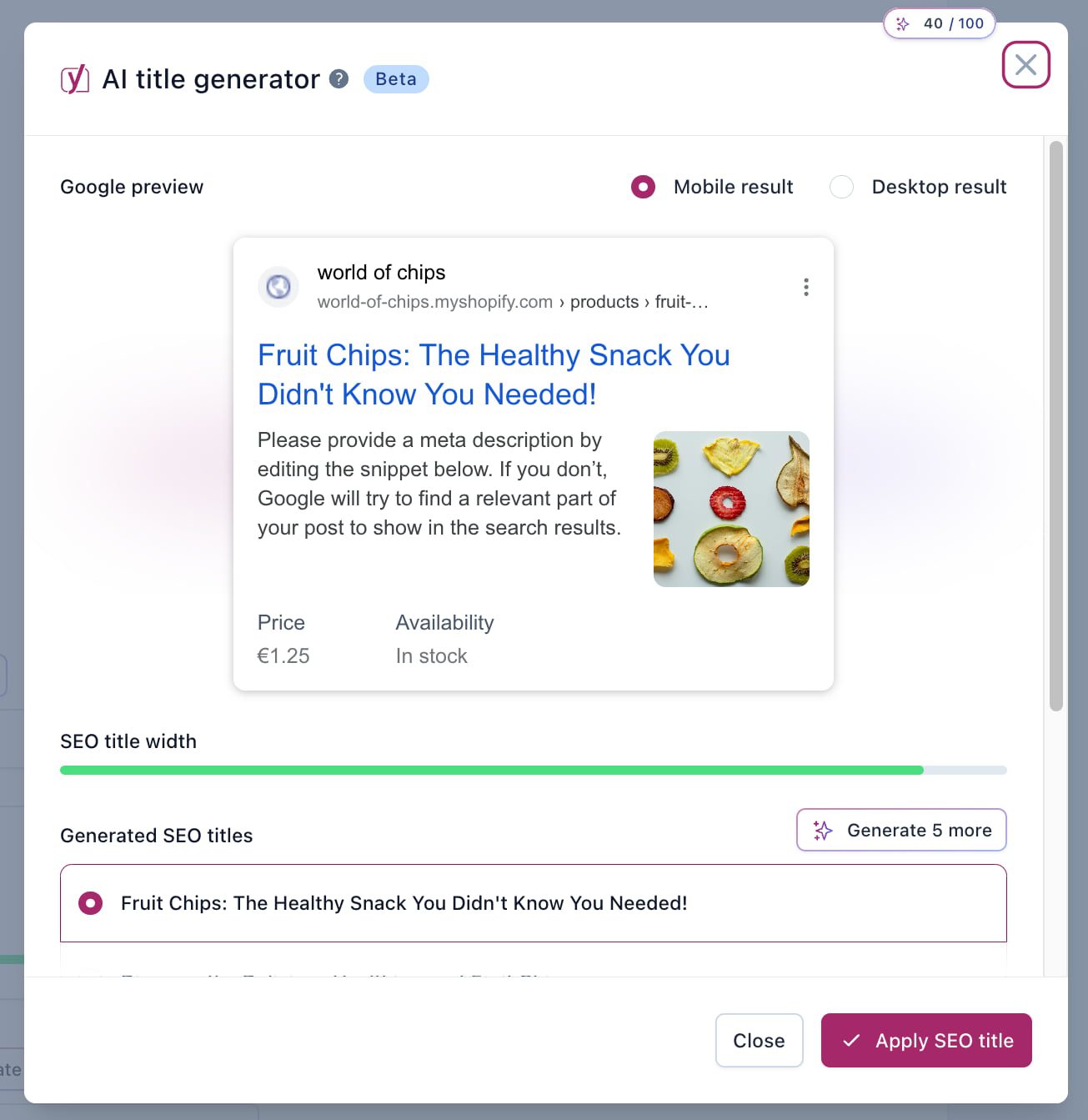
Once you have optimized your products or pages, scroll down to the Yoast SEO interface’s Title and Meta Description section. Here, you’ll notice a purple button with a sparkle icon: Generate Shopify SEO title or Generate Shopify Meta Description, depending on which you are looking for. Clicking the button will open a modal that shows the Search Appearance preview. It will also show five suggestions for titles or meta descriptions it generated. The AI analyzes your product details, keywords, and user intent to create optimized content.

Carefully review the AI-generated titles and meta descriptions. Ensure they accurately reflect your product details and align with your brand voice. If you are not happy with the first five, hit the button again to have it generate more. Pick the one you are happy with. Make any necessary edits to tailor the content to your specific audience or to highlight unique selling points.

Once you are satisfied with the content, save the changes. Then, track the performance of the updated titles and descriptions using tools like Google Analytics or Shopify analytics tools to assess improvements in CTR and traffic.

It’s now easy for Shopify merchants to improve their SEO in just a few steps — all thanks to AI. These tools can help you aim for greater visibility and more effective engagement with your potential customers.

Conclusion

Titles and meta descriptions are often the first things consumers see from your Shopify store. Optimizing them properly increases visibility and engagement! Yoast SEO for Shopify now makes that process a lot easier. Adopt our AI tools to enhance your SEO strategies and improve your online store’s performance.

Coming up next!

Ad Copy Tactics Backed By Study Of Over 1 Million Google Ads via @sejournal, @navahf

Mastering effective ad copy is crucial for achieving success with Google Ads.

Yet, the PPC landscape can make it challenging to discern which optimization techniques truly yield results.

Although various perspectives exist on optimizing ads, few are substantiated by comprehensive data. A recent study from Optmyzr attempted to address this.

The goal isn’t to promote or dissuade any specific method but to provide a clearer understanding of how different creative decisions impact your campaigns.

Use the data to help you identify higher profit probability opportunities.

Methodology And Data Scope

The Optmyzr study analyzed data from over 22,000 Google Ads accounts that have been active for at least 90 days with a minimum monthly spend of $1,500.

Across more than a million ads, we assessed Responsive Search Ads (RSAs), Expanded Text Ads (ETAs), and Demand Gen campaigns. Due to API limitations, we could not retrieve asset-level data for Performance Max campaigns.

Additionally, all monetary figures were converted to USD to standardize comparisons.

Key Questions Explored

To provide actionable insights, we focused on addressing the following questions:

  • Is there a correlation between Ad Strength and performance?
  • How do pinning assets impact ad performance?
  • Do ads written in title case or sentence case perform better?
  • How does creative length affect ad performance?
  • Can ETA strategies effectively translate to RSAs and Demand Gen ads?

As we evaluated the results, it’s important to note that our data set represents advanced marketers.

This means there may be selection bias, and these insights might differ in a broader advertiser pool with varying levels of experience.

The Relationship Between Ad Strength And Performance

Google explicitly states that Ad Strength is a tool designed to guide ad optimization rather than act as a ranking factor.

Despite this, marketers often hold mixed opinions about its usefulness, as its role in ad performance appears inconsistent.

data for rsa ad strengthImage from author, September 2024

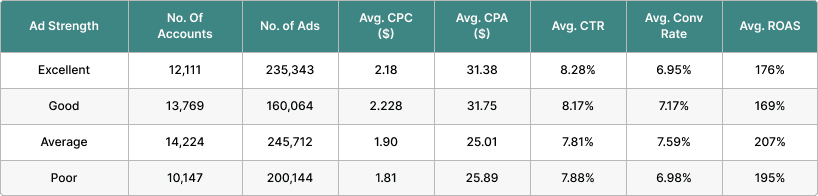
Our data corroborates this skepticism. Ads labeled with an “average” Ad Strength score outperformed those with “good” or “excellent” scores in key metrics like CPA, conversion rate, and ROAS.

This disparity is particularly evident in RSAs, where the ROAS tends to decrease sharply when moving from “average” to “good,” with only a marginal increase when advancing to “excellent.”

data for demand gen ad strengthScreenshot from author, September 2024

Interestingly, Demand Gen ads also showed a stronger performance with an “average” Ad Strength, except for ROAS.

The metrics for conversion rates in Demand Gen and RSAs were notably similar, which is surprising since Demand Gen ads are typically designed for awareness, while RSAs focus on driving transactions.

Key Takeaways:

  • Ad Strength doesn’t reliably correlate with performance, so it shouldn’t be a primary metric for assessing your ads.
  • Most ads with “poor” or “average” Ad Strength labels perform well by standard advertising KPIs.
  • “Good” or “excellent” Ad Strength labels do not guarantee better performance.

How Does Pinning Affect Ad Performance?

Pinning refers to locking specific assets like headlines or descriptions in fixed positions within the ad. This technique became common with RSAs, but there’s ongoing debate about its efficacy.

Some advertisers advocate for pinning all assets to replicate the control offered by ETAs, while others prefer to let Google optimize placements automatically.

data on pinningImage from author, September 2024

Our data suggests that pinning some, but not all, assets offers the most balanced results in terms of CPA, ROAS, and CPC. However, ads where all assets are pinned achieve the highest relevance in terms of CTR.

Still, this marginally higher CTR doesn’t necessarily translate into better conversion metrics. Ads with unpinned or partially pinned assets generally perform better in terms of conversion rates and cost-based metrics.

Key Takeaways:

  • Selective pinning is optimal, offering a good balance between creative control and automation.
  • Fully pinned ads may increase CTR but tend to underperform in metrics like CPA and ROAS.
  • Advertisers should embrace RSAs, as they consistently outperform ETAs – even with fully pinned assets.

Title Case Vs. Sentence Case: Which Performs Better?

The choice between title case (“This Is a Title Case Sentence”) and sentence case (“This is a sentence case sentence”) is often a point of contention among advertisers.

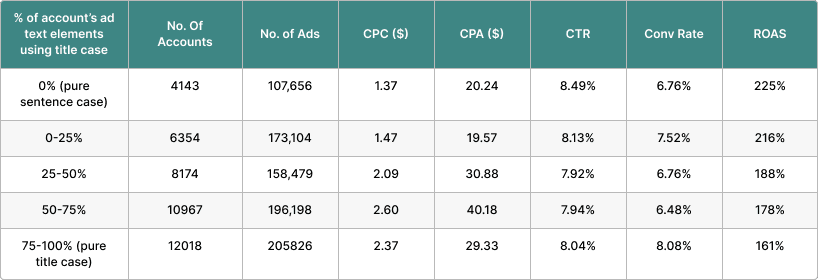
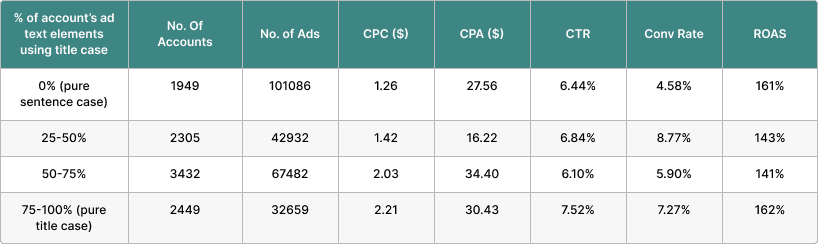
Our analysis revealed a clear trend: Ads using sentence case generally outperformed those in title case, particularly in RSAs and Demand Gen campaigns.

Data on title vs sentence casingImage from author, September 2024

(RSA Data)

(ETA Data)Image from author, September 2024

(ETA Data)

(Demand Gen)Image from author, September 2024

(Demand Gen)

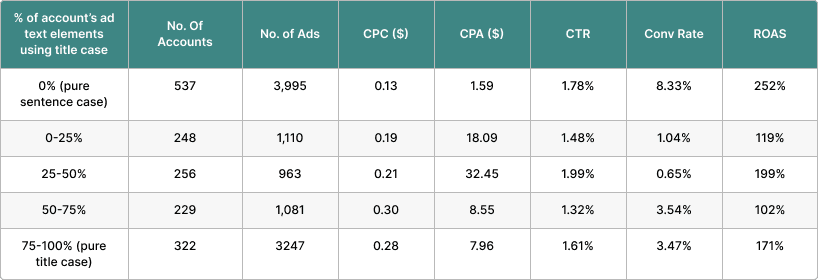
ROAS, in particular, showed a marked preference for sentence case across these ad types, suggesting that a more natural, conversational tone may resonate better with users.

Interestingly, many advertisers still use a mix of title and sentence case within the same account, which counters the traditional approach of maintaining consistency throughout the ad copy.

Key Takeaways:

  • Sentence case outperforms title case in RSAs and Demand Gen ads on most KPIs.
  • Including sentence case ads in your testing can improve performance, as it aligns more closely with organic results, which users perceive as higher quality.
  • Although ETAs perform slightly better with title case, sentence case is increasingly the preferred choice in modern ad formats.

The Impact Of Ad Length On Performance

Ad copy, particularly for Google Ads, requires brevity without sacrificing impact.

We analyzed the effects of character count on ad performance, grouping ads by the length of headlines and descriptions.

rsa headline character countImage from author, September 2024
RSA description lengthImage from author, September 2024

(RSA Data)

ETA dataImage from author, September 2024
Image from author, September 2024

(ETA Data)

creative length demand genImage from author, September 2024
Image from author, September 2024

(Demand Gen Data)

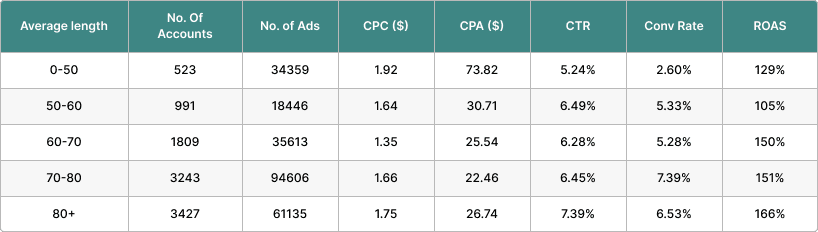
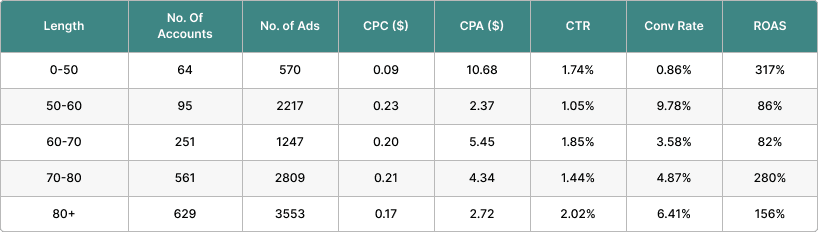
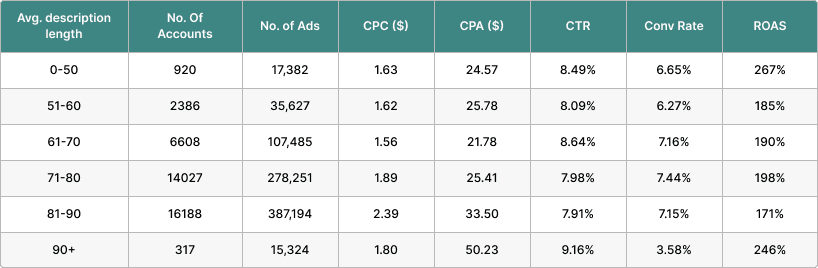
Interestingly, shorter headlines tend to outperform longer ones in CTR and conversion rates, while descriptions benefit from moderate length.

Ads that tried to maximize character counts by using dynamic keyword insertion (DKI) or customizers often saw no significant performance improvement.

Moreover, applying ETA strategies to RSAs proved largely ineffective.

In almost all cases, advertisers who carried over ETA tactics to RSAs saw a decline in performance, likely because of how Google dynamically assembles ad components for display.

Key Takeaways:

  • Shorter headlines lead to better performance, especially in RSAs.
  • Focus on concise, impactful messaging instead of trying to fill every available character.
  • ETA tactics do not translate well to RSAs, and attempting to replicate them can hurt performance.

Final Thoughts On Ad Optimizations

In summary, several key insights emerge from this analysis.

First, Ad Strength should not be your primary focus when assessing performance. Instead, concentrate on creating relevant, engaging ad copy tailored to your target audience.

Additionally, pinning assets should be a strategic, creative decision rather than a hard rule, and advertisers should incorporate sentence case into their testing for RSAs and Demand Gen ads.

Finally, focus on quality over quantity in ad copy length, as longer ads do not always equate to better results.

By refining these elements of your ads, you can drive better ROI and adapt to the evolving landscape of Google Ads.

Read the full Ad Strength & Creative Study from Optmyzr.

More resources: 


Featured Image: Sammby/Shutterstock
2024 Climate Tech Companies to Watch: First Solar and its advanced solar panels

First Solar is expanding production of its thin-film solar cells and opening new factories to meet a surge of demand. Meanwhile, it’s investing in perovskites—tiny crystalline materials that many view as a key solar technology of the future. 

The world needs more electricity than ever, as the AI boom puts intense demand on data centers and more heat waves increase the use of air-conditioning. To reduce emissions and keep global warming in check, a larger share of that electricity must come from renewables. 

Much of the growth in renewables comes from solar. And First Solar is one of the largest manufacturers of solar panels in the US, which is the world’s second-largest solar market after China. The company is benefiting from US tariffs on foreign-made solar panels and tax credits made available through the Inflation Reduction Act. 

Today, Chinese firms produce the vast majority of the world’s solar panels. Most build cells that incorporate a layer of silicon to absorb the sun’s light and awaken electrons within, which then flow out as current. Instead of silicon, First Solar’s cells rely on a thin film made from two other elements: cadmium and tellurium. These cells can be produced more quickly than silicon cells, using less energy and water. 

But there’s still room for improvement in the cells’ performance. Today’s best silicon solar panels convert roughly 25% of the sun’s energy into electricity, and cadmium telluride tends to lag behind that. To boost efficiency, First Solar is now looking to incorporate a new class of materials called perovskites into its cells. These tiny crystals absorb different wavelengths of light from those absorbed by silicon or cadmium telluride. Cells that add perovskites to the mix—known as perovskite tandem solar cells—could potentially convert even more of the sun’s energy into electricity. 

First Solar is among a handful of companies exploring how to layer these crystals into commercial solar cells to improve performance. Last year it acquired a firm called Evolar, a leader in thin-film and perovskite research, to further this aim. 


Key indicators

  • Industry: Renewable energy 
  • Founded: 1999
  • Headquarters: Tempe, Arizona, USA
  • Notable fact: First Solar’s backlog of orders totals 76 gigawatts and stretches out to 2030.

Potential for impact

Globally, solar energy accounted for more than three times as much new capacity for electricity generation as wind in 2023, according to the International Energy Agency. There are a few reasons why—the price of panels has dropped dramatically in the past 20 years as production ramped up, and they’re relatively easy to install and maintain. 

Solar’s future looks just as bright—global solar capacity is expected to reach nearly 2,000 terawatt-hours this year, and the IEA says we could see it quadruple by the end of the decade. In the US, First Solar’s expanding production and its recent investments into perovskites will shape the solar market for years to come. 

Caveats 

One of the biggest obstacles to bringing more utility-scale solar plants online in the US is hooking these projects up to the grid once they’re built. The federal agency that approves grid interconnections has a backlog of requests. Right now it takes about five years, on average, for a new solar plant to open. Recent reforms aim to make this process faster, but their impact is still unclear. 

Compounding this problem is a shortage of transformers, which step the voltage of electricity up or down; these are crucial to managing the flow of clean energy across the grid. And there are siting challenges, since developers must obtain permits and some community groups oppose large installations. First Solar’s customers are overwhelmingly based in the US and include developers of new solar projects that face all these issues, which could limit the company’s growth.

The fate of the US solar industry is strongly influenced by domestic policy, and the US presidential election could affect First Solar’s expansion plans in a few ways (even if tax credits to US manufacturers have enjoyed broad bipartisan support). Though it seems unlikely that the IRA would be repealed, it’s possible that a new administration could amend parts of it. 

The new president could impose higher tariffs and place more restrictions on imports. First Solar has publicly supported such tariffs—which critics blame for the high price of US panels. Or the president could lower tariffs and decrease import restrictions. Uncertainty on policy matters could make developers less willing to place new orders until a new administration is in place. 

And there’s no guarantee that the company can make tandem cells work. Perovskites are notoriously unstable and break down in the sun—rather inconvenient for a solar material. First Solar will need to find new ways to produce and package them at scale, and prove to customers that these panels will work reliably for years once installed. 

Finally, though First Solar’s panels avoid concerns about forced labor in the supply chain for silicon produced in China, such problems have also occurred in the company’s own supply chain

Next steps

Later this year, First Solar will begin producing miniature versions of tandem solar panels at a factory in Ohio. If these panels perform well in tests, the company will manufacture full-size prototypes at its new R&D center nearby.  

Meanwhile, First Solar is building new manufacturing facilities to expand production of its cadmium telluride panels. The company opened its first factory in India earlier this year and now manufactures in four countries—India, the US, Malaysia, and Vietnam. 

In the US, First Solar just opened a new plant in Alabama, with another to follow in Louisiana in 2025. By 2027, the company expects to have more than 25 gigawatts of annual manufacturing capacity—more than the total capacity of new utility-scale US solar installed last year. 

Explore the 2024 list of 15 Climate Tech Companies to Watch.