We finally have a definition for open-source AI

Open-source AI is everywhere right now. The problem is, no one agrees on what it actually is. Now we may finally have an answer. The Open Source Initiative (OSI), the self-appointed arbiters of what it means to be open source, has released a new definition, which it hopes will help lawmakers develop regulations to protect consumers from AI risks. 

Though OSI has published much about what constitutes open-source technology in other fields, this marks its first attempt to define the term for AI models. It asked a 70-person group of researchers, lawyers, policymakers, and activists, as well as representatives from big tech companies like Meta, Google, and Amazon, to come up with the working definition. 

According to the group, an open-source AI system can be used for any purpose without securing permission, and researchers should be able to inspect its components and study how the system works.

It should also be possible to modify the system for any purpose—including to change its output—and to share it with others to use, with or without modifications, for any purpose. In addition, the standard attempts to define a level of transparency for a given model’s training data, source code, and weights. 

The previous lack of an open-source standard presented a problem. Although we know that the decisions of OpenAI and Anthropic to keep their models, data sets, and algorithms secret makes their AI closed source, some experts argue that Meta and Google’s freely accessible models, which are open to anyone to inspect and adapt, aren’t truly open source either, because of licenses that restrict what users can do with the models and because the training data sets aren’t made public. Meta, Google, and OpenAI have been contacted for their response to the new definition but did not reply before publication.

“Companies have been known to misuse the term when marketing their models,” says Avijit Ghosh, an applied policy researcher at Hugging Face, a platform for building and sharing AI models. Describing models as open source may cause them to be perceived as more trustworthy, even if researchers aren’t able to independently investigate whether they really are open source.

Ayah Bdeir, a senior advisor to Mozilla and a participant in OSI’s process, says certain parts of the open-source definition were relatively easy to agree upon, including the need to reveal model weights (the parameters that help determine how an AI model generates an output). Other parts of the deliberations were more contentious, particularly the question of how public training data should be.

The lack of transparency about where training data comes from has led to innumerable lawsuits against big AI companies, from makers of large language models like OpenAI to music generators like Suno, which do not disclose much about their training sets beyond saying they contain “publicly accessible information.” In response, some advocates say that open-source models should disclose all their training sets, a standard that Bdeir says would be difficult to enforce because of issues like copyright and data ownership. 

Ultimately, the new definition requires that open-source models provide information about the training data to the extent that “a skilled person can recreate a substantially equivalent system using the same or similar data.” It’s not a blanket requirement to share all training data sets, but it also goes further than what many proprietary models or even ostensibly open-source models do today. It’s a compromise.

“Insisting on an ideologically pristine kind of gold standard that actually will not effectively be met by anybody ends up backfiring,” Bdeir says. She adds that OSI is planning some sort of enforcement mechanism, which will flag models that are described as open source but do not meet its definition. It also plans to release a list of AI models that do meet the new definition. Though none are confirmed, the handful of models that Bdeir told MIT Technology Review are expected to land on the list are relatively small names, including Pythia by Eleuther, OLMo by Ai2, and models by the open-source collective LLM360.

Andrew Ng’s new model lets you play around with solar geoengineering to see what would happen

AI pioneer Andrew Ng has released a simple online tool that allows anyone to tinker with the dials of a solar geoengineering model, exploring what might happen if nations attempt to counteract climate change by spraying reflective particles into the atmosphere.

The concept of solar geoengineering was born from the realization that the planet has cooled in the months following massive volcanic eruptions, including one that occurred in 1991, when Mt. Pinatubo blasted some 20 million tons of sulfur dioxide into the stratosphere. But critics fear that deliberately releasing such materials could harm certain regions of the world, discourage efforts to cut greenhouse-gas emissions, or spark conflicts between nations, among other counterproductive consequences.

The goal of Ng’s emulator, called Planet Parasol, is to invite more people to think about solar geoengineering, explore the potential trade-offs involved in such interventions, and use the results to discuss and debate our options for climate action. The tool, developed in partnership with researchers at Cornell, the University of California, San Diego, and other institutions, also highlights how AI could help advance our understanding of solar geoengineering. 

The current version is bare-bones. It allows users to select different emissions scenarios and various quantities of particles that would be released each year, from 25% of a Pinatubo eruption to 125%. 

Planet Parasol then displays a pair of diverging lines that represent warming levels globally through 2100. One shows the steady rise in temperatures that would occur without solar geoengineering, and the other indicates how much warming could be reduced under your selected scenario. The model can also highlight regional temperature differences on heat maps.

You can also scribble your own rising, falling, or squiggling line representing different levels of intervention across the decades to see what might happen as reflective aerosols are released.

I tried to simulate what’s known as the “termination shock” scenario, exploring how much temperatures would rise if, for some reason, the world had to suddenly halt or cut back on solar geoengineering after using it at high levels. The sudden surge of warming that could occur afterward is often cited as a risk of geoengineering. The model projects that global temperatures would quickly rise over the following years, though they might take several decades to fully rebound to the curve they would have been on if the nations in this simulation hadn’t conducted such an intervention in the first place. 

To be clear, this is an exaggerated scenario, in which I maxed out the warming and the geoengineering. No one is proposing anything like this. I was playing around to see what would happen because, well, that’s what an emulator lets you do.

You can give it a try yourself here

Emulators are effectively stripped-down climate models. They’re not as precise, since they don’t simulate as many of the planet’s complex, interconnected processes. But they don’t require nearly as much time and computing power to run.

International negotiators and policymakers often use climate emulators, like En-ROADS, to get a quick, rough sense of the impact that potential rules or commitments on greenhouse-gas emissions could have. 

The Parasol team wanted to develop a similar tool specifically to allow people to evaluate the potential effects of various solar geoengineering scenarios, says Daniele Visioni, a climate scientist focused on solar geoengineering at Cornell, who contributed to Planet Parasol (as well as an earlier emulator).

Climate models are steadily becoming more powerful, simulating more Earth system processes at higher resolutions, and spitting out more and more information as they do. AI is well suited to help draw meaning and understanding from that data. It’s getting ever better at spotting patterns within huge data sets and predicting outcomes based on them.

Ng’s machine-learning group at Stanford has applied AI to a growing list of climate-related subjects. Among other projects, it has developed tools to identify sources of methane emissions, recognize the drivers of deforestation, and forecast the availability of solar energy. Ng also helps oversee the AI for Climate Change bootcamp at the university.

But he says he’s been spending more and more of his time exploring the potential of solar geoengineering (sometimes referred to as solar radiation management, or SRM), given the threat of climate change and the role that AI can play in advancing the research field. 

There are “many things one can do—and that society broadly should work on—to help address climate change, first and foremost decarbonization,” he wrote in an email. “And SRM is where I’m focusing most of my climate-related efforts right now, given that this is one of the places where engineers and researchers can make a big difference (in addition to decarbonization).”

In a 2022 piece, Ng noted that AI could play several important roles in geoengineering research, including “autonomously piloting high-altitude drones” that would disperse reflective particles, modeling effects of geoengineering across specific regions, and optimizing techniques. 

Planet Parasol itself is built on top of another climate emulator, developed by researchers at the University of Leeds and the University of Oxford, that relies on the rules of physics to project global average temperatures under various scenarios. Ng’s team then harnessed machine learning to estimate the local cooling effects that could result from varying levels of solar geoengineering, says Jeremy Irvin, a grad student in his research group at Stanford.

One of the clearest limits of the current version of the tool, however, is that the results look dazzling. In the scenarios I tested, solar geoengineering cleanly cuts off the predicted rise in temperatures over the coming decades, which it may well do. 

That might lead the casual user of such a tool to conclude: Cool, let’s do it!

But even if solar geoengineering does help the world on average, it could still have negative effects, such as harming the protective ozone layer, disturbing regional rainfall patterns, undermining agriculture productivity, and changing the distribution of infectious diseases. 

None of that is incorporated in the results as yet. Plus, a climate emulator isn’t equipped to address deeply complex societal concerns. For instance, does researching such possibilities ease pressure to address the root causes of climate change? Can a tool that works at the scale of the planet ever be managed in a globally equitable way? Planet Parasol won’t be able to answer either of those questions.

Holly Buck, an environmental social scientist at the University at Buffalo and author of After Geoengineering, questioned the broader value of such a tool along similar lines.

In focus groups that she has conducted on the topic of solar geoengineering, she’s found that people easily grok the concept that it can curb warming, even without seeing the results plotted out in a model.

“They want to hear about what can go wrong, the impact on precipitation and extreme weather, who will control it, what it means existentially to fail to deal with the root of the problem, and so on,” she said in an email. “So it is hard to imagine who would actually use this and how.”

Visioni explained that the group did make a point of highlighting major challenges and concerns at the top of the page. He added that they intend to improve the tool over time in ways that will provide a fuller sense of the uncertainties, trade-offs, and regional impacts.

“This is hard, and I struggled a lot with your same observation,” Visioni wrote in an email. “But at the same time … I came to the conclusion it’s worth putting something down and work[ing] to improve it with user feedback, rather than wait until we have the perfect, nuanced version.”

As to the value of the tool, Irvin added that seeing the temperature reduction laid out clearly can make a “stronger, lasting impression.” 

“We are calling for more research to push the science forward about other areas of concern prior to potential implementation, and we hope the tool helps people understand the capabilities of SAI and support future research on it,” he said.

AI could be a game changer for people with disabilities

As a lifelong disabled person who constantly copes with multiple conditions, I have a natural tendency to view emerging technologies with skepticism. Most new things are built for the majority of people—in this case, people without disabilities—and the truth of the matter is there’s no guarantee I’ll have access to them.

There are certainly exceptions to the rule. A prime example is the iPhone. Although discrete accessibility software did not appear until the device’s third-generation model, in 2009, earlier generations were still revolutionary for me. After I’d spent years using flip phones with postage-stamp-size screens and hard-to-press buttons, the fact that the original iPhone had a relatively large screen and a touch-based UI was accessibility unto itself. 

AI could make these kinds of jumps in accessibility more common across a wide range of technologies. But you probably haven’t heard much about that possibility. While the New York Times sues OpenAI over ChatGPT’s scraping of its content and everyone ruminates over the ethics of AI tools, there seems to be less consideration of the good ChatGPT can do for people of various abilities. For someone with visual and motor delays, using ChatGPT to do research can be a lifesaver. Instead of trying to manage a dozen browser tabs with Google searches and other pertinent information, you can have ChatGPT collate everything into one space. Likewise, it’s highly plausible that artists who can’t draw in the conventional manner could use voice prompts to have Midjourney or Adobe Firefly create what they’re thinking of. That might be the only way for such a person to indulge an artistic passion. 

For those who, like me, are blind or have low vision, the ability to summon a ride on demand and go anywhere without imposing on anyone else for help is a huge deal.

Of course, data needs to be vetted for accuracy and gathered with permission—there are ample reasons to be wary of AI’s potential to serve up wrong or potentially harmful, ableist information about the disabled community. Still, it feels unappreciated (and underreported) that AI-based software can truly be an assistive technology, enabling people to do things they otherwise would be excluded from. AI could give a disabled person agency and autonomy. That’s the whole point of accessibility—freeing people in a society not designed for their needs.

The ability to automatically generate video captions and image descriptions provides additional examples of how automation can make computers and productivity technology more accessible. And more broadly, it’s hard not to be enthused about ever-burgeoning technologies like autonomous vehicles. Most tech journalists and other industry watchers are interested in self-driving cars for the sheer novelty, but the reality is the AI software behind vehicles like Waymo’s fleet of Jaguar SUVs is quite literally enabling many in the disability community to exert more agency over their transport. For those who, like me, are blind or have low vision, the ability to summon a ride on demand and go anywhere without imposing on anyone else for help is a huge deal. It’s not hard to envision a future in which, as the technology matures, autonomous vehicles are normalized to the point where blind people could buy their own cars. 

At the same time, AI is enabling serious advances in technology for people with limb differences. How exciting will it be, decades from now, to have synthetic arms and legs, hands or feet, that more or less function like the real things? Similarly, the team at Boston-based Tatum Robotics is combining hardware with AI to make communication more accessible for deaf-blind people: A robotic hand forms hand signs, or words in American Sign Language that can be read tactilely against the palm. Like autonomous vehicles, these applications have enormous potential to positively influence the everyday lives of countless people. All this goes far beyond mere chatbots.

It should be noted that disabled people historically have been among the earliest adopters of new technologies. AI is no different, yet public discourse routinely fails to meaningfully account for this. After all, AI plays to a computer’s greatest strength: automation. As time marches on, the way AI grows and evolves will be unmistakably and indelibly shaped by disabled people and our myriad needs and tolerances. It will offer us more access to information, to productivity, and most important, to society writ large.

Steven Aquino is a freelance tech journalist covering accessibility and assistive technologies. He is based in San Francisco.

The Download: simulating solar geoengineering, and AI-enabled accessibility

This is today’s edition of The Download, our weekday newsletter that provides a daily dose of what’s going on in the world of technology.

Andrew Ng’s new model lets you play around with solar geoengineering to see what would happen

AI pioneer Andrew Ng has released a simple online tool that allows anyone to tinker with the dials of a solar geoengineering model, exploring what might happen if nations attempt to counteract climate change by spraying reflective particles into the atmosphere.

The concept of solar geoengineering was born from the realization that the planet has cooled after massive volcanic eruptions. But critics fear that deliberately releasing such materials could harm certain regions of the world, discourage efforts to cut greenhouse-gas emissions, or spark conflicts between nations, among other bad outcomes.

The goal of Ng’s emulator, called Planet Parasol, is to invite more people to think about solar geoengineering, explore the potential trade-offs involved in such interventions, and use the results to discuss and debate our options for climate action. Read the full story.

—James Temple

AI could be a game changer for people with disabilities 

It’s normal, and maybe even wise, to view emerging technologies with skepticism. That’s especially true as most new things are built for the majority of people—which is to say people without disabilities. 

However, there are exceptions to the rule. A prime example is the iPhone, which had a relatively large screen and a touch-based UI. And now, it seems AI could make these kinds of jumps in accessibility even more common across a wider range of technologies. Read the full story

—Steven Aquino

This piece is from the next print issue of MIT Technology Review, which lands on Wednesday August 28. It’s dedicated to celebrating 125 years of the magazine and promises to be a great read. If you don’t already, subscribe now to get your copy.

Tech that measures our brainwaves is 100 years old. How will we be using it 100 years from now?

It’s 100 years this week since EEG (electroencephalography) was first used to measure electrical activity in a person’s brain. The finding was revolutionary. It helped people understand that epilepsy was a neurological disorder as opposed to a personality trait, for one thing (yes, really).

The fundamentals of EEG have not changed much over the last century—scientists and doctors still put electrodes on people’s heads to try to work out what’s going on inside their brains. But we’ve been able to do a lot more with the information that’s collected, from learning how we think to diagnosing brain and hearing disorders. So what more might we be able to do 100 years from now? Read our story to find out.

—Jessica Hamzelou 

This story is from The Checkup, our weekly newsletter all about the latest in health and biotech. Sign up to receive it in your inbox every Thursday.

The must-reads

I’ve combed the internet to find you today’s most fun/important/scary/fascinating stories about technology.

1 We aren’t ready for the creep of AI into our cameras
Capabilities embedded in the latest Google Pixel handset will further destroy our ability to believe what we see. (The Verge)
Is this really the direction we want to go in? (MIT Technology Review)

2 Kamala Harris’ campaign has joined Twitch
In a bid to keep attracting younger voters. (Wired $)
Meanwhile, Trump is launching some sort of crypto platform. (CNBC)
+ And people are having a lot of fun remixing JD Vance’s ‘Never Trump’ comment. (NYT $)

3 NASA is set to decide on Starliner’s return tomorrow
There’s a lot at stake, especially for the two astronauts it’s set to ferry back from the ISS. (Ars Technica)

4 Inside the crazy world of Palmer Luckey
Restless, controversial and clever, the tech billionaire is a difficult person to pin down. (Tablet)

5 There’s a new humanoid robot in town
Just one problem though: it doesn’t have legs (yet.) (IEEE Spectrum)
+ A new system lets robots sense human touch without artificial skin. (MIT Technology Review)

6 Can Ford wean America off its addiction to big cars?
It may be crucial to transitioning to electric vehicles, as heavier cars demand so much more of their batteries. (The Atlantic $)
Why bigger EVs aren’t always better. (MIT Technology Review)

7 Competition for copper is more intense than ever
Clean energy is pushing up demand, and people are stealing, fighting and even dying to meet it.  (Wired $)

8 Bored? Scrolling on your phone might make it worse
Maybe we should all try to get better at tolerating the discomfort of boredom every now and then. (WP $)
A dubious trend for non-traditional pets is taking off on TikTok. (The Guardian)

9 Hydrogel can learn to play Pong 
Researchers now plan to see what else it could do too—maybe even help control robots. (New Scientist $)

10 You can now cross-post from Instagram to Threads
Though watch out: content for one doesn’t always translate well to the other. (TechCrunch)
Instagram’s also adding a MySpace-esque ‘song on profile’ feature. (The Verge)

Quote of the day

“We chase the approval of strangers on our phones. We build all manner of walls and fences around ourselves and then wonder why we feel so alone.” 

 —Former US President Barack Obama offers his diagnosis of society’s ills to the Democratic National Convention, Politico reports.

The big story

This startup wants to find out if humans can have babies in space

storks flying through space wearing astronaut helmets with babies in bundles

MARIA JESUS CONTRERAS

October 2023

Despite the burgeoning interest in deep space exploration and settlement, we still know very little about what happens to our reproductive biology when we’re in orbit. Scientists have started to speculate on whether in vitro fertilization technology is possible beyond Earth. That’s something SpaceBorn United, a biotech startup, is seeking to pioneer. 

It plans to send a mini lab on a rocket into low Earth orbit, where in vitro fertilization, or IVF, will take place. If it succeeds, the company’s research could pave the way for future space settlements. Read the full story.

—Scott Solomon

We can still have nice things

A place for comfort, fun and distraction to brighten up your day. (Got any ideas? Drop me a line or tweet ’em at me.)

+ Metallica’s gig in Moscow in 1991 was one for the ages. You can watch the whole thing online too!
+ If you’ve been gripped by the need to do some summertime clearing out, here’s how minimalists do it.
+ Please resist taking a photo of your airport tray—you’re holding everyone up.
+ One of the most intense zombie video games has been given a makeover.

Overstock Relaunches: Q2 2024 Recap

Back in 2009 I queried a marketing contact at Overstock.com about possibly interviewing Patrick Byrne, the CEO. “I’ll ask him,” the contact replied.

An hour or two later, I received an email — from Patrick Byrne.

The dialog and subsequent interview are memorable. He involved no public relations personnel — unusual for a publicly traded company — and required no preparation.

“Should I send my questions in advance?” I asked.

“No,” he said. “Ask whatever you want.”

We published the interview in December of that year. I learned he held a Stanford PhD and funded the construction of schools worldwide. He shared in the interview helpful ecommerce tips on holiday selling and shipping and was generous with his time, utterly unpretentious.

None of that squared with the Patrick Byrne years afterward, the one embroiled in nonstop investor lawsuits, who reportedly romanced a Russian spy, and, yes, the man scheming in the Trump Oval Office.

Bed Bath & Beyond

Nonetheless, I think of Byrne and the years-ago interview when Overstock makes the news, such as last year when it purchased Bed Bath & Beyond, the retail chain, out of bankruptcy.

Byrne had long since left the company. His successors evidently sought a post-pandemic reset and paid $21 million for whatever was left of the storied retailer. Thus began a disastrous chain of events.

  • June 2023: Purchased Bed Bath & Beyond.
  • October 2023: Rebranded “Overstock.com” to “BedBathAndBeyond.com.” Changed the corporate name to “Beyond, Inc.” and switched from the Nasdaq to the New York Stock Exchange with a new trading symbol of “BYON.”
  • February 2024: Posted 2023 net losses of $307.8 million, a company record, on revenue of $1.56 billion, a 20% year-over-year decline.
  • March 2024: Relaunched Overstock.com.

Q2 2024 Financials

By June 30, Beyond, Inc. operated two ecommerce sites, BedBathAndBeyond.com (housewares) and Overstock.com (discounted goods).

The Q2 financial statements do not segregate each site’s performance. Combined, the sites generated roughly $398 million of revenue for the quarter, a 5.7% decline from the previous year, with a net loss of approximately $43 million, a 42% improvement from the Q2 2023 loss of $74 million.

Beyond, Inc. acquired another bankrupt brand, Zulily, for $4.5 million in cash in March. Look for that retailer of women’s and children’s apparel to relaunch this fall, having ceased operations in December.

Beyond, Inc.’s stock price on August 22 was $11.02, a five-year low.

Google Confirms AI Overviews Affected By Core Updates via @sejournal, @MattGSouthern

In a recent LinkedIn exchange, Google’s Senior Search Analyst John Mueller confirmed that core algorithm updates impact the search engine’s AI-powered overviews.

This info gives us a clearer picture of how AI is being woven into Google’s search results.

Responding to a question on LinkedIn, Mueller stated:

“These are a part of search, and core updates affect search, so yes.”

This backs up what folks in the SEO industry have noticed—the sources used in AI overviews seem to change after major algorithm updates.

Background On AI Overviews

Google rolled out AI overviews in US search results a few months back.

These summaries use a special version of Google’s Gemini AI to generate answers at the top of search results. The AI pulls info from different websites and combines it into a short, easy-to-read overview.

The Impact Of Core Updates

Core updates are broad changes to Google’s search algorithms and systems, typically rolled out several times a year.

These updates are intended to improve the quality of search results by reassessing how content is evaluated and ranked.

Google’s most recent core update, launched on August 15, is still rolling out. The company advises waiting until the update is finished before analyzing the impact.

Looking Ahead

As Google keeps integrating AI into search, publishers need more clarity around how core algorithm updates impact these features.

Mueller’s confirmation helps, but there’s still a lot we don’t know. There are still many questions about what makes content show up in AI overviews and whether it’s different from what makes websites rank high in regular search results.


Featured Image: Veroniksha/Shutterstock

6 Ways Spammers Exploit Google With Reddit via @sejournal, @martinibuster

A search marketer named Lars Lofgren felt exasperated by the avalanche of spam hitting Reddit and decided to expose the tricks that spammers are using to exploit Google’s preference for ranking Reddit discussions.

Reddit’s Spam Problem

Lars wrote that the reason he decided to expose how spammers are exploiting Reddit was because he’s a Redditor who is appalled by how spammy Reddit has become which in turn is infecting how spammy Google’s search results have become.

I spoke with Lars by email and he explained his motivation:

“I’m in the SEO industry and I believe in producing great content. That’s always been what motivates me. Produce great content, make Google users happy, Google features my stuff, and everyone wins.

Starting last fall, Google has begun featuring Reddit everywhere. In theory, this can be good. Reddit has tons of authentic conversations. But it’s anonymous, not moderated well, and has no accountability. So great content across the internet is getting buried below spammy Reddit content.

I want to be able to search Google and reliably find great content again, not spam. And a lot of business owners that run great websites have had to do layoffs or even shut down their websites because of this.”

How Spammers Exploit Reddit

Lars wrote an article that exposes six ways that spammers are using Reddit to promote affiliate sites and getting rewarded by Google. In our discussion I asked him if links were commoditized on Reddit and he speculated that it wouldn’t surprise him.

“I wouldn’t be surprised at all if moderators are selling links. …I’d be shocked if it wasn’t happening somewhere on Reddit. Or a company could just buy the link outright, lots of companies do this with blog posts that rank.”

1. Become A Moderator

Moderators have the power to pin a comment to any post. If anyone objects to the spammy activity the moderators can simply ban the users and make them go away.

In our conversation, Lars explained how moderators spam their subreddits and why Google’s uncontrolled ranking of Reddit discussions has corrupted them:

“A moderator of a subreddit can publish a comment of their own to any post in their subreddit. Usually it’ll be a new comment that they make to the conversation. And then pin the comment to the very top of the conversation so everyone sees it.

They can’t modify comments from other users but they can pin any comment of their own. This moderation power is there for communicating to their community, like when a conversation gets too controversial and a moderator wants to slow it down.

Some moderators have realized that their subreddit is being featured for lucrative terms in Google. So they go looking for posts that rank, then pin comments in those posts with a link that makes them a lot of money personally.”

2. Find Posts That Google Ranks

Lars wrote that another tactic spammers use is to identify posts that Google is ranking and then add a new pinned post that contains an affiliate link. A pinned post is a post that’s permanently lodged at the beginning of a discussion. That ensures that it will have maximum exposure and engagement with users who visit Reddit from Google’s search results.

He writes:

“If you were a mod of that subreddit, you could go into that comment thread, add a new comment with your own affiliate link, then pin that comment to the top of the thread. And that’s EXACTLY what someone has done…”

3. Spam A Trusted Subreddit

The next technique doesn’t even involve becoming a mod. Lars described that a spammer just needs to find a subreddit that has a history of ranking in the SERPs. The next step is to create a topic. Lars suggests using a sock puppet to answer the question with a link.

As a moderator at WebmasterWorld for around 20 years, and a forum owner as well, I can confirm that that technique is an old one known as Tag Teaming. Tag Teaming is where a person posts a question then subsequently answers the question with a different account. That second account is called a sock puppet.

Successfully using sock puppets against a seasoned and determined moderator won’t work. But from my experience as a forum owner and a moderator, I know that most moderators are just enthusiasts and rarely have any idea when someone is abusing their forum.  So Lar’s insistence that spammers are using sock puppets is absolutely valid.

4. Create Engagement Bait

Another tactic that Lars exposes is about dropping a mention of a product or website in a Reddit discussion instead of a link. Spammers do this because it has a higher likelihood of surviving moderator scrutiny.

What spammers do is post a discussion that purposely inspires empathy and causes other Redditors to jump in with their advice and experiences. The key to this strategy is to use a sock puppet to post an answer early in the discussion so that when after it begins trending the post with the spam in it will rank higher.

Lars writes:

“Use all your Reddit accounts to pump up the conversation and get it trending. Once that’s done, the community should run with it.

If you hit an emotional pain really well and your product mention looks natural, the subreddit will go crazy. Everyone will jump in, empathize, offer their own suggestions, argue, upvote, the whole thing.”

There’s a similar strategy called Linkbaiting that uses emotional triggers to promote engagement. One of the legendary SEOs from the past, Todd Malicoat, wrote about these triggers 17 years ago (some of which he credited to other people for having invented them). Using emotionally triggering topics is an old but proven tactic.

5. Build A New Subreddit

Lars said that another spam tactic is to build their own subreddit, seed it with sock puppet conversations on topics that are a highly ranked in similar subreddits. Lars explained that Reddit’s recommendation engine will begin surfacing the spam posts to users interested in that topic which will then help the spammy subreddit grow so that the spammer can do whatever they want with it once it’s mature.

6. Aged Reddit Accounts Can Be Bought

Lars revealed that there is a market for aged Reddit member accounts with posting histories that can be purchased for as little as $150. This avoids having to create an army of sock puppets and building a posting history so that they appear to be legit accounts.

Everything Google Ranks Is A Commodity

I’ve been in SEO for twenty five years and one thing that never changes is that everything that Google ranks becomes a commodity. If it ranks then there are a legion of spammers and hackers who desire to exploit it. So it’s not surprising to me that spammers have worked out how to successfully exploit Reddit.

The spam situation is bad news for Google because now it has to police Reddit discussions to weed out the spam. Is Google up to the task?

Read the article by Lars Lofgren:

The Sleazy World of Reddit Marketing, Everything is Fake

Featured Image by Shutterstock/Luis Molinero

What Is Largest Contentful Paint: An Easy Explanation via @sejournal, @vahandev

Largest Contentful Paint (LCP) is a Google user experience metric integrated into ranking systems in 2021.

LCP is one of the three Core Web Vitals (CWV) metrics that track technical performance metrics that impact user experience.

Core Web Vitals exist paradoxically, with Google providing guidance highlighting their importance but downplaying their impact on rankings.

LCP, like the other CWV signals, is useful for diagnosing technical issues and ensuring your website meets a base level of functionality for users.

What Is Largest Contentful Paint?

LCP is a measurement of how long it takes for the main content of a page to download and be ready to be interacted with.

Specifically, the time it takes from page load initiation to the rendering of the largest image or block of text within the user viewport. Anything below the fold doesn’t count.

Images, video poster images, background images, and block-level text elements like paragraph tags are typical elements measured.

LCP consists of the following sub-metrics:

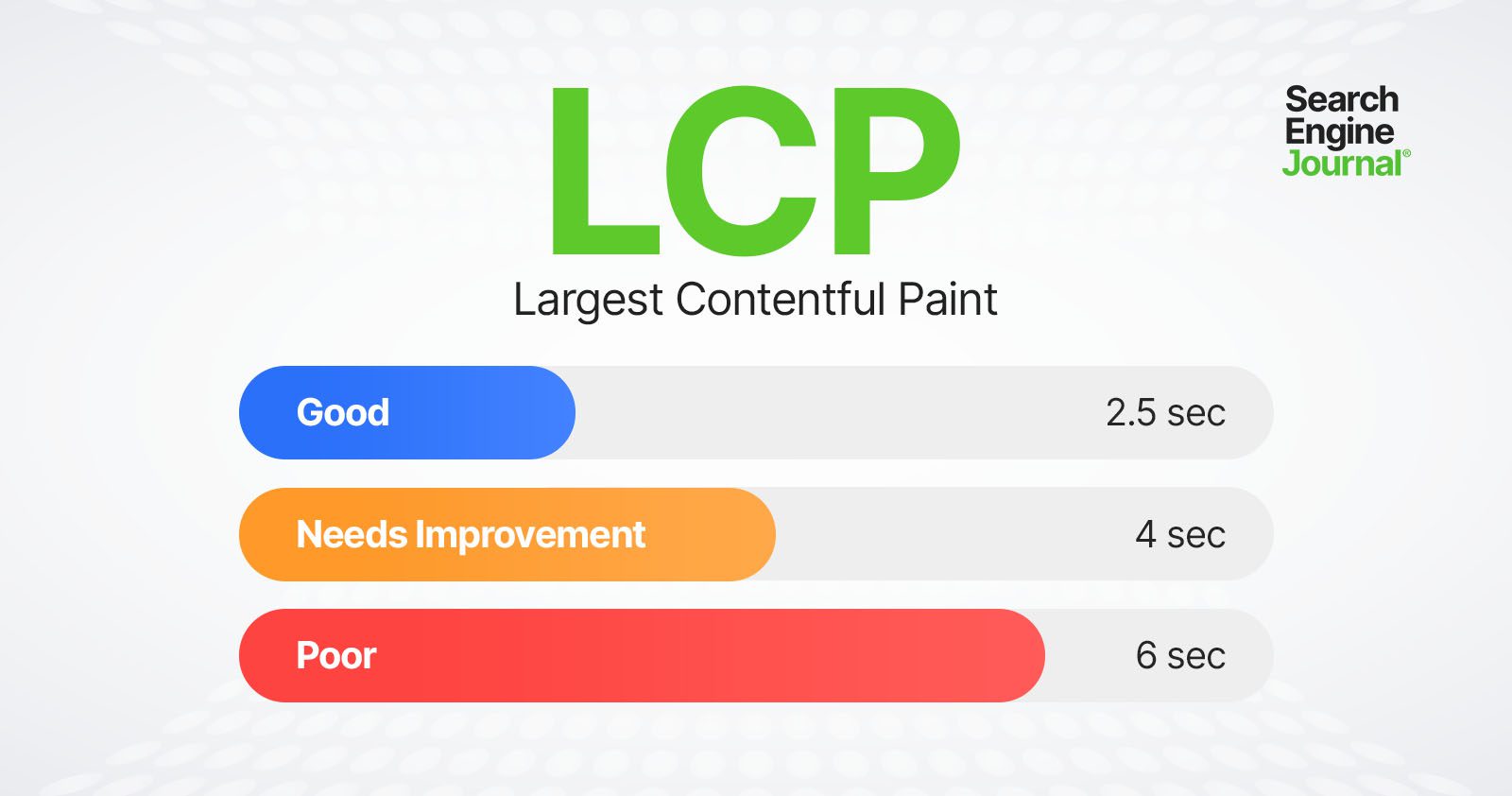
Optimizing for LCP means optimizing for each of these metrics, so it takes less than 2.5 seconds to load and display LCP resources.

Here is a threshold scale for your reference:

LCP thresholdsLCP thresholds

Let’s dive into what these sub-metrics mean and how you can improve.

Time To First Byte (TTFB)

TTFB is the server response time and measures the time it takes for the user’s browser to receive the first byte of data from your server. This includes DNS lookup time, the time it takes to process requests by server, and redirects.

Optimizing TTFB can significantly reduce the overall load time and improve LCP.

Server response time largely depends on:

  • Database queries.
  • CDN cache misses.
  • Inefficient server-side rendering.
  • Hosting.

Let’s review each:

1. Database Queries

If your response time is high, try to identify the source.

For example, it may be due to poorly optimized queries or a high volume of queries slowing down the server’s response time. If you have a MySQL database, you can log slow queries to find which queries are slow.

If you have a WordPress website, you can use the Query Monitor plugin to see how much time SQL queries take.

Other great tools are Blackfire or Newrelic, which do not depend on the CMS or stack you use, but require installation on your hosting/server.

2. CDN Cache Misses

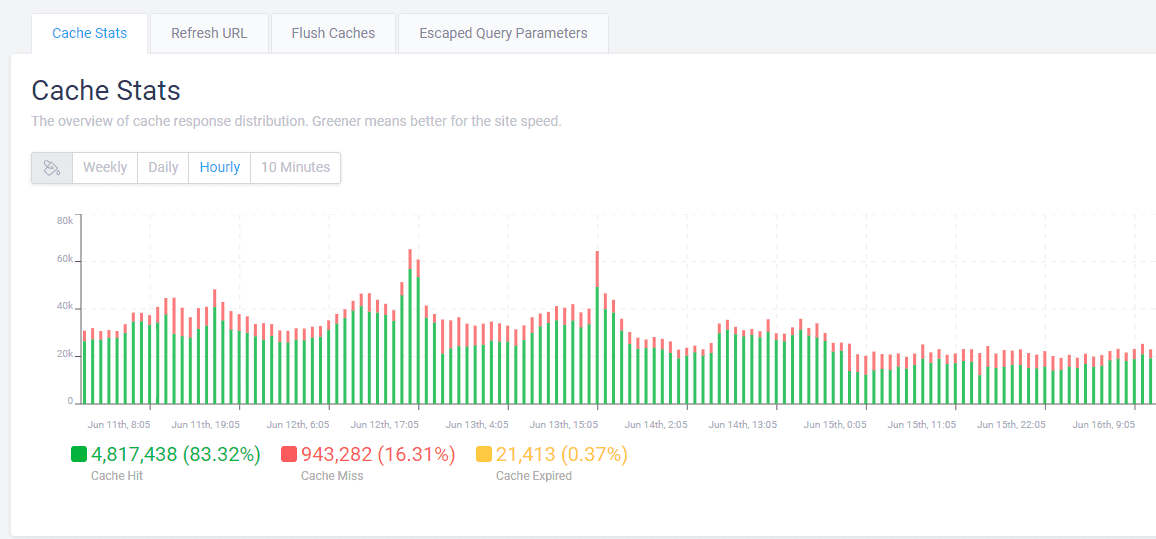
A CDN cache miss occurs when a requested resource is not found in the CDN’s cache, and the request is forwarded to fetch from the origin server. This process takes more time, leading to increased latency and longer load times for the end user.

Usually, your CDN provider has a report on how many cache misses you have.

Example of CDN cache reportExample of CDN cache report

If you observe a high percentage ( >10% ) of cache misses, you may need to contact your CDN provider or hosting support in case you have managed hosting with cache integrated to solve the issue.

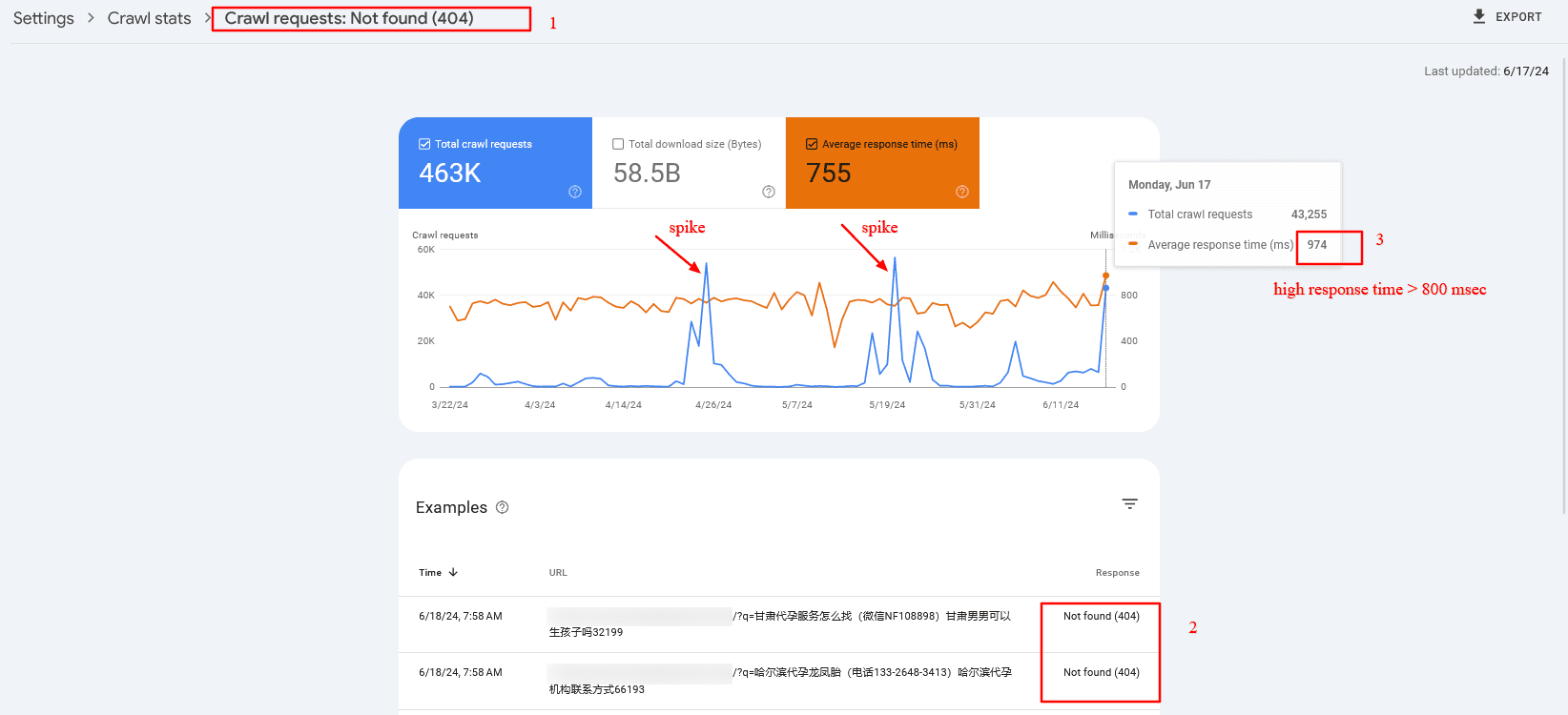
One reason that may cause cache misses is when you have a search spam attack.

For example, a dozen spammy domains link to your internal search pages with random spammy queries like [/?q=甘肃代], which are not cached because the search term is different each time. The issue is that Googlebot aggressively crawls them, which may cause high server response times and cache misses.

In that case, and overall, it is a good practice to block search or facets URLs via robots.txt. But once you block them via robots.txt, you may find those URLs to be indexed because they have backlinks from low-quality websites.

However, don’t be afraid. John Mueller said it would be cleared in time.

Here is a real-life example from the search console of high server response time (TTFB) caused by cache misses:

Crawl spike of 404 search pages which have high server response timeCrawl spike of 404 search pages that have high server response time

3. Inefficient Server Side Rendering

You may have certain components on your website that depend on third-party APIs.

For example, you’ve seen reads and shares numbers on SEJ’s articles. We fetch those numbers from different APIs, but instead of fetching them when a request is made to the server, we prefetch them and store them in our database for faster display.

Imagine if we connect to share count and GA4 APIs when a request is made to the server. Each request takes about 300-500 ms to execute, and we would add about ~1,000 ms delay due to inefficient server-side rendering. So, make sure your backend is optimized.

4. Hosting

Be aware that hosting is highly important for low TTFB. By choosing the right hosting, you may be able to reduce your TTFB by two to three times.

Choose hosting with CDN and caching integrated into the system. This will help you avoid purchasing a CDN separately and save time maintaining it.

So, investing in the right hosting will pay off.

Read more detailed guidance:

Now, let’s look into other metrics mentioned above that contribute to LCP.

Resource Load Delay

Resource load delay is the time it takes for the browser to locate and start downloading the LCP resource.

For example, if you have a background image on your hero section that requires CSS files to load to be identified, there will be a delay equal to the time the browser needs to download the CSS file to start downloading the LCP image.

In the case when the LCP element is a text block, this time is zero.

By optimizing how quickly these resources are identified and loaded, you can improve the time it takes to display critical content. One way to do this is to preload both CSS files and LCP images by setting fetchpriority=”high” to the image so it starts downloading the CSS file.


But a better approach – if you have enough control over the website – is to inline the critical CSS required for above the fold, so the browser doesn’t spend time downloading the CSS file. This saves bandwidth and will preload only the image.

Of course, it’s even better if you design webpages to avoid hero images or sliders, as those usually don’t add value, and users tend to scroll past them since they are distracting.

Another major factor contributing to load delay is redirects.

If you have external backlinks with redirects, there’s not much you can do. But you have control over your internal links, so try to find internal links with redirects, usually because of missing trailing slashes, non-WWW versions, or changed URLs, and replace them with actual destinations.

There are a number of technical SEO tools you can use to crawl your website and find redirects to be replaced.

Resource Load Duration

Resource load duration refers to the actual time spent downloading the LCP resource.

Even if the browser quickly finds and starts downloading resources, slow download speeds can still affect LCP negatively. It depends on the size of the resources, the server’s network connection speed, and the user’s network conditions.

You can reduce resource load duration by implementing:

  • WebP format.
  • Properly sized images (make the intrinsic size of the image match the visible size).
  • Load prioritization.
  • CDN.

Element Render Delay

Element render delay is the time it takes for the browser to process and render the LCP element.

This metric is influenced by the complexity of your HTML, CSS, and JavaScript.

Minimizing render-blocking resources and optimizing your code can help reduce this delay. However, it may happen that you have heavy JavaScript scripting running, which blocks the main thread, and the rendering of the LCP element is delayed until those tasks are completed.

Here is where low values of the Total Blocking Time (TBT) metric are important, as it measures the total time during which the main thread is blocked by long tasks on page load, indicating the presence of heavy scripts that can delay rendering and responsiveness.

One way you can improve not only load duration and delay but overall all CWV metrics when users navigate within your website is to implement speculation rules API for future navigations. By prerendering pages as users mouse over links or pages they will most likely navigate, you can make your pages load instantaneously.

Beware These Scoring “Gotchas”

All elements in the user’s screen (the viewport) are used to calculate LCP. That means that images rendered off-screen and then shifted into the layout, once rendered, may not count as part of the Largest Contentful Paint score.

On the opposite end, elements starting in the user viewport and then getting pushed off-screen may be counted as part of the LCP calculation.

How To Measure The LCP Score

There are two kinds of scoring tools. The first is called Field Tools, and the second is called Lab Tools.

Field tools are actual measurements of a site.

Lab tools give a virtual score based on a simulated crawl using algorithms that approximate Internet conditions that a typical mobile phone user might encounter.

Here is one way you can find LCP resources and measure the time to display them via DevTools > Performance report:

You can read more in our in-depth guide on how to measure CWV metrics, where you can learn how to troubleshoot not only LCP but other metrics altogether.

LCP Optimization Is A Much More In-Depth Subject

Improving LCP is a crucial step toward improving CVW, but it can be the most challenging CWV metric to optimize.

LCP consists of multiple layers of sub-metrics, each requiring a thorough understanding for effective optimization.

This guide has given you a basic idea of improving LCP, and the insights you’ve gained thus far will help you make significant improvements.

But there’s still more to learn. Optimizing each sub-metric is a nuanced science. Stay tuned, as we’ll publish in-depth guides dedicated to optimizing each sub-metric.

More resources:


Featured image credit: BestForBest/Shutterstock

WordPress Cache Plugin Vulnerability Affects +5 Million Websites via @sejournal, @martinibuster

Up to 5 million installations of the LiteSpeed Cache WordPress plugin are vulnerable to an exploit that allows hackers to gain administrator rights and upload malicious files and plugins

The vulnerability was first reported to Patchstack, a WordPress security company, which notified the plugin developer and waited until the vulnerability was patched before making a public announcement.

Patchstack founder Oliver Sild discussed this with Search Engine Journal and provided background information about how the vulnerability was discovered and how serious it is.

Sild shared:

“It was reported to through the Patchstack WordPress Bug Bounty program which offers bounties to security researchers who report vulnerabilities. The report qualified for a $14,400 USD bounty. We work directly with both the researcher and the plugin developer to ensure vulnerabilities get patched properly before public disclosure.

We’ve monitored the WordPress ecosystem for possible exploitation attempts since the beginning of August and so far there are no signs of mass-exploitation. But we do expect this to become exploited soon though.”

Asked how serious this vulnerability is, Sild responded:

“It’s a critical vulnerability, made particularly dangerous because of its large install base. Hackers are definitely looking into it as we speak.”

What Caused The Vulnerability?

According to Patchstack, the compromise arose because of a plugin feature that creates a temporary user that crawls the site in order to then create a cache of the web pages. A cache is a copy of web page resources that stored and delivered to browsers when they request a web page. A cache speeds up web pages by reducing the amount of times a server has to fetch from a database to serve web pages.

The technical explanation by Patchstack:

“The vulnerability exploits a user simulation feature in the plugin which is protected by a weak security hash that uses known values.

…Unfortunately, this security hash generation suffers from several problems that make its possible values known.”

Recommendation

Users of the LiteSpeed WordPress plugin are encouraged to update their sites immediately because hackers may be hunting down WordPress sites to exploit. The vulnerability was fixed in version 6.4.1 on August 19th.

Users of the Patchstack WordPress security solution receive instant mitigation of vulnerabilities. Patchstack is available in a free version and the paid version costs as little as $5/month.

Read more about the vulnerability:

Critical Privilege Escalation in LiteSpeed Cache Plugin Affecting 5+ Million Sites

Featured Image by Shutterstock/Asier Romero

How To Create Engaging Instagram Carousels via @sejournal, @annabellenyst

No Instagram strategy is complete without carousels.

Why? Because they’re powerful storytelling tools that generate outsized engagement among Instagram audiences.

But how do you make carousels effective?

Creating engaging carousels can help you increase your reach and engagement on Instagram and build a stronger relationship with your followers.

Plus, they’re easy to create if you have a plan and the right tips. Lucky for you, we have all the tips you need right here in this article.

Let’s get started.

Start With A Story

When designing an Instagram carousel, starting with a clear theme or story is crucial in helping you select images or videos that create a cohesive post.

Like any social media content, think about the message you want to convey and the content you want to showcase.

Consider your brand identity and target audience.

What content would resonate with your followers and align with your brand message? This could be a theme based on your industry, your brand values, or a particular aspect of your products or services.

For instance, if you’re a food blogger, you could create an Instagram carousel featuring a step-by-step recipe, with the first image being a shot of the finished dish.

Then, follow it up with images of each ingredient and each step in the cooking process. This way, your carousel tells a story while providing followers with value.

You can also showcase your products or services in action.

For example, if you run a fitness brand, create a carousel of exercises or workout routines featuring your products – like this apartment and travel-friendly workout routine from fitness influencer Kayla Itsines.

A fashion brand, on the other hand, might create a carousel showcasing different ways to style a particular item of clothing.

Another effective carousel format is to share behind-the-scenes content or personal stories, such as photos of your team at work, personal stories about your brand journey, or the inspiration behind your products.

This helps to humanize your brand and build a stronger connection with your followers.

Whatever you choose, the key is to pick a theme or story that is both relevant to your brand and interesting to your audience.

Content Order

The order in which you display your content is crucial to creating an effective Instagram carousel.

The first image or video is typically the most important, as it will set the tone for your content, capture your audience’s attention, and encourage them to swipe through the rest of the carousel.

It’s typically the first frame that people see (though occasionally, they may see the second frame first – so bear that in mind when creating your content).

Use subsequent images or videos to tell a story or provide additional context.

How you do this will depend on your carousel’s goal. What is the one thing you want a follower to “leave” with?

No matter what type of content order you choose, it should create a logical flow between slides, making it natural for audiences to swipe through.

Here are some examples of common Instagram carousel structures:

Narrative Structure

  • What It Is: The images are arranged logically to tell a story or share a message.
  • When To Use It: This method can be particularly effective for product launches or brand campaigns where you want to build excitement and engagement around a specific theme. It’s great for explaining specific concepts or breaking down stories linearly. This is why list style carousels are so popular.
  • Why You Use It: Narratives and stories get followers emotionally engaged in the content.

Here is a great example of narrative structure from Later.

Random Structure

  • What It Is: The images have no specific narrative or message.
  • When To Use It: This structure is ideal for showcasing various products or services or sharing behind-the-scenes content that doesn’t necessarily follow a specific sequence.
  • Why You Use It: Not only can a random structure be fun, but curiosity and spontaneity can be extremely helpful, particularly if you want to build up some buzz around an event.

This carousel from National Geographic is a nice example of a random structure.

Comparative Structure

Still trying to figure out how to present your images? Consider the visual appeal of the images and how they will look when viewed as a group.

You can alternate between different image types, such as close-ups and wide shots, or use consistent color schemes or filters to create a cohesive look and feel.

  • What It Is: The images are offered in pairs. Or half of the images will differ from the other half.
  • When To Use It: Comparative structure is excellent for demonstrating before-and-after, us-versus-competitors, or with-and-without.
  • Why You Use It: Choose this structure to show how your product solves a problem or emphasize the impact of an experience.

Here is an example of a comparative carousel showing before and after visuals from HGTV.

Use Visuals That Say The Right Thing

An engaging Instagram carousel starts with aesthetically appealing, eye-catching, high-quality images or videos. These will help grab your audience’s attention and encourage them to swipe through the entire carousel.

It’s important to choose visuals that have exceptional clarity and decent resolution, though you should also bear in mind that recent trends show audiences value authenticity over perfection.

Here’s an example of a carousel from Airbnb that leverages beautiful imagery to pique the attention of audiences.

You should also consider using consistent color schemes or filters. This will help create a cohesive sense of visual unity across the entire carousel and make sure your brand is present in the content.

In short, you want the carousel to feel like an experience, not just a collection of pictures.

Your Instagram carousel plan should also include the type of visuals you want to showcase in it.

Will you only have product images and videos? Would lifestyle shots, behind-the-scenes footage, or user-generated content (UGC) be more effective?

Another option is to mix up the type of content in each carousel to keep things interesting and varied.

You could alternate between videos and images and try out different approaches, but the key here is to choose visuals that align with your brand message and resonate with your audience.

Once you’ve selected your content, you can think more about the composition of the carousel itself and how you’ll order it. You might want to experiment with different layouts, such as grids or collages, to create a unique and striking post.

Finally, keep the context of your post in mind. Instagram users scroll quickly through their feeds, so you’ll need bold, bright colors or to incorporate text or graphics that interrupt this habit and stop them long enough to swipe and consume the content.

Text Overlays, Captions, And Music

Text, captions, and now even music are important aspects of creating engaging and effective Instagram carousel content.

These components work together to convey your message, build excitement around your products or services, and encourage your audience to take action.

Captions

First, keep your captions concise and engaging. You want to capture attention quickly and communicate your message efficiently, so use short, punchy sentences and clear language. If it makes sense, include some emojis to catch people’s eye.

Second, consider the tone of your captions and how they align with your brand identity.

If your brand is playful and lighthearted, your captions should be the same: fun, humorous language. Use an informative and educational tone if your brand is more serious or professional.

Third, use your captions to contextualize the story or experience you present in your images. This will help bring your audience along for the journey and encourage them to engage with your brand.

Finally, include a call to action (CTA) to increase engagement and drive more traffic to your website or other digital channels.

This could be as simple as encouraging your audience to swipe through the carousel, asking them a question, or prompting them to visit your website for more information.

Text Overlays

Your use of text goes beyond captions. Text overlays can be highly effective in adding context and additional information and can enhance the visual impact of your carousels.

Here are a few tips:

  • Choose a legible and visually pleasing font that matches your brand aesthetic. Remember that users will be viewing it on small mobile screens.
  • Keep your text concise and to the point. Instagram users scroll quickly through their feeds, so your text needs to be easy to digest and understand.
  • Only include essential information and ensure that each overlay only has one job. For example, to provide more information about a product or provide context to a narrative.
  • Ensure that overlay text doesn’t obscure important parts of your images and is visually balanced with the other elements in your carousel.

Don’t make the mistake of thinking of text overlays as extra ad space, however. Use them strategically to add value to your content.

For example, you may want to use text overlays to provide additional context or details about your products or services or a CTA that encourages your audience to engage with your brand.

Music

A newer feature to the platform, adding music to Instagram carousels has become a dynamic way to enhance engagement with your content.

We know that music can evoke emotions, set the tone, and add another layer of storytelling to your content. However, it bears mentioning that business accounts are typically more restricted in the songs that they can use.

Here are a few tips for effectively adding music to your carousels:

  • Choose music that aligns with the theme or message of the content within your carousel.
  • Leverage music that reflects your brand’s personality and tone.
  • Where possible, utilize music that can enhance the narrative of your carousel.
  • If you’re (legally) able to, engage your audience by including songs that are trending or popular.

By thoughtfully integrating elements like text, captions, and music, you can take your Instagram carousels to a whole new level and significantly enhance their performance and engagement.

Design Instagram Carousels With Mobile In Mind

Instagram is primarily a mobile app, so you must prep and design your content for mobile users.

If you’re designing an Instagram carousel featuring a long infographic, for example, break it down into several slides so that it’s easier for your audience to view on a mobile screen. You might also need to use larger text or adjust the font size.

But it’s more than that.

You should consider the quality of the images you’re using and how they will appear to a mobile viewer. Make sure that the resolution and specs fit with Instagram’s guidelines and that the details of the image will be viewable on mobile.

You may even want to consider arrows, buttons, ribbons, or other elements that run off the right side of the image to push users from one image to the next.

Conclusion

Once you’ve posted your Instagram carousel, engage with your followers by prompting them to like, comment, or share your post.

Encourage them to leave comments or questions about the product they see or the story you’ve presented.

Just remember to respond to these comments promptly and continue the conversation by answering questions or addressing concerns.

And if you follow the tips we’ve provided for you here, there will be many of them!

More resources:


Featured Image: Kaspars Grinvalds/Shutterstock