In the latest episode of Google’s Search Off The Record podcast, hosts John Mueller and Lizzi Sassman discussed “content decay”—the natural process by which online content becomes outdated or loses relevance over time.
While not a widely used term among SEO professionals, the concept raises questions about how websites should handle aging content that may contain obsolete information, broken links, or outdated references.
What Is Content Decay?
Mueller, a Search Advocate at Google, defines content decay as:
“[Content decay is] something where, when you look at reference material, it’s kind of by definition old. People wrote about it because they’ve studied it for a really long time. So it’s an old thing. But that doesn’t mean it’s no longer true or no longer useful.”
It’s worth noting Mueller was initially unfamiliar with the term:
“When I looked at it, it sounded like this was a known term, and I felt inadequate when I realized I had no idea what it actually meant, and I had to interpret what it probably means from the name.
Sassman, who oversees the Search Central website’s content, admitted she was also unfamiliar with content decay.
She stated:
“… it sounded a little bit negative … Like something’s probably wrong with the content. Probably it’s rotting or something has happened to it over time.”
After defining the term, the two dissected various approaches to handling content decay, using Google’s help documents as a case study.
Content Decay Not Necessarily A Bad Thing
Content decay isn’t, by definition, a bad thing.
Blog posts announcing past events or product changes may seem like sources of content decay.
However, Sassman advises keeping that content for historical accuracy.
Sassman gives an example, citing Google’s decision to keep pages containing the outdated term “Webmaster Tools.”
“If we went back and replaced everything where we said ‘Google Webmasters’ with ‘Search Console,’ it would be factually incorrect. Search Console didn’t exist at that point. It was Webmaster Tools.”
Avoiding User Confusion
According to Mueller, the challenge in dealing with content decay is “avoiding confusing people.”
Indicating when content is outdated, providing context around obsolete references, and sensible use of redirects can help mitigate potential confusion.
Mueller stated
“People come to our site for whatever reason, then we should make sure that they find information that’s helpful for them and that they understand the context. If something is old and they search for it, they should be able to recognize, ‘Oh, maybe I have to rethink what I wanted to do because what I was searching for doesn’t exist anymore or is completely different now.’”
No One-Size-Fits-All Solution
There are no easy solutions to content decay. You must thoughtfully evaluate aging content, understanding that some pieces warrant archiving while others remain valuable historical references despite age.
Listen to the full episode of Google’s podcast below:
Why SEJ Cares
The concept of “content decay” addresses a challenge all website owners face – how to manage and maintain content as it ages.
Dealing with outdated website content is essential to creating a positive user experience and building brand trust.
How This Can Help You
By examining Google’s approaches, this podcast episode offers the following takeaways:
There’s value in preserving old content for historical accuracy.
Consider updating old pages to indicate outdated advice or deprecated features.
Establish an auditing process for routinely evaluating aging content.
FAQ
What does “content decay” mean in the context of SEO?
Online content tends to become outdated or irrelevant over time. This can happen due to industry changes, shifts in user interests, or simply the passing of time.
In the context of SEO, outdated content impacts how useful and accurate the information is for users, which can negatively affect website traffic and search rankings.
To maintain a website’s credibility and performance in search results, SEO professionals need to identify and update or repurpose content that has become outdated.
Should all outdated content be removed from a website?
Not all old content needs to be deleted. It depends on what kind of content it is and why it was created. Content that shows past events, product changes, or uses outdated terms can be kept for historical accuracy.
Old content provides context and shows how a brand or industry has evolved over time. It’s important to consider value before removing, updating, or keeping old content.
What are the best practices to avoid user confusion with outdated content?
Website owners and SEO professionals should take the following steps to avoid confusing users with outdated content:
Show when content was published or note if the information has changed since it was created.
Add explanations around outdated references to explain why they may no longer be relevant.
Set up redirects to guide users to the most current information if the content has moved or been updated.
These strategies help people understand a page’s relevance and assist them in getting the most accurate information for their needs.
Featured Image: Screenshot from YouTube.com/GoogleSearchCentral, May 2024.
Eric Schmidt, former CEO of Google, said in an interview that Google’s mission is to organize the world’s information, not to provide blue links. Schmidt’s pragmatic statements seem to describe a future where websites are unnecessary and advertising is increasingly effective.
Answers Without Links Is A Good User Experience?
The ex-CEO’s prediction of the future of Google may seems to contradict statements by Google’s current CEO that assert that search and the web will continue to coexist as well as by Danny Sullivan who has many times said that a healthy web ecosystem is important to Google.
There are many actions taken by Google in the past that indicate that Eric Schmidt’s prediction fit perfectly with how Google has ranked sites in the past.
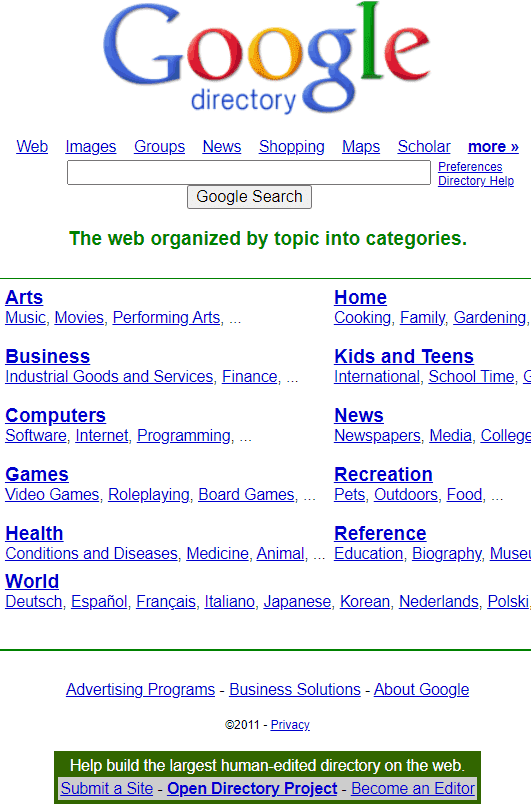
The early days of the web were navigated not just by search engines but by curated web directories that served as starting places for Internet users to go find information, hopping from link to link in a hyperlinked Internet. The idea was that hyperlinks was how users could find information.
Google Search not only ranked webpages from web directories, Google itself hosted a version of DMOZ, an open source web directory that was curated by thousands of volunteers much like Wikipedia is maintained by volunteer editors today.
But a day came when Google stopped ranking directories and the reason given was that it was a better user experience show answers and not links to pages with more links (this event is likely archived somewhere on the WebmasterWorld forum, it happened a long time ago).
Then there are Google’s answers for flight tracking, package tracking, stock quotes, the time and weather information that has zero links.
Example Of An Answer Without Links
Eric Schmidt’s assertion that Google will take advantage of AI to show answers fits into Google’s design principle that showing answers is a good user experience if it fully satisfies the query.
The only difference between the old days and now is that Google is that AI has (mostly) unlocked the ability to show answers without linking to any websites.
So it’s not far-fetched that Google may decide that showing answers is a good user experience, there is precedence for that approach.
AI Is Underhyped
Schmidt put forward the idea that AI is not overhyped but in fact is underhyped.
He observed:
“I hate to tell you but I think this stuff is underhyped not overhyped. Because the arrival of intelligence of a non-human form is really a big deal for the world.
It’s coming. It’s here. It’s about to happen. It happens in stages. …the reason I’m saying it’s underhyped is you’re seeing the future of reasoning, the future of human interaction, the future of research, the future of planning is being invented right now.
There’s something called infinite context windows, which means that you can — it’s like having an infinite short-term memory, which I certainly don’t have, where you can basically keep feeding it information and it keeps learning and changing.”
Eric Schmidt On The Future Of Search
The interviewer asked Schmidt about a future where AI answers questions without links to sources on the web.
The interviewer asked this question:
“In a world where the AI provides the answer, and doesn’t necessarily need to send you to 12 places where you’re going to go find it yourself… what happens to all of that?
Eric Schmidt answered:
“It’s pretty important to understand that Google is not about blue links, it’s about organizing the world’s information. What better tool than the arrival of AI to do that better.
Do you think you can monetize that? You betcha.”
Will Answers Without Links Happen?
It has to be reiterated that Eric Schmidt (LinkedIn profile) is no longer the CEO at Google or Executive Chairman & Technical Advisor at Alphabet (for four years now). His opinions may not reflect the current thinking within Google.
However it’s not unreasonable to speculate that maybe he is saying out loud what those within Google cannot officially discuss.
The most solid information we have now is that Google Search will continue to have links but that Google (and others like Apple) are moving ahead with AI assistants on mobile devices that can answer questions and perform tasks.
Whether you’re behind the wheel of a dealership, running a tire shop, or steering any other type of automotive business, mastering SEO remains an indispensable component of a successful marketing strategy in 2024.
Today’s automotive consumers are more connected and informed than ever.
Moreover, the preference for organic search results over paid advertisements remains strong, highlighting the critical importance of SEO in today’s digital-first consumer landscape.
However, staying up-to-date on Google’s search engine results page (SERP) and algorithm changes requires diligence.
To further illustrate this, consider these insights:
88% of potential car buyers now turn to digital channels to gather information.
Car buyers dedicate 14 hours and 39 minutes to online research and finding the perfect car for their needs.
95% of car shoppers checked social media platforms during their car-shopping journey.
81% of car shoppers find online activities improve their overall buying experience, citing both saving time (93%) and price transparency (valued by 78%) as key benefits.
Nearly half (46%) of car dealers surveyed made at least 9% of their sales through entirely online purchases.
Armed with these insights, let’s explore the top seven automotive SEO strategies for 2024, designed to put your business in the lead and drive it toward success.
1. Craft Compelling, Original Content And Leverage Rich Snippets
In SEO, content is still king. For automotive businesses, this means creating in-depth, informative content that engages and informs your audience.
Focus on valuable resources like blog posts, buying guides, and vehicle reviews that blend informative details with engaging storytelling.
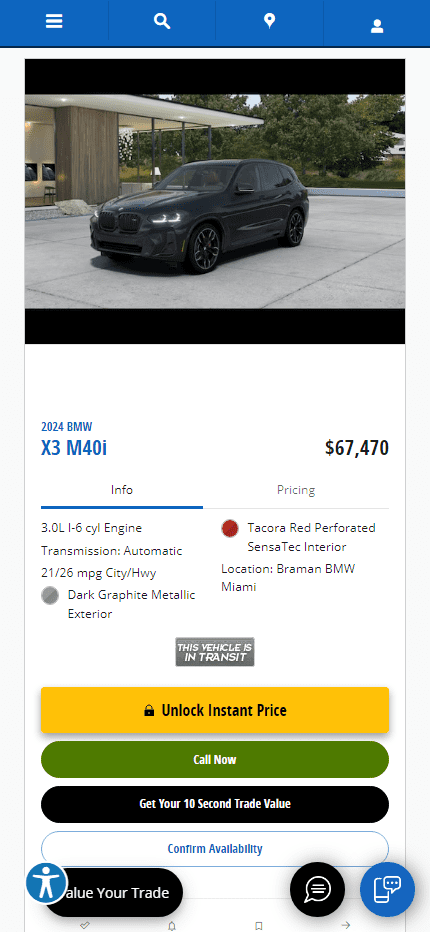
Here is a great example of more informational content from a dealership in Miami. They do an excellent job of incorporating CTA’s within the helpful content to funnel users to their selection of vehicles:
Image from bramanmiami.com, April 2024
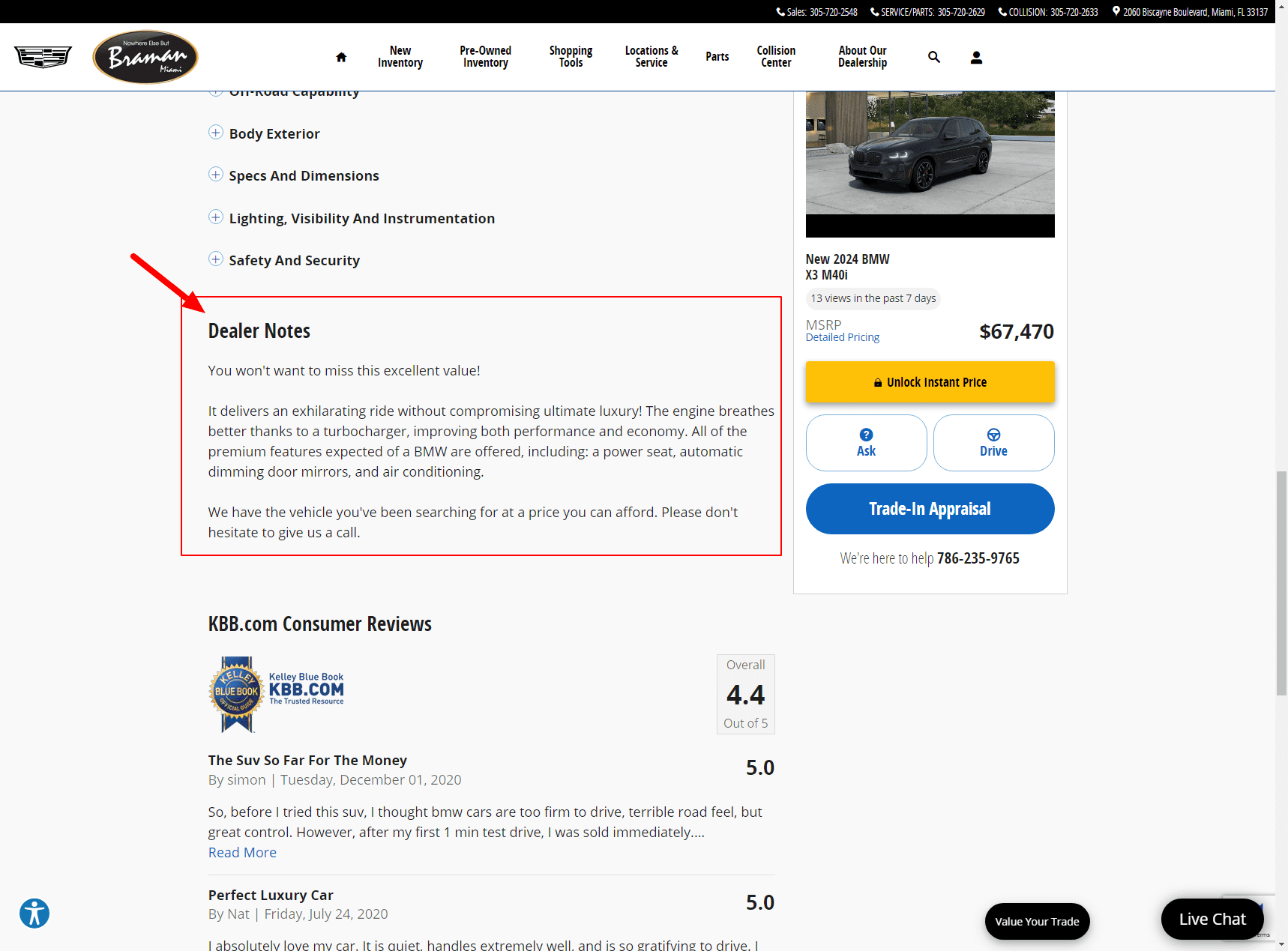
On individual car listing pages, they even add Dealer Notes to further add more uniqueness to their pages so it isn’t just a regurgitation of the manufacturer’s information:
Image from bramanmiami.com, April 2024
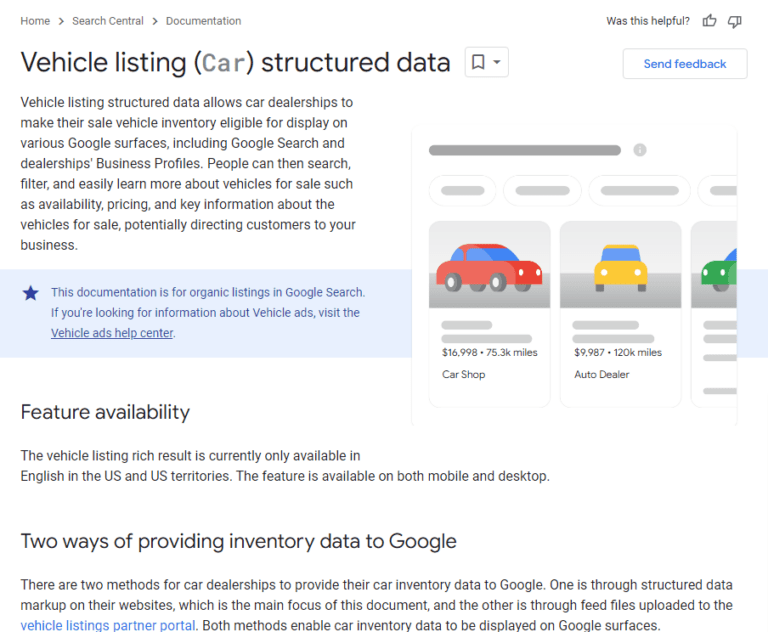
Rich snippets enhance your visibility in search results, providing a snapshot of your content’s value.
Implementing structured data markup also helps search engines understand and display your content more effectively, increasing the likelihood of clicks.
Screenshot from Google Search Central, February 2024
Video content has become an indispensable tool for businesses. It provides a dynamic platform to showcase vehicles, demonstrate features, and share customer testimonials.
A recent survey shows that, by leveraging video content, 86% of marketers experienced increased web traffic, and 87% saw a direct boost in sales.
As a brand, you should use this opportunity to embrace video SEO and amplify your visibility on search engines and social platforms.
Incorporate relevant keywords in video titles, descriptions, and tags to ensure your video aligns with search queries.
You may also use short, engaging videos that highlight your inventory’s unique selling points to captivate potential buyers and drive traffic to your site.
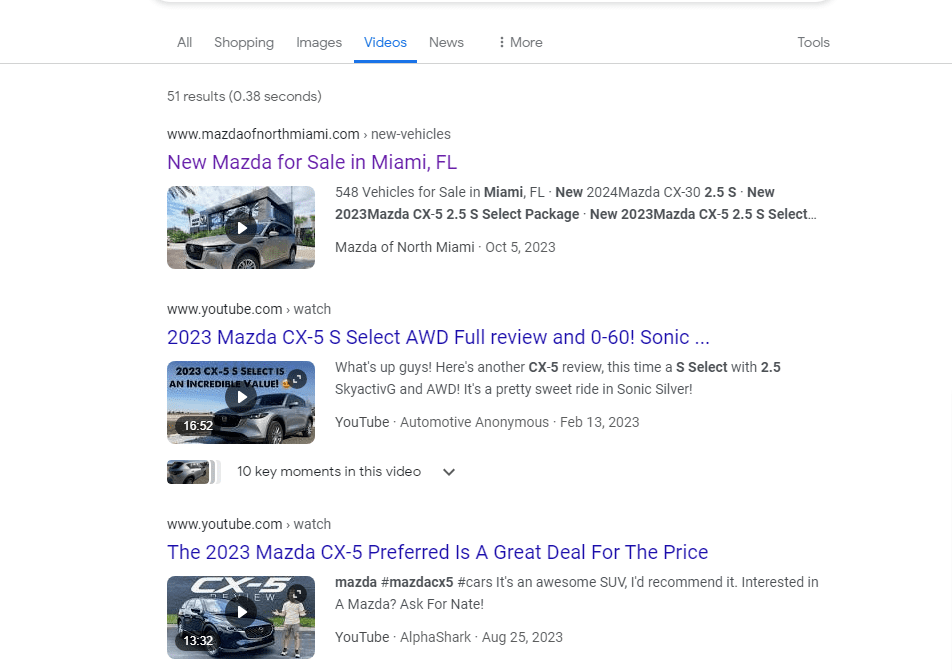
Look at this great example from Mazda of North Miami that leverages video on their car listing pages to show the car off to potential customers:
Image from mazdaofnorthmiami.com, April 2024
Even better, they marked up this page using structured data and are now benefitting from their listing page showing the video element in the SERPs which should only further improve their organic CTR:
With the majority of online searches now conducted on mobile devices, a mobile-optimized website is essential for SEO success.
Google’s mobile-first indexing means the mobile version of your site is the primary version Google considers for ranking.
Make sure your website is responsive, mobile-friendly, and intuitive. This is crucial for capturing the mobile audience.
This is a perfect example of how a dealership should incorporate a mobile-first design. They do an excellent job of showing the most pertinent information for a consumer to browse (pictures, specs, pricing, CTAs).
Strategically include local keywords in your website content and engage with local community events to enhance your visibility in local search results.
Also, testimonials and reviews act as powerful social proof. In automotive digital marketing, 82% of consumers turn to online reviews for local businesses.
To help future buyers feel confident in their choices, encourage satisfied customers to leave positive reviews about their experience.
Screenshot from search for [st louis car dealerships], Google, February 2024
5. Build Authority Through Strategic Link Building
Backlinks signal to search engines that your site is a credible and authoritative source of information.
Automotive businesses should aim to acquire high-quality backlinks from reputable automotive blogs, local business directories, and industry publications.
These backlinks not only improve your site’s SEO performance but also drive targeted traffic, enhancing your online visibility and reputation within the industry.
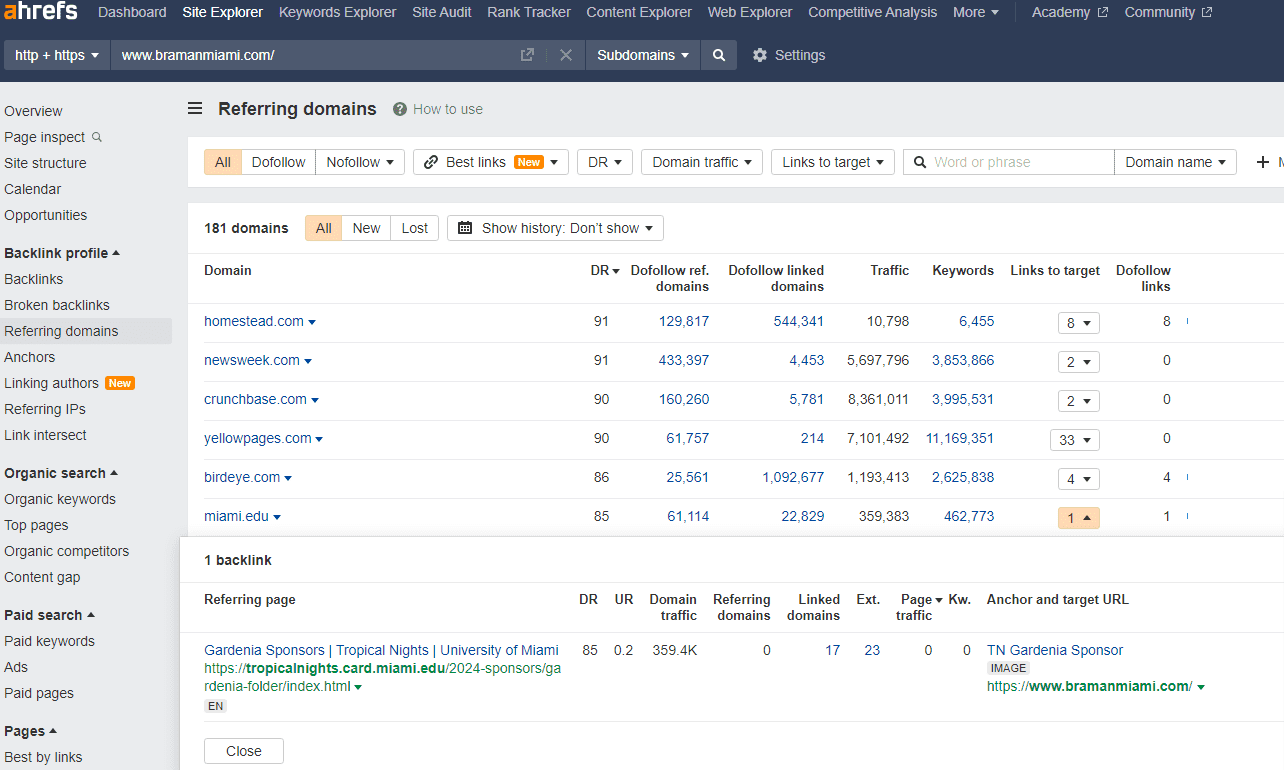
This dealership in Miami does a great job of leveraging sponsorships to local events in their community to capture additional inbound links to improve their authority:
6. Prioritize Technical SEO For A Healthier Website
Technical SEO ensures your website is accessible and readable by search engines, addressing issues that could hinder your site’s performance.
By conducting regular technical audits, you can identify and rectify problems such as slow loading speeds, broken links, and duplicate content.
A technically sound website provides a solid foundation for your SEO efforts, ensuring your content and keywords can be effectively indexed and ranked.
For automotive websites, this means creating content that not only showcases your knowledge of the automotive industry but also provides users with valuable, trustworthy information.
This could include detailed guides on choosing the right vehicle, practical tips for car maintenance, or insights into the latest automotive technology.
By demonstrating firsthand experience and expertise in your content, you can significantly improve your site’s authority and trustworthiness in the eyes of both users and search engines.
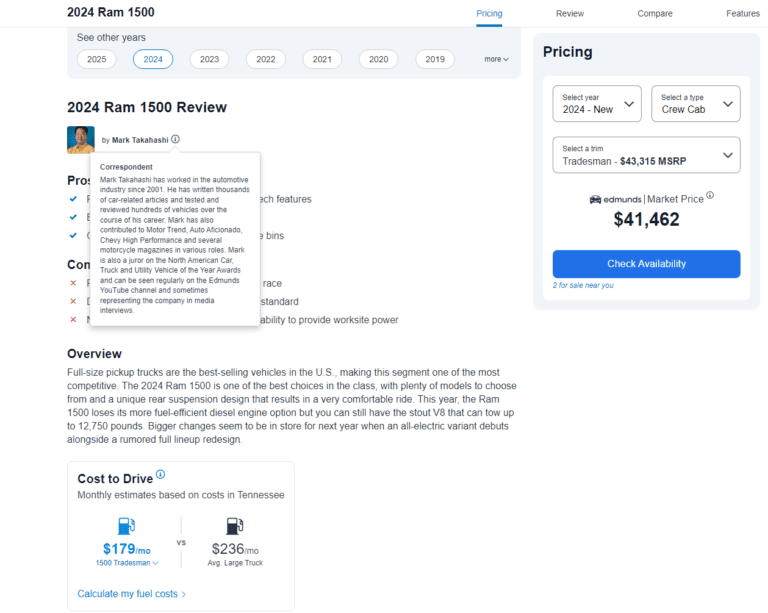
Look at how Edmunds.com leverages authorship to further validate EEAT principles:
Image from Edmunds.com, April 2024
Example: You could share a series of blog posts written by your experienced mechanics on how to maintain vehicles during different seasons, offering practical car care advice. This would demonstrate your in-depth knowledge of the topic and position your brand as a reliable source for your customers.
In 2024, the importance of a robust, data-driven SEO strategy for automotive businesses has never been clearer.
Drive your organic presence to new heights by:
Creating high-quality content.
Optimizing for video.
Adopting a mobile-first design.
Managing your local listings.
Building a strong backlink profile.
Maintaining your website’s technical health.
Focusing on E-E-A-T principles to provide a positive user experience.
Implementing these seven strategies will not only enhance your visibility in search engine results but also position your business as a leader within the automotive industry.
HTML meta tags have been called one of the most important aspects of SEO for quite a long time. And you know what? This is still true.
You may (and should) write good content, attract backlinks, and do your best in page layout design. But all of the above is hardly useful without HTML tags.
Huh, just like meta tags are useless if the page itself is awful…
Google’s John Mueller said that Google uses HTML meta tags to form SERP snippets, not for rankings. But in this statement, he admits that a good search snippet makes people visit your page. So, meta tags are definitely what you must care about to get traffic.
HTML tags tell Google about the page’s content in the most digestible way, so it is a crucial component for SEO success.
In addition, Google can lower your positions if you misuse HTML meta tags – intentionally or not. This is one more sign that meta tags are essential.
So, let’s dive in. Here are the top 10 HTML meta tags for you to use on your site. Read carefully and borrow best practices.
1. Title Tags
The title tag is your main and most important anchor.
The
element typically appears as a clickable headline in search engine results pages (SERPs) and also shows up on social networks and in browsers.
For example, if you view the HTML for this article, you’ll see the title is:
10 Most Important Meta Tags You Need to Know for SEO
Title tags are placed in the
of your webpage and are meant to provide a clear and comprehensive idea of what the page is all about.
But do they have a major impact on rankings as they used to for many years?
Over the past few years, user behavior factors have often been discussed as logical proof of relevance and thus a ranking signal – even Google representatives admit its impact here and there.
The page’s title is still the first thing a searcher sees in SERPs, and it helps them decide if the page is likely to answer the search intent.
A well-written one may increase the number of clicks and traffic, which has at least some impact on rankings.
A simple experiment can also show that Google no longer needs your title tag to include an exact match keyword to determine the topic the page covers.
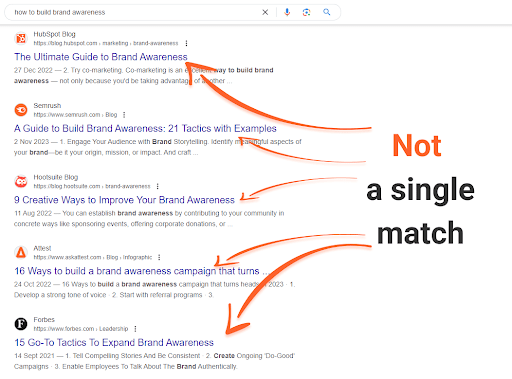
For instance, a couple of years ago, a Google search for [how to build brand awareness] would bring up 2 out of the top 5 results with titles exactly matching your query.
Today, though, we see a different picture:
Screenshot from search for [how to build brand awareness], Google, April 2024
Not a single exact match.
And yet, not a single irrelevant result either; every single one of the pages given here explains how to build awareness, and the titles reflect that.
Search engines are looking at the whole picture, and they tend to evaluate a page’s content as a whole, but the cover of a book still matters – especially when it comes to interaction with searchers.
Best Practices
Give each page a unique title that describes the page’s content concisely and accurately.
Keep the titles up to 50-60 characters long (so they do not get truncated in the SERPs). Remember that long titles are shortened to about 600-700px on the SERP.
Put important keywords first, but in a natural manner, as if you write titles for your visitors in the first place.
Make use of your brand name in the title. Even if it ends up not being shown on the SERPs, it’ll still make a difference for the search engine.
Tip: Use Your Title To Attract Attention
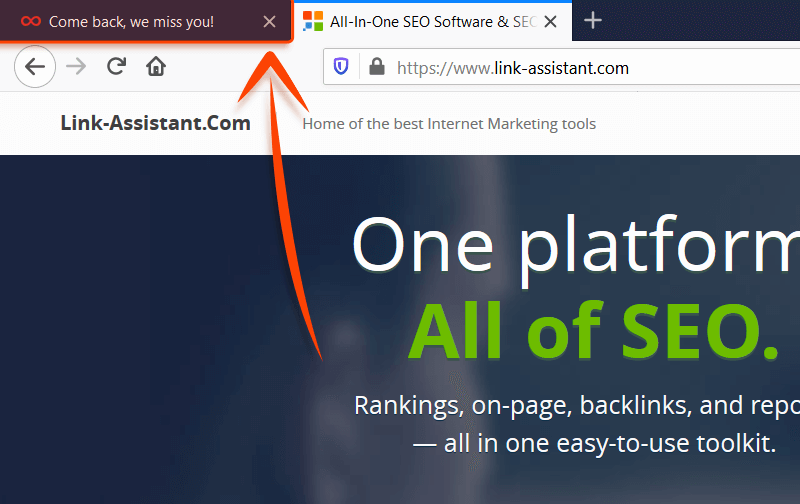
The title tag is precious not only because it’s prime SERP real estate but also because it functions as a tab title in your web browser.
This can be used to attract a user’s attention. For example:
Screenshot from author, April 2024
It’s the exact approach used by Facebook and LinkedIn to show you that you have notifications, and it can be used to pretty good effect.
2. Meta Description Tags
Meta description also resides in the
of a webpage and is commonly (though not always) displayed in a SERP snippet along with a title and page URL.
For example, this is the meta description for this article:
Although meta description is not a direct ranking factor, it requires your optimization effort to attract users’ (and Google’s) attention.
The meta description is what people see in the search snippet together with the title, so it is one of the aspects that makes them decide if your page is worth clicking.
The description impacts the number of clicks you get and may also improve CTR and decrease bounce rates if the pages’ content fulfills the promises. That’s why the description must be as realistic as it is inviting and distinctly reflect the content.
If your description contains the keywords a searcher used in their search query, they will appear on the SERP in bold. This goes a long way in helping you stand out and inform the searcher exactly what they’ll find on your page.
If Google considers your description to not match the content of your page, it can generate its own one in a suitable way. So make sure your meta description contains the main keyword and is topically relevant.
There is no way to put every keyword you want to rank for in the meta description, and there is no real need for that – instead, write a couple of cohesive sentences describing the gist of your page, with some keywords included.
A good way to figure out what to write in your meta description, what works best for your particular topic right now, is to do some competition research.
Look up how your top-ranking competition fills out their own descriptions to get a feel for the best use cases in every particular case.
Best Practices
Give each page a unique meta description that clearly reflects what value the page carries.
Google’s snippets typically max out around 150-160 characters (including spaces).
Include your most significant keywords so they can get highlighted on the actual SERP, but be careful to avoid keyword stuffing. Don’t make your description just a combination of keywords you’re targeting.
Optionally, use an eye-catching call-to-action, a unique proposition you offer, or additional hints on what to expect – ‘Learn,’ ‘Buy’ constructions, etc.
Do not use quotation marks, as Google will cut your snippet there.
Meta Tip
The meta description doesn’t have to be just a sentence that repeats the first paragraph of your page’s text.
Be creative — add call to action (CTA) to encourage action if relevant, use keyword variations (i.e. not the keyword you’ve used in the title), and keep search intent in mind.
For example, if you have an informational page about scallops, it’s a nice idea to make your meta description a definition of scallops. If your page tells you how to cook scallops, then think up a tasty, crusty description for your recipe.
If you’re a fishmonger selling fresh scallops, describe how fresh they are and encourage people to buy them ASAP with some CTA.
3. Robots Meta Tag
A page-level robots meta tag with content=“noindex” attribute instructs the search engines not to index any given page.
A nofollow attribute instructs not to follow any links on that page.
While these tags don’t correlate with rankings directly, in some cases, they may have some impact on how your site looks in the eyes of search engines overall.
For instance, Google highly dislikes thin content.
While it might not be intentional, your site could have pages that offer little value to users yet are necessary for certain reasons.
Additionally, there may be “draft” or placeholder pages that need publishing before they are fully optimized.
Ideally, you wouldn’t want these pages to be considered when assessing the overall quality of your site.
In other cases, you may want certain pages to stay out of SERPs as they feature a special deal that is supposed to be accessible only by a direct link (e.g., from a newsletter).
Finally, if you have a sitewide search option, Google recommends closing custom results pages, which can be crawled indefinitely and waste bot’s resources on no unique content.
In the above cases, noindex and nofollow tags are very helpful, as they give you certain control over your site’s appearance to search engines.
Best Practices
Close unnecessary/unfinished pages with thin content that have little value and no intent to appear in the SERPs.
Close pages that unreasonably waste crawl budget.
Make sure carefully you don’t mistakenly restrict important pages from indexing.
4. rel=”canonical” Link Tag
The rel=”canonical” link tag is a way of telling search engines which version of a page you consider the main one and would like to be indexed by search engines and found by people.
It’s commonly used in cases when the same page is available under multiple different URLs, or multiple different pages have very similar content covering the same subject.
Internal duplicate content is not treated as strictly as copied content, as there’s usually no manipulative intent behind it.
Yet this may become a source of confusion for search engines: unless you indicate which URL you prefer to rank with, search engines may choose it for you.
The selected URL gets crawled more frequently, while the others are being left behind.
You can see that while there’s almost no penalty risk, such a state of affairs is far not optimal.
Another benefit is that canonicalizing a page makes it easier to track performance stats associated with the content.
According to Google, using a rel=canonical for duplicate content helps Google consolidate all your efforts and pass the link signals from all the page’s versions to the preferred one.
That is where using the canonical tag may help you steer the SEO effort in one direction.
Best SEO Practices
Pages with similar content on the same subject.
Duplicate pages available under multiple URLs.
Versions of the same page with session IDs or other URL Parameters that do not affect the content.
Use canonical tags for near-duplicate pages carefully: If the two pages connected by a canonical tag differ too much in content, the search engine will simply disregard the tag.
5. Social Media Meta Tags
Facebook initially introduced Open Graph to let you control how a page would look when shared on social media.
Twitter cards offer similar enhancements but are exclusive to X (Twitter).
Here are the main Open Graph tags:
og:title – Here, you put the title to which you want to be displayed when your page is linked.
og:url – Your page’s URL.
og:description – Your page’s description. Remember that Facebook will display only about 300 characters of description.
og:image – Here, you can put the URL of an image you want shown when your page is linked to.
Use the specific social media meta tags in order to boost how your links look to your following.
It’s not a huge tweak and doesn’t influence your rankings on the search engines.
However, by configuring how the links to your pages look, you can greatly boost your CTR and UX metrics.
Best SEO Practices
6. Schema Markup
Schema markup is a specific technique for organizing the data on each of your web pages in a way that search engines recognize.
It’s a great feature to implement because it’s a real win-win.
Having a structured schema markup:
Is a great boost to your UX.
Carries huge SEO value.
Improves content understanding.
Helps get into SERP features.
Increases chances of winning rich snippets.
SEO has grown far beyond just keywords and backlinks. Having relevant and properly implemented structured data on your pages is, in many cases, a must if you want to lure traffic and rank high.
For example, if your site is from an ecommerce niche, you will have no choice but to add product schema markup on your product pages. Otherwise, your snippet will just get lost.
The same is true for sites about cooking — search for any recipe, and you will look at nothing but the Recipes SERP feature.
Screenshot of search for [beef wellington recipe], Google, April 2024
Sure thing, you’d want your site to be there.
Note: Most of today’s popular content management systems, especially those related to ecommerce like Shopify, have relevant structured data built-in by default.
A “semantic web” is a “meaningful web,” where the focus shifts from keywords instances and backlinks alone to concepts behind them and relationships between those concepts.
Structured data markup is exactly what helps search engines not only read the content but also understand what certain words relate to.
The SERPs have evolved so much that you may not even need to click through the results to get an answer to your query.
But if one is about to click, a rich snippet – with a nice image, a 5-star rating, specified price range, stock status, operating hours, or whatever is useful – is very likely to catch an eye and attract more clicks than a plain-text result.
Assigning schema tags to certain page elements makes your SERP snippet rich in information that is helpful and appealing to users.
And, back to square one, user behavior factors like CTR and bounce rate affect how search engines rank your site.
Thoroughly test the markup to make sure it isn’t misleading or added improperly.
7. Heading Tags (H1-H6)
Heading tags are HTML tags used to identify different sections of a page’s content and act as mini-titles for different parts.
The usage of heading tags these days is a source of some debate.
While H2-H6 tags are considered not as important to search engines, proper usage of H1 tags has been emphasized in many industry studies.
Although H2-H6 tags were initially used for UX purposes, the introduction of passage indexing in 2021 made them pretty valuable. Like, Google can index and rank a part of your page if the query matches with, say, the H3 heading and the paragraph it is related to.
What we should be thinking about instead is that headings are crucial for text and content organization, and we should take them seriously.
For search engines, it’s easier to read and understand well-organized content than to crawl through structural issues.
For users, headings are like anchors in a wall of text, navigating them through the page and making it easier to digest.
These factors raise the importance of careful optimization, where small details add up to the big SEO- and user-friendly picture and can lead to ranking increases.
Best Practices
Keep your headings relevant to the chunk of text they describe. Just because they aren’t a ranking factor doesn’t mean search engines don’t take them into account.
Always have your headings reflect the sentiment of the text they are placed over. Avoid headings like “Chapter 1… Chapter 2… Chapter 3…”.
Don’t overuse the tags and the keywords in them. Keep it readable for users.
Should Your Title Tag & H1 Match?
According to Google’s recommendations, you are encouraged to match your page’s title and H1, changing the order slightly and changing it up here and there.
So, if you are struggling to come up with the perfect H1, simply use your title again.
8. HTML5 Semantic Tags
HTML5 semantic tags belong to the latest HTML standard and are necessary to help Google and other search engines better understand a page’s content.
Here’s how HTML5 tags look like in the page source code:
10 Most Important Meta Tags You Need to Know for SEO

Title tags are placed in the 'head' of your webpage and are meant to provide a clear and comprehensive idea of what the page is all about.
HTML5 Tags Examples
There are a lot of HTML5 tags widely used today by SEOs. If you take a closer look at these tags, you’ll see that their names repeat the most common elements found on any page, such as videos, menus, etc.
So here they are (most of them):
— Defines a big and meaningful piece of content (an article, a forum post, etc.) that goes as a standalone unit.
— Shows an embedded sound or audio stream.
— Describes a widget from which the user can obtain additional information or controls on-demand.
— Defines a dialog box or a subwindow a user can interact with in case of necessity.
— Embeds a piece of multimedia content like videos, sounds, or any external apps.
— Defines the content of the footer of the page, document, or section.
— Defines the content of the header section of the page, document, or section.
— Defines the most important and meaningful part of the page’s content, or of the ( can be placed inside the
section).
— Defines a page section with navigation links.
— Defines a container for multiple image sources.
— Shows alternative sources for the embedded media elements like
— Along with the
, this element provides a summary visible to the user.
— Embeds an SVG file in an HTML document.
— Encodes dates and times (birthdays, events, meetings, etc.) in a machine-readable format.
— Embeds video content in an HTML document without requiring any additional plugin to play a video.
Best SEO Practices
The truth is that HTML5 tags replace neverending
s all of us know and keep using these days.
Still, HTML5 attributes may help your content index faster and rank better, as Google clearly sees and understands what is an
Multimodality is a relatively new term for something extremely old: how people have learned about the world since humanity appeared. Individuals receive information from myriad sources via their senses, including sight, sound, and touch. Human brains combine these different modes of data into a highly nuanced, holistic picture of reality.
“Communication between humans is multimodal,” says Jina AI CEO Han Xiao. “They use text, voice, emotions, expressions, and sometimes photos.” That’s just a few obvious means of sharing information. Given this, he adds, “it is very safe to assume that future communication between human and machine will also be multimodal.”
A technology that sees the world from different angles
We are not there yet. The furthest advances in this direction have occurred in the fledgling field of multimodal AI. The problem is not a lack of vision. While a technology able to translate between modalities would clearly be valuable, Mirella Lapata, a professor at the University of Edinburgh and director of its Laboratory for Integrated Artificial Intelligence, says “it’s a lot more complicated” to execute than unimodal AI.
In practice, generative AI tools use different strategies for different types of data when building large data models—the complex neural networks that organize vast amounts of information. For example, those that draw on textual sources segregate individual tokens, usually words. Each token is assigned an “embedding” or “vector”: a numerical matrix representing how and where the token is used compared to others. Collectively, the vector creates a mathematical representation of the token’s meaning. An image model, on the other hand, might use pixels as its tokens for embedding, and an audio one sound frequencies.
A multimodal AI model typically relies on several unimodal ones. As Henry Ajder, founder of AI consultancy Latent Space, puts it, this involves “almost stringing together” the various contributing models. Doing so involves various techniques to align the elements of each unimodal model, in a process called fusion. For example, the word “tree”, an image of an oak tree, and audio in the form of rustling leaves might be fused in this way. This allows the model to create a multifaceted description of reality.
This content was produced by Insights, the custom content arm of MIT Technology Review. It was not written by MIT Technology Review’s editorial staff.
Though generative AI is still a nascent technology, it is already being adopted by teams across companies to unleash new levels of productivity and creativity. Marketers are deploying generative AI to create personalized customer journeys. Designers are using the technology to boost brainstorming and iterate between different content layouts more quickly. The future of technology is exciting, but there can be implications if these innovations are not built responsibly.
As Adobe’s CIO, I get questions from both our internal teams and other technology leaders: how can generative AI add real value for knowledge workers—at an enterprise level? Adobe is a producer and consumer of generative AI technologies, and this question is urgent for us in both capacities. It’s also a question that CIOs of large companies are uniquely positioned to answer. We have a distinct view into different teams across our organizations, and working with customers gives us more opportunities to enhance business functions.
Our approach
When it comes to AI at Adobe, my team has taken a comprehensive approach that includes investment in foundational AI, strategic adoption, an AI ethics framework, legal considerations, security, and content authentication. The rollout follows a phased approach, starting with pilot groups and building communities around AI.
This approach includes experimenting with and documenting use cases like writing and editing, data analysis, presentations and employee onboarding, corporate training, employee portals, and improved personalization across HR channels. The rollouts are accompanied by training podcasts and other resources to educate and empower employees to use AI in ways that improve their work and keep them more engaged.
Unlocking productivity with documents
While there are innumerable ways that CIOs can leverage generative AI to help surface value at scale for knowledge workers, I’d like to focus on digital documents—a space in which Adobe has been a leader for over 30 years. Whether they are sales associates who spend hours responding to requests for proposals (RFPs) or customizing presentations, marketers who need competitive intel for their next campaign, or legal and finance teams who need to consume, analyze, and summarize massive amounts of complex information—documents are a core part of knowledge workers’ daily work life. Despite their ubiquity and the fact that critical information lives inside companies’ documents (from research reports to contracts to white papers to confidential strategies and even intellectual property), most knowledge workers are experiencing information overload. The impact on both employee productivity and engagement is real.
Lessons from customer zero
Adobe invented the PDF and we’ve been innovating new ways for knowledge workers to get more productive with their digital documents for decades. Earlier this year, the Acrobat team approached my team about launching an all-employee beta for the new generative AI-powered AI Assistant. The tool is designed to help people consume the information in documents faster and enable them to consolidate and format information into business content.
I faced all the same questions every CIO is asking about deploying generative AI across their business— from security and governance to use cases and value. We discovered the following three specific ways where generative AI helped (and is still helping) our employees work smarter and improve productivity.
Faster time to knowledge Our employees used AI Assistant to close the gap between understanding and action for large, complicated documents. The generative AI-powered tool’s summary feature automatically generates an overview to give readers a quick understanding of the content. A conversational interface allows employees to “chat” with their documents and provides a list of suggested questions to help them get started. To get more details, employees can ask the assistant to generate top takeaways or surface only the information on a specific topic. At Adobe, our R&D teams used to spend more than 10 hours a week reading and analyzing technical white papers and industry reports. With generative AI, they’ve been able to nearly halve that time by asking questions and getting answers about exactly what they need to know and instantly identifying trends or surfacing inconsistencies across multiple documents.
Easy navigation and verification AI-powered chat is gaining ground on traditional search when it comes to navigating the internet. However, there are still challenges when it comes to accuracy and connecting responses to the source. Acrobat AI Assistant takes a more focused approach, applying generative AI to the set of documents employees select and providing hot links and clickable citations along with responses. So instead of using the search function to locate random words or trying to scan through dozens of pages for the information they need, AI Assistant generates both responses and clickable citations and links, allowing employees to navigate quickly to the source where they can quickly verify the information and move on, or spend time deep diving to learn more. One example of where generative AI is having a huge productivity impact is with our sales teams who spend hours researching prospects by reading materials like annual reports as well as responding to RFPs. Consuming that information and finding just the right details for RPFs can cost each salesperson more than eight hours a week. Armed with AI Assistant, sales associates quickly navigate pages of documents and identify critical intelligence to personalize pitch decks and instantly find and verify technical details for RFPs, cutting the time they spend down to about four hours.
Creating business content One of the most interesting use cases we helped validate is taking information in documents and formatting and repurposing that information into business content. With nearly 30,000 employees dispersed across regions, we have a lot of employees who work asynchronously and depend on technology and colleagues to keep them up to date. Using generative AI, employees can now summarize meeting transcripts, surface action items, and instantly format the information into an email for sharing with their teams or a report for their manager. Before starting the beta, our communications teams reported spending a full workday (seven to 10 hours) per week transforming documents like white papers and research reports into derivative content like media briefing decks, social media posts, blogs, and other thought leadership content. Today they’re saving more than five hours a week by instantly generating first drafts with the help of generative AI.
Simple, safe, and responsible
CIOs love learning about and testing new technologies, but at times they can require lengthy evaluations and implementation processes. Acrobat AI Assistant can be deployed in minutes on the desktop, web, or mobile apps employees already know and use every day. Acrobat AI Assistant leverages a variety of processes, protocols, and technologies so our customers’ data remains their data and they can deploy the features with confidence. No document content is stored or used to train AI Assistant without customers’ consent, and the features only deliver insights from documents users provide. For more information about Adobe is deploying generative AI safely, visit here.
Generative AI is an incredibly exciting technology with incredible potential to help every knowledge worker work smarter and more productively. By having the right guardrails in place, identifying high-value use cases, and providing ongoing training and education to encourage successful adoption, technology leaders can support their workforce and companies to be wildly successful in our AI-accelerated world.
This content was produced by Adobe. It was not written by MIT Technology Review’s editorial staff.
Google DeepMind has released an improved version of its biology prediction tool, AlphaFold, that can predict the structures not only of proteins but of nearly all the elements of biological life.
It’s a development that could help accelerate drug discovery and other scientific research. The tool is currently being used to experiment with identifying everything from resilient crops to new vaccines.
While the previous model, released in 2020, amazed the research community with its ability to predict proteins structures, researchers have been clamoring for the tool to handle more than just proteins.
Now, DeepMind says, AlphaFold 3 can predict the structures of DNA, RNA, and molecules like ligands, which are essential to drug discovery. DeepMind says the tool provides a more nuanced and dynamic portrait of molecule interactions than anything previously available.
“Biology is a dynamic system,” DeepMind CEO Demis Hassabis told reporters on a call. “Properties of biology emerge through the interactions between different molecules in the cell, and you can think about AlphaFold 3 as our first big sort of step toward [modeling] that.”
Mohammed AlQuraishi, an assistant professor of systems biology at Columbia University who is unaffiliated with DeepMind, thinks the new version of the model will be even better for drug discovery. “The AlphaFold 2 system only knew about amino acids, so it was of very limited utility for biopharma,” he says. “But now, the system can in principle predict where a drug binds a protein.”
Isomorphic Labs, a drug discovery spinoff of DeepMind, is already using the model for exactly that purpose, collaborating with pharmaceutical companies to try to develop new treatments for diseases, according to DeepMind.
AlQuraishi says the release marks a big leap forward. But there are caveats.
“It makes the system much more general, and in particular for drug discovery purposes (in early-stage research), it’s far more useful now than AlphaFold 2,” he says. But as with most models, the impact of AlphaFold will depend on how accurate its predictions are. For some uses, AlphaFold 3 has double the success rate of similar leading models like RoseTTAFold. But for others, like protein-RNA interactions, AlQuraishi says it’s still very inaccurate.
DeepMind says that depending on the interaction being modeled, accuracy can range from 40% to over 80%, and the model will let researchers know how confident it is in its prediction. With less accurate predictions, researchers have to use AlphaFold merely as a starting point before pursuing other methods. Regardless of these ranges in accuracy, if researchers are trying to take the first steps toward answering a question like which enzymes have the potential to break down the plastic in water bottles, it’s vastly more efficient to use a tool like AlphaFold than experimental techniques such as x-ray crystallography.
A revamped model
AlphaFold 3’s larger library of molecules and higher level of complexity required improvements to the underlying model architecture. So DeepMind turned to diffusion techniques, which AI researchers have been steadily improving in recent years and now power image and video generators like OpenAI’s DALL-E 2 and Sora. It works by training a model to start with a noisy image and then reduce that noise bit by bit until an accurate prediction emerges. That method allows AlphaFold 3 to handle a much larger set of inputs.
That marked “a big evolution from the previous model,” says John Jumper, director at Google DeepMind. “It really simplified the whole process of getting all these different atoms to work together.”
It also presented new risks. As the AlphaFold 3 paper details, the use of diffusion techniques made it possible for the model to hallucinate, or generate structures that look plausible but in reality could not exist. Researchers reduced that risk by adding more training data to the areas most prone to hallucination, though that doesn’t eliminate the problem completely.
Restricted access
Part of AlphaFold 3’s impact will depend on how DeepMind divvies up access to the model. For AlphaFold 2, the company released the open-source code, allowing researchers to look under the hood to gain a better understanding of how it worked. It was also available for all purposes, including commercial use by drugmakers. For AlphaFold 3, Hassabis said, there are no current plans to release the full code. The company is instead releasing a public interface for the model called the AlphaFold Server, which imposes limitations on which molecules can be experimented with and can only be used for noncommercial purposes. DeepMind says the interface will lower the technical barrier and broaden the use of the tool to biologists who are less knowledgeable about this technology.
The new restrictions are significant, according to AlQuraishi. “The system’s main selling point—its ability to predict protein–small molecule interactions—is basically unavailable for public use,” he says. “It’s mostly a teaser at this point.”
The U.S. Census Bureau gathers monthly data on sales and inventories from domestic wholesale firms. The “Monthly Wholesale Trade” survey includes B2B merchants, distributors, exporters, and importers but excludes manufacturers, refiners, and miners selling their own products.
According to the Census Bureau, the survey “offers business leaders and policymakers a current assessment of the nation’s economic status and plays a vital role in estimating the quarterly gross domestic product.”
U.S. wholesale revenue in February 2024 (PDF) stood at $673.7 billion, up from $658.4 billion from the previous month and $669.3 billion in February 2023, an increase of 2.3% and 0.6%, respectively.
Wholesale inventories are the stock of unsold goods. Inventories are a key component of gross domestic product changes. A high inventory count points to an economic slowdown, while a low number indicates stronger growth.
U.S. wholesale inventories for February 2024 were $901.1 billion, slightly higher than $896.5 billion in January and down from $918.8 billion one year ago.
–
According to the data, U.S. wholesale inventories dropped by 0.4% month over month in March 2024.
–
Furthermore, as of March 2024, about 6.2 million people worked in the wholesale trade industry in the United States.
Having awesome products is why people would shop in your Shopify store. But there are many options to get people to notice those amazing products. One of those is content marketing, and then specifically blogging. This article will give practical tips on improving your Shopify store’s blog posts.
Table of contents
Main reasons to publish blog posts on Shopify
If we break everything down, your content is what ranks in search engines. Of course, your products can appear in the various shopping sections in Google, but your content helps you attract an audience, build a brand, and get noticed.
Simply put, blogging can improve the SEO of your store or online business. It makes your store more visible to Google as regularly updated blog content encourages search engines to crawl and index your site more frequently. By writing about relevant topics, you automatically expand the range of keywords and phrases for which your Shopify business will rank.
In addition, as you fill your site with highly relevant content, you’re improving the overall quality of it. This provides a platform to engage customers, share valuable information, and respond to their comments and questions. As a result, you’re building a community around your brand, which will help to improve customer loyalty. Blogging on an online store can also increase your reach. People might be more inclined to share your blog content on social media or other outlets where your potential customers are.
Well-written, unique, high-quality, informative articles establish your brand as an industry authority. Blog posts are an amazing outlet to showcase your expertise and share insights on your Shopify site. All of this helps to improve your brand’s reputation.
Blogs improve customer experience
Of course, blogs are excellent for promoting new products, sales, and events. Content marketing through blogging is cost-effective compared to traditional advertising. But it’s not only about sales; it’s about educating users to get them ready to buy.
Blogs can educate customers about your products and industry. Educational content can reduce customer service inquiries by providing answers to common questions. Quality content can subtly influence purchasing decisions by highlighting the benefits and applications of your products. In the end, all of this helps potential customers make informed purchasing decisions.
Blogs give you a lot of options to inform your customers and improve their experience
Shopify blog posts have a long shelf life
If done well, your Shopify blog posts can continue attracting traffic well into the future. Blog posts generate leads long after publication, offering long-term ROI on your online marketing. Ensuring your content is evergreen helps you remain relevant and continues to draw in visitors over time.
Lastly, a well-maintained blog can set your ecommerce site apart from competitors. It can become a competitive advantage if your competitors lack a decent content marketing strategy. Unique and engaging content can be a key differentiator for your brand. Blogging can be a powerful component of your Shopify store’s online marketing strategy.
Well-written blog posts can keep bringing in traffic for quite some time
Pitfalls to avoid when starting a Shopify blog
We’ve seen that adding a blog to your online store can significantly enhance your brand’s visibility, customer engagement, and SEO performance. However, some pitfalls can undermine its success. One challenge is keeping a consistent posting schedule. You need it to keep your audience engaged and your SEO in check, but people frequently overlook this.
Another common pitfall is producing irrelevant or low-quality content that doesn’t provide value to your audience. In the end, this could hurt your online business. Additionally, neglecting ecommerce SEO can limit your blog’s visibility and effectiveness.
Tips for writing blog posts that strike a chord
We’ve established that adding a blog to your Shopify store can bring great benefits, but only if you do it well. One of the most important points to consider is content quality. Content quality is what you say and how well you say it. Your writing talent can make or break your Shopify blog posts. These days, it’s enticing to open ChatGPT or Gemini and ask it to write a post for you, but that’s not actual writing.
Know your audience
Understanding your audience is crucial for effective writing. By knowing who you’re writing for, you can tailor your content to their needs, interests, and preferences, making your blogging more engaging and relevant. This involves using language and examples that resonate with them, fostering a deeper connection, and encouraging interactions like comments and shares. Conducting keyword research for your Shopify store is also essential, as it helps address your audience’s specific concerns and challenges, making your writing clearer and more direct.
Eliminating unnecessary jargon and focusing on clarity ensures your message is communicated efficiently. This increases the likelihood of persuading your audience to take action, whether making a purchase or engaging with your brand. Ultimately, this will boost conversions and build loyalty.
Keep your writing clean and to the point
For effective blog content, you should use simplicity, clarity, and brevity as your main guiding principles. Start by clearly understanding the primary message you want to convey. This understanding will guide your writing, helping you stay focused and avoid unnecessary digressions.
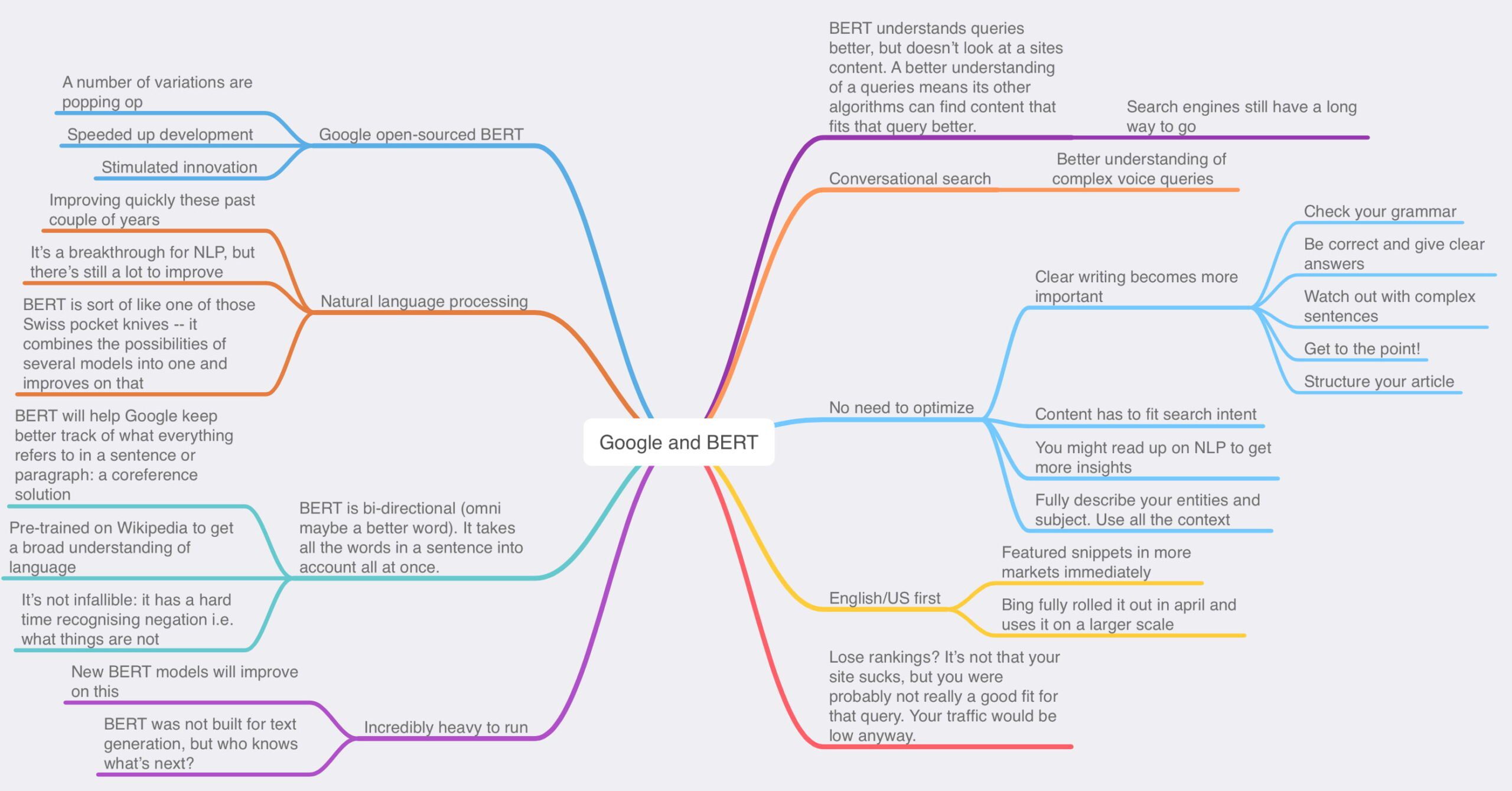
Then, plan out what you want to write before you start writing. Outline the main points you want to cover. A structured approach helps organize thoughts and ensures that each paragraph contributes directly to your overall message. Making a mindmap can help you structure your thoughts and make new connections between thinking. Planning makes the writing part so much easier.
An example of a mindmap explaining the topic of Google BERT for a blog post
Keep it simple
Avoid jargon and complex vocabulary that might confuse your readers. When possible, use everyday language to ensure clarity. Opt for simpler alternatives that make your message clear. As a result, your writings will be accessible to a broad audience.
Be direct and concise by using short sentences and paragraphs. Get to the point quickly by eliminating filler words and redundant phrases that don’t add value to your message.
Don’t forget to write in the active voice instead of the passive voice. Write in the active voice as much as possible. It’s more direct, lively, and clear than the passive voice, making your writing easier to understand.
Make it human and make it your own
As a beginning writer, you’re always searching for your voice. This takes a while to develop. For instance, you might want to infuse your writing with a sense of humanity and uniqueness. Try adopting a conversational tone as if you’re talking to a friend. If it makes sense, don’t shy away from sharing personal anecdotes and experiences that illuminate your points.
Expressing your opinions thoughtfully can add depth to your blogging. You can make your stories more vivid by using descriptive language that taps into the senses. This can make your content more emotionally resonant. Importantly, let your personality and unique voice shine through. Ultimately, this is the authenticity that makes your writing distinctive and relatable.
Develop a tone of voice that fits your brand
Developing a distinct tone of voice for your writing begins with deeply understanding your audience. You’ll also need a clear definition of your brand’s personality and an analytical review of your existing content.
If you want your content to resonate with your readers, you must delve into who they are. You need to identify their interests, values, and the language that speaks to them. This forms your brand’s personality — whether authoritative, playful, inspiring, or something else. Describing your brand in human characteristics helps craft a personal and engaging tone.
Simultaneously, examine your current content to see what performed well. This can provide valuable insights. If you want to find aspects of your tone that resonate with your audience, you should check articles that got much engagement or positive feedback in the past.
Writing is rewriting
Embrace the concept that “writing is rewriting.” Begin by taking a break after your initial draft to gain a fresh perspective, then read your work aloud to catch any awkward phrasing or inconsistencies.
Initially, focus on the overall structure to ensure ideas flow logically. Be prepared to ruthlessly cut anything that doesn’t directly contribute to your main points. Simplify difficult sentences and get feedback from trusted sources for fresh insights.
Revising and refining your work enhances its clarity and impact, but you must know when to stop. But remember that truly great writing comes from a willingness to revisit and improve your initial ideas.
Yoast SEO for Shopify improves your blog posts
Yoast SEO for Shopify has tools to significantly enhance your content’s quality and visibility. This Shopify SEO app aims to help you make your content SEO-friendly and engaging for your customers.
Yoast SEO provides detailed analysis and actionable recommendations for optimizing your content, including product descriptions, blog posts, and web pages. It guides you on where to place your target keywords, how to structure your content for better readability, and what you might be missing regarding SEO best practices.
The readability analysis feature evaluates your content to ensure it’s clear and accessible to your target audience. It checks for sentence length, passive voice usage, and paragraph structure, offering suggestions to make your content easier to read. This improves user experience and increases engagement rates, as readers are likelier to stay on straightforward and engaging pages.
Yoast SEO for Shopify helps you optimize your blog post for readability and SEO
Examples of great blogs on Shopify
Exploring successful blogs on Shopify stores can provide valuable insights and inspiration for your content strategy. Here are some examples that have harnessed the power of blogging to engage their audience, enhance brand awareness, and drive traffic to their stores.
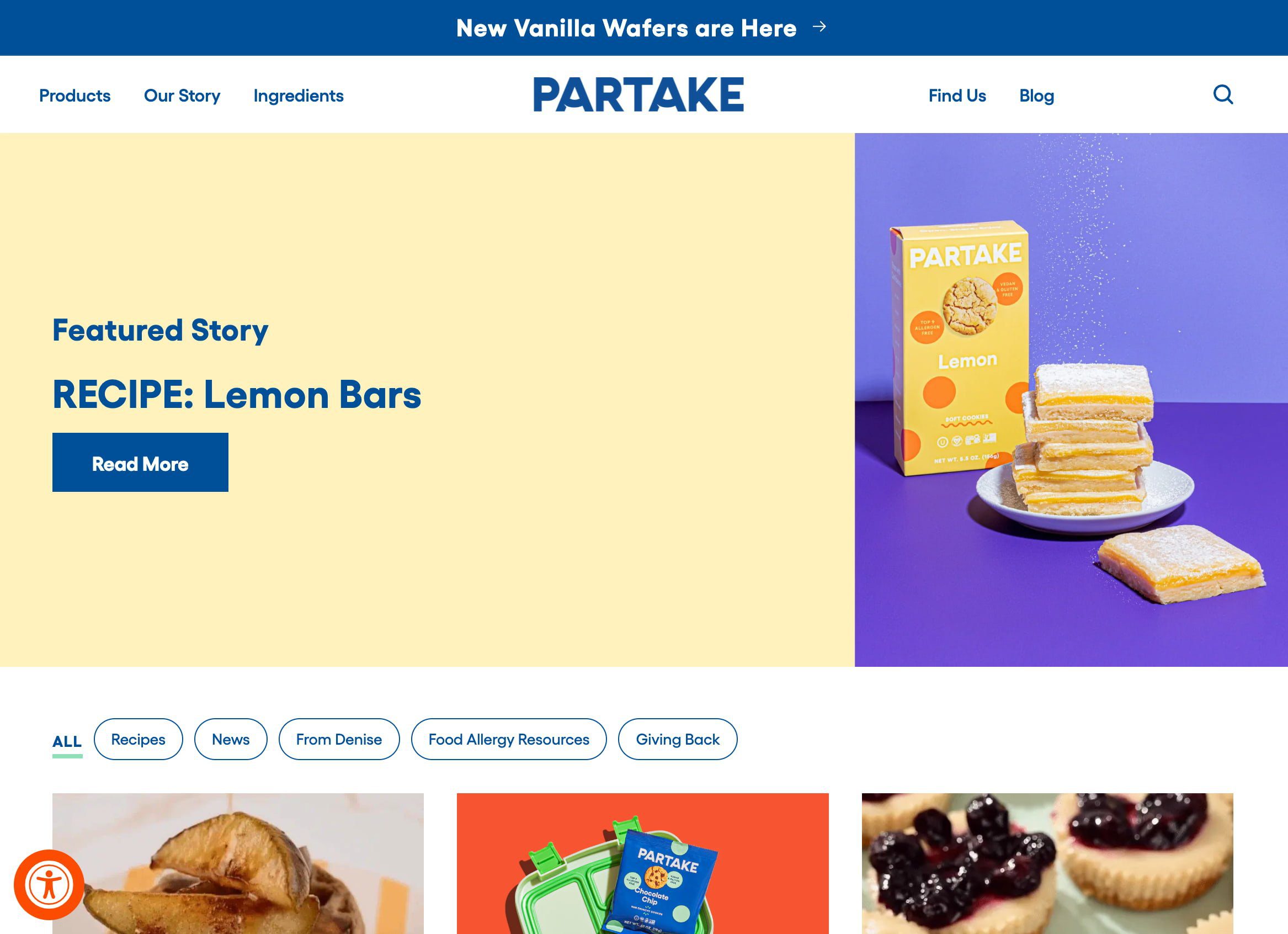
Partake Foods
Overview: Partake Foods stands out not just for its allergy-friendly food products but also for its engaging and informative blog. The blog is a resourceful hub where readers can find many recipes, food allergy guides, parenting tips for managing allergies, and insights into an allergy-aware lifestyle. It caters to the needs of parents looking for safe, delicious options for their children with food allergies, but it goes beyond just food.
Why it works: The success of the Partake Foods blog lies in its ability to directly address and alleviate the concerns of its core audience—parents navigating the complex world of food allergies. By providing valuable, practical content, Partake Foods positions itself as more than just a food brand; it becomes a trusted ally to families.
Briogeo has a great blog with loads of useful content
Overview: Briogeo, a natural hair care brand, enriches its Shopify store with a blog that serves as a cornerstone for educating and engaging its audience. This blog doesn’t just sell products; it delves into various topics relevant to natural hair care, including detailed guides on hair types, the benefits of specific ingredients, and tutorials on tackling common hair concerns.
Why it works: The effectiveness of Briogeo’s blog lies in its educational approach, addressing its audience’s specific needs and questions with information and practical advice. By focusing on the intricacies of natural hair care and the science behind their product formulations, Briogeo establishes itself as an authority in the space.
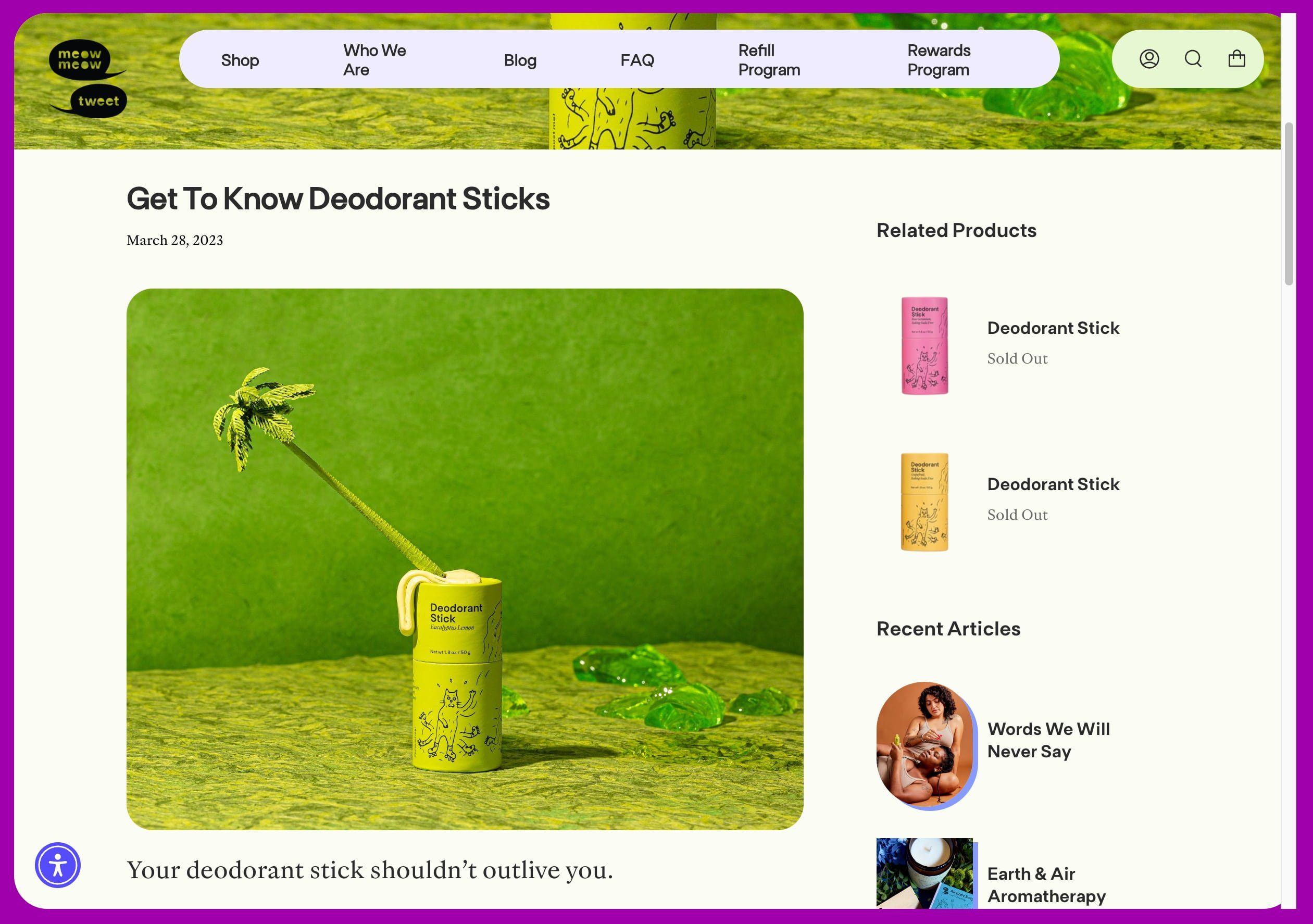
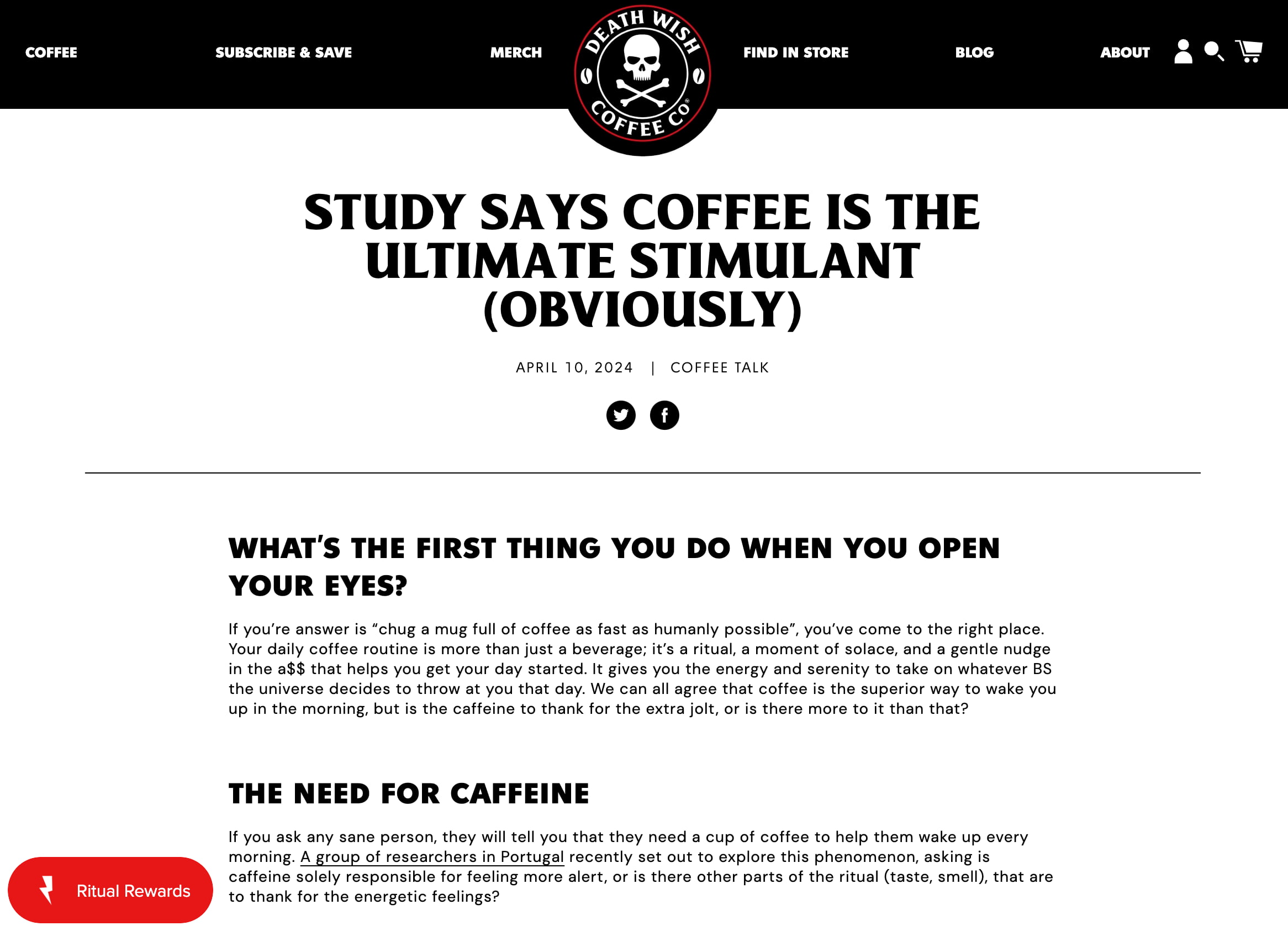
An example of a blog post on the Death Wish Coffee Shopify blog
Overview: Known as producing the world’s strongest coffee, Death Wish Coffee’s blog is a treasure trove of coffee culture, brewing tips, and company news. It effectively engages coffee enthusiasts with content ranging from the science behind caffeine to stories of people living life to the fullest, embodying the brand’s adventurous and bold spirit.
Why it works: The blog perfectly captures the brand’s essence — intense, passionate about coffee, and a bit rebellious. By sharing content that appeals directly to their target audience’s interests, they promote their products and build a strong community of coffee lovers. The blog serves as a platform to educate readers about their unique value proposition while entertaining and informing them about coffee.
The BeardBrand blog is all about growing and improving beards and mustaches
Overview: BeardBrand takes the concept of beard care and elevates it to a lifestyle, which is vividly reflected in their blog. Their content ranges from grooming tips and style advice to deeper dives into the culture of beard-keeping. BeardBrand’s blog is a comprehensive guide for anyone looking to embrace their facial hair, offering insights into grooming techniques, product recommendations, and the philosophy behind growing a beard. It’s not just about selling beard oil or grooming kits; it’s about fostering a community and identity among beard enthusiasts.
Why it works: The BeardBrand blog excels because it taps into the lifestyle and ethos of its audience rather than merely focusing on product usage. By addressing the broader culture of beard-keeping and the lifestyle that comes with it, the blog connects on a deeper level with readers who see their beards as an expression of their identity. This connection is further solidified by the blog’s clear, confident, and engaging tone of voice, which mirrors the brand’s ethos of self-care and community.
An example of a blog post on the Veloforte Shopify store
Overview: VELOFORTE, recognized for its range of natural, performance-enhancing nutrition products, extends its commitment to athlete support through its engaging and informative blog. The blog stands out as a valuable resource for athletes of all levels, offering nutritional advice, endurance training tips, and insights into optimizing performance through natural means.
Why it works: The success of VELOFORTE’s blog lies in its precision targeting and expertly crafted content that speaks directly to the needs and interests of endurance athletes. By providing scientifically backed nutrition and training advice, the blog positions VELOFORTE as a thought leader in sports nutrition and deepens trust with its audience. This trust is crucial for a brand whose products are designed to support peak athletic performance.
An example of an article on the Made In Cookware Shopify blog
Overview: Made In Cookware distinguishes itself through its high-quality kitchen tools and richly informative blog. This platform serves as a culinary hub, offering everything from cooking tips and detailed recipes to chef interviews and insights into the manufacturing processes of their cookware. The blog aims to educate home cooks and culinary enthusiasts, providing information that spans basic cooking techniques and advanced culinary concepts.
Why it works: The effectiveness of Made In Cookware’s blog lies in its ability to demystify the cooking process, making gourmet cooking accessible to a broader audience by sharing professional chefs’ secrets and offering guidance on using their products to achieve the best culinary results, Made In positions itself as an ally in the kitchen. This educational approach builds trust with the audience and illustrates the value of investing in quality cookware.
These examples illustrate how diverse Shopify stores use blogging to connect with their audience. These blogs effectively enhance their brand’s online presence and customer engagement through educational content, behind-the-scenes stories, or practical advice. These examples serve as a blueprint for success for anyone looking to boost their Shopify store’s content strategy. Consider integrating similar approaches tailored to your brand’s unique voice and audience needs.
Write awesome, helpful content that builds your brand
Blogging is great as it can help your Shopify store to stand out from the crowd. While adding a blog is easy, writing your content is harder. Make sure to write high-quality content about the topics you know your customers are interested in. Use easy-to-understand language and other writing tips to make your content come alive.
Google announced a new tool for Analytics to streamline data comparisons.
The ‘saved comparisons’ feature allows you to save filtered user data segments for rapid side-by-side analysis.
Google states in an announcement:
“We’re launching saved comparisons to help you save time when comparing the user bases you care about.
Learn how you can do that without recreating the comparison every time!”
We’re launching saved comparisons to help you save time when comparing the user bases you care about. Learn how you can do that without recreating the comparison every time! → https://t.co/29nN2MiPtmpic.twitter.com/r8924rAT05
Google links to a help page that lists several benefits and use cases:
“Comparisons let you evaluate subsets of your data side by side. For example, you could compare data generated by Android devices to data generated by iOS devices.”
“In Google Analytics 4, comparisons take the place of segments in Universal Analytics.”
Saved Comparisons: How They Work
The new comparisons tool allows you to create customized filtered views of Google Analytics data based on dimensions like platform, country, traffic source, and custom audiences.
These dimensions can incorporate multiple conditions using logic operators.
For example, you could generate a comparison separating “Android OR iOS” traffic from web traffic. Or you could combine location data like “Country = Argentina OR Japan” with platform filters.
These customized comparison views can then be saved to the property level in Analytics.
Users with access can quickly apply saved comparisons to any report for efficient analysis without rebuilding filters.
Google’s documentation states:
“As an administrator or editor…you can save comparisons to your Google Analytics 4 property. Saved comparisons enable you and others with access to compare the user bases you care about without needing to recreate the comparisons each time.”
Rollout & Limitations
The saved comparisons feature is rolling out gradually. There’s a limit of 200 saved comparisons per property.
For more advanced filtering needs, such as sequences of user events, Google recommends creating a custom audience first and saving a comparison based on that audience definition.
Some reports may be incompatible if they don’t include the filtered dimensions used in a saved comparison. In that case, the documentation suggests choosing different dimensions or conditions for that report type.
Why SEJ Cares
The ability to create and apply saved comparisons addresses a time-consuming aspect of analytics work.
Analysts must view data through different lenses, segmenting by device, location, traffic source, etc. Manually recreating these filtered comparisons for each report can slow down production.
Any innovation streamlining common tasks is welcome in an arena where data teams are strapped for time.
How This Can Help You
Saved comparisons mean less time getting bogged down in filter recreation and more time for impactful analysis.
Here are a few key ways this could benefit your work:
Save time by avoiding constant recreation of filters for common comparisons (e.g. mobile vs desktop, traffic sources, geo locations).
Share saved comparisons with colleagues for consistent analysis views.
Switch between comprehensive views and isolated comparisons with a single click.
Break down conversions, engagement, audience origins, and more by your saved user segments.
Use thoughtfully combined conditions to surface targeted segments (e.g. paid traffic for a certain product/location).
The new saved comparisons in Google Analytics may seem like an incremental change. However, simplifying workflows and reducing time spent on mundane tasks can boost productivity in a big way.





![Google search for [st louis car dealerships]](https://ecommerceedu.com/wp-content/uploads/2024/05/st-louis-car-dealerships-Google-Search.png)