How to craft great page titles for SEO?

Writing strong page titles is one of the simplest and most impactful SEO optimizations you can make. The title tag is often the first thing users see in search results, and it helps search engines understand the content of your page.

In this article, you’ll learn what SEO page titles are, why they matter, and how to write titles that improve visibility and attract clicks.

Key takeaways

  • Crafting a strong page title is vital for SEO; it attracts clicks and helps search engines understand your content
  • An SEO page title appears in search results and browser tabs, serving as the first impression for users
  • To optimize your page title, include relevant keywords and ensure it aligns with the content to improve your ranking
  • Yoast SEO provides tools to help check title width and keyword usage, and includes an AI-powered title generator
  • You can change the page title after publication, and doing so may significantly improve click-through rates

Table of contents

What is an SEO page title?

Let’s start with the basics. If you look at the source of a page (right-click on the page, then choose View Page Source), you find a title in the head section. It looks like this:

This is an example SEO title - Example.com

This is the HTML title tag, also called the SEO title. When you look something up in a search engine, you get a list of results that appear as snippets. The part that looks like a headline is the SEO title. The SEO title typically includes the post title but may also incorporate other elements, such as the site name. Or even emojis!

An example of a Google snippet with a favicon, site name, URL, meta description, and title in the largest font

In most cases, the SEO title is the first thing people see, even before they get on your site. In tabbed browsers, you will usually also see the SEO title in the page tab, as shown in the image below.

An SEO title in a browser tab

What’s the purpose of an SEO title?

Your SEO title aims to entice people to click on it, visit your website, read your post, or purchase your product. If your title is not good enough, people will ignore it and move on to other results. Essentially, there are two goals that you want to achieve with an SEO title:

  1. It must help you rank for a keyword
  2. It must make the user want to click through to your page

Google uses many signals when deciding your relevance for a specific keyword. While click-through rate is not a direct ranking factor, user interaction with search results can be a signal that a result matches search intent.

If your page ranks well but attracts few clicks, that may indicate your title doesn’t resonate with searchers. Improving your SEO title can increase clicks and help you perform better over time.

Additionally, as mentioned earlier, Google uses the SEO title specified for your website as a ranking input. So, it’s not just about those clicks; you also need to ensure that your title reflects the topic being discussed on your page and the keyword that you’re focusing on. The SEO title you use has a direct influence on your ranking.

Now that you know the importance of SEO titles, let’s look at how to evaluate and improve them. Tools like Yoast SEO (Free) can help by checking key elements such as title width and keyword usage. Yoast SEO Premium uses generative AI to create titles.

A smarter analysis in Yoast SEO Premium

Yoast SEO Premium has a smart content analysis that helps you take your content to the next level!

Yoast SEO Premium includes an AI-powered title generator that can help you create SEO-friendly page titles based on your content and focus keyphrase. This can be useful for inspiration or for quickly generating alternatives when you’re unsure how to phrase a title.

As with any AI-generated content, it’s best to review and refine the suggested titles to ensure they align with your page’s intent, brand voice, and audience expectations.

In addition, if you use Yoast SEO Premium, you get various other AI features, like Yoast AI Optimize, that help you do the hard work.

Simply hit the Use AI button to have Yoast SEO Premium generate great titles for you

What does the empty title check in Yoast SEO do?

The empty title check in Yoast SEO Premium is self-explanatory: it checks whether you’ve filled in any text in your post’s ‘Title’ section. If you haven’t, you’ll see a red traffic light reminding you to add a title. Once this is filled in, the post title can be automatically added to the SEO title field using the ‘Title’ variable.

You can edit your titles in the Search appearance section of Yoast SEO

Note that your post title is output as an H1 heading. A clear H1 helps users quickly understand what a page is about, improves accessibility for screen readers, and aids search engines in interpreting the page structure. You should only use one H1 heading per page to avoid confusing search engines. Don’t worry; we’ve got a check for multiple H1 headings in Yoast SEO!

What does the SEO title width check in Yoast SEO do?

You will find this check in the SEO tab of the Yoast SEO sidebar or meta box. If you haven’t written an SEO title yet, this will remind you to do so. Additionally, Yoast SEO verifies the width of your SEO title. When it is too long, you will get a warning.

We used to warn you if your SEO title was too short, but we’ve changed that since our Yoast 17.1 release. A title with an optimal width gets you a green traffic light in the analysis. Remember that we exclude the separator symbol and site title from the title width check. We don’t consider these when calculating the SEO title progress bar.

You can find the SEO title width check in the Yoast SEO sidebar or the meta box

How to write an SEO title with an optimal width

If your SEO title doesn’t have the correct width, parts of it may be cut off in Google’s search results. The result may vary, depending on the device you’re using. That’s why you can also check how your SEO title will look in the mobile and desktop search results in the Search appearance section of Yoast SEO. The tool defaults to the mobile version, but you can also switch to view it in the desktop version.

Here’s a desktop result:

The Search appearance in Yoast SEO lets you switch between the mobile and desktop results

And here’s the mobile result for the same URL:

A mobile preview for this particular page

As a general guideline, aim for a title that fully displays on mobile search results, clearly communicates the main topic, and avoids unnecessary filler words. If your title fits visually and still reads naturally, you’re on the right track.

Width vs. Length

Have you noticed that we talk about width rather than length? Why is that? Rather than using a character count, Google has a fixed width for the titles counted in pixels. While your title tags can be long, and Google doesn’t have a set limit on the number of characters you can use, there is a limit on what’s visible in the search results. If your SEO title is too wide, Google will visually truncate it. That might be different from what you want. Additionally, avoid wasting valuable space by keeping the title concise and clear. Additionally, the SEO title often informs other title-like elements, such as the og:title, which also has display constraints.

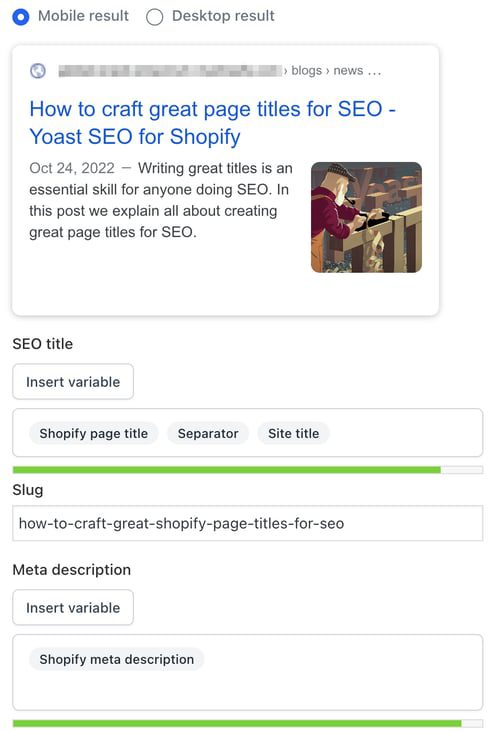
Luckily, our Search appearance section can help you out! You can fill in your SEO title; our plugin will provide you with immediate feedback. The green line underneath the SEO title turns red when your title is too long. Keep an eye on that and use the feedback to create great headlines.
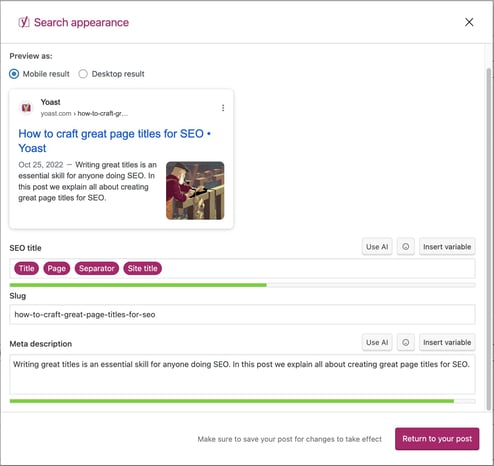
The Search appearance section in the Yoast SEO for WordPress block editor
The Google preview in Yoast SEO for Shopify

What does the keyphrase in the SEO title check in Yoast SEO do?

This check appears in the SEO tab of the Yoast SEO sidebar in WordPress and Shopify, as well as in the meta box in WordPress. It checks if you’re using your keyphrase in the SEO title of your post or page. This check is intentionally strict because the SEO title plays an important role in signaling a page’s topic to both search engines and users. Since Google uses the title to figure out your page’s topic, not having the focus keyphrase in the SEO title may harm your rankings. Additionally, potential visitors are more likely to click on a search result that matches their query. For optimal results, try to include your keyphrase at the beginning of the SEO title.

This check finds out if you’ve used your focus keyphrase in your SEO title

How to use your keyphrase in the SEO title

Sometimes, when optimizing for a highly competitive keyword, everyone will have the keyword at the beginning of the SEO title. In that case, you can try making it stand out by putting one or two words before your focus keyword, thereby slightly “indenting” your result. In Yoast SEO, if you start your SEO title with “the”, “a”, “who”, or another function word followed by your keyphrase, you’ll still get a green traffic light.

At other times, such as when you have a very long keyphrase, adding the complete keyphrase at the beginning doesn’t make sense. If your SEO title looks weird with the keyphrase at the beginning, try to add as much of the keyphrase as early in the SEO title as possible. But always keep an eye on the natural flow and readability.

How to reduce the chance of Google rewriting your SEO title

Google may rewrite titles when they are overly long, stuffed with keywords, misleading, or inconsistent with the page’s main heading.

To reduce the likelihood of rewrites:

  • Make sure your SEO title closely matches your page’s H1
  • Avoid excessive separators, repetition, or boilerplate text
  • Ensure the title accurately reflects the page content

While rewrites can still happen, clear and concise titles are more likely to be shown as written.

Want to learn how to write text that’s pleasant to read and optimized for search engines? Our SEO copywriting course can help you with that. You can access this course and our other SEO courses with Yoast SEO Premium. This also gives you access to extra features in the Yoast SEO plugin.

Are you struggling with more aspects of SEO copywriting? Don’t worry! We can teach you to master all facets, so you’ll know how to write awesome copy that ranks. Take a look at our SEO copywriting training and try the free trial lessons!

Crafting SEO-friendly page title: FAQs

Are the SEO title and the H1 heading the same?

To be clear, you should not confuse the SEO title with the post title; both serve different purposes and do not have to be the same.

The post title, also known as the H1 heading, is the main heading users see on the page. Its primary role is to help readers understand what the page is about and to add structure to your content. You should always write your H1 with users in mind.

The SEO title is the title that appears in search results and in the browser tab. This title helps search engines understand the topic of your page and influences whether users click on your result.

While the SEO title and H1 can be similar, they do not need to be identical. In WordPress, tools like Yoast SEO allow you to set a separate SEO title, giving you more control over how your page appears in search results without changing the on-page heading.

Should you add your brand to the SEO title?

For quite some time, it was a common practice among some SEOs to omit the site name from the SEO title. The idea was that the “density” of the title mattered, and the site name wouldn’t help with that. Don’t do this. If possible, your SEO title should include your brand, preferably in a recognizable way. If people search for a topic and see your brand several times, even if they don’t click on it the first time, they might click when they see you again on their next page of results.

However, with the site name and favicon updates, be sure to fill in the site settings, upload a favicon, and make general changes to the design of the snippets. This will increase your brand’s visibility in search results. Today, you’ll notice that Google hardly shows your brand name in the snippet’s title. However, Google often has a mind of its own when generating titles to change them for any given reason. The design and function of the SERPs can change at any moment, so we still recommend adding your brand to your titles.

Can you change the SEO title after a page is published?

Yes. You can change the SEO title even after a page has been published, and doing so can improve performance.

At Yoast, we once noticed that although we ranked well for “WordPress security,” the page was not getting as much traffic as expected. We updated the SEO title and meta description to make them more engaging and relevant. As a result, traffic to that page increased by over 30 percent.
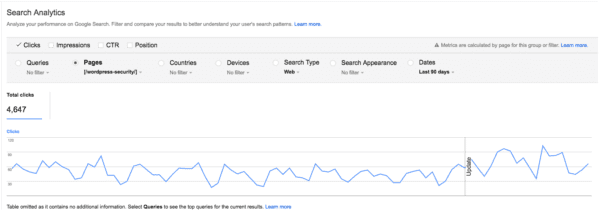
The original SEO title was:

WordPress Security • Yoast

We changed it to:

WordPress Security in a few easy steps! • Yoast

This change did not significantly affect rankings, but it did improve click-through rates. The keywords stayed largely the same, but the title became more compelling for searchers.

This shows that optimizing SEO titles after publication can be an effective way to increase traffic, especially if your page already ranks well but receives fewer clicks than expected.

Does Google always use the SEO title you set?

No. Google does not always display the exact SEO title you set in search results.

That said, the HTML title tag is still the most common source Google uses for generating title links. Google Search uses the following sources to automatically determine title links:

  • The tag
  • The main visible heading on the page, such as the
  • Other headings on the page
  • Prominent text styled to stand out
  • Anchor text from internal or external links
  • Structured data related to the website

Google typically selects one title per page and does not change it for different queries.

What does this mean for you? The SEO title you set remains important for ranking and relevance. Even if Google sometimes displays a different version, your title still helps search engines understand the content of your page.

To stay on top of changes, monitor your key pages in Google Search Console, check how titles appear in search results, and watch for shifts in click-through rates.

Can you use the same title for SEO and social media?

You can, but it is often better not to.

What might be a good SEO title isn’t necessarily a good title for social media. In social media, keyword optimization is less important than creating a title that entices people to click. You often don’t need to include the brand name in the title. This is especially true for Facebook and X if you include some branding in your post image. Our social media appearance previews in Yoast SEO Premium and Yoast SEO for Shopify can help you.

If you use Yoast SEO, you can set different titles for Google, Facebook, and X. Enter your SEO title in the snippet editor, then customize the social media titles in the social tab. If you do not set a specific X title, X will use the Facebook title by default.

This flexibility allows you to optimize your titles for both search engines and social platforms without compromise.

Favicons and your online brand: Make sure you stand out!

Favicons are those little icons you see in your browser tabs. When you have many open tabs in your browser, they help you recognize and find the page you were looking for. They are important for your branding because Google shows them in the mobile and desktop search results. So, let’s take a closer look at those little icons and your branding here!

What is a favicon?

A favicon is a tiny, square image that represents a website. You see it in your browser’s address bar, open tabs, and bookmarks. Its main job is to help users quickly identify and find a site among many open tabs or results. Often, these match a website’s logo or theme, making it instantly recognizable. For consistency, favicons follow certain size and format rules to look good on different devices and platforms.

Favicon in your browser bar

The above example is in a browser bar, but we also see these in the search results. For some time, Google has shown them in its search results.

an example of a search result with the yoast favicon located in the top left corner
The Yoast logo is an example of a favicon in Google search

If your favicon represents a trustworthy brand, it can help people recognize your brand through this little icon, boosting your site’s click-through rate. After all, a picture says more than a thousand words!

Make your favicon stand out

You should make sure your favicon stands out, whether from that long list of tabs or the search results. Check if it matches your logo and website well. Especially when you are not one of the big brands and want people to recognize this little icon. Some tips directly related to that are:

  • Avoid too many details in your icon;
  • Please use the right colors so the favicon doesn’t blend in with the gray of your browser tab;
  • Test it at various sizes to ensure it remains clear and recognizable.

Everything is about branding. Your brand should be recognizable. Proper branding ensures that people will immediately relate your favicon to your website.

Follow Google’s guidelines regarding which format and size to use for your favicon. Google’s latest guidelines require favicons to maintain a 1:1 aspect ratio and a minimum size of 8×8 pixels. While the minimum size offers a baseline, Google strongly recommends using a resolution of at least 48×48 pixels to ensure clarity and visual appeal across various devices.

You should review and adjust your favicons to align with these guidelines. Make sure that your brand remains effectively represented in search results.

an example of a site might look on google as shown in the search appearance section of yoast seo
Yoast SEO shows your favicon in the Search Appearance section

Do these have SEO benefits?

Are there real SEO benefits? The importance of these icons certainly increased since they are present in the search results. While adding a favicon won’t directly make your page rank higher, it might increase the click-through rate to your page when it is shown next to your URL in the search results. It adds professionalism to your site, enhancing user perception and trust. This might indirectly contribute to better engagement metrics.

Of course, this only works if people feel positively about your brand or website. In practice, you should invest time in holistic SEO: making your website (and product/service) awesome in every way!

Favicons in WordPress

If you use WordPress, you might know that there’s a favicon functionality in WordPress. You can use this default functionality without hassle. It’s located in the General Settings and is called Site Icon. Here, you can read step-by-step instructions on how to change your site’s favicon in WordPress.

Set your favicon in the WordPress General Settings

These icons are small powerhouses

Favicons might be small, but they impact how people see your website. Your favicon can represent your brand by keeping your design simple and following the latest guidelines. It helps attract attention and makes your site look more professional. While they don’t directly boost search rankings, they can lead to higher click-through rates and better brand recognition. These benefits can support your overall SEO strategy. Spending a little time on a great icon can strengthen your connection with visitors.

Read more: 5 tips on branding »

Coming up next!

seo enhancements
Should your business start using Threads?

Social media can be a great tool for your business and your SEO, because it can help drive traffic to your website. That’s why it’s good to keep an eye on new social media platforms, like Threads. So, is it worth it to invest your time in Threads? Or should you focus your efforts on other social media platforms?

Before we dive into Threads specifically, it’s good to refresh our memories. So, why is it good for your business to be on social media? Multiple reasons. First, because it helps your off-page SEO, which means it generates traffic to your site.

Second, a lot of people use social media as a search engine nowadays, so being active on multiple platforms can boost your brand’s visibility big time. And finally, it can only enhance your trustworthiness, because your audience will see that there are actual people behind the brand. 

What is Threads?

Created by Instagram, Threads is a text-based conversation app. Think of it as Twitter’s sibling. It’s a platform where people are encouraged to be authentic and write whatever they’re thinking. 

When Threads was first launched, it became the fastest platform to ever reach 100 million users. Which happened in just five days! However, after a month, Threads quickly lost 80% of its users. So is it not worth the trouble anymore? Not exactly. It still boasts a few million users, and for a new social media platform, that’s not a bad start.

Should you create a Threads account?

Depends! As always, you should look at where your audience is. However, sometimes it can pay off to venture into uncharted territories. And maybe the leap to a new platform isn’t even that big. If your posts always perform well on X (formerly Twitter), then they might actually do well on Threads too—seeing as it’s a similar platform.

Okay, let’s talk about why it might actually be a good idea to create that Threads account.

1. Rapid user growth

As we already mentioned, Threads has quickly gained a large and active user base. This means it has the potential to become even bigger, especially if X (formerly Twitter) keeps making not-so-popular choices

2. Integration with IG

Since Threads is already connected to Instagram, it allows a seamless integration between the two. This means you can easily share content between the two platforms. Plus, it allows you to use your existing follower base from Instagram. You won’t have to start from zero! 

3. Authentic platform with real-time conversation

A huge trend at the moment is authenticity. It’s part of the reason why TikTok has grown so popular, because people are looking for authentic content. They want to see the people behind a brand or business. Since Threads is designed for real-time interactions, this makes it the perfect place for you to build a connection with your audience.

4. Stay relevant

Last but not least, you might want to consider creating a Threads account to stay relevant. If your audience is on Threads, you should be too. This will allow you to stay visible and in the loop, because you know just what your audience is talking about—which you can then use to your advantage!

The future of Threads

It’s tricky to predict what will happen to Threads. How long will it be around? Will it grow more popular or less? Seeing as more people are leaving X (formerly Twitter) and moving to Threads, there’s a  big chance that Threads will stick around. 

Especially since it’s expected that Threads will introduce more features, such as advanced analytics, ecommerce integration, and an in-app camera function. According to PR Daily, Threads is also testing a draft post option, and exploring automatic archiving of posts, which are all positive signs that Threads is here to say.

Don’t be afraid to experiment on social media

Social media is all about experimentation. Whether it’s trying out funny content or short-form videos, or trying out new social media platforms. Because if you don’t experiment, how will you know what your audience will engage with? 

Plus, as we said before, it’s also great for your off-page SEO. If your social media content gets shared by others, you’ll be getting more brand mentions and recognition. You might even get more backlinks! So if you have the time, why not give Threads a go?

Coming up next!

seo enhancements
What is off-page SEO?

SEO can be explained as any effort you make to improve your website. But did you know there’s an important distinction between on-page and off-page SEO? Optimizing your website is called on-page SEO and includes things like site structure, content and speed optimization. Off-page SEO entails, among other things, link building, social media, and local SEO. In other words, generating traffic to your site and making your business appear like the real deal it is. In this post, we answer the question: What is off-page SEO?

Exposure, trust and brand awareness

When focusing on on-page SEO, you’re doing everything in your power to create a good website. You write great content, build a solid site structure, make your website mobile-friendly and work on improving page speed. All is well in the world and you’ve done all you can. Right? Well, there’s another part we can’t forget: off-page SEO. This helps you to bring in those hordes of visitors and potential customers. Both are important pieces of the puzzle.

By writing quality content you can rank in search engines, but by getting a few great, relevant sites to link to that content, you’re increasing the chance that you’ll end up ranking a lot higher. The same goes for building your brand and creating trust. This doesn’t just happen on your site, but mostly off-site. Take reviews, for instance, these can make or break your company. You need them, but they most often appear on external sites. These are all factors that contribute to your rankings.

It’s not only important to rank high for your search term, but also to create trust and a sense of authority. You must appear to be the best search result, not just in a technical and content sense, but also in reality. Popularity, quality, and relevance are everything. Especially now that E-E-A-T (which stands for Experience, Expertise, Authoritativeness and Trustworthiness) has become a core concept in how Google rates your online content.

Links are the threads that keep our web together. Search engines use links to determine how valuable a piece of content or a particular site is. Getting quality links will always be a great tactic if you’re serious about SEO. And who isn’t? In the past, there have been debates on the relevance of links. We firmly believe in the importance of links. That being said, you need the good ones. Don’t buy stuff, and keep a close eye on where and how you’re being linked to. We’ve written several guides on how to get quality links for your site and what you shouldn’t do when link building.

By itself, social media is not essential for ranking well in search engines. It is however growing in popularity, and more and more people are using these platforms for their online searches as well. It’s also a great way to reach more people and grow your brand as a whole.

At the end of the day, SEO is about being found online. By being active on social media, you will be deemed more trustworthy, be more easily found and have a great way to showcase your brand more. People will probably expect to find you there and you don’t want them to end up empty-handed or stumble across your competition. It also gives you a great opportunity to interact with your audience in a fun and approachable way. So make sure to invest in social media to reach your audience.

Local SEO is also off-page SEO

Local SEO is essential if your business is locally oriented. But what is it? Where normally, you would focus your efforts on reaching as many people as possible, wherever they are, local SEO focuses on reaching people in a certain area. So, for example, when you’re a bike repair shop or real estate agent.

For local businesses, part of the off-page SEO is in-person SEO. Word-of-mouth marketing plays a big role in getting people to your business. Not just that, happy customers can leave reviews online that Google – and other potential customers – can use to see how well you are doing. The experiences that people have with your business, should be similar and positive, whether they’re offline or online.

Don’t forget to showcase yourself

Coming back to the importance of showing your expertise or authority on a topic, you need to make sure this isn’t just being said on your website. Make appearances to talk about your field or expertise or service/product with others. By blogging for another website in your field, doing interviews, being a guest on podcasts, or going to events to do a talk or workshop. Share your knowledge and be active to let people know that you’re the go-to person (or website) when it comes to that specific topic.

Off-page SEO is an integral part of your SEO strategy

As we’ve shown, off-page SEO supplements on-page SEO. They go hand in hand. You need to focus on what’s going on outside your website as well. Work on proper link building, branding and your social media efforts to make the most of your SEO. You can optimize your site all you want, but if it isn’t perceived as a quality destination for people, it will be difficult to get people to your website at all.

Read more: The ultimate guide to content SEO »

Coming up next!

5 tips on how to use TikTok for your business

If you want to reach a younger audience, you need to look into TikTok. Almost half of TikTok’s user base is under 30 years old. So if that’s a market you want to target, you should consider creating a TikTok account and a TikTok strategy. In this post, we’ll give you 5 tips on how to use TikTok for your business. Let’s go!

Understand TikTok as a platform

It’s good to understand TikTok as a platform before you start using it for your business. Why? Because you need to understand what appeals to people and what type of content is popular if you want more engagement.

TikTok is typically used for short-form videos that range between 5 seconds and 3 minutes long. The app has a huge music library and in-app editing features, which means it’s easy to create your own content. 

The TikTok algorithm

Another reason why TikTok has grown so popular is because it has a very clever algorithm. Their For You page seems to effortlessly and endlessly share content that you like. And it only gets better! Which makes it hard for people to leave the app, since it keeps showing them great content. Before they know it, just one more video has turned into twenty videos! 

Should you get a TikTok business account?

TikTok offers businesses this neat thing called a business account. It’s not hard to set up, and gives your brand the credibility of being a verified business. It also allows you to set up a TikTok shop and use a link in your profile. Plus, you can download all the analytics, which makes it easier to use the data in reports.

The only downside? You won’t get access to all the commercial sounds. But there are still lots of good sounds that you can use, so a TikTok business account is worth it in our opinion.  

5 tips on how to use TikTok for your business

1. Showcase the value of your product within 3 seconds

Users want to quickly see the value of your video. So, try to show your USP (unique selling point) at the very start. Ideally, in the first three seconds of your video. Otherwise, people will just scroll away. 

For example, let’s say you sell ultra-strong iPhone cases. You could film a scene where you drop the phone from the second floor, then show your viewers that it didn’t get scratched. Of course, there are tons of ways to showcase the unique value of your business. It all depends on your product. Just remember to keep it to the point!

2. Try not to sell 

Unlike other platforms, you should build a connection with your audience on TikTok before you try to sell them anything. In fact, it’s better not to be sales-y at all! That type of content typically doesn’t do well. 

Instead, treat TikTok as a way to be authentic with your audience. For example, you could share your journey as a small business owner or showcase your products in fun ways. It will take time to build an audience, but it will be worth it once you’ve found your target audience!

3. Be vulnerable

TikTok users appreciate authenticity and “realness”. That’s why videos where people share their struggles with their small business tend to get a lot of engagement, since people find those stories relatable. 

Some ideas: 

  • A “story time” video about how you started your business. A popular trend that fits this topic would be: how it started vs. how it’s going 
  • Things you learned during your small business journey
  • A mistake you made and what you learned from it
Examples of small businesses who are vulnerable and authentic on TikTok

If you want to take TikTok seriously, you shouldn’t post just once a week. Instead, try to post everyday. This will allow you to keep up with TikTok’s algorithm. 

Of course, creating and editing new videos everyday sounds daunting! But there’s tons of ways to create new content. For example, you can hop on trends, make videos of your products, or relate your business to a trending sound. The key is not to take things too seriously. Just have fun! 

Note: Of course, you shouldn’t just be posting trends. Try to have a good balance between planned videos and trendy/fun videos.

5. Utilize UGC for your TikTok ads

If you’re a small business, TikTok ads are a great way to get your name out there. Still, it’s good not to be too sales-y. A great way to avoid this is by boosting videos made by users, otherwise known as user generated content (UGC). These videos will come across as more genuine and authentic than a polished video ad.

Just make sure you ask the creator’s permission before you use their video! 

Examples of UGC ads

Whether it’s TikTok or Instagram or another social media platform, it’s good for your SEO to be active on social media. After all, SEO is all about being found. When people search for you, it’s nice if they’re be able to find you on multiple platforms. In fact, with social media being so popular as it is, your audience probably expects you to be on social media!

Plus, Google now shows TikTok videos in the search results too. So if your videos show up there, you will get a nice bit of extra visibility.

Find what works for you

Since TikTok is all about authenticity, you should only create content that you feel comfortable with. Don’t try to shape yourself and your business into something it’s not. People will notice. Instead, find a video style and posting schedule that works for you, and have fun!

Coming up next!