Google: AI Mode Checkout Can’t Raise Prices via @sejournal, @MattGSouthern

Google is disputing claims that its new AI-powered shopping checkout work could enable what critics describe as “surveillance pricing” or other forms of overcharging.

The back-and-forth started after Lindsay Owens, executive director of consumer economics think tank Groundwork Collaborative, criticized Google’s newly announced Universal Commerce Protocol and pointed to language in its public roadmap about “cross-sell and upsell modules.”

U.S. Sen. Elizabeth Warren amplified the criticism, saying Google is “using troves of your data to help retailers trick you into spending more money.”

Google’s corporate account News from Google replied that the claims “around pricing are inaccurate,” adding that merchants are prohibited from showing higher prices on Google than what appears on their own sites.

What Triggered The Back-And-Forth

Owens wrote on X that Google’s announcement about integrating shopping into AI Mode and Gemini included “personalized upselling,” which she described as “analyzing your chat data and using it to overcharge you.”

Warren then reposted Owens’ thread and echoed the allegation in stronger terms, calling it “plain wrong” that Google would use user data to help retailers “trick you into spending more money.”

Google responded publicly on X with a thread disputing the premise.

News from Google wrote on X:

“These claims around pricing are inaccurate. We strictly prohibit merchants from showing prices on Google that are higher than what is reflected on their site, period.”

Google also addressed the “upselling” term directly:

“The term ‘upselling’ is not about overcharging. It’s a standard way for retailers to show additional premium product options that people might be interested in.”

And it added that “Direct Offers” can only move in one direction:

“‘Direct Offers’ is a pilot that enables merchants to offer a lower priced deal or add extra services like free shipping … it cannot be used to raise prices.”

Where “Upsell Modules” Shows Up

The language critics are pointing to is in the Universal Commerce Protocol roadmap, which lists “Native cross-sell and upsell modules” as an upcoming initiative, described as enabling “personalized recommendations and upsells based on user context.”

Separately, Google’s technical write-up on UCP says AI shopping experiences need support for things like “real-time inventory checks, dynamic pricing, and instant transactions” within a conversational context. The “dynamic pricing” phrasing is broad, but it is part of what critics are interpreting through a consumer protection lens.

Google’s Ads & Commerce blog post presents UCP as covering the entire shopping journey, linking it to AI Mode and Gemini, while emphasizing that retailers stay the seller of record.

Why This Matters

I have covered Google’s price accuracy enforcement going back years, including Merchant Center policies meant to prevent situations where a shopper sees one price and gets a higher one at checkout. That history is why the “prices on Google versus prices on your site” line is doing so much work in Google’s response.

The bigger picture is that Google is trying to turn AI Mode and Gemini into places where product discovery can end with a transaction. When that happens, the conversation stops being purely about relevance and starts being about pricing rules, disclosures, and what “personalization” means in practice.

Looking Ahead

If this becomes another layer of feed requirements and policy edge cases, retailers will feel it immediately. If it reduces drop-off between product discovery and checkout, Google will likely push harder to make it a default part of AI Mode shopping.


Featured Image: zikg/Shutterstock

Google’s UCP Checkout Brings New Tradeoffs For Retailers via @sejournal, @MattGSouthern

When Google announced that shoppers could complete purchases directly in AI Mode, the focus was on convenience and technical capability. A retailer who emailed Search Engine Journal raised different questions about what gets lost when the transaction moves to Google’s surfaces.

The retailer cited concerns that customers never visit the store, see accessory recommendations from other sellers, and lose brand connection when making purchases on Google.

The concern shows a tradeoff in Google’s Universal Commerce Protocol. Retailers gain potential access to customers at the moment of purchase intent. However, they may lose some of the brand environment, discovery patterns, and relationship-building that occur when shoppers visit owned sites.

What Changes When Checkout Leaves Your Site

The change affects several parts of how retailers interact with customers.

Cross-selling

Cross-selling may change shape. A customer buying a camera on your site might see lens recommendations, memory cards, or cases based on your merchandising strategy.

Google says it plans to add capabilities like discovering related products, applying loyalty rewards, and powering custom shopping experiences on Google, but it hasn’t detailed reporting, fees, or data-sharing for AI Mode checkout.

If loyalty rewards, saved preferences, and checkout work more smoothly on Google surfaces, some shoppers may prefer that experience even if retailers have less control over it. Whether that tradeoff benefits retailers depends on details Google hasn’t disclosed yet.

Brand Connection

Brand storytelling can get compressed into whatever product data feeds into Google’s systems. Retailers invest in site design, content, and navigation to communicate what makes them different. That investment may not fully transfer when the interaction happens in AI Mode’s standardized interface.

The customer relationship dynamics change. Retailers traditionally owned the full transaction flow: discovery, consideration, purchase, and post-purchase communication. For orders completed inside AI Mode, Google would host more of the discovery and checkout experience on its own surfaces, while retailers remain the seller of record.

The degree to which retailers can access customer journey data that normally informs merchandising and marketing is unknown.

The Amazon Parallel

The situation resembles dynamics that already exist with Amazon marketplace sellers. Third-party sellers on Amazon get access to massive customer traffic. Marketplace sellers often accept less control over the customer experience and limited access to relationship signals compared with selling on their own sites.

Google’s protocol creates similar dynamics but extends them across the open web rather than within a single marketplace. Google positions UCP as an open standard, in contrast to Amazon’s closed marketplace model. The key difference: Amazon requires sellers to list products on its platform. UCP lets Google insert checkout capabilities into AI Mode while products technically remain on participating retailers’ inventory systems.

Whether that distinction leads to more data for retailers or a different platform dependency depends on reporting and data-sharing details Google hasn’t specified.

When It Makes Sense, When It Doesn’t

Some retail business models rely heavily on price, convenience, and fulfillment speed. For these retailers, losing the site visit may matter less if UCP delivers customers when they’re ready to buy.

Other retailers compete on curation, brand experience, and discovery. A customer visiting a specialty outdoor gear retailer expects to explore complementary products, read buying guides, and engage with brand content. Moving more of the purchase flow onto Google surfaces could reduce how much of that value proposition happens on a retailer’s site.

The calculation also depends on customer acquisition costs. For example, if you’re paying $30 to acquire a customer through Google Ads and they buy a $50 product on your site, the unit economics work when you can cross-sell or build long-term relationship value. If checkout happens on Google’s surface and you can’t cross-sell or retarget, the same acquisition cost may not be worth it.

What’s Known Versus What’s Speculation

Google said eligible U.S. retailers will be able to participate in UCP checkout through AI Mode in Search and the Gemini app. Google says retailers remain the seller of record and can customize the integration.

A separate Google Developers blog post explains that merchants remain the Merchant of Record and highlights an embedded option for a customized checkout experience. But the announcement didn’t detail the data-sharing arrangement, fee structure, or the funnel-level reporting retailers will receive for AI Mode checkout events.

The protocol is described as “open,” but adoption requirements, integration complexity, and whether non-Google AI systems can use it are unclear.

Google’s Business Agent feature demonstrates one use of the new protocol: branded AI chat appears in Search results for participating retailers, but the interaction occurs on Google’s platform.

Some analysts frame the change as existential, using terms like “extinction event” for certain retail models. That’s based on assumptions about adoption rates, customer behavior, and competitive dynamics that haven’t played out yet.

The more measured question retailers are asking: Does this create fragmentation where they need to optimize for multiple checkout flows, or consolidation where Google becomes the dominant transaction layer for product searches?

Questions Without Clear Answers

Three implementation details will likely determine how disruptive AI Mode checkout becomes for retailers:

  1. Merchant Center control: whether participation is explicitly opt-in and retailers can limit checkout to specific products or categories.
  2. Measurement: what reporting retailers get for actions on Google surfaces and whether AI Mode orders can be distinguished from standard site conversions.
  3. Customer and journey data: what signals, if any, come back to retailers to support lifecycle marketing and merchandising decisions.

Google has outlined the direction for UCP but hasn’t detailed these operational components.

Looking Ahead

Google said UCP checkout will roll out to eligible U.S. retailers soon, but hasn’t provided specific timing. Business Agent, which puts branded AI chat on Search results, went live Jan. 12.

Retailers questioning the tradeoffs between visibility and control face a pattern that’s played out before with Amazon, Google Shopping, and social commerce. Early participants gain access to new traffic sources but accept platform rules they don’t control. Late adopters may find themselves at a disadvantage.

The core question several retailers have raised is: Can they maintain the brand differentiation and relationship-building that justified creating owned channels when the transaction occurs on someone else’s platform?

The protocol is too new to know yet.


Featured Image: michnik101/Shutterstock

Agentic Commerce: What SEOs Need To Consider (ACP & UCP) via @sejournal, @alexmoss

In my last post, I referenced how there is now a growing split between the “human” web and the “agentic” web, where AI agents are becoming an additional audience/profile alongside the “traditional” human visitors we have been optimizing for for years.

This shift is now becoming more aggressive, especially when it comes to the transactional web in the form of agentic commerce. 2026 will see the accelerated adoption of this method, where store owners will now have to cater to and optimize for both the human and agentic visitor concurrently.

The recent launch of Universal Commerce Protocol (UCP) from Google underlines the push towards this integration of AI and ecommerce experiences.

What Is Agentic Commerce?

Agentic commerce is when agents complete purchases autonomously on behalf of users. Now, a human can engage with a large language model platform, where the agent will browse and purchase from a site on behalf (and with approval) of the human. Not only is the agent acting as the gatekeeper for information gain and influencing decisions, but they are also acting as the gatekeeper for the transaction itself.

This is a step beyond delegating an LLM to act as a recommendation agent or a method of validation, but now transfers authority to actually transact.

Enter ACP (Agentic Commerce Protocol)

On Sept. 29, 2025, OpenAI and Stripe announced their partnership and, within this, launched ACP, an open standard that defines how AI agents, merchants, and payment providers interact to complete agentic and programmatic purchases.

On the same day, OpenAI detailed platforms that were immediately able to benefit from agentic commerce, including Shopify and Etsy, with others following suit using the protocol, including Walmart and Instacart.

From a CMS point of view, Shopify hit the ground running by enabling ACP for over 1 million merchants from the day of the announcement. WooCommerce has followed suit more recently by announcing it will be part of Stripe’s launch of Agentic Commerce Suite, which will allow even more merchants the ability to sell products through various AI-based platforms.

But ACP was launched three months ago, and as we now know, things move fast…

UCP: Google’s Answer To The Immersive Agentic Commerce Experience

Google just announced the launch of Universal Commerce Protocol, which widens some boundaries applied by ACP by tackling a broader problem, providing any AI surface (like Search AI Mode or Gemini) a common language to discover merchants, understand their capabilities, and orchestrate full journeys from discovery through order management, as well as engagement beyond a purchase (also made seamless using Google Pay). This is also done by integrating with other existing standards, including APIs, Agent2Agent (A2A), and the Model Context Protocol (MCP).

Aspect ACP (OpenAI) UCP (Google)
Primary focus Agent‑led commerce in ChatGPT and ACP‑aware agents.​ Unified rail for many agents/surfaces talking to merchants.
Journey Coverage Product feed, checkout, fulfillment, delegated payment. Discovery, checkout, discounts, fulfillment, order management, payments.
Driver OpenAI + Stripe & ecosystem partners. Google + retailers/platforms (Shopify, Etsy, Walmart, etc.).

Here, Google adds to the possibilities of the commerce experience, where SEOs can adopt both ACP and UCP in order to accommodate both platforms and ecosystems.

This will only become more immersive as 2026 progresses. Google has a great advantage of knowing a lot about individual users, and features such as AI features inside Gmail illustrate Google can utilize and understand much more context about individuals in order to provide an even more frictionless experience.

Why This Matters For SEOs

As SEOs, we’ve spent over a generation optimizing for humans, albeit for various personas or ICPs. While we are still required to do this, we must now include the agent as an additional consideration. This does pose another challenge: that AI agents don’t browse pages but instead query APIs, parse product feeds, and evaluate structured data.

As such, we need to optimize for this. Maybe I can give it a name…

ACO: Agentic Commerce Optimization

I don’t want to trigger you by introducing yet another acronym to what seems to be a previous year of new acronyms, but for the sake of this post, let’s pretend that ACO is something you’ve been told to do now, as well as SEO, even though this is still SEO.

What would I need to consider and optimize for for successful ACO?

  • Crawlability: Agents still follow links, take journeys, and understand IA.
  • Format: Content needs to be concise with less fluff, but enough to ensure unique value has been added, and that it provides consistency throughout the site as a whole.
  • Structured Data: Agents will become more reliant on existing standards, especially if they’re open source.
  • Brand Authority And Sentiment: Populating your products well is, of course, paramount, but without positive brand sentiment, you have the challenge of convincing the agent to cite you as part of that discovery, then have to convince the human who will have that feedback presented to them. Third-party perspectives will become a larger contribution towards some of the agents’ grounding procedures before any agentic commerce begins.

Sounds familiar, right? While ACP is a connector between your site and the platforms that allow agents to use it, and CMSs are out there to make that connection as seamless as possible, this isn’t just a switch where, when switched on, is automatically optimized.

ACO = SEO.  

Schema.org Is The Glue

Pascal Fleury presenting structured data options at Search Central Live Zurich December 2025
Image Credit: Alex Moss, January 2026

Last month at Google Search Central Live in Zurich, Pascal Fleury went into detail about structured data for Shopping, where we can see that, while “schema.org is the glue that holds [structured data] together,” there are still other industry standards, such as GS1, that will add even more granular detail to products that will not only help inform agents on really specific details but also understand that you’re a great source of information to continue ingest from.

Product schema, pricing, availability, reviews, FAQs, shipping options, and other logistics, loyalty schemes –  all of this structured data will need close optimization. If it’s missing or incorrect, you’re invisible to agent-mediated discovery.

Test The Agents

Even before your store is ACP-enabled, test how agents perceive your products. Ask platforms about products in your category. Do they surface your brand? How do they describe your products and complementary offerings? What information are they presenting, from both first-party and third-party perspectives? And more importantly, what is missing that you expected to be present?

Then, enable. What are the differences? Compare the results.

What Can I Do About It Now?

ACP

For WooCommerce and Wix, you will unfortunately need to join Stripe’s waitlist for ACS. Shopify users also have to join their own waitlist. Until then, we will have to wait until full rollout, but expect this to accelerate in Q1 of 2026.

If you work with a site where you have to integrate ACP directly into your CMS, any early adopters will perhaps benefit from early discovery, while the other CMSs catch up and competition is lower. So here, while this will require more resources, you will be able to take advantage of what ACP has to offer while most wait for their CMS platform to create the solution for them.

UCP

This is extremely fresh information, but I suggest that some time to understand it in detail, as well as experiment where possible using their documentation and GitHub repo, I know that’s how a lot of my time will be spent in the next few weeks.

More Resources:


Featured Image: Koupei Studio/Shutterstock

Google Announces AI Mode Checkout Protocol, Business Agent via @sejournal, @MattGSouthern

Google announced tools that let shoppers complete purchases directly within AI Mode and chat with branded AI agents in Search results.

Users can purchase from eligible product listings on Google. Retailers are still the seller of record, while the checkout happens on Google surfaces instead of the retailer’s website.

Universal Commerce Protocol Powers AI Mode Checkout

Google launched the Universal Commerce Protocol, an open standard for what it calls “agentic commerce.” The protocol will power checkout on eligible Google product listings in AI Mode in Search and the Gemini app.

Google developed UCP with Shopify, Etsy, Wayfair, Target, and Walmart. More than 20 additional companies endorsed it, including Adyen, American Express, Best Buy, Mastercard, Stripe, The Home Depot, and Visa.

Shoppers will use Google Pay with payment methods and shipping info from Google Wallet. PayPal support is coming. UCP checkout starts with eligible U.S. retailers, with global expansion planned.

Business Agent Brings Branded Chat To Search

Business Agent lets shoppers chat with brands in Search results. Google describes it as a “virtual sales associate” that can answer product questions in the brand’s voice.

The feature goes live January 12 with Lowe’s, Michael’s, Poshmark, Reebok, and others. Eligible U.S. retailers can activate and customize the agent through Merchant Center.

Google plans to add capabilities for training agents on retailer data, providing product offers, and enabling purchases within the chat experience.

Direct Offers Pilot Tests Ads In AI Mode

Google also announced Direct Offers, a new ad pilot in AI Mode. It allows advertisers to offer exclusive discounts to people searching for products.

Google gave an example of a rug search where relevant retailers could feature a special 20% discount. Retailers set up offers in campaign settings, and Google determines when to display them.

Early partners include Petco, e.l.f. Cosmetics, Samsonite, Rugs USA, and Shopify merchants.

Why This Matters

Checkout in AI Mode means a user searching for a product can research, compare, and buy without ever reaching the retailer’s site.

For ecommerce sites, this changes the traffic equation. The sale still happens, but the site visit may not. Retailers participating in UCP gain access to high-intent buyers at the moment of decision. Those who don’t participate may find their products harder to surface when users expect to complete transactions without leaving Google.

Looking Ahead

Checkout in AI Mode rolls out to eligible U.S. retailers soon. Business Agent launches January 12. Direct Offers is in pilot with select advertisers.

Google said it plans to add new Merchant Center data attributes designed for discovery in AI Mode, Gemini, and Business Agent. The company will roll out the new attributes with a small group of retailers soon before expanding more broadly.


Featured Image: hafakot/Shutterstock

How To Manage Demand Fluctuation During Key Ecommerce Shopping Seasons via @sejournal, @brookeosmundson

Ecommerce demand doesn’t rise and fall in a straight line throughout the years.

It can build gradually, spike hard, stall, or drop with little-to-no warning. During peak shopping periods like Black Friday, Cyber Monday, Prime Day(s), Back-to-School, these swings become even more intense.

For PPC marketers, that volatility affects far more than just traffic or CPCs. It influences bidding strategies, budgets, inventory planning, campaign structures, and even internal operations.

Managing demand fluctuation isn’t just about “spending more when demand is high.” It’s also about knowing when demand is coming, preparing your accounts before the surge, staying in control while competition rises, and stabilizing performance after the peak ends.

It means understanding that marketing decisions affect logistics and profitability, not just vanity metrics like impression share.

This article will walk you through how to manage demand in a way that improves performance and protects the business across each phase of the season.

1. Understand And Anticipate Seasonal Demand

Predictable seasonal spikes are only predictable if you know what to look for.

Demand rarely appears out of nowhere. It ramps up gradually. The marketers who recognize early changes in behavior are the ones who scale at the right time instead of reacting too late.

Start with historical data from your own account. Look at when impressions and clicks began to rise last year, not just when the holiday officially started.

Compare year-over-year and week-over-week trends to identify whether demand is starting earlier. In many industries, consumers begin researching long before they’re ready to buy, which means waiting until “the big day” is too late to build momentum.

Conversion lag is another signal. If your data shows it normally takes five days from first click to purchase, and your promo begins on Friday, you need to start increasing budget earlier in the week. Otherwise, you’ll miss buyers who started the journey before the event.

Don’t ignore external factors. Shipping cutoff dates, competitor promotions, weather trends, and even economic sentiment can accelerate or delay demand. The data in the platform only shows part of the picture, while market behavior provides the context.

Forecasting is also critical. Even a simple model based on past revenue, impression share, and growth targets can help you determine expected demand and budget requirements.

This helps create a baseline so you can recognize when performance is ahead or behind expectations and adjust accordingly.

2. Align Bids And Budgets With Demand

Once demand starts building, your bidding and budgeting strategy must evolve with it. This is where many marketers either scale too slowly and miss opportunity. On the opposite side, you scale too aggressively and burn through budget prematurely.

If you’re using Smart Bidding, seasonality adjustments in Google Ads or Microsoft Ads can help the algorithm prepare for a short-term spike that differs from typical trends. These are best used for specific, limited windows (e.g., a 3-day flash sale) rather than entire multi-week seasons.

When demand returns to normal, remove the adjustment so the system doesn’t keep bidding too high in a softening market.

Target settings also matter. A tROAS (Target Return on Ad Spend) goal that works during regular pricing may be too restrictive during steep discounts. Likewise, a CPA goal may need to be relaxed slightly if conversion rates are temporarily lower but lifetime value remains strong.

In some cases, switching to a “Maximize” strategy gives the system more flexibility to capture demand efficiently, especially when intent is high and margin is acceptable.

If using “Maximize Conversions” (or Conversion Value), you could set more flexible bid limits to let the algorithm know you’re willing to pay more for conversions without letting it go haywire and have a mind of its own.

Budgets require just as much attention as bids. If campaigns are capping out early in the day, you’re likely missing high-intent shoppers later. Increasing budgets, reallocating across campaigns, or adjusting bids to stretch delivery can help you maintain visibility during peak hours. Shared budgets can also allow strong-performing categories to pull in more spend without manual intervention.

Scaling back after the surge is equally important. Abrupt budget cuts or major bid changes can disrupt algorithmic learning. Gradual reductions give the system time to recalibrate as demand normalizes.

3. Keep Product Availability And Campaign Structures Aligned

Even the best campaign strategy falls apart if product availability isn’t properly managed.

During peak shopping seasons, inventory can change rapidly. If feeds don’t update quickly, ads may continue promoting items that are low or out of stock. This leads to wasting spend and hurting customer experience.

Be sure to increase your feed update frequency during high-demand periods. This could mean multiple syncs per day if possible.

Ensure that price, availability, and shipping information are accurate. If your platform or feed tool allows real-time inventory updates, take advantage of it.

Custom labels in your feed are one of the most valuable seasonality tools. Try labeling your products by margin, best seller status, promotion type, limited stock, or seasonality. This allows you to structure campaigns around business priorities, not just categories or sub-types.

For example:

  • Increase bids on high-margin or high-conversion products
  • Lower bids or pause products with low inventory
  • Separate promotional items so they receive dedicated budgets and messaging

Performance Max and Shopping campaigns require even more attention. In my experience, it’s common to see PMax concentrate budget on a narrow slice of the catalog while other SKUs receive little to no impression share.

If that pattern doesn’t match your merchandising goals, segmenting high-priority product groups and tightening feed signals usually helps. If you don’t segment campaigns thoughtfully or monitor product-level performance, the algorithm may stall.

Consider using a mix of Standard Shopping and PMax when you need more control over key seasonal categories. Standard Shopping can provide the structure you need, while PMax can help with scaling.

Just make sure they serve different roles to avoid internal competition.

Campaign structure should work hand-in-hand with inventory strategy. The goal is to ensure your best products get visibility when demand spikes and that you don’t waste spend on items you can’t fulfill.

4. Work With Internal Teams During Peak Demand

In normal months, PPC managers can operate with relative independence.

During major retail seasons, that approach can create problems.

Demand fluctuation affects far more than media spend. It touches logistics, merchandising, pricing, site operations, and customer experience.

For example, if marketing pushes a product heavily but the warehouse can’t fulfill orders quickly enough, conversion rates could drop, and customer complaints can arise.

If a PPC offer launches a “50% off” ad before the site reflects the discount, you’ll likely pay for unqualified clicks or see conversions drop.

If inventory runs low but product promotions continue, you’ll burn budget on products that can’t convert.

During peak periods, cross-functional alignment is necessary for optimal performance. Be sure to establish regular communication with:

  • Inventory and fulfillment (stock levels, restock timelines, shipping delays).
  • Merchandising (featured products, bundles, hero SKUs).
  • Pricing and promotions (exact discount timing and margin impact).
  • Creative (messaging changes, urgency vs. value).
  • Site operations (traffic capacity, potential downtime, landing page readiness).
  • Customer service (policy changes, support volume expectations).

Even short daily syncs with these teams can prevent costly mistakes. Something as simple as a delayed shipment or pricing error can change campaign performance within hours.

When teams are aligned, marketing decisions become less reactive and more strategic.

Also, be prepared to change messaging quickly. If shipping times increase, adjust ad copy or landing page expectations. If a product is selling out fast, highlight “limited availability” or shift spend to similar in-stock alternatives.

5. Plan For Post-Peak Performance And Future Seasons

When the surge ends, the work isn’t over.

The post-peak period can feel unstable. After peak periods, I’ve experienced many advertisers observe a short re-balancing window: Conversion intent normalizes faster than bidding pressure does. This is where many marketers overreact and cut budgets too aggressively, causing campaigns to lose momentum.

Instead, treat the cooldown as a transition phase. Reset any seasonality bid adjustments. Reevaluate ROAS or CPA targets. Gradually adjust budgets to align with current demand, rather than slashing them immediately.

Shift campaign focus to retention and LTV where appropriate. Remarketing, post-purchase offers, loyalty initiatives, and subscription promotions can help turn seasonal traffic into long-term value. The conversion window doesn’t always end when the sale does.

This is also the most important time to analyze. Don’t wait weeks to reflect; be sure to capture key insights while the data is fresh.

When analyzing, ask questions like:

  • Which categories or SKUs exceeded (or missed) expectations?
  • Were budgets or bids too slow to adjust?
  • Did any campaigns cap too early in the day?
  • Were there inventory issues that hurt performance?
  • How did different bidding strategies respond under pressure?
  • What messaging/ad copy resonated best with users?
  • What would you start earlier or stop entirely next time?

Document everything. Don’t assume you’ll remember next year.

Seasonality repeats, but consumer behavior and the corresponding algorithm responses evolve every year. The teams that improve each cycle are the ones who treat post-peak as planning time, not recovery time.

Then, build your playbook for the next season. Define earlier ramp-up timing if needed. Establish bidding and budget frameworks. Create inventory and messaging coordination workflows.

When the next seasonality surge comes, you’ll be ready to scale strategically.

Sustain Stability Through Every Season

Managing demand fluctuation is more about staying in control when the market becomes unpredictable. That requires preparation, data awareness, cross-team coordination, flexible bidding and budgeting, and deliberate post-peak analysis.

Demand shifts will always happen. The difference between chaotic seasons and successful ones comes down to how well you anticipate, adapt, and learn from each cycle.

The marketers who treat seasonality as a workflow system (not an event) are the ones who can turn volatility into growth.

More Resources:


Featured Image: Roman Samborskyi/Shutterstock

Why WooCommerce Slows Down (& How to Fix It With the Right Server Stack)

This post was sponsored by Cloudways. The opinions expressed in this article are the sponsor’s own.

Wondering why your rankings may be declining?

Just discovered your WooCommerce site has slow load times?

A slow WooCommerce site doesn’t just cost you conversions. It affects search visibility, backend performance, and customer trust.

Whether you’re a developer running your own stack or an agency managing dozens of client stores, understanding how WooCommerce performance scales under load is now considered table stakes.

Today, many WordPress sites are far more dynamic, meaning many things are happening at the same time:

  • Stores run real-time sales.
  • LMS platforms track user progress.
  • Membership sites deliver highly personalized content.

Every action a user takes, from logging in, updating a cart, or initiating checkout, relies on live data from the server. These requests cannot be cached.

Tools like Varnish or CDNs can help with public pages such as the homepage or product listings. But once someone logs in to their account or interacts with their session, caching no longer helps. Each request must be processed in real time.

This article breaks down why that happens and what kind of server setup is helping stores stay fast, stable, and ready to grow.

Why Do WooCommerce Stores Slow Down?

WooCommerce often performs well on the surface. But as traffic grows and users start interacting with the site, speed issues begin to show. These are the most common reasons why stores slow down under pressure:

1. PHP: It Struggles With High User Activity

WooCommerce depends on PHP to process dynamic actions such as cart updates, coupon logic, and checkout steps. Traditional stacks using Apache for PHP handling are slower and less efficient.

Modern environments use PHP-FPM, which improves execution speed and handles more users at once without delays.

2. A Full Database: It Becomes A Bottleneck

Order creation, cart activity, and user actions generate a high number of database writes. During busy times like flash sales, new merchandise arrivals, or course launches, the database struggles to keep up.

Platforms that support optimized query execution and better indexing handle these spikes more smoothly.

3. Caching Issues: Object Caching Is Missing Or Poorly Configured

Without proper object caching, WooCommerce queries the database repeatedly for the same information. That includes product data, imagery, cart contents, and user sessions.

Solutions that include built-in Redis support help move this data to memory, reducing server load and improving site speed.

4. Concurrency Limits Affect Performance During Spikes

Most hosting stacks today, including Apache-based ones, perform well for a wide range of WordPress and WooCommerce sites. They handle typical traffic reliably and have powered many successful stores.

As traffic increases and more users log in and interact with the site at the same time, the load on the server begins to grow. Architecture starts to play a bigger role at that point.

Stacks built on NGINX with event-driven processing can manage higher concurrency more efficiently, especially during unanticipated traffic spikes.

Rather than replacing what already works, this approach extends the performance ceiling for stores that are becoming more dynamic and need consistent responsiveness under heavier load.

5. Your WordPress Admin Slows Down During Sales Seasons

During busy periods like seasonal sales campaigns or new stock availability, stores can often slow down for the team managing the site, too. The WordPress dashboard takes longer to load, which means publishing products, managing orders, or editing pages also becomes slower.

This slowdown happens because both shoppers and staff are using the site’s resources at the same time, and the server has to handle all those requests at once.

Modern stacks reduce this friction by balancing frontend and backend resources more effectively.

How To Architect A Scalable WordPress Setup For Dynamic Workloads?

WooCommerce stores today are built for more than stable traffic. Customers are logging in, updating their carts, taking actions to manage their subscription profile, and as a result, are interacting with your backend in real time.

The traditional WordPress setup, which is primarily designed for static content, cannot handle that kind of demand.

Here’s how a typical setup compares to one built for performance and scale:

Component Basic Setup         Scalable Setup
Web Server Apache NGINX
PHP Handler mod_php or CGI PHP-FPM
Object Caching None or database transients Redis with Object Cache Pro
Scheduled Tasks WP-Cron System cron job
Caching CDN or full-page caching only Layered caching, including object cache
.htaccess Handling Built-in with Apache Manual rewrite rules in NGINX config
Concurrency Handling Limited Event-based, memory-efficient server

How To Manually Setup A Performance-Ready & Scalable WooCommerce Stack

Don’t have bandwidth? Try the easy way.

If you’re setting up your own server or tuning an existing one, are the most important components to get right:

1) Use NGINX For Static File Performance

NGINX is often used as a high-performance web server for handling static files and managing concurrent requests efficiently. It is well suited for stores expecting high traffic or looking to fine-tune their infrastructure for speed.

Unlike Apache, NGINX does not use .htaccess files. Rewrite rules, such as permalinks, redirects, and trailing slashes, need to be added manually to the server block. For WordPress, these rules are well-documented and only need to be set once during setup.

This approach gives more control at the server level and can be helpful for teams building out their own environment or optimizing for scale.

2) Enable PHP-FPM For Faster Request Handling

PHP-FPM separates PHP processing from the web server. It gives you more control over memory and CPU usage. Tune values like pm.max_children and pm.max_requests based on your server size to prevent overload during high activity.

3) Install Redis With Object Cache Pro

Redis allows WooCommerce to store frequently used data in memory. This includes cart contents, user sessions, and product metadata.

Pair this with Object Cache Pro to compress cache objects, reduce database load, and improve site responsiveness under load.

4) Replace WP-Cron With A System-Level Cron Job

By default, WordPress checks for scheduled tasks whenever someone visits your site. That includes sending emails, clearing inventory, and syncing data. If you have steady traffic, it works. If not, things get delayed.

You can avoid that by turning off WP-Cron. Just add define(‘DISABLE_WP_CRON’, true); to your wp-config.php file. Then, set up a real cron job at the server level to run wp-cron.php every minute. This keeps those tasks running on time without depending on visitors.

5) Add Rewrite Rules Manually For NGINX

NGINX doesn’t use .htaccess. That means you’ll need to define URL rules directly in the server block.

This includes things like permalinks, redirects, and static file handling. It’s a one-time setup, and most of the rules you need are already available from trusted WordPress documentation. Once you add them, everything works just like it would on Apache.

A Few Tradeoffs To Keep In Mind

This kind of setup brings a real speed boost. But there are some technical changes to keep in mind.

  • NGINX won’t read .htaccess. All rewrites and redirects need to be added manually.
  • WordPress Multisite may need extra tweaks, especially if you’re using subdirectory mode.
  • Security settings like IP bans or rate limits should be handled at the server level, not through plugins.

Most developers won’t find these issues difficult to work with. But if you’re using a modern platform, much of it is already taken care of.

You don’t need overly complex infrastructure to make WooCommerce fast; just a stack that aligns with how modern, dynamic stores operate today.

Next, we’ll look at how that kind of stack performs under traffic, with benchmarks that show what actually changes when the server is built for dynamic sites.

What Happens When You Switch To An Optimized Stack?

Not all performance challenges come from code or plugins. As stores grow and user interactions increase, the type of workload becomes more important, especially when handling live sessions from logged-in users.

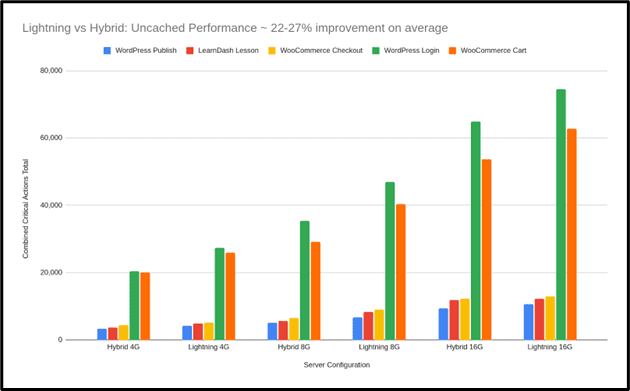
To better understand how different environments respond to this kind of activity, Koddr.io ran an independent benchmark comparing two common production setups:

  • A hybrid stack using Apache and NGINX.
  • A stack built on NGINX with PHP-FPM, Redis, and object caching.

Both setups were fully optimized and included tuned components like PHP-FPM and Redis. The purpose of the benchmark was to observe how each performs under specific, real-world conditions.

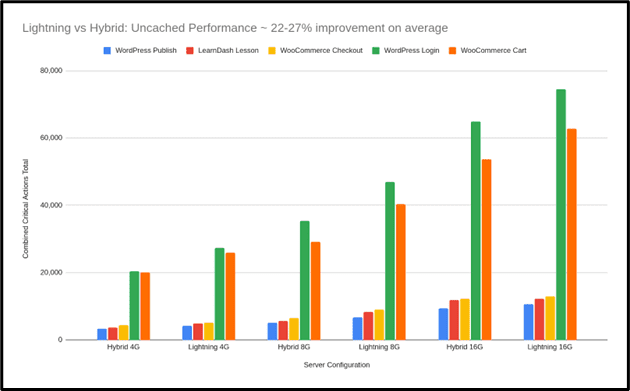
The tests focused on uncached activity from WooCommerce and LearnDash, where logged-in users trigger dynamic server responses.

In these scenarios, the optimized stack showed higher throughput and consistency during peak loads. This highlights the value of having infrastructure tailored for dynamic, high-concurrency traffic, depending on the use case.

WooCommerce Runs Faster Under Load

One test simulated 80 users checking out at the same time. The difference was clear:

Scenario Hybrid Stack Optimized Stack Gain
WooCommerce Checkout 3,035 actions 4,809 actions +58%
Screenshot from Koddr.io, August 2025

LMS Platforms Benefit Even More

For LearnDash course browsing—a write-heavy and uncached task, the optimized stack completed 85% more requests:

Scenario Hybrid Stack Optimized Stack Gain
LearnDash Course List View 13,459 actions 25,031 actions +85%

This shows how optimized stacks handle personalized or dynamic content more efficiently. These types of requests can’t be cached, so the server’s raw efficiency becomes critical.

Screenshot from Koddr.io, August 2025

Backend Speed Improves, Too

The optimized stack wasn’t just faster for customers. It also made the WordPress admin area more responsive:

  • WordPress login times improved by up to 31%.
  • Publish actions ran 20% faster, even with high traffic.

This means your team can concurrently manage products, update pages, and respond to sales in real time, without delays or timeouts.

It Handles More Without Relying On Caching

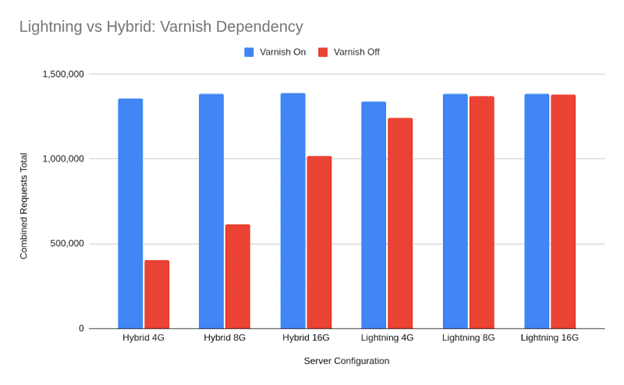
When Koddr turned off Varnish, the hybrid stack experienced a 71% drop in performance. This shows how effectively it handles cached traffic. The optimized stack dropped just 7%, which highlights its ability to maintain speed even during uncached, logged-in sessions.

Both setups have their strengths, but for stores with real-time user activity, reducing reliance on caching can make a measurable difference.

Stack Type With Caching Without Caching Drop
Hybrid Stack 654,000 actions 184,000 actions -7%
Optimized Stack 619,000 actions 572,000 actions -7%
Screenshot from Koddr.io, August 2025

Why This Matters?

Static pages are easy to optimize. But WooCommerce stores deal with real-time traffic. Cart updates, login sessions, and checkouts all require live processing. Caching cannot help once a user has signed in.

The Koddr.io results show how an optimized server stack:

  • Reduces CPU spikes during traffic surges.
  • Keeps the backend responsive for your team.
  • Delivers more stable speed for logged-in users.
  • Helps scale without complex performance workarounds.

These are the kinds of changes that power newer stacks purpose-built for dynamic workloads like Cloudways Lightning, built for real WooCommerce workloads.

Core Web Vitals Aren’t Just About The Frontend

You can optimize every image. Minify every line of code. Switch to a faster theme. But your Core Web Vitals score will still suffer if the server can’t respond quickly.

That’s what happens when logged-in users interact with WooCommerce or LMS sites.

When a customer hits “Add to Cart,” caching is out of the picture. The server has to process the request live. That’s where TTFB (Time to First Byte) becomes a real problem.

Slow server response means Google waits longer to start rendering the page. And that delay directly affects your Largest Contentful Paint and Interaction to Next Paint metrics.

Frontend tuning gets you part of the way. But if the backend is slow, your scores won’t improve. Especially for logged-in experiences.

Real optimization starts at the server.

How Agencies Are Skipping The Manual Work

Every developer has a checklist for WooCommerce performance. Use NGINX. Set up Redis. Replace WP-Cron. Add a WAF. Test under load. Keep tuning.

But not every team has the bandwidth to maintain all of it.

That’s why more agencies are using pre-optimized stacks that include these upgrades by default. Cloudways Lightning, a managed stack based on NGINX + PHP-FPM, designed for dynamic workloads is a good example of that.

It’s not just about speed. It’s also about backend stability during high traffic. Admin logins stay fast. Product updates don’t hang. Orders keep flowing.

Joe Lackner, founder of Celsius LLC, shared what changed for them:

“Moving our WordPress workloads to the new Cloudways stack has been a game-changer. The console admin experience is snappier, page load times have improved by +20%, and once again Cloudways has proven to be way ahead of the game in terms of reliability and cost-to-performance value at this price point.”

This is what agencies are looking for. A way to scale without getting dragged into infrastructure management every time traffic picks up.

Final Takeaway

WooCommerce performance is no longer just about homepage load speed.

Your site handles real-time activity from both customers and your team. Once a user logs in or reaches checkout, caching no longer applies. Each action hits the server directly.

If the infrastructure isn’t optimized, site speed drops, sales suffer, and backend work slows down.

The foundations matter. A stack that’s built for high concurrency and uncached traffic keeps things fast across the board. That includes cart updates, admin changes, and product publishing.

For teams who don’t want to manage server tuning manually, options like Cloudways Lightning deliver a faster, simpler path to performance at scale.

Use promo code “SUMMER305” and get 30% off for 5 months + 15 free migrations. Signup Now!


Image Credits

Featured Image: Image by Cloudways. Used with permission.

In-Post Images: Images by Cloudways. Used with permission.

OpenAI Quietly Adds Shopify As A Shopping Search Partner via @sejournal, @martinibuster

OpenAI has quietly added Shopify as a third-party search partner to help power their shopping search, which shows shopping-rich results. The addition of Shopify was not formally announced, but quietly tucked into OpenAI ChatGPT search documentation.

Shopify Is An OpenAI Search Partner

Aleyda Solís (LinkedIn profile) recently noticed that OpenAI had updated their Search documentation to add Shopify to the list of third party search providers.

She posted:

“Ecommerce sites: I’ve found that Shopify is listed along with Bing as a ChatGPT third-party search provider! OpenAI added Shopify along with Bing as a third-party search provider in their ChatGPT Search documentation on May 15, 2025; a couple of weeks after their enhanced shopping experience was announced on April 28.”

OpenAI Is Showing Merchants From Multiple Platforms

OpenAI shopping search is returning results from a variety of platforms. For example, a search for hunting dog supplies returns sites hosted on Shopify but also Turbify (formerly Yahoo Stores)

Screenshot Showing Origin Of OpenAI Shopping Rich Results

The rich results with images were sourced from Shopify and Amazon merchants for this specific query.

At least one of the shopping results listed in the Recommended Sellers is a merchant hosted on the Turbify ecommerce platform:

Screenshot Of OpenAI Recommended Retailers With Gun Dog Supply, Hosted On Turbify Platform

OpenAI Shopping Features

OpenAI recently rolled out shopping features for ChatGPT Search. Products are listed like search results and sometimes as rich results with images and other shopping related information like review stars.

ChatGPT Search uses images and structured metadata related to prices and product description, presumably Schema structured data although it’s not explicitly stated. ChatGPT may generate product titles, descriptions, and reviews based on the data received from third-party websites and sometimes may generate summarized reviews.

Merchants are ranked according to how the merchant data is received from third-party data providers, which at this point includes Bing and Shopify.

Ecommerce stores that aren’t on Shopify can apply to have their products included in OpenAI’s shopping results. Stores that want to opt in must not be opted out of OpenAI’s web crawler, OAI-SearchBot .

Featured Image by Shutterstock/kung_tom

Amazon Sellers: Inventory Management Tips For 2025 via @sejournal, @AMZRobynJohnson

Anyone with experience selling on Amazon will tell you that the most important part of your business is making sure that you stay in stock.

Inventory stockouts not only lose the incremental sales, but also impact your organic rankings and diminish your advertising efforts.

Managing inventory levels has become more complex as Amazon has rolled out several programs that penalize sellers for both holding too much and too little inventory.

Mismanagement of inventory levels can also influence your capacity limits, directly impacting the amount of inventory that Amazon will allow you to send into the Fulfillment by Amazon (FBA) program.

There are also fees for excess or low inventory that can hurt your bottom line as a business owner.

There are specific tips and tactics for determining and maintaining your ideal inventory levels on FBA, which include understanding:

  • Capacity Limits & Inventory Performance Index (IPI).
  • Storage Fees.
  • Low Inventory Fees.
  • Placement Fees.

Capacity Limits And IPI Scores

Inventory Performance Index

This is the primary metric that Amazon uses to determine how well you control your inventory levels over time.

This directly impacts what Amazon will allow you for FBA capacity limits. Meaning, if your score is low, Amazon may limit the amount of inventory you are allowed to store at FBA warehouses.

This metric is a 12-week rolling average, and it factors in four main components to calculate your score: Excess Inventory %, Stranded Inventory %, Sell-Through Rate, and In-Stock Rate.

Excess Inventory

Amazon considers an item to have excess inventory “if it has over 90 days of supply based on the forecasted demand.”

Excess inventory percentages help sellers plan when to restock or remove inventory from FBA.

This is one of the most critical factors influencing IPI as it measures where a seller’s profitability may take a hit due to storage fees and holding costs for slow-moving FBA inventory.

Stranded Inventory

This component refers to products unavailable for sale due to listing issues.

It occurs when your listing doesn’t meet Amazon guidelines, pending compliance or hazmat issues, or when a listing error prevents the listing from showing as active.

In these instances, your products become stranded and unable to move while incurring FBA storage fees.

Sell-Through Rate

Amazon calculates sell-through as “units shipped over the past 90 days divided by the average number of units on hand in their fulfillment centers during that time period.”

This is a key component to utilize when forecasting how much inventory should be in FBA at all times.

Sell-through will be your guide to a balanced inventory, avoiding stockouts, and preventing excessive fees.

In-Stock Rate

Amazon looks at the percentage of time your products have been in stock during the past 30 days, with additional weight given to items that have sold more units over the past 60 days.

If you maintain a high in-stock rate, it will result in fewer lost sales.

Amazon uses the IPI score to grade how effectively you manage your FBA inventory utilization. (Screenshot from Amazon, April 2025)

How does your IPI score impact your available storage volume?

Amazon dictates your storage capacity limits based on your IPI score and sales performance, so maintaining healthy inventory levels will improve your overall account standing.

Total Capacity Limit

This refers to the amount of inventory you can ship to Amazon’s FBA warehouses and the overall maximum number of units you can store at Amazon’s fulfillment centers at any particular time.

Capacity limits are reviewed and adjusted monthly. Any changes for the next month will be announced on the third Monday.

Accounts active for less than 39 weeks are not subject to these restrictions, as Amazon will use this period to determine how much capacity your FBA business needs as you grow.

It is important to note that this is only true for those accounts on the Professional Seller Plan; those with the Individual Seller Plan are limited to 15 cubic feet per month.

Your total storage usage includes all the units currently stored at Amazon, any units in route, and all shipments, including those that have been prepared but not yet sent to Amazon.

  • Available Inventory: Sellable items stored in fulfillment centers and ready to be shipped to customers.
  • Inbound Units: Inventory shipped but not yet received at an Amazon fulfillment center.
  • Reserved Units: Units tied to pending customer shipments; items in transit between fulfillment centers after initial receipt. Units undergoing review, investigation, or are currently in the receiving process before being made available for sale.
  • Unfulfillable Inventory: Items marked unsellable due to damage, customer returns deemed unsellable, or expired/defective inventory.

What Can Sellers Do To Improve Their IPI score?

You can’t improve what you can’t track, so the first step is always to monitor your inventory metrics.

You can find your IPI and capacity limits by going to the Seller Central top-left menu > Inventory > FBA Inventory. On the next screen, click on Inventory > Inventory Performance.

Your IPI score will be displayed at the top left of the page. Below, you can see a breakdown of the four main elements of IPI.

Your storage capacity will be listed at the bottom of the page, under the small gray box labeled “Capacity Monitor.”

You can view your Inventory Performance Index through this path on Amazon. (Screenshot from Amazon, April 2025)

Improving Your IPI

IPI Score on Amazon. In the bottom middle, you see the Capacity Monitor. (Screenshot from Amazon, April 2025)

Increasing your IPI score on Amazon can take two to 12 weeks, so planning with enough time is essential to success.

If your IPI is below the 400 limit that Amazon requires, you need to start taking aggressive action today.

It is important to highlight that Amazon’s system does not weigh each influencing factor equally when determining your IPI score.

Excess inventory and sell-through rate are the parameters that have the most significant impact on IPI.

In contrast, stranded inventory and restock rates can play a minor role in the overall score.

You will get more traction by prioritizing the first two components rather than spreading your efforts equally across all four elements.

The minimum threshold for a healthy IPI is a score of 400. However, Amazon can increase or decrease the minimum IPI at any time.

For example, during the height of the pandemic, Amazon changed the minimum IPI to 500, but it has been reduced back to 400 since then.

For this reason, we advise our clients to aim for a total IPI of at least 50 points over the current IPI requirement.

Some product mixes make maintaining a high IPI easier than others. For example, suppose you are a small brand with few products that move consistently. In that case, your IPI will generally tend to be higher.

Recommended Actions To Improve IPI

Excess Inventory

Remove slow-moving items; excess inventory is generally one of the top two reasons your IPI score could be low.

Screenshot from Amazon, April 2025

The first step to addressing excess inventory is to pull back inventory you don’t expect to sell.

Focus on SKUs that have gone out of fashion or merchandise experiencing a significant demand drop, like seasonal products.

If you don’t expect to sell a product within three months, you should pull back the inventory to sell on a different channel by creating a removal order.

Run the numbers and consider promotions on low-selling SKUs; sometimes it makes more sense to discount and/or advertise certain products to help them sell faster rather than recalling inventory from Amazon.

While Amazon is great at logistics and moving items through its process, it isn’t great at returning items to sellers. If possible, we want to proactively take action to avoid pulling back inventory and risking damage.

Remember, you may need to create a case with Seller Support to claim reimbursement for damaged or lost units that were part of a removal order.

Optimizing a listing that is not moving can also help increase the sell-through rate.

Evaluate your detail pages and look for opportunities to optimize. Review your reviews and returns and address them in your bullet points, images, and A+ to increase conversions and sell-through rate.

Sell-Through Rate

Prioritize sending fast-moving items to FBA. Amazon looks at this to identify whether the items you’re selling are things customers want to purchase.

The way that we improve the sell-through rate is to send in small shipments of items that will sell out very quickly.

Suppose you’re currently using LTL (Less Than Truckload) or FTL (Full Truckload). In that case, we recommend moving to small parcel shipments during this process to send more frequent shipments without going out of stock for long periods.

As you’re restocking items, you want to prioritize those that will move quickly, sending small quantities of items that will sell out as soon as they arrive or shortly after.

This increases your overall sell-through rate and significantly impacts your overall IPI.

It is vital that, no matter how fast you think a product will move through as you send these products in, you’re testing small batches to make sure that things will sell at the pace you anticipate.

Stranded Inventory

Inventory held in FBA warehouses and unavailable for sale affects your overall IPI.

Fixing stranded inventory can make a slight difference. However, if you need to move your IPI significantly, this component will not make a considerable difference.

It would be best to address stranded inventory weekly or bi-weekly, depending on your general sell-through rate.

In-Stock Rate

This is probably the most frustrating metric of the IPI because Amazon tells you that you can’t restock items because they’re not selling fast enough.

At the same time, it’s trying to encourage you to ensure you stay in stock.

We have found that this metric is given very little weight, and you’re better off focusing on the two key metrics: excess inventory and sell-through rate.

As you work to increase your overall IPI, it is essential to remember that it can take several weeks to improve.

You must give the IPI enough time to move before determining whether your actions are making a difference. It can be tempting to check your IPI often. However, your IPI score is only recalculated once a week.

Suppose you need to raise your IPI quickly or by a significant amount. In that case, you may need to take overly aggressive actions in pruning your inventory and pumping fast-moving items through your account to increase your score to the required amount.

If you have to bid for a capacity increase, you should only do this if you have the data to support being able to sell through that higher quantity of items, so you do not incur extra fees.

Additional Options To Combat Low IPI And Storage Capacity Issues

Some brands we work with have focused on selling their fastest-moving SKUs.

At the same time, they utilize third-party sellers to carry their slower-moving items while they work on increasing their averages.

We have several reliable third-party resellers to whom we can refer our clients if it’s ever an issue.

Suppose you don’t want to utilize third-party sellers. In that case, the alternative is to increase your total number of Merchant Fulfilled offerings.

Remember, Merchant Fulfilled offerings generally don’t compete well against FBA offers, so watch your competition to determine feasibility.

Another step you can take is to allocate your FBA warehouse space to items with the highest margin and smallest dimensional size, as they are highly profitable and sell quickly.

Leaving items with lower profitability or moving slower through Merchant Fulfilled (MF).

Expanding Capacity Limits

Suppose you’re currently experiencing a capacity limit. In that case, Amazon can increase your capacity limit for a specific period of time by submitting a request, subject to Amazon’s approval.

It is important to remember that if the storage limit increase request gets approved, your account is subject to paying a “reservation fee” for each cubic foot of capacity requested, and it will be charged at the end of the specified period.

This fee is subject to a credit depending on your sales achieved during the period (performance credits are earned at $0.15 for every dollar of sales you generate using the additional capacity).

Inventory Stock-Based Fees

As margins are tighter than ever, understanding how Amazon fees are calculated is crucial to profitably planning inventory levels on the marketplace.

When inventory levels are managed effectively, these fees usually make up a very small percentage of the costs to sell on Amazon.

However, when too much or too little inventory is sent, these fees can skyrocket.

Storage Fees

Amazon wants inventory turned in four to six weeks on average.

When sellers send in too much inventory, it can take up valuable space in the FBA warehouse. Amazon first started to combat this with storage fees.

The storage fees [gated link] are made up of the “Base Monthly Storage Fee” and the “Storage Utilization Fee” (formerly known as the Long Term Storage Fee).

Base Monthly Storage Fee

This fee is charged for all inventory at the fulfillment centers. It is calculated by the cubic foot at the ASIN level. The cost of the fee is variable by:

  • Time of Year.
  • Size Tier of the ASIN.
  • Hazmat Status (Dangerous Goods Program).
  • Exempted Status (new sellers, sellers with less than 25 cubic feet of storage, and SKUs in the FBA New Selection program).
Amazon now shows you the estimated storage fees in their FBA revenue calculator. You can see that the longer you plan to store inventory, the more expensive storage becomes. (Screenshot from Amazon, April 2025)

Storage Utilization Fee

For items that are at the FBA warehouses aged over 30 days, you are charged a storage utilization fee that is calculated by the number of units aged over 30 days by the size of the item in cubic feet, at a fee that is determined by:

  • Size Tier.
  • Storage Utilization Ratio.
  • Hazmat Status (Dangerous Goods Program).
  • Exempted Status (new sellers, sellers with less than 25 cubic feet of storage, and SKUs in the FBA New Selection program).

Here is an example of fees provided by Amazon for a total of 100 units on one ASIN:

When inventory is managed to have an average of four to six weeks, the storage fees are usually much less than those of traditional 3PL warehouses.

As Amazon implemented these policies (as well as the IPI/Capacity policies below), sellers started to focus on maintaining as little inventory on Amazon as possible.

This meant that Amazon started to see products out of stock more often. To combat this, Amazon instituted a new fee called the “Low Inventory Level Fee.”

Screenshot from Amazon Seller Central Support, giving an example of storage fees (April 2025).

The longer the inventory is at Amazon, the more you will be charged per cubic foot for excess inventory fees.

Low Inventory Level Fee

The low inventory fee [gated link] is designed to ensure that Amazon has popular products in stock, ready for customers to buy.

These fees are rarely applied as long as inventory levels are managed to that four to six weeks mark. However, you need to understand how they work, especially if you have high-velocity items at Amazon.

If Amazon sees that you have less than 28 days of inventory available based on both your sales velocity over the last 30 and 90 days, they will charge a per-unit fee for each item you sell on Amazon FBA. This fee is assessed on a weekly level.

Fast-moving items can get very expensive. This means it is just as important to have adequate inventory at Amazon as it is to avoid overstocking.

Calculating Inventory Needs

As we work with our clients for inventory restock recommendations, we look at the sell-through rate at the 30- and 90-day sales velocity and cross-reference that with previous year’s sales on Amazon.

We also look for events in previous years, such as stockouts, significant external factors like being featured on TV or having a large influencer, and occasionally external factors like weather temperatures for seasonal items.

Excess inventory should be called back, disposed of, or pushed with ads/promotions to keep inventory levels healthy.

From Amazon’s perspective, it wants to ensure that customers have favorable shopping experiences and quickly get the products they want. This means ensuring that the products most likely to be sold are available.

Amazon looks at how you have managed inventory in the past and whether customers are purchasing your products to determine how much space is allocated to you.

The better Amazon feels you are at managing your space at Amazon’s FBA warehouses, the more storage space you will be allowed.

Monitoring Inventory Matters

To succeed on the platform, you must take an active role in your Amazon inventory management.

In prior years, simply avoiding restocks was enough. However, these new requirements require a greater focus on monitoring your sell-through rate and storage utilization on Amazon.

More Resources:


Featured Image: PeopleImages.com – Yuri A/Shutterstock

Is WordPress The Right Choice For eCommerce Websites? via @sejournal, @atuljindal01

WordPress is a popular choice when it comes to building ecommerce websites. Currently, over 4 million live stores are powered by WooCommerce, which runs on the WordPress platform.

The platform offers countless benefits for online sellers. So, it’s easy to see why so many ecommerce merchants choose WordPress for their business.

But, is it really the best choice for your business?

Let’s review some of WordPress’s pros and cons before making that decision.

WordPress For Ecommerce

Many big brand, successful ecommerce websites run on WordPress. But, should you trust WordPress’s capabilities to run an online store?

WordPress has some very obvious benefits for ecommerce sellers, but that’s not to say there are no downsides. You have to keep both the benefits and the downsides in mind before deciding whether or not you want to move forward with WordPress.

The Benefits

WordPress has a tight-knit, supportive community and lots of help available for whoever needs it.

The platform also empowers its users with powerful performance-tracking insights and optimization opportunities, which are not the only benefits of using WordPress for ecommerce.

There are more:

No Transaction Costs

If you are building an ecommerce store, you will be making some transactions on the website.

Some website builders and ecommerce platforms keep a percentage of every transaction that happens on the website as a fee. WordPress does not do that.

When using WordPress, you only have to pay the payment processing fee to your payment gateway provider. The website builder won’t charge anything.

This may make selling online using WordPress more cost-effective, especially for smaller businesses.

Besides that, WordPress also integrates seamlessly with numerous payment gateways apart from the most popular ones. You can use PayPal and Stripe, but WordPress also supports other, less popular, regional payment gateways.

WordPress Is Free

There’s no monthly subscription involved when it comes to WordPress.

You have to pay for the hosting, domain, and added functionality, but getting started is free.

This is unlike other platforms, which have a flat fee that you have to pay upfront before you can even get a feel for the platform.

Enhanced Customization

Your website needs to be visually appealing and stand out from the crowd. This will help you reinforce your unique brand identity and deliver a more memorable experience.

Unfortunately, many ecommerce platforms offer cookie-cutter websites that have the same layout and visual look and feel. This can make it harder for your brand to stand out and be unique.

WordPress, however, has thousands of themes that allow you to customize your site according to your business’s unique personality.

When you build a WordPress website, you also get access to the source code. This enables you to take your customization beyond simply adjusting the theme and transform every aspect of the website. The only requirement: development expertise.

WordPress also has thousands and thousands of plugins. These plugins can help you not just customize your website however you want, but also offer functionality that boosts the experience your business delivers online.

Website Ownership

Lots of hard work and resources have gone into launching your ecommerce store. You want to keep it under your ownership and wish to reserve the right to move it whenever you want to.

With WordPress, this is possible.

You have complete ownership of the website you build using WordPress. This includes the website content, as well as all its data and files, and you can use them as you please.

Flexibility In Hosting Options

Many popular ecommerce platforms provide managed hosting, which is great, but it can get problematic when your business grows or your priorities and goals evolve.

WordPress offers hosting as well, but it also allows you to buy hosting from third-party providers, so you can host your website wherever you want.

This flexibility in hosting options allows you to switch hosting providers as your business grows.

Not being tied to one hosting provider also allows you to take your website elsewhere if performance drops because of server issues on the host’s side.

Scalability

Your ecommerce business will eventually grow. It will attract more traffic and you’ll make more sales, so you need a website that can grow with you and support your plans.

With numerous plugins and hosting flexibility, WordPress offers the scalability you need when running a fast-growing business.

SEO-Friendly

About 33% of all traffic to ecommerce websites comes from organic searches. You know what this means: You cannot skip SEO when optimizing your website.

As amazing as your SEO strategy may be, it needs your ecommerce platforms support it.

The good thing about WordPress is that it has features and plugins to support your SEO efforts and boost its outcomes.

Marketing Integrations

SEO is just one part of your marketing strategy. There are other tactics you need to implement to maintain your growth trajectory.

WordPress supports numerous marketing integrations to help your email and social media marketing efforts.

It also has plugins for customer engagement and social proof to make sure your ecommerce store has everything it needs to generate value.

The Downsides

As amazing as WordPress may be for ecommerce, it has some downsides that you need to know before deciding whether you want to use it for your ecommerce store.

WordPress Is Not Very User-Friendly

Getting started on WordPress is free. It may be simple, too. However, running a successful ecommerce store on WordPress requires technical expertise.

There’s a learning curve involved in doing anything more than logging into WordPress to get started.

Support is available, and you can easily access hundreds of tutorials and help blogs, but learning to build a WordPress website from scratch with online tutorials requires time and effort.

Needs Regular Updates

WordPress’s core software, as well as the plugins, all get frequent updates. In most cases, you have to install these updates manually to make sure your website is up-to-date.

Failing to follow these updates can make your website more vulnerable to threats and increase the risk of it getting hacked or ransomed.

If you own or manage a WordPress website, you will have to spend time tracking all these updates and installing them promptly to avoid the risk of exploitation.

Securing The Website Is Your Responsibility

WordPress’s popularity and the large number of themes and plugins an average website uses make WordPress websites more vulnerable to security breaches.

While WordPress has a security team that constantly checks for security vulnerabilities in the core software and releases patches and updates, you have to install these updates on time to secure your website and avoid the risk of hacking.

Nearly 70% of WordPress websites run the latest version of the software, so 30% are at risk of vulnerabilities.

Manually tracking updates all the time and installing them is labor-intensive. That is why many business owners fall short and end up running a website that is more at risk of an attack.

Plugins Can Create Problems

WordPress plugins help you customize your website and offer enhanced functionalities, but they also have their own set of problems.

For one, installing too many plugins can bloat the code of your website and slow it down. In the ecommerce world, every second that your website fails to load properly means missed business.

Second, just like the core software, plugins also get security patches and updates that need to be installed.

Falling short on this end can lead to plugins introducing backdoor pathways into your website that malicious actors can exploit.

Even if you are all caught up on the updates, the plugins, unless thoroughly vetted before download, can be sketchy and make your website more vulnerable to attacks.

Plugins were responsible for 97% of all new security vulnerabilities in WordPress websites.

WordPress Is Not An Ecommerce Platform

WordPress is a content management system. It can support ecommerce websites, but it is not built to do that.

Other ecommerce platforms like Shopify and BigCommerce are built to help you sell online.

This is why WordPress may have some limitations when it comes to ecommerce, especially if compared with other big ecommerce players.

That’s not to say WordPress can’t do ecommerce. It can. You’ll just have to research and add a variety of plugins and manage the website well to maximize your chances of success.

WordPress Vs. Shopify And BigCommerce

Shopify and BigCommerce are also popular choices for building ecommerce websites.

How does WordPress fare against them? Is it better? Is it worse?

The truth is Shopify and BigCommerce are both managed platforms. They are designed to help people with no coding knowledge build and launch their ecommerce websites easily.

This is why, while WordPress may have a learning curve, Shopify and BigCommerce are both more user-friendly and easier to use.

However, WordPress still leads in customization and flexibility. Shopify and BigCommerce both have themes and apps with upgraded functionality and visual appeal, but they are limited compared to WordPress.

Final Word

WordPress has all that you need to build an ecommerce store. It supports payment gateways, has no transaction fee, and offers many plugins, but all of these benefits come with some downsides.

Managing a WordPress website can be time-consuming. There may be a learning curve involved, and if you slack on updates, your website may develop security vulnerabilities.

So, the choice between WordPress and some other managed ecommerce platform comes down to your business, goals, and priorities.

If you have the technical expertise and resources to dedicate to managing, maintaining, and updating a WordPress site, it may be a good option for you.

If you want a platform that makes building and running an ecommerce platform a breeze, you may want to look into other options.

More Resources:


Featured Image: SofikoS/Shutterstock

Google Merchant Center Updates: Changes For Online Sellers via @sejournal, @MattGSouthern

Google is changing its Merchant Center rules. These updates will roll out in two phases and affect how sellers list products in Shopping ads and free listings.

The changes impact instalment pricing, energy labels, member pricing, and US sales tax information.

Immediate Changes (Starting April 8)

Three key changes are now in effect:

1. New Instalment Pricing Rules

Google no longer allows the [price] attribute to be used for deposits on installment products.

Sellers must use the [downpayment] sub-attribute within the [installment] attribute. The [price] attribute must show what customers pay when paying in full upfront.

2. Updated Energy Labels:

For EU countries, Google replaced the energy efficiency class attributes with the broader [certification] attribute.

This supports both new and old EU energy labels. Norway, Switzerland, and the UK still use the original energy attributes.

3. Better Delivery Options:

Google added more delivery details at the product level. New attributes include [carrier_shipping] and options to specify business days for handling and transit. These help show more accurate delivery times in ads and listings.

Changes Starting July 1

More changes are coming on July 1:

Member Pricing Updates

Google will stop allowing member prices in the regular [price] or [sale_price] attributes. This applies worldwide for both paid and free membership programs.

Instead, use the [loyalty_program] attribute. Products that don’t follow this rule might be disapproved after July 1.

No More US Sales Tax Requirements

Google will stop requiring US sellers to provide sales tax information through the [tax] and [tax_category] attributes or Merchant Center settings.

Products previously rejected for missing tax information may start appearing in results, which could affect your ad spending.

Google notes that US sellers must still submit tax information until July 1.

What These Changes Mean for Sellers

These updates will require changes to how you structure product data.

If you offer payment plans, the new rules clarify how to show full payment versus installment options. This helps shoppers understand pricing better.

The energy label changes for EU countries match current regulations and give more options for showing graphical labels.

The member pricing change will affect many retailers. You must use the loyalty program attribute instead of regular price fields if you offer loyalty discounts.

Once the sales tax requirement ends, US sellers will benefit from simpler feeds, which may fix some common disapproval issues.

Getting Your Merchant Center Ready

To keep your listings working well:

  1. Check your feeds for any outdated attributes
  2. Update installment pricing right away
  3. EU sellers: switch to the new certification attribute for energy labels
  4. Change how you handle loyalty pricing before July 1
  5. Watch for improved performance of listings that were previously disapproved for tax issues

Google notes:

“With this change, offers currently disapproved for missing tax information may begin to receive traffic.”

By adapting to these changes early, you can avoid disruptions to your Shopping ads and listings while benefiting from better product data and delivery information.


Featured Image: BestForBest/Shutterstock