seo enhancements
Last-minute Black Friday SEO prepping for ecommerce stores

Black Friday is three weeks away, so it’s time to finalize the last adjustments. Here’s what to focus on now, based on two Yoast Black Friday coffee chats with our own principal SEOs, Carolyn Shelby and Alex Moss. Alex states, “Black Friday isn’t one day anymore, but a season. If you’re not visible to AI now, you won’t be in the results when shoppers ask for recommendations.”

Table of contents

1. Stop breaking things (seriously)

  • No major technical changes. Switching platforms, payment processors, or themes? Wait until January. Focus on optimizing what you have
  • Code freeze starts now. If it’s not broken, don’t fix it. Test changes in a staging environment first
  • Exception: Installing Yoast SEO or WooCommerce SEO add-ons is a low-risk activity. Do it if needed

Pro tip: If you must update plugins, test on staging and avoid updates one week before Black Friday.

2. Fix these right now (or regret it later)

Fraud attacks are ramping up

Fraudsters test stolen credit cards by buying cheap items (<$5). Signs you’re being targeted:

  • Sudden spike in orders for your lowest-priced item
  • High failure rates (declined payments)
  • Orders from VPNs/rotating IPs

How to fight back:

  • Raise your minimum price. Bundle items to push totals over $5 (e.g., “Buy 2 stickers, get free shipping”)
  • Add friction (carefully):
    • Enable CAPTCHA on checkout
    • Turn on Stripe Radar (if using Stripe) or velocity checks (limits orders per IP)
    • Avoid disabling guest checkout, as this will hurt conversions
    • Contact your payment processor. Say: “I’m seeing fraudulent test orders. Here’s the pattern, please help me block them.”
    • Block high-risk countries (if you don’t ship there). Use Cloudflare’s WAF (Web Application Firewall) to filter traffic.

Warning: Fulfilling fraudulent orders costs you product + shipping + time. Verify payments before shipping.

Language and search alignment

  • AI/LLMs (ChatGPT, Gemini) can’t “see” hidden text. If it’s behind tabs/toggles/accordions, they’ll miss it. Move critical info (FAQs, specs, reviews) to visible text.
  • Avoid “clever” product names. Example: A dress colored “Pristine” won’t show up in searches for “ivory dress”.
    • Fix: Add generic terms in parentheses:
      • Wrong: “Pristine Midi Dress”
      • Right: “Pristine (Ivory) Midi Dress”
  • Test your products with AI: Ask ChatGPT:
    “Find me [your product] in [color/size/price range].” If it misses your product, your descriptions need work.

Reviews are trust signals (for humans and AI)

  • Encourage detailed reviews. Generic “I love it!” won’t help.
    • Ask customers: “How do you use this product? What problem does it solve?”
    • Example: “These hiking shoes fit my wide feet—finally no blisters!”
  • Leverage brand reviews. If you sell multiple products, get reviews for your brand (e.g., via G2 or Trustpilot). LLMs pull these when answering questions like “What’s the best brand for X?”
  • Last-resort tactic: Ask friends/family to leave honest reviews. (No fake ones, because Google penalizes that.)

Pro tip: Utilize Yoast SEO’s FAQ schema for reviews and Q&As. However, please keep FAQs visible; avoid hiding them in toggles.

3. Optimize for AI and search (quick wins)

Product pages: Lead with the good stuff

  • First 100 words matter most. AI/LLMs and users skim, so put key details up top, such as price, shipping info, and bundling options
  • Plain and concise language wins over clever marketing.
    • Example:
      • Original: “Experience luxury with our artisanal ceramic mug.”
      • Optimized: “14oz ceramic mug. Dishwasher-safe, holds heat for 2 hours.”
  • Add videos. Show the product in use (e.g., flipping through a planner, wearing a dress). Yoast SEO Premium includes video SEO tools. Please use them
  • Focus on your “underdog” products. These aren’t your top three bestsellers, but they’re the items ranking lower down your sales list. They might not sell as much, but they often have higher profit margins, making them a worthwhile consideration.
  • How to optimize them:
    • Use Google Search Console to identify:
      • Products with steady sales and high profitability (promote these in bundles or via email).
      • Products that could benefit from topic clustering (group related queries to uncover hidden opportunities).
    • Give them a boost by:
      • Bundling them with bestsellers (e.g., “Buy our top-selling coffee maker, get 20% off these premium beans”).
      • Upselling or cross-selling (e.g., “Customers who bought this also loved…”).

Use email and social to seed the AI

  • Send a Black Friday teaser email this week. Include:
    • Your brand name + product names (helps AI recall you later)
    • Clear discounts (e.g., “20% off all espresso makers—no code needed”)
    • Links to product pages (not just the homepage)
  • Why? ChatGPT/Gemini now scans emails (if users connect their Gmail). If someone asks, “Where can I buy X?”, the AI may suggest your brand because it saw your email
  • Social posts: 80% useful, 20% fun. Example:
    • Wrong: [Image of pizza with caption: “Ooooh”]
    • Right: “Our Chicago deep-dish pizza—now 15% off for Black Friday! [Link] #DeepDishDeals”

Remove friction from checkout

  • Audit your checkout flow. Ask:
    • Do you need a phone number? (Many users abandon carts here.)
    • Is shipping info clear upfront? (e.g., “Free shipping on orders over $50”)
    • Can users save their cart for later?
    • Test with dummy orders. Use Shopify/WooCommerce’s test credit card numbers to simulate purchases

4. Last-minute hacks (do these soon)

Task Why it matters Log in to Merchant Center > Check for warnings.
Create a Black Friday landing page Centralizes promotions for AI/users. Use a PLP (Product Landing Page) with text like: “Gifts under $50 for sports-loving dads”. Link to it from emails/social.
Update Google Shopping feed Fix errors (missing SKUs, sizes) now. Log in to Merchant Center and check for warnings.
Add FAQ schema Helps AI answer questions like “What’s the return policy?” Use Yoast SEO’s FAQ block (visible text only!).
Check inventory Avoid selling out of bestsellers. Reorder now, because shipping delays are expected to spike in November.
Set up a backup payment processor Fraud attacks can freeze your account. Add Stripe (even if inactive) as a backup to PayPal.

5. What not to do before Black Friday

Don’t wait until the last minute to launch promotions or make critical changes. Big brands start their Black Friday campaigns in early November. If you hold off until Thanksgiving week, you’ll miss the early shoppers and the AI “training window.” LLMs prioritize brands they’ve seen mentioned in emails, social posts, or searches before the holiday rush.

Avoid hiding key details behind tabs, accordions, or images. AI tools like ChatGPT and Gemini often skip hidden text when scraping product pages, and users tend to overlook shipping costs and return policies as well. Never ignore Fake Friday (the Friday before BF), the unofficial kickoff when bargain hunters start browsing. Run a pre-sale or teaser discount to capture this traffic before competitors do.

Steer clear of overcomplicating bundles or discounts. A “Buy 5 random items, get a mystery gift” deal might sound creative, but it confuses shoppers and dilutes profits. Instead, pair high-margin items with slower sellers (e.g., “Buy a camera, get 50% off a memory card”).

Don’t assume your payment processor can handle fraud spikes. If you’re suddenly hit with stolen card tests (look for a surge in cheap, failed orders), your account could get flagged or frozen. Set up Stripe Radar or PayPal’s fraud filters now—and have a backup processor ready.

Finally, never neglect mobile checkout testing. If your “Add to Cart” button is hard to tap or forms don’t autofill on phones, you’ll lose impulse buyers. Test on a slow 3G connection to simulate real-world frustration.

Your Black Friday success starts now

The countdown is on. Black Friday will be here before you know it. But here is the good news. You still have time to make a real impact. Whether it is tightening up your product descriptions, safeguarding against fraud, or making sure your site is AI-friendly, every small tweak you make now can translate into bigger sales when the shopping frenzy hits.

If you are feeling overwhelmed, remember this. You do not have to do it all alone. Tools like Yoast SEO Premium and WooCommerce SEO can help you optimize your product pages, structure your content for both AI and search engines, and even add schema markup to ensure your products are more visible to both AI and search engines. It is like having an SEO expert in your corner, guiding you through the chaos so you can focus on what really matters. Selling more and stressing less.

So take a deep breath, tackle one task at a time, and trust that you have got this. Here is to your most successful Black Friday yet. Now go get those sales. And if you need a little extra help, you know where to find us.

Buy WooCommerce SEO now!

Unlock powerful features and much more for your online store with Yoast WooCommerce SEO!

Still not ready for Black Friday 2025? Here is your last minute rescue plan

Heads up! Black Friday is almost here, and if you still haven’t prepared, it’s time to act fast. The clock is ticking, but you can still make meaningful updates that count. This article covers practical and straightforward last minute Black Friday tips to help you make quick, effective changes to your eCommerce store. Even with just a few days left, there’s still room to attract customers and make the most of the biggest shopping event of the year.

Table of contents

Key takeaways

  • Act quickly to implement last minute Black Friday tips for maximizing eCommerce sales
  • Focus on essentials such as clear offers, optimized checkout processes, and engaging email campaigns to boost conversions
  • Leverage social media to build anticipation, share customer stories, and create urgency with time-sensitive posts
  • Consider quick SEO fixes to enhance visibility, like updating meta titles and refreshing content for Black Friday
  • Utilize tools like Yoast SEO for enhanced performance and structured data to ensure your deals stand out in search results

Did you know?

Numbers show that Black Friday 2024 broke all records, as U.S. shoppers spent a staggering $ 10.8 billion online, representing a 10.2 percent increase from 2023. These numbers prove one thing: it is never too late to take action and grab your share of the Black Friday rush.

The must-dos (essentials you can’t miss)

The fastest way to put your Black Friday campaign on pilot mode is by focusing on a few essentials that make an immediate difference. These must-do, last minute Black Friday tips are your quick wins, helping you cover the basics, build momentum, and set up the foundation for a successful marketing campaign.

Make your offers crystal clear

When shoppers land on your website, your Black Friday deals should be impossible to miss. Highlight your best offers right on the homepage or add a static banner so visitors see them immediately. The clearer your offers are, the easier it is for customers to take action.

One of the most innovative ways to increase engagement is by using countdown timers. They build urgency, encourage faster decisions, and make shoppers feel like they’re part of something time-sensitive. The Diamond Store saw this in action when they added a live countdown clock to their 24-hour Black Friday email campaign. The result? A 400% higher conversion rate compared to their previous emails.

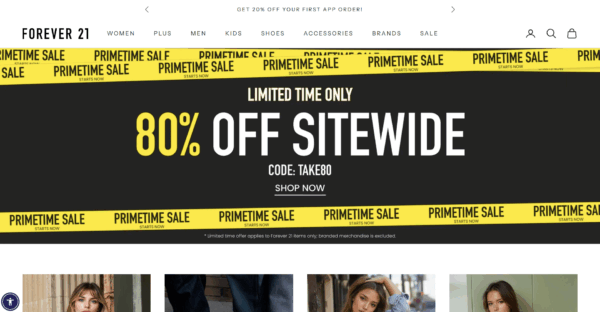
Forever 21 shows all the offers clearly on the homepage

For WordPress users, OptinMonster is a quick way to get started. It lets you create dynamic floating bars and banners with countdowns, all through a simple drag-and-drop builder.

If you’re using Shopify, the Essential Countdown Timer Bar app works perfectly for creating announcement bars or cart countdowns to drive urgency and prevent cart abandonment.

Check your checkout

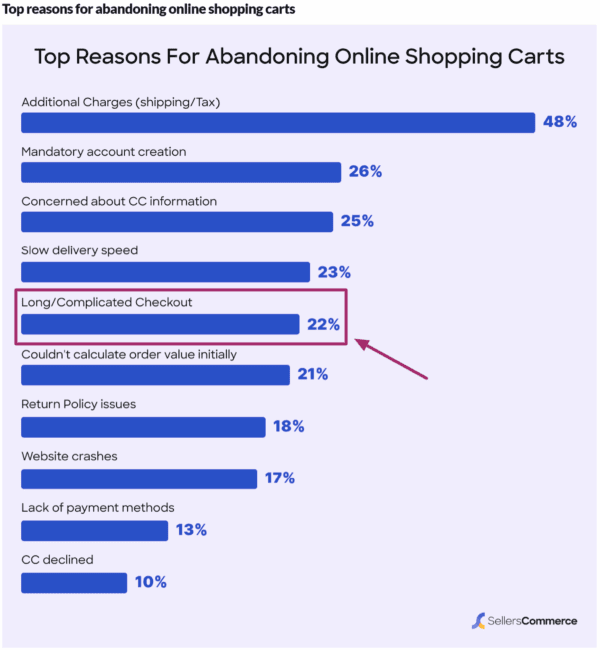
Did you know a long or confusing checkout process is one of the biggest reasons shoppers abandon their carts, especially during high-traffic days like Black Friday? That’s the last thing you want when every second counts.

Before the rush begins, take a few minutes to go through your own checkout process on both desktop and mobile. Place a test order just like a customer would. Verify that your discount codes are applied correctly, your payment options load smoothly, and the overall flow feels quick and effortless.

Read more: Boost your checkout page UX: Vital tips for online stores

Ask a few friends, family members, or even teammates to try it too. Fresh eyes often spot friction points you might miss, such as unclear buttons, confusing forms, or slow-loading pages.

Trust also plays a huge role. Ensure your checkout page displays secure payment badges and recognizable gateways, such as PayPal, Apple Pay, or Stripe. When shoppers feel confident their payment is safe, they’re far more likely to hit “Buy now.”

And one last tip: keep it simple. The fewer distractions and clicks, the smoother the path to purchase. That’s precisely what drives conversions during a last minute Black Friday rush.

Send a simple email to your list

Black Friday emails have been shown to generate 33 percent higher conversion rates than regular marketing messages. That alone makes it one of the smartest last minute Black Friday tips to focus on. When time is short, your existing customer base is your best asset. They already trust your brand and are far more likely to act quickly on your offers.

Keep your email focused and straightforward. Start with a subject line that clearly highlights your best deal or most significant discount. For example, in the screenshot below, you can see how the key offer or discount is prominently displayed in the subject line, while the body reinforces the offer with a clear call to action.

Inside the email, make your main offer impossible to miss. Emphasize the key benefits of your product or service, and include a direct call to action that takes users straight to your Black Friday sale page. Make it visually engaging by adding a countdown timer or a short GIF that brings energy and urgency to the message.

Remember, this isn’t about crafting a perfect campaign. It’s about getting the right message to the right people at the right time. A simple, well-timed email can make a real difference in your Black Friday sales.

Promote on social media channels

Social media continues to play a significant role in Black Friday success. It has seen a 7 percent year-over-year increase in traffic, now driving around 10 percent of all global mobile traffic referrals during the holiday season. Your audience is already scrolling, searching, and shopping, so this is your opportunity to be where they are.

In these last few days, your social media strategy should focus on building anticipation and trust. If you have customer review videos, testimonials, or any user-generated content, start sharing them now. Boosting these posts or running quick ad campaigns featuring real customer stories can help you build credibility fast. People are far more likely to buy when they see genuine experiences from others.

You can also collaborate with a micro-influencer or a brand advocate who already has a connection with your target audience. Even a brief post, story, or reel from them can draw attention to your sale and help you gain visibility.

If you are short on time, focus only on your most active platform, whether that is Instagram, Facebook, TikTok, or LinkedIn. Post your best offer as a pinned post or a story highlight and use countdown stickers or short video snippets to create a sense of urgency.

Lastly, remember to engage. Reply to comments, answer questions, and reshare posts from happy customers. Small interactions can make your brand feel more approachable and help you stand out during the Black Friday rush.

Must read: How to handle comments on your blog

Quick SEO fixes for better Black Friday reach

If you haven’t touched your SEO yet, don’t worry. There’s still time to make a few quick updates that can help your store appear in the search results. These last minute Black Friday SEO tweaks can enhance visibility, attract the right audience, and might give your deals a competitive edge.

Start with your meta titles and meta descriptions. Add words like Black Friday 2025, sale, or deal to your titles so searchers know what to expect. For example, instead of ‘Women’s handbags – Classic collection,’ you can try ‘Black Friday 2025 deals on women’s handbags.’ Keep it relevant, natural, and clear.

Next, check your product and landing pages. Make sure they’re up to date with current pricing, stock status, and offers. Highlight the discounts in your product descriptions, and, if possible, include keywords that shoppers might search for, such as ‘best Black Friday deals’ or ‘holiday gift offers.’

Another smart move is to reuse your existing content. If you already have an older Black Friday or holiday gift guide, simply refresh it for 2025 by updating the year, offers, and internal links. It’s a fast way to keep your content relevant without having to start from scratch.

Lastly, take a minute to review your page experience. A fast, mobile-friendly site can make or break your Black Friday sales. Run a quick check using Google’s PageSpeed Insights and fix anything that’s slowing your pages down. Even minor improvements can help increase conversions.

These quick wins may not replace a comprehensive Black Friday SEO strategy. However, they can still make your website more discoverable and help you capture traffic from shoppers actively seeking deals.

The nice-to-dos (if you have a little more time)

Okay, so the must-dos can help you frame a solid last minute marketing campaign. But if you’ve managed to check those off quickly and still have a little time on your hands, don’t stop there. The following few ideas may seem optional, but they can give your campaign the extra boost it needs to capture more attention, convert hesitant shoppers, and capitalize on the Black Friday rush.

Run simple retargeting ads

Don’t let potential buyers slip away after visiting your store. Retargeting ads help remind them of products they viewed or added to their carts, increasing the chances of conversion. Even a short, time-bound campaign with strong visuals and clear CTAs can make a difference during the Black Friday rush.

Bundle products or create quick gift sets

Shoppers love convenience, especially during the holidays. Bundling complementary products or creating quick gift sets can simplify decision-making and increase your average order value. Highlight these as limited-time deals to develop a sense of urgency and drive faster sales.

Add live chat or quick support options

Many customers abandon their carts when questions go unanswered. Adding a live chat feature helps resolve last minute queries instantly and keeps buyers engaged throughout the checkout process. Tools like Tidio and LiveChat integrate seamlessly with both WordPress and Shopify, making setup quick and easy.

Make your Black Friday deals shine with Yoast SEO for free!

Getting your offers in front of the right people starts with how your website appears and performs in search results. That’s where Yoast SEO can be a real game-changer during the Black Friday rush.

Here’s how:

Write SEO-friendly content

With Yoast SEO, you can create content that both readers and search engines understand. With Yoast SEO’s real-time feedback:

  • Get instant insights on keyword use, density, and placement
  • Optimize your product titles and descriptions to highlight key offers
  • Ensure your content maintains the right balance between keywords and readability

Improve readability

Shoppers move fast during Black Friday. Keep them engaged with content that is easy to read and skim. Yoast helps you:

  • Simplify long sentences and paragraphs
  • Use better transitions for a smoother flow
  • Maintain a consistent tone and structure throughout your content

Help search engines crawl your site efficiently

Visibility depends on how easily search engines can crawl and index your site. With Yoast SEO, you can:

  • Automatically generate XML sitemaps to guide crawlers
  • Use SEO-friendly breadcrumbs to create a clear site structure
  • Ensure your most important Black Friday pages are indexed correctly

Prepare your website for the future of search

AI-powered search is transforming the way people discover brands and deals online. The llms.txt feature in Yoast SEO helps you:

  • Communicate directly with AI systems, such as ChatGPT
  • Control how your content is accessed and cited by large language models
  • Enhance the likelihood of your offers being accurately represented in AI-driven summaries and recommendations

Install Yoast SEO now

Bonus: Automate structured data for rich results

Want your Black Friday products to stand out in search with details like price, stock status, and ratings? That’s where structured data comes in. It helps search engines understand your products better and display them as rich results.

With the Yoast WooCommerce SEO plugin, this process becomes effortless. It automatically adds product-specific structured data to your pages, so your deals are clearer and more clickable in search results. This gives your listings the best chance to shine when shoppers are scanning for quick, trustworthy deals during the Black Friday rush.

Buy WooCommerce SEO now!

Unlock powerful features and much more for your online store with Yoast WooCommerce SEO!
Final thoughts: simple moves, big impact

As the countdown begins, remember that success isn’t about doing more but doing what matters most. It’s easy to get caught up in ambitious plans, such as redesigning your website, launching new products, or building influencer partnerships, but those time-intensive ideas rarely deliver quick results when the clock is ticking.

Instead, focus on achievable actions that create immediate impact. Refresh your existing content, refine your offers, and utilize tools like Yoast SEO to optimize your pages efficiently. A few smart tweaks to your product descriptions, meta titles, or site speed can often drive better conversions than a full-scale overhaul.

The key to winning Black Friday isn’t scale, it’s strategy. Work with what you already have, double down on proven tactics, and use every minute wisely. That’s how you turn last minute prep into lasting results.

A detailed guide to optimizing ecommerce product variations for SEO and conversions

Table of contents

Product variations are more than just an ecommerce feature. They give your customers choices, whether it’s size, color, style, or material, while helping your store stand out in competitive search results. When optimized correctly, product variations do more than display available options. They improve the customer experience by making shopping easier. At the same time, they boost conversions by catering to diverse needs and support your SEO strategy by targeting more keywords.

This guide will explain the best practices for product variations and show you how to optimize them for search engines and customers so your ecommerce site can grow in traffic, rankings, and sales.

What are product variations in ecommerce?

Product variations or product variants are different versions of the same product designed to give customers options. These variations can be based on attributes like size, color, material, style, or capacity. Instead of creating multiple product listings, variations group all options under a single product, making it easier for customers to browse and purchase.

For example, when you search for an iPhone on Amazon, you’ll see options for different colors and storage capacities, all available on a single page. This setup lets customers explore multiple choices without leaving the main product page.

Example of product variants

Managing product variations depends on the platform you use:

  • In WooCommerce, product variations are created using attributes such as size or color, and then assigning values to those attributes. Store owners can upload unique images, set prices, and adjust stock for each variation

    Read more: Variable Products Documentation – WooCommerce

  • In Shopify, variations are managed under the ‘Variants’ section of a product. You can add options like size, color, or material, and then assign values. Each variant can have its own price, SKU, and image, making it simple to customize how the variations appear in your store


    Read more: Shopify Help Center – Adding variants

Why do product variations matter for customers?

Okay, now let’s see why you need product variants and not upload each option as a completely separate product. Think of it this way: customers don’t want to scroll through endless listings just to compare a black t-shirt with a white one or a 64GB phone with a 128GB version. Variations keep everything in one place, making shopping smoother and more intuitive.

Here’s why product variations are so important for your customers:

  • Improved shopping experience: Variants reduce unnecessary clicks and allow customers to compare options side by side within a single product page. This saves time and makes decision-making easier
  • Higher conversions and lower bounce rates: When customers find their preferred size, color, or feature right away, they are more likely to complete a purchase instead of leaving your store
  • Reduced purchase anxiety: Variants ensure customers do not feel limited by stock. Seeing multiple choices available decreases the chance of cart abandonment
  • Personalization and satisfaction: Offering customers options empowers them to choose a product that feels tailor-made for them, improving overall satisfaction
  • Indirect SEO benefits: A better shopping experience often leads to longer session durations, fewer bounces, and more engagement. These signals may indirectly support stronger SEO performance, as they align with positive user experience metrics

How do product variations support your ecommerce SEO strategies?

Product variations are not just about creating a better shopping experience; they also bring direct ecommerce SEO benefits that can help your store attract more qualified traffic. When optimized correctly, variants can make your product pages richer, more discoverable, and more engaging.

Increase in keyword targeting

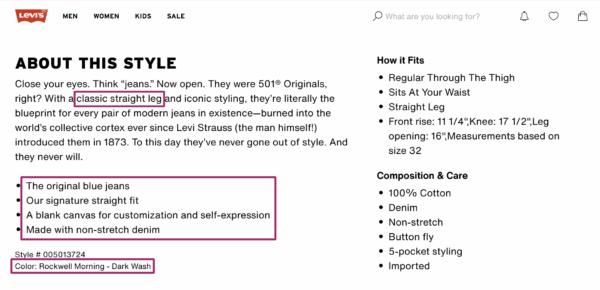
Variants allow you to target a wider range of long-tail keywords that reflect real customer search behavior. For example, instead of only competing for ‘men’s wallet,’ you can rank for ‘men’s black leather wallet’ or ‘slim men’s brown wallet.’ These specific keywords usually carry higher purchase intent and face less competition

Levi’s product page for jeans uses long-tail keywords in the product description for keyword targeting

Richer content for search engines and AI engines

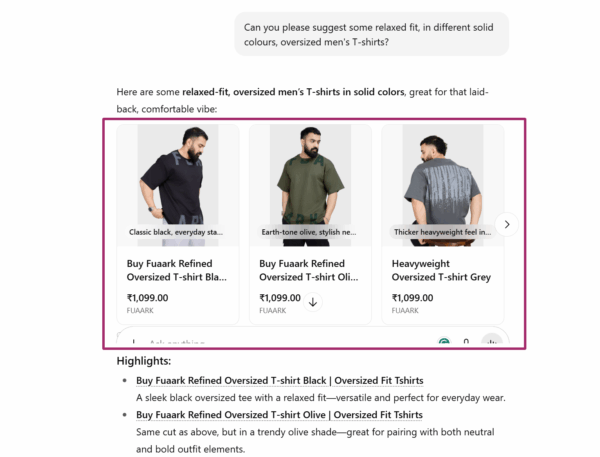
Each variation allows you to add unique attributes, descriptions, and specifications. This creates a more detailed and content-rich product page that search engines and AI-driven engines (like ChatGPT or Google’s AI Overviews) value when surfacing answers and shaping brand perception.

ChatGPT showing product options for a t-shirt

Improved user engagement and longer sessions

A well-structured page that clearly displays variations keeps users from bouncing to competitor sites when they don’t immediately find their preferred option. Instead, they spend more time exploring, comparing, and interacting with your store, which indirectly supports SEO through stronger engagement signals.

Better structured data for enhanced search results

When product variants are properly marked up with structured data, search engines can display rich snippets that include price ranges, availability, color options, and reviews. This not only makes your listings stand out but also boosts click-through rates (CTRs) from search results.

Yoast SEO’s Structure data feature describes your product content as a single interconnected schema graph that search engines can easily understand. This helps them interpret your product variations more accurately and increases your chances of getting rich results, from product details to FAQs.

In short, optimized product variants make your product pages more keyword-diverse, content-rich, and engaging while also improving how your store is presented in search results and generative AI chat replies.

Blueprint for optimizing your product variations

Here’s the part you’ve been waiting for: how to optimize your product variations for SEO, conversions, and user experience. In this section, we’ll cover the right technical implementation, smart SEO tactics, and the common mistakes you’ll want to avoid.

Technical implementation of product variations

Getting the technical setup right is the foundation for optimizing your product variations for both ecommerce SEO and user experience. Poor implementation can lead to crawl inefficiencies, duplicate content, and a confusing buyer journey.

Here’s how to approach it effectively:

Handling variations in URLs

One of the biggest decisions you’ll make is how to structure URLs for your product variations:

  • Parameters (e.g., ?color=red&size=12): Good for filtering and faceted navigation, but they can create crawl bloat if not managed properly. Always define URL parameters in Google Search Console and use canonical tags to consolidate signals
  • Separate pages for each variation (e.g., /red-dress-size-12): This can be useful when specific variations have significant search demand (like ‘iPhone 15 Pro Max 512GB Blue’). However, it requires careful duplication management and unique, optimized content for each page
  • Single product page with dropdowns or swatches: The most common approach for ecommerce stores, as it consolidates SEO signals into one canonical page while providing users with all available variations in one place

Takeaway: Use a hybrid approach. Keep a single master product page, but only create dedicated variation URLs for high-demand search queries (with unique descriptions, images, and structured data).

Note: only create dedicated variation URLs if you can add unique value (content/images), otherwise, it risks duplication

Internal linking best practices

Internal linking is crucial in helping search engines understand the relationships between your main product page and its variations.

  • Always link back to the parent product page from any variation-specific pages
  • Ensure your category pages link to the main product page, not every single variation (to prevent diluting crawl equity)
  • Use descriptive anchor text when linking internally, e.g., ‘men’s black leather wallet’ rather than just ‘wallet’

The Internal linking suggestions feature in Yoast SEO Premium is a real time-saver. As you write, it recommends relevant pages and posts so you can easily connect variations, parent products, and related content. This not only strengthens your site structure and boosts SEO but also ensures visitors enjoy a seamless browsing experience.

A smarter analysis in Yoast SEO Premium

Yoast SEO Premium has a smart content analysis that helps you take your content to the next level!

Takeaway: Build a clean hierarchy where category pages → main product pages → variations, ensuring both users and crawlers can navigate easily.

Managing faceted navigation and filters

Filters (like size, color, brand, or price) enhance user experience but can create SEO challenges if every filter combination generates a new crawlable URL.

  • Use or noindex for low-value filter pages (like ‘price under $20’ if it doesn’t add SEO value)
  • Block irrelevant filter parameters in robots.txt to prevent crawl bloat
  • For valuable filters (e.g., ‘red running shoes’), allow them to be indexed and optimize the content

Takeaway: Conduct a filter audit in Google Search Console. Identify which filtered URLs actually drive impressions and clicks, and only allow those to be indexable.

Media content optimization for ecommerce product variations

When it comes to product variations, visuals and supporting media play a critical role in both SEO and conversions. Shoppers often make purchase decisions based on how well they can visualize a specific variation. In fact, 75% of online shoppers rely on product images when making purchasing decisions.

Also read: Image SEO: Optimizing images for search engines

Here’s how you can optimize media content for ecommerce product variations:

Use unique images for each variation

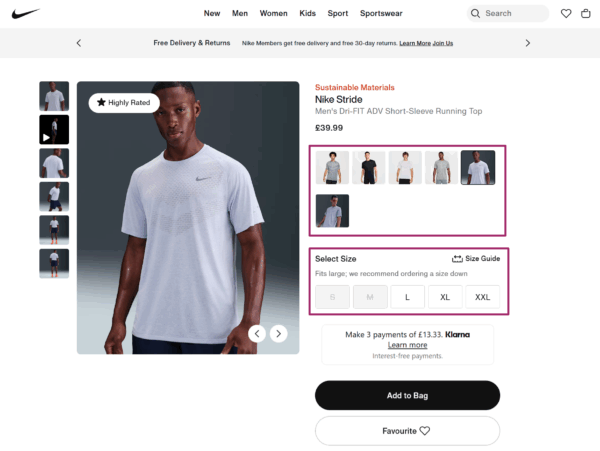
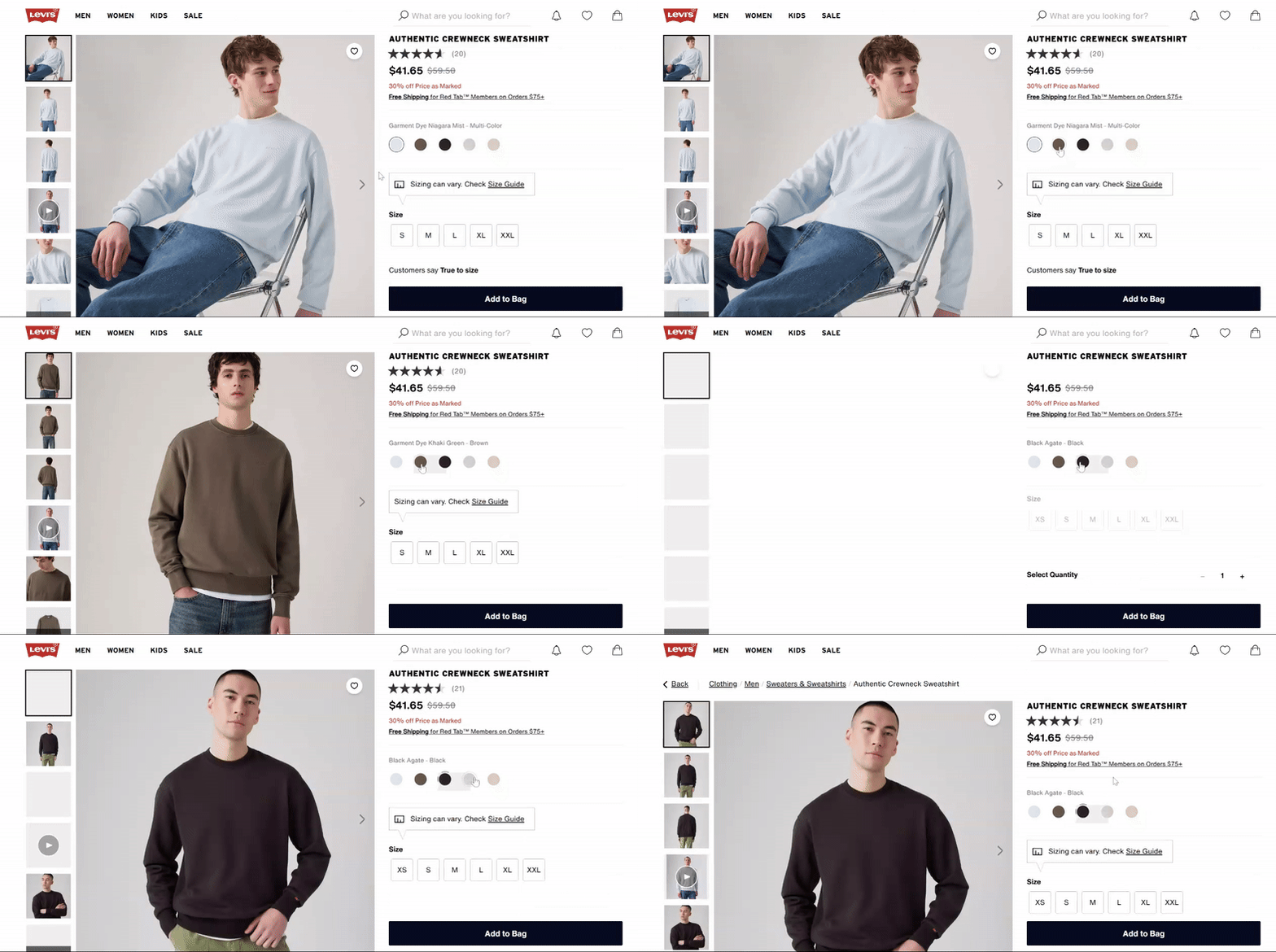
Avoid using the same generic image across all variations. Display each color, size, material, or feature with its own high-quality image set. For example, if you sell a t-shirt in six colors, show each color separately to help customers make confident choices.

Unique product images for each variant

Leverage 360° views and videos

Showcase variations with interactive media like 360° spins or short product videos. For example, a ‘black leather recliner’ video demonstrates texture and function more effectively than a static image, leading to higher engagement and conversions.

Use videos and 360-degree media to portray your products

Optimize alt text, file names, and metadata

Every image should have descriptive, keyword-rich alt text that specifies the variation. Instead of writing ‘red shoe,’ use ‘women’s red running shoe size 8.’ File names (e.g., womens-red-running-shoe-size8.webp) and captions should also reinforce the variation for better indexing.

Implement structured data for media

Use the Product schema to explicitly define images and videos for each variation. Including structured data ensures that Google and AI-driven engines like ChatGPT can clearly interpret your variation visuals and display them in rich results or AI summaries.

For instance, assigning images to specific SKUs (via image markup) makes it easier for search engines to show the correct variation in shopping results.

SEO tips for product variations

Optimizing product variations for SEO requires more than attractive visuals and solid descriptions. You need to apply some proven SEO techniques to ensure search engines correctly interpret your product pages and users get the best possible experience.

Here are a few key practices every ecommerce store owner should follow:

Use canonical tags to avoid duplicate content issues

Product variations often generate multiple URLs, which can cause duplicate content problems. Canonical tags help solve this by pointing to the primary version of a page, consolidating ranking signals, and avoiding internal competition.

Yoast simplifies this process by automatically inserting canonical URL tags on your product pages. This ensures search engines know which version to prioritize, prevents diluted link equity, and even consolidates social shares under the original page. For store owners, this means less technical overhead and stronger, cleaner rankings.

Apply global product identifiers (GTIN, MPN, ISBN) where relevant

Global product identifiers like GTINs, MPNs, and ISBNs act as unique fingerprints for your products. They help Google and other search engines correctly match your items in their vast index, which improves the accuracy of search listings and reduces confusion with similar products. They also add credibility, since customers can cross-check these identifiers before purchase.

With Yoast WooCommerce SEO, adding these identifiers becomes much easier. The plugin reminds you to fill in missing SKUs, GTINs, or EANs for each product variation and automatically outputs them in structured data. This not only helps your products qualify for rich results but also ensures that no variant is left incomplete from an SEO standpoint.

Buy WooCommerce SEO now!

Unlock powerful features and much more for your online store with Yoast WooCommerce SEO!
Regularly audit Google Search Console data to track performance

Google Search Console is a goldmine for understanding how product variations are performing. By monitoring which variant pages are driving impressions, clicks, and conversions, you can refine your SEO strategy.

For example, if certain variants attract little traffic but consume crawl budget, it might be better to consolidate them under canonical tags.

Regular audits also help you detect indexing issues, thin content problems, or underperforming structured data. This keeps your product catalogue lean, crawl-efficient, and focused on driving meaningful organic traffic.

Also read: How to check the performance of rich results in Google Search Console

Common product variation ecommerce errors to avoid

Even if you’ve implemented the right technical setup, added structured data, and optimized your media content, a few small mistakes can undo all that effort. To make sure your product variations support SEO and conversions instead of hurting them, here are some common pitfalls to avoid:

  • Duplicate content: Creating separate standalone pages for each variation (like size or color) without consolidation leads to content duplication. This confuses search engines and dilutes rankings across multiple weak pages
  • Poor user experience: If your variation options are hidden, unclear, or slow to load, users struggle to make choices. This friction reduces conversions and increases bounce rates
  • Incorrect structured data: Applying schema inaccurately can cause search engines to display the wrong product details in search results, damaging credibility and visibility
  • Thin content: Not providing unique descriptions, images, or metadata for each variation leaves the page with little value. Search engines tend to down-rank such content, reducing discoverability
  • Crawl bloat: Generating too many low-value variation URLs (like separate pages for every minor option) wastes crawl budget and prevents high-priority pages from being indexed efficiently. Additionally, it could dilute internal link equity

By keeping these errors in check, you’ll ensure your product variation strategy strengthens your SEO and user experience instead of working against them.

Ready to unfold all variations?

Product variations are not just small details hidden in your catalogue. They play a major role in how both search engines and shoppers experience your store. When done right, they prevent duplicate content issues, improve crawl efficiency, deliver richer search results, and create a seamless journey for your customers.

The key is to treat product variations as part of your overall SEO strategy, not as an afterthought. Every unique image, structured snippet, and clear variation option makes your store more visible, more reliable, and more profitable.

This is where Yoast SEO becomes a game-changer. With automatic structured data, smart handling of canonical URLs, and advanced content optimization tools, Yoast helps you get product variations right the first time.

Ecommerce copywriting tips & frameworks that convert [+a free checklist]

Table of contents

Product pages. Ads. Emails. Headlines. Every word you publish either builds momentum or loses it. Great ecommerce copy does more than describe a product. It earns trust, sparks emotion, and clears doubt. Most importantly, it helps someone say yes with confidence. 

This guide includes 20 practical, proven tips to sharpen your copy across strategy, product pages, persuasion, and retention. They’re not theory. Just tested techniques from brands that convert. 

And there’s more: Want the full 40? 
Get the 20 bonus tips straight to your inbox by signing up here. 

How to choose the right copywriting framework and emotional trigger 

Before you write, choose two things: 

  1. A framework to guide structure 
  1. An emotional trigger to shape tone and persuasion 

These decisions will shape every line of your copy. 

Copywriting frameworks 

1. AIDA: Attention, Interest, Desire, Action 

AIDA is the foundational copywriting framework that guides prospects through a systematic journey from awareness to conversion. 

Best for: Landing pages, ads, hero sections. 

Why it works: It grabs attention quickly, builds curiosity, then shifts momentum toward a clear action. 

Example: Selling a portable espresso maker 

Attention: “Brew perfect espresso anywhere.”

Interest: “No plugs, no bulky machines, just fresh coffee in your backpack.”

Desire: “Get café-level crema in 90 seconds flat.” 

Action: “Order now and take 20% off your first brew.” 

2. PAS: Problem, Agitation, Solution 

PAS is the emotional powerhouse that transforms pain points into urgent buying decisions by first identifying problems and discomfort and presenting a solution.   

Best for: Pain-point-driven products or comparison pages.

Why it works: It starts by naming the problem and digging into the frustration, then offers your product as the fix. 

Example: Selling an anti-theft travel backpack 

Problem: “Worried about pickpockets on your next trip?” 

Agitation: “One stolen wallet can ruin your entire vacation and most zippers do not stand a chance.” 

Solution: “Our backpack has cut-proof fabric, hidden zippers, and lockable compartments to keep you safe on the move.” 

3. BAB: Before, After, Bridge 

BAB leverages aspirational storytelling to showcase transformation, painting a vivid picture of life improvement before positioning your solution as the bridge to that better future.   

Best for: Lifestyle or transformation-focused products.

Why it works: It shows life before and after the product, then connects the dots with your offer. 

Example: Selling a fitness app 

Before: “You used to skip workouts, feel sluggish, and waste time guessing what to do at the gym.” 

After: “Now your workouts are short, focused, and actually fun to stick with.” 

Bridge: “All it took was our guided 20-minute training plans built for real people and real schedules.” 

Emotional triggers 

Pathos: Emotion 

Best for: Beauty, lifestyle, wellness, identity-driven products.

Why it works: It speaks to how people want to feel or who they want to become. 

Example: Selling sustainable clothing 

“You are not just buying a shirt. You are choosing to show up for the planet and look good doing it.” 

Logos: Logic 

Best for: Tech, tools, performance-based products.

Why it works: It appeals to rational decision-making, like saving time, money, or hassle. 

Example: Selling noise-canceling headphones 

“Blocks 95% of background noise so you can focus faster and work smarter, backed by lab testing and a 2-year warranty.” 

Ethos: Trust and credibility 

Best for: Financial, health, professional, or safety-related products.

Why it works: People rely on authority or reputation to reduce risk.

Example: Selling skincare 

“Developed by dermatologists and trusted by over 1 million users worldwide because your skin deserves expert care.” 

Strategies for clearer copy 

Strategic copywriting transforms scattered messaging into focused communication that guides prospects smoothly through their buying journey.   

  1. Let structure guide flow: AIDA, PAS, BAB. Pick one and follow it through. Good copy is linear, not scattered. 
  1. Tone should match buyer intent: New visitor? Use clarity and reassurance. Returning shopper? Bring speed and confidence. 
  1. Give each section one job: Trying to explain, reassure, and upsell in a single block? Nothing will land. Break it up. 
  1. Answer doubts before they form: If shipping time, fit, or returns are common questions, surface them early in the copy. 
  1. Use a mix of logic, emotion, and visuals: Show how the product works, how it feels, and how it fits their life. 

Product copywriting prioritizes outcome-driven messaging that shows customers exactly how their lives improve. It moves beyond features to paint vivid pictures of real-world usage scenarios. 

  1. Lead with the outcome: Start with what changes for the customer. Then explain how. 
  1. Put the product in a real moment: Don’t say “compact.” Say, “Fits in your jacket pocket on a rainy commute.” 
  1. Use bullets to speed up decisions: List what is included, what it is made of, and who it is for. Keep it snappy. 
  1. Write purposeful alt text: Describe what the image shows and how it ties to the benefit. 
    Example: “Man hiking with a 40L waterproof pack. Rain visible, straps tight.” 
  1. Flag missing alt text during content analysis: It helps keep accessibility and SEO aligned without extra efforts.

What most ecommerce copy gets wrong 

A well-written text is polite. Descriptive. Sometimes clever. But it rarely decides or helps in conversion.

A Strong copy does not try to please everyone. It tells the right person, “This is for you.” It dares to be specific. It has an inviting glare and confidence to emphasize what matters and ignore what does not. 

Copywriting hooks and earns attention. It says, “Here it is, look.” SEO attracts keen onlookers. 

Good copy makes them stop and persuades them to be curious about more. The best ecommerce brands leverage both. Tools like Yoast SEO bridge the gap between conversion-driven copy and search visibility. 

Persuasion tips that feel natural 

Natural persuasion in copywriting focuses on building genuine connections through transparent communication rather than manipulative tactics.   

  1. Start strong: Put your main benefit above the fold. Do not hide the reason to care. 
  1. Use microcopy to ease tension: “No hidden fees” next to pricing. “We will never charge without asking” near the credit card field. 
  1. Only create urgency if it is real: “Only 3 left” works if it is true. False scarcity breaks trust. 
  1. Make subheads sell, not just organize: “Why 10,000 customers switched” says more than “Features.” 
  1. Precision beats cleverness: “Save 3 hours a week” converts better than “Boost productivity. 

Strategy Retention tips to boost trust 

Customer retention copywriting transforms one-time buyers into loyal advocates through strategic communication that demonstrates ongoing value and genuine care.  

  1. Make thank-you pages do more: Confirm next steps. Offer a bonus. Link to a useful guide. Do not waste attention. 
  1. Follow up with something useful: A setup guide, a pro tip, or a behind-the-scenes story is more valuable than a request for a review. 
  1. Treat onboarding like conversion 2.0: “You are 60 seconds away from setup” is better than “See instructions.” 
  1. Write policies with warmth and clarity: “If it does not fit, send it back. No stress.” Sounds like a human. That is the point. 
  1. Show loyalty some love: A personal thank-you after the third purchase can mean more than a 10 percent coupon. 

Final thoughts 

Forget clever. Go for clarity. Don’t be smart. Leverage curious questions. Think about what a customer wants.

Let them feel seen and heard. Forget perfection; strive for a connection. Keep your words simple. If your words help the right person say yes and the right searcher find your page, they have already done their job. That is where strong copy meets smart SEO. 

Want 20 more copywriting techniques that drive conversions? 

In Part 2, we’ll go deeper into: 

  • Advanced copywriting funnel;
  • High-impact product formatting ideas;
  • Persuasive phrasing that feels personal to the reader;
  • Loyalty copy that turns onlookers into trusted comrades.
seo enhancements
How much does it cost to build a website?

Table of contents

Thinking about building a website? Whether you are a small business owner, a freelancer, or launching a side project, one of the first questions you will want answered is: how much does it cost to build a website? This is not just about curiosity, understanding your website costs early on can help you budget effectively and avoid any unpleasant surprises.

The truth is that the answer is rarely simple. Ask ten business owners about their website building costs and you will probably get ten completely different answers. That is because website costs can range from almost nothing to tens of thousands of euros. The variation comes down to what you need your website to do. A small brochure site with a few pages can be built on a modest budget, whereas an ecommerce store with thousands of products and secure payment facilities will always cost more. The good news is that once you understand where the costs lie, you can make better decisions. And while Yoast SEO will not directly reduce your build costs, it will help you avoid expensive SEO mistakes, improve site performance, and keep your long-term marketing budget under control.

What are you actually paying for when building a website?

Design and user experience: This sets the tone for how visitors feel about your site. Good design is more than colors and fonts, it is about navigation, site structure, and encouraging visitors to stay and explore. Read more about user experience

Development: Turns your designs into a working website. A simple build will cost less, but advanced features or integrations push the price up. 

Domain and hosting: These two are essential and unavoidable. Your domain name generally costs between €10 and €50 per year and hosting keeps your site live. Shared hosting is cheapest, but dedicated hosting provides better performance and enhanced security. As a recommendation, Bluehost is a great choice for both domain registration and hosting. On top of that, it also works extremely well with WordPress. 

Read more: Yoast SEO

Content: A blank page isn’t going to keep visitors on your site for very long, so you’re going to need to have something to show them. You can of course do your own content, but professional content creators can be useful in getting more conversions. 

Read more: writing great website copy.

SEO: This ensures your site gets found. You can do it yourself, but Yoast SEO helps simplify the process and can reduce costs by guiding you on how to optimize pages as you write. 

Read more: how to use the Yoast SEO plugin.

Here’s a chart to explain the above in a quick-check guide: 

Area  Description 
Design  Custom visuals, layout, user interface (UI), mobile responsiveness 
User experience (UX)   Navigation logic, site structure, call-to-action placement 
Development   Code, content management system (CMS), plug-ins or features 
Domain and hosting   Your website’s address and where it lives online 
Content and SEO   Written pages, blog posts, metadata, and optimizations 
Ongoing maintenance  Plugin updates, security, backups, fixes 

Upfront costs:

Of course, none of this comes for free, unless there are some things you can do yourself like copywriting or photography. This will still cost you in terms of time though, so it may be worth considering hiring a professional if there are other areas of your business that you would rather focus on. With that in mind, let’s take a quick look at some upfront costs that you will only have to pay for once at the very start.

Type of cost Low estimate High estimate
Domain name €10/year €50/year
Design & UX €0 (DIY template) €10,000+
Development (CMS setup, features, integrations) €0 (DIY) €40,000+
Initial content (copywriting, images, product setup) €200 €5,000+

Ongoing and variable costs:

Obviously, once your website is up and running, that’s not the end of the story. You are presumably here for the long-term and that means there are going to be recurring costs. These cover things like hosting, so your site can stay live, maintenance, to keep everything secure and updated, and you’ll need to continually post new content to engage with your site’s visitors.

Ongoing costs (billed monthly or yearly):

Type of cost Low estimate High estimate
Hosting €50/year €300+/year
Maintenance & security (updates, backups, SSL, fixes) €100/month €500+/month
Ongoing content & SEO €200/year €5,000+/year

Variable costs:

Most people spend their time focusing on the look and feel of their site and while that is important, it’s not the only thing to consider. It’s understandable that things like legal technicalities and CDNs are not front-of-mind when you’re excited about growing your business but it is necessary. That means you’ll need to complete these, often overlooked, tasks to make sure that you remain on track for growth and stay compliant.

Type of cost Low estimate High estimate
Marketing & ads €100/month €10,000+/month
Accessibility & legal compliance €200 €5,000+
Scaling & performance upgrades (plugins, CDN, extra development work) €100 €10,000+

Website building options 

There are three main ways to build a site, and your choice here will have an impact on the final cost.  

1. DIY builders (like Wix or Squarespace)  

These platforms, as well as some others, will let you build a site from scratch without the need for any technical skills. They’re affordable, quick to set up and ideal for portfolio sites, hobby sites, or small businesses. If you are using these site builders for business, you might find them limiting when you need to scale or want more advanced SEO.   

2. WordPress + Yoast  

For most successful small and medium sized businesses, WordPress is an excellent solution as it’s flexible, scalable, and widely supported. What’s more, when you pair it with Yoast SEO for WooCommerce you can start publishing optimized content from day one, making your online store more visible instantly. This makes it more affordable in the long run as there’s no need for an agency, and you can add features as you grow rather than having to rebuild every time.  

3. Custom-built website via an agency 

For complex businesses like advanced ecommerce or security services, a custom-built site is their best option. It’s the most expensive option but gives you complete control, giving you everything you want without having to compromise on anything. However, you may find that tailored code and features will cost a lot more.     

Watch out for these hidden costs 

One common misconception is that the costs end when your site goes live. That’s just not true, in fact, some of the most expensive problems show up after launch. These can include:  

Non-converting content: You can have the most beautiful website in the world but if it’s not pulling in paying customers, there’s a problem. Try investing in professional copywriting and SEO-friendly content that will ensure visitors take action.   

Dropped traffic: Starting off with bad SEO can really hamper your traffic. Without help, it’s easy to make errors that could take months to fix. This is very much a case of prevention is better than cure.  

Technical debt: Sites built on outdated technology or poorly coded templates may work at first but become costly to maintain or upgrade after a while.   

Accessibility cost: It’s important that you make sure your site caters to all, especially those who may have visual or audio impairments. 

Legal costs: There are certain legal requirements to take care of. These aren’t just there to protect the customer; they protect you too. So, don’t forget that you’ll need things like a cookie consent tool and a term of service policy. 

How Yoast saves you money (over time) 

Yoast isn’t about saving you money on upfront costs; what it does is prevent expensive mistakes. It will save you money over time though as you’ll benefit from reduced costs of ongoing SEO and content marketing. 

To get more specific though, Yoast’s real-time SEO guidance helps you write better, optimized content without needing to hire a writer. In addition, the Readability analysis and Internal linking suggestions are two features that help to reduce bounce rates by making your content perform better, which literally translates into more conversions. On top of this, adding structured data manually is time consuming and costly. Yoast automates much of this, giving you rich search results without developer costs. And if that’s not enough to whet your appetite, there are free and premium options.  

Feature  How it saves you money  
Real-time SEO guidance   Write better content, faster, without hiring an SEO expert  
Readability analysis  Engaged readers means more conversions 
Schema & structured data   Get results without coding knowledge 
Internal linking suggestions   Boost traffic to key pages without external help 

Budgeting tips for small business owners 

By spending smart, you can get big results for less. Here are a few things to keep in mind: 

  1. Start with clarity, not complexity
    Fancy animations might look nice, but if they confuse your visitors, they’re not worth the price. 
  1. Spend more on content than code
    Great content = better SEO = better ROI.   
  1. Invest in tools that scale with you
    WordPress and Yoast both grow with your business. 
  1. Plan for the long game
    Don’t treat launch as the finish line. Content updates and SEO tweaks are ongoing.

Read more: How to optimize your crawl budget

Ecommerce vs. general website: does it change the cost? 

Yes, dramatically. Ecommerce sites need: 

  • Payment gateways. 
  • Product listings. 
  • Inventory management. 
  • Legal disclaimers. 
  • Stronger performance and security. 

Expect to pay more, sometimes a lot more, for development, plugins, and maintenance. But again, tools like Yoast SEO help make your product pages more visible and your content more persuasive.   

Platforms like WooCommerce give you a practical and flexible way to run your online store without having to reinvent the wheel. But the real key to success is visibility, after all, if people can’t find you, they can’t buy from you. And this is what Yoast SEO for WooCommerce does best.  

Read more: See how Yoast helps ecommerce sites

Final thoughts 

Ultimately, what matters about your site most is what it does for your business. With WordPress and Yoast, you can create a professional site that looks great, enhances your online visibility, and grows with your business, without breaking the bank. One of the best things you can do to really set the wheels in motion now though is to go to this guide WordPress for beginners training course and learn how to put yourself and your company first.

Good SEO isn’t a luxury; it’s a smart investment, so start today. Good luck!

Product page SEO: 5 things to improve

Having great product pages is important for your sales. After all, it’s where people decide to click that buy button. Besides optimizing your product pages for user experience, you also want to make sure these pages work for your SEO. You might think this is obvious. That’s why we’ll show you a few less obvious elements of product page SEO in this post. And we’ll explain why it’s so important to take these things into account. Let’s go!

Table of contents

1. The basics of product page SEO

First things first: a product page on an online store is a page too. This means that all the SEO things that matter for your content pages matter for your product pages as well. Of course, there’s a lot more to product page SEO. But for now, this will be your basic optimization. Tip: If you offer not-so-exciting products on your site, you may want to read our post on SEO for boring products.

Let’s start with the basics.

A great title

Try to focus on the product name and include the manufacturer’s name, if applicable. In addition, if your product is a small part of a larger machine (screw, tube), for example, you should include the SKU as well. People might search for that specifically.

A proper and unique product description

While it might be tempting to use the same description as the product’s manufacturer, you really shouldn’t. That description might be found on hundreds of websites, which means it’s duplicate content and a sign of low quality for your website (to Google). Remember, you want to prevent duplicate content at all times!

Now, you might think: “But all my other content (content pages, category pages, blog) is unique!” However, if the content on hundreds of product pages isn’t unique, then the majority of your website’s content still won’t be up to par. So make time to create unique content! And if you need help, the Yoast WooCommerce SEO plugin comes with product-specific content and SEO analysis that helps you produce great product descriptions.

An inviting meta description

A product page usually contains a lot of general information, like the product’s dimensions or your company’s terms of service. To avoid Google using that unrelated text in a meta description, you want to add a meta description to your product pages. It’s arguably even more important than adding one to your content pages!

Next, try to come up with unique meta descriptions. This can be difficult sometimes. You might come up with a sort of template, where you only change the product name per product. That’s okay to start with. But ideally, all your meta descriptions should be unique. Yoast SEO has various AI features that will help you with this.

Pick a great and easy-to-remember URL

We recommend using the product name in the URL. However, keep it short and simple so that it is still readable for site visitors.

Add high-quality and well-optimized images with proper ALT text

Include the product name in at least the main product image. This will help you do better in visual search. Also, don’t forget video — if applicable.

Focus on your product page UX

Last but not least: UX, or user experience. This is an important step because it’s all about making your product pages as user-friendly as possible. Plus, it’s an important part of holistic SEO. There are many parts to UX, which is why we wrote a post with product page UX examples. Give it a read!

Read more: Write great product descriptions with WooCommerce SEO »

WooCommerce SEO simplified

Enhance product visibility and drive more traffic to your online shop.

2. Add structured data for your products and get rich results

Structured data is an essential part of a modern SEO strategy. You simply can’t do without structured data for your product pages anymore, because they help your product page stand out. For example, there is a specific Product schema that helps you get highlighted search results, so-called rich results. These are great for your site’s visibility, and they can also increase your click-through rate! And if you mark up customers’ reviews with Review structured data, they will show up in the search results. Seeing those beautiful stars underneath a product page will convince people they should check out your site!

Another reason to add it is to manage customers’ expectations. Your visitors will know your price up front and that the product is still in stock. How’s that for user experience?

Search engines and AI/LLMs will understand your page better

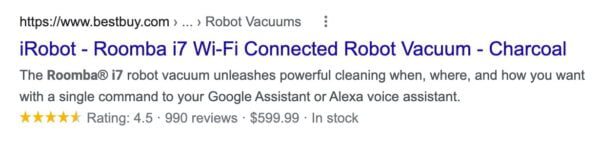
Structured data is also important for your product page SEO because the major search engines came up with this markup, not the W3C consortium. Google, Bing, Yahoo, and Yandex agreed upon this markup, so they could identify product pages and all the product elements and characteristics more easily. Why? So they could a) understand these pages a lot better and b) show you rich snippets like this:

That’s a lot of info in the search results, right?

The Product schema tells the search engine more about the product. It could include characteristics like product description, manufacturer, brand, name, dimensions, and color, but also the SKU we mentioned earlier. The Offer schema includes more information on price and availability, like currency and stock. It can even include something called priceValidUntil to let search engines know that the price offer is for a limited time only.

Add structured data with Yoast SEO

Boost your website’s presence with powerful schema structured data features, included for free with Yoast SEO.

Options to add structured data for product page SEO

Schema.org has a lot of options, but only a limited set of properties are supported by search engines. For instance, look at Google’s page on product page structured data to see what search engines expect in your code and what they can do with it.

This is why you want to add Schema.org data for product page SEO: It’s easier to recognize for Google, and it makes sure to include important extras in Google already. If you have a WooCommerce shop, our WooCommerce SEO plugin takes care of a lot of this stuff behind the scenes.

Keep reading: Rich results, structured data and Schema: a visual guide to help you understand »

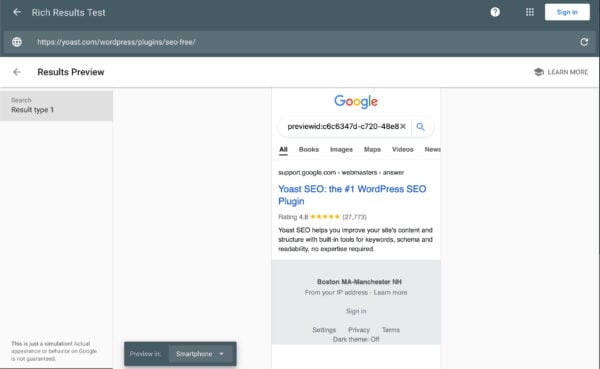
A preview of how your product might look in Google thanks to structured data

3. Add real reviews

Reviews are important. In fact, 74% of consumers say that they check reviews on at least two sites before buying anything online or locally. Although not everyone trusts online reviews, many do, so they can be very helpful.

If you are a local company, online reviews are even more important. Most reviews tend to be extremely positive, but it might just be the negative reviews that give a better sense of what is going on with a company or product. In addition, getting awesome testimonials is another way of showing your business means business.

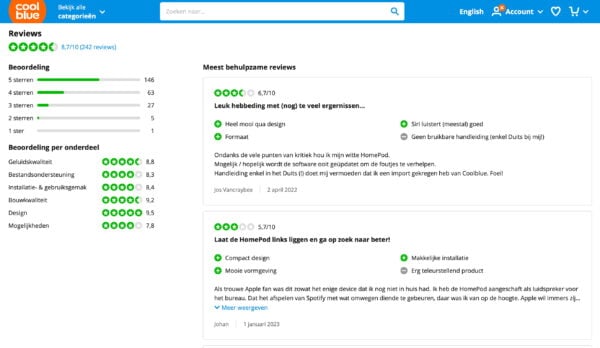
Leading Dutch online store Coolblue gives consumers a lot of options to make relevant and useful reviews of the products they buy

Try to get your customers to leave reviews, then show the reviews on your product page. Do you get a negative review? Contact the writer, find out what’s wrong, and try to mitigate the situation. Maybe they can turn their negative review into a positive one. Plus: You’ve gained new insights into your work.

If you’re not sure how to get those ratings and reviews, check out our blog post: how to get ratings and reviews for your business. And don’t forget to mark up your reviews and ratings with Review and Rating schema so search engines can pick them up and show rich results on the search results pages.

4. Make your product page lightning fast

Nobody enjoys waiting, especially when browsing on a mobile device. Many shoppers are now using their phones to make purchases, so speed on your product pages is crucial. Visitors expect instant access to content, and search engines reward that expectation. Compress images, implement responsive design, and streamline scripts to enhance load times. Regularly test your mobile layout to identify and fix problems before they impact your users. Prioritizing mobile performance not only satisfies your customers but also aligns with search engine preferences, potentially boosting your SEO rankings and increasing traffic.

Remember, a fast, mobile-friendly site is a win-win for everyone involved. To get you started, here’s a post about how to improve your Core Web Vital scores.

5. User test your product page

Looking at numbers in Google Analytics, Search Console, or other analytical tools can give you insight into how people find and interact with your page. These insights can help you improve the performance of a page even more. But there’s another way to ensure that your product page is as awesome as it can be: user testing. There are also many ways to get more value from site visitors with A/B testing.

How user testing can help you

Testers can find loads of issues for you, such as terrible use of images (including non-functioning galleries), bad handling of out-of-stock products, or inaccurate shipping and return information, which can lead to trust issues. Now, you might be thinking: Surely, my website doesn’t have those issues! But you’d be surprised.

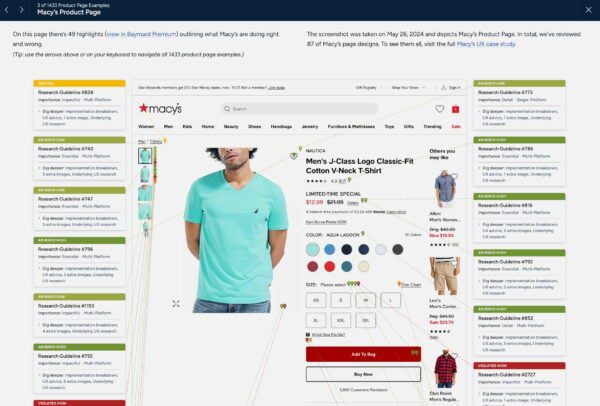
In their Product Page UX research project, the Baymard Institute found that:

“The high-level benchmark results show that only 49% of e-commerce sites have an overall ‘decent’ or ‘good’ UX performance for their product pages, while 51% of sites have ‘mediocre’ or worse product page implementations. On the extreme ends of performance, only a couple of sites had a very ‘poor’ Product Page UX performance that failed to align with commonly observed user behavior in our large-scale PDP testing. This is a fortunate shift upward from 2021, which previously had 4% of sites with below ‘poor’ performances. At the other end of the scale, there aren’t any sites with an overall ‘Perfect’ or ‘“’State of the Art’ product page implementation (unchanged since 2021).

You can read this fascinating study on their Product Page UX site.

The Baymard report has loads of insights into the most common errors seen on product pages

While you compare your product pages to external user research, don’t forget to do your own user testing! Doing proper research will give you eye-opening results that you probably wouldn’t have found yourself.

Bonus: Build trust and show people your authenticity

Getting a stranger to buy something on your site involves a lot of trust. Someone needs to know you are authentic before handing you their hard-earned money, right? Google puts a lot of emphasis on the element of trust — It’s all over their famous Search Quality Raters Guidelines. The search engine tries to evaluate trust and expertise by looking at online reviews, the accolades a site or its authors receive, and much more.

Brand perception in AI and LLMs

AI search engines and LLMs also assess these trust factors to shape how your brand is presented. They analyze reviews, schema, and overall credibility to produce an accurate portrayal. A trustworthy online presence can positively influence how these systems perceive and convey your brand to users.

This is why it’s so important that your About Us and Customer Service pages are in order. Make sure people can easily find your contact information, information about returns and shipping, payment, privacy, etc. This will build trust with your customers. So, don’t forget!

Social proof is another way to build trust with your customers. Adding social proof to your product pages can significantly influence buying decisions. Display customer reviews, testimonials, and ratings to build trust and demonstrate real-life experiences. Include trust badges, like security symbols or industry awards, to boost credibility. Encourage happy customers to share photos or videos of your products and showcase this content on your website. These elements help assure visitors that your products are both credible and valued by others.

Conclusion: Be serious about your product page SEO

If you’re serious about optimizing your product page, you shouldn’t focus on regular SEO and user experience alone. You’ll have to dig deeper into other aspects of your product pages. For instance, you could add the Product and Offer Schema, so Google can easily index all the details about your product and show these as rich results in the search results. In addition, you should make your product pages fast, add user reviews, and try to enhance your website’s trustworthiness. And don’t forget to test everything you do!

Need a helping hand? Be sure to check out our ecommerce SEO training course. Learn what ecommerce SEO entails, how to optimize your site, and boost your online presence. Want to get your products ranking in the shopping search results? We’ll tell you how. Start your free trial lesson today! Full access to Yoast SEO Academy is included in Yoast SEO Premium, which also includes all other plugins — including Local SEO for optimizing your performance in local search.

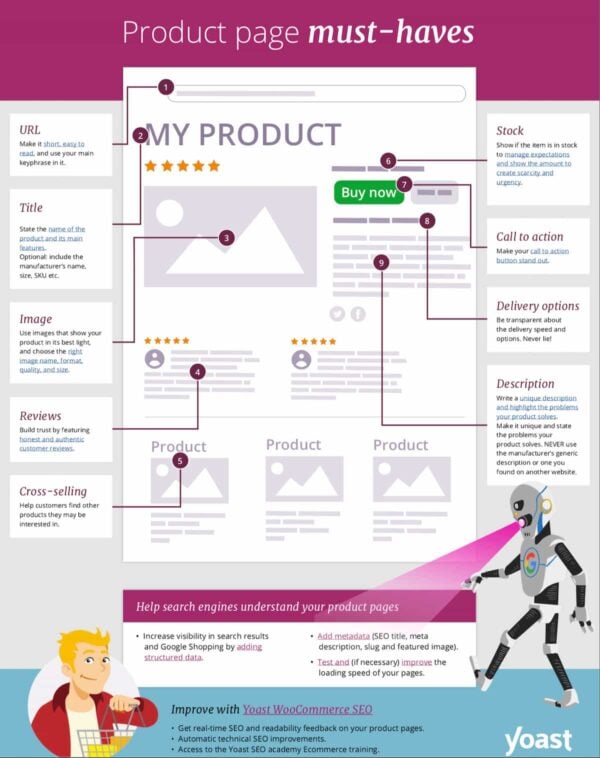
Check out our overview of product page must-haves

To help you stay on top of your product pages, we created a PDF that you can use to optimize your product pages. Most of what’s discussed in this blog post can be found in the PDF, plus more tips! Just click on the image to go to the PDF and download it.

preview product page must haves
Click on the image to download the PDF

Read on: 7 ways to improve product descriptions in your online store »

LLM SEO Optimization Techniques: (including llms.txt)

Table of Contents

  1. How to Make Your Content Visible in the Age of AI Search
  2. What Are LLMs and Why Should You Care?
  3. The New Way of Searching
  4. SEO vs. GEO vs. AEO vs. LLMO: Are We Just Rebranding SEO?
  5. Key LLM SEO Optimization Techniques
  6. Bonus Strategies for LLM Optimization
  7. The Role of llms.txt: Giving AI Search All the Right Signals
  8. LLM Optimization vs. Traditional SEO
  9. Common Mistakes to Avoid
  10. Tools and Resources to Get Started
  11. Conclusion

How to make your content visible in the age of AI search 

So, what exactly is LLM Optimization? Well, the answer to that question depends on who you ask. For example, if you ask a machine learning engineer, they’ll tell you it’s all about tweaking prompts and token limits to get better performance from a large language model. In fact, Iguazio actually defines LLM optimization as improving the way models respond, which means smarter, faster, and with more contextual recognition.    

If, on the other hand, you are a content strategist or SEO enthusiast, LLM optimization will mean something completely different to you and that is making sure that your content shows up in AI-generated search results. And, that needs to be true no matter whether you’re talking to ChatGPT, searching with Perplexity, or scanning Google’s new AI Mode for answers. Some call this ChatGPT SEO or Generative Engine Optimization. 

So, if you fall into the latter of those two groups, ie: the people who want their content and product pages to be seen and clicked, then this article is for you. And, if you’d like to read on, we’ll show you why LLM optimization in an AI-search landscape isn’t some sort of luxury option; it’s an absolute necessity. 

What are LLMs and why should you care? 

AI engineers train Large Language models on huge amounts of text and data to generate answers, summaries, code, and human-like language. They’ve read everything (not just the Classics) and that includes blogs, news articles and your website.   

The reason that’s important is that LLMs don’t crawl your website in real time like Search Engines do. What they do is read it, learn from it and when someone asks them a question, they try to recall what they saw and rephrase it into an answer. If your site shows up as the answer, “Great” but if not, you’ve got a visibility problem. 

The new way of searching 

Search is not just about Google anymore. Also, it’s not as if just one other thing has come to dominate which means we’re left with a rather messy mix of Perplexity answers, Chat GPT chats, Gemini summaries and voice assistants reading out answers while we try to do two tasks at once. 

In short, people aren’t just searching, they’re conversing and if your content can’t hold its own in this environment then you’re missing out on visibility, traffic, and the ability to build trust.  We’ll walk you through exactly how to fix that.   

Read more: How to optimize content for AI LLM comprehension using Yoast’s tools 

SEO vs. GEO vs. AEO vs. LLMO: Are we just rebranding SEO? 

If you’ve been wondering whether you now need four different strategies for SEO (Search Engine Optimization), GEO (Generative Engine Optimization), AEO (Answer Engine Optimization), and LLMO (Large Language Model Optimization), relax, it’s not as big a deal as you might think. You see, despite all the buzzwords, the core of optimization hasn’t changed much. 

All four terms point to the same central goal: making your content more findable, quotable, and credible in machine-generated output regardless of whether that comes from Google’s AI Overviews, ChatGPT, or an answer box on Bing. 

So, should you overhaul your entire content strategy to ‘do LLMO’? 

Not really. At least, not yet. 

Most of what boosts your presence in LLMs is already what SEO professionals have been doing for years. Structured content, semantic clarity, topical authority, entity association, clean internal linking, it’s all classic SEO.  

Where they slightly diverge: 

SEO (Search Engine Optimization)  Relies on backlinks and site architecture to establish authority 
GEO (Generative Engine Optimization  Puts extra emphasis on unlinked brand mentions and semantic association 
AEO (Answer Engine Optimization)  Focuses on being the single best, most concise, and sourceable response to a specific query 
LLMO (Large Language Model Optimization)  Leans into optimizing content not just for people or search crawlers but for LLMs reading in chunks, skipping JavaScript, and relying on embeddings and grounding datasets  

But the thing is: you don’t need four different playbooks. All you need is one solid SEO foundation. In fact, this point is backed up by Google’s Gary Illyes who confirmed that AI Search does not require specialized optimization, saying that “AI SEO” is not necessary and that standard SEO is all that is needed for both AI Overviews and AI Mode. 

  • Focus more on entity mentions, not just links 
  • Treat your core site pages (home, pricing, about) and PDFs as important LLM fuel.
  • Remember that AI crawlers don’t render JavaScript, so client-side content might be invisible   
  • Think about how LLMs process structure (chunking, context, citations), not just how humans skim it 

So, if you’ve already been investing in foundational SEO, you’re already doing most of what GEO, AEO, and LLMO ae all about. That’s why not every new acronym needs you to have a whole rethink on your efforts. Sometimes, it’s just like SEO. 

Key LLM SEO optimization techniques 

Now that we know LLMs aren’t crawling our site but are understanding it, we need to think a little differently about how we create and construct content and for more on this, you may find this article extremely insightful. This is not about cramming in keywords or trying to play the algorithm, it’s about clarity, structure and credibility because these are the things LLMs care about when deciding what to quote, summarize or ignore. Below are some techniques that will help your content stay visible now that people are using generative search.   

The bar has been raised on the quality of content  

LLMs love clarity. The more natural and specific your language is, the easier it is for them to understand and reuse your content. That means not using jargon, avoiding ambiguity and instead, focusing on writing like you’re explaining something to a colleague. 

To give an exact example: 

Don’t Say: 

“Our innovative tool revolutionizes the digital landscape for modern businesses.” 

Instead Say: 

“The Yoast SEO plugin for WordPress helps businesses to improve their website’s visibility and appear inn search results 

Use Structure, Chunked Formatting

Chunked formatting means breaking your content into small pieces (chunks) of informatin that are easy to understand and remember. LLMs tend to prioritize the most easily digestible content construction – which means your headings, bullet points, and clearly defined sections must do a lot of heavy lifting. Not only does organizing your content like this help people to skim read, but it also helps machines understand what each section is about.  

Structuring your content like this will help: 

  • Write clear, descriptive H2s and 3s 
  • Use bullet points that can provide standalone value 
  • Include summaries and tables to give quick overviews 

Be Factual, Transparent, and Authoritative 

Just like Google, LLMs need to trust that your content is reliable before they start taking you seriously. This means you need to show your working out, quote sources, reveal authors, and follow the principles of E-E-A-T. Experience, Expertise, Authority, and Trust. 

Follow these E-E-A-T principles 

To do this: 

  • Include an author bio and credentials if possible (include a link to actual author bios and social profiles) 
  • Name your sources when you use claims or statistics 
  • Share real experiences if possible “As a small business owner…” 

The more real, relatable and trustworthy your content looks, the more AI will like it.  

Optimize for Summarization 

LLMs won’t quote your entire blog post; they’ll only use snippets. Your job is to make those snippets irresistible. Start with strong lead sentences so that each paragraph begins with a clear point followed by context. Also, it’s a good idea to front-load your content. Don’t save your best bits for the end.  

As a reminder: 

  • Start each section with what you want the key takeaway to be 
  • Keep paragraphs short and self-contained 
  • Create standalone summary paragraphs as these often get quoted in AI generated answers 

Use Schema 

Behind every great summary is a structured content model. That’s where Schema markup comes in and to help the AI understand your content, you need to speak in a certain way.   

Read more about schema markup 

To make things clear, use: 

  • Article for blog content 
  • FAQPage for questions and answers 
  • HowTo for instructions 
  • Author and Person for writer’s bio
  • WebPage for generic content 

Bonus strategies for LLM optimization

Once you’ve got the basics completed, like clear writing, structure and trust signals, there’s still more you can do to give your content the best shot at visibility. These bonus strategies focus on how to make your site even more AI-friendly by anticipating how LLMs interpret and reuse information. 

Use Explicit Context and Clear language 

Humans have an incredible ability to be able to ‘fill in the blanks’ and still ‘get the message’ even if the information they got was vague or unclear. One of the biggest differences between humans and LLMs? Humans can infer meaning from vague references. LLMs on the other hand… well, let’s just say that it doesn’t come naturally to them. 

In any case, the point is that if your article mentions “this tool” or “our product” without any context, an LLM might miss the connection entirely. The result? You’re left out of the answer, even if you’re the best source. 

So, to give your content the clarity it deserves: 

  • Use the full product or brand name, like “Yoast SEO plugin for WordPress,” not just “Yoast” 
  • Define technical or niche terms before using them 
  • Avoid vague language (“this page,” “the above section,” “click here”) 

You don’t need to be repetitive, but you do need to be explicit rather than implicit.  

Leverage FAQs and Conversational Formats 

LLMs love FAQs because they’re direct, predictable, and easy to quote. They closely match real user intent and provide high-value snippets that tools like Perplexity and Gemini can pull from without much guesswork. 

How to use the FAQ block in WordPress 

That said, there’s an important limitation to keep in mind if you’re using the Yoast SEO FAQ block in Gutenberg

You cannot use H2 or H3 heading tags inside the FAQ block. 
The block creates its own question-answer formatting using custom HTML, which is great for structured data (FAQ Page schema), but it doesn’t support native heading tags which limits your ability to optimize AI readability and skimmability. 

So, if your goal is to appear in AI-generated summaries or answer boxes, where headings like “What is LLM SEO?” make it easy for AI to quote your content, you might be better off using manual formatting

Here’s how to get the best of both worlds: 

  • STEP 1: Use H2 or H3 tags for each question (e.g., “What is llms.txt?”) and write a clear, short answer beneath it. This improves LLM visibility but doesn’t generate structured FAQ schema. 
  • Step 2: Use the Yoast FAQ block for schema support but know that it won’t give you a proper heading structure. 

 Ultimately, the more your FAQs resemble natural, searchable questions — and are structured in a way that both humans and AI can easily parse — the more likely they are to be featured in answers. 

Enhance Trust with Freshness Signals  

Just like search engines, some LLMs give preference to newer content, but remember that we need to talk to them in a certain way to get the best out of them. 

Older content can be overlooked. Worse, it can be quoted incorrectly if something has changed since you last hit publish. 

Make sure your pages include: 

  • A clear “last updated” timestamp (can we get a picture of what one would look like for clarification?) 
  • Regular reviews for accuracy 
  • Changelogs or update notes if applicable (especially for software or plugin content) 

It doesn’t have to be complicated, even a simple “Last updated: June 2025” can help both readers and AI systems trust that your content is current.  

How to keep content fresh 

Prioritize Author Visibility and Credibility 

Today, we’re entering a phase where who wrote your content is just as important as what it says. That means you need to highlight author visibility and put effort into signaling real-world experience. 

Here’s how: 

  • Include author bios in WordPress with credentials and links to their professional profiles 
  • Use Person schema to formally associate the content with a specific individual 
  • Weave in relevant experience (“As an SEO consultant who works with SaaS brands…”) 

Remember, LLMs are more likely to trust, quote, and amplify expert-authored content. 

Use Internal Linking Strategically 

Think of internal linking as your site’s nervous system. It helps both humans and LLMs understand what’s important, how topics relate, and where to go next. 

But internal linking isn’t just about SEO hygiene anymore — it’s also a way to establish topic authority and help LLMs build a map of your expertise. 

Do: 

  • Cluster related articles together (e.g., link from “LLM Optimization” to “Schema Markup for SEO”) 
  • Use descriptive anchor text like “read our full guide to Schema markup,” not just “click here” 
  • Ensure every piece of content supports a broader narrative 

Our internal linking feature is available for free with a Yoast SEO Premium plugin. 

The role of llms.txt. Giving AI search all the right signals 

Now let’s talk about one of the most recent developments in LLM visibility; a little file called llms.txt

Think of it as a sibling to robots.txt, but instead of guiding search engines, it tells AI tools how they’re allowed to interact with your content. Note: llms.txt is still an evolving standard, and support across AI tools may vary, but it’s a smart step toward asserting control 

With llms.txt, you can: 

  • Define how your content may be reused or summarized 
  • Set clear expectations around attribution, licensing 

It’s not just about protection, it’s about being proactive as AI usage accelerates. 

Even better: Yoast now offers llms.txt integration right inside the plugin, so you don’t need to mess around with code or server settings. If you want to future-proof your site’s visibility (and your IP), this is where you start. 

The llms.txt feature is available for both free and premium customers.   

LLM Optimization vs Traditional SEO: 

LLM Optimization and SEO are part of the same family, but they serve different functions and require slightly different thinking. 

Let’s compare: 

Traditional SEO  LLM Optimization 
Crawled and ranked by bots  Read, remembered, and reused by AIs 
Emphasizes keywords  Emphasizes context and clarity 
   
Optimizes for SERPs  Optimizes for AI-generated summaries and answers 

The takeaway? You can’t ignore either. One brings traffic; the other boosts brand visibility within AI responses. 

And considering that 42% of users now start their research with an LLM (not Google), you’ll want to be found in both places. 

Common Mistakes to Avoid 

Even well-meaning content creators fall into holes. So, take a look at the tips below to avoid any mishaps that could damage your LLM visibility: 

  • Writing like a robot or allowing a robot to write for you (ironically, not appreciated by robots) 
  • Leaving your content undated and unchanged for years 
  • Publishing posts without any author information or editorial standards 
  • Ignoring internal links or leaving orphaned pages 
  • Using vague headings or anchor text like “read more” or “this article” 

If your content looks generic, outdated, or anonymous, it won’t earn any trust. And, without trust, it won’t get quoted. 

 Tools and Resources to Get Started 

Search used to be about visibility within SERPs. But now, it’s also about being seen in summaries, answers, snippets, and chats. LLMs aren’t just shaping the future of search; they’re shaping how your brand is perceived to both humans and robots alike. 

To stand out: 

  • Write with clarity and context 
  • Structure for humans and machines 
  • Cite your expertise and show your authors 
  • Use tools like Yoast and llms.txt to signal your intent 

Future-proof your visibility with Yoast SEO. From llms.txt integration to schema support, Yoast gives you all the tools you need to speak AI’s language and dominate both generative answers and search engines. Get started with Yoast SEO Premium now and make it easy for AI to say something accurate, useful, and… ideally, about you. 

seo enhancements
How to prep your Shopify or WooCommerce store for Black Friday before the rush starts  

Table of contents

Black Friday is the biggest rush of the year for most ecommerce businesses, and it is right around the corner. The most successful merchants prepare for Black Friday early and follow a structured plan to prepare their stores, ensure visibility, and convert first-time visitors into long-term customers.

This guide breaks down your preparation into three categories: Basic, Intermediate, and Advanced. Each section builds on the last so that you can grow your readiness over time, regardless of your team size or budget.

Basic: Start with what you can control for Black Friday

These actions lay the groundwork for everything else. Without these, no advanced strategy will stick.  

1. Optimize your metadata  

First impressions matter, and your metadata is the first thing users see in search results. So make it count and leave a lasting impact. 

Why it matters: Strong metadata can improve visibility and attract more clicks. When your titles and descriptions align with what shoppers seek, your chances of standing out rise significantly.  

Actionable tips:  

  • Prioritize metadata for high-traffic products and category pages.  
  • Include seasonal keywords such as “Black Friday deals” or “holiday gift ideas.”  
  • Keep titles and descriptions concise and compelling.  

With Yoast SEO for Shopify and Yoast WooCommerce SEO, you can preview and improve your metadata in real time. The tools flag missing or duplicated fields and guide you on how to write content that earns clicks.  

  2. Optimize product pages for both humans and search engines

Product pages are the moment of truth. They’re where curiosity turns into clicks and clicks turn into customers.  

Why it matters: No matter how great your traffic or ads are, most people will leave without buying if the product page feels confusing or incomplete. A well-structured page improves your chances of ranking in search and helps buyers feel confident in their decision.  

Actionable tips:  

  • Lead with benefits, not just specs. Tell shoppers how the product fits into their lives.  
  • Use bullet points and headers to make details skimmable.  
  • Reinforce trust by showing stock levels, customer reviews, and delivery clarity.
  • Bulk update how you showcase your product on Shopify using Yoast SEO for Shopify Content Templates feature.

Yoast WooCommerce SEO and Yoast SEO for Shopify help your product pages appear cleanly and clearly in search results. They add structured data behind the scenes and check your content for SEO and readability so you can focus on turning visitors into buyers. 

Internal linking guides customer to surface key pages, maps user behavior, and boosts your site’s SEO. 

Why it matters: Internal linking helps search engines understand your site structure, distributes authority to key pages, and guides visitors toward high-converting content. It keeps users engaged, supports SEO, and makes your promotions easier to surface across your site.  

Actionable tips:  

  • Link to your Black Friday page from key blogs and evergreen content.  
  • Feature top categories or bestsellers in your navigation.  
  • Use anchor text that aligns with what users are searching for.  

Yoast WooCommerce SEO offers internal linking suggestions as you write, making keeping your content connected and strategic easier. 

Fast wins and common pitfalls

Once you have set up the basics, some steps can help you boost impact quicker and avoid costly missed opportunities. 

Fast wins:

  • Swap stock photos for original product shots 
  • Double-check coupon logic and expiration dates 
  • Test any gift wrap or personalization options on product pages 

Big pitfalls to avoid: 

  • Waiting until November to publish seasonal content 
  • Using duplicate product descriptions from suppliers 
  • Letting broken links or outdated pages remain live 

Once the technical foundation is stable, it’s time to focus on your content and promotions.  

4. Test and improve your site’s speed  

Site speed directly impacts user experience, especially during high-traffic periods like Black Friday. Slow-loading pages frustrate shoppers and lead to lost sales.  

Why it matters: A fast site supports smoother browsing and quicker checkout. Search engines consider page performance in rankings, and users are more likely to buy when the experience feels seamless.  

Actionable tips:  

  • Use performance monitoring tools to identify slow pages.  
  • Compress and resize large images to reduce page load times.  
  • Deactivate unused plugins (WooCommerce) or apps (Shopify).  
  • Clean up excessive code or bulky page elements.  

While Yoast SEO is not a speed optimization tool, clean site structure and proper internal linking help improve crawlability and engagement, indirectly supporting performance. 

5. Create a focused Black Friday landing page  

Your landing page is the command center for your seasonal promotions. It’s where visitors decide to browse further or bounce. 

Why it matters: A dedicated page gives your Black Friday campaign direction and cohesion. Instead of scattering your offers across the site, it provides a clear path for shoppers to follow. It simplifies navigation, allows for better internal linking, and gives you a consistent, trackable URL for email campaigns, ads, and site banners. Plus, it’s reusable! Just update the content each year.  

Actionable tips:  

  • Create a short, memorable URL like /black-friday-deals and keep it live year-round.  
  • Showcase limited-time offers, bundles, top-selling categories, and exclusive discounts.  
  • Use persuasive headers, quick-loading images, and CTA buttons that lead directly to product pages.  
  • Answer common buyer concerns upfront, e.g., shipping deadlines, return windows, and local pickup options. 

6. Segment your email list and automate flows  

Email isn’t just another marketing channel during Black Friday; it’s your direct line to customers ready to buy.  

Why it matters: Blasting the same message with monotonous tone to everyone no longer works. Crafting compelling emails with personalized messages that resonate with the reader is key to email marketing. People are more likely to open, click, and shop when an email speaks to their pain points and highlights the solution. A segmented email list means you’re talking to people based on what they care about: early access, bundles, or a product they viewed or left in their cart.

Actionable tips:  

  • Break your list into clear segments, e.g., loyal customers, cart abandoners, and holiday-only shoppers.  
  • Map out your flow: teaser email, early access offer, launch announcement, final hours.  
  • Track performance with UTM parameters like utm_campaign=bf25 so you can optimize in real time. 

For more on syncing content and email, check out our basics of email marketing blog post.

7. Create content that helps people find your deals earlier  

Buyers don’t always search for discounts. Many start with questions or ideas like “affordable gifts for coworkers” or “best tech gift under $100.”  

Why it matters: Helpful blog posts and gift guides pull in people who aren’t searching for your brand yet. These early touchpoints introduce your products and lead them toward your Black Friday offers.  

Actionable tips:  

  • Write guides and roundups tied to real shopper intent.  
  • Use long-tail keywords that match seasonal search habits.  
  • Add smart internal links to featured products or your Black Friday landing page. 

Fast wins and common pitfalls

Once your product pages are polished, tighten up the surrounding details.

 Fast wins:

  • Set a calendar reminder for your campaign email and social media schedule 
  • Add an announcement banner linking to your Black Friday page 
  • Test your email signup and welcome flow to catch any issues 

Big pitfalls to avoid: 

  • Forgetting to link email campaigns to relevant landing pages 
  • Using inconsistent messaging and UTMs across channels 
  • Launching your Black Friday page too late for indexing and ranking 

Buy WooCommerce SEO now!

Unlock powerful features and much more for your online store with Yoast WooCommerce SEO!
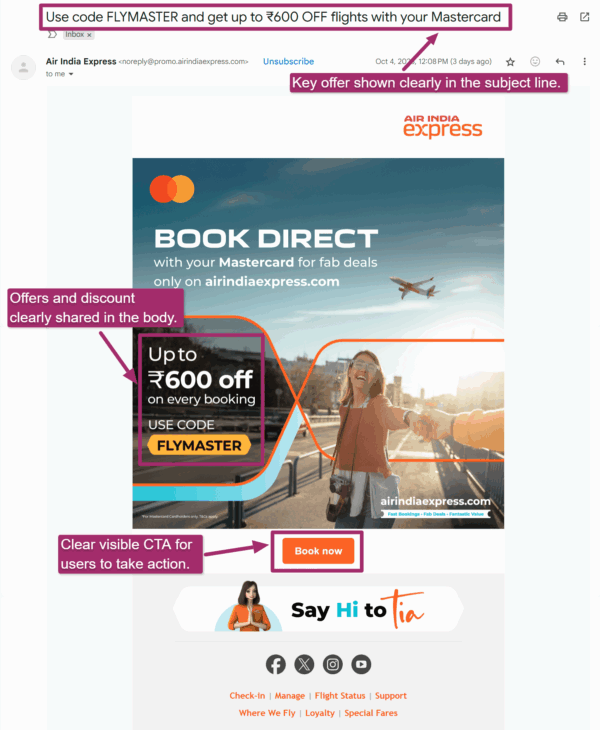
Advanced Black Friday preparation: Boost visibility, trust, and retention  

If you’re already doing the essentials well, these strategies will help you scale.  

7. Improve your chances of showing up in local search  

If you offer in-store pickup or have a physical store, don’t miss out on the people searching near you. Shoppers looking for same-day purchases often skip past online-only stores.  

Why it matters: When someone searches for a product near them, being present in the results can drive instant foot traffic and build trust before they even walk in.  

Actionable tips:  

  • Ensure your name, address, and phone (NAP) are identical across all pages and listings.  
  • Update your opening hours and add clear pickup instructions.  
  • Add content to your site that mentions your location, city, or neighborhood.  

Yoast Local SEO is included in the Yoast WooCommerce SEO. It helps you create and manage local schema and landing pages that appear in search. (It is not available for Shopify.)  

8. Use structured data to stand out in search  

When someone searches for a product and your listing shows price, availability, or reviews, that’s not luck. That’s structured data.  

Why it matters:  Rich snippets give your products more space in search results, credibility, and clicks.  

Actionable tips:  

  • Add structured data (schema) for Product, Offer, and Review to top-selling listings.  
  • Use Google’s tools to check that your schema is implemented correctly.
  • Use product variant schema to improve your chances of showing in rich search results.

Yoast SEO for Shopify and Yoast WooCommerce SEO automatically adds this, but you can also fine-tune it for special products or campaigns if needed.  

9. Set up post-purchase flows before the sale starts  

Black Friday may be over at checkout, but it’s just the beginning of your relationship with a new customer.  

Why it matters: People who buy during Black Friday often need reassurance and support. They’re far more likely to come back if they feel taken care of.  

Actionable tips:  

  • Set up automated flows for thank-you messages, setup tips, and review requests.  
  • Offer a discount for a second purchase or referral.  
  • Guide people back to your product pages or Google review profile.  

Taking care of this now means you can focus on fulfillment and service during the Black Friday rush. 

Fast wins and common pitfalls

A thoughtful follow-up and last check make sure you build on opportunities and are ready for what might come your way.

 Fast wins: 

  • Recheck your sitemap to ensure new pages are indexed 
  • Update your business hours and contact details in your footer 
  • Enable review requests to trigger automatically post-purchase 

Big pitfalls to avoid: 

  • Making last-minute technical changes with no buffer 
  • Ignoring mobile performance and checkout testing 
  • Overlooking schema validation or broken structured data 

Final thoughts  

Preparing for Black Friday is about being proactive, not reactive. Every SEO improvement you make now, from product pages to local visibility, will help you attract more shoppers and turn clicks into customers.  

Yoast gives you the tools to stay ahead: clearer product listings, stronger search visibility, and smart automations that scale with your store. Whether you’re using Shopify or WooCommerce, optimize now to be ready before the crowds arrive.  

Explore:

Redesigned Shopify onboarding: thoughtful UX, real impact 

Today we’ve launched a redesigned onboarding experience for Yoast SEO for Shopify, built to guide, support, and empower every user from the moment they install. Customer-centric marketers and designers know, first impressions matter, and thoughtful onboarding is the first step to long-term success. 

A new onboarding, designed with care 

We’ve simplified the setup process, removed unnecessary steps, and introduced a guided, narrative-style welcome experience that makes it easier to get started and harder to get stuck. 

Whether you’re new to SEO or scaling a large store, our goal is the same: help you feel confident from the first click. 

“We wanted users to land in the onboarding flow and immediately understand two things: how the app can help them improve their Shopify store’s SEO, and what steps to take first to see results.” Tom Ottjes, UX Designer at Yoast 

Behind the scenes: Service design in action 

This onboarding redesign isn’t just a UI refresh, it’s the result of a service design approach that included: 

  • Journey mapping based on real user behavior 
  • Cross-functional collaboration across UX, development, support and marketing using service blueprints
  • Strategic improvements to both front-end and back-end processes 

Want to learn how a single blueprint helped align our teams and reshape the onboarding experience? 

Read the full story behind the update: Redesigning onboarding for impact 

What’s next? 

We’re already working on the next phase of improvements designed to improve our customers’ experience, including smarter in-app guidance and contextual feature onboarding.   

Thanks to everyone who shared feedback along the way. Keep it coming, we’re listening, learning, and building better together.  

seo enhancements
Ecommerce SEO checklist: 30 tips for a better online store

There is so much you can do to optimize your online store, whether for users or Google. To help you cover all your bases, we’ve written this ecommerce SEO checklist. It doesn’t cover absolutely everything, but if you at least start by optimizing all the aspects in this post, you will definitely be doing a great job!

Table of contents

Site-wide ecommerce checklist

The first part of our ecommerce checklist is all about changes you can make site-wide to make sure your online shop is up to scratch. Some of these tips will help with your ecommerce SEO, but — more importantly — they will give users a better experience when they visit your site.

1. Use consistent branding

The first thing you should be aware of is that you should always use consistent branding. Ensure your brand or logo is visible on your homepage and page title. This will build trust and help promote and build your business, helping trigger recognition offline and in search engine result pages.

2. Add social buttons and newsletter sign-up

Newsletters and social media are the easiest ways to get return visits from your customers. Be sure to draw attention to your social profiles and newsletter signups throughout your website. Add your social profiles to your footer at least (use icons, links, and social widgets), but if you have space left in your header, that would also be a great spot for them. Promote your newsletter in your sidebar and use scroll-triggered boxes to draw attention to it. A nice giveaway always helps motivate people to subscribe.

3. Take care of site navigation essentials

Make sure users can navigate to your most important pages from your site menu. It should always be easy to reach shopping pages and the shopping cart, as well as customer service information and FAQs covering essential information like shipping costs and payment options. If users can’t find these pages, they’ll find it difficult to shop on your site.

4. Use SSL and security seals

Here’s one vital thing about creating trust: If your site has an SSL certificate, it will have that nice green padlock in your visitors’ browser address bar, and you’ll let them know they are shopping in a safe environment. These things will help customers confidently insert their home address, credit card details, or other personal information you ask them to provide. You could also add security seals. Find more tips like this in our trust article.

5. Make sure your site is mobile-friendly

Don’t forget mobile users! Making purchases via mobile is a popular option for many shoppers. So be ready for them and don’t miss out on those transactions. Read our ultimate guide to mobile SEO to get started.

6. Get things up to speed

When we say speed, we mean the performance of your site. People have short attention spans, and we’ve all got used to faster internet everywhere. However, many places worldwide have to make do with less-than-perfect mobile connections and a small data allowance. Don’t take your situation as gospel. Also, Google tends to rank websites faster, which is another reason to make sure your website is as fast as possible.

7. Add an ‘About us’ page if you don’t have one

People like to know about the company they’re buying from. Who is behind it? What’s their story? What motivates them? If we share the same values and beliefs, people are likelier to return to that shop and buy more products. Adding an about us page, and perhaps a team photo will help build a connection between your company and your customers. If you want some inspiration, Patagonia and Dopper are nice examples.

Buy Yoast SEO Premium now!

Unlock powerful features and much more for your WordPress site with the Yoast SEO Premium plugin!

Homepage

While you don’t necessarily need to optimize the homepage of your ecommerce site for SEO, you shouldn’t just ignore it completely, either. There are a couple of things you can do to make sure any visitors landing there will continue to shop and make a purchase:

8. Show featured products

You also need to reserve a prominent spot on your homepage for featured products or something similar, usually your core products or the items you currently have on sale. This will provide an immediate trigger for visitors and a good way to let them know whether or not they have come to the right online shop.

9. Include a compelling call to action

Your homepage needs a compelling call to action. This may change if you want to promote particular products or run seasonal promotions like a Black Friday sale. But whatever your CTA is, you need to make sure it’s always easily visible and meets your visitors’ needs and expectations.

Product search and categories

Having a great site is one thing, but if visitors can’t find the products they want to buy, it won’t be much of use to anyone. That’s why the following section of our ecommerce checklist is all about making your products easy for customers to find when searching on your site.

10. Add a search option

Every online store with more than 20 products should have a search option. Make sure you put the search option in a visible spot, as this will probably be the navigation of choice for your visitors. Besides optimizing your search option, be sure to give the search result pages some TLC. More on that later.

11. Use product categories

How you set up your categories and make these accessible to visitors matters – a lot. Categories help visitors get to different groups of products as quickly as possible, especially those who aren’t sure which specific products to buy. Amazon has a large list of categories (or departments), but makes the kind of products a category contains as clear as possible. That has much to do with naming these categories and logically using subcategories. Put yourself in the place of your visitors and go over your shop’s categories. Do they make sense? Are these the terms a visitor would use? If the answer is yes, you’re on the right track.

12. Add introductory content on category pages

Besides being clear about the name of your category, be sure to add a nice introduction to your category pages as well. This introduction is like the glue that holds the collection of products on that page together. This is really helpful in determining the subject of the page, especially for search engines. This also helps the category pages function in a similar way to cornerstone content.

13. Add thumbnail images for your products

In most cases, product images say more than a thousand words. This is especially true for those pages that simply don’t have space for a thousand words about a single product, such as your category or internal search result pages. Adding a stunning thumbnail image of that dress or painting will encourage more clicks to that page. Good thumbnail images make it easier for visitors to choose from a wide variety of products in category or search result pages.

14. Include calls to action in overviews

Besides having killer product thumbnails, your overview pages also need a call to action for each product, which means the visitor can add that product to their cart right from the category or search result page. Although it isn’t always possible for every product, you should do this wherever you can. There are online shops that allow you to choose the color and size of jeans, for example, without having to go to the product page. Choose the option you like, click add to cart, and proceed to checkout, all from the overview page.

Product pages

You’ve probably already put much effort into crafting your product pages. But are you sure nothing is missing, and nothing can be improved? This section of our ecommerce SEO checklist will help you ensure your product pages look the best they can.

15. Add great product images

Be sure to add great product images to your product pages. They should be zoomable and give multiple views of the product. Remember that even the filename and alt text of the product image matter for SEO. There’s a lot more on this in our detailed article on product images.

16. Write a fantastic product description

Optimizing your category pages is often much easier than optimizing all your product pages. If you’re selling bolts, screws and nails, adding an awesome and unique product description to each page is a lot of work. If you need your product page to rank as well, be sure to invest some time and effort in optimizing your product descriptions for the product name and/or SKU. Our Yoast SEO plugin will be useful if you have a WordPress site or a Shopify store.

17. Be clear about pricing

We can’t emphasize this enough: be clear about your prices. Adding surprise costs like shipping or taxes later in the checkout process will backfire, and shoppers may abandon their purchase. Be clear about these additional costs (if any) right from the start. You could even leverage this by offering free shipping on orders of more than a certain value, say $20 or $50. Surprise costs are a major turn-off, and they are illegal in the EU.

18. Show product reviews

Creating trust is a good thing for all online shops. Genuine product reviews help a great deal with this. One thing we would recommend for websites that include user reviews from third parties is to copy a couple of those reviews to your own website. Including third-party reviews in, for example, a widget, would be a great solution. Add these near your call to action for the best results.

19. Promote related products

When you’ve got their interest, leverage it. If someone buys an iPhone from your site, chances are they’ll need a cover and might even want a pair of those expensive wireless ear pods. But they might feel a bit less expensive when a customer has just paid full price for a new iPhone! Adding a related products section or an ‘other customers also bought’ section to your product page will trigger upsells, allow for bundles, and much more. We highly recommend adding these.

20. Add a call to action on your product page

Your visitor needs to click the Add to Cart button on your product page to start the purchase. Don’t hide that button! The number of shops that accidentally disguise the Add to Cart button is lower than it used to be, but we’d still like you to look at that button and make sure it stands out. This is especially true when you have a secondary call to action like ‘Add to wish list’. Making sure that the Add to Cart button stands out the most and is the largest and first major button on your product page is essential.

21. Show stock availability

These days, the availability of a product drives sales. With online shops everywhere, people want to buy things at a shop that will deliver the products they want tomorrow or even the same day. If you tell users a product is in stock, people are likelier to buy it. But this isn’t just about competition; it’s about managing expectations. If your website shows something isn’t in stock, people can still decide to buy at your shop and know they’ll have to wait a bit. If people buy at your shop and won’t get the product for three weeks because it’s out of stock, they’d likely have bought it elsewhere. Not making availability clear also badly affects your brand, by the way.

It can be easy to overlook the details of your shopping cart and checkout process. However, these parts of your site are vital to the customer journey. In this section of our ecommerce checklist, we encourage you to take some time to ensure everything is working seamlessly.

22. Make the shopping cart easy to find

Regardless of how noble your intentions are, in most cases, your main goal is to make as much money as possible, and that money is made through your shopping cart. For this reason, your shopping cart should always be available and visible – don’t make people look for it. We recommend adding the number of products in the cart to the cart icon. It will help people remember if they have already added products to the cart.

A recognizable shopping cart icon that shows how many products are in the cart.

23. Show the payment options early on

Like in number 16 of this ecommerce SEO checklist, this one is about preventing surprises. It’s frustrating to get to the end of the checkout process only to find that your preferred payment option isn’t available. And again, if your ecommerce shop is in the EU, it is now a legal requirement to display your accepted payment methods to customers before they get to the checkout.

24. No account needed

Always allow customers to buy without forcing them to create an account. We think that making customers create an account is bad practice. It’s only valid if creating an account gives customers perks like easy license renewal, managing recurring payments, etc. These are tasks customers probably would want to do in a secure environment, so they wouldn’t mind setting up an account, but when they’re shopping for clothes, having an account only makes sense for convenience reasons (not having to fill in address details next time and so on), and therefore it should be optional.

25. Set longer cookie expiration times

Perhaps ‘cookie expiration times’ are too narrow for what we’re trying to say. Our article on shopping cart abandonment will tell you a lot about how people use your shopping cart. Read that entire article, and you’ll discover why using longer cookie expiration times for your cart is better.

26. Use discount codes wisely

Discount codes and vouchers can be a great way to increase sales. But before you put a field to add a discount code on your checkout pages, consider whether you want to do this carefully. Once users see the option to add a code, they will want a discount code. And often, that means they’ll stop mid-transaction and search for one! So, if you want to offer discount codes, it’s a good idea to make it easy for users to find a discount (even if it’s to remove the delivery costs from their order). If you’re not planning to offer discount codes soon, leaving the discount code field off your checkout pages is probably better. Otherwise, it might increase your cart abandonment rates.

Search and social appearance

All right, by now, your online shop should be ready to go. One thing left to do for our ecommerce SEO checklist: make sure your site looks its best wherever it appears. That could be in the Google search results or social media, so be ready to make a good impression!

27. Optimize your SEO titles and Meta descriptions

With ecommerce sites, more so than all other websites, SEO titles and meta descriptions serve a very important purpose. Where Google is probably able to come up with a proper and keyword-related invitation to your website for information pages, the chances are your product page doesn’t have enough product information, or it contains details about your customer service or warranty that Google might use instead. Add a product-focused meta description to your product pages to encourage Google not to show the wrong text in search results! Use Yoast SEO Premium’s AI tools to speed up the creation process.

28. Add structured data to your pages

We recommend adding structured data to your product pages for technical SEO reasons. Schema markup will help search engines and Google Shopping understand your page’s contents better, and it might even help your page stand out in the search results!

Add at least schema.org/Product and schema.org/Offer, and see if you can extend this to even more detailed schemas. Adding structured data markup is more technical than optimizing your product description, so if you don’t know exactly what you’re doing, please ask your web developer for help. You can also use our WooCommerce SEO plugin or Shopify SEO app, making it much easier!

Read more: Schema.org is hard, Yoast SEO makes it easy for you »

29. Make sure you look great on social media

Besides structured data, be sure to add OpenGraph and X Cards. Again, Yoast SEO can help you add images to your page to be displayed on social media. With Yoast SEO Premium, you can even preview those! These ensure that when people share your content or products, they will be displayed as attractively as possible. This and more are explained in our article about product page SEO.

Keep reading: Positioning your shop in the online market »

One last thing…

30. Make ecommerce easier with Yoast SEO

Yoast SEO plugins and apps can help you to optimize loads of aspects of your site:

  • Making sure your texts are readable? Check.
  • Keyword research and optimization? Check.
  • Managing your SEO titles, meta descriptions and social outputs? Check.
  • Using AI to speed up the hard work? Check.
  • Adding structured data to your pages with minimal effort? Check.
  • Extra features for WooCommerce with our dedicated WooCommerce plugin? Check.
  • And for your Shopify store? Check.

Try Yoast SEO for WordPress (available in free and Premium versions) on your site today. If you’re using WooCommerce, add on our WooCommerce plugin for the ultimate ecommerce optimization. Alternatively, if you’re working with Shopify, try our Yoast SEO for Shopify app instead.

Lastly, boost your ecommerce SEO expertise with our ecommerce training at Yoast SEO Academy! You can follow a trial lesson for free or unlock the full course when you buy Yoast SEO Premium, Yoast WooCommerce SEO, or Yoast SEO for Shopify. Still want more? Check out our ultimate guide to ecommerce usability.