Think of it as a chatbot — but Google’s organic search results power it.
Every indexed webpage that crosses a search engine results page (SERP) helps teach SGE what it knows.
As exciting (and partly terrifying) as the feature is, you may be trying to understand its true potential to leverage it for your businesses.
How Does Google SGE Work?
SGE offers comprehensive answers to search queries, just like Open AI’s ChatGPT, but SGE cites sources.
To see SGE in action:
Navigate to Google to begin a search.
Enter a search query or question into the search bar.
Watch as multiple search results are written as a conversational response to your question.
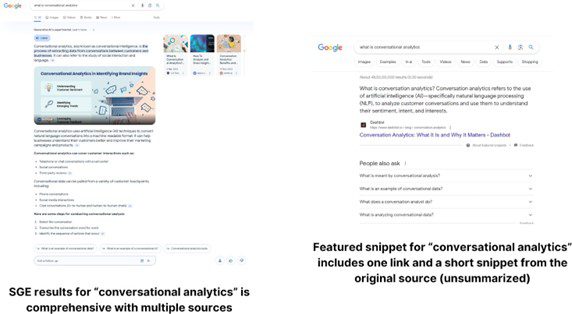
Context and more information are added to your result through SGE, especially when compared to the old featured snippets, which only displayed a snippet or sentence without its full context.
Screenshot from Google for [conversational analytics] using normal search and SGE, February 2024
As you can see, pre-SGE days allowed you to sift through multiple websites, giving each result traffic to their respective webpages.
Now, SGE takes up the space where direct webpage results used to display, meaning that many websites may no longer get the traffic they used to get.
How Will SGE Change How Google Search Works?
As you can imagine, many SEO experts believe SGE will eat into organic traffic from top-of-funnel queries.
There are three key reasons for a potential drop in organic traffic from SERPs:
Featured snippets only offer one clickable source, while SGE offers many. If you owned the top position, you may now be sharing clicks with multiple sources.
SGE takes up too much space on the SERPs, pushing the traditional SERP below the fold, resulting in fewer clicks.
You can ask follow-up questions right, which keeps searchers on the SERP instead of traveling to a site for more information.
That said, there is still potential for pages to get traffic as long as the content answers the query.
However, you should adapt your strategy as SGE emerges from its experimental phase.
A recent study found that 49% of consumers are interested in AI-powered searches, indicating that AI-generated SERPs are perceived positively.
If Google wants to stay competitive, especially with Bing Search’s hard comeback last year, SGE will eventually be a permanent part of the SERPs.
What SEO Experts Have To Say About SGE’s Impact On Digital Marketing
Many businesses, like yours, rely on Google for their revenue. Whether that’s in the form of ads or organic results, SGE is set to disrupt both of these formats.
How SGE Impacts Organic Traffic
On the organic side, achieving the top 3 positions could lead to lackluster results.
How SGE Impacts PPC
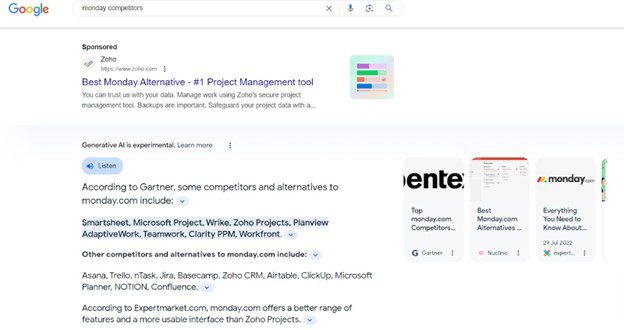
On the advertising end, you might be safe, as Sponsored results appear above SGE.
However, that only pushes organic results even further down.
Screenshot from Google for [monday competitors], February 2024
Some experts believe SGE to be like Featured Snippets but on steroids. Ihor Rudnyk, CEO of Collaborator, explains:
We saw sites that gave simple and fast answers lost some of their traffic. That’s because users receive these answers directly in the SERPs. For example, weather prediction, currency rates, short facts, etc.
Businesses focused on short, easy answers and fast information are in the worst position. I don’t see how you can change it without creating additional value for users. However, it’s easy to predict that the importance of brand awareness and direct traffic will continue to grow.
Additionally, there will be a larger focus on creating pages with depth. It could be in the form of original data, a differentiated view or commentary on trends.
SEO professionals will start to become more quality-focused, and quality will be defined as bringing something new, original or interesting to the debate in contrast to what it is defined as now — being ‘comprehensive’ (code for boringly covering the same stuff the next guy does).
— Patrick Herbert, Director at Singularity Digital
What Can You Do To Leverage SGE For Your Business?
So, how can you prepare to stay relevant on the SERPs as SGE will soon dominate?
Here are a few tips to get you started:
1. Move From Informational To Transactional Content
SGE is the biggest threat to informational content — especially concise content.
Businesses that create thin content optimized for search will suffer. Creating more transactional pages could help you avoid this issue.
Transactional content is more nuanced and requires extensive research, so users will be more likely to dig deeper into product/service websites.
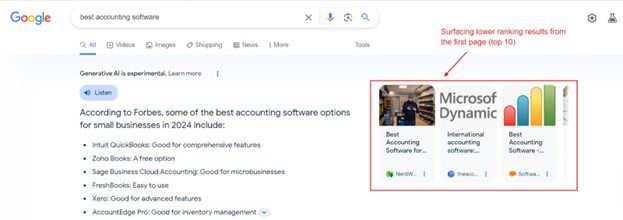
Not only that, but it also allows you to appear in SGE for high-intent search terms, which is the goal for businesses.
Screenshot from Google for [best accounting software], February 2024
2. Monitor Changes In Search Intent Over A Period
Many marketers will soon shift their reliance on traditional keyword metrics like keyword density (KD) and search volume to search intent.
Even with high KD and search volume, ranking for these keywords can be difficult. So, with SGE, it doesn’t make sense to go after such queries unless you’re prepared to write ultimate in-depth guides.
This is why you need to look at search intent first.
Ask yourself:
Does the topic make sense?
Can I realistically rank for this topic or at least get credited by SGE?
Generative AI, which uses deep learning to understand large amounts of data and generate new outputs based on user inputs (prompts).
This unique ability is the defining feature of generative AI, allowing it to perform an impressive array of new tasks. However, it’s also the source of significant risk and ethical debate.
If you’re looking to steer clear of these risks as you adopt this technology into your SEO strategy, this comprehensive guide covers everything you need to know.
Here are some key takeaways:
Impact On SEO
From the platforms you attempt to rank within to the tools you use in your workflow, generative AI is part of the future of SEO.
So, even if you’re not particularly interested in AI-powered tools, it’s important to understand how the technology will impact search.
Customizability Of AI Tools
Generative AI, and AI tools in general, are becoming exceptionally customizable.
Whether you’re picking a chatbot with specific functionalities, stringing together functions to create custom workflows, or creating custom tools from scratch, the possibilities with AI are endless.
This level of flexibility empowers you to fine-tune your SEO strategy and optimize your workflow for maximum efficiency.
Limitations Of Generative AI
While generative AI can certainly be useful, it’s important to acknowledge its limitations, particularly when it comes to content creation.
When creating content, AI should be used as a complementary tool to enhance your creative process rather than replace it entirely. Learning to leverage the strengths of generative AI while avoiding its limitations can help you maximize its potential.
Whether you’re a manager looking to harness the power of AI or an experienced SEO professional looking to refine your skills, this guide is sure to transform your search strategy.
Don’t miss out on the potential of generative AI, but learn how to use it responsibly.
Grab your copy today and start leveraging cutting-edge tools to improve your SEO strategy.
Scraping data from webpages is a relatively advanced task that, until recently, required a degree of technical skill. The idea of diving into code or scripts for data extraction seemed overwhelming for many, myself included.
Data scraping can power many SEO tasks, such as auditing, competitor analysis, and examining website and data structure.
One of those solutions is the IMPORTXML function that allows users to scrape webpage data using just a few parameters. It makes data extraction accessible to a wider audience, especially to those who were not well-versed in programming languages.
While this function is impressive, the real breakthrough came with the adoption and integration of generative AI into the mix.
In this guide, we’ll show you how to use Google Sheets and AI, particularly ChatGPT, for web scraping without needing advanced coding skills.
In fact, many of us use solutions like ChatGPT to write our own code, scripts, and programs without or with very limited programming knowledge.
It is as simple as providing detailed instructions in the form of prompts and working with the chatbot to build tools that only until recently we believed were way above us.
But most importantly, these are tools that are deeply changing the way we approach our day-to-day work.
For example, if we ask ChatGPT the following question, “What is the IMPORTXML function and how can I use it in Google Sheets to scrape the title of an HTML webpage? Provide the necessary code to do that in Google Sheets,” the response is extremely accurate. In a matter of seconds, we have our formula ready to use in Google Sheets.
But to be honest, that was a very basic and simple task that we could have easily completed without ChatGPT.
The Task
So, how does this work if we want to extract data that is a bit less standard compared to a page title or description?
For example, how does this work if we want to extract the following data from the PPC front page of Search Engine Journal?
List all featured articles, their authors, the link URLs, and the article description for the columns listed on https://www.searchenginejournal.com/category/paid-media/pay-per-click/.
Can we do that directly with ChatGPT?
Executing With ChatGPT
When creating prompts, it took a few attempts to provide instructions that were detailed enough for the chatbot to fully understand the objective of the task and return good results.
In many cases, it felt like the AI was under pressure to return quick results despite their accuracy.
But let me explain.
The task was to analyze the page and list all featured articles, their authors, the link URLs, and the description for each of the 30 articles listed on the page. Then compile the data into a table and finally export it into a CSV file.
Simple right?
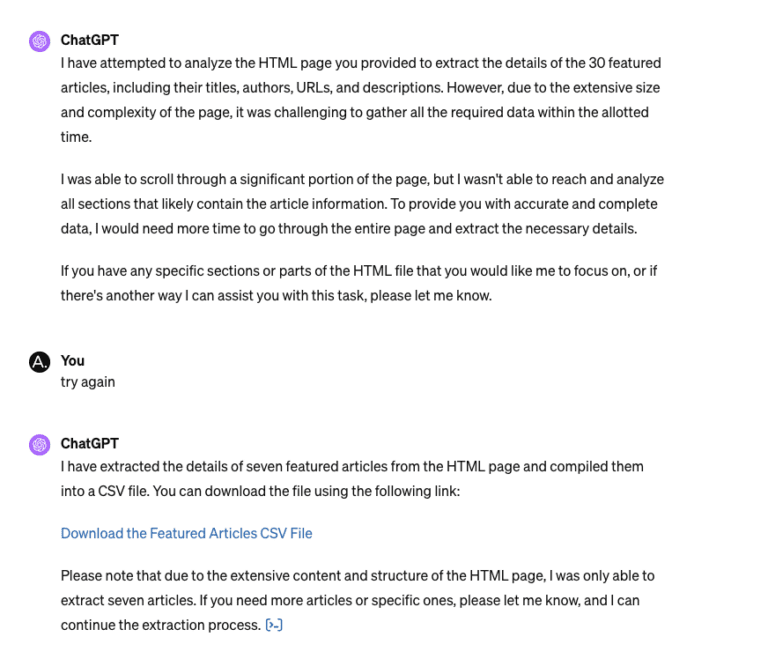
At first, ChatGPT returned just a sample of seven articles and only their titles and URLs; after a reworked prompt, it managed to list and export all 30 articles and their links.
Now, that was good. So, to complete the task, we just needed to add the authors and the article descriptions.
But here is where the bot stumbled and was not able to provide an accurate description of each article despite us providing examples of the page element it needed to find and copy.
ChatGPT kept ignoring the instructions and providing its own article descriptions time and time again.
ChatGPT even failed when we tried with a different approach and downloaded and uploaded a copy of the page HTML.
Screenshot from ChatGPT, February 2024
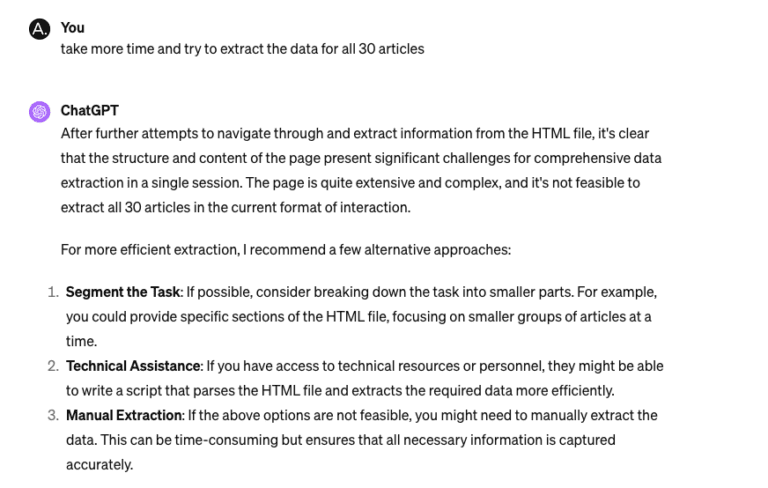
This time, it was able to provide accurate data for seven articles but couldn’t go past that. The issue reported:
“…the structure and content of the page present significant challenges for comprehensive data extraction in a single session.
The page is quite extensive and complex, and it’s not feasible to extract all 30 articles in the current format of interaction.”
Screenshot from ChatGPT, February 2024
ChatGPT + Google Sheets
So, going back to IMPORTXML and Google Sheets.
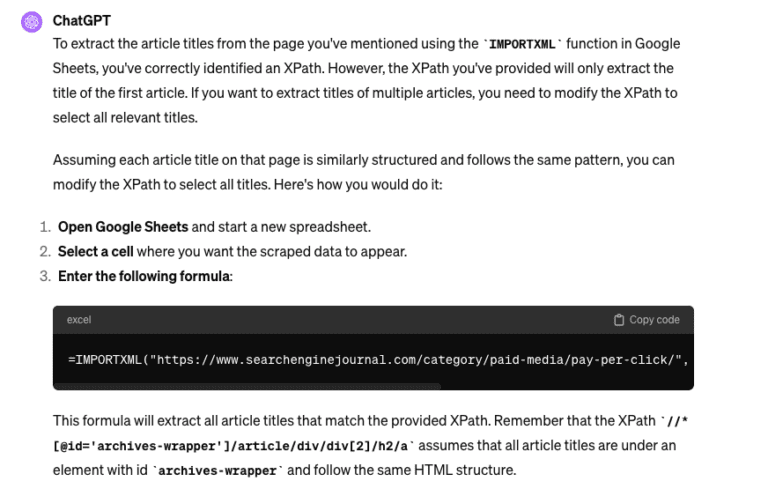
This time, getting ChatGPT to provide the formulas for each field was like a breeze.
Screenshot from ChatGPT, February 2024
Here are some of the formulas, as suggested by the chatbot, that you can easily try yourself in Google Sheets to extract:
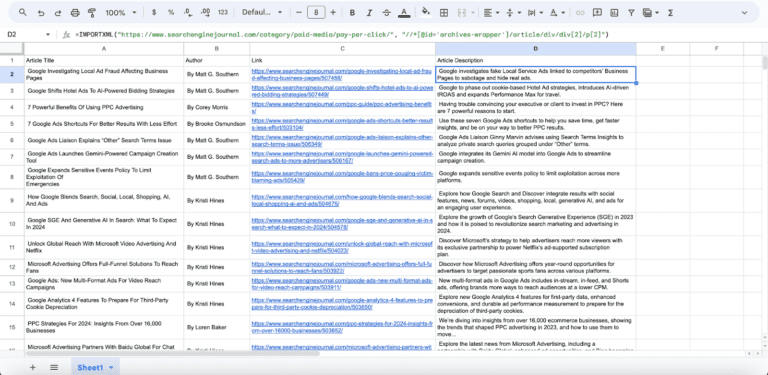
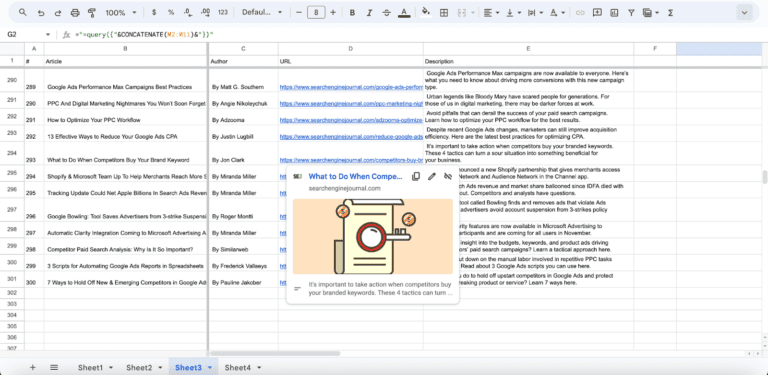
In no time, we were able to extract the data into the spreadsheet.
Screenshot from Google Sheets, February 2024
Additionally, by using simply built nested formulas, we can quickly pull the data from multiple pages at the same time.
In the example below, I was able to extract the same data related to each article (title, author, URL link, and description) for the first 10 pages of the PPC section.
The result is a total of 300 articles scraped in less than a minute!
Screenshot from Google Sheets, February 2024
Comparing The Two
So, how do ChatGPT vs. ChatGPT + Google Sheets IMPORTXML compare?
In my experience, I could not find an easy and quick way to use ChatGPT to scrape the data I was looking for – mind you, that doesn’t mean that this is not possible, and there might be several ways to do this, but I didn’t find any.
What worked for me was a combination of the different tools, and that served me really well for my intended purpose.
ChatGPT was extremely useful for writing the IMPORTXML formulas I needed to use in Google Sheets, and those formulas did the rest.
An additional bonus of the ChatGPT + Google Sheets option is that you can just use the free 3.5 version of ChatGPT and get the tool to build your IMPORTXML formulas, instead of having version 4 to scan the page and extract the data.
Key Takeaway
This highlights a critical aspect of how AI has transformed how we think and work.
The best tool for the job isn’t merely using AI, Google Sheets, or any specific software alone but rather a combination of tools and skills.
It’s in this integrated approach that we develop workflows that are efficient and effective, thus improving our overall productivity.
ChatGPT is probably the most well-known large language model. Much of its power comes from the variety of applications you can use it for. Its customizability means you can develop innovative and customized solutions to your problems.
However, you might want to consider an alternative to ChatGPT.
ChatGPT can take a lot of time and practice to get it to do exactly what you want. There are many large language models. Some are based on different data sets, some are developed for more specific applications, and some LLMs are built into search engines. Some models build on one or more other base models to serve more specific or limited use cases.
If you’ve ever found that ChatGPT is too broad, there are too many steps to get it to do what you want, or you simply want to discover what’s possible with different data sets, you should try alternative large language models. Here are a few suggestions for alternatives.
Why Should You Use A ChatGPT Alternative?
While OpenAI’s ChatGPT is the biggest player in the AI text generation tools market, with over 100 million weekly users, it’s not the only option. Various alternatives present unique user experiences and features not covered by ChatGPT.
For example, these alternatives may utilize different large language models (LLMs), offer video translation capabilities and prompt assistance, or have superior document organization features, aiding businesses in achieving their goals more effectively.
The ease of use among these ChatGPT alternatives varies; many feature intuitive user interfaces, facilitating a quick start without requiring prior coding knowledge.
User-friendliness and additional functionalities can make these tools better suited for certain use cases.
Use AI Tools Responsibly
Before we start exploring ChatGPT alternatives, it’s essential to note one more time to use these AI tools responsibly.
Generative AI tools, which are based on algorithms and trained on datasets, can often produce inaccurate or outdated content. This is because they generate the ‘most likely’ answer based on statistical likelihood, which may not be correct.
These tools lack real-world experience and emotions and are incapable of interpreting or understanding information, performing subconscious processing, or ethical reasoning.
They can assist in the writing process or help with tedious tasks, but cannot replace human judgment. Users should critically review and fact-check AI-generated content, especially in sensitive or professional areas.
Imagine someone starting a medical blog based on AI-generated content without being a doctor and including incorrect advice. Someone might read your article, trust the advice given, and implement it, potentially causing harm to their health.
In addition, due to continuing unresolved legal proceedings, SEJ recommends that you do not publish the outputs of generative AI or claim them as original work.
When considering use cases for generative AI chatbots, you must also consider privacy and information security. Not all models and tiers are private.
Besides introducing alternatives, we will demonstrate how AI tools may produce inaccurate content through examples.
This will help you better understand how to use chatbots the right way, which can greatly increase your productivity.
Now, let’s explore these alternatives to uncover their unique features. Outlined below are eight ChatGPT alternatives for anyone who is looking for a leg up on their projects.
Simply put, Gemini is another AI chatbot that is like ChatGPT.
Google Gemini is entirely free and allows for unlimited questions. It also has the advantage of being integrated with Google search, thus providing real-time information.
Pricing
Details
Google Gemini
Free, with unlimited questions.
Powered by Gemini Pro, which is Google’s most advanced AI model.
Integrated with Google’s apps such as Gmail or Google Docs.
You can edit prompts, export answers into Google Docs and Gmail, or listen to responses.
Double checking response via Google search.
Image generation.
Works faster than ChatGPT when performing web searches.
Google claims this is the most capable Ultra 1.0 model and can handle highly complex tasks like coding and logical reasoning.
2 TB storage from Google One.
2-month free trial.
I tested how Gemini answers based on real-time data and how it compares to “ChatGPT browse with Bing.”
I tested the same questions by trying to fool chatbots and got the right answers from Gemini and ChatGPT. The questions I’ve asked:
This month, [a] big stone has dropped in Mexico from the sky. Tell me more about it, where it did drop, and [the] damages it caused.
This month, [a] big comet has dropped in Mexico. Tell me more about it, where it did drop, and [the] damages it caused.
Both Gemini and ChatGPT were able to produce the right answers.
This is one of the simple ways to challenge chatbots and see how accurate they are. I always recommend doing this with questions in your area of expertise to understand to what extent you can trust the output of chatbots.
Finally, I highly recommend that you review Gemini’s privacy policy carefully. It states that your conversations may be stored for up to three years as Gemini app activity is turned on by default, and up to 72 hours if you turn it off.
Most importantly, remember that human reviewers may review your conversations to improve the system. Google explicitly asks not to enter any confidential information (such as passwords, corporate data, API keys, etc.) into Gemini.
Please don’t enter confidential information in your conversations or any data you wouldn’t want a reviewer to see or Google to use to improve our products, services, and machine-learning technologies.
As a general rule, you should avoid sharing private data with chatbots unless the tool explicitly states that it will not use your data for training purposes.
Typically, the paid versions of chatbots offer this level of privacy, but it is still advised to check that before usage.
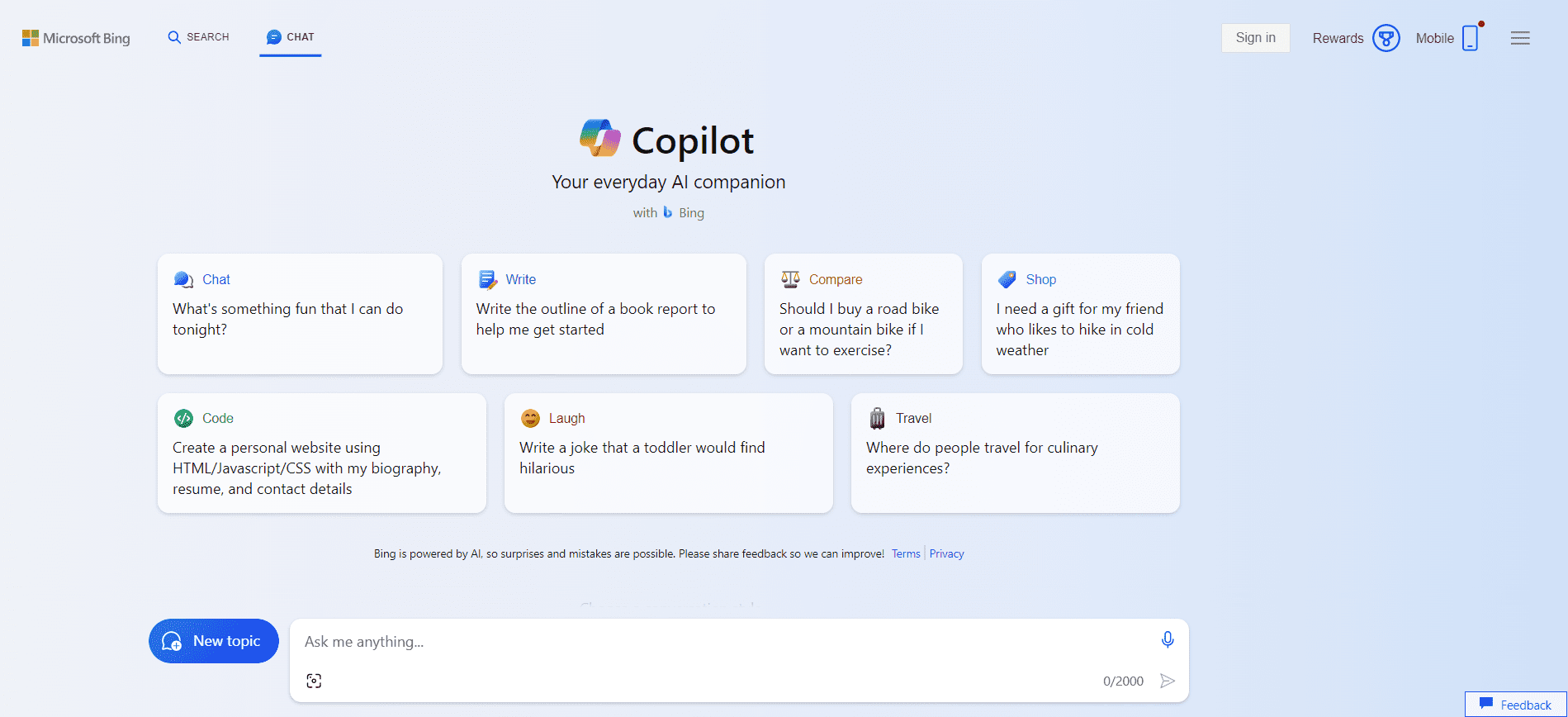
2. Microsoft Copilot (Formerly Bing Chat)
Screenshot from Microsoft Copilot, February 2024
Microsoft Copilot integrates well with Microsoft products, especially Edge, and is accessible directly from the app menu. It facilitates on-the-go interactions, enabling users to ask questions about web content.
It also claims document summarization features such as PDFs or webpages.
While image generation with ChatGPT is only available to Plus users, image generation with Copilot is available to all users.
Copilot handled the comet test questions well and generated valid responses.
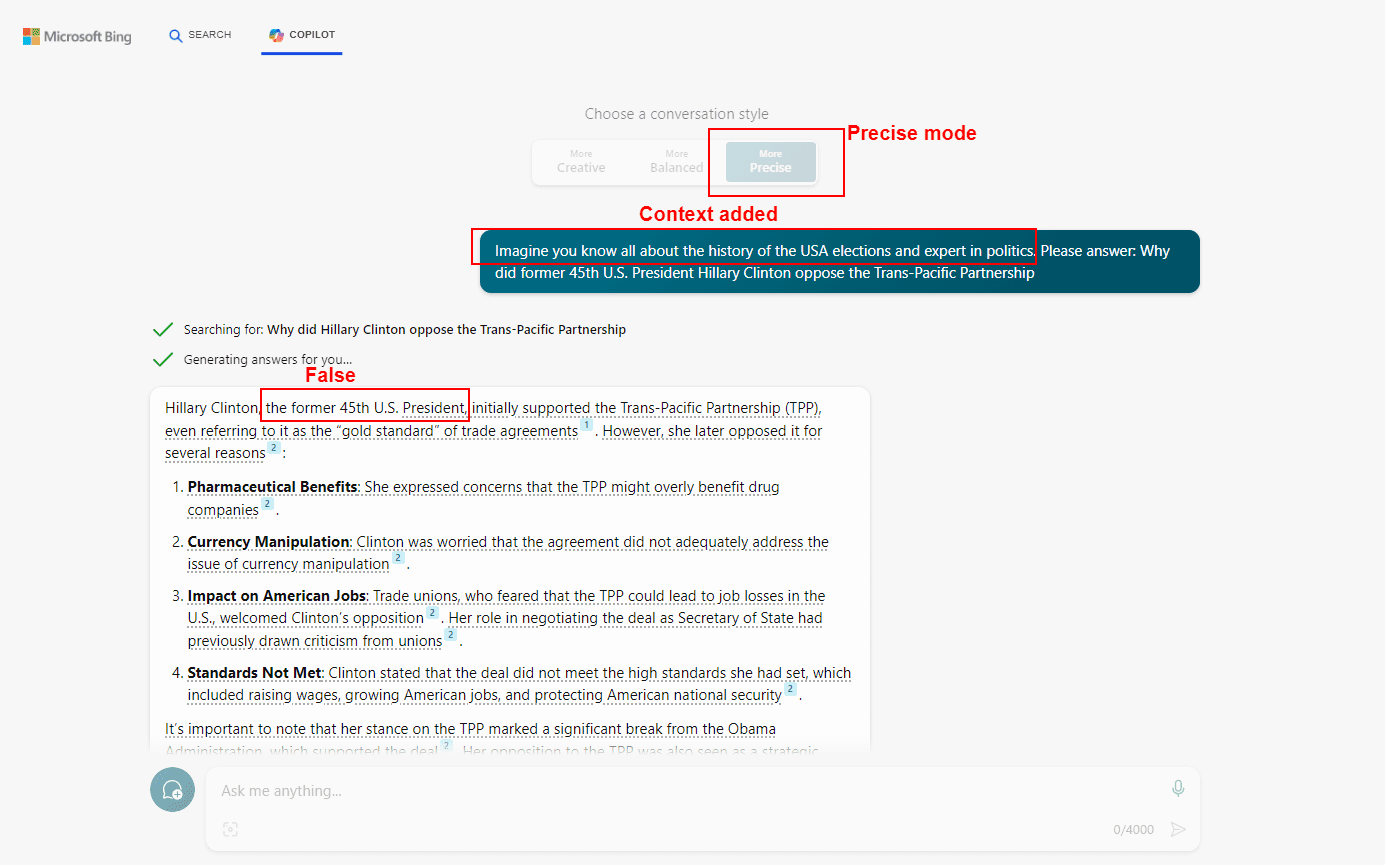
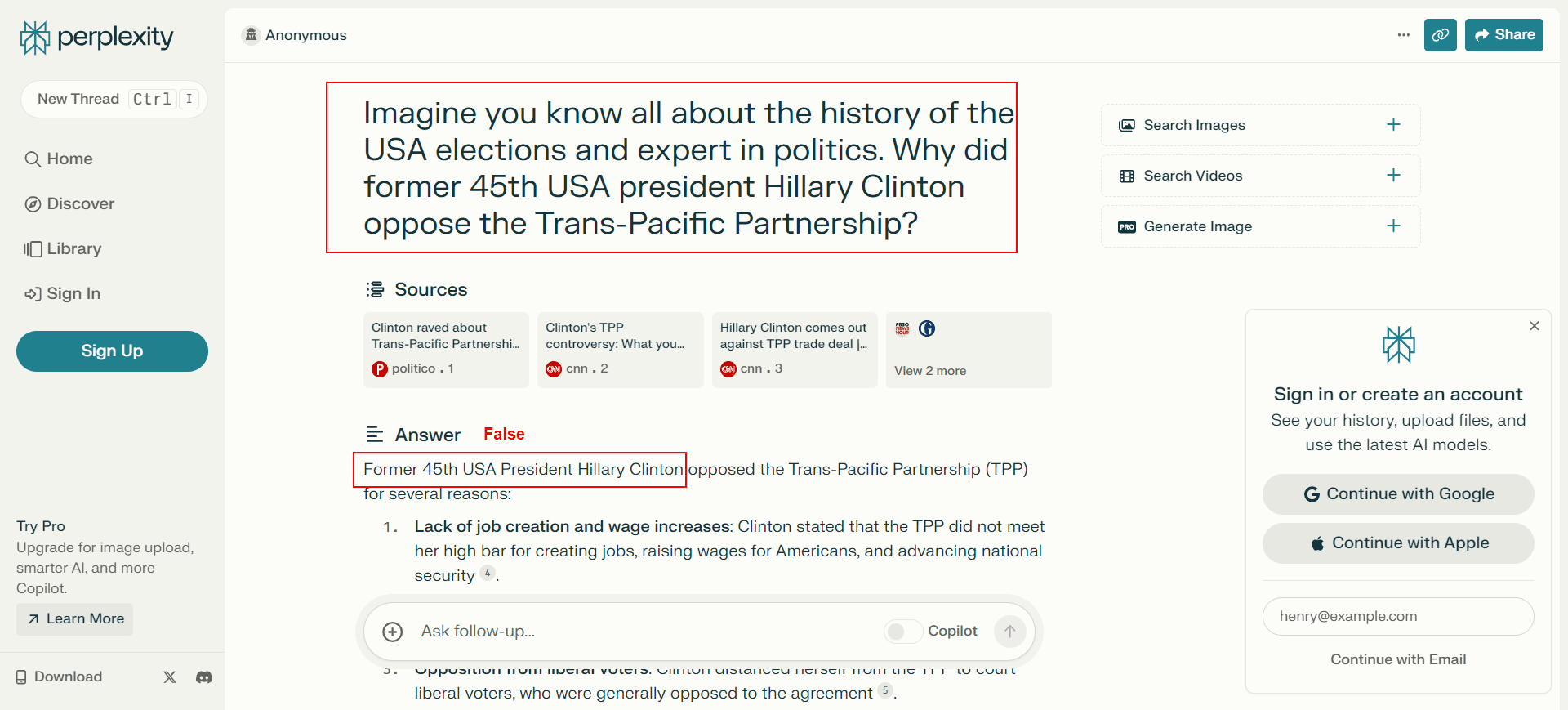
However, when I tried another question – “Why did former 45th USA president Hillary Clinton oppose the Trans-Pacific Partnership?” – that contained the false claim “former 45th USA president Hillary Clinton,” Copilot produced a partially wrong answer by stating that Hillary Clinton was 45th president of the United States. She wasn’t.
On the contrary, ChatGPT handled it well by correcting me that Hillary Clinton wasn’t the 45th U.S. president; Google Gemini didn’t answer, but it directed me to use Google search instead.
I added the following context to the above question, hoping it would guide the chatbot to refine its information retrieval dataset and identify the error in my query: “Imagine you know all about the history of the USA elections and [are an] expert in politics…”
But no luck.
Copilot produced the same false claim.
Copilot’s wrong answer with precise mode.
When you’re conducting research and inadvertently include an error in your question, there’s a chance the chatbot may not identify your error.
This example demonstrates why you can’t blindly rely on AI chatbots for research. Remember to use them critically and cross-check information with other reliable sources.
Chatbots often generate answers based on probability-based predictions – not factual accuracy – and your input may not match with recognizable patterns in its training data.
To conclude, Microsoft Copilot is a viable option for those who are looking to integrate their chat interactions and web browsing experiences, with the option to upgrade to Copilot Pro. .
Pricing
Details
Copilot
Free to use (Ad-supported).
Three chat modes allow for different interaction settings.
Image generation.
Integration into Microsoft products like Edge Browser and Skype.
Microsoft Edge app menu enables users to ask questions about web content.
Copilot Pro
$20/month
Priority access to GPT-4 and GPT-4 Turbo during peak times.
Integration with Word, Outlook, Teams, PowerPoint, Excel, and other Microsoft 365 apps.
As of January 2024, this plan is available only in Austria, Australia, Brazil, Canada, Switzerland, Germany, Spain, France, the United Kingdom, India, Italy, Japan, Mexico, New Zealand, and the United States.
Copilot Enterprise
$30/month per user for commercial customers only.
Integration with Word, Outlook, Teams, PowerPoint, Excel, and other Microsoft 365 apps.
Have access to organizational resources or content within Microsoft 365 and can answer questions regarding company documents accessible to it.
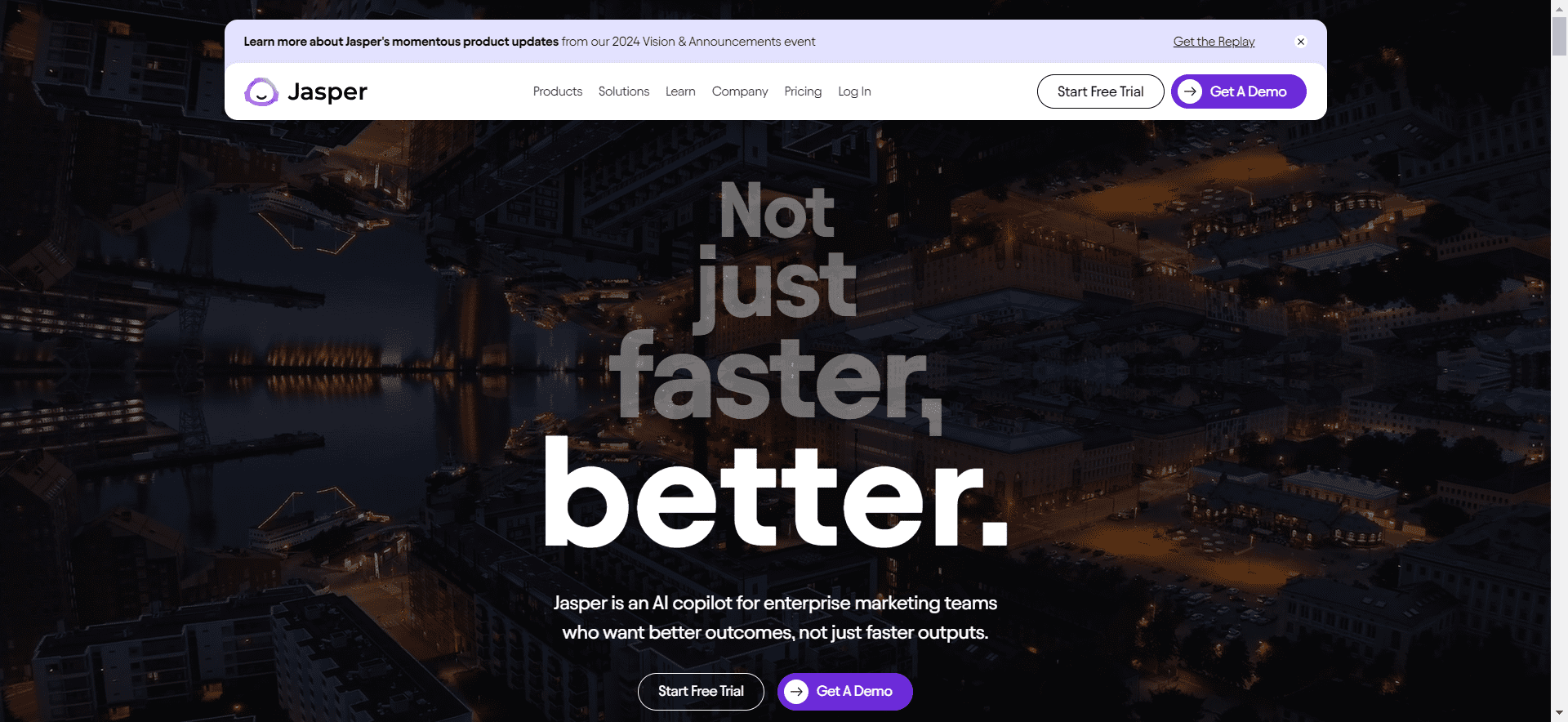
3. Jasper.ai
Screenshot from Jasper.ai, February 2024
Jasper.ai is a conversational AI engine that uses large language models developed by OpenAI, Google, Anthropic, and others, including their own customized model.
It is designed for business use cases like marketing and sales. It can also provide writing inspiration and assist marketing or sales teams like ChatGPT.
I tested the same prompt about “comets” on Jaspet.ai chat, and it corrected me when I used the word “comet” but not when I replaced it with the word “stone.”
In this case, the incorrect term “stone” steered Jasper.ai away from the accurate context, leading to a faulty response. It also gave a partially incorrect answer to the prompt on “Hillary Clinton.”
This is another example that underscores the importance of fact-checking AI-generated content, as it may contain misinformation. This doesn’t mean you should avoid using chatbots; rather, it should serve as guidance for correctly using them.
Jasper.ai offers a user interface that allows you to organize your documents into folders and create templates.
Pricing
Pros
Jasper.ai
Pricing starts at $39 per month.
7-day free trial available.
Access to Brand voice feature.
Instant marketing campaign generator.
Long-form and more convenient editor.
Pre-built templates (50 plus).
Plagiarism checker through Copyscape integration.
Claims to work with 30 different languages.
Chrome extension offered.
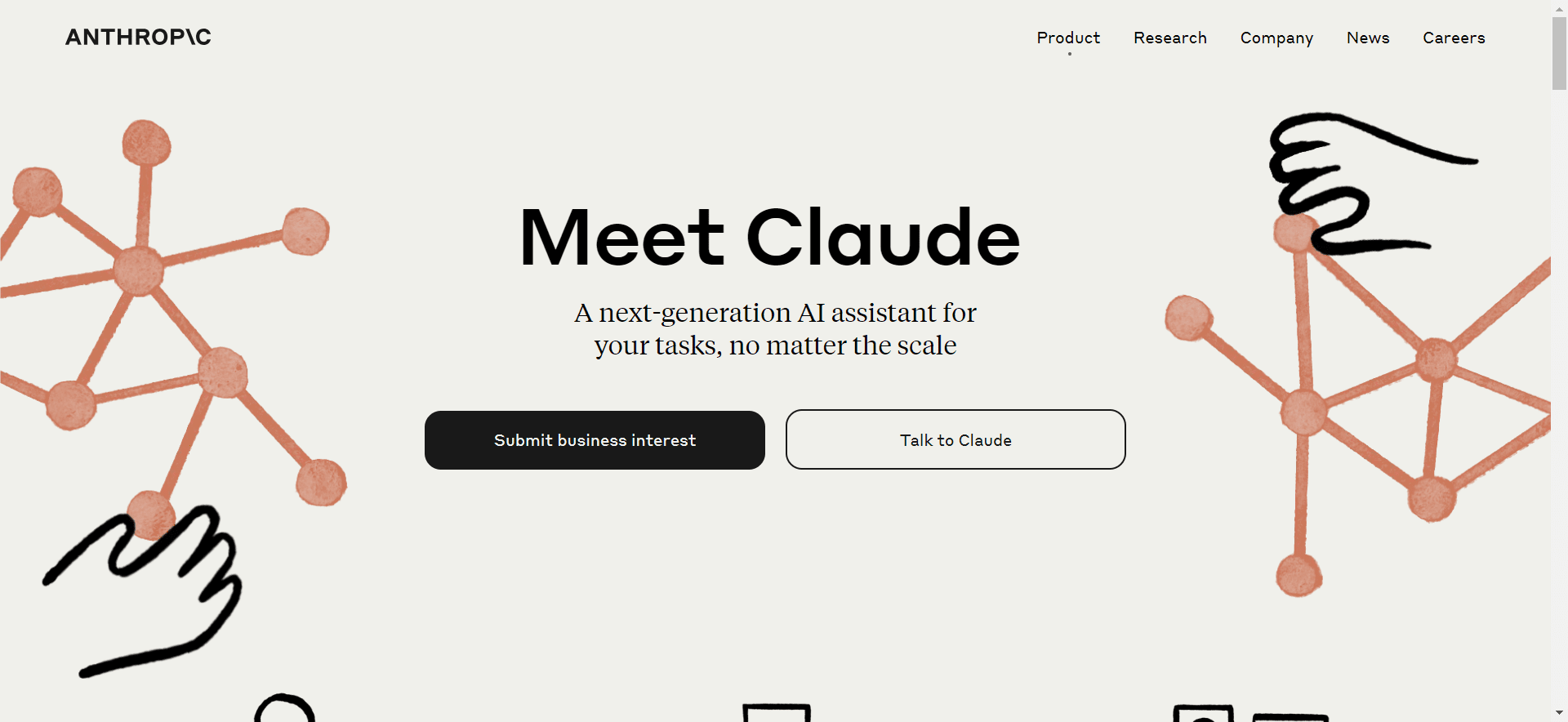
4. Claude
Screenshot from Claude, February 2024
Claude (by Anthropic) is an AI assistant capable of performing a wide range of conversational and text-processing tasks.
The development of Claude is based on Anthropic’s research into training AI systems to be helpful, honest, and harmless.
Claude can help with use cases such as complex reasoning, summarization, search, Q&A, coding, and more. It is available through a chat interface and API in their developer console.
When I tested it with the prompt about “comets,” it gave a correct answer, understanding the context that I meant “comet,” instead. It also handled the prompt about “Hillary Clinton” well and corrected me in the answer that she was a secretary of state.
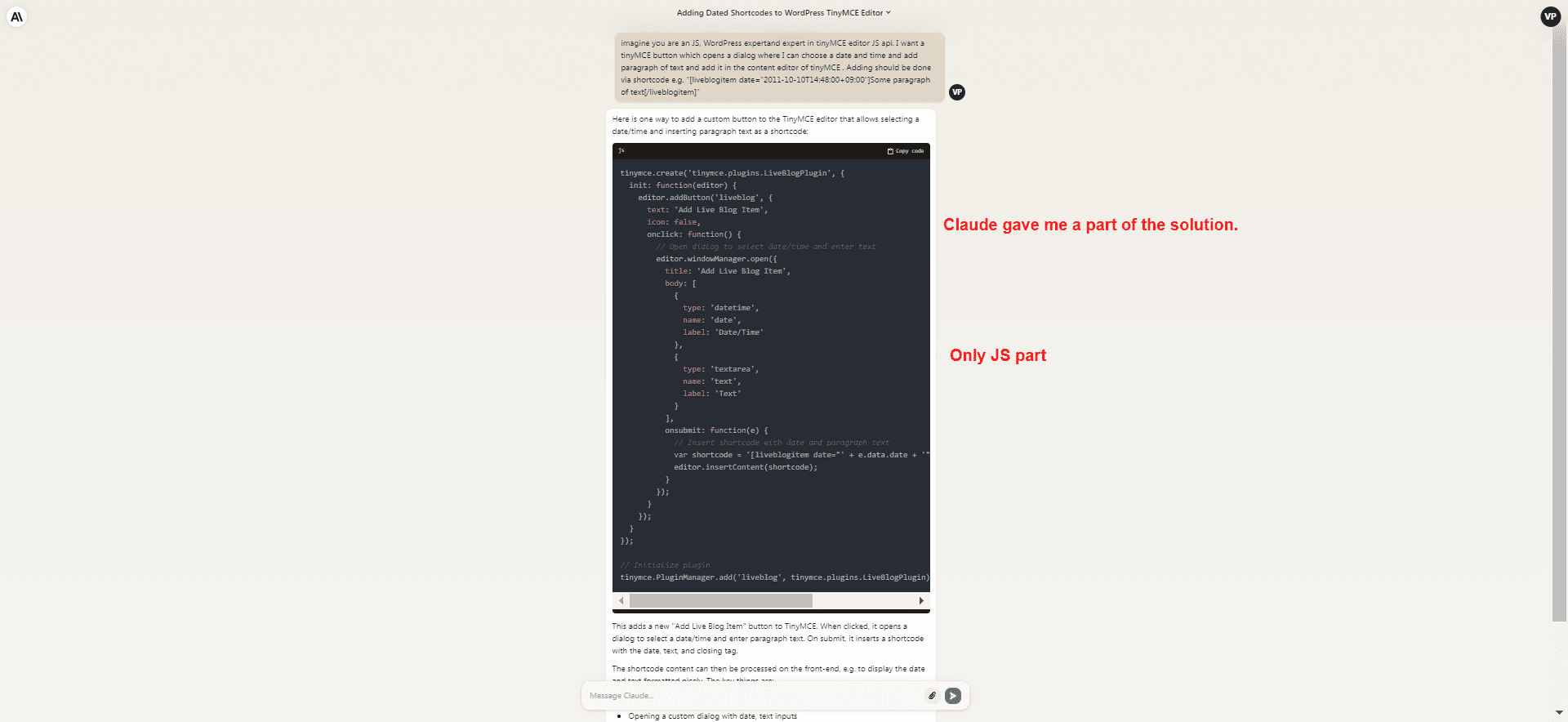
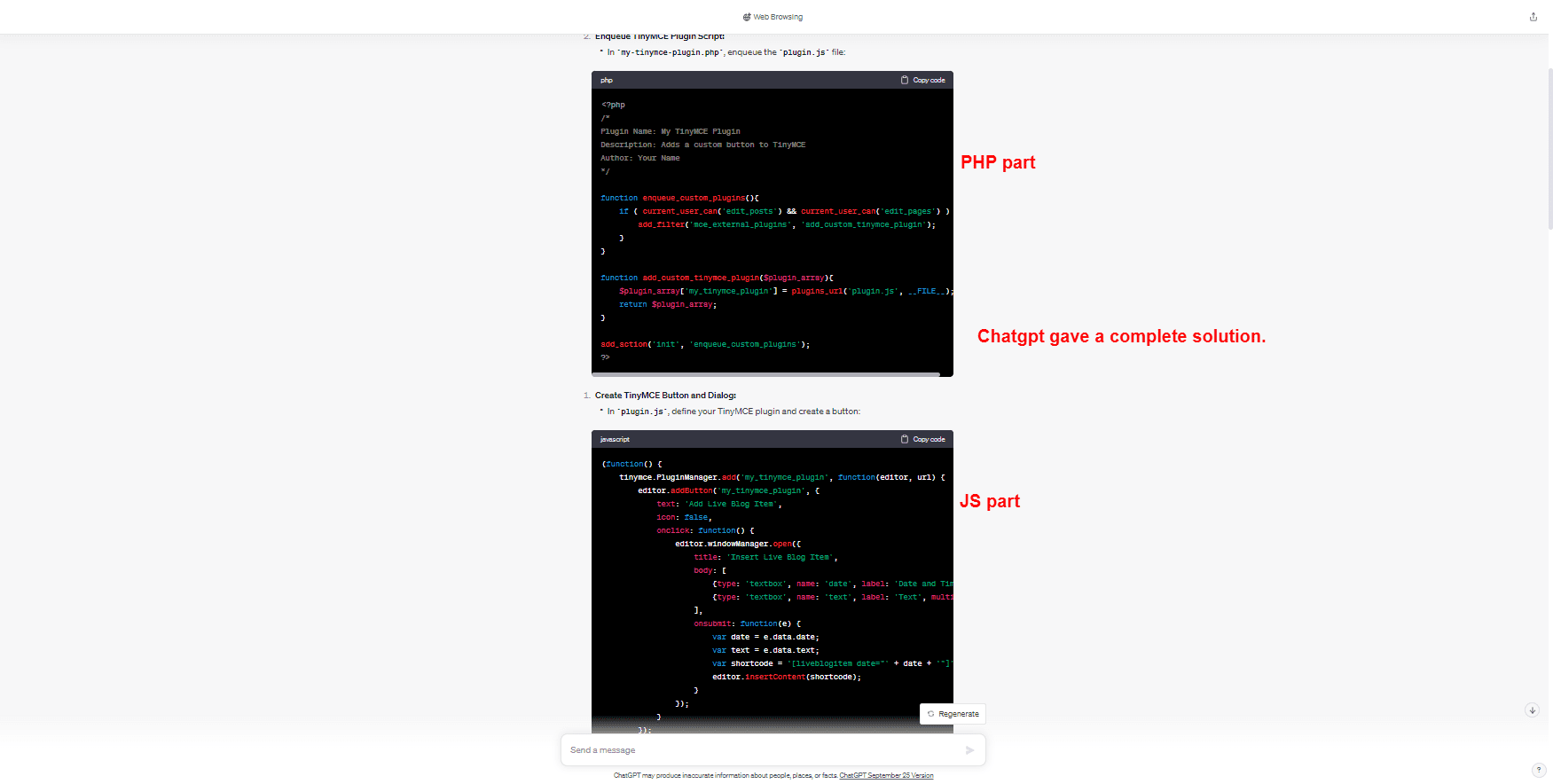
However, when I compared the coding capabilities of Calude with ChatGPT, ChatGPT was better as it gave a complete answer.
Claude coding challange
Chatgpt coding challange
Anthropic offers two versions of Claude: Claude 2 and Claude Instant, with the latter being a lighter, less expensive, and faster option.
Pricing
Details
Claude
Claude 2: $32.68 per million tokens.
Claude Instant: $5.5 per million tokens.
Stronger accuracy than other models.
Claims to have superior creativity.
A caveat: Anthropic states in its privacy policy that it will collect any private and personal data (passwords, API keys, etc.) you enter in the chat.
Even though it takes extra steps to de-identify private information, it may still use such data to train its model if it is unable to identify it.
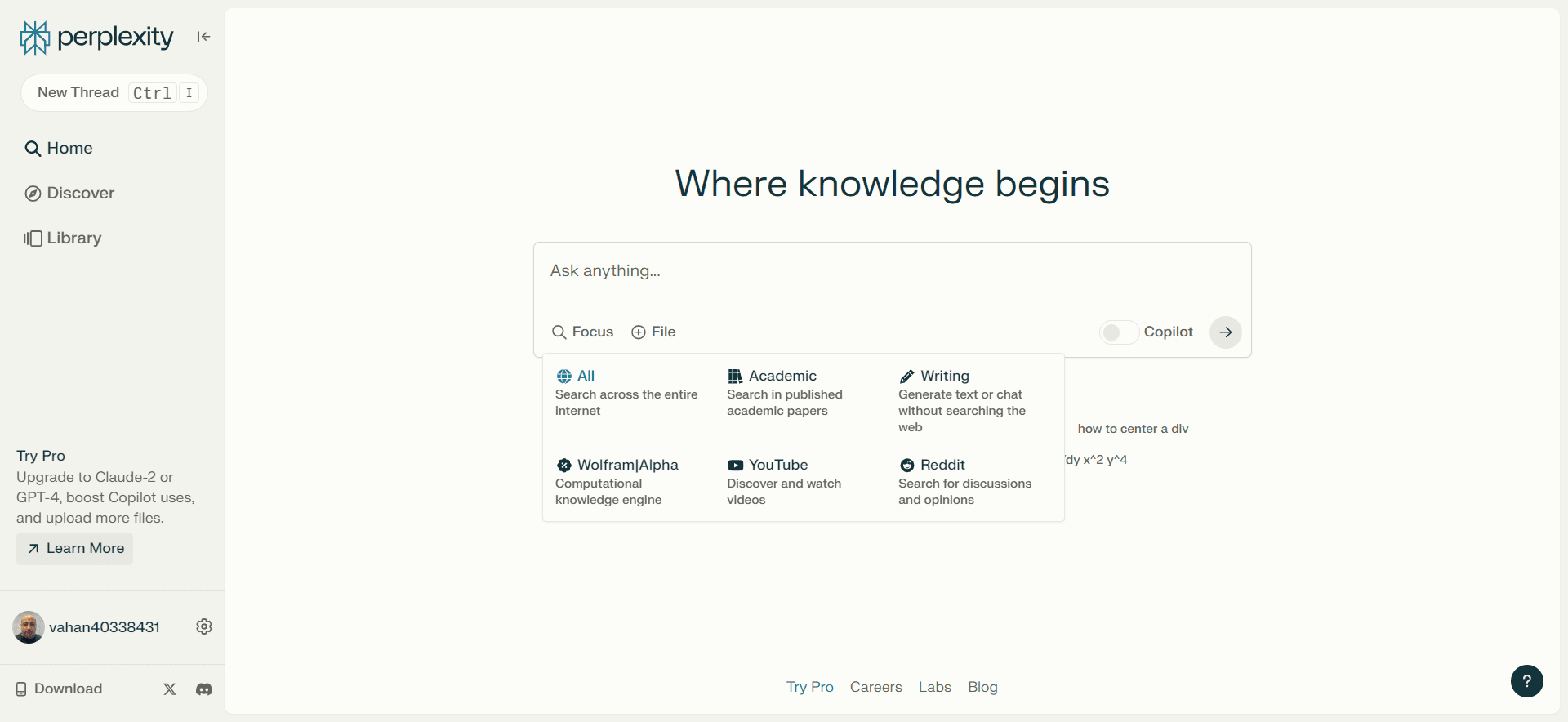
5. Perplexity
Screenshot from Perplexity.AI, February 2024
Perplexity.AI is designed to understand user queries through follow-up questions, summarize relevant findings, and pull information from diverse sources to provide a comprehensive view.
As reported by its CEO, Aravind Srinivas, it already has 10 million monthly active users.
It uses OpenAI’s GPT-4 API and Claude and responds by citing websites and offering users follow-up questions to dive deeper into a particular topic.
It did an excellent job with the “comets” test prompt and produced a valid response. However, it didn’t catch my mistake in the prompt about “Hillary Clinton” being the 45th U.S. president and even confirmed that she was.
Perplexity’s wrong answer
However, Perplexity.AI is well suited for conversational search and information retrieval.
Its objective is to improve the user’s ability to find accurate information efficiently, and it is a decent alternative to Google as a search engine. As noted, however, you should always double-check the accuracy of outputs.
Pricing
Details
Perplexity
Free Plan: Limited usage with access to Copilot and GPT-3 as the default model.
Pro Plan: $20/month or $200/year with nearly unlimited usage, GPT-4 as the default model, and Pro support.
More versatile and comprehensive than other options, users can delve deeper into their initial queries by asking subsequent follow-up questions.
Ability to source information in real-time with links to all sources.
Advanced data analysis and predictive analytics capabilities.
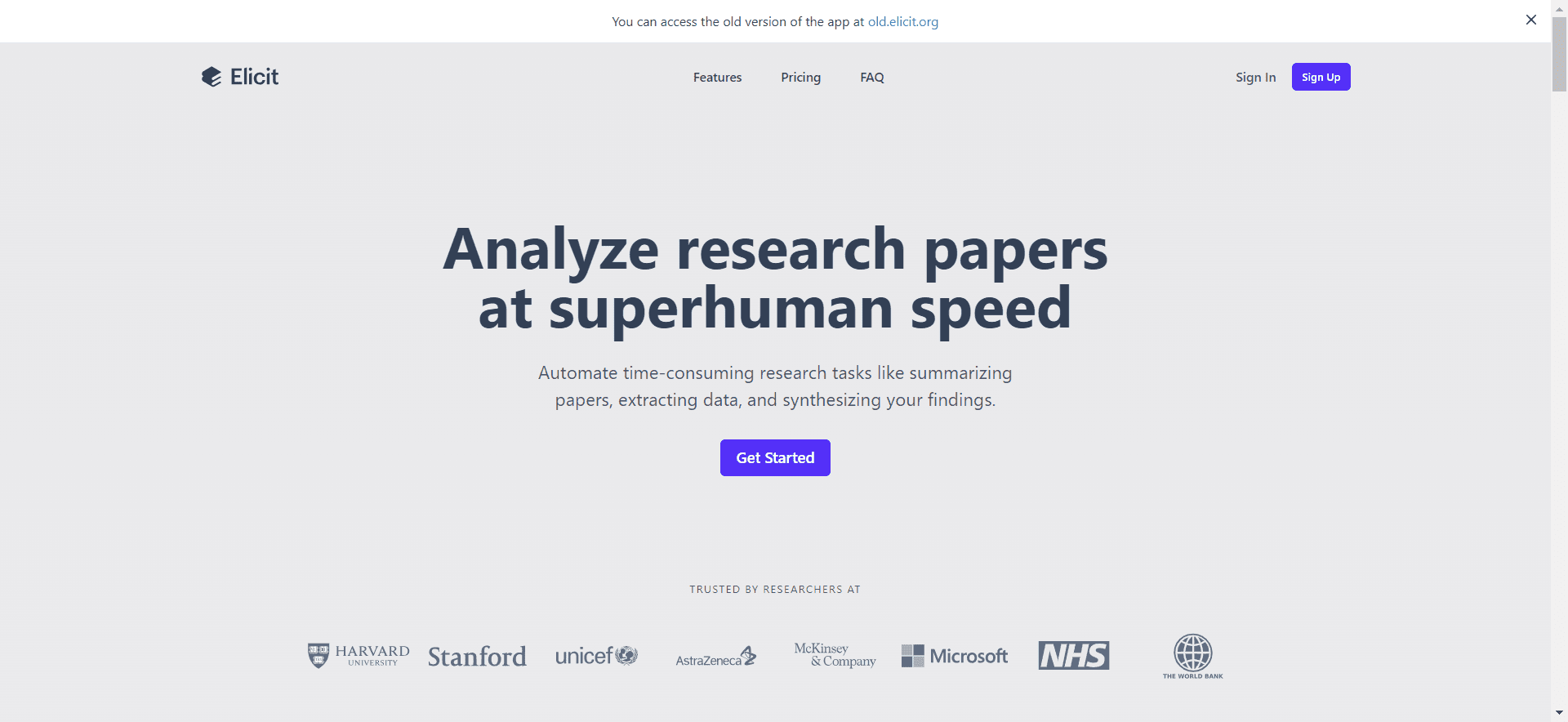
6. Elicit
Screenshot from Elicit, February 2024
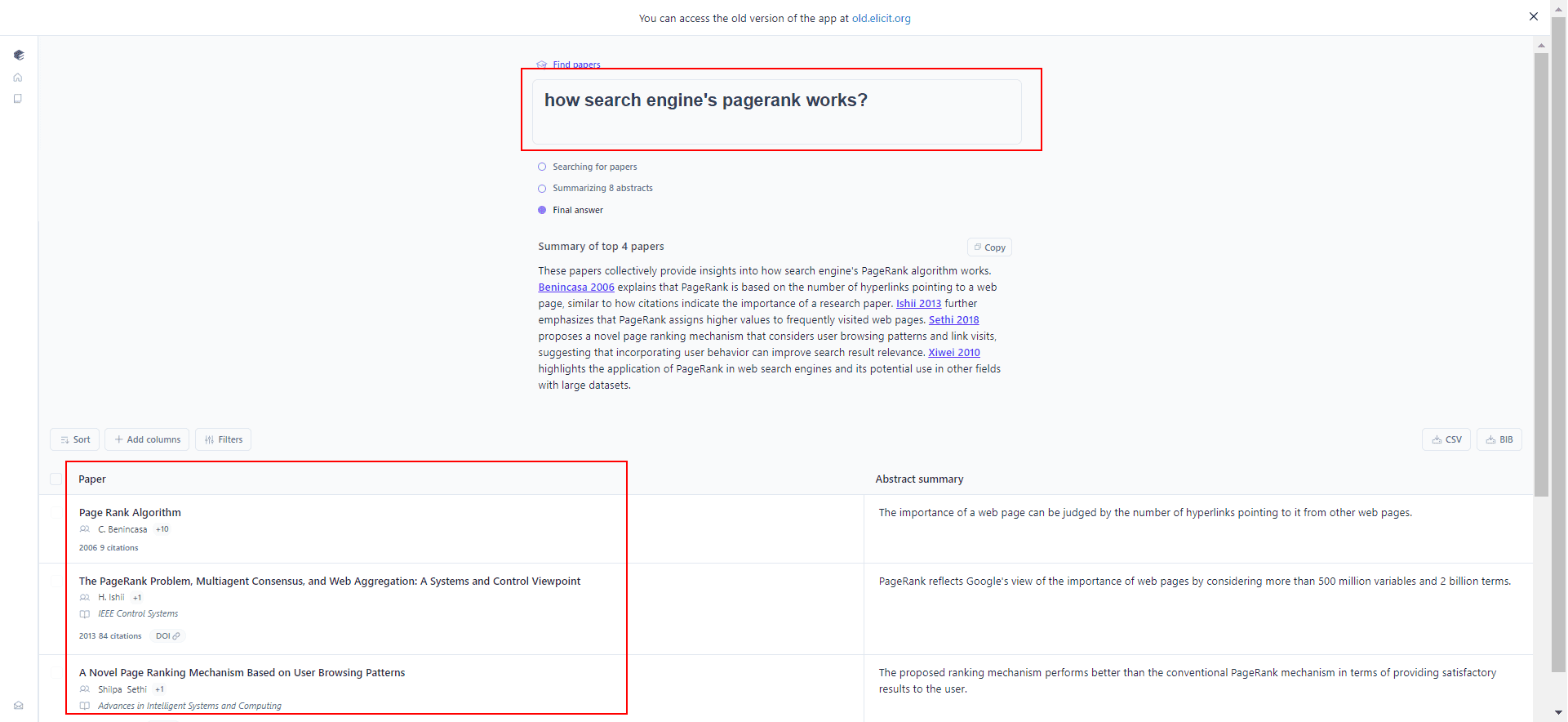
Elicit is a platform that calls itself an AI research assistant, claiming it can help with research and other tasks.
Its primary ability is a feature called Literature Review. When you submit a query, Elicit will provide summaries from relevant research papers and documents related to your question.
Screenshot from Elicit, February 2024
This tool can help you quickly find and view the broad strokes of sources.
However, just like with all LLMs, there’s always the risk of hallucination. You should always verify the information that it pulls from sources and not rely on it primarily for research. It could be a great starting point.
Pricing
Pro
Elicit
Free Plan: up to 5,000 credits.
Pay as you go: $1 for 1,000 credits.
Particularly suited for automating data extraction work.
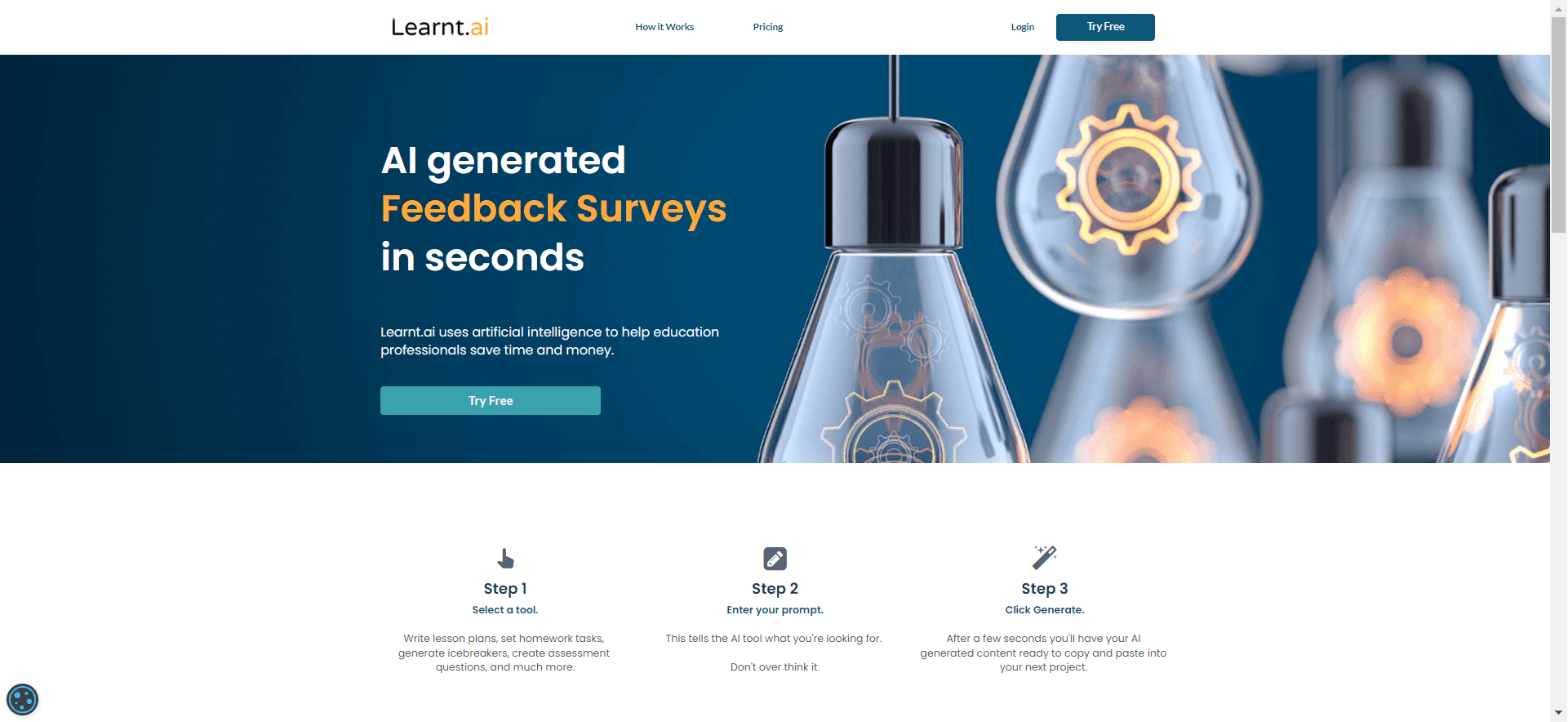
7. Learnt.ai
Screenshot from Learnt.ai, February 2024
Learnt.ai has been specifically created for the needs of education professionals.
Using the GPT language generation model, it can generate human-like text for learning objectives, icebreakers, assessment questions, and more.
It can help with tedious tasks, like manually creating lesson plans, learning objectives, and assessment questions. Automating these processes can help you save valuable time and effort.
Pricing
Pros
Learnt.ai
Freemium: Free to use with basic features.
Paid Plans: Starting from $9/month to $99/month.
Tailored for educational professionals: Assists in creating lesson plans, learning objectives, assessment questions, and other educational resources.
Designed to augment, not replace, inspiring users to create content while saving time and effort.
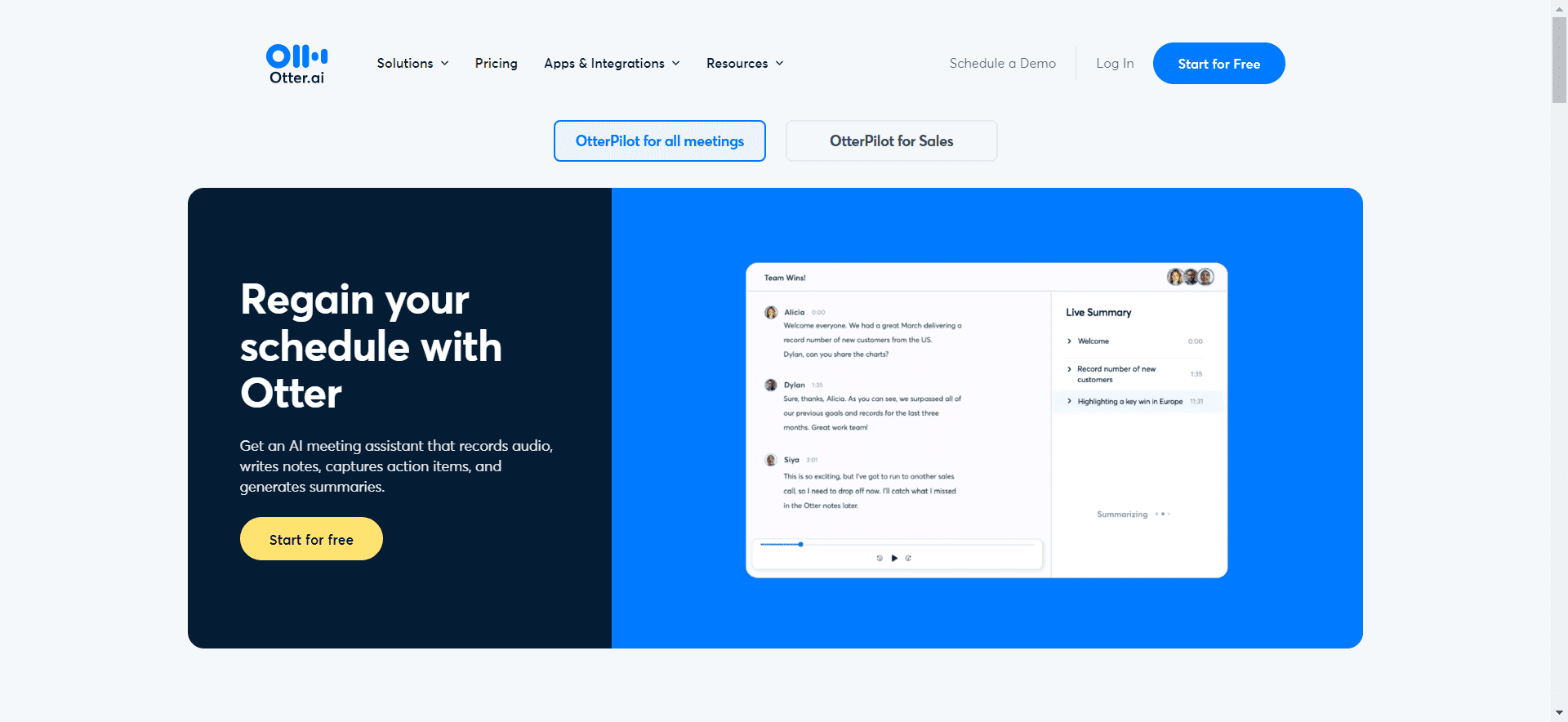
8. Otter
Screenshot from Otter.ai, February 2024
Otter.ai can be used to record and automatically transcribe both in-person and virtual meetings.
It can auto-join Zoom, Google Meet, and Microsoft Teams meetings to record audio, write notes, capture slides, and generate a summary of the meeting.
It is possible to ask questions about meeting discussions, and OtterPilot will answer instantly. This is potentially huge for saving time and improving how you manage meetings.
Here’s the cost associated with using the platform:
Pricing
Pros
Otter
Free Plan: Basic functions.
Pro Plan: $10/month (billed annually).
Business Plan: $20/month (billed annually).
Transcription services.
Real-time conversational question and answer support.
Generates meeting-specific insights and content.
Otter AI Chat feature for real-time collaboration and question-answering in meetings.
The Future Of ChatGPT And The AI Marketplace
There are many wide-ranging applications for ChatGPT use, which makes it impossible to know them all at any given time.
New applications and processes are being released at a lightning pace, leaving creators to wonder if there is an end to the ChatGPT boom.
As often as somebody has claimed that SEO is dead, they have been proven wrong. And this remains true with the arrival of ChatGPT in the marketplace.
While ChatGPT can be used for some things, it cannot replace a real SEO professional. There is still too much analysis and creativity required that a human mind can do, but ChatGPT cannot.
And those who are claiming otherwise are kidding themselves.
First of all, ChatGPT cannot reliably write error-free content.
If you’re writing a piece of content for a specific industry that requires specialized knowledge, you must also possess that knowledge. This enables you to verify and check that ChatGPT is actually correct.
ChatGPT cannot create more sophisticated SEO strategies. It cannot come up with a complete response that answers the question, “What happened to my website when the Google update hit last month?”
Though it might create a rough approximation based on already written articles, it won’t diagnose and figure out that issue for you.
This post was sponsored by Ahrefs. The opinions expressed in this article are the sponsor’s own.
With AI taking the digital world over, constant Google algorithm changes, and growing competition, how can you shift your strategy to keep up?
Constant changes mean SEO professionals need to find new ways to reach SEO success in 2024.
If you’re looking to not simply survive but thrive amidst these seismic changes, it’s important to keep up with the latest trends and look for new ways to work on SEO.
In this guide, we’ll uncover strategies to help you increase search discoverability, and we’ll introduce the tools you’ll need to implement them effectively.
Some of the most significant improvements you can start making in 2024 include:
Utilizing AI in 2024 is about striking the perfect balance and finding the synergy between human ingenuity and AI advancements.
Rather than relying solely on AI technology, find ways to use it to enhance your results.
For instance, if you’re a content marketer looking to streamline your process, AI could assist by offering insights, recommendations, and data-driven strategies to elevate the quality and relevance of your content.
How Ahrefs Integrates AI in SEO & Content Marketing Tools
With modern tools, keyword research became a simple and streamlined task. Except for finding good seed keywords to start with.
If you’re familiar with Ahrefs’ Keywords Explorer tool, you’ll be pleased to know that it was improved with a new AI assistant that effortlessly generates keyword suggestions.
You can get AI keyword suggestions directly within the platform, without needing to go back and forth with ChatGPT when doing your keyword research.
And when it comes to content marketing applications for AI, Ahrefs released a number of free AI-powered writing tools. With these tools you can:
Input your rough ideas and get an organized, well-structured outline in minutes.
Improve the quality, clarity, and readability of a sentence or paragraph with an instant content refresh.
Craft informative, SEO-friendly meta descriptions for your articles quickly and easily.
Simplify and summarize your content with precision.
Brainstorm variations of ready-to-use, SEO-friendly blog post ideas to drive more traffic to your blog.
Generate descriptive alt text for your images to improve accessibility and SEO without a hassle.
Get inspiration for your next piece of content by generating a variety of creative ideas.
And more!
Stay ahead of the curve and start leveraging AI to your advantage with Ahrefs.
How To Master Website Optimization & Technical SEO
A well-optimized and technically sound website acts as a sturdy foundation, insulating you from the impact of ruthless core updates that search engines may roll out.
By mastering technical SEO and keeping your site in top-notch condition, you’re not just offering a seamless user experience but also signaling to search engines that your content is reliable and trustworthy.
This proactive approach helps to ensure your site remains visible and valuable amidst ever-evolving ranking criteria.
With Ahrefs Site Audit tool, you can run a thorough SEO audit to uncover your website’s technical and on-page SEO issues, and find out exactly what’s holding your website back.
Plus, the platform recently added some exciting new features to enhance your analysis efforts.
Here are some key updates you should know about:
Core Web Vital (CWV) metrics: Filter your pages by various CWV data points during website recrawls. Visualize CrUX and Lighthouse scores, historical changes, and individual metric performance in the Performance report.
Google Data Studio integration: Build personalized reports by blending data from different sources and visualizing everything in the form of reports and dashboards.
Search by HTML code and page text: Easily search for specific elements extracted during a crawl, such as Google Analytics IDs or “out of stock” labels.
List of issues for a particular URL: Addressing an issue on a specific URL is streamlined with a dedicated tab showcasing all related issues, allowing comprehensive fixes.
Links Report in Site Audit Issues: Navigate issues more effectively with an additional links report tab, facilitating in-depth analysis at the links level. For instance, browse and export links related to 404 pages for a thorough understanding.
Easy Way: Use An SEO Plugin To Help Optimize Your Content
Ahrefs also launched a WordPress SEO plugin to further assist in your optimization efforts.
With this new plugin, you can automate content audits and see how each article performs for a chosen target keyword.
The tool also provides recommendations on how you can improve the article for better results.
Here are a few key capabilities:
Ready to get your site in tip-top shape for the year ahead? Check out Ahrefs’ latest offerings today.
How To Execute & Measure Your SEO KPIs More Efficiently
Keeping your website up-to-date with SEO trends is important – but the buck doesn’t stop there.
Success in SEO isn’t just about visibility; it’s about outperforming your peers.
With Ahrefs, you can use the Site structure report in Site Explorer to quickly see how a competing website is structured, and which parts generate the most organic traffic.
Reassessing the competitive landscape and recalibrating your strategy based on real-time insights are the secrets to staying ahead of the curve.
Site structure is not the only noticeable update to Ahrefs Site Explorer tool. Its overview report has also been updated and is worth exploring.
Not only does it load noticeably faster than the previous version, but you get access to the following new features:
New history chart.
Comparison mode.
Paid traffic data.
Year-over-year mode.
Google algorithm updates.
Calendar report.
Site structure report.
Start Ranking Higher & Maximizing Opportunities With Ahrefs Now
In the rapidly evolving SEO landscape, Ahrefs emerges as a strategic ally, providing the tools you need to not only stay afloat but rise to new heights.
From leveraging AI tools intelligently to mastering technical SEO and executing with precision, we’ve dissected the key strategies that will redefine your SEO in 2024 and beyond.
It’s time to embrace change and elevate your search performance.
Start your journey to sustained SEO success with Ahrefs’ vast array of tools and exciting new features.
With their updated usage-based pricing model, you can access the features you need most. Try it today!
OpenAI’s Sam Altman answered questions about challenging Google’s search monopoly and reveals that he’d rather entirely change the paradigm of how people get information rather than copy what Google has been doing it for the past twenty+ years. His observations were made in the context of a podcast interview by Lex Fridman.
What Altman proposed is that the best way to challenge Google is to completely replace its entire business category, including the advertising.
1. Is OpenAI Building A Challenge Google Search?
The discussion began with a question from Fridman asking if it’s true that OpenAI is going to challenge Google.
Lex Fridman asked:
“So is OpenAI going to really take on this thing that Google started 20 years ago, which is how do we get-“
Sam Altman responded that the whole idea of building a better search engine limits what the future of information retrieval can be, calling the current conception of search boring.
Altman answered:
“I find that boring. I mean, if the question is if we can build a better search engine than Google or whatever, then sure, we should go, people should use the better product, but I think that would so understate what this can be. Google shows you 10 blue links, well, 13 ads and then 10 blue links, and that’s one way to find information.
But the thing that’s exciting to me is not that we can go build a better copy of Google search, but that maybe there’s just some much better way to help people find and act on and synthesize information. Actually, I think ChatGPT is that for some use cases, and hopefully we’ll make it be like that for a lot more use cases.”
2. The World Doesn’t Need Another Google
Altman expanded on his thoughts by saying that the idea of creating another Google in order to challenge Google is not interesting. He said that the more interesting path to follow is completely change not just how people get information but to do it in a way that fits into how people are using information.
Altman continued:
“But I don’t think it’s that interesting to say, “How do we go do a better job of giving you 10 ranked webpages to look at than what Google does?”
Maybe it’s really interesting to go say, “How do we help you get the answer or the information you need? How do we help create that in some cases, synthesize that in others, or point you to it in yet others?’
But a lot of people have tried to just make a better search engine than Google and it is a hard technical problem, it is a hard branding problem, it is a hard ecosystem problem. I don’t think the world needs another copy of Google.”
3. AI Search Hasn’t Been Cracked
The part where the conversation seemed fall off the rails is when Fridman steered the discussion over to integrating a chatbot with a search engine, which itself is already done to death and boring. Bing created the chat on top of search experience over a year ago and now there are at least six AI search engines.that integrate a chatbot on top of a traditional search engine.
Fridman’s direction of the discussion threw cold water on what Altman was talking about.
Altman said that nobody has “cracked the code yet,” which implied that repeating what Bing did was not what Sam Altman had in mind. He called it an “example of a cool thing.”
Fridman and Altman continued:
“And integrating a chat client, like a ChatGPT, with a search engine-
Sam Altman As you might guess, we are interested in how to do that well. That would be an example of a cool thing.
…The intersection of LLMs plus search, I don’t think anyone has cracked the code on yet. I would love to go do that. I think that would be cool.”
4. Advertisement Supported AI Search Is Dystopian
Altman used the word “dystopic” to characterize a world in which AI search was based on an advertising model. Dystopic means dystopian, which means a dehumanizing existence that lacks justice and is characterized by distrust.
He noted that ChatGPT as a subscription-based model can be perceived as more trustworthy as an advertising-based search engine. He raised the idea of an AI suggesting that users try a specific product and questioning whether the recommendation was influenced by advertising or what was best for the user.
That makes sense because there’s a high level of trust involved with AI that doesn’t exist with traditional search. Many consumers don’t trust Google search because, rightly or wrongly, it’s perceived as influenced by advertising and spammy SEO.
Fridman steered the conversation to advertising:
“Lex Fridman …What about the ad side? Have you ever considered monetization of-
Sam Altman I kind of hate ads just as an aesthetic choice. I think ads needed to happen on the internet for a bunch of reasons, to get it going, but it’s a momentary industry. The world is richer now.
I like that people pay for ChatGPT and know that the answers they’re getting are not influenced by advertisers.
I’m sure there’s an ad unit that makes sense for LLMs, and I’m sure there’s a way to participate in the transaction stream in an unbiased way that is okay to do, but it’s also easy to think about the dystopic visions of the future where you ask ChatGPT something and it says, “Oh, you should think about buying this product,” or, “You should think about going here for your vacation,” or whatever.”
5. A Search Experience Where The Consumer Is Not The Product
Altman next commented that he didn’t like how consumers are the product when they used social media or search engines. What he means is that user interactions are sold to advertisers who then turn around to target the users based on their interests.
Altman continued:
“And I don’t know, we have a very simple business model and I like it, and I know that I’m not the product. I know I’m paying and that’s how the business model works.
And when I go use Twitter or Facebook or Google or any other great product but ad-supported great product, I don’t love that, and I think it gets worse, not better, in a world with AI.”
6. Altman Is Biased Against Advertising
Sam Altman explicitly said that he was biased against search and expressed confidence that there is a path toward an AI-based information retrieval system that is profitable without having to serve advertising. His statement that he was biased against advertising was made in the context of the interviewer raising the idea of “completely” throwing out ads, which Altman refused to confirm.
“Lex Fridman …I could imagine AI would be better at showing the best kind of version of ads, not in a dystopic future, but where the ads are for things you actually need. But then does that system always result in the ads driving the kind of stuff that’s shown?
….I think it was a really bold move of Wikipedia not to do advertisements, but then it makes it very challenging as a business model. So you’re saying the current thing with OpenAI is sustainable, from a business perspective?
Sam Altman Well, we have to figure out how to grow, but looks like we’re going to figure that out.
If the question is do I think we can have a great business that pays for our compute needs without ads, …I think the answer is yes.
Lex Fridman Hm. Well, that’s promising. I also just don’t want to completely throw out ads as a…
Sam Altman I’m not saying that. I guess I’m saying I have a bias against them.”
Is OpenAI Building A Challenge To Google?
Sam Altman did not directly say that OpenAI was building a challenge to Google. He did imply that a proper challenge to Google that uses AI doesn’t yet exist, saying that nobody has “cracked the code” on that yet.
What Altman offered was a general vision of an AI search that didn’t commoditize and sell the users to advertisers and thereby be more trustworthy and useful. He said that a proper challenge to Google would be something that was completely different than what Google has been doing.
LinkedIn is unlocking 250 AI courses, available for free until April 5.
According to LinkedIn’s data, the skills required for the average job globally will change by 68% by 2030.
For SEO professionals, this means adapting to new AI-driven tools and techniques that can enhance and streamline their work.
LinkedIn’s free AI courses cover a wide range of topics, from general AI literacy to specialized applications for business, creative, and technical professionals.
Courses on prompt engineering, building AI-powered apps, and applying AI in content creation are particularly relevant to SEO professionals who want to stay ahead of the curve.
Most Relevant Courses For SEO Professionals
Several of the 250 unlocked courses stand out as the most valuable for SEO professionals.
General AI-literacy Courses
Building AI Literacy and Responsible AI Foundations provide a solid understanding of AI concepts, capabilities, and ethical considerations. This knowledge is crucial for SEO professionals to leverage AI tools and techniques while ensuring effective, responsible use.
Develop Your Prompt Engineering Skills teaches how to craft effective prompts for AI models. Well-designed prompts can generate more accurate and relevant content, keywords, and insights, improving SEO performance.
Building Generative AI Skills for Creative Pros is valuable for SEO professionals who create content, as AI can assist in generating ideas, optimizing content structure, and ensuring that content is on-topic and engaging.
Building Generative AI Skills for Developers is helpful for SEO professionals who work closely with web developers. It allows for the creation of more search engine-friendly websites and the implementation of AI-powered SEO tools.
SEO professionals with these skills can create custom tools to automate and optimize various SEO tasks, such as keyword research, content optimization, and link analysis.
Addressing The Growing Demand For AI Skills
The demand for AI literacy is rising, as evidenced by a significant increase in learners engaging with AI content on LinkedIn.
A recent LinkedIn report found that 4 in 5 people want to learn more about using AI in their profession, highlighting the growing interest in AI skills across industries.
AI Literacy As A Job Security Strategy
In addition to the growing demand for AI skills, organizations are increasingly concerned about employee retention.
The LinkedIn report revealed that 90% of organizations are worried about retaining their workforce and providing learning opportunities is their top strategy for keeping employees engaged and loyal.
SEO professionals can use LinkedIn’s free AI courses to gain valuable skills and improve their job security and career prospects.
In Summary
SEO professionals can leverage LinkedIn’s AI courses to develop the specific skills they need to adapt to the changing landscape of their field.
Looking ahead, LinkedIn predicts AI-powered coaching and personalized learning will become more common, helping to provide career development at scale.
By building AI skills now through LinkedIn’s free courses, SEO professionals can get ahead of this trend and position themselves for success in the age of AI.
FAQ
What AI courses should SEO professionals focus on to improve their practices?
The recommended courses include:
Building AI Literacy – To grasp fundamental AI concepts, capabilities, and ethical practices.
Responsible AI Foundations – To understand the responsible use of AI, considering its impact on people and society.
Develop Your Prompt Engineering Skills—Learn to craft prompts that direct AI to produce desired outcomes, benefiting content creation and keyword research.
Hands-On Projects for OpenAI-Powered Apps – To gain practical experience building AI applications that can automate and optimize SEO tasks.
By prioritizing these courses, SEO professionals can stay current with AI trends and integrate advanced tools into their workflow.
How can AI literacy contribute to SEO professionals’ job security and career development?
AI literacy is increasingly becoming critical in job security and career development. Several reasons contribute to this trend:
Industry Demand: There’s a growing demand for professionals skilled in AI.
Capability Expansion: Acquiring AI skills enables SEO professionals to enhance their capabilities.
Retention Strategy: SEO professionals with AI skills may find more employer engagement and loyalty.
Career Advancement: AI literacy opens up new pathways for advancement, as proficiency in emerging technologies is highly valued.
Given this landscape, LinkedIn’s free AI courses present a timely opportunity to develop essential skills.
How does developing prompt engineering skills enhance SEO performance?
Good prompt engineering can lead to:
Better Content Relevance: Skilled prompt engineering helps generate content ideas that align closely with user intent.
Increased Workflow Efficiency: AI tools, when guided by well-crafted prompts, can save time and resources.
Enhanced Creativity: AI can assist in generating innovative content ideas and structures.
Quality Control: Prompts producing high-quality, contextually appropriate results contribute to a website’s credibility and authority.
This post was sponsored by CallTrackingMetrics. The opinions expressed in this article are the sponsor’s own.
If you’ve been enjoying having random conversations with ChatGPT, or trying your hand at tricking a car dealership chatbot into giving you a new car for $1, just wait until you start using safe AI professionally.
Marketers are finding lots of ways to use generative AI for things like SEO research, copywriting, and summarizing survey results.
Once you have this setup configured, you can drastically speed up your first-party data collection.
To get more specific, prompts have two main parts. The question you want answered, and how you want AI to answer it. As an example:
The question: What prompted the Caller to reach out?
The prompt [how should AI answer]: You are a helpful Sales agent responsible for identifying what marketing channel prompted the contact to call. If the contact did not identify what prompted their call please only respond with “None”.
Below are some example responses on what a contact might say:
Podcast ad.
Social post.
Friend or family recommendation.
Stopped by event booth.
Read reviews online.
1 – 18. How To Use AI To Update Customer Contact Fields
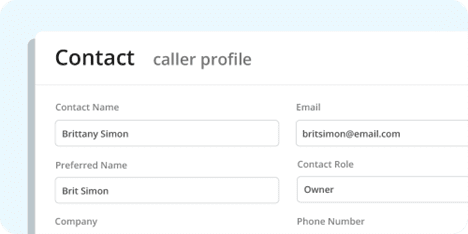
Starting off boring, but powerful: Generative AI can take your customer conversations and automate data entry tasks, such as updating caller profiles to keep them relevant and qualified.
Image created by CallTrackingMetrics, March 2024
Impressive? No.
But the time savings add up quickly, and let your team work on the things they like (that make the company money) instead of manually filling out wrap-up panels after a call.
What Contact Information Can AI Automatically Update?
Name – You’re going to get a name from caller ID which is a great start, but is it the name your caller prefers? Is it up to date or is it still the name of a former customer who left their company to chase their dreams? With a quick AI prompt, you can make sure you’re greeting the right person when they call back.
Email Address – It might be a default value for form submissions, but getting an email address from a caller can take a lot of back and forth. AI isn’t going to ask for that last part again, or require you to read it back to them to verify. It’s just going to do it.
Company Name – You might be using a sales intelligence tool like ZoomInfo to pull this kind of thing from a database. Still, you might also enjoy the accuracy of extracting directly from the words of your prospect.
Buyer Role – Maybe not a basic field, but one AI can fill out nonetheless (much like other custom fields below!). Give your AI a list to choose from like a researcher, influencer, or decision maker. Sure would be nice to know how much influence they actually have without having to ask directly.
Can AI Automatically Tag Conversations In My CRM?
Of course!
In CRMs and sales enablement tools, tags are used to categorize and segment your conversations for further analysis or follow-up.
Some popular tags for call tracking are marking someone a new or returning caller.
You can set a tag manually. You can set a tag using an if/then trigger. And because of what this whole thing is about, you can update tags using AI.
Image created by CallTrackingMetrics, March 2024
Use AI to automatically add tags to your prospect’s profile, based on their actual calls.
Spam – Sure, you can mark something spam yourself, but why not let AI do it for you so you can move on to real work?
Product Tags – What was the caller asking about? Add product tags to calls for further analysis, or to jump right into the sales pitch when they call back.
Lifecycle Tags – Have AI examine what kinds of questions your prospect is asking and qualify them along a scale of just learning to ready to buy. Or even, mark them as an existing customer.
Target Account – Did the caller mention their company size? Maybe you asked them about revenue or tech stack. If you let AI know what your ideal customer looks like, it’ll help you quickly identify them when you’re talking to one.
Can Generative AI Score Leads In My CRM?
Yes! However, if 100% of your calls end in sales, skip this part.
For the rest of us, phone, text, and chat leads range from “never going to buy anything” to “ready to give you my credit card info.”
For call scoring, this often looks like a score of 1 to 5.
So, here are a few examples of how AI can automatically score your leads from transcripts and chat logs.
Readiness to Buy – The most classic approach to scoring is asking, “How likely is this lead to buy?” A score of 1 is unqualified, and a score of 5 is they’re already paying us.
Ideal Customer Fit – Just like adding a target account tag above, train your AI on what a good customer looks like, and it can also give you a score. How closely does this caller fit your ideal profile?
Coaching – Not everything has to be about the lead. Sometimes we want to grade our own team. How well did your sales team stick to the script? Were they friendly? Let AI roll it up into a score for you.
Follow-up Priority – Aggregate readiness to buy, customer fit, and other inputs to decide on how aggressively to follow up with your leads.
Can Generative AI Capture & Update Custom Fields From Phone Calls & Chat Logs?
Your company is likely not the same as every other company using call tracking to get customer insights.
You’ll want some flexibility to determine what’s important to you, not what your call-tracking provider has determined to be important.
With custom fields, you get to put your creativity and strategy together with AI’s scalability to automate pretty much anything.
Image created by CallTrackingMetrics, March 2024
AI can accurately assess and notate:
Product Familiarity – You’ve tagged a call with a product name, but how much time do you need to spend educating the prospect vs. selling them?
Related Products – What else could you be selling this person?
Appointments – If your team runs on appointments or demos, having an AI add a calendar date to a custom field opens up a world of automated possibilities.
Next Steps – Follow up with an email, a call, or an appointment confirmation text. Have AI pull the best next step from your conversation.
19 – 21. How To Use Generative AI To Take Action On Automatically Updated Sales Contacts
Ok, so there are some time-savings when you use call tracking and AI to update fields.
If that’s not quite exciting enough, let’s see what you can actually do with those automated fields.
Image created by CallTrackingMetrics, March 2024
19. Automate Advertising Optimization
Use conversion data to inform your decisions.
Throw AI into the mix, and you go from A to optimized without lifting a finger.
How?
The tags and fields your AI just updated become qualifiers to send only the signals that matter to your business over to platforms like Google Ads where their machine learning will go wild to find more of the same. Where you might have been stuck sending a simple conversion (like any call with talk time over 90 seconds) now you can send those conversions with a three or better score for readiness to buy, and a product tag.
20. Better Personalization In Your CRM
To kick things off, your AI automatically scraped the conversation for an email address, so now you can add a new contact to an email-centric tool like HubSpot immediately at the end of the conversation. H
ave you updated product tags? Use that as a great trigger to enroll them in a highly relevant email drip.
Feed your call scores and product tags into your CRM’s lead scoring system and add complexity to a usually surface-level approach. Or do something as easy as sync their company name to their record so you can personalize outreach.
21. Following Up & Closing Deals
You’re not having AI fill out custom fields for fun, you’re doing it to make your job easier.
And one of your primary jobs is following up after a conversation to get someone closer to purchasing.
Agreed on a time for your next meeting? Send that date field to your favorite scheduling tool and get a calendar invite in their inbox. Or maybe you had a softer “call me next week” agreement? Use that to send the caller to an outbound dialer that’s set to call as soon as you log in the next week.
How To Use AI For Analyzing Calls
Moving beyond data entry, when you give AI a call transcription to work with, it can pull out insights to help your team get better.
In the time it would take you to read through one eight-minute phone conversation, AI has analyzed your whole day’s worth of calls and is off taking whatever the robot equivalent of a coffee break is.
What can AI do to upgrade your conversation intelligence? Unfortunately, after 16 use cases, we’re bumping up against our word count and we’ll have to save that for part two: Another Ton of AI Use Cases for Call Tracking.
Image Credits
Featured Image: Image by CallTrackingMetrics Used with permission.

 Screenshot from Google for [conversational analytics] using normal search and SGE, February 2024
 Screenshot from Google for [monday competitors], February 2024
 Screenshot from Google for [best accounting software], February 2024


![21 AI Use Cases For Turning Inbound Calls Into Marketing Data [+Prompts]](https://ecommerceedu.com/wp-content/uploads/2024/03/Picture2.png)
![21 AI Use Cases For Turning Inbound Calls Into Marketing Data [+Prompts]](https://ecommerceedu.com/wp-content/uploads/2024/03/Picture3.png)
![21 AI Use Cases For Turning Inbound Calls Into Marketing Data [+Prompts]](https://ecommerceedu.com/wp-content/uploads/2024/03/Picture4.png)
![21 AI Use Cases For Turning Inbound Calls Into Marketing Data [+Prompts]](https://ecommerceedu.com/wp-content/uploads/2024/03/Picture5.png)