Google On Why Simple Factors Aren’t Ranking Signals via @sejournal, @martinibuster

Google’s John Mueller affirmed in a LinkedIn post that two site characteristics that could be perceived as indicative of site quality aren’t ranking factors, suggesting that other perceived indicators of quality may not be either.

Site Characteristics And Ranking Factors

John Mueller posted something interesting on LinkedIn because it offers insight into how an attribute of quality sometimes isn’t enough to be an actual ranking factor. His post also encourages a more realistic consideration of what should be considered a signal of quality and what is simply a characteristic of a site.

The two characteristics of site quality that Mueller discussed are valid HTML and typos (typographical errors, commonly in reference to spelling errors). His post was inspired by an analysis of 200 home pages of the most popular websites that found that only 0.5% of which had valid HTML. That means that out of the 200 of the most popular sites, only 1 home page was written with valid HTML.

John Mueller said that a ranking factor like valid HTML would be a low bar, presumably because spammers can easily create web page templates that use valid HTML. Mueller also made the same observation about typos.

Valid HTML

Valid HTML means that the code underlying a web page follows all of the rules for how HTML should be used. What constitutes valid HTML is defined by the W3C (World Wide Web Consortium), the international standards making body for the web. HTML, CSS, and Web Accessibility are examples of standards that the W3C creates. The validity of HTML can be tested at the W3C Markup Validation Service which is available at validator.w3.org.

Is Valid HTML A Ranking Factor?

The post begins by stating that a commonly asked question is whether valid HTML is a ranking factor or some other kind of factor for Google Search. It’s a valid question because valid HTML could be seen as a characteristic of quality.

He wrote:

“Every now and then, we get questions about whether “valid HTML” is a ranking factor, or a requirement for Google Search.

Jens has done regular analysis of the validity of the top websites’ homepages, and the results are sobering.”

The phrase, “the results are sobering” means that the results that most home pages use invalid HTML is surprising and possibly cause for consideration.

Given how virtually all content management systems do not generate valid HTML, I’m somewhat surprised that even one site out of 200 used valid HTML. I would expect a number closer to zero.

Mueller goes on to note that valid HTML is a low bar for a ranking factor:

“…this is imo a pretty low bar. It’s a bit like saying professional writers produce content free of typos – that seems reasonable, right? Google also doesn’t use typos as a ranking factor, but imagine you ship multiple typos on your homepage? Eww.

And, it’s trivial to validate the HTML that a site produces. It’s trivial to monitor the validity of important pages – like your homepage.”

Ease Of Achieving Characteristic Of Quality

There have been many false signals of quality promoted and abandoned by SEOs, the most recent one being “authorship” and “content reviews” that are supposed to show that an authoritative author wrote an article and that the article was checked by someone who is authoritative. People did things like invent authors with AI generated images that are associated to fake LinkedIn profiles in the naïve belief that adding an author to the article will trick Google into awarding ranking factor points (or whatever, lol).

The authorship signal turned out to be a misinterpretation of Google’s Search Quality Raters Guidelines and a big waste of a lot of people’s time. If SEOs had considered how easy it was to create an “authorship” signal it would have been apparent to more people that it was a trivial thing to fake.

So, one takeaway from Mueller’s post can be said to be that if there’s a question about whether something is a ranking factor, first check if Google explicitly says it’s a ranking factor and if not then consider if literally any spammer can achieve that “something” that an SEO claims is a ranking factor. If it’s a trivial thing to achieve then there’s a high likelihood it’s not a ranking factor.

There Is Still Value To Be Had From Non-Ranking Factors

The fact that something is relatively easy to fake doesn’t mean that web publishes and site owners should stop doing it. If something is good for users and helps to build trust then it’s likely a good idea to keep doing it. Just because something is not a ranking factor doesn’t invalidate the practice.  It’s always a good practice in the long run to keep doing activities that build trust in the business or the content, regardless of whether it’s a ranking factor or not.  Google tries to pick up on the signals that users or other websites give in order to determine if a website is high quality, useful, and helpful, so anything that generates trust and satisfaction is likely a good thing.

Read John Mueller’s post on LinkedIn here.

Featured Image by Shutterstock/stockfour

Why Content Is Important For SEO via @sejournal, @lorenbaker

Content is SEO. More specifically, it’s one side of the SEO relationship. One core function of search engines is to connect users with the information they’re looking for. That information might be a product listing, a review, a news story, an image, or a video.

The other core function of search engines is to retain users.

Search engines retain users by ensuring their confidence and trust in the displayed results. Over time, they build expectations that using their platform is a safe, streamlined experience that quickly leads users to what they want.

SEO success depends on being found by your target audience for what they are looking for and consistently providing a satisfying user experience based on the context of the queries they type into search engines.

Search Is Built On Content

The core function of search engines is to help users find information. Search engines first discover webpages, they parse and render and they then add them to an index. When a user inputs a query, search engines retrieve relevant webpages in the index and then “rank” them.

Search engines need to know what pages are about and what they contain in order to serve them to the right users. In concept, they do this quite simply: They examine the content. The real process behind this is complicated, executed by automated algorithms and evaluated with human feedback.

Google constantly adjusts and updates it algorithms with the goal of ensuring the most relevant content is served to searchers.

This relationship between searchers, search engines, and websites, has come to define the internet experience for most users. Unless you know the exact URL of the website you intend to visit, you need must find it via a third party. That could be social media, a search engine, or even discovering the website offline and then typing it in. This is called a “referral,” and Google sends 64% of all website referrals in the U.S. Microsoft and Bing send the next largest amount of referrals, followed by YouTube.

Getting discovered by people who don’t already know you depends on search engines, and search engines depend on content.

The SEO Value Of Content

Google has said it prioritizes user satisfaction.

It’s confirmed that user behavior signals impact ranking.

At this point, whether this relationship is causal or correlative doesn’t matter. You must prioritize user experience and satisfaction because it’s a key indicator of SEO success.

Written language is still the primary way users interact with search engines and how algorithms understand websites. Google algorithms can interpret audio and videos, but written text is core to SEO functionality.

Enticing clicks and engaging users through content that satisfies their queries is the baseline of SEO. If your pages can’t do that, you won’t have success.

High-quality content and user experiences aren’t just important for SEO; they’re prerequisites.

This is true for all advertising and branding. Entire industries and careers are built on the skills to refine the right messaging and put it in front of the right people.

Evidence For The SEO Value Of Content

Google highlights the importance of content in its “SEO fundamentals” documentation. It advises that Google’s algorithms look for “helpful, reliable information that’s primarily created to benefit people,” and provides details about how to self-assess high-quality content.

  • Content, and how well it matches a user’s needs, is one of the core positive and negative factors in Google’s ranking systems. It updates systems to reduce content it deems to be unhelpful and prioritize content it deems to be helpful.
  • In fact, Google’s analysis of the content may determine whether a page enters the index at all to become eligible to rank. If you work hard to provide a good experience and serve the needs of your users, search engines have more reason to surface your content and may do so more often.
  • A 2024 study in partnership between WLDM, ClickStream, and SurferSEO suggests that the quality of your coverage on a topic is highly correlated with rankings.

Content And User Behavior

Recent developments in the SEO industry, such as the Google leak, continue to highlight the value of both content and user experience.

Google values user satisfaction to determine the effectiveness and quality of webpages and does seem to use behavioral analysis in ranking websites. It also focuses on the user intent of queries and whether a specific intent is served by a particular resource.

The satisfaction of your users is, if not directly responsible for SEO performance, highly correlated with it.

Many factors affect user experience and satisfaction. Website loading speed and other performance metrics are part of it. Intrusive elements of the page on the experience are another.

Content, however, is one of the primary determiners of a “good” or “bad” experience.

  • Does the user find what they’re looking for? How long does it take?
  • Is the content accurate and complete?
  • Is the content trustworthy and authoritative?

The answers to these questions reflect whether the user has a good or bad experience with your content, and this determines their behavior. Bad experiences tend to result in the user leaving without engaging with your website, while good experiences tend to result in the user spending more time on the page or taking action.

This makes content critical not only to your SEO efforts on search engines but also to your website’s performance metrics. Serving the right content to the right users in the right way impacts whether they become leads, convert, or come back later.

Leaning into quality and experience is a win all around. Good experiences lead to desirable behaviors. These behaviors are strong indications of the quality of your website and content. They lead to positive outcomes for your business and are correlated with successful SEO.

What Kinds Of Content Do You Need?

Successful content looks different for each goal you have and the different specific queries you’re targeting.

Text is still the basis of online content when it comes to search. Videos are massively popular. YouTube is the second-most popular search engine in the world. However, in terms of referrals, it only sends 3.5% of referral traffic to the web in the U.S. In addition, videos have titles, and these days, most have automated transcripts. These text elements are critical for discovery.

That isn’t to say videos and images aren’t popular. Video, especially “shorts” style videos, is an increasingly popular medium. Cisco reported that video made up 82% of all internet traffic in 2022. So you absolutely shoulder consider images and video as part of your content strategy to best serve your audiences and customers.

Both can enhance text-based webpages and stand on their own on social platforms.

But for SEO, it’s critical to remember that Google search sends the most referral traffic to other websites. Text content is still the core of a good SEO strategy. Multi-modal AI algorithms are getting very good at translating information between various forms of media, but text content remains critical for several reasons:

  • Plain text has high accessibility. Screen readers can access it, and it can be resized easily.
  • Text is the easiest way for both people and algorithms to analyze semantic connections between ideas and entities.
  • Text doesn’t depend on device performance like videos and images might.
  • Text hyperlinks are very powerful SEO tools because they convey direct meaning along with the link.
  • It’s easier to skim through text than video.

Text content is still dominant for SEO. But you should not ignore other content. Images, for example, make for strong link building assets because they’re attractive and easily sharable. Accompanying text with images and video accommodates a variety of user preferences and can help capture attention when plain text might not.

Like everything else, it’s down to what best serves users in any given situation.

SEO Content: Serving Users Since Search Was A Thing

Search engines match content to the needs of users.

Content is one-third of this relationship: user – search engine – information.

You need content to perform SEO, and any digital marketing activity successfully.

The difficulty comes from serving that perfect content for the perfect situation.

So read “How To Create High-Quality Content” next.

Read More:


Featured Image: Roman Samborskyi/Shutterstock

Why & How To Track Google Algorithm Updates via @sejournal, @lorenbaker

Google constantly evaluates and updates its algorithms. There can be hundreds or even thousands of individual changes per year.

Google does confirm some of the major updates, such as site reputation abuse, the March 2024 core update, and the November 2023 reviews update.

But, often, Google will not officially confirm an update, and these are only picked up through high volatility in the SERPs.

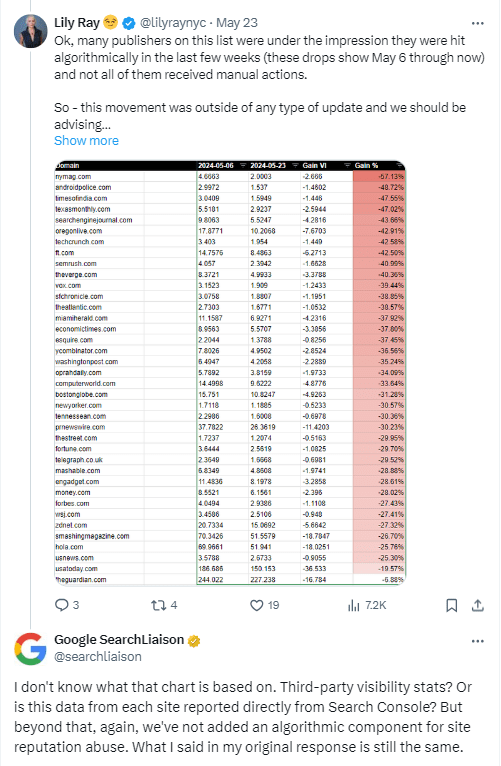
For example, in May of 2024, Lily Ray observed huge changes in traffic to a dozen publisher sites using rank tracking tools. Google rejected the idea of an algorithm update.

Google rejects the idea of an algorithm update observed by SEO tools.Google rejects the idea of an algorithm update observed by SEO tools.

The volatility mentioned in the tweet was observed around May 7, a day after Google announced that it rolled out a reputation abuse update with manual actions, with the algorithmic part following later.

Since it didn’t mention specific dates, many assumed that those websites were hit by the reputation abuse algorithmic rollout. However, SearchLiaison responded and refuted that assumption, leaving many SEO pros in a state of confusion.

A lot of common SEO advice you’ll see (especially from Google) amounts to “don’t chase algorithms, just do what’s best for the user” – but algorithms can have a catastrophic impact on SEO performance (sometimes unjustly).

For this reason, if you are managing a site for a brand, you need to act quickly if there is an update.

Knowing when an update hits and understanding each update will help you to adjust your strategy as needed, to avoid being impacted in future updates and also to try and recover quickly if you do have a negative impact.

Why You Should Track Google Updates

Understanding algorithms and updates is a core SEO skill. Occasionally, Google releases an update that is consequential enough to get a name (e.g., FloridaPanda, Penguin, RankBrain), and significantly impact how Google search works. You don’t want to get caught out by a big update, which means you should analyze the history of the algorithms to understand their future trajectory.

An algorithm change or update primarily impacts your website’s organic visibility in Google Search. Mostly, that comes in the form of rankings. But updates can cause disruption in other ways, too, for example by adding Search features to a particular search engine results page (SERP) that reduce click-through rates and traffic.

Tracking and understanding Google updates helps you adjust for sudden performance instability. It also helps you create SEO strategies that will be effective in the long term. Understanding where the algorithms have been helps you project where they might go. This will help you avoid risky SEO practices and reduce the risk of an update significantly impacting your website.

Recovering from updates that impact you negatively takes work and time. If you track updates, you can understand why your site’s ranking might have changed and take the necessary steps to recover as quickly as possible.

Resources For Tracking Google Algorithm Updates

Here are resources that can make your life easier and help you keep track of Google algorithm updates.

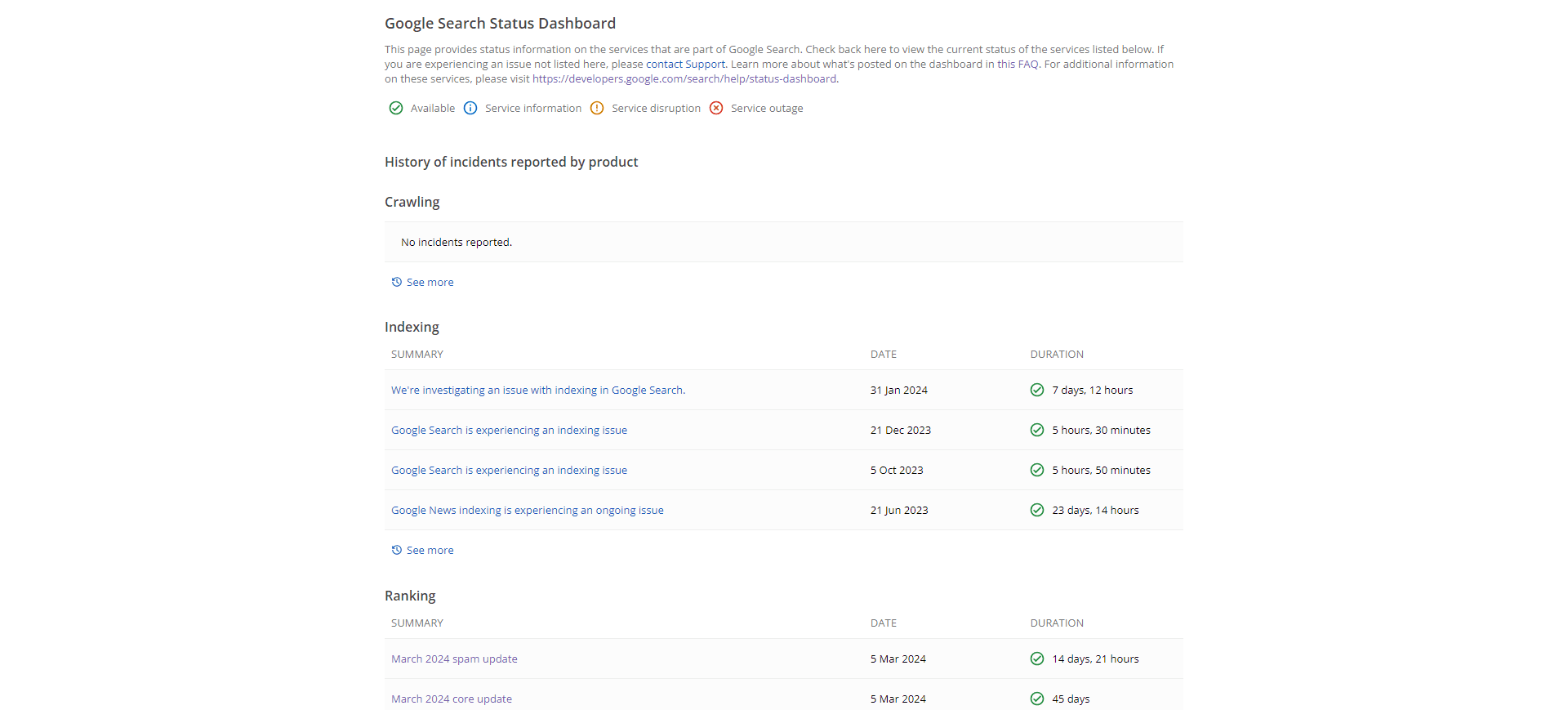
Google Search Status Dashboard

Google search dashboardImage from Google search dashboard, June 2024

The advantage of this dashboard is that it also tracks indexing and crawling incidents alongside algorithm updates in the Ranking section.

You can subscribe to updates using this RSS feed it provides.

Keep an eye on this resource to stay updated on the latest changes and incidents straight from Google.

X (Formerly Twitter)

Ten years ago, Matt Cutts was the best person at Google to follow as he regularly kept the SEO community informed about changes to search.

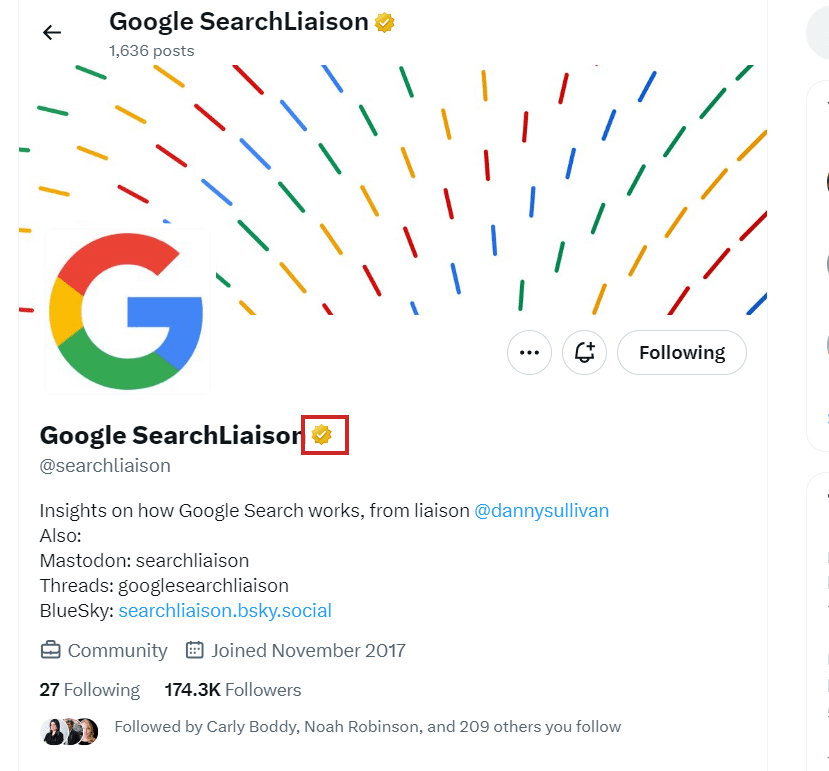
This role is now performed by Google SearchLiaison, which is managed by Danny Sullivan.

Google SearchLiaison's Page on XGoogle SearchLiaison’s Page on X

Make sure you follow the real @searchliaison page that has a verified badge on the profile.

If you have questions regarding Google’s algorithm updates, you may post your question on X by tagging @searchliaison, and you may be lucky to get answers directly from Google. Try to be comprehensive and provide as many details about your issue as possible to increase your chances of getting a response.

Other than the official page, you may want to follow Barry Schwartz (@rustybrick) and Marie Haynes (@Marie_Haynes), who are always on the lookout for news about algorithm changes.

Search Engine Journal

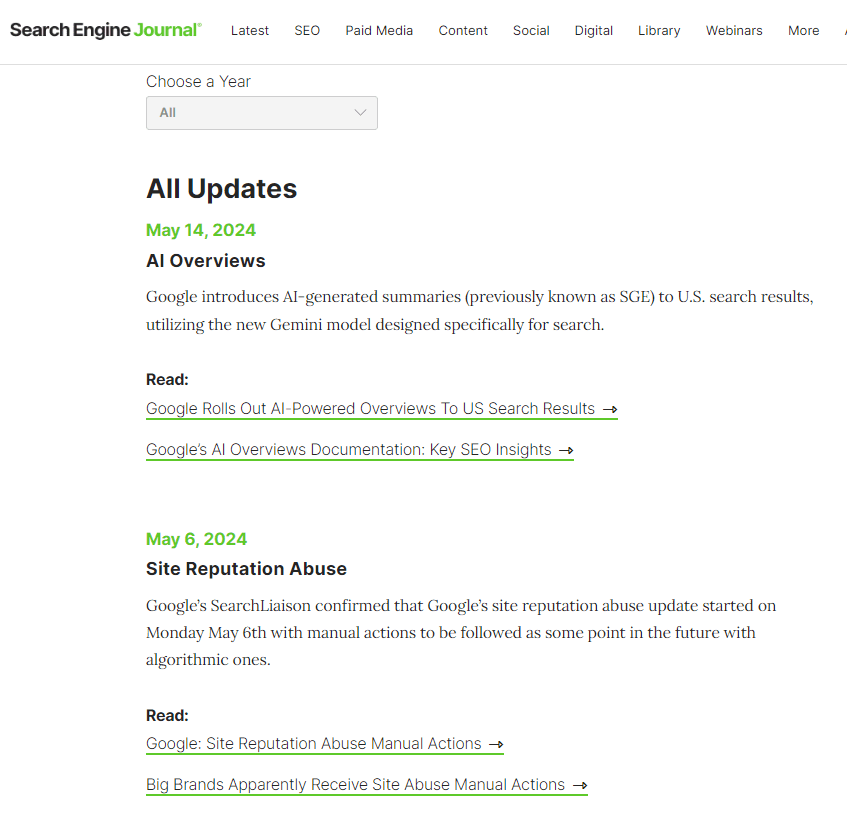
History of Google Algorithm UpdatesHistory of Google Algorithm Updates

Search Engine Journal has a dedicated page about the history of Google’s algorithm updates – from 2003 to the present. It includes the following information:

  • Algorithm name.
  • The rollout date.
  • A brief overview of the impact.
  • Whether it is confirmed or unconfirmed.
  • Related publications and official announcements so you can dive deeper and understand the changes.

You can also sign up for SEJ’s newsletters, and we’ll keep you posted on every major algorithm update.

Google isn’t a fan of third-party tools that track algorithm updates. It warns the SEO community that they are prone to errors and may have false positive detections.

I can see why Google disliked them, as they are crawling Google SERPs regularly to gather data – which, of course, Google doesn’t like. 😀

It is often true that they report volatile changes in search result pages. Still, in most cases, these tools report accurately by providing “volatility scores,” representing how much the SERP has changed.

Below is a table detailing the SERP volatility levels for various tools:

Now, let’s review a few tools you can use to track Google’s algorithm updates.

1. MozCast

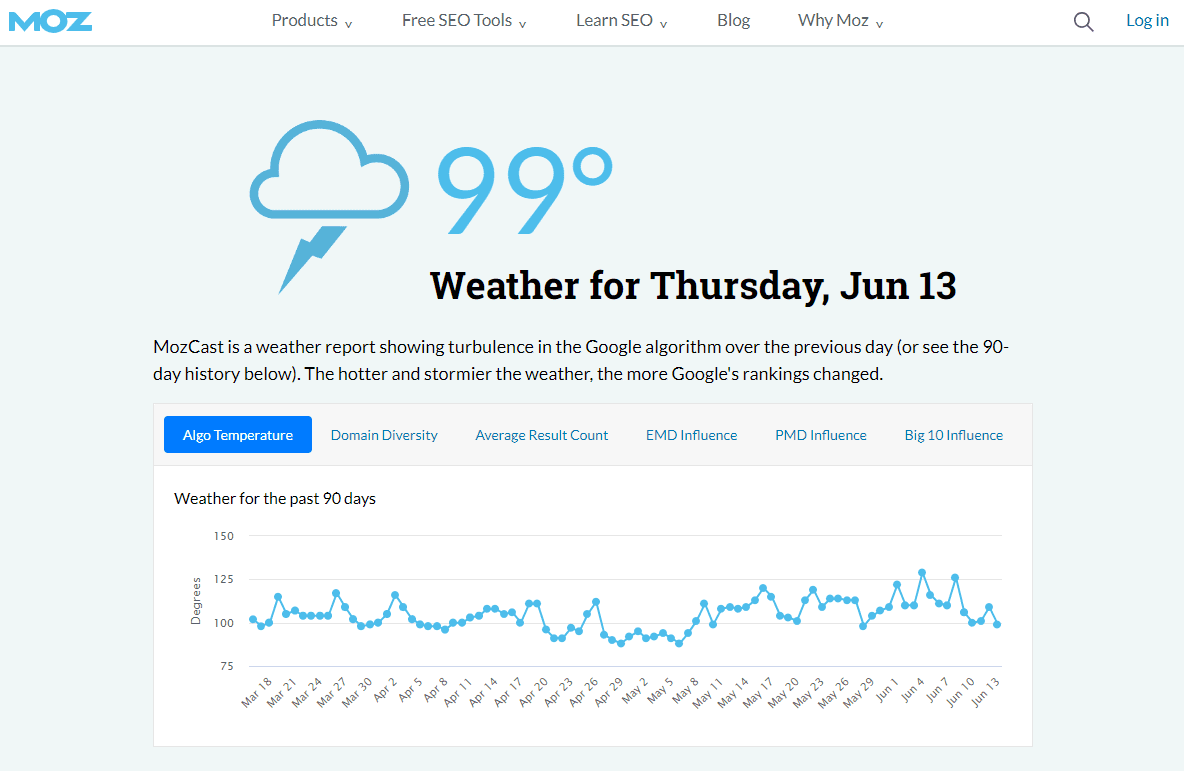
Screenshot of MozCast from moz.comScreenshot of MozCast from moz.com

MozCast makes rank tracking fun in the style of a weather report.

It compares the rankings of the same set of keywords on two consecutive days and calculates how much the positions of these keywords have moved up or down, translating into a temperature scale. Per their specifications, 70°F represents a normal, stable day, and higher temperatures indicate more drastic changes.

To get an idea of what temperature is considered high, I want to note that during the March core update, MozCast’s temperature was 108°F-115°F. On May 7, its score was 90°F, then went up to 111°F, indicating that MozCast could detect movements.

So, when MozCast temperature is close to 100°F, it is quite high.

2. Semrush Sensor

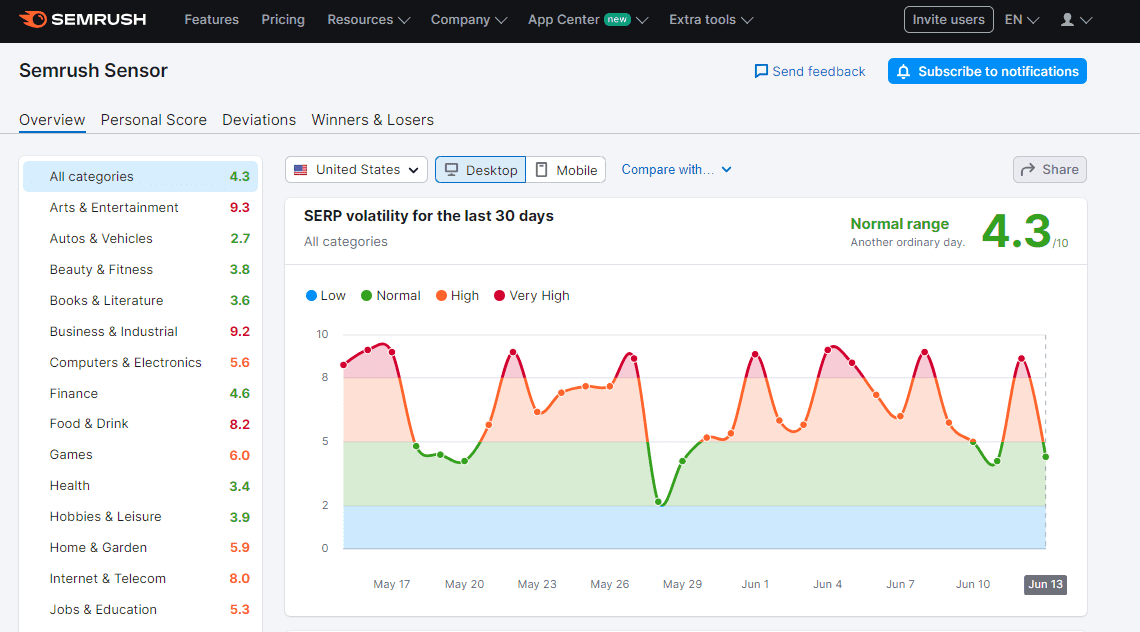
Screenshot from Semrush.comScreenshot from Semrush.com

Semrush Sensor is a powerful tool designed to help you understand and track fluctuations in rankings.

Similar to MozCast, it monitors a fixed set of keywords and how much the search results for these keywords change by the end of each day. But it provides richer information by industries and locations.

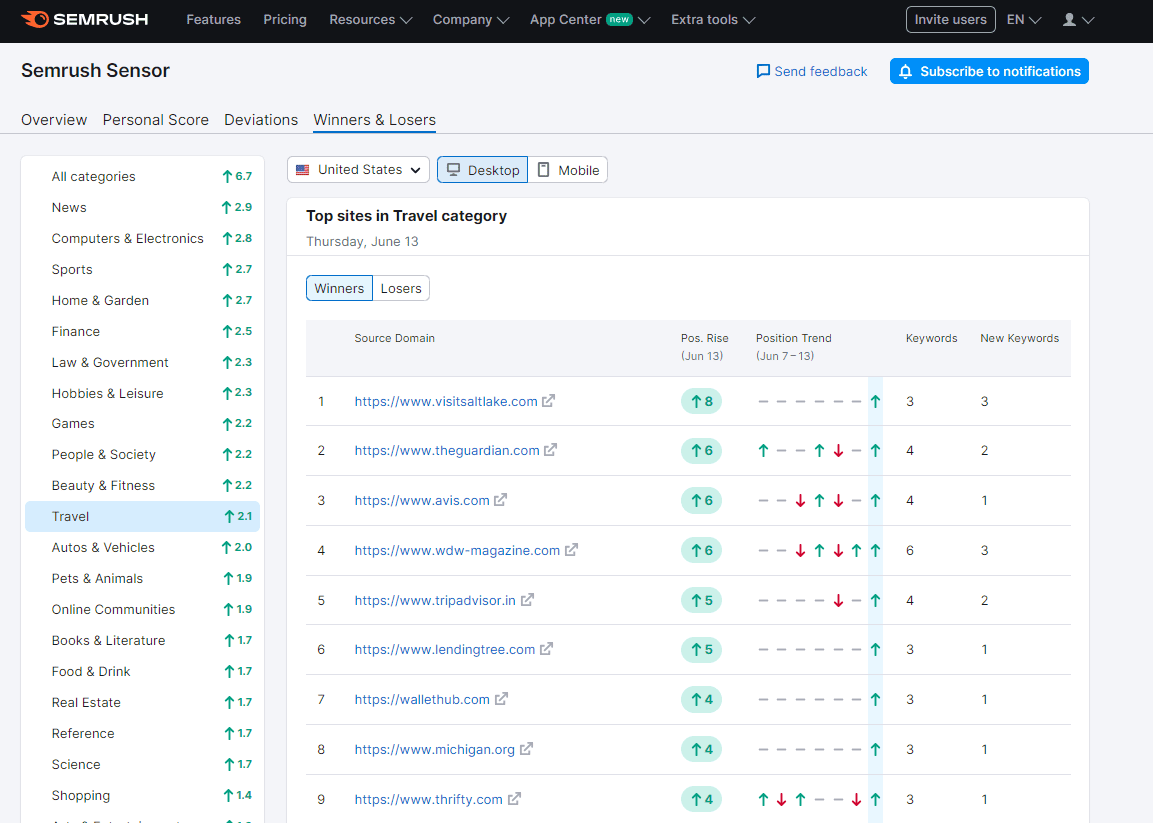
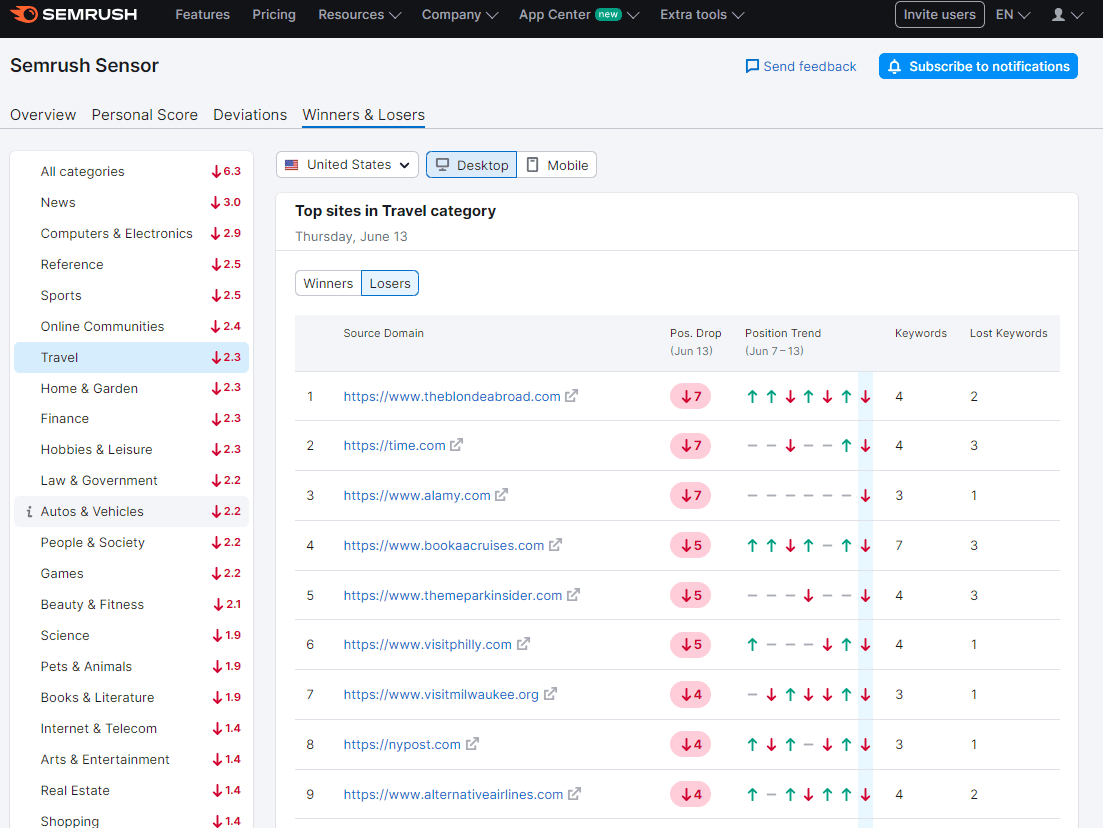
Another highly valuable feature of the Semrush sensor is the report of winners and losers, which can help you run a quick competitive analysis to see websites benefiting or suffering from recent changes.

Its scale varies from 0 to 10. Usually, during core algorithm updates, the score is between 8 and 10. On May 7, its score was around 9.5 out of 10, which means there was an earthquake in SERPs.

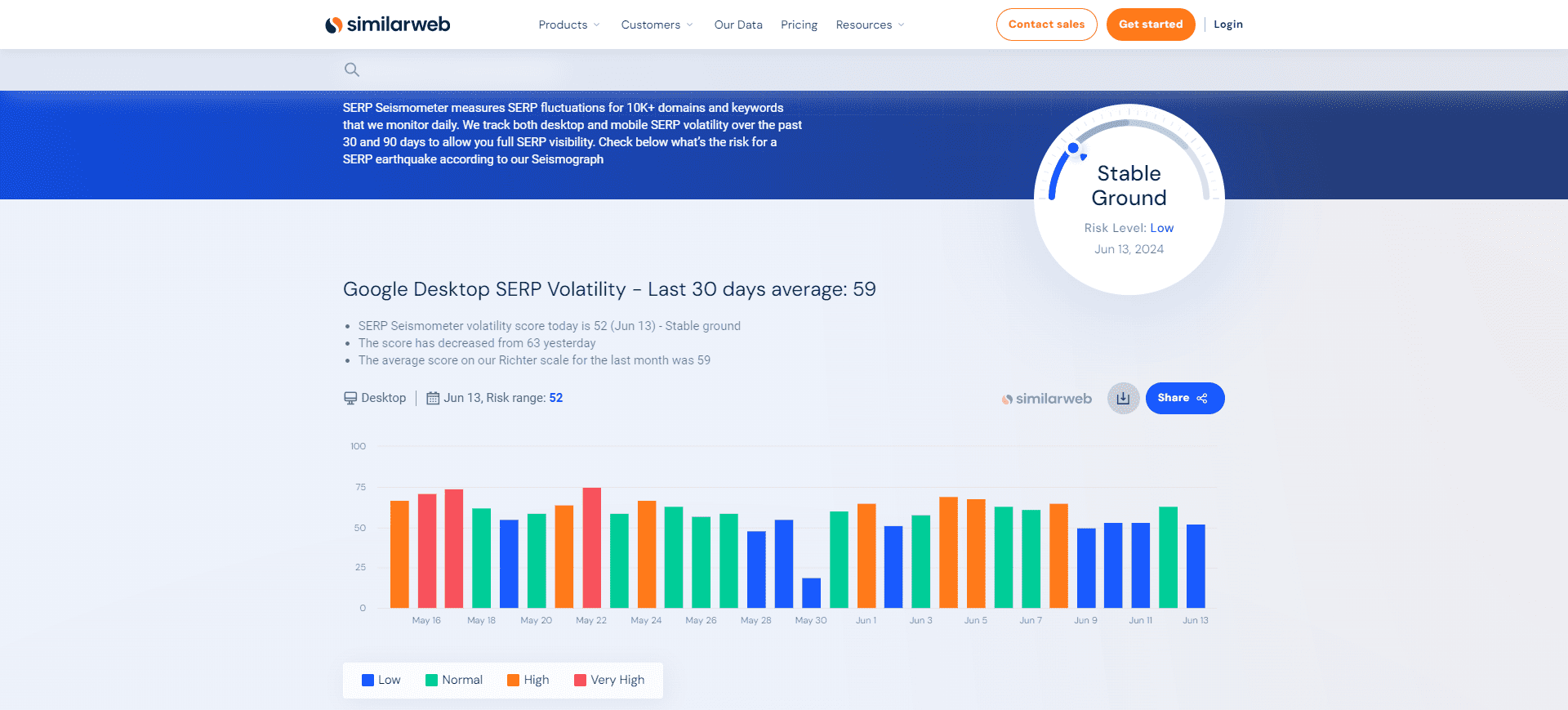
3. Similarweb

Screenshot from Similarweb.comScreenshot from Similarweb.com

Similarweb monitors more than 10,000 domains and keywords on a daily basis to identify ranking patterns and track volatility in Google’s desktop and mobile search results.

Here is how to read its graphs:

  • The numbers on the graph indicate the level of ranking fluctuations on specific dates.
  • A higher number means more significant changes in rankings.
  • Orange signals a moderate risk.
  • Red indicates a high risk.

Again, to give you an idea of what risk level is considered high, I want to mention that during Google’s March core update, the risk level metric was 65. On May 11, the risk level metric was 71, which is high. We can conclude that Similarweb was able to detect the anomaly observed by the SEO community.

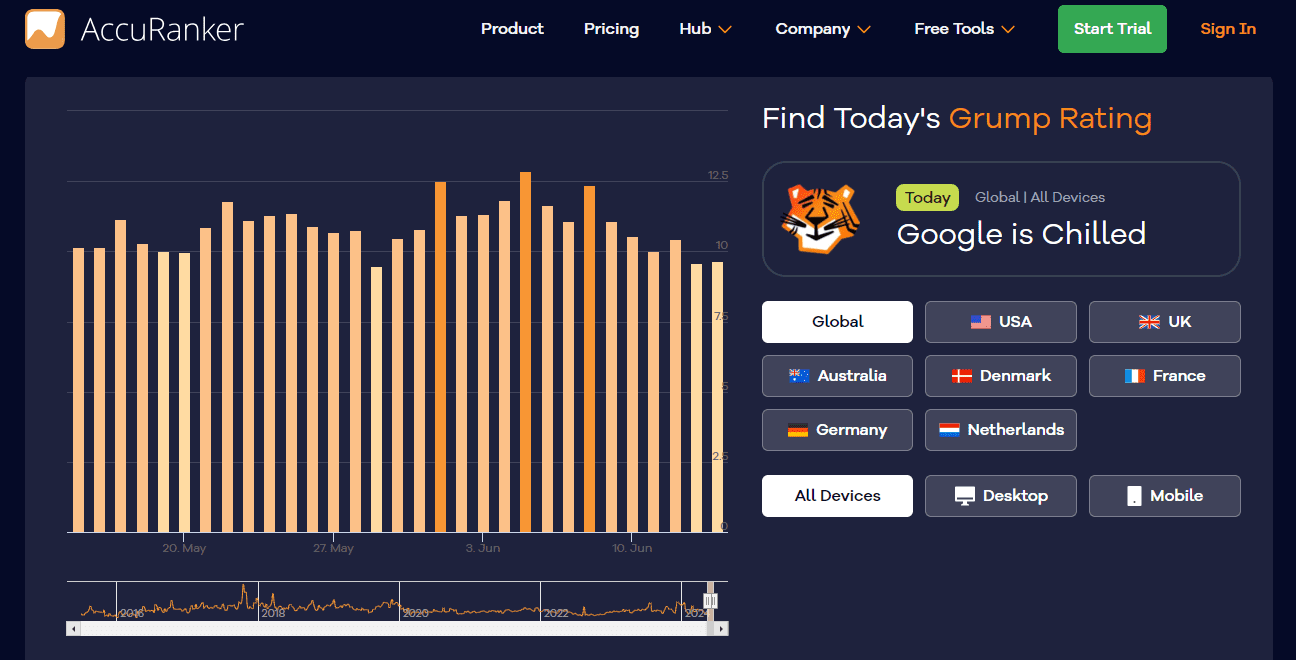
4. Accuranker ‘Grump’ Rating

Screenshot from accuranker.comScreenshot from accuranker.com

Accuranker is another great tool for observing Google SERP volatilities.

They have a fun scoring scale:

  • Grumpy (0-10): Google is chilled.
  • Cautious (10-12): Normal activity.
  • Grumpy (12-15): More than usual.
  • Furious (15+): High fluctuations in SERP.

One advantage over others is that they let you go back as far as you want, providing historical data back to 2016, and the data is updated in real-time.

In contrast to several other sensors, it provides details on how Accuranker calculates its rating:

  • It monitors a set of 30,000 randomly selected keywords.
  • It splits the keyword selection set between mobile and desktop searches (15,000 each).
  • For each keyword, it analyzes the top 100 search results.
  • The final index number for the keyword is the total sum of the position differences for each keyword divided by the number of results (typically 100).

A higher index number means more significant fluctuations in the rankings. For example, during the core update, it is in the order of ~14, which is more than usual. On May 7-9, the tool scored “Google is chilled” and ‘Cautious’ with a score of ~9.

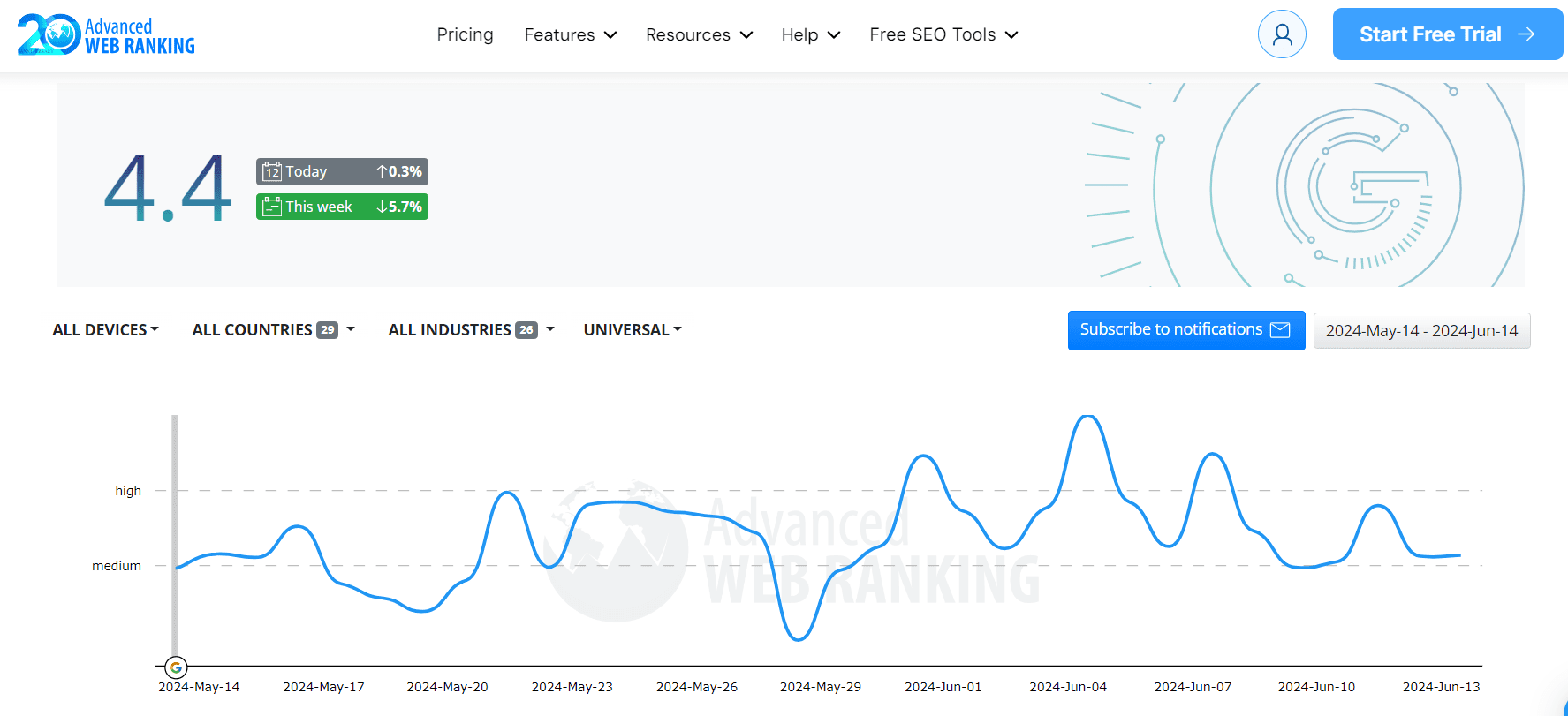
5. Advanced Web Rankings Google Algorithm Changes

Screenshot from advancedwebranking.comScreenshot from advancedwebranking.com

Advanced Web Rankings monitors the ranking changes of approximately 400,000 desktop keywords and 200,000 mobile keywords across various countries.

You can segment the data countries, devices, and industries, and look up historical data by going back as much as you want by selecting a custom date period.

The tool calculates the Volatility (KPI), which has the following areas:

  • Low Volatility: Indicates insignificant changes.
  • Medium Volatility: Represents moderate changes in SERPs, which could be due to minor algorithm updates or other factors.
  • High Volatility: This means high fluctuations in SERP often correlated with major Google algorithm updates.

During the March core update, it detected high volatility with a score of 7.3 and medium volatility with a score of 4-5 on May 7-9.

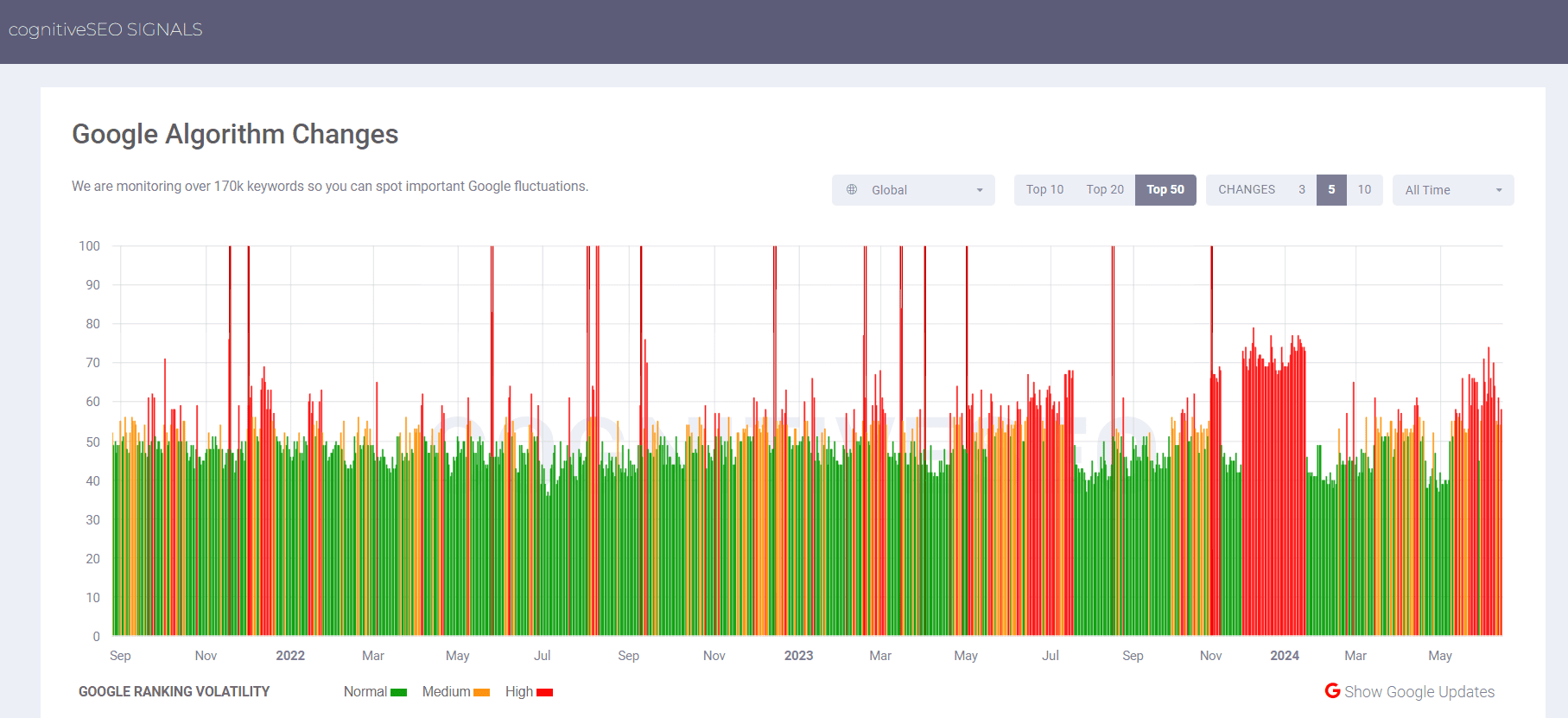
6. CognitiveSEO Signals

Screenshot from cognitiveseo.comScreenshot from cognitiveseo.com

CognitiveSEO Signals monitors over 170,000 keywords. These keywords are randomly selected to track ranking fluctuations in desktop, mobile, and local search results.

Again, it doesn’t disclose how it calculates the volatility score, but it has a nice chart showing days with high fluctuations in red.

During the recent March core update and on May 7-9, it detected high volatility, with scores of 70 and 75, respectively.

7. Algoroo

Screenshot from algoroo.comScreenshot from algoroo.com

Algoroo is another tool to track Google’s algorithm updates, which is built and maintained by Dejan.

It doesn’t disclose how tracking works. What we know is that it tracks selected keywords and calculates their ranking movements.

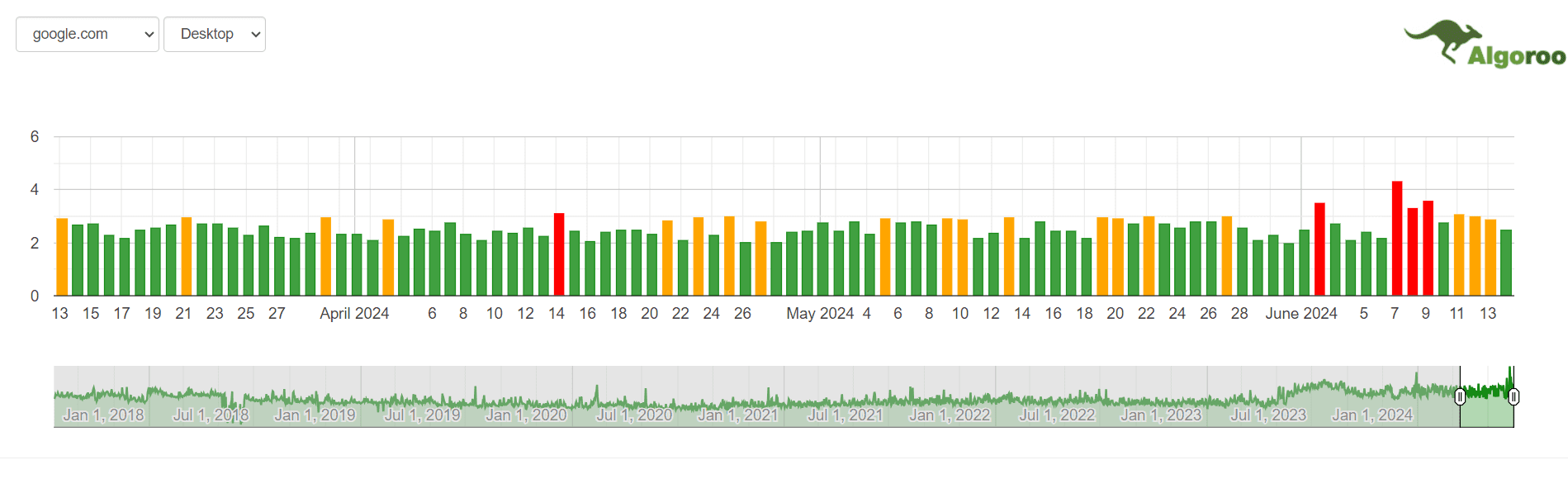
Reading data is really simple; when bars are in red, it means high fluctuations.

During the recent March core update, medium volatility was detected, and nothing unusual but normal activity on May 7-9.

What To Do After An Algorithm Update

There are six things you should always remember when algorithm updates (whether confirmed or unconfirmed) negatively impact your website:

  • Don’t jump and perform sitewide changes in panic mode.
  • Check the website’s technical setup to ensure that your traffic didn’t drop due to the server being down or your developer accidentally blocking it via robots.txt or noindexing mistakenly.
  • Be patient and collect data.
  • Observe how your competitors are affected by the update to find any patterns.
  • Read credible sources (like Search Engine Journal) to gain insights and see what the SEO experts have to say.
  • Make adjustments to your SEO strategy and tactics as necessary.

It’s also important to remember that Google’s algorithms are constantly changing.

What impacts your rankings today could change in a few days, a week, or a month.

For more in-depth information, check out our guides:


Featured Image: salarko/Shutterstock

The Expert SEO Guide To URL Parameter Handling via @sejournal, @jes_scholz

In the world of SEO, URL parameters pose a significant problem.

While developers and data analysts may appreciate their utility, these query strings are an SEO headache.

Countless parameter combinations can split a single user intent across thousands of URL variations. This can cause complications for crawling, indexing, visibility and, ultimately, lead to lower traffic.

The issue is we can’t simply wish them away, which means it’s crucial to master how to manage URL parameters in an SEO-friendly way.

To do so, we will explore:

What Are URL Parameters?

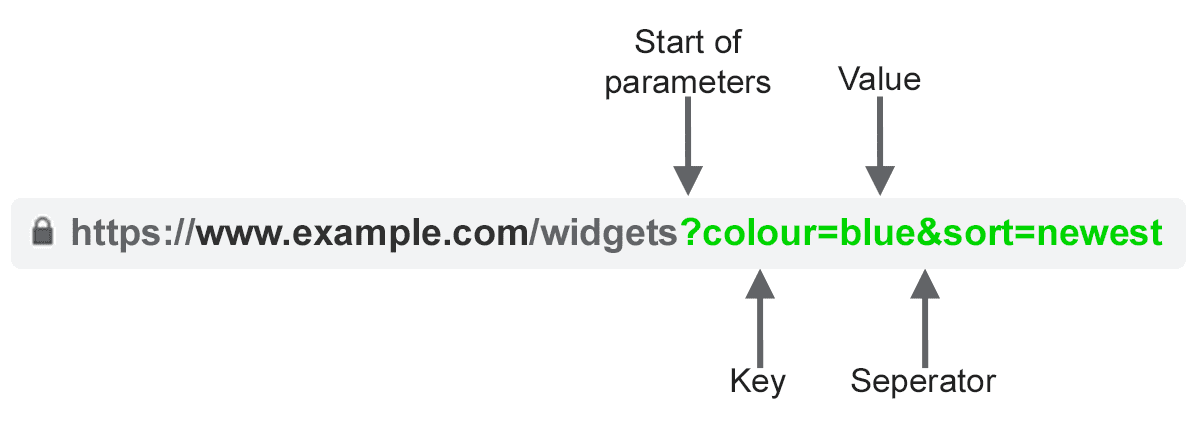
url parameter elementsImage created by author

URL parameters, also known as query strings or URI variables, are the portion of a URL that follows the ‘?’ symbol. They are comprised of a key and a value pair, separated by an ‘=’ sign. Multiple parameters can be added to a single page when separated by an ‘&’.

The most common use cases for parameters are:

  • Tracking – For example ?utm_medium=social, ?sessionid=123 or ?affiliateid=abc
  • Reordering – For example ?sort=lowest-price, ?order=highest-rated or ?so=latest
  • Filtering – For example ?type=widget, colour=purple or ?price-range=20-50
  • Identifying – For example ?product=small-purple-widget, categoryid=124 or itemid=24AU
  • Paginating – For example, ?page=2, ?p=2 or viewItems=10-30
  • Searching – For example, ?query=users-query, ?q=users-query or ?search=drop-down-option
  • Translating – For example, ?lang=fr or ?language=de

SEO Issues With URL Parameters

1. Parameters Create Duplicate Content

Often, URL parameters make no significant change to the content of a page.

A re-ordered version of the page is often not so different from the original. A page URL with tracking tags or a session ID is identical to the original.

For example, the following URLs would all return a collection of widgets.

  • Static URL: https://www.example.com/widgets
  • Tracking parameter: https://www.example.com/widgets?sessionID=32764
  • Reordering parameter: https://www.example.com/widgets?sort=latest
  • Identifying parameter: https://www.example.com?category=widgets
  • Searching parameter: https://www.example.com/products?search=widget

That’s quite a few URLs for what is effectively the same content – now imagine this over every category on your site. It can really add up.

The challenge is that search engines treat every parameter-based URL as a new page. So, they see multiple variations of the same page, all serving duplicate content and all targeting the same search intent or semantic topic.

While such duplication is unlikely to cause a website to be completely filtered out of the search results, it does lead to keyword cannibalization and could downgrade Google’s view of your overall site quality, as these additional URLs add no real value.

2. Parameters Reduce Crawl Efficacy

Crawling redundant parameter pages distracts Googlebot, reducing your site’s ability to index SEO-relevant pages and increasing server load.

Google sums up this point perfectly.

“Overly complex URLs, especially those containing multiple parameters, can cause a problems for crawlers by creating unnecessarily high numbers of URLs that point to identical or similar content on your site.

As a result, Googlebot may consume much more bandwidth than necessary, or may be unable to completely index all the content on your site.”

3. Parameters Split Page Ranking Signals

If you have multiple permutations of the same page content, links and social shares may be coming in on various versions.

This dilutes your ranking signals. When you confuse a crawler, it becomes unsure which of the competing pages to index for the search query.

4. Parameters Make URLs Less Clickable

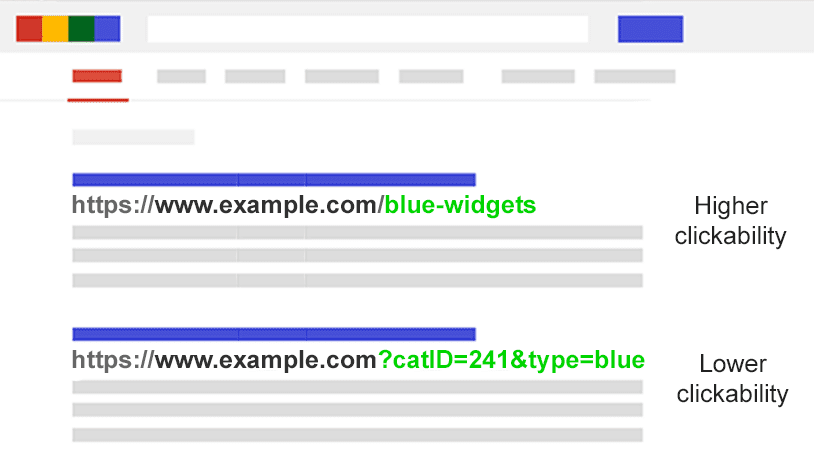
parameter based url clickabilityImage created by author

Let’s face it: parameter URLs are unsightly. They’re hard to read. They don’t seem as trustworthy. As such, they are slightly less likely to be clicked.

This may impact page performance. Not only because CTR influences rankings, but also because it’s less clickable in AI chatbots, social media, in emails, when copy-pasted into forums, or anywhere else the full URL may be displayed.

While this may only have a fractional impact on a single page’s amplification, every tweet, like, share, email, link, and mention matters for the domain.

Poor URL readability could contribute to a decrease in brand engagement.

Assess The Extent Of Your Parameter Problem

It’s important to know every parameter used on your website. But chances are your developers don’t keep an up-to-date list.

So how do you find all the parameters that need handling? Or understand how search engines crawl and index such pages? Know the value they bring to users?

Follow these five steps:

  • Run a crawler: With a tool like Screaming Frog, you can search for “?” in the URL.
  • Review your log files: See if Googlebot is crawling parameter-based URLs.
  • Look in the Google Search Console page indexing report: In the samples of index and relevant non-indexed exclusions, search for ‘?’ in the URL.
  • Search with site: inurl: advanced operators: Know how Google is indexing the parameters you found by putting the key in a site:example.com inurl:key combination query.
  • Look in Google Analytics all pages report: Search for “?” to see how each of the parameters you found are used by users. Be sure to check that URL query parameters have not been excluded in the view setting.

Armed with this data, you can now decide how to best handle each of your website’s parameters.

SEO Solutions To Tame URL Parameters

You have six tools in your SEO arsenal to deal with URL parameters on a strategic level.

Limit Parameter-based URLs

A simple review of how and why parameters are generated can provide an SEO quick win.

You will often find ways to reduce the number of parameter URLs and thus minimize the negative SEO impact. There are four common issues to begin your review.

1. Eliminate Unnecessary Parameters

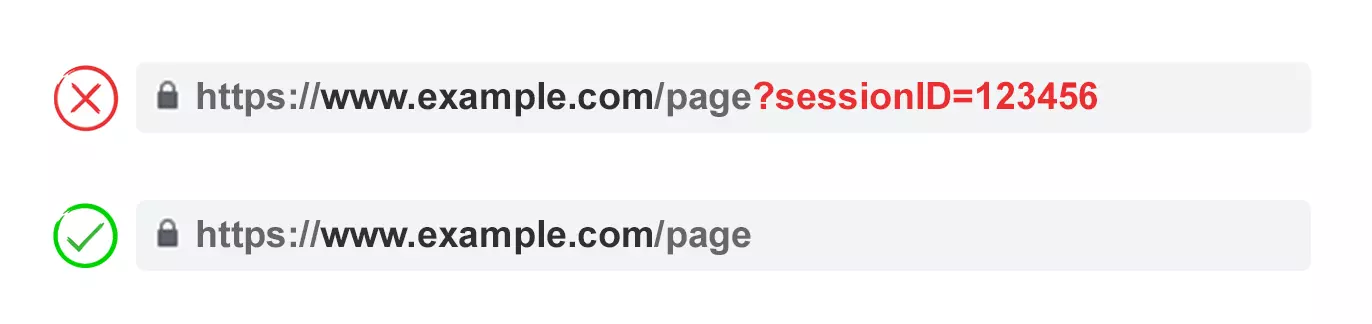
remove unnecessary parametersImage created by author

Ask your developer for a list of every website’s parameters and their functions. Chances are, you will discover parameters that no longer perform a valuable function.

For example, users can be better identified by cookies than sessionIDs. Yet the sessionID parameter may still exist on your website as it was used historically.

Or you may discover that a filter in your faceted navigation is rarely applied by your users.

Any parameters caused by technical debt should be eliminated immediately.

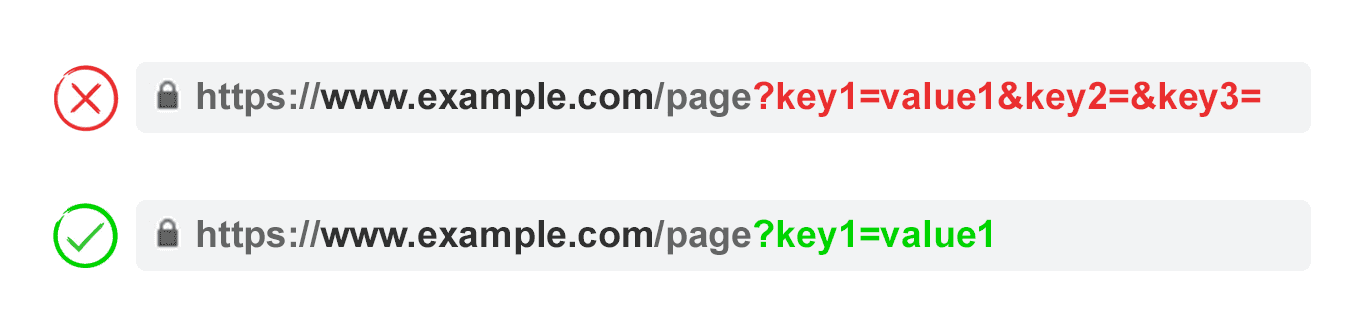
2. Prevent Empty Values

no empty parameter valuesImage created by author

URL parameters should be added to a URL only when they have a function. Don’t permit parameter keys to be added if the value is blank.

In the above example, key2 and key3 add no value, both literally and figuratively.

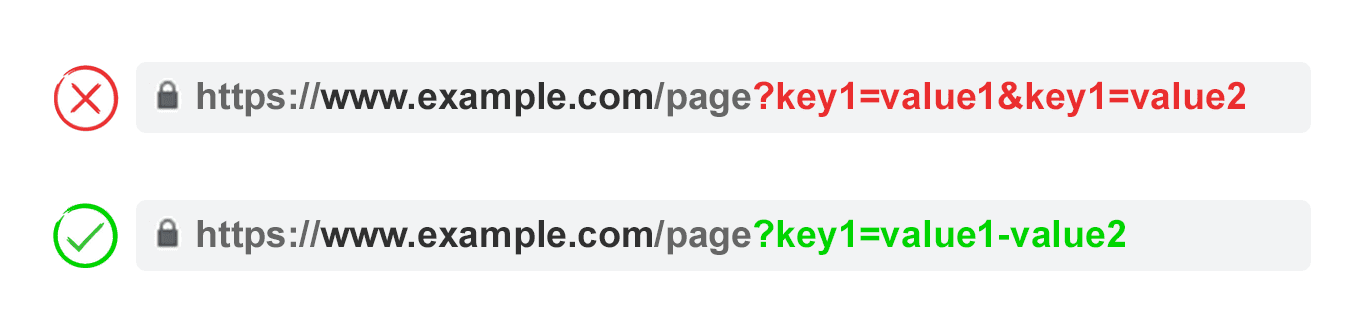
3. Use Keys Only Once

single key usageImage created by author

Avoid applying multiple parameters with the same parameter name and a different value.

For multi-select options, it is better to combine the values after a single key.

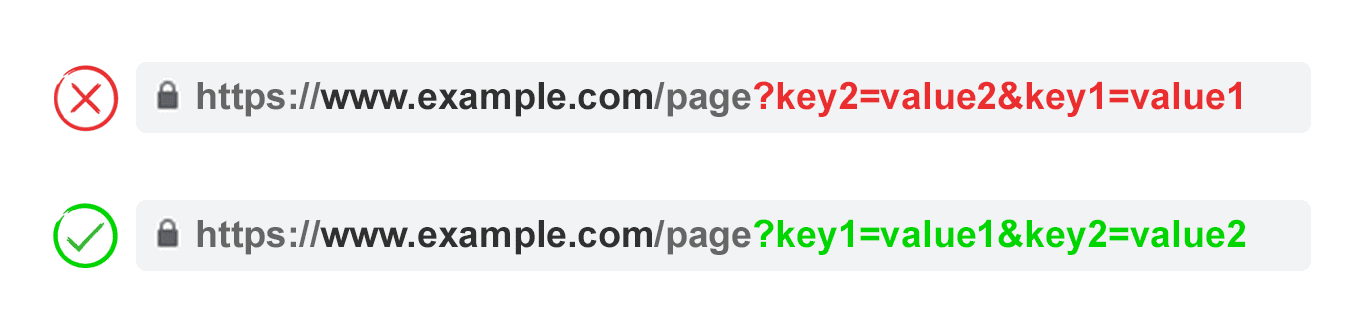
4. Order URL Parameters

order url parametersImage created by author

If the same URL parameter is rearranged, the pages are interpreted by search engines as equal.

As such, parameter order doesn’t matter from a duplicate content perspective. But each of those combinations burns crawl budget and split ranking signals.

Avoid these issues by asking your developer to write a script to always place parameters in a consistent order, regardless of how the user selected them.

In my opinion, you should start with any translating parameters, followed by identifying, then pagination, then layering on filtering and reordering or search parameters, and finally tracking.

Pros:

  • Ensures more efficient crawling.
  • Reduces duplicate content issues.
  • Consolidates ranking signals to fewer pages.
  • Suitable for all parameter types.

Cons:

  • Moderate technical implementation time.

Rel=”Canonical” Link Attribute

rel=canonical for parameter handlingImage created by author

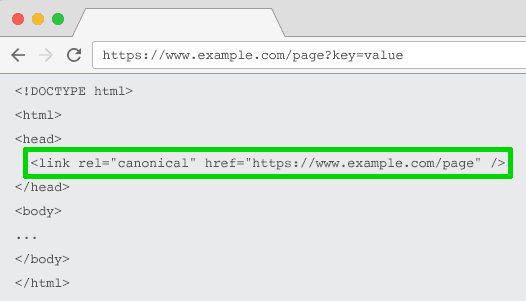
The rel=”canonical” link attribute calls out that a page has identical or similar content to another. This encourages search engines to consolidate the ranking signals to the URL specified as canonical.

You can rel=canonical your parameter-based URLs to your SEO-friendly URL for tracking, identifying, or reordering parameters.

But this tactic is not suitable when the parameter page content is not close enough to the canonical, such as pagination, searching, translating, or some filtering parameters.

Pros:

  • Relatively easy technical implementation.
  • Very likely to safeguard against duplicate content issues.
  • Consolidates ranking signals to the canonical URL.

Cons:

  • Wastes crawling on parameter pages.
  • Not suitable for all parameter types.
  • Interpreted by search engines as a strong hint, not a directive.

Meta Robots Noindex Tag

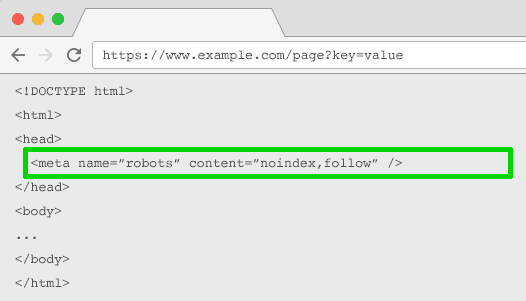
meta robots noidex tag for parameter handlingImage created by author

Set a noindex directive for any parameter-based page that doesn’t add SEO value. This tag will prevent search engines from indexing the page.

URLs with a “noindex” tag are also likely to be crawled less frequently and if it’s present for a long time will eventually lead Google to nofollow the page’s links.

Pros:

  • Relatively easy technical implementation.
  • Very likely to safeguard against duplicate content issues.
  • Suitable for all parameter types you do not wish to be indexed.
  • Removes existing parameter-based URLs from the index.

Cons:

  • Won’t prevent search engines from crawling URLs, but will encourage them to do so less frequently.
  • Doesn’t consolidate ranking signals.
  • Interpreted by search engines as a strong hint, not a directive.

Robots.txt Disallow

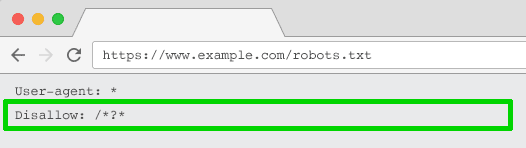
robots txt disallow for parameter handlingImage created by author

The robots.txt file is what search engines look at first before crawling your site. If they see something is disallowed, they won’t even go there.

You can use this file to block crawler access to every parameter based URL (with Disallow: /*?*) or only to specific query strings you don’t want to be indexed.

Pros:

  • Simple technical implementation.
  • Allows more efficient crawling.
  • Avoids duplicate content issues.
  • Suitable for all parameter types you do not wish to be crawled.

Cons:

  • Doesn’t consolidate ranking signals.
  • Doesn’t remove existing URLs from the index.

Move From Dynamic To Static URLs

Many people think the optimal way to handle URL parameters is to simply avoid them in the first place.

After all, subfolders surpass parameters to help Google understand site structure and static, keyword-based URLs have always been a cornerstone of on-page SEO.

To achieve this, you can use server-side URL rewrites to convert parameters into subfolder URLs.

For example, the URL:

www.example.com/view-product?id=482794

Would become:

www.example.com/widgets/purple

This approach works well for descriptive keyword-based parameters, such as those that identify categories, products, or filters for search engine-relevant attributes. It is also effective for translated content.

But it becomes problematic for non-keyword-relevant elements of faceted navigation, such as an exact price. Having such a filter as a static, indexable URL offers no SEO value.

It’s also an issue for searching parameters, as every user-generated query would create a static page that vies for ranking against the canonical – or worse presents to crawlers low-quality content pages whenever a user has searched for an item you don’t offer.

It’s somewhat odd when applied to pagination (although not uncommon due to WordPress), which would give a URL such as

www.example.com/widgets/purple/page2

Very odd for reordering, which would give a URL such as

www.example.com/widgets/purple/lowest-price

And is often not a viable option for tracking. Google Analytics will not acknowledge a static version of the UTM parameter.

More to the point: Replacing dynamic parameters with static URLs for things like pagination, on-site search box results, or sorting does not address duplicate content, crawl budget, or internal link equity dilution.

Having all the combinations of filters from your faceted navigation as indexable URLs often results in thin content issues. Especially if you offer multi-select filters.

Many SEO pros argue it’s possible to provide the same user experience without impacting the URL. For example, by using POST rather than GET requests to modify the page content. Thus, preserving the user experience and avoiding SEO problems.

But stripping out parameters in this manner would remove the possibility for your audience to bookmark or share a link to that specific page – and is obviously not feasible for tracking parameters and not optimal for pagination.

The crux of the matter is that for many websites, completely avoiding parameters is simply not possible if you want to provide the ideal user experience. Nor would it be best practice SEO.

So we are left with this. For parameters that you don’t want to be indexed in search results (paginating, reordering, tracking, etc) implement them as query strings. For parameters that you do want to be indexed, use static URL paths.

Pros:

  • Shifts crawler focus from parameter-based to static URLs which have a higher likelihood to rank.

Cons:

  • Significant investment of development time for URL rewrites and 301 redirects.
  • Doesn’t prevent duplicate content issues.
  • Doesn’t consolidate ranking signals.
  • Not suitable for all parameter types.
  • May lead to thin content issues.
  • Doesn’t always provide a linkable or bookmarkable URL.

Best Practices For URL Parameter Handling For SEO

So which of these six SEO tactics should you implement?

The answer can’t be all of them.

Not only would that create unnecessary complexity, but often, the SEO solutions actively conflict with one another.

For example, if you implement robots.txt disallow, Google would not be able to see any meta noindex tags. You also shouldn’t combine a meta noindex tag with a rel=canonical link attribute.

Google’s John Mueller, Gary Ilyes, and Lizzi Sassman couldn’t even decide on an approach. In a Search Off The Record episode, they discussed the challenges that parameters present for crawling.

They even suggest bringing back a parameter handling tool in Google Search Console. Google, if you are reading this, please do bring it back!

What becomes clear is there isn’t one perfect solution. There are occasions when crawling efficiency is more important than consolidating authority signals.

Ultimately, what’s right for your website will depend on your priorities.

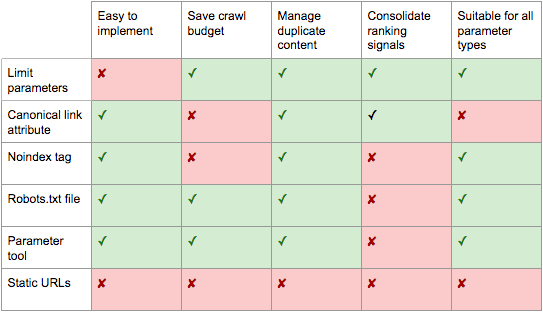
url parameter handling option pros and consImage created by author

Personally, I take the following plan of attack for SEO-friendly parameter handling:

  • Research user intents to understand what parameters should be search engine friendly, static URLs.
  • Implement effective pagination handling using a ?page= parameter.
  • For all remaining parameter-based URLs, block crawling with a robots.txt disallow and add a noindex tag as backup.
  • Double-check that no parameter-based URLs are being submitted in the XML sitemap.

No matter what parameter handling strategy you choose to implement, be sure to document the impact of your efforts on KPIs.

More resources: 


Featured Image: BestForBest/Shutterstock

International SEO Expansion: Best Practices Guide

Getting your international SEO strategy right can be an elusive feat.

There are a lot more factors at play than people give credit for, and it’s often a thankless job.

A successful international SEO strategy requires a deep knowledge of your company’s commercial strategy as well as technical SEO knowledge, cultural sensitivity, and excellent data skills.

Yet the industry often regards international SEO as just your hreflang setup.

In this article, I will distill the complexities of international SEO success into an actionable step-by-step list that will take you from beginner to advanced practitioner. Let’s begin!

Part I: Be Commercially Aware

1. Understand Why Your Company Is Going International

Companies can grow by expanding their products and services, focusing on gaining market penetration or expanding into new markets.

While your team’s goal might be traffic, leads, or revenue, the leadership team is likely working under a different set of parameters. Most of the time, leadership’s ultimate goal is to maximize shareholder value.

  • In founder-owned companies, growth goals might be slower and more sustainable, usually aimed at maintaining and growing profitability.
  • VC-owned companies have high growth goals because they must provide their investors with a return that’s higher than the stock market. This is what is known as the alpha, or your company’s ability to beat the market in growth.
  • Publicly traded companies are likely aiming to grow their share value.
  • Startups, depending on their maturity stage, are likely looking to prove product-market fit or expand their reach fast to show that their operations are scalable and have the potential to be profitable in the future. The goal of this is to aid in raising further capital from investors.

Understanding why businesses go international is essential for informing your SEO decisions. What’s best practice for SEO isn’t always what’s best for business.

You must adapt your strategy to your company’s growth model.

  • Companies choosing to grow sustainably and maintain profitability will likely expand more slowly to a market that resembles their core market.
  • VC-owned companies will be able to invest in a wider range of countries, with a smaller concern for providing their users with an experience on par with that of their core markets.
  • Startups can try to beat their competitors to market by expanding quickly and throwing a lot of money at the project, or they might be concerned with cash flow and try to expand fast but cut corners by using automatic translation.

2. Stack Rank Your Target Markets To Prioritize Your Investment

I promise I’ll get to hreflang implementation soon, but so much about international SEO has to do with commercial awareness – so bear with me; this will make you a better professional.

Many companies have different market tiers to reflect how much of a priority each market is. Market prioritization can happen using many different metrics, such as:

  • Average order value or lifetime customer value.
  • Amount of investment required.
  • Market size.
  • And market similarity.

American companies often prioritize developed English-speaking countries such as the UK, Canada, or Australia. These are most similar to their core market, and most of their market knowledge will be transferable.

After that, companies are likely to target large European economies, such as Germany and France. They might also target the LatAm market and Spain in the same effort.

The last prioritization tier can vary widely among companies, with a focus on the Nordic, Brazilian, or Asian markets.

Part II: Know Your Tech

3. Define Your International URL Structure

When doing international SEO, there are 4 different possible URL structures, each with its pros and cons.

ccTLD Structure

A ccTLD structure is set up to target different countries based on the domain type.

This structure is not ideal for companies that target different languages rather than different countries. For example, a .es website is targeting Spain, not the Spanish language.

An advantage to this kind of structure is that the ccTLD sends a very strong localization signal to search engines as to what market they are targeting, and they can lead to improved trust and CTR in your core country.

On the other hand, ccTLDs can dilute your site’s authority, as links will be spread across domains rather than concentrated on the .com.

gTLD With Subdirectories

This is my personal favorite when it comes to international SEO.

These URL structures can look like website.com/en if they’re targeting languages or website.com/en-gb if they’re targeting countries.

This configuration aggregates the authority you gain across your different territories into a single domain, it’s cheaper to maintain, and the .com TLD is widely recognizable by users worldwide.

On the other hand, this setup can look less personalized to people outside the US, who might wonder if you can service their markets.

gTLD With Subdomains

This setup involves placing international content on a subdomain like us.website.com. While once popular, it’s slipping in favor because it doesn’t bring anything unique to the table anymore.

This setup offers a clear signal to users and search engines about the intended audience of a specific subdomain.

However, subdomains often face issues with SEO, as Google tends to view them as separate entities. This separation can dilute link, similar to the ccTLD approach but without the geo-targeting advantages.

gTLD With Parameters

This is the setup where you add parameters at the end of the URL to indicate the language of the page, such as website.com/?lang=en.

I strongly advise against this setup, as it can present multiple technical SEO challenges and trust issues.

4. Understand Your Hreflang Setup

In the words of John Mueller: hreflang can be one of the most complex aspects of SEO.

Tweet by John Mueller talking about how hreflang can be one of the more complex aspects of SEO.Screenshot from Twitter, May 2024

Hreflang reminds me of a multilingual form of a canonical tag, where we tell search engines that one document is a version of the other and explain the relationship between them.

I find hreflang implementation very interesting from a technical point of view. Because development teams mostly manage it, and it can be very much hit or miss.

Often, hreflang is constructed from existing fields in your content management system (CMS) or content database.

You might find that your development team is pulling the HTML lang tag, which follows a different ISO standard than hreflang, leading to a broken implementation.

Other times, there is a field in your CMS that your development team pulls from to build your hreflang setup.

Finding out how your hreflang tags are generated can be extremely helpful in identifying the sources of different issues or mitigating potential risks.

So speak to your engineering team and ask them how you’re currently generating hreflang.

5. Implement Hreflang Without Errors

There are three ways to implement hreflang on your site:

  • On your sitemap.
  • Through your HTTP header.
  • On your HTML head.

The method most of us are most familiar with is the HTML head. And while you can use more than one method, they should match each other perfectly. Otherwise, you risk confusing search engines.

Here are some basic rules for getting it done correctly:

  • In your hreflang implementation, the URL must include domain and protocol.
  • You must follow the ISO 639-1 language codes – don’t go around making up your own.
  • Hreflang tags must be reciprocal. If the page you’re listing as a language alternative does not list you back, your implementation won’t work.
  • Audit your hreflang regularly. My favorite tool for this, since it added the hreflang cluster analysis and link graphs, is Ahrefs. For the record, Ahrefs is not paying me to say this; it’s a genuine recommendation and has helped me a lot in my work.
  • You should only have one page per language.
  • Your hreflang URLs should be self-canonicalizing and respond with a 200 code.

Follow the above rules, and you’ll avoid the most common hreflang mistakes that SEO pros make.

And if you’re interested in the technical SEO aspect beyond hreflang, I recommend reading Mind your language by Rob Owen.

Part III: Invest In Content Incrementally

6. Translate Your Top-performing Content Topics

Now that you have the basic commercial and technical knowledge covered, you’re ready to start creating a content strategy.

You likely have a wealth of content in your core market that can be recycled. But you want to focus on translating high-converting topics, not just any topic; otherwise, you might be wasting your budget!

Let’s go step by step.

Cluster Your Website’s Content By Topic

  • Crawl your site using your favorite SEO tool and extract the URL and H1.
  • Use ChatGPT to classify that list of URLs into topics. You might already know what you usually write about, so include those topics in your prompt. You don’t want to have a classification that’s too granular, so you can prompt chatGPT to only create groups with a minimum of 10 URLs (adjust this to reflect the size of your website) and class everything else as other. This is an example of what your prompt might look like: “I will provide you with a list of article titles and their corresponding URL. Classify this list into the following topics: survey best practices, research and analysis, employee surveys, market research and others. Return this in a table format with the URL, title and group name.”
  • Start a spreadsheet with all your URLs in the first column, titles in the second column, and the group they belong to in the third column.

Measure Your Performance By Topic

  • Export your GSC data and use a =VLOOKUP formula to match your clicks to your URLs.
  • Export your conversion data and use a =VLOOKUP formula to match your conversions (leads, sales, sign-ups, or revenue) to the right URL.
  • You can then copy your topics column onto a new sheet. Remove duplicates and use the =SUMIF formula to aggregate your click data and conversion data by topic.

Choose What Topics You’ll Be Translating First

Using this data, you can now choose what topics are most likely to drive conversions based on your core market data. Choose how many topics or pieces of content you’ll be translating based on your budget.

Personally, I like translating one topic at a time because I’ve found that generating topical authority on one specific topic makes it easier for me to rank on an adjacent topic that I write about next.

7. Localize Your English Content

Once you’re set up with all your key pages and a few content topics, it’s time to evaluate your investment and see where you could be getting a bigger return.

At this stage, many companies have translated their content into a few different languages and likely copied the US content into their UK and Australian sites. Now that you’ve done some translation, it’s time to work on localization.

If you’ve just copied your US content into your UK and Australian sites, your Google Search Console indexing report might be screaming at you, “Duplicate, Google selected a different canonical than the user.”

A very easy fix that could yield great returns is to localize your English content to the nuances of those English-speaking markets.

You will want to instruct your translation and localization providers to adapt the spellings of certain words, change the choice of words, introduce local expressions, and update any cited statistic for the US with their local equivalent.

For example, if I’m targeting a British audience, “analyze” becomes “analyse,” a “stroller” becomes a “pram,” and “soccer” becomes “football.”

8. Invest In In-market Content

Once you’ve got the basics in place, you can start tackling the specific needs of other markets. This strategy is expensive, and you should only use it in your priority markets, but it can really set you apart from your competitors.

For this, you will need to work with a local linguist to identify pain points, use cases, or needs exclusive to your target market.

For example, if France suddenly made it mandatory to run a diversity and inclusion study for companies with over 250 employees, I’d want to know this and create some content on DEI surveys at SurveyMonkey.

9. Integrate With Other Content Workflows

In step six, we evaluated our top-performing content, chose the best articles to translate, and got it all down. But wait. Some of these source articles have been updated. And there is even more content now!

To run a successful international SEO campaign you must integrate with all the other teams publishing content within your organization.

Usually, the teams creating content in an organization are SEO, content, PR, product marketing, demand generation, customer marketing, customer service, customer education, or solutions engineering.

That’s a lot, and you won’t be able to integrate with everyone all at once. Prioritize the teams that create the most revenue-generating content, such as SEO, content, or product marketing.

Working with these teams, you will have to establish a process for what happens when they create a new piece, update some content, or remove an existing piece.

These processes can differ for everyone, but I can tell you what I do with my team and hope it inspires you.

  • When a piece of content that’s already been localized into international markets is updated, we get the content in a queue to be re-localized the next quarter.
  • When they create a new piece of content, we evaluate its performance, and if it’s performing above average, we add it to a localization queue for the next quarter.
  • When they change the URL of a piece of content or delete it, all international sites must follow suit at the same time, since due to some technical limitations, not making the change globally would create some hreflang issues.

Wrapping Up

International SEO is vast and complex, and no article can cover it all, but many interesting resources have been created by SEO pros across the community for those who want to learn more.

Navigating the complexities of international SEO is no small feat. It’s an intricate dance of aligning commercial strategies with technical precision, cultural insights, and data-driven decisions.

From understanding your company’s core motives for global expansion to meticulously implementing hreflang tags and localizing content, every step plays a crucial role in building a successful international presence.

More resources: 


Featured Image: BritCats Studio/Shutterstock

New WordPress Plugin Simplifies Achieving Success via @sejournal, @martinibuster

The co-founders of Yoast have launched a plugin that helps users plan tasks, defeat procrastination, and remove distractions, making it easier to achieve success. This plugin simplifies managing critical tasks like maintaining website health, publishing posts, and updating content.

Why This Plugin Helps Users Become Successful

A reason why some websites fail to achieve all that they are capable of is momentum and consistent output. Creators to have a plan that is rigorously followed generally experience more success in search. Winning is fun but getting there is not always fun.

Immediate rewards are a powerful motivator for success. This new plugin makes achievement feel instantly gratifying, which is why it deserves serious consideration.

Clarity, Focus And Achievements

Working at home as a solopreneur or with remote workers can be challenging because there are so many distractions. People are generally task oriented but not necessarily hard-wired to follow a mental list of things to do. It’s easier when someone tells you what to do but the reality is that we have to take charge and tell ourselves what to do in order to achieve great things.

That’s the brilliant thing about the new Progress Planner plugin, it allows users to create a road map to success within the context of the WordPress site itself, embedded within the environment the user is working in.

One of the ingenious features of Progress Planner is that it gamifies task completion with badges that remind users of how much they’ve achieved, subtly encouraging them to continue completing tasks. It’s literally rewarding the brain with feedback on completion of a task, a mental pat on the back.

The Progress Planner website describes the tool like this:

“It simplifies website management by providing a clear overview of your tasks, tracking your progress, and keeping you motivated.”

Money’s a nice motivator but immediate positive feedback is a powerful motivator for progressing from achievement to achievement.

Progress Planner Beta

The plugin is currently in Beta, which is one step ahead of the Alpha stage where bugs are worked out. This means that the plugin has full functionality but is still collecting feedback from users. Nevertheless, Progress Planner is ready for use right now and the official launch date is set for October 3, 2024.

The plugin is 100% free to use and a pro version is planned for sometime in the future that will add even more features.

Progress Planner, by the co-founders of Yoast, is available right now from the official WordPress Plugin Repository and also in the plugin dashboard in the WordPress admin.

Read more and download the plugin: Progress Planner Plugin At WordPress.org

Visit the Progress Planner Website: Progress Planner

Featured Image by Shutterstock/Cast Of Thousands

Google Integrates Internet Archive Links Into Search Results via @sejournal, @MattGSouthern

Google has announced a new feature integrating links to the Internet Archive’s Wayback Machine within its search results.

This update, rolled out globally today, allows searchers to access archived versions of webpages directly from Google’s search interface.

How To Access The Feature

The new functionality is part of Google’s existing ‘About this page’ feature.

You can now find a link to the Wayback Machine by clicking the three dots next to a search result, selecting “About this result,” and then choosing “More about this page.”

A Google spokesperson explained the rationale behind the update:

“We know that many people, including those in the research community, value being able to see previous versions of webpages when available. That’s why we’ve added links to the Internet Archive’s Wayback Machine to our ‘About this page’ feature.”

The Internet Archive’s Role

The Internet Archive, a non-profit digital library, has been preserving snapshots of websites through its Wayback Machine for over 25 years.

Mark Graham, Director of the Wayback Machine at the Internet Archive, commented on the significance of this integration:

“The web is aging, and with it, countless URLs now lead to digital ghosts. Businesses fold, governments shift, disasters strike, and content management systems evolve—all erasing swaths of online history,” Graham stated. “This digital time capsule transforms our ‘now-only’ browsing into a journey through internet history.”

Limitations

It’s important to note that this feature will not be available for all websites.

Links to archived pages will not appear if the rights holder has opted out of archiving or if the webpage violates content policies.

Implications

This collaboration between Google and the Internet Archive marks a step in improving access to historical web content.

Tools like this are valuable for researchers and general users seeking to understand how online information has changed over time.

Availability

This feature is available now, and users worldwide should be able to access these archive links through Google Search.


Featured Image: Postmodern Studio/Shutterstock
Favoritism: Has Google Dialed Up The Brand Factor Even More? via @sejournal, @Kevin_Indig

Has Google recently turned up the visibility dial for “brands”?

Every consulting pitch deck has a “build a strong brand” slide. We all know “brand” is important for SEO.
We’ve all heard Eric Schmidt’s quote: “Brands are the solution, not the problem. Brands are how you sort out the cesspool.”

The impact of branding is not exclusive to SEO. The whole industry of brand marketing exists because consumers seek out brands they trust.
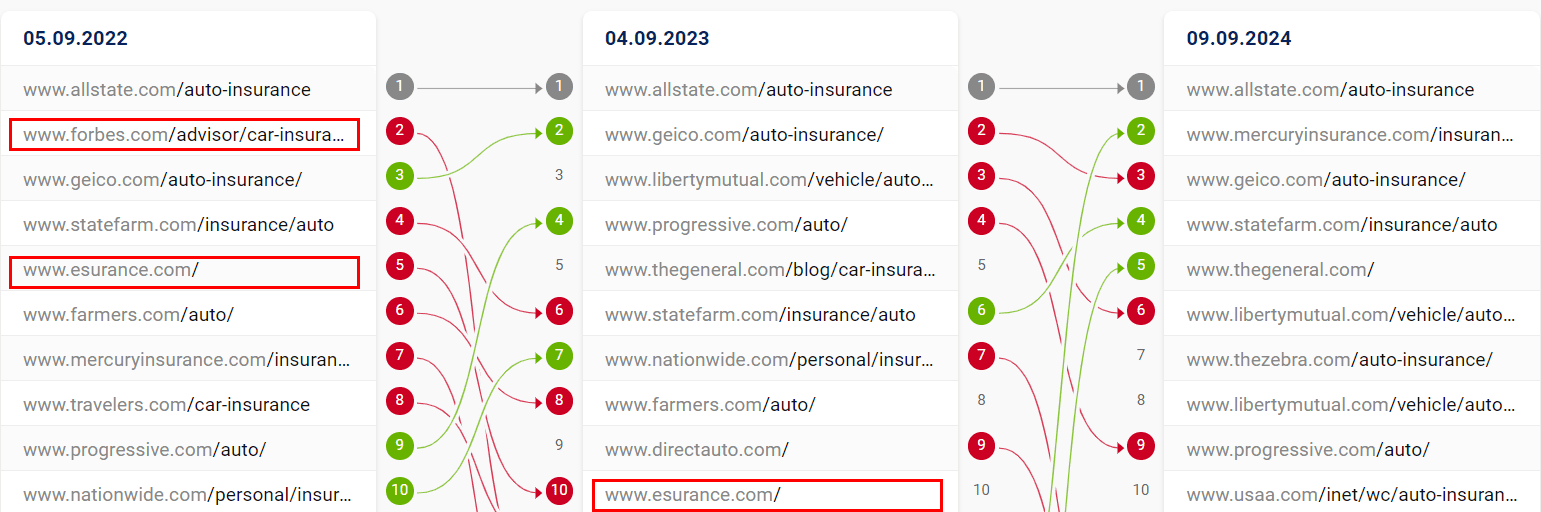
But Schmidt’s quote dropped in 2008 (when users were interestingly just as frustrated with web results as today). Back then, Google didn’t understand content as well as today and leaned much more on user and basic backlink signals.

Today, the organic search landscape looks very different:

So, have “brands” gained? The answer is yes, but only in some verticals. But what even defines a brand?

Definition

In the context of SEO, I define a “brand” as a domain that gets:

  • Significant brand search volume.
  • Higher than expected CTR.
  • A knowledge card.
  • High brand recall/NPS.
  • Growing number of brand keywords.
  • A meaningful number of relevant backlinks with brand anchor text.

The way it might materialize in Search:

  • Brands see higher than average conversion rates because users trust brands more.
  • Users search for brand combination keywords, like “shopify brand name generator”
  • It’s likely that brand signals outweigh other signals as big brands get away with more.

Google gives brands preferential treatment because:

  • Users want them. Schmidt said in the same interview about the cesspool: “Brand affinity is clearly hard wired. It is so fundamental to human existence that it’s not going away. It must have a genetic component.”
  • Aggregators can be intermediaries, which is less helpful for searchers (think meta-search engines).
  • Google competes with more aggregators head-on (think Amazon/retailers).

The consequences for SEO Aggregators can be severe.

In David vs. Goliath, I analyzed the top 1,000 winner and loser sites over the last 12 months and found that “bigger sites indeed grow faster than smaller sites, but likely not because they’re big but because they’ve found growth levers they can pull over a long time period.”

Important: “ecommerce retailers and publishers have lost the most,” while brands like Lenovo, Sigma, Coleman, or Hanes gained visibility, as I called out in the follow-up article.

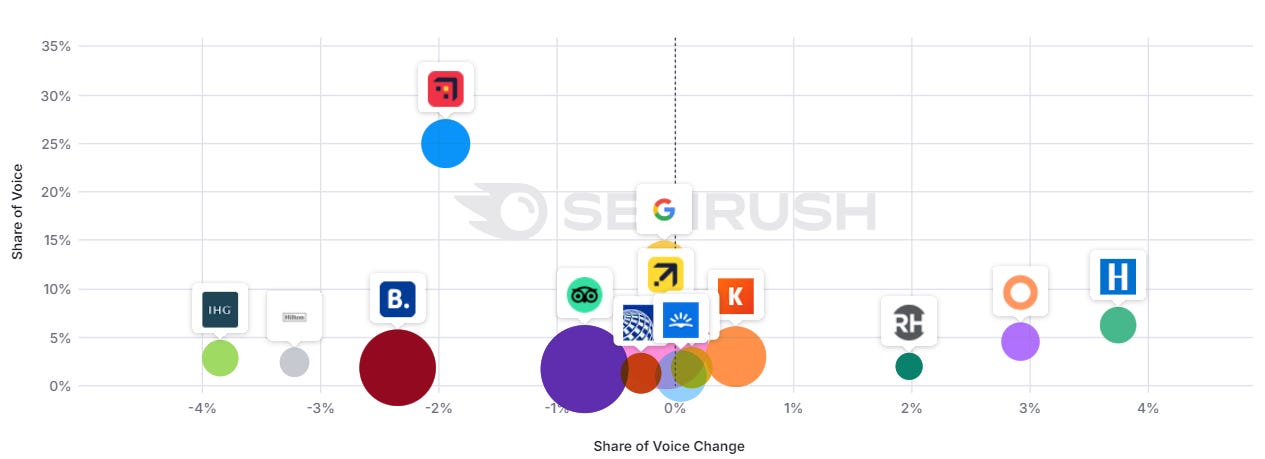
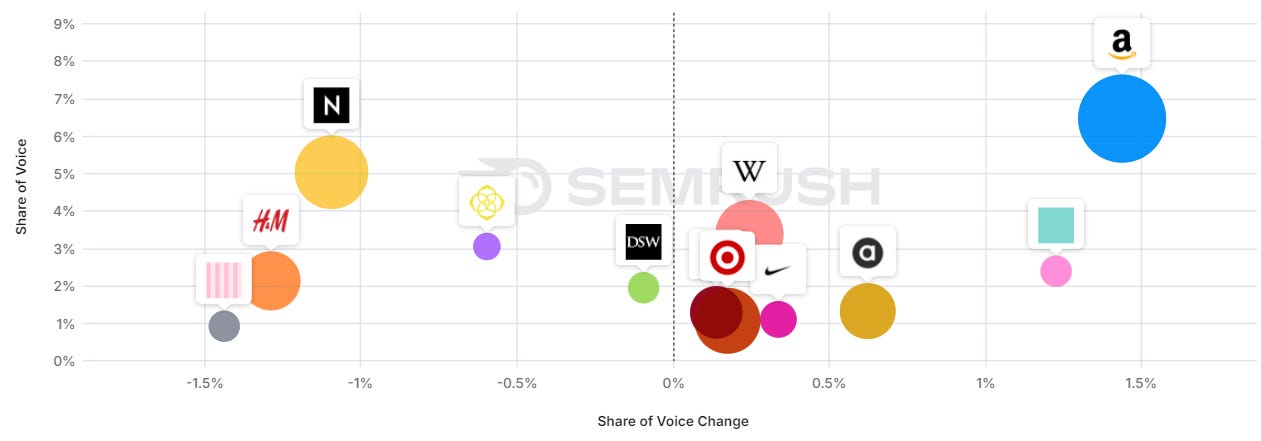
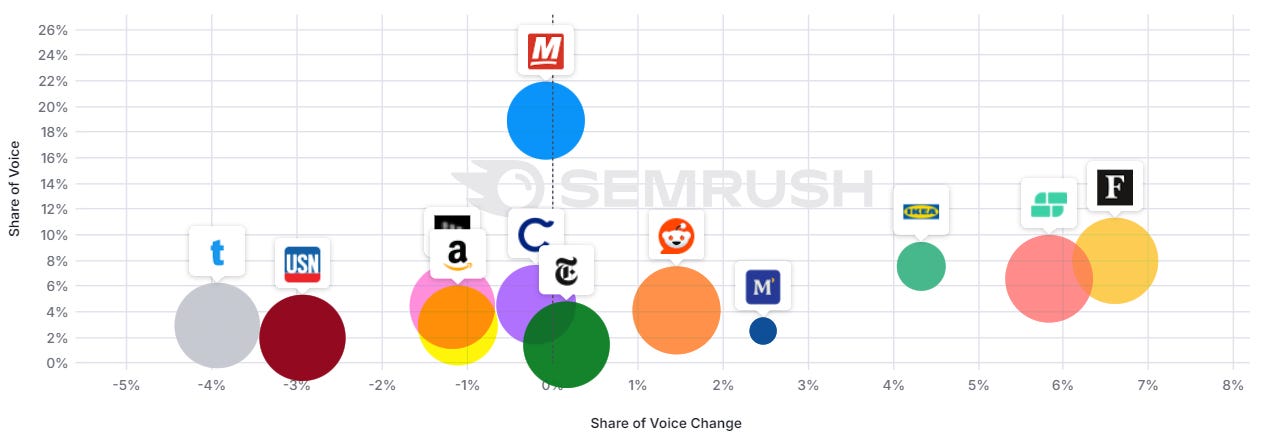
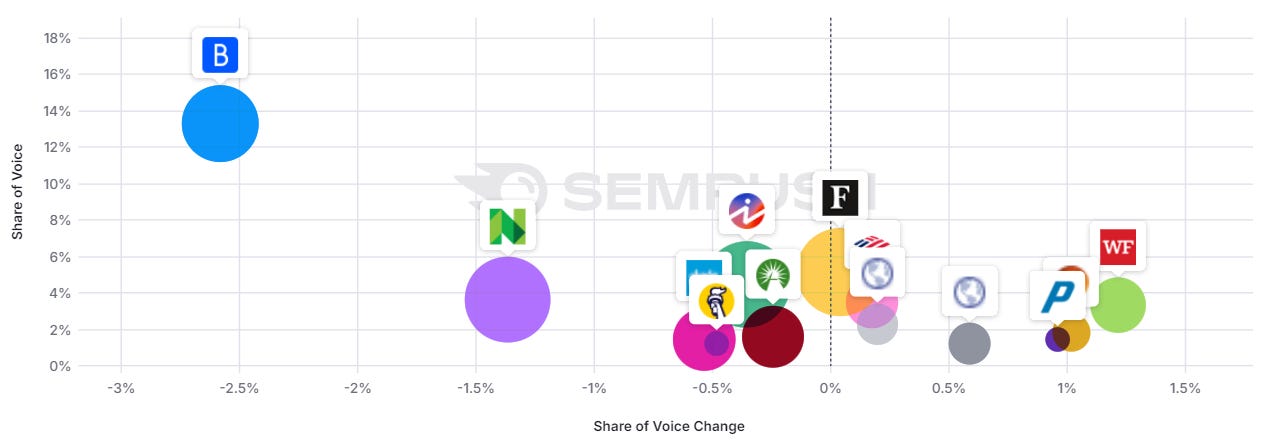
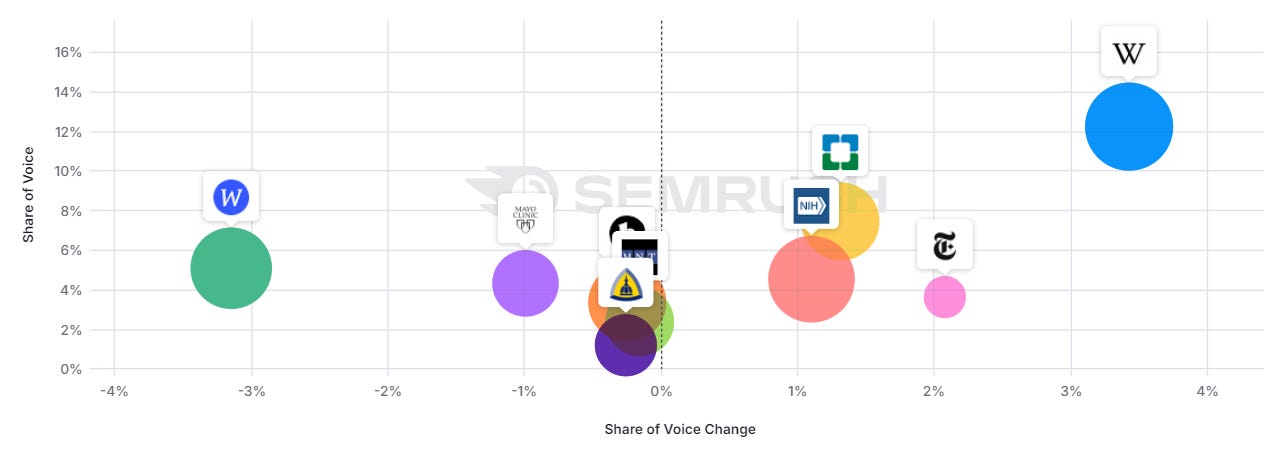
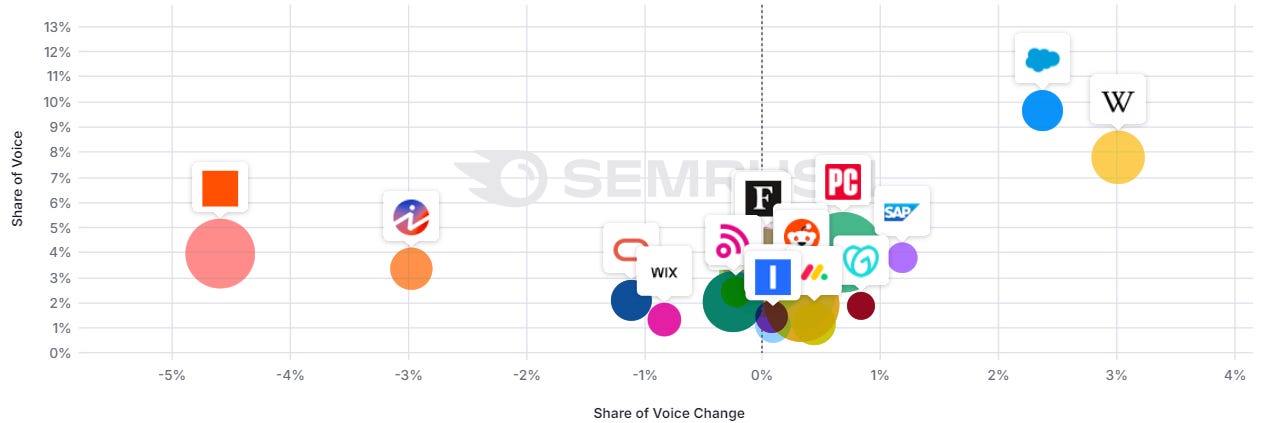
Digging deeper into a set of almost 10,000 keywords I track in the Semrush Enterprise Suite, we can see a shift in some verticals over the last 12 months.

Travel: more brands

Image Credit: Kevin Indig

Fashion: mixed picture

Image Credit: Kevin Indig

Beds: mixed picture

Image Credit: Kevin Indig

Finance: more brands

Image Credit: Kevin Indig

Health: mixed picture

Image Credit: Kevin Indig

SaaS: more brands

Image Credit: Kevin Indig

Note:

  • This shift hit not just consumer spaces but B2B as well.
  • The impact in ecommerce is harder to judge due to the dominance of free product listings.
  • In finance, major players like Nerdwallet lost a lot of visibility (there might be more going on).

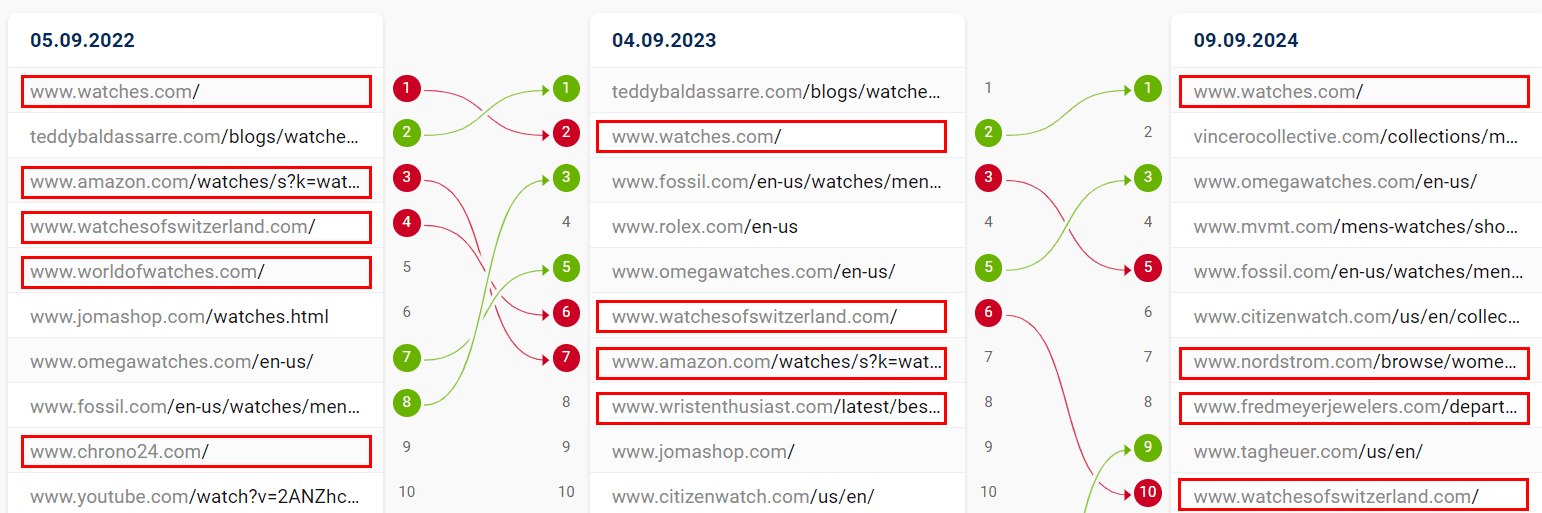
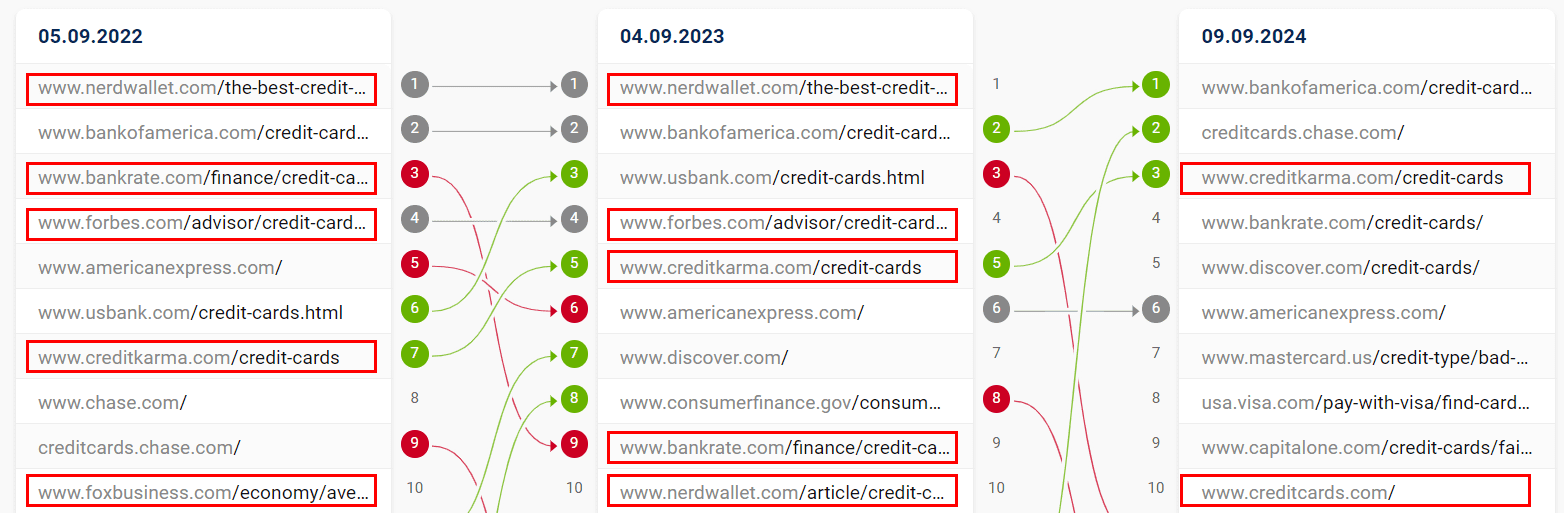
To top it off, three exemplary, hypercompetitive keywords also show major SERP mix shifts over the last two years (non-brands highlighted in red):

Credit Cards: more brands

Image Credit: Kevin Indig

Car insurance: more brands

Image Credit: Kevin Indig

Watches: more brands

Image Credit: Kevin Indig

Response

Here is how I work with companies that I don’t see as established brands:

We work on reputation by mining reviews on third-party review sites and developing a plan for improving them if necessary.

Google strongly cares about third-party reviews (and so do users), which you can see in the fact that it enriches the shopping graph with them or cites them in the SERPs.

We invest in brand marketing and monitor brand recall/NPS in relation to competitors. We aim always to be a little better, which is part of a larger product strategy.

In my experience, SEO and product are not separable. We monitor and invest in brand mentions and in what context they’re mentioned (co-occurrence).

We consider hard calls when it comes to exact match domains (EMDs). Even though you will find plenty of examples that they work and the cost of migration is very high, sometimes moving to a brand name is the best long-term option. How many EMDs do you know that are memorable?

We take a close look at the ratio of brand to non-brand traffic – are both growing? If you have a low number of branded searches compared to non-branded ones, you don’t have a brand.

We look at brand links and mentions. While generic anchor text links are valuable, people tend to underestimate the impact of brand links on the homepage.

The most effective things you typically do (in the white hat space) for more brand links are also things that get your brand “on the map,” so this also funnels into a larger brand marketing strategy.

Back in 2008, brand links were likely the deciding brand factor.

Today, it’s paired with brand name searches, as Tom Capper’s analysis on Moz shows: domains that lost during Helpful Content Updates had a high ratio of Domain Authority to Brand Authority, meaning lots of links but few brand links.


The Helpful Content Update Was Not What You Think


Featured Image: Paulo Bobita/Search Engine Journal