Google announced that it is now indexing .epub documents, a format commonly used to print books for e-readers. Google is already showing EPUB books in the search index.
EPUB File Format
EPUB is an XML-based eBook publishing format based on a standard developed by the International Digital Publishing Forum, which in 2016 was subsequently merged with the World Wide Wide Web Consortium (W3C). The goal of the merger was to bring together electronic book publishing with the Internet so that they would mutually enrich each other.
Google Indexing EBUB Content
The intent of merging e-publishing with the Internet aligns with Google’s decision to index (and at some point presumably rank) EPUB content. The only surprise should be that it took eight years to do so. The changelog notes that EPUB file format was added to Google’s documentation of indexable file types and offers no other details.
Google’s official changelog offers a matter of fact notation:
“Adding epub to indexable file types
What: Added EPUB to the list of indexable file types.
Why: Google Search now supports epub.”
Does Google Rank EPUB Content?
I did a site:search for EPUB content, noted the title of a scientific research about eating contaminated fish in Lake Ontario (“Consumption of Contaminated Lake Fish and Reproduction”) that was hosted on the journals.lww.com domain.
I next searched for that document in the regular search using the exact match keyword phrase and a variation of the keyword phrase (“Consumption of Contaminated Fish in Lake Ontario”) and Google didn’t surface the EPUB document but it did surface the webpage that contained the download to the EPUB document.
Screenshot Of EPUB Download Page
Google’s official indexable file type documentation only notes that the listed filetypes are indexable. At this time it’s fair to say that Google isn’t ranking EPUB documents but Google will surface them with a filetype:epub search.
An analysis of 25,000 ecommerce queries by Bartosz Góralewicz, founder of Onely, reveals the impact of Google’s AI overviews on search visibility for online retailers.
The study found that 16% of eCommerce queries now return an AI overview in search results, accounting for 13% of total search volume in this sector.
Notably, 80% of the sources listed in these AI overviews do not rank organically for the original query.
“Ranking #1-3 gives you only an 8% chance of being a source in AI overviews,” Góralewicz stated.
🗞️ Google AI overviews vs. eCommerce 🗞️
We just finished analyzing 25k eCommerce queries.
TL;DR
– 16% of queries return AI-overview (previously SGE)
– 13% of search volume from search goes through AI overviews
– 80% of sources don’t rank organically for the query (!)
— Bartosz Góralewicz (@bart_goralewicz) May 22, 2024
Shift Toward “Accelerated” Product Experiences
International SEO consultant Aleyda Solis analyzed the disconnect between traditional organic ranking and inclusion in AI overviews.
According to Solis, for product-related queries, Google is prioritizing an “accelerated” approach over summarizing currently ranking pages.
She commented Góralewicz’ findings, stating:
“… rather than providing high level summaries of what’s already ranked organically below, what Google does with e-commerce is “accelerate” the experience by already showcasing what the user would get next.”
Solis explains that for queries where Google previously ranked category pages, reviews, and buying guides, it’s now bypassing this level of results with AI overviews.
This: “80% of AI overview sources don’t rank organically for the query” from 25K e-commerce queries that @bart_goralewicz analyzed.
As Góralewicz notes, this could be an initial rollout, speculating that “Google will expand AI overviews for high-cost queries when enabling ads” based on data showing they are currently excluded for high cost-per-click keywords.
An in-depth report across ecommerce and publishing is expected soon from Góralewicz and Onely, with additional insights into this search trend.
Why SEJ Cares
AI overviews represent a shift in how search visibility is achieved for ecommerce websites.
With most overviews currently pulling product data from non-ranking sources, the traditional connection between organic rankings and search traffic is being disrupted.
Retailers may need to adapt their SEO strategies for this new search environment.
How This Can Benefit You
While unsettling for established brands, AI overviews create new opportunities for retailers to gain visibility without competing for the most commercially valuable keywords.
Ecommerce sites can potentially circumvent traditional ranking barriers by optimizing product data and detail pages for Google’s “accelerated” product displays.
The detailed assessment framework provided by Solis enables merchants to audit their exposure and prioritize optimization needs accordingly.
FAQ
What are the key findings from the analysis of AI overviews & ecommerce queries?
Góralewicz’s analysis of 25,000 ecommerce queries found:
16% of ecommerce queries now return an AI overview in the search results.
80% of the sources listed in these AI overviews do not rank organically for the original query.
Ranking positions #1-3 only provides an 8% chance of being a source in AI overviews.
These insights reveal significant shifts in how ecommerce sites need to approach search visibility.
Why are AI overviews pulling product data from non-ranking sources, and what does this mean for retailers?
Google’s AI overviews prioritize “accelerated” experiences over summarizing currently ranked pages for product-related queries.
This shift focuses on showcasing directly what users seek instead of traditional organic results.
For retailers, this means:
A need to optimize product pages beyond traditional SEO practices, catering to the data requirements of AI overviews.
Opportunities to gain visibility without necessarily holding top organic rankings.
Potential to bypass traditional ranking barriers by focusing on enhanced product data integration.
Retailers must adapt quickly to remain competitive in this evolving search environment.
What practical steps can retailers take to evaluate and improve their search visibility in light of AI overview disruptions?
Retailers can take several practical steps to evaluate and improve their search visibility:
Utilize the spreadsheet provided by Aleyda Solis to assess the potential traffic impact of AI overviews.
Optimize product and detail pages to align with the data and presentation style preferred by AI overviews.
Continuously monitor changes and updates to AI overviews, adapting strategies based on new data and trends.
These steps can help retailers navigate the impact of AI overviews and maintain or improve their search visibility.
Please note that this is separate from users’ Google Maps review history, which is already public.
Centralized Review Management
Google’s search reviews profiles, accessible at profile.google.com, is a centralized hub for you to see all the reviews you’ve previously contributed, including reviews for TV shows, movies, and other content.
This new feature provides a more seamless experience for viewing, updating, and deleting past reviews.
Private Initially, Public Soon
Currently, these profiles are visible only to the individual users themselves.
On June 24th, other Google users can view your profile and written reviews by tapping our name or picture on any published reviews.
Privacy Considerations
By allowing users to access and explore each other’s review histories, Google is making the review ecosystem within its platforms more transparent.
While the profile will make your written reviews publicly accessible, Google has assured that personal details from individual Google Accounts, such as birthdays, won’t be displayed.
If you prefer not to have a public profile, you’ll have the option to delete it.
Why SEJ Cares
This centralized profile could be a helpful way to evaluate the credibility and consistency of reviewers, potentially influencing purchasing decisions.
Conversely, creators may need to adapt their review management strategies to account for the potential impact of individual reviewers.
As the June 24th rollout date approaches, expect to see this new feature integrated into the search experience.
How This Can Benefit You
If you actively contribute reviews on Google’s platforms, this increased visibility may enhance your influence and result in greater recognition within your area of expertise.
For creators, the ability to investigate reviewer profiles could help identify and address potentially misleading or fraudulent reviews, fostering a more trustworthy review ecosystem.
On the other hand, it may necessitate a more proactive approach to monitoring and responding to critical reviews, as they will now be more easily accessible to potential customers.
FAQ
What is the search reviews profile feature introduced by Google?
Google introduced a new type of social profile that allows users to view, manage, and share their written reviews across various platforms.
This feature aims to make users’ reviews more helpful by centralizing them in one hub. It makes it easier for users to update, delete, or view their past reviews. Initially private, these profiles will soon be visible to other users starting June 24th.
How will individual reviewer profiles impact online marketers?
This feature adds a layer of transparency to the review ecosystem. Online marketers might use these profiles to assess the credibility and consistency of reviewers, which can inform their strategies for managing customer feedback.
For reviewers, increased visibility can enhance their reputations, potentially influencing purchasing decisions and improving their authority in specific niches.
What are the key benefits of the new Google profiles for active review contributors?
Active review contributors stand to benefit from increased visibility and recognition. Their reviews will be easily accessible, enhancing their influence as trusted reviewers.
This can be particularly advantageous for users whose reviews focus on specific domains, as it may lead to greater acknowledgment and trust from the community.
Google’s Search Liaison, Danny Sullivan, has confirmed that the search engine hasn’t launched algorithmic actions targeting site reputation abuse.
This clarification addresses speculation within the SEO community that recent traffic drops are related to Google’s previously announced policy update.
Sullivan Says No Update Rolled Out
Lily Ray, an SEO professional, shared a screenshot on Twitter showing a significant drop in traffic for the website Groupon starting on May 6.
Ray suggested this was evidence that Google had begun rolling out algorithmic penalties for sites violating the company’s site reputation abuse policy.
However, Sullivan quickly stepped in, stating:
“We have not gone live with algorithmic actions on site reputation abuse. I well imagine when we do, we’ll be very clear about that. Publishers seeing changes and thinking it’s this — it’s not — results change all the time for all types of reasons.”
We have not gone live with algorithmic actions on site reputation abuse. I well imagine when we do, we’ll be very clear about that. Publishers seeing changes and thinking it’s this — it’s not — results change all the time for all types of reasons. The actions currently only…
— Google SearchLiaison (@searchliaison) May 23, 2024
Sullivan added that when the actions are rolled out, they will only impact specific content, not entire websites.
This is an important distinction, as it suggests that even if a site has some pages manually penalized, the rest of the domain can rank normally.
I don’t know what that chart is based on. Third-party visibility stats? Or is this data from each site reported directly from Search Console? But beyond that, again, we’ve not added an algorithmic component for site reputation abuse. What I said in my original response is still…
— Google SearchLiaison (@searchliaison) May 23, 2024
Background On Google’s Site Reputation Abuse Policy
Earlier this year, Google announced a new policy to combat what it calls “site reputation abuse.”
This refers to situations where third-party content is published on authoritative domains with little oversight or involvement from the host site.
Examples include sponsored posts, advertorials, and partner content that is loosely related to or unrelated to a site’s primary purpose.
Under the new policy, Google is taking manual action against offending pages and plans to incorporate algorithmic detection.
What This Means For Publishers & SEOs
While Google hasn’t launched any algorithmic updates related to site reputation abuse, the manual actions have publishers on high alert.
Those who rely heavily on sponsored content or partner posts to drive traffic should audit their sites and remove any potential policy violations.
Sullivan’s confirmation that algorithmic changes haven’t occurred may provide temporary relief.
Additionally, his statements also serve as a reminder that significant ranking fluctuations can happen at any time due to various factors, not just specific policy rollouts.
FAQ
Will Google’s future algorithmic actions impact entire websites or specific content?
When Google eventually rolls out algorithmic actions for site reputation abuse, these actions will target specific content rather than the entire website.
This means that if certain pages are found to be in violation, only those pages will be affected, allowing other parts of the site to continue ranking normally.
What should publishers and SEOs do in light of Google’s site reputation abuse policy?
Publishers and SEO professionals should audit their sites to identify and remove any content that may violate Google’s site reputation abuse policy.
This includes sponsored posts and partner content that doesn’t align with the site’s primary purpose. Taking these steps can mitigate the risk of manual penalties from Google.
What is the context of the recent traffic drops seen in the SEO community?
Google claims the recent drops for coupon sites aren’t linked to any algorithmic actions for site reputation abuse. Traffic fluctuations can occur for various reasons and aren’t always linked to a specific algorithm update.
A keynote at Google’s Marketing Live event showed a new AI-powered visual search results that feature advertisements that engage users within the context of an AI-Assisted search, blurring the line between AI-generated search results and advertisements.
Google Lens is a truly helpful app but it becomes unconventional where it blurs the line between an assistant helping users and being led to a shopping cart. This new way of engaging potential customers with AI is so far out there that the presenter doesn’t even call it advertising, he doesn’t even use the word.
Visual Search Traffic Opportunity?
Google’s Group Product Manager Sylvanus Bent, begins the presentation with an overview of the next version of Google Lens visual search that will be useful for surfacing information and for help finding where to buy them.
Sylvanus explained how it will be an opportunity for websites to receive traffic from this new way to search.
“…whether you’re snapping a photo with lens or circling to search something on your social feed, visual search unlocks new ways to explore whatever catches your eye, and we recently announced a newly redesigned results page for Visual search.
Soon, instead of just visual matches, you’ll see a wide range of results, from images to video, web links, and facts about the knowledge graph. It gets people the helpful information they need and creates new opportunities for sites to be discovered.”
It’s hard to say whether or not this will bring search traffic to websites and what the quality of that traffic will be. Will they stick around to read an article? Will they engage with a product review?
Visual Search Results
Sylvanus shares a hypothetical example of someone at an airport baggage claim who falls in like with someone else’s bag. He explains that all the person needs to do is snap a photo of the luggage bag and Google Lens will take them directly to shopping options.
He explains:
“No words, no problem. Just open Lens, take a quick picture and immediately you’ll see options to purchase.
And for the first time, shopping ads will appear at the very top of the results on linked searches, where a business can offer what a consumer is looking for.
This will help them easily purchase something that catches their eye.”
These are image-heavy shopping ads at the top of the search results and as annoying as that may be it’s nowhere near the “next level” advertising that is coming to Google’s new version of visual search where Google presents a paid promotion within the context of an AI Assistant.
Interactive Search Shopping
Sylvanus next describes an AI-powered form advertising that happens directly within search. But he doesn’t call it advertising. He doesn’t even use the word advertising. He suggests this new form of AI search experience is more than offer, saying that, “it’s an experience.”
He’s right to not use the word advertisement because what he describes goes far beyond advertising and blurs the boundaries between search and advertising within the context of AI-powered suggestions, paid suggestions.
Sylvanus explains how this new form of shopping experience works:
“And next, imagine a world where every search ad is more than an offer. It’s an experience. It’s a new way for you to engage more directly with your customers. And we’re exploring search ads with AI powered recommendations across different verticals. So I want to show you an example that’s going live soon and you’ll see even more when we get to shopping.”
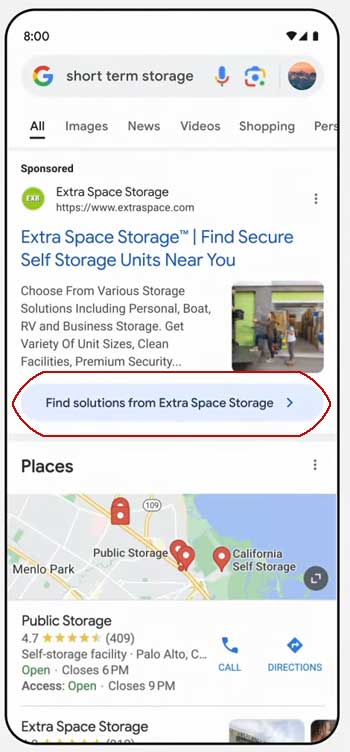
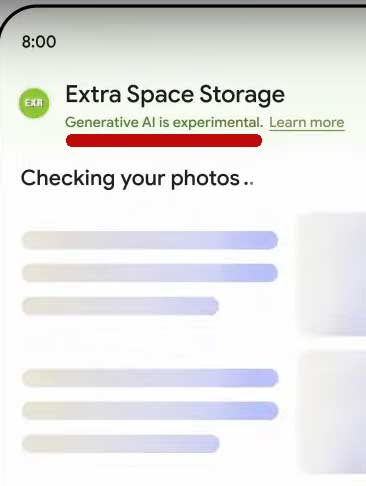
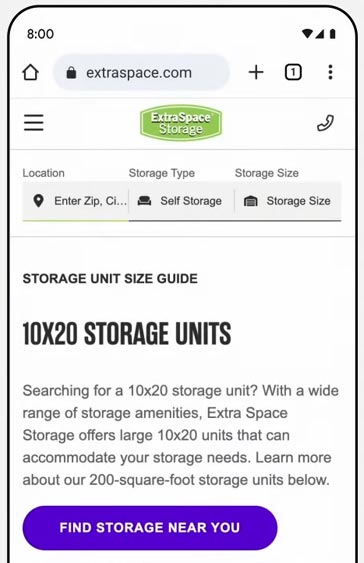
He uses the example of someone who needs to store their furniture for a few months and who turns to Google to find short term storage. What he describes is a query for local short term storage that turns into a “dynamic ad experience” that leads the searcher into throwing packing supplies into their shopping cart.
He narrated how it works:
“You search for short term storage and you see an ad for extra space storage. Now you can click into a new dynamic ad experience.
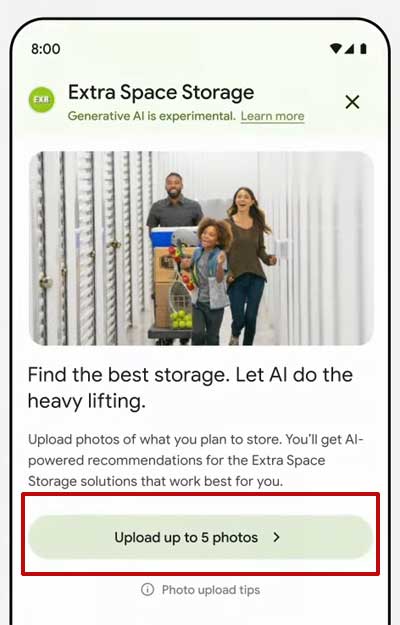
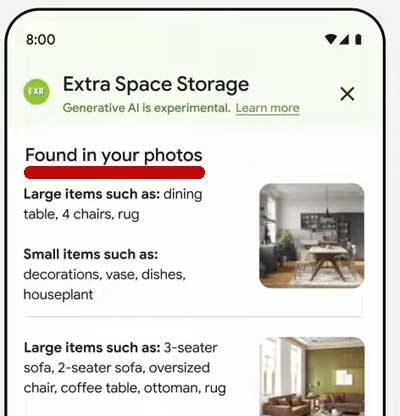
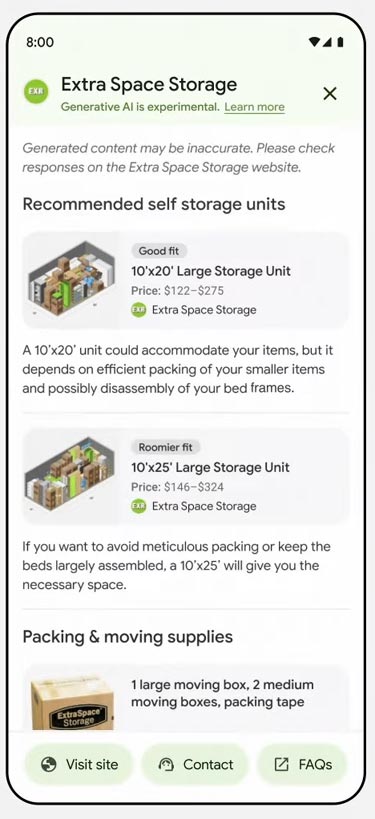
You can select and upload photos of the different rooms in your house, showing how much furniture you have, and then extra space storage with help from Google, AI generates a description of all your belongings for you to verify. You get a recommendation for the right size and type of storage unit and even how much packing supplies you need to get the job done. Then you just go to the website to complete the transaction.
And this is taking the definition of a helpful ad to the next level. It does everything but physically pick up your stuff and move it, and that is cool.”
Step 1: Search For Short Term Storage
The above screenshot shows an advertisement that when clicked takes the user to what looks like an AI-assisted search but is really an interactive advertisement.
Step 2: Upload Photos For “AI Assistance”
The above image is a screenshot of an advertisement that is presented in the context of AI-assisted search. Masking an advertisement within a different context is the same principal behind an advertorial where an advertisement is hidden in the form of an article. The phrases “Let AI do the heavy lifting” and “AI-powered recommendations” create the context of AI-search that masks the true context of an advertisement.
Step 3: Images Chosen For Uploading
The above screenshot shows how a user uploads an image to the AI-powered advertisement within the context of an AI-powered search app.
The Word “App” Masks That This Is An Ad
Above is a screenshot of how a user uploads a photo to the AI-powered interactive advertisement within the context of a visual search engine, using the word “app” to further the illusion that the user is interacting with an app and not an advertisement.
Upload Process Masks The Advertising Context
The phrase “Generative AI is experimental” contributes to the illusion that this is an AI-assisted search.
Step 4: Upload Confirmation
In step 4 the “app” advertisement is for confirming that the AI correctly identified the furniture that needs to be put into storage.
Step 5: AI “Recommendations”
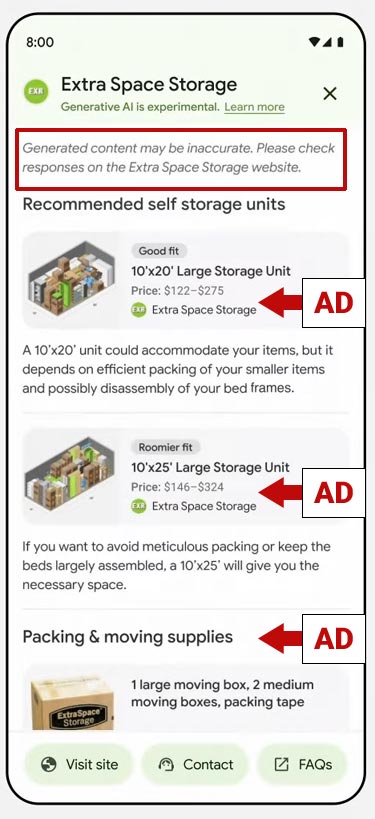
The above screenshot shows “AI recommendations” that look like search results.
The Recommendations Are Ad Units
Those recommendations are actually ad units that when clicked takes the user to the “Extra Space Storage” shopping website.
Step 6: Searcher Visits Advertiser Website
Blurring The Boundaries
What the Google keynote speaker describes is the integration of paid product suggestions into an AI assisted search. This kind of advertising is so far out there that the Googler doesn’t even call it advertising and rightfully so because what this does is blur the line between AI assisted search and advertising. At what point does a helpful AI search become just a platform for using AI to offer paid suggestions?
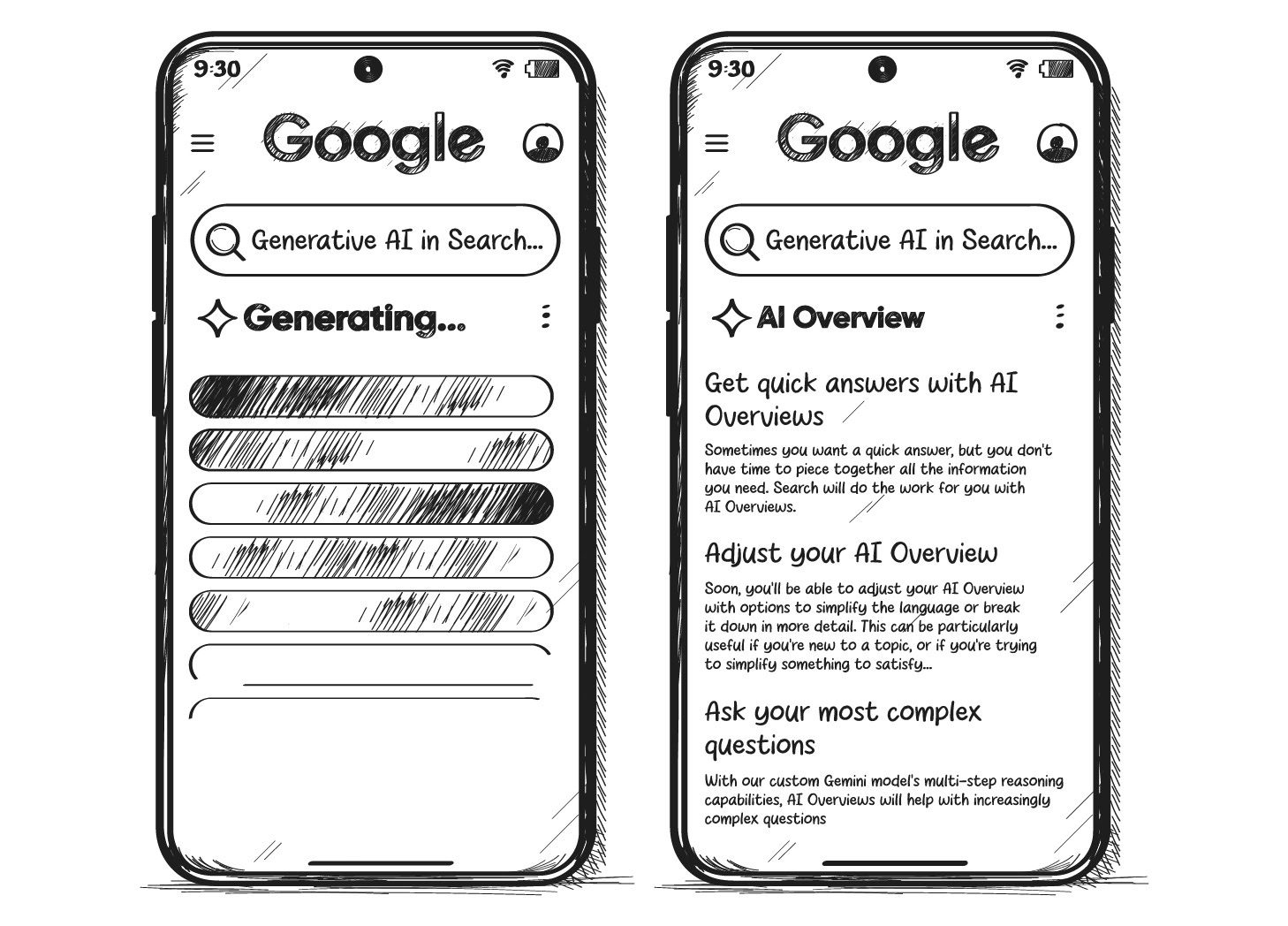
Google I/O 2024 was all about one thing: the launch of AI Overviews (short: AIOs). You might know the Gemini-powered direct answers as AI Snapshots from Google’s public beta environment Search Generative Experience. Now, they’re here, ushering in a new era for Search.
Google’s stunning first quarter and the softening of the ChatGPT hype led me to believe that Google had no reason to launch AIOs. Clearly, I was wrong.
So, why did it launch AIOs? A few possible reasons:
Optics.
Google wants to disrupt itself before someone else does.
AIOs massively improve the experience for long-tail queries.
Higher pressure from Perplexity, ChatGPT & Co. than we thought.
Google might as well give the answer itself, given the low quality of open web content.
AI results allow searchers to do the actual thing instead of reading about how to do it.
Are AIOs the end of Google Search as we know it? Yes. Is that good? Also, yes. Every tech advancement bears threats, but also opportunities.
Image Credit: Lyna ™
Boost your skills with Growth Memo’s weekly expert insights. Subscribe for free!
From Queries To Prompts
We’re entering a new era of Search because AIOs are a new playing field with new rules. They look like 18-year-old Featured Snippets on ‘roids, but they’re not. Classic ranking factors don’t apply.
Instead, Google blurs the line between searching and doing.
Liz Reid, Google’s head of Search, calls the capabilities of AIOs “agentive,” referring to their role as agents who can do things for you. Giving answers to questions is just one task of many.
In their full glory, agentive AIOs expand to what Google calls “AI-organized search results.” Instead of blue links, Gemini composes a personalized feed of local results, short videos, and forums based on your prompt.
Google plays into its competitive advantage of owning Maps, Gmail, YouTube, Chrome, and Android. AI-organized SERPs are rolling out for inspirational queries, but I don’t see why they wouldn’t appear for commercial queries as well.
Instead of giving you answers, AIOs are the gateway to AI in Google Search that does things for you. The future of Search isn’t keywords but prompts.
AIOs show up for complex queries where Google attempts “… to make an algorithmic value judgment behind the scenes as to whether it should serve up AI-generated answers or a conventional blue link to click.”
“Complex queries” sounds much like long-tail queries, where Google’s search experience has traditionally been horrendous despite “using AI for years.”
AIOs and classic search results are powered by different systems. Proof: Sites that were punished by Google penalties can still appear with content and sources in AIOs.
AIOs use multi-step reasoning, which breaks searches (prompts) down into parts, answers each one, and puts the answer back together. This approach sounds a lot like chain-of-thought prompting, where a large language model (LLM) explains each step when giving an answer.
In Search, users might be able to give feedback on single parts of an answer and fine-tune Gemini’s understanding of user intent and personalization capabilities.
New technology introduces costs and benefits. I admit, AIOs improved a lot in SGE just before they launched. I also think AIOs are a better experience for users and a long desired update to how Google works. It’s our job to figure out how they work and how to gain visibility.
Here is the good, the bad, and the ugly of AIOs.
The Good
1. Early data shows that AIOs appear for only 0.48% of desktop and 0.57% of mobile search results.
Early data shows very few AIOs in Search. (Image Credit: Kevin Indig)
Rank trackers measure SERP features based on the logged-out experience, which might be different from personalized user results.
For now, it seems you have a higher chance of getting audited by the IRS than seeing an AIO.
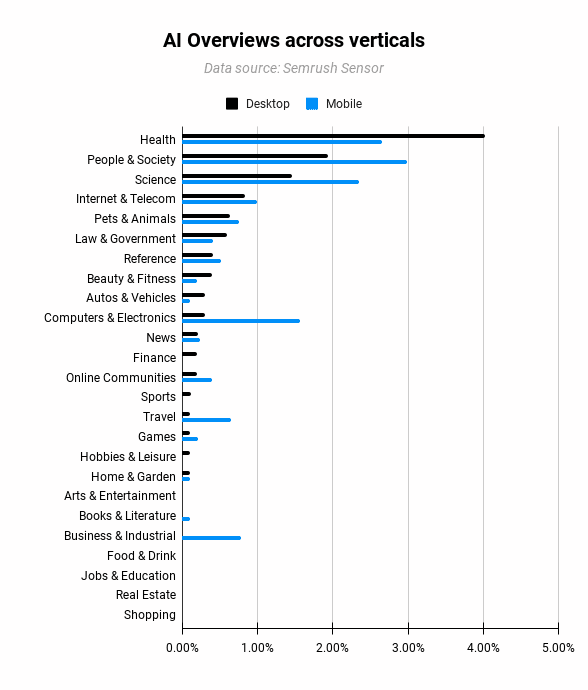
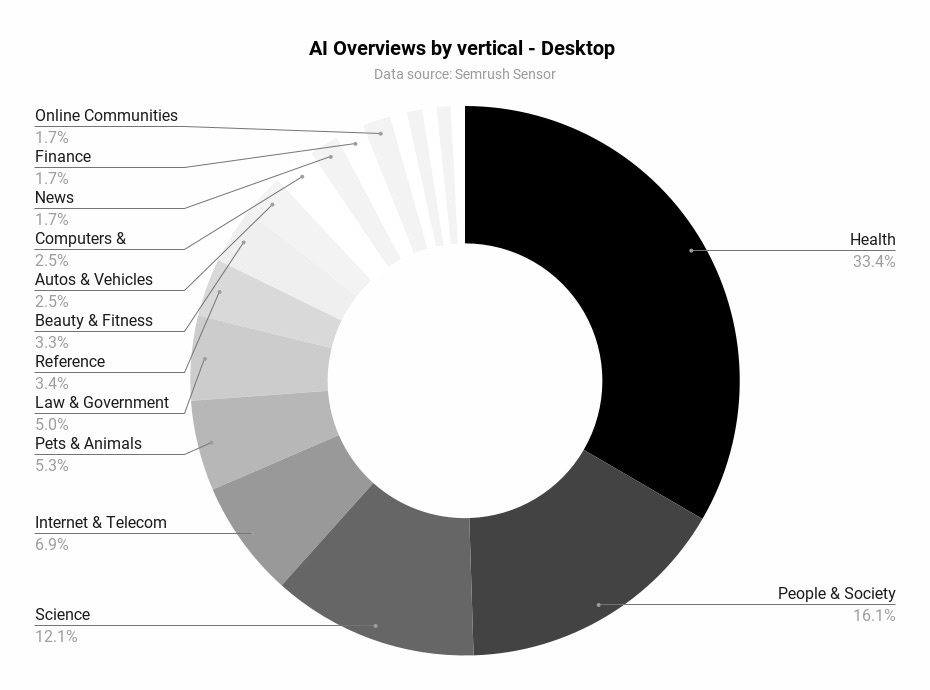
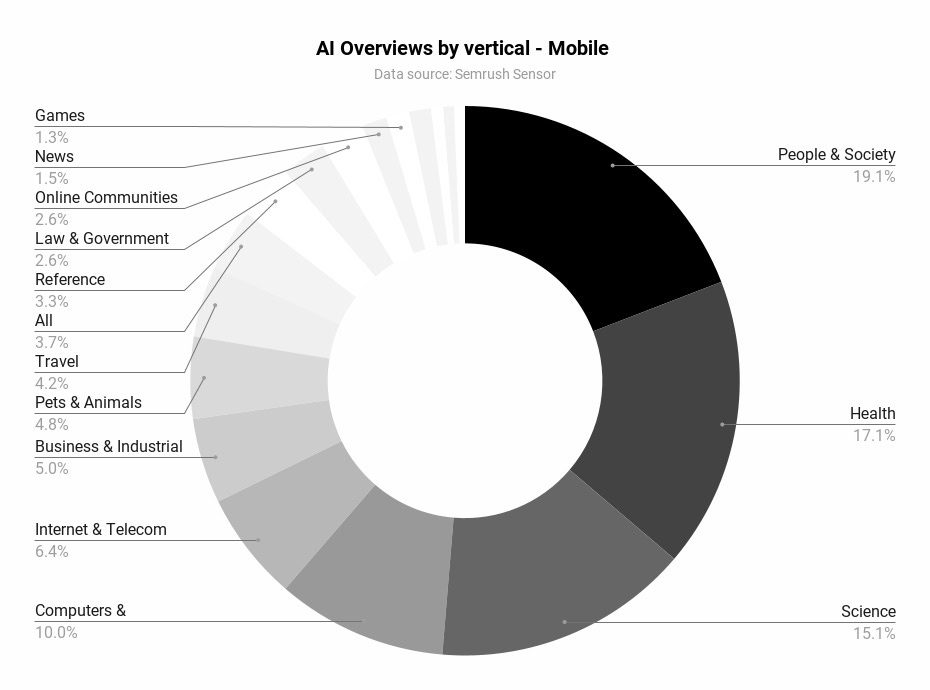
Early data shows that Google doesn’t shy away from giving AI answers in sensitive spaces like health, science, pets, and law. It’s questionable whether that’s a good way to start.
Verticals like people, beauty, and sports would forgive mistakes so much more.
The majority of AI Overviews on desktop show up in health, people & society, and science verticals. (Image Credit: Kevin Indig)
The majority of AI Overviews on mobile show up in people & society, health, and science verticals. (Image Credit: Kevin Indig)
2. What I’m most excited about: AIOs could be a massive opportunity to match searchers with the right site – better and faster.
According to Sundar Pichai, SGE led to longer queries. Assuming engagement with AIOs follow suit, longer queries reveal more about what users really want (intent), similar to how social networks measure behavior.
As a result, AIOs likely shrink organic traffic, but bring more organic conversions – more juice, less squeeze.
3. Lower cost-per-click (CPC).
CPCs are high and getting more expensive. But if AIOs and AI-organized SERPs can connect users with the right company faster, CPCs go down because fewer advertisers compete with each other for the same searcher.
Google could significantly grow monetizable queries in the long-tail queries. Win-win.
The Bad
1. Misinformation.
Examples of AIOs contaminated with misinformation or questionable answers are easy to find. It’s clear that Google tolerates some degree of misinformation or poor results.
Of course, Google needs to fix misinformation as fast as possible, especially in sensitive areas like health or law. But AIOs also magnify an uncomfortable fact: The web has been full of misinformation for a while.
Consensus is easier for some topics than others. I do have hope that AI, in general, makes it easier to identify misinformation.
We’re also facing a denominator trap in the debate about how much wrong information is okay: We don’t know how many AIOs deliver correct vs. factually wrong results. It might just be a tiny fraction, but misinformation sticks out like a sore thumb.
The same is true for good vs. bad experiences with AIOs. There is a chance the absolute majority of experiences are good.
2. Traffic loss.
Travel sites, publishers, and affiliates will suffer from the launch of AIOs, especially AI-organized SERPs cut deep into the flesh or sites that help with creative tasks, information gathering, and product reviews.
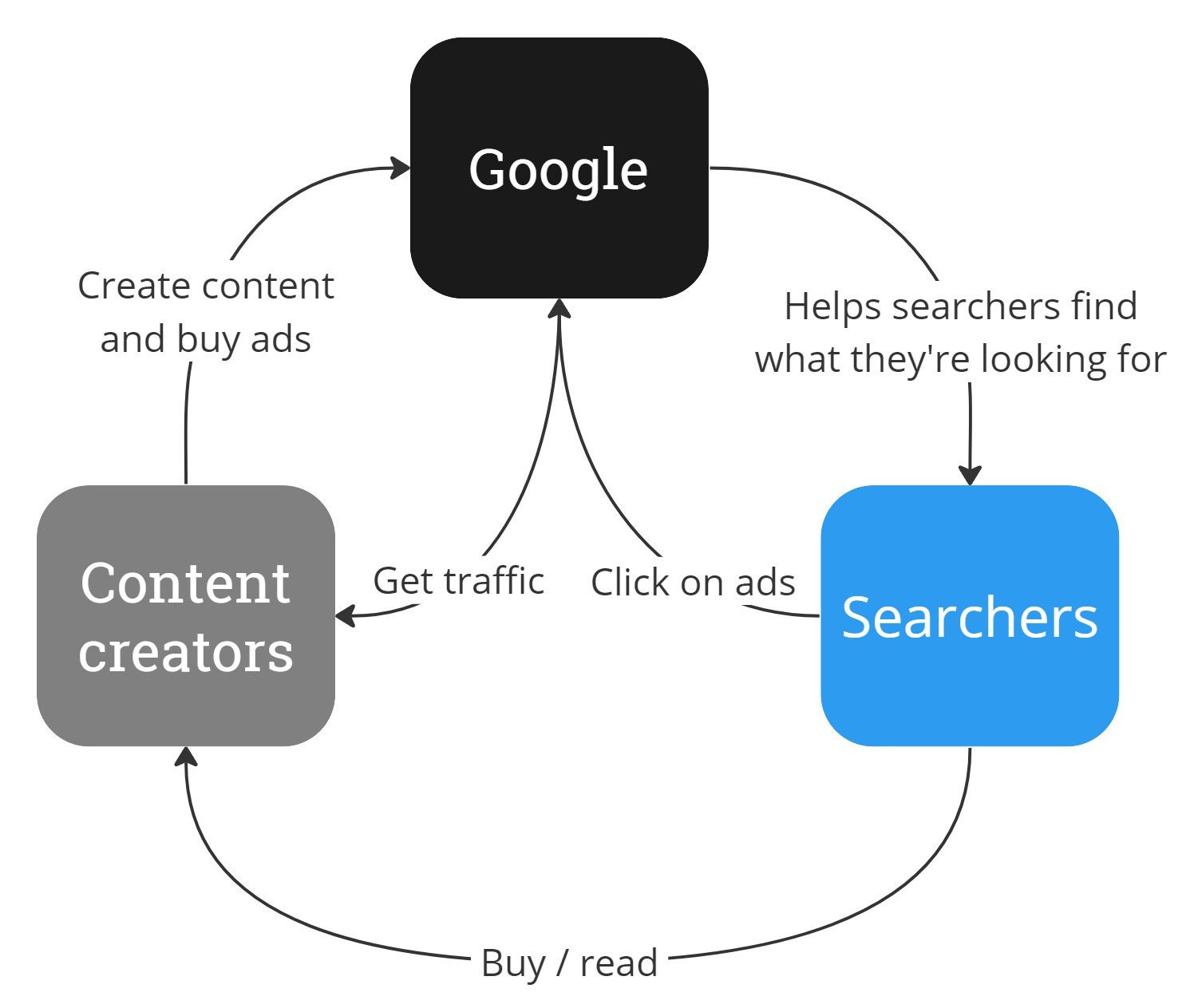
3. AIOs break the old contract between Google, searchers, and content creators.
People and companies created content that Google could run ads against and received traffic in return.
Now that anybody can recreate Wikipedia’s content with basic LLMs, Google might as well give the answer itself and send traffic only when users want to explore more.
The old contract between Google, content creators, and searchers is void. (Image Credit: Kevin Indig)
AIOs still have links, and we’ll soon figure out how much traffic they actually send out. But links in AIOs have another important mission: Create trust with users by showing where the information comes from.
The Ugly
People have already used AI Overviews billions of times through our experiment in Search Labs. They like that they can get both a quick overview of a topic and links to learn more. We’ve found that with AI Overviews, people use Search more, and are more satisfied with their results.
1. Baseless claims.
Google claims that AI Overviews lead to more searches and better satisfaction. Isn’t that a paradox? Shouldn’t a better experience result in fewer searches?
Pichai also mentioned an “increase in engagement.” Again, what does that mean?
With AI Overviews, people are visiting a greater diversity of websites for help with more complex questions. And we see that the links included in AI Overviews get more clicks than if the page had appeared as a traditional web listing for that query.
The announcement sounds like “top results get more traffic,” but what it actually means is that Google shows different sites in AIOs than in classic web search, which get more traffic since they don’t rank well in classic search but now get featured in AIOs.
2. Data loss.
The worst part about AI Overviews is that Google doesn’t provide telemetry to understand their impact. Clicks and impressions for AIOs will not be separable from classic results. I couldn’t imagine an easier way for Pichai & Co. to prove that AIOs are better for the web than letting sites measure referral traffic.
“Google CEO Sundar Pichai suggested that offering granular AI preview traffic data might encourage website owners to manipulate the system.
He believes providing detailed metrics could result in publishers designing their content specifically to game Google’s search engine, which may lead to a worse user experience.”
The future of organic visibility tracking is a combination of first-party data (Google Search Console) enhanced with third-party tools that fill the gaps.
AIOs might surface more personalized results, but we can leverage technology to solve this problem.
AI bots could be trained on human search behavior and emulate personas to search and scrape Google’s logged-in experience to give us an approximation of personalized human search results. Google is not the only one that benefits from advancements in AI.
3. No opt-out.
In classic Google fashion, you can’t really opt out of AIOs. It’s not a great look, given the bad image AI answers already have.
You can use a nosnippet meta tag but cripple yourself in the process because you also lose your description and rich snippets.
Searchers can’t opt out of AIOs either and have to install Chrome extensions to get rid of them.
Moving Forward
We will deal with this change like any other change before: SSL encryption, mobile, SERP features, Helpful Content Update (HCU), etc. Like every other time, we’ll measure, test, learn, and adapt.
Besides ranking algorithms, we now also need to stay on top of Google’s AI models because they define what’s possible for AIOs and AI-organized SERPs.
For example, Gemini 1.5 Pro will have a 2 million-token context window by the end of the year. That’s the equivalent of 2 hours of videos, 22 hours of audio, and 1.4 million words.
Capabilities matter because they impact user behavior. For example, AIOs lead to a lot more long-tail queries (as confirmed by Sundar Pichai) and voice searches.
We need to start paying attention to training tokens, multi-modal capabilities, zero-shot tasks, speed, etc., and talk about new models like new ranking algorithms.
As a result, how we talk about updates, understand them, and approach them also needs to evolve.
It’s also worth highlighting that not all Google updates are designed to be punitive; a number of updates in the past 24-36 months have been aligned with Google’s “core algorithm” and adoption of different technologies.
What Is A Core Update?
As Danny Sullivan (via the SearchLiason X account) defines, a core update is when Google makes a “notable” change to one or more of its core systems.
These updates change how inputs (our content, links, etc.) are processed and weighed.
The systems are continuously running, so once updated, they begin to process and refresh based on the new criteria.
Not all updates are reported on, as, according to Sullivan, it would just be a continuous notification feed and not helpful outside of the current narrative that Search is not a static product and is always updating.
While most confirmed updates take 3 to 4 weeks to complete (the last core update officially took 45 days at the time of writing), significant changes can usually be seen within the first 24-48 hours of rollout.
During the rollout period, you should expect volatility and fluctuations, but from experience, the “danger zone” for the most trafficked and searched-for queries is in the first couple of days.
It’s also key to remember that not all losses in traffic and rankings are related to updates.
As the Google Dance is now a thing of memory and Google processes in real time, changes in your performance could be due to your competitors’ efforts and improvements in their value propositions—such as improving content or benefitting from valuable press coverage.
When this happens, Google tends to perform keyword tests and try different websites in different positions to gain user feedback before establishing a “new” more stable results page.
This can be frustrating, but it further affirms that SEO isn’t a “one and done” activity, and refining and proving value proposition for specific search queries is an ongoing exercise.
Unfortunate Timings With Transformation Projects
As core updates aren’t predictable, many websites undergo a major transformation at the same time an update is announced.
Anecdotally, these tend to be ongoing transformation projects, such as migrations that tend to accidentally coincide with core updates.
Migrations themselves can take time to complete and be processed by Google, so adding the complexity of the unknown change variables makes it harder to discern if performance changes (or lags in returning to previous performance) are caused by the migration processing or the core update.
Recovering From An Update
While it is possible to recover from an update before the next broad core updates are released, most sites tend to see the biggest changes (and recoveries) during subsequent updates – if they have better aligned their content with what Google is looking for:
“Content that was impacted in Search or Discover by one might not recover—assuming improvements have been made—until the next broad core update is released.”
The same Google document also outlines another truth: Making improvements doesn’t guarantee recovery if “more deserving content” exists, as Google will continue to rank it highly within its search results.
Recovering from a Google update typically means improving one (or more) of the following:
Recoveries can look different because there are different types.
Some recoveries are fast, and due to the recovery activities you’ve been implementing, traffic is almost back to pre-update levels, if not higher.
This usually happens when a search engine update revises and amends a variable that was changed in a previous update.
Other recoveries take longer.
This means Google has likely seen positive user data from the variables changed in the previous update, and the impetus is on you to better align your website and content with what Google is looking to reward.
Before getting to phase one, asking questions in this initial “phase zero” can save a lot of time and concerns across business stakeholders:
Where are we seeing the traffic drop?
If via a third-party tool, is this consistent with our proprietary data?
Has the third-party tool updated its own data sets and traffic forecasts?
If in our proprietary data, are all tracking codes implemented and triggering correctly?
Answering these questions first can prevent resource wastage and potentially bring calm back to the situation.
Phase One: Assess The Impact
By identifying which pages have lost traffic you can establish the drop affects only certain pages or the entire site, you narrow down your scope of where to look next in diagnosing the potential causes for your traffic drop.
Data collection: The first step is to collect and pool as much data as possible that is available to you, ideally at the keyword and URL level. This can come from your Google Search Console, Google Analytics, and other analytics platforms and data sources.
Data segmentation: Segment your data by page cluster, keyword cluster, demographic, persona, device, or your own custom categorization to determine which areas have been most affected.
Data comparison: Comparing against historical data is vital to understanding any potential correlations between seasonality and previous traffic/buyer behavior.
Read more:
Phase Two: Review The SERPs
Evaluating what has changed in the search engine results pages (SERPs) for your primary search terms and term clusters is an important next step.
When looking at the SERPs, you need to be objective, remove any biases, and avoid thinking things like “my content is better than that,” as the data currently suggests otherwise. This data collection is your first part in performing a GAP analysis.
How much has Google changed the SERPs?
Is Google now preferring websites targeting a different search intent?
Is Google rewarding websites that are a different source type?
Have your direct competitors been affected in a positive/negative way?
Has Google introduced new SERP features?
Has Google removed SERP features?
Is Google double-listing any domains in the top 10?
Now that you have the data from reviewing the SERPs, you can perform a GAP analysis on your own website.
Over the years, I have found two areas important to examine in depth: evaluating your content’s depth and relevance and how aligned the content is to the search intent and user expectations for the query.
Comprehensive Coverage: Assess whether your content fully addresses the topics at hand. It should provide all the necessary information that a user might be looking for when searching for the query and provide relevant supporting content and logical next steps for the user on their various journey paths.
Data & Information Accuracy: Make sure that the content is up-to-date with the latest information, especially in industries that have high levels of interest or rely heavily on statistics. Updating statistical data tables and examples to the most recent available data helps build the integrity and validity of the content in the eyes of users
Beneficial Purpose Alignment: Each piece of content has a beneficial purpose. There is no right or wrong beneficial purpose, but it should align with user expectations. For example, an informational piece of content titled “the best X software for Y,” which unsubtly positions your company as number one with a review three times the length of the others, doesn’t have a beneficial purpose that aligns with the keyword intent.
Now that you’ve collected and analyzed all your data and understand the differences between your content and what Google is currently rewarding, you can begin to devise a strategy to address these differences.
Defining the strategy first is crucial, as it allows you to communicate expectations around activities and your recovery plan with wider business stakeholders.
From experience, far too many fall into the trap of immediately jumping to tactics (as they differ greatly).
Strategies are designed to provide a broad framework and guide decision-making over the longer term, ensuring that all efforts are aligned with the business’s core objectives.
This aligns your SEO efforts with the business objectives and helps steer conversations away from metrics such as rankings and keywords towards more important business metrics such as leads and revenue.
Google won’t tell you why your rankings drop. Understanding the reasons for a reduction in your traffic or SERP performance requires an objective look at your website.
You must abandon your assumptions about your content and website’s worthiness to be at the top and ask yourself: do my pages deserve to rank?
Once you have a clear assessment, you can move forward. Recovering from a sudden ranking drop takes time, patience, and effort. Good information is your best tool.
Speakers at Google’s Marketing Live event demonstrated how they will utilize user search queries and AI Overviews content to show interactive shopping ads that will push organic search results even lower, stating that Google is “focused on opening up new opportunities for your business.”
Google: We’re Not Building A Better Search Engine
The first speaker, Philipp Schindler, SVP & Chief Business Officer at Google, said out loud what Googlers normally don’t when he said that the purpose of search results is to show advertising.
He made the remark in the context of a new AI video tool that will help YouTube creators make more content.
At the 18:19 minute mark of the event, Schindler boasted:
“We’ve been collaborating with some really talented film makers, musicians and artists, and the results have been simply incredible. Soon we’ll bring video to shorts, opening up a whole new world of creative possibilities for you and your brands. Just imagine every creator with the power of AI in their pocket.
So what does all of this mean for you? More creators creating more quality content attracts more viewers, which means more reach, engagement and ROI for you. We’re not just building a better search engine or a better YouTube. We’re focused on opening up new opportunities for your business.”
The statement that Google is using AI Overviews and Search to build reach and ROI for advertisers is not the only one. The next two speakers made the same point.
Search And Shopping Ads In AI Overviews
The next speaker was Vidhya Srinivasan, VP/GM, Advertising at Google. She begins by describing how search experiences will drive traffic to websites. Then quickly switches gear to show how interactive advertising will push organic search listings literally beyond the view of users who are making the search queries.
At the 30 minute mark of the video, Srinivasan explained:
“AI overviews will appear in search results when they are particularly helpful beyond what search offers today. As we continue to test and evolve the search experience, we are going to stay super focused on sending valuable traffic to publishers and creators. But then, more avenues for user exploration leads to more choice and more choice leads to more opportunities for advertisers.
You may have noticed that we already show ads above and below AI overviews. These ads are matched to the user’s search query. We will now start testing, Search and Shopping ads ads in AI overviews for users in the US.
What is also new with this is we are going to match these ads not just to the query context, but also to the information within the AI Overviews. And, as always, ads will be clearly labeled.”
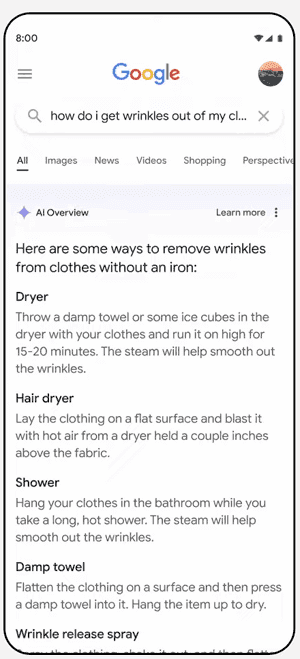
1. AI Overviews – No Organic Listings
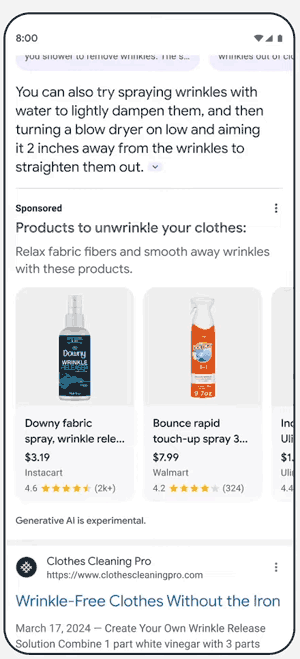
2. Scroll Down For Shopping Ads
She next went on to describe an example of wrinkled clothes while traveling and turning to Google Search to find ways to prevent the wrinkles. She shows a search activity for travel hacks and shows how organic search results are pushed beneath the AI Overviews feature and new Search and Shopping ads that contain product images and pop out far more than any search results do.
She explained how the new AI Overviews shopping ads will be there to convert searchers:
“With the AI overview, I quickly found some common travel hacks that sounded promising. As I browsed the many options that showed up, I found a really nice fix, a wrinkle release spray that I’d never heard of before. So perfect. I want to try that.
Now, with this feature, I can just click on this ad right away, right there, and buy it.
So as you can see, we’re just making it easier and faster for consumers so that they can take action right away. So this is just one example of how we are using Gen AI. There are many more, and we’re going to start with more applications in search ads.”
3. Targeted Ads Based On AI Overviews
Google Search Is The Bait
Google search engineers are using the most advanced technology and data to create the most useful search results of any time in Google’s history, this is the best it’s ever been. But according to the people who are really in charge at Google, the purpose of Search is not “to organize the world’s information and make it universally accessible and useful” but to build more “reach, engagement and ROI” for advertisers. Sam Altman was right to call what Google is doing dystopian.
SEOs Were Social Engineered
Social engineering is the management of people’s behavior in order to get them to perform a certain way. Google got a huge chunk of the web ecosystem bought into concepts like Core Web Vitals and also Experience, Expertise, Authoritativeness and Trustworthiness in order to satisfy users that Google apparently never intended for them.
It’s not the fault of the Googlers who put their hearts into perfecting search. They do a good job. But it’s clear that Google’s mission is no longer to make information accessible and useful. Perhaps what can only feel like a dystopian horror, Google succeeded in social-engineering the search community and publishers to focus on creating helpful content so that those on the advertising side can use it to build more ROI for advertisers.
It’s not just SEOs and publishers that were used for the benefit of advertisers.
While often overlooked, these HTML tags provide a hierarchical structure to content, enhancing readability and navigation for human visitors.
At the same time, header tags offer semantic signals that help search engines better understand context and key topics.
Google’s guidance reinforces the need to use header tags strategically.
John Mueller, a Google Search Advocate, has stated that header elements are a “really strong signal” that informs Google’s understanding of a page’s topics.
As Google emphasizes rewarding high-quality user experiences, optimizing header tags presents an opportunity to align with best practices for human visitors and search crawlers.
This article outlines how to use header tags, from enhancing content structure and scannability to targeting opportunities for featured snippet displays.
We also explore techniques for incorporating relevant keywords and maintaining consistent formatting.
By implementing these recommendations, websites can provide a better experience while potentially boosting visibility on search engine results pages (SERPs).
What Is A Header Tag?
Header tags are HTML tags that tell a browser what styling it should use to display a piece of text on a webpage.
If we looked up the HTML for the heading above, it’d look something like this:
What is a Header Tag?
Like headings in print content, header tags are used to title or introduce the content below them. HTML header tags follow a hierarchy from
to
.
H1 tags denote the most important text, such as the central theme or title.
H2 and H3 tags are commonly used as subheadings.
H4, H5, and H6 tags provide further structure within those subsections.
Header tags are helpful for users and search engines. For your users, they give them a preview of the content they’re about to read.
For search engines like Google, header tags provide context and a hierarchy for your page. Think of header tags as chapter titles in a book.
Give them a quick scan, and you’ll have a pretty good idea of what it’s about.
How Many Header Tags Are Supported?
HTML supports six levels of header tags, ranging from
to
.
The
tag is typically used for the main heading or title of a page, while
and
tags are commonly employed for subheadings.
The remaining tags,
,
, and
, can provide further structure within subsections.
Header tags help create a logical structure for your content, making it easier for users and search engines to navigate.
Treat your H1 as the main title, H2s as chapters, and H3s to H6s as subsections within each chapter.
When planning your article or landing page, consider the main ideas you want your visitors to take away. These main ideas should form the basis of your header tags and help you create a clear outline.
2. Break Up Blocks Of Text With Subheadings
Break up long blocks of text with relevant subheadings to enhance readability. This makes your content more user-friendly and helps search engines identify covered topics.
A scannable article is positioned to perform well in search engines because Google rewards user-friendly content.
Additionally, scannable articles are commonly shared on social media, which can increase the likelihood of earning natural backlinks.
3. Include Keywords In Your Header Tags
Include your target keywords in header tags where appropriate, but avoid overusing them. Focus on creating informative and engaging headers that accurately reflect the content below them.
While keywords are essential, it’s important not to force them in at the expense of readability.
Google uses header tags to gather context for your page, so incorporate keywords naturally.
Always prioritize creating value and avoid keyword stuffing, which can lead to a poor experience and potential penalties.
4. Optimize For Featured Snippets
Carefully crafted header tags can increase your chances of winning featured snippets.
Here’s how.
Paragraph Featured Snippets
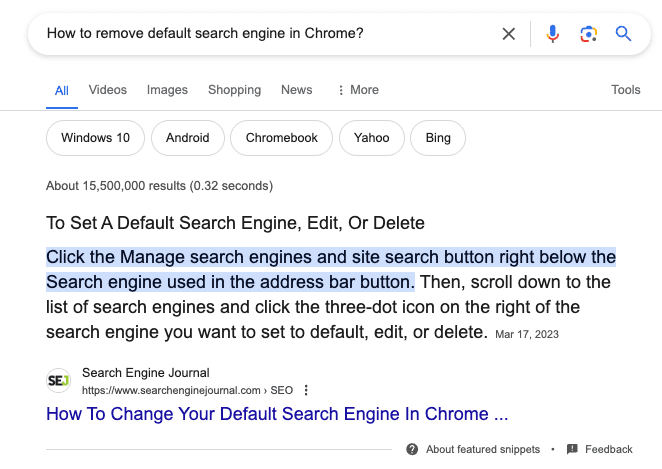
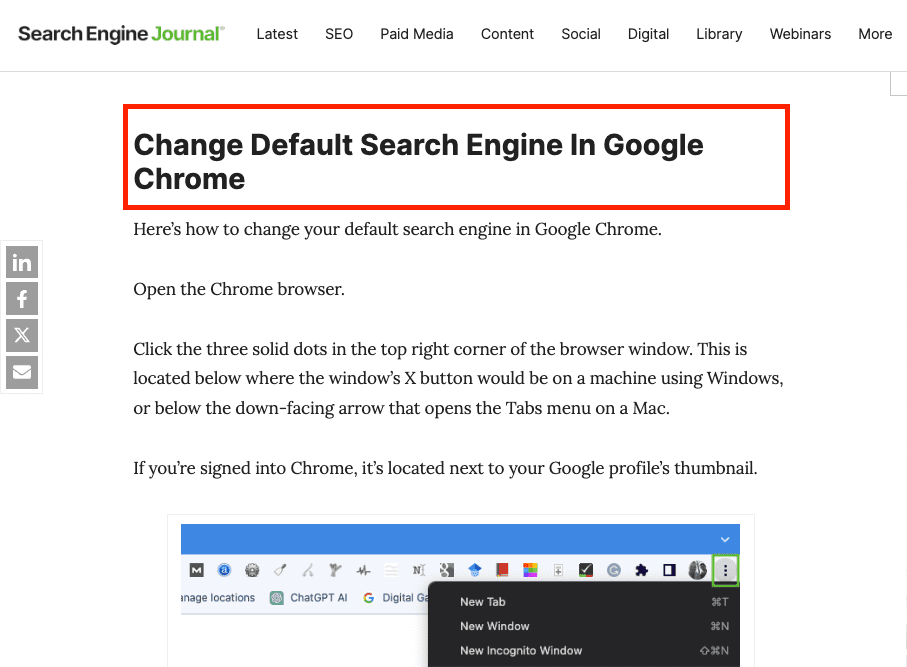
To optimize for paragraph-featured snippets, identify a relevant long-tail keyword and use it in your H2.
Then, directly below the H2, provide a clear and concise answer to the query, placing the text within
paragraph tags.
This structure helps Google identify and extract the information it needs.
Screenshot from search for [how to remove default search engine in chrome], Google, April 2024
Screenshot from search for [how to remove default search engine in chrome], Google, April 2024
List Featured Snippets
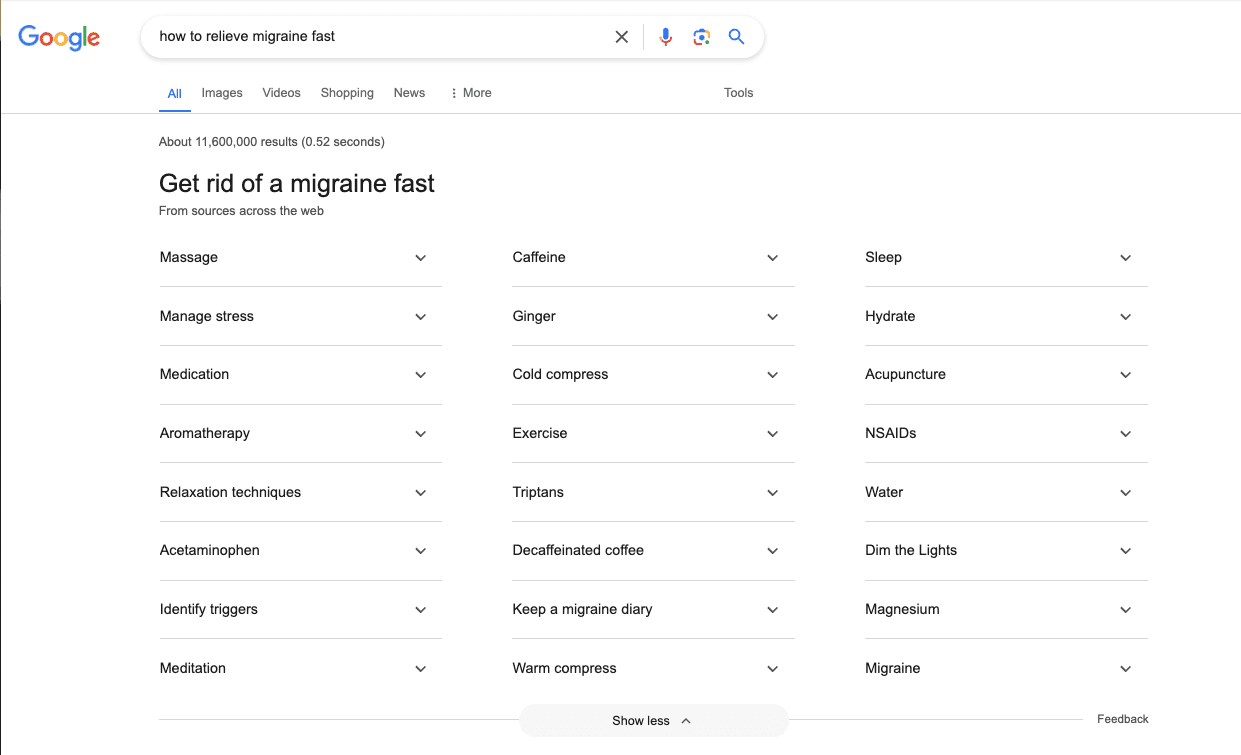
To optimize for list featured snippets, use subheadings (H2 to H6) to outline different items or steps in a process.
Google can pull from these subheadings to create a bulleted or numbered list in the featured snippet, increasing your visibility and driving more traffic to your site.
Here’s an example.
When you search for [how to relieve migraine fast], Google creates a list of answers using the H2s from this WebMD article.
Screenshot from search for [how to relieve migraine fast], Google, April 2024
While multiple H1s are technically allowed, using only one H1 per page is best. This maintains a clear hierarchy and avoids confusion for users and search engines.
Using multiple H1s can make your page appear disorganized. Instead, reserve the H1 tag for your main title and use H2 to H6 tags for subheadings.
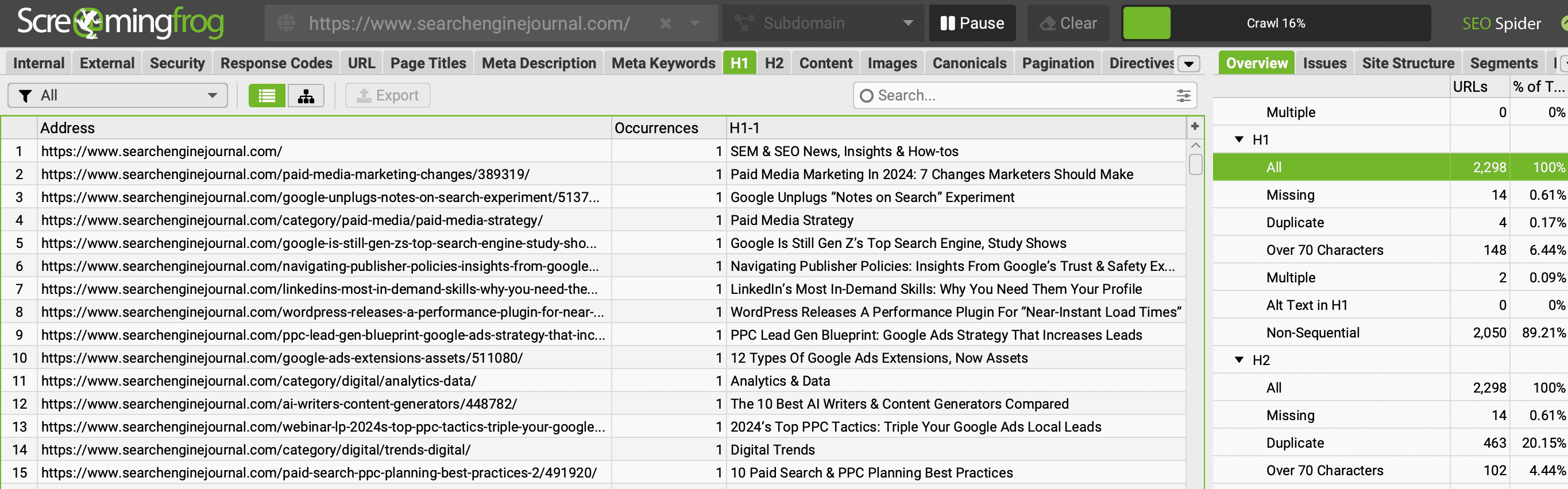
To ensure your site doesn’t have multiple H1s, run your domain through a crawler tool like Screaming Frog and check the H1 tab to identify any pages with missing or numerous H1s.
Screenshot from Screaming Frog, April 2024
The same report is available for H2s.
6. Keep Your Header Tags Consistent
Ensure your header tags follow a consistent style and format throughout your website.
This includes using the same case (title or sentence case), keeping them concise, and limiting their length to around 70 characters.
Consistency in your header tags contributes to a better experience and helps establish a cohesive brand image.
When deciding on a format, consider your target audience and the tone of your content. Once you’ve chosen a style, apply it consistently across all your pages.
In addition to maintaining a consistent format, keep your header tags concise and to the point.
Treat them like mini-titles for the following section of text, and avoid using them to stuff keywords or write lengthy paragraphs.
7. Make Your Header Tags Interesting
Write interesting, engaging header tags that entice readers to continue reading your content.
Pay special attention to your H1, as it can decide whether visitors stay on your page or bounce back to the search results.
A compelling H1 should communicate the main topic of your page and align with the user’s search intent.
Take the time to brainstorm and refine your header tags, ensuring they accurately reflect the content and entice users to keep reading.
Why Header Tags Are Important For SEO
Header tags play a role in SEO by enhancing user experience, providing context to search engines, and increasing the chances of securing featured snippets.
This can potentially lead to better rankings, increased visibility, and higher engagement rates.
Descriptive headings allow readers to skim and jump to relevant sections.
For search crawlers, headers give semantic cues about the context and priority of page content.
Don’t underestimate the SEO power of header tags. Make them a top priority when optimizing your content.
This post was sponsored by DebugBear. The opinions expressed in this article are the sponsor’s own.
Keeping your website fast is important for user experience and SEO.
The Core Web Vitals initiative by Google provides a set of metrics to help you understand the performance of your website.
The three Core Web Vitals metrics are:
This post focuses on the recently introduced INP metric and what you can do to improve it.
How Is Interaction To Next Paint Measured?
INP measures how quickly your website responds to user interactions – for example, a click on a button. More specifically, INP measures the time in milliseconds between the user input and when the browser has finished processing the interaction and is ready to display any visual updates on the page.
Your website needs to complete this process in under 200 milliseconds to get a “Good” score. Values over half a second are considered “Poor”. A poor score in a Core Web Vitals metric can negatively impact your search engine rankings.
Google collects INP data from real visitors on your website as part of the Chrome User Experience Report (CrUX). This CrUX data is what ultimately impacts rankings.
Image created by DebugBear, May 2024
How To Identify & Fix Slow INP Times
The factors causing poor Interaction to Next Paint can often be complex and hard to figure out. Follow this step-by-step guide to understand slow interactions on your website and find potential optimizations.
1. How To Identify A Page With Slow INP Times
Different pages on your website will have different Core Web Vitals scores. So you need to identify a slow page and then investigate what’s causing it to be slow.
By default, page URLs are grouped into URL groups that cover many different pages. Be careful here – not all pages might have the problem that Google is reporting. Instead, click on each URL group to see if URL-specific data is available for some pages and then focus on those.
Screenshot of Google Search Console, May 2024
Using A Real-User Monitoring (RUM) Service
Google won’t report Core Web Vitals data for every page on your website, and it only provides the raw measurements without any details to help you understand and fix the issues. To get that you can use a real-user monitoring tool like DebugBear.
Real-user monitoring works by installing an analytics snippet on your website that measures how fast your website is for your visitors. Once that’s set up you’ll have access to an Interaction to Next Paint dashboard like this:
Screenshot of the DebugBear Interaction to Next Paint dashboard, May 2024
You can identify pages you want to optimize in the list, hover over the URL, and click the funnel icon to look at data for that specific page only.
Image created by DebugBear, May 2024
2. Figure Out What Element Interactions Are Slow
Different visitors on the same page will have different experiences. A lot of that depends on how they interact with the page: if they click on a background image there’s no risk of the page suddenly freezing, but if they click on a button that starts some heavy processing then that’s more likely. And users in that second scenario will experience much higher INP.
To help with that, RUM data provides a breakdown of what page elements users interacted with and how big the interaction delays were.
Screenshot of the DebugBear INP Elements view, May 2024
The screenshot above shows different INP interactions sorted by how frequent these user interactions are. To make optimizations as easy as possible you’ll want to focus on a slow interaction that affects many users.
In DebugBear, you can click on the page element to add it to your filters and continue your investigation.
3. Identify What INP Component Contributes The Most To Slow Interactions
Input Delay: Background code that blocks the interaction from being processed.
Processing Time: The time spent directly handling the interaction.
Presentation Delay: Displaying the visual updates to the screen.
You should focus on which INP component is the biggest contributor to the slow INP time, and ensure you keep that in mind during your investigation.
Screenshot of the DebugBear INP Components, May 2024
In this scenario, Processing Time is the biggest contributor to the slow INP time for the set of pages you’re looking at, but you need to dig deeper to understand why.
High processing time indicates that there is code intercepting the user interaction and running slow performing code. If instead you saw a high input delay, that suggests that there are background tasks blocking the interaction from being processed, for example due to third-party scripts.
4. Check Which Scripts Are Contributing To Slow INP
Sometimes browsers report specific scripts that are contributing to a slow interaction. Your website likely contains both first-party and third-party scripts, both of which can contribute to slow INP times.
A RUM tool like DebugBear can collect and surface this data. The main thing you want to look at is whether you mostly see your own website code or code from third parties.
Screenshot of the INP Primary Script Domain Grouping in DebugBear, May 2024
Tip: When you see a script, or source code function marked as “N/A”, this can indicate that the script comes from a different origin and has additional security restrictions that prevent RUM tools from capturing more detailed information.
This now begins to tell a story: it appears that analytics/third-party scripts are the biggest contributors to the slow INP times.
5. Identify Why Those Scripts Are Running
At this point, you now have a strong suspicion that most of the INP delay, at least on the pages and elements you’re looking at, is due to third-party scripts. But how can you tell whether those are general tracking scripts or if they actually have a role in handling the interaction?
DebugBear offers a breakdown that helps see why the code is running, called the INP Primary Script Invoker breakdown. That’s a bit of a mouthful – multiple different scripts can be involved in slowing down an interaction, and here you just see the biggest contributor. The “Invoker” is just a value that the browser reports about what caused this code to run.
Screenshot of the INP Primary Script Invoker Grouping in DebugBear, May 2024
The following invoker names are examples of page-wide event handlers:
onclick
onmousedown
onpointerup
You can see those a lot in the screenshot above, which tells you that the analytics script is tracking clicks anywhere on the page.
In contrast, if you saw invoker names like these that would indicate event handlers for a specific element on the page:
.load_more.onclick
#logo.onclick
6. Review Specific Page Views
A lot of the data you’ve seen so far is aggregated. It’s now time to look at the individual INP events, to form a definitive conclusion about what’s causing slow INP in this example.
Real user monitoring tools like DebugBear generally offer a way to review specific user experiences. For example, you can see what browser they used, how big their screen is, and what element led to the slowest interaction.
Screenshot of a Page View in DebugBear Real User Monitoring, May 2024
As mentioned before, multiple scripts can contribute to overall slow INP. The INP Scripts section shows you the scripts that were run during the INP interaction:
Screenshot of the DebugBear INP script breakdown, May 2024
You can review each of these scripts in more detail to understand why they run and what’s causing them to take longer to finish.
7. Use The DevTools Profiler For More Information
Real user monitoring tools have access to a lot of data, but for performance and security reasons they can access nowhere near all the available data. That’s why it’s a good idea to also use Chrome DevTools to measure your page performance.
To debug INP in DevTools you can measure how the browser processes one of the slow interactions you’ve identified before. DevTools then shows you exactly how the browser is spending its time handling the interaction.
Screenshot of a performance profile in Chrome DevTools, May 2024
How You Might Resolve This Issue
In this example, you or your development team could resolve this issue by:
Working with the third-party script provider to optimize their script.
Removing the script if it is not essential to the website, or finding an alternative provider.
Adjusting how your own code interacts with the script
How To Investigate High Input Delay
In the previous example most of the INP time was spent running code in response to the interaction. But often the browser is already busy running other code when a user interaction happens. When investigating the INP components you’ll then see a high input delay value.
This can happen for various reasons, for example:
The user interacted with the website while it was still loading.
A scheduled task is running on the page, for example an ongoing animation.
The page is loading and rendering new content.
To understand what’s happening, you can review the invoker name and the INP scripts section of individual user experiences.
Screenshot of the INP Component breakdown within DebugBear, May 2024
In this screenshot, you can see that a timer is running code that coincides with the start of a user interaction.
The script can be opened to reveal the exact code that is run:
Screenshot of INP script details in DebugBear, May 2024
The source code shown in the previous screenshot comes from a third-party user tracking script that is running on the page.
At this stage, you and your development team can continue with the INP workflow presented earlier in this article. For example, debugging with browser DevTools or contacting the third-party provider for support.
How To Investigate High Presentation Delay
Presentation delay tends to be more difficult to debug than input delay or processing time. Often it’s caused by browser behavior rather than a specific script. But as before, you still start by identifying a specific page and a specific interaction.
You can see an example interaction with high presentation delay here:
Screenshot of the an interaction with high presentation delay, May 2024
You see that this happens when the user enters text into a form field. In this example, many visitors pasted large amounts of text that the browser had to process.
Here the fix was to delay the processing, show a “Waiting…” message to the user, and then complete the processing later on. You can see how the INP score improves from May 3:
Screenshot of an Interaction to Next Paint timeline in DebugBear, May 2024
Get The Data You Need To Improve Interaction To Next Paint
Screenshot of the DebugBear Core Web Vitals dashboard, May 2024
Google’s CrUX data is aggregated over a 28-day period, which means that it’ll take a while before you notice a regression. With real-user monitoring you can see the impact of website changes right away and get alerted automatically when there’s a big change.
DebugBear monitors lab data, CrUX data, and real user data. That way you have all the data you need to optimize your Core Web Vitals in one place.
This article has been sponsored by DebugBear, and the views presented herein represent the sponsor’s perspective.
Ready to start optimizing your website? Sign up for DebugBear and get the data you need to deliver great user experiences.