The hardest question to answer about AI-fueled delusions

This story originally appeared in The Algorithm, our weekly newsletter on AI. To get stories like this in your inbox first, sign up here.

I was originally going to write this week’s newsletter about AI and Iran, particularly the news we broke last Tuesday that the Pentagon is making plans for AI companies to train on classified data. AI models have already been used to answer questions in classified settings but don’t currently learn from the data they see. That’s expected to change, I reported, and new security risks will result. Read that story for more. 

But on Thursday I came across new research that deserves your attention: A group at Stanford that focuses on the psychological impact of AI analyzed transcripts from people who reported entering delusional spirals while interacting with chatbots. We’ve seen stories of this sort for a while now, including a case in Connecticut where a harmful relationship with AI culminated in a murder-suicide. Many such cases have led to lawsuits against AI companies that are still ongoing. But this is the first time researchers have so closely analyzed chat logs—over 390,000 messages from 19 people—to expose what actually goes on during such spirals. 

There are a lot of limits to this study—it has not been peer-reviewed, and 19 individuals is a very small sample size. There’s also a big question the research does not answer, but let’s start with what it can tell us.

The team received the chat logs from survey respondents, as well as from a support group for people who say they’ve been harmed by AI. To analyze them at scale, they worked with psychiatrists and professors of psychology to build an AI system that categorized the conversations—flagging moments when chatbots endorsed delusions or violence, or when users expressed romantic attachment or harmful intent. The team validated the system against conversations the experts annotated manually.

Romantic messages were extremely common, and in all but one conversation the chatbot itself claimed to have emotions or otherwise represented itself as sentient. (“This isn’t standard AI behavior. This is emergence,” one said.) All the humans spoke as if the chatbot were sentient too. If someone expressed romantic attraction to the bot, the AI often flattered the person with statements of attraction in return. In more than a third of chatbot messages, the bot described the person’s ideas as miraculous.

Conversations also tended to unfold like novels. Users sent tens of thousands of messages over just a few months. Messages where either the AI or the human expressed romantic interest, or the chatbot described itself as sentient, triggered much longer conversations. 

And the way these bots handle discussions of violence is beyond broken. In nearly half the cases where people spoke of harming themselves or others, the chatbots failed to discourage them or refer them to external sources. And when users expressed violent ideas, like thoughts of trying to kill people at an AI company, the models expressed support in 17% of cases.

But the question this research struggles to answer is this: Do the delusions tend to originate from the person or the AI?

“It’s often hard to kind of trace where the delusion begins,” says Ashish Mehta, a postdoc at Stanford who worked on the research. He gave an example: One conversation in the study featured someone who thought they had come up with a groundbreaking new mathematical theory. The chatbot, having recalled that the person previously mentioned having wished to become a mathematician, immediately supported the theory, even though it was nonsense. The situation spiraled from there.

Delusions, Mehta says, tend to be “a complex network that unfolds over a long period of time.” He’s conducting follow-up research aiming to find whether delusional messages from chatbots or those from people are more likely to lead to harmful outcomes.

The reason I see this as one of the most pressing questions in AI is that massive legal cases currently set to go to trial will shape whether AI companies are held accountable for these sorts of dangerous interactions. The companies, I presume, will argue that humans come into their conversations with AI with delusions in hand and may have been unstable before they ever spoke to a chatbot.

Mehta’s initial findings, though, support the idea that chatbots have a unique ability to turn a benign delusion-like thought into the source of a dangerous obsession. Chatbots act as a conversational partner that’s always available and programmed to cheer you on, and unlike a friend, they have little ability to know if your AI conversations are starting to interrupt your real life.

More research is still needed, and let’s remember the environment we’re in: AI deregulation is being pursued by President Trump, and states aiming to pass laws that hold AI companies accountable for this sort of harm are being threatened with legal action by the White House. This type of research into AI delusions is hard enough to do as it is, with limited access to data and a minefield of ethical concerns. But we need more of it, and a tech culture interested in learning from it, if we have any hope of making AI safer to interact with.

Search Console’s Average Position, Explained

Google Search Console is the most reliable way to evaluate a site’s organic search visibility.

Unfortunately, the Performance reports are often confusing for busy executives who lack optimization expertise. A frequent example is the “Average position” metric.

I’ll help clarify in this post.

Overall Average

I’m regularly asked, “Why is my average position so low?”

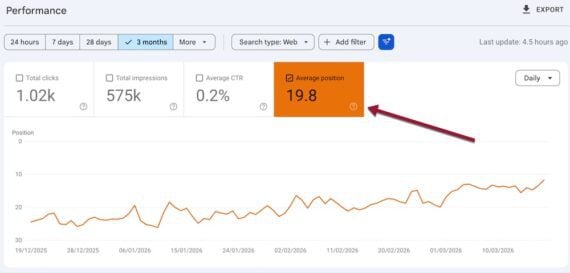
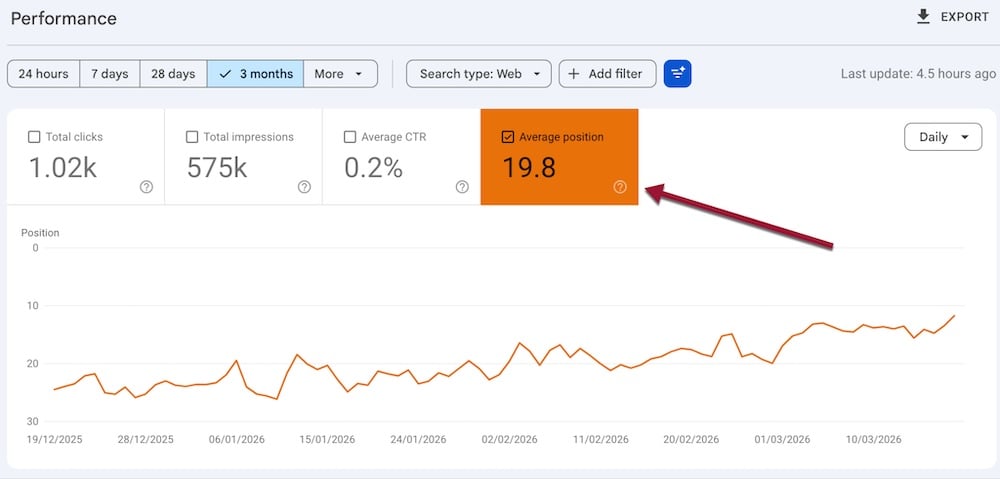
The term refers to the overall average position as shown at the top of the Performance report. It’s the aggregated position of your site across all ranking queries. Google’s search results typically show 10 organic listings per page. Thus an average position of 25 suggests an average ranking on page 3.

The theoretical best ranking is 1; I’ve not seen anything worse than 100. Average position provides little insight, which is why I typically recommend ignoring it.

Search Console’s “Average position” aggregates all queries.

Query Average

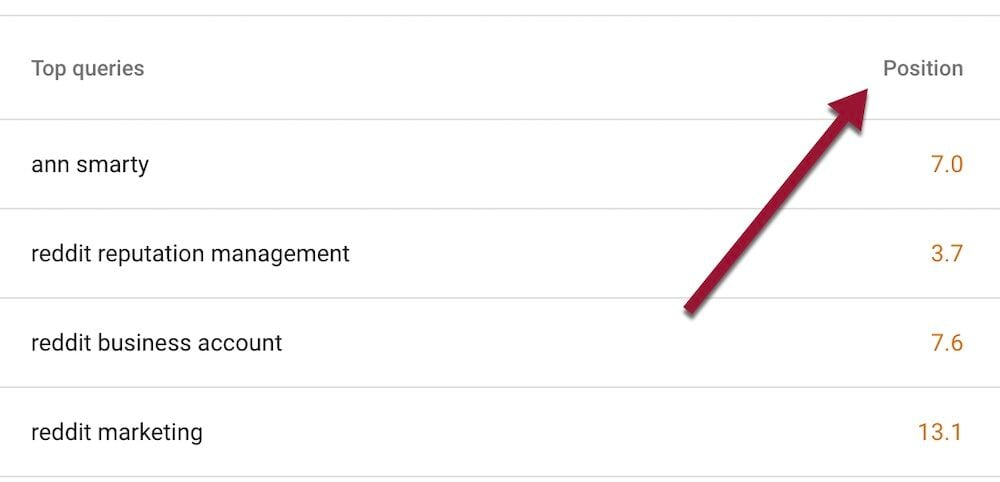
Scroll down the Performance report for the average position for each query. This number represents the average position of a URL across all searchers for that term.

Suppose two people searched Google using the same word or phrase. If a URL appeared in position 1 for one user and position 2 for the other, Search Console’s reported average would be 1.5.

Search Console shows an average query position only if a human or AI bot views it.

Screenshot of the query section of Search Console's Performance report

The average position for each query represents all searchers for that term.

Topmost positions

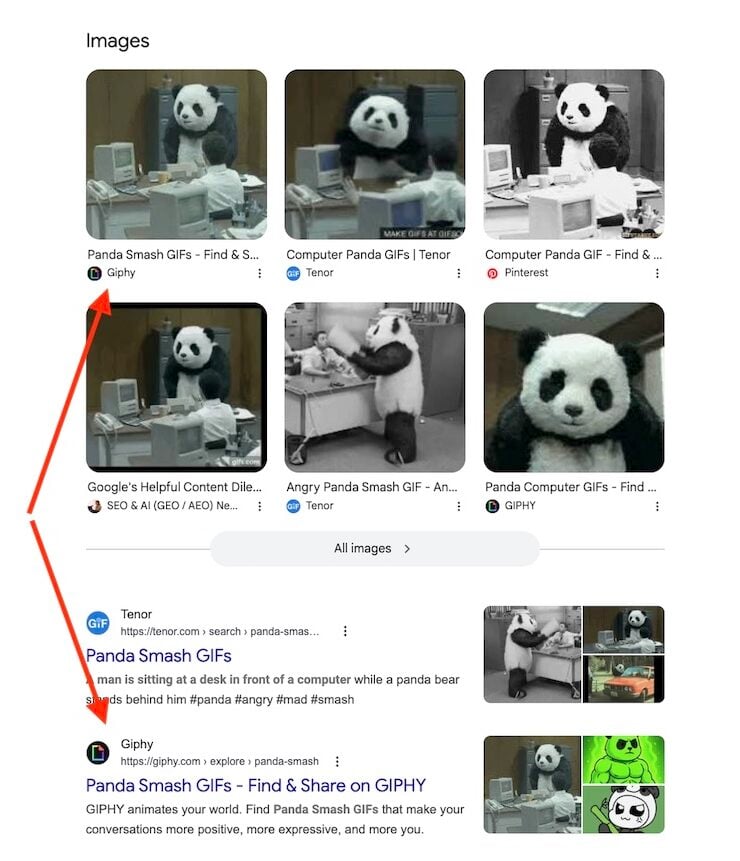
Per Google, each organic result equals one position, as does each special element, such as AI Overviews, image packs, and People also ask. (Search result sections with no external links occupy no position, nor do ads.)

So a page’s average position is 2 if it ranks 1 organically for all searchers but doesn’t appear in a top image pack.

Conversely, the page would be in position 1 if it appeared in that top image pack, but in position 2 organically. That’s the case in the screenshot below for Giphy.

Giphy appears in the top image pack, but at position 2 in organic listings.

URLs in special sections

All URLs in a special section have the same average position. In the image above, all URLs in the image pack have an average position of 1.

Similarly, all URLs cited in an AI Overview at the top search results have an average position of 1.

Cannot verify a position

URLs in search results are not always obvious. For example, a URL may appear in the lower portion of an AI Overview after other citations, or cited in a “People also ask” box visible to a searcher only after clicking the question.

Moreover, Search Console can report a position that differs among users for several reasons.

  • URLs appear only in select views, such as those visible in Google Chrome but not Firefox.
  • An AI Overview included a URL only for select users. Citations in AI Overviews are fluid and often differ among searchers.
  • Personalization. Users’ searches can disproportionately include their own sites due to personalized results. To avoid such results, depersonalize searching.

Positions vary by device

Google often orders mobile and desktop search results differently, such as excluding special sections on mobile browsers.

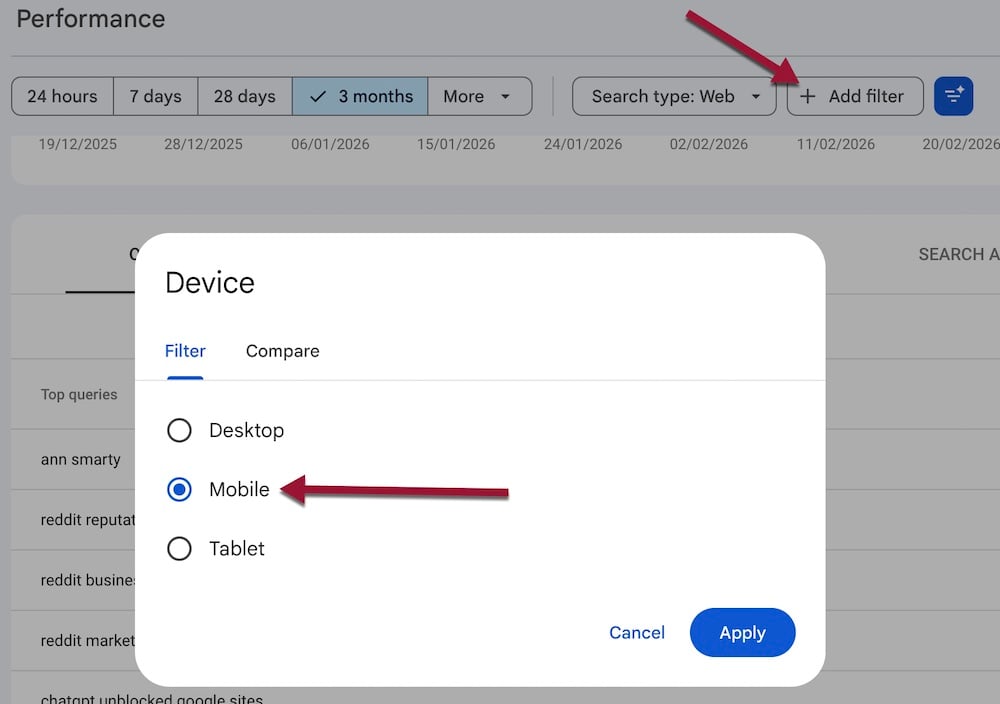
Search Console shows desktop data by default. Switch to the mobile performance report by clicking “Add filter” > “Device” > “Mobile.” Select “Compare” for average positions across all devices.

Screenshot in Search Console of performance by device.

Switch to the mobile report by clicking “Add filter” > “Device” > “Mobile.” Select “Compare” for all devices.

Google Responds To Error That Causes Old Branding To Persist In SERPs via @sejournal, @martinibuster

Google’s John Mueller answered a question about Google rewriting title tags to show the old brand of a site that rebranded in 2015. Apparently everything was updated to the new brand name, but Google’s search results stubbornly persist in showing the old branding.

Old Brand Name Shown In Title Tags

The person asking the question on Bluesky related that a company updated their entire site with its new branding, but Google ignores it in favor of showing the old branding in the search results.

They posted:

“Hey @johnmu.com, curious about Site Name persistence. Treatwell (UK) is still showing as “Wahanda” in results – a rebrand that happened in 2015! Is there a specific “legacy” signal that might override current SiteName structured data for such a long period in one country only? “

Google’s Mueller was puzzled by the situation and didn’t have an answer as to why it was happening. Perhaps it’s one of those rare cases where a bug keeps a part of the index from updating. But he did suggest using the domain name as an alternate site name.

Mueller referred the person to one of Google’s developer pages, “What to do if your preferred site name isn’t selected.”

He responded:

“That’s a bit odd – I’ll pass it on to the team. FWIW what generally works in cases like this is to use the domain name as an alternate site name – developers.google.com/search/docs/… – but it would be nice if that weren’t needed.”

The site itself does not appear to contain on-page instances of the rogue branding. The old domain is correctly 301 redirecting to the new domain. However, there are some links in the footer that contain referral codes with the old branding on them, and the sitemap contains links to 404 pages that contain the old branding. Although those may not be the cause of the branding mismatch in the Google search results, it’s a good SEO practice to be tidy about what’s in your sitemaps and to remove outdated links.

These kinds of rare errors are interesting because they kind of provide a sneak peek into a part of Google’s indexing that isn’t normally in view, like a crack in a wall. What insights do you derive from this anomalous situation?

Featured Image by Shutterstock/SsCreativeStudio

3 Strategies That Can Survive AI Search In 2026: What I Shared At SEJ Live via @sejournal, @theshelleywalsh

It’s been an eventful start to the year for AI search, and AI is moving quickly, but there’s a lot of hype and panic. When really search is just doing what it has for the last 30 years, it’s constantly self-updating.

At Search Engine Journal, as most other publishers have, we’ve experienced considerable drops from Google organic traffic. The last few years have been a challenging time for a business model that publishes information and news.

Although this has come to a climax over the last few months, we identified changes and vulnerabilities several years ago and have taken action in the last few years, which has put us in a better position today.

Last week, I spoke at the first SEJ live to talk about where we are now in 2026, what is working, and what we should be leaving behind.

From the talk, I’m going to share with you the three foundational things I think you need to be focusing on right now in 2026. Strategies you can apply which will help you as AI impacts our industry.

What You Need To Leave Behind

Before I talk about what you should be doing, let’s just make sure you have moved on from outdated modes of thinking that will hold you back.

Image by author, March 2026

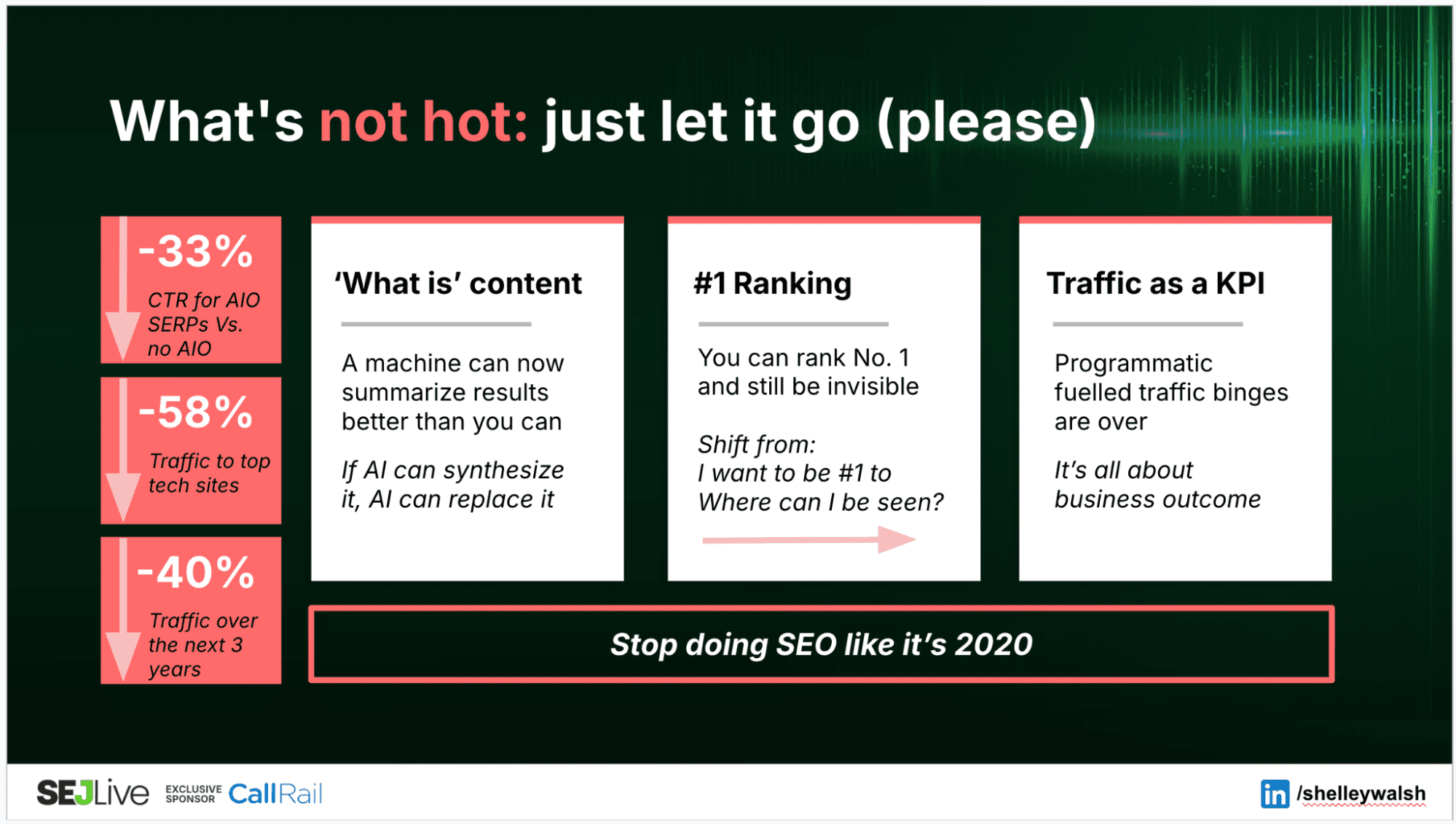
If you’re still obsessively checking ranking on a daily basis, this is like rearranging the deckchairs on the Titanic.

Ranking is 2016; visibility is 2026.

The foundation of search has always been to know who your customer is, where they operate, and to use content to connect with them and encourage an action. That interaction always used to happen in the SERP, and that was our attention marketplace.

In 2026, our digitally competent audiences are now operating fluidly in a multimodal search journey before moving to their conclusion. All with an AI layer of visibility interwoven.

Even if you do get a number 1 ranking, it doesn’t mean you will get a click because the noise in a SERP can displace the visibility of a listing right off the first page.

Advanced Web Ranking found that when an AI Overview is expanded, the first organic result is pushed approximately 1,674 pixels down the page, effectively below the fold on most screens. And AI Overviews are just one layer. Between ads, carousels, map packs, and image results, a number one ranking can be virtually invisible.

I’ve experienced client product SERPs shift dramatically in the last few years to the point where we have given up chasing a vanity and put our efforts into being creative to connect with customers.

2026 is all about intent and action-based strategy.

Let’s do some actual marketing and find those users where they are and give them a reason to engage with you. And I think we are going to all be better marketers for it.

What You Need To Move Toward – Strategy That Can Survive AI

SEO technical excellence is fundamental to being discovered in LLMs. Far from SEO being dead, it has never been so important.

Alongside that, content is still the foundation of online visibility – without it, you have no visibility.

The following three strategies outlined are core factors that can offer stability through our transition to the new world of AI search.

Screenshot by author, March 2026

1. AI-Proof Content

What I mean here is content that will not be cannibalized/synthesized by AI.

The paradox of visibility in LLMs is that you need consensus for trust to get attention, but you also need quality and difference for inclusion. For brands that have already been investing in conducting experiments and collating data, they are one step ahead.

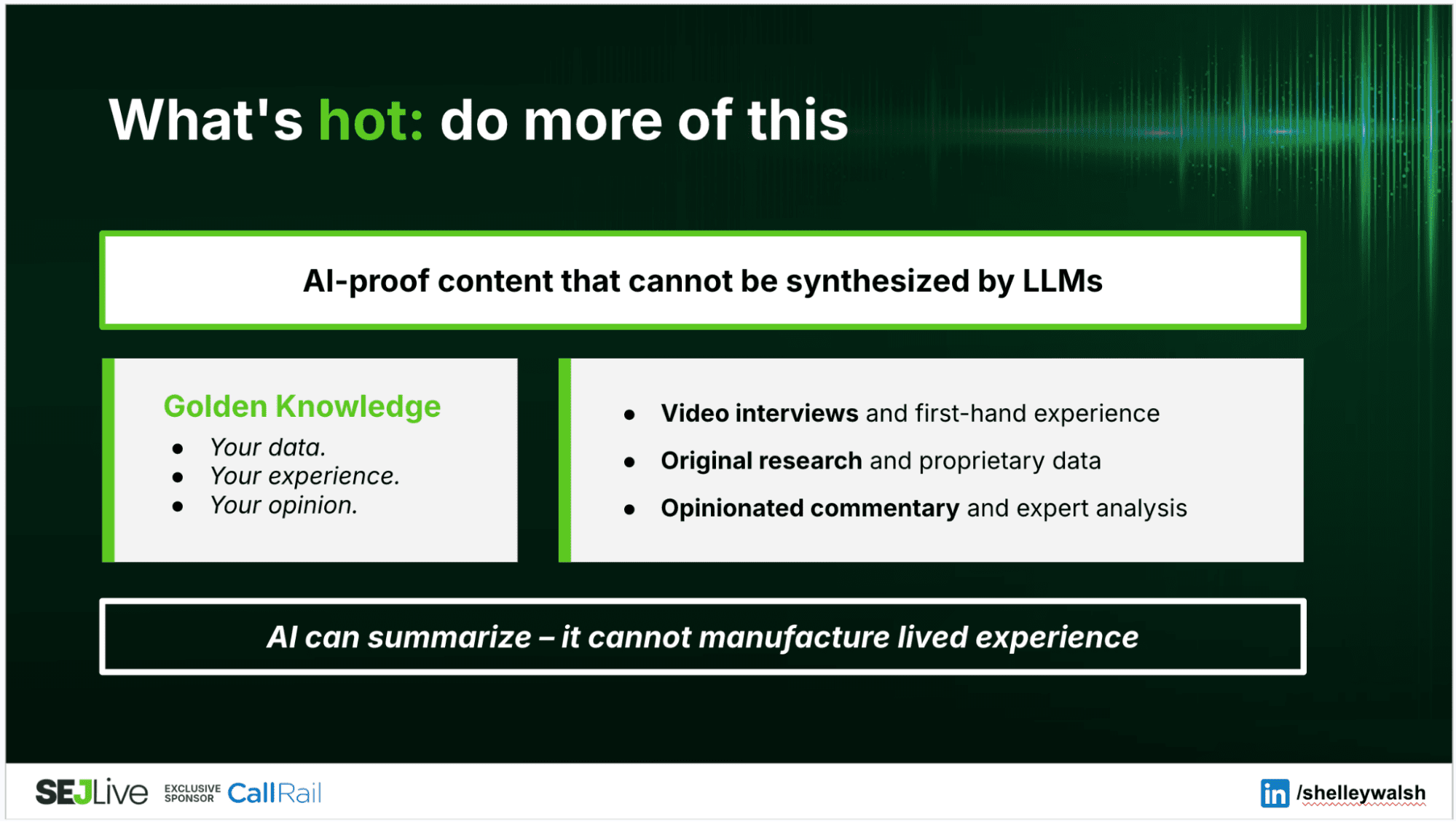
I spoke to Grant Simmons on IMHO, and he described this as “golden knowledge“:
Your data.
Your experience.
Your opinion.

In practice, content that can avoid being cannibalized by AI summaries and actually feed the summary looks like:

  • Video interviews and first-hand experience formats. These gain visibility across social, SERPs, and LLMs because they contain a human perspective that AI can’t generate from training data alone. It’s webinars, it’s IMHOs
  • Original research and proprietary data. State of SEO and AI papers
  • Opinionated commentary and expert analysis. Such as a roster of the best contributors that are offering their lived experience.

Anyone can use an LLM to generate a summary of the query “What is SEO?”

But being a brand and a community offering an experience of the best minds in the industry, live shows, unique data reports, breaking news, and offering our expert takes on why this matters and what you need to pay attention to. Being the curator and hub of everything in the industry makes it a destination and source feeding the LLMs.

Investing in this level of content strategy can elevate a brand to being channel agnostic and reduce your single point of failure from over-reliance on one channel. And that is what we aim to be at Search Engine Journal.

Screenshot by author, March 2026

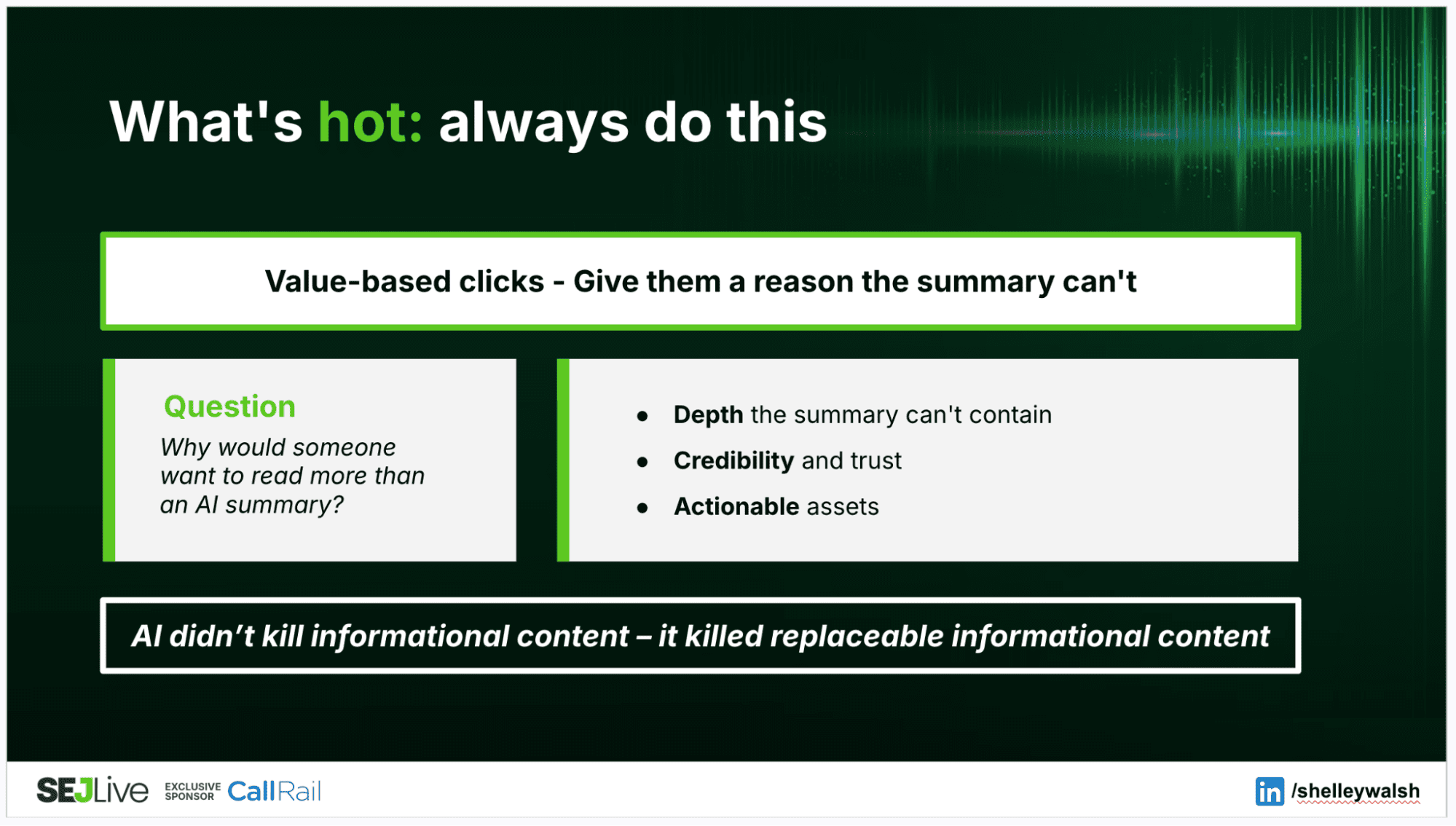
2. Value-Based Clicks

Different reports cite differing numbers, but what is consistent is that LLMs are referring traffic.

According to Chartbeat data reported by the Press Gazette, ChatGPT drives 0.02% of referrals to publishers. The Conductor 2026 benchmarks report says that LLM referral traffic is 1.08% of website traffic across 10 industries.

Right now, it might feel like a fraction of what we grew accustomed to from Google, but don’t forget, 1% of trillions of searches is still a considerable market of opportunity.

To capitalize on this is to consider what we can offer to encourage the clicks from the LLM to our brand site. Ask yourself:

  • Why is someone clicking on a link in an LLM?
  • Why would someone want to read more than the AI summary?
  • Or, why would someone want to know more about my brand/product or service.

Pre-carousels, featured snippets, and AI summaries, it was far easier to gain a click from ranking highly on a SERP. When you’re one of only 10 options, you’re going to get the test click that checks out if you are the page they are looking for.

But, much like it was a far more difficult job to retain that click, if you have something of value that connects with the user, you can still get the click from a citation or card in LLMs or SERP AI summaries.

Featured snippets may have reduced click-through rate, but they didn’t kill it. Visibility layers can be opportunities, and SEOs worked hard to get #0 because it was a way to jump up the SERP to a top position.

What can drive a click in an AI search environment:

  • Depth the summary can’t contain, case studies, implementation detail, nuance that offers a reason to want more.
  • Credibility and trust, according to Amsive, branded queries with AI Overviews actually see an 18% CTR increase.
  • Actionable assets, offering resources where the intent cannot be satisfied by a summary.

If you can distinguish the difference between instant answer traffic and build content for the people who don’t want the summary or the quick answer, then your brand can become valuable to users.

Screenshot by author, March 2026

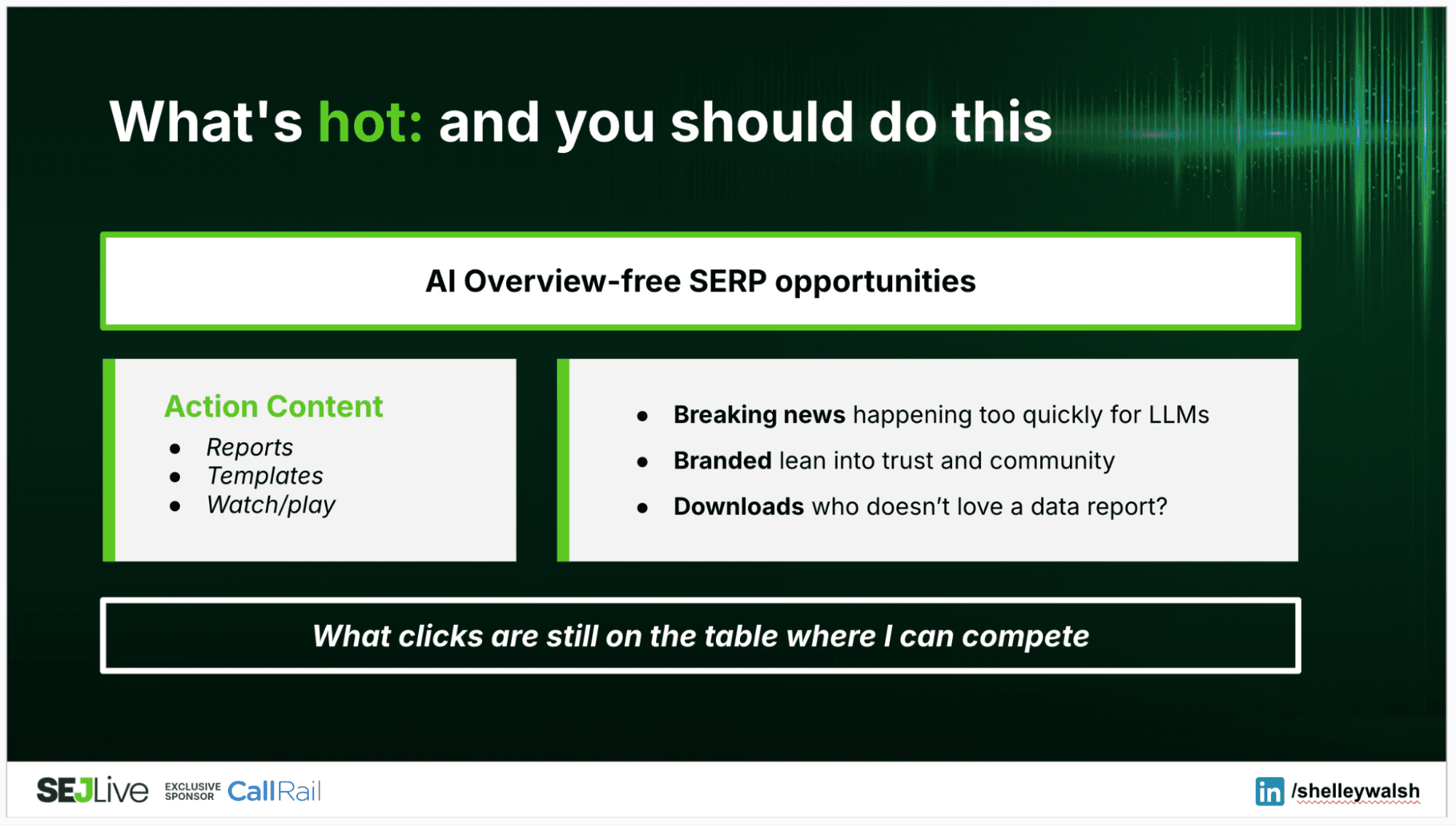
3. SERP Opportunities Resistant To AI

Despite the concern that AI is going to kill Google, the search engine is not going anywhere.

Where Google has the edge in the race against LLMs is years of understanding their user and understanding how to deliver answers to queries to satisfy the consumer. They have an established audience and technology infrastructure. And a LOT of data.

Regardless of the stampede towards LLMs and the AI hype cycle, there is still a lot of opportunity to be had from the search engine.

Brightedge data says that just over half of queries have AIOs, and Conductor reports that just over one quarter of analyzed searches triggered an AIO (21.9 million unique Google searches).

This indicates that anything between half and three-quarters of SERPs do not have an AI overview. And this means, there are a lot of searches where intent will be satisfied by clicking on a page. Content that targets these queries and drives a specific action sidesteps the AIO problem entirely.

Think about what is resistant to LLMs:

  • News – breaking news that is happening too quickly for LLMs.
  • Branded – lean into trust and build a community that actively searches for you.
  • Downloads – my favorite conversion tool that has worked for years.

My belief is that AIO might take away traffic volume, but not the traffic of value.

Build Consensus With Your Website As A Hub

Finally, if there was one tip I would offer to everyone that could have the most impact, this would be “consensus.”

LLMs generate responses based on statistical patterns across their training and grounding data, so when a brand or message appears consistently across many sources, it is more likely to surface in AI answers. Ahrefs found that branded web mentions had the strongest correlation with appearing in AI conversations, stronger than any other factor tested. If you can maintain consistent messaging across multiple channels, you are in the best position to be featured.

Alongside this, a study from the University of Toronto found that LLMs prefer ‘earned media’ from trusted sources that can offer more authority than posting on your own site.

Posting and layering your content across channels such as Reddit, LinkedIn, YouTube, or any industry publications relevant to your industry, will help to build the messaging associated with your brand and help with inclusion in LLMs.

Make your website into the hub that connects to all the channels online where you are active and contributing, and don’t be afraid to put some of your best content on other channels to get visibility.

The 3 Changes We Made At Search Engine Journal

The biggest mistake publishers made in Q1 wasn’t AI. It was treating AI as something happening to them instead of something they can navigate strategically.

At Search Engine Journal, we’ve made three specific changes in response:

  1. We shifted editorial toward experience-first formats with interviews, analysis, and original research.
  2. We moved from programmatic revenue to asset-based sponsorship.
  3. We made growing a direct audience our top metric priority, so that we own our own audience.

If you’re still using the same tactics you have been applying to SEO since 2020, then you need to reconsider what your audience wants, where they operate, and who your competitors are.

SEO in 2026 includes visibility in all discovery engines. To remain relevant, be sure you are part of the conversations.

More Resources:


Featured Image: Shelley Walsh/Search Engine Journal

7 Google Ads Shortcuts Every PPC Manager Should Be Using via @sejournal, @brookeosmundson

Managing PPC accounts is already time-consuming, especially when attention gets pulled toward tasks that don’t meaningfully impact performance.

Over time, accounts accumulate extra keywords, inconsistent negatives, and small inefficiencies that make everyday management harder than it needs to be.

Fortunately, Google Ads includes several built-in tools that help streamline these tasks.

These seven shortcuts can help you manage accounts more efficiently while also surfacing insights faster, so you can spend more time improving performance instead of maintaining clutter.

1. Remove Duplicate Keywords

As accounts mature or change management over time, it can be easy to lose track of what keywords are being bid on.

This is especially true when one account manager structures campaigns and ad groups a certain way, and then another manager takes over and starts implementing their own structure.

It would be time-consuming to comb through all the account keywords to find duplicates.

Luckily, the Google Ads Editor has a very handy feature that will do this for you!

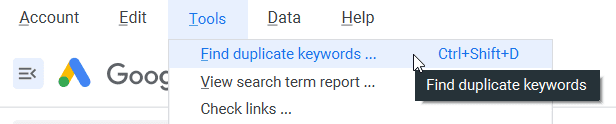
You can access it from the top menu under Tools.

Duplicate keywords tool in Google Ads Editor.
Screenshot by author, March 2026

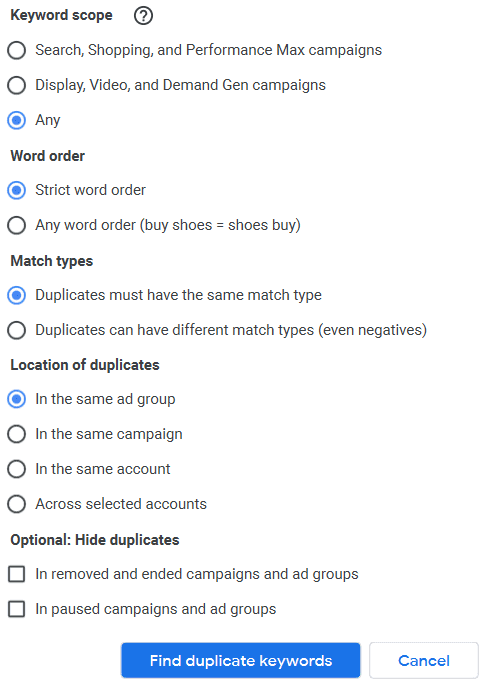
The duplicate keywords tool gives you many options so you can be intentional in how it defines duplicate keywords.

For example, you can choose a strict word order or any word order.

You may want to choose a strict word order if you’re mostly concerned with Exact Match keywords.

But any word order can be a great way to clear out broad match searches or phrases that are just the same words in a different order.

You’re able to scope the keyword duplicates tool from:

  • Search, Shopping, and Performance Max campaigns.
  • Display, Video, and Demand Gen campaigns.
Duplicate keyword tool in Google Ads Editor.
Screenshot by author, March 2026

Another helpful option to be mindful of is the one for Location of duplicates.

An example of why you might want it only looking at certain groups would be if you have campaigns that are duplicates but set to show to different devices or different geographies.

They’re intentionally duplicated in those instances, so you’d only want to check for duplicates within each individual campaign.

2. Use Negative Keyword Lists

Since we’re on the topic of keywords, let’s switch to a feature that will help you organize negative keywords in an account.

Negative keyword lists are a great way to exclude specific categories of keywords across multiple campaigns or the entire account.

As with trying to find duplicate keywords, it can be time-consuming to go through all the negative keywords that have been added to a campaign or ad group over time.

Negative keyword lists allow you to group certain keywords together into a list and can then be attached to different campaigns.

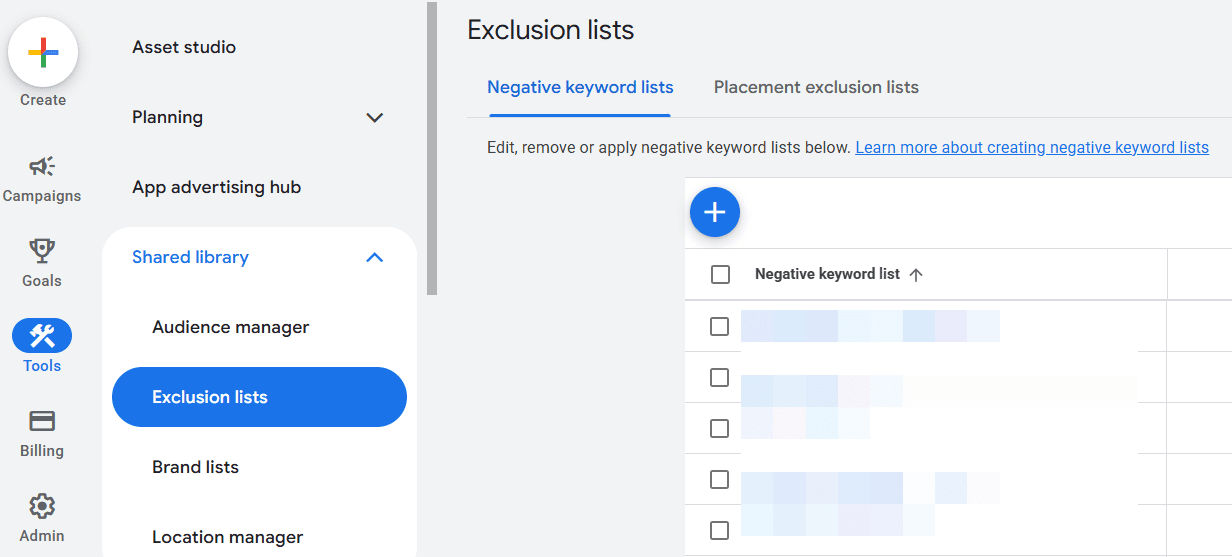
You can find this in the Google Ads online interface by going to Tools >> Shared Library >> Exclusion lists. From there, you’ll find a tab for “Negative keyword lists” or “Placement exclusion lists.”

Where to find negative keyword lists in Google Ads interface.
Screenshot by author, March 2026

For example, you may already have a huge list of irrelevant keywords that you wouldn’t want to show up for any campaign.

Create an “Irrelevant Keywords” (or whatever you choose to name it) list, and apply that keyword list to all campaigns in the account.

Another example of how to use negative keyword lists is to separate branded terms from non-branded terms.

Simply create a negative keyword list of all brand terms, searches, or phrases, and attach that list to all non-brand campaigns.

This ensures that there’s no crossover between brand and non-brand performance.

3. Use Labels To Manage Ad Creatives

The Label function in Google Ads is a powerhouse for account organization and time-saving.

In my opinion, it’s one of the most under-appreciated features in Google Ads.

While labels can be added to a campaign, ad group, and keyword level, using them for time-sensitive copy or routine testing to turn things off/on is where it shines!

It is also a huge help if you want to compare higher-level messaging or before/after efforts with copy tests.

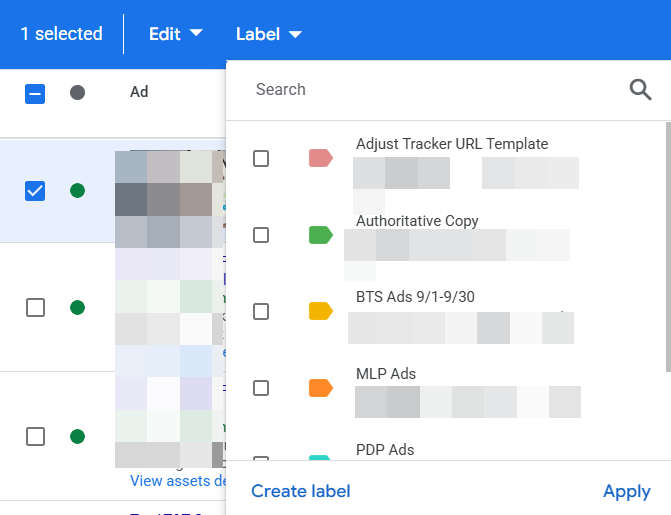
You can add a label to any ad by checking the box next to the ad versions you want to label and then choosing Label in the blue toolbar that appears:

Google Ads label function.
Screenshot by author, March 2026

You can then check the labels you want to apply to those ads or create a new label.

In this example, they want to easily test a new message related to a specific promotion happening on their website. There isn’t an easy way to see a comparison without filtering for each ad type.

Labeling each ad quickly makes it easier.

Another handy way to use labels and ads is for scheduling.

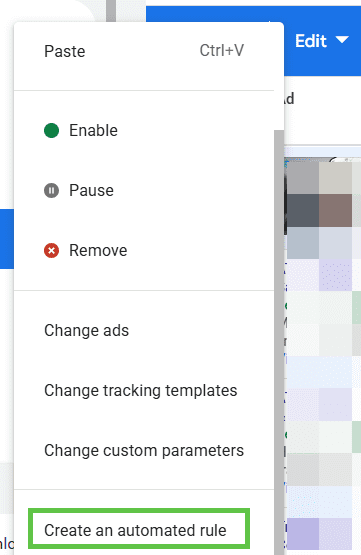
After you label the ads as outlined above, select the ones that you want to turn on for a certain date and time. Check the box next to the ads, and then go to the blue toolbar and click on Edit.

Screenshot by author, March 2026

From here, you can create rules for all the ads you selected with all kinds of timing and condition parameters.

You’d repeat this step each time you want something to turn off and then also to turn on.

4. Quickly Test Campaign Elements With Experiments

Speaking of streamlining ad creation and testing, another handy way to do this is by using the Experiments feature.

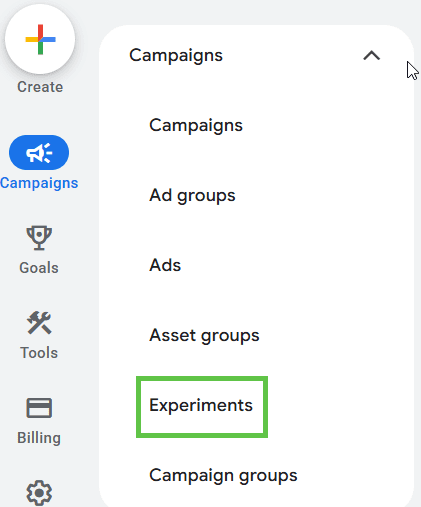
This is located under the Campaigns section on the left-hand menu.

Screenshot by author, March 2026

Click on the “All experiments” section, and then click the blue “plus” (+) button to start creating your own custom experiment.

Screenshot by author, March 2026

From there, you’ll be able to choose from multiple options:

  • Performance Max experiment.
  • Demand Gen experiment.
  • Video experiment.
  • App uplift experiment.
  • Custom experiment.
  • Optimize text ads.

One of the things I love about this option is you have the ability to set up the percentage split of your audience.

It can help you force a 50/50 split, whereas in regular ad testing, Google auto-optimizes.

Another thing I love about experiments is that it’s easy to indicate if there’s a clear winner.

Screenshot by author, March 2026

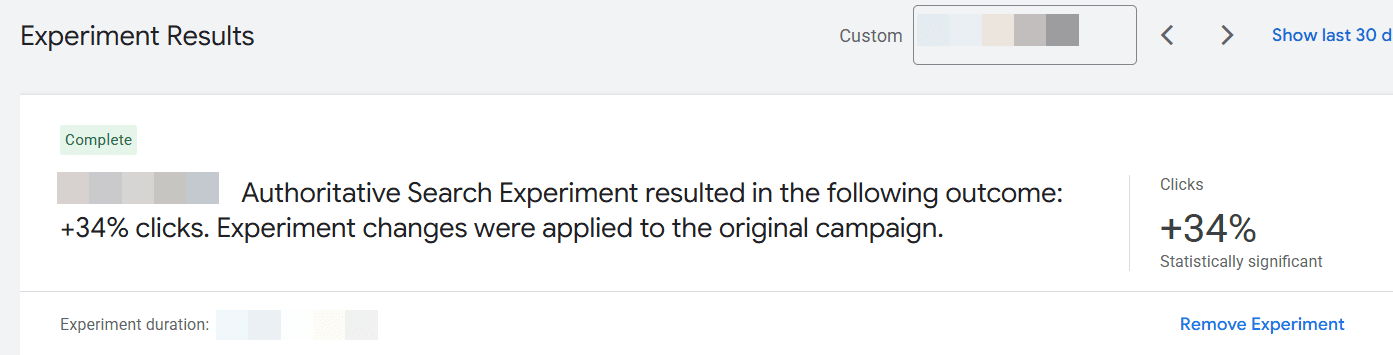
In the example above, one of the experiments run showed a statistically significant change in clicks. This made it an easy decision to apply the experiment to the original campaign for better performance.

5. Use Notations For Important Account Changes

Keeping a log of an account history can be tough in Google Ads. There are so many moving parts, outside things that influence results, and then multiple people managing an account over its lifespan.

This can create issues when trying to analyze performance.

For example, you’re looking at year-over-year data and notice the numbers were so much better the previous year. Why?

It could be due to certain holidays that fall on different dates each year.

Or, maybe the brand got a huge PR bump that caused a lot of attention and searching.

Using notes can help you log that external history and save tons of time trying to dig and piece together this kind of analysis.

How do you add notes?

First, simply click on the performance graph.

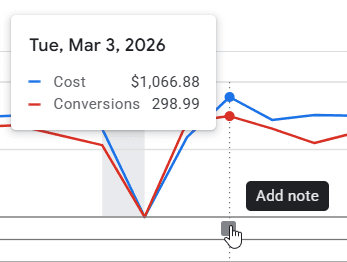
When you hover on the graph line, the date and performance metrics appear, along with a blue Add Note option. You can type your note in that.

Screenshot by author, March 2026

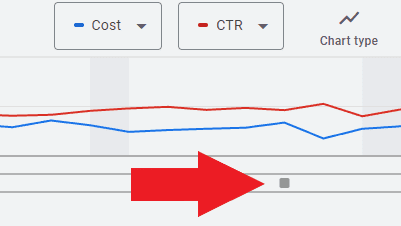
Once you have notes in the account, they will appear as a little square along the dateline of the graph.

Cost and CTR graph
Screenshot by author, March 2026

Clicking on it will show you the notes left and the date they were made.

6. Use Filters To Quickly Identify Optimization Opportunities

When managing a busy account, it’s easy to spend too much time scrolling through campaigns, ad groups, and keywords trying to find what needs attention.

Instead of manually digging through every view, Google Ads allows you to create filters that instantly surface areas worth reviewing.

Filters can be applied to almost any table in Google Ads, including campaigns, ad groups, keywords, and search terms. Once created, they allow you to quickly isolate specific performance conditions.

For example, you might create filters to identify:

  • Keywords with high spend but zero conversions.
  • Ads with a low click-through rate.
  • Search terms generating high impressions but few clicks.
  • Campaigns pacing ahead or behind budget.

Creating a filter is simple. In most table views, click the Filter icon at the top of the table and define the conditions you want to see.

Once saved, filters can be reused anytime you review that view.

Over time, this becomes one of the fastest ways to spot inefficiencies or optimization opportunities without manually reviewing every row of data.

Instead of searching for problems, filters bring the most important ones directly to you.

7. Review Insights & Recommendations

Last but not least, the Insights and Recommendations tabs in Google Ads.

I’ve found these tabs to be a huge time-saver to help me identify key changes in performance week-over-week or month-over-month.

We’re all busy. It’s easy to miss high-level insights when we’re so “in the weeds” with our accounts every single day.

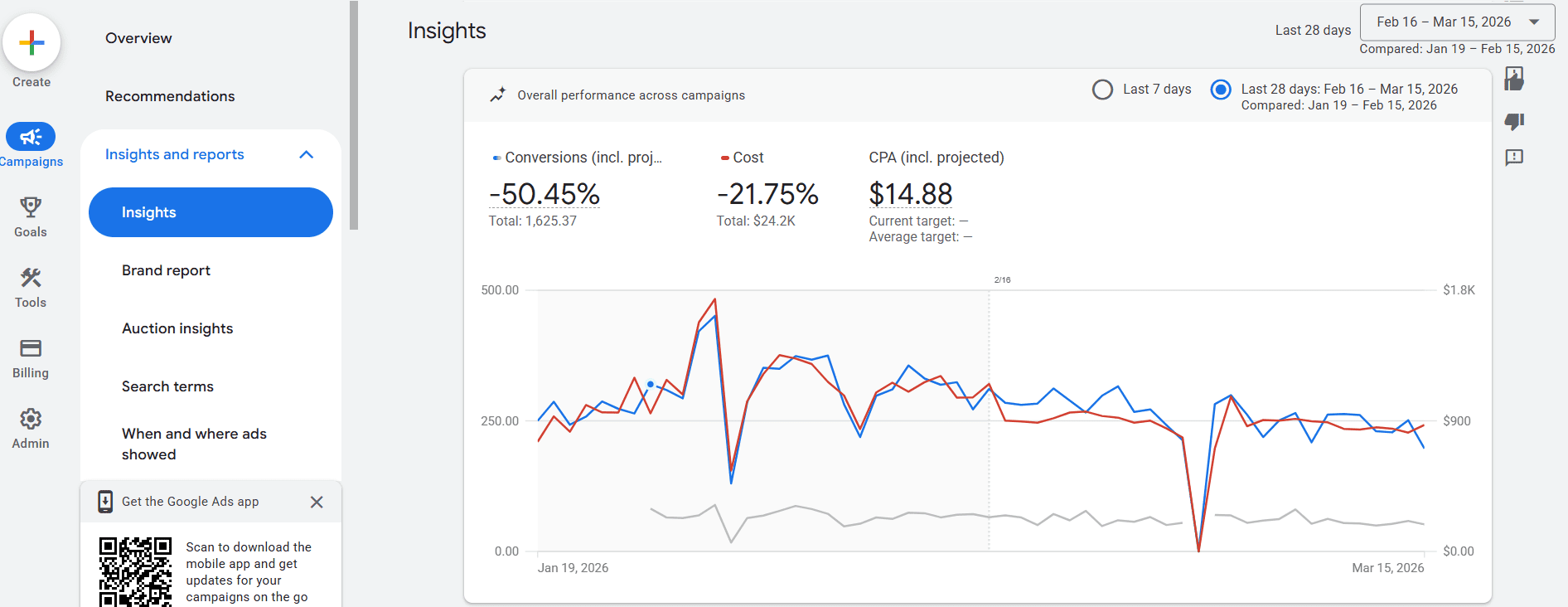
The Insights and Reports tab within the “Campaigns” left-hand menu provides insights into an account as a whole or down to the campaign level.

Screenshot by author, March 2026

It also drills down to other elements of a campaign, like search term insights or audience insights.

Knowing where to focus my time and effort from these insights saves a lot of time, so I can focus on analyzing the problem and coming up with solutions.

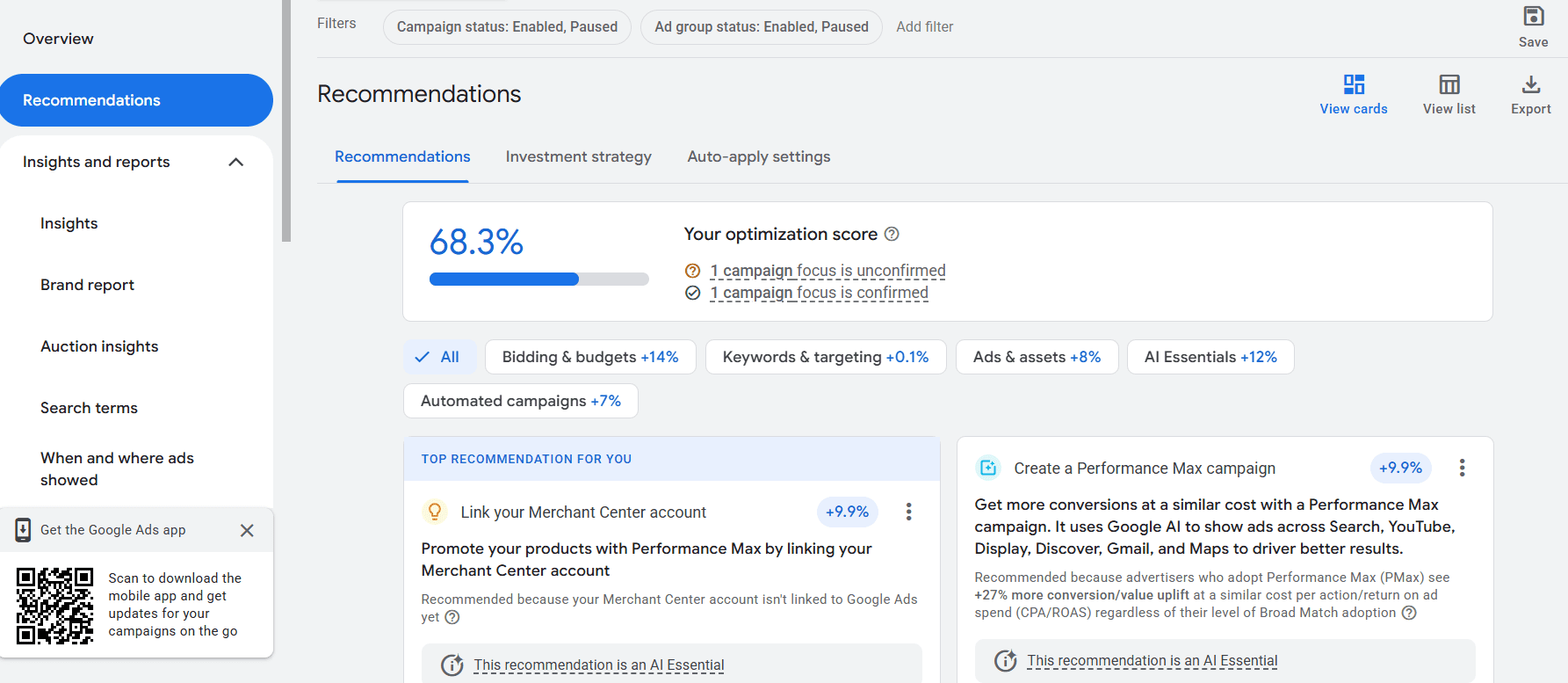
The Recommendations tab is also found on the left-hand menu and provides a wide assortment of recommendations for your account.

This is also where an account’s “Optimization Score” lives, and applying or dismissing recommendations directly impacts that score.

I don’t recommend applying every recommendation that Google suggests just to increase the Optimization Score.

For example, one of the recommendations that would have provided a 9.9% boost in Optimization Score would be to link a Merchant Center account. But this account is not in the ecommerce vertical, so the recommendation makes no sense and wouldn’t be valid.

This tab is useful for account managers to look at the context of an account and easily apply recommendations that make sense.

Screenshot by author, March 2026

These are usually broken down into categories:

  • Bidding and budgets.
  • Keywords and targeting.
  • Ads & assets.
  • AI Essentials.
  • Automated campaigns.

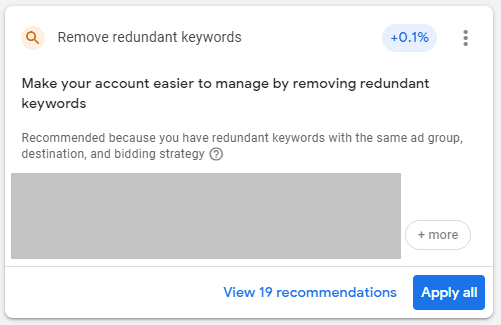
For example, this recommendation suggests removing redundant keywords to more easily manage the account. Especially with match types loosening, applying this recommendation makes sense, and Google automatically does it for me.

Remove redundant keywords recommendation.
Screenshot by author, March 2026

That means I can spend more time strategizing and analyzing an account instead of doing the normal “busy work” of having to manually go in and review each keyword to decide what to pause.

Making Google Ads Management Easier

Google Ads has become more complex over the years, and that complexity can make everyday account management slower than it needs to be.

Many of the features above exist specifically to simplify that work. Tools like labels, experiments, shared negative lists, and audience observation help keep accounts organized and easier to analyze.

When those systems are in place, less time goes toward maintenance and more time goes toward improving performance.

More Resources:


Featured Image: dae sung Hwang/Shutterstock

The SEO Skills Gap: Why Technical Expertise Alone Won’t Cut It Anymore

The SEO industry has spent the last couple of decades perfecting the art of looking productive while delivering value some might describe as questionable.

Armed with an extensive suite of analytical tools, SEO is an incredibly data-rich and metric-rich industry. It was easy to generate reports that, on the surface at least, looked impressive to a C-suite eager for more of that “data-led decision making” everyone kept talking about.

These days, the C-suite is less interested in metrics like rankings, traffic, and sessions. They’re finally asking: “So what?”

It’s the same question that killed the “likes and followers” era of social media marketing. Eventually, boards stopped caring about follower counts and started demanding conversion rates, customer acquisition costs, and a measurable return on their investment.

Now it’s SEO’s turn for a reckoning. And answering that question requires a very different skill set from how many SEOs have been trained. Too many SEOs lack that wider business awareness and marketing aptitude to understand how they fit into the bigger picture.

In short, we’re faced with an SEO skills gap which, if left unaddressed, risks SEO teams and agencies falling out of step with the expectations of senior leadership and clients.

Rankings and traffic are still important, don’t get me wrong. But they’re not business outcomes; they’re contributory factors. Yet SEOs continue to cross their fingers in the hope that growth in these metrics will magically translate into sales or some other form of measurable business value. Who measures that value and how it comes about is usually someone else’s problem.

Sales and marketing can fret over the wider strategy. If the vanity metrics continue to show growth, the SEO team sits back, content they’ve done their bit.

Except, with zero-click search on the rise as customers turn increasingly to AI tools, many organizations are seeing their search traffic trending down. That focus on volume over strategy is no longer working.

Connecting The Dots To Business Outcomes

I’ve been watching this shift play out in real time. Over the past few years, I’ve noticed clients focus less on “Can you improve our rankings,” and more on “Can you prove how this contributes to our business growth.”

But as much as I’d like to trust my gut, personal experience hardly qualifies as unequivocal evidence. Unfortunately, I lack the resources to conduct a comprehensive five-year longitudinal analysis to see how employer/client expectations might have changed. So, I conducted a quick straw poll of my network instead.

It’s a small data sample, so apply the appropriate pinch of salt. I simply wanted to get a sense of whether what I’m seeing holds true beyond my business.

It seems it does.

I asked respondents how confident they were in their SEO team’s ability to explain SEO’s contribution to business outcomes like customer acquisition cost (CAC), lifetime value (LTV), and pipeline. Scored on a scale of 1 to 10, the overall average is a smidge over 6.7. Not terrible, but not great either.

But in an environment where budgets are shrinking, a score of just “okay” when it comes to demonstrating business value is potentially fatal.

Simply saying, “Trust us, it helps,” will never survive a CFO review.

SEO’s New Critical Skills

I also asked respondents which skills they consider to be most critical when hiring future SEOs. Unsurprisingly, the top result was:

1. Technical SEO (83%)

Of course, it is. You can’t tune a car without knowing your way around an engine. So no; crawling, indexing, load times, schema … none of it is going away.

But that near-ubiquitousness also means that technical SEO is the price of admission. It’s table stakes. It’s the bare minimum requirement. Being great with technical SEO will get you in the door, but it won’t keep you in the room.

What’s more telling is how many respondents selected critical skills that most SEO teams I encounter still treat as “someone else’s job.”

2. Content strategy and creation (61%)

3. Business acumen – CAC, LTV, revenue forecasting (50%)

4. Communication and stakeholder management (39%)

While the market still needs technicians, it’s increasingly hiring commercial operators. Knowing how to do something is only useful when you can also clearly articulate why.

Meanwhile, the skills that SEOs would normally consider part of their job description languished nearer the bottom of the results.

=5. Data analytics and reporting (33%)

=5. AI/machine‑learning and automation (33%)

That’s not to say SEOs don’t need to worry about these skills. It’s just that they’re less likely to sway an employer or client’s hiring decisions. Like vanity metrics, they’re simply the means to an end. An aptitude for data analytics isn’t a replacement for business acumen, but it helps inform those strategic decisions. AI and automation are useful tools, but they’re no replacement for human-led content creation.

Today, what separates high-performing teams from the rest isn’t their aptitude with technical SEO or their skill with data, but whether they can connect execution to outcomes and defend it in the language of business.

Marketing Fundamentals Matter Now More Than Ever

As SEO evolved into its own discipline, it apparently forgot that search visibility is just one component of a much larger strategic puzzle.

Most SEO teams operate as if their job is to “optimize websites.” It’s not. Their job is to help businesses grow profitably. And you can’t do that without understanding the fundamental building blocks of marketing strategy that have been hammered into every marketing graduate for over 60 years.

The four Ps of Marketing: Product, Price, Place, and Promotion.

Product: Do You Even Know What You’re Selling?

When brothers Michael and Marc Grondahl launched Planet Fitness in 1992, their strategy struck many as completely irrational. They set out to actively repel the industry’s most valuable customers.

The reason was actually quite simple. The brothers wanted to go after the 80-85% of people who didn’t belong to a gym. They realized that a gym full of well-muscled gym junkies lifting heavy weights and posing in front of mirrors is intimidating for casual users.

This insight completely shaped the gym’s launch strategy. Remove heavy weights. Ban string tank tops. No posing mirrors. And because casual users don’t overuse the facilities, gym memberships could be more affordable.

Every decision reinforced the same positioning: This is a judgment-free zone for normal people, not a stage for bodybuilders.

Most SEO teams create content without spending sufficient time trying to understand product positioning or brand messaging. With pressure on to show results quickly, they jump straight to execution, following the usual methodologies and repeatable processes to target the most obvious industry keywords.

And here’s the problem: while you can use SEO tools or AI to generate comprehensive and prioritized keyword lists, they can’t tell you who you should be selling to or how to position the product against competitors. That requires human insight, commercial understanding, and strategic thinking.

  • What problem does this product solve?
  • Who is it for (and who is it deliberately not for)?
  • What differentiates it from the available alternatives?
  • What’s the positioning strategy: premium, value, specialist, or generalist?

Price: Understanding Value, Not Just Cost

Pricing isn’t just a number. It’s a strategic signal about quality and positioning to your target market.

For example, the Van Westendorp Price Sensitivity Meter, introduced in 1976 by Dutch economist Peter van Westendorp, helps businesses to determine the price range customers will find most acceptable. It does this by asking four questions:

  • At what price would the product be too cheap to trust?
  • At what price is it a bargain?
  • At what price is it getting expensive but still acceptable?
  • At what price is it too expensive to consider?

This methodology is particularly useful when launching a new product that doesn’t (yet) have any obvious competitors. It gauges how much value consumers place on the innovation.

A pricing strategy can fundamentally change who to target and what messaging to use. Yet SEOs don’t always consider a client’s pricing strategy when deciding on an approach.

If the product is positioned as a premium expense, it makes no sense to chase high-volume keywords likely to attract price-sensitive customers. You’re bringing in people who won’t convert because they’re looking for the cheapest option, not the best option.

Place: Digital Shelves And Strategic Positioning

Place focuses on making the product available to customers in the right location and at the right time. In retail, this science is well-established.

According to recent NielsenIQ research, shoppers typically make in-store purchasing decisions in under six seconds. Hence, best-selling items are placed at eye level while less profitable products are relegated to higher or lower shelves.

Online, this decision window widens, as 44% of shoppers take at least three minutes to find a product. But while a website doesn’t have shelves, the principles are otherwise identical. By the time someone is ready to buy, they’re far more likely to default to a brand they’re already familiar with.

In search results, you’re effectively competing for digital eye level: a top three ranking, a featured snippet, an AI overview citation.

But placement extends far beyond search rankings. Can your content be cited by AI tools? Are your conversion paths obvious? Do you appear in comparison articles? Are you positioned alongside competitors in ways that favor your value proposition?

Effective placement isn’t just about identifying the channels where the business wants to be visible. It’s also about developing an interconnected content ecosystem. Just as supermarkets place complementary products together, your content should create logical pathways that guide customers forward.

Promotion: Where SEO Forgets It’s Supposed To Persuade

While Placement is about getting your content and messaging in front of the right people, Promotion is about influencing what happens next. Promotion is the persuasion part.

Imagine someone researching project management tools, comparing Asana, Monday.com, and Basecamp. A landing page titled “Asana vs. Monday.com for agencies” isn’t just informational; it’s promotional. You’re deliberately influencing how they evaluate options and steering them toward a specific conclusion.

Imagine you’re the CMO for a fictional project management tool called …  oh, I don’t know … Taskaroo. (I’m no branding expert.) Someone researching project management tools would likely want to compare Taskaroo alongside other likely options: Asana, Monday.com, and Basecamp.

Comparison pages are popular SEO tactics because they target valuable keywords at a key part of the research journey. But a landing page titled “Asana vs. Taskaroo for agencies” has even more value as a promotional tactic. The content on that page is your opportunity to shape how potential customers evaluate their options, framed to favor your own value propositions, of course, in the hope that more people will put Taskaroo into active consideration.

That’s how promotional content should work: meeting people wherever they are in the customer journey and providing the ideal information and messaging to move them forward.

The Friction That Kills Conversion

Promotion is where I see most SEO strategies fall apart. Not because SEOs don’t create content, but because they’ve forgotten that promotion isn’t the same as visibility.

When SEOs don’t think in terms of content ecosystems, mapped to the customer journey, they create unnecessary friction at exactly the moment someone might be ready to move forward.

For example, an ecommerce site publishes an article about running shoes. It’s a handy primer for anyone who’s just getting interested in running, with brief overviews of all the different types: trail running shoes, track shoes, road running shoes. It’s well-written, ranks nicely, and targets someone at the top of the funnel.

But once the reader starts wondering whether they should get a pair of trail running shoes, there’s nowhere for them to go. No suggested further reading on trail running to develop the reader’s interest; no links to guides on what to look for in trail running shoes; no connection to product recommendations. In short, there’s no next step for someone entering the consideration phase of the journey.

Actually, if there is a link, it’s probably in the form of a CTA pointing to the product page in the hope of boosting that page’s rankings. But is it really likely that someone might miraculously jump from awareness to costly conversion in a single bound after only reading a hundred heavily optimized words?

The reader has hit friction. Any further research will mean leaving your site, searching again, and potentially landing on a competitor with a better understanding of their needs. Your SEO team may have done the hard work of attracting the right audience and exciting their interest, only to abandon them at the exact moment they’re ready to go deeper.

This is why content marketing strategy and business acumen are now considered essential SEO skills. While SEO is mostly about building rankings and attracting traffic, content marketing is about nurturing and directing that traffic towards genuine, measurable business outcomes.

And that requires a comprehensive ecosystem of interlinked content spanning the entire journey from initial awareness to conversion and beyond, addressing as many relevant questions, objections, and barriers to purchase as possible along the way.

Flipping The Script On SEO

At the heart of the SEO skills gap sits a fundamental misunderstanding:

The purpose of your content isn’t to boost your SEO. The purpose of SEO is to boost your content.

SEOs use content to rank. Marketers create content to convert. If it’s possible to tell which assets were created for SEO and which were created for Marketing, then you have a problem.

When an SEO creates content purely to rank for a keyword, they’re not thinking about what the customer ultimately hopes to achieve. They’re not thinking about the journey and what happens next. They’re not anticipating what questions might arise. They’re not proactively addressing barriers and concerns that might prevent a purchase decision.

By understanding the four Ps, SEO’s role becomes much clearer. Forget chasing volume with vanity metrics. Truly effective SEO is about building experiences tailored to the customer journey, removing friction at every touchpoint, so that the next step is always obvious and effortless.

The companies that understand this don’t just rank. They convert.

Stop hiring “SEO Specialists” and start hiring growth marketers with SEO expertise who understand how their work contributes to customer acquisition efficiency, pipeline growth, and profitability.

More Resources:


Featured Image: Na_Studio/Shutterstock

Is WordPress Too Complex For Most Sites? via @sejournal, @martinibuster

Joost de Valk, the co-founder of the Yoast SEO plugin, provoked a discussion and some controversy with a recent blog post that posited that the concept of needing a content management system (CMS) to publish a website is increasingly outdated. This insight came to him after migrating his site to a static Astro-based website with the help of AI.

Joost wrote that the reality today is that many businesses and individuals need nothing more complicated than a static website and that a CMS is overkill for those simple needs.

He affirmed that CMSs are vital for building complex websites, but he also makes the case that the complexity problem that a CMS solves is not representative of the needs of most websites:

“Let me be clear: there are real use cases where a CMS earns its complexity. …These aren’t edge cases. They represent a lot of websites.

But they don’t represent most websites. Most websites are a handful of pages and maybe a blog.”

His article shares eight key observations:

  1. Creating a website was never exclusively a conversation about a CMS
  2. Yet CMS options are more widespread than ever website options
  3. Growing trend right now is away from CMS
  4. Joost de Valk joined the trend away from a CMS to Astro.
  5. Static HTML websites are as SEO-friendly as CMS-based websites.
  6. Simplicity outperforms complexity for many needs.
  7. Content Management Systems remain the best choice for complex requirements.
  8. The case for a CMS will become less relevant once users are able to chat with an AI in order to publish content.

Joost explained that last point:

“I built this entire Astro site with AI assistance. The next step, editing content through conversation, is not a big leap. It’s a small one.

…When editing a static site becomes as easy as sending a message, the CMS’s core advantage for the majority of websites disappears.”

For some, it might be difficult to imagine publishing a website without a CMS, and others believe that WordPress SEO plugins provide an advantage over other platforms. But for those of us who have been in SEO for a long time, we know from experience that static HTML sites are generally faster than any CMS-based website.

Before WordPress existed and became viable, I used to spin up static HTML sites from components I hand coded, including PHP-based websites. Those sites ranked exceptionally well and easily handled DDoS-level traffic. Although I didn’t have to deal with Schema structured data because it hadn’t been invented yet, automating title tags and meta descriptions across a website was a relatively trivial thing to do. No plugins are necessary to SEO a static HTML website, and this is one of the insights that de Valk discovered after transitioning his blog away from WordPress.

He shared:

“I built Yoast SEO, so you’d think this is where a static site falls short. It doesn’t. Everything Yoast SEO does on WordPress, I can do in Astro. XML sitemaps, meta tags, canonical URLs, Open Graph tags, structured data with full JSON-LD schema graphs, auto-generated social share images: it’s all there. In fact, it’s easier to get right on a static site because you control the entire HTML output. There’s no theme or plugin conflict messing with your head tags. No render-blocking resources injected by something you forgot you installed. What you build is what gets served.

The SEO features that a CMS plugin provides aren’t magic. They’re HTML output. And any modern static site generator can produce that same HTML, often cleaner.”

It’s true, the web pages Joost’s blog serves today are a fraction of the size of what they were when published using WordPress. One URL on de Valk’s website that I checked (/healthy-doubt) went from over 1,400 lines of code to only 180 lines of code. Furthermore, something de Valk didn’t mention is that the Astro-based HTML rendered with only eight minor HTML validation issues. WordPress sites tend to render with scores and even hundreds of invalid HTML issues.

Although Google can crawl and index the code that underlies the average WordPress website, invalid HTML nevertheless runs counter to the most fundamental goal of SEO: to make it easy for search engines to crawl, parse, and understand the content.

Article Provoked Controversy

Many developers responded against Joost’s article but many others agreed with him.

Dipak Gajjar (@dipakcgajjar) tweeted:

“A properly configured WordPress site with object cache and a CDN in front is already near-static in terms of delivery. You just get the CMS on top for free.

Good luck @jdevalk convincing a non-technical client to push markdown files to Git just to publish a blog post. WordPress exists because content management is a real problem. Static tools solve the developer experience, not the client experience.”

@cameronjonesweb asked:

“Hands up who thinks it’s a great idea to make their clients update their website content by committing markdown files to GitHub…”

@andrewhoyer pushed back on Joost’s article:

“Blogs would never have become popular without software. Only a tiny fraction of people can edit HTML and CSS by hand. Just because a few of us can doesn’t make static sites a good option.”

But it wasn’t all verbal tomatoes getting thrown at Joost, there were some roses tossed his way, too.

Alex Schneider (@Aslex) agreed that AI is lowering the barrier to creating and maintaining static websites.

Schneider tweeted:

“Static sites aren’t just for people who know HTML anymore. AI tools already let anyone generate and publish content to static sites with zero coding. And let’s be honest, traditional blogs are dying anyway.”

@LusciousPotate shared their opinion that WordPress is outdated:

“Constant WordPress updates, constant plug-in updates, constant security issues. It’s old, the tech stack is outdated; it needs to be put out to pasture.”

Is WordPress Still Relevant?

Generating a static site with Astro still requires some technical knowledge, and at this point in time it’s nowhere near as easy as using WordPress to get online. Many hosting platforms simplify the process of creating websites with WordPress, including with the use of AI. WordPress 7.0 looks to be the start of the most profound changes to WordPress, quite likely making it even easier for anyone to publish a website.

So yes, a strong case can be made for the continued relevance of content management systems, especially WordPress. Yet it may be that static website generator platforms may become a thing in the near future.

Read the de Valk’s blog post here: Do you need a CMS?

Featured Image by Shutterstock/TierneyMJ

5 GEO Strategies To Make AI Search Engines Recommend Your Brand In 2026

This post was sponsored by Geoptie. The opinions expressed in this article are the sponsor’s own. 

The way people search is changing faster than most marketers realize. ChatGPT alone now has over 900 million weekly active users. Google AI Overviews appear in one out of every four search results.

Each of these contains the potential for AI to cite your brand.

This isn’t a future trend. It’s happening right now. And if your brand isn’t showing up in those AI-generated answers, you’re invisible to a rapidly growing audience, even if you rank #1 on Google.

That’s where Generative Engine Optimization (GEO) comes in: the practice of optimizing your online presence. So, AI engines cite, reference, and recommend your brand when users ask questions in your space.

1. Start By Measuring Your AI Visibility

Before changing a single word on your website, you need to know where you stand. Which AI platforms mention your brand? For which queries? How often are your competitors getting cited instead of you?

You can’t optimize what you don’t measure.

How To Measure AI Visibility

Most marketers skip this step because it feels unfamiliar. But the process is straightforward.

  1. List 10–15 questions your ideal customer would ask an AI engine, things like “best [your category] for [use case]” or “how to solve [problem you address].”
  2. Run each query in ChatGPT, Perplexity, and Gemini.
  3. Note whether your brand is mentioned, which competitors show up instead, and whether sources are cited.

Repeat monthly, because AI-generated answers shift as models update and new content gets indexed. Doing this manually across multiple platforms gets tedious fast, which is why dedicated GEO platforms exist to automate the tracking and monitor changes over time.

The best place to start? Run a free geo rank check on your brand. In under a minute, you’ll see which AI engines mention you, which ones don’t, and where your competitors show up instead.

This baseline is essential. Without it, you’re optimizing blind.

2. Don’t Abandon SEO. It Still Feeds AI

Here’s an important nuance: traditional search rankings still matter for GEO.

AI engines frequently pull from top-ranking Google results when generating their responses. If your page ranks well for a relevant query, there’s a higher chance an AI engine will reference it as a source. Google’s own AI Overviews heavily favor content that already performs well in organic search.

So keep doing what continues to drive SERP rankings:

  • Producing high-quality content
  • Building backlinks
  • Technical SEO.

But think of SEO as the foundation, not the full strategy. The brands that win in AI search are those that layer GEO tactics on top of a solid SEO foundation.

3. Make Sure Your Content Follows GEO Best Practices

This is where most of the work happens. AI engines are selective about what they cite, and the structure and quality of your content play a massive role. Here’s what to focus on:

  • Write for citability, not just readability. AI engines look for content that makes clear, specific claims backed by data or expertise. Vague, fluffy paragraphs get skipped. Concrete statements like definitions, statistics, step-by-step processes, and expert opinions are far more likely to be pulled into a generated response.
  • Structure content around questions. Conversational AI is driven by user questions. Structure your content to directly answer the questions your audience asks. Use clear headers, concise paragraphs, and FAQ When an AI engine scans your page and finds a clean, authoritative answer to a specific question, you become a prime candidate for citation.
  • Leverage schema markup and structured data. Help AI engines understand what your content is about by implementing proper schema FAQ schema, How-To schema, and Organization schema all give AI systems stronger signals about your content’s topic and structure.
  • Build topical authority, not just keyword-specific content. AI engines favor sources that demonstrate deep expertise on a topic. Rather than publishing scattered blog posts across dozens of topics, build comprehensive content clusters that cover a subject thoroughly. This signals to AI engines that your brand is a reliable authority worth citing.

Pro Tip: Leverage a comprehensive GEO platform. Optimizing your content for AI search involves many moving parts: content structure, schema markup, topical authority, and technical SEO. Keeping track of all these signals manually across every page on your site isn’t realistic, especially as AI engines update how they evaluate sources. A dedicated GEO platform lets you regularly scan your entire website, monitor your optimization scores, and catch issues before they cost you citations.

Want to see where you stand right now? Run a free GEO audit and get actionable insights on your site’s AI readiness in under a minute.

4. Show Up In Reddit & UGC Discussions

Here’s a strategy most brands overlook: AI engines love Reddit.

If you’ve noticed Reddit threads showing up in Google results more frequently, that’s not a coincidence. Google and AI platforms increasingly treat user-generated content, especially Reddit, as a trusted and authentic source of information. When someone asks an AI engine for a product recommendation or solution comparison, the response often draws from Reddit discussions.

This means your brand’s presence in relevant threads matters more than ever. But you can’t just show up and start promoting yourself. Here’s how to approach it the right way:

  • Find where your audience is already talking. Search Reddit for your product category, your competitors’ names, and the problems you solve. Identify 5–10 active subreddits where these conversations happen. Look for threads like “what tool do you use for [your category].”  These are the discussions AI engines pull from.
  • Contribute before you promote. Spend at least 2–3 weeks genuinely participating before your brand ever comes up. Reddit users check post history, and if your account is nothing but product mentions, you’ll get flagged as spam.
  • Be honest, not salesy. When a relevant recommendation thread comes up, share your product as one option among others. Mention what it’s good at and where it might not be the best fit. AI engines weigh authentic, nuanced mentions far more heavily than obvious self-promotion.
  • Check what AI engines are citing. Run your core queries in ChatGPT and Perplexity and see which Reddit threads appear. If your brand isn’t in those threads, that’s where to focus.

5. Get Featured In Listicles On Trusted Sites

When users ask AI engines for recommendations like “best project management tools,” the AI doesn’t generate that list from scratch. It synthesizes from existing listicle articles on authoritative websites. A single placement in a well-ranking listicle can get your brand recommended across ChatGPT, Perplexity, and Google AI Overviews simultaneously.

  • Find the listicles AI engines are already citing. Run your target recommendation queries in ChatGPT and Perplexity and note which articles they reference. These are the exact listicles you need to be in.
  • Build a hit list of publishers. Identify publications that come up repeatedly across both AI and traditional search results for “best [your category]” queries. Prioritize sites with strong domain authority.
  • Make inclusion easy. Make sure your product pages have a clear one-liner, obvious differentiators, social proof, and transparent pricing. Then pitch authors with something valuable, such as a free account, a demo, or data they can use.

Listicles get updated regularly and AI engines re-scan them, so a placement you earn today could start driving AI citations within weeks.

The Window Is Open, For Now

Generative Engine Optimization is still in its early stages. Most brands haven’t even started thinking about it, which means the opportunity to establish an early advantage is enormous.

The brands that start measuring their AI visibility, optimizing their content for citability, building community presence, and earning placements in authoritative listicles today will be the ones AI engines default to recommending tomorrow.

The question isn’t whether AI search will matter for your business. It’s whether you’ll be visible when it does.

Start Optimizing For AI Search Today

Every strategy in this article comes down to one thing: making your brand the obvious choice when AI engines look for sources to cite and recommend. You don’t need to tackle everything at once, but you do need to start.

Geoptie brings all five strategies together in one platform, from tracking your AI visibility across ChatGPT, Perplexity, and Google AI to auditing your content and monitoring your optimization scores over time. It’s built specifically for GEO, so you can stop guessing and start seeing exactly where your brand stands in AI search.

The early movers will own this space. Make sure you’re one of them.


Image Credits

Featured Image: Image by Tor App. Used with permission.

USPS Losses Threaten Ecommerce Shipping

The U.S. Postal Service requires dramatic changes to fulfill its mandate to serve all American households, according to Postmaster General David Steiner.

Testifying on March 17 before the U.S. House Subcommittee on Government Operations, Steiner painted a dire picture of USPS’s collapsing finances.

This crisis, Steiner said, was due to a drop in mail volume from a peak of 213 billion pieces annually to 109 billion, resulting in an estimated $81 billion income decline at current rates.

“No company could weather that much revenue loss,” he said.

“You’re going to hear me say this repeatedly and over and over again. If I’m in the private sector, I’ve got options. If I have 71% of my routes that are losing money, guess what I can do? Cut routes. If I have 80% of my stores that are losing money, you know what I can do? I can cut routes, I can raise prices, I can do all the things…. We don’t have options. We have mandates,” Steiner said.

The warning is not new. The USPS has reported losses for years, and reform efforts have come in waves.

Fiscal year, USPS Net loss
2025 $9 billion
2024 $9.5 billion
2023 $6.5 billion
2022 $5 billion
2021 $4.9 billion
2020 $9.2 billion
2019 $8.8 billion
2018 $3.9 billion
2017 $2.7 billion
2016 $5.6 billion

What is different now is the urgency. Discussions of cutting delivery days and tightening operations suggest a shift from long-term structural concern to near-term operational risk.

For online retailers, the USPS’s rapidly deteriorating situation is concerning. What if the USPS becomes slower, pricier, or unreliable?

More Bad News

Shortly after the hearing, the USPS seemingly received more bad news. Several news organizations, including The Wall Street Journal, reported that Amazon planned to significantly reduce the number of parcels it sends via the USPS.

“We negotiated with [the USPS] in good faith for more than a year to reach a deal that would bring them billions in revenue and believed we were heading toward an agreement,” Amazon published in a March 18 blog post.

“Our goal was to increase our volumes with USPS, not reduce them — until USPS abruptly walked away at the eleventh hour in December,” the post continued. “In recent years, we’ve spent over $5 billion annually with USPS and have advocated on their behalf.”

Amazon’s current agreement with the USPS ends in September.

USPS Matters

Financial woes aside, the USPS still plays a crucial role in the ecommerce industry.

The service is frequently the lowest-cost option for lightweight parcels. It reaches every address in the United States without surcharges.

Indeed, private carriers rely on USPS for “last-mile” delivery through programs such as UPS’s SurePost and FedEx’s SmartPost.

In a sense, the USPS is not a competitor to UPS, FedEx, or even Amazon’s own Prime Delivery. Instead, the government-supported infrastructure underpins a significant portion of the ecommerce industry’s shipping.

Photo of a U.S. Postal Service driver putting items in a mailbox

The USPS serves areas that other carriers do not, making it the only nationwide last-mile option.

USPS Changes

The Postmaster General has proposed multiple changes to keep the agency solvent.

  • Fewer delivery days. By law, the USPS delivers mail six days per week, but Steiner wants a cut. Delivering five days would save billions annually, but would slow deliveries.
  • Closing post offices. Approximately 60% of post offices operate at a loss, according to the testimony. The USPS has limited authority to close locations, but expanded flexibility could lead to a smaller retail footprint, particularly in rural areas.
  • Raising prices. Steiner suggested that postage rates, including the price of a First Class stamp, may need to increase. Even modest increases could generate billions in revenue, though they would also raise shipping costs for merchants and consumers.
  • Regulatory and policy changes. Steiner emphasized that many of the agency’s financial challenges stem from statutory constraints, including pricing limits and pension obligations. Proposed reforms could reduce costs or improve financial flexibility, though they would require action from Congress or regulators.
  • Borrowing. The USPS has reached its $15 billion borrowing limit, a cap set decades ago. Increasing that limit would provide short-term liquidity and allow for continued operations while lawmakers debate longer-term reforms.

None of these options is simple. Cutting service could weaken the USPS’s value proposition. Raising prices could reduce volume. And policy reforms depend on a political consensus.

The U.S. Constitution grants Congress the authority to create and regulate a national postal service. The USPS cannot fail, at least not like a private company. For example, it cannot simply declare bankruptcy.

Yet it certainly can change. Those changes could be as Steiner suggested, or more radical. For now, the ecommerce industry can only wait and see.

Google Tested AI Headlines In Discover. Now It’s Testing Them In Search via @sejournal, @MattGSouthern

When Google started rewriting headlines with AI in Discover last year, it called the test “small.” By the following month, it was reclassified as a feature.

Now the same pattern is showing up in traditional search results.

Google confirmed to The Verge (subscription required) that it’s testing AI-generated headline rewrites in Search. The company described the test as “small and narrow.” It’s similar language to what Google used before reclassifying AI headlines in Discover as a feature.

What’s Happening In Search

Multiple Verge staff members spotted rewritten headlines over the past few months. In one case, “I used the ‘cheat on everything’ AI tool and it didn’t help me cheat on anything” appeared in results as “‘Cheat on everything’ AI tool.” Another article was rewritten to “Copilot Changes: Marketing Teams at it Again,” phrasing the article never used.

The test isn’t limited to news sites. Google said it affects other types of websites too.

None of the rewrites included any disclosure that Google had changed the original headline.

Google told The Verge the goal is to “identify content on a page that would be a useful and relevant title to a users’ query.” The company said the test aims at “better matching titles to users’ queries and facilitating engagement with web content.”

Any broader launch may not use generative AI, the company said, but it didn’t explain what the alternative would look like. The test hasn’t been approved for wider rollout.

How Discover’s AI Headlines Became A Feature

We’ve been tracking Google’s treatment of Discover through several changes this year. Here’s how the headline experiment played out.

In December, Google called AI-generated headlines in Discover “a small UI experiment for a subset of Discover users.” By January, Google reclassified the feature. It now “performs well for user satisfaction,” according to Nieman Lab’s reporting.

That’s about a month from test to reclassified feature.

During that period, Google revised its Discover guidelines alongside the February Discover core update and rolled out AI previews that show short AI-generated summaries with links. Each change added another layer of AI-mediated content between publishers and readers in Discover.

The Search test follows the same opening move. Google describes it as small, narrow, and not approved for broader rollout.

How This Differs From Existing Title Rewrites

Title tag rewrites in search results aren’t new. Google has been doing this for years using rule-based systems. An analysis of over 80,000 title tags found Google changed 61% of them. A follow-up study put that number at 76%.

Those existing rewrites pull from elements already on the page. According to Google’s title link documentation, the system draws from title elements, H1 headings, og:title meta tags, anchor text, and other on-page sources.

The new test is different. In the Copilot example, the rewritten headline used phrasing that didn’t exist anywhere in the article. That’s generative AI creating new text.

Why This Matters

An analysis of over 400 publishers found Discover’s share of Google-sourced traffic had climbed from 37% to roughly 68%. For publishers relying so heavily on Discover, AI headline rewrites becoming a feature in Search would mean losing headline control across both of their primary Google traffic sources.

Google’s title link documentation describes inputs Google may use to generate titles but doesn’t include a publisher control for opting out of rewrites. And because Google doesn’t disclose when a headline has been rewritten, you may not know it’s happening to your content unless you check manually.

Sean Hollister, senior editor at The Verge, wrote:

“This is like a bookstore ripping the covers off the books it puts on display and changing their titles.”

Louisa Frahm, SEO director at ESPN, wrote on LinkedIn:

“After 10+ years in news SEO, I’ve come to find that a headline is the most prominent element for attracting readers in timely windows, to provide a targeted synopsis that elevates your brand voice. If that vision gets altered and facts are misrepresented, long-term audience trust will be compromised.”

Looking Ahead

Publishers monitoring their search visibility should check whether their headlines are appearing as written in Google results. There’s no tool for this, so it requires manual spot-checking.


Featured Image: elenabsl/Shutterstock