Budget Allocation: When To Choose Google Ads Vs. Meta Ads

Choosing between Google Ads and Meta Ads isn’t about which platform is better. It’s about which makes more sense for your goals, audience, and spend.

As both platforms continue to change with smarter automation, stricter privacy rules, and rising ad costs, advertisers need a framework for deciding where their budgets go.

Here’s how to think it through.

Google Ads Vs. Meta Ads: The Core Difference

Google Ads is built around user intent.

Whether it’s [best CRM for real estate agents] or [emergency plumber near me], that intent translates into higher conversion potential because people come to Google actively looking for solutions.

Meta Ads (Facebook and Instagram) are driven by discovery.

You’re placing ad content in front of users who weren’t searching for your product but might be persuaded to click, browse, or buy.

This makes Meta stronger for brand awareness, lifestyle products, and impulse-driven purchases.

In short, Google wins when users know what they want. Meta wins when you want to influence what they want.

When Google Ads Make More Sense

Google Ads is the platform to choose when search volume and purchase intent are high.

Legal services, home service providers, and B2B companies often perform better in Google because they solve specific problems people are actively researching.

The cost-per-click (CPC) is especially high in competitive industries like home services or law, but the quality of traffic and the high payout often justifies the spend.

CPCs in home services verticals can exceed $6.50 and legal can exceed $8.50 (most up-to-date numbers from 2024).

It’s also a strong fit for ecommerce brands.

Someone searching for [black corset sundress] or [best gaming laptop under $1,500] is closer to buying than someone casually swiping through Instagram.

Google Shopping Ads and Performance Max campaigns can be great campaigns to streamline the purchase path.

Local businesses also benefit from Google’s ecosystem, especially with Local Services Ads.

When Meta Ads Outperform

Meta shines when you aim to build demand, but it’s not limited to just awareness or engagement.

For many ecommerce brands, Meta is a primary driver of direct conversions, especially when the product is aesthetically pleasing, impulse-friendly, or supported by strong creative assets.

Campaign types like Advantage+ Shopping, paired with dynamic product ads, won’t just help your brand get noticed; they can drive sales right away, too.

What makes Meta effective is how it is able to blend product discovery with fast action, which makes it a great tool for new product launches, lifestyle products, and visually driven goods like fashion, beauty, or home decor.

Its creative formats, Reels, Stories, and Carousels offer brands the flexibility to tell a compelling story and convert in the same swipe.

It’s also the better choice for lower-budget campaigns. The 2024 Facebook Ads benchmarks show a $1.88 CPC across all industries compared to Google’s $4.66.

Meta also leans into AI to adapt to the post-iOS 14 landscape. Advantage+ Shopping Campaigns and the Conversions API help automate targeting and placements while making up for lost third-party data.

Lead generation for B2C brands can perform well on Meta, too, especially with strong creative and clear calls to action.

With the right mix of assets, like product demos, influencer content, and user-generated content, Meta can drive results well beyond just awareness.

What’s Changing In 2025 And Why It Affects Budget Decisions

Rising ad costs are forcing marketers to be more deliberate with every dollar.

Google’s Smart Bidding and Meta’s Advantage+ now automate most of the optimization process, from placements to bidding strategies.

However, they’re not one-size-fits-all. Without a clear structure, reliable creative inputs, and regular human oversight, automation can just as easily waste budget as performance scales.

The dominance of short-form videos has changed ad creatives. Formats like YouTube Shorts, Instagram Reels, and Facebook Stories capture more attention and often outperform static ads in both reach and cost efficiency.

First-party data is now essential for advanced targeting.

Google’s Customer Match and Meta’s Conversions API offer better performance if you have the data to feed them – this is where scale matters.

Large brands with thousands of customers can activate precise targeting strategies. For small businesses, platform-led targeting or broader lookalikes often remain the better bet.

How To Allocate Your Budget

Unfortunately, there’s no universal formula for dividing the budget between Google Ads and Meta Ads. What works for one brand may fail for another.

Instead, I would suggest evaluating your budget not just by platform but by objective, funnel stage, product type, and customer behavior.

Start With Intent

If your target customer is actively looking for a solution, whether it’s a personal injury lawyer, an enterprise SaaS tool, or a plumber at 3 a.m. Google Ads is where you’ll see the highest return.

Paid search captures high-intent traffic at the moment of need, and in these scenarios, it’s often smart to allocate 70% or more of your ad budget to Google.

Meta simply isn’t built to catch bottom-of-funnel demand like that.

Here’s a good way to frame this:

Ask yourself, “Does my customer know they need this?” If the answer is yes, test Google first.

If, instead, you’re thinking, “I need to tell my customer why they need this,” test Meta first.

If you’re not sure whether your customers know they need your product or service, start with keyword research. If there’s a high search volume, Google likely deserves a larger share of your budget.

If You’re Building A Brand, Lean Into Meta

Meta Ads does great in categories where brand identity, lifestyle associations, and storytelling drive consideration.

This makes Instagram and Facebook ideal for brands launching new products, entering crowded markets, or selling aesthetics-first items like skincare, fashion, or home decor.

In these cases, it’s common to see brands allocate 70% of their budget to Meta, especially when early-stage awareness or engagement is a priority.

Ecommerce Brands Need A Dual Strategy

For product-driven businesses, the platform split often comes down to product price points and customer buying behavior.

High-ticket or research-heavy products, like fitness equipment, electronics, or furniture, usually perform better on Google.

Lower-priced, impulse-friendly products, like jewelry, apparel, or novelty gifts, often convert faster on Meta, where users aren’t actively searching but are open to discovery.

A 50/50 split is a good starting point, but the performance data should quickly tell you whether to skew heavier toward search or social.

Lead Generation Requires Funnel-Specific Planning

For B2B lead gen, Google Ads is the platform where you’ll receive higher-quality leads due to the higher intent of the query.

If your sales process is long or consultative, Google is worth the majority of your spend.

However, Meta can be cost-effective for B2C lead gen, especially offers like product waitlists or newsletter opt-ins.

Meta’s audience targeting and creative tools can nurture users through the early stages of the funnel.

Budget splits here can range from 60/40 to 40/60 depending on your customer and conversion goals.

Testing Is Your Real Allocation Strategy

Budgeting isn’t a set-it-and-forget-it model.

Allocate a small portion of your budget to test both platforms. Validate which creative, copy, audiences, and formats drive the best results.

Don’t just test platforms. Test offers, price points, landing pages, and funnel sequences.

A $250 test campaign split evenly across Google and Meta can give you more insights than a bloated campaign stuck on a single channel.

Make Your Budget Flexible, Not Fixed

Most successful brands don’t work with rigid splits. They start with a hypothesis, test quickly, and reallocate monthly (or weekly) based on data.

Seasonality, promotions, creative fatigue, and even news cycles can impact which platform is more effective at any given time.

If your entire budget is tied to one platform year-round, you’re probably leaving money on the table.

Final Word: Don’t Pick One. Build A Hybrid Strategy

The most effective advertisers aren’t choosing between Google and Meta. They’re building strategies that leverage both.

Use Google Ads when you need to convert high-intent search traffic. Use Meta Ads when you’re building demand, launching a product, or nurturing an audience.

Invest in creative work that works across platforms, especially video. Lean into automation, but keep a close eye on performance.

Most importantly, stay flexible. What works in Q1 may fail in Q3. Let data, not assumptions, shape your budget decisions.

More Resources:


Featured Image: Whiskerz/Shutterstock
How To Write SEO Reports That Get Attention From Your CMO via @sejournal, @AdamHeitzman

We’ve all been there. You spend weeks optimizing content, fixing technical issues, and building quality links – only to have your client skim through your report and ask, “But how is this affecting our bottom line?”

And they’re right to ask. As experienced SEO managers, we need to move beyond traffic numbers and keyword rankings.

Your clients don’t care about impressions or even clicks if they can’t see how those metrics translate to actual business results.

I’ve learned this lesson the hard way. After losing a major client despite significantly improving their rankings (it turns out they weren’t ranking for terms that actually drove revenue), I completely revamped our reporting approach.

Now, I focus on connecting every SEO effort to business outcomes that my clients genuinely care about: revenue growth, reduced acquisition costs, and competitive advantages.

The truth is, with AI reshaping search and budgets under constant scrutiny, proving SEO’s business value isn’t optional anymore. It’s essential for keeping your clients and justifying your fees.

So, let’s talk about how to transform standard SEO reports into strategic assets that make your clients see you as indispensable.

1. Traffic: Beyond Volume To Value

Let’s be real: Your clients aren’t getting bonuses for traffic increases alone anymore.

Yes, traffic is still foundational, but your CMO clients are being hammered about return on investment (ROI) in every meeting.

They need ammunition to defend their budgets, and “we got more visitors” doesn’t cut it in the boardroom.

When I start client reports now, I immediately connect traffic to dollars.

Here’s how to transform this section from a traffic report to a value demonstration: First, ditch the habit of leading with “traffic went up X%.”

Instead, start with: “Organic search generated $X in revenue this quarter through Y new customers.” This immediately frames SEO as a revenue channel, not a vanity metrics game.

Here’s what your traffic section should include:

  • Traffic that matters: Break down traffic by buying intent. 10,000 visitors with purchase intent beats 100,000 tire-kickers every time. Show this segmentation.
  • Revenue story: What actual money did this traffic generate?
  • Comparison value: “This organic traffic would have cost $X through paid channels” is powerful. Use organic traffic value.
  • Mobile: Mobile now accounts for 64% of organic searches (up from 56% in 2021). If your mobile performance lags, you’re leaving money on the table. Highlight this gap!
  • Customer Journey Insights: Show where organic visitors enter the funnel and how they move through it. This tells a much richer story than pure traffic numbers.

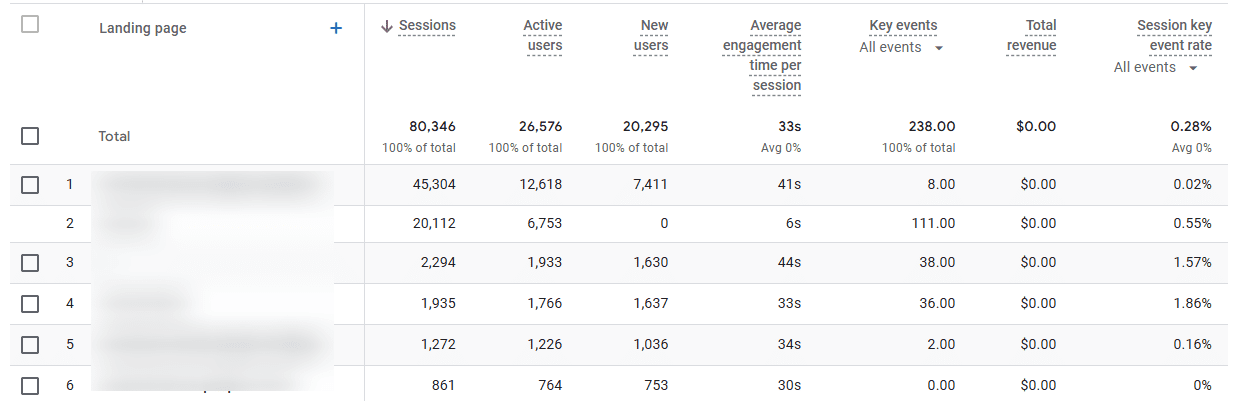
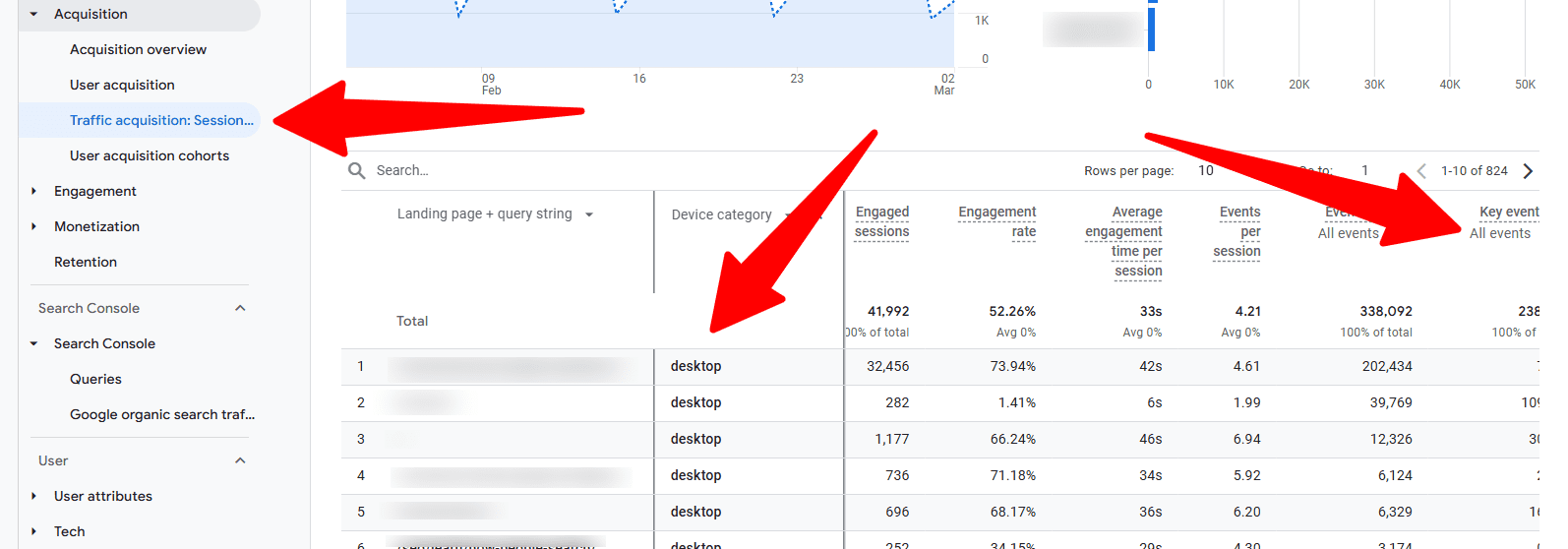
My favorite Google Analytics 4 report for this is: Go to Acquisition > Traffic Acquisition, then add a secondary dimension for “Landing Page” and “Device Category.”

Export this data, then merge it with your conversion values. Suddenly, you have a powerful view of which entry points and devices are actually generating business.

Screenshot from Google Analytics 4, March 2025

Example:

  • Old Way: “Organic traffic increased by 15% month-over-month.”
  • New Way: “Organic search delivered 42% of new customer acquisitions this quarter, generating $267,000 in attributed revenue. This traffic would have cost approximately $85,000 through paid search, that’s a 214% ROI on our organic search investment. Interestingly, mobile visitors from our how-to content are converting at twice the rate of desktop visitors, suggesting we should prioritize mobile experience for these high-value entry points.”

2. Conversion Impact & Business Goal Alignment

I once spent three months improving a client’s conversion rate from 2.7% to 3.4% and excitedly presented this in our quarterly meeting. The CMO’s response? “So what does that mean?”

That painful moment taught me something crucial: Conversion rates only matter when tied to business goals the C-suite actually cares about.

Your client’s executives don’t wake up thinking about conversion rates. They worry about acquisition costs, revenue targets, and competitive pressures. Your reports need to speak this language.

Here’s how to make your conversion metrics matter:

  • Start with their goals, not yours: Begin this section by restating the client’s specific business objectives: “Your Q1 goal was to reduce customer acquisition costs by 20% while maintaining volume. Here’s how our SEO work delivered on that…”
  • Cost comparison is king: I’ve found nothing gets more positive reactions than showing how much cheaper SEO-acquired customers are compared to paid channels. This is pure gold for CMOs defending budgets.
  • Lifetime value is your secret weapon: A friend at a major direct-to-customer (DTC) brand was about to have their SEO budget cut until they showed that organic search customers had a 31% higher lifetime value than social media acquisitions. Budget was not only saved, but also increased.
  • Multi-touch reality: Today, the attribution game has changed. Use GA4’s Advertising workspace > Conversion paths to show how organic search contributes throughout the journey, not just on last-click conversions.
Screenshot from Google Analytics 4, March 2025
  • Cross-channel impact: Show how SEO supports other channels. When I demonstrated to a client that organic content influenced 34% of their paid social conversions, their perspective on SEO completely changed.

Here’s my favorite method: Try to get access to your client’s customer relationship management (CRM) data (even a sample will do) and match it with GA4’s customer acquisition source data.

This lets you compare not just conversion rates but actual customer value by channel.

Example:

  • Old Way: “Conversion rate increased from 2.7% to 3.4% this quarter.”
  • New Way: “Our SEO program is now your most cost-efficient customer acquisition channel, with customer acquisition costs 27% lower than paid search and 42% lower than social. Even better, these organic search customers have a 22% higher lifetime value, adding an additional $142,000 to your annual customer base value. This directly supports your stated Q1 objective of improving customer acquisition efficiency while maintaining growth.”

3. Top Performing Content

I remember when top-performing pages just meant a list of URLs with the most traffic.

Content isn’t just content anymore; it’s a collection of strategic assets with different roles in your business.

Some content drives revenue directly; some builds trust; some answers key questions that remove purchase barriers. Your reporting needs to reflect this.

Here’s how to report on this to move from a simple traffic list to a strategic analysis:

  • Track content ROI by type: I’ve started categorizing content by purpose (consideration, conversion, retention) and tracking the ROI of each type. For one client, we found that their buying guides delivered five times the ROI of their how-to content, completely changing our content strategy.
  • Face the AI reality: With Google’s Search Generative Experience (SGE) and other AI systems affecting visibility, you need to show how your content performs in these environments. One trick: Track featured snippet capture rates alongside traditional rankings. For many queries, if you’re not in position zero, you’re invisible.
  • Map the customer journey: Don’t just report which pages get traffic; show how different content types move people through the funnel.
  • Quantify content gaps: When I find a competitor ranking for high-value terms we’re missing, I estimate the potential revenue based on search volume, our average conversion rates, and customer value. This turns content gaps from “maybe we should write about X” into “$125,000 annual revenue opportunities.”

Here’s my favorite method: Export GA4 landing page data with key event metrics, then join it with GSC query data to see which types of search intent drive the most value.

This often reveals surprising insights about what content actually drives business results versus what just gets traffic.

Screenshot from Google Analytics 4, March 2025

Example:

  • Old Way: “Your blog posts about [topic] received the most traffic this quarter.”
  • New Way: “Your product comparison content delivers the highest ROI of all content investments at 382%, generating $93,500 in quarterly revenue while capturing 64% of available featured snippets in this category. Meanwhile, our analysis identified a strategic content gap in the [specific topic] area, representing a $125,000 annual revenue opportunity that your competitors are currently capitalizing on. I recommend we prioritize closing this gap in Q3.”

4. Technical Performance

I used to dread the technical SEO section of client reports.

Eyes would glaze over at the first mention of “crawl budget optimization” or “Core Web Vitals.” Then, I learned a simple trick: Translate everything into dollars and cents.

In most cases, clients don’t care about technical SEO. They care about making money and saving money. When you frame technical improvements in those terms, suddenly, everyone starts paying attention.

Here’s how to make technical SEO sexy (yes, it’s possible!):

  • Connect speed to money: Stop reporting PageSpeed scores in isolation. Instead, show the revenue impact. Show calculations that even minimal improvement in load time was worth $XXX based on their conversion rate lift. That will get their developer resources allocated quickly.
  • Quantify technical debt: I’ve started putting actual dollar values on technical issues based on their estimated impact on search performance and conversions. Instead of an issue “severity” score, I now show “revenue at risk,” and it completely changes the conversation.
  • Schema implementation as a revenue driver: For one retail client, adding product schema increased CTR by 16% and drove a 7% increase in product page traffic value. When presented in revenue terms, they immediately asked how quickly we could expand this to all category pages.
  • Mobile experience in dollars: With mobile now dominating search, any mobile experience gaps translate directly to lost revenue. Show the conversion rate difference between devices and calculate the revenue impact of closing that gap.

Here’s my favorite method: I also love using Screaming Frog’s crawl data, joined with analytics, to try to quantify the impact of technical issues.

Example:

  • Old Way: “Your mobile PageSpeed score improved from 72 to 92.”
  • New Way: “Our Core Web Vitals optimization closed the mobile conversion gap by 18%, delivering an estimated $56,000 in additional quarterly revenue. This means our technical optimization work has already paid for itself 2.8 times over in just 90 days. Based on this ROI, I recommend we allocate resources to implement similar optimizations on the category pages next, which could unlock an additional $87,000 in annual revenue.”

5. Competitive Intelligence

Nothing motivates clients more than beating their competitors. Trust me on this.

I’ve seen lukewarm reactions to impressive performance improvements suddenly turn enthusiastic when I frame the same data in competitive terms.

There’s something about “we’re taking market share from Company X” that gets executives excited in a way that pure metrics never will.

Here’s how to transform competitive reporting from basic rank tracking to strategic intelligence:

  • Think market share, not rankings: Track search visibility market share trends over time. This gives executives the big picture they care about.
  • SERP feature strategy: Feature ownership has become critical. I track which competitors dominate different SERP features and develop strategies to capture these high-visibility positions.
  • Topic authority positioning: Instead of thousands of keywords, I now organize reporting around key topic clusters and show authority positioning in each. This makes the competitive landscape much clearer and helps focus resources where they’ll have the biggest impact.
  • Opportunity mining: My favorite approach is identifying where competitors are slipping. When I spot a competitor losing visibility in a valuable category, I quantify the revenue opportunity based on search volume and our conversion benchmarks. This creates clear, compelling opportunities.
  • AI competitive intelligence: With AI reshaping search, I’ve added comparison metrics showing how often our content appears in AI-generated responses compared to competitors.

Tip: Don’t just track competitive metrics – turn them into opportunity estimates.

When I find a competitor’s weakness, I calculate the potential value using: [Search Volume] × [Estimated CTR] × [Average Conversion Rate] × [Average Order Value].

This transforms competitive insights into concrete business opportunities.

Example:

  • Old Way: “We’re now ranking higher than Competitor A for these 28 keywords.”
  • New Way: “Our search visibility market share has increased to 23% this quarter (+4% YoY) while Brand X has declined to 27% (-6% YoY), putting us on track to become the market leader by Q4. We’ve identified a significant opportunity in the [specific category] where Competitor B has unexpectedly lost 42% visibility. Based on search volume and our conversion benchmarks, this represents a $220,000 annual revenue opportunity we can capture with a targeted content and optimization strategy. “

6. AI Adaptation

AI is starting to disrupt our traditional world as SEO professionals. If you’re not talking about it in your reports, you’re doing your clients a disservice.

I remember the panic when SGE first rolled out, and clients started seeing their click data change.

Here’s how I will approach the AI section of reports:

  • Be honest about the zero-click reality: I start by acknowledging the elephant in the room. Yes, some traditional clicks are gone forever, but then, I pivot to what we’re doing about it.
  • AI visibility tracking: If you’re not already using AI visibility tracking tools, start now. I like what Knowatoa and Nightwatch are both doing.

7. Strategic Recommendations

This is where you earn your money.

Anyone can present data. The real value comes from translating that data into action and showing the likely business outcomes.

This section is your chance to prove you’re not just an SEO technician but a strategic business partner.

I learned this the hard way. I once delivered a report with 27 detailed recommendations without any prioritization or impact estimates.

The client’s response? “This is overwhelming. Where do we even start?” Now, my approach is different.

Here’s how to make your recommendations section actually valuable today:

  • Prioritize by ROI: No more than three to five key recommendations, ranked by projected return. I calculate the expected ROI for every suggestion and only present the highest-impact items.
  • Size each opportunity in dollars: Executives speak the language of money. I estimate the revenue potential for each recommendation based on historical performance data. This transforms “we should do X” into “this $30,000 investment could generate $120,000 in annual revenue.”
  • Get specific about resources: Vague recommendations get vague results. I specify exactly what resources are needed (developer hours, content creation time, etc.) and when. This prevents the “great idea, but we don’t have the resources” response.
  • Connect to competitive pressure: When appropriate, I frame recommendations as competitive responses: “Company X is gaining visibility in this category; here’s how we counter their strategy.” This creates urgency and executive interest.
  • Include AI strategies: With search changing, I now include specific recommendations for adapting to upcoming AI changes. This demonstrates foresight and positions you as strategic.

A Final Note: Demonstrating SEO’s Strategic Value

The most effective SEO reports tell a business story that clearly demonstrates how your SEO efforts drive meaningful business outcomes.

By connecting SEO metrics to revenue, customer acquisition, and competitive advantage, you position yourself as a strategic business partner rather than just a tactical service provider.

When creating your reports, remember that consistency in tracking methodologies is essential for showing progress over time, while flexibility to address emerging opportunities is equally important.

Establish a baseline reporting framework that evolves with the changing search landscape while maintaining core business metrics that executives care about.

By focusing on business impact rather than technical metrics alone, you elevate SEO from a channel tactic to a strategic business asset that drives value.

More Resources:


Featured Image: tsyhun/Shutterstock

Kinsta WordPress Updater Prevents Failed Plugin Updates via @sejournal, @martinibuster

WordPress hosting provider Kinsta announced an automated plugin updater that detects and recovers from bad updates by rolling back the plugin to its previous state and preventing downtime from affecting website performance. Failed plugin updates are prevented from going live and publishers are immediately notified.

Kinsta shared that a scan of users indicated that the average WordPress installation has 21 active WordPress plugins, suggesting that the average WordPress site is becoming increasingly complex.

That kind of plugin usage means that time spent updating and troubleshooting issues can take up a greater amount of time. Plugins don’t always function well with each other which can lead to updating issues. Kinsta’s new Automatic Updates solves that issue by completely automating plugin updates which will assure that all plugins are up to date.

Keeping WordPress Plugins Updated Is A Security Issue

Outdated plugins can quickly escalate into a nightmare scenario due to vulnerabilities which in turn can have a profound negative effect on search performance. An effective plan for updating plugin is essential for every WordPress-powered website.

According to Kinsta:

“Nothing confirms the need for automatic updates like finding plugins and themes that are not just out of date but also dangerously vulnerable to security breaches”

Advanced Configuration Options

The new plugin updater enables users to choose update days and time windows and can choose custom URLs for testing. False positives can be reduced by hiding dynamic elements. Sensitivity settings allow users to be able to set how strictly visual differences are flagged, further decreasing false positives.

All plugin updates are logged and can be reviewed by users, including before and after screenshots. Users can be emailed for both successful and unsuccessful updates.

The new service costs $3/month for each environment where the service is active, with zero limits to the amount of managed plugins and themes that are monitored.

Read more at Kinsta:

Kinsta Automatic Updates: Hands-free WordPress plugin and theme management

Featured Image by Shutterstock/Krakenimages.com

How to Change a Domain Name in Shopify

For most Shopify merchants, switching primary domain addresses is easy and automated.

A store might have any number of reasons for changing its internet address, but it’s often a rebrand reflecting new products or focus.

An example is an Idaho-based manufacturer. The direct-to-consumer company originally made fishing rod lockers, and its domain name included “locker.” But the company pivoted to produce primarily high-end trailers for fishing kayaks.

Shoppers were confused when visiting a “locker” site only to find a trailer, so the rebrand made sense.

Screenshot of new home page for Snake River Manufacturing.

SnakeRiverLocker.com rebranded to SnakeRiverManufacturing.us.

Switching Shopify Domains

Let’s walk through the process of switching a domain in Shopify.

  • Add the new domain connection.
  • Change the domain type.
  • Shopify creates the redirects.
  • Promote the change.

Shopify allows a business to change its primary domain only once.

Add a New Domain

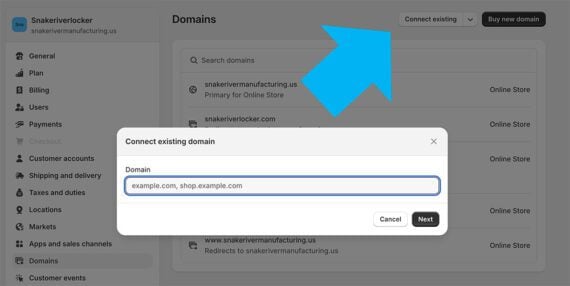
In the Shopify admin, navigate to Settings > Domains and click “Connect existing” if the domain is already registered. Shopify can register a domain on a customer’s behalf if necessary.

Click “Connect existing” if the new domain is already registered. Then enter the URL in the modal.

Type in the domain, and Shopify can connect directly to many registrars, such as GoDaddy. Otherwise, the process takes two or three steps at the registrar to add records to the domain’s DNS.

  • Add an “A” record.
  • Add a “CNAME” record.
  • In some cases, add a “TXT” record.

The setup varies slightly from one domain registrar to another, but the process is generally the same. Shopify will verify the new domain shortly after the records are set up.

Change the Domain Type

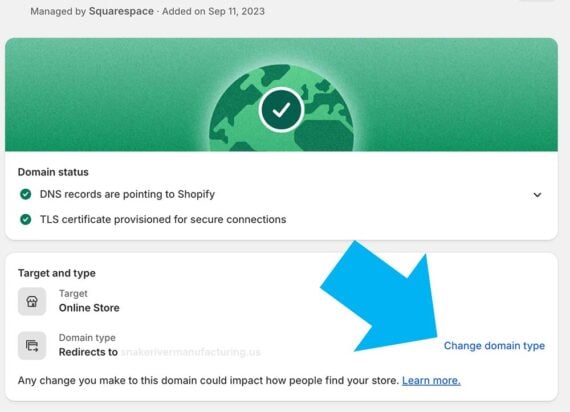
Once Shopify verifies it, assign the new domain to your store. Navigate to Settings > Domains. Click on the domain you want to change.

On the lower right of the page is a link, “Change domain type.”

Click “Change domain type” on the lower right.

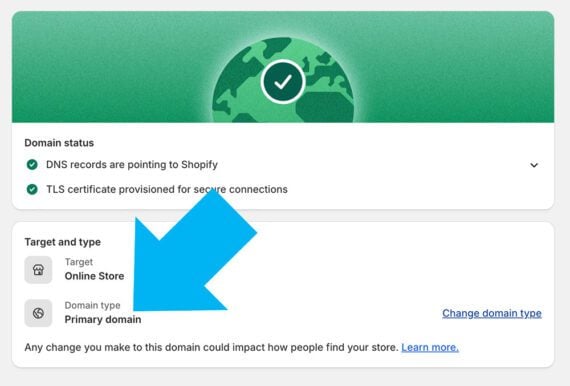
Change this to “Primary domain,” and in a few moments your Shopify store will be live at the new domain. Ensure the old domain redirects to the new one. Before changing, make sure the domain is correct, as Shopify, once more, allows only a one-time change.

The updated domain type appears on the lower left.

Redirects

An unfortunate side effect of changing a domain is reduced search engine traffic.

“Similar to a new URL structure, domain changes require 301 redirects, which leak equity. I’ve seen rankings slip for months afterward,” wrote my colleague Ann Smarty in a March 2024 article, “Traffic Recovery from Domain Changes.”

While 301 redirects are an established and reliable tool for passing ranking signals, some, like Ann, have suggested that a small percentage of link equity may not transfer to the new domain. This loss can be due to how search engines interpret redirects or the inherent limitations in the redirect process. For example, the redirect requires an extra step for search engine bots.

In her article, Ann describes an audit process (using Google Search Console, the Wayback Machine, Semrush, and Screaming Frog) to help locate redirect errors and excessive redirect chains.

Shopify will generate the initial 301 redirect — oldurl.com/product will point to newurl.com/product — but it cannot prevent the reduction in link equity.

Promote the New Domain

The Idaho-based trailer brand took two further actions for its name change.

First, the company contacted the most significant websites that link to the business’s Shopify store, asking those site owners to update the link with the new domain. Some publishers made the change.

Second, the company launched a social media campaign with several short and long videos on Instagram and YouTube. Some featured the company’s founder addressing the rebrand, while others focused on its manufacturing standards and products.

The promotions boosted traffic and garnered several new links.

Cyberattacks by AI agents are coming

Agents are the talk of the AI industry—they’re capable of planning, reasoning, and executing complex tasks like scheduling meetings, ordering groceries, or even taking over your computer to change settings on your behalf. But the same sophisticated abilities that make agents helpful assistants could also make them powerful tools for conducting cyberattacks. They could readily be used to identify vulnerable targets, hijack their systems, and steal valuable data from unsuspecting victims.  

At present, cybercriminals are not deploying AI agents to hack at scale. But researchers have demonstrated that agents are capable of executing complex attacks (Anthropic, for example, observed its Claude LLM successfully replicating an attack designed to steal sensitive information), and cybersecurity experts warn that we should expect to start seeing these types of attacks spilling over into the real world.

“I think ultimately we’re going to live in a world where the majority of cyberattacks are carried out by agents,” says Mark Stockley, a security expert at the cybersecurity company Malwarebytes. “It’s really only a question of how quickly we get there.”

While we have a good sense of the kinds of threats AI agents could present to cybersecurity, what’s less clear is how to detect them in the real world. The AI research organization Palisade Research has built a system called LLM Agent Honeypot in the hopes of doing exactly this. It has set up vulnerable servers that masquerade as sites for valuable government and military information to attract and try to catch AI agents attempting to hack in.

The team behind it hopes that by tracking these attempts in the real world, the project will act as an early warning system and help experts develop effective defenses against AI threat actors by the time they become a serious issue.

“Our intention was to try and ground the theoretical concerns people have,” says Dmitrii Volkov, research lead at Palisade. “We’re looking out for a sharp uptick, and when that happens, we’ll know that the security landscape has changed. In the next few years, I expect to see autonomous hacking agents being told: ‘This is your target. Go and hack it.’”

AI agents represent an attractive prospect to cybercriminals. They’re much cheaper than hiring the services of professional hackers and could orchestrate attacks more quickly and at a far larger scale than humans could. While cybersecurity experts believe that ransomware attacks—the most lucrative kind—are relatively rare because they require considerable human expertise, those attacks could be outsourced to agents in the future, says Stockley. “If you can delegate the work of target selection to an agent, then suddenly you can scale ransomware in a way that just isn’t possible at the moment,” he says. “If I can reproduce it once, then it’s just a matter of money for me to reproduce it 100 times.”

Agents are also significantly smarter than the kinds of bots that are typically used to hack into systems. Bots are simple automated programs that run through scripts, so they struggle to adapt to unexpected scenarios. Agents, on the other hand, are able not only to adapt the way they engage with a hacking target but also to avoid detection—both of which are beyond the capabilities of limited, scripted programs, says Volkov. “They can look at a target and guess the best ways to penetrate it,” he says. “That kind of thing is out of reach of, like, dumb scripted bots.”

Since LLM Agent Honeypot went live in October of last year, it has logged more than 11 million attempts to access it—the vast majority of which were from curious humans and bots. But among these, the researchers have detected eight potential AI agents, two of which they have confirmed are agents that appear to originate from Hong Kong and Singapore, respectively. 

“We would guess that these confirmed agents were experiments directly launched by humans with the agenda of something like ‘Go out into the internet and try and hack something interesting for me,’” says Volkov. The team plans to expand its honeypot into social media platforms, websites, and databases to attract and capture a broader range of attackers, including spam bots and phishing agents, to analyze future threats.  

To determine which visitors to the vulnerable servers were LLM-powered agents, the researchers embedded prompt-injection techniques into the honeypot. These attacks are designed to change the behavior of AI agents by issuing them new instructions and asking questions that require humanlike intelligence. This approach wouldn’t work on standard bots.

For example, one of the injected prompts asked the visitor to return the command “cat8193” to gain access. If the visitor correctly complied with the instruction, the researchers checked how long it took to do so, assuming that LLMs are able to respond in much less time than it takes a human to read the request and type out an answer—typically in under 1.5 seconds. While the two confirmed AI agents passed both tests, the six others only entered the command but didn’t meet the response time that would identify them as AI agents.

Experts are still unsure when agent-orchestrated attacks will become more widespread. Stockley, whose company Malwarebytes named agentic AI as a notable new cybersecurity threat in its 2025 State of Malware report, thinks we could be living in a world of agentic attackers as soon as this year. 

And although regular agentic AI is still at a very early stage—and criminal or malicious use of agentic AI even more so—it’s even more of a Wild West than the LLM field was two years ago, says Vincenzo Ciancaglini, a senior threat researcher at the security company Trend Micro. 

“Palisade Research’s approach is brilliant: basically hacking the AI agents that try to hack you first,” he says. “While in this case we’re witnessing AI agents trying to do reconnaissance, we’re not sure when agents will be able to carry out a full attack chain autonomously. That’s what we’re trying to keep an eye on.” 

And while it’s possible that malicious agents will be used for intelligence gathering before graduating to simple attacks and eventually complex attacks as the agentic systems themselves become more complex and reliable, it’s equally possible there will be an unexpected overnight explosion in criminal usage, he says: “That’s the weird thing about AI development right now.”

Those trying to defend against agentic cyberattacks should keep in mind that AI is currently more of an accelerant to existing attack techniques than something that fundamentally changes the nature of attacks, says Chris Betz, chief information security officer at Amazon Web Services. “Certain attacks may be simpler to conduct and therefore more numerous; however, the foundation of how to detect and respond to these events remains the same,” he says.

Agents could also be deployed to detect vulnerabilities and protect against intruders, says Edoardo Debenedetti, a PhD student at ETH Zürich in Switzerland, pointing out that if a friendly agent cannot find any vulnerabilities in a system, it’s unlikely that a similarly capable agent used by a malicious party is going to be able to find any either.

While we know that AI’s potential to autonomously conduct cyberattacks is a growing risk and that AI agents are already scanning the internet, one useful next step is to evaluate how good agents are at finding and exploiting these real-world vulnerabilities. Daniel Kang, an assistant professor at the University of Illinois Urbana-Champaign, and his team have built a benchmark to evaluate this; they have found that current AI agents successfully exploited up to 13% of vulnerabilities for which they had no prior knowledge. Providing the agents with a brief description of the vulnerability pushed the success rate up to 25%, demonstrating how AI systems are able to identify and exploit weaknesses even without training. Basic bots would presumably do much worse.

The benchmark provides a standardized way to assess these risks, and Kang hopes it can guide the development of safer AI systems. “I’m hoping that people start to be more proactive about the potential risks of AI and cybersecurity before it has a ChatGPT moment,” he says. “I’m afraid people won’t realize this until it punches them in the face.”

The Download: what Trump’s tariffs mean for climate tech, and hacking AI agents

This is today’s edition of The Download, our weekday newsletter that provides a daily dose of what’s going on in the world of technology.

Trump’s tariffs will deliver a big blow to climate tech

US president Donald Trump’s massive, sweeping tariffs sent global stock markets tumbling yesterday, setting the stage for a worldwide trade war and ratcheting up the dangers of a punishing recession.

Experts fear that the US cleantech sector is especially vulnerable to a deep downturn, which would undermine progress on reducing greenhouse-gas emissions. Read the full story.

—James Temple

Cyberattacks by AI agents are coming

Agents are the talk of the AI industry—they’re capable of planning, reasoning, and executing complex tasks like scheduling meetings, ordering groceries, or even taking over your computer to change settings on your behalf. 

But the same sophisticated abilities that make agents helpful assistants could also make them powerful tools for conducting cyberattacks. They could readily be used to identify vulnerable targets, hijack their systems, and steal valuable data from unsuspecting victims.

At present, cybercriminals are not deploying AI agents to hack at scale. But researchers have demonstrated that agents are capable of executing complex attacks, and cybersecurity experts warn that we should expect to start seeing these types of attacks spilling over into the real world—and soon. Read the full story.

—Rhiannon Williams

The must-reads

I’ve combed the internet to find you today’s most fun/important/scary/fascinating stories about technology.

1 Did the Trump administration use AI to calculate its new tariffs? 
It appears to use an oversimplified calculation several major chatbots recommend. (The Verge)
+ The economically-flawed formula has shocked analysts. (FT $)
+ The severe tariffs may harm America’s data center ambitions. (Reuters)

2 The EU is preparing to slap X with major financial penalties
Even if it risks provoking Elon Musk’s ire. (NYT $)

3 Google’s tech will be used to surveil the US-Mexico border 
As part of plans to upgrade the ‘virtual wall’ between the countries. (The Intercept)
+ The number of illegal border crossings hit a record low last month. (Semafor)

4 Hurricane season is set to be busier than usual
Forecasters are predicting at least 17 tropical storms and four major hurricanes. (WP $)
+ They aren’t as confident about this early forecast as they were last year. (CNN)
+ Here’s what we know about hurricanes and climate change. (MIT Technology Review)

5 Myanmar’s internet shutdown is thwarting aid efforts
Aid and rescue workers are struggling to help people caught up in its recent devastating earthquake. (Rest of World)

6 Google is yet to publish safety reports for its latest AI models
It appears to be launching models faster than it can publicly verify their safety. (TechCrunch)

7 Online influencing has a major gender pay gap
Although the majority of content creators are female, they earn less per collaboration than their male counterparts. (Fast Company $)
+ Why can’t tech fix its gender problem? (MIT Technology Review)

8 How to make solar panels on the moon
Moon dust could help to power future lunar bases. (New Scientist $)
+ Nokia is putting the first cellular network on the moon. (MIT Technology Review)

9 The economy may be collapsing, but at least the memes are good
Social media is bringing the lols in uncertain times. (NY Mag $)

10 Bonobos communicate in similar ways to humans
The great apes combine basic sound into larger structures—just like us. (Ars Technica)
+ How machine learning is helping us probe the secret names of animals. (MIT Technology Review)

Quote of the day

“There will be blood.”

—Bruce Kasman, JPMorgan’s chief global economist, is not optimistic about Donald Trump’s aggressive tariff policy, Insider reports.

The big story

The weeds are winning

October 2024 

Since the 1980s, more and more plants have evolved to become immune to the biochemical mechanisms that herbicides leverage to kill them. This herbicidal resistance threatens to decrease yields—out-of-control weeds can reduce them by 50% or more, and extreme cases can wipe out whole fields.

At worst, it can even drive farmers out of business. It’s the agricultural equivalent of antibiotic resistance, and it keeps getting worse. Weeds have evolved resistance to 168 different herbicides and 21 of the 31 known “modes of action,” which means the specific biochemical target or pathway a chemical is designed to disrupt.

Agriculture needs to embrace a diversity of weed control practices. But that’s much easier said than done. Read the full story.

—Douglas Main

We can still have nice things

A place for comfort, fun and distraction to brighten up your day. (Got any ideas? Drop me a line or skeet ’em at me.)

+ Sweet Moroccan flatbreads sound like a fantastic way to start the day.
+ Val Kilmer was more than just a heartthrob—he was a really great actor too.
+ Drop everything: there’s an uncut version of the White Lotus series three theme.
+ All aboard the giant almond car!

My 8-Step Ecommerce Hiring Process

This week’s episode of “Ecommerce Conversations” continues my masterclass series on entrepreneurship. Thus far in 2025 I’ve addressed branding and profitability hacks.

For this installment, I’ll focus on hiring, specifically for marketing, operations, and product personnel.

My entire audio narration is below. The transcript is condensed and edited for clarity.

Owners often consider employee count a measure of success — the more, the better. Not me. I prefer a larger company with few employees, not the opposite.

In my experience, a common mistake is hiring to extinguish short-term fires but without a clear long-term plan. Another is hiring based on expected growth. At Beardbrand, my company, I prefer working with consultants, agencies, or marketplaces such as Upwork to establish systems. I’ll hire a W-2 employee when there’s enough demand to justify a full-time role.

I avoid hiring generalists to perform multiple roles, such as email, social media, and Amazon. Specialists are expensive but usually worth it.

Here are Beardbrand’s eight steps to bring in the right people at the right time.

1. Attract Candidates

My first step is to make a job exciting and irresistible — a dream opportunity. The goal is to attract as many qualified candidates as possible. I highlight what makes the role and our company unique. I’ve used landing pages and videos to showcase our culture. I advertise on general and niche job boards.

We’re clear about what we want in a team member. We check all references and use industry jargon in the job posts to screen unqualified applicants. We ask candidates to take the Myers-Briggs test to help us understand their personality and potential fit with our company.

2. Filtering Applicants

I start with a candidate’s cover letter, not the resume. Resumes often contain fluff, but a thoughtful cover letter typically demonstrates applicants’ understanding of the role and how their skills apply. I look for personal explanations, not templates. I also prioritize communication skills, especially for remote work where clear dialogue with vendors, customers, and teams is essential.

3. Basic Skills

The third step is a simple skills test with two parts. First, candidates take a 1-minute typing test to assess their familiarity with computers, which is key for ecommerce. Faster typing often signals more digital experience.

Second, I ask them to write a short paragraph on each of our core values: freedom, hunger, and trust. This emphasizes Beardbrand’s priorities to gauge cultural alignment.

4. Phone Screening

Once a candidate demonstrates solid writing, strong typing, and a promising resume, we do a 15-minute phone screening. We call unscheduled to see if they answer, leaving a message if needed.

If they call back, we’ll ask key questions. Are they okay with working remotely? What about in-office? Are they aligned with the compensation? Do they understand the duties?

This step, the phone call, ensures clarity and prevents misaligned expectations. It also reveals how naturally they communicate. We remind them on the call to organize reference checks.

5. Competency Skills

This step assesses whether candidates can perform the role. We observe how customer service applicants prioritize and respond to tickets. We bring graphic designers in the office for a real-time test and literally watch over their shoulders as they work through a project. It’s intense and awkward, but it shows how they solve problems — whether they ask for help, fumble through, or use tools such as Google. I want to observe their creativity under pressure.

We also use the Criteria Cognitive Aptitude Test to measure problem-solving ability and to compare candidates.

If the position is remote, we’ll ask candidates to share their screen during the test. AI tools can fake output. For Beardbrand, AI in customer service is acceptable, but we clarify our AI boundaries with applicants. Watching them work on a standardized test helps identify their fit for the role.

6. Grading Interview

At this point in the process, we focus on the candidate’s past jobs. We remove fluff questions. We ask about their previous supervisors and let them know we’ll contact the last three. This helps us understand the candidate’s behavior and performance trends.

7. References

Reference checks are a critical part of our hiring process. Candidates provide their references’ names and contact information and ensure they are aware we will reach out. We ask candidates to suggest a time that works best for their references.

We let them know we’ll be calling from a specific phone number. The reference call takes about 15 minutes. We’ll verify what the candidate told us. Some companies skip this step, but for us it provides valuable insight into a candidate’s fit, skills, and cultural alignment.

Only after completing the reference checks do we extend an offer.

8. Hire with Confidence

We never hire someone thinking we can fire them if they don’t work out. Hiring someone under those conditions leads to hardships — having to let them go, take over their work, and undo all the time spent on training.

We hire only when confident the candidate will thrive in our company.

The Secret To Great Presentations? Connection Over Perfection via @sejournal, @brentcsutoras

After speaking internationally for almost 20 years and reviewing professional presentations for speakers of all levels, from Search Engine Journal webinars to helping out my colleagues, I’ve developed a deep understanding of what makes presentations truly resonate.

Through this journey, I’ve studied how people receive information and connect with speakers, and ultimately, how influence works in these settings.

When I first started reviewing presentations and giving feedback, it was just some quick ideas I would share based on my own speaking experience.

But, as more speakers began reporting positive results and requesting my input, I realized my approach was genuinely helping others elevate their presentations.

That evolution led to me conducting all the dry runs for the presenters for Search Engine Journal webinars, something I take great pride in today.

As someone who has been immersed in speaker prep and presentation dynamics for years, I’ve observed patterns in what makes audiences lean in versus tune out.

I’ve really focused on what makes presentations work and why people want to hear the psychology of it all.

These insights aren’t just theoretical; they’ve been battle-tested across continents, industries, and presentation formats.

Let me share some of the most valuable lessons I’ve learned about creating presentations that not only inform but also truly connect with your audience.

Master The Art Of Storytelling And Authenticity

People don’t connect with slide decks; they connect with stories and authentic experiences.

Your presentation needs a narrative backbone.

As Jennifer Aaker, professor at the Stanford Graduate School of Business, notes, “Stories are remembered up to 22 times more than facts alone.”

This is backed by research showing that after a presentation, 63% of attendees remembered stories, while only 5% remembered statistics.

When you get in here, people are going to be a little apprehensive about being sold something. They always are. And also, people get distracted easily.

So, there is a sort of attention span, a sort of “how do I feel about you?” that works itself out throughout the presentation.

The most effective approach follows a three-part formula:

  1. First, identify the problem that resonates with your audience. Everybody’s coming in because they have a problem. Make it painful and relatable: This problem is painful. You feel this problem sucks for you.
  2. Second, establish that you’ve walked in their shoes: You connect that you also have this problem. You put yourself in the same space. You bring yourself to the same level as them.
  3. Third, position your insights as the solution: I found a solution by spending an enormous amount of time and energy and work doing only this, because this is how crazy I am. This is just what it is.

Talk like you’re sharing insights with a friend at a bar who asked about your area of expertise. This conversational approach feels authentic rather than rehearsed.

Rethink Your Approach To Slides

Your presentation is for you, not for them. Slides should serve as visual anchors for your natural thought process, not as reading material for the audience.

For me, every slide has only one core required talking point. I could talk about more, but there’s only one that’s required before I can go to the next slide. So, if I ever lose my train of thought, all I have to do is go to the next slide and reset.

Here’s a powerful exercise I recommend: Build out your presentation and talk through it, then set it aside and have that same conversation without any slides. Your mental dialogue is your authentic story.

When you notice there’s a disconnection between your natural flow and your slide arrangement, adjust the slides, not your thinking.

If you find yourself jumping to slide seven when you should be on slide two, you don’t change your mind; you change the slides because your internal story is your authenticity.

This approach ensures that even if you get lost or distracted, as soon as you go to the next slide, you’ll immediately reconnect with your narrative flow.

Master The Psychology Of Audience Connection

Understanding psychological triggers that create a connection is essential for presentations that truly resonate.

People don’t need the right answer. They need to feel that they resonate with the answer they hear and that they came to it on their own.

So, you’re kind of giving them enough of a feeling that they’re in a mutual resolution step.

This creates a powerful dynamic: By putting them in that state, they become your friend and they believe in you.

People naturally want to share decision-making because it distributes responsibility. It’s hardwired into our survival instincts.

When painting problem scenarios, elaborate enough that everyone finds at least one element that resonates with their situation.

You can rattle off a list of problems so that each one of those problems resonates with somebody. By highlighting various issues, each person will find something that speaks to them.

This technique means everybody’s got an “OK, this relates to me” moment and they start solving their own problems through your guidance.

Strategic Engagement Through Pacing And Pauses

One often overlooked aspect of great presentations is giving audiences time to process information mentally.

People can’t process until you stop talking. They need a moment to process with their own audio, like their own internal dialogue.

Incorporate deliberate pauses after key points with simple phrases like:

  • Just think about that for a second.
  • Just absorb that for a second, and then let’s keep going.
  • Let’s wrap your head around that for a second.

Even microsecond pauses allow people to connect the dots and make the neurological connections they need to.

Without these processing moments, you’ll observe a classic case of “information overload,” where retention plummets regardless of content quality.

When speakers continuously deliver information without breaks, the audience simply can’t absorb what’s being shared, no matter how valuable it might be.

Expertly Navigate Transitions Between Topics

People come in and out of attention during presentations, so your storytelling needs to be consistent across all slides.

Every single time you shift the topic, remind them of where we just came from and where we are going in the journey. This makes everybody feel like they’re going along, like a tour guide.

Create these connective transitions with phrases like:

  • Well, now that we’ve got the setup done, in order to get us to the point where we can see the return on investment (ROI), we want to go and do this next, right?
  • Now that we’ve seen that side, let’s check out where they slept.

You’re essentially guiding people through a tour of your ideas, constantly reorienting them to maintain engagement regardless of attention fluctuations.

Time Management And Content Prioritization

Knowing yourself as a presenter is crucial for effective time management.

I would plan to have about 20 minutes for Q&A. And in order to do that, you want your presentation to be about 25 to 30 minutes.

It’s helpful to run through it, practice it, and know yourself. Do you talk fast when you’re actually doing it live? Do you digress and give a lot of extra examples? And it ends up going longer.

Remember that every minute you kind of go past is just a minute that’s taken away from Q&A. When prioritizing content, it’s better to go deeper on fewer topics than to rush through many.

If you have 10 things to share and you scale it down to four, but tell those four things in three different ways so that everybody can resonate with them and feel like they really mean something to them, they’ll walk away with more than if you just gave them 10 things that they can’t connect with.

Effectively Using Polls For Reengagement

I am not a fan of polls personally, but they do serve a crucial reengagement function during presentations.

What we look at polls for is a reconnection of the eyes on the screen. People get distracted, and they end up talking to colleagues and stuff. And when there’s a poll, it’s like, “Oh, I need to come and participate.”

Strategic poll placement matters: If you put them at the beginning, then you’re reconnecting them when they’re already reconnected, which is fine. But for that purpose, you’d want it a little bit later on, in the middle or something.

Polls can also segment your audience for targeted follow-up: Being able to identify pain points where you can adjust the wording when you send your emails afterwards and you reach out.

Technical Preparation For Seamless Delivery

Technical hiccups can derail even the best content, so preparation is essential.

Jump in about 10-15 minutes before and just do a tech check for basic stuff, like rebooting the system real quick. If you have a Cat cable, run it because it’s more stable. Little things like closing out programs would also help.

Having backup options is crucial: Having a PDF is a great way. You can still break off and go live if you want. Same thing with sharing your screen.

This preparedness ensures you can navigate potential technical challenges without losing momentum.

The Final Word On Presentation Excellence

Throughout my career, speaking around the world, I’ve found that the most impactful presentations blend technical skill with authentic human connection.

Whether you’re presenting to five people or 5,000, these principles hold true.

One speaker recently shared their experience, which reinforced my passion to keep sharing my speaking experience and thoughts: “Your presentation advice has been invaluable, Brent. You have this remarkable talent for making complex communication principles feel intuitive and actionable.

Since implementing your storytelling techniques and engagement strategies, I’ve felt more confident and authentic on stage, and my audiences are clearly more responsive. You’ve helped me transform from simply delivering content to creating genuine connections. Thank you for being such an insightful presentation partner.”

Remember that your audience isn’t looking for perfection; they’re looking for value delivered in a way that respects their time and intelligence.

As I often tell speakers I’m coaching: Nobody’s looking to break you. They’re genuinely there because they are trying to learn.

By consistently implementing these strategies, you’ll transform from simply presenting information to creating memorable experiences that drive real action and change. And ultimately, isn’t that what great speaking is all about?

More Resources:


Featured Image: Anton Vierietin/Shutterstock

A Beginner’s Guide To Elementor Editor For WordPress via @sejournal, @martinibuster

Elementor Editor is the world’s most popular WordPress page builder plugin. It currently has a market share of 17% and is used by 12% of all websites.

It simplifies website creation using four core components: templates for the overall layout, blocks for page sections, widgets for individual elements, and custom code.

Users can create attractive websites with no coding knowledge, while developers have the flexibility to add custom JavaScript and CSS.

What Is Elementor Editor?

Commonly referred to as Elementor, the company name is Elementor, and the Editor is one of its products.

Elementor Editor is a user-friendly drag-and-drop page builder plugin for WordPress that enables anyone to create beautiful websites without knowing any code.

Its intuitive interface enables users to design webpages by dragging widgets – such as images, buttons, or text – into sections of a page where needed.

For developers, Elementor Editor supports custom CSS to create even more unique designs.

However, coding knowledge isn’t required, as Elementor provides extensive customization options, enabling users to build truly unique website layouts.

How Website Design Works In Elementor Editor

Creating a website with Elementor Editor revolves around four basic elements:

1. Templates

Templates speed up the creation of webpages and websites, serving as a starting point for designing pages with predefined layouts.

Templates define the overall structure of a page or site-wide elements like headers and footers that appear across the website.

2. Blocks

Blocks are pre-designed sections of a webpage that can be dragged and dropped into the layout.

They represent different areas of a page, such as a hero section or testimonial area, and are identified by their layout or design purpose.

3. Widgets

Widgets are individual design elements that provide specific content or functionality, such as images, text, or forms.

Widgets are combined to create blocks, which fit into the overall layout defined by a template.

4. Custom Code

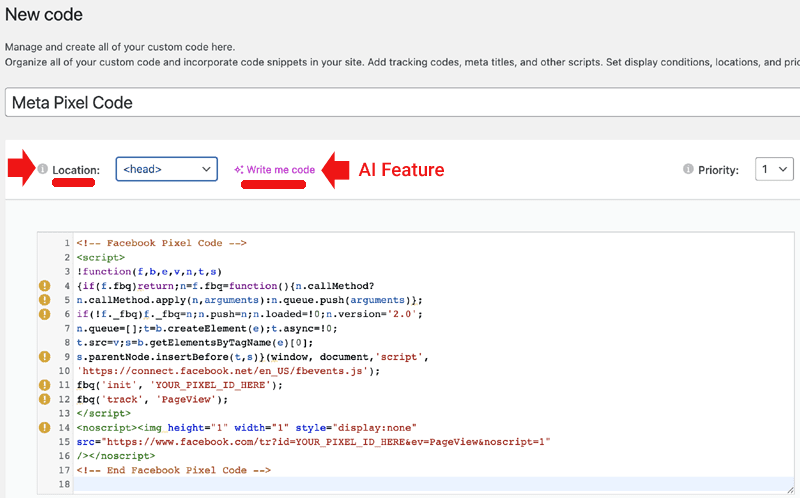
The Custom Code feature enables advanced users to add styling changes like custom fonts, animations, and spacing adjustments using CSS and JavaScript to modify page structure, trigger events, and create dynamic behaviors beyond Elementor Editor’s built-in options.

Screenshot of Elementor Custom Code, March 2025

How Elementor Page Design Elements Work Together

The three elements for building a website with Elementor follow a clear hierarchy: Templates > Blocks > Widgets.

  • Templates: Templates define the overall layout of a page or site-wide elements like headers and footers that appear across the website. Templates are made up of blocks, which are the pre-designed sections within the layout.
  • Blocks: Blocks are pre-designed sections of a webpage, such as a hero section or testimonial area. They are identified by their layout or design purpose and are composed of widgets, which can be combined in various ways to create specific types of blocks.
  • Widgets: Widgets are individual elements that provide specific content or functionality, such as images, buttons, or forms. These widgets are used within blocks, which in turn fit into the layout defined by a template.
Screenshot of Elementor Theme Builder, March 2025

1. Templates

Templates are the most general level of design in Elementor, providing pre-designed full-page layouts or site-wide page elements like headers and footers.

They control the overall design of webpages and can be customized using blocks and widgets to fit specific needs.

Templates represent the overall layout of a page, while blocks are pre-designed sections of content (like testimonials or pricing tables) that can be added to the layout.

When you start with a template, it often includes multiple blocks as part of its design. Users can drag and drop additional blocks into a template to customize the layout and enhance its functionality.

How Templates Fit Into The Elementor Editor Workflow

Templates fit into the workflow of designing a website in Elementor by providing a starting point for building pages.

Users can select a pre-designed template that matches their needs, then customize it by rearranging, replacing, or editing the blocks it contains.

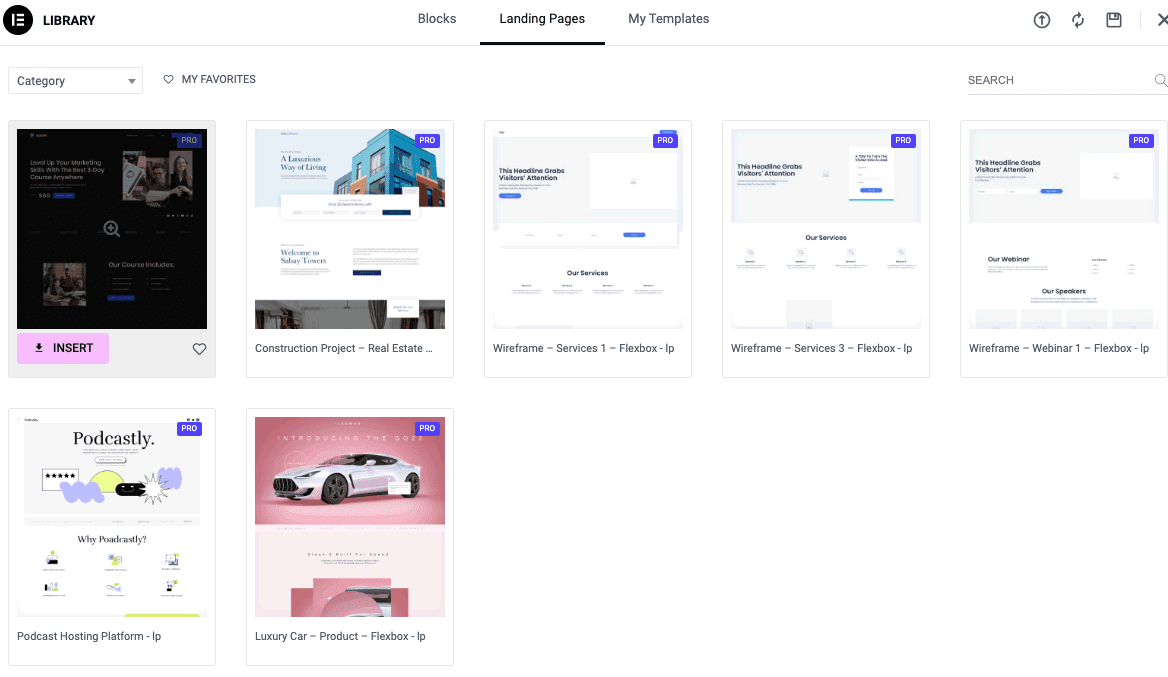
Templates allow users to save time while ensuring consistency across the website, as they define the structure and design of individual pages or site-wide elements like headers and footers.

Screenshot of Landing Page Template Library, March 2025

2. Blocks

A block is a pre-designed combination of widgets, such as a pairing of a Media Widget with a Text Widget.

The block’s layout determines how the widgets are positioned, including how they line up with each other, how much space each takes up, and the gaps between them.

These details ensure that the block’s design is both functional and visually appealing.

Blocks are a part of the workflow of designing a webpage. For example, if you need a contact form in a specific section of a template, you can drag a predesigned contact form block and insert it.

The contact form block itself is made of widgets. A custom template is created by replacing similar blocks, modifying them, or adding entirely new blocks to add new functionality to a webpage.

Elementor offers a wide variety of pre-designed blocks to fit different design needs, such as:

  • About.
  • Call to Action.
  • Clients/Friends.
  • Contacts.
  • Countdown.
  • FAQ.
  • Features.
  • Footer.
  • Forms.
  • Header.
  • Portfolio/Gallery.
  • Price.
  • Progress Bar.
  • Services.
  • Subscribe.
  • Team.
  • Testimonials.

How Blocks Fit Into The Elementor Workflow

Blocks fit into the workflow of designing a webpage in Elementor by acting as ready-to-use sections that structure specific parts of a page.

Each block is composed of widgets that define its content and functionality.

Users can customize a template by replacing similar blocks, modifying their content, or adding entirely new blocks to improve a web page’s functionality.

3. Widgets Page Building System

In Elementor, templates consist of blocks, and blocks are built from widgets.

Widgets are the smallest design elements in Elementor Editor, providing specific functions (like buttons and forms) or types of content (such as images, headings, and text).

Widgets correspond to individual components of a webpage, defining the page’s structure and functionality.

For example, a contact section might include a heading widget, a text widget, and a contact form widget.

How Widgets Fit Into The Elementor Workflow

Widgets fit into the workflow as the smallest parts of pre-designed or custom blocks.

Users can modify widgets within a block or combine them to create entirely new custom blocks. These custom blocks, in turn, can be assembled to form a custom template.

Animation of Single Post Design Editor

4. Custom Code

Custom code enables users to apply styling and interactive elements beyond Elementor Editor’s built-in tools.

Unlike templates, blocks, and widgets, which offer predefined structures, custom code provides direct control over design and functionality.

CSS allows for fine-tuning layouts, typography, and animations. JavaScript adds dynamic effects, such as scrolling animations or hover-based interactions. HTML integrates third-party tools, like external forms or tracking scripts, into the page.

Custom code is useful when Elementor Editor’s built-in settings aren’t enough, offering additional flexibility for refining designs to achieve greater specificity, complexity, and control over design and functionalities.

Users can also add code to the head section of a website to load style sheets, scripts, or tracking codes site-wide.

How Custom Code Fits Into The Elementor Editor Workflow

Custom code fits into the Elementor Editor workflow by enabling users to refine styling, add interactivity, and add complexity that’s not available through standard templates, blocks, and widgets.

Users can apply CSS through Elementor Editor’s Custom Code feature to make site-wide styling adjustments without modifying individual elements.

JavaScript can add dynamic behaviors, such as sticky navigation or hover-triggered animations. HTML embeds external content, such as custom forms or tracking scripts.

For site-wide modifications, Elementor Pro enables global custom code application, ensuring changes remain consistent across multiple pages.

Users can also add code to the head section to load style sheets and scripts before page content.

Custom code provides flexibility where blocks and widgets do not, allowing users to fine-tune their designs while keeping the workflow structured.

Elementor Editor AI

Elementor Editor’s AI enables users to generate and refine text directly within the text widget.

Users can access the AI text writer by clicking a pink “Write with AI” link.

AI-generated content is suggested based on context and can be adjusted by simplifying, expanding, shortening, or fixing grammar.

Users can also modify the tone or translate text into multiple languages.

Elementor Editor’s AI generating a heading.

Adding Custom Code With Elementor AI

Elementor Editor’s custom code feature also offers AI to enable users to generate and apply custom code without manually writing CSS, JavaScript, or HTML.

For element-specific styling, Elementor AI can generate custom CSS for effects like hover animations, sticky headers, or text transformations. The AI-generated code includes an explanation of its function, helping users understand its impact before applying it.

While Elementor Editor’s AI streamlines coding, users are responsible for checking the generated code to ensure it works as intended.

How Much It Costs

Elementor Editor is available in a free version that’s useful on its own, but upgrading to the premium paid levels unlocks a wider range of design options.

The Editor is surprisingly affordable, considering the value it provides and its extensive capabilities.

The descriptively named Essential tier costs under $60/year. The next step up, called Advanced Solo, costs less than $80/year. Both tiers offer licenses for the use of one website.

The main difference between the two tiers is that the advanced version offers ecommerce features, the ability to add custom code, and can be used in a collaborative manner with the Collaborative Notes feature.

The upper tiers offer the same capabilities but with licenses that allow deployment on more websites.

Elementor Editor Democratizes Professional Website Design

Elementor Editor is a versatile WordPress page builder that helps users design websites using three easy-to-understand elements: templates, blocks, and widgets.

Templates control the overall layout of a page, blocks are pre-designed sections of a template layout, and widgets are granular design elements that fit into blocks, corresponding to specific content types (like text and images) and functionality (like forms and buttons).

Together, these elements form the basis of an intuitive workflow that democratizes web design, enabling users to create attractive websites like a pro.

More Resources:


Featured Image: Ico Maker/Shutterstock