Wikipedia And SEO: Everything You Need To Know via @sejournal, @MattGSouthern

Many people misunderstand how Wikipedia relates to SEO.

Wikipedia doesn’t provide direct SEO benefits like followed backlinks or promotional content. However, it’s a valuable resource for digital marketers and content creators.

This article examines how Wikipedia affects Google’s Knowledge Graph, provides keyword research guidance, supports content planning, and demonstrates effective internal linking practices.

Key topics include:

  • Wikipedia’s content guidelines and their impact on SEO.
  • The platform’s role in Google’s Knowledge Graph.
  • How to use Wikipedia for keyword research and content planning.
  • Lessons from Wikipedia’s internal linking structure.
  • Best ways to include Wikipedia in SEO strategies.

We will also explore how to add insights from Wikipedia into your SEO strategy without breaking its terms of use.

Wikipedia Guidelines & SEO

Wikipedia has strict rules about what content it allows.

These rules include being notable, maintaining a neutral point of view, being verifiable, and using reliable sources.

Following these rules is essential; otherwise, your content may be removed, and your account could be banned.

Many people mistakenly believe that creating a Wikipedia page for their business or adding links to their website will improve their search engine rankings.

However, Wikipedia doesn’t allow entries made for advertising purposes. Also, all external links are labeled as “nofollow,” which means they don’t help with SEO.

John Mueller, a Google Search Advocate, has stated:

“Randomly dropping a link into Wikipedia has no SEO value and will do nothing for your site. All you’re doing is creating extra work for the Wikipedia maintainers, who will remove your link drops. It’s a waste of your time and theirs.”

While you can’t use Wikipedia for direct SEO benefits, you can still find several ways to use the platform to support your overall SEO strategy.

Wikipedia’s Role In Google’s Knowledge Graph

Google’s Knowledge Graph is a system that understands facts and entities and how they relate. It was originally informed by Freebase and also the CIA World Factbook and Wikipedia.

The Knowledge Graph also informs Google Knowledge Panels, which display for known entities on the right hand side of SERPs.

For example, when you search for a historical figure like Leonardo da Vinci, the panel overviews da Vinci’s life, key facts, and related entities, with much of the information coming from Wikipedia.

Screenshot from Google, December 2024

One of the most powerful ways to use Wikipedia is to understand how Google connects different topics and entities.

This can help you when creating content to understand what entities are related to topics. And to optimize your content to align with how search engines interpret and display information, increasing your visibility in search results.

Using Wikipedia For Keyword Research

Keyword research is an integral part of SEO, and Wikipedia can help you find useful terms and phrases.

Subject experts often write Wikipedia articles, so they use specific language that your audience may use when searching for information.

For example, if you are writing about renewable energy, look at Wikipedia articles on solar, wind, and geothermal energy. These articles can help you find key terms to include.

Studying the language in these articles can improve your keyword strategy and ensure your content connects with your audience.

Wikipedia also provides valuable insights into how popular specific topics are. You can access traffic statistics that reveal how many users have visited a page.

If a topic has many page views, it shows a strong interest in that subject. You can use this information to choose which topics to focus on, helping you attract more organic traffic.

Wikipedia As A Content Planning Tool

Wikipedia is a goldmine of ideas and inspiration for content planning.

By looking at the citations, external links, and related pages in Wikipedia articles, you can find helpful information and potential topics for your website.

For example, suppose you have a blog about digital marketing and research “content marketing” on Wikipedia. In that case, you may discover links to articles about the history of content marketing, different content formats, and successful case studies.

These resources can inspire blog posts like “The Evolution of Content Marketing: From Print to Digital” or “10 Proven Content Formats to Engage Your Audience.”

Wikipedia can also help you find content gaps and topics that are not thoroughly covered in your field.

Look for stubs, short articles that lack detailed information, and pages with missing citations or broken links. These areas are good opportunities to create in-depth content that provides value to your audience.

By filling these gaps, you can attract more visitors and make your website a trusted resource in your industry.

Learning From Wikipedia’s Internal Linking Structure

Wikipedia’s internal linking structure is an excellent example of how to organize and connect related information. It links articles extensively, creating an easy-to-navigate web of knowledge.

You can learn effective ways to organize and connect your content by looking at how Wikipedia structures its content and links.

To create a clear information hierarchy, Wikipedia uses categories, subcategories, and hyperlinks.

For example, the “Search Engine Optimization” article falls under the category “Search Engines.” This structure helps users see how different topics relate to one another and makes navigation easier.

Similar principles can be used for your website to keep your content organized, easy to navigate, and connected.

Creating a clear structure and linking related pages improves the user experience and helps search engines understand your content’s context. This can enhance your search engine rankings and overall SEO performance.

Summary: Using Wikipedia As A Tool For SEO

Wikipedia may not directly affect search engine rankings, but it is an essential resource for your SEO strategy.

You can use Wikipedia’s wealth of information to improve your keyword research, content planning, and understanding of how information connects online.

Instead of trying to manipulate Wikipedia for quick SEO wins, use it as a tool for research and learning.

Use the insights you gain from Wikipedia for your website and content strategy.

More Resources:


Featured Image: Antlii/Shutterstock
10 Strategic SEO Insights & Tactical Advice For 2025 And Beyond via @sejournal, @gregjarboe

At the beginning of 2002, there were more than a dozen “search engines,” including crawlers, directories, and paid/PPC/CPC engines.

But by the end of that year, Google had emerged from the pack to become the leading player. (According to Nielsen//NetRatings, Google had a 39% share of 47 million “search hours” in December 2002.1)

I recently called the past 20 years “The Age of the One-Trick Pony.” Back at the beginning of 2003, if you figured out how to improve a website’s visibility in Google’s organic search results, then you could get a well-paying job at an SEO agency.

But, SEO professionals need to prepare for a paradigm shift as that age is about to end.

This means you must invest more time learning innovative marketing disciplines, and demonstrate prudent judgment to manage change.

As we step into the future of search, I can share five strategic insights and five pieces of tactical advice.

Strategic Insights

According to Sun Tzu, an ancient Chinese military strategist, “Tactics without strategy is the noise before defeat.”

And far too many SEOs have spent too little time exploring and evaluating different digital marketing strategies.

This explains Why There Are So Few Vice Presidents of Search Engine Optimization.

So, what can you do to outline a strategy for 2025 and beyond?

1. Embrace AI As A Powerful Tool

You’ve already learned how to use SEO tools that help you improve your company or client’s search engine rankings by analyzing keywords, content, and backlinks.

So, instead of feeling threatened by AI, embrace it as just another tool to add to your toolbox.

Jensen Huang, the founder, president, and CEO of Nvidia, has said, “AI is not going to take your job. The person who uses AI is going to take your job.”

Almost two years later, we’ve learned by comparing the content output generated by ChatGPT, Gemini, and Claude that generative AI tools may be smarter than newbies at times, but not people with more education, expertise, and experience.

For example, researchers at the University of Reading in England created over 30 fake psychology student accounts and used them to submit ChatGPT-4-produced answers to examination questions.

On average, ChatGPT-4 scored better than human students in the first- and second-year exams, where the questions were easier.

In their last year at the university, students are expected to provide deeper insights and use more elaborate analytical skills. Generative AI isn’t particularly good at that, which is why third-year human students got better grades than ChatGPT-4.

So, embrace AI as a powerful tool – but one that requires someone with education, expertise, and experience to use it effectively. And whatever you do, don’t become a tool of your tools.

2. Conduct Audience Research

I’ve been using keyword research tools since 2002, but I started using an audience research tool in 2020.

With classic keyword research, you learn how many searches a keyword gets. With an audience research tool, you also learn about the audience that searches for a keyword, uses words in their bio, or visits a website.

This is a game changer – and it’s arriving at the precise moment when SEO pros need to start creating the kind of user, buyer, marketing, and customer personas that can transform SEO, PPC, and content marketing.

To get a seat at the big table, SEO marketers must move beyond optimizing their sites, pages, articles, and content for an undifferentiated group of search engine users.

Why? Because one size does not fit all.

Digital marketers have been targeting ads at segments of people with specific demographics, intents, and interests for decades.

However, SEO professionals seemed satisfied with trying to guess the intent of users based on the words or phrases in their queries.

Who can blame them? Previously, keyword research tools could only tell SEOs “what” people searched for, but not “who” they were.

Now, SEO and content marketers can get surprising insights into the demographics, interests, and information sources that influence their intent.

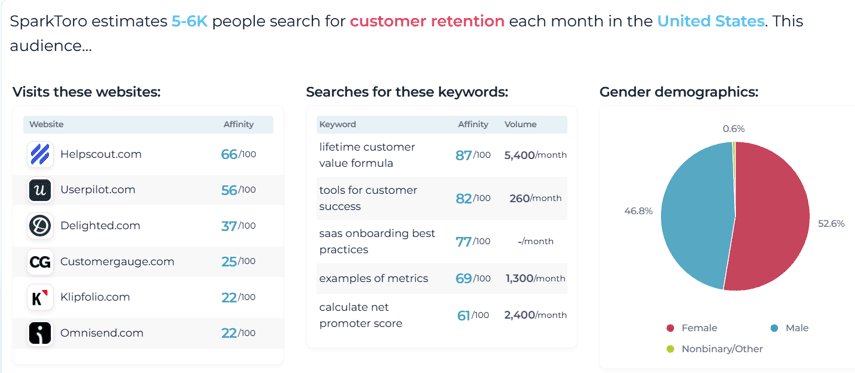
For example, let’s say that the B2B company or client you work for wants to know who searches for “customer retention”?

Well, SparkToro tells you that 5,000 to 6,000 people search for “customer retention” each month in the United States.

Screenshot from SparkToro, December 2024

The tool also tells you that 52.6% are female, and 46.8% are male. Surprised?

They also visit websites like HelpScout.com and Userpilot.com, as well as search other keywords like “lifetime customer value formula” and “tools for customer success.”

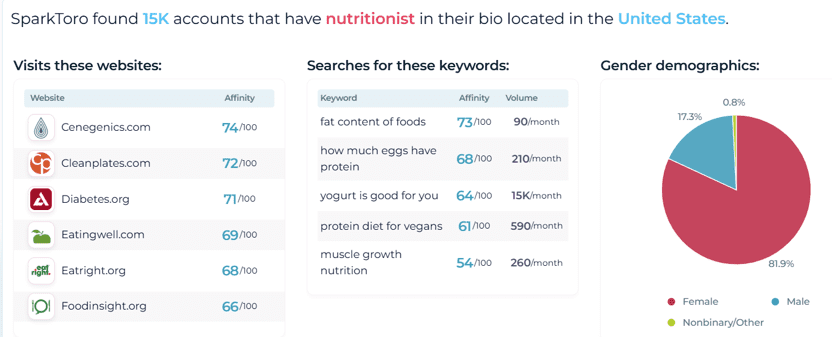
Or, let’s say that the target audience that your B2C company or client wants to reach is a “nutritionist.”

Screenshot from SparkToro, December 2024

The tool tells you that 15,000 people have “nutritionist” in their social media bios. The tool also tells you that 81.9% are female, and 174.3% are male.

They also visit websites like Cenegenics.com and CleanPlates.com. And they’re searching for keywords like “fat content of foods” and “how much eggs have protein.”

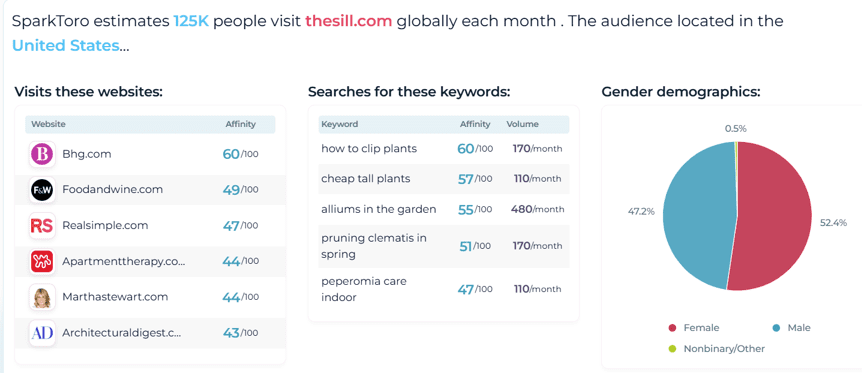
Finally, let’s say you’ve just started doing work for TheSill.com.

You could tell Eliza that 125,000 people globally visit TheSill.com each month.

Screenshot from SparkToro, December 2024

And the audience located in the United States is 52.4% female, and 47.2% male.

This audience also visits BHG.com and FoodandWine.com, And they search for “how to clip plants” and “cheap tall plants.”

That’s why I think conducting audience research gives you a competitive advantage over keyword research when it comes to crafting more resonant, effective content.

3. Focus On High-Quality, Original Content

It’s worth re-reading Google’s guidance on building high-quality sites published in 2011, following the first Panda algorithm change.

It’s also worth reading the Googe Search Center documentation for creating helpful, reliable, people-first content.

If you have time, then it’s also worth checking out Leveraging YouTube, LinkedIn, And Cross-Channel Strategies For Success.

What will you learn from all this background reading? Content is still king.

And while AI may help you crank out content more efficiently, it still doesn’t create the high-quality, original content that readers crave and Google rewards.

However, it’s important to recognize that there are different perspectives on creating high-quality, original content.

Some experts are focused on increasing efficiency (doing things right), while others are focused on improving effectiveness (doing the right things).

Spoiler alert: I’m in the second camp, along with a lot of content marketers. But, a lot of senior executives, especially chief financial officers (CFOs), are in the first camp.

So, SEO marketers won’t be surprised when they read what Stephanie Stahl said: “Creating content that prompts a desired action isn’t easy.”

SEO professionals may feel a surge of empathetic pain when they read that the biggest challenge that 54% of B2B content creation teams face is “lack of resources.”

But, SEO pros may also feel a surge of hope when they read that Stahl also said, “a group of top performers has found a way to surge ahead. They’ve figured out how to understand their audience’s needs, produce high-quality content, and use AI to create more efficient workflows.”

So, how do the most successful content marketers differ from their less successful peers? Well, according to Stahl, top performers are more likely to:

  • Have the right technology to manage content across the organization.
  • Have a scalable model for content creation.
  • Say their scalable model is creating the desired outcomes.

But the factors that B2B top performers say contribute to their content marketing success are:

  • Understand our audience (82%).
  • Produce high-quality content (77%).
  • Possess industry expertise (70%).
  • Have high-performing team members (69%).
  • Set goals that align with their organization’s objectives (62%).
  • Measure and demonstrate content performance effectively (53%).

So, the debate between efficiency and effectiveness isn’t over. You don’t need to pick sides, but you should be aware that executives at your company are probably debating this topic, too.

4. Build Strong Backlinks

I don’t need to tell SEO pros they need to build strong backlinks. I also don’t need to tell you that this is getting harder to do.

Back in 2002, all you needed to do was submit your URL to the Yahoo! Directory and the Open Directory Project (also known as DMOZ). But, both directories have since been shut down, with the Yahoo! Directory closing in 2014 and the Open Directory Project in 2017.

Meanwhile, Google’s Penguin algorithm update, which rolled out from 2012 to 2016, targeted link spam and manipulative link-building practices.

So, how do you build strong backlinks these days?

You can start by reading What Links Should You Build For A Natural Backlink Profile?

Or,  download “Link Building For SEO: A Complete Guide.”

5. Prioritize User Experience (UX):

Finally, read about how AI is transforming user experiences and influencing SEO rankings.

Every SEO I’ve met over the past 20 years knows how to evaluate the usability of webpages.

For any of the new SEO experts that I haven’t met yet, here’s what Google has to say about the usability of webpages:

“Our systems also consider the usability of content. When all things are relatively equal, content that people will find more accessible may perform better.”

Google adds:

“For example, our systems would look at page experience aspects, such as if content is mobile-friendly, so that those on mobile devices can easily view it. Similarly, they look to see if content loads quickly, also important to mobile users.”

Get it? Got it? Good.

Tactical Advice

It’s worth knowing that Sun Tzu also said, “Strategy without tactics is the slowest route to victory.”

This quote reminds me of the scene from the superhero comedy film, Mystery Men (1999), where Mr. Furious says, “If you want to push something down, you have to pull it up. If you want to go left, you have to go right.”

But I must admit that the ancient Chinese military strategist is right. You need tactical advice as well as strategic insights to achieve your professional goals and advance in this field or industry.

1. Stay Updated With Algorithm Changes

In November 2003, Google surprised SEO professionals with its first major algorithm update. It was called the “Florida Update” because it hit the industry like a hurricane.

Since then, SEO pros have monitored Google’s algorithm updates and adjusted their strategies accordingly.

If you want to stay updated about algorithm changes, start by reading, Why & How To Track Google Algorithm Updates.

2. Leverage Schema Markup

You’ll also want to implement schema markup to help search engines understand your content and display rich snippets.

If you don’t already know how to do that, then read What Is Schema Markup & Why Is It Important For SEO?

After you’ve done your homework, use tools like Google’s Schema Markup Testing Tool to test your structured data.

3. Optimize For Core Web Vitals

You already know that improving page load speed, interactivity, and visual stability enhance your user experience.

You can brush up on reading about page speed and Core Web Vitals.

4. Track And Analyze Your Performance

It goes without saying that you need to use digital analytics tools to track and analyze your performance. But it’s well worth reading: Beyond Rankings and Beyond Pageviews.

SEO professionals need to have a seat at the table when digital marketing teams decide which events to turn into “key events” in GA4.

Why? So, we can go beyond tracking which default channel was the source of website traffic and begin measuring which channels are generating leads or driving online sales.

5. Adapt To Emerging Trends

    SEO marketers have been doing this for more than two decades. But it won’t hurt you to download the “State of SEO 2025.”

    Summary: Adapting To The New Age Of Search

    By following these strategic SEO insights and tactical advice, you can position yourself for success in the ever-evolving digital landscape – whether you remain at your current company or need to re-invent yourself at another one.

    To close with another quote from Sun Tzu: “In the midst of chaos, there is also opportunity.”

    Footnote:

    1 Sullivan, D. (2002, March 4-6). Search Engine Strategies 2003 [Conference Handbook (p. 42)]. Hilton Boston Park Plaza, MA, United States.


    More Resources:


    Featured Image: Buravleva stock/Shutterstock

    Google Reveals Top Searches Of 2024 via @sejournal, @MattGSouthern

    Google has released its annual “Year in Search” report, highlighting the top trending searches, news, people, entertainment, and more that captured the world’s attention in 2024.

    Based on Google search data, the report offers a glimpse into the topics, events, and figures that defined the year.

    Here’s an overview of top trending searches worldwide and a breakdown of U.S.-specific trends.

    Global Top Trending Searches 2024

    Overall Searches

    Globally, the top trending searches were dominated by major sporting events.

    The Copa América soccer tournament topped the list, followed by the UEFA European Championship and the ICC Men’s T20 World Cup cricket tournament.

    1. Copa América.
    2. UEFA European Championship.
    3. ICC Men’s T20 World Cup.
    4. India vs. England.
    5. Liam Payne.

    News

    In the news category, the U.S. presidential election was the most searched topic worldwide, surpassing interest in the Olympic games, which came in third.

    Excessive heat and Hurricane Milton also drove significant search interest, ranking as the second and fourth top global news events.

    1. U.S. Election.
    2. Excessive heat.
    3. Olympics.
    4. Hurricane Milton.

    Entertainment

    In entertainment, veteran comedian and actor Katt Williams topped the global list of most searched actors. Rising stars like Ella Purnell and Hina Khan also earned spots in the top five.

    Highly anticipated sequels dominated movie searches, with “Inside Out 2,” “Deadpool & Wolverine,” and “Dune: Part Two” ranking as the top three.

    Top Actors:

    1. Katt Williams.
    2. Pawan Kalyan.
    3. Adam Brody.
    4. Ella Purnell.
    5. Hina Khan.

    Top Movies:

    1. Inside Out 2.
    2. Deadpool & Wolverine.
    3. Saltburn.
    4. Beetlejuice Beetlejuice.
    5. Dune: Part Two.

    United States Top Trending Searches 2024

    Overall Searches

    1. Election.
    2. Donald Trump.
    3. Connections.
    4. New York Yankees.
    5. Kamala Harris.

    People

    1. Donald Trump.
    2. Kamala Harris.
    3. JD Vance.
    4. Joe Biden.
    5. Catherine, Princess of Wales.

    Entertainment

    Actors:

    1. Katt Williams.
    2. Jacob Elordi.
    3. Glen Powell.
    4. Jeremy Allen White.
    5. Shane Gillis.

    Musicians

    1. Usher.
    2. Diddy.
    3. Kendrick Lamar.
    4. Drake.
    5. Justin Timberlake.

    Sports

    Sports fans worldwide were captivated by boxer Mike Tyson, the second most searched athlete globally behind Algerian karate champion Imane Khelif.

    Sixteen-year-old soccer phenom Lamine Yamal also made the top five, reflecting the growing buzz about the young star.

    Among sports teams, American franchises dominated, with the New York Yankees, Los Angeles Dodgers, and Boston Celtics ranking in the top five for global searches.

    However, interest in soccer was evident, with Inter Miami CF and German club Bayer Leverkusen also making the list.

    Athletes:

    1. Mike Tyson.
    2. Imane Khalif.
    3. Simone Biles.
    4. Scottie Scheffler.
    5. Jake Paul.

    Teams:

    1. New York Yankees.
    2. Los Angeles Dodgers.
    3. New York Mets.
    4. Boston Celtics.
    5. Minnesota Timberwolves.

    Digital Culture & Gaming

    In gaming, the massively multiplayer life sim Connections was the most searched game globally, followed by the creature-capturing open-world adventure Palworld.

    The trends point to gamers’ desire for connection and imaginative escapism.

    Games:

    1. Connections.
    2. Strands.
    3. Infinite Craft.
    4. Palworld.
    5. Sprunki.

    Lifestyle Trends

    Aesthetics:

    1. Mob wife aesthetic.
    2. Nancy Meyers aesthetic.
    3. Pillow face aesthetic.
    4. Brat aesthetic.
    5. Decora aesthetic.

    Food & Recipes

    Olympic-themed chocolate muffin recipes topped global food-related searches, while the traditional Chinese treat tanghulu came in second. Dubai chocolate bar rounded out the top five, showcasing an international palate.

    1. Olympic chocolate muffins.
    2. Tanghulu.
    3. Tini’s mac and cheese.
    4. Mama Kelce’s cookie.
    5. Dense bean salad.

    Popular Locations (Google Maps)

    When it came to getting out and about, Google Maps searches showed Central Park in New York as the most searched-for park in the world, while the British Museum topped the list of museums.

    For sports venue searches, Madison Square Garden led the pack.

    Top U.S. Hiking Areas:

    1. Dater Mountain Nature Park, Sloatsburg, NY.
    2. Columbia River Gorge National Scenic Area, OR.
    3. Garden of the Gods, Colorado Springs, CO.
    4. Looking Glass Falls, Asheville, NC.
    5. Diamond Head Crater Trailhead, Honolulu, HI.

    Music Trends

    Google’s “Hum to Search” feature, which identifies songs based on audio clips, revealed that people around the world were eager to locate catchy tunes like “Beautiful Things” by Benson Boone and “Die With A Smile” by Lady Gaga.

    The sea shanty “Wellerman” also had a global resurgence.

    Most Hummed Songs:

    1. Beautiful Things – Benson Boone.
    2. Axel F – Crazy Frog
    3. Wellerman – Santiano.
    4. Past Lives – Slushii.
    5. Too Sweet – Hozier.

    A Snapshot Of 2024 Through Search

    Google’s Year in Search 2024 reflects what connected people worldwide over the past year.

    Key highlights include the World Cup, travel, a renewed love for nature, and virtual adventures. Common themes are sports, entertainment, connection, and comfort.

    We’ll be watching to see what people search for in 2025 and beyond.

    For a complete overview of this year’s search trends, visit Google’s Year in Search mini-site.

    More Resources:


    Featured Image: Daniel Pawer/Shutterstock

    Google Offers To Loosen Search Engine Deals In Antitrust Response via @sejournal, @MattGSouthern

    Google has submitted its proposal to address the Department of Justice’s (DOJ) antitrust lawsuit, which accuses the company of monopolistic practices in search.

    Google disagrees with the court’s initial decision and plans to appeal. However, as part of the legal process, Google and the DOJ must present remedy proposals.

    Background

    In October 2020, the DOJ and several state attorneys general sued Google for breaking antitrust laws to maintain its control over search services and advertising.

    In September 2024, Judge Amit Mehta ruled in favor of the DOJ.

    The DOJ demands that Google sell Chrome, which it argues strengthens Google’s search dominance.

    Additionally, the Justice Department suggested Google sell Android if other solutions fail to restore competition.

    Google’s Defense

    Google has condemned the DOJ’s proposal, labeling it a “radical interventionist agenda.”

    Kent Walker, Google’s President of Global Affairs, argued that the remedies would “break a range of Google products” and result in “unprecedented government overreach.”

    Lee-Anne Mulholland, Google’s VP of Regulatory Affairs, stated that the case concerns contracts, not broader competition issues.

    The company believes its success comes from having better products and innovative ideas rather than engaging in unfair competition.

    Google stated in its filing:

    “People don’t use Google because they have to — they use it because they want to.”

    DOJ’s Demands

    The Justice Department’s proposal seeks extensive structural changes, including:

    • Mandatory sale of the Chrome browser
    • Possible sale of Android
    • Prohibition of exclusive agreements
    • Mandatory data sharing with competitors
    • Enhanced oversight through a technical committee

    Google’s Remedies Proposal

    Google’s proposal focuses on search distribution agreements with browsers and device manufacturers.

    Here are the key points:

    1. Browser Agreements: Browser companies like Apple and Mozilla would be allowed to negotiate multiple default search engine agreements across different platforms.
    2. Android Contracts: Device makers would have greater freedom to preload multiple search engines and Google apps independently
    3. Oversight and Compliance: A compliance monitoring system would be implemented

    Next Steps

    A remedies hearing is scheduled for April, at which time Google will appeal the court’s ruling.

    Google argues its proposal meets the court’s findings about search contracts, while the DOJ seeks more extensive changes.

    This case outcome could impact the search engine market and Google’s business model as we know it.


    Featured Image: JHVEPhoto/Shutterstock

    The HCU Effect In Google Updates via @sejournal, @martinibuster

    It’s fairly commonplace for Google Updates to prompt SEOs to raise concerns about the Helpful Content Update (HCU). A careful consideration of known facts reveals that it may be possible to determine whether a site is truly impacted by HCU-related signals.

    Black Box Systems

    Black box systems are something that all SEOs should consider understanding because it helps prevent misunderstandings about the consequences of a Google Update, both the core and spam updates.

    A black box is a system where someone observing from the outside knows what goes in (the input) and can see what comes out  (the output). What the observer cannot do is infer what is happening inside the box based on the input or the output of the black box.

    There are literally thousands of processes going on inside Google’s black box algorithm which makes it impossible to isolate the impact of a single factor. Identifying the ranking effect of the HCU is even more impossible because Google removed it as a standalone system and integrated into the core algorithm.

    On a side note, the black-box nature of Google’s ranking algorithms is why SEO ranking factor research based on millions of search results (the output) is unreliable. Those studies make good clickbait and will continue to be created as long as SEOs remain unaware of the principle of the black box.

    Helpful Content Update (HCU)

    The helpful content system (commonly referred to as the HCU) was integrated into Google’s core algorithm in March 2024 and the system no longer exists.  It now exists as a component of the ranking algorithm among other ranking-related algorithms.

    What that means is that it’s not a standalone system that impacts sites a couple times a year. It’s now integrated into the ranking systems that run all the time.

    Previously, when Google updated the Helpful Content System, a site’s rankings drop could reasonably be attributed to the system. That’s no longer the case, as it’s now a part of the ranking algorithm that runs continuously.

    When Google announces an update they no longer mention if the former HCU was updated because it’s not a system anymore, it’s just a bunch of signals in the ranking algorithm that runs all the time.

    This is how Google explained it:

    “Announced in 2022 as the “Helpful Content Update”, this was a system designed to better ensure people see original, helpful content written by people, for people, in search results, rather than content made primarily to gain search engine traffic. In March 2024, it evolved and became part of our core ranking systems, as our systems use a variety of signals and systems to present helpful results to users.”

    Here’s the exception to that rule:

    If Google’s update announcement mentions they are improving the signals for identifying “people-first” content then it’s fairly reasonable to assume that some component of the former HCU was updated.

    What Needs To Be Understood About The HCU

    It needs to be understood that there is literally no way to claim with 100% certainty that the HCU is the reason why any given site lost rankings during a core algorithm update. There is no way to isolate the effects of the HCU signals from the hundreds or thousands of other signals.

    Except for when Google’s update announcement specifically mentions one of the components, but even then it’s important to identify the effects on the site instead of shrugging and declaring it’s the HCU. That’s an excuse, not a diagnosis.

    How To Diagnose Effects Of HCU

    Google recommends reading their documentation about all the signals for helpful “people-first” content in order to understand the effects of HCU related issues. People-first means content that is not search-engine first.

    The documentation says:

    “Google’s automated ranking systems are designed to present helpful, reliable information that’s primarily created to benefit people, not to gain search engine rankings, in the top Search results. This page is designed to help creators evaluate if they’re producing such content.”

    Google’s documentation on people-first content recommends the following topics for debugging ranking issues:

    1. Content and quality
    2. Expertise
    3. Page experience
    4. People-first content
    5. Search engine-first content

    Google’s documentation goes on to say that after identifying relevant web pages, other signals are applied to check if the content exhibit “aspects” of experience, expertise, authoritativeness, and trustworthiness (EEAT).

    “After identifying relevant content, our systems aim to prioritize those that seem most helpful. To do this, they identify a mix of factors that can help determine which content demonstrates aspects of experience, expertise, authoritativeness, and trustworthiness, or what we call E-E-A-T.

    Of these aspects, trust is most important. The others contribute to trust, but content doesn’t necessarily have to demonstrate all of them. For example, some content might be helpful based on the experience it demonstrates, while other content might be helpful because of the expertise it shares.”

    Takeaway

    The takeaway from Google’s documentation about people-first content is that there are multiple components to what HCU is. People-first content is super important, especially because it’s the standard SEO practice to create search-engine first content by starting with top ranked keywords, organizing site architecture around keywords, and generally optimizing for keywords and not for people.  For more on that topic read: A Candid Assessment Of AI Search & SEO

    Google’s People-First Documentation

    Creating helpful, reliable, people-first content

    Featured Image by Shutterstock/Studio Romantic

    Google Launches (Final?) Spam Update Of The Year via @sejournal, @MattGSouthern

    Google announced the rollout of the December 2024 spam update.

    The update, expected to be completed within a week, arrives amid ongoing industry discussions about the effectiveness of Google’s spam-fighting measures.

    This December update caps off a year of spam-fighting measures, including the June Spam Update and the March Core Update, which targeted policy-violating websites and aimed to reduce “unhelpful” content by 40%.

    It’s also worth mentioning that this update closely follows the December core update.

    Looking Back At A Year Of Updates

    This year saw an unprecedented frequency of major algorithm updates, with core updates in March, August, November, and December.

    The August update, which took nearly three weeks to complete, targeted low-value SEO content while promoting high-quality material.

    The December core update, launched on December 12, came unusually close to the November update, with Google explaining that different systems are often improved in parallel.

    Policy Transformation

    This year marked a shift in Google’s approach to spam detection and prevention with three major policy updates.

    1.Site Reputation Abuse

    Introduced in May 2024, Google began targeting “parasite SEO” practices where third-party content exploits established domains’ authority.

    This update mainly affected:

    • Major publishers hosting third-party product reviews
    • News sites with extensive coupon sections
    • Sports websites with AI-generated content

    The policy change led to notable casualties, including several high-profile publishers receiving manual actions for hosting third-party content without sufficient oversight.

    2. Expired Domain Abuse

    Google’s enhanced focus on expired domain manipulation addressed:

    • Purchase of expired domains for backlink exploitation
    • Repurposing authoritative domains for unrelated content
    • Domain squatting for search ranking manipulation

    3. Scaled Content Abuse

    Previously known as “spammy auto-generated content,” this rebranded policy expanded to include:

    • AI-generated content at scale
    • Mass-produced content across multiple sites
    • Content translation manipulation
    • Automated content transformation techniques

    See more: An In-Depth Look At Google Spam Policies Updates And What Changed

    Spam-Specific Updates

    June 2024 Spam Update

    • Week-long implementation period
    • Focused on policy-violating websites
    • Enhanced detection of automated content

    November 2024 SRA Enforcement

    • Implementation of site reputation abuse penalties
    • Affected major publishers’ sponsored content strategies
    • Required significant content policy adjustments across news sites

    Looking Ahead

    With the December core update having completed its rollout and the new spam update now underway, prepare for another round of potential ranking fluctuations through the end of the year.

    The spam update is expected to be completed next week, with progress tracked through Google’s Search Status Dashboard.


    Featured Image: JHVEPhoto/Shutterstock

    Ask An SEO: How To Move From Page 2 To Top Positions via @sejournal, @rollerblader

    Today’s Ask an SEO question comes from Roy in Dinajpur:

    “My website URL [is] still [in] position No. 15. How can increase to No. 3 or 4?”

    Great question, and likely one of the top five that get asked. The answer is situational, and it is easier to resolve when you don’t overthink it.

    The first thing to do is to look at the current pages in the top 10 positions and create a list by page of:

    • What they have in common.
    • Talking points and topics they cover.
    • How many internal links that point to these pages.
    • The number of quality and spammy backlinks each page has.
    • On-page factors like HTML structure, schema, and the quality of the content.
    • Content formatting and if they’re presenting the content in the most easy-to-understand and use formats.

    I like to do this in spreadsheets because it lets me either assign values from one to 10 and add them up, or see what is missing and what is included across the sites more easily.

    If you assign a number for each page with the aspect I’m looking for, I can add the columns and rows up to see how common it is based on the higher number.

    If you only use a one (1), meaning it exists on the page, the higher the number, the more pages have it. If rating the quality of content, UX, formatting, sourcing, etc., I assign one to 10.

    Once added up across or down, I can see which pages are the best and look at why. From there, I can begin working on my variation and create an even better experience.

    Pro-tip: Better experiences may sometimes mean less content, removing specific sections as they may not be topically relevant, or adding in things I didn’t think of but make sense.

    But don’t rely on this alone. Go deeper into the features on the pages and within the websites ranking above you, and then look at your own page.

    Start To Review Your Own Content Or Page

    Now, ask yourself:

    • Do I have the same content or not?
    • Is my content or page sharing something unique or more useful than these?
    • They all have X content, but is it topically relevant to the query I want my page to show up for?
      • If not, delete it so my page is more on-topic.
      • If yes, add it.
    • What could be better explained, or could clearer examples be used that are missing from theirs?
    • Can I easily absorb the text, or would bullets, tables, videos, sound clips, images, and infographics make it better?

    These are ways you can begin to create more helpful content on your page. Then, look at some of the other factors that can help. Internal links can be a good place to start.

    Where on my website do I reference this topic, product, or service, and will linking to my page help the website visitor?

    If these same pages have traffic and backlinks and get social shares, add the internal link. Just make sure it benefits the end user and is not just there for SEO.

    Now, look to see if you have conflicting internal links (links to the different pages off of the same keywords and the same intent).

    In some cases, backlinks could be a factor, especially with “Your Money of Your Life” (YMYL) and medical queries. What does your page have that the others do not, and how is it more trustworthy than theirs?

    You can use this to ask the websites linking to them to include you or replace their links with your resource instead.

    Another option is to begin building quality links to your resource, but avoid spammy tactics like mass emailing, guest posting, scholarships, grants, forum and blog comments, PBNs, and link exchanges.

    Technical audit and on-page SEO can help you as well. Schema does not help with rankings, but it does help with rich results and lets search engines know what your page is about. Make sure yours is not deprecated and is up to date.

    Check your header tags, titles, descriptions, and wording. When doing that, also ensure that your content is around the same reading level and language style as the audience you want to reach.

    Look At The Overall Site

    Another thing is to consider the site overall.

    Having one or two quality pages is good, but what about other topics that work for the same audience and would be interesting for them to read once they finish the page they’re on? This applies to ecommerce, publishers, and everything in between.

    Are you using AI and LLMs to create content? You should probably delete that content immediately if you didn’t go in and edit it to have information only a human with experience would know.

    If you’re using LLMs to create content, you’re recycling the knowledge already out there versus adding something new. It is the same as scraping four or five sites and using an article spinner to produce the output.

    Is there thin content that is also in the category or being recommended? Delete that, too. Same with recommended articles from third parties and ad networks.

    Having a couple of good-quality pages is great, but if the person clicks on the next article and it is thin, outdated, or inaccurate, you’re providing a bad experience, and some algorithms may use sitewide classifiers.

    Those thin and spammy pages that do not educate and provide solutions impact the high-quality pages.

    If all else is equal between you and another site, these low-quality pages could be the deciding factor if your high-quality page makes it to page one and who stays on page two if all else is equal.

    The same goes for page and site speed. Yes, they matter, but not that much unless you’re a publisher.

    Do Everything Right And You Should Get There

    Sometimes, you can do everything right and have the best experience, but Google, Bing, Yahoo, Baidu, or Naver doesn’t bring you up to page one or top positions. Then you magically jump there, as do other pages during a core update.

    There’s no one-size-fits-all solution for moving to the top five positions from page two, but by doing everything right, you should eventually make it there.

    Fix the issues above and then keep working on it. Eventually, it pays off, and you’ll likely see your site and pages start hitting page one and going to top positions when you’ve fixed enough.

    If you’re on page two, that means your page and your site have some quality that is trustworthy.

    Now, it’s a matter of fine-tuning that experience so that it can become a page one result. The above tip should help you diagnose what could be better; once done, it’s a waiting game if your experience is already there. I hope this helps.

    More resources:


    Featured Image: Paulo Bobita/Search Engine Journal

    8 Metrics To Measure The Effectiveness Of Your Internal Linking Strategy via @sejournal, @xandervalencia

    You might’ve thought we’ve covered everything there is to know about internal linking.

    But few dare to dig into the tricky details of tracking the success of an internal linking hierarchy. That’s because it’s messy, it’s difficult, and it’s not always straightforward – but it’s worth it.

    In this guide, we’re covering the metrics that matter most when it comes to internal linking, how to track them, and what they mean in terms of the collective benefit to your website’s SEO strategy.

    Is Internal Linking “Measurable”?

    Yes, it is measurable, but it’s not always simple.

    With something as indeterminate as “internal linking,” it’s easy to assume that the results are more subjective than objective.

    For instance, it is difficult to tag individual internal links to assess how a user navigates your site — let alone determine if that results in a goal completion or conversion.

    So, measuring the success of your internal linking strategy requires some creative thinking.

    While the metrics may not be direct, in context, they can paint a picture of whether the internal links are benefiting your website’s SEO. You just need to know where to look!

    Why Measure Your Internal Linking Results?

    Internal linking is one of those SEO activities most often treated as a “best practice,” less often venturing into the realm of technical assessment and in-depth strategy.

    Sure, there’s an understanding that one should link to the most important pages of their website, but how far do we go beyond that?

    Glad you asked because there are a few ways to nerd out about internal linking. If you’re an SEO savant, I’m sure you will appreciate this.

    • User Navigation and Intent: Auditing your internal linking strategy via Google Analytics will reveal surprising insights about how users navigate your site. It will allow you to infer what users intend to find when perusing your site content (i.e., where are they going next?).
    • Page Authority: You’ll likely notice that some pages get more traffic than others. This may be a result of higher search volume keywords, volume and quality of backlinks, page authority, and a range of other factors. Internal links allow you to direct some of this authority to lower-performing pages.
    • Information Architecture: Internal linking is an essential part of facilitating an intuitive and easy user experience. By directing users to relevant pages and posts, you remove friction from their navigational process, lifting barriers to purchase.
    • Content Gaps: Through auditing, you will likely find gaps in your content. Have you thoroughly exhausted the topic “pillar” on your website, or are there more items to cover? Where would a user likely want to venture next? How can you take them there?

    In essence, there are several benefits to auditing, analyzing, and updating your internal linking strategy.

    If you’re ready to go beyond “best practices” and dig into the data, you’ve come to the right place.

    Internal Linking: How To Measure Success

    As we all know, in SEO, some things are subjective, and others are objective. An internal linking strategy involves a bit of both.

    The metrics used to assess internal linking success are mostly objective, while observations and applications can be wholly subjective.

    Feel free to interpret the data as you see fit for your own SEO strategy purposes, and know that you’re not limited to these metrics when it comes to analyzing your internal links.

    1. Crawl Depth

    One of my favorite metrics for analyzing internal links is crawl depth. This metric, reported by Google Search Console’s Crawl Stats report, measures how many pages search engine bots can access and index within a single crawl.

    Before implementing internal link updates, I take a baseline of the site’s current crawl depth.

    As internal links are added/updated, I most often see an increase in the number of pages found and indexed (assuming there was a discrepancy at the beginning).

    An optimized internal linking structure can help search engines crawl deeper into the site, ensuring more pages are indexed and capable of being ranked by Google.

    2. Bounce Rate

    There are pros and cons to using bounce rate to measure SEO success. The metric alone can miss a lot of context.

    For example, in cases of law firm SEO, a higher bounce rate might not be concerning if the end goal is a phone call rather than a user continuously navigating the site. There are many nuances to measuring and assessing the importance of bounce rate.

    But when it comes to internal linking, assessing bounce rate can be informative.

    Bounce rate (reported by Google Analytics) measures the percentage of website visitors who land on a website and then leave without taking any action. “Action” here could mean clicking on another page, completing a form, making a purchase, etc.

    Internal links can increase the likelihood that a user will venture to another page on your website.

    Again, compare the results before and after implementing your internal link improvements. A lower bounce rate may indicate that users are finding more relevant content, and are staying on your site for longer.

    3. Behavior Flow

    Universal Analytics’ “Behavior Flow” report was depreciated with the upgrade to GA4, but there are other ways to view a user’s navigational path through your website.

    With the new “path exploration report,” you can analyze a user’s journey through your site, including the pages they land on and the actions they take.

    Though not exactly a “metric,” this report does reveal data about which pages users are visiting and where they navigate to next. It also reveals where they drop off.

    This is critical information when it comes to internal linking, as you can add links to pages to reduce drop-off, add visual aids to direct users to important pages, and change the placement of your links to improve click-throughs.

    4. Pages Per Session

    Another Google Analytics metric, Pages Per Session measures the average number of pages a visitor views during a session.

    For example, if a visitor only visits two pages and then leaves, that’s not ideal. But if they visit more than two pages, indicating an intent to find information and, potentially, make a purchase, things are looking up!

    This can be a helpful metric because it (in part) indicates whether your internal links are well-placed and are making it easy for visitors to navigate to additional pages.

    Effective internal linking encourages users to explore more content, increasing page views per session, and signaling good user engagement.

    Note that, like bounce rate, there are many nuances to assessing the importance of pages per session as an indicator of SEO performance.

    For example, a business would likely prefer that a user calls them right away rather than venturing to several pages of their website. Immediate action is ideal!

    5. Time On Page

    While pages per session measures the number of pages a user visits within a session, time on page measures the amount of time a user spends on a single webpage before navigating to another page.

    In the context of internal linking, higher time on page may indicate that your links are effective in guiding users to content that holds their attention.

    Also, while not a direct ranking factor, time on page can contribute to search engines’ understanding of your site’s quality.

    Pages that keep users engaged signal a positive user experience, which search engines may consider when determining your rankings.

    In that way,  higher time on page as a result of internal linking improvements may indicate the success of your strategy.

    6. Page Authority

    Page Authority is a score developed by Moz to assess how well a particular page will rank in the SERPs based on a variety of factors. Scores range from 1 to 100, with a higher score indicating a higher expected ranking.

    I like to look at Page Authority when it comes to internal linking because internal links can “send” authority to the pages they link to.

    Basically, when you link from high-authority pages to other pages on your site, it helps distribute “link equity” across your site. This practice can raise the authority of less visible or lower-ranking pages.

    You may notice that the Page Authority of a destination page increases after you link to it from a high-authority page. Measuring this, across multiple pages, can be a strong indicator of internal linking effectiveness.

    7. Conversion Rate

    You can use Google Tag Manager (GTM) to track conversions from users who click on internal links.

    Internal links can guide users down the sales funnel as they navigate from one page to another and, ultimately, make a purchase, submit a form, etc.

    Tracking whether linked pages lead to conversions (e.g., purchases or sign-ups) is crucial for assessing the effectiveness of your internal linking strategy.

    Here’s how to track internal link conversions with GTM:

    1. Log into Google Analytics.
    2. Create a conversion event representing the action you want to track (e.g., form submissions, purchases, sign-ups).
    3. Take note of the event name and/or parameters (you’ll use them later).
    4. Log into Google Tag Manager and click “Triggers” in the sidebar. Select “New” to create a new trigger.
    5. Name the trigger (e.g., “Internal Link Click”).
    6. Choose “Click – Just Links” as the trigger type.
    7. In the Trigger Configuration section, set the following:
      • This trigger fires on: “Some Link Clicks”
    8. In the next section, create a condition to target only internal links. Set the condition to:
      • Click URL → Matches RegEx → ^https?://(www.)?yoursite.com
    9. Replace yoursite.com with your actual domain.
    10. Save the trigger.
    11. Next, go to the Tags section in GTM and click “New.” Name the tag (e.g., “Internal Link Click Event”).
    12. Choose Tag Type as “Google Analytics: GA4 Event.”
    13. Under Tag Configuration, fill in the following:
      • Configuration Tag: Select your GA4 configuration tag.
      • Event Name: Name the event (e.g., “internal_link_click”).
      • Event Parameters: Add additional parameters for deeper insights. Example: Parameter Name: “link_url”
      • Value: {{Click URL}}
    14. In the Triggering section, select the “Internal Link Click” trigger you created earlier.
    15. Save the tag.
    16. Back in GA4, click on Admin.
    17. Under the Property column, click on Events.
    18. You will see a list of events that GA4 has already tracked (including any custom events like “internal_link_click” if you’ve set up your GTM tag correctly).
    19. Find the event you want to track as a conversion (e.g., “internal_link_click”). If it is not listed, it means the event hasn’t been triggered yet, and you’ll need to wait until it fires or manually create the event (explained below).
    20. Once the event appears in the list, toggle the “Mark as conversion” switch next to the event. This will now track the event as a conversion in GA4.

    8. Organic Traffic

    One of the clearest signs of SEO success is increased traffic. However, it can be challenging to directly link traffic growth to changes in your internal linking strategy.

    But you can compare traffic stats before and after internal link updates, all else being held equal.

    Be sure to track the organic traffic to your website over time using tools like Google Analytics or Semrush.

    The addition of internal links can direct more traffic flow to other pages on your site, improve the rate at which pages are indexed, and distribute page authority, which can boost your overall organic traffic.

    Improve Your Internal Linking Strategy With These Tips

    Internal linking is an important yet oft-overlooked strategy in SEO. It’s so simple that it’s easy to forget how impactful it can be.

    With the help of the metrics above and some creative thinking, you can drive better organic results for your site and your clients.

    • Audit Often: Analyze your website performance every quarter (if not more) to assess your internal pages and determine whether any content gaps exist on your site. Audit your website for broken and/or redirected links, fixing these as needed to improve user experience and the crawlability of your website.
    • Add Links Regularly: Any time you add new content, look for opportunities to link to existing pages or articles. Aim for at least three internal links on each page.
    • Examine Your Traffic: Identify high-traffic, high-authority pages and add internal links from these to your lower-performing pages. Compare traffic before and after these changes.
    • Play With Placement: Experiment with the placement and prominence of your internal links. Use different visual components, weight, and colors to make internal links more obvious and enticing.

    With this guide, you can get a clear picture of how well your internal linking strategy is performing and make adjustments to improve your SEO results.

    Want more user engagement and action on your website? Internal linking is one way to do that!

    More resources:


    Featured Image: denayunebgt/Shutterstock

    Cut The Malarkey. Speaking Frankly About AI Search & SEO via @sejournal, @martinibuster

    Search marketing is undergoing dramatic changes, with many debating whether SEO is on its way out as AI Search rises in popularity. What follows is a candid assessment of what is going on with SEO and search engines today.

    An SEO School Shuts Down

    An SEO school by a group called Authority Hackers recently announced their closure, emphasizing that it’s not because SEO is dead but due to the collapse of the content site model. They cited three reasons for this situation. The following is not about the SEO school, that’s just a symptom of something important going on today.

    1. Google Updates is one of the reasons cited for the decline of the content site model. Here’s the candid part: If the Google updates killed your publishing site, that’s kind of the red flag that there’s something about the SEO that needs examination.

    Here’s the frank part: Google’s updates have generally crushed websites that begin with keyword research, are followed by stealing content ideas from competitors and scraping Google’s SERPs for more keyword phrases. That’s not audience research, that’s search engine research. Search engine research results in Made For Search Engine websites. This doesn’t describe all websites that lost rankings but it’s a common method of SEO that in my opinion seriously needs to be reassessed.

    2. The other reason cited by the SEO school is the “AI content tsunami.” I’m not sure what that means because it can mean a lot of things. Is that AI content spam? Or is that a reference to AI content sites overwhelming the publisher who cranks out two articles a week?

    Do I need to say out loud what content output implies about site authority?

    3. The third reason for the decline of the content model is the dramatic changes to Search Engine Results Pages (SERPs). Now this, this is a valid reason, but not for the reasons most SEOs think.

    The organic SERPs have, for the past 25 years, been dominated by the top three ranked positions, with about 20-30% of the traffic siphoned off to Google Ads for search topics that convert. That’s the status quo: Three sites are winning and everyone else is losing.

    AI Overviews has not changed a thing. AIO doubled down on the status quo. According to BrightEdge research, the top ranked websites in AIO are largely the same as the organic top ranked websites. What that means is that three sites are still winning and everyone else is still losing.

    The biggest change to the SERPs that most SEOs are missing is what I already mentioned, that made for search engine websites have been getting wiped out by Google updates.

    The helpful content update (HCU) is the scapegoat but that’s just ONE algorithm out of hundreds. There is literally no way for anyone to claim with 100% certainty that the HCU is the reason why any given site lost rankings. Google is a black box algorithm. A lot of people are saying but none of them can explain how they are able to pick out the effects of one algorithm out of hundreds.

    The thing about being in SEO for 25 years is that people like me are accustomed to dramatic changes. Yes, the SERPs have changed dramatically. That’s how search engines have always done things.

    If you’ve only been doing SEO for ten years, I can understand how the recent changes seem dramatic. But when you’ve been in it for as long as I have, dramatic changes are expected. That’s the status quo. Dramatic SERP changes is how it’s always been.

    SEO Is Now AEO?

    Someone started a discussion with two sentences that said AEO is the new SEO and that ChatGPT was quickly becoming the leading search engine, inspiring well over a hundred responses. The discussion is in a private Facebook group called AI/ChatGPT Prompts for Entrepreneurs.

    AEO is a relatively new acronym meaning Answer Engine Optimization. It describes AI Search Optimization. AISEO is more a more precise acronym but it sounds too close to E-I-E-I-O.

    Is AEO really a thing? Consider this: All AI search engines use a search index and traditional search ranking algorithms. For goodness sakes, Perplexity AI uses a version of Google’s PageRank, one of the most traditional ranking algorithms of all time.

    People in that discussion generally agreed that AEO is not a thing, that AI Search Engines were not yet a major challenge to Google and that SEO is still a thing.

    All is not upside down with the world because at least in that discussion the overwhelming sentiment is that AEO is not a thing. Many observed that ChatGPT uses Bing’s index, so if you’re doing “AEO” for ChatGPT you’re actually just doing SEO for Bing. Others expressed that the average person has no experience with ChatGPT and until it’s integrated into a major browser it’s going to remain a niche search engine.

    There was one person insisting that Perplexity AI was designed as an AI Search Engine, completely misunderstanding that Perplexity AI uses a search index and identifies authoritative websites with an updated version of Google’s old PageRank algorithm.

    AI has been a strong search engine factor in Google since at least 10 years. Longer if you consider that Google Brain began as a project in 2011.

    • AI in search is not new.
    • Search results summaries aren’t new either (Featured Snippets).
    • Google’s Information Gain patent for AI Chatbots filed in 2018.

    AI in search feels new but it’s not new. The biggest difference isn’t in the back end, it’s in the front and it’s changing how users interact with data. This is the big change that all SEOs should be paying close attention to.

    Featured Image by Shutterstock/pathdoc

    18 Essential Accessibility Changes To Drive Increased Website Growth via @sejournal, @skynet_lv

    This post was sponsored by “Skynet Technologies USA LLC”.

    Did you know that 1 billion people have not reached you or your customers’ websites yet.

    1 billion potential customers are waiting for businesses to step up and do what’s right.

    Find out if your website is accessible to 1 billion people >>>

    Accessibility isn’t just a compliance checkbox anymore – it’s a growth strategy.

    The demand for scalable, innovative accessibility solutions has skyrocketed.

    And your competition is already making these improvements.

    For agencies, this means an unprecedented opportunity to meet clients’ needs while driving revenue.

    Learn how you can generate additional revenue and boost your clients’ SERP ranking by gaining access to:

    Ready to get started?

    How Accessibility Improvements Can Increase Growth

    The digital economy thrives on inclusion.

    There is a large market of individuals who are not included in modern website usability.

    With over a billion people globally living with disabilities, accessible digital experiences open doors to untapped markets.

    Do Websites Need To Be Accessible?

    The short answer is yes.

    How Does An Accessible Website Drive Traffic?

    Traffic comes from people who have needs. Of course, everyone has needs, including people with disabilities.

    Accessible websites and tools cater to all users, expanding reach to a diverse and often overlooked customer base.

    Global Potential & Unlocking New Audiences

    From a global perspective, the global community of people with disabilities is a market estimated to hold a staggering $13 trillion in spending power.

    By removing barriers and ensuring inclusive digital experiences, you can tap into this 1 billion-person market and drive substantial economic growth.

    Digital accessibility helps to increase employment opportunities, education options, and simple access to various banking and financial services for everybody.

    Boosts User Experience & Engagement 

    Accessibility improvements run parallel with SEO improvements.

    In fact, they often enhance overall website performance, which leads to:

    • Better user experience.
    • Higher rankings.
    • Increased traffic.
    • Higher conversion rates.

    Ensures Your Websites Are Compliant

    Increasing lawsuits against businesses that fail to comply with accessibility regulations have imposed pressure on them to implement accessibility in their digital assets.

    Compliance with ADA, WCAG 2.0, 2.1, 2.2, Section 508, Australian DDA, European EAA EN 301 549, UK Equality Act (EA), Indian RPD Act, Israeli Standard 5568, California Unruh, Ontario AODA, Canada ACA, German BITV, Brazilian Inclusion Law (LBI 13.146/2015), Spain UNE 139803:2012, France RGAA standards, JIS X 8341 (Japan), Italian Stanca Act, Switzerland DDA, Austrian Web Accessibility Act (WZG) guidelines aren’t optional. Accessibility solution partnerships ensure to stay ahead of potential lawsuits while fostering goodwill.

    6 Steps To Boost Your Growth With Accessibility

    1. To drive growth, your agency should prioritize digital accessibility by following WCAG standards, regularly testing with tools like AXE, WAVE, or Skynet Technologies Website Accessibility Checker, and addressing accessibility gaps. Build accessible design frameworks with high-contrast colors, scalable text, and clear navigation.
    2. Integrate assistive technologies such as keyboard navigation, screen reader compatibility, and video accessibility. Focus on responsive design, accessible forms, and inclusive content strategies like descriptive link text, simplified language, and alternative formats.
    3. Providing accessibility training and creating inclusive marketing materials will further support compliance and growth.
    4. To ensure the website thrives, prioritize mobile-first design for responsiveness across all devices, adhere to WCAG accessibility standards, and incorporate keyboard-friendly navigation and alt text for media.
    5. Optimize page speed and core web vitals while using an intuitive interface with clear navigation and effective call-to-action buttons, and use SEO-friendly content with proper keyword optimization and schema markups to boost visibility.
    6. Ensure security with SSL certificates, clear cookie consent banners, and compliance with privacy regulations like GDPR and CCPA. Finally, implement analytics and conversion tracking tools to gather insights and drive long-term growth.

    We know this is a lot.

    If this sounds good to you, let us help you get set up.

    How Can Digital Accessibility Partnerships Supercharge Your Clients’ SEO?

    Partnering for digital accessibility isn’t just about inclusivity — it’s a game-changer for SEO, too!

    Accessible websites are built with cleaner code, smarter structures, and user-friendly features like alt text and clear headings that search engines love.

    Plus, faster load times, mobile-friendly designs, and seamless navigation keep users engaged, reducing bounce rates and boosting rankings. When you focus on making a site accessible to everyone, you’re not just widening your audience—you’re signaling to search engines that the website is high-quality and relevant. It’s a win-win for accessibility and SEO!

    12 Essential Factors To Consider For Successful Accessibility Partnerships

    1. Expertise: Look for a provider with a proven track record in digital accessibility, including knowledge of relevant global website accessibility standards and best practices.
    2. Experience: Consider their experience working with similar industries or organizations.
    3. Tools and technologies: Evaluate their use of automated and manual testing tools to identify and remediate accessibility issues.
    4. Price Flexibility: Explore pricing models that align with both the budget and project requirements. Whether for a single site or multiple sites, the service should be compatible and scalable to meet the needs.
    5. Platform Compatibility: Ensure seamless accessibility integration across various platforms, providing a consistent and accessible experience for all users, regardless of the website environment.
    6. Multi-language support: Enhance user experience with global language support, making websites more inclusive and accessible to a global audience.
    7. Regular check-ins: Schedule regular meetings to discuss project progress, address any issues, and make necessary adjustments.
    8. Clear communication channels: Establish clear communication channels (for example: email, and project management tools) to facilitate efficient collaboration.
    9. Transparent reporting: Request detailed reports on the progress of accessibility testing, remediation efforts, and overall project status.
    10. KPIs to measure success: Review the partner’s historical data, especially those similar projects in terms of scale, complexity, and industry.
    11. Evaluate technical expertise: Assess their proficiency in using various accessibility testing tools and ability to integrate different APIs.
    12. Long-term partnership strategy: Compare previous data with the current one for improvement and optimization process. It is crucial for a long-term partnership that there is a specific interval of review and improvements.

      Scaling Accessibility With Smart Partnerships

      All in One Accessibility®: Simplicity meets efficiency!

      The All in One Accessibility® is an AI-powered accessibility tool that helps organizations to enhance their website accessibility level for ADA, WCAG 2.0, 2.1, 2.2, Section 508, Australian DDA, European EAA EN 301 549, UK Equality Act (EA), Indian RPD Act, Israeli Standard 5568, California Unruh, Ontario AODA, Canada ACA, German BITV, Brazilian Inclusion Law (LBI 13.146/2015), Spain UNE 139803:2012, France RGAA standards, JIS X 8341 (Japan), Italian Stanca Act, Switzerland DDA, Austrian Web Accessibility Act (WZG), and more.

      It is available with features like sign language LIBRAS (Brazilian Portuguese Only) integration, 140+ multilingual support, screen reader, voice navigation, smart language auto-detection and voice customization, talk & type, Google and Adobe Analytics tracking, along with premium add-ons including white label and custom branding, VPAT/ACR reports, manual accessibility audit and remediation, PDF remediation, and many more.

      • Quick Setup: Install the widget to any site with ease—no advanced coding required.
      • Feature-Rich Design: From text resizing and color contrast adjustments to screen reader support, it’s packed with tools that elevate the user experience.
      • Revenue Opportunities: Agencies can resell the solution to clients, adding a high-value service to their offerings while earning attractive commissions through the affiliate program.
      • Reduced development costs: Minimizes the financial impact of accessibility remediation by implementing best practices and quick tools.

      Agency Partnership: Scaling accessibility with ease!

      • Extended Service Offerings: The All in One Accessibility® Agency Partnership allows agencies to offer a powerful accessibility widget – quick accessibility solution into their services, enabling them that are in high demand.
      • White Label: As an agency partner, you can offer All in One Accessibility® under their own brand name.
      • Centralized Management: It simplifies oversight by consolidating accessibility data and reporting, allowing enterprises to manage multiple websites seamlessly.
      • Attractive Revenue Streams: Agencies can resell the widget to clients, earning significant revenue through competitive pricing structures and repeat business opportunities.
      • Boost Client Retention: By addressing accessibility needs proactively, agencies build stronger relationships with clients, fostering long-term loyalty and recurring contracts.
      • Increase Market Reach: Partnering with All in One Accessibility® positions agencies as leaders in inclusivity, attracting businesses looking for reliable accessibility solutions.
      • NO Investment, High Return: With no setup costs, scalable features, and up to 30% commission, the partnership enables agencies to maximize profitability with their clients.

      Affiliate Partnership: A revenue opportunity for everyone!

      The All in One Accessibility® Affiliate Partnership program is for content creators, marketers, accessibility advocates, web professionals, 501 (c) organizations (non-profit), and law firms.

      • Revenue Growth through Referrals: The All in One Accessibility® affiliate partnership allows affiliates to earn competitive commissions by promoting a high-demand accessibility solution, turning referrals into consistent revenue.
      • Expanding Market Reach: Affiliates can tap into a diverse audience of businesses seeking ADA and WCAG compliance, scaling both revenue and the adoption of accessibility solutions.
      • Fostering Accessibility Awareness: By promoting the All in One Accessibility® widget, affiliates play a pivotal role in driving inclusivity, helping more websites become accessible to users with disabilities.
      • Leveraging Trusted Branding: Affiliates benefit from partnering with a reliable and recognized quick accessibility improvement tool, boosting their credibility and marketing impact.
      • Scaling with Zero Investment: With user-friendly promotional resources and a seamless onboarding process, affiliates can maximize returns without any costs.

      Use Accessibility As A Growth Engine

      Endeavoring for strategic partnerships with accessibility solution providers is a win-win for agencies aiming to meet the diverse needs of their clients. These partnerships not only enhance the accessibility of digital assets but also create opportunities for growth, and loyalty, top search engine rankings, boost revenue, improve compliance with legal standards, and make you to contribute into digital accessibility world.

      With Skynet Technologies USA LLC, Transform accessibility from a challenge into a revenue-driving partnership. Let inclusivity power the success.

      Ready to get started? Embarking on a digital accessibility journey is simpler than you think! Take the first step by evaluating the website’s current WCAG compliance with a manual accessibility audit.

      For more information, Reach out hello@skynettechnologies.com.


      Image Credits

      Featured Image: Image by Skynet Technologies. Used with permission.