Google DeepMind’s new tool, called AlphaEvolve, uses the Gemini 2.0 family of large language models (LLMs) to produce code for a wide range of different tasks. LLMs are known to be hit and miss at coding. The twist here is that AlphaEvolve scores each of Gemini’s suggestions, throwing out the bad and tweaking the good, in an iterative process, until it has produced the best algorithm it can. In many cases, the results are more efficient or more accurate than the best existing (human-written) solutions.
“You can see it as a sort of super coding agent,” says Pushmeet Kohli, a vice president at Google DeepMind who leads its AI for Science teams. “It doesn’t just propose a piece of code or an edit, it actually produces a result that maybe nobody was aware of.”
In particular, AlphaEvolve came up with a way to improve the software Google uses to allocate jobs to its many millions of servers around the world. Google DeepMind claims the company has been using this new software across all of its data centers for more than a year, freeing up 0.7% of Google’s total computing resources. That might not sound like much, but at Google’s scale it’s huge.
Jakob Moosbauer, a mathematician at the University of Warwick in the UK, is impressed. He says the way AlphaEvolve searches for algorithms that produce specific solutions—rather than searching for the solutions themselves—makes it especially powerful. “It makes the approach applicable to such a wide range of problems,” he says. “AI is becoming a tool that will be essential in mathematics and computer science.”
AlphaEvolve continues a line of work that Google DeepMind has been pursuing for years. Its vision is that AI can help to advance human knowledge across math and science. In 2022, it developed AlphaTensor, a model that found a faster way to solve matrix multiplications—a fundamental problem in computer science—beating a record that had stood for more than 50 years. In 2023, it revealed AlphaDev, which discovered faster ways to perform a number of basic calculations performed by computers trillions of times a day. AlphaTensor and AlphaDev both turn math problems into a kind of game, then search for a winning series of moves.
FunSearch, which arrived in late 2023, swapped out game-playing AI and replaced it with LLMs that can generate code. Because LLMs can carry out a range of tasks, FunSearch can take on a wider variety of problems than its predecessors, which were trained to play just one type of game. The tool was used to crack a famous unsolved problem in pure mathematics.
AlphaEvolve is the next generation of FunSearch. Instead of coming up with short snippets of code to solve a specific problem, as FunSearch did, it can produce programs that are hundreds of lines long. This makes it applicable to a much wider variety of problems.
In theory, AlphaEvolve could be applied to any problem that can be described in code and that has solutions that can be evaluated by a computer. “Algorithms run the world around us, so the impact of that is huge,” says Matej Balog, a researcher at Google DeepMind who leads the algorithm discovery team.
Survival of the fittest
Here’s how it works: AlphaEvolve can be prompted like any LLM. Give it a description of the problem and any extra hints you want, such as previous solutions, and AlphaEvolve will get Gemini 2.0 Flash (the smallest, fastest version of Google DeepMind’s flagship LLM) to generate multiple blocks of code to solve the problem.
It then takes these candidate solutions, runs them to see how accurate or efficient they are, and scores them according to a range of relevant metrics. Does this code produce the correct result? Does it run faster than previous solutions? And so on.
AlphaEvolve then takes the best of the current batch of solutions and asks Gemini to improve them. Sometimes AlphaEvolve will throw a previous solution back into the mix to prevent Gemini from hitting a dead end.
When it gets stuck, AlphaEvolve can also call on Gemini 2.0 Pro, the most powerful of Google DeepMind’s LLMs. The idea is to generate many solutions with the faster Flash but add solutions from the slower Pro when needed.
These rounds of generation, scoring, and regeneration continue until Gemini fails to come up with anything better than what it already has.
Number games
The team tested AlphaEvolve on a range of different problems. For example, they looked at matrix multiplication again to see how a general-purpose tool like AlphaEvolve compared to the specialized AlphaTensor. Matrices are grids of numbers. Matrix multiplication is a basic computation that underpins many applications, from AI to computer graphics, yet nobody knows the fastest way to do it. “It’s kind of unbelievable that it’s still an open question,” says Balog.
The team gave AlphaEvolve a description of the problem and an example of a standard algorithm for solving it. The tool not only produced new algorithms that could calculate 14 different sizes of matrix faster than any existing approach, it also improved on AlphaTensor’s record-beating result for multipying two four-by-four matrices.
AlphaEvolve scored 16,000 candidates suggested by Gemini to find the winning solution, but that’s still more efficient than AlphaTensor, says Balog. AlphaTensor’s solution also only worked when a matrix was filled with 0s and 1s. AlphaEvolve solves the problem with other numbers too.
“The result on matrix multiplication is very impressive,” says Moosbauer. “This new algorithm has the potential to speed up computations in practice.”
Manuel Kauers, a mathematician at Johannes Kepler University in Linz, Austria, agrees: “The improvement for matrices is likely to have practical relevance.”
By coincidence, Kauers and a colleague have just used a different computational technique to find some of the speedups AlphaEvolve came up with. The pair posted a paper online reporting their results last week.
“It is great to see that we are moving forward with the understanding of matrix multiplication,” says Kauers. “Every technique that helps is a welcome contribution to this effort.”
Real-world problems
Matrix multiplication was just one breakthrough. In total, Google DeepMind tested AlphaEvolve on more than 50 different types of well-known math puzzles, including problems in Fourier analysis (the math behind data compression, essential to applications such as video streaming), the minimum overlap problem (an open problem in number theory proposed by mathematician Paul Erdős in 1955), and kissing numbers (a problem introduced by Isaac Newton that has applications in materials science, chemistry, and cryptography). AlphaEvolve matched the best existing solutions in 75% of cases and found better solutions in 20% of cases.
Google DeepMind then applied AlphaEvolve to a handful of real-world problems. As well as coming up with a more efficient algorithm for managing computational resources across data centers, the tool found a way to reduce the power consumption of Google’s specialized tensor processing unit chips.
AlphaEvolve even found a way to speed up the training of Gemini itself, by producing a more efficient algorithm for managing a certain type of computation used in the training process.
Google DeepMind plans to continue exploring potential applications of its tool. One limitation is that AlphaEvolve can’t be used for problems with solutions that need to be scored by a person, such as lab experiments that are subject to interpretation.
Moosbauer also points out that while AlphaEvolve may produce impressive new results across a wide range of problems, it gives little theoretical insight into how it arrived at those solutions. That’s a drawback when it comes to advancing human understanding.
Even so, tools like AlphaEvolve are set to change the way researchers work. “I don’t think we are finished,” says Kohli. “There is much further that we can go in terms of how powerful this type of approach is.”
Retail media is the practice of publishing third-party advertisements on branded retail sites, as pioneered by Amazon Ads. To date, U.S. merchants have dominated retail media, capturing over half of global retail media ad spend, according to a new survey and report from the Boston Consulting Group, a global advisory firm.
The BCG survey focused on retail media outside the U.S., querying 100 retailers and advertiser-brands across Europe, Africa, the Middle East, and South America.
Per the survey, brands that advertised on retail sites in those regions have achieved a higher return on investment than on other marketing channels, mainly due to better targeting from retailers’ first-party data.
–
Surveyed retailers cited two primary benefits of publishing ads: expanding revenue and enhancing partnerships with suppliers and brands.
–
Most retailers offer basic targeting, but brand advertisers seek more advanced capabilities.
Google’s John Mueller has clarified that all links within AI Overviews (AIOs) share a single position in Google Search Console.
SEO consultant Gianluca Fiorelli asked Mueller how Search Console tracks position data for URLs in Google’s AI-generated answer boxes.
Mueller referenced Google’s official help docs, explaining:
“Basically an AIO counts as a block, so it’s all one position. It can be first position, if the block is shown first, but I don’t know if AIO is always shown first.”
This indicates that every website linked in an AI Overview receives the same position value in Search Console reports.
This occurs regardless of where the link appears in the overview panel, whether immediately visible or hidden until a user expands the box.
What Google’s Documentation Says
Google’s Search Console Help docs explain how AI Overview metrics work:
Position: “An AI Overview occupies a single position in search results, and all links in the AI Overview are assigned that same position.”
Clicks: “Clicking a link to an external page in the AI Overview counts as a click.”
Impressions: “Standard impression rules apply. To be counted as an impression, the link must be scrolled or expanded into view.”
The docs also note:
“Search Console doesn’t include data from experiments in Search Labs, as these experiments are still in active development.”
The Missing Data Behind Google’s Click Claims
This discussion highlights an ongoing debate in the SEO community regarding the performance of links in AI Overviews.
Lily Ray, Vice President of SEO Strategy & Research at Amsive, recently pointed out Google’s year-old claim that websites receive more clicks when featured in AI Overviews, stating:
“I would love to see a single GSC report that confirms this statement, because every study so far has shown the opposite.”
“We see that the links included in AIO get more clicks than if the page had appeared as a traditional web listing for that query.”
I would love to see a single GSC report that confirms this statement, because every study so far has shown the opposite.https://t.co/I1MVzr0vVi
Ray’s statement reflects the concerns of many SEO professionals, as Google has not provided data to support its claims.
Looking Ahead
While we now understand how position metrics are recorded, the question remains: Do AI Overview placements drive more or less traffic than traditional search listings?
Google claims one thing, but many people report different experiences.
Since all AIO links share the same position, it’s difficult to determine which specific placements perform better.
This debate highlights the need for more precise data about how AIOs affect website traffic compared to regular search results.
Google has long held a firm grip on the search engine landscape, but that dominant veneer is starting to show cracks.
In recent months, regulatory scrutiny, public mistrust, and rising anxiety around AI have pushed digital privacy into the spotlight.
Millions of users are now evaluating their relationship with “big tech” and actively seeking alternatives, prioritizing trust and anonymity.
What was once relegated to being a niche concern is now a broader user shift, with privacy-first search engines gaining momentum across various demographics.
The Privacy Shift
Recent stats clearly show that people are becoming more privacy-aware and want greater control.
Norton reports that 85% of users globally want tighter reins on their data.
In the U.S., over 87% of voters back restrictions on the sale of personal data without consent, while 86% support limits on what companies can collect in the first place.
That awareness is turning into action.
A 2024 study found that 51% of users between 18 and 24 actively take steps to protect their digital footprint. This shows how people search, with apparent platform choices and behavior shifts.
DuckDuckGo, Brave, And The “Privacy Engine” Movement
DuckDuckGo is at the forefront of this change. Since its launch in 2008, it’s grown into a major player with over 100 million daily searches.
Brave Search, integrated into the privacy-focused Brave browser, is also gaining ground. Built on an index from its own crawler and a number of “crowd-sourced” sources, DDG is committed to ad-free, unbiased results.
Brave reflects the demand for tools that serve users rather than advertisers.
These platforms highlight a growing appetite for search options among a growing user base that rejects surveillance and upholds user agency.
The Rise Of New Privacy Engines
Awareness around data tracking has driven more users to seek out search engines that don’t rely on surveillance-based business models.
Traditional engines like Google and Bing have come under fire for harvesting user data to fuel targeted advertising.
In contrast, privacy-first search engines are gaining traction by rejecting tracking, behavioral profiling, and data retention, offering users more control and transparency over how their search activity is handled.
While DuckDuckGo is the front-runner when it comes to privacy-focused search engines, there are a number of players in this category. To better understand them, I reached out to their teams to dig deeper than the information just found online.
Swisscows
Image from author, May 2025
One rising contender is Swisscows, a Switzerland-based engine that recently marked its 10-year milestone.
It’s more than a search engine; it’s a whole ecosystem with encrypted messaging, secure cloud storage, VPN services, and an AI-powered summary tool focused on keeping user data private.
With roughly 25 million searches per month and a user base spanning Switzerland, the U.S., and Germany, Swisscows stands out for filtering out adult and violent content, making it popular among educators and families.
Its results come from its own index and Brave, chosen for their privacy-first approach.
“We don’t personalize or profile users,” the team told me. “That means more neutral, manipulation-free search results.”
Swisscows is also investing in semantic search and AI, aiming not to build chatbots but to improve information discovery and trend insights, hinting at a more ethical path for AI in search.
Startpage
Another major player is Startpage, which operates out of the Netherlands. The company has also rolled out a private browsing app, handling billions of searches yearly.
Startpage also doesn’t engage in user profiling. That means no tracking, no cookies by default, and no storing of IP addresses.
Users get results sourced from Google and Bing, but do not have the data collection that typically comes with them.
“People are simply done with being watched,” said the Startpage team. “As AI becomes more embedded in search, the demand for privacy is only increasing. Trust depends on clear policies and a commitment to not compromise user rights.”
Mojeek
Then there’s Mojeek, an independent engine with indexing and server infrastructure.
Unlike privacy-conscious tools that piggyback off bigger indexes, Mojeek runs its stack out of one of the UK’s most sustainable data centers.
By 2022, its index had hit 6 billion pages, a sizable feat for a standalone engine.
Mojeek doesn’t store search histories, use cookies, or track users. It delivers the same results to everyone, providing a transparent alternative to mainstream engines’ personalization-heavy approaches.
It’s also the default choice on several privacy-oriented browsers, like Privacy Browser, and is integrated into Pale Moon, SerenityOS, and Kagi Search.
What’s Fuelling The Shift?
This movement isn’t just about escaping ads or dodging trackers but reclaiming control.
AI-driven tools like ChatGPT, Google’s AI Overviews, and Bing AI are reshaping search by relying more on user data than ever.
As AI becomes more integrated into search engines, privacy becomes a central point of differentiation.
At the same time, regulatory pressure is intensifying. Governments are pushing back on unchecked data use, from the GDPR and the Digital Services Act in Europe to the proposed American Privacy Rights Act.
By the end of 2024, modern data protection laws were expected to cover three-quarters of the global population, reflecting a worldwide demand for stricter safeguards.
Optimizing For Privacy Search Engines
To optimize for privacy-first search engines like Swisscows and Startpage, marketers need to rethink their strategies.
Standard SEO tactics that depend heavily on tracking user behavior don’t hold up well when personalization is limited.
Instead, the focus shifts to a deeper understanding of the audience, what questions they’re asking, how they phrase them, and the intent behind their searches.
Creating content that directly answers real user needs, keeping the site structure intuitive, and using language that clearly reflects search intent has become a central focus.
Without behavioral tracking, insight must come from sources like on-site search data, user reviews, forum conversations, and direct feedback.
In this space, winning in SEO means less about gaming the system and more about delivering practical, trustworthy information in a straightforward way.
The Future Of Search Is Changing
Traditional search engines are increasingly wrapped up in advertising and AI. Still, privacy-first options are emerging as both safer and more ethical alternatives.
Whether it’s Swisscows with its commitment to content integrity or Startpage delivering Google-quality results without the tracking, these platforms represent a new direction shaped by more informed, privacy-conscious users.
ChatGPT is more than just a prompting and response platform. You can send prompts to ask for help with SEO, but it becomes more powerful the moment that you make your own agent.
I conduct many SEO audits – it’s a necessity for an enterprise site – so I was looking for a way to streamline some of these processes.
How did I do it? By creating a ChatGPT agent that I’m going to share with you so that you can customize and change it to meet your needs.
I’ll keep things as “untechnical” as possible, but just follow the instructions, and everything should work.
I’m going to explain the following steps”
Configuration of your own ChatGPT.
Creating your own Cloudflare code to fetch a page’s HTML data.
Putting your SEO audit agents to work.
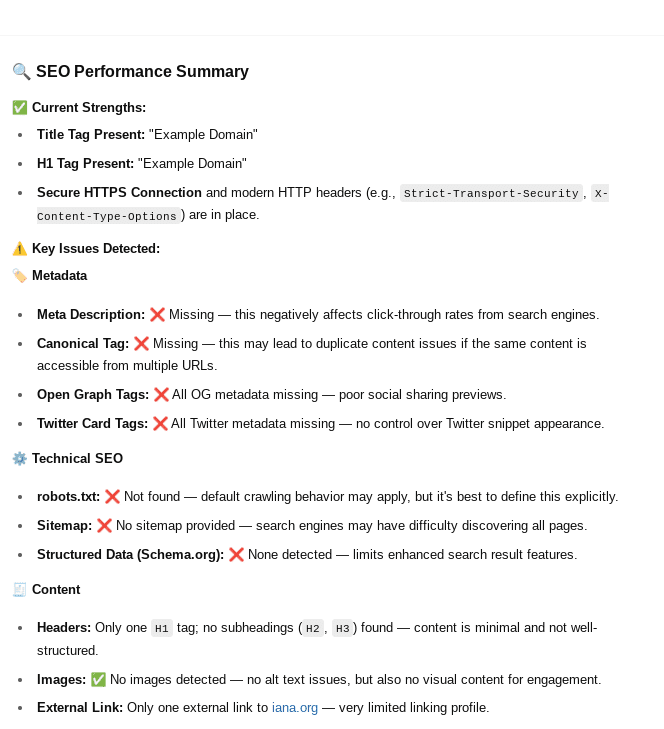
At the end, you’ll have a bot that provides you with information, such as:
Custom ChatGPT for SEO (Image from author, May 2025)
You’ll also receive a list of actionable steps to take to improve your SEO based on the agent’s findings.
Creating A Cloudflare Pages Worker For Your Agent
Cloudflare Pages workers help your agent gather information from the website you’re trying to parse and view its current state of SEO.
You can use a free account to get started, and you can register by doing the following:
Going to http://pages.dev/
Creating an account
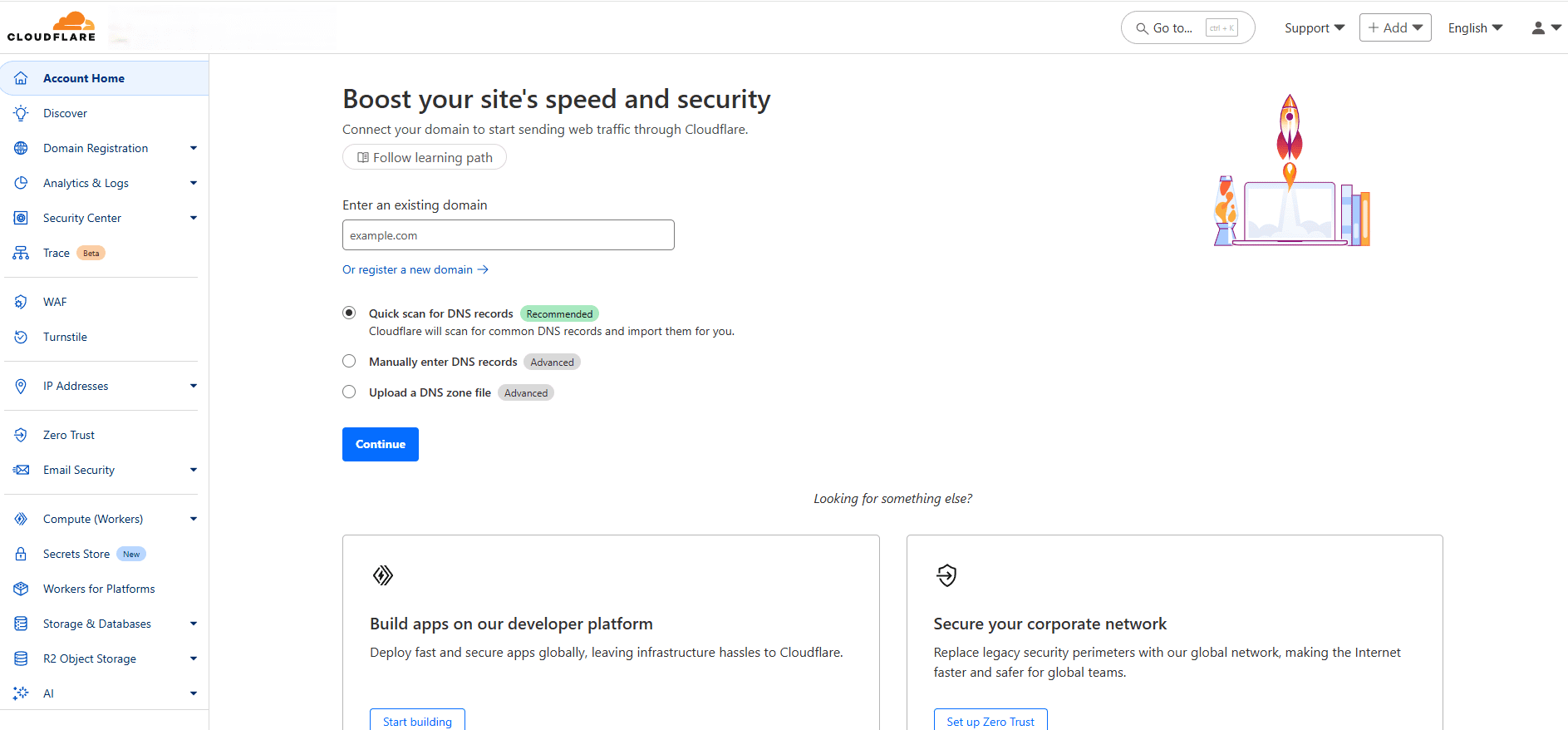
I used Google to sign up because it’s easier, but choose the method you’re most comfortable with. You’ll end up on a screen that looks something like this:
Cloudflare Dashboard (Screenshot from Cloudfare, May 2025)
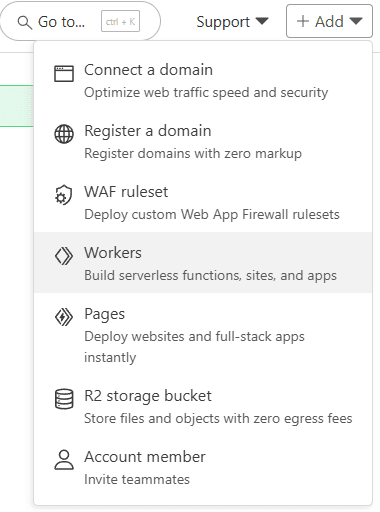
Navigate to Add > Workers.
Add a Cloudflare Worker (Screenshot from Cloudfare, May 2025)
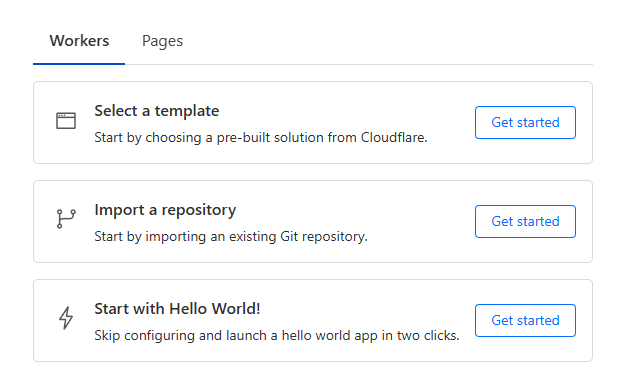
You can then select a template, import a repository, or start with Hello World! I chose the Hello World option, as it’s the easiest one to use.
Selecting Cloudflare Worker (Screenshot from Cloudfare, May 2025)
Go through the next screen and hit “Deploy.” You’ll end up on a screen that says, “Success! Your project is deployed to Region: Earth.”
Don’t click off this page.
Instead, click on “Edit code,” remove all of the existing code, and enter the following code into the editor:
addEventListener('fetch', event => {
event.respondWith(handleRequest(event.request));
});
async function handleRequest(request) {
const { searchParams } = new URL(request.url);
const targetUrl = searchParams.get('url');
const userAgentName = searchParams.get('user-agent');
if (!targetUrl) {
return new Response(
JSON.stringify({ error: "Missing 'url' parameter" }),
{ status: 400, headers: { 'Content-Type': 'application/json' } }
);
}
const userAgents = {
googlebot: 'Mozilla/5.0 (Linux; Android 6.0.1; Nexus 5X Build/MMB29P) AppleWebKit/537.36 (KHTML, like Gecko) Chrome/121.0.6167.184 Mobile Safari/537.36 (compatible; Googlebot/2.1; +http://www.google.com/bot.html)',
samsung5g: 'Mozilla/5.0 (Linux; Android 13; SM-S901B) AppleWebKit/537.36 (KHTML, like Gecko) Chrome/112.0.0.0 Mobile Safari/537.36',
iphone13pmax: 'Mozilla/5.0 (iPhone14,3; U; CPU iPhone OS 15_0 like Mac OS X) AppleWebKit/602.1.50 (KHTML, like Gecko) Version/10.0 Mobile/19A346 Safari/602.1',
msedge: 'Mozilla/5.0 (Windows NT 10.0; Win64; x64) AppleWebKit/537.36 (KHTML, like Gecko) Chrome/42.0.2311.135 Safari/537.36 Edge/12.246',
safari: 'Mozilla/5.0 (Macintosh; Intel Mac OS X 10_11_2) AppleWebKit/601.3.9 (KHTML, like Gecko) Version/9.0.2 Safari/601.3.9',
bingbot: 'Mozilla/5.0 AppleWebKit/537.36 (KHTML, like Gecko; compatible; bingbot/2.0; +http://www.bing.com/bingbot.htm) Chrome/',
chrome: 'Mozilla/5.0 (Windows NT 10.0; Win64; x64) AppleWebKit/537.36 (KHTML, like Gecko) Chrome/129.0.0.0 Safari/537.36',
};
const userAgent = userAgents[userAgentName] || userAgents.chrome;
const headers = {
'User-Agent': userAgent,
'Accept': 'text/html,application/xhtml+xml,application/xml;q=0.9,*/*;q=0.8',
'Accept-Encoding': 'gzip',
'Cache-Control': 'no-cache',
'Pragma': 'no-cache',
};
try {
let redirectChain = [];
let currentUrl = targetUrl;
let finalResponse;
// Follow redirects
while (true) {
const response = await fetch(currentUrl, { headers, redirect: 'manual' });
// Add the current URL and status to the redirect chain only if it's not already added
if (!redirectChain.length || redirectChain[redirectChain.length - 1].url !== currentUrl) {
redirectChain.push({ url: currentUrl, status: response.status });
}
// Check if the response is a redirect
if (response.status >= 300 && response.status < 400 && response.headers.get('location')) { const redirectUrl = new URL(response.headers.get('location'), currentUrl).href; currentUrl = redirectUrl; // Follow the redirect } else { // No more redirects; capture the final response finalResponse = response; break; } } if (!finalResponse.ok) { throw new Error(`Request to ${targetUrl} failed with status code: ${finalResponse.status}`); } const html = await finalResponse.text(); // Robots.txt const domain = new URL(targetUrl).origin; const robotsTxtResponse = await fetch(`${domain}/robots.txt`, { headers }); const robotsTxt = robotsTxtResponse.ok ? await robotsTxtResponse.text() : 'robots.txt not found'; const sitemapMatches = robotsTxt.match(/Sitemap:s*(https?://[^s]+)/gi) || []; const sitemaps = sitemapMatches.map(sitemap => sitemap.replace('Sitemap: ', '').trim());
// Metadata
const titleMatch = html.match(/]*>s*(.*?)s*/i);
const title = titleMatch ? titleMatch[1] : 'No Title Found';
const metaDescriptionMatch = html.match(//i);
const metaDescription = metaDescriptionMatch ? metaDescriptionMatch[1] : 'No Meta Description Found';
const canonicalMatch = html.match(//i);
const canonical = canonicalMatch ? canonicalMatch[1] : 'No Canonical Tag Found';
// Open Graph and Twitter Info
const ogTags = {
ogTitle: (html.match(//i) || [])[1] || 'No Open Graph Title',
ogDescription: (html.match(//i) || [])[1] || 'No Open Graph Description',
ogImage: (html.match(//i) || [])[1] || 'No Open Graph Image',
};
const twitterTags = {
twitterTitle: (html.match(//i) || [])[2] || 'No Twitter Title',
twitterDescription: (html.match(//i) || [])[2] || 'No Twitter Description',
twitterImage: (html.match(//i) || [])[2] || 'No Twitter Image',
twitterCard: (html.match(//i) || [])[2] || 'No Twitter Card Type',
twitterCreator: (html.match(//i) || [])[2] || 'No Twitter Creator',
twitterSite: (html.match(//i) || [])[2] || 'No Twitter Site',
twitterLabel1: (html.match(//i) || [])[2] || 'No Twitter Label 1',
twitterData1: (html.match(//i) || [])[2] || 'No Twitter Data 1',
twitterLabel2: (html.match(//i) || [])[2] || 'No Twitter Label 2',
twitterData2: (html.match(//i) || [])[2] || 'No Twitter Data 2',
twitterAccountId: (html.match(//i) || [])[2] || 'No Twitter Account ID',
};
// Headings
const headings = {
h1: [...html.matchAll(/
Based on consumer research from over 2,000 individuals across the UK, US, France, and Germany, this session will give you a clear picture of what makes people take action.
In this session, you’ll learn:
✅ What gets consumers to choose one business over another. ✅ Actionable tips to optimize local SEO strategies across Google, Apple, voice search, AI tools & more. ✅ How to improve visibility, clarity, and trust across every location you manage. ✅ Digital signals that matter most to consumers.
Presented by Krystal Taing (VP) and Paul Modaley (Content Marketing Manager) at Uberall, this event is built for businesses that want to capture more high-intent traffic and convert it into real-world outcomes across any industry.
An emerging mobile communication standard could reach critical mass later this year, boosting performance for an already outstanding promotional channel.
The Rich Communication Services (RCS) standard could supersede two mobile message types: Short Message Service (SMS) and Multimedia Messaging Service (MMS).
RCS enables relatively more message interactivity, making it possible to share rich media, including buttons, carousels, and branding. It allows a mobile device’s native text messaging app to behave like an over-the-top version, e.g., WhatsApp, WeChat, and Facebook Messenger.
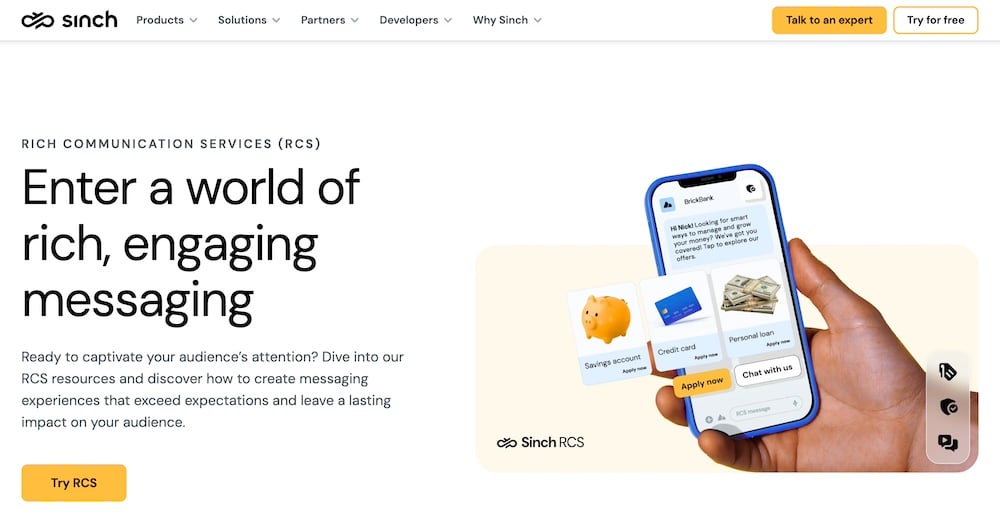
RCS is coming to North American businesses. Providers include Twilio, Infobip, and Sinch, shown here.
RCS for Merchants
The RCS standard has been in development since 2007. It became available in the United States in 2015 but took a decade to reach smartphone users. Most Android users had access to RCS in 2023, and after some delay, Apple added RCS support with iOS 18.1 in October 2024. Canada and Mexico had RCS even sooner than the United States, meaning RCS is widely available throughout North America.
However, most RCS messages have been person-to-person and did not take full advantage of the service’s upgraded capabilities.
The next significant RCS step will be business messaging. Companies have to be registered and verified to send RCS messages. Registration often occurs through a third-party, communication-as-a-service provider such as Twilio, Infobip, and Sinch, and ultimately requires individual carrier approval, which can take time.
Yet all signs indicate that RCS will scale commercially in the latter half of 2025. Juniper Research, for example, predicted that some 50 billion RCS messages will occur in 2025. Others believe RCS could be popular with enterprise retailers during the 2025 Christmas shopping season.
Brand identity
One often discussed RCS feature is branding. Because RCS senders are registered and verified, messages use the brand’s name rather than a phone number or short code for identification. Thus, a text message could arrive from, say, “Target” instead of “12345.” It could also show Target’s logo.
Interactivity
RCS supports clickable images. By comparison, an MMS message could include an image up to 500 KB and a separate text link. An ecommerce merchant using MMS might send a product image and a link to the product page. But with RCS, product images are 100 MB (200 times larger) and clickable.
Hence an RCS message could contain clickable call-to-action buttons. A seller might include a “Track My Order,” “Buy Now,” or even an “Order Again” button directly in the message.
Depending on its ecommerce platform and messaging opt-in process, a merchant could conceivably include one-touch order buttons that allow a recipient to tap to order without leaving the messaging app.
Finally, RCS will likely include so-called application-to-person chat. A shopper could receive an order confirmation message, reply to the message via an AI chatbot, and receive rich media link images, interactive maps, in-app surveys, and more.
Metrics
RCS also offers improved campaign tracking, such as open or seen rates, clicks, and types of message interactions.
Performance
Even without RCS, text messaging is a high-performing, if challenging, marketing channel.
Forbes, Sender, Mailchimp, and others place text message open rates above 90% and click rates at 40%. Moreover, shoppers typically respond quickly to texts, often in seconds. And compared to other marketing channels, SMS is inexpensive.
If SMS and MMS have a weakness, it’s the limitations of relatively small images and no clickable elements, which the RCS addresses.
How much RCS at scale can improve on SMS and MMS is uncertain, but there are indications. For example, a 2019 RCS test from Subway and the Sprint Network produced 60% higher click rates than SMS.
Next Steps
Pricing for RCS business messaging is sometimes confusing or at least misunderstood, mainly owing to an á la carte model. Some RCS messages could be significantly more expensive than others, based partly on the template and capabilities.
Thus ecommerce marketers considering RCS should gauge the return on investment carefully and consider a blended approach for campaigns — RCS, MMS, and SMS.
Some merchants may opt to avoid RCS altogether. Regardless, commercial text messaging is an emerging channel in 2025. Services such as Audience Tap and Textual can help smaller merchants get started.
This post was sponsored by RollerAds. The opinions expressed in this article are the sponsor’s own.
Want more visibility in Google Discover?
Not sure how to get into Google’s personalized news feeds?
Discover isn’t like search. You don’t rank for keywords.
You get selected.
And that means the best way to get featured isn’t to optimize for keywords; it’s to optimize for specific algorithmic signals.
In this guide, we’ll cover the core ranking signals that help Google determine which content belongs in Discover feeds, and how you can naturally boost those signals using tools like push notifications.
Google Discover Optimization Tips: Which Signals Tell Google Your Content Belongs in Discover?
Google Discover uses a different algorithm from traditional search results.
While it still considers many of the same quality indicators, Discover visibility depends less on keywords and more on how your content performs in the real world.
Here are the most important content quality signals for Discover.
Experience: Firsthand, real-world familiarity with the subject.
Expertise: Deep knowledge and skill in your content niche.
Authoritativeness: Recognition from other trusted sources.
Trustworthiness: Accurate, unbiased, and reliable information.
2. Engagement Metrics
These tell Google your content resonates with users and may be worth promoting more widely.
3. Strong Visuals & Headlines
Discover is highly visual, so if you don’t stand out immediately, the users are likely to scroll past your content.
Take your time to polish headlines to get attention, but make sure they accurately reflect the content of your article, post, or whatever you’re writing right now.
Engaging headlines, images, and videos perform better, especially when those assets are optimized for mobile.
4. Technical SEO & Mobile Optimization
While you don’t need to “rank” per se, you do need a well-optimized site, which includes:
Fast load times: Consider page speed and overall efficiency. Use PageSpeed Insights to ensure your web pages are optimized for user performance.
Mobile-friendly layouts: Google Discover is only available on mobile devices, as there is currently no desktop version.
Structured data: Google relies on structured data to categorize content and provide relevant suggestions for users. To attract more engaged and relevant users, you need to add tags and structure data so that Google can better recognize and categorize your content.
Internal linking & link building: It will help you create your own network of content. This concerns old articles, too, as they might serve as a gateway to newer pieces of content.
RSS or Atom Feed: Allow users to follow you to receive updates quickly. Google generates a feed for you automatically, but you can connect your own.
Google Web Stories: Similar to Instagram, these stories appear under the Visual Stories banner on mobiles and serve to expand your reach. Stories are easy to create, engaging, interactive, and fun.
Track, test, improve. Use Google Search Console (GSC) to monitor your performance and statistics. Unlike Google Analytics, it has a dedicated tab for monitoring Google Discover traffic.
5. Freshness & Topical Relevance
Valuable content addresses and solves pain points.
For content to have a better chance of showing up in Discover feeds, it should be:
Accurate.
Timely.
Trending.
Helpful.
Continuously updated.
This is especially powerful if your content is tied to current events or spikes in interest, as shown in Google Trends.
To discover what users search for, try:
Google Search: Enter a query and scroll down to view related and popular requests.
Google Search’s Autocomplete: Start typing a search and observe the suggested autocomplete queries; these are the queries that many others regularly search for.
Google Trends: Identify how popular a content direction is in any part of the world. This is also great for identifying seasonality.
How Google Discover Works
Google Discover suggests your content, which should include all the positive signals mentioned above.
The Google app user engages with your content within Google Discover, adding to Google’s knowledge of how users interact with your website.
These engagements (visitor volume, time on page, user experience, etc.) indicate to Google that your content is well-suited for similar readers.
Google increases your reach and visibility on Google Discover.
Those new viewers engage with your content in a similar pattern.
The cycle repeats, spreading your optimized content to more Google Discover timelines.
This is known as a positive loop because your content consistently passes positive ranking signals back to Google’s Discover algorithm, thereby continuing to increase in engagement.
How Do I Create A Positive Loop & Show Up In Google Discover?
We know that Google Discover places your content based on:
High-clickthrough rates.
Long time-on-page.
Repeat visitors.
So, how can you increase those metrics?
By getting a dedicated reader base that is always ready to consume your new content.
Push notifications are a great way to alert your dedicated readers that new content is out.
And they will feed your Google Discover algorithm data.
How To Use Push Notifications To Boost These Google Signals
Many publishers avoid push notifications, believing they’re too promotional or might harm user experience (UX).
However, modern push notification platforms allow you to take a more hybrid approach, combining editorial updates with monetization to boost visibility.
Why Hybrid Push Notifications Help Boost Discover Visibility
Done right, push notifications help your content get discovered organically by:
Increasing CTR with a second wave of distribution.
Driving fast engagement shortly after publication.
Bringing back repeat readers to increase session depth.
Boosting behavioral signals that Google uses to judge quality.
In other words, push notifications support the very engagement metrics that can lead to more Discover visibility.
When users receive a mix of informative and promotional pushes, each message feels fresh, encouraging clicks and boosting your CTR.
Higher engagement signals to Google that your content is valuable, increasing the chances of it being featured on Discover.
And since Discover traffic is largely made up of new visitors, each one becomes a fresh opportunity to grow your subscriber base.
Once users opt in, you can keep re-engaging them, creating a cycle of rising visibility, CTR, and traffic.
Image created by RollerAds April, 2025
How to Implement Hybrid Push Format to Get on Discover Faster
In a recent case study, one RollerAds publisher increased their revenue from $0 to $60,000 per month by pairing great content with hybrid push notifications and Discover-optimized distribution. The key was creating content that signals quality and leveraging distribution to show it.
With a tool like RollerAds, you can gain a streamlined way to:
Send personalized push notifications for your latest content.
Mix promotional and editorial messaging without spamming your readers.
Increase engagement, retention, and revenue simultaneously.
Simply register your site, get a custom strategy from your account manager, and start boosting content visibility, without compromising user experience.
Even better? You can monetize this traffic directly with ad formats designed for Discover audiences, no intrusive pop-ups or poor user experience. Just clear, engaging content with a side of revenue.
For SEJ readers, use the code SEJ30 to add +30% to your funds before July 1st, 2025.
Just show the code to your account manager on RollerAds before your first payment.
Getting featured on Google Discover isn’t just about luck; it’s about strategy.
From creating high-quality, relevant content to optimizing visuals, headlines, and mobile performance, every step counts. However, to truly stand out and amplify your chances, pairing content strategy with smart tools, such as hybrid push notifications from RollerAds, can make all the difference.
Engaging your audience through push updates not only drives more clicks but also signals content quality to Google, boosting your Discover reach. With the right monetization tools, you can convert that traffic into substantial revenue.
Image Credits
Featured Image: Image by RollerAds. Used with permission.
In-Post Image: Images by RollerAds. Used with permission.
One thing I need you to understand about the groundbreaking data I’m about to show you is that no one has ever done this kind of analysis before.
Ever.
To our knowledge, no other independent usability study has explored a major web platform at this scale.
AI changes everything, and search is at the forefront.
Together with Eric van Buskirk and his team, I conducted a behavioral study that provides us with unique and mission-critical insights into how people use Google, especially AI Overviews (AIOs).
This data allows us all to better understand how people actually use the new feature and, therefore, better optimize for this new world of search.
We captured screen recordings + think-aloud sessions on 70 people (≈ 400 AIO encounters) to see what really happens when Google shows an AIO.
We tracked their scrolls, hovers, dwells, comments, and even their emotions!
The effort to gather and evaluate this data was high. It required:
A solid five-figure USD investment.
A team of six people.
Combing through 13,500 words of annotations.
Sifting through 29 hours of recordings.
So many hours we lost count.
I want to call out that the study was directed by Eric Van Buskirk.
We designed the questions, focus points, and the method together, but Eric hired collaborators, ran the study, and delivered the results. Once the study was finished, we interpreted the data together.
Here’s a three-minute video summary of the results:
Boost your skills with Growth Memo’s weekly expert insights. Subscribe for free!
Executive Summary
Our usability study puts hard numbers behind what many SEO pros have sensed anecdotally:
Traffic drain is real and measurable. Desktop outbound click-through rate (CTR) can fall by two-thirds the moment an AIO appears; mobile fares better, but still loses almost half its clicks.
Attention stays up-screen. Seven in 10 searchers never read past the first third of an AIO; trust and visibility are won – or lost – inside a few lines.
Demographics define user behavior. Younger mobile users embrace AI answers and social proof; older searchers still dig for blue links and authority sites. Query intents with high-risk outcomes (like Your Money or Your Life searches) also cause users to dig more into search for validation.
The decision filter has changed. Brand/authority is now the first gate, search intent relevance the second; snippet wording only matters once trust is secured.
Residual clicks follow community proof and video. Reddit threads, YouTube demos, and forum posts soak up roughly a third of the traffic that AIO leaves behind.
Together, these findings show that visibility, not raw referral traffic, is becoming the main currency of organic search.
Key Takeaways
Before you dig into the overall findings, here are the high notes:
AIOs kill clicks, especially on desktop: External click rates drop when an AIO block appears.
Most users skim only the top third of the panel: Citations or mentions for your brand must surface early to be seen. Median scroll = 30% of panel height; only a minority of users scroll past 75%.
Trust is earned through depth: Scroll-depth and stated trust move together (ρ = 0.38). Clear sources high up accelerate both trust and scroll-stop rate.
Age and device shape engagement: 25 to 34-year-olds on mobile are the power users: They pick AIO as the final answer in 1 of 2 queries.
Community and video matter post-AIO: When users do leave the SERP, many outbound clicks go to Reddit, YouTube, or forum posts – social proof seals decisions.
Methodology Summary
You’ll find a detailed methodology at the end of the article (and a methodology deep dive from Eric here), but here’s a short summary of how the data was collected:
We asked 70 U.S. searchers (42 on mobile, 27 on desktop) to complete eight real-world Google queries – six that trigger an AIO and two that do not – while UXtweak recorded their screens, scrolls, clicks, and think-aloud commentary.
Over 525 task videos (≈ 400 AIO encounters) were frame-by-frame coded by three analysts who logged scroll depth, dwell time, internal vs. external clicks, trust statements, and emotional reactions for every SERP element that held attention for at least five seconds.
The resulting 408 annotated results provide the quantitative spine – and the qualitative color – behind the findings you’re about to read.
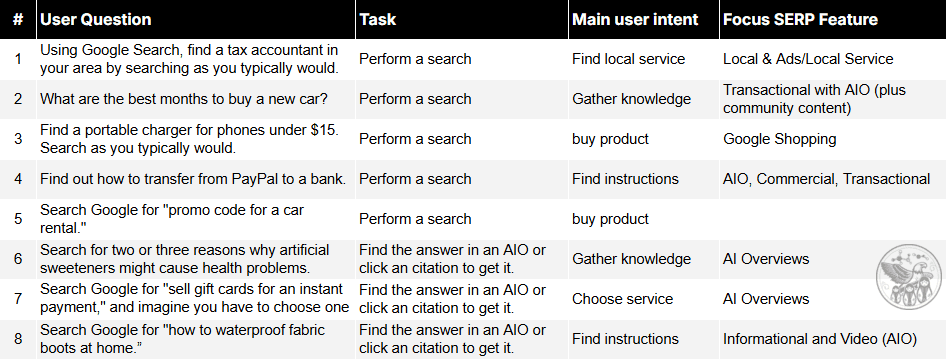
We asked participants to complete these eight tasks:
Using Google Search, find a tax accountant in your area by searching as you typically would.
What are the best months to buy a new car?
Find a portable charger for phones under $15. Search as you typically would.
Find out how to transfer from PayPal to a bank.
Search Google for “promo code for a car rental.”
Search for two or three reasons why artificial sweeteners might cause health problems.
Search Google for “sell gift cards for an instant payment,” and imagine you have to choose one of the services mentioned.
Search Google for “how to waterproof fabric boots at home.”
Image Credit: Kevin Indig
1. How Do Users Actually Read AIO Content?
Several analyses have examined the impact of AIOs on click-through rates and organic traffic.
But no one has yet looked into how users actually engage with AIOs – until now.
In our analysis, we captured how far down the AIO users scroll, when they click the “show more” button, and where they dwell on the page.
Key Stats:
An overwhelming 88% of users clicked “show more” to expand truncated AIOs.
We measured how far down* the participants scrolled who looked at the AIO result for at least five seconds:
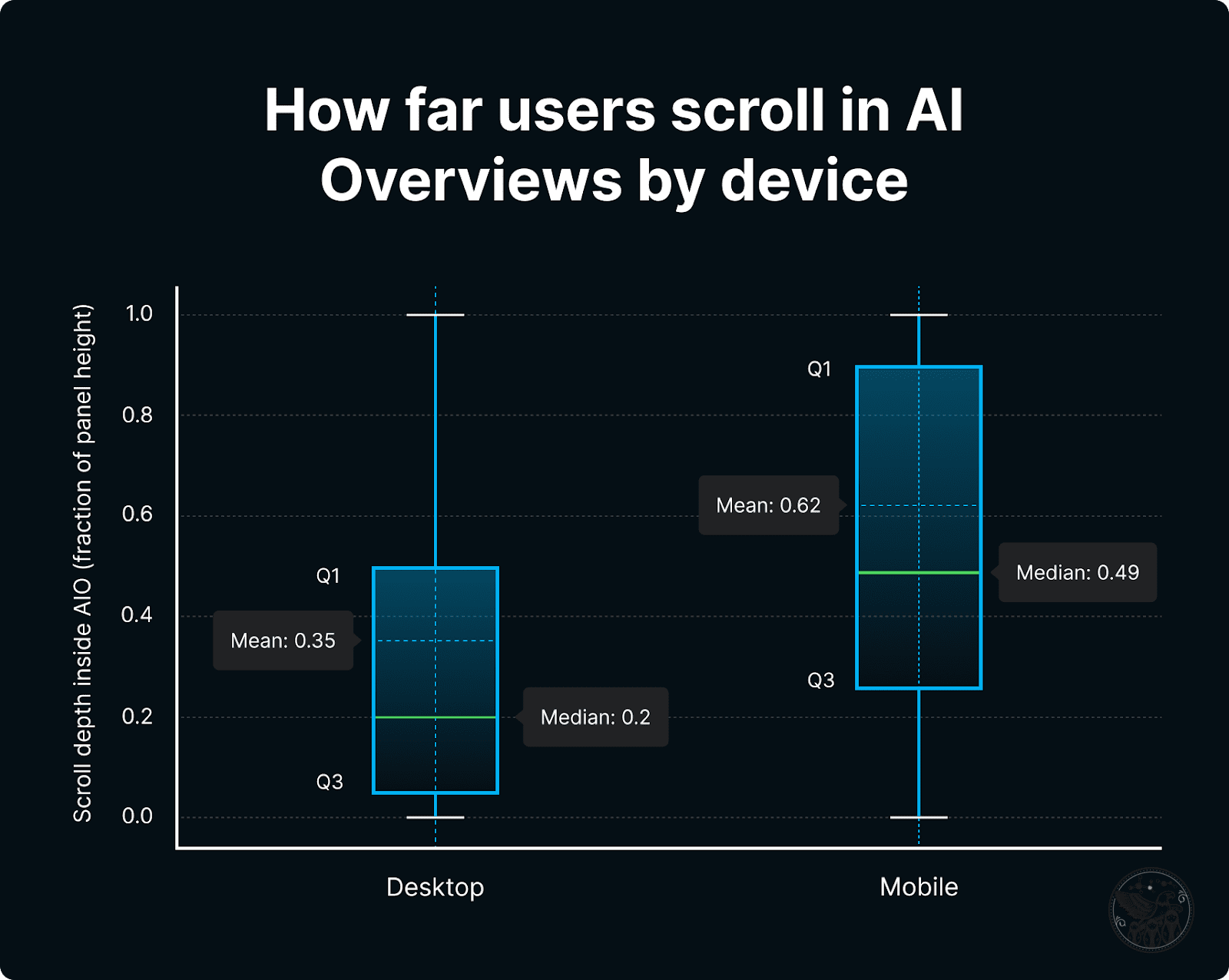
Average scroll depth: 75%.
Median scroll depth: 30%.
*0% = they never scrolled inside the box; 100% = they reached the very bottom at least once.
Image Credit: Kevin Indig
A few outliers skew the average.
The median is much more telling: Most users stop reading AIOs after the top third.
In total, 86% of participants “skimmed quickly,” meaning they didn’t take much time to read everything in the AIO but scavenged for key insights.
Dwell times averaged between 30-45 seconds, indicating meaningful user engagement rather than superficial interactions.
Eric, director of the study, found that 40% of questions end with statements like “I usually don’t go past this” or “AIO answers all my questions.”
The remainder, almost a third of the sessions, show people scanning AIOs, then choosing a brand site, video, Reddit thread, or .gov/.edu result instead. (“I like AIO, but I still prefer Reddit,” was a sentiment we heard.)
But who scrolls further down the AIO?
Young people: Ages 25-34 years.
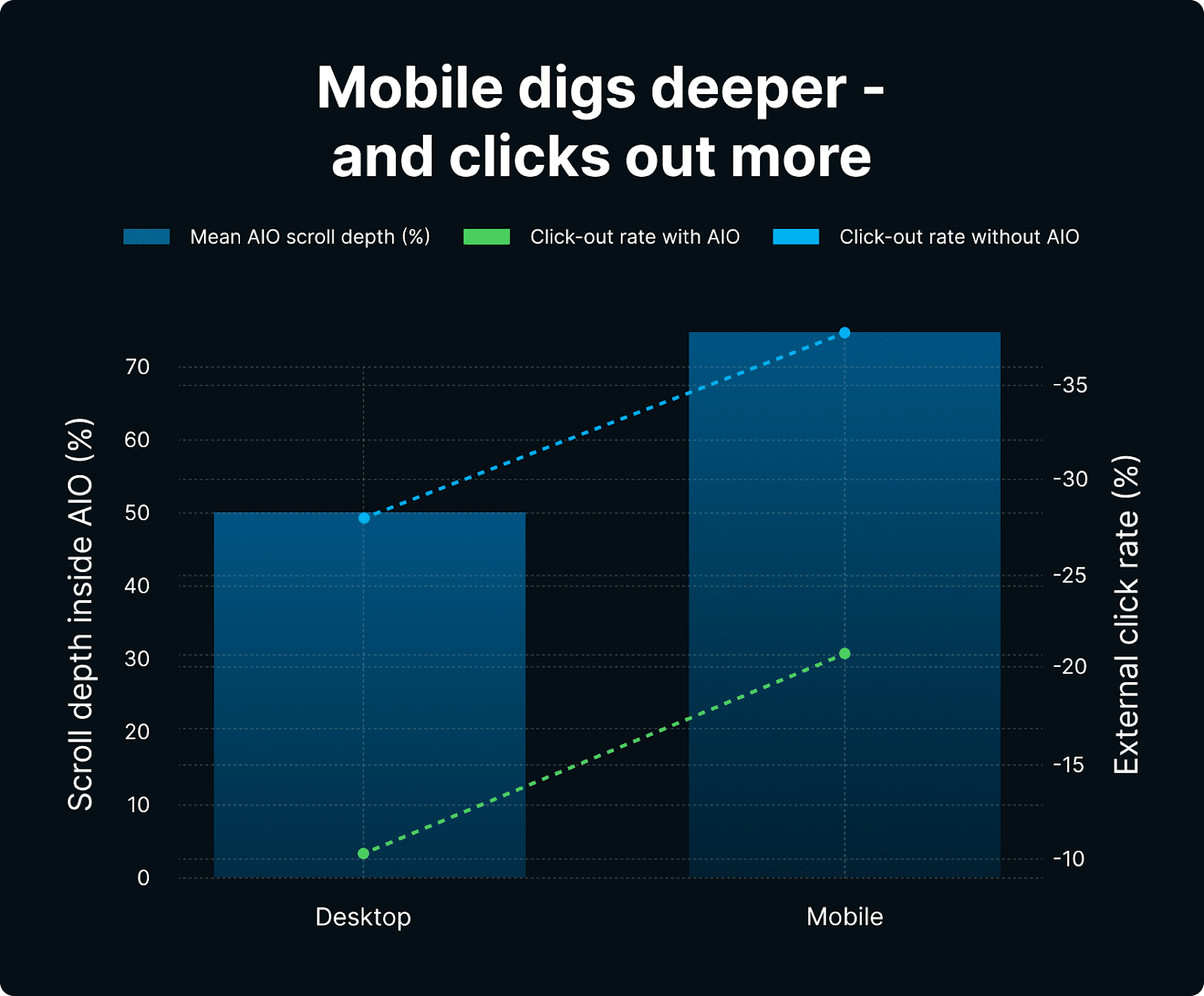
Mobile users: An average of 54% mobile users vs. 29% desktop users keep scrolling the AIO.
Searchers with an intent that reflects high stakes: Think tasks that involve financial or medical queries. Low-stakes searches, like coupon codes, are the opposite. Here’s a look at the average scroll depth across intents:
Health YMYL – 52%.
DIY or how-to – 54%.
Financial YMYL – 46%.
Decision timing (“best month to buy…”) – 41%.
Promo code queries – 34%.
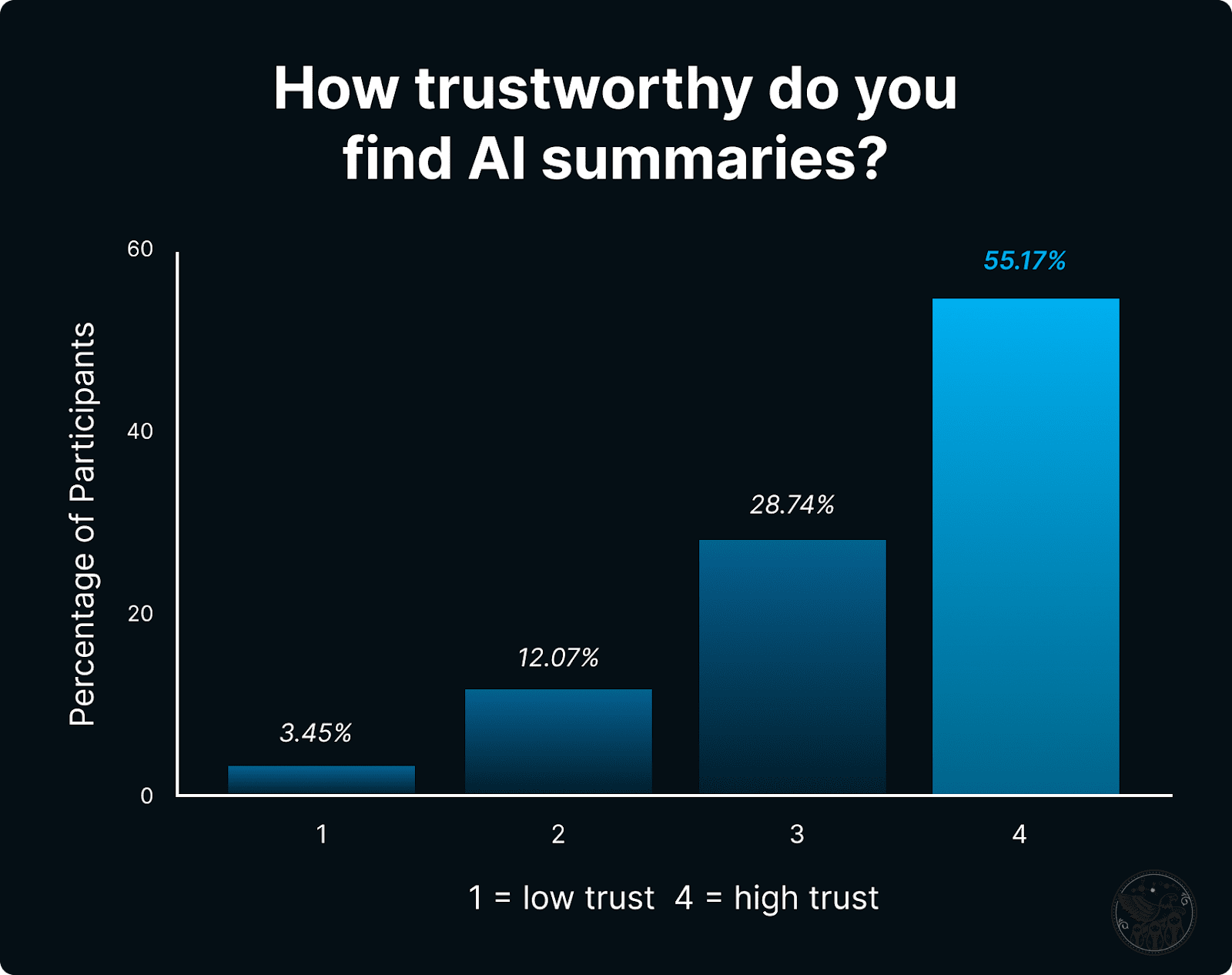
When we asked participants about how much they trust AI-generated summaries, we got an average of 3.4 – quite high!
Image Credit: Kevin Indig
Why It Matters:
Similar to classic search results, aim to be cited as high up the AIO as possible to be the most visible.
When optimizing, we also need to consider the stakes of each individual, singular search query and what it might take for a person to verify a claim or find a trustworthy solution, whether the search is in YMYL topic or a general, traditionally low-risk topic.
This is more practical than the YMYL framework we’ve been using for a long time. The more a user has to lose when making the wrong decision, the more likely they are to engage deeply with AIOs.
Ultimately, our study shows that users engage more with an AIO out of skepticism. The higher the stakes are for a decision, the more they question the AIO. And the more they work to validate the AIO with sources outside of it.
Insight:
Users treat an AIO as a fact sheet: quick scan, expand if needed, minimal internal navigation.
You can see this in the difference between average and median scroll depth. Only a few users scrolled down to 75% of the AIO.
Users who end the task saying they trust the AIO are the same ones who have scrolled far enough to read citations or expanded paragraphs. Authoritative sources showing up high in the AIO accelerate trust.
Practical Takeaways:
Most people will never reach the bottom of the AIO, so valuable mentions and citations are only up high, similar to how classic search results work.
Similar to optimizing for Featured Snippets, when targeting AIOs, keep answers in content blocks concise, to the point, and simple.
Invest in your positioning, messaging, and becoming an authoritative source in your area of expertise. That way, users recognize your brand in the SERPs – and ideally before they search.
I’m dropping more insights and guidance on how to apply these learnings for paid subscribers later this week. Make sure you don’t miss it. Upgrade here.
2. What’s The Click-Through Behavior Like When AIOs Are Present?
AIOs give users answers before they click on web results.
Therefore, the logical question is how much less traffic can websites expect when AI Overviews show up?
Key Stats:
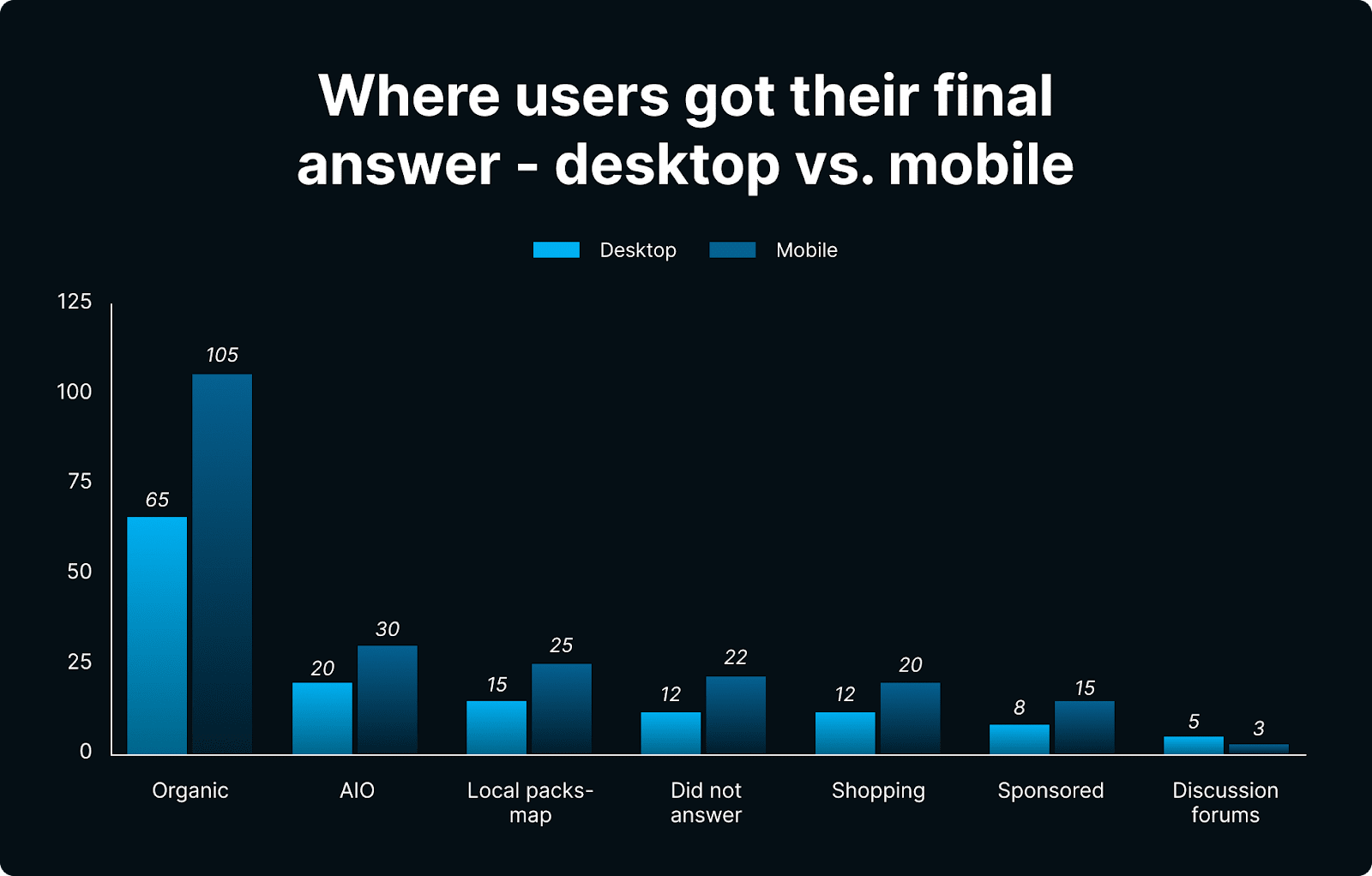
Everyone obviously wants to know how AIOs impact click-through rates. But clicks are just a proxy for completed user journeys.
While these are usually hard to track, we were able to figure out exactly when participants completed their journeys based on their commentary and screen tracking.
Image Credit: Kevin Indig
The remaining ~80% of queries were answered using:
Organic and sponsored results.
Community forums.
Videos.
Map packs.
Other prominent SERP Features, like People Also Ask.
This observation actually fits Google’s narrative of AIOs being a “jumping-off point,” but I want to be clear that AIOs also kill a lot of clicks in the process, and our tasks require a higher level of skepticism than many highly searched queries.1
Of course, there’s a difference between commercial and informational queries that we must keep in mind.
Notably, 4 out of 5 users progressed past the AIO, so ranking in the first organic or paid slots remains critical for monetizable queries.
Most answers (81 % on desktop and 78 % on mobile) for transactional and/or commercial queries came from other non-AIO SERP elements, such as:
Organic links.
Discussions and forums.
Featured snippets.
Promo‑code aggregators.
Sponsored results.
But for AIO actions that took place in the Overview itself, here’s what we found:
On mobile, 19% of participants clicked a citation-related element within the AIO panel, such as a link icon or hyperlinked text (excluding “show more” clicks).
On desktop, users clicked internally within an AIO just 7.4% of the time.
Overall, our main AIO blocks contained few hyper-texted links, and on desktop, these links were nearly absent. The primary click out of the main panels was the (somewhat confusing) link icon.
The data we gathered from this part of the study confirms a few things:
Don’t expect too much traffic, even when you’re cited high up the AIO. Traffic loss is inevitable and probably impossible to compensate for. (But there is hope.)
Revenue models tied to sessions are suffering and will suffer more. (For example: Sites that rely on ads and affiliate models.)
Marketing dashboards that track only visits are under-valuing visibility wins or hiding looming losses.
The SERP battleground is shifting from rank to AIO presence. Budgets and optimization practices have to follow.
Insight:
The data shows that users treat AIO primarily as a read-only summary.
Users read, decide, and stay put.
Outbound traffic is the exception, not the rule. When AIOs are absent, outbound click rates rise to an average of 28% on desktop and 38% on mobile.
Notice how simple questions don’t require click-throughs in the following clip from the study:
And yet, there are cases in which organic results convince users to be better than AIOs:
Practical Takeaways:
Optimize content for AIO citations, but don’t measure referral traffic (ie, clicks) for success.
Instead, measure visibility by monitoring the following:
Impressions (easy but fuzzy).
Citation rank (how high up the AIO you’re cited).
Share of Voice (how often you’re cited, how high, and how you show up in the organic results).
You also need to immediately communicate to leaders, stakeholders, partners, and clients that organic traffic is already or about to drop significantly.
For those who are subscribed to the paid version of The Growth Memo, we have a prepped slide deck to help you communicate these changes to your stakeholders coming out this week.
“We’re more emotional animals and make more decisions from our gut than we like to admit.”
Besides engagement, we also wanted to know how users feel about the results they’re seeing.
Why? Because emotions have an impact on our decisions, from clicks to purchases.
Key Stats:
Image Credit: Kevin Indig
Why It Matters:
Emotion is tied to risk. Searchers are internally asking What’s at stake? When making a decision to trust a result
And as a result, high-stakes niches – or even expensive products – receive more skepticism and scrutiny from users.
This skepticism plays out in the form of clicks – a.k.a. your opportunities to convince people that you’re trustworthy.
The good news: Users don’t rely on AIOs only for YMYL queries; they also validate and verify with classic results.
In low-risk niches where the threat of picking a wrong answer is low – like coupon codes or certain informational queries – brands can focus on page speed and price.
Overall, here’s what stuck out the most from this segment of the study:
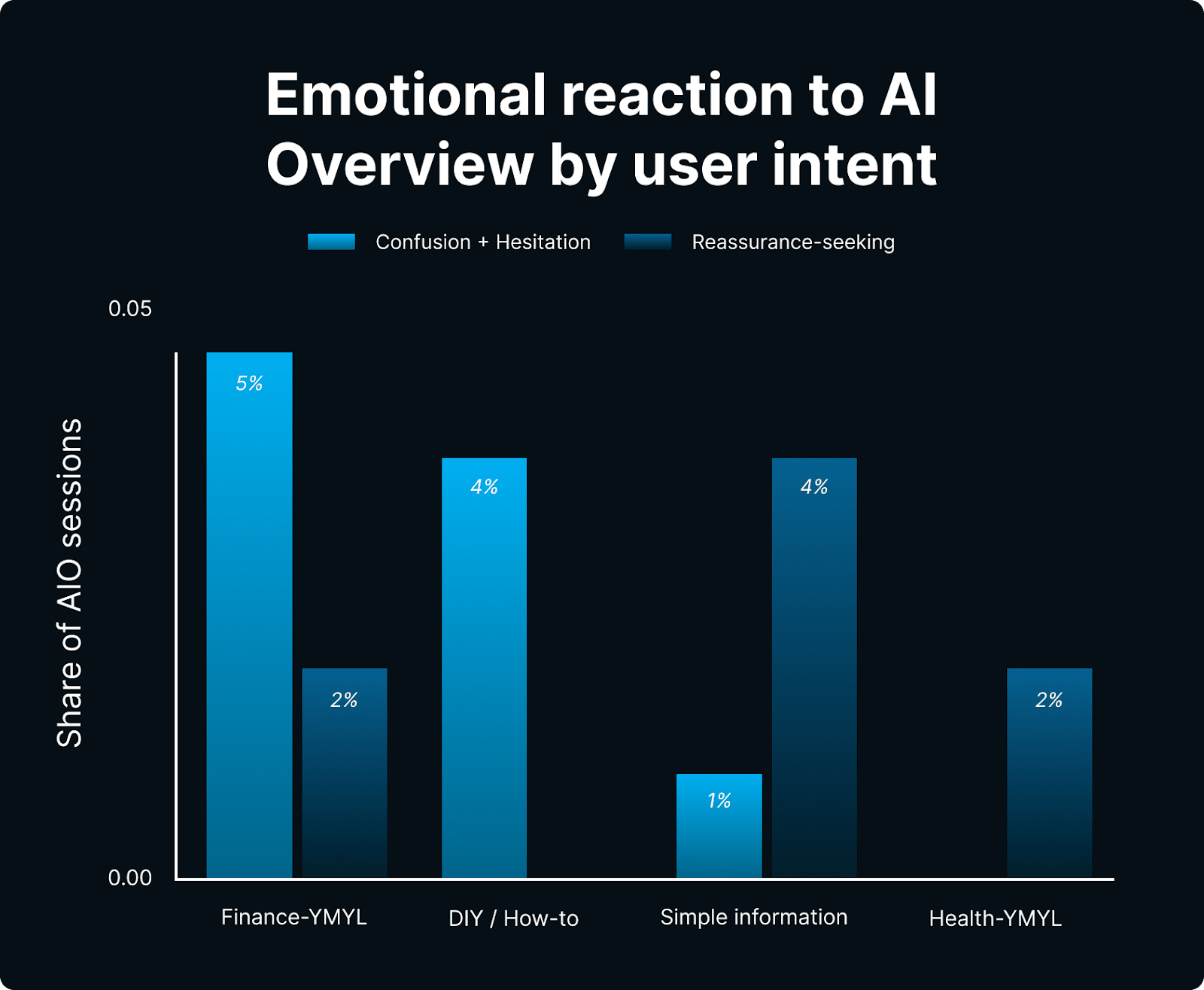
Hesitation or confusion spikes on medical or money queries when AIOs cite unknown brands.
Reassurance-seeking (opening a second organic link “to be sure”) appears in 38% of sessions where an AIO is present.
No-reaction silent scans dominate product or local-intent tasks.
For high-stakes queries, users care about authoritative sources, as you can see in this clip from the study:
But organic results can still win if they signal better relevance.
Sites in the health and finance spaces have a higher chance of seeing lower traffic losses from AIOs.
Aim to get mentioned or linked from highly authoritative sources, like .gov sites.
Prioritize trust-building in your on-page experience to catch those double-check clicks. You can do this with visible editorial guidelines, expert authors + reviewers, and high-effort content production (original graphics, etc.).
4. What Influences The Type Of Result A User Chooses As Their Final Answer?
Up until now, my mental model of search – and I would argue the industry’s as well – was that users pick results by relevance: “Does it answer my question?”
But that has changed, and I think AI is a big reason.
We grouped over 550 think-aloud comments into four recurring themes to explain the new user behavior in the search results:
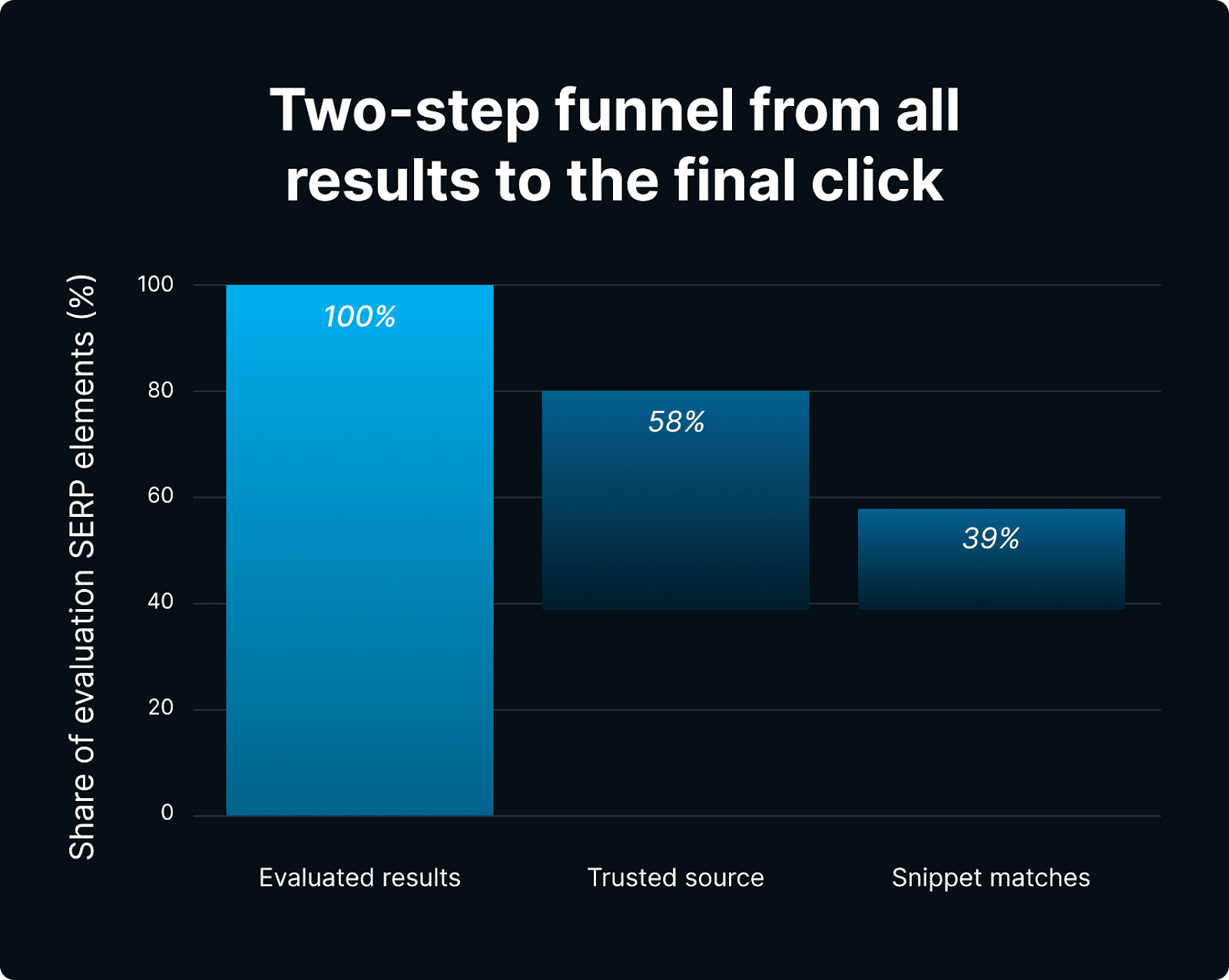
Whenever a recognised brand, authority site, .gov or .edu appeared, it was chosen first in 58% of the cases where such a link was present.
Comparison/Validation (= Secondary Driver)
After reading an AIO or Blue Link, 18% of users still opened a Reddit thread, YouTube video, or second organic result “just to double-check.”
Snippet/Preview Relevance (= Speeds Decision)
After clearing the trust gate, users scanned the two-line snippet, bolded query terms, or AIO phrasing. When the snippet looked off-topic, users skipped even trusted domains.
Top-Of-Page Visibility (= Skews The Decision)
Limited viewport and thumb ergonomics make “position-0” features (AIO, featured snippet) and rank-1 organic vastly more influential on phones.
First-screen links were chosen 71% of the time. Users only scroll when the topic feels risky.
Image Credit: Kevin Indig
Why It Matters:
It’s not just about matching the intent of the query anymore. The old notion of “search intent relevance only” is outdated.
Brand authority and trustworthiness compound: Once you’re trusted, you likely outrank unknown rivals – even without richer snippets.
Of course, placement matters, and SERP real estate above the fold is scarce … and skews user decisions.
Trust is the core ingredient when it comes to anything AI. Search is no exception.
Insight:
Users apply a rapid two-step filter that looks like this:
“Do I trust this result?” → “Does this result answer my question?”
Look at these two clips from the study and notice how the participant selects results he explicitly trusts:
You’ll hear the participant state:
“Yelp is a good resource that I use a lot, so I’d probably click Yelp.”
“I’ll try to find one that has decent reviews and that’s nearby.”
“I trust Yelp.”
You’ll also hear this in Clip No. 2 above:
“US News and World Reports is trustworthy. Edmonds is trustworthy.”
“I picked this ’cause US News and World Reports is a trusted source, and they have a clear answer right here in the key takeaways.” (Note: They make information easy to find.)
Of course, there is nuance to this two-step filter.
The director of this study, Eric, adds the following observations:
How-to and evergreen intents (like waterproofing boots, selling gift cards, or coupon hunting) are easiest to satisfy for AIOs. Users feel the AI is “tried and tested” and “super helpful” for these stable facts.
Location-sensitive or personal-risk queries trigger more skepticism. One study participant shared aloud that, “It only says New York … that doesn’t help me,” and another shared, “I’d go straight to PayPal for accuracy.”
Medical-risk examples show a mixed approach: Some users praise the concise summary, others insist on cross-checking with authoritative sources like the Mayo Clinic or the NHS.
Ultimately, we’ve noticed that the more time users spend reading the AIO, the higher their chance of trusting the answer and being influenced by it.
This is a priming effect: Once a brand or concept appears in the AIO, it remains top-of-mind.
Practical Takeaways:
Trust is the gatekeeper. One of the biggest drivers of SEO success is how well you’ve earned “share of mind” before someone even sees your brand in an AIO or search result. Maybe that was always true, but AIOs make it non-negotiable now.
Being present in the AIO (ideally high up) is valuable because it leaves an impression on users. That’s where impressions as a metric become more valuable.
5. How Do Demographics Influence Search Behavior And Interactions With AIOs?
We often talk about user intent in SEO, but completely ignore demographics.
History has shown that technical jumps, like what we’re living through with AI right now, have a bigger impact on younger demographics.
The same is true of Search.
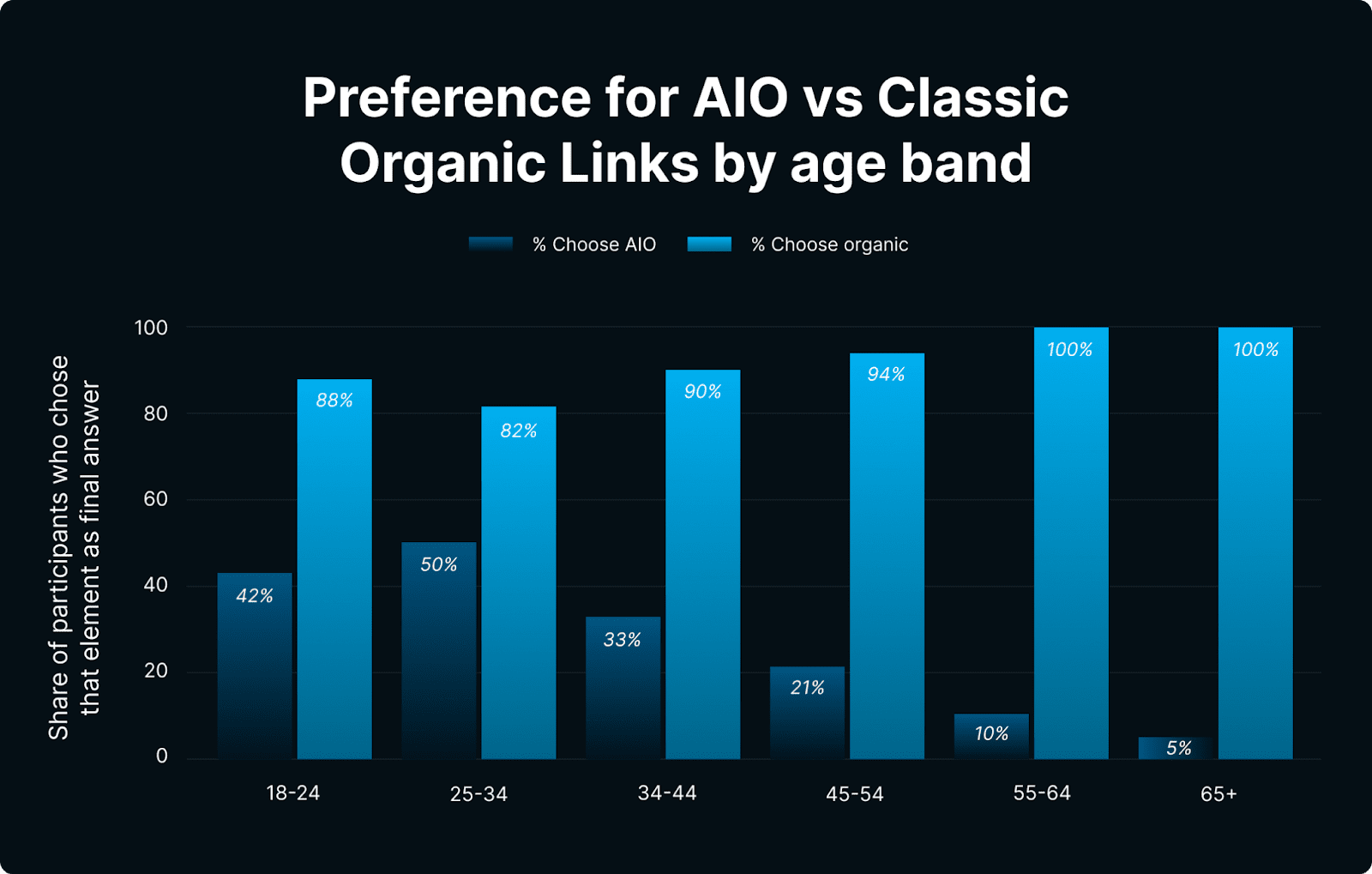
Our research found stark differences in how people of different ages engage with the search results.
Below, you’ll see the percentage of time when an organic result was chosen, whether there was an AIO present for the user’s review or not.
Image Credit: Kevin Indig
Why It Matters:
One-size-fits-all SEO practices don’t work anymore.
Just like for other social or content platforms, segmentation by demographic becomes as critical as segmentation by keyword intent.
Insight:
AIO adoption is generational.
Older audiences are still relying heavily on classic organic results. Younger demographics are more likely to focus on the AIO and validate with Reddit.
Practical Takeaways:
Prioritize content and SERP Feature bets by age segment.
For brands that target an older audience, double down on classic organic search. Don’t over-index on AIOs. The exception here would be queries with a local intent or online shopping searches.
In these cases, user intent overpowers age preferences.
Quick reminder here: Premium subscribers get expanded info later this week. Upgrade to paid.
6. How Do Devices Impact User Behavior?
Devices reflect search context.
Mobile devices are used more often on the go, which is why mobile searches are more likely to have local intent and SERP Features like local packs.
Mobile users are also more restrained in their behavior due to smaller screen real estate. These factors are also reflected in how users engage with AIOs.
Image Credit: Kevin Indig
Why It Matters:
You need to ensure mobile snippets and structured data are flawless; they get more scrutiny.
Mobile is now the primary remaining source of incremental Google traffic. Optimize for it first.
Insight:
Vertical scrolling and thumb ergonomics make mobile users dig deeper and click out more.
And when an AIO is missing, users revert to classic “blue link” behavior, especially on mobile, where more than one-third of searches produced a click to a non-Google site.
Practical Takeaways:
You need to track and compare mobile and desktop SERPs. We missed this in classic SEO, and now it’s so much more important.
To prioritize which format you optimize for, you must validate that you get more mobile users to your site first (use Google Search Console).
If mobile is important to your target audience, regularly run separate mobile rank and snippet audits. And optimize the above-the-fold experience, in addition to:
Making the page skimmable.
Shortening time-to-value on the page (essentially, the time it takes to resolve the query or reach an insight from your site).
Simplifying navigation on the page and site.
7. How And When Do Users Engage With Community-Based, Video-Based, And Shopping Carousel Content?
The controversial rise of Reddit often leaves us wondering why Google gives community content so much prominence across all topics and verticals.
Our study explains what users really do.
Key Stats:
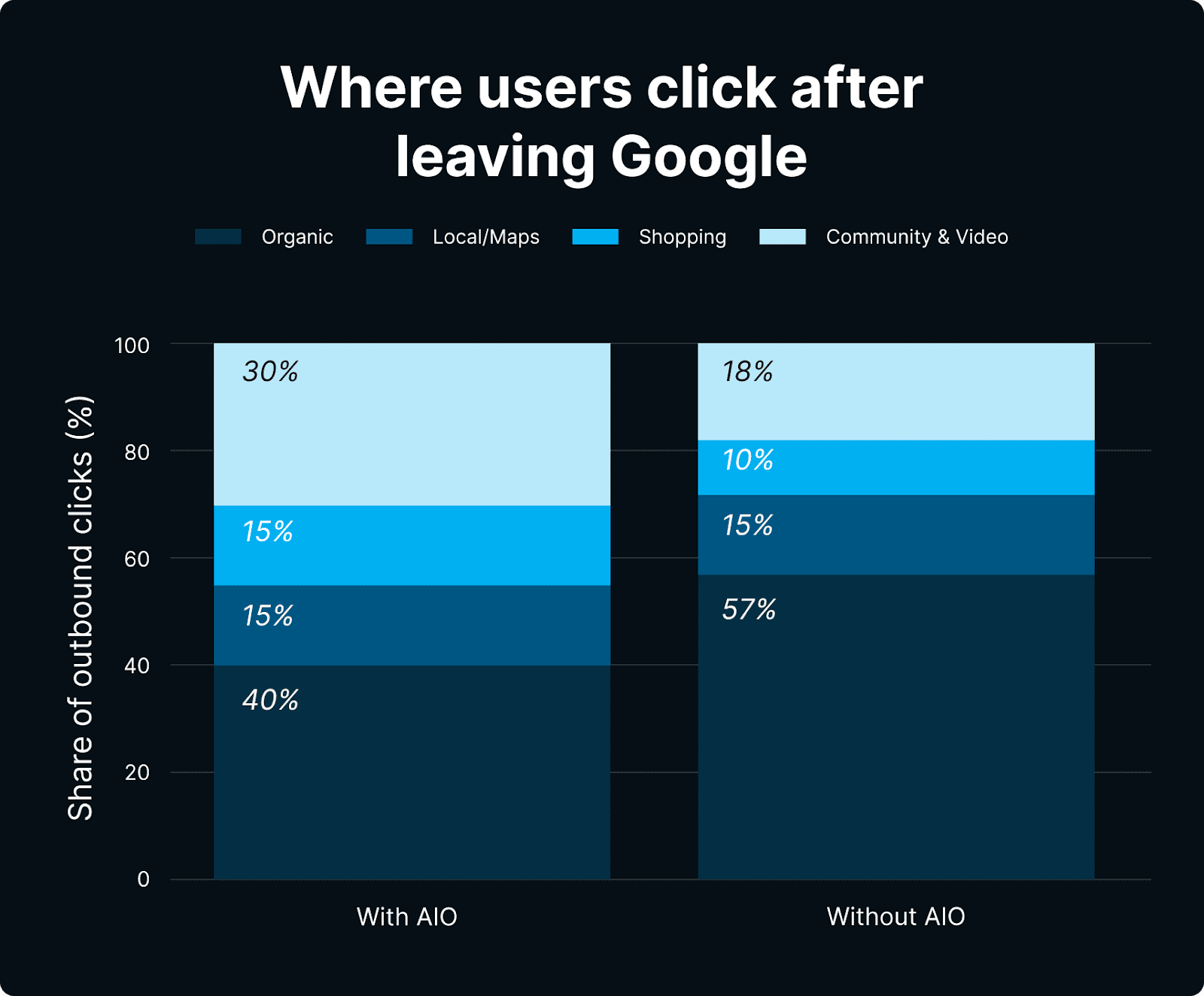
We looked at where clicks go when users leave Google or want to validate answers:
Image Credit: Kevin Indig
Keep in mind that SERP Features and corresponding user behavior vary by question or task performed.
In this study, only one task surfaced video results: “how to waterproof fabric boots at home.”
And here’s how users in this study responded to video results:
Users watched the preview frames, hovered for autoplay, then clicked through to YouTube in 5 of the 7 cases.
Although videos made up less than 2% of all logged elements, their 37-second dwell time exceeds AIO dwell time itself (31 seconds).
Users linger to watch autoplay previews or scroll thumbnails before deciding to click through.
For shopping-related tasks, we noticed the following:
30% of clicks go to local packs.
26.4% of clicks go to shopping modules (product grids).
13.2% of clicks go to text ads.
40% of clicks went to paid-organic results (text + PLAs).
7 out of 10 clicks bypassed classic organic links in favour of Google‑curated verticals or ads.
By the way, Amazon was a huge competitor to the shopping carousel.
Many people said, “I would just go to Amazon” (see clip below):
This study participant states: “Typically, I go to Amazon … scroll past the sponsored results and look for something with a lot of reviews.”
Why It Matters:
Social proof platforms (Reddit, YouTube) absorb the demand that AIOs can’t satisfy. Be present there.
Insight:
Community proof-points matter. When users leave the SERP after looking at an AIO, community links receive a lot of those clicks (18% when AIOs are not present).
People – especially the younger cohort that trusts AIO the most – use forums to get a (validating) voice from another human. Users in their 20s to 30s clicked Reddit or YouTube far more than older cohorts.
For some queries, like how-tos, users skip the AIO intentionally because they expect richer media, like videos.
Practical Takeaways:
Invest in Organic Reddit (or the most relevant forum in your industry) when and if it appears for your most relevant queries. Seek both citations and social proof, as they reinforce each other.
Optimize video thumbnails and the first 15 seconds. Users decide whether or not to click from the autoplay preview; if the opening doesn’t show the task in action, they skip.
Conclusion: Welcome To The New World Of Search
You made it to the end! Congratulations to you and your attention span (or did you just scroll here 🤔?).
To summarize everything you just (hopefully) read: If your brand isn’t surfaced in the first third of an AIO, it’s effectively invisible.
Search has flipped from a click economy to a visibility economy.
And within that economy, the new currency is authority, which now outranks search intent relevance.
Users ask, “Do I trust this brand?” before they even consider the answer.
If I had to boil the findings down to one sentence, it would be this: Users treat an AIO as a fact sheet: They quickly scan, expand if needed, and use minimal internal navigation.
Top Takeaways For Operators:
Shift KPIs from clicks to presence. Track how often, how high, and for which queries your brand appears in AIO.
Lead with authority. Invest in expert endorsements, .gov/.edu links, and PR that earns immediate trust.
Package answers for skimmers. Key-fact boxes, bullets, and schema matter more than ever.
Own the validation click. Seed Reddit threads, video demos, and comparison guides – users still seek a second opinion.
Segregate desktop and mobile strategy. Treat desktop as a branding surface; fight for mobile if you need traffic.
Top Takeaways For Decision Makers:
Expect – and budget for – a structural drop in organic sessions. AIOs cut outbound clicks roughly in half on desktop and by a third on mobile; revenue models tied to sessions (ads, affiliate) need hedging strategies.
Shift KPIs and tooling from “rank” to “share of voice in AIO.” Track how often, how high, and for which queries your brand appears in the panel; classic position-tracking alone masks looming losses. Keep in mind we’re still refining the new metrics model.
Invest in authority signals that secure trust instantly. Recognition by .gov, .edu, expert reviewers, or high-profile PR sways 58% of users to choose a cited source first. Brand trust precedes relevance in the new decision filter.
Allocate resources to validation channels – Reddit, YouTube, forums – where many residual clicks go after an AIO. Owning the follow-up click preserves influence even when Google keeps the first.
Open Questions That Still Matter
Citation mechanics. How does Google choose which sources surface in the collapsed AIO, and in what order?
Attribution leakage. Will Search Console or GA ever expose AIO-driven impressions so brands can value “on-SERP” exposure?
Monetization models. If outbound traffic keeps shrinking, how will publishers, affiliates, and SaaS products replace lost session-based revenue?
Personalization vs. authority. Will future AIOs weigh personal history over global trust signals – and can brands influence that balance?
Regulatory impact. Could antitrust or copyright actions force Google to show more outbound links – or fewer?
Behavior over time. Do users acclimate to AIOs and eventually click less (or more) as trust grows?
Hint: Paid subscribers can get answers to these questions (and can send me any question that’s top of mind!) related to this study.
Additional Resources
Other primary research that puts the qualitative data into perspective:
Methodology
Study Design And Objective
We conducted a mixed-methods, within-subjects usability study to quantify how Google’s AI Overviews (AIO) change user behavior.
Each participant completed eight live Google searches: six queries that consistently triggered an AIO and two that did not. This arrangement lets us isolate the incremental effect of AIO while holding person-level variables constant.
Participants And Recruitment
Sixty-nine English-speaking U.S. adults were recruited on Prolific between 22 March and 8 April 2025.
Eligibility required a ≥ 95% Prolific approval rate, a Chromium-based browser (for the recording extension), and a functioning microphone.
Participants chose their own device; 42 used mobile (61%) and 27 used desktop (39%).
A pilot with eight users refined instructions; 18 further sessions were excluded for technical failure and four for non-compliance. The final dataset contains 525 valid task videos.
Task Protocol
Each session ran in UXtweak’s Remote Moderated mode.
After reading a task prompt, the participant navigated to google.com, searched, and spoke thoughts aloud. They declared a final answer (“I’m selecting this because…”) before clicking “Done” in an overlay.
Task set:
Local service (“find a tax accountant near you”) – no AIO.
Decision timing (“best month to buy a car”) – AIO.
Low-cost product (“portable charger < $15”) – no AIO.
Transactional YMYL (“transfer PayPal to bank”) – AIO.
Coupon/deal (“car-rental promo code”) – AIO.
Health YMYL (“why artificial sweeteners might cause health problems”) – AIO.
Finance YMYL (“sell gift cards for instant payment”) – AIO.
DIY how-to (“how to waterproof fabric boots”) – AIO.
Capture Stack
UXtweak recorded full-screen video (1080p desktop or device resolution mobile), cursor paths, scroll events, and audio. Recordings averaged 25 min; incentives were $8 USD.
Annotation Procedure
Three trained coders reviewed every video in parallel and logged one row per SERP element that held attention ≈ for 5 seconds or longer. Twenty-three variables were captured, grouped as:
Outcome – final answer, satisfaction flag, explicit trust flag.
The research director (Eric van Buskirk) spot-checked 10% of videos. Inter-coder agreement: dwell-time SD ± 3 s; Cohen’s κ on trust category = 0.79 (substantial).
Data Processing And Metrics
Annotations were exported to Python/pandas 2.2. Scroll values entered as whole numbers were normalised to fractions (e.g., 80 → 0.80).
The 99th percentile of dwell was Winsorised to dampen outliers. This produced 408 evaluated SERP elements and ≈ 350 valid AIO observations.
Statistical Analysis
Descriptives (means, medians, proportions) were stratified by device, age, and query intent.
Spearman rank correlations tested monotonic relationships among scroll %, dwell, trust, and query-refinement counts (power >.8 to detect ρ ≥ .25).
Welch t-tests compared mobile vs desktop means; McNemar χ² compared click-through incidence with vs without AIO.
Reliability And Power
With n ≈ 350 AIO rows, the standard error for a proportion of .50 is ≈ .05; correlations ≥ .30 are significant at α =.05. Cross-coder checks ensured temporal metrics and categorical judgements were consistent.
Limitations
Sample skews young (58% ≤ 34 yrs) and U.S.-based; think-aloud may lengthen dwell by ~5-10 s. Coder-judged trust/emotion involves subjectivity despite reliability checks.
Study window overlaps Google’s March 2025 core update; SERP UI was in flux. Findings generalise to Chromium browsers; Safari/Firefox users were not sampled.
Ethical Compliance
Participants gave informed consent; recordings stored encrypted; no personally identifying data retained. Study conforms to Prolific’s ethics policy and UXtweak TOS.
This narrative supplies sufficient procedural and statistical detail for replication or secondary analysis.
SEJ’s Content & SEO Strategist Shelley Walsh prerecorded an interview with Kevin before the launch to talk about his research. For more explanation about his findings, watch below.
More Resources:
Featured Image: Paulo Bobita/Search Engine Journal