Join Shannon Vize, Sr. Content Marketing Manager at Conductor, and Pat Reinhart, VP of Services & Thought Leadership, as they walk through the biggest search and content shifts shaping 2025. From Google’s AI Overviews to new content strategies that actually convert, you’ll get clear guidance to help you move forward with confidence.
Don’t Miss Out!
Join us live and walk away with a clear roadmap for leading your SEO and content strategy in 2025.
Can’t attend live?
Register anyway and we’ll send you the full recording to watch at your convenience.
It took me more than a decade to discover all these lessons. By reading this article, you can apply these insights to save yourself and your SEO clients time, money, and frustration – in less than an hour.
Lesson #1: Technical SEO Is Your Foundation For SEO Success
Lesson: You should always start any SEO work with technical fundamentals; crawlability and indexability determine whether search engines can even see your site.
Technical SEO ensures search engines can crawl, index, and fully understand your content. If search engines can’t properly access your site, no amount of quality content or backlinks will help.
After auditing over 500 websites, I believe technical SEO is the most critical aspect of SEO, which comes down to two fundamental concepts:
Crawlability: Can search engines easily find and navigate your website’s pages?
Indexability: Once crawled, can your pages appear in search results?
If your pages fail these two tests, they won’t even enter the SEO game — and your SEO efforts won’t matter.
Lesson: You should be cautious when relying heavily on JavaScript. It can easily prevent Google from seeing and indexing critical content.
JavaScript adds great interactivity, but search engines (even as smart as Google) often struggle to process it reliably.
Google handles JavaScript in three steps (crawling, rendering, and indexing) using an evergreen Chromium browser. However, rendering delays (from minutes to weeks) and limited resources can prevent important content from getting indexed.
I’ve audited many sites whose SEO was failing because key JavaScript-loaded content wasn’t visible to Google.
Typically, important content was missing from the initial HTML, it didn’t load properly during rendering, or there were significant differences between the raw HTML and rendered HTML when it came to content or meta elements.
You should always test if Google can see your JavaScript-based content:
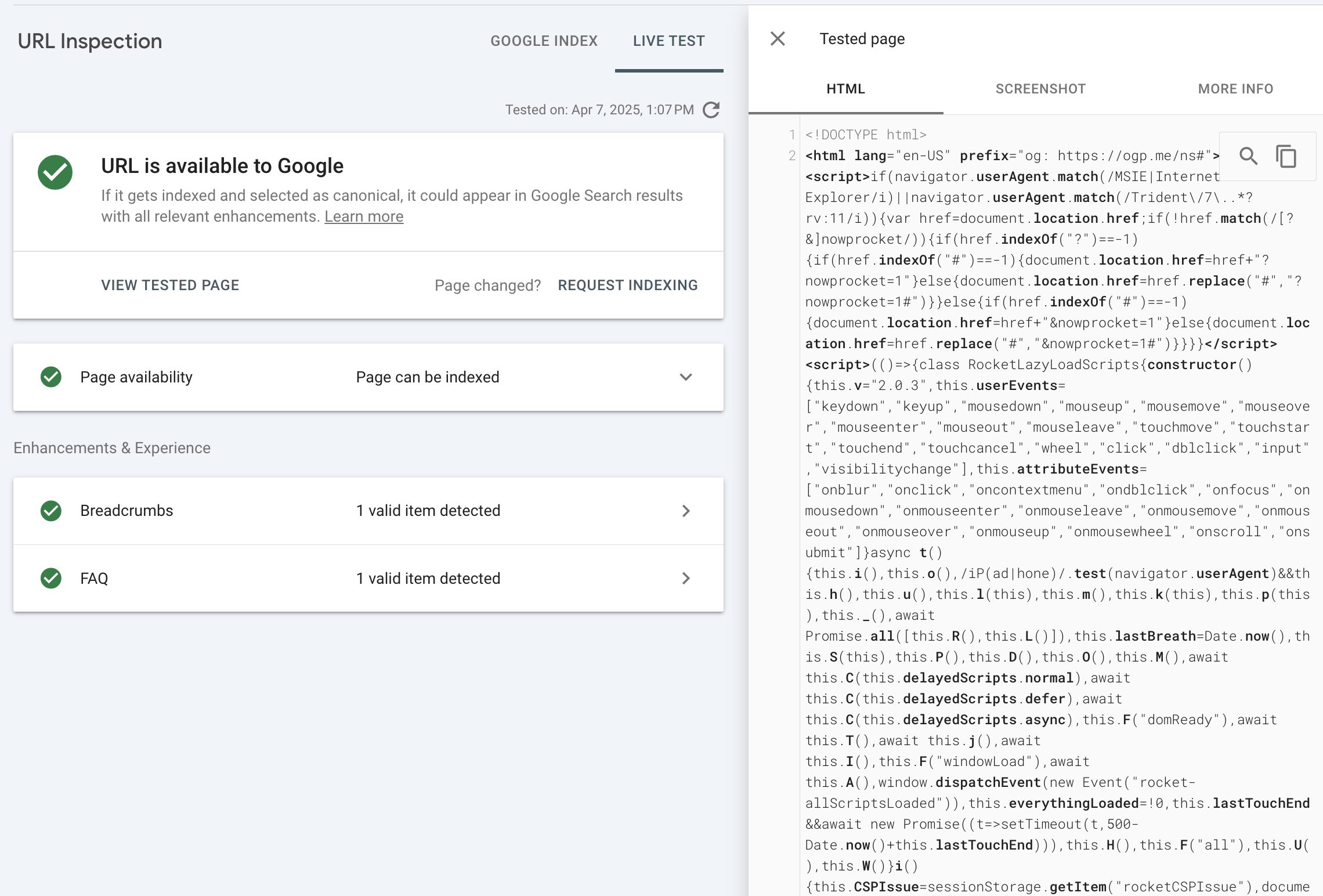
Use the Live URL Test in Google Search Console and verify rendered HTML.
Google Search Console LIVE Test allows you to see the rendered HTML. (Screenshot from Google Search Console, April 2025)
Or, search Google for a unique sentence from your JavaScript content (in quotes). If your content isn’t showing up, Google probably can’t index it.*
The site: search in Google allows you to quickly check whether a given piece of text on a given page is indexed by Google. (Screenshot from Google Search, April 2025)
*This will only work for URLs that are already in Google’s index.
Here are a few best practices regarding JavaScript SEO:
Critical content in HTML: You should include titles, descriptions, and important content directly in the initial HTML so search engines can index it immediately. You should remember that Google doesn’t scroll or click.
Server-Side Rendering (SSR): You should consider implementing SSR to serve fully rendered HTML. It’s more reliable and less resource-intensive for search engines.
Proper robots.txt setup: Websites should block essential JavaScript files needed for rendering, as this prevents indexing.
Use crawlable URLs: You should ensure each page has a unique, crawlable URL. You should also avoid URL fragments (#section) for important content; they often don’t get indexed.
Lesson #3: Crawl Budget Matters, But Only If Your Website Is Huge
Lesson: You should only worry about the crawl budget if your website has hundreds of thousands or millions of pages.
Crawl budget refers to how many pages a search engine like Google crawls on your site within a certain timeframe. It’s determined by two main factors:
Crawl capacity limit: This prevents Googlebot from overwhelming your server with too many simultaneous requests.
Crawl demand: This is based on your site’s popularity and how often content changes.
No matter what you hear or read on the internet, most websites don’t need to stress about crawl budget at all. Google typically handles crawling efficiently for smaller websites.
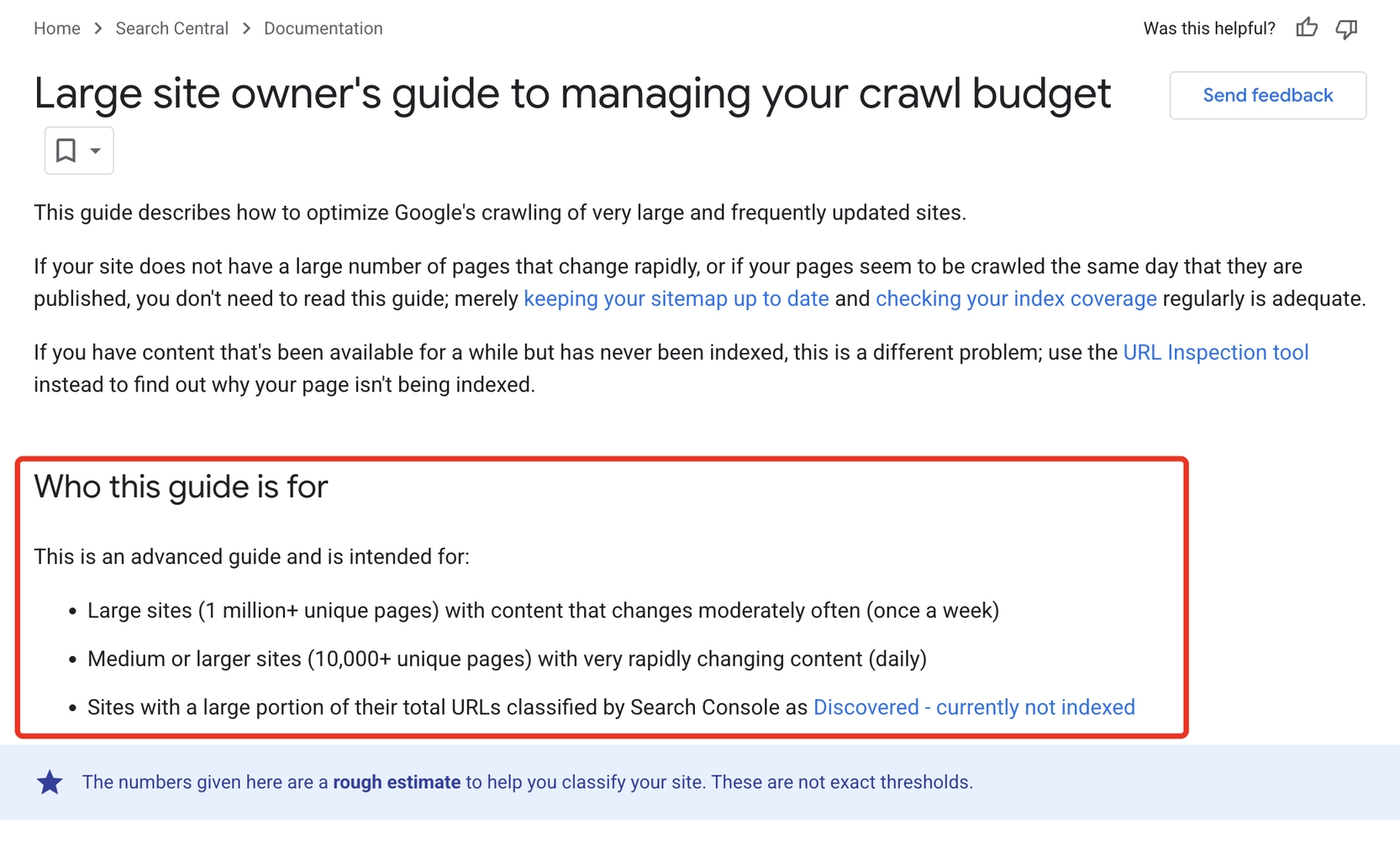
But for huge websites – especially those with millions of URLs or daily-changing content – crawl budget becomes critical (as Google confirms in its crawl budget documentation).
Google, in its documentation, clearly defines what types of websites should be concerned about crawl budget. (Screenshot from Search Central, April 2025)
In this case, you need to ensure that Google prioritizes and crawls important pages frequently without wasting resources on pages that should never be crawled or indexed.
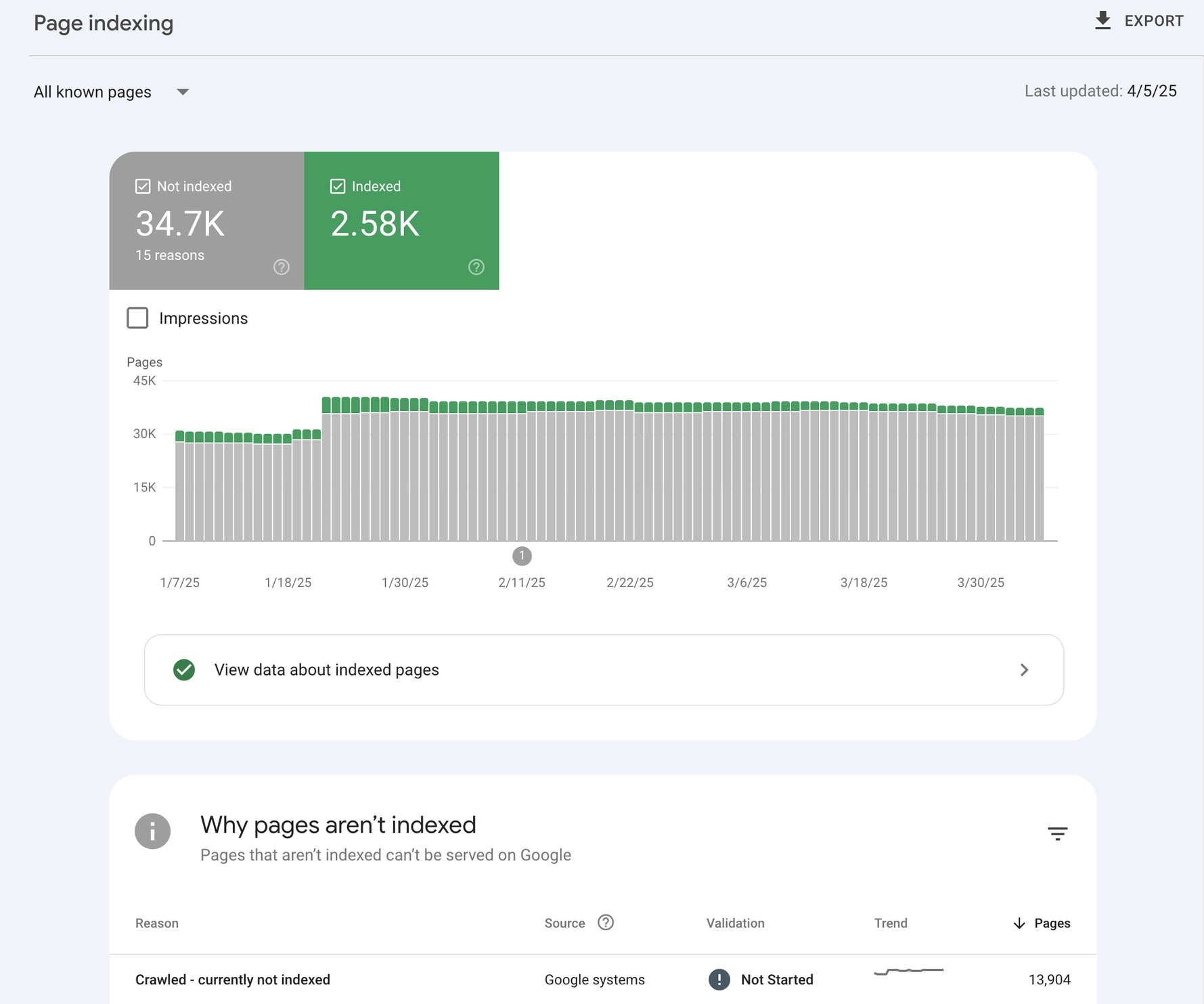
You can check your crawl budget health using Google Search Console’s Indexing report. Pay attention to:
Crawled – Currently Not Indexed: This usually indicates indexing problems, not crawl budget.
Discovered – Currently Not Indexed: This typically signals crawl budget issues.
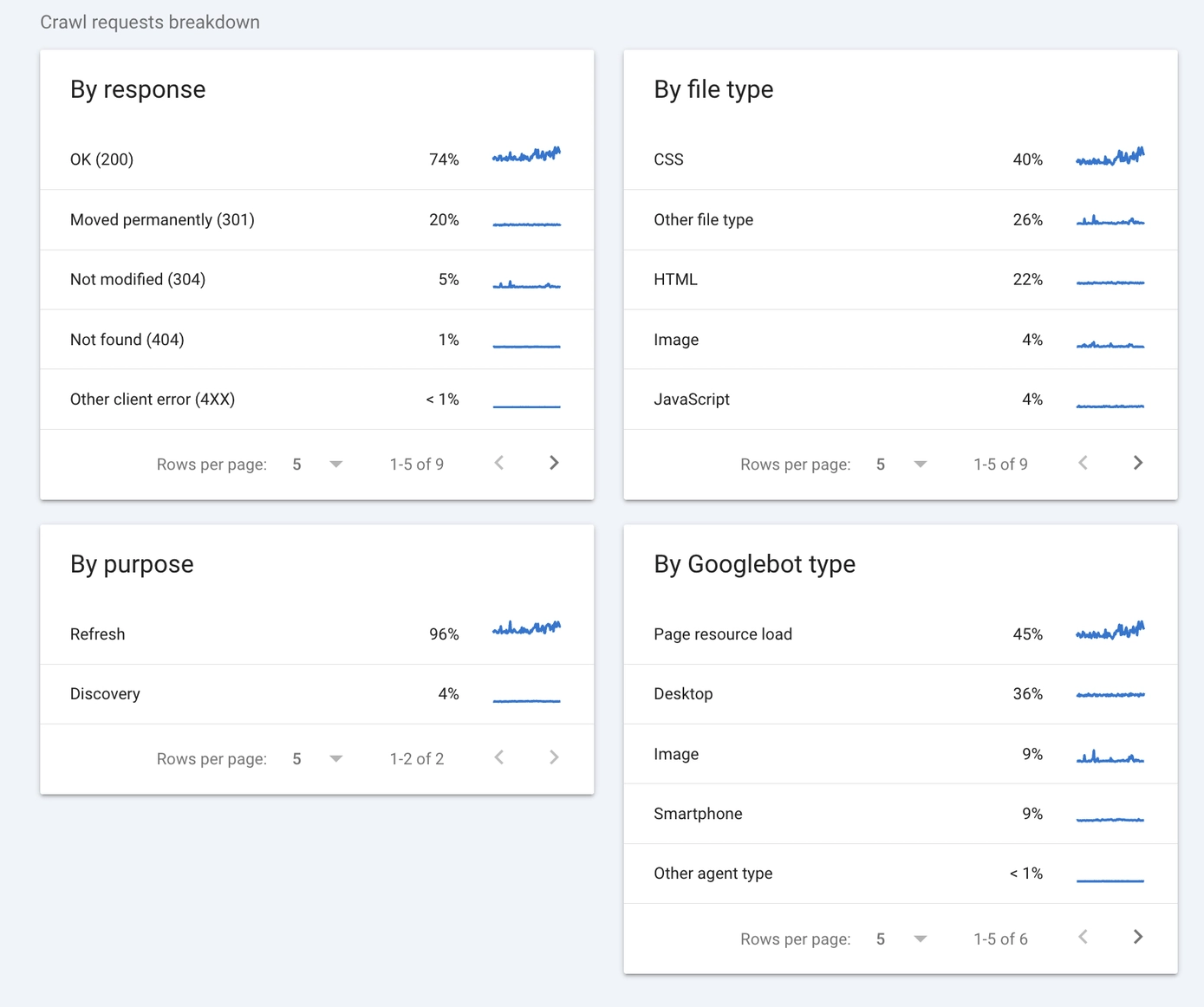
You should also regularly review Google Search Console’s Crawl Stats report to see how many pages Google crawls per day. Comparing crawled pages with total pages on your site helps you spot inefficiencies.
While those quick checks in GSC naturally won’t replace log file analysis, they will give quick insights into possible crawl budget issues and may suggest that a detailed log file analysis may be necessary.
Lesson #4: Log File Analysis Lets You See The Entire Picture
Lesson: Log file analysis is a must for many websites. It reveals details you can’t see otherwise and helps diagnose problems with crawlability and indexability that affect your site’s ability to rank.
Log files track every visit from search engine bots, like Googlebot or Bingbot. They show which pages are crawled, how often, and what the bots do. This data lets you spot issues and decide how to fix them.
For example, on an ecommerce site, you might find Googlebot crawling product pages, adding items to the cart, and removing them, wasting your crawl budget on useless actions.
With this insight, you can block those cart-related URLs with parameters to save resources so that Googlebot can crawl and index valuable, indexable canonical URLs.
Here is how you can make use of log file analysis:
Start by accessing your server access logs, which record bot activity.
Look at what pages bots hit most, how frequently they visit, and if they’re stuck on low-value URLs.
You don’t need to analyze logs manually. Tools like Screaming Frog Log File Analyzer make it easy to identify patterns quickly.
If you notice issues, like bots repeatedly crawling URLs with parameters, you can easily update your robots.txt file to block those unnecessary crawls
Getting log files isn’t always easy, especially for big enterprise sites where server access might be restricted.
If that’s the case, you can use the aforementioned Google Search Console’s Crawl Stats, which provides valuable insights into Googlebot’s crawling activity, including pages crawled, crawl frequency, and response times.
The Google Search Console Crawl Stats report provides a sample of data about Google’s crawling activity. (Screenshot from Google Search Console, April 2025)
While log files offer the most detailed view of search engine interactions, even a quick check in Crawl Stats helps you spot issues you might otherwise miss.
Lesson #5: Core Web Vitals Are Overrated. Stop Obsessing Over Them
Lesson: You should focus less on Core Web Vitals. They rarely make or break SEO results.
Core Web Vitals measure loading speed, interactivity, and visual stability, but they do not influence SEO as significantly as many assume.
After auditing over 500 websites, I’ve rarely seen Core Web Vitals alone significantly improve rankings.
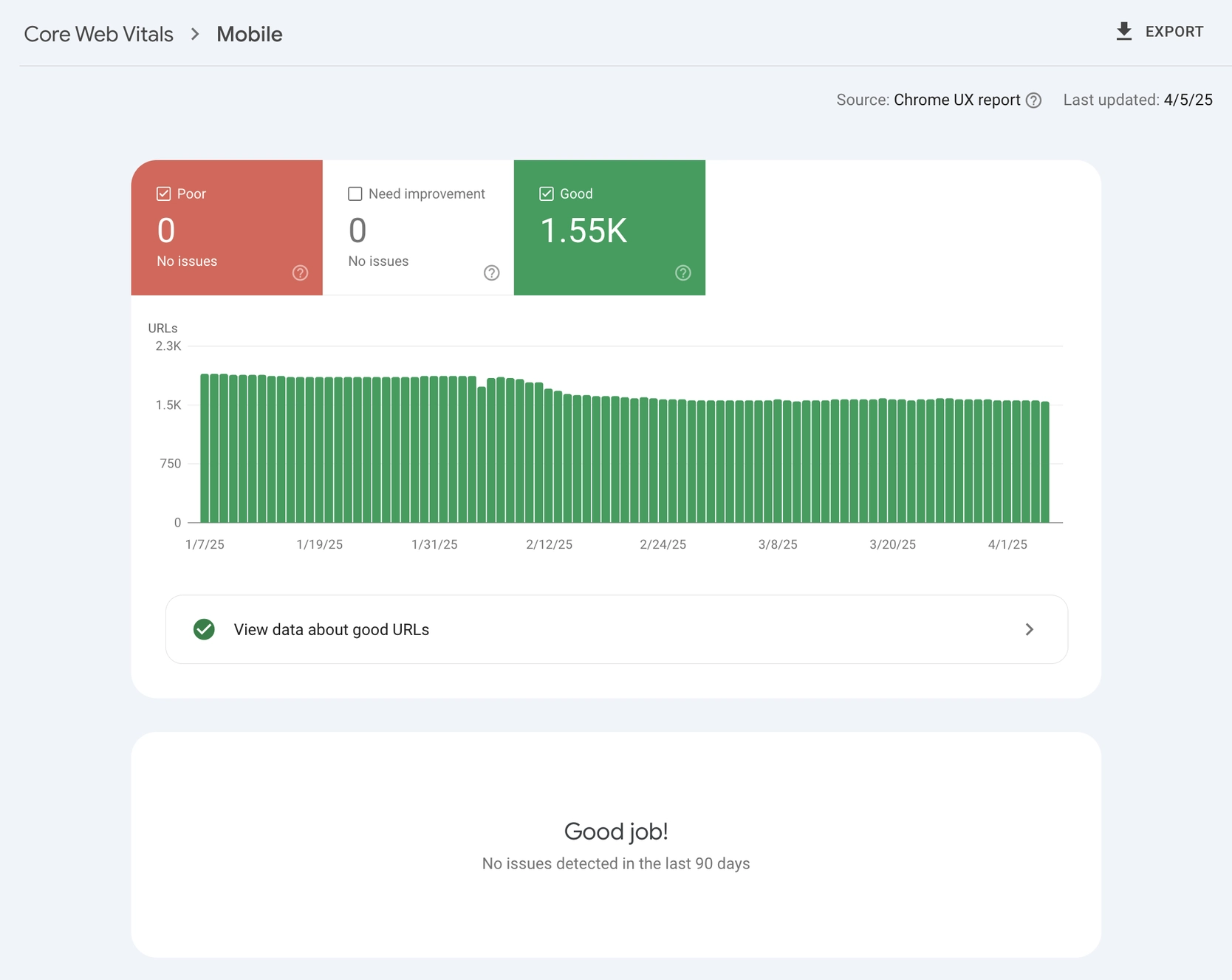
Most sites only see measurable improvement if their loading times are extremely poor – taking more than 30 seconds – or have critical issues flagged in Google Search Console (where everything is marked in red).
The Core Web Vitals report in Google Search Console provides real-world user data. (Screenshot from Google Search Console, April 2025)
I’ve watched clients spend thousands, even tens of thousands of dollars, chasing perfect Core Web Vitals scores while overlooking fundamental SEO basics, such as content quality or keyword strategy.
Redirecting those resources toward content and foundational SEO improvements usually yields way better results.
When evaluating Core Web Vitals, you should focus exclusively on real-world data from Google Search Console (as opposed to lab data in Google PageSpeed Insights) and consider users’ geographic locations and typical internet speeds.
If your users live in urban areas with reliable high-speed internet, Core Web Vitals won’t affect them much. But if they’re rural users on slower connections or older devices, site speed and visual stability become critical.
The bottom line here is that you should always base your decision to optimize Core Web Vitals on your specific audience’s needs and real user data – not just industry trends.
Lesson #6: Use Schema (Structured Data) To Help Google Understand & Trust You
Lesson: You should use structured data (Schema) to tell Google who you are, what you do, and why your website deserves trust and visibility.
Schema Markup (or structured data) explicitly defines your content’s meaning, which helps Google easily understand the main topic and context of your pages.
Certain schema types, like rich results markup, allow your listings to display extra details, such as star ratings, event information, or product prices. These “rich snippets” can grab attention in search results and increase click-through rates.
You can think of schema as informative labels for Google. You can label almost anything – products, articles, reviews, events – to clearly explain relationships and context. This clarity helps search engines understand why your content is relevant for a given query.
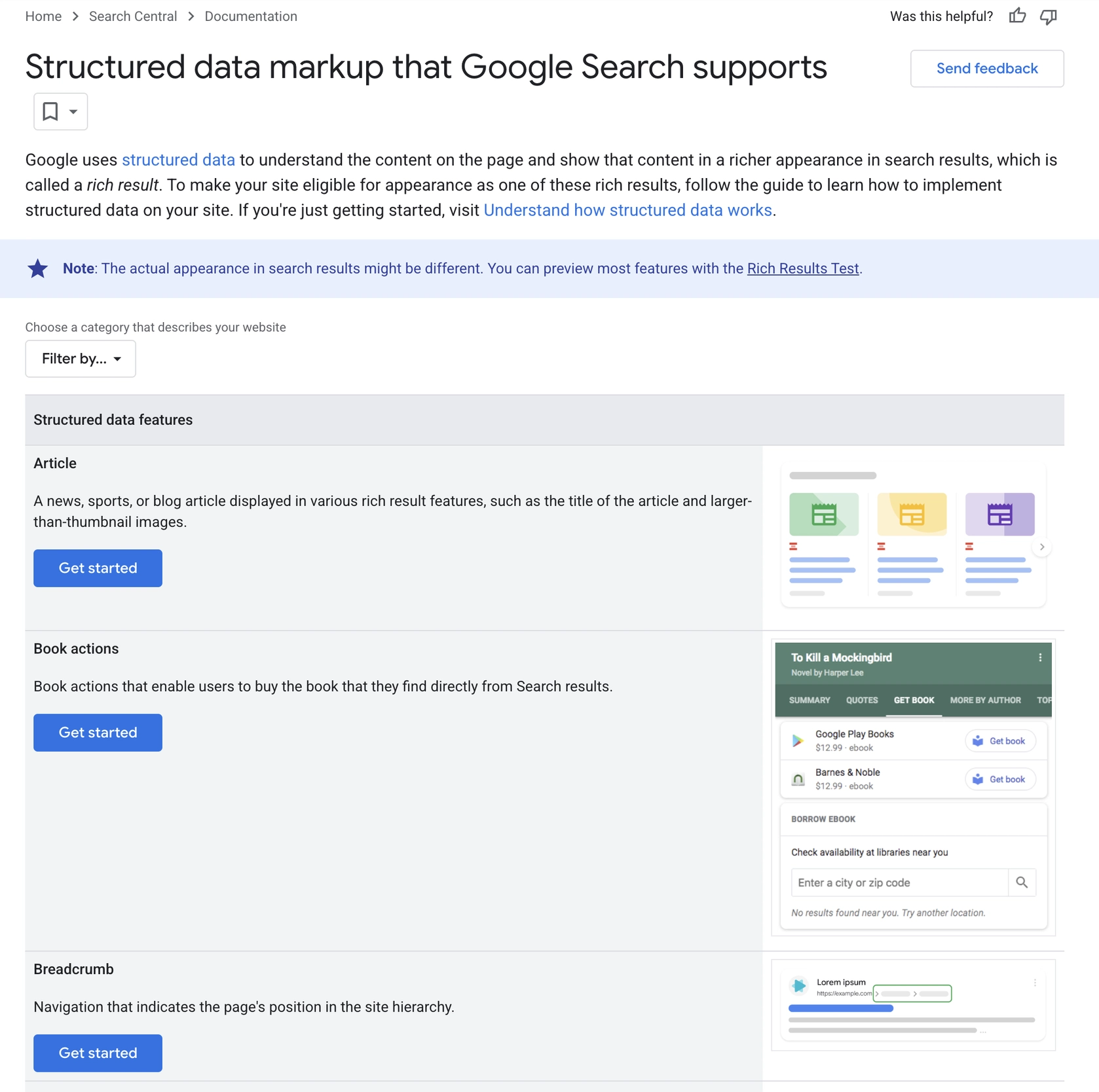
You should always choose the correct schema type (like “Article” for blog posts or “Product” for e-commerce pages), implement it properly with JSON-LD, and carefully test it using Google’s Rich Results Test or Structured Data Testing Tool.
In its documentation, Google shows examples of structured data markup supported by Google Search. (Screenshot from Google Search Console, April 2025)
Schema lets you optimize SEO behind the scenes without affecting what your audience sees.
While SEO clients often hesitate about changing visible content, they usually feel comfortable adding structured data because it’s invisible to website visitors.
Lesson #7: Keyword Research And Mapping Are Everything
Lesson: Technical SEO gets you into the game by controlling what search engines can crawl and index. But, the next step – keyword research and mapping – tells them what your site is about and how to rank it.
Too often, websites chase the latest SEO tricks or target broad, competitive keywords without any strategic planning. They skip proper keyword research and rarely invest in keyword mapping, both essential steps to long-term SEO success:
Keyword research identifies the exact words and phrases your audience actually uses to search.
Keyword mapping assigns these researched terms to specific pages and gives each page a clear, focused purpose.
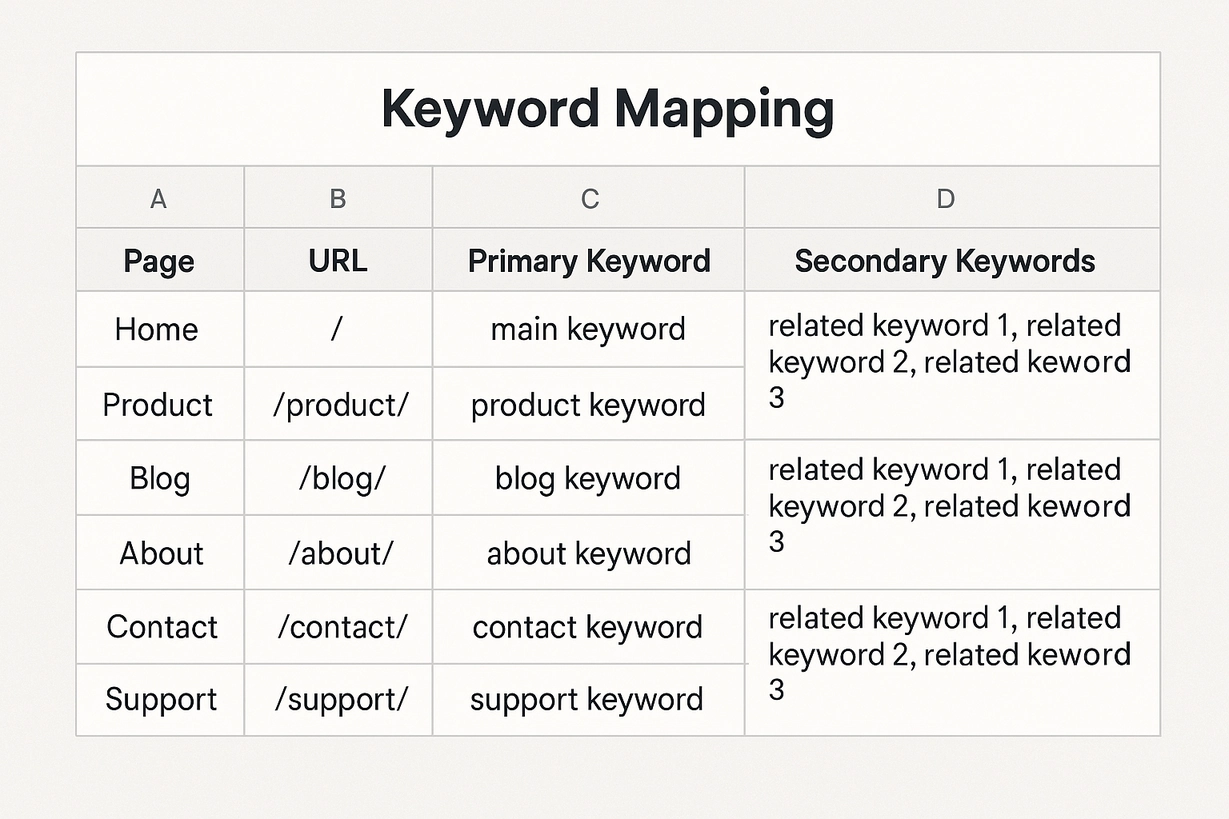
Every website should have a spreadsheet listing all its indexable canonical URLs.
Next to each URL, there should be the main keyword that the page should target, plus a few related synonyms or variations.
Having the keyword mapping document is a vital element of any SEO strategy. (Image from author, April 2025)
Without this structure, you’ll be guessing and hoping your pages rank for terms that may not even match your content.
A clear keyword map ensures every page has a defined role, which makes your entire SEO strategy more effective.
This isn’t busywork; it’s the foundation of a solid SEO strategy.
Lesson #8: On-Page SEO Accounts For 80% Of Success
Lesson: From my experience auditing hundreds of websites, on-page SEO drives about 80% of SEO results. Yet, only about 1 in 20 or 30 sites I review have done it well. Most get it wrong from the start.
Many websites rush straight into link building, generating hundreds or even thousands of low-quality backlinks with exact-match anchor texts, before laying any SEO groundwork.
They skip essential keyword research, overlook keyword mapping, and fail to optimize their key pages first.
I’ve seen this over and over: chasing advanced or shiny tactics while ignoring the basics that actually work.
When your technical SEO foundation is strong, focusing on on-page SEO can often deliver significant results.
There are thousands of articles about basic on-page SEO: optimizing titles, headers, and content around targeted keywords.
Yet, almost nobody implements all of these basics correctly. Instead of chasing trendy or complex tactics, you should focus first on the essentials:
Do proper keyword research to identify terms your audience actually searches.
Map these keywords clearly to specific pages.
Optimize each page’s title tags, meta descriptions, headers, images, internal links, and content accordingly.
These straightforward steps are often enough to achieve SEO success, yet many overlook them while searching for complicated shortcuts.
Lesson #9: Internal Linking Is An Underused But Powerful SEO Opportunity
Lesson: Internal links hold more power than overhyped external backlinks and can significantly clarify your site’s structure for Google.
Internal links are way more powerful than most website owners realize.
Everyone talks about backlinks from external sites, but internal linking – when done correctly – can actually make a huge impact.
Unless your website is brand new, improving your internal linking can give your SEO a serious lift by helping Google clearly understand the topic and context of your site and its specific pages.
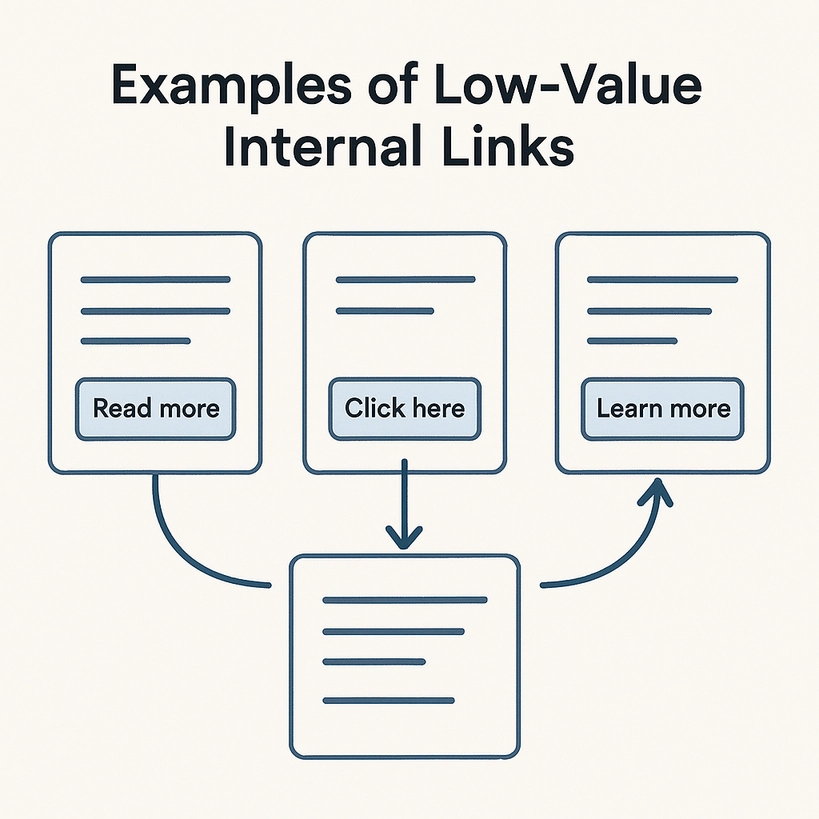
Still, many websites don’t use internal links effectively. They rely heavily on generic anchor texts like “Read more” or “Learn more,” which tell search engines absolutely nothing about the linked page’s content.
Image from author, April 2025
Website owners often approach me convinced they need a deep technical audit.
Yet, when I take a closer look, their real issue frequently turns out to be poor internal linking or unclear website structure, both making it harder for Google to understand the site’s content and value.
Internal linking can also give a boost to underperforming pages.
For example, if you have a page with strong external backlinks, linking internally from that high-authority page to weaker ones can pass authority and help those pages rank better.
Investing a little extra time in improving your internal links is always worth it. They’re one of the easiest yet most powerful SEO tools you have.
Lesson #10: Backlinks Are Just One SEO Lever, Not The Only One
Lesson: You should never blindly chase backlinks to fix your SEO. Build them strategically only after mastering the basics.
SEO audits often show websites placing too much emphasis on backlinks while neglecting many other critical SEO opportunities.
Blindly building backlinks without first covering SEO fundamentals – like removing technical SEO blockages, doing thorough keyword research, and mapping clear keywords to every page – is a common and costly mistake.
Even after getting those basics right, link building should never be random or reactive.
Too often, I see sites start building backlinks simply because their SEO isn’t progressing, hoping more links will magically help. This rarely works.
Instead, you should always approach link building strategically, by first carefully analyzing your direct SERP competitors to determine if backlinks are genuinely your missing element:
Look closely at the pages outranking you.
Identify whether their advantage truly comes from backlinks or better on-page optimization, content quality, or internal linking.
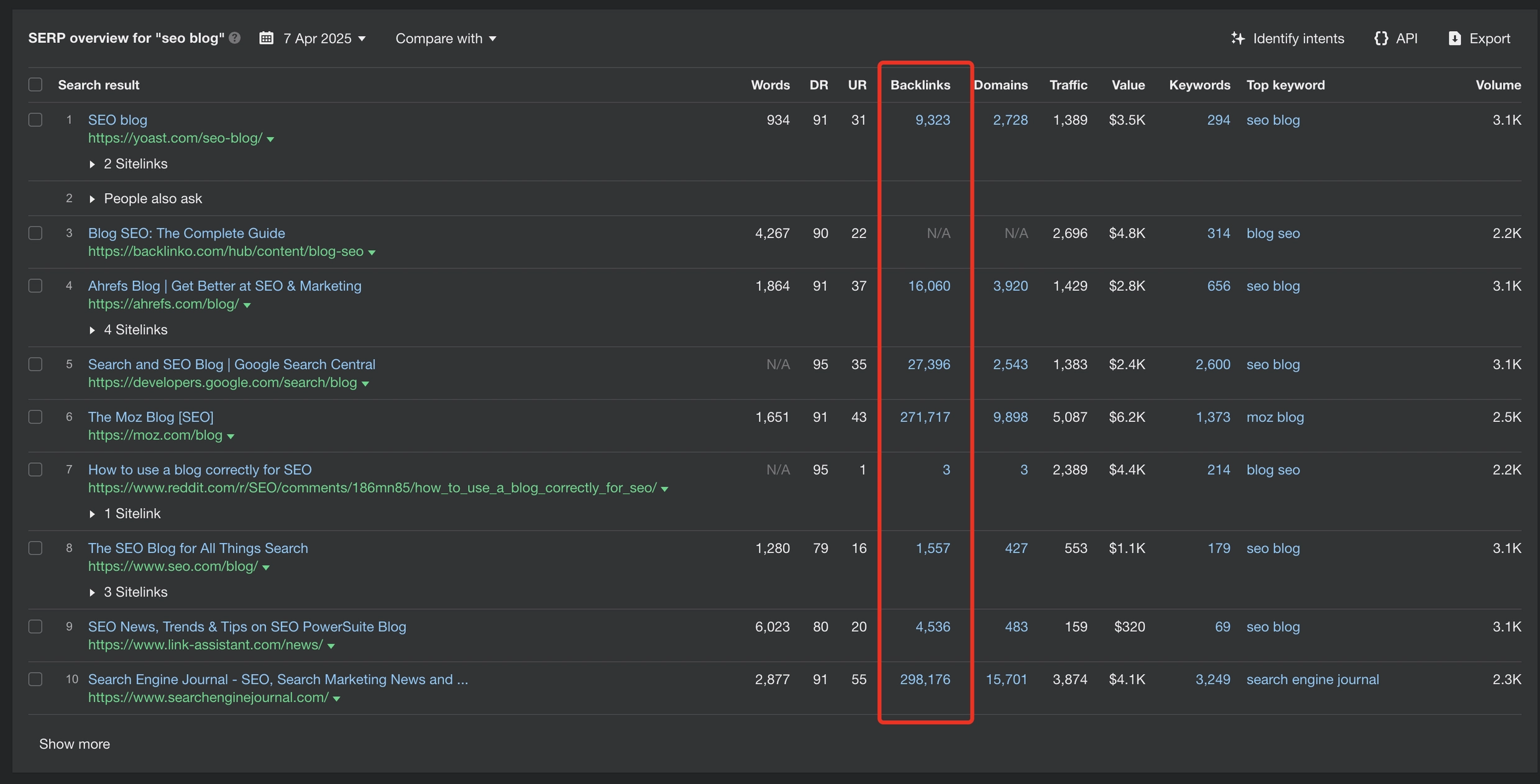
The decision on whether or not to build backlinks should be based on whether direct competitors have more and better backlinks. (Image from author, April 2025)
Only after ensuring your on-page SEO and internal links are strong and confirming that backlinks are indeed the differentiating factor, should you invest in targeted link building.
Typically, you don’t need hundreds of low-quality backlinks. Often, just a few strategic editorial links or well-crafted SEO press releases can close the gap and improve your rankings.
Lesson #11: SEO Tools Alone Can’t Replace Manual SEO Checks
Lesson: You should never trust SEO tools blindly. Always cross-check their findings manually using your own judgment and common sense.
SEO tools make our work faster, easier, and more efficient, but they still can’t fully replicate human analysis or insight.
Tools lack the ability to understand context and strategy in the way that SEO professionals do. They usually can’t “connect the dots” or assess the real significance of certain findings.
This is exactly why every recommendation provided by a tool needs manual verification. You should always evaluate the severity and real-world impact of the issue yourself.
Often, website owners come to me alarmed by “fatal” errors flagged by their SEO tools.
Yet, when I manually inspect these issues, most turn out to be minor or irrelevant.
Meanwhile, fundamental aspects of SEO, such as strategic keyword targeting or on-page optimization, are completely missing since no tool can fully capture these nuances.
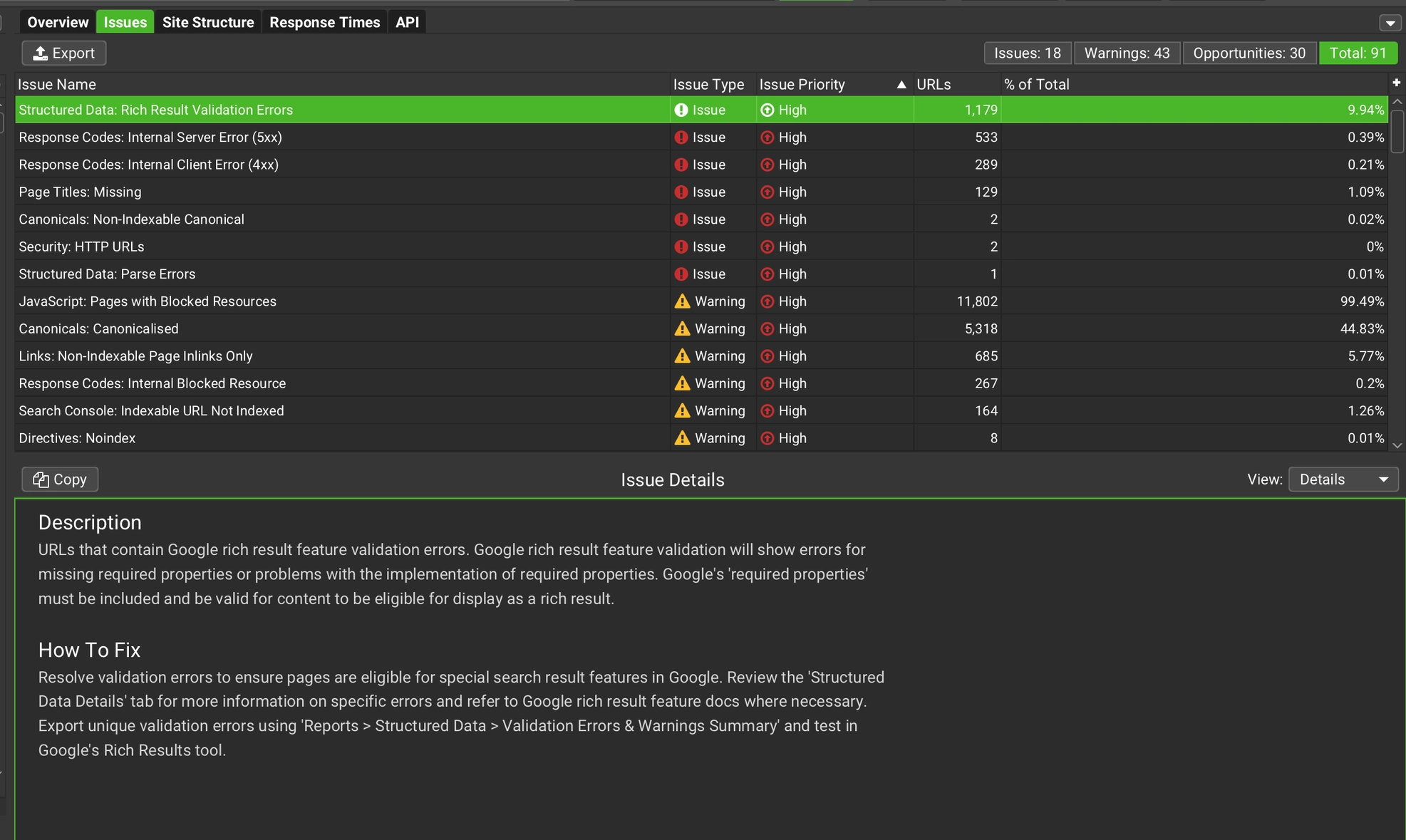
Screaming Frog SEO Spider says there are rich result validation errors, but when I check that manually, there are no errors. (Screenshot from Screaming Frog, April 2025)
SEO tools are still incredibly useful because they handle large-scale checks that humans can’t easily perform, like analyzing millions of URLs at once.
However, you should always interpret their findings carefully and manually verify the importance and actual impact before taking any action.
Final Thoughts
After auditing hundreds of websites, the biggest pattern I notice isn’t complex technical SEO issues, though they do matter.
Instead, the most frequent and significant problem is simply a lack of a clear, prioritized SEO strategy.
Too often, SEO is done without a solid foundation or clear direction, which makes all other efforts less effective.
Another common issue is undiagnosed technical problems lingering from old site migrations or updates. These hidden problems can quietly hurt rankings for years if left unresolved.
The lessons above cover the majority of challenges I encounter daily, but remember: Each website is unique. There’s no one-size-fits-all checklist.
Every audit must be personalized and consider the site’s specific context, audience, goals, and limitations.
SEO tools and AI are increasingly helpful, but they’re still just tools. Ultimately, your own human judgment, experience, and common sense remain the most critical factors in effective SEO.
Todd Friesen, one of the most experienced digital marketers in our industry, recently posted on LinkedIn that the core fundamentals that apply to traditional search engines work exactly the same for AI search optimization. His post quickly received dozens of comments and more than a hundred likes, indicating that he’s not the only one who believes there’s no need to give SEO another name.
Who Is Todd Friesen?
Todd has had a long career in SEO, formerly of Salesforce and other top agencies and businesses. Like me, he was a moderator at the old WebmasterWorld Forums, only he’s been doing SEO for even longer. Although he’s younger than I am, I totally consider him my elder in the SEO business. Todd Friesen, along with Greg Boser, was an SEO podcasting pioneer with their SEO Rockstars show.
AEO – Answer Engine Optimization
There’s been a race to give a name to optimizing web content for AI search engines and few details on why it merits a new name.
We find ourselves today with five names for the exact same thing:
AEO (Answer Engine Optimization)
AIO (AI Optimization)
CEO (Chat Engine Optimization)
GEO (Generative Engine Optimization)
LMO (Language Model Optimization)
There are many people today that agree that optimizing for an AI search engine is fundamentally the same as optimizing for a traditional search engine. There’s little case for a new name when even an AI search engine like Perplexity uses a version of Google’s PageRank algorithm for ranking authoritative websites.
Todd Friesen’s post on LinkedIn made the case that optimizing for AI search engines is essentially the same thing as SEO:
“It is basically fundamental SEO and fundamental brand building. Can we stop over complicating it?
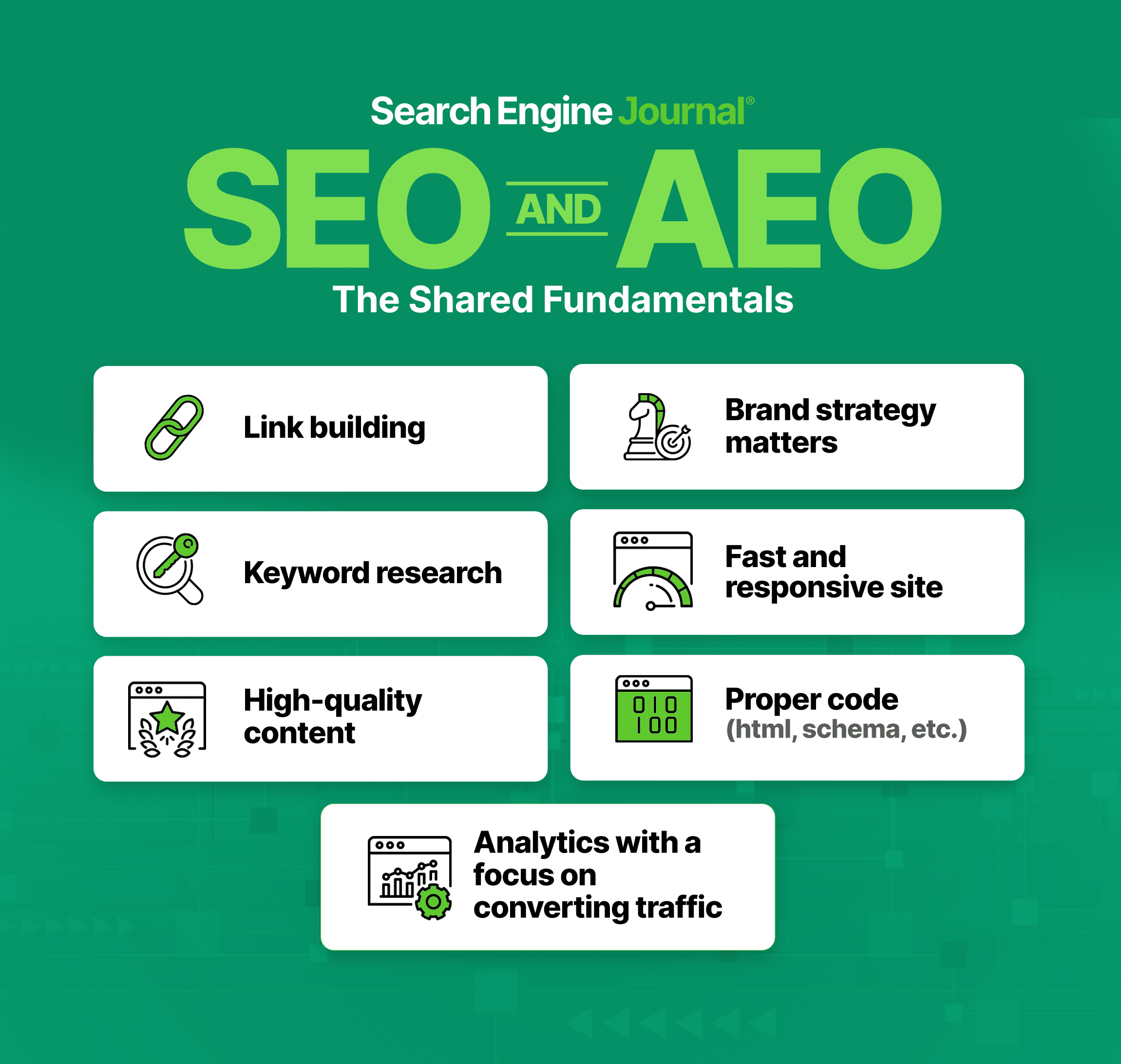
– proper code (html, schema and all that) – fast and responsive site – good content – keyword research (yes, we still do this) – coordination with brand marketing – build some links – analytics and reporting (focus on converting traffic) – rinse and repeat”
SEO For AI = The Same SEO Fundamentals
Todd Friesen is right. While there’s room for quibbling about the details the overall framework for SEO, regardless if it’s for an AI search engine or not, can be reduced to these seven fundamentals of optimization.
Digital Marketer Rosy Callejas (LinkedIn Profile) agreed that there were too many names for the same thing:
“Too many names! SEO vs AEO vs GEO”
Kevin Doory, (LinkedIn Profile) Director Of SEO at RazorFish commented:
“The ones that talk about what they do, can change the names to whatever they want. The rest of us will just do the darn things.”
“Still SEO after all these (failed) attempts to distance from it by “thought leaders” – eg: inbound marketing, growth hacking, and whatever other nomenclature du jour they decide to cook up next.”
Ryan Jones (LinkedIn Profile), Senior Vice President, SEO at Razorfish (and founder of SERPrecon.com) commented on the ridiculousness of the GEO name:
“GEO is a terrible name”
Pushback On AEO Elsewhere
A discussion on Bluesky saw Google’s John Mueller commenting on the motivations for creating hype.
“It is absolutely wild to me that in this debate of GEO/AEO and SEO, everyone is saying that building a brand is not a requisite for SEO, but it is important for GEO/AEO.
Like bro, chill. This AI stuff didn’t invent the need for building a brand. It existed way before it. smh.”
Google’s John Mueller responded:
“You don’t build an audience online by being reasonable, and you don’t sell new things / services by saying the current status is sufficient.”
What Do You Think?
What’s your opinion? Is SEO for AI fundamentally the same as for regular search engines?
The humble robots.txt file often sits quietly in the background of a WordPress site, but the default is somewhat basic out of the box and, of course, doesn’t contribute towards any customized directives you may want to adopt.
No more intro needed – let’s dive right into what else you can include to improve it.
(A small note to add: This post is only useful for WordPress installations on the root directory of a domain or subdomain only, e.g., domain.com or example.domain.com. )
Where Exactly Is The WordPress Robots.txt File?
By default, WordPress generates a virtual robots.txt file. You can see it by visiting /robots.txt of your install, for example:
https://yoursite.com/robots.txt
This default file exists only in memory and isn’t represented by a file on your server.
If you want to use a custom robots.txt file, all you have to do is upload one to the root folder of the install.
You can do this either by using an FTP application or a plugin, such as Yoast SEO (SEO → Tools → File Editor), that includes a robots.txt editor that you can access within the WordPress admin area.
The Default WordPress Robots.txt (And Why It’s Not Enough)
If you don’t manually create a robots.txt file, WordPress’ default output looks like this:
There are now dated suggestions to disallow some core WordPress directories like /wp-includes/, /wp-content/plugins/, or even /wp-content/uploads/. Don’t!
Here’s why you shouldn’t block them:
Google is smart enough to ignore irrelevant files. Blocking CSS and JavaScript can hurt renderability and cause indexing issues.
You may unintentionally block valuable images/videos/other media, especially those loaded from /wp-content/uploads/, which contains all uploaded media that you definitely want crawled.
Instead, let crawlers fetch the CSS, JavaScript, and images they need for proper rendering.
Managing Staging Sites
It’s advisable to ensure that staging sites are not crawled for both SEO and general security purposes.
You should still use the noindex meta tag, but to ensure another layer is covered, it’s still advisable to do both.
If you navigate to Settings > Reading, you can tick the option “Discourage search engines from indexing this site,” which does the following in the robots.txt file (or you can add this in yourself).
User-agent: *
Disallow: /
Google may still index pages if it discovers links elsewhere (usually caused by calls to staging from production when migration isn’t perfect).
Important: When you move to production, ensure you double-check this setting again to ensure that you revert any disallowing or noindexing.
Clean Up Some Non-Essential Core WordPress Paths
Not everything should be blocked, but many default paths add no SEO value, such as the below:
Sometimes, you’ll want to stop search engines from crawling URLs with known low-value query parameters, like tracking parameters, comment responses, or print versions.
You can use Google Search Console’s URL Parameters tool to monitor parameter-driven indexing patterns and decide if additional disallows are worthy of adding.
Disallowing Low-Value Taxonomies And SERPs
If your WordPress site includes tag archives or internal search results pages that offer no added value, you can block them too:
If you use tag taxonomy pages as part of content you want indexed and crawled, then ignore this, but generally, they don’t add any benefits.
Also, make sure your internal linking structure supports your decision and minimizes any internal linking to areas you have no intention of indexing or crawling.
Monitor On Crawl Stats
Once your robots.txt is in place, monitor crawl stats via Google Search Console:
Look at Crawl Stats under Settings to see if bots are wasting resources.
Use the URL Inspection Tool to confirm whether a blocked URL is indexed or not.
Check Sitemaps and make sure they only reference pages you actually want crawled and indexed.
In addition, some server management tools, such as Plesk, cPanel, and Cloudflare, can provide extremely detailed crawl statistics beyond Google.
Lastly, use Screaming Frog’s configuration override to simulate changes and revisit Yoast SEO’s crawl optimization features, some of which solve the above.
Final Thoughts
While WordPress is a great CMS, it isn’t set up with the most ideal default robots.txt or set up with crawl optimization in mind.
Just a few lines of code and less than 30 minutes of your time can save you thousands of unnecessary crawl requests to your site that aren’t worthy of being identified at all, as well as securing a potential scaling issue in the future.
Right now, despite its ubiquity, AI is seen as anything but a normal technology. There is talk of AI systems that will soon merit the term “superintelligence,” and the former CEO of Google recently suggested we control AI models the way we control uranium and other nuclear weapons materials. Anthropic is dedicating time and money to study AI “welfare,” including what rights AI models may be entitled to. Meanwhile, such models are moving into disciplines that feel distinctly human, from making music to providing therapy.
No wonder that anyone pondering AI’s future tends to fall into either a utopian or a dystopian camp. While OpenAI’s Sam Altman muses that AI’s impact will feel more like the Renaissance than the Industrial Revolution, over half of Americans are more concerned than excited about AI’s future. (That half includes a few friends of mine, who at a party recently speculated whether AI-resistant communities might emerge—modern-day Mennonites, carving out spaces where AI is limited by choice, not necessity.)
So against this backdrop, a recent essay by two AI researchers at Princeton felt quite provocative. Arvind Narayanan, who directs the university’s Center for Information Technology Policy, and doctoral candidate Sayash Kapoor wrote a 40-page plea for everyone to calm down and think of AI as a normal technology. This runs opposite to the “common tendency to treat it akin to a separate species, a highly autonomous, potentially superintelligent entity.”
Instead, according to the researchers, AI is a general-purpose technology whose application might be better compared to the drawn-out adoption of electricity or the internet than to nuclear weapons—though they concede this is in some ways a flawed analogy.
The core point, Kapoor says, is that we need to start differentiating between the rapid development of AI methods—the flashy and impressive displays of what AI can do in the lab—and what comes from the actual applications of AI, which in historical examples of other technologies lag behind by decades.
“Much of the discussion of AI’s societal impacts ignores this process of adoption,” Kapoor told me, “and expects societal impacts to occur at the speed of technological development.” In other words, the adoption of useful artificial intelligence, in his view, will be less of a tsunami and more of a trickle.
In the essay, the pair make some other bracing arguments: terms like “superintelligence” are so incoherent and speculative that we shouldn’t use them; AI won’t automate everything but will birth a category of human labor that monitors, verifies, and supervises AI; and we should focus more on AI’s likelihood to worsen current problems in society than the possibility of it creating new ones.
“AI supercharges capitalism,” Narayanan says. It has the capacity to either help or hurt inequality, labor markets, the free press, and democratic backsliding, depending on how it’s deployed, he says.
There’s one alarming deployment of AI that the authors leave out, though: the use of AI by militaries. That, of course, is picking up rapidly, raising alarms that life and death decisions are increasingly being aided by AI. The authors exclude that use from their essay because it’s hard to analyze without access to classified information, but they say their research on the subject is forthcoming.
One of the biggest implications of treating AI as “normal” is that it would upend the position that both the Biden administration and now the Trump White House have taken: Building the best AI is a national security priority, and the federal government should take a range of actions—limiting what chips can be exported to China, dedicating more energy to data centers—to make that happen. In their paper, the two authors refer to US-China “AI arms race” rhetoric as “shrill.”
“The arms race framing verges on absurd,” Narayanan says. The knowledge it takes to build powerful AI models spreads quickly and is already being undertaken by researchers around the world, he says, and “it is not feasible to keep secrets at that scale.”
So what policies do the authors propose? Rather than planning around sci-fi fears, Kapoor talks about “strengthening democratic institutions, increasing technical expertise in government, improving AI literacy, and incentivizing defenders to adopt AI.”
By contrast to policies aimed at controlling AI superintelligence or winning the arms race, these recommendations sound totally boring. And that’s kind of the point.
This story originally appeared in The Algorithm, our weekly newsletter on AI. To get stories like this in your inbox first, sign up here.
Separating AI reality from hyped-up fiction isn’t always easy. That’s why we’ve created the AI Hype Index—a simple, at-a-glance summary of everything you need to know about the state of the industry.
AI agents are the AI industry’s hypiest new product—intelligent assistants capable of completing tasks without human supervision. But while they can be theoretically useful—Simular AI’s S2 agent, for example, intelligently switches between models depending on what it’s been told to do—they could also be weaponized to execute cyberattacks. Elsewhere, OpenAI is reported to be throwing its hat into the social media arena, and AI models are getting more adept at making music. Oh, and if the results of the first half-marathon pitting humans against humanoid robots are anything to go by, we won’t have to worry about the robot uprising any time soon.
This is today’s edition of The Download, our weekday newsletter that provides a daily dose of what’s going on in the world of technology.
The AI Hype Index: AI agent cyberattacks, racing robots, and musical models
Separating AI reality from hyped-up fiction isn’t always easy. That’s why we’ve created the AI Hype Index—a simple, at-a-glance summary of everything you need to know about the state of the industry. Take a look at this month’s edition of the index here.
Is AI “normal”?
Despite its ubiquity, AI is seen as anything but a normal technology. There is talk of AI systems that will soon merit the term “superintelligence,” and the former CEO of Google recently suggested we control AI models the way we control uranium and other nuclear weapons materials.
A recent essay by two AI researchers at Princeton argues that AI is a general-purpose technology whose application might be better compared to the drawn-out adoption of electricity or the internet than to nuclear weapons. Read on to learn more about the policies the authors propose.
—James O’Donnell
This story originally appeared in The Algorithm, our weekly newsletter on AI. To get stories like this in your inbox first, sign up here.
The must-reads
I’ve combed the internet to find you today’s most fun/important/scary/fascinating stories about technology.
1 US Congress has passed the Take It Down Act The legislation is designed to crack down on revenge porn and deepfake nudes. (WP $) + But critics fear it’ll be weaponized to suppress online speech and encryption. (The Verge) + Donald Trump has said he wants to use the bill to protect himself. (The Hill)
2 The Trump administration is embracing shady crypto firms Including Tether, whose stablecoin is often used by criminals. (NYT $) + Crypto lender Nexo, which ran into regulatory trouble, is now returning to the US. (CoinDesk) + The UAE is planning a stablecoin regulated by the country’s central bank. (Bloomberg $)
3 Elon Musk’s DOGE conflicts of interest are worth $2.37 billion Although experts estimate the true worth could be higher. (The Guardian) + DOGE’s tech takeover threatens the safety and stability of our critical data. (MIT Technology Review)
4 Researchers secretly deployed bots into a debate subreddit In a highly unethical bid to try and change users’ minds. (404 Media) + AI is no replacement for human mediators. (MIT Technology Review)
5 Amazon’s first internet satellites have been launched successfully 27 down, 3,209 to go. (Reuters) + It’s Bezos’s answer to Musk’s Starlink. (FT $)
6 Amazon is pressuring its suppliers to slash their prices It’s trying to protect its margins as Trump’s tariffs start to bite. (FT $) + Temu’s approach? Pass on the new taxes to its customers. (Bloomberg $) + Here’s how the tariffs are going to worsen the digital divide. (Wired $) + Sweeping tariffs could threaten the US manufacturing rebound. (MIT Technology Review)
7 Sam Altman and Satya Nadella are drifting apart The pair disagree on OpenAI’s approach to AGI, among other things. (WSJ $)
8 Duolingo is replacing human workers with AI It’s all part of the plan to make the language learning app “AI-first.” (The Verge)
9 Earthquakes may be a rich source of hydrogen Which is good news for the scientists trying to track down the gas. (New Scientist $) + Why the next energy race is for underground hydrogen. (MIT Technology Review)
10 The Hubble Space Telescope is turning 35-years old And it’s still capturing jaw dropping images. (The Atlantic $) + Scientists have made some interesting discoveries about Jupiter’s volcanic moon. (Quanta Magazine)
Quote of the day
“When the person championing your anti-abuse legislation is promising to use it for abuse, you might have a problem.”
—Entrepreneur Mike Masnick says Donald Trump’s endorsement of the Take It Down Bill is self-serving in a post on Techdirt.
One more thing
The terrible complexity of technological problems
The philosopher Karl Popper once argued that there are two kinds of problems in the world: clock problems and cloud problems. As the metaphor suggests, clock problems obey a certain logic. The fix may not be easy, but it’s achievable.
Cloud problems offer no such assurances. They are inherently complex and unpredictable, and they usually have social, psychological, or political dimensions. Because of their dynamic, shape-shifting nature, trying to “fix” a cloud problem often ends up creating several new problems.
But there are ways to reckon with this kind of technological complexity—and the wicked problems it creates. Read the full story.
—Bryan Gardiner
We can still have nice things
A place for comfort, fun and distraction to brighten up your day. (Got any ideas? Drop me a line or skeet ’em at me.)
Keyword rank tracking was once an essential search engine optimization tactic. But consumers are increasingly searching on generative AI platforms, which do not disclose prompt data, such as words and phrases.
Moreover, genAI responses are highly dynamic and personalized. A site may appear in an answer to an initial prompt or, alternatively, in a follow-up.
How can brands evaluate visibility in AI-driven answers against competitors and adjust strategy accordingly?
There are no good answers.
Yet new software solutions are attempting to address the need in various ways.
Knowatoa
Knowatoa is an AI visibility analysis tool with two primary components:
Crawlability status is a rough equivalent of Search Console for various genAI bots. It checks whether AI bots can access and crawl your site (based on the robots.txt file and hosting settings).
Visibility analysis scrutinizes your presence in answers on ChatGPT, Claude, Meta AI, and Perplexity.
To use, create an account and enter your domain. The tool will pull keywords (from third-party providers such as Semrush) and use them to generate commercial intent prompts, those that could trigger product or company responses.
Users can then review the prompts and add or delete according to their marketing approach. Users then create a project to collect answers to the prompts from the AI platforms.
The ensuing report resembles a rank tracking tool, allowing you to see which responses include your brand and where. It also discloses the exact answers to a given prompt.
Knowatoa generates prompts from users’ keywords to see which responses include the users’ brands. Click image to enlarge.
The tool also provides a question analysis based on your keywords that includes intent, category, and stage, such as “awareness” or “consideration.”
Knowatoa is free to register and obtain an initial analysis. Paid plans start at $49 per month.
Knowatoa’s question analysis includes intent, category, and stage, such as “awareness” or “consideration.” Click image to enlarge.
Essio
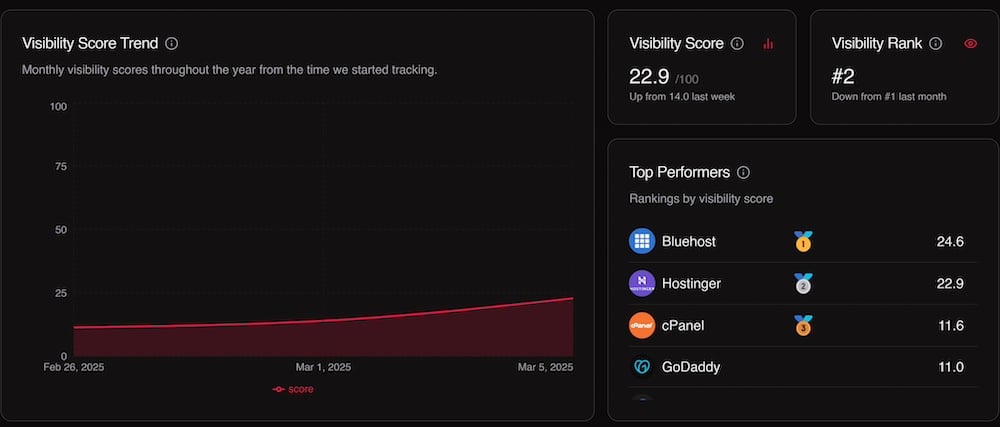
Essio is another premium AI visibility tool with a more generic and visual approach. It provides users with a visibility score across multiple AI platforms, but it doesn’t show which prompts produce brand mentions.
Essio provides users with a visibility score across multiple AI platforms. Click image to enlarge.
My favorite Essio feature is its listing of better-performing competitors, those included in answers for a user’s prompts.
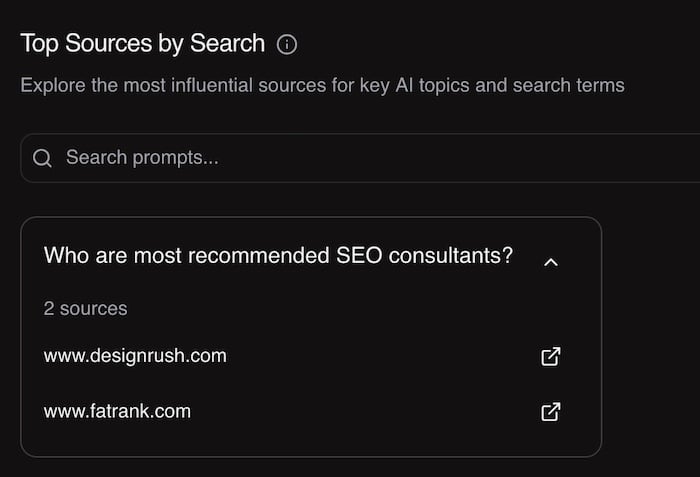
The most actionable part of the report is “influential” links, i.e., various URLs included in responses to your most relevant prompts. The report is handy for reverse engineering the process — responses vs. prompts.
Essio’s pricing starts at $75 per month. To me, it suits large brands that seek a broad overview of their AI visibility.
Essio’s report for “influential sources” is handy for reverse engineering prompts. Click image to enlarge.
Waikay
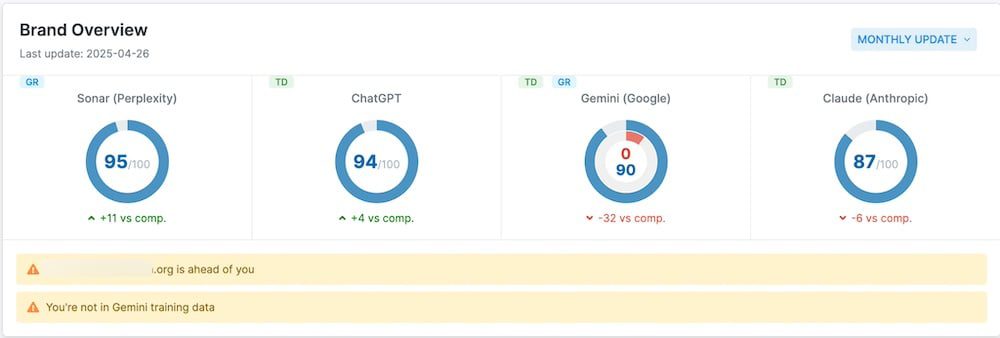
Waikay checks the training data of ChatGPT, Gemini, Perplexity, and Claude to ascertain what they know about your brand and competitors.
Waikay checks ChatGPT, Gemini, Perplexity, and Claude to ascertain what they know about your brand and competitors. Click image to enlarge.
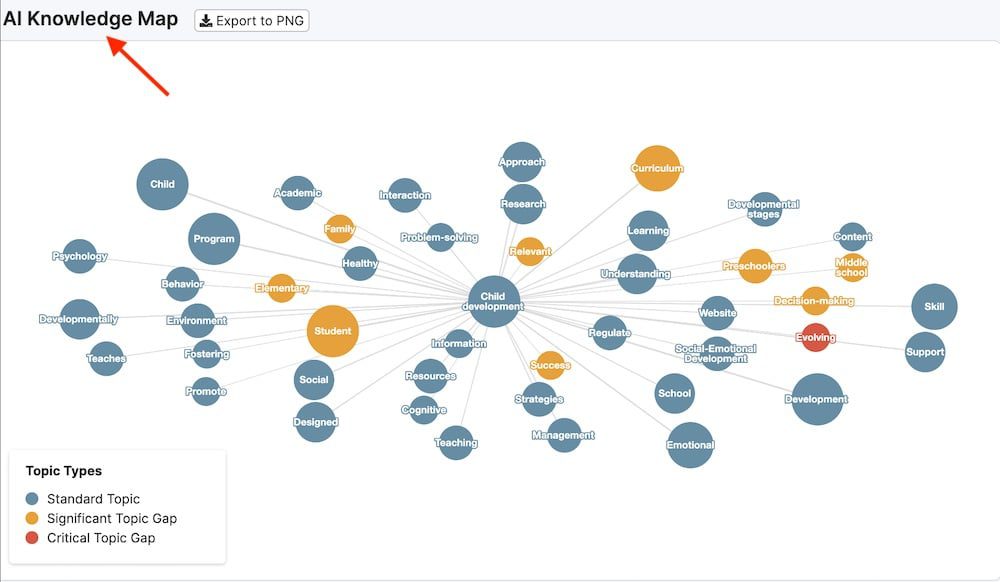
Waikay identifies concepts your brand is associated with and tracks “knowledge gaps,” i.e., topics associated with your competitors but not your brand.
Users can rerun reports to see how the training data and missing concepts are evolving for their brands with the addition of new content. Users can create a report on any knowledge gap and receive content topics and ideas.
Waikay runs automated monthly reports to track how users’ content marketing efforts impact AI training data.
Waikay offers a “brand report” for free. Paid plans start at $19.95 per month.
Waikay’s AI Knowledge Map identifies topics associated with your competitors but not your brand. Click image to enlarge.
New research shows that map platforms have become key search engines for local businesses.
One in five consumers now searches directly in map apps instead of traditional search engines.
BrightLocal’s Consumer Search Behavior study found that Google, Apple, and Bing Maps make up 20% of all local searches.
This is a big part of search traffic that many marketers might be missing in their local SEO plans.
The Rise of Map-First Search Behavior
The research found that 15% of consumers use Google Maps as their first choice for local searches. This makes it the second most popular platform after Google Search (45%).
The study reads:
“Another significant finding is the prominence of Google Maps in local search. 15% of consumers said they would use Google Maps as their first port of call, meaning they are searching local terms—which could be brand or non-brand terms—directly in Google Maps.”
It continues:
“Google Maps, Apple Maps, and Bing Maps combined make up 20% of default local search platforms. This reinforces the importance of ensuring you’re optimizing for both map packs and organic search listings. You might have a strong presence in the SERPs, but if consumers are looking for businesses like yours on a map search, you need to ensure you’re going to be found there, too.”
This change shows that consumers favor visual, location-based searches for local businesses, especially when making spontaneous decisions.
Generational Differences in Map Usage
Different age groups use map platforms at different rates:
Eighteen percent of Gen Z consumers use Google Maps as their primary local search tool, which is three percentage points higher than the average.
21% of Millennials use Google Maps as their default local search platform.
5% of Millennials prefer Apple Maps as their primary local search option.
Younger consumers appear to be more comfortable using maps to discover local businesses. This might be because they’re used to doing everything on mobile devices.
What Consumers Look for in Map Results
The study found key information that drives consumer decisions when using maps:
85% of consumers say contact information and opening hours are “important” or “very important”
46% rate business contact information as “very important”
Nearly half (49%) of consumers “often” or “always” plan their route to a business after searching
Map-based searches have high potential to convert browsers into customers, the report notes:
“Almost half of consumers (49%) said that they ‘often’ or ‘always’ go on to plan their travel route to the chosen business. This suggests two things: one, how quickly consumers seem to be making their decisions, and two, that consumers are conducting local business research with the aim of visiting in the very near future.”
SEO Implications for Local Businesses
For SEO pros and local marketers, these findings highlight several actions to take:
Ensure accuracy across all map platforms, not just Google.
Focus on complete business information, especially contact details and hours.
Monitor the “justifications” in map results, which can be sourced from your business information, reviews, and website.
Treat maps as a primary search channel rather than an afterthought.
BrightLocal highlights:
“So, don’t lose out to potential customers by not having a correct address, phone number, or email address listed on your platforms—and be sure to check your opening hours are up to date.”
Looking Ahead
Map platforms are evolving from simple navigation tools into search engines that drive sales and revenue.
If you treat map listings as an afterthought, you risk missing many motivated, ready-to-buy consumers.
As search continues to fragment across platforms, investing specific resources in optimizing your map presence, beyond standard local SEO, is increasingly essential for businesses that rely on local traffic.
GoDaddy launched a new partner program called GoDaddy Agency that matches web developers with leads for small to mid-sized businesses (SMBs). It provides digital agencies with tools, services, and support to help them grow what they offer their customers.
The new program is available to U.S. based freelancers and web development agencies. GoDaddy offers the following benefits:
Client leads Partners are paired with SMBs based on expertise and business goals. GoDaddy delivers high-intent business referrals from GoDaddy’s own Web Design Services enquiries.
Commission revenue opportunities Partners can earn up to 20% commission for each new client purchases.
Access to premium WordPress tools
Co-branded marketing Top-performing partners benefit from more exposure from joint marketing campaigns.
Dedicated Support Every agency is assigned an Agency Success Manager who can help them navigate ways to benefit more from the program.
Joseph Palumbo, Go-to-Market and Agency Programs Director at GoDaddy explained:
“The GoDaddy Agency Program is all about helping agencies grow. We give partners the tools, support, and referrals they need to take on more clients and bigger projects—without adding more stress to their day. It’s like having a team behind your team.”
For WordPress Developers And More
I asked GoDaddy if this program exclusively for WordPress developers. They answered:
“GoDaddy has a wide variety of products to help make any business successful. So, this isn’t just about WordPress. We have plenty of website solutions, like Managed WordPress, Websites + Marketing or VPS for application development. Additionally, we have other services like email through Office 365, SSL certificates and more.”
Advantage Of Migrating Customers To GoDaddy
I asked GoDaddy what advantages can a developer at another host receive by bringing all of their clients over to GoDaddy?
They answered:
“First, our extensive product portfolio and diverse hosting selection allows agencies to house all and any projects at GoDaddy, allowing them to simplify their operations and giving them the opportunity to manage their business from a single dashboard and leverage a deep connection with a digital partner that understands their challenges and opportunities.
On top of that, there’s the growth potential. Every day, we get calls from customers who want websites that are too complex for us to design and build. So, we have created a system that instead of directing those customers elsewhere, we can connect with Web agencies that are better suited to handle their requests.
If a digital agency becomes a serious partner and the work they do meets our standards, and they have great customer service , etc. we can help make connections that are mutually beneficial to our customers and our partners.”
Regarding my question about WordPress tools offered to agency partners, a spokesperson answered:
“We have a wide variety of AI tools to help them get their jobs done faster. From website design via AI to product descriptions and social posts. Beyond our AI tools, agency partners that use WordPress can work directly with our WordPress Premium Support team. This is a team of WordPress experts and developers who can assist with anything WordPress-related whether hosted at GoDaddy or somewhere else.”
Takeaways
When was the last time your hosting provider gave you a business lead? The Agency partner program is an innovative ecosystem that supports agencies and freelancers who partner with GoDaddy, a win-win for everyone involved.
It makes sense for a web host to share business leads from customers who are actively in the market for web development work with partner agencies and freelancers who could use those leads. It’s a win-win for the web host and the agency partners, an opportunity that’s worth looking into.
GoDaddy’s new Agency Program connects U.S.-based web developers, freelancers and agencies with high-intent leads from small-to-mid-sized businesses while offering commissions, tools, and support to help agencies grow their client base and streamline operations. The program is a unique ecosystem that enables developers to consolidate hosting, leverage WordPress and AI tools, and benefit from co-marketing and personalized support.
Client Acquisition via Referrals: GoDaddy matches agency partners with high-intent SMB leads generated from its own service inquiries.
Revenue Opportunities: Agencies can earn up to 20% commission on client purchases made through the program.
Consolidated Hosting and Tools: Agencies can manage multiple client types using GoDaddy’s product ecosystem, including WordPress, VPS, and Websites + Marketing.
Premium WordPress and AI Support: Partners gain access to a dedicated WordPress Premium Support team and AI-powered productivity tools (e.g., design, content generation).
Co-Branded Marketing Exposure: High-performing partners receive increased visibility through joint campaigns with GoDaddy.
Dedicated Success Management: Each partner is assigned an Agency Success Manager for personalized guidance and program optimization.
Incentive for Migration from Other Hosts: GoDaddy offers a centralized platform offering simplicity, scale, and client acquisition opportunities for agencies switching from other providers.