How To Find Competitors’ Keywords: Tips & Tools

This post was sponsored by SE Ranking. The opinions expressed in this article are the sponsor’s own.

Wondering why your competitors rank higher than you?

The secret to your competitors’ SEO success might be as simple as targeting the appropriate keywords.

Since these keywords are successful for your competitors, there’s a good chance they could be valuable for you as well.

In this article, we’ll explore the most effective yet simple ways to find competitors’ keywords so that you can guide your own SEO strategy and potentially outperform your competitors in SERPs.

Benefits Of Competitor Keyword Analysis

Competitor keywords are the search terms your competitors target within their content to rank high in SERPs, either organically or through paid ads.

Collecting search terms that your competitors rely on can help you:

1. Identify & Close Keyword Gaps.

The list of high-ranking keywords driving traffic to your competitors may include valuable search terms you’re currently missing out on.

To close these keyword gaps, you can either optimize your existing content with these keywords or use them as inspiration for creating new content with high traffic potential.

2. Adapt To Market Trends & Customer Needs.

You may notice a shift in the keywords your competitors optimize content for. This could be a sign that market trends or customer expectations are changing.

Keep track of these keywords to jump on emerging trends and align your content strategy accordingly.

3. Enhance Visibility & Rankings.

Analyzing your competitors’ high-ranking keywords and pages can help you identify their winning patterns (e.g., content format, user intent focus, update frequency, etc).

Study what works for your rivals (and why) to learn how to adapt these tactics to your website and achieve higher SERP positions.

How To Identify Your Competitors’ Keywords

There are many ways to find keywords used by competitors within their content. Let’s weigh the pros and cons of the most popular options.

Use SE Ranking

SE Ranking is a complete toolkit that delivers unique data insights. These insights help SEO pros build and maintain successful SEO campaigns.

Here’s the list of pros that the platform offers for agency and in-house SEO professionals:

  1. Huge databases. SE Ranking has one of the web’s largest keyword databases. It features over 5 billion keywords across 188 regions. Also, the number of keywords in their database is constantly growing, with a 30% increase in 2024 compared to the previous year.
  2. Reliable data. SE Ranking collects keyword data, analyzes it, and computes core SEO metrics directly from its proprietary algorithm. The platform also relies on AI-powered traffic estimations that have up to a 100% match with GSC data.

Thanks to SE Ranking’s recent major data quality update, the platform boasts even fresher and more accurate information on backlinks and referring domains (both new and lost).

As a result, by considering the website’s backlink profile, authority, and SERP competitiveness, SE Ranking now makes highly accurate calculations of keyword difficulty. This makes it easy to see how likely your own website or page is to rank at the top of the SERPs for a particular query.

  1. Broad feature set. Beyond conducting competitive (& keyword) research, you can also use this tool to track keyword rankings, perform website audits, handle all aspects of on-page optimization, manage local SEO campaigns, optimize your content for search, and much more.
  2. Great value for money. The tool offers premium features with generous data limits at a fair price. This eliminates the need to choose between functionality and affordability.

Let’s now review how to use SE Ranking to discover the keywords your competitors are targeting for both organic search and paid advertising.

First, open the Competitive Research Tool and input your competitor’s domain name into the search bar. Select a region and click Analyze to initiate analysis of this website.
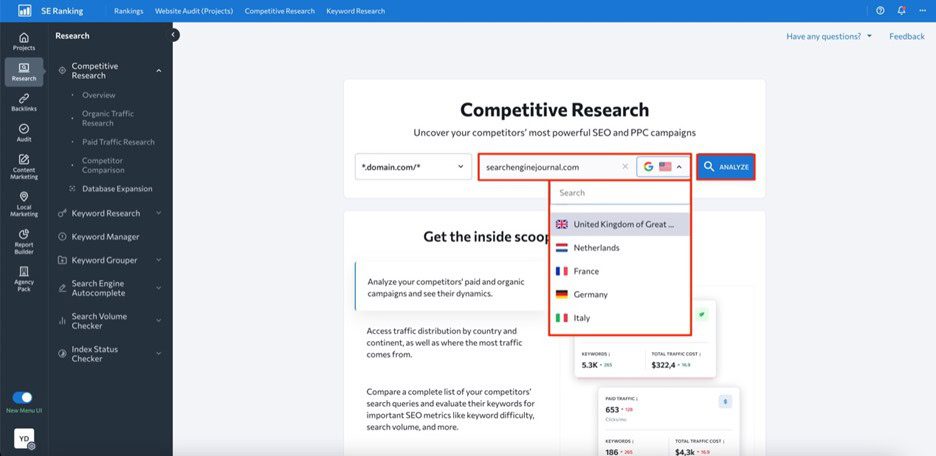
Image created by SE Ranking, May 2024

Depending on your goal, go either to the Organic Traffic Research or Paid Traffic Research tab on the left-hand navigation menu.

Here, you’ll be able to see data on estimated organic clicks, total number of keywords, traffic cost, and backlinks.
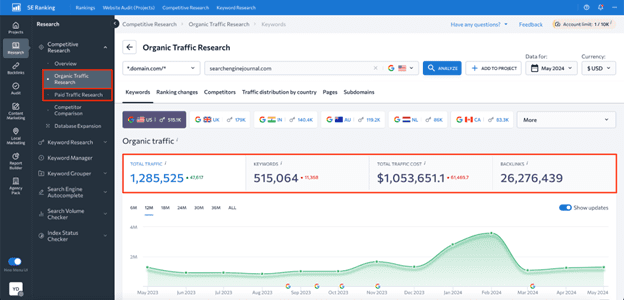
Image created by SE Ranking, May 2024

Upon scrolling this page down, you’ll see a table with all the keywords the website ranks for, along with data on search volume, keyword difficulty, user intent, SERP features triggered by keywords, ranking position, URLs ranking for the analyzed keyword, and more.
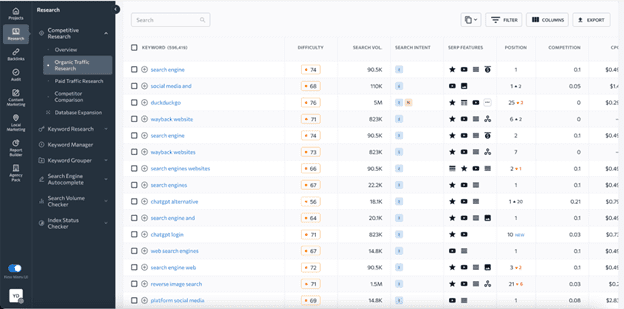
Image created by SE Ranking, May 2024

What’s more, the tool allows you to find keywords your competitors rank for but you don’t.

To do this, head to the Competitor Comparison tab and add up to two websites for comparison.
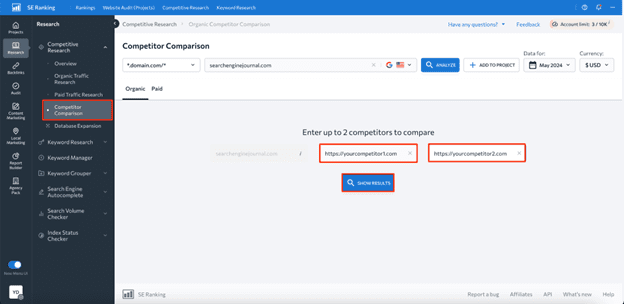
Image created by SE Ranking, May 2024

Within the Missing tab, you’ll be able to see existing keyword gaps.
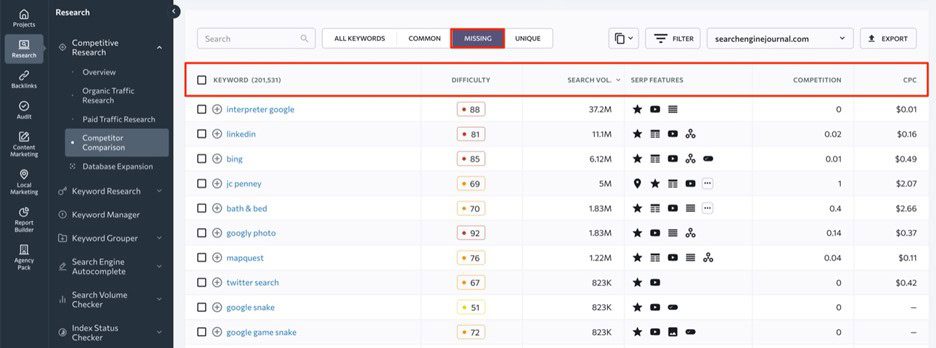
Image created by SE Ranking, May 2024

While the platform offers many benefits, there are also some downsides to be aware of, such as:

  1. Higher-priced plans are required for some features. For instance, historical data on keywords is only available to Pro and Business plan users.
  2. Data is limited to Google only. SE Ranking’s Competitor Research Tool only provides data for Google.

Use Google Keyword Planner

Google Keyword Planner is a free Google service, which you can use to find competitors’ paid keywords.

Here’s the list of benefits this tool offers in terms of competitive keyword analysis:

  1. Free access. Keyword Planner is completely free to use, which makes it a great option for SEO newbies and businesses with limited budgets.
  2. Core keyword data. The tool shows core SEO metrics like search volume, competition, and suggested bid prices for each identified keyword.
  3. Keyword categorization. Keyword Planner allows you to organize keywords into different groups, which may be helpful for creating targeted ad campaigns.
  4. Historical data. The tool has four years of historical data available.

Once you log into your  Google Ads account, navigate to the Tools section and select Keyword Planner.
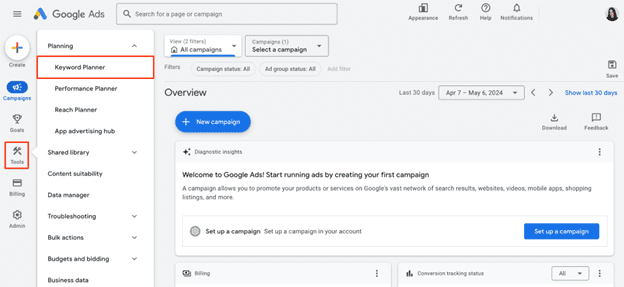
Screenshot from Google Ads, May 2024

Now, click on the Discover new keywords option.
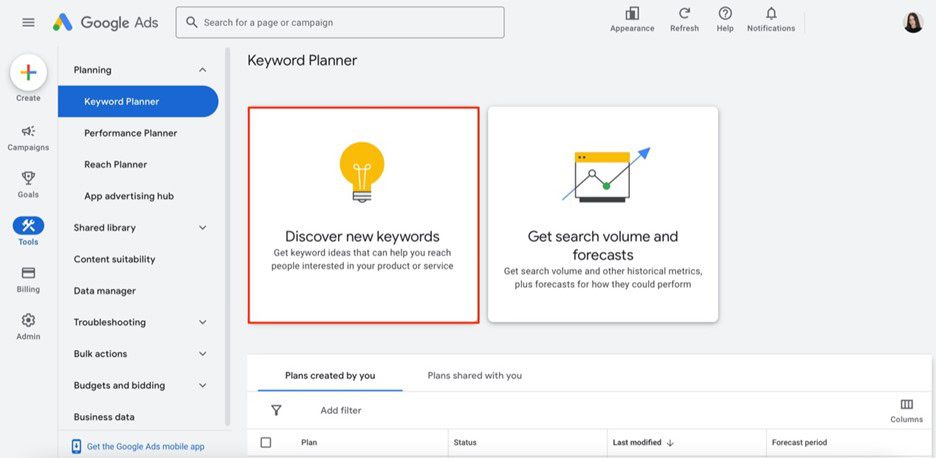
Screenshot from Google Ads, May 2024

Choose Start with a website option, enter your competitor’s website domain, region, and language, then choose to analyze the whole site (recommended for deeper insights) or a specific URL.
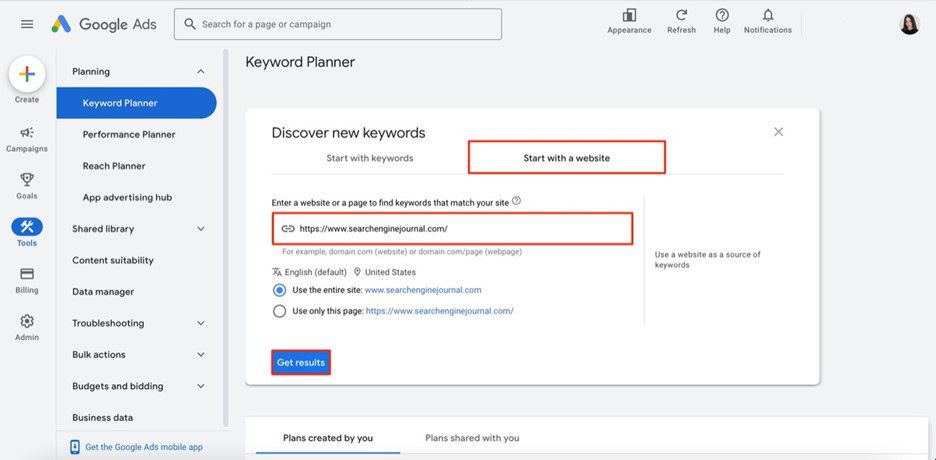
Screenshot from Google Ads, May 2024

And there you have it — a table with all keywords that your analyzed website uses in its Google Ads campaigns.
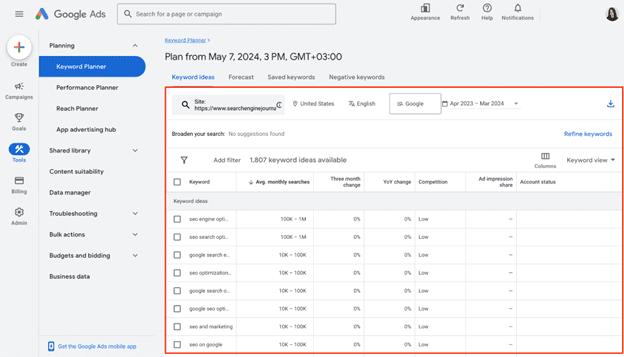
Screenshot from Google Ads, May 2024

Although Keyword Planner can be helpful, it’s not the most effective and data-rich tool for finding competitors’ keywords. Its main drawbacks are the following:

  1. No organic data. The tool offers data on paid keywords, which is mainly suitable for advertising campaigns.
  2. Broad search volume data. Since it’s displayed in ranges rather than exact numbers, it might be difficult to precisely assess the demand for identified keywords.
  3. No keyword gap feature. Using this tool, you cannot compare your and your competitors’ keywords side-by-side and, therefore, find missing keyword options.

So, if you want to access more reliable and in-depth data on competitors’ keywords, you’ll most likely need to consider other dedicated SEO tools.

Use SpyFu

SpyFu is a comprehensive SEO and PPC analysis tool created with the idea of “spying” on competitors.

Its main pros in terms of competitor keyword analysis are the following:

  1. Database with 10+ years of historical data. Although available only in a Professional plan, SpyFu offers long-term insights to monitor industry trends and adapt accordingly.
  2. Keyword gap analysis. Using this tool, you can easily compare your keywords to those of your competitors using metrics like search volume, keyword difficulty, organic clicks, etc.
  3. Affordability. It’s suitable for businesses on a tight budget.

To explore competitor data, simply visit their website and enter your competitor’s domain in the search bar.

You’ll be presented with valuable insights into their SEO performance, from estimated traffic to the list of their top-performing pages and keywords. Navigate to the Top Keywords section and click the View All Organic Keywords button to see the search terms they rank for.
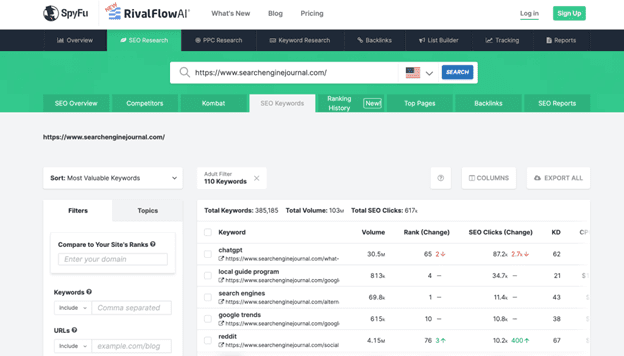
Screenshot of SpyFu, May 2024

Yet, this free version provides an overview of just the top 5 keywords for a domain along with metrics like search volume, rank change, SEO clicks, and so on. To perform a more comprehensive analysis, you’ll need to upgrade to a paid plan.

When it comes to the tool’s cons, it would be worth mentioning:

  1. Keyword data may be outdated. On average, SpyFu updates data on keyword rankings once a month.
  2. Limited number of target regions. Keyword data is available for just 14 countries.

Wrapping Up

There’s no doubt that finding competitors’ keywords is a great way to optimize your own content strategy and outperform your rivals in SERPs.

By following the step-by-step instructions described in this article, we’re sure you’ll be able to find high-value keywords you haven’t considered before.

Ready to start optimizing your website? Sign up for SE Ranking and get the data you need to deliver great user experiences.


Image Credits

Featured Image: Image by SE Ranking. Used with permission.

AI-readiness for C-suite leaders

Generative AI, like predictive AI before it, has rightly seized the attention of business executives. The technology has the potential to add trillions of dollars to annual global economic activity, and its adoption for business applications is expected to improve the top or bottom lines—or both—at many organizations.

While generative AI offers an impressive and powerful new set of capabilities, its business value is not a given. While some powerful foundational models are open to public use, these do not serve as a differentiator for those looking to get ahead of the competition and unlock AI’s full potential. To gain those advantages, organizations must look to enhance AI models with their own data to create unique business insights and opportunities.

Preparing an organization’s data for AI, however, unlocks a new set of challenges and opportunities. This MIT Technology Review Insights survey report investigates whether companies’ data foundations are ready to garner benefits from generative AI, as well as the challenges of building the necessary data infrastructure for this technology. In doing so, it draws on insights from a survey of 300 C-suite executives and senior technology leaders, as well on in-depth interviews with four leading experts.

Its key findings include the following:

Data integration is the leading priority for AI readiness. In our survey, 82% of C-suite and other senior executives agree that “scaling AI or generative AI use cases to create business value is a top priority for our organization.” The number-one challenge in achieving that AI readiness, survey respondents say, is data integration and pipelines (45%). Asked about challenging aspects of data integration, respondents named four: managing data volume, moving data from on-premises to the cloud, enabling real-time access, and managing changes to data.

Executives are laser-focused on data management challenges—and lasting solutions. Among survey respondents, 83% say that their “organization has identified numerous sources of data that we must bring together in order to enable our AI initiatives.” Though data-dependent technologies of recent decades drove data integration and aggregation programs, these were typically tailored to specific use cases. Now, however, companies are looking for something more scalable and use-case agnostic: 82% of respondents are prioritizing solutions “that will continue to work in the future, regardless of other changes to our data strategy and partners.”

Data governance and security is a top concern for regulated sectors. Data governance and security concerns are the second most common data readiness challenge (cited by 44% of respondents). Respondents from highly regulated sectors were two to three times more likely to cite data governance and security as a concern, and chief data officers (CDOs) say this is a challenge at twice the rate of their C-suite peers. And our experts agree: Data governance and security should be addressed from the beginning of any AI strategy to ensure data is used and accessed properly.

This content was produced by Insights, the custom content arm of MIT Technology Review. It was not written by MIT Technology Review’s editorial staff.

Download the full report.

Industry- and AI-focused cloud transformation

For years, cloud technology has demonstrated its ability to cut costs, improve efficiencies, and boost productivity. But today’s organizations are looking to cloud for more than simply operational gains. Faced with an ever-evolving regulatory landscape, a complex business environment, and rapid technological change, organizations are increasingly recognizing cloud’s potential to catalyze business transformation.

Cloud can transform business by making it ready for AI and other emerging technologies. The global consultancy McKinsey projects that a staggering $3 trillion in value could be created by cloud transformations by 2030. Key value drivers range from innovation-driven growth to accelerated product development.

“As applications move to the cloud, more and more opportunities are getting unlocked,” says Vinod Mamtani, vice president and general manager of generative AI services for Oracle Cloud Infrastructure. “For example, the application of AI and generative AI are transforming businesses in deep ways.”

No longer simply a software and infrastructure upgrade, cloud is now a powerful technology capable of accelerating innovation, improving agility, and supporting emerging tools. In order to capitalize on cloud’s competitive advantages, however, businesses must ask for more from their cloud transformations.

Every business operates in its own context, and so a strong cloud solution should have built-in support for industry-specific best practices. And because emerging technology increasingly drives all businesses, an effective cloud platform must be ready for AI and the immense impacts it will have on the way organizations operate and employees work.

An industry-specific approach

The imperative for cloud transformation is evident: In today’s fast-faced business environment, cloud can help organizations enhance innovation, scalability, agility, and speed while simultaneously alleviating the burden on time-strapped IT teams. Yet most organizations have not fully made the leap to cloud. McKinsey, for example, reports a broad mismatch between leading companies’ cloud aspirations and realities—though nearly all organizations say they aspire to run the majority of their applications in the cloud within the decade, the average organization has currently relocated only 15–20% of them.

Cloud solutions that take an industry-specific approach can help companies meet their business needs more easily, making cloud adoption faster, smoother, and more immediately useful. “Cloud requirements can vary significantly across vertical industries due to differences in compliance requirements, data sensitivity, scalability, and specific business objectives,” says Deviprasad Rambhatla, senior vice president and sector head of retail services and transportation at Wipro.

Health-care organizations, for instance, need to manage sensitive patient data while complying with strict regulations such as HIPAA. As a result, cloud solutions for that industry must ensure features such as high availability, disaster recovery capabilities, and continuous access to critical patient information.

Retailers, on the other hand, are more likely to experience seasonal business fluctuations, requiring cloud solutions that allow for greater flexibility. “Cloud solutions allow retailers to scale infrastructure on an up-and-down basis,” says Rambhatla. “Moreover, they’re able to do it on demand, ensuring optimal performance and cost efficiency.”

Cloud-based applications can also be tailored to meet the precise requirements of a particular industry. For retailers, these might include analytics tools that ingest vast volumes of data and generate insights that help the business better understand consumer behavior and anticipate market trends.

Download the full report.

This content was produced by Insights, the custom content arm of MIT Technology Review. It was not written by MIT Technology Review’s editorial staff.

New Ecommerce Tools: May 29, 2024

Every week we publish a rundown of new products from companies offering services to ecommerce and omnichannel merchants. This installment includes updates on generative AI, product images, page speed optimization, automated marketing, digital payments, omnichannel management, and the metaverse.

Got an ecommerce product release? Email releases@practicalecommerce.com.

New Tools for Merchants: May 29

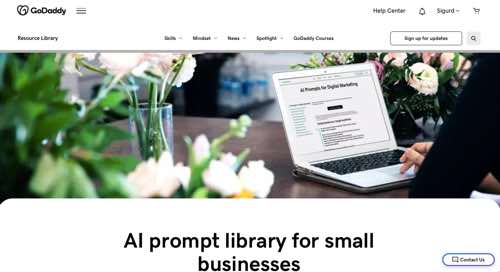
GoDaddy expands Generative AI Prompt Library capabilities. GoDaddy has expanded its Small Business GenAI Prompt Library. Business owners now have access to more than 185 prompts, with 43 new prompts added across five new categories. A clip-to-copy icon makes transferring an AI prompt from the library to a chatbot easier. GoDaddy has also expanded access to its GenAI Prompt Library in India, alongside a Spanish-language library in Mexico, Colombia, and Spain, as well as a Portuguese library in Brazil.

Web page for GoDaddy's Small Business AI Prompt Library

GoDaddy’s Small Business AI Prompt Library

Shopify applies for a patent on personalized AI-generated images for ads. Shopify has filed a patent application for “tuning AI-generated images.” This patent would seemingly expand on the company’s existing AI tools, allowing merchants to personalize AI-generated images used in advertising. Shopify’s system collects data from a merchant’s online storefront, such as product images and categories. The models train on large sets of “regularization images” of products in the same category. The system would then allow merchants to generate and edit photos of their products.

WP Rocket’s WordPress plugin can optimize LCP Core Web Vitals. WP Rocket, a WordPress page speed performance plugin, has released a new version to help publishers optimize for Largest Contentful Paint, a page speed metric that shows how quickly the main content of a web page is loaded. This latest version of WP Rocket contains Automatic LCP optimization for on-page elements from the main content so that they are served first, raising the LCP scores and providing a better user experience.

Walmart launches Realm with influencer-led virtual shops. The new Walmart Realm is a digital shopping experience with influencer-led virtual shops in immersive worlds. Three initial virtual shops highlight fashion, beauty, and home products selected by popular creator partners. The shops are (i) So Jelly, an underwater playground, (ii) Y’allternative, a gothic Western destination, and (iii) Go Chromatic, a futuristic metallic world. Walmart Realm also includes creators’ social content and three mini-games inspired by the featured products.

Web page for Walmart Realm

Walmart Realm

Google invests $350 million in India’s ecommerce giant Flipkart. Google is investing nearly $350 million in Flipkart, the Bengaluru-based and Walmart-backed ecommerce marketplace. “Google’s proposed investment and its Cloud collaboration will help Flipkart expand its business and advance the modernization of its digital infrastructure to serve customers across the country,” Flipkart said in a statement. The funding round led by Walmart values Flipkart at $37 billion.

Wunderkind launches AI-powered Autonomous Marketing Platform. Wunderkind has launched its AI-powered Autonomous Marketing Platform and its first application, Studio, which brings self-service tools to the creative workflow for marketers. Wunderkind’s Autonomous Marketing Platform leverages AI to streamline the marketing build, reporting, and optimization process. The generative AI capabilities in Studio empower marketers to optimize messaging, based on Wunderkind’s observation across trillions of consumer interactions.

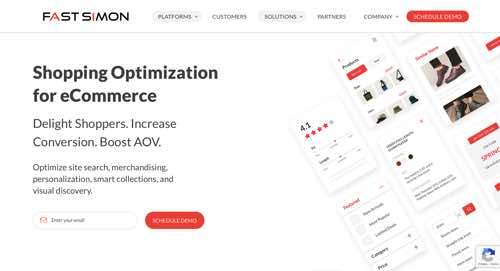
Fast Simon launches GenAI Hybrid Search for ecommerce search results. Fast Simon, a provider of AI-powered shopping optimization, has announced GenAI Hybrid Search, a tool to deliver accurate and relevant search results. GenAI Hybrid Search combines keyword and vector search with multimodal AI, which leverages various data types, including text and images, to give AI more context. According to Fast Simon, the combination reduces the incidence of “no results” and produces more relevant responses, even with long-tail queries or queries with similar semantic meanings but different keywords.

Home page of Fast Simon

Fast Simon

Google launches generative AI tools for product images. Now on Product Studio from Google, merchants can generate product images that match a unique brand style. Upload an image with an aesthetic, add a prompt describing the scene, and within moments Product Studio will generate campaign-ready content. Product Studio can also create videos from just one photo. With just the click of a button, animate components of still product images to create short videos or playful product GIFs for social media.

OneStock raises $72 million for omnichannel order management. OneStock, a provider of order management systems, has announced a $72 million investment from Summit Partners. OneStock provides a platform to manage end-to-end order fulfillment and visibility, empowering retailers to offer a “buy anywhere, deliver anywhere, return anywhere” experience. The funding will be used for international expansion, particularly into the U.S. market. OneStock is an Adobe Gold Partner and an official integrated partner with Shopify.

eBay launches Recommerce Day for pre-loved shopping. On May 21, eBay ran its inaugural Recommerce Day, celebrating the release of its annual 2024 Recommerce Report, measuring eBay seller and buyer insights and motivations around pre-loved shopping. Recommerce Day featured a takeover of the eBay home page with opportunities to learn more about recommerce, find pre-loved deals, and participate in an eBay Live program featuring used items. Throughout the day, followers had opportunities to win pre-owned and refurbished prizes during the eBay livestream.

Visa partners with SKUx to ease digital payments for clients. Visa has partnered with digital payments provider SKUx to provide improved payment experiences to selective merchants and consumer packaged goods companies leveraging SKUx’s solutions. These solutions address various client needs, such as customer acquisition, loyalty programs, consumer care, and recovery. Visa clients can access the digital payments platform of SKUx and improve B2B and B2C payment flows for merchants.

SKUx home page

SKUx

WordPress Releases Way To Build Sites On A Windows Desktop via @sejournal, @martinibuster

Last month WordPress released a way to create or test WordPress sites on the desktop but the app was limited to Apple Mac devices. This month WordPress announces that WordPress Studio is now available for Microsoft Windows.

According to WordPress, Microsoft Windows users account for over 25% of WordPress developers. But it’s possible that non-developers who use WordPress for their websites may account for many more people who use WordPress and would like to learn how to create with it.

WordPress Studio is an easy to use development platform that will help developers who use Microsoft Windows as well as non-developers who want to learn how to use WordPress without messing anything up on a live website.

The official WordPress announcement explained:

“We recently launched Studio, our free and open source local WordPress development environment, for MacOS, and we’re happy to share that the Windows version of Studio is now available!

As a reminder, we’ve built Studio to be the fastest and simplest way to build WordPress sites locally.”

Local WordPress Development

Local development is a way to work on a website from the desktop (local) as opposed to working on the site on a webhost. There are many reasons to work on a website locally, with convenience being at the top of the list. Working on a website directly on a desktop environment makes it unlikely for a mistake that could cause the site to go public and causing unintended ranking consequences for the actual site that’s live on the web, which is a second reason why local development is popular.

A third reason for local development is that it’s cheaper, faster and for those with less development skills, it’s generally easier than creating an online testing site for the purpose of testing new plugins to verify they won’t break a site or simply for creating a demo site for sharing with a client or a team.

Until now, the downside of local development is that many of the most popular local development platforms have a steep learning curve which is inconvenient for publishers and SMBs who don’t have the time to devote to learning yet another skill. I know about the learning curve because I’ve used a few local development platforms in the past.

WordPress Studio

WordPress has now released a solution to the problem of local WordPress development that’s specific to WordPress and makes it easier for WordPress users to test, develop and learn how to become more comfortable with WordPress. It’s easy to break a WordPress site and until now there was never an easy way to test WordPress plugins without additional expense or to just plain old learn how to use WordPress.

WordPress lists the following benefits:

  • Demo sites
    Forget Ngrok-like tunnels—share interactive snapshots of your local sites with clients or colleagues, powered by WordPress.com.
  • Superfast WordPress installation
    Regardless of how many sites you’re working on, you can create unlimited local sites in Studio.
  • Dependency-free building
    Build lightweight and reliable local WordPress sites, powered by WordPress Playground, without the hassle of Docker, NGINX, Apache, or MySQL.
  • One-click admin
    Spend less time wrangling passwords—open WP Admin for each site with just one click.
  • Open your site anywhere
    Develop your sites your way. Open your site’s code in your favorite IDE, CLI, or file browser to fit your workflow.
  • Built by the biggest contributor to WordPress core
    With 109 active contributors, we know WordPress inside and out.

Create And Share A Demo Site

One of the fantastic features of WordPress Studio is the ability to share your demo sites with others on your team or with clients, to get feedback and iteratively improve the website. A user first needs to create a WordPress.com account and connect the local Studio desktop app to the WordPress account. Users are able to host five demo sites for free on a temporary domain (WP.build). Free demo sites last for 7 days after the last update to the demo site so if you need it to stay longer just update the demo site.

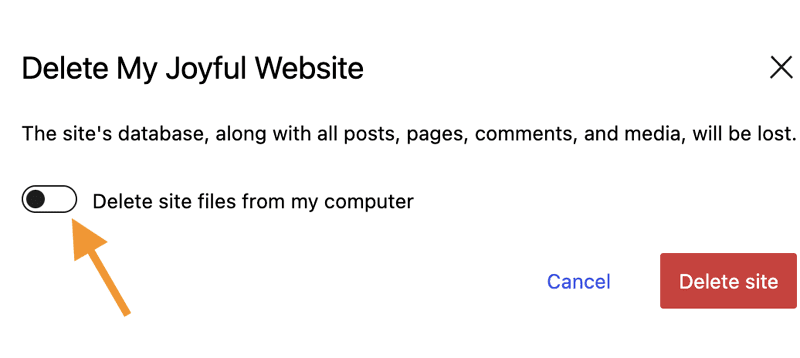
All demo sites can be manually deleted from the hosted demo and also on the desktop.

Screenshot Of How To Delete A Website In Studio

Support For Exporting A Theme

The WordPress Studio local development environment has the functionality for exporting a theme. Users can create a theme on their desktop environment and then select to export the theme. The Studio app will export the theme as a zip file which can then be uploaded to a live site (or a staging environment) online.

Full instructions on how to use Studio is available on WordPress.com. Judging by the instructions, using Studio appears to be a lot easier to use compared to other local development solutions that in general are made to accommodate a wide range of websites, not just WordPress sites. The learning curve appears to be relatively gentle compared to other local development environments.

Read more about the Windows version of WordPress Studio:

Studio: Now Available for Windows

Download a Windows or Mac version of Studio, both versions are free:

Build Fast, Ship Faster with Studio

seo enhancements
The basics of email marketing

Why is email marketing an important element of your marketing strategy? Because it’s a great tool to create and nurture a dedicated audience. Plus, it’s relatively easy to set up. In this post, we’ll discuss the basics of email marketing, and give you a few practical tips on how to get started.

The 4 benefits of email marketing

Before we start with the basics, let’s go over all the benefits of email marketing. Because there are plenty!

1. Committed audience

First, it’s good to remember that people who sign up for a newsletter want to receive information from you. They’re very committed, which is why email marketing pays off. Because the people you’re sending your newsletters to actually want to read your stuff!

2. Low costs

Second, the costs of email marketing are very low. This means email marketing has a relatively high return-on-investment. Plus, it helps that a newsletter is relatively easy to set up through a service like MailChimp or TinyLetter.

3. Increase retention

Third, email is a great way to increase your customers’ retention. This means it can increase the amount of customers that purchase repeatedly, instead of just once. In other words: email will help you turn your clients into return customers. How? By emailing your customers on a regular basis, your brand will stay top of mind and they’ll return more quickly to buy something again. Of course, your emails would have to be interesting, enticing and engaging for this to really work.

4. Specific messaging

Finally, it’s also easy to target specific subgroups within your entire audience. You can easily create these in your mail service, then send dedicated emails to your audience. Just don’t forget to regularly ask your audience what topics they’re interested in, and make it easy for them to opt-in or opt-out of receiving certain emails.

3 pitfalls of email marketing

1. A lot of work

Of course, creating content for a newsletter can be a lot of work. Especially if you’re also maintaining a blog. Plus, if you want to send out a newsletter on a regular basis, you’ll have to make sure your emails are filled with useful content. Don’t send your audience something they’re not interested in or have seen a million times before.

2. Don’t be clickbait-y

What’s more, don’t try to tease or bait your audience too much. Just like with clickbait articles—which no one likes—people want to receive useful and helpful emails. If you constantly ask them to read on without providing much information, your emails can become frustrating. Plus, they’ll take up too much time to fully engage with.

3. People are busy

Nowadays, people receive hundreds of emails every day. Which means most people don’t have the time to read all their emails. At best, they’ll scan through your email before clicking away. At worst, they’ll only read the subject line and then decide to read or delete. So you only have a few seconds to get your message across. Try to remember to be helpful and to the point, so people won’t get frustrated!

How to set up a newsletter?

Let’s dive into the basics of email marketing. If you follow these tips, you’ll be writing great newsletters in no time.

1 Start with the most important message

As we just discussed, most people won’t read your entire newsletter. That’s why it’s crucial to start with the thing you really want people to know more about. You could also choose something that people would like to read.

Bonus tip: one focus

While you can put in tons of messages and calls-to-action, it’s probably better to keep your newsletter focused and to the point. Ideally, you only want one call-to-action. Ask people to read, subscribe, or purchase. Don’t ask them to do everything at once. People are far too busy for that.

2 Choose a good subject line

Whether people actually open your newsletter depends on the subject of your newsletter. MailChimp, for example, makes it easy to test open rates of newsletters with different subject lines. So it really pays off to think about and test which subject lines work for your audience. Just don’t be too clickbait-y!

3 Clarity and focus

Make sure the layout of your newsletter is clear and looks appealing. And don’t forget to make your design responsive too, so people can read it on their phones and tablets. Finally, make sure your calls-to-action are clear by using buttons or boldened text for example.

4 Tone of voice

The people who signed up to receive your newsletter like your products, your blog, or your company. So your tone of voice should be friendly and enthusiastic, not aggressive or salesy. Your newsletter should make your audience even more fond of you and your products. So try to make them feel special!

5 Make it visual

No one likes receiving a wall of text. It makes your email look cluttered and stressful, and people will generally not want to read it. So use illustrations and pictures to break up the text and make your newsletter look more attractive.

Tips on making your newsletter more awesome

1. Choose the right tool

There are a number of helpful tools that make sending out emails that much easier. MailChimp is a popular one, and with good reason. It’s has an intuitive interface and a good free plan that allows you to easily get started with sending newsletters.

2. Test!

To get the most out of your email marketing, it’s smart to test what works and what doesn’t. For example, you can look into the time and day of the week you’re sending your newsletter. For personal blogs, the weekend could be a time to draw people to your site, while for others it might work better to send their newsletter during office hours.

Read more: A/B testing your newsletters »

3. Getting people to subscribe

In order to send people your newsletter, you have to convince them to subscribe first. Make sure you offer a subscribe field beneath your posts and on other visible places on your website. You can also use a pop-up to invite people to subscribe.

4. Make sure your newsletter is mobile friendly

We’ve said it before, and we’ll say it again! You need to have a responsive email design, because many people check their email on their phone. Luckily, a lot of mailing services offer default templates that are mobile friendly and will scale down nicely. This is a good option if you don’t want to spend too much time or money on your newsletter.

Conclusion about email marketing

Email marketing is a great way to reach your audience. You can communicate with clients that really want to be informed about your products or your company. Plus, email marketing is relatively cheap and contributes to keep your audience coming back to your site. So get those subscriptions and make sure you create a newsletter with interesting content and an appealing design that works on mobile as well!

Keep reading: Social Media Strategy: where to begin »

Coming up next!

How To Use The Google Ads Search Terms Report via @sejournal, @brookeosmundson

One of the most essential aspects of a profitable Google Ads strategy is reaching the right people, with the right message, while they’re searching.

To do this correctly, you need to know exactly how your ads are doing and what words potential customers are using to search.

This is where the Google Ads search terms report comes in handy.

This report is a goldmine and an invaluable asset to every Google Ads account.

With insights into exact phrases being used to trigger your ads, the search terms report can help:

  • Significantly refine your keyword strategy.
  • Enhance your targeting.
  • Boost your return on investment (ROI).

Let’s get into why the Google Ads search terms report is not only helpful but essential for maximizing Google Ads profitability.

What Is The Google Ads Search Terms Report?

The search terms report is a performance tool that shows how your ad performed when triggered by actual searches on the Google Search Network.

The report shows specific terms and phrases that triggered your ad to show, which helps determine if you’re bidding on the right keywords or using the right match types.

If you find search terms that aren’t relevant for your business, you can easily add them to your negative keyword list repository.

This helps you spend your budget more effectively by ensuring your ads are only triggered for relevant, useful searches by potential customers.

Keep in mind that there is a difference between a search term and a keyword:

  • Search term: Shows the exact word or phrase a customer enters on the Google Search Network to trigger an ad.
  • Keyword: The word or phrase that Google Ads advertisers target and bid on to show their ads to customers.

How To Create A Search Terms Report

Creating a search terms report in your Google Ads account is simple, and better yet – it can be automated!

To view your search terms report, you’ll need to:

  • Log into your Google Ads account.
  • Navigate to “Campaigns” >> “Insights & reports” >> “Search terms”

Below is an example of where to navigate in your Google Ads account to find the search terms report.

Screenshot of a Google Ads interface showing the Screenshot taken by author, April 2024

After running this report, there are multiple actions you can take as a marketer:

  • Add top-performing searches to corresponding ad groups as keywords.
  • Select the desired match type (e.g. broad, phrase, exact) if adding new keywords.
  • Add irrelevant search terms to a negative keyword list.

3 Ways To Use Search Terms Report Data

As mentioned above, there are numerous ways you can use the search terms report data to optimize campaign performance.

Let’s take a look at three examples of how to use this report to get the best bang for your buck.

1. Refine Existing Keyword Lists

The first area the search terms report can help with is refining existing keyword lists.

By combing through the search terms report, you can find areas of opportunities, including:

  • What searches are leading to conversions.
  • What searches are irrelevant to the product or service.
  • What searches have high impressions but low clicks.
  • How searches are being mapped to existing keywords and ad groups.

For searches leading to conversions, it likely makes sense to add those as keywords to an existing ad group or create a new ad group.

If you’re finding some searches to be irrelevant to what you’re selling, it’s best to add them as negative keywords. That prevents your ad from showing up for that search moving forward.

If some searches have a high volume of impressions, but very few clicks, these will take further consideration. If it’s a keyword worth bidding on, it may indicate that the bid strategy isn’t competitive enough – meaning you’ll have to take action on your bid strategy.

If a search term is being triggered by multiple keywords and ad groups, this is a case of cross-pollution of keywords. This can lead to lower ROI because it’s essentially having multiple keywords bid on that search term, which can drive up the cost. If this happens, you have a few options:

  • Review and update existing keyword match types as necessary.
  • Add negative keywords where appropriate at the ad group or campaign level to avoid cross-pollution.

Ultimately, using the search terms report in this way allows you to determine what is performing well and eliminate poor performers.

2. Understand How Your Audience Is Actually Searching For Your Product

Something I often see is a mismatch of how a company talks about its product or service vs. how a customer is actually searching for it in the real world.

If you’re bidding on keywords you think describe your product or service but are not getting any traction, you could be misaligning expectations.

Oftentimes, searches that lead to conversions are from terms you wouldn’t have thought to bid on without looking at the search terms report.

One of this report’s most underutilized use cases is finding lesser-known ways customers are searching for and finding your product.

Finding these types of keywords may result in the creation of a new campaign, especially if the search terms don’t fit existing ad group structures.

Building out campaigns by different search themes allows for appropriate bidding strategies for each because not all keyword values are created equal!

Understanding how a customer is describing their need for a product or service not only helps your keyword strategy but can lead to better-aligned product positioning.

This leads us to a third way the search term report can help your campaigns.

3. Optimize Ad Copy and Landing Pages

As discussed in #2, customers’ language and phrases can provide valuable insights into their needs and preferences.

Marketers can use the search terms report to better tailor ad copy, making it more relevant and appealing to prospective customers.

And let’s not forget about the corresponding landing page!

Once a user clicks on an ad, they expect to see an alignment of what they searched for and what is presented on a website.

Make sure that landing page content is updated regularly to better match the searcher’s intent.

This can result in a better user experience and an improvement in conversion rates.

How Using The Search Terms Report Can Help ROI

All three examples above are ways that the search terms report can improve campaign ROI.

How so?

Let’s take a look at each example further.

How Refining Keywords Helps ROI

Part of refining existing keywords is negating any irrelevant search terms that trigger an ad.

Having a solid negative keyword strategy gets rid of “unwanted” spending on keywords that don’t make sense.

That previously “wasted” spend then gets redirected to campaigns that regularly drive higher ROI.

Additionally, adding top-performing search terms gives you better control from a bid strategy perspective.

Being able to pull the appropriate levers and setting proper bid strategies by search theme ultimately leads to better ROI.

How Understanding Audience Intent Helps ROI

By understanding the exact language and search terms that potential customers use, marketers can update ad copy and landing pages to better match those searches.

This can increase ad relevance and Ad Rank within Google Ads.

These items help with keyword Quality Score, which can help reduce CPCs as your Quality Score increases.

More relevant ads likely lead to higher click-through rates, which leads to a higher likelihood of converting those users!

How Updating Ad Copy And Landing Pages Helps ROI

This example goes hand-in-hand with the above recommendation.

As you start to better understand the audience’s search intent, updating ad copy and landing pages to reflect their search indicates better ad relevance.

Once a user clicks on that relevant ad, they find the content of the landing page matches better to what they’re looking for.

This enhanced relevance can significantly increase the likelihood of conversion, which ultimately boosts ROI.

Use This Report To Make Data-Driven Decisions

Google Ads is an integral part of any digital marketing strategy, often accounting for a large portion of your marketing budget.

By regularly reviewing the search terms report, you can refine your marketing budget to make your Google Ads campaigns more effective.

Using this report to make data-driven decisions that fine-tune multiple facets of campaign management leads to more effective ad spending, higher conversions, and ultimately higher ROI.

More resources: 


Featured Image: FGC/Shutterstock

Doubts Emerge Over Alleged Google Data Leak via @sejournal, @martinibuster

Many SEOs are coming to the conclusion that the alleged Google data leak was not a leak, did not contain ranking algorithm secrets, was five years out of date and it did not show anything new. While that’s not how everyone feels about it, SEOs in general don’t tend to agree about anything.

As SEJ reported yesterday, there were signs that this was not a ranking algorithm data dump and that there were many unanswered questions.

Our take about the alleged leak was:

“At this point in time there is no hard evidence that this “leaked” data is actually from Google Search… and not related in any way to how websites are ranked in Google Search.”

At this point we have more information and many SEOs are saying that the information is not an algorithm data dump.

Some SEOs Urged Caution

While many in the search community were quick to accept the claims of a data leak at face value, others who care about actual facts cautioned to slow down and think first and to be open minded to all possibilities.

Tweet By Ex-Googler Pedro Dias

Tweet with the following words: There's nothing worse than information without context. Also, there’s no point in trying to explain anything to someone that only accepts what aligns with their predefined assumptions and biases.

Ryan Jones was the first to offer a modest note of caution, advising people in a tweet to view the information objectively and without preconceived ideas.

Ex-Googler Pedro Dias tweeted:

“Have no issues with the shared data. And advising caution on the interpretation of some items.”

Pedro followed up with another tweet to explain why he couldn’t comment on specifics:

“I can only speak for me. I think you understand why I can’t just correct specific items. What I’m saying is that context is needed and room should be given for interpretation.”

Someone tweeted that Pedro’s response didn’t add anything to the discussion.

Pedro responded:

“I didn’t say that. All I’ve been saying is please be careful jumping to conclusions. If you think that’s not helpful, than I’m sorry.”

The ex-Googler later tweeted about the importance of having discussions:

“Let’s remind everyone:
– It’s healthy to bring logical arguments to a discussion.

– It’s not healthy to expect everyone to buy opinions without discussing. Especially when it comes from data sources lacking context.”

Search marketing expert Dean Cruddance tweeted:

“There isn’t anything that gives away the secret sauce.”

To which ex-Googler Pedro Dias responded:

“100%
But the impact of this, fuels a lot of tinfoil hattery and simplistic takes on search, which is suboptimal.

In the end, I believe it’s more detrimental than beneficial. Not for the information it contains, but by how it’s gonna be spun and interpreted.”

This SEO Is Not Buying It

As the day passed more and more SEOs began openly doubting the leak. Twenty-year search marketing expert Trevor Stolber (LinkedIn profile) posted his observations about the alleged leak, indicating that he wasn’t “buying it.”

Some of what he posted on LinkedIn:

  • “It’s from a deprecated code base (still very interesting – but old and not used)
  • It’s not actually from their ranking algorithm, it is an API used internally
  • We already knew most of the things that are in there
  • Good production code documentation would specify ranges and values – I see none of that here
  • Google doesn’t use DA (Domain Authority) – DA is an analog to PR (Page Rank) which was Google’s stand-out differentiator – I am not sure why so much attention is being paid to these nuances.”

Kristine Schachinger, another SEO who I personally know to be an expert, commented in that discussion that the information in the so-called leak dated from 2019.

“I have been reading the raw dump and they are all dated 2019 and there is literally nothing you can gather from 90% of the pages — I so agree. “

Others in that discussion openly questioned if it was actually a leak and most everyone agreed that there was nothing new in it and advised it was better to focus on Google’s new AI Overviews, particularly because AI doesn’t follow ranking factors.

This Was Not A Leak?

Out of all the people in SEO, the person who can most be described as the father of modern SEO is Brett Tabke. He is the founder of PubCon search marketing conference and also the founder of WebmasterWorld, which in the early days of SEO was the largest and most important SEO forum in the world. Brett is also the person who coined the acronym SERPs (for search engine results pages).

Brett devoted five hours to studying the data leak and then posted his observations on Facebook.

Among his observations (paraphrased):

  • This is not a leak
  • There is zero in it that’s directly algorithm related but rather they are API calls.
  • He found nothing that points to how any of the data could be used as part of a ranking algorithm.

Ash Nallawalla, an enterprise SEO with over 20 years experienced commented:

“Like I said a few times, it is merely an API document with a list of calls and not an algo code dump. At the most, we can learn some more internal Google terminology.”

Google Data Leak: Where Are The Facts?

It’s sinking in within the SEO community that this wasn’t the Google algorithm data leak that some expected it to be. In fact, it wasn’t even a leak by a Googler. And far from being algorithm secrets many are agreeing that there is nothing new in there and that it’s just a distraction.

Google Ads Now Being Mixed In With Organic Results via @sejournal, @brodieseo

Google has an incentive to encourage users to click its sponsored ads – but this should not be to the detriment of user experience.

This aspect of Search seems to have gone awry in recent years, with Google engaging in activities that negatively impacted users.

Historically, search engine users are accustomed to ads either being placed at the top or the bottom of a SERP, with the page itself either being purely organic results or having the organic results placed in between the ads. Search features are often mixed in, too.

This has now changed.

A change was recently added to Google’s documentation, stating that:

“Top ads may show below the top organic results on certain queries.”

Detailing how placement for top ads is dynamic and may change.

In this article, we explore this change and its impact on users and organic search results.

Timeline Of Changes

Leading up to the change, Google had been testing mixing sponsored ads within organic listings in various capacities over a 10-month period.

Here is a timeline of the changes leading up to the official launch.

June 17th, 2023: Initial Testing

This was the first time the test appeared in Google’s search results, only showing on mobile devices at the time. Within this initial testing period, it was showing for very few users with more discrete inclusion only on mobile, easily being mistaken for an organic listing for users.

October 23rd, 2023: Heavier Testing

Within this testing period, it was the first time that the broader SEO community started to notice the ad labels appearing within organic listings, being visible across both mobile and desktop.

This testing period was more prolonged in the lead-up to launch.

March 28th, 2024: Launch

On this date, Google’s Ads Liaison announced that the change would be a permanent one, with a new definition being added to the “top ads” documentation. From this date, users were then to expect an official change where ads would be mixed in with organic results beyond limited testing.

Different Types Of Placements

Now that Google has been mixing sponsored ads within organic results for almost two months, we’re able to gain a better understanding of the extent of the change and how the sponsored ads are appearing.

Based on my research, there are two common situations where Google is presenting ads within organic listings.

Mixed With Organic Results

The standard approach involves a simple ad placement within the top organic results.

Based on my experience, it is common for there to be one or two ads that are placed together in this situation. It is rare for there to be a maximum of four ads in a row.

An example of this can be found below:

Screenshot from search for seo expert melbourneScreenshot from search for [seo expert melbourne], Google, May 2024

In this example, the sponsored ad technically appears in position #2 on the page. Normally, the ad would have appeared above my page, but in this instance, it is below.

For the Semrush page, the visibility on the SERP would be unchanged if they were above, but for my page it is at an advantage in terms of ranking visibility.

Directly Below Featured Snippets

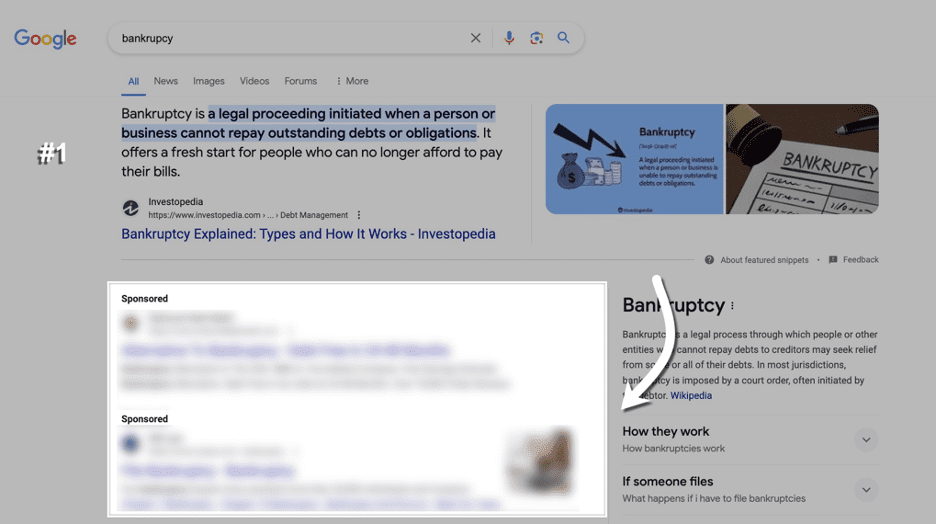
What seems to be the most common way ads are mixed in with organic listings is by placing them directly below a featured snippet.

In cases like this, it is common for there to be a full lot of four ads that appear below the featured snippet. In this example, there are two ads that are appearing.

2 sponsored ads appearing in the SERPsScreenshot from search for [backruptcy], Google, May 2024

In the past, and still having the ability to show right now, ads would always be placed directly above the featured snippet.

This could have been perceived as a poor user experience, considering featured snippets tend to show when an answer to a query can be explained with a short description from the page.

What Are Google’s Intentions?

Each of the situations explained in the previous section could be interpreted differently.

The first situation (mixed within organic results) is pretty clear about Google’s intentions: to encourage more clicks on ads and desensitize users to ads appearing at the top, with users mistaking ads for organic listings.

In contrast, the second situation with featured snippets could be perceived differently. While ads continue to appear in the viewport on desktop, the answer to the user’s query is prominently displayed at the top of search results without ads getting in the way.

I can’t see this being a bad thing for users or SEO, as Google is making the organic listing more visible across these instances.

In general, I’m aware of Google’s need to prioritize ad revenue with changes to ad placement. While there are certainly arguments to be made from both angles with this change, my perception is that the outcome is fairly neutral from both sides.

Ads mixed in with organic results are still exceptionally rare, but featured snippet placements are a more common use case, and there are some clear upsides to this.

How To Analyze With Semrush

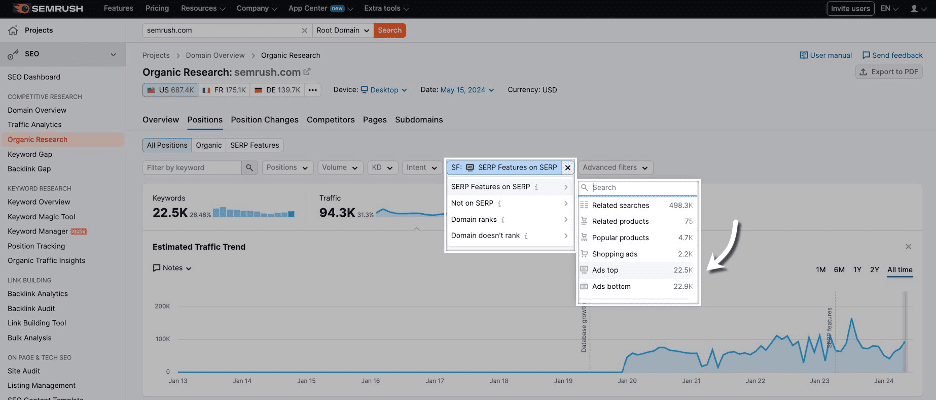
analyze ads top featureScreenshot from Semrush, May 2024

While Semrush does have an Advertising Research tool that shows you the position of your ads across various queries, I found that the data wasn’t being collected in a way that allows you to compare ad position relative to organic listings.

As an alternative, I found the best approach for analysis to be through using “Ads top” as a SERP feature filter through Organic Research to locate instances where ads were being mixed with organic listings.

Here’s where this filter is located:

This filtering doesn’t allow you to filter by URLs for a specific domain, with it instead showing instances where “top ads” are a SERP feature across the Semrush index.

Using this method, I’m able to review historical top ad inclusions since the launch in March and conclude that ads being mixed in with organic results is still exceptionally rare.

Final Thoughts

Overall, based on how Google currently operates, I’m not particularly concerned about this ad placement change from Google.

While the change is an official one based on the update to Google’s documentation, it still operates more like a test, where ads are continuing to appear in normal positions in the vast majority of instances.

Based on my research, I believe the change should be perceived as neutral for Google users and SEO. If you see ads being mixed with organic listings in the wild, keep your wits about you.

I’ll be keeping an eye on this change to make sure Google’s ad placements don’t get too carried away.

Google’s ad testing has more recently reverted back to using the “ad” labeling instead of “sponsored” on mobile, which was the previous treatment up until recent years.

We can certainly expect these types of tests to continue into the future, with there never being a boring day within our industry.

More resources: 


Featured Image: BestForBest/Shutterstock 

Why Using A Log Analyzer Is A Must For Big Websites

This post was sponsored by JetOctopus. The opinions expressed in this article are the sponsor’s own.

If you manage a large website with over 10,000 pages, you can likely appreciate the unique SEO challenges that come with such scale.

Sure, the traditional tools and tactics — keyword optimization, link building, etc. — are important to establish a strong foundation and maintain basic SEO hygiene.

However, they may not fully address the technical complexities of Site Visibility for Searchbots and the dynamic needs of a large enterprise website.

This is where log analyzers become crucial. An SEO log analyzer monitors and analyzes server access logs to give you real insights into how search engines interact with your website. It allows you to take strategic action that satisfies both search crawlers and users, leading to stronger returns on your efforts.

In this post, you’ll learn what a log analyzer is and how it can enable your enterprise SEO strategy to achieve sustained success. But first, let’s take a quick look at what makes SEO tricky for big websites with thousands of pages.

The Unique SEO Challenges For Large Websites

Managing SEO for a website with over 10,000 pages isn’t just a step up in scale; it’s a whole different ball game.

Relying on traditional SEO tactics limits your site’s potential for organic growth. You can have the best titles and content on your pages, but if Googlebot can’t crawl them effectively, those pages will be ignored and may not get ranked ever.

Image created by JetOctopus, May 2024

For big websites, the sheer volume of content and pages makes it difficult to ensure every (important) page is optimized for visibility to Googlebot. Then, the added complexity of an elaborate site architecture often leads to significant crawl budget issues. This means Googlebot is missing crucial pages during its crawls.

Image created by JetOctopus, May 2024

Furthermore, big websites are more vulnerable to technical glitches — such as unexpected tweaks in the code from the dev team — that can impact SEO. This often exacerbates other issues like slow page speeds due to heavy content, broken links in bulk, or redundant pages that compete for the same keywords (keyword cannibalization).

All in all, these issues that come with size necessitate a more robust approach to SEO. One that can adapt to the dynamic nature of big websites and ensure that every optimization effort is more meaningful toward the ultimate goal of improving visibility and driving traffic.

This strategic shift is where the power of an SEO log analyzer becomes evident, providing granular insights that help prioritize high-impact actions. The primary action being to better understand Googlebot like it’s your website’s main user — until your important pages are accessed by Googlebot, they won’t rank and drive traffic.

What Is An SEO Log Analyzer?

An SEO log analyzer is essentially a tool that processes and analyzes the data generated by web servers every time a page is requested. It tracks how search engine crawlers interact with a website, providing crucial insights into what happens behind the scenes. A log analyzer can identify which pages are crawled, how often, and whether any crawl issues occur, such as Googlebot being unable to access important pages.

By analyzing these server logs, log analyzers help SEO teams understand how a website is actually seen by search engines. This enables them to make precise adjustments to enhance site performance, boost crawl efficiency, and ultimately improve SERP visibility.

Put simply, a deep dive into the logs data helps discover opportunities and pinpoint issues that might otherwise go unnoticed in large websites.

But why exactly should you focus your efforts on treating Googlebot as your most important visitor?

Why is crawl budget a big deal?

Let’s look into this.

Optimizing Crawl Budget For Maximum SEO Impact

Crawl budget refers to the number of pages a search engine bot — like Googlebot — will crawl on your site within a given timeframe. Once a site’s budget is used up, the bot will stop crawling and move on to other websites.

Crawl budgets vary for every website and your site’s budget is determined by Google itself, by considering a range of factors such as the site’s size, performance, frequency of updates, and links. When you focus on optimizing these factors strategically, you can increase your crawl budget and speed up ranking for new website pages and content.

As you’d expect, making the most of this budget ensures that your most important pages are frequently visited and indexed by Googlebot. This typically translates into better rankings (provided your content and user experience are solid).

And here’s where a log analyzer tool makes itself particularly useful by providing detailed insights into how crawlers interact with your site. As mentioned earlier, it allows you to see which pages are being crawled and how often, helping identify and resolve inefficiencies such as low-value or irrelevant pages that are wasting valuable crawl resources.

An advanced log analyzer like JetOctopus offers a complete view of all the stages from crawling and indexation to getting organic clicks. Its SEO Funnel covers all the main stages, from your website being visited by Googlebot to being ranked in the top 10 and bringing in organic traffic.

Image created by JetOctopus, May 2024

As you can see above, the tabular view shows how many pages are open to indexation versus those closed from indexation. Understanding this ratio is crucial because if commercially important pages are closed from indexation, they will not appear in subsequent funnel stages.

The next stage examines the number of pages crawled by Googlebot, with “green pages” representing those crawled and within the structure, and “gray pages” indicating potential crawl budget waste because they are visited by Googlebot but not within the structure, possibly orphan pages or accidentally excluded from the structure. Hence, it’s vital to analyze this part of your crawl budget for optimization.

The later stages include analyzing what percentage of pages are ranked in Google SERPs, how many of these rankings are in the top 10 or top three, and, finally, the number of pages receiving organic clicks.

Overall, the SEO funnel gives you concrete numbers, with links to lists of URLs for further analysis, such as indexable vs. non-indexable pages and how crawl budget waste is occurring. It is an excellent starting point for crawl budget analysis, allowing a way to visualize the big picture and get insights for an impactful optimization plan that drives tangible SEO growth.

Put simply, by prioritizing high-value pages — ensuring they are free from errors and easily accessible to search bots — you can greatly improve your site’s visibility and ranking.

Using an SEO log analyzer, you can understand exactly what should be optimized on pages that are being ignored by crawlers, work on them, and thus attract Googlebot visits. A log analyzer benefits in optimizing other crucial aspects of your website:

Image created by JetOctopus, May 2024
  • Detailed Analysis of Bot Behavior: Log analyzers allow you to dissect how search bots interact with your site by examining factors like the depth of their crawl, the number of internal links on a page, and the word count per page. This detailed analysis provides you with the exact to-do items for optimizing your site’s SEO performance.
  • Improves Internal Linking and Technical Performance: Log analyzers provide detailed insights into the structure and health of your site. They help identify underperforming pages and optimize the internal links placement, ensuring a smoother user and crawler navigation. They also facilitate the fine-tuning of content to better meet SEO standards, while highlighting technical issues that may affect site speed and accessibility.
  • Aids in Troubleshooting JavaScript and Indexation Challenges: Big websites, especially eCommerce, often rely heavily on JavaScript for dynamic content. In the case of JS websites, the crawling process is lengthy. A log analyzer can track how well search engine bots are able to render and index JavaScript-dependent content, underlining potential pitfalls in real-time. It also identifies pages that are not being indexed as intended, allowing for timely corrections to ensure all relevant content can rank.
  • Helps Optimize Distance from Index (DFI): The concept of Distance from Index (DFI) refers to the number of clicks required to reach any given page from the home page. A lower DFI is generally better for SEO as it means important content is easier to find, both by users and search engine crawlers. Log analyzers help map out the navigational structure of your site, suggesting changes that can reduce DFI and improve the overall accessibility of key content and product pages.

Besides, historical log data offered by a log analyzer can be invaluable. It helps make your SEO performance not only understandable but also predictable. Analyzing past interactions allows you to spot trends, anticipate future hiccups, and plan more effective SEO strategies.

With JetOctopus, you benefit from no volume limits on logs, enabling comprehensive analysis without the fear of missing out on crucial data. This approach is fundamental in continually refining your strategy and securing your site’s top spot in the fast-evolving landscape of search.

Real-World Wins Using Log Analyzer

Big websites in various industries have leveraged log analyzers to attain and maintain top spots on Google for profitable keywords, which has significantly contributed to their business growth.

For example, Skroutz, Greece’s biggest marketplace website with over 1 million sessions daily, set up a real-time crawl and log analyzer tool that helped them know things like:

  • Does Googlebot crawl pages that have more than two filters activated?
  • How extensively does Googlebot crawl a particularly popular category?
  • What are the main URL parameters that Googlebot crawls?
  • Does Googlebot visit pages with filters like “Size,” which are typically marked as nofollow?

This ability to see real-time visualization tables and historical log data spanning over ten months for monitoring Googlebot crawls effectively enabled Skroutz to find crawling loopholes and decrease index size, thus optimizing its crawl budget.

Eventually, they also saw a reduced time for new URLs to be indexed and ranked — instead of taking 2-3 months to index and rank new URLs, the indexing and ranking phase took only a few days.

This strategic approach to technical SEO using log files has helped Skroutz cement its position as one of the top 1000 websites globally according to SimilarWeb, and the fourth most visited website in Greece (after Google, Facebook, and Youtube) with over 70% share of its traffic from organic search.

Image created by JetOctopus, May 2024

Another case in point is DOM.RIA, Ukraine’s popular real estate and rental listing website, which doubled the Googlebot visits by optimizing their website’s crawl efficiency. As their site structure is huge and elaborate, they needed to optimize the crawl efficiency for Googlebot to ensure the freshness and relevance of content appearing in Google.

Initially, they implemented a new sitemap to improve the indexing of deeper directories. Despite these efforts, Googlebot visits remained low.

By using the JetOctopus to analyze their log files, DOM.RIA identified and addressed issues with their internal linking and DFI. They then created mini-sitemaps for poorly scanned directories (such as for the city, including URLs for streets, districts, metro, etc.) while assigning meta tags with links to pages that Googlebot often visits. This strategic change resulted in a more than twofold increase in Googlebot activity on these crucial pages within two weeks.

Image created by JetOctopus, May 2024

Getting Started With An SEO Log Analyzer

Now that you know what a log analyzer is and what it can do for big websites, let’s take a quick look at the steps involved in logs analysis.

Here is an overview of using an SEO log analyzer like JetOctopus for your website:

  • Integrate Your Logs: Begin by integrating your server logs with a log analysis tool. This step is crucial for capturing all data related to site visits, which includes every request made to the server.
  • Identify Key Issues: Use the log analyzer to uncover significant issues such as server errors (5xx), slow load times, and other anomalies that could be affecting user experience and site performance. This step involves filtering and sorting through large volumes of data to focus on high-impact problems.
  • Fix the Issues: Once problems are identified, prioritize and address these issues to improve site reliability and performance. This might involve fixing broken links, optimizing slow-loading pages, and correcting server errors.
  • Combine with Crawl Analysis: Merge log analysis data with crawl data. This integration allows for a deeper dive into crawl budget analysis and optimization. Analyze how search engines crawl your site and adjust your SEO strategy to ensure that your most valuable pages receive adequate attention from search bots.

And that’s how you can ensure that search engines are efficiently indexing your most important content.

Conclusion

As you can see, the strategic use of log analyzers is more than just a technical necessity for large-scale websites. Optimizing your site’s crawl efficiency with a log analyzer can immensely impact your SERP visibility.

For CMOs managing large-scale websites, embracing a log analyzer and crawler toolkit like JetOctopus is like getting an extra tech SEO analyst that bridges the gap between SEO data integration and organic traffic growth.


Image Credits

Featured Image: Image by JetOctopus Used with permission.