This week’s question comes from Evan, who asked: “How do I prevent my PPC budget from getting eaten by branded competitor terms?”
It’s a good question, as few things frustrate advertisers more than watching transactional budgets get drained by competitor-branded searches. Marketing dollars intended for high-intent, conversion-ready audiences often get spent on clicks from users searching for competitors instead. These searches typically convert at lower rates and can produce deceptively low CPCs, creating false positives that distort performance data.
Protecting spend from competitor traffic requires a mix of negative keyword management, platform tools, and thoughtful campaign structure. Here’s how advertisers can take control and ensure their budgets stay focused on profitable intent.
Use Strategic Negatives
Negative keywords remain the most reliable way to prevent ads from serving on competitor-branded queries. Adding competitor names as phrase match negatives blocks variations of that brand name, while exact match negatives offer more precision when overlap risk is high.
However, advertisers must be careful. Some competitor names resemble valuable generic phrases. For example, if a competitor calls its business “Dog Trainer Near Me,” excluding that term could block qualified local leads. The goal is to remove competitor intent, not legitimate customer searches.
It’s also important to recognize that negative keyword limits are imposed by the ad platforms themselves. Google Ads and Microsoft Ads both restrict the number of negatives an account can include. Most advertisers can expect to cap out between 2,500 and 10,000 negatives per account, depending on structure and platform. Because of this limitation, advertisers should be selective about what they block.
The most efficient approach is to create a shared list of proven competitor negatives and apply it at the campaign or account level. This method saves space and keeps exclusions consistent across campaigns. Regularly review search term reports to identify new competitor variants and refine your list based on performance data.
Leverage Brand Inclusions And Exclusions In AI Campaigns
Advertisers running AI-driven campaign types, such as Performance Max, can use brand inclusion and exclusion controls to refine targeting. These tools allow advertisers to specify which brands their ads can or cannot appear alongside.
It’s important to understand that brand exclusions are not the same as negative keywords. A negative keyword blocks a specific word or phrase. A brand exclusion tells the system to avoid what it identifies as queries related to a particular brand. This AI-driven interpretation can reduce the need for lengthy negative lists, though close variants may still slip through.
These settings only apply to campaigns that use AI optimization, so advertisers must opt into automated formats to access them. If an account does not meet the required conversion thresholds for AI bidding, traditional negatives remain the best control option.
Assign Accurate Conversion Values And ROAS Goals
Competitor searches often look cheap on paper but cost more in practice due to lower conversion rates. A click on a competitor term may cost less, but it usually takes many more of those clicks to produce a single conversion.
To correct for this, advertisers should ensure their conversion tracking reflects actual business value. Assign different conversion values to calls, form fills, trial signups, or purchases to align with real-world outcomes. This helps automated bidding systems prioritize actions that contribute most to revenue rather than chasing inexpensive but unprofitable clicks.
On Google Ads, using Maximize Conversion Value with a ROAS target or applying cross-per-click floors can guide automation toward efficiency. Bid caps on both Google and Microsoft Ads help maintain control and prevent runaway spend on experimental traffic.
Structure Competitor Campaigns Separately
When an advertiser chooses to bid on competitor-branded keywords intentionally, those campaigns should operate in isolation. Competitor campaigns need their own budget, bidding strategy, and performance goals.
If the purpose is awareness, advertisers can remove ROAS targets and focus on visibility. If the purpose is performance, set high ROAS thresholds to ensure efficiency. The goal is to appear in competitor search results strategically, not to capture volume for its own sake.
Each competitor should live in a separate ad group with tailored creative. Avoid dynamic keyword insertion and never include competitor names in ad copy. Doing so risks ad disapprovals or account suspensions. Instead, ads should highlight what differentiates the advertiser (unique offers, service quality, or proprietary advantages) without mentioning the competitor directly.
Competitor bidding should remain limited to a short list of key rivals. A smaller, well-targeted approach allows for better creative control and clearer measurement of performance impact.
Continuously Audit And Refine
Competitor-related traffic shifts over time, and advertisers need to stay vigilant. Regularly reviewing search term reports helps uncover new variations or misspellings of competitor names that may be triggering ads. When low-performing competitor queries appear, add them to your shared negative list.
Segment performance by device, location, and audience type to find patterns. For instance, competitor clicks may be less efficient on mobile devices or in certain regions. These insights can guide bid adjustments, audience exclusions, or negative refinements that further protect the budget.
Balance Control With Opportunity
Blocking competitor-branded traffic improves efficiency, but advertisers must balance control with opportunity. Removing competitor terms completely eliminates the chance to influence potential buyers who are comparing options. This trade-off is worth making for consistently underperforming queries, but should always be intentional.
Negatives and brand exclusions create a strong defense. Accurate conversion valuation and disciplined bidding drive smarter optimization. Separate competitor campaigns allow for strategic engagement without risking broad budget leakage.
More Resources:
Featured Image: Paulo Bobita/Search Engine Journal
Did you know that even a one-second delay in page loading speed can cause up to 11% fewer page views? That’s right, you might have the best content strategy and a solid plan to drive traffic, but visitors won’t stay long if your site lags. Page speed is one of the biggest factors in keeping users engaged and converting.
In this guide, we’ll uncover the most common causes of slow websites and explore proven ways to boost website performance. Whether your site feels sluggish or you simply want to make it faster, these insights will help you identify what’s holding it back and how to fix it.
Table of contents
What do we mean by ‘website performance’ and why is it important for you?
Website performance is all about how efficiently your site loads and responds when someone visits it. It’s not just about how fast a page appears; it’s about how smoothly users can interact with your content across devices, browsers, and locations. In simple terms, it’s the overall quality of your site’s experience that should feel fast, responsive, and effortless to use.
When your page loading speed is optimized, you’re not only improving the user experience but also setting the foundation for long-term website performance.
Here’s why it matters for every website owner:
Fast-loading sites have higher conversion rates and lower bounce rates
Attention spans are notoriously short. As the internet gets faster, they’re getting shorter still. Numerous studies have found a clear link between the time it takes a page to load and the percentage of visitors who become impatient while waiting.
By offering a fast site, you encourage your visitors to stay longer. Not to mention, you’re helping them complete their checkout journey more quickly. That helps improve your conversion rate and build trust and brand loyalty. Think of all the times you’ve been cursing the screen because you had to wait for a page to load or were running in circles because the user experience was atrocious. It happens so often, don’t be that site.
A fast page improves user experience
Google understands that the time it takes for a page to load is vital to the overall user experience. Waiting for content to appear, the inability to interact with a page, and even noticing delays create friction.
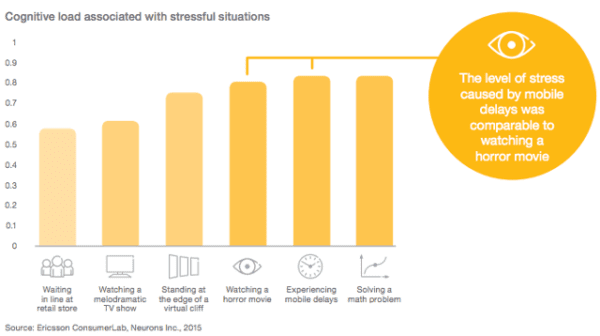
That friction costs time, money, and your visitor’s experience. Research shows that the level of stress from waiting for slow mobile results can be more stressful than watching a horror movie. Surely not, you say? That’s what the fine folks at Ericsson Research found a few years back.
Ericsson Mobility Report MWC Edition, February 2016
Improving your site speed across the board means making people happy. They’ll enjoy using your site, make more purchases, and return more frequently. This means that Google will view your site as a great search result because you are delivering high-quality content. Eventually, you might get a nice ranking boost.
Frustration hurts your users and hurts your rankings
It’s not just Google – research from every corner of the web on all aspects of consumer behavior shows that speed has a significant impact on outcomes.
Nearly 70% of consumers say that page speed impacts their willingness to buy (unbounce)
20% of users abandon their cart if the transaction process is too slow (radware.com)
The BBC found that they lost an additional 10% of users for every additional second their site took to load
These costs and site abandonment happen because users dislike being frustrated. Poor experiences lead them to leave, visit other websites, and switch to competitors. Google easily tracks these behaviors (through bounces back to search engine results pages, short visits, and other signals) and is a strong indicator that the page shouldn’t be ranking where it is.
Google needs fast sites
Speed isn’t only good for users – it’s good for Google, too. Slow websites are often inefficient. They may load too many large files, haven’t optimized their media, or fail to utilize modern technologies to serve their page. That means that Google has to consume more bandwidth, allocate more resources, and spend more money.
Across the whole web, every millisecond they can save, and every byte they don’t have to process, adds up quickly. And quite often, simple changes to configuration, processes, or code can make websites much faster with no drawbacks. That may be why Google is so vocal about its education on performance.
A faster web is better for users and significantly reduces Google’s operating costs. Either way, that means that they’re going to continue rewarding fast(er) sites.
Improving page speed helps to improve crawling for search engines
Modern sites are incredibly wieldy, and untangling that mess can make a big difference. The larger your site is, the greater the impact page speed optimizations will have. That not only impacts user experience and conversion rates but also affects crawl budget and crawl rate.
When a Googlebot comes around and crawls your webpage, it crawls the HTML file. Any resources referenced in the file, like images, CSS, and JavaScript, will be fetched separately. The more files you have and the heavier they are, the longer it will take for the Googlebot to go through them.
On the flip side, the more time Google spends on crawling a page and its files, the less time and resources Google has to dedicate to other pages. That means Google may miss out on other important pages and content on your site.
Optimizing your website and content for speed will provide a good user experience for your visitors and help Googlebots better crawl your site. They can come around more often and accomplish more.
Page speed is a ranking factor
Google has repeatedly said that a fast site helps you rank better. It’s no surprise, then, that Google has been measuring the speed of your site and using that information in its ranking algorithms since 2010.
In 2018, Google launched the so-called ‘Speed Update,’ making page speed a ranking factor for mobile searches. Google emphasized that it would only affect the slowest sites and that fast sites would not receive a boost; however, they are evaluating website performance across the board.
In 2021, Google announced the page experience algorithm update, demonstrating that page speed and user experience are intertwined. Core Web Vitals clearly state that speed is an essential ranking factor. The update also gave site owners metrics and standards to work with.
Of course, Google still wants to serve searchers the most relevant information, even if the page experience is somewhat lacking. Creating high-quality content remains the most effective way to achieve a high ranking. However, Google also states that page experience signals become more important when many pages with relevant content compete for visibility in the search results.
Google mobile-first index
Another significant factor in page speed for ranking is Google’s mobile-first approach to indexing content. That means Google uses the mobile version of your pages for indexing and ranking. This approach makes sense as we increasingly rely on mobile devices to access the internet. In recent research, Semrush found out that 66% of all website visits come from mobile devices.
To compete for a spot in the search results, your mobile page needs to meet Core Web Vitals standards and other page experience signals. And this is not easy at all. Pages on mobile take longer to load compared to their desktop counterparts, while attention span stays the same. People might be more patient on mobile devices, but not significantly so.
Take a look at some statistics:
The average website loading time is 2.5 seconds on desktop and 8.6 seconds on mobile, based on an analysis of the top 100 web pages worldwide (tooltester)
The average mobile web page takes 15.3 seconds to load (thinkwithgoogle)
On average, webpages on mobile take 70.9% longer to load than on desktop (tooltester)
A loading speed of 10 seconds increases the probability of a mobile site visitor bouncing by 123% compared to a one-second loading speed (thinkwithgoogle)
All the more reasons to optimize your website and content if your goal is to win a spot in the SERP.
Understanding the web page loading process
When you click a link or type a URL and press Enter, your browser initiates a series of steps to load the web page. It might seem like magic, but behind the scenes, there’s a lot happening in just a few seconds. Understanding this process can help you see what affects your page loading speed and what you can do to boost website performance.
The process of loading a page can be divided into three key stages:
Network stage
This is where the connection begins. When someone visits your site, their browser looks up your domain name and connects to your server. This process, known as DNS lookup and TCP connection, enables data to travel between your website and the visitor’s device.
You don’t have much direct control over this stage, but technologies like content delivery networks (CDNs) and smart routing can make a big difference, especially if you serve visitors from around the world. For local websites, optimizing your hosting setup can still help improve overall page loading speed.
Server response stage
Once the connection is established, the visitor’s browser sends a request to your server asking for the web page and its content. This is when your server processes that request and sends back the necessary files.
The quality of your hosting, server configuration, and even your website’s theme or plugins all influence how quickly your server responds. A slow response is one of the most common issues with slow websites, so investing in a solid hosting environment is crucial if you want to boost your website’s performance.
One popular choice is Bluehost, which offers reliable infrastructure, SSD storage, and built-in CDN support, making it a go-to hosting solution for many website owners.
Browser rendering stage
Now it’s time for the browser to put everything together. It retrieves data from your server and begins displaying it by loading images, processing CSS and JavaScript, and rendering all visible elements.
Browsers typically load content in order, starting with what’s visible at the top (above the fold) and then proceeding down the page. That’s why optimizing the content at the top helps users interact with your site sooner. Even if the entire page isn’t fully loaded yet, a quick initial render can make it feel fast and keep users engaged.
Key causes that are causing your website to slow down
While you can’t control the quality of your visitors’ internet connection, most slow website issues come from within your own setup. Let’s examine the key areas that may be hindering your site’s performance and explore how to address them to enhance your website’s performance.
Your hosting service
Your hosting plays a big role in your website’s performance because it’s where your site lives. The speed and stability of your host determine how quickly your site responds to visitors. Factors such as server configuration, uptime, and infrastructure all impact this performance.
Choosing a reliable host eliminates one major factor that affects speed optimization. Bluehost, for example, offers robust servers, reliable uptime, and built-in performance tools, making it a go-to hosting choice for anyone serious about speed and stability.
Your website theme
Themes define how your website looks and feels, but they also impact its loading speed. Some themes are designed with clean, lightweight code that’s optimized for performance, while others are heavy with animations and complex design elements. To boost website performance, opt for a theme that prioritizes simplicity, efficiency, and clean coding.
Large file size
From your HTML and CSS files to heavy JavaScript, large file sizes can slow down your website. Modern websites often rely heavily on JavaScript for dynamic effects, but overusing it can cause your pages to load slowly, especially on mobile devices. Reducing file sizes, compressing assets, and minimizing unnecessary scripts can significantly improve the perceived speed of your pages.
Badly written code
Poorly optimized code can cause a range of issues, from JavaScript errors to broken layouts. Messy or redundant code makes it harder for browsers to load your site efficiently. Cleaning up your code and ensuring it’s well-structured helps improve both performance and maintainability.
Images and videos
Unoptimized images and large video files are among the biggest causes of slow websites. Heavy media files increase your page weight, which directly impacts loading times. If your header image or hero banner is too large, it can delay the appearance of the main content. Optimizing your media files through compression, resizing, and Image SEO can dramatically improve your website’s speed.
Too many plugins and widgets
Plugins are what make WordPress so flexible, but adding too many can slow down your site. Each plugin adds extra code that your browser needs to process. Unused or outdated plugins can also conflict with your theme or other extensions, further reducing performance. Audit your plugins regularly and only keep the ones that truly add value.
Absence of a CDN
A content delivery network (CDN) helps your website load faster for users worldwide. It stores copies of your site’s static content, such as images and CSS files, across multiple servers located in different regions. This means that users access your site from the nearest available server, reducing loading time. If your audience is global, using a CDN is one of the easiest ways to boost website performance.
Redirects
Redirects are useful for managing URLs and maintaining SEO, but too many can slow down your site. Each redirect adds an extra step before reaching the final page. While a few redirects won’t hurt, long redirect chains can significantly affect performance. Whenever possible, try to link directly to the final URL to maintain consistent page loading speed.
For WordPress users, the redirect manager feature in Yoast SEO Premium makes handling URL changes effortless and performance-friendly. You can pick from redirect types such as 301, 302, 307, 410, and 451 right from the dashboard. Since server-side redirects tend to load faster than PHP-based ones, Yoast lets you choose the type your stack supports, allowing you to avoid slow website causes and boost website performance.
A smarter analysis in Yoast SEO Premium
Yoast SEO Premium has a smart content analysis that helps you take your content to the next level!
How to measure page speed and diagnose performance issues
Before you can improve your website performance, you need to know how well (or poorly) your pages are performing. Measuring your page speed helps you identify what’s slowing down your website and provides a direction for optimization.
What is page speed, really?
Page speed refers to how quickly your website’s content loads and becomes usable. But it’s not as simple as saying, ‘My website loads in 4 seconds.’ Think of it as how fast a visitor can start interacting with your site.
A page might appear to load quickly, but still feel slow if buttons, videos, or images take time to respond. That’s why website performance isn’t defined by one single metric — it’s about the overall user experience.
Did you know?
There is a difference between page speed and site speed. Page speed measures how fast a single page loads, while site speed reflects your website’s overall performance. Since every page behaves differently, measuring site speed is a more challenging task. Simply put, if most pages on your website perform well in terms of Core Web Vitals, it is considered fast.
Core metrics that define website performance
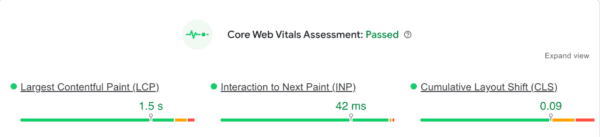
Core Web Vitals are Google’s standard for evaluating how real users experience your website. These metrics focus on the three most important aspects of page experience: loading performance, interactivity, and visual stability. Improving them helps both your search visibility and your user satisfaction.
Largest Contentful Paint (LCP): Measures how long it takes for the main content on your page to load. Aim for LCP within 2.5 seconds for a smooth loading experience
Interaction to Next Paint (INP): Replaces the older First Input Delay metric and measures how quickly your site responds to user interactions like taps, clicks, or key presses. An INP score under 200 milliseconds ensures your site feels responsive and intuitive
Cumulative Layout Shift (CLS): Tracks how stable your content remains while loading. Elements shifting on screen can frustrate users, so keep CLS below 0.1 for a stable visual experience
How to interpret and improve your scores
Perfection is not the target. Progress and user comfort are what count. If you notice issues in your Core Web Vitals report, here are some practical steps:
If your LCP is slow: Compress images, serve modern formats like WebP, use lazy loading, or upgrade hosting to reduce load times
If your INP score is high: Reduce heavy JavaScript execution, minimize unused scripts, and avoid main thread blocking
If your CLS score is poor: Set defined width and height for images, videos, and ad containers so the layout does not jump around while loading
If your TTFB is high: Time to First Byte is not a Core Web Vital, but it still impacts loading speed. Improve server performance, use caching, and consider a CDN
Remember that even small improvements create a noticeable difference. Faster load times, stable layouts, and quicker interactions directly contribute to a smoother experience that users appreciate and search engines reward.
Tools to measure and analyze your website’s performance
Here are some powerful tools that help you measure, analyze, and improve your page loading speed:
Google PageSpeed Insights
Google PageSpeed Insights is a free tool from Google that provides both lab data (simulated results) and field data (real-world user experiences). It evaluates your page’s Core Web Vitals, highlights problem areas, and even offers suggestions under ‘Opportunities’ to improve load times.
Google Search Console (Page Experience Report)
The ‘Page Experience’ section gives you an overview of how your URLs perform for both mobile and desktop users. It groups URLs that fail Core Web Vitals, helping you identify whether you need to improve LCP, FID, or CLS scores.
Lighthouse (in Chrome DevTools)
Lighthouse is a built-in auditing tool in Chrome that measures page speed, accessibility, SEO, and best practices. It’s great for developers who want deeper insights into what’s affecting site performance.
WebPageTest
WebPage Test lets you test how your website performs across various networks, locations, and devices. Its ‘waterfall’ view shows exactly when each asset on your site loads, perfect for spotting slow resources or scripts that delay rendering.
Chrome Developer Tools (Network tab)
If you’re hands-on, Chrome DevTools is your real-time lab. Open your site, press F12, and monitor how each resource loads. It’s perfect for debugging and understanding what’s happening behind the scenes.
A quick checklist for diagnosing performance issues
Use this checklist whenever you’re analyzing your website performance:
Run your URL through PageSpeed Insights for Core Web Vitals data
Check your Page Experience report in Google Search Console
Use Lighthouse for a detailed technical audit
Review your WebPageTest waterfall to spot bottlenecks
Monitor your server performance (ask your host or use plugins like Query Monitor)
Re-test after every major update or plugin installation
Speed up, but with purpose
As Mahatma Gandhi once said, ‘There is more to life than increasing its speed.’ The same goes for your website. While optimizing speed is vital for better engagement, search rankings, and conversions, it is equally important to focus on creating an experience that feels effortless and meaningful to your visitors. A truly high-performing website strikes a balance between speed, usability, accessibility, and user intent.
When your pages load quickly, your content reads clearly, and your navigation feels intuitive, you create more than just a fast site; you create a space where visitors want to stay, explore, and connect.
Edwin is an experienced strategic content specialist. Before joining Yoast, he worked for a top-tier web design magazine, where he developed a keen understanding of how to create great content.
Back in 2005 I intuited that there are wildly successful Internet enterprises that owed nothing to SEO. These successes intrigued me because they happened according to undocumented rules outside of the SEO bubble. These sites have stories and lessons about building success.
Turning Your Enthusiasm Into Success
In 2005 I interviewed the founder of the Church Of The Flying Spaghetti Monster, which at the time had a massive Page Rank score of 7. The founder explains how promotion was never part of a plan- in fact he denied having any success plan at all. He simply put the visual material out there and let people hotlink the heck out of it at the rate 40GB/day back in 2005.
The site is controversial because it was created in response to an idea called Intelligent Design, which is an ideology that believes that aspects of the universe and life are the products of an unseen intelligent hand and not products of undirected processes like evolution and natural selection. This article is not about religion, it’s about how someone leveraged their passion to create a wildly successful website.
The point is, there was no direct benefit to hotlinking, only the indirect benefits of putting his name out there and having it seen, known and remembered. It’s the essence of what we talk about when we talk about brand and mindshare building. Which is why I say that this interview is wildly relevant in 2013. Many of my most innovative methods for obtaining links are located within the mindset of identifying latent opportunities related to indirect benefits. There is a lot of opportunity there because most of the industry is focused on the direct-benefits/ROI mindset. Without further ado, here is the interview. Enjoy!
Secrets Of A Wildly Popular Website
The other day I stumbled across a successful website called, Church of the Flying Spaghetti Monster that does about 40 GB of traffic (including hotlinks) every single day. The site was created as a response to a social, cultural, political, and religiou issue of the day.
Many of you are interested in developing strategies to creating massively popular sites, so the following story of this hyper-successful website (PR 7, in case you were wondering) may be of interest.
Creating a website to react to controversy or a current event is an old but maybe forgotten methods for receiving links. Blogs fit into this plan very nicely. The following is the anatomy of a website created purely for the passion of it. It was not created for links or monetary benefit. Nevertheless it has accomplished what thousands of link hungry money grubbing webmasters aspire to every day. Ha!
So let’s take a peek behind the scenes of a wildly successful site that also makes decent change. The following is an interview with Bobby Henderson, the man behind the site.
Can you give me a little history of the Church of the Flying Spaghetti Monster website?
“The site was never planned. “the letter” had been written and sent off – with no reply – for months before it occurred to me to post it online.”
Have you ever built a website before, what is your web background?
“I made a website for the Roseburg, Oregon school district when I was in high school.
With the Fly Spaghetti Monster (FSM) site, I want things to be as plain and non-shiny as possible. Screw aesthetics. I don’t want it to look slick and well-designed at all. I prefer it to be just slapped together, with new content added frequently. I love it when people give me tips to make the site better. It’s received well over 100 million hits at this point, so maybe there’s something to this content-instead-of-shiny-ness thing.”
What made you decide to build your website?
“The idea of a Flying Spaghetti Monster was completely random. I wrote the letter at about 3am one night, for no particular reason other than I couldn’t sleep. And there must have been something in news about ID that day.
After posting the letter online, it was “discovered” almost immediately. It got boingboing’ed within a couple weeks, and blew up from there. I’ve done zero “promotion”. Promotion is fake. None of the site was planned, it has evolved over the months. Same with the whoring-out, the t-shirts,etc. None of that stuff was my idea. People asked for it, so I put it up. I can remember telling a friend that I would be shocked if one person bought a t-shirt. Now there have been around 20k sold.”
To what do you attribute the support of your site from so many people?
“I believe the support for the FSM project comes from spite…
I get 100-200 emails a day. Depends on the news, though. I got maybe 300 emails about that “pirate” attack on the cruise-ship. Incidentally, the reason we saw no change in global weather was because they were not real pirates. Real pirates don’t have machine guns and speedboats. (editors note: The FSM dogma asserts a connection between pirates and global warming)”
Were you surprised at how the site took off?
“Yes of course I’m surprised the site took off. And it blows my mind that it’s still alive. Yesterday was the highest-traffic day yet, with 3.5 million hits (most of those hits were hotlinked images).
What advice do you have to others who have a site they want to promote?
“Advice. . . ok .. here’s something. A lot of people go out of their way to stop hotlinking. I go out of my to allow it – going so far as paying for the extra bandwidth to let people steal my stuff. Why? It’s all part of the propaganda machine. It would be easy enough to prevent people from hotlinking FSM images. But I WANT people to see my propaganda, so why not allow it?
It’s like advertising, requiring zero effort by me. I am paying for about 40GB in bandwidth every day in just hijacked images – and it’s totally worth it, because now the Flying Spaghetti Monster is everywhere.”
Seeing how your deity is a flying spaghetti monster, I am curious… do you like eating spaghetti?
BrightEdge’s latest research shows that Google’s AI Overviews are now appearing in ways that reflect what BrightEdge describes as “deliberate, aggressive choices” about where AI shows up and where it does not. These trends show marketers where AI search is showing up within the buyer’s journey and what businesses should expect.
The data indicates that Google is concentrating AI in parts of the shopping process where it gives clear informational value, particularly during research and evaluation. This aligns AI Overviews with the points in the shopping journey where users need help comparing options or understanding product details.
BrightEdge reports that Google retained only about 30 percent of the AI Overview keywords that appeared at the peak of its September 1 through October 15, 2025 research window. The retained queries also tended to have higher search volume than the removed ones, which BrightEdge notes is the opposite pattern observed in 2024. This fits with the higher retention in categories where shoppers look for explanations, comparisons, and instructional information.
BrightEdge explains:
“The numbers paint an interesting story: Google retained only 30% of its peak AI Overview keywords. But here’s what makes 2025 fundamentally different: those retained keywords have HIGHER search volume than removed ones—the complete opposite of 2024. Google isn’t just pulling back; it’s being strategic about which searches deserve AI guidance.”
The shifting behavior of AI Overviews shows how actively Google is tuning its system. BrightEdge observed a spike from 9 percent to 26 percent coverage on September 18 before returning to 9 percent soon after. This change signals ongoing testing. The year-over-year overlap of AI Overview keywords is only 18 percent, which BrightEdge calls a “massive reshuffling” that shows “active experimentation” and requires marketers to plan for change rather than stability. The volatility shows Google may be experimenting or responding to user trends and that the queries shown in AI Overviews can change over time. My opinion is that Google is likely responding to user trends, testing how they respond to AI Overviews, then using the data to show more if user reactions are positive.
AI Is A Comparison And Evaluation Layer
BrightEdge’s research indicates that AI Overviews aligns with shopper intent. Google places AI in research queries such as “best TV for gaming,” continues support for evaluation queries like “Samsung vs LG,” and then withdraws when users show purchase intent with searches like “Samsung S95C price.”
These examples show that AI serves as an educational and comparison layer, not a transactional one. When a shopper reaches a buying decision, Google steps back and lets traditional results handle the final step. This apparent alignment with comparison and evaluation means Google is confident in using AI Overviews as a part of the shopping journey.
Usefulness Varies Across Categories
The data shows that AI’s usefulness varies across categories, and Google adjusts AIO keywords retention based on these needs. Categories that retained AI Overviews such as Grocery, TV and Home Theater, and Small Appliances share a pattern.
Users rely on comparison, explanation, and instruction during their decisions. In contrast, categories with low retention, like Furniture and Home, rely on visual browsing rather than text-based evaluation. This limits the value of AI. Google’s category patterns show that AI appears more often in categories where text-based information (such as comparison, explanation, and instruction) guides decisions.
Google’s keyword filtering clarifies how AI fits into the shopping journey. Among retained queries, a little more than a quarter are evaluation or comparison searches, including “best [product]” and “X vs Y” terms. These are queries where users need background and guidance. In contrast, Google removes bottom-funnel keywords. Price, buy, deals, and specific product names are removed. This shows Google’s focus is on how useful AI serves for each intent. AI educates and guides but does not handle the final purchase step.
Shopping Trends Influence AI Appearance
The shopping calendar shapes how AI appears in search results. BrightEdge describes the typical shopping journey as consisting of research in November, evaluation and comparison in early December, and buying in late December. AI helps shoppers understand options in November, assists with comparisons in early December, and by late December, AI tends to be less influential and traditional search results tend to complete the sale.
This makes November the key moment for making evaluation and comparison content easier for AI to cite. Once December arrives, the chance for AI-driven discovery shrinks because consumers have moved on to the final leg of their shopping journey, purchase.
These findings mean that brands should align their content strategies with the points in the journey where AI Overviews are active. BrightEdge advises identifying evaluation and transactional pages, ensuring that comparison content is indexed early, and watching category-specific retention patterns. The data indicates two areas where brands can focus their efforts. One is supporting AI during research and review stages. The other is improving organic search visibility for purchasing queries. The 18 percent year-over-year consistency figure also shows that flexibility is needed because the queries shown in AI Overviews change frequently.
Although the behavior of AI Overviews may seem volatile, BrightEdge’s research suggests that the changes follow a consistent pattern. AI surfaces when people are learning and evaluating and withdraws when users shift into buying. Categories that require explanations or comparisons see the highest retention in AI Overviews, and November remains the key period when AI can use that content. The overall pattern gives brands a clearer view of how AI fits into the shopping journey and how user intent shapes where AI shows up.
Successful link and brand mention building is strongly about overcoming skepticism and building relationships with the people behind the websites that you want to acquire a link or brand mention from. It can be as simple as showing what you have in common or inspiring a sense of goodwill towards your site.
Overcoming Skepticism: Try Non-Link Brand Building
One of the biggest barriers to acquiring a link, particularly a free link, is skepticism. For example, I recall that one of my campaigns repeatedly received rejections from non-profit type organizations and associations because the client site was commercial in nature, even though this particular client site lacked the overt signals of commercial intent like ads or products, associations and organizations were resistant.
This is how I discovered there are other opportunities for building top of mind brand awareness with brand mentions. Although these organizations were skeptical about linking to commercial client sites they were way okay with accepting contributions to their email newsletters and magazines that were sent out every month to thousands of potential customers.
Lessons To Learn From The Broken Link Outreach
The broken link outreach is an old approach that works (Hi, I saw you have a broken link on your page/And btw would you consider adding example.com?). One thing that doesn’t get discussed is why it works.
The reason why broken link building works is instructional on crafting an outreach with a high conversion rate. Ever see a supermarket shopper drop a few boxes and subsequently be assisted by a stranger? Most people typically welcome help. Most people generally smile. Why is that? How do you feel when someone helps you?
I feel good and believe most others do, too. Not only that, there is a temporary bond between us in the form of a good feeling. That’s called goodwill. Goodwill is a general feeling of kindness and friendliness to someone else. When someone does something kind to someone else, the other person thinks, “Oh, this is a nice person.” That’s goodwill.
I believe that is the reason why the broken link outreach works so well. The normal skeptical distance is temporarily bridged by an amount of goodwill that is earned by helping someone else out. The approach bridges the skeptical distance between strangers.
Knowing this, don’t limit yourself to broken links. The approach should be renamed from Broken Links Outreach to simply the Goodwill Outreach because it works for anything that is broken on a site and leads to building goodwill.
For example:
Typos
Broken code
Spam comments
Hacked web pages
A dangerously out of date CMS installation
During the course of your free link campaign, keep your approach flexible by keeping an eye out for hidden opportunities for bridging the distance of skepticism. This means having the flexibility to alter your approach to fit the typo, broken code, out of date CMS installation, etc. This is the challenge facing those who are scaling up or outsourcing to a third party, they simply cannot pivot to acting on an unexpected opportunity.
For example, you might review a site and discover that they have a resources page or you might discover that they have a monthly newsletter that goes out to ten thousand potential customers. Being flexible to brand building or alternative helpful approaches helps to create a better sense of authenticity and build goodwill that can turn into a link or a valuable brand mention.
Social Affinity
Social Affinity is a subtle signal that works. Like it or not, people still tend to think in tribal terms. They feel better about you if they know you share the same values and interests. Sharing work, geographic, and social similarities work to bridge the distance between you and the site publisher handing out links.
Doing this can be as simple as having a badge on your site that shows you donate to a specific charity or that you’re a member of an organization. A powerful way to signal social affinity is to mention that you’ve published an article in a sister-chapter of an organization or association.
This can be an aspect of the outreach persona. The word persona literally means a mask, it has etymological roots in the Latin word persōna, which meant a mask that was used in a theatrical production. I’ll discuss outreach persona at another time. For the time being, it’s just how you represent yourself in your outreach through subtle cues.
For example, many years ago I was working on a client’s free link campaign and noticed that success rate went up when there was a geographical/regional affinity between the outreach persona and the link acquisition target. What this means is that the success rate went up when the outreach came from a domain where a state or city name in the outreach domain was geographically close to the organization or association that I was outreaching to.
This is similarly true with my personal link campaigns, where my persona shares a topical affinity, especially when there is a shared hobby or vocation. It’s an “Oh, they’re a part of my tribe” type of reaction. They can be trusted. These are social signals that can be useful for overcoming inherent skepticism.
Social signals when applied in the right context can help overcome skepticism and build that bridge by presenting evidence in your outreach or website of your social membership. For example, if your outreach is related to the outdoors, then being a member, sponsor, or contributor to wildlife conservation groups can help bridge the skeptical distance with the publishers you are contacting for a link.
Link Building Is About Goodwill And Social Affinity
A great deal of link building is built on the premise of scale where people send out tens of thousands of emails (spray) and then “pray” that a small percentage of respondents will convert and provide a link. In my experience, being careful, planning ahead for social affinity and being aware of opportunities to be helpful can open doors of opportunities for both brand mention and link building.
WordPress 6.9, scheduled for release on December 2, 2025, is shipping with a new Abilities API that introduces a new system designed to make advanced AI-driven functionality possible for themes and plugins. The new Abilities API will standardize how plugins, themes, and core describe what they can do in a format that humans and machines can understand.
This positions WordPress sites to be understood and used more reliably by AI agents and automation tools, since the Abilities API provides the structured information those systems need to interact with site functionality in a predictable way.
The Abilities API is designed to address a long-standing issue in WordPress: functionality has been scattered across custom functions, AJAX handlers, and plugin-specific implementations. According to WordPress, the purpose of the API is to provide a common way for WordPress core, plugins, and themes to describe what they can do in a standardized, machine-readable form.
This approach enables discoverability, clear validation, and predictable execution wherever an ability originates. By centralizing the description and exposure of capabilities, the Abilities API provides a centralized way to describe functionality that might otherwise be scattered across different implementations.
What An Ability Is
The announcement defines an “ability” as a self-contained unit of functionality that includes its inputs, outputs, permissions, and execution logic. This structure allows abilities to be managed as separate pieces of functionality rather than fragments buried in theme or plugin code. WordPress explains that registering abilities through the API lets developers define permission checks, execution callbacks, and validation requirements, ensuring predictable behavior wherever the ability is used. By replacing isolated functions with defined units, WordPress creates a clearer and more open system for interacting with its features.
What Developers Gain From Abilities API
Developers gain several advantages by registering functionality as abilities. According to the announcement, abilities become discoverable through standardized interfaces, which means they can be queried, listed, and inspected across different contexts. Developers can organize them into categories, validate inputs and outputs, and apply permission rules that define who or what can execute them. The announcement notes that one benefit is automatic exposure through REST API endpoints under the wp-abilities/v1 namespace. This setup shifts WordPress from custom-coded actions to a system where functionality is defined in a consistent and reachable way.
Abilities Best Practices
One of the frustrating paint points for WordPress users is when a plugin or theme conflicts with another one. This happens for a variety of reasons but in the case of the Abilities API, WordPress has created a set of rules that should help prevent conflicts and errors.
WordPress explains the practices:
Ability names should follow these practices:
Use namespaced names to prevent conflicts (e.g., my-plugin/my-ability)
Use only lowercase alphanumeric characters, dashes, and forward slashes
Use descriptive, action-oriented names (e.g., process-payment, generate-report)
The format should be namespace/ability-name
Abilities API
The Abilities API introduces three components that work together to provide a complete system for registering and interacting with abilities.
1. The first is a PHP API for registering, managing, and executing abilities.
2. The second is automatic REST API exposure, which ensures that abilities can be accessed through endpoints without extra developer effort.
3. The third is a set of new hooks that help developers integrate with the system. These components, according to the announcement, bring consistency to how abilities are described and executed, forming a base described in the announcement as a consistent way to register and execute abilities.
The Abilities API is guided by several design goals that help it function as a long-term foundation.
Discoverability Discoverability is a central goal, allowing every ability to be listed, queried, and inspected.
Interoperability Interoperability is also emphasized, as the uniform schema lets different parts of WordPress create workflows together.
Security Security is a part of the new API by design with permission checks defining who and what can invoke abilities.
Part Of The AI Building Blocks Initiative
The Abilities API is not an isolated change but part of the AI Building Blocks initiative meant to prepare WordPress for AI-driven workflows. The announcement explains that this system provides the base for AI agents, automation tools, and developers to interact with WordPress in a predictable way. Abilities are machine-readable and exposed in the same manner across PHP, REST, and planned interfaces, and the announcement describes them as usable across those contexts. The Abilities API provides the metadata that AI agents and automation tools can use to understand and work with WordPress functionality.
The introduction of the Abilities API in WordPress 6.9 potentially marks a huge change in how functionality is organized, described, and accessed across the platform. By creating a standardized system for defining abilities and exposing them in different contexts, WordPress introduces a system that positions WordPress to be in the forefront of future AI innovations for years to come. This is a big and consequential update to WordPress that will be here in a few short weeks.
Link building is an essential part of SEO. It helps search engines find, understand, and rank your pages. You can write the perfect post, but if search engines cannot follow at least one link to it, your content may stay hidden from view.
For Google to discover your pages, you need links from other websites. The more relevant and trustworthy those links are, the stronger your reputation becomes. In this guide, we explain what link building means in 2025, how it connects to digital PR, and how AI-driven search now evaluates trust and authority.
A link, or hyperlink, connects one page on the internet to another. It helps users and search engines move between pages.
For readers, links make it easy to explore related topics. For search engines, links act like roads, guiding crawlers to discover and index new content. Without inbound links, a website can be difficult for search engines to find or evaluate.
You can learn more about how search engines navigate websites in our article on site structure and SEO.
The first part contains the URL, and the second part is the clickable text, called the anchor text. Both parts matter for SEO and user experience, because they tell both people and search engines what to expect when they click.
Internal and external links
There are two main types of links that affect SEO. Internal links connect pages within your own website, while external links come from other websites and point to your pages. External links are often called backlinks.
Both types of links matter, but external links carry more authority because they act as endorsements from independent sources. Internal linking, however, plays a crucial role in helping search engines understand how your content fits together and which pages are most important.
The anchor text describes the linked page. Clear, descriptive anchor text helps users understand where a link will take them and gives search engines more context about the topic.
For example, “SEO copywriting guide” is much more useful and meaningful than “click here.” The right anchor text improves usability, accessibility, and search relevance. You can optimize your own internal linking by using logical, topic-based anchors.
Link building is the process of earning backlinks from other websites. These links act as votes of confidence, signaling to search engines that your content is valuable and trustworthy.
Search engines like Google still use backlinks as a key ranking signal, but the focus has shifted away from quantity and toward quality and context. A single link from an authoritative, relevant site can be worth far more than dozens from unrelated or low-quality sources.
Good link building is about creating genuine connections, not collecting as many links as possible. When people share your content because they find it useful, you gain visibility, credibility, and referral traffic. These benefits reinforce one another, helping your brand stand out both in traditional search and in AI-driven environments where authority and reputation matter most.
Link building as digital PR
In 2025, link building has evolved into a form of digital PR. Instead of focusing purely on SEO tactics, marketers now use link building to boost brand visibility and credibility.
Digital PR revolves around storytelling, relationship-building, and public exposure. A successful strategy might involve pitching articles or insights to journalists, collaborating with bloggers, or publishing original research that earns citations across the web. When your business appears in trusted media or professional communities, you gain not just backlinks but also brand mentions and citations that reinforce your authority.
Citations are particularly important in today’s search landscape. They are references to your brand or content, even without a clickable link. Search engines and AI systems treat them as indicators of credibility, especially when they appear on reputable sites. Combined with consistent author information and structured data, they help demonstrate your E-E-A-T—Experience, Expertise, Authoritativeness, and Trustworthiness.
You can learn more about building brand authority in our article on E-E-A-T and SEO.
Link quality over quantity
Not all links are created equal. A high-quality backlink from a well-respected, topic-relevant website has far more impact than multiple links from small or unrelated sites.
Consider a restaurant owner who earns a link from The Guardian’s food section. That single editorial mention is far more valuable than a dozen random directory links. Google recognizes that editorial links earned for merit are strong signals of expertise, while low-effort links from unrelated pages carry little or no value.
High-quality backlinks usually come from sites with strong reputations, clear editorial standards, and engaged audiences. They fit naturally within content and make sense to readers. Low-quality links, on the other hand, can make your site appear manipulative or untrustworthy. Building authority takes time, but the reward is a reputation that search engines and users can rely on.
Read more about this long-term approach in our post on holistic SEO.
Avoid shady link-building tactics
Because earning good links can take time, some site owners resort to shortcuts like buying backlinks, using link farms, or participating in private blog networks. These tactics may offer quick results, but they violate Google’s spam policies and can trigger severe penalties.
When a site’s link profile looks unnatural or manipulative, Google may reduce its visibility or remove it from results altogether. Recovering from such penalties can take months. It is far safer to focus on ethical, transparent methods. Quality always lasts longer than trickery.
How to earn high-quality links
The best way to earn strong backlinks is to produce content that others genuinely want to reference. Start by understanding your audience and their challenges. Once you know what they are looking for, create content that provides clear answers, unique insights, or helpful tools.
For example, publishing original data or research can attract links from journalists and educators. Creating detailed how-to guides or case studies can draw links from blogs and businesses that want to cite your expertise. You can also build relationships with people in your industry by commenting on their content, sharing their work, and offering collaboration ideas.
Newsworthy content is another proven approach. Announce a product launch, partnership, or study that has real value for your audience. When you provide something genuinely useful, you will find that links and citations follow naturally.
Structured data also plays a growing role. By using Schema markup, you help search engines understand your brand, authors, and topics, making it easier for them to connect mentions of your business across the web.
Search is evolving quickly. Systems like Google Gemini, ChatGPT, and Perplexity no longer rely solely on backlinks to determine authority. They analyze the meaning and connections behind content, paying attention to context, reputation, and consistency.
In this new landscape, links still matter, but they are part of a wider ecosystem of trust signals. Mentions, structured data, and author profiles all contribute to how search and AI systems understand your expertise. This means that link building is now about being both findable and credible.
To stay ahead, make sure your brand and authors are clearly represented across your site. Use structured data to connect your organization, people, and content. Keep your messaging consistent wherever your brand appears. When machines and humans can both understand who you are and what you offer, your chances of visibility increase.
You can read more about how structured data supports this process in our guide to Schema and structured data.
Examples of effective link building
There are many ways to put link building into action. A company might publish a research study that earns coverage from major industry blogs and online magazines. A small business might collaborate with local influencers or community organizations that naturally reference its website. Another might produce in-depth educational content that other professionals use as a trusted resource.
Each of these examples shares the same principle: links are earned because the content has genuine value. That is the foundation of successful link building. When people trust what you create and see it as worth sharing, search engines take notice too.
In conclusion
Link building remains one of the strongest ways to build visibility and authority. But in 2025, success depends on more than collecting backlinks. It depends on trust, consistency, and reputation.
Think of link building as part of your digital PR strategy. Focus on creating content that deserves attention, build relationships with credible sources, and communicate your expertise clearly. The combination of valuable content, ethical outreach, and structured data will help you stand out across both Google Search and AI-driven platforms.
When you build for people first, the right links will follow.
TL;DR (2025 Version)
Link building means earning links from other websites to show search engines that your content is credible and valuable. In 2025, it is part of digital PR, focused on relationships, trust, and reputation rather than quantity.
AI-driven search now looks at citations, structured data, and contextual relevance alongside backlinks. Focus on quality, clarity, and authority to build long-term visibility online.
Ethical link building remains one of the best ways to grow your brand’s reach and reputation in search.
Brendan Reid
Brendan is a seasoned writer with a particular interest in SMEs. What he really enjoys is being able to provide real, actionable steps that can be taken today to start making business better for everyone.
For years, many chief information officers (CIOs) looked at VMware-to-cloud migrations with a wary pragmatism. Manually mapping dependencies and rewriting legacy apps mid-flight was not an enticing, low-lift proposition for enterprise IT teams.
But the calculus for such decisions has changed dramatically in a short period of time. Following recent VMware licensing changes, organizations are seeing greater uncertainty around the platform’s future. At the same time, cloud-native innovation is accelerating. According to the CNCF’s 2024 Annual Survey, 89% of organizations have already adopted at least some cloud-native techniques, and the share of companies reporting nearly all development and deployment as cloud-native grew sharply from 2023 to 2024 (20% to 24%). And market research firm IDC reports that cloud providers have become top strategic partners for generative AI initiatives.
This is all happening amid escalating pressure to innovate faster and more cost-effectively to meet the demands of an AI-first future. As enterprises prepare for that inevitability, they are facing compute demands that are difficult, if not prohibitively expensive, to maintain exclusively on-premises.
This content was produced by Insights, the custom content arm of MIT Technology Review. It was not written by MIT Technology Review’s editorial staff.
This content was researched, designed, and written by human writers, editors, analysts, and illustrators. This includes the writing of surveys and collection of data for surveys. AI tools that may have been used were limited to secondary production processes that passed thorough human review.
This is today’s edition of The Download, our weekday newsletter that provides a daily dose of what’s going on in the world of technology.
What it’s like to be in the middle of a conspiracy theory (according to a conspiracy theory expert)
—Mike Rothschild is a journalist and an expert on the growth and impact of conspiracy theories and disinformation.
It’s something of a familiar cycle by now: Tragedy hits; rampant misinformation and conspiracy theories follow. It’s often even more acute in the case of a natural disaster, when conspiracy theories about what “really” caused the calamity run right into culture-war-driven climate change denialism. Put together, these theories obscure real causes while elevating fake ones.
I’ve studied these ideas extensively, having spent the last 10 years writing about conspiracy theories and disinformation as a journalist and researcher. I’ve covered everything from the rise of QAnon to whether Donald Trump faked his assassination attempt. I’ve written three books, testified to Congress, and even written a report for the January 6th Committee.
Still, I’d never lived it. Not until my house in Altadena, California, burned down. Read the full story.
This story is part of MIT Technology Review’s series “The New Conspiracy Age,” on how the present boom in conspiracy theories is reshaping science and technology. Check out the rest of the series here. It’s also featured in this week’s MIT Technology Review Narrated podcast, which we publish each week on Spotify and Apple Podcasts.
If you’d like to hear more from Mike, he’ll be joining our features editor Amanda Silverman and executive editor Niall Firth for a subscriber-exclusive Roundtable conversation exploring how we can survive in the age of conspiracies. It’s at 1pm ET on Thursday November 20—register now to join us!
This startup thinks slime mold can help us design better cities
It is a yellow blob with no brain, yet some researchers believe a curious organism known as slime mold could help us build more resilient cities.
Humans have been building cities for 6,000 years, but slime mold has been around for 600 million. The team behind a new startup called Mireta wants to translate the organism’s biological superpowers into algorithms that might help improve transit times, alleviate congestion, and minimize climate-related disruptions in cities worldwide. Read the full story.
—Elissaveta M. Brandon
This story is from the latest print issue of MIT Technology Review magazine, which is full of fascinating stories about our bodies. If you haven’t already, subscribe now to receive future issues once they land.
The must-reads
I’ve combed the internet to find you today’s most fun/important/scary/fascinating stories about technology.
1 US government officials are skipping COP30 And American corporate executives are following their lead. (NYT $) + Protestors stormed the climate talks in Brazil. (The Guardian) + Gavin Newsom took aim at Donald Trump’s climate policies onstage. (FT $)
2 The UK may assess AI models for their ability to generate CSAM Its government has suggested amending a legal bill to enable the tests. (BBC) + US investigators are using AI to detect child abuse images made by AI. (MIT Technology Review)
3 Google is suing a group of Chinese hackers It claims they’re selling software to enable criminal scams. (FT $) + The group allegedly sends colossal text message phishing attacks. (CBS News)
4 A major ‘cryptoqueen’ criminal has been jailed Qian Zhimin used money stolen from Chinese pensioners to buy cryptocurrency now worth billions. (BBC) + She defrauded her victims through an elaborate ponzi scheme. (CNN)
5 Carbon capture’s creators fear it’s being misused Overreliance on the method could breed overconfidence and cause countries to delay reducing emissions. (Bloomberg $) + Big Tech’s big bet on a controversial carbon removal tactic. (MIT Technology Review)
6 The UK will use AI to phase out animal testing 3D bioprinted human tissues could also help to speed up the process. (The Guardian) + But the AI boom is looking increasingly precarious. (WSJ $)
7 Louisiana is dealing with a whooping cough outbreak Two infants have died to date from the wholly preventative disease. (Undark)
8 Here’s how ordinary people use ChatGPT Emotional support and discussions crop up regularly.(WP $) + It’s surprisingly easy to stumble into a relationship with an AI chatbot. (MIT Technology Review)
9 Inside the search for lost continents A newly-discovered mechanism is shedding light on why they may have vanished. (404 Media) + How environmental DNA is giving scientists a new way to understand our world. (MIT Technology Review)
10 AI is taking Gen Z’s entry-level jobs Especially in traditionally graduate-friendly consultancies. (NY Mag $) + What the Industrial Revolution can teach us about how to handle AI. (Knowable Magazine) + America’s corporate boards are stumbling in the dark. (WSJ $)
Quote of the day
“We can’t eat money.”
—Nato, an Indigenous leader from the Tupinamba community, tells Reuters why they are protesting at the COP30 climate summit in Brazil against any potential sale of their land.
One more thing
How K-pop fans are shaping elections around the globe
Back in the early ‘90s, Korean pop music, known as K-pop, was largely conserved to its native South Korea. It’s since exploded around the globe into an international phenomenon, emphasizing choreography and elaborate performance.
It’s made bands like Girls Generation, EXO, BTS, and Blackpink into household names, and inspired a special brand of particularly fierce devotion in their fans.
Now, those same fandoms have learned how to use their digital skills to advocate for social change and pursue political goals—organizing acts of civil resistance, donating generously to charity, and even foiling white supremacist attempts to spread hate speech. Read the full story.
—Soo Youn
We can still have nice things
A place for comfort, fun and distraction to brighten up your day. (Got any ideas? Drop me a line or skeet ’em at me.)
This week’s installment of new products and services for ecommerce merchants includes updates on agentic commerce, multichannel management, buy-now pay-later, cryptocurrencies, product feed management, and predictive marketing.
Got an ecommerce product release? Email updates@practicalecommerce.com.
New Tools for Merchants
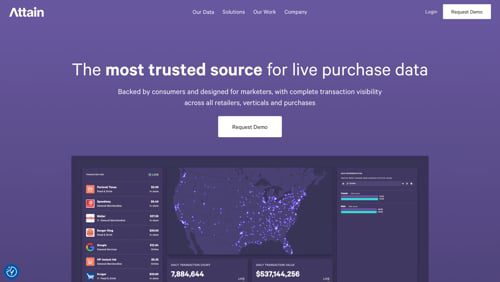
Attain expands OutcomeHQ with predictive AI for marketing results.Attain, a provider of live permissioned purchase data for marketing, has debuted OutcomeAI Summaries, a capability within OutcomeHQ, Attain’s data platform, that instantly transforms live purchase data into strategic insights. According to Attain, OutcomeAI enables marketers to anticipate what’s working and what’s coming next across the media lifecycle. OutcomeAI Summaries surface campaign and brand insights while campaigns are live, providing recommendations that complement existing tools and accelerate decision-making, according to Attain.
Attain
PayPal launches buy-now pay-later in Canada.PayPal has launched Pay in 4, an interest-free, no-fee, BNPL service for Canadians to split eligible purchases of $30 to $1,500 into four equal, interest-free payments over six weeks. Payment options include debit, credit, or bank account. Consumers can pay early using the PayPal app or online. According to PayPal, there are no late fees, sign-up fees, or hidden costs. PayPal’s Purchase Protection covers eligible Pay in 4 transactions.
Block enables Bitcoin payments for Square sellers.Block, the payments infrastructure firm led by Twitter co-founder Jack Dorsey, has enabled Bitcoin payments globally for merchants using the Square point-of-sale platform. The integration allows merchants to accept Bitcoin at checkout with instant settlement via Bitcoin’s Lightning Network, with no fees until 2027. Sellers can automatically convert a portion of their daily card sales into Bitcoin as well.
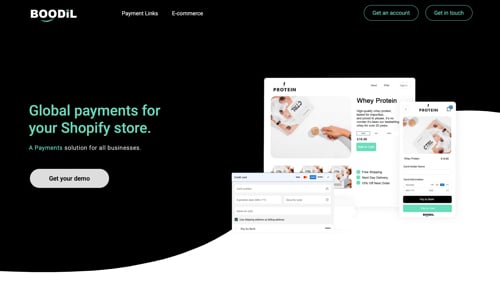
Cashflows partners with Boodil on card payments for U.K. Shopify merchants.Cashflows, a payments platform, has partnered with Boodil, a U.K.-based ecommerce payments technology provider, to enhance the payment experience for Shopify merchants across the U.K. The partnership combines Cashflows’ acquiring and gateway technology with Boodil’s payment infrastructure, providing Shopify merchants with a payment suite that offers card payments and digital wallets. Merchants complete their onboarding via Cashflows and can activate card payments via the Boodil application.
Boodil
Amazon Bazaar app expands Haul to 14 new destinations.Amazon has announced a standalone shopping app called Bazaar, part of its global Haul low-cost shopping experience. Amazon Bazaar is initially available in 14 locations: Hong Kong, Philippines, Taiwan, Kuwait, Qatar, Bahrain, Oman, Peru, Ecuador, Argentina, Costa Rica, Dominican Republic, Jamaica, and Nigeria. Bazaar supports local currency options and multiple languages, including English, Spanish, French, Portuguese, German, and Traditional Chinese. Customers can use their existing Amazon credentials or create new accounts.
Inriver expands product content distribution with Shopify and Affiliated Distributors.Inriver, a product information management platform, has announced partnerships with Shopify and Affiliated Distributors. Inriver says its Shopify adapter pushes enriched product details directly into a Shopify store through secure APIs. Inriver’s partnership with Affiliated Distributors combines the latter’s eContent Service with Inriver’s PIM, enabling suppliers to syndicate product data and digital assets to a network of more than 230 independent distributors. Through the Affiliated Distributors’ channel in Inriver, vendors can share accurate content faster.
Firmly launches Buy Now platform for agentic commerce.Firmly, a transaction layer powering shoppable content, has launched its Buy Now platform to standardize fragmented commerce protocols and make products shoppable anywhere. Firmly’s centralized Model Context Protocol server provides access to structured product, pricing, availability, and fulfillment data in an AI-readable format. Features include consolidated protocol management, a cryptographic audit trail, and an agent reputation manager.
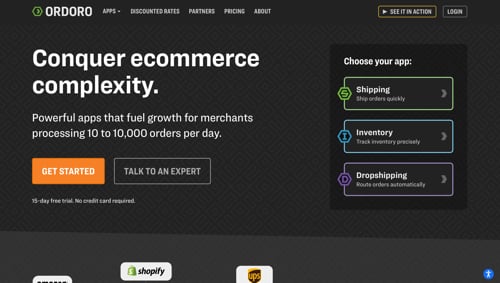
Multichannel operations app Ordoro integrates with Miva ecommerce platform.Ordoro, a provider of multichannel ecommerce operations software, has announced direct integration with Miva, an ecommerce platform. This API-driven integration gives Miva sellers access to Ordoro’s post-checkout tools, including bulk shipping, automated inventory syncing, dropshipping management, and order routing, all from a centralized dashboard. Merchants can keep stock levels synced in real time across multiple sales channels and warehouses, and automatically route orders and handle complex product catalogs.
Shopline and Lexore partner on AI-powered customer intelligence for merchants.Shopline, a global commerce software provider, has partnered with Lexore Spark, an AI-powered commerce platform to help direct-to-consumer brands with product development and marketing. By integrating Lexore Spark into Shopline, merchants can test concepts with real customers, gather instant feedback, and launch what’s proven to sell. This integration provides Shopline merchants with real-time, in-depth insights at scale, enabling them to curate more personalized shopping experiences.
ECI Software Solutions launches built-in ecommerce AI agent.ECI Software Solutions, a provider of AI-powered business management software and services, has launched its ecommerce AI agent, a built-in tool within the company’s EvolutionX B2B ecommerce platform. ECI’s AI agent (i) provides real-time access to sales, orders, and customer behavior and (ii) automatically enriches product listings with additional details and relevant keywords to improve organic search rankings, visibility, and conversions. Intelligent pattern recognition evaluates orders, detects anomalies, and flags suspicious activity, per ECI.
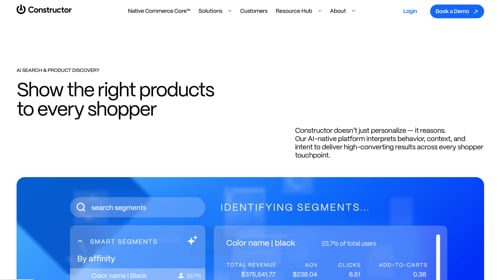
Constructor, a search platform, releases AI Product Insights Agent.Constructor, a search and product discovery platform for enterprise ecommerce companies, has released its AI Product Insights Agent, a virtual expert on retail product detail pages. According to Constructor, the agent combines generative AI with rich ecommerce data, including on shopper behavior, product specs, and real-time session context. Shoppers can ask questions about the products they’re viewing, choose from frequently asked prompts, and get context-aware answers.