Google has published documentation for a native link between Google Business Profile and Google Analytics, bringing local metrics like calls and direction requests into Analytics reports. The link may not appear in every Analytics account yet.
What Shows Up In Analytics
Once a profile is linked, a Google Business Profile section appears in your reports. It includes seven metrics: interactions, website clicks, calls, directions, messages, bookings, and menus. You create the link in the Analytics Admin panel, under Product links.
What The Link Doesn’t Do
If you link more than one profile, Analytics combines the metrics across all of them. You can’t segment or filter by an individual location. The metrics also can’t be used in explorations, comparisons, or filters, and the integration doesn’t work for subproperties.
Analytics keeps Business Profile data for six months. Reports won’t show anything older, even if your Analytics date range goes back further.
Analytics also differs from the Business Profile dashboard in one way. It shows every Business Profile metric regardless of your business type, while the dashboard hides metrics that don’t apply to you.
Why This Matters
Until now, Analytics could see Business Profile traffic only through UTM tags on your profile links, which mostly catch website clicks. Calls, directions, and bookings happen on the profile itself, and a native link brings those local actions into Analytics alongside web data. For a single-location business, that consolidation arrives in a tool they already use. Multi-location brands and agencies get less from it than a single-location business does.
Looking Ahead
Google’s help document doesn’t say whether the link is available to all Analytics accounts, or whether per-location reporting will follow. Analytics holds six months of Business Profile data, so it shows recent local trends rather than a long-term record. For now, the Business Profile dashboard, exports, and the Performance API still provide more location-level detail than the Analytics integration.
Ann Handley posted something on LinkedIn last week that stopped me mid-scroll. She’s a Wall Street Journal bestselling author and one of the most respected voices in marketing, and she wrote:
Her post went on to ask a question that nobody in the AI training industry seems to be asking: “Why do we keep teaching people how to use AI – without ever teaching them when not to?”
I messaged her. I had to know where someone would go to learn that.
Her honest answer: “I don’t know of a course that teaches exclusively this. At MarketingProfs, our sessions about AI typically include a few slides that touch on when not to use AI, or how to protect against hallucinations, but I don’t know of a whole session or series.”
She added, “I think that’s actually the story, and why I wrote what I wrote. We have an entire industry built around AI skills training – prompt engineering bootcamps, certification programs, tools tutorials, a million LinkedIn posts about the perfect prompts you need to do this or that or else you’re falling behind. What we don’t have is anything that asks: when should you put the tool down? When does using it cost you something you didn’t mean to give up?”
That gap is real, and it matters more than the AI training industry currently acknowledges.
Prompt Literacy Takes An Afternoon. Judgment Literacy Takes Years
The distinction Ann draws is not subtle once you see it. Prompt literacy is teachable in an afternoon. You learn the syntax, the structure, the iterative refinement loop. You learn to be specific, to add constraints, to tell the model what not to do as well as what to do. This is genuinely useful and genuinely learnable quickly.
Judgment literacy is something else entirely. It is knowing when the speed of AI output is actually eroding something you needed to build slowly. It is recognizing when the struggle itself is the point, when the friction of not knowing the answer yet is what produces the expertise that will matter later. It is understanding, as Ann put it, “when AI helps and when it shortcuts the very struggle that teaches us something.”
One commenter on her post put it precisely:
“Prompt literacy is teachable in an afternoon and judgment literacy takes years, because judgment is mostly knowing the value of the struggle you’d be skipping.”
I’ve been teaching an online course on AI content that audiences actually trust for several years. And I’ve spent recent months analyzing what the AI training landscape actually offers practitioners. The pattern is consistent. The courses that exist (and there are now many of them) teach you what tools can do. The better ones teach you how to deploy them strategically. Almost none of them teach you when to put them down.
The AI training industry has a structural incentive problem. Courses that teach you to use tools generate demand for more tools, more courses, more certifications. There is no business model for teaching restraint. Nobody is building a prompt engineering bootcamp whose primary lesson is “sometimes don’t.”
But the cost of skipping the judgment question is real and measurable. Anthropic’s own research found that junior engineers who leaned heavily on AI coding agents demonstrated weaker understanding of their work when tested afterward. When the tool produced output, their struggle that would have built expertise did not happen. The output and the expertise are not the same thing.
For SEO professionals and content marketers specifically, the exposure is direct. MIT’s AI Labor Exposure Map, which I wrote about last week, found that nearly three-quarters of the time a marketing specialist spends at work goes to tasks that AI can already handle. The question is not whether to use AI for those tasks. For many of them, you should. The question is which tasks in that 74% are actually the ones where the doing is the learning, where outsourcing the execution also outsources the understanding you needed to build.
That question requires judgment. It cannot be answered by a prompt.
Culture, Not Coursework
When I asked Ann where practitioners should go to develop this judgment, her second message reframed the question entirely.
“Do we actually need a course? What we need instead is permission and better modeling. Leaders who visibly choose the long road. Managers who say out loud when they are not going to use AI for certain things, and here’s why. Individuals who see the value. Said another way: culture not coursework.”
That reframe is worth sitting with. The judgment about when not to use AI is not a skill that gets transmitted through a certificate program. It is a professional norm that gets transmitted through observation, through watching someone you respect make a deliberate choice to do something the slow, human-fumbling-in-the-dark way, and then explaining why.
Ann has a book coming out in February 2027 from Penguin Random House called “ASAP (As Slow As Possible): When to Take the Long Road in a Shortcut World.” The title captures the tension precisely. In a professional culture that has made speed the primary virtue, choosing slowness requires not just judgment but courage: the willingness to be seen taking longer when everyone around you is accelerating.
What Practitioners Can Actually Try Right Now
Ann’s point about culture rather than coursework is correct in the long run. But while that culture is still forming, practitioners need something concrete. Here is a workflow worth replicating, drawn from an experiment I ran with the editorial team at The Acton Exchange, a nonprofit community newspaper in Acton, Massachusetts, in November 2025.
The team faced a deadline problem. A steering committee had just held a three-hour working session on a critical school district reorganization question, reviewing 156 pages of materials. The meeting wasn’t recorded, which meant no transcript was available. But the 101 pages of supplemental information and 55 pages of public comments the committee had received ahead of time were accessible.
So, the team tried something new. We crafted a detailed prompt specifying what the article needed to accomplish: accurate and trustworthy information, a compelling story, relevant to residents. We uploaded all 156 pages to four AI engines simultaneously: ChatGPT, Gemini, Perplexity, and NotebookLM. Each engine took a different route from the same prompt and the same source material. ChatGPT produced 748 words focused on data and process. Gemini produced 712 words focused on why the status quo was no longer viable. Perplexity produced 1,232 words focused on what the options meant for residents. NotebookLM produced 1,506 words organized around five surprising truths.
We reviewed all four drafts together at an all-hands editorial meeting. Perplexity’s draft was the most accurate and the most useful as a foundation. We chose it as our starting point. Then we did what no AI engine could do: We added direct quotes from people who were in the room, reflecting the community voices that the Acton Exchange exists to represent.
The key lesson from this experiment is not which engine performed best. It is what the process revealed about judgment. Town Manager John Mangiaratti had observed a few weeks earlier that the tools were helpful for the first 75% of content, but that “the remaining 25% of details, nuance, and context are either missing or incorrect.” Superintendent Peter Light agreed, adding that quality improves with better input prompts.
That 75/25 split is a practical frame for any content workflow. Use AI to get 75% of the way there quickly. Then apply human expertise, primary source verification, and direct observation to close the gap. The 25% that requires a human is not a bug in the workflow. It is where the judgment lives.
Ann Handley is right that the real skill is judgment: knowing when speed is useful and when it actually erodes something you needed to build. The Acton Exchange experiment didn’t resolve that question. It made the question visible in a way that a prompt engineering course never would.
Prompt literacy gets you to 75%. Judgment literacy is what closes the rest.
In a recent AGI House interview, Sergey Brin described Gemini as a system whose capabilities are not just evolving but integrating world knowledge across languages and modalities. He said the software that AI runs on has also evolved beyond what it was originally designed for, and while Brin can envision Gemini achieving AGI, he also couldn’t see what comes next.
AGI: Artificial General Intelligence
AGI is a level of AI that can learn, understand, and apply knowledge across tasks in a manner similar to humans. Today’s AI can produce useful answers, write code, analyze images, and solve many narrow problems, but it does not yet understand the world or independently apply knowledge across domains the way a human can.
OpenAI, Google DeepMind, and Anthropic are all developing AGI, but they emphasize different reasons for what they want to do with it. OpenAI focuses on economic benefits, Google DeepMind emphasizes scientific discovery, and Anthropic prioritizes human progress.
Next Big Thing: AI Capabilities Are Converging
Brin said that Google’s earlier AI progress relied on specialized models that were built for specific tasks. But he said that Gemini is increasingly achieving state-of-the-art performance across multiple domains like mathematics and scientific reasoning. What Google is seeing is that capabilities that used to rely on models trained to do specific things are now giving way to model families that can do it all: convergence.
He also said that convergence was something that happened; it wasn’t something he expected when Google began developing AI.
The context of his answer was a question about what the next big thing is, with his answer being convergence.
Brin responded:
“I think the exciting thing is that all of these things are converging to the same general models.
In the past, we would have to have specialized models. And in the case of protein folding, we obviously still do.
But increasingly, our main Gemini LLMs can be the state-of-the-art for math, for example, and for other kinds of scientific questions. So that convergence is, I don’t know, I guess it’s not something I really would have predicted at the outset. But it’s been kind of incredible to see.
And I guess baked into that is this concept of transfer, just the idea that when you train for a certain class of problems, let’s say you’re training for coding, that that actually can help your math reasoning and vice versa.
And that’s been really exciting to see… the multimodal capability also is an example of that. Like, can you actually get a transfer from being able to process images to actually being able to think through kind of geometric text problems too.”
Transfer learning is one reason convergence is happening. Transfer learning is where you train a model in one thing and it turns out that it has benefits in accomplishing tasks in something else that’s seemingly unrelated. So what’s happening now is that Google is finding that combining things like vision training, mathematics and reasoning are contributing to improvements across multiple capabilities.
Transformers Are “Weirdly Flexible”
Brin was asked if transformers will play a role in AGI. Transformers are the software that AI runs on and the breakthrough that enabled things like ChatGPT. Brin’s answer mentions MOE, which stands for Mixture Of Experts. MOE is a technique for routing specific tasks to specialized internal “experts” to increase efficiency.
For the question of whether AGI will run on transformers, Brin answered:
“Transformers have been weirdly flexible. We use them for image and video in addition to text. So they’ve exceeded their original capability.
Now, to be fair, along the way, they’ve also changed. I mean, we have whatever, sparse kind of MOE, transformers. I mean, there are a lot of little details that have shifted along the way, so it’s not like the exact same thing as the transformer paper.
If I could guess, could something close to that be AGI? I would say yes.
That’s just my guess, just because they’ve been able to evolve so much.
But like I said, they are changing. It’s not like the exact same thing as the original transformer paper.”
World Models Are Converging With Gemini
Brin was asked if world models would help AI achieve AGI, if that’s a part of reaching that goal. A world model is an AI’s internal simulation of reality that helps it anticipate what might happen next. By predicting the consequences of different actions, it can make better decisions and plan ahead.
He mentioned Google’s Gemini Omni as an example of this direction in AI. Gemini Omni was introduced in mid-May at Google I/O. Google describes it as their new “any input to output” multimodal AI model family. It combines Gemini’s reasoning abilities with generative media capabilities, starting with video creation and editing. Google describes it as a model that can eventually “create anything from any input.”
The question asked was:
“What’s your perspective on how world models can help reach AGI?”
Brin answered:
“Yeah, I mean, world models are like video, basically, models. And I guess there’s a couple– people talk about AGI pretty broadly.
I think of it as, I think of AGI as the idea of, the AI can actually improve itself.
But other people, and I think probably those people are more correct, sort of think AGI means, well, the AI needs to be able to do anything a person can do.
And those are two different things.
So to do anything a person can do, you absolutely need to be able to understand and interact with the physical world.
So for that, being able to you know, dream, imagine what’s going to happen in the world if you do something and comprehend it is obviously important.
So, I think the world models, yes, if you’re going to do everything and that, you know, extends to robotics and things like that, world models are key.
And yeah, you guys have probably had more time to play with our Gem Omni model honestly than I have, because I’m deep into self-improvement game.
But yeah, we’ve been working on that for a long time, Omni’s the latest version of that.
Omni is also pretty cool because it’s just the same, you know, Gemini, like we trained it also with all the text and all the other things, trains exactly the same way.
The fact that these converge is kind of amazing. But yes, you need that capability for this ability to interact physically.”
The takeaway is that Gemini is taking a new direction with the convergence of world models. It’s the next stage of growth.
What Comes After AGI?
Someone asked Brin about what comes after AGI, which was a really good question. What was interesting about Brin’s answer is that he didn’t have one. Brin’s response was that he couldn’t really see beyond it. He compared AI to previous technology waves like the web and mobile computing, but he did not identify a paradigm of what comes next.
The implication is that figuring out what comes after AGI would itself be a major opportunity.
He said:
“Wow, that’s a great question.
What’s sort of next after we hit AGI?
I mean, I think everybody is pretty focused on accelerating the growth in AI right now. What comes after?
We started with obviously the web and internet search. We kind of went through the mobile generation, which was another pretty big explosion.
I guess now people are– now AI is a huge new industry trend. And what comes after that?
Boy.. I mean, I think if you can answer that, you’ll have a fantastic company on your hands.”
What It All Means
Brin sees AI moving toward AGI through convergence.
Capabilities once handled by separate models are merging into broader model families.
Transfer learning helps one kind of expertise improve performance in another.
Transformers continue to evolve.
World models may be Gemini’s next stage of growth.
It may be that nobody knows what comes after AGI until they’ve achieved it.
OpenAI, Google DeepMind, and Anthropic are all working toward creating AGI, prioritizing different goals for it.
Brin’s description of Gemini offers a glimpse into how Google thinks AGI may be achieved. He described a process of convergence, where capabilities that once required separate systems are increasingly appearing within the same model family. One reason this is happening is transfer learning, where training a model in one domain improves its abilities in another.
That same convergence is now extending into world models. Rather than treating physical-world understanding as a separate discipline, Google is integrating those capabilities into Gemini itself. Brin pointed to Gemini Omni as an example of how reasoning, multimodal understanding, and world-model capabilities are increasingly becoming part of the same system.
What comes after AGI remains an open question. Brin said he can imagine current AI architectures continuing to evolve toward AGI, but when asked what follows it, he did not have an answer. If AGI is the next frontier, whatever comes after it could be the foundation of an entirely new generation of companies and technologies.
Welcome to the week’s Pulse: updates affect how you measure AI search visibility, whether you can opt out of it, and how the completed core update reshaped rankings.
Here’s what matters for you and your work.
Google Adds AI Search Controls And Reports To Search Console
Google is testing two new Search Console features for AI search visibility. A toggle lets you control whether your site appears in AI Overviews and AI Mode. Dedicated performance reports show how your URLs appear in AI features across Search and Discover.
Key facts: The reports cover impressions, pages, countries, devices, and dates with hourly granularity. Click data isn’t included. Google says it’s working with website owners to decide which metrics to add next. Both features are rolling out to a subset of UK websites first.
Why This Matters
Until now, AI-driven visibility was bundled into standard Search Console data with no way to isolate it. The new reports give you a dedicated view of which pages appeared inside AI answers and in which countries.
Impressions tell you how often your pages appeared, but not whether anyone clicked through. That gap has been the central question in AI search measurement for over a year. This launch doesn’t close it yet.
What SEO Professionals Are Saying
In a LinkedIn post, Glenn Gabe, President of G-Squared Interactive, wrote:
“AI reporting coming to GSC! Awesome! No click data. NOT Awesome.”
UK Regulator Requires Google To Let Publishers Opt Out Of AI Search
The UK’s Competition and Markets Authority has imposed a conduct requirement on Google under its digital markets regime. Publishers will be able to opt out of having their content used in AI search features.
Key facts: Google must let websites opt out of AI Overviews and AI Mode, opting out won’t hurt their position regular search results. Google must also let publishers opt out of content being used to train AI models. They have nine months to comply
Why This Matters
This is the first time a regulator has required the separation of AI-feature participation from standard search indexing. Publishers have wanted this since AI Overviews launched. The only previous option also removed them from standard snippets.
Publishers in the UK now have a regulatory backstop for controls that Google is providing voluntarily elsewhere. The CMA says it will announce further action on Google’s search business in the coming weeks.
What Search Industry Professionals Are Saying
In a LinkedIn post, Stuart Forrest, formerly Global SEO Director for Publishing at Bauer Media, wrote:
“The CMA has announced a win for publishers on AI search but this is a win for Google.”
Todd Davies, Competition Law PhD Candidate at University College London, wrote:
“In my view, the ability to opt-out is little more than a consolation prize for publishers.”
Google’s May 2026 Core Update Complete After Volatile Rollout
Google’s May core update finished rolling out on June 2, lasting 11 days.
Key facts: Third-party tracking tools showed elevated volatility at several points during the rollout. Google’s guidance suggests waiting at least a week after a major update finishes before analyzing data.
Why This Matters
The update is the fourth confirmed entry on Google’s Search Status Dashboard this year. That’s roughly one confirmed ranking-related event every six weeks so far.
Some practitioners reported regaining traditional rankings while losing visibility in AI-generated responses from the same update. That split means checking both surfaces, not just organic positions.
What SEO Professionals Are Saying
In a LinkedIn post, Aleyda Solís, SEO Consultant and Founder of Orainti, posted:
“Source type fit mattered more than authority alone.”
Danielle Pardoe, AI Marketing and eCommerce Specialist, Founder of Infinity1 and TradieM8, commented:
“We’ve seen clients recover traditional rankings but still lose AI answer placements from the same update.”
Google launched Search Profiles, a customizable page that pulls together a creator’s YouTube channels, social accounts, and links in one place on Google Search.
Key facts: Creators need at least 100,000 followers on YouTube, Instagram, or X to be eligible. TikTok requires 300,000. Search Profiles are currently available only in the United States. Claiming a profile can trigger the creation of a knowledge panel or enhance an existing one.
Why This Matters
The profile also serves to connect people with more content from the websites they follow. When you follow a publisher through their profile, you may see more of their content in Discover.
The 100,000-follower minimum leaves out most independent creators and small publishers. That threshold limits the feature to established accounts, at least at launch.
Theme Of The Week: AI Search Visibility Starts Getting Infrastructure
For over a year, two questions have defined AI search for publishers. How do you know if you’re in it, and can you control whether you are?
This week delivered answers from two directions. Google began rolling out dedicated AI performance reports and testing an opt-out toggle in Search Console. The UK imposed a legal obligation on Google. Between them, the infrastructure for managing your AI search presence started moving from idea to reality, even if the tools are still limited in scope.
Launching a new website, whether it’s a redesign, replatform, or full CMS migration, is often treated as a milestone for a business. But for SEO teams, it can quickly become a high-risk transition. Even migrations that appear technical sound at launch can trigger significant visibility and traffic declines in the months that follow.
In more severe cases, the impact of an “SEO migration hangover” can persist for 12 to 18 months, impacting rankings, organic revenue, and overall search performance long after the new site deploys.
What Is A Migration Hangover?
A SEO migration hangover is the prolonged, significant, and often avoidable drop in organic traffic that follows a website migration. A migration hangover is a long-term loss of authority and traffic following a poorly executed domain move. Normal volatility differs significantly from a hangover.
Normal volatility is only a temporary website migration traffic drop, with less fluctuation as Google recrawls, reprocesses, and re-evaluates changed content. In my experience, a normal, temporary dip in site traffic is typically 10-30%, while a damaging hangover causes a traffic drop of 50% or more.
Google needs time to process structural changes primarily due to the immense scale of its infrastructure, requiring months to re-crawl, re-evaluate, and re-index trillions of pages, especially after core updates.
The majority of post-migration traffic drops share a common root cause. Site migrations are too often scoped as technical projects, a handoff between developers and designers, rather than strategic business decisions with significant SEO implications. When teams launch without SEO input, the consequences can follow a business for months.
Some of the most common reasons for a website migration drop include:
Broken Or Missing 301 Redirects
301 redirects for an SEO migration are responsible for passing link equity to new URLs. When they’re missing or wrong, Google will treat the old page as if it’s gone and strip its ranking power. Even one missed high-authority URL can cause a significant dip in traffic.
Common Redirect Errors:
Missing redirects entirely.
Temporary 302 redirects used instead of a permanent 301.
Redirect chains with multiple hops that slow crawling.
Redirects to irrelevant pages.
Noindex Tags Left Over From Staging
Leaving noindex tags on a live site after the migration is a classic and devastating mistake. Developers set pages to noindex during staging to prevent premature indexing, then forget to flip it back.
Google is instructed to ignore the pages and starts to de-index the entire site. Once the tags are removed, it can take anywhere from a few days to several weeks for Google and other search engines to re-index all pages.
Canonical Tags Pointing To Old URLs
If canonical tags still reference the old domain or URL structure post-migration, Google will continue to credit the old URLs and ignore the new ones. This will delay the transfer of ranking signals. New pages will fail to index because Google sees the old URL as the true authority.
This is one of the most common causes for a migration hangover, as it’s not always picked up on typical crawling tools without manual review.
Content Changes That Hurt Relevance
Sometimes the new design includes rewriting copy or removing pages that ranked well. If the content changes, the keyword relevance changes, and the rankings will follow.
Content changes that can hurt relevance include:
Content edits (heading structures, body content, internal linking patterns).
Missing content elements (images, videos, body copy).
Page Speed Regression
A new design or new CMS can quietly make the site slower. Slow, clunky sites hurt rankings and the user experience. A performance regression after the migration can chip away at rankings over time since Google uses Core Web Vitals as a ranking signal.
Unnecessary Changes To URL Structures
While some URL structure changes are unavoidable during a replatforming project, for example, moving from WordPress to Shopify, where default structures like /collections/ and /products/ are introduced, unnecessary URL changes can create avoidable ranking volatility and visibility loss.
Even when 301 redirects are implemented correctly, redirects are not a perfect transfer of authority or relevance. Changing URLs at scale forces search engines to reassess page signals and process new site structures. Google can take time to fully understand the relationship between the old and new URLs, particularly on larger or more complex websites.
How To Know If You Have A Migration Hangover (Vs. Normal Volatility)
Changes in traffic might lead business owners to wonder, “Is this normal, or is something broken?”
In my experience, normal volatility looks like a 10-20% dip that stabilizes and recovers within two to six weeks with no ongoing errors in Google Search Console.
A migration hangover looks like a drop exceeding 30-50%, new crawl errors or 404s appearing in Search Console, indexed page counts falling, and no sign of stabilization after four or more weeks.
A successful website migration begins many months before the code changes. The pre-migration phase will determine whether the migration will lead to growth or a loss in traffic. Here are a few website migration SEO best practices:
Crawl your existing site before launch and document all URLs, title tags, and canonical tags.
Map every old URL to its new destination and test all 301 redirects in staging.
Audit structured data and schema markup to ensure it migrates correctly.
Benchmark page speed before migration so you have a baseline to compare post-launch.
Confirm robots.txt and noindex tags are set correctly on the live site before going live.
The migration doesn’t end when the site goes live. During the post-migration monitoring period, it’s critical to catch issues as soon as possible. This will ensure your SEO performance will recover as the business intended. To recover traffic after a site migration, start with a crawl of the new site to identify potential technical errors.
Developers should fix the highest-traffic pages first, then cross-check canonicals, re-submit the sitemap, and verify noindex isn’t blocking key pages.
Any content that changed significantly may need to be restored or re-optimized for target keywords. It’s common for fluctuation to happen during the migration.
A Migration Hangover Case Study
In this example, a SaaS website introduced an SEO agency halfway through a site migration. They staggered the redesign and partially relaunched initiatives while the old version of the site sat, still live, on a “legacy” subdomain that was crawlable and accessible to Google.
Content delays, optimization approvals, and a lack of content transfer caused a loss in visibility. The new design offered minimal space for content creation, which, if the agency had been bought in sooner, would have been discussed during the process.
Multiple redirects, broken pages, and external domain migrations were left outstanding with no priority, despite the impact on the main domain being clear.
The website migration took place at the peak of the website’s visibility, indicating the significant impact that the hangover had.
A Migration Success Story
It doesn’t have to be this messy, though. Bringing in an SEO partner prior to the site migration taking place can be highly impactful.
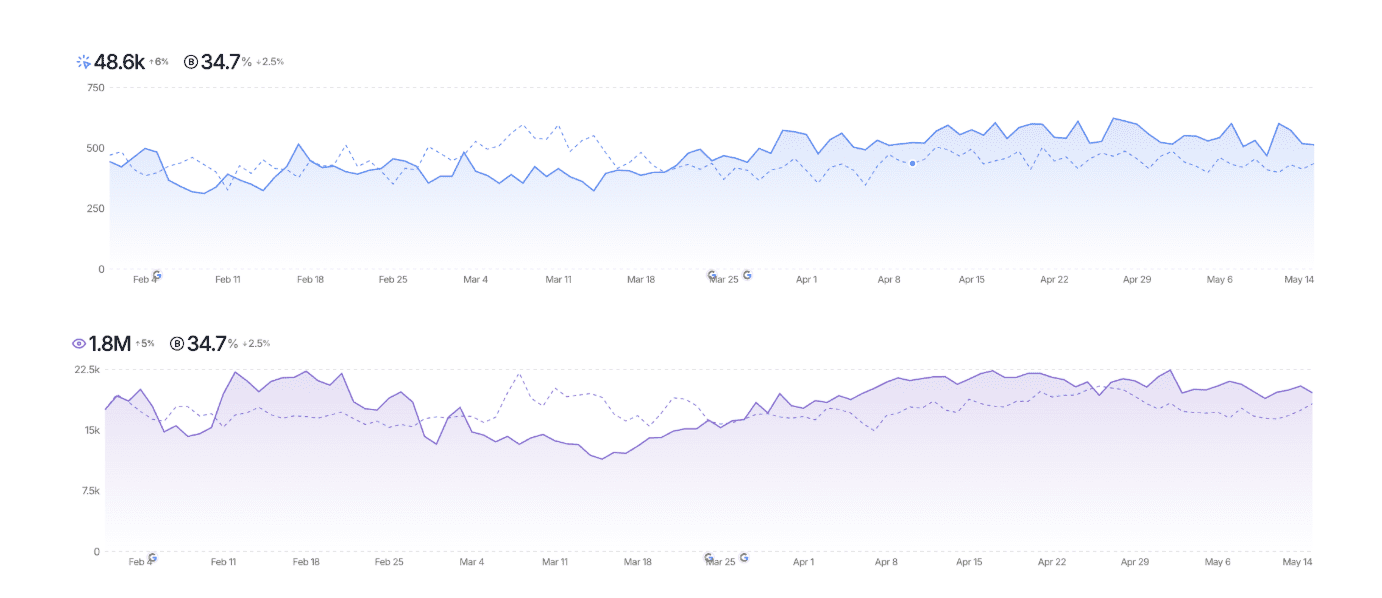
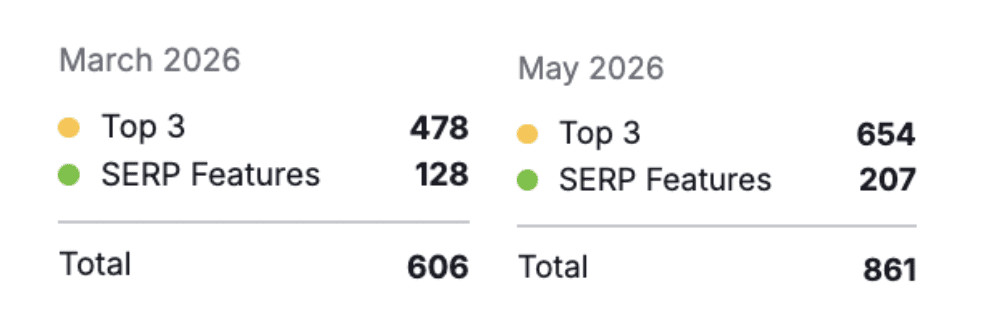
In this case study, an aftermarket parts distributor (ecommerce site) rebuilt their website from the ground up with a new platform, new structure, new URL architecture, and new design. They had momentum on the old site and weren’t willing to risk it. In just three months post-migration, they generated over $750,000 in organic revenue, top 3 ranking positions increased to an all-time high, both clicks & impressions increased by 5% vs. the previous period, and they saw month-over-month gains across every user acquisition metric.
Image from author, May 2026Image from author, May 2026
This came from a well-managed migration process with clear pre- and post- migration steps and, bringing in the SEO team from the initial design phase through to post-deployment.
Final Thoughts
A messy website migration doesn’t have to happen.
A website migration can unlock major improvements for a business – from better user experience to more scalable technology and long-term growth. But without a clear SEO migration strategy, even well-intentioned redesigns that may look great for the brand can result in prolonged traffic loss and reduced organic revenue.
The difference between a successful migration and a damaging one usually comes down to proper preparation, collaboration, and post-launch monitoring. Businesses that involve SEO teams early in the planning stage are far more likely to preserve visibility and maintain momentum after launch.
From initial feedback during the design and wireframing phase to auditing the existing site, protecting high-value URLs, validating technical SEO elements before and after deployment, and closely monitoring performance post-launch, businesses can significantly reduce migration risk and position the new website for long-term organic growth instead of recovery.
An analysis of SISTRIX visibility data by Aleyda Solis found a pattern in the final days of Google’s May core update. Sites that best fit a query’s intent, market, and result type tended to gain visibility, while sites a step removed from that fit lost ground.
It’s one tool’s data for two markets, taken at the tail of the rollout, so other datasets and regions may look different.
Solis says the pattern feels like a reset, where the destination type matters for each query. She mentions that authority still plays a role, but by itself, it doesn’t fully explain who benefits and who doesn’t.
Authority Alone Didn’t Explain The Winners
Some high-authority domains experienced drops, including nytimes.com and nih.gov.
Original sources gained while third parties dipped. For example, in the UK index, cambridge.org rose by 40.9% while the pronunciation tool youglish.com fell by 69.6%.
So the education category didn’t win or lose overall. What mattered was which source type fit the query.
UK Results Tilted Toward Local Sites
Local retailers gained while the .com version of the same brand fell in the UK index.
Amazon.co.uk rose by 21.3%, while amazon.com fell by 54.6% for UK users. In the US index, the same .com domains held roughly flat.
The pattern lines up with earlier work from Solis. Her analysis of AI search clicks across 10 markets found most clicks going to local domains rather than global defaults. She suggests international sites check for wrong-market ranking and weak country-specific signals.
It Wasn’t A Blanket Category Story
The data doesn’t support reading any whole category as a winner or loser.
Forums and Q&A sites pulled back, with reddit.com down 23.8% in the UK, but larger social and video platforms held flat to positive. Big marketplaces such as trip.com and indeed.com gained, so “aggregators lost” doesn’t hold either.
Solis notes the forum pullback could be a durable correction or end-of-rollout volatility.
Why This Matters
The takeaway is that authority may be too broad a comparison point on its own.
For each query that matters, Solis suggests checking which result type gained after the update, then confirming your page is that type and not a weaker echo of a source that already owns it.
Her read of May continues what she saw in the March core update, which she described as a move toward stronger default destinations.
Looking Ahead
Google’s core update documentation recommends waiting at least a week after a core update completes before drawing conclusions from Search Console data, which puts the earliest clean read around June 9.
Different tools measure visibility in different ways and can rank the same domains differently, so treat this as one early signal rather than a settled picture.
AI is driving an increase in lawsuits: A new study found that self-represented court filings more than doubled after 2023. Judges largely attribute the surge to chatbots.
Clearer filings, same odds: AI is helping people without lawyers write more coherent arguments, but it isn’t helping them win. Mounting a lawsuit involves far more than drafting text, experts say.
Chatbot-client privilege is unsettled law: Courts are split on whether conversations with AI tools like ChatGPT deserve the same legal protections as attorney-client communications, with conflicting rulings emerging from Michigan, New York, and Colorado.
Who pays when the chatbot is wrong?: Nippon Life Insurance sued OpenAI in March, alleging ChatGPT practiced law without a license. States are now weighing legislation to hold AI companies liable for bad legal advice.
Most days in her chambers, Judge Maritza Braswell, a federal magistrate judge in Colorado, sifts through stacks of documents written by people without a lawyer. Many of them can’t afford to hire a lawyer, and others have cases too weak or too small to interest one. She reads each one carefully, mindful of how daunting it is to walk into the courtroom alone.
Lately, like many judges across the US, she has seen a noticeable uptick in such filings. According to a new study that examined 4.5 million federal civil cases from 2005 to 2026, the share of lawsuits brought by self-represented people increased from 11% in 2022 to 16.8% in 2025. Within those cases, the number of filings made more than doubled from pre-2023 levels.
Judge Braswell puts that jump down to AI.
“I do correlate that to AI in part because I see AI use,” she says. As a tech-savvy judge who uses AI to vet court documents, she’s learned to recognize how large language models write. She can tell from the prose and at times, hallucinated cases and fabricated quotes.
“I’m also actually seeing better-drafted pleadings,” she says.
But while AI appears to be expanding access to justice, it doesn’t seem to be improving people’s chances of winning. Judges are also starting to question what kinds of rights and responsibilities large language models should bear as they step into lawyers’ shoes. For example, they ask whether a chatbot has a duty to provide good advice, as a human lawyer does. And a growing number of lawmakers across the US are starting to grapple with who should pay the price when chatbots dish out bad legal advice.
AI supercharges lawsuits
To test whether AI was driving the increase in lawsuits filed by people without a lawyer, the authors of the study, Anand Shah at MIT and Joshua Levy at the University of Southern California, ran 1,600 randomly sampled court documents through Pangram, a commercial AI-text detector. The share flagged as containing AI-generated writing rose from 1% in 2023 to 18% in 2026.
To Judge Braswell, that’s not necessarily a cause for concern. While the surge of AI-assisted filings might be adding to their workloads, she and many other judges find the cases easier to rule on because AI is helping people without legal training better articulate their arguments.
Court documents written by people without lawyers are notoriously hard to decipher. Some arrive as handwritten scrawls bordering on gibberish that judges take a while to decode. However cryptic, judges are required to read them charitably.
These days, Judge Braswell has been churning through motions drafted by AI faster than the ones written by the litigants. “I have to be really careful because some of them contain hallucinations and errors, but I can generally understand what they’re arguing better with AI assistance from them than without it,” she says.
The clearer filings let Judge Braswell hear them better. “If I understand an argument a little bit better, I’m probably going to be able to help a little bit more,” she says.
Online communities are springing up to trade self-help guides on using AI to sue. In December 2024, a viral Reddit post walked immigration applicants through suing the United States Citizenship and Immigration Services over delayed review of their applications: draft a writ of mandamus with Microsoft Copilot, pay a lawyer $150 to polish it, and file in the expedient District of Vermont. Cases filed by people without lawyers in Vermont rose from about 45 a year before 2022 to more than 1,100 in 2024.
Even so, people without lawyers are far more likely to lose their case than people with lawyers, and that’s not changing even with the addition of AI, the study found.
“It turns out that mounting a lawsuit is a complex, multifaceted task. Not all of it is just drafting text,” says Levy.
Chatbot-client privilege
Judge William Garfinkel, a federal magistrate judge in Connecticut, has served on the bench for three decades, pondering all sorts of questions about lawyers’ relationship with their clients. Lately, he has been wondering whether people’s conversations with chatbots dispensing legal advice should be privileged, the way their conversations with lawyers are.
“You can make a good argument that … conversations with large language models like Claude or ChatGPT or Grok should deserve some protection,” he says.
Courts are starting to grapple with this question. In February, a federal court in Michigan ruled that a self-represented person’s conversations with ChatGPT to prepare her case were work product—legal work that is shielded from the opposing side.
The decision came on the same day a federal court in New York held that documents a criminal defendant had generated using Claude were not privileged attorney-client conversations or work product. The court argued that Claude is not an attorney and that a user has no “reasonable expectation of confidentiality in his communication” with it because AI companies can disclose user data to third parties.
In March, Judge Braswell ruled that a self-represented person’s use of a chatbot should stay off limits. “It is true that AI systems like ChatGPT, Claude, Gemini, and others … collect user data for training and other purposes. But … that does not eliminate all expectations of privacy,” she wrote. Courts have since remained split on the issue.
Malpractice without a pulse
Some judges are also wondering whether a chatbot, like a lawyer, has a duty to provide good legal advice. Judge Allison Goddard, a federal magistrate judge in California, has noticed that people without lawyers often get the wrong advice from ChatGPT when trying to assess the value of their case during settlement negotiations. In one case, a plaintiff who slipped and fell in a store asked for $700,000 from the store, which was wildly more than the case was worth.
“Where are you getting the idea that you’re getting $700,000? Did you go to ChatGPT?” Judge Goddard asked. “Well …” the plaintiff mumbled. She then walked the person through the law to explain why ChatGPT was wrong and suggested a lower amount. “It’s like Dr. Google went to law school,” she says.
Then there’s the question of who’s liable when a chatbot makes such mistakes. In March, Nippon Life Insurance Company sued OpenAI alleging that ChatGPT practiced law without a license and helped a woman reopen a lawsuit that was already settled, flooding the court with frivolous filings. “ChatGPT is not an attorney,” the lawsuit said.
In May, OpenAI asked the court to dismiss the case, arguing that ChatGPT does not practice law. “ChatGPT is not a person and neither has nor uses any degree of legal knowledge or skill,” OpenAI said in its filing. The case is still pending before the court.
States have started to weigh legislation that would hold AI companies liable when their chatbots offer bad legal advice. New York introduced a bill in March that would bar chatbots from impersonating lawyers, even if they notify users that they are interacting with chatbots. In Congress, a series of bills have been proposed to ban chatbots from posing as lawyers, doctors, and other licensed professionals. The bills have yet to gain traction.
For now, people will continue turning to AI to be their lawyer. For many of them, the rewards outweigh the risks. Not long ago, when Judge Braswell asked self-represented litigants why they wanted a particular piece of evidence, they mumbled timidly. Now, they answer her questions confidently, having rehearsed with a chatbot.
“This is a really tough system to navigate. With AI, though, it gets a little less complex,” she says.
This is today’s edition of The Download, our weekday newsletter that provides a daily dose of what’s going on in the world of technology.
How courts are coping with a flood of AI-generated lawsuits
Most days in her chambers, Judge Maritza Braswell, a federal magistrate judge in Colorado, sifts through stacks of documents written by people without a lawyer. The number of these filings has more than doubled compared to before 2023. She puts that jump down to AI.
But while AI appears to be expanding access to justice, it doesn’t seem to be improving people’s chances of winning. Judges are starting to question what rights and duties chatbots should have as they stand in for lawyers. Lawmakers, meanwhile, are grappling with who should pay the price when chatbots produce bad legal advice.
How virtual power plants could provide energy for data centers
Would you take a payment to ramp down your electricity use? Would it change anything if you were doing so to help power a local data center? A new project backed by Google will put those questions to the test.
The company has signed a deal to fund a virtual power plant in the largest power grid in the US. The system will group together devices like electric vehicles and smart thermostats, paying customers to adjust their usage when the grid is stretched.
This story is from The Spark, our weekly newsletter giving you the inside track on all things climate. Sign up to receive it in your inbox every Wednesday.
The must-reads
I’ve combed the internet to find you today’s most fun/important/scary/fascinating stories about technology.
1 The EU has proposed new legislation to end its Big Tech dependence The laws aim to boost domestic cloud, AI and semiconductors. (CNBC) + US firms would be blocked from critical public tenders. (Reuters $) + It also wants to make sure non-EU actors cannot disrupt tech services with a “kill switch.” (The Guardian) + But the proposal needs to be negotiated with EU member states. (Politico $)
2 Intelligence agencies warn Chinese spies are recruiting on LinkedIn The Five Eyes alliance said Beijing is using job platforms for espionage. (BBC) + The spies are allegedly recruiting government and military staff. (Politico $) + The Chinese embassy in the UK condemned the accusations. (Bloomberg $) + Meet the man hunting the spies in your smartphone. (MIT Technology Review)
3 AI CEOs have called for a law protecting against biological weapons They warn that synthetic DNA could be used for bioweapons. (Wired $) + Sam Altman, Dario Amodei, and Demis Hassabis joined the call. (WSJ $) + No one’s sure if synthetic mirror life will kill us all. (MIT Technology Review)
4 Firms are using Reddit to manipulate ChatGPT and Google AI search They’re spamming subreddits to get posts scraped by chatbots. (404 Media) + What we’ve been getting wrong about AI’s truth crisis. (MIT Technology Review)
5 Meta keeps delaying the launch of its new AI model The new Muse Spark AI model API still has no release date. (WSJ $) + Which is hampering Meta’s plans to monetize its AI investments. (Reuters $)
6 For the first time, a US city has voted to permanently ban data centers Monterey Park, California, voted in favor of the move. (LA Times) + Should we be moving data centers to space? (MIT Technology Review)
7 China is betting on household chore training to advance robotics Data harvested in homes and factories provides a scaling edge. (Rest of World) + Gig workers are training humanoids at home. (MIT Technology Review)
8 Sam Altman will urge US lawmakers not to require AI model approvals He’s advocating against proposals for new AI rules. (Reuters $) + His move comes after President Trump signed a new AI order. (Wired $)
9 Quantinuum raised $1.68 billion in an IPO as quantum computing rises Investors flocked to one of the fast-growing sector’s leaders. (Reuters $)
10 Someone finally wants to hire philosophers: Silicon Valley Big tech hopes they will help build better machines. (The Atlantic $)
Quote of the day
“Historically, these companies have been very willing to play Russian roulette—and they’re playing another round.”
—Connor Leahy, an AI researcher, former hacker and US director of ControlAI, tells the Financial Times why he’s concerned about Anthropic’s relentless race to the top.
One More Thing
HENRY HORENSTEIN/GETTY
What an octopus’s mind can teach us about AI’s ultimate mystery
Emily Bender, a linguist at the University of Washington, has developed a thought experiment she calls the octopus test. It involves an octopus learning to copy patterns in human writing and produce squiggles in response. But does the animal actually understand the language or are we merely projecting meaning onto it?
Bender’s octopus is a stand-in for AI systems like ChatGPT. The intelligence we see in these machines is also projected on them by us. The same applies to consciousness: we may claim to see it, but it remains unclear whether it is really there.
Recent quarterly earnings reports from Walmart, Costco, and Dollar Tree suggest that consumers are still spending, but are looking for low prices and perceived value.
In May, Walmart reported a 7.3% year-over-year increase in revenue for the quarter ended April 30 (ecommerce-only sales grew 26%). Costco posted strong YoY sales growth — 6.6% excluding fuel — for the three months ended May 1. And Dollar Tree raised its outlook after reporting improving sales, up 7.2% YoY for the quarter ended May 2.
While they target different shoppers, all three retailers share a reputation for delivering relative value and inexpensive goods.
The benefits extend beyond pricing. Value-conscious shoppers can be more difficult and expensive to acquire. They compare prices, delay purchases, and look for reassurance before clicking the buy button.
Walmart, as an example, is known for competitive pricing and convenience. Costco has built its business on the idea that buying in bulk delivers better value over time. Dollar Tree appeals to shoppers seeking affordable essentials.
The common thread is not necessarily low prices. It is clarity. Shoppers quickly understand why the purchase makes sense.
Value and CAC
Customer acquisition cost depends on more than advertising rates. Conversion rates play an equally important role.
A shopper who visits three websites before making a purchase is less likely to convert on the first visit. So a single ad might require multiple clicks to earn a sale.
The result is a relatively higher CAC.
Hence some ecommerce merchants may struggle with customer acquisition costs even with well-managed advertising campaigns. The issue may be that shoppers need more evidence or time before purchasing.
Make Value Obvious
The takeaway here is that online retailers should focus on communicating value.
One way to communicate a product’s value is to focus on outcomes rather than features.
Consumers do not buy a backpack because it is made of 1,000-denier nylon (although this should still be in product specifications). They buy it for years of travel. Likewise, folks may care less about the particulars of a frying pan so long as their eggs won’t stick.
In a value-based shopping economy, the most effective marketing might be the signals that help shoppers justify a purchase.
Product pages can explain durability, warranties, savings, or long-term performance. Content marketing can demonstrate expertise, compare alternatives, or answer common objections. Reviews, testimonials, and guarantees can reduce perceived risk.
Each element provides evidence that the purchase is worthwhile, requiring less persuasion. Fewer doubts lead to higher conversion rates, making every advertising click more productive.
Walmart, Costco, and Dollar Tree each communicate value in different ways. The common thread is that shoppers rarely need to guess why the purchase makes sense. Ecommerce merchants may benefit from applying the same lesson.
Google is launching Search profiles, giving creators a page to pull their content together from different platforms.
The profiles show articles, videos, and social posts in one place. People can follow their favorite websites and creators to see more of their content in Google Discover.
What Search Profiles Include
Creators can customize their profile with an avatar, bio, website link, and linked social and video accounts.
Rene Ritchie, YouTube’s creator liaison, explained the feature in a video:
Ritchie added that creators can pin their latest work and add links to merch stores.
The profile also includes a “Follow on Google” button, Google’s blog post notes:
“People can easily follow sources from their profile, so they’re more likely to see that content on Discover, found on the home screen of the Google app.”
Where Search Profiles Appear
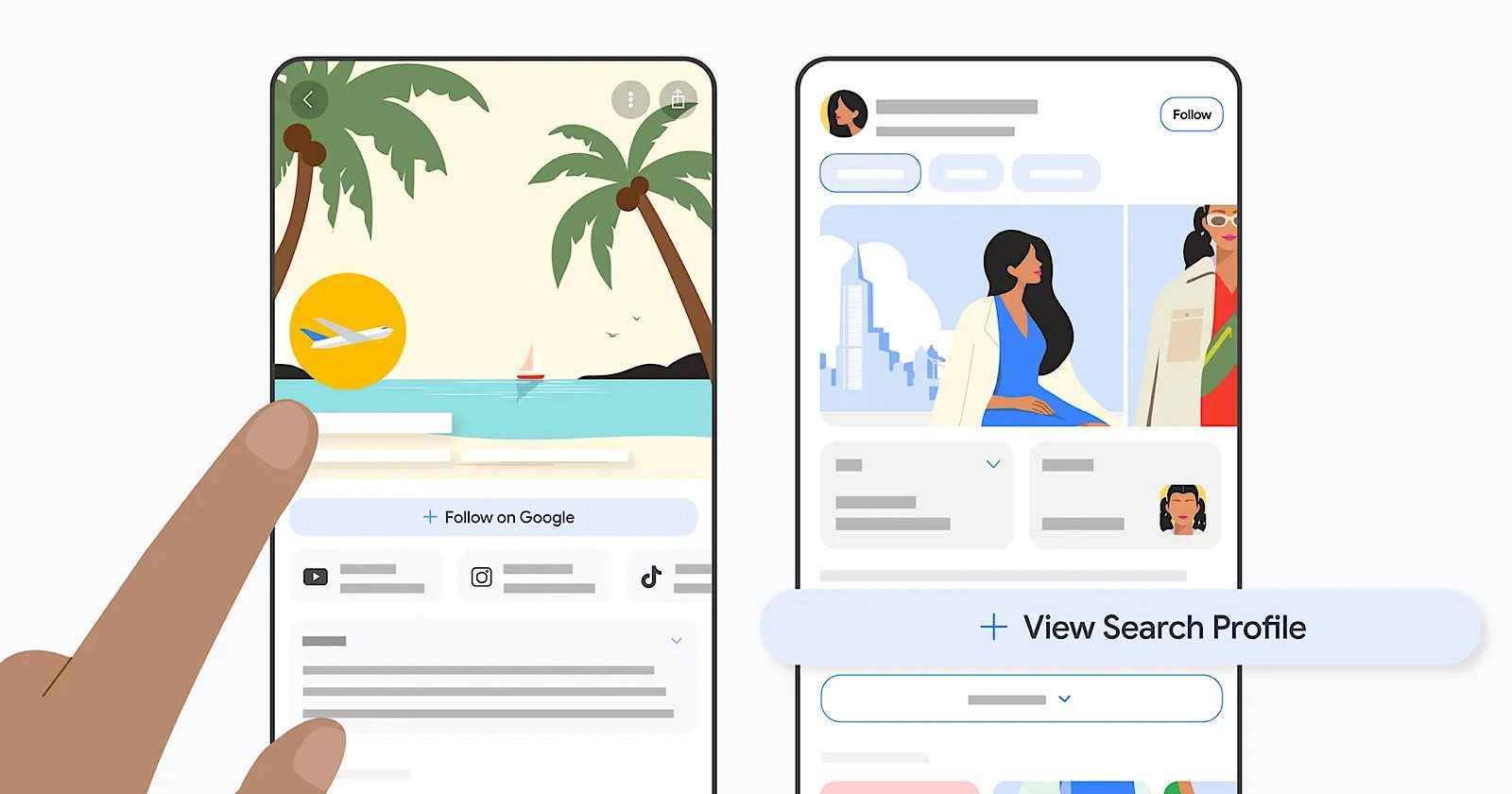
On mobile, profiles show up in three places. You can tap “View Search Profile” at the bottom of a knowledge panel in Search results. You can also tap a publisher or creator’s name above a Discover card, and each profile gets a direct URL that can be shared anywhere.
Eligibility Requirements
Not everyone can create a profile at launch. Google’s help documentation lists the minimum follower counts you need on at least one platform.
“To be eligible, we have to have a public account with at least 100,000 followers on a single supported platform, Instagram, YouTube, or X. If we only have a public account on TikTok, we have to have at least 300,000 followers.”
Creators must also be at least 18 years old. Google does allow someone 18 or older to create and manage a profile on behalf of a minor.
Profile handles are automatically set to match the your most-followed linked account. If that handle is already taken, Google assigns the next most-followed option.
After linking at least one qualifying social account, click “Create Profile.”
Any changes to a profile’s name, social links, or bio require Google approval. Suggested changes stay in “Pending” status until reviewed.
New content from linked platforms typically goes live within 24 hours, according to Google’s help page.
Knowledge Panel Connection
Claiming a Search profile could also get you a knowledge panel. Google’s blog post stated:
“Claiming a profile may trigger the creation of a knowledge panel for eligible publishers and creators. If you already have a knowledge panel, it will be enhanced with your updated avatar, latest content, and a direct profile link.”
That’s a new way for creators to get a knowledge panel without going through Google’s existing claim process.
Does A Profile Affect Search Ranking?
No. Google’s help documentation says creating a Search profile doesn’t affect ranking.
Any visibility benefit is in Discover, not Search. When someone follows a publisher, they may see more of that publisher’s content in their Discover feed.
Broader Context
Google has been adding publisher-facing tools to Discover over the past year.
In September, Google launched the Follow button for websites and creators on Discover. That update also brought posts from X, Instagram, and YouTube Shorts into the Discover feed alongside traditional articles.
Google later expanded its Preferred Sources feature to all languages in April. That feature lets people choose which websites they want to see more often in Top Stories and Discover.
Google’s February Discover core update also changed which websites appeared in the feed. Google said the update prioritized locally relevant content and reduced sensational material.
Search profiles provide something creators didn’t have before. They now get a Google-hosted page tied to Discover’s Follow button that they can customize themselves.
Why This Matters
Those who qualify can now shape how they show up across Search and Discover from one page.
The Follow button is the most important feature of the whole update, in terms of visibility. When someone follows your profile, they’re more likely to see your content in Discover.
Looking Ahead
Search profiles are launching in the U.S. only. Google said it plans to expand to more publishers and creators worldwide and add more capabilities.