10 tips to streamline your blog content workflow

Content production seems quite simple, in principle. You develop an idea, write about it, do SEO checks, and click publish. Simple, right? It never turns out that way, especially when working with a team. Miscommunications, last-minute changes, and confusion about what needs to happen when. We’ve all been there! Try these ten tips to streamline your digital content workflow and eliminate much stress.

Table of contents

Before we start

Before we start, remember that the ‘perfect’ content workflow probably doesn’t exist. After all, every piece of content is unique, so a one-size-fits-all process is unlikely to produce the highest quality results. If your high-quality, unique content is taking forever to finish, you might struggle to meet deadlines or keep to a schedule. If that sounds like you or your organization, take a look at our tips and see how you can improve.

1. Start the process with clear goals

Whether you’re working alone or as part of a bigger team, it’s important to have a clear idea of all the steps involved and how long each step might take. Not every digital content process is the same. For instance, social media posts don’t need to be optimized for search engines, while blog posts targeting organic traffic do. Regardless of your end goal, the first step is always to start with clear goals.

Want to cover all your bases? Try to answer as many of these questions as you can, as clearly as you can:

  • What topic are you focusing on? How in-depth will you go?
  • Who are you writing for? Who is your audience?
  • What are you trying to achieve? More website visits, increased sales, and more social shares?
  • How will people be able to find your content? Where will you share it, and when?

If you specify your ideas and plans clearly at the beginning, it can help you and your team align your plans. It also helps you to stay on track, which can save you a lot of back-and-forth later on!

Read more: Audience research: how to analyze your audience »

2. Identify contributors and stakeholders

If you’re working in a team, our next tip is as important as the first. Why? Even if you’re clear about your goals, does everyone involved agree with your action plan? That’s why you need to identify your essential contributors and key stakeholders.

Depending on how big your organization is and how well-developed your process is already, making a list of contributors and stakeholders could be a lot of hard work, or a total no-brainer. If you sometimes find that your digital content workflow reaches a bottleneck (or descends to total chaos) because blockers arise from unexpected sources, it could be a sign that you need to do more work in this area.

Once you’ve come up with your plan, it’s a good idea to share it with any essential colleagues who need to give approval in the end before you start doing the real work. If you can get these people to agree with your initial plan, you can refer back to this later to explain creative choices and decisions you might need to make. When you let key parties know what to expect, you can avoid a lot of “What is this? What were you thinking?” kind of conversations.

3. Visualize your content workflow

It can be beneficial to visualize your content workflow, even if it seems daunting. At a minimum, you should write out the basic steps. If you add boxes and arrows to link the steps together, this can help to make the journey through the steps clearer (especially if there are moments when you need to loop back and repeat an earlier step). You can create this however feels comfortable to you — you could choose basic office software like Microsoft Word or Google Docs (Yoast SEO has a handy Google Docs add-on), you could try more advanced software like Visio or Lucidchart, or you could sketch it out on paper. It’s up to you!

For instance, your workflow could look like the first example written out in steps, or like the image below if you use a visualization tool. If, like us, you’re working in WordPress or Google Docs with the Yoast SEO plugin enabled, you can incorporate the features that you use into your workflow too.

Use Yoast SEO in Google Docs

Optimize as you draft for SEO, inclusivity, and readability. The Yoast SEO Google Docs add-on lets you export content ready for WordPress, no reformatting required.

Content workflow example 1

  1. Create a content brief with the agreement of any necessary colleagues
  2. Carry out keyword research using Google Trends and the Semrush keyword data tool in Yoast SEO Premium
  3. Create an article outline using a title and headings that relate to your keywords and the expected search intent
  4. Check if your stakeholders agree with the article outline: If yes, then continue; If no, go back to steps 1-3
  5. Write your draft in WordPress or Google Docs, taking the readability and SEO optimization suggestions from the Yoast SEO plugin into account
  6. Add a featured image in the Post Settings tab and a social image in the Social media appearance tab
  7. Make sure the SEO title, meta description and slug are all a suitable length and describe the content well
  8. Use the Public Preview option in WordPress to share a preview of the post with everyone who needs to give feedback or approval
  9. If feedback needs to be implemented, then implement it! If you’ve made any important changes, go back to get feedback and approval again!
  10. Once everyone who needs to has approved it, your post is ready to publish.

Content workflow example 2

An example of a Jira workflow for tracking blog projects

Read more: How to optimize a blog post for search engines: a checklist! »

4. Assign activities and responsibilities to team members

Even if you have a solid content workflow on paper, it’s important to ensure that each time you go through it, everyone is clear about who is doing what. Not only that, but how and when will different team members communicate with each other to hand over tasks or ask questions? Clearing these kinds of things up in advance can save a lot of hassle for everyone involved.

If these tasks aren’t a regular part of your team’s working day, they’ll also need to manage their own schedule to accommodate the tasks. If so, make sure that they have time to work on your planned content. It’s also worth checking what other priorities your contributors are juggling, as these could prevent progress if they become too demanding. Maybe you have the authority to make your planned content a top priority. If that’s your intention, make sure everyone involved knows that this should be #1 on their to-do list!

Naturally, you’ll want to set a deadline for when your content is going to be published. But if you think you can just send out an initial set of instructions, with one final deadline for all the tasks, and nothing concrete in between… Then things are quite likely to go wrong.

To achieve a much more reliable plan of action, you should include sub-deadlines and contact moments at key points in the content process. These help to keep everyone’s work aligned as the piece of content is developed, and can help you to avoid process bottlenecks by identifying issues early on. It’s also wise to schedule your own internal deadlines to have your content ready at least a week before you intend to publish it. That way, you can avoid last-minute changes (and all the mistakes that are likely to come with them). We’ll come back to this point later.

6. Agree on standards and priorities

So at this point, if you’ve followed all of our tips, you might be planning in sub-deadlines like ‘rough draft is ready’ or ‘final draft for approval’. Before you build all your hopes and dreams around these mini-deliverables, you’ll need to clarify how rough this rough draft can be! After all, you don’t want to end up disappointed because you only received a basic article outline and a few bullet point lists when you were expecting something almost finished.

If you’re using tools like Yoast SEO, you’ll also want to make it clear what results are acceptable to you: for instance, do you expect the readability analysis to always be green, but the SEO analysis doesn’t have to be when it’s not written for ranking purposes? Do you expect the internal linking suggestions to be added as a requirement, or are these just to be used as suggestions? Make sure everyone agrees about how you use your tools and what the end goal is.

7. Allow time for final checks and changes

If you have a regular content publishing schedule that you want to keep to, it’s a good idea to prepare your drafts with a decent amount of time to spare. That way, you can avoid stressing about deadlines and last-minute changes. Here are a few things that really ought to be on your pre-publication checklist, especially if they’re not already incorporated in your content development process:

  • Check the SEO of your post using the Yoast SEO analysis. Is it good enough?
  • Check the readability of your post using the readability analysis. Is it good enough?
  • Have you added a featured image?
  • Have you added an OG image and title for optimized social sharing?
  • Is the slug short and descriptive?
  • Have you added internal links to and from other relevant pages on your site?
  • If you use tags/categories, have you selected all the right options?
  • Are comments enabled/disabled according to your preferences for this post?
  • Is the correct date/time set for your post?
Yoast SEO for Google Docs add-on
Using Yoast SEO in Google Docs makes it much easier to work across teams

As you can see, there’s quite a lot to do even after a post is written, so don’t underestimate how long these checks will take.

Got a good basic content process, but still having issues? This is what to check:

8. Do you create unnecessary work?

Sometimes tasks become more complicated than they really need to be. Are there times when one small change causes a cascade of new issues to deal with? This can be a sign that you need to rethink the order of your steps and who is involved. Small changes should be easy, right?

Often, it’s obvious who should be doing what and how the process should continue. But it’s not always. For instance, if you have a graphic design team, do they need to make every change themselves? Can you make things easier by enabling your writing team to change text and background colors themselves, for instance?

Another type of problem can arise if you don’t have a clear decision-maker in place. Sure, there might be lots of people who should have a say about the content in the end. But who makes the final decisions? If it’s not clear who is responsible for which decisions, you might end up with all your best experts trying to reach an agreement about every little thing. That can be tricky, and it can waste loads of time! Make it easier by giving specific individuals ownership of specific aspects of the process.

9. Are things not going according to plan?

Sometimes things go wrong, in spite of your best efforts. But if things are often going wrong in your content production process, you should investigate the cause of your problems. It’s always a good idea to reach out to the people involved in the steps that are going wrong. What challenges are they facing? Does the existing process make things easier for them or more difficult? And very importantly, ask if they have any ideas to improve the process!

Don’t be afraid to try something new if what you’re doing isn’t working. Even if your new idea doesn’t work out any better, you can always learn from it and try something different next time! Or put it this way: trying anything is better than burying your head in the sand and continuing with a broken content development process.

Last but not least: are you making life harder by adding in ‘nice-to-have’ extras that weren’t part of the plan? It’s an easy mistake to make! After all, when you really care about the content you’re creating, your natural instinct is to keep improving and make it the best that it can be. Even though that means making a whole new infographic. Even though that infographic wasn’t a part of the original plan. Your team can make it happen, right? Or else you can just push the deadline back…

It’s great to aim high when it comes to making quality content. But if you’re ambitious, late-arriving ideas become a burden to the process, you might want to start categorizing them into “must-have” and “nice-to-have” content elements. That way, everyone knows which parts to prioritize and which parts can be left out if they’re too difficult to achieve within the original plan. And don’t forget that one of the biggest advantages of publishing digital content is that you can continue to improve it and share it again whenever you want!

Streamline your content workflow, but don’t let it rule you!

Those are our ten tips! It can be really worthwhile to streamline your content workflow, especially if you’re experiencing issues and bottlenecks in the process. Naturally, every situation is different, and each piece of content comes with its own opportunities and challenges, too. So you need to think about what works for you and what doesn’t in order to adapt your content process.

Try to keep a balance and avoid making a content process that’s too strict or inflexible. You don’t want to set up a rigid process that dictates your editorial decisions and rules your creative output. It’s a creative process, after all! So it’s always good to keep some room for flexibility, but just how much is up to you.

Remember: whatever your content workflow looks like, WordPress, Google Docs, and the Yoast SEO plugin can help you! From your main topic and focus keyphrase, through to the final touches you add just before publishing, the tools can form checkpoints to easily align your team and your goals.

Read more: Adapting your content SEO strategy »

How to create a good meta description

The meta description summarizes a page’s content and presents it to users in the search results. It’s one of the first things people will likely see when searching for something, so optimizing it is crucial for SEO. It’s your chance to persuade users to click on your result! This post will show you the characteristics of a good meta description and how Yoast SEO can help you get it right.

Table of contents

Did you get a red traffic light for the keyphrase in the meta description check in Yoast SEO? Read what this check does, and how to turn this traffic light green. Yoast SEO also checks the length of your meta description. Read about how that check works and how to write a concise meta description.

The meta description is an HTML tag you can set for a post or page of your website. In it, you can use roughly 155 characters to describe what your page is about. If you’re lucky, Google will show it beneath your page’s title in the search results. It allows you to convince search engine users that your page will offer what they are looking for.

In Google’s search results, this is where it can be displayed:

A meta description from yoast.com as seen in the search results

And this is what it looks like in the HTML code of the page:

The purpose of a meta description is simple: it needs to get someone searching with a search term on Google to click your link. In other words, meta descriptions are there to generate click-throughs from search engines.

Search engines say there is no direct SEO benefit from the meta description – they don’t use it in their ranking algorithm. But there is an indirect benefit: Google uses click-through rate (CTR) to determine whether you’re a good result. If more people click on your result, Google considers you to be a good result and will, based on your position, move you up the rankings. This is why optimizing your meta description is important, as is optimizing your titles.

Unfortunately, there is no guarantee that Google will display the description that you’ve written. But, as there is a chance it will, adding it to your post or page is always worth the effort.

What does a good meta description contain?

Here’s a list of elements you need to write a good meta description:

  1. Keep it up to 155 characters
  2. Use an active voice and make it actionable
  3. Include a call to action
  4. Use your focus keyphrase
  5. Show specifications when needed
  6. Make sure it matches the content of the page
  7. Make it unique

Let’s go over them in detail!

1. Keep it up to 155 characters 

The right length doesn’t exist; it depends on the message you want to convey. You should take enough space to convey the message, but keep it short and snappy. However, if you check the search results in Google, you’ll mostly see snippets of 120 to 156 characters, like in the example below. Google says you can make your meta descriptions as long as you want, but there is a limit to what we can see in the SERPs — and that’s around 155 characters; anything longer will get truncated.

an example of a meta description showing one on puppy training, including review ratings
This search result from a Yoast SEO user shows a succinct meta description in Google

Unfortunately, you can’t fully control what Google displays in the search results. Sometimes, it shows the meta description, and sometimes, it just grabs some sentences of your copy or generates something itself. Either way, your best bet is to keep it short. That way, if Google does decide to show the description you’ve written, it won’t be cut short. 

2. Use active voice and make it actionable 

If you see the meta description as an invitation to visit your page, you have to think about your user and their (possible) motivation to visit your page. Ensure your description isn’t dull, difficult, or too cryptic. People need to know what they can expect to find on your page.

The example in the image below is the description you should strive to write. It’s active, speaks to you, and addresses you directly. You know what you’ll get if you click on the link!

an example of a meta description with an attractive writing style
Make people want to click your search result

3. Include a call-to-action

“Hello, we have a new product, and you want it. Find out more!” This overlaps with what we said about the active voice, but we wanted to emphasize it again. The meta description is your sales text. In this case, the “product” you are trying to sell is the linked page. Invitations like Learn more, Get it now, Try for free come in handy, and we use them too.

an example of a meta description with a call to action
Get people to click on your link

4. Use your focus keyword

If the search keyword matches a part of the text in the meta description, Google will be more inclined to use it and highlight it in the search results. This will make the link to your site even more inviting. Google sometimes even highlights synonyms. In the example below, both the Academy Awards and Oscars are highlighted. Getting your results emphasized like that makes them stand out even more.

The image shows a meta description for the Wikipedia page about the Academy Awards. The words 'Academy Awards' and 'Oscars' are shown in bold text.
A listing for the Academy Awards on Google

5. Show specifications, where possible 

If you have a product in your Shopify or WooCommerce store aimed at the tech-savvy, it can be a good idea to focus on the technical specs. For example, you can include the manufacturer, SKU, price, etc. If the visitor specifically seeks that product, you won’t have to convince them. Can the watch help us stay fit? Sign us up; that’s all we need to know. Note that to optimize your result in this manner, you should work on getting rich snippets.

Google search result describe the Apple Watch SE
Make it spark

6. Make sure it matches the content of the page

This is an important one. Google will find out if you use meta descriptions to trick visitors into clicking on your results. They might even penalize you if you do it. But besides that, misleading descriptions will also increase your bounce rate. Which will also lower people’s trust in your company. It’s a bad idea for that reason alone. That is why you want the meta description to match the content on the page.

7. Make it unique 

Adding the date to the snippet preview

People often ask questions about the date shown in the Google preview of our Yoast SEO plugin. We’ve added this because search engines may display a date with your snippet. So it’s important to factor it in when you decide on the right length of your meta description. Unfortunately, there’s no way to directly control whether this date is shown or not, but you can try to manage the dates they use in the search results.

If your meta description is the same as those for other pages, the user experience in Google will be hampered. Although your page titles might vary, all pages will appear the same because all the descriptions are identical. Instead of creating duplicate meta descriptions, you’d better leave them blank. Google will pick a snippet from the page containing the keyword used in the query. That being said, writing a unique meta description for every page you want to rank is always the best practice.

Adding a meta description is easy if you’re on WordPress or Shopify and using Yoast SEO. Firstly, you can write it in the Search appearance preview section of Yoast SEO. But Yoast SEO also gives you feedback on it in the SEO analysis. The plugin checks the meta description length and whether you’ve used your focus keyphrase. So, let’s see how the plugin helps you and what you can do with it. 

Using AI to generate meta descriptions in Yoast SEO Premium

Yoast SEO Premium has our Yoast AI Generate features, which include AI-powered meta description generation. This meta description generator brings the power of generative AI to your fingertips, producing engaging and SEO-optimized meta descriptions with just one click. Using advanced algorithms and machine learning techniques, it generates creative and appealing meta descriptions, captivating your audience while meeting search engine standards.

yoast seo's ai tool can generate relevant titles and meta descriptions for you
Creating meta descriptions with a little help from generative AI in Yoast SEO Premium

This feature simplifies your meta description optimization process and fully complies with best SEO practices. It enhances user experience, amplifies your website’s visibility, and effortlessly directs high-quality, organic traffic to your site. With this outstanding AI generator, effortlessly elevate your SEO performance and generate outstanding meta descriptions that set you apart.

You can edit your meta description in Yoast SEO
You can edit your meta description in Yoast SEO for Shopify

What does the keyphrase in meta description assessment in Yoast SEO do?

This check is all about using the keyphrase in the meta description. A focus keyphrase is the search term you want a page to rank for. When people use that term, you want them to find your page. You base your keyphrase on keyword research. After your research, you should end up with a combination of words that most of your audience will likely search for. We’ve already discussed that when you use your keyphrase in the meta description, Google will likely highlight it. That makes it easier for people to see they’ve found what they are looking for. 

Yoast SEO checks if and how often you use the words from your focus keyphrase in the meta description text. In addition, if you use Yoast SEO Premium, it also considers the synonyms you enter. If you overdo it, the plugin advises you to limit the use of your focus keyphrase.

What a green bullet looks like in Yoast SEO
What a green bullet looks like in Yoast SEO for Shopify

How to get a green traffic light for the keyphrase in meta description

You’ll get a red traffic light if you don’t mention the keyphrase in the meta description. So, make sure to write one. But don’t stuff your meta description with your keyphrase because that will also get you a red traffic light. And make sure to mention all the words from your keyphrase near each other. Search engines are pretty smart nowadays, but you must clarify what your page is about. 

Yoast SEO Premium plugin considers the synonyms you’ve added when it performs its analysis. This allows you to write more naturally, resulting in a more pleasant text. Moreover, it’s easier to score a green traffic light this way. Use it to your advantage!

Unlock all features in Yoast SEO Premium

Save time on your SEO and get access to all of our SEO courses.

What does the meta description length assessment do?

This meta description length assessment measures whether your description is too short (less than 120 characters) or too long (more than 156 characters).  You’ll get a green traffic light when your meta description has the right length. If it’s too long or too short, you’ll get an orange traffic light in the SEO analysis of Yoast SEO (or red if you’ve marked your article as cornerstone content).

What the check looks like in the Yoast SEO sidebar
A green bullet in the Yoast SEO for Shopify app

How to write a concise meta description

A good meta description convinces people that your page offers the best result for their query. But, to be the best result, you must know what people seek. What is their search intent? Are they looking for an answer to a question? If they are, try to give them the most complete answer. Are they looking for a product? Write down what makes your product stand out and why they would best buy it in your store. Be concise and convincing!

You get real-time feedback on the meta description length in the Search appearance section in the Yoast SEO sidebar or meta box. Click “Search appearance” in the Yoast SEO sidebar to write a meta description. This will open the snippet editor, and you’ll see input fields for editing the SEO title, the slug, and the meta description. When you start typing in the meta description input field, the snippet preview at the top of the Search appearance editor will immediately show your new text. Underneath the input field, there is a bar. It’s orange when you start typing and will become green when you’ve added enough information. When you add too much text, it will turn orange again.

The bar will change color when your go over the limit
Checking the Google preview in Yoast SEO for Shopify

Writing or editing your meta description in the Yoast SEO meta box underneath your post editor is also possible. Go to the SEO tab in the meta box (if it’s not on this tab by default), and you can start typing in the field under Meta description immediately.

What to do if you need meta descriptions for a lot of pages?

After reading this, do you need to change all your meta descriptions? But are you not sure how to fit that into your schedule? Google has the answer:

If you don’t have time to create a description for every single page, try to prioritize your content; at the very least, create a description for the critical URLs like your home page and popular pages.

Advice from Google Search Central documentation

You can check which of your pages ranks highest with Google Search Console. Take it from there. It’s also possible to optimize your meta descriptions with variables in Yoast SEO. This allows you to speed up this process without worrying about duplicate descriptions.

If you prefer to write a unique description for each page and have much to get through, you can use the Bulk editor tool in Yoast SEO for WordPress. Head to the Tools page, click ‘Bulk editor’, then select the ‘Description’ tab. You’ll be able to see any meta descriptions already set for your pages, and you can quickly add new ones without opening each page individually. However, with this tool, you won’t get warnings if your description is too short/long, or if the focus keyword is missing.

Preventing snippets with Yoast SEO

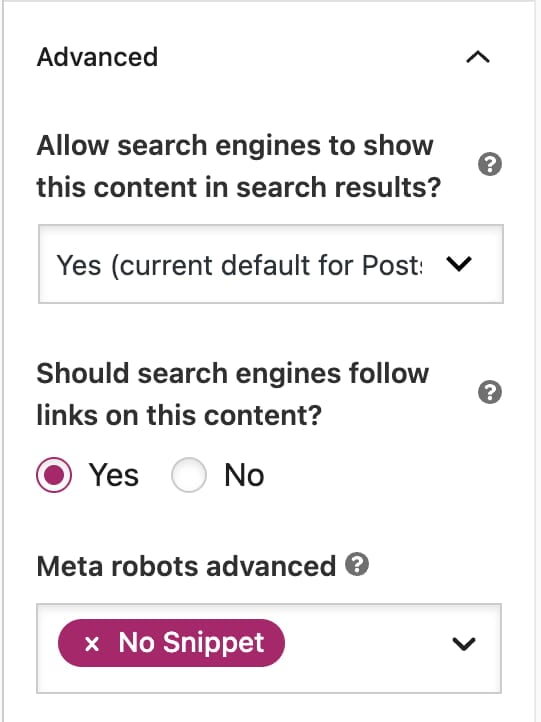
Yoast SEO provides an easy way to control search result snippets using the nosnippet meta tag feature. This setting lets you prevent Google from displaying any snippet for particular pages, giving you control over what appears in search results. It’s especially useful when you want to prioritize privacy or ensure that content is not shown without its full context. With the nosnippet tag, you have another way to manage snippet creation and to align everything with your content strategy.

in the advanced section of yoast seo, you can prevent snippets from appearing by activating no snippet
Yoast SEO lets you easily add the nosnippets robots tag in the Advanced settings

Do you have Yoast SEO? Check the Social media appearance in the Yoast SEO sidebar or social tab in the Yoast SEO meta box below your post or page. You can add a separate description for your social media channels there. In Yoast SEO Premium, you even have social previews that show you what your post or page will look like when shared on social media.

Conclusion to meta descriptions

Meta descriptions are a crucial yet often underestimated component of SEO — even if these are not fully in your control. It serves as a brief advertisement for your content in search results, influencing click-through rates and user engagement. Crafting clear, compelling, and keyword-rich meta descriptions can significantly enhance your online visibility. In return, it could attract more targeted traffic to your website. While they may not directly impact rankings, their role in driving clicks and conversions is undeniable.

A well-crafted meta description is not just about SEO; it’s about creating a better user experience by providing searchers with a clear, concise preview of what to expect on your page. Of course, Google might think it knows better than you, but that doesn’t mean you shouldn’t put your best foot forward!

Read more: How to use the Google preview in Yoast SEO »

Yoast AI Optimize is now available for Classic Editor

We’re excited to announce that Yoast AI Optimize is now also available when using the Classic Editor in WordPress!

You’ve finished your copy, great! But those pesky Yoast SEO Analysis lights aren’t all green and you have to make manual changes. That’s where Yoast AI Optimize comes in. With Yoast SEO Premium, you can now get AI-powered suggestions right inside your Classic Editor to help fine-tune your content.

What is Yoast AI Optimize?

Yoast AI Optimize brings smart, targeted SEO support into your writing flow. It gives AI-powered suggestions for specific assessments in the Yoast SEO analysis, such as length, structure, and keyphrase distribution.  You’ll see exactly where improvements can be made and get quick, editable suggestions to help you fix them. You can quickly apply or dismiss them; the final decision always remains yours.

Benefits:

  • Get real-time AI suggestions that help improve SEO and readability
  • Edit suggestions to match your style and tone of voice
  • Apply or dismiss suggestions easily without breaking your writing flow
  • Use it in both the Classic and Block editors with Yoast SEO Premium
  • Supports optimization for:
    • Keyphrase in introduction
    • Keyphrase distribution
    • Keyphrase density
    • Sentence length
    • Paragraph length

Whether you’re using the Classic Editor or sticking with the Block Editor, Yoast AI Optimize helps you improve your SEO score faster, without losing the personal touch.

If you’re curious to know how we built this feature, check out our developer blog post with all the behind the scenes.

Ready to optimize smarter?
Update to Yoast SEO Premium to try AI Optimize in the Classic Editor today!

How to optimize content for AI LLM comprehension using Yoast’s tools

As AI-driven search engines rewrite the rules of content visibility, one thing is clear: optimization isn’t dead — it’s evolving. Large language models (LLMs) like ChatGPT, Google’s Gemini, and Perplexity AI don’t just retrieve web pages; they synthesize answers. And your content? It only gets included if it’s clear, relevant, and easy to extract. The good news? If you’re already using the Yoast SEO plugin, you have some of the most critical tools for this new era baked right into your workflow.

Table of contents

Learn how to structure content for AI

In this post, I’ll walk through how LLMs evaluate and extract content — and how Yoast SEO’s content analysis features, particularly the Flesch Reading Ease score and green light checks, can help you structure your writing for AI retrieval, not just human readers.

And more importantly, I want to clarify a common misconception: Yoast SEO isn’t about “chasing green lights.” It’s about helping you become a better, clearer communicator. Green lights aren’t the end goal—they’re indicators that you’re aligning your content with the kinds of clarity and structure that serve both readers and AI systems. In a world where LLMs decide what gets surfaced and summarized, being a better writer is your best competitive advantage.

Even if AI search doesn’t dominate your vertical today, it will. The best time to prepare was years ago. The second-best time is right now. Consider this your SEO shade tree: start planting.

What AI search wants from your content

Forget rankings — AI search is about retrievability and clarity. LLMs ingest and parse content based on:

  • Literal surface-level term matching (yes, keywords still matter)
  • Structural formatting cues like headings, lists, and bullet points
  • Clarity of ideas — one idea per paragraph, one purpose per section
  • Prompt alignment — using the same terminology your audience would use

Even the smartest LLM will skip your content if it’s overly complex, meandering, or fails to mention the query terms directly. That means no more hiding your key points in paragraph five. No more cute, clever intros that never get to the point. The models are pulling excerpts, not reading for nuance.

This is where Yoast SEO shines. Its features, often seen as basic hygiene, are perfectly aligned with what makes content usable by AI.

The Flesch Reading Ease score is more important than ever

In a world of AI Overviews and synthesized summaries, readability is a superpower.

The Flesch Reading Ease score — included in the Yoast SEO content analysis — doesn’t just help human readers skim your content. It helps machines parse and interpret it.

LLMs prefer:

  • Shorter sentences
  • Simple phrasing
  • One idea per paragraph

These are the exact factors the Flesch score evaluates. So when Yoast flags your content as difficult to read, it’s not nitpicking — it’s showing you what might keep your article out of an AI Overview.

Pro tip: When possible, aim for a Flesch score above 60, especially for top-of-funnel or FAQ-style content you want to be quoted or summarized.

And let’s be clear: this doesn’t mean your content has to be simplistic or dumbed down. It just needs to be accessible. Plainspoken, not generic. Direct, not dull. Think of it as writing for a global audience — or a machine that doesn’t have time for interpretive poetry.

You can find the Flesch reading score in Yoast SEO Insights in your sidebar — this is the score for the post you are reading now

Don’t ignore those green lights (Even when you think you know better)

I’ll be honest: I’ve been one of the worst offenders when it comes to ignoring those green lights. I like long sentences. I enjoy prose that meanders a little if it means delivering a point with style. And I’ve spent enough of my career writing professionally that being told how to write by a plugin occasionally rubbed me the wrong way.

But here’s the thing I’ve come to accept: it’s not that the plugin is trying to replace your voice or artistry. It’s that it’s trying to ensure your work can be understood, parsed, and surfaced—especially by machines.

It is absolutely still possible to create highly visible content that doesn’t earn a green light for sentence structure or reading ease. I’ve done it. But those pieces need to be intentional. They need to be structured so that the core ideas—the “meat” of the argument—aren’t buried in the longest paragraph of the article or expressed only in dense, lyrical blocks of text.

If you want to break the rules, fine. But make sure you know where the lines are before you step over them. The art is still welcome—it just has to be thoughtfully placed.

Yoast’s content checks aren’t arbitrary — they’re aligned with how both humans and machines understand text. In fact, many of the green-light criteria align shockingly well with what LLMs are known to favor:

  • Subheadings every 300 words = easier segmentation and extraction
  • Introductory paragraph present = good for AI frontloading
  • Paragraph length = one idea per chunk, which is LLM-friendly
  • Sentence length limits = fewer chances for parsing failure

In other words: the green light checklist is not just “SEO best practice.” It’s an LLM comprehension checklist in disguise.

And while experienced writers might feel tempted to override these warnings with “but this sounds better to me,” it’s worth considering how much clearer your writing becomes when you follow them. Especially when writing for an audience that might include an algorithm.

an example of the Yoast SEO sidebar showing three overall green traffic lights for a post
Not every traffic light for individual checks has to be green — just make sure the overall lights are

Structuring for LLMs: A Yoast-assisted framework

If you want your content to get pulled into AI-generated answers, try this simple structure — and let Yoast SEO help enforce it:

  1. Start with a TL;DR or definition: Use short, declarative sentences. Bonus if you can bold the key phrase or structure it as a definition. LLMs love to latch onto clear, answer-style content.
  2. Use subheadings to divide your points: Make sure each section answers one specific question or explains one concept. Headings serve as cues for both readers and models.
  3. Use bulleted or numbered lists: Yoast SEO will warn you if a list is too long without proper formatting. LLMs love well-structured lists because they can be directly extracted.
  4. Echo the query language: Use the exact phrases people search for. This helps the AI match your content to user prompts. Literal matching still matters.
  5. End with a clear summary or CTA: AI often pulls from intros or conclusions. Don’t waste them. Reinforce your main point and point readers toward next steps.

Even if you’re writing complex thought leadership content, this structure ensures your brilliance is actually understood and surfaced.

You don’t need Schema if your structure is clear — but it helps

Structured data is still valuable, especially for establishing context and disambiguating entities. But Yoast SEO users should remember: if your page is poorly written or confusing, schema won’t save it.

LLMs cite content that is:

  • Logically segmented
  • Written in plain, direct language
  • Free of interruptions, overlays, or unrelated diversions

Yoast SEO helps you get there — not just with schema tools, but with live readability feedback during writing.

It’s also worth noting that while structured data might support AI understanding, it’s the structure of the writing that matters most for inclusion in AI responses. LLMs pull paragraphs and list items, not rich snippets. If you want to be quoted, you have to be quotable.

TL;DR: Use Yoast SEO to make your content AI-ready

In the age of AI search, optimization means:

  • Writing like a human, formatting like a machine
  • Saying things plainly
  • Echoing how people phrase questions
  • Structuring content so it can be lifted and used

Yoast SEO’s content analysis isn’t just a checklist — it’s an AI visibility strategy. That little green light might be your ticket to being the source LLMs choose to summarize.

Don’t fall into the trap of writing for the plugin. Use the plugin to write better for people and machines. That shift in mindset makes all the difference.

And as LLMs continue to power more and more of the search experience, from Google AI Overviews to tools like ChatGPT Browse, that visibility is worth more than position #1 ever was. Start now. You’ll be glad you did.

Keyword and content cannibalization: how to identify and fix it

If you optimize your articles for similar terms, your rankings might suffer from keyword or content cannibalization: you’ll be ‘devouring’ your chances to rank in Google! Especially when your site is growing, your content could start competing with itself. Here, we’ll explain why keyword and content cannibalism can harm SEO, how to recognize it, and what to do about it.

Table of contents

What is keyword cannibalization?

Keyword cannibalization happens when multiple pages on your website target the same or very similar keywords. This often occurs unintentionally, especially as your site grows and more content accumulates. Pages that are too similar in focus might confuse search engines, which may struggle to decide which to rank higher. As a result, your pages compete with one another, and all of them can rank lower.

For example, if you publish two posts — one optimized for “does readability rank” and another for “readability ranking factor” — Google may see them competing for the same query. Instead of one strong result, both might hover around lower positions, weakening your site’s overall performance.

What is content cannibalization?

Content cannibalization is closely related but centers on the issue of multiple articles covering the same topic, regardless of whether they’re optimized for the same keyword. It’s a broader issue that affects thematic overlap more than exact keyword matching.

Where keyword cannibalization focuses on duplicating keywords, content cannibalization involves too many pages delivering overlapping value. This undermines user experience, spreads authority thin, and can make your content performance uneven.

Is cannibalization harmful?

Both keyword and content cannibalization can hurt SEO.

  • Lower rankings: Google often limits the number of results from a domain per query. When several of your pages try to rank for the same keyword, they could all underperform. This is especially true when neither page is clearly better in content depth, backlinks, or relevance.
  • Diluted backlinks: Instead of one strong page getting all the backlinks, multiple weaker ones split the attention. If many pages discuss a similar topic, other sites may link to each inconsistently. As a result, no one page accumulates strong authority. This fragmentation makes it harder for your content to rank competitively.
  • Confused crawlers: Search engines can’t always easily figure out which page they should prioritize. As a result, this could lead to inconsistent rankings. These days, Google is better at understanding topical relationships and can often see their differences. If content overlap is too high and intent is unclear, prioritization issues can still arise, especially on sites with thin or low-quality pages.
  • Reduced Click-Through Rate (CTR): Spreading clicks across several similar listings may lower the collective performance. If multiple similar titles from your domain show in results, users may split clicks between them. Worse, one strong CTA title might appear further down the page than a weaker or outdated one. This can impact user engagement and CTR for both pages, especially if they fall further down the SERPs.

In short, cannibalization limits your content’s potential by weakening each page’s authority and clarity.

How to identify cannibalization issues

As your site grows, you’ll have more and more content. Some of these articles are going to be about a similar topic. Even when you’ve always categorized it well, your content might compete with itself. You’re suffering from keyword or content cannibalization. Finding and fixing keyword cannibalization issues should be part of your content maintenance work to prevent all this.

Identifying keyword cannibalization

Start with a site search. Use site:yourdomain.com “keyword” in Google to surface all pages relevant to a particular term. If you see two or more of your URLs targeting the same term, they may be in conflict.

Next, use tools like Google Search Console. Look under the Performance tab. Filter by query to view keywords that bring in impressions and clicks, then see which pages receive traffic from those terms. Then, use SEO tools such as Ahrefs or Semrush to track keyword rankings and expose overlapping URLs targeting the same terms.

Look especially for pages that rank beyond the top five positions for the same term. When two of your URLs rank closely together outside the top spots, it’s often a sign that neither is performing optimally.

A simple site search with your domain and keyword will show all the pages ranking for that term

Identifying content cannibalization

Content cannibalization is subtler. You might not see overlapping keywords, but you may notice thematic overlap.

Review URL structures and tags to catch duplicates

Start by scanning your site’s URLs and content categories to catch pages covering the same topic in different formats. Look for similar slugs, repeated folder structures, or articles under the same tag or category. This quick check often reveals duplicate coverage, especially on larger sites or those with multiple writers.

Use keyword/topic mapping tools

Trace what each page is targeting. Create a list of your key pages and their target keywords or main topics. This helps you spot when multiple pages aim for the same term or cover the same subject. It doesn’t matter whether you use a tool or a spreadsheet, but keyword mapping helps explain the purpose of content. It also helps avoid overlap and ensures that all pages on your site have a place in your strategy.

Use the page filter

In Google Search Console, use the Page filter to see how each URL performs. The data gives insights into impressions, clicks, and average position. Look for pages that are getting traffic from similar queries. Multiple pages appearing for the same or closely related terms could signal content cannibalization. You can also use the Query filter to search by keyword and review which pages compete for it.

How to fix cannibalization issues

You should know your content, its performance, and where overlaps exist. Fixing keyword or content cannibalization means auditing, evaluating, and restructuring your pages. It doesn’t mean you should delete content blindly. Every page on your site should have a purpose and support your site’s overall SEO strategy. Below are practical ways to resolve both types of cannibalization.

Fixing keyword cannibalization

In many cases, solving keyword cannibalization means deleting and merging content. We will run you through some of that maintenance work as we did it at Yoast to show you how to do this. In particular, we’ll show you some thinking around a cluster of keywords related to keyword research.

Step 1: Audit your content

The first step is finding all the content on the keyword research topic. Most of that was simple: we have a keyword research tag, and most of the content was nicely tagged. This was also confronting, as we had many posts about the topic.

We searched for site:yoast.com "keyword research" and Google showed all the posts and pages on the site that mentioned the topic. We had dozens of articles devoted to keyword research or large sections mentioning it. Dozens or so mentioned it in passing and linked to other articles.

We started auditing the content for this particular group of keywords to improve our rankings around the cluster of keywords related to keyword research. So we needed to analyze which pages were ranking and which weren’t. This content maintenance turned out to be badly needed. It was surely time to find and fix possible cannibalization issues!

Step 2: Analyze the content performance

Go to Google Search Console and find the Performance section. In that section, click the filter bar. Click Query and type “keyword research” into the box like this:

A Google Search Console keyword query filter helping you find which articles rank for terms
Google Search Console helps you find which articles rank for certain terms

This makes Google Search Console match all queries containing keyword and research. This gives you two very important pieces of data. A list of the keywords your site has been shown in the search results for, and the clicks and click-through rate (CTR) for those keywords. A list of the pages that were receiving all that traffic, and how much traffic each of those pages received.

Start with the total number of clicks the content received for all those queries, then look at the individual pages. Something was clear: just a few posts were getting most of the traffic. But we knew we had loads of articles covering this topic. It was time to clean up. Of course, we didn’t want to throw away any posts that were getting traffic not included in this bucket of traffic, so we had to check each post individually. 

We removed the Query filter and used another option: the Page filter. This allows you to filter by a group of URLs or a specific URL. On larger sites, you might be able to filter by groups of URLs. In this case, we looked at the data for each post individually, which is best if you truly want to find and fix keyword cannibalization on your website.

Step 3: Decide on the next steps

After reviewing each post in this content maintenance process, we decided whether to keep it or delete it. If we deleted a post (which we did for most of them), we decided which post we should redirect it to.

For each of those posts, we evaluated whether they had sections to merge into another article. Some posts had paragraphs or sections that could be merged into another post. When merging posts entails more work (and time) than adding one paragraph or a few sentences, we recommend working in a new draft by cloning one of the original posts with Yoast Duplicate Post plugin. This way, you can work on your merged post without making live changes to one of your original posts.

Step 4: Take action

We had a list of action items: content to add to specific articles, after which each piece of content could be deleted from the articles it came from. Using Yoast SEO Premium, it’s easy to 301 redirect a post or page when you delete it, so that process was fairly painless.

With that, we’d removed the excess articles about the topic and retained only the most important ones. We still had a list of articles that mentioned the topic and linked to one of the other. We reviewed them and ensured each was linked to one or more of the remaining articles in the appropriate section.

Another example of fixing cannibalization by merging

Another example: We once had three separate articles covering how to do an SEO audit, split into parts 1, 2, and 3. Each post focused on a different section of the audit process, but none of them ranked well or brought in meaningful traffic. On their own, the articles felt incomplete, and splitting the topic likely made it harder for users (and search engines) to find everything they needed in one place. We decided to take a step back.

After reviewing performance data and gathering insights on what users were actually searching for, we merged the three posts into a single, more useful SEO audit guide. We rewrote outdated sections, expanded key points, added a practical checklist, included tool recommendations, and tightened up the structure. Since updating and combining the content, that article now ranks for more keywords than the separate posts ever did, draws more consistent traffic, and performs better overall. It’s a good example of how merging overlapping content, when done thoughtfully, can give users more value and improve SEO at the same time.

This shows three old seo audit articles that were merged in a much better, more comprehensive guide
Merging three simple posts into one big, much-improved SEO audit guide helped boost performance

Yoast Duplicate Post is a great free plugin

Ever wanted to quickly make a copy of a post in WordPress to work on some changes without the risk of ruining the published post?

You need Yoast Duplicate Post!

Fixing content cannibalization

Even if keywords differ slightly, topics may still overlap, and there are things you can do to improve that.

Create a cornerstone/pillar or landing page

Create a main page — a cornerstone article — that covers the broad topic in depth, then link to more specific articles that explore subtopics. This helps define a content hierarchy, improves internal linking, and signals which page should rank for the core topic to search engines. Supporting content can still rank independently, but will pass relevance and authority back to the pillar.

Consolidate underperforming content

If you have several pages covering similar ideas, but none are ranking well, combine them into one stronger, more complete resource. Prioritize the page with the most traffic or links, and bring valuable sections from the others. This helps reduce redundancy, improve content quality, and give search engines a clear page to index for that topic.

Use 301 redirects

Redirects are an important tool for your cannibalization actions. After deleting content, remember to use 301 redirects to send visitors from the old URLs to the updated one. Of course, you can also send them to the most relevant page as an alternative. This keeps existing rankings, backlinks, and traffic from the original pages intact. Plus, it also helps to avoid broken links or indexing issues. 

Preventive measures

Another way to avoid future keyword or content cannibalization issues is to prevent them, of course. 

Audit your content regularly

Analyze the content for your most important topics regularly. Look for overlapping pages, outdated posts, or content that doesn’t fit your keyword strategy. Regular audits will help you find issues early, which can help keep your site focused and maintain search visibility.

Assign a unique target keyword to each page

Before creating new content, please ensure no existing page targets the same keyword. Giving each page a clear, unique focus prevents internal competition and helps search engines understand which page to rank for a given query.

Write with a clear content brief

Start every piece with a brief that outlines the target keyword, search intent, key points to cover, and how it supports your existing content. Such a strategy helps your articles stay focused and avoids topic overlap. In addition, it ensures that the new content you add is truly unique to your site.

Keep a keyword and topic map

Maintain a simple record of which topics and keywords are already covered on your site. This makes it easier to spot gaps, avoid duplication, and plan new content that fits your overall strategy. A keyword map also helps when updating or pruning existing pages.

Also, if you’re running an e-commerce site with many similar product pages, make sure category pages are well-optimized and that your products clearly support them through internal linking.

Common mistakes in addressing cannibalization

Cannibalization happens, and many site owners have tried to address it in one way or another. Of course, there are right and wrong ways to do this.

Deleting pages without checking their value

Don’t delete content because you think it no longer serves a goal. Before you do that, look at traffic data, backlinks, and search performance before taking drastic measures. For instance, a page may look outdated, while in reality, it still drives traffic or has solid external links. Simply deleting it could lead to unwanted ranking losses.

Relying on canonical tags without checking content

Adding a canonical tag isn’t always the right fix. If two pages are too similar, merging or redirecting them may be better. Canonicals help when content overlap is minimal and both pages still serve a purpose, not as a quick workaround for duplication without analysis.

Merging pages that target different search intent

Just because two pages cover a similar topic doesn’t mean they should be combined. If each one is aimed at a very specific audience or answers a different question, merging them could hurt relevance and rankings. Always consider the intent behind each page before deciding to consolidate.

Overlooking internal linking opportunities

Internal links help search engines understand which pages are most important. If you skip this step, you may weaken page authority and miss chances to guide crawlers — and users — to your key content. Linking related pages strategically can reduce confusion and support stronger rankings.

Final thoughts on keyword and content cannibalization

A growing website means a growing risk of content overlapping. This could be a risk to the visibility of all that content. To prevent this, perform regular content audits and carefully plan and structure your content. 

Whether you’re fixing overlapping blog posts or aligning product pages under a clear hierarchy, regularly addressing cannibalization helps search engines — and users — find the most relevant, valuable pages on your site.

7 tips to write good, high-quality content

Writing quality content should be a key aspect of every SEO strategy. But when is your content considered good or high-quality? And does quality mean the same for your users as for Google? In this article, we’ll discuss creating content and how you can make sure it hits the mark. It will require some creative writing skills. But don’t worry, you don’t have to become the next big author! By focusing on the right things, you can create high-ranking quality content that your users will happily read.

What is quality content?

That is the million-dollar question. Knowing how to write good content helps you get more visitors, higher conversions, and lower bounce rates. But who determines the quality of your content? The easy answer: your users. However, this also makes creating the right content more difficult. Because every user is different and has a different search intent. They have, however, one thing in common: every user knows what they want.

Although your users eventually determine the quality of your content, you can take a few steps to ensure you end up with well-thought-out, readable, and attractive content. In other words, content that’s eligible to be considered high-quality by your users and search engines. Luckily, a lot of the aspects that users will appreciate about your content are the same as the aspects search engines look for in quality content.

How search engines determine quality content

Search engines want to present their users with the exact content they seek. Content that is helpful, reliable and people-first and aligns with their current search intent. To help you create good content, Google has an acronym that you can consult: E-E-A-T. 


Search engines decide on what is content quality by assessing a number of things – relevance, clarity and helpfulness, credibility and uniqueness. This all ties into the importance of E-E-A-T (Experience, Expertise, Authoritativeness, and Trustworthiness) in any strategy around brand or topical authority.

Alex Moss – Principal SEO at Yoast


The acronym E-E-A-T stands for Experience, Expertise, Authoritativeness and Trustworthiness. In their ongoing search for the best content, Google has added this acronym to their search quality raters guidelines. They use this to assess and judge the quality of online content. Although it’s especially important for so-called YMYL websites (“Your Money Your Life” – sites that are related to well-being, health, finances or safety), these guidelines apply to all content out there.

Why is quality content important?

 Quality content is the foundation of a strong brand, helping you establish authority and expertise in your industry. Well-crafted content speaks directly to the needs of your audience, providing valuable insights that position your brand as a reliable source. Whether it’s through blog posts, social media, or in-depth guides, delivering high-quality content builds long-term relationships with customers, fosters engagement, and strengthens brand credibility.

Beyond its impact on branding, quality content plays a crucial role in SEO. As mentioned above, search engines prioritize helpful, well-structured, and informative content that truly benefits users. By focusing on producing valuable content that answers queries effectively, you can achieve higher rankings in the search results. This leads to increased visibility, organic traffic, and better engagement, which will help you grow your website sustainably. To scale content creation effectively, check out this guide on scaling content. Additionally, if you mainly write content for your clients’ website, make sure to check out our article on writing valuable content that your clients will love.

7 steps to start creating high-quality content

To ensure the quality of your content, there are 7 steps that you can follow. Let’s go into them in more detail.

1. Write for your readers, not yourself

If you have an ecommerce site, you want readers to know about the products or services you offer. If you’re a blogger, you want readers to get to know you and the topics that interest you. However, it’s also important to consider what your users want to read about. What interests do they have? What events or news do they follow that you can relate to your business?  And what ‘problems’ are they trying to fix that have led them to your site?

The first step in creating high-quality content is ensuring it contains the information your audience is looking for. To find out what your users are looking for, you have to conduct proper keyword research. This will help you determine what subjects to write about and what words your audience uses. Keyword research also helps your rankings, as more visitors and lower bounce rates tell Google that your page is a good result to show in their search results.

2. Think about search intent and your goal

Search intent is the reason why someone conducts a specific search. It’s the term used to describe their purpose. For example, do they have a question they need answered? Or do they want to buy something online? Someone’s search intent makes a difference in how they consider the quality of your content. If it fits their need at that moment, then they will stay on your page longer. But if they need an answer to a question and the page they land on only tries to sell them products, they’ll be gone before you know it.

Match goals to different search intents

It’s important to consider search intent while creating content for a specific page. That’s why we advise you to match your goals to users’ different search intents. Is one of your goals to increase newsletter subscriptions? Then, you should add that subscription button to pages where users with an informational intent land. Does a visitor have a transactional intent (meaning: they want to buy something)? Make sure they land on a product or category page dedicated to the product they are looking for. 

Of course, experience tells us it’s not always that black and white. Still, it’s good to consider your users’ search intent. It helps you determine the focus of your content and what call-to-actions you want to add. A great way to get started is by adopting a content design mindset. This mindset helps you produce user-centered content based on real needs. Also, we recommend looking at the search results for some input to create great content.

3. Make your content readable and engaging

Do you want to get your message across? And do you want people to read your entire blog post or page? Then, make your content easy to read. This means that you should:

  • Think about the structure of your text and the words you use. Too much text without any headings or paragraphs, also known as a wall of text,  tends to scare people off. Use headings and whitespace to give your readers some air while reading.
  • Try to limit the use of difficult words and be cautious of the length of your sentences. Both can make your content harder to understand, which will slow down and frustrate your reader.
  • Variation in your text will make it engaging. Use synonyms and alternate longer sentences with shorter ones to mix it up.

Another important thing to focus on: Have fun! And be conversational in your writing. This helps you write high-quality content that is different from your competitors’ and helps users get to know you and your brand.

Read more: 5 tips for writing readable blog posts »

4. Write with E-E-A-T in mind

Experience, expertise, authoritativeness and trustworthiness can all be used to improve your content. So how can you make sure to include these in your writing? We’ll go through them one by one and give you some pointers.

Share your experience

Although the acronym started as E-A-T, they added another E shortly after. This newly added E stands for experience. They prefer content that showcases knowledge or skills gained through first-hand experience. This can be gained through personal involvement or observations related to the topic at hand. To give an example, someone who has worked as an optician for many years will be experienced in the topic of eyesight. Or someone who has a prescription themselves will also have experience on the topic.

Keep reading: The new E in E-E-A-T, or the importance of Experience »

Be the expert in your field

The second E in E-E-A-T stands for expertise. Although it makes sense that this would be an important factor in determining the quality of content, it is trickier to evaluate. So what Google does is find out what it can about the author itself. What is their reputation when it comes to the topic at hand? What is their background? And what other (reliable) sources are they referring to? When it comes to this criterion, it will pay off to be clear about your expertise and where it comes from online.

Read on: The E in E-A-T: What is expertise? And how to show it? »

Show your authority

Related to expertise, the next letter stands for authoritativeness. An authority can be defined as a person or organization having power or control in a particular area. When you’re an authority on a topic, you often have the proper knowledge on it. That’s why official websites often have a higher chance of being perceived as the authority on a topic. But also aspects like qualifications and being associated with well-known organizations count towards this. If this one is tricky for you, don’t worry. It’s just one of the aspects Google looks for when determining quality. If this one doesn’t fit your blog or business, just focus more on the other letters in the acronym.

Keep on reading: The A in E-A-T: What is authoritativeness? »

Be trustworthy

The last one probably doesn’t come as a surprise, as this is something we all look for when browsing online. The trustworthiness of the content before you. Whether it’s for a product you want to buy or information that you’re looking for, trust plays a big role in how serious you take online content. If it doesn’t feel right, a user will hesitate in the best case and leave your website in the worst. Google’s guidelines are quite clear on how they determine the trustworthiness of a website: “An unsatisfying amount of any of the following is a reason to give a page a low-quality rating: customer service information, contact information, information about who is responsible for the website or information about who created the content.” So make sure to be clear on these and look for other opportunities to show your trustworthiness.

Read more: The T in E-E-A-T: What is Trustworthiness? How can you achieve it? »

5. Keep your content up to date

Another key element of writing high-quality content is ensuring it’s up-to-date and relevant. This means you have to update your content occasionally to ensure people can find the right information. But why is this so important? It shows your users that you’re on top of recent developments and can always provide them with accurate information. In other words, it builds trust and keeps your audience returning to your site.

Keeping your website and blog posts updated is also important for SEO, as this shows Google that your site is ‘alive’ and relevant. So, make sure you schedule a time to update your content regularly.

Keep reading: 10 tips to improve the quality of your page »

6. Invest time in site structure

The five steps we’ve discussed so far will help you write content that is easy to read and user-centered. Now, we’d like to highlight an equally important step: working on your site structure. It’s important because it will help users and search engines find your content.

Site structure refers to the way you organize your site’s content. When you structure your site well, search engines can index your URLs better. It helps Google determine the importance of your pages and which ones are related to each other. A good site structure allows users to find their way around your site more easily. It will help them find quality content in the search results and on your website. That’s why there’s much to gain from perfecting your site structure.

7. Use Yoast SEO to perfect your content

The last tip I want to share is the content analysis in our very own Yoast SEO plugin. This feature gives you real-time feedback on your content while you’re editing your page in the backend. It monitors whether you use your chosen keyword often enough and in the right places, it looks at text length and gives you feedback on readability. For example, it tells you when you use the passive voice too much, whether you’re using enough subheadings, gives you feedback on word complexity and the use of transition words. All of this and more is available in the free version to help you improve the readability and quality of your content. 

The content analysis in Yoast SEO Premium goes a bit further and also does the following:

  • Allows you to optimize your text for related keyphrases and synonyms
  • Recognizes different forms of your keyphrase, so you can focus on writing naturally
  • Recognizes singular and plural, and also tenses of verbs
  • Gives access to our AI features, like Yoast AI Optimize, suggesting changes in your content
  • Gives you access to all the Yoast SEO academy courses, including our SEO copywriting training!

Buy Yoast SEO Premium now!

Unlock powerful features and much more for your WordPress site with the Yoast SEO Premium plugin!

A quick recap on high-quality content

Good, high-quality content will positively affect your SEO in the long run. So, before publishing post after post (or page after page), make sure to keep the following in mind. Make sure to write for your readers, make your content readable, match search intent with your goals, be trustworthy, keep your content up to date, and work on your site structure. 

The result? Good content that your readers will appreciate. This will positively affect your number of visitors, conversions and eventual revenue. If you want to learn more tips and tricks, make sure to read our guide to SEO copywriting!

Read on: SEO copywriting: the ultimate guide »

seo enhancements
How to write valuable content that your clients will love

As an agency owner, you need skills to write content that your clients and audiences will love. Luckily, you can learn how to do it with proper steps and helpful tools. Here, we’ll discuss how to plan, write, and optimize the content work for your clients. If you have your process down, you’ll easily create content that aligns with the client’s needs and brings in results. One of the tools we’ll use is the Yoast SEO plugin, which helps your content production. 

Table of contents

Understanding what makes content valuable

Good content always has a goal — it could answer questions, solve problems, or offer critical information. If readers find your clients’ content valuable, they will likely feel listened to. They will understand that the advice and ideas are meant for them, which helps you build a bond with them. Writing valuable, high-quality content isn’t just for filling your client’s websites but a way to help and inspire them to improve their business. 

There are many options to get results from the content you produce for your clients. So, what are some of the more popular goals you can target with your client’s content?

  • Building brand recognition: Share brand stories and values so people understand who your clients are.
  • Teaching the audience: Create articles and videos showing how products and services work.
  • Getting leads: Write content to get people to subscribe, download items, or contact your client. 
  • Driving traffic: If your client’s content is valuable, readers will likely click on their site.
  • Increasing engagement: Make content to spark conversations and get feedback. 

Keep writing focused and clear, with your eyes on the ball. You should focus intently on your clients’ current issues, challenges, and opportunities. Take the time to write well-researched pieces, as these can empower your readers. Once you do this, they will likely see your clients as subject matter experts they can trust. Straightforward, high-quality content can inspire readers and bring much value to you as an agency. 

Strategic planning is the foundation

Much of the writing process is about planning. Before you write for your clients, clearly define the goals for that content piece. Find out what questions your clients’ customers are struggling with and how your answers can help them. Research their target audience to understand their daily struggles. This way, you can make your content much more relevant to readers. 

It’s advisable to spend plenty of time doing keyword research. This process is very helpful, giving you many insights into your client’s audience and the words they use to find things. Ultimately, these findings will help you build content strategies for your clients.

The next step is to create a content plan. First, make a simple calendar or a list of topics your client wants to cover. Your plan will guide them and help them keep track of their audience’s themes and recurring concerns. 

Don’t forget to use tools that integrate directly into their content. For instance, the Yoast SEO plugin has integrated keyword research features — among many other great features. It can highlight keywords and trends related to current topics, which will help your clients plan the current piece of content but could also inform the next. 

Ideation and content planning

After researching, it’s time to start generating ideas for your client’s content. Don’t tie yourself up too much; brainstorm freely. Write down every topic that pops up and then organize these ideas to match the client’s needs. Mind mapping is a fantastic way to sort and visualize these ideas. Of course, you can always use a simple list or whatever works for you. Seeing these ideas together helps your client see the connection between them. 

Before starting to write, it’s a good idea to think about the structure of the content. Break down the article into introductions, main sections, and conclusions. This way, it’s easier to structure the content and keep the writing focused and readable. From there, write and edit the first draft — editing helps the content shine.

Optimize your writing for readability

Good writing is all about clarity. Use direct language and try to avoid passive voice. Vary your sentence length to keep the client’s articles engaging. Start with a bold statement or an inverted pyramid-style intro. In the rest of the article, use detailed explanations to build on and prove the main point. 

Read more: SEO copywriting: the ultimate guide 

Format your client’s text to improve readability. Always use headers to introduce new sections and short paragraphs to make it easier for readers to follow the ideas. The same goes for using lists and bullet points to break up walls of text. Make sure that every element of your client’s layout allows the reader to understand your writing quickly.

During this phase, you also need to consider on-page SEO optimizations. Watch how you use your focus keywords and logically structure your client’s content. As you might know, Yoast SEO is a fantastic tool for this. It gives you feedback on sentences, passive voice use, and keyword use and distribution. As a result, this feedback helps publish high-quality content, especially under a tight deadline.  

Read more: What is high-quality content and how do you create it? 

Using Yoast SEO in your content process

Yoast SEO is an SEO plugin/add-on for WordPress, Shopify, and WooCommerce. It’s designed with simplicity in mind while also offering a solid set of SEO features. It also lives within your post editor to give you feedback on your writing. For instance, it offers real-time suggestions on how you use keywords and the structure of your article. Thanks to this, you can focus on the writing part without sacrificing the SEO and technical aspects of making content your clients will love.

Yoast SEO is an industry standard for agencies. It’s a helpful tool that guides users in writing engaging, valuable content for all clients. As it’s aimed at ease of use, the feedback is practical and insightful. Also, Yoast SEO Premium comes with AI-powered suggestions that make this process even easier. Using this SEO plugin in your agency helps you build a consistent content process to write, review, and optimize high-quality content. 

Inspiring through actionable content

Help your readers out and show how little things can make a big difference. Don’t forget to give your clients the tools and processes needed to succeed. For instance, share your best practices and guidelines for writing content and creating the valuable material everyone seeks. Share stories of how your agency helped clients reach their content goals, as these insights help potential new clients choose you over the competition.

Inspiration can come from many places, but it’s not always a given. When you get inspired, your client’s content can reach a whole new level. Content can also reach new heights when writing with a clear purpose and using tools that support your writing process. This way, you can turn a simple set of ideas into content your clients will love. 

Wrapping up

Creating content your client loves depends on many things, especially having good plans, writing clearly, and regular improvements. As always, everything starts with research to build a solid plan. After that, start creating relevant content for your clients with clear writing and text structure. Finally, optimize your work with helpful tools like the Yoast SEO plugin, which gives relevant feedback and improvements. 

You should also treat it as a learning process and improve as you go. This way, your clients eventually have a solid foundation that gets more engagement and deeper connections with their audience. Try it out and see how it can change your client’s next project. Every article will strengthen your client relationship while showing your expertise and experience.

seo enhancements
Scaling content creation without compromising quality (with template)

SEO is, for a large part, all about getting the right content in front of the right audience. When you’ve been doing that for a while, there comes a time when you want to scale content production. Scaling content creation means you aim to make more content to reach new targets. While that’s a good idea, you need to find a way to scale while keeping the same level of quality you’ve always had. Let’s go over how to scale your content production step by step, showing common problems and solutions.

Table of contents

What is content scaling?

Content scaling is about making your content process more efficient. The goal should be to make more content without lowering the quality. First, you must examine every step of your content creation process — from brainstorming to research, editing, publishing, and reporting. Once you have the process detailed, you can find ways to do those tasks faster and predictably. 

A well-scaled process helps you create a lot of content. This approach helps you build a solid system rather than adding more articles. For instance, your content team could develop a checklist to help review articles, introduce a content calendar to improve planning and set up clear tone-of-voice guidelines. These steps help you stay consistent and true to your brand — whether you produce one weekly article or dozens. 

Why scaling content matters

Scaling content production can directly help your business. If you actively publish high-quality content on your site, search engines will understand that your site is active and reliable. By targeting the right audience with the right search intent and message, you could improve your search visibility and generate more traffic for your content. Search engines are likelier to see you as trustworthy when you publish high-quality content.

In addition, producing content more consistently and following a plan can help you reach a bigger audience. More articles mean more opportunities to write about topics that interest your different audience groups. In the end, this will broaden your brand’s presence. You’ll have a bigger chance of people seeing you as a trusted source if you offer helpful insights and solutions to their problems.

All your content can help potential customers make decisions. This content is another way to address their concerns and answer questions. By doing this strategically, you can continue to engage your audience and nudge them closer to making that final decision. Of course, whether that decision is a sale, information request, or newsletter signup doesn’t matter.

Scaling your content production also supports your branding. When you create well-organized content over a longer period, you can support your brand voice and recognition. That reliability helps build trust and strengthens your reputation. 

The biggest challenges in scaling content

If you want to scale your content production, you must overcome several hurdles, which, if you don’t consider, will impact the quality and consistency of your content. 

Quality control and consistency

When you produce more content, you need to make sure that every piece represents your brand well. However, catching errors or maintaining the proper tone becomes harder because you have more content to review. If you don’t do this well, there’s a risk that your articles will vary in tone or style. Without proper guidelines or a good editorial process, your content quality may suffer when you publish more and more.

For example, you can miss issues like tone, formatting, or factual errors without a standard editing checklist. If you do this for a while and people start to notice, they can form a different view of your brand. It would almost look like you don’t care about these issues. You need to set clear quality benchmarks and a solid review process. Consistent editing with fixed content rules helps everything you publish meet the same standards.

Handling different audience needs

In an ideal world, you write for different groups. You cannot target one group only. Every segment has its own interests, problems, and ideas. But if you scale your output, you risk writing mainly generic articles. No one will like that content.

If you haven’t yet sorted your audience, do so and focus your content on these specific groups. As a result, your content will be more useful for the people in those groups.

Process difficulty and extra management work

More content means more parts to manage. Each article needs research, writing, review, checking, and then publishing. This is fine if you publish a few posts a month because you can handle these steps by hand. But growing your output complicates things when you face many deadlines, writers, or quality checks.

Complexity leads to bottlenecks. If you struggle with one thing, that might eventually slow down everything. Think of it like this: when you don’t scale your editorial process, you will eventually have a pile of articles that need approval. This grinds your publication flow to a halt. Develop a system that divides tasks into repeatable steps. Use content calendars and checklists to track progress and make managing projects easier. 

Balancing speed and thoughtfulness

Scaling content production can lead to pressure to cut corners to meet deadlines. When the speed of publication comes into play, there’s a high chance that content will become less developed. This shouldn’t happen. Every piece of content should be carefully planned and produced. Rushing only leads to content that lacks depth, accuracy, or clarity. 

Of course, this is easier said than done. You have to find ways to increase efficiency without sacrificing the quality of your content. Start by streamlining your process, breaking it up into smaller tasks. Set up a system that monitors quality while giving you enough room to be flexible.  

Building a repeatable content creation process

Scaling your content production reliably requires setting up a solid content process. That process should be easily repeatable and have clear tasks, which will help keep your team on track. 

Map the entire content workflow

Describe each content task and work your way through the list of what has to be done. Write down a list of all phases, ranging from conception through publication. This will help you understand where delays or errors creep in. Consider drawing a flow diagram or another visual. This list will act as your directive.  

Create a content calendar

Use a content calendar to plan your publishing schedule. Proper planning helps you keep track of deadlines, even if they are for different outlets. Thanks to your content plan, your team can write content in advance and, hopefully, without stressing out about deadlines too much.

Develop detailed briefs and outlines

Content briefs are a great way to align writers — see below for an example. A brief like this should, at least,  include the subject, target audience, key messages, and keywords that the writer should target. Once approved, create an outline for the content and fill in the structure. A good content brief speeds up the writing process while ensuring that content is targeted well. 

Implement a style guide

A style guide can help you ground every piece of content in a consistent tone of voice and formatting. This guide should include rules for tone, punctuation, formatting, and whatever else makes sense to share. You can easily share this guide with anyone on your team; even freelancers enjoy using it. 

Use checklists for each stage

You’ll find it easier to manage once you break the process down into small tasks. Make a checklist for tasks such as researching, writing, and editing. Having a proper checklist helps you make sure that you don’t forget anything. This could be checking facts, improving readability, or using proper SEO tactics. Your lists will help you scale your content production while maintaining quality output.

Standardize tools and platforms

Use well-known tools to manage tasks in your team. Think of project management tools like Jira or Asana, shared calendars in CoSchedule, Canva for visual designs, and document templates in Microsoft Office. Many companies use Google Docs to collaborate on documents. In those cases, you can use one of the standardized Google Docs extensions, which are easier to scale.

Write a good manual or checklist for these tools so that anyone — from in-house writers to external freelancers — follows the same steps. Standardization makes this work and helps apply important SEO best practices properly.

All of these things help your team routinely produce quality content. Making the process repeatable reduces the chance of errors and wasted time, so you can scale without losing what makes your content awesome. 

Strategies to scale without losing quality

Careful planning is one of the best ways to scale your content without lowering its quality. Another great option is to use clear methods to make your work more effective. 

Develop a strong content strategy and workflow 

As always, start with a solid plan that includes your goals, topics, and the audience you want to reach. Creating content for your audience is much easier when everyone truly understands who those people are. A good workflow avoids delays and helps people move from one task to another.

Use a detailed content calendar

We’ve discussed the importance of content calendars, and you really have to see these as your roadmap. A calendar shows all upcoming publications, deadlines, and the status of various projects. A good calendar keeps everyone up to date at all times and makes sure the work is nicely spread out. Good planning prevents missed deadlines.

Use template structures

Templates help you standardize your work, as they offer a reusable structure for common types of content. Each type of content can have its own structure to fill in. These templates help writers speed up their work while maintaining consistency across articles. 

Repurpose content thoughtfully

Look at what you already have and see how it can be adapted into a different form. For example, you can split a long-form article into several videos or a series of shorter posts. This strategy saves time while also delivering fresh material in new formats. Make sure to adapt the new content to the correct audience. 

Assign clear roles within your team 

Find out your team members’ strengths and have them do what they do best. A  writer should handle the initial draft while an editor reviews the work. Your trusted subject matter expert should check the content for accuracy. Clear roles help people do what they do best, which helps preserve content quality.

Maintaining high-quality content at scale

It isn’t easy to maintain content quality when scaling content production. To make the process more manageable, you should establish habits and use tools that help you make sure that every piece of content meets your standards. 

Follow your style guide

Setting up a good style guide keeps your writing consistent. Your style guide should include information on your content’s tone of voice, the terminology you can and can’t use, and how you structure and format it. Share this guide with your team.

Schedule periodic audits

Similarly, regularly review your existing content to see if it’s outdated or needs to adapt to changes in your brand messaging. This helps keep your older content relevant and accurate. 

Use tools when appropriate

Tools can help scale your content production. Even a tool like our Yoast SEO plugin can help your content work. Good content tools can help with formatting, improving readability, checking for keyword placement, and some even help with on-page SEO.

Using Generative AI for scaling content output

Using AI to scale content production might seem like a good idea, but please be careful. Generative AI can definitely be a valuable tool for content processes. However, AI is not without issues and needs interaction from real people.

Human oversight makes sure that the output aligns with your brand’s voice and content standards. You can use generative AI as a starting point or a helpful assistant, but not as a complete replacement for your real writers. Your use of AI should have a clear process to bring the content up to your desired quality level.

Conclusion to scaling content production

Scaling up content production shouldn’t mean lower quality. Mostly, it’s about knowing the content process inside out. Once you have that, you can lay out the steps for everyone to follow. With a good process, you can meet your goals and still maintain the quality of the content. Be sure to set up content templates, calendars, and clear roles for your team. Make the adjustments and see how this can lead to better results. 

Bonus: Content brief template for SEO

Are you looking for a basic content brief template that helps scale your content production? Check out the one below:

Content brief section Details
Title/headline suggestion [Insert title]
Primary keyword [Main keyword]
Secondary keywords [Keyword 1], [Keyword 2]
Search intent [Informational, commercial, transactional, etc.]
Audience persona [If needed, description of audience persona]
Content objective [What is the content meant to achieve]
Benchmark content [URLs of best-in-class content about this topic]
Word count range [Word count]
Tone and style guidelines [Tone and style]
Outline/sections Introduction;
Main points/headings;
Subheadings;
Conclusion
SEO requirements Meta title: [Title];
Meta description: [Description];
Header tags: H1, H2, H3;
URL: [Proposed URL for content]
Call to action [What do you want people to do/click on?]
Internal and external links Internal: [Links]
External: [Links]
Visuals and multimedia [List of visuals]
Examples/references [Links to examples/references]
Deadline and submission details [Deadline and submission instructions]
How to perform an SEO audit (with checklist)

An SEO audit is a health checkup of your site. It allows you to know what works and what does not, and it allows you to make improvements based on what you find. This can lead to improved performance — both on the search results pages and how visitors engage with your website.

Table of contents

What is an SEO audit?

An SEO audit looks at how well a website performs in search results to find areas that need work. It helps find technical SEO problems, analyze on-page elements, evaluate Core Web Vitals and site speed, and analyze user experience and content quality. An SEO audit also looks at outside variables like backlinks and rival tactics to identify areas for improvement. Making sure your website is optimized for users and search engines can help it rank better and attract more organic traffic.

A helpful guide

An SEO audit checklist

Read on below for the step-by-step process, but here is an SEO audit checklist that will help you get started quickly.

⬜️ Crawl your website using Screaming Frog (or similar tools)

⬜️ Analyze your site with an SEO tool (e.g., Semrush or Ahrefs)

⬜️ Pull reports from Google Analytics and Search Console

⬜️ Create a centralized spreadsheet for findings

⬜️ Check the user experience (check CTAs, menus, etc)

⬜️ Audit website content (duplicate and thin content)

⬜️ Optimize internal linking

⬜️ Optimize page titles and meta descriptions

⬜️ Improve content with proper headings (H1 to H6)

⬜️ Ensure the correct use of canonical tags

⬜️ Add and validate Schema markup

⬜️ Monitor and improve Core Web Vitals

⬜️ Improve general site performance

⬜️ Improve mobile responsiveness

⬜️ Boost user engagement

⬜️ Track metrics regularly

⬜️ Check Search Console reports

⬜️ Schedule regular check-ins

Step 1: Preparing an SEO audit

To make your site audit a success, you must prepare well. You need to collect the right information about your website using SEO tools, understand how to diagnose issues and prioritize fixes.

Crawl your website with Screaming Frog (or something similar)

The first step is crawling your website with crawler software. This helps find technical SEO issues that otherwise wouldn’t be so visible. Screaming Frog is one of the most trusted names in this, but Sitebulb is another highly recommended one. The free version of Screaming Frog crawls 500 URLs, but you can upgrade if needed. 

Crawling your site is easy; simply download and install Screaming Frog. Open the tool and enter your site’s homepage URL. Then, hit Start, and the crawl will run. Once the scan is complete, export the data into a CSV file for further sorting and prioritization.

Screaming Frog gives you a ton of data that you can export to sheets quickly

What to look for?

Screaming Frog generates a ton of data, so it’s good to prioritize the outcome. Scan for missing, duplicate, or overly long titles and descriptions. Each page should have unique, targeted metadata. Find pages or links that return (404) errors as broken links frustrate users and hurt SEO. Then, identify oversized assets that slow your page load time, such as images, JavaScript, and CSS files. Last but not least, make sure that canonical URLs are properly implemented to avoid duplicate content issues.

Use an all-in-one SEO tool (Semrush or Ahrefs)

In addition to a technical crawl, you can use tools like Semrush or Ahrefs to conduct a detailed SEO audit. These tools provide many insights, including keyword rankings, backlink health, and competitor performance. 

These tools also let you run a site audit, which gives you a technical health score. You’ll find many improvements to make, like pages blocked by robots.txt or issues with internal linking. The tools also review the quality and relevance of your backlinks and give you ideas on how to get high-quality new links. You’ll also get keyword rankings to track how individual pages perform for target keywords. Identify opportunities to refine content or target new search terms.

Download the most important reports and cross-reference them with your Screaming Frog export.

Pull data from Google Analytics and Search Console

Combining all these insights with your site’s user behavior and engagement data will make your SEO audit come alive. It helps you understand how people use your site and how they experience it to pinpoint pages to improve. Export your findings from Google Analytics and Search Console to include in your audit comparisons.

Check the top-performing landing pages in Google Analytics and their engagement rates. Pages with low engagement rates may have poor content or a disconnect between user expectations and page design. Also, look at session duration and exit rates to find pages where people quickly leave your site.

Use the Performance Report in Search Console to see which pages and queries drive the most clicks and impressions. This will also highlight low CTR pages — ranking well but failing to attract searchers. Then, check the Page Indexing Report for crawl errors, warnings, or blocked pages and review the Core Web Vitals Report to find pages failing on speed or usability metrics.

Google Search Console is an essential tool for SEO audits, here we see the perfomance report
Google Search Console is an essential tool for SEO audits

Create a centralized spreadsheet

Once you have all the data, please combine everything in a big spreadsheet. How you set this up is up to you, as everyone uses something different. But you could use something like this:

  • Page URL
  • Technical issues (e.g., broken links, slow load speed)
  • Engagement metrics (e.g., engagement rates, time on page)
  • Keyword rankings
  • Optimization notes (e.g., missing metadata, duplicate content)
  • Priority (High, Medium, Low)

This spreadsheet will guide your fixes throughout the audit process.

Minimal SEO audit (optional)

Not every audit needs to be a deep dive into your site. Sometimes, you don’t have the time but still feel the need to work on your site. In this case, you could do a simpler, quicker health check and evaluate specific regions of your site to see if these perform well. Such a minimal SEO audit is a streamlined version of a full audit to find and fix critical performance issues.

Here’s a basic framework for a quick audit:

  1. Check that your site is indexed by searching site:yourdomain.com in Google.
  2. Run a Google PageSpeed Insights test for slow-loading pages.
  3. Examine the titles and meta descriptions of your most important pages (e.g., homepage, service pages, and key sales pages).
  4. Fix broken links using Screaming Frog or a quick manual check in your navigation.

This lightweight SEO audit still finds high-priority issues without the time commitment of a full review.

Step 2: User experience & content SEO

The next step is to see how people perceive and interact with your site. Look at the user experience and see if you can find things to improve. You can get people to your site by using high-quality content aimed at the right search intent and audience. Not only that, because you want to have them returning. 

Improving the user experience

Do you know if your users can find what they need quickly? If not, they might leave your site quickly. Giving them a good experience will do wonders in the long run. In your SEO audit, start by diagnosing these common UX factors:

Make sure the colors match your branding and are easy to read. Look at contrast, as this is especially important for buttons and links. Make CTAs (like “Buy now” or “Learn more”) stand out visually.

Check if the most important design elements are above the fold. Key messages and CTAs should be visible without scrolling. Think of this as the headline act—it must grab attention immediately. Add customer testimonials, third-party endorsements, and security badges (e.g., SSL or payment protection signs) to build credibility.

Give special attention to your menus. Test menus, drop-downs, and search functions. Breadcrumbs also help users see where they are within the site hierarchy.   

Audit website content

SEO is largely about content, so review its quality and improve where necessary. The Semrush/Ahrefs site audit should have given you many pointers. With this list, start working on the following.

Check the keyword targeting of your content. Make sure that each page represents a primary keyword. Ahrefs and Semrush show which keywords your pages rank for and identify gaps.

Check for duplicate or thin content. Avoid weak, duplicate, or low-value content. Where necessary, merge similar pages into one in-depth article. Provide actionable, valuable content.

Remember Google’s Helpful Content standards. Create content that delivers real value and focuses on user intent. Your content should answer questions with actionable, audience-focused solutions. Last, you demonstrate Experience, Expertise, Authoritativeness, and Trustworthiness (E-E-A-T): Add author bios, cite reliable sources, and link references where necessary to develop expertise and trustworthiness.

Internal linking and related content

SEO is not just about getting users and search engines to your site —it’s also about keeping and showing them around. One of the most powerful ways to do this is through internal linking, so be sure to include this in your SEO audit. 

Check how you link your most important pages, like cornerstone articles or product categories. Your content should have a couple of links based on relevance and importance, but not too many. In addition, you should include a related content section on your pages to encourage further reading.  

Anchor text should include relevant keywords or describe the linked page and try to avoid generic phrases like “click here”. 

An internal search feature is another important aspect of showing people around your site. Make sure that your search bar provides relevant results, especially on large websites. Monitor what people search for to inform your content strategy.

Step 3: General on-page SEO

On-page SEO concerns the technical and content improvements you make on specific pages. This helps search engines understand your pages. It also helps your readers to find what they want. 

Optimize page titles and meta descriptions

Page titles and meta descriptions are the first things a visitor sees in search results. While search engines like to generate these based on relevance, you can still influence how you’d like these to appear for maximum CTR. 

For your page titles, make sure that every page on your site has a unique title. Duplicate titles confuse search engines, which is something you don’t want. And while there’s no limit to how long titles can be in the SERPs, they get cut off visually after a set number of characters. Try to find the sweet spot.

Incorporate your primary keyword close to the beginning of the title, but avoid keyword stuffing. For example, instead of “SEO tips SEO tips SEO tips,” use “10 SEO tips for beginners – Step-by-step guide.” Don’t forget to add your brand name at the end of the title, e.g., “How to do an SEO audit – Your Brand”

For your meta descriptions, make sure that they concisely explain what the page is about. You should also include the primary keyword while making sure the text flows naturally. Don’t forget to encourage action. Incorporate a call-to-action (CTA), such as “Learn more,” “Discover how,” or “Start now.”

Optimize heading structures (H1 to H6)

Headings are excellent tools for structuring and making your content easier to read. They also assist search engines with recognizing how important the information is on each page.

  • Start with one H1: The H1 is the main heading for the webpage, and it should contain your targeted keyword. Each page should have a single H1 tag.
  • Use H2s for major sections: Use H2 tags to break up content into logical sections. Consider these the main subheadings of your article.
  • Add H3s or H4s for subsections: You can have more subsections under H2s if you want to break it down further using H3 or H4 for better structuring.
  • Keep it logical: Don’t skip heading levels (e.g., jumping from H1 to H4) or use headings only for styling.
  • Be descriptive: Write headings describing the section’s content. For example, instead of “Step 1,” use “Step 1: Analyze your traffic metrics.”
WordPress has a handy feature to check the heading structure of your articles

Ensure proper use of canonical tags

Canonical tags show a search engine which version of a page to prioritize when duplicates or near-duplicates of the same page are available on your site. This is especially important for online stores, as these have many variations of the same products due to filtering or session-based URLs. 

You should always choose one canonical version for a page. For example, if both https://example.com and https://www.example.com exist, set one canonical URL to prevent duplicate content issues. Don’t forget to add the canonical tag in each page’s HTML section and be consistent in your internal linking. For instance, always link to one version of the URL rather than switching between http and https.

Regularly check for issues using Screaming Frog or Semrush to find pages missing canonical tags or ones with conflicting canonicals.

Add and test schema markup

Structured data in the form of Schema markup helps make your site more understandable for search engines. The code you add to your site helps structure and identify your content in a way that search engines can easily consume. In some cases, this can even lead to highlighted search results, for instance, for products or ratings and reviews. 

Yoast SEO drastically simplifies adding schema for WordPress, WooCommerce and Shopify users. The SEO plugin outputs JSON-LD (the format preferred by Google) to add schema markup directly to your page’s HTML.

There are many options for adding Schema, but you should start with the basics and things relevant to your site. For instance, you should use the Article schema for articles and blog posts and highlight publication dates, images, authors, and headlines. 

Ecommerce businesses should use Product structured data. This data should highlight pricing, stock availability, ratings, and reviews. If it makes sense, you can also markup your FAQ pages, which will no longer be highlighted in Google’s SERPs.

There are many other options, so you must check what makes sense for your situation. For instance, if you run a recipe site, you can add Recipe structured data, or if you publish events on your site, use Events

Don’t forget to test your structured data. Use Google’s Rich Results Test Tool to check if your structured data is correct and valid. Also, check Search Console for errors under the “Enhancements” tab.

the google rich results test shows seven valid items for rich results
Yoast SEO makes it easy to add essential structured data

Audit and improve your backlinks

Backlinks are as important as ever. Every link from a relevant, high-quality source counts towards your authority. These links prove to search engines that your content is valuable and meaningful. Of course, there’s a ton of spamming happening with links.

You can use tools like Moz, Ahrefs, or Semrush to audit your backlink profile. The results show a list of spammy backlinks and links from irrelevant websites with low authority. If spammy websites link to you, there’s an option in Google Search Console to disavow these links. This is only needed in very rare cases, though. Only disavow links you’re sure are harmful — this is a last resort for low-quality links you cannot get removed manually.

It’s more important to focus on earning high-quality backlinks. Create shareable, high-value content like guides, research, or infographics while building relationships with related websites, bloggers, or journalists for natural backlink opportunities.

Step 4: Site speed and engagement

Check your site performance, as site speed and user engagement greatly impact success. Pages that load slowly are annoying for users and can give you a poor score in the eyes of search engines. Low engagement rates can hurt your results, as users might stop visiting your site.

Understanding and improving Core Web Vitals

To underscore the importance of performance, Google launched the Core Web Vitals. These metrics help site owners gain insights into how their sites perform in real life and get tips on improving those scores. The metrics focus on loading times, interactivity and stability. Together, these determine how enjoyable users find your site. 

LCP measures how long your largest asset loads

The Largest Contentful Paint (LCP) measures how long it takes for the largest visible element on the screen (usually an image, video, or headline) to render fully. If performance is bad, you can improve this by optimizing images by compressing them without sacrificing quality. You can use modern file formats like WebP for faster performance and minimize render-blocking resources like heavy CSS or JavaScript files. Defer unnecessary scripts and prioritize above-the-fold content.

INP measures interactivity 

Interaction to Next Paint (INP): INP is the new Core Web Vitals metric from Google that tracks how quickly your site responds to user input clicks, taps, and keystrokes. While FID only reported on the delay for the first interaction, INP evaluates all interactivity events for the session. This ensures a fuller score.

You can improve your performance by minimizing JavaScript execution. Use Screaming Frog or PageSpeed Insights to flag heavy scripts and defer or remove non-critical JavaScript. Use browser caching to cache JavaScript and other assets so they don’t reload unnecessarily and reduce reliance on third-party scripts. You can offload heavy tasks to web workers to free up the main thread and process user interactions faster.

CLS measures stability

Cumulative Layout Shift (CLS) measures the stability of a webpage’s visual layout. It checks if the content moves unexpectedly as the page loads (e.g. when an image loads late and pushes buttons elsewhere on the screen).

You can improve this by specifying dimensions (width and height) for all images and videos in your HTML/CSS. This prevents the browser from guessing dimensions and rearranging content. Avoid inserting ads, banners, or other dynamic elements above the fold after loading content. Please preload important assets like fonts or images to ensure they appear quickly and predictably.

Site speed optimization beyond Core Web Vitals

Core Web Vitals should be a main focus, but there are other strategies to implement to improve site speed and page experience. Faster websites equal user satisfaction, reduce bounce rates and make your audience more likely to stick around in the future. 

Start reducing the number of HTTP requests for a faster site. Combine CSS and JavaScript files where practical, or use modern HTTP/3 protocols, allowing browsers to send out multiple requests simultaneously. Also, unused CSS and JavaScript should be eliminated to reduce file sizes and speed up load times. File compression can be used via Gzip or Brotli to compress the assets before serving them to the user. Compressed files load faster without losing quality; most hosting providers or web servers can help you set this up. Tools like Google Lighthouse can also alert you if compression is missing.

Implement lazy loading for images and videos so that only visible content loads immediately while other assets load as needed. WordPress users can easily use plugins like Smush or Lazy Load by WP Rocket to achieve this, or custom JavaScript libraries like lazysizes work on other platforms. Distribute your site’s static assets with a Content Delivery Network (CDN), which delivers files from servers closest to users, improving global load speeds. Popular CDN providers include Cloudflare, Akamai, and Amazon CloudFront. Finally, performance analysis tools such as Google Lighthouse, GTmetrix, or Pingdom analyze bottlenecks, track progress, and ensure your efforts work.

Google's PageSpeed Insights is one of the best tools for an seo audit
Google’s PageSpeed Insights is one of the best tools to understand your site’s real-life performance

Improving mobile performance and responsiveness

Mobile is everything these days. For most websites, this means that most of the traffic will be coming from mobile devices. Search engines like Google consider the quality of your mobile site when ranking your content, so being mobile-friendly should always be on the tip of your tongue.

Run various mobile tests to see how your site performs on phones and tablets. Look for layout issues, problems with interactive elements, or slow-loading pages or assets. Check if your responsive web design works properly so your site dynamically adapts to all device sizes. Also, ensure your CTAs are mobile-friendly, and your forms are accessible from mobile devices. 

Increasing user engagement on your site

Faster pages keep users on your website, but engagement ensures they take meaningful actions. Thanks to better site performance, you’ll get higher engagement rates, which results in better conversions, newsletter signups, product purchases, and more.

Simplify your site’s navigation to make it easy for users to find what they need. Use clear menus with logical structures, such as categories and subcategories, and add breadcrumbs to show users where they are within the site. Dropdown menus should be intuitive, and internal search bars must return accurate, relevant results quickly. Additionally, ensure key Call-to-Actions (CTAs), like “Sign Up” or “Request a Quote,” are prominently placed above the fold or immediately following key content sections. Use descriptive, action-oriented language in your CTAs to make them more compelling and clickable.

Encourage users to explore your site more with internal links and related content suggestions. Add social sharing buttons to blog posts, infographics, or product pages to make it easy for users to share content on platforms like Facebook, LinkedIn, or X. If using popups or exit-intent offers (e.g., subscription prompts or discounts), ensure they are thoughtfully designed and minimally intrusive. Poorly timed or aggressive popups risk driving users away, so aim to balance engagement with user experience.

Tools for site speed and engagement improvements

To help optimize, you can utilize Google Lighthouse, which will show you how your Core Web Vitals performs overall, and GTmetrix, which goes in-depth and gives actionable recommendations on improving page speed results.

Hotjar offers insights into where users click, how they scroll, and how they behave overall. WP Rocket is for WordPress users looking to automate technical processes such as caching, lazy loading, and database optimization. Various WordPress plugins add customizable social share buttons to enhance content sharing, making it easier for visitors to share your posts on their favorite platforms.

Step 5: Monitoring and tracking results

SEO is a colossal effort; the process does not end there once that initial effort is made. You must monitor your actions to determine whether those changes work as intended. Regular monitoring is also a great opportunity to find improvements and better calibrate your SEO strategy. Regular monitoring helps you improve your site, adjust to the latest algorithm updates, and retain the course.

Why monitor results?

By tracking results, you can measure the impact of your audit (e.g., increased rankings, traffic, and engagement). It’ll also help spot new issues like broken links, slow pages, or dropped rankings. This will ultimately help you improve your strategy by identifying what’s driving results and where to focus next.

SEO is not something you do in a month or so. It takes time, and you might see the results in many months. Consistently track and analyze.

Metrics to track

Start by looking at traffic metrics. Organic traffic shows how many users find your site through search engines, which you can monitor in Google Analytics under Acquisition > Organic Search. Check referral traffic to see if other backlinks are sending visitors to your site. This data shows how effective your SEO and link-building work is.

Next, evaluate engagement and search performance. Metrics like engagement rates and time on page help you understand how users interact with your content. On the search side, track keyword rankings with tools like Wincher, Ahrefs, or Semrush to see how well your pages are doing in the SERPs.

Use Google Search Console to monitor your CTR and check for indexing issues in the Coverage Report. Make sure that your most important pages are indexed. Monitor loading speed, interactivity, and layout stability in tools like PageSpeed Insights.

Schedule regular check-ins

You need to make monitoring results a regular thing. Review rankings, CTR, and new crawl errors weekly. Each month, check traffic trends, user behavior, and fixes made during the audit. Every quarter, you should run a fresh crawl with Screaming Frog, check competitor performance, and update old pages based on new opportunities.

Conclusion on doing SEO audits

Following these steps will help perform an SEO audit,  from preparing your data to addressing user experience and technical SEO improvements. Make sure each fix you aim to do aligns with your goals and strategy. Auditing regularly keeps your site running at its best and ready to rank in search results.

5 tips on how to create good seasonal content

It’s the festive season! Or it’s nearly Valentine’s Day, or the start of summer, or… You get the drift. People love to celebrate, which is why seasonal content tends to do well during those periods. So, should you put effort into creating content for the holidays? We think so! But you should be smart about it. Here are five tips to help you create good-quality seasonal content.

Why should you create seasonal content?

A big benefit of creating seasonal content is that you’ll stay top of mind. After all, your customers are probably looking for content to give them ideas for gifts, services, or events. By participating in the trend, you’ll show your audience that your business is relevant.

Of course, by having seasonal content, you’ll also be able to boost your brand’s visibility and traffic. Especially if you have content optimized for seasonal keywords! In short: most people get swept up by the holiday season, so it’s good to join the hype.

Tip 1: Create evergreen seasonal content

Good news for busy people! You don’t need to create a new piece of seasonal content every year. It’s way better to create one excellent Christmas post, for example, that you optimize every year. Preferably, you optimize it a month or two before the event or holiday takes place. 

This will save you time, and increases the likelihood of your content actually ranking (since that usually takes a while). So, avoid adding years to your content. Don’t write a piece about: Best recipes for Hanukkah 2024. Just delete the year from the title, and you’re good to go. 

If you do want to include the year in your title, don’t include it in your URL. That way, you can update the post and title each year without having to constantly create new posts and redirect the old ones.

Our Black Friday post has a year in the title, but not in the URL

What if you already have multiple content pieces about the same holiday?

If your posts rank well for different keywords and they get a decent amount of organic traffic, keep them. But if there is overlap in the keywords they’re ranking for and they get okayish traffic, it’s better to merge them into one big post. Just make sure the post’s content still makes sense. 

Our tip would be to use the URL of the post that is performing the best. For the other posts, make sure you redirect them to the optimized post so people won’t hit a 404. 

Tip 2: Do keyword research

Whether you want to write a new post or optimize an existing one, it’s good to do research. First, start with keyword research, so you know what your audience is searching for during specific events or holidays. 

Tip: you can always look for variations of your core keywords! For example, you can add “holiday” or “guide” or “summer/winter” to them.

Just don’t create content for content’s sake. Only write content if you’re sure that your audience is looking for this information. At the end of the day, you want your audience to feel that your site has added value. 

Tip 3: Do competitor research

Once you’ve picked out a main keyword, it’s good to search for that keyword in Google, for example. Analyze the top results. Are they blog posts or category pages? If they’re blog posts, what kind of articles are they? For example, if all the top posts are how-to guides then you probably have the best chance of ranking if your article is a how-to guide as well. Just make sure to write something different from what’s already out there.

Tip 4: Plan well ahead of time

It’s good to remember that people often search for gift ideas or tips for activities or recipes weeks in advance. This means you’ll need to have your seasonal content ready before the actual holiday! That’s why it might be a good idea to have a content calendar for your posts, so you won’t forget.

Plus, it’s good to publish new content early so it has time to rank. After all, once the event is there, you want your content to be findable by your audience. That’s why it’s also a good idea to make sure your content meets Google’s helpful content and E-E-A-T guidelines.

Tip 5: Keep your seasonal content updated

Even though you’ve created evergreen content, make sure to update it at least once a year—preferably a couple of weeks before the event or holiday itself. Let’s say you have a new tip, or one of your products is no longer being produced. By updating your content, you’ll ensure that your content is always relevant and helpful. Which your audience and Google will both like!

Don’t forget to republish your content as new!

Once you’ve updated your content, don’t forget to change the publish date. This way, people (and search engines) will know it’s been updated. Of course, if you have a feature on your site that shows both the publish and updated date, then this isn’t necessary.

So why should you republish or update your content? Again, it shows that your content is relevant and current. Because let’s be honest, how would you feel if you read a blog post with Tips for a perfect summer vacation and the date said 2018? You’d think it was outdated, right?

Tip: Our free Duplicate Post plugin allows you to easily rewrite and republish your posts! With the plugin, you can edit your posts without taking them offline.

A screenshot of the Rewrite & Republish feature in the WordPress backend.
You can access the Rewrite & Republish feature via the WordPress toolbar or from the post overview

Seasonal content: the gift that keeps on giving

If you’ve got a solid post that you can update every year, you’ll ensure that you’ll give your audience helpful content. Plus, you’ll gain more traffic during seasonal events. Just make sure to update or write your content weeks in advance, so it has time to rank. All that’s left then, is to promote your content, for example on your social media channels or via email marketing. Good luck!

Coming up next!