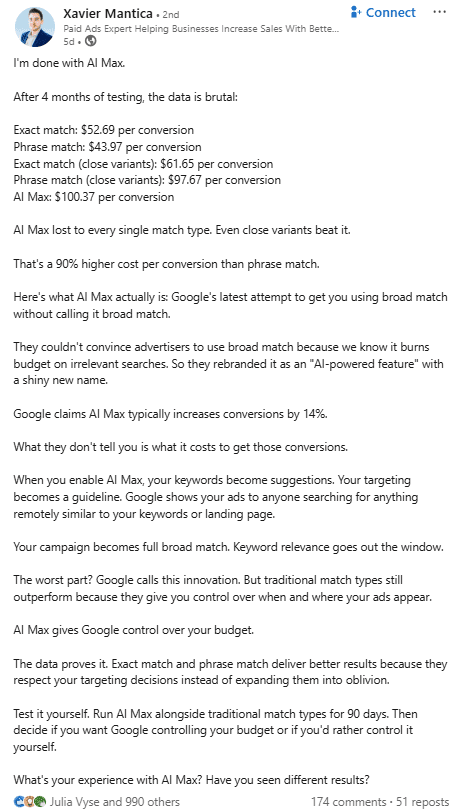
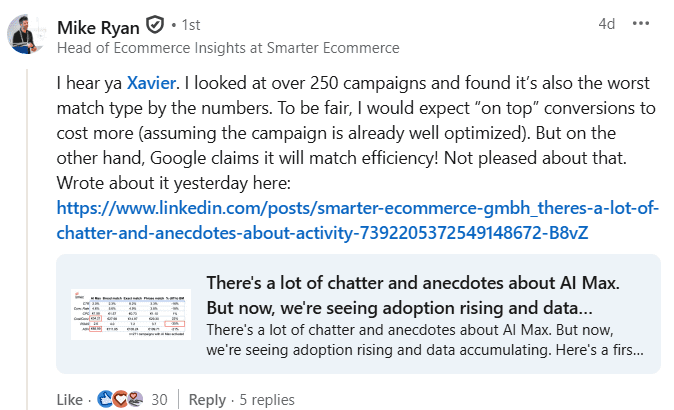
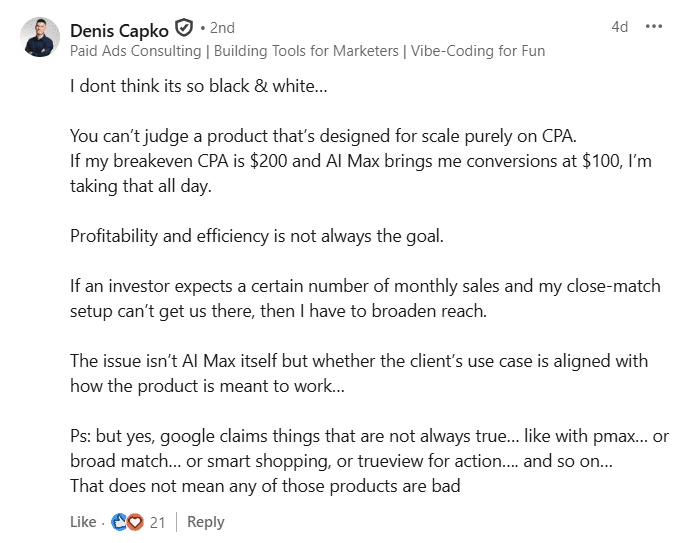
How To Evaluate Creative Performance in Meta Ads (and What To Test) via @sejournal, @timothyjjensen

When running a Meta Ads campaign, creative should be at the center of your strategy. As targeting options have become more limited in the platform from the super-granular segments available in years past, overthinking targeting layers often raises cost while sacrificing performance.

Meta has also been emphasizing the importance of differentiating creative, warning that similar assets will essentially be seen as the same by their system, and potentially limiting reach as audience fatigue sets in from seeing an image or video over and over.

Assuming you’ve started with a foundation of properly configured event tracking, keeping your audience targeting high-level and focusing on testing diverse creative will generally drive the best results. Given the importance of creative, understanding how you can view the performance of your assets is crucial to informing your Meta advertising strategy.

Breaking It Down

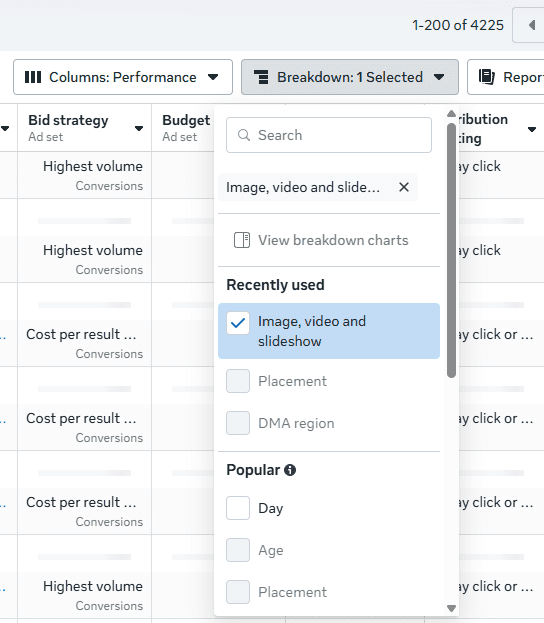
From the main Ads Manager screen, you can use the Breakdown option to segment performance by individual ad creative (images and videos). This can be done at either the ad set or ad level.

Breaking down performance by creative in MetaImage from author, October 2025

You can then see metrics such as clicks, link clicks, impressions, cost-per-click (CPC), click-through rate (CTR), reach, frequency, and spend for individual assets. However, you unfortunately cannot see counts for custom conversions or events broken down at this level.

While the lack of conversion data is a miss on Meta’s part, you can still find value in this reporting. If you’re using dynamic creative, you can see which individual assets are being served the most and which are receiving the highest engagement (based on CTR). You can also determine if frequency is running high for particular assets and if fatigue may be setting in.

If you’re running a single image ad without dynamic creative, but using different images for various placements (e.g., square images for feed placements and vertical images for Stories/Reels), you can still see conversion performance separated by breaking down by Placement instead of creative. Here, you can also delineate between different platforms (Facebook vs. Instagram vs. Threads) for individual placement types as well.

Custom Reporting

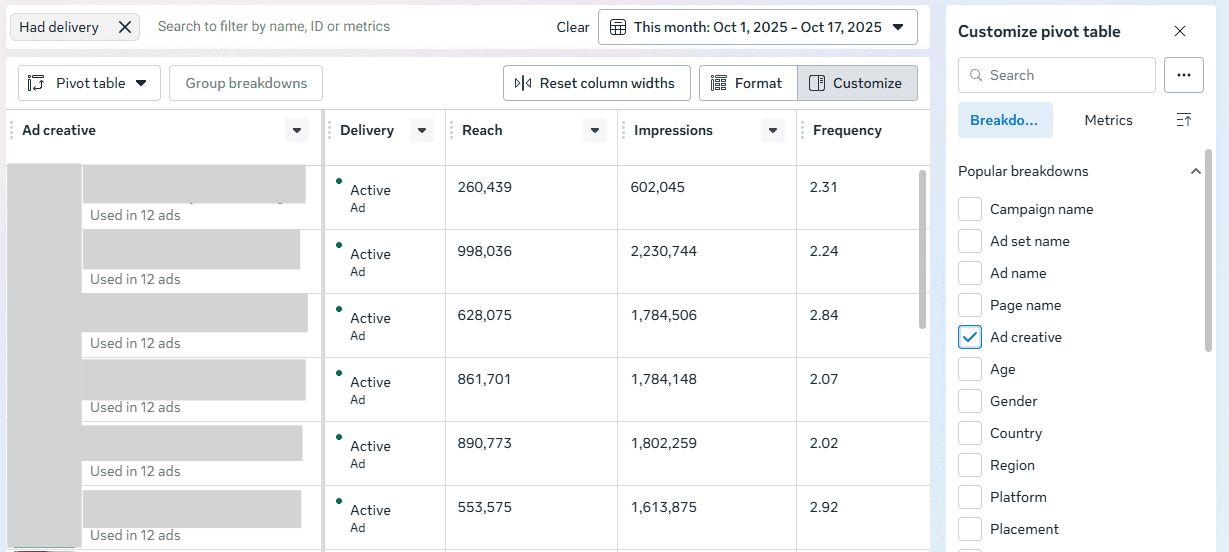
You can also use the Ads Reporting section to create a custom report that includes individual ad creatives in addition to metrics you’d like to see. When building your report, use a pivot table and check the box for “Ad creative” if you’d like to see data aggregated across campaigns and ad sets that are using the same creative.

Meta Ads ReportingImage from author, October 2025

You’ll then see a thumbnail of the image or video, along with the accompanying copy. This report can be helpful for doing aggregate comparisons of how specific images are performing if you’re reusing them for different ad sets or campaigns. For instance, you may have campaigns segmented by market for budget reasons, but be serving the same assets.

Creative Testing

We’ve looked at how to view creative performance across your Meta campaigns in a couple of different ways, but what if you want to stage a test from the ground up to compare how different creative assets might perform? You can use the standard Experiments feature that has existed for a while in Meta and set up separate ad sets or campaigns with different ads, but let’s hone in on the Creative Testing feature that’s specifically built for this purpose.

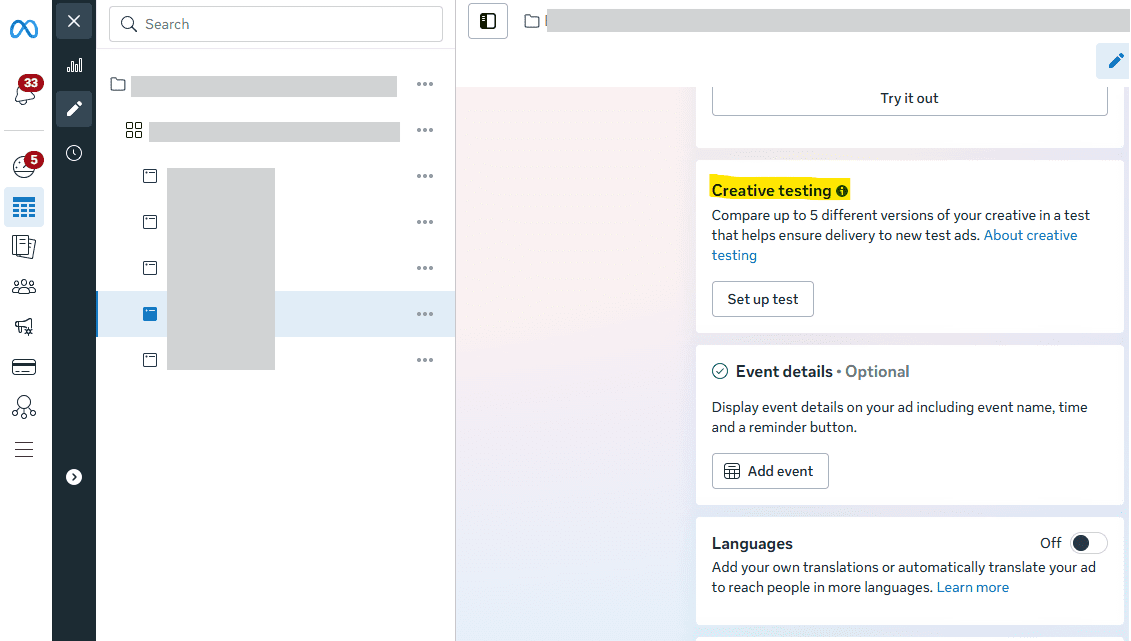
To kick off a test, go to the edit view for an existing ad within a campaign and scroll down until you see the “Creative Testing” section. Select the option to “Set up test.”

Creative TestingImage from author, October 2025

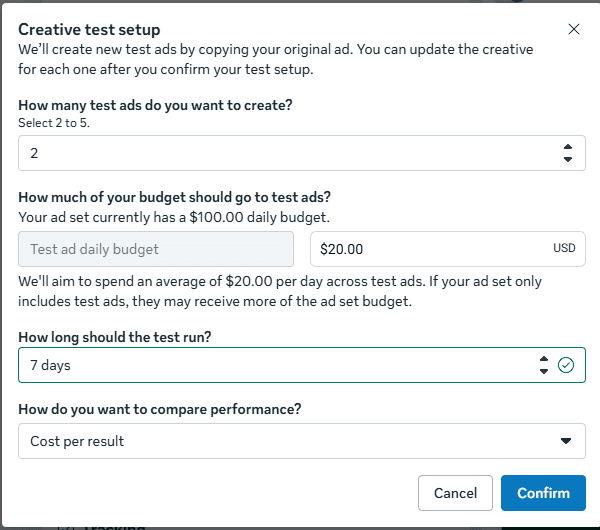
Next, you can define the criteria for your test setup. Start by choosing to create up to five ads. Then, allocate the amount of budget that you’d like to use and define the length of the test (up to 30 days).

Creative Test SetupImage from author, October 2025

Finally, select the metric you’ll use to evaluate success. You can choose a more general goal, such as CPC or cost per result, or you can choose a specific conversion (either custom conversion or event) to look at CPA.

Finally, confirm your test, and adjust the new creatives to include the updated assets you’d like to use. You can then view results in the Experiments section, or via the campaign in Ads Manager, as the test begins to run.

According to Meta, using this approach allows you to keep learnings from the test ads within your ad set if you choose to run them moving forward. As the learning phase can be a hindrance to getting new ads off the ground, this tactic can be a benefit in addition to the ease of testing.

Measurement Outside Meta

In addition to what you can see in Meta, use tools such as Google Analytics to see performance from ad clicks to your site. As long as you’ve properly tagged your ad URLs, you can see how specific ones have driven engagement and conversions on your site.

Meta’s attribution (even click attribution) is notorious for taking all the credit it can, but using another platform can allow you to see Meta traffic alongside other sources that may also have influenced conversion. You can then determine how Meta may have influenced the buying journey, as it often may appear earlier in consideration and be followed up by sources such as search.

What Should You Test?

How can you plan creative tests that give you actionable data? As discussed at the beginning of the article, differentiation is key to both avoiding fatigue and providing significant results.

While design capabilities may vary depending on your business’s resources and bandwidth, the availability of a plethora of AI tools and user-friendly design platforms allows for simple creation of multiple assets. Think through what works best for your brand, but some potential suggestions for comparison include:

  • Illustrated vector images vs. photography.
  • Stock photography vs. your brand’s photography.
  • Animation vs. static images.
  • Text-heavy assets vs. minimal or no text.
  • Informal “phone” videos vs. polished formal videos.

From here, you can evaluate which types of assets tend to best resonate with your audience based on the data you’re able to see both in Meta and in third-party platforms. Also, be careful not to completely write off a particular type of creative because of a past test. Audience preferences can change over time, so it’s worth retesting periodically.

How Can You Apply Your Learnings?

As you evaluate the performance of various assets, you can translate the learnings into practical application in Meta and beyond. For instance, if you find that animated text videos tend to perform well, you can create them for multiple products and test different video backgrounds.

Additionally, take learnings beyond Meta and apply them to other platforms. With the caveat that each platform is unique and what works on one may not be guaranteed to perform elsewhere, images that work on Meta may be worth testing in other channels, such as Google Demand Gen and LinkedIn.

Outside of ad platforms, you can also implement image styles or videos that performed in Meta testing onto your landing pages. For instance, if your Meta audience appears to resonate more with illustrated vector imagery as opposed to photography, test that type of creative in graphics on your site.

Start Evaluating & Start Testing

If you haven’t previously been paying enough attention to the performance of specific creatives in Meta, now is a crucial time to start doing so. Ensure that you’re using different enough variants and avoiding fatigue. Think through some tests you can set up for your clients or your brand, and start creating and launching new graphics.

More Resources:


Featured Image: Viktoriia_M/Shutterstock

Black Friday 2025: Tips To Boost Your Holiday PPC Performance (Get Ready Now) via @sejournal, @brookeosmundson

Black Friday doesn’t sneak up on anyone, yet somehow it still catches advertisers off guard every year.

Campaigns launch at the last minute, budgets aren’t ready, and tracking issues surface once performance starts to spike.

If you’ve managed PPC through Q4, you know how quickly small mistakes can turn into costly ones. CPCs rise, competition intensifies, and ad inventory becomes harder to win. By the time the weekend hits, there’s little room left for major fixes.

That’s why the most successful advertisers treat preparation as their advantage. They plan budgets before the rush, stabilize feeds early, and set guardrails around automation before the system starts making aggressive bids.

This article walks through the key areas worth reviewing now so you can step into the busiest retail period of the year with fewer surprises and a plan that holds up under pressure.

Let’s start with what to revisit from last year.

Take The Time To Audit Last Year’s Wins And Pitfalls

Before building anything new, it’s worth taking a closer look at last year’s performance.

The strategy here isn’t about copying old campaigns; it’s about understanding where they overdelivered, where they stalled out, and how the landscape might have changed since then.

In Google Ads, start with the attribution reports. Look beyond just last-click conversions and examine how various campaign types contributed throughout the funnel.

If Performance Max campaigns played more of an assist role, that should inform how you structure them this year.

If Standard Shopping capped out early or certain product categories were underrepresented, those are fixable issues.

You can also use auction insights to see when competitors ramped up spend, or whether you lost impression share due to budget or rank. These reports offer useful context if you’re planning to scale this year but didn’t last year.

If you’re using Microsoft Ads, review audience and device performance to see where volume shifted.

Holiday behavior isn’t always the same across platforms. What worked well on Google may not have translated to Bing or Meta, and vice versa.

The goal is to identify specific opportunities, not just assume last year’s playbook will hold up.

Build Early, Even If You’re Not Launching Yet

There’s value in building out your campaigns well in advance of Black Friday, even if you don’t plan to activate them until closer to the sale.

Whether you’re launching new campaigns or just updating ads in existing ones, getting ahead on structure gives you time to QA creative, troubleshoot disapprovals, and coordinate across teams.

If you’re planning to reuse existing campaigns, you can still stay organized using labels. For example:

  • Apply labels to new Responsive Search Ads (RSAs) that include holiday-specific copy or promotions.
  • Label sitelinks, callouts, or promo assets that reference Black Friday offers.
  • Tag ad groups or asset groups that are tied to limited-time sale messaging.

Using a clear naming convention makes it easier to filter, review, and schedule changes across campaigns without confusion.

If you want to automate this even further, you can create automated rules based on labels.

For example, you can set a rule to enable all ads with your Black Friday label at 12:01 a.m. on November 28. You can also set up rules to pause those same ads at the end of the promotion, reducing the chance that outdated messaging stays live.

You’d also want to create an automated rule to run to pause all non-Black Friday ads at the same time. This ensures that only your promo ads are running during Black Friday season.

If you end up creating Black Friday-specific campaigns, you can easily set start and end dates on them to ensure they only run during the allotted time.

While you don’t have complete scheduling control at the ad or asset level across platforms, you can use a combination of labels, automated rules, or campaign/ad group start and end dates. These give you enough flexibility to manage most scenarios without scrambling the morning of your launch.

If you’re running Meta Ads, be sure to upload your Black Friday creative and audience setups well in advance. Platforms are slower to review and approve ads during peak periods, and early delivery data will help the algorithm optimize once you start increasing budgets.

Give Smart Bidding Better Direction

Most advertisers are using some sort of Smart Bidding for their campaigns, especially around Black Friday. That doesn’t mean you should take a hands-off approach, though.

If you’re using Google Ads, consider seasonality adjustments if you’re planning for a short-term sale or expect a sudden fluctuation in conversion rates. These adjustments tell Google to expect better-than-usual performance during a specific window, and can help avoid underspending during flash sales.

Seasonality adjustments are currently available for these campaign types that use either a Target ROAS or Target CPA bid strategy:

  • Search.
  • Shopping.
  • Display.

If you’re using seasonality adjustments for conversion rates, then you can choose between these campaign types:

  • Search.
  • Display.
  • Shopping.
  • Performance Max.
  • App (in beta).

That said, they’re not suited for every situation. If you’re running a longer sale or have limited historical volume, the adjustment could cause more volatility than good.

For broader holiday performance, make sure your campaigns have enough data to support Smart Bidding decisions. Review the “Bid Strategy Report” and watch for signs of limited learning or constrained budgets.

Pushing into a critical promo window without stabilized bidding can lead to inefficient spend, especially with newer campaigns.

Check Your Product Feed Before It Becomes A Problem

It’s easy to focus on campaign settings and forget that your product feed is powering everything from standard Shopping campaigns to Performance Max. If it’s not accurate or timely, your best offers might not show up correctly.

In Google Merchant Center, navigate to the Diagnostics tab and resolve any disapprovals or mismatched pricing issues. These often spike around holidays when sale prices don’t sync correctly or out-of-stock products remain active.

Make sure your feed includes items like:

  • Up-to-date GTINs and product identifiers.
  • Attributes like ‘sale_price’ and ‘sale_price_effective_date’ for promotions.
  • High-quality images that meet platform guidelines.
  • Clear shipping and availability details.

If you’re running Performance Max campaigns, review the Listing Groups report to ensure your most valuable products are getting served. Many advertisers find that certain SKUs get minimal impressions due to budget spread or structural issues.

This is also a good time to upload holiday-themed creative assets, including lifestyle images and product videos. These can improve performance in placements like YouTube and Discover, which tend to ramp during PMax campaigns in Q4.

The more you control the feed and asset side, the less you have to worry about automation making subpar choices when competition is highest.

Expect Things To Break, And Plan Around That

Black Friday campaigns don’t always go according to plan.

Promo pages fail to update. Budgets cap out early. Tracking drops off mid-day. It’s worth thinking through what could go wrong now, while you still have time to build a backup plan.

Start with some of the basics in campaign planning:

  • Double-check conversion actions in Google Ads and Google Analytics 4. Make sure no duplicate events are being counted, and key actions like purchases, add-to-cart, and email sign-ups are being tracked.
  • Test final URLs on mobile and desktop. If you’re using promo pages, confirm they’re live and loading quickly. A slow checkout experience during Black Friday Cyber Monday (BFCM) will almost always tank performance.
  • Pre-schedule creative updates where possible. You don’t want to be manually swapping sitelinks or headlines in the middle of a surge.
  • Double-check your automated rules. If you’re using rules to enable sale ads and pausing evergreen ads, make sure to have the platform(s) email you with any changes so you can confirm with confidence the right ads are being shown at the right time.
  • Set up alerts for unusual activities. If campaigns showcase a sudden ROAS drop, zero conversions, or unusual spend, you’ll want to be alerted in real-time. Even something as simple as a budget cap hitting before 10 a.m. can throw off the day if it goes unnoticed.

The more you can troubleshoot before launch week, the fewer fires you’ll need to put out when things are moving fast.

Don’t Shut Down Campaigns The Minute Cyber Monday Ends

It’s common for brands to ramp hard through Cyber Monday, then pause everything until January. But, many shoppers are still active well into December, especially those looking for last-minute gifts or deals that weren’t available earlier.

Based on previous personal experience, Google Ads auction data may show that competition could dip after Cyber Monday and shopping intent doesn’t disappear. Conversion rates often stay steady through the first two weeks of December, particularly for brands with fast shipping or digital products.

Rather than winding down completely, consider updating your messaging to reflect the urgency. Swap out “Black Friday” language for “Still Time to Save” or “Guaranteed Delivery Before Christmas.” Countdown ads and shipping deadline assets work well here.

If you’re running remarketing campaigns, exclude recent purchasers and focus on users who visited key pages but didn’t convert. These audiences tend to convert at lower cost-per-acquisition (CPA) during post-Cyber sales, especially if you’ve got gift cards or bundled offers to promote.

December also gives you a chance to build audience pools for Q1. Visitors from BFCM campaigns can be remarketed to in January for loyalty or cross-sell efforts. Just make sure your campaign structure allows for clean audience segmentation.

Planning Ahead Is Still Your Best Defense

Once your campaigns are running, focus on maintaining performance instead of overhauling what’s already working. Black Friday weekend tends to amplify everything, good or bad.

A stable structure, clean data, and smart pacing decisions matter more than any last-minute bid change.

This shopping season isn’t a one-day sprint anymore. It stretches across weeks of demand shifts, extended promotions, and changing intent signals. Advertisers who treat it as a cycle rather than a moment gain the clearest insights for what comes next.

Keep a close eye on pacing and creative fatigue, but trust the groundwork you’ve built. Review performance daily, document what drives the strongest returns, and note what didn’t hold up under pressure.

When your campaigns are ready before the chaos begins, the season stops being stressful and starts being strategic.

More Resources:


Featured Image: Roman Samborskyi/Shutterstock
Using Attribution Paths To Transform Your Google Ads Strategy

Let’s state a fact: Google Ads in 2025 runs on automation. From Smart Bidding and Responsive Search Ads to Performance Max and upcoming AI-driven campaign types, machine learning now determines how ads are served and how budgets are distributed. But automation is only as strong as the data that powers it and how well advertisers understand the journey behind each conversion.

That’s where attribution paths (formerly, “conversion paths”) come in. They show how people actually move from the first ad click to the final step, highlighting how multiple touchpoints contribute to results. As automation and AI increasingly shape Google Ads bidding, knowing how to interpret these paths has become essential. They reveal where conversions really start, which campaigns are quietly assisting, and how much value your upper funnel is driving. Without that context, Smart Bidding can overvalue easy-to-measure conversions while undervaluing campaigns that build demand.

Understanding attribution paths is no longer optional. It’s one of the most reliable ways to ensure automation stays aligned with business reality – and not just with what’s easiest for Google’s algorithm to see.

Where To Find The Attribution Paths Report

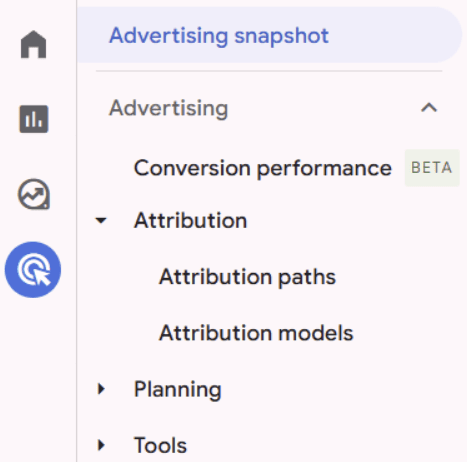
The Attribution paths report lives under Advertising → Attribution in Google Analytics 4.

Attribution Paths reportImage from author, October 2025

It shows the sequence of touchpoints leading to a selected key event (GA4’s new term for “conversion” in reporting).

When linked with Google Ads, GA4’s Attribution paths can include a wider set of touchpoints, not just clicks. These may cover impressions, engaged views, emails, downloads, and site usage events. In practice, advertisers may see earlier interactions, such as YouTube views or Display impressions, represented in their conversion paths, rather than only the last click.

That impression visibility is a hidden gem. Instead of asking “Which campaign got the last click?” you can ask, “Which channels actually contribute to conversion journeys?”

From “Conversions” To “Key Events”

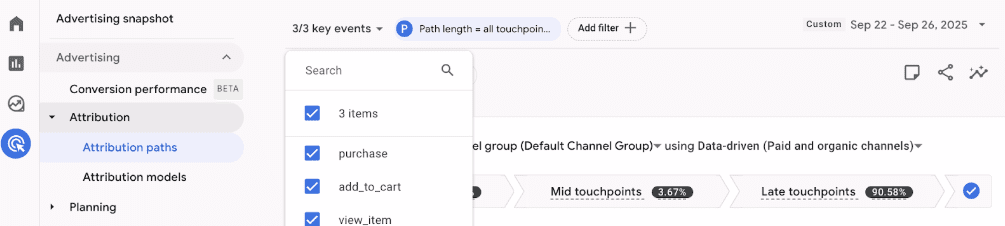
The terminology shift trips up many teams. In GA4 reports, you’ll see key events; in Google Ads, you’ll still import and bid on conversions. Functionally, they’re the same, just labelled differently depending on the platform. This matters because the Attribution paths report lets you segment by the exact key event you optimize for in Ads.

key event segmentationImage from author, October 2025

Beyond Last-Click: How To Use The Report

Here’s where the Attribution paths report becomes more than a pretty diagram:

Prove And Price Upper-Funnel Ads

Under a last-click model, touchpoints like YouTube impressions or Display views receive no credit for a conversion. But if you switch to Data-Driven Attribution (DDA) in GA4’s Attribution models, the system redistributes some credit to these earlier touchpoints when there’s statistical evidence they influenced the conversion. Attribution paths then show where those touchpoints occurred in the journey, giving you a directional view of their assist value. This isn’t causal “incrementality testing,” but it’s a practical way to highlight the contribution of upper-funnel Ads before requesting more budget.

Check Conversion Lag Before Tightening The Strategy

Time lag and path length metrics reveal how long users take to complete a conversion on average. If journeys average 10+ days, but you’re using a seven-day conversion window in Ads, your Smart Bidding may be cutting conversions off too early.

Segment By Conversion Type

A newsletter signup path looks very different from a qualified lead path. By selecting one key event at a time, you avoid combining low-value and high-value conversions, ensuring a more effective approach.

Validate Budget Shifts

The Attribution models report (sitting next to Attribution paths) shows how credit changes under DDA vs. last-click. Use Attribution paths to ensure that model-based reallocations reflect actual journeys, not anomalies.

For example, a B2B software advertiser discovered through Attribution Paths that most demo requests came from users who watched a YouTube awareness ad first, clicked a retargeting ad on Display, and then searched the brand name before converting. Under a last-click model, only the branded search ad received credit. But once path data revealed the full sequence, it became clear that the upper funnel was generating the demand, and the brand campaign was simply closing. With that context, the advertiser was able to justify maintaining a top-of-funnel budget.

Caveats You Can’t Ignore

Assisted Conversions Are Gone

Unlike Universal Analytics, GA4 doesn’t provide an “assists” metric. If you want it, you’ll need to export path data and calculate it manually.

Expect Discrepancies

Numbers in GA4’s Acquisition reports and Attribution paths often don’t line up. GA4’s Acquisition reports use different attribution logic depending on the report. User Acquisition attributes all credit to the first touch. Traffic Acquisition is attributed to the last non-direct touch. Key event (conversion) attribution is the only place where GA4 applies the property’s cross-channel attribution model (by default, data-driven). By contrast, the Attribution reports let you swap models entirely, compare outcomes, and even visualize how impressions or non-click touchpoints factor into paths. In other words, Acquisition reports show you who arrived and converted, while Attribution paths show you how credit is distributed across multiple interactions. Both are useful, but they’re answering different questions.

Data Availability

GA4 attribution only covers data from June 14, 2021, onwards, and only online touchpoints are covered by default.

Privacy, Sampling, And Model Lag

Modern attribution reports operate within data limits that every advertiser should account for. Privacy thresholds prevent Google from showing data when impression or click counts are too low, which is why some paths appear grouped under “Other.” Sampling can also affect the accuracy of multi-channel or multi-device reports, meaning figures should be treated directionally rather than as absolutes. Finally, attribution data has built-in lag: conversions that happen days after a click will backfill into earlier reports, so results from the past 24-48 hours are rarely complete. Waiting for that lag to settle before drawing conclusions gives automation a fairer dataset to learn from.

From Insights To Action In Google Ads

GA4 analysis means little unless you feed it back into your Ads strategy. Here’s how practitioners are using Attribution paths to shape accounts:

Import the right key events. Optimizing for form fills alone often floods Ads with spam. Instead, integrate your CRM and import sales qualified leads (SQLs) or other meaningful events as primary conversions.

Budget with “path context” in mind. If upper-funnel campaigns frequently appear in early path positions, avoid cutting their spend, even if the last-click ROI looks weak. They’re building journeys for your search campaigns to close later.

Control overlap with PMax. Performance Max campaigns behave like bottom-funnel, feed-driven engines, rather than true full-funnel campaigns. Attribution paths confirm this: If PMax dominates late-stage paths, don’t mistake it for incremental awareness.

Set guardrails. Guardrails are often just good account structure – negatives, segmentation, and clear bidding rules. Attribution insights only help if your Ads setup allows the algorithm to learn from them.

Why This Is The Moment To Care

Google has spent the past several years adding transparency: brand exclusions in PMax, channel reporting, and search terms data. But transparency in Ads itself is still limited. GA4 Attribution paths are where you can actually prove assist value, diagnose lag, and reframe conversations with stakeholders.

GA4’s reporting is messy, but if you know how to read it, you can tell a clearer story than Ads alone ever could.

GA4’s Attribution paths aren’t just a reporting feature. They’re one of the few places you can see the whole journey before Smart Bidding reduces everything to a single number. Treat it as a decision layer: Validate which campaigns deserve credit, import the right events into Ads, and use those insights to argue for budgets across the funnel.

More Resources:


Featured Image: Anton Vierietin/Shutterstock

How AI is Helping Brands Convert More Customers [Webinar] via @sejournal, @hethr_campbell

Turn insights into smarter conversions and higher ROI.

AI is changing how customers convert. Are your landing pages and CRO strategies keeping up? 

Each missed lead is lost revenue. 

Relying on traditional tactics is no longer enough.

Join Laura Beussman, CMO of CallRail, and Ryan Johnson, CPO of CallRail, for a live webinar where you’ll learn how top marketing leaders are using AI to prioritize leads, optimize funnels, and drive measurable growth.

What You’ll Learn

  • How to automatically prioritize and convert your best leads.
  • How to spot funnel drop-off points that are costing revenue.
  • CRO tactics to make your marketing funnel work smarter, not harder.
  • How to identify the exact messaging that boosts conversions and ROI.

Why Attend

This webinar will give you the tools to capture more leads, surface actionable insights from interactions, remove friction slowing conversions, and automate your CRO playbook for ongoing growth.

Register now to gain actionable strategies for faster, smarter conversions with AI.

🛑 Can’t attend live? Register anyway, and we’ll send you the full recording.

Tips For Running Competitor Campaigns In Paid Search via @sejournal, @timothyjjensen

Paid search professionals constantly debate the merits of running paid search campaigns bidding on competitor brand names. Questions such as the following may arise:

  • Is bidding on your competitors ethical?
  • Are the high costs-per-click (CPCs) worth spending the budget on?
  • Are you actually reaching people with buying intent?

In this article, I’ll talk through answers to these questions and more to help you understand if a competitor search campaign might be right for your brand.

Competitor Bidding Ethics

Google and Microsoft allow you to bid on your competitor’s name within keywords (and this right has even been tested in the courts here and here.), but you cannot directly mention a trademarked brand name (that you don’t have the rights to use) in ad copy.

In addition, even if you don’t include their name, you should not write your ad copy in a way that a user thinks they may be going to your competitor’s site instead of yours.

For instance, you might use the headline “Official Site” (without mentioning whose official site you’re pointing to). When a user sees that in conjunction with having searched for the competitor’s name, they may naturally think they’re going to that company’s site.

Finally, the landing page should also clearly feature your brand’s name and logo in order to avoid deception.

Cost-Benefit Analysis Of Competitor Bidding

Let’s face it: competitor keywords can have expensive CPCs. High competition around these keywords in many industries drives up cost.

You’ll also generally struggle to achieve a decent quality score due to other companies’ brand keywords naturally being deemed less relevant to your ads and landing pages, which can also impact cost.

Because of the high potential cost, competitor bidding does not make sense for all industries or brands.

For instance, if you’re selling products with a low profit margin, bidding on these pricy keywords may not work. Generally, this tactic works best for higher cost, higher margin products and services, as it’s easier to still yield a return on investment (ROI) after higher costs-per-acquisition (CPAs) and lower conversion rates.

Be careful also about entering competitor bidding “wars” for the sole reason that other brands are bidding on your name. This action can quickly lead to rising CPCs for all with little payoff.

One scenario where I’ve seen competitor bidding work best is when a company offers a very specific, complex service that’s difficult to sum up in a search query but has established brands that the right prospects would be familiar with.

For instance, if you’re promoting software for a particular type of industrial machine, niche buyers may be aware of companies that already provide that software.

Once you’ve established a use case for competitor bidding, you should establish a list of brands to use.

Determining Competitors To Bid On

When figuring out which competitor brands to bid on, you should rely on a combination of both internal company data as well as ad platform data.

First of all, talk with key stakeholders in marketing and sales to determine who the brand considers to be top competitors.

Who has similar products and services? Which brands target similar prospects (whether by location, demographic, or company traits)?

Note that this list may not and likely will not contain all potential competitors.

If you have established paid search campaigns already, use auction insights to see the top brands showing up for the same queries as yours. Of course, these may not all be completely relevant and will require some vetting through.

Once you’ve compiled a list, it’s time to think through the keywords you’ll bid on.

Who Is (And Isn’t) Your Audience

Be careful about going unnecessarily broad in the keywords you’re using in competitor campaigns.

Generally, if you’re just bidding on the brand name alone, you’re likely reaching a lot of existing customers looking to log in, place online orders, or find a nearby location without giving a second thought to anything else.

For instance, Apple isn’t going to sell many MacBooks by bidding on the word “Microsoft.”

Ideally, you want to reach people who are in a research phase, indicated by wording in their search query:

  • [Brand name] + cost/pricing
  • [Brand name] + compare/vs
  • [Brand name] + reviews
  • [Brand name] + pros/cons
  • [Brand name] + alternatives
  • [Brand name] + features

While a potentially riskier strategy, as people may be in a heated moment, you could also test targeting people experiencing issues and potentially in the market to switch:

  • [Brand name] + support
  • [Brand name] + troubleshoot
  • [Brand name] + cancel

Create Your Ads

Now, think through the ad copy you’ll put in front of prospects searching for competitors. Take some time to review competitor ads and offers, considering how your calls-to-action (CTAs) will stack up.

Think through areas where you “win” against certain competitors and highlight those. Remember that these may vary based on the brand you’re bidding against.

For instance, you may have lower costs than a certain competitor and highlight pricing for those searches, while you may have higher costs than another competitor but have unique features to highlight.

Also, look at how your offers compare. If one competitor offers a seven-day demo and you offer a 30-day demo, feature that in your ad.

This also should be an area you regularly monitor and adjust CTAs based on how competitors tweak their ads and offers.

What Happens After The Ad?

One maxim applicable to any paid search campaign is that what happens on the search engine results page up to the ad click is only one portion of the user experience.

A significant portion of the decision process happens after reaching the landing page, beyond what you can control in keywords and ad copy.

Think through what your prospect is seeing based on the context that they were researching a competitor. Your homepage probably isn’t the best place to land them, and the same sales landing page you use for more general keywords may not be ideal either.

Assuming a user is comparison shopping, placing some content on your landing page positioning your brand against others will likely help.

For instance, you could create a table showing how your features and pricing stack up vs. competitors (either mentioning specific names or providing industry averages).

You could also hone in on trust signals that set your brand apart. Highlight industry awards you’ve won. Mention the number of accounts serviced. Talk about how many integrations you have with commonly used products.

If you need to establish a baseline for comparing against other companies, prompt a large language model (LLM) to put together a list of features for your brand and a list of top competitors.

Provide the URLs for pages that would contain products/services to flesh this out.

Launch And Monitor Results

Once you have your competitor campaigns fleshed out, it’s time to get them off the ground and see what performance looks like.

In addition to ensuring proper conversion tracking and watching for lead/sale quality, you’ll also want to keep an eye out for both how current competitors change up their offers and new competitors entering the space that may be worth targeting.

With a carefully thought-out setup and proper monitoring, you may find that competitor search campaigns allow you to capture leads or sales from queries you were not previously reaching.

On the other hand, you may discover that for your industry, the CPAs and conversion rates aren’t worthwhile, but as with anything in PPC, you ran a test and learned the results.

At the very least, take stock of potential competitors in your field and consider testing if you are looking to expand your reach in paid search.

More Resources:


Featured Image: SvetaZi/Shutterstock

6 AI Marketing Myths That Are Costing You Money [Webinar] via @sejournal, @duchessjenm

Stop letting AI drain your budget. Learn how to make it work for you.

Think AI can fully run your marketing strategy on autopilot? 

Or that AI-generated content should deliver instant results? 

It is time to bust the AI myths that are slowing you down and costing you money.

Join Bailey Beckham, Senior Partner Marketing Manager at CallRail, and Jennifer McDonald, Senior Marketing Manager at Search Engine Journal, on August 21, 2025, for an exclusive webinar. Get the insights you need to stop wasting time and money and start leveraging AI the right way.

In this session, you will learn:

Why this session is essential:

AI tools can’t run your strategy on autopilot. You need to make smarter decisions, ask the right questions, and guide your AI tools to work for you, not against you. 

This webinar will help you unlock AI’s full potential and optimize your content to improve your marketing performance.

Register now to learn how to get your content loved by AI, LLMs, and most importantly, your audience. Can’t attend live? Don’t worry, sign up anyway, and we will send you the on-demand recording.

The Great Reversal: Why Agencies Are Replacing PPC With Predictable SEO via @sejournal, @mktbrew

This post was sponsored by Market Brew. The opinions expressed in this article are the sponsor’s own.

What if your client’s PPC budget could fund long-term organic growth instead?

Why do organic results dominate user clicks, but get sidelined in budget discussions?

Organic Drives 5x More Traffic Than PPC. Can We Prove It?

The Short Answer: Yes!

Over the past decade, digital marketers have witnessed a dramatic shift in how search budgets are allocated.

In the past decade, companies were funding SEO teams alongside PPC teams. However, a shift towards PPC-first has dominated the inbound marketing space.

Where Have SEO Budgets Gone?

Today, more than $150 billion is spent annually on paid search in the United States alone, while only $50 billion is invested in SEO.

That’s a 3-to-1 ratio, even though 90% of search clicks go to organic results, and only 10% to ads.

It’s not because paid search is more effective. Paid search is just easier to measure.

But that’s changing with the return of attribution within predictive SEO.

What Is Attribution?

Attribution in marketing is the process of identifying which touchpoints or channels contributed to a conversion or sale.

It helps us understand the customer journey so we can allocate budget more effectively and optimize campaigns for higher ROI.

As Google’s algorithms evolved, the cause-and-effect between SEO efforts and business outcomes became harder to prove.

Ranking fluctuations seemed random. Timelines stretched.

Clients became impatient.

Trackable Digital Marketing Has Destroyed SEO

With Google Ads, every dollar has a direct, reportable outcome:

  • Impressions.
  • Clicks.
  • Conversions.

SEO, by contrast, has long been:

  • A black box.

As a result, agencies and the clients that hire them followed the money, even when SEO’s results were higher.

PPC’s Direct Attribution Makes PPC Look More Important, But SEO Still Dominates

Hard facts:

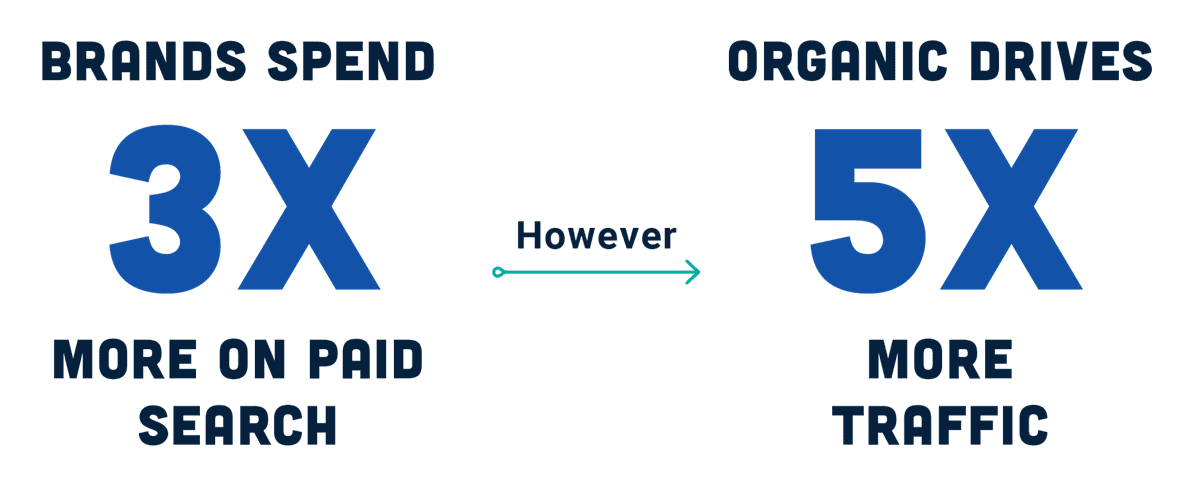
  • SEO drives 5x more traffic than PPC.
  • Companies pay 3x more on PPC than SEO.
Image created by MarketBrew, August 2025

You Can Now Trace ROI Back To SEO

As a result, many SEO professionals and agencies want a way back to organic. Now, there is one, and it’s powered by attribution.

Attribution Is the Key to Measurable SEO Performance

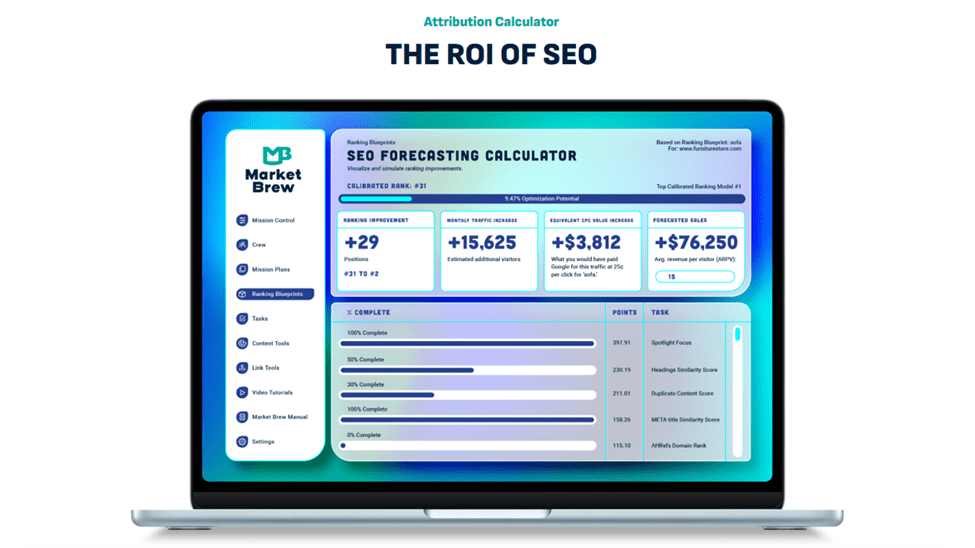
Instead of sitting on the edge of the search engine’s black box, guessing what might happen, we can now go inside the SEO black box, to simulate how the algorithms behave, factor by factor, and observe exactly how rankings react to each change.

This is SEO with attribution.

Image created by MarketBrew, August 2025

With this model in place, you are no longer stuck saying “trust us.”

You can say, “Here’s what we changed. Here’s how rankings moved. Here’s the value of that movement.” Whether the change was a new internal link structure or a content improvement, it’s now visible, measurable, and attributable.

For the first time, SEO teams have a way to communicate performance in terms executives understand: cause, effect, and value.

This transparency is changing the way agencies operate. It turns SEO into a predictable system, not a gamble. And it arms client-facing teams with the evidence they need to justify the budget, or win it back.

How Agencies Are Replacing PPC With Measurable Organic SEO

For agencies, attribution opens the door to something much bigger than better reporting; it enables a completely new kind of offering: performance-based SEO.

Traditionally, SEO services have been sold as retainers or hourly engagements. Clients pay for effort, not outcomes. With attribution, agencies can now flip that model and say: You only pay when results happen.

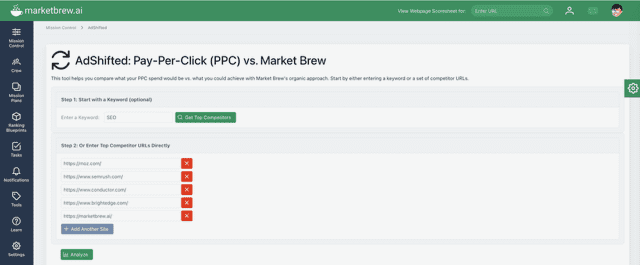
Enter Market Brew’s AdShifted feature to model this value and success as shown here:

Screenshot from a video by MarketBrew, August 2025

The AdShift tool starts by entering a keyword to discover up to 4* competitive URLs for the Keyword’s Top Clustered Similarities. (*including your own website plus 4 top-ranking competitors)

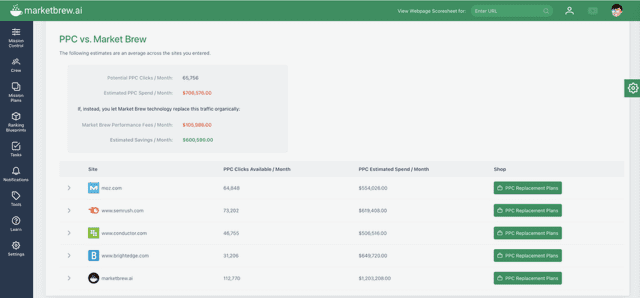
Screenshot of PPC vs. MarketBrew comparison dashboard by Marketbrew, August 2025

AdShift averages CPC and search volume across all keywords and URLs, giving you a reliable market-wide estimate and details for your brand towards a monthly PPC investment to rank #1.

The dashboard of a business dashboard.
Screenshot of a dashboard by Marketbrew, August 2025

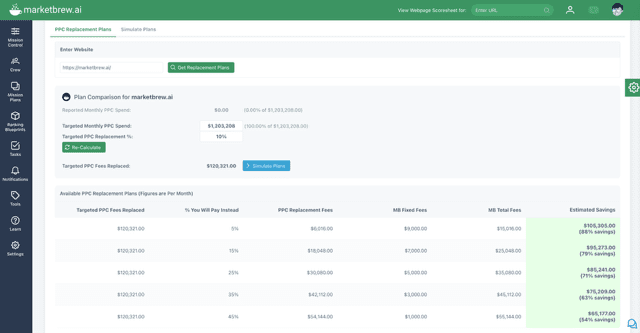
AdShift then calculates YOUR percentage of replacement for PPC to fund SEO.

This allows you to model your own Performance Plan with variable discounts available to the Market Brew license fees with an always less than 50% of PPC Fee for clicks replaced by new SEO traffic.

The dashboard for a business account.
Screenshot of a dashboard by Marketbrew, August 2025

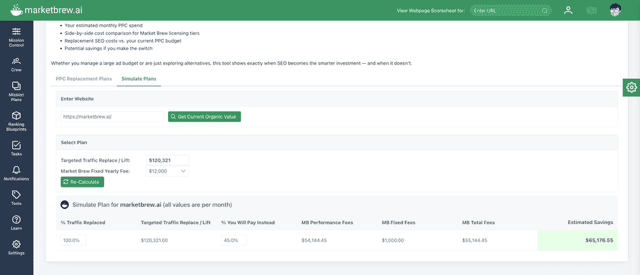
AdShift simulates a PPC replacement plan option selected based on its keywords footprint to instantly see savings from the associated Performance Plans.

That’s the heart of the PPC replacement plan: a strategy you can use to gradually shift a  clients’ paid search budgets into measurable performance-based SEO.

What Is A PPC Replacement Plan? Trackable SEO.

A PPC replacement plan is a strategy in which agencies gradually shift their clients’ paid search budgets into organic investments, with measurable outcomes and shared performance incentives.

Here’s how it works:

  1. Benchmark Paid Spend: Identify the current Google Ads budget, i.e., $10,000 per month or $120,000 per year.
  2. Forecast Organic Value: Use search engine modeling to predict the lift in organic traffic from specific SEO tasks.
  3. Execute & Attribute: Complete tasks and monitor real-time changes in rankings and traffic.
  4. Charge on Impact: Instead of billing for time, bill for results, often at a fraction of the client’s former ad spend.

This is not about replacing all paid spend.

Branded queries and some high-value targets may remain in PPC. But for the large, expensive middle of the keyword funnel, agencies can now offer a smarter path: predictable, attributable organic results, at a lower cost-per-click, with better margins.

And most importantly, instead of lining Google’s pockets with PPC revenue, your investments begin to fuel both organic and LLM searches!

Real-World Proof That SEO Attribution Works

Agencies exploring this new attribution-powered model aren’t just intrigued … they’re energized. For many, it’s the first time in years that SEO feels like a strategic growth engine, not just a checklist of deliverables.

“We’ve pitched performance SEO to three clients this month alone,” said one digital strategy lead. “The ability to tie ranking improvements to specific tasks changed the entire conversation.”

Sean Myers, CEO, ThreeTech

Another partner shared,

“Instead of walking into meetings looking to justify an SEO retainer, we enter with a blueprint representing a SEO/GEO/AEO Search Engine’s ‘digital twin’ with the AI-driven tasks that show exactly what needs to be changed and the rankings it produces. Clients don’t question the value … they ask what’s next.”

Stephen Heitz, Chief Innovation Officer, LAVIDGE

Several agencies report that new business wins are increasing simply because they offer something different. While competitors stick to vague SEO promises or expensive PPC management, partners leveraging attribution offer clarity, accountability, and control.

And when the client sees that they’re paying less and getting more, it’s not a hard sell, it’s a long-term relationship.

A Smarter, More Profitable Model for Agencies and SEOs

The traditional agency model in search has become a maze of expectations.

Managing paid search may deliver short-term wins, but it comes to a bidding war with only those with the biggest budgets winning. SEO, meanwhile, has often felt like a thankless task … necessary but underappreciated, valuable but difficult to prove.

Attribution changes that.

For agencies, this is a path back to profitability and positioning. With attribution, you’re not just selling effort … you’re selling outcomes. And because the work is modeled and measured in advance, you can confidently offer performance plans that are both client-friendly and agency-profitable.

For SEOs, this is about getting the credit they deserve. Attribution allows practitioners to demonstrate their impact in concrete terms. Rankings don’t just move, … they move because of you. Traffic increases aren’t vague, … they’re connected to your specific strategies.

Now, you can show this.

Most importantly, this approach rebuilds trust.

Clients no longer have to guess what’s working. They see it. In dashboards, in forecasts, in side-by-side comparisons of where they were and where they are now. It restores SEO to a place of clarity and control where value is obvious, and investment is earned.

The industry has been waiting for this. And now, it’s here.

From PPC Dependence to Organic Dominance — Now Backed by Data

Search budgets have long been upside down, pouring billions into paid clicks that capture a mere fraction of user attention, while underfunding the organic channel that delivers lasting value.

Why? Because SEO lacked attribution.

That’s no longer the case.

Today, agencies and SEO professionals have the tools to prove what works, forecast what’s next, and get paid for the real value they deliver. It’s a shift that empowers agencies to move beyond bidding-war PPC management and into a lower cost & higher ROAS, performance-based SEO.

This isn’t just a new service mode it’s a rebalancing of power in search.

Organic is back. It’s measurable. It’s profitable. And it’s ready to take center stage again.

The only question is: will you be the agency or brand that leads the shift or watch as others do it first?

Citations

Image Credits

Featured Image: Image by Market Brew. Used with permission.

In-Post Image: Images by Market Brew. Used with permission.

Don’t Overlook Mid-Funnel Prospects: AI PPC Strategies For Business Growth via @sejournal, @LisaRocksSEM

Marketers tend to prioritize top-of-funnel awareness and bottom-funnel conversion efforts.

Yet, the mid-funnel stage is where prospects actively weigh options and is crucial for sustained growth and profitability.

Overlooking this critical stage can reduce revenue potential. Using AI-driven paid media for nurturing and retargeting can bridge this gap, converting high-quality leads into profitable customers.

Importance Of Mid-Funnel Engagement

Prospects in the mid-funnel have already expressed interest and are ready to move to action.

They are conducting detailed comparisons, attending webinars, downloading whitepapers, and critically evaluating their choices.

Despite this intense engagement, advertisers often overlook this critical phase, causing leads to drop off.

Common challenges at this stage include generic content that fails to resonate and intrusive retargeting campaigns.

The lack of personalized campaigns and ad copy further undermines mid-funnel marketing. It’s important now for marketers to reassess their strategies to better engage prospects.

Understanding The Customer Journey: Top-, Mid-, And Bottom-Funnel Behaviors

To effectively target prospects, we have to understand their journey through the marketing funnel.

As we explore AI’s impact on the mid-funnel, let’s first look at how prospect behaviors evolve from awareness to conversion.

For PPC strategists and chief marketing officers, aligning paid media tactics with each funnel stage is key to maximizing AI’s potential in campaigns.

To illustrate how PPC strategies should evolve with the prospect’s mindset, consider the following breakdown of PPC tactics for each funnel stage.

Funnel Stage Prospect Mindset & Goal (PPC Lens) Common PPC Keyword/Query Types Key PPC Ad Focus Core PPC Tactics & Ad Formats
Top-Funnel (Awareness) “I have a problem or need.”

  • Seeking general information
Informational keywords:

  • “how to solve problem”
  • “what is”
  • “benefits of”
  • Educate and inform.
  • Position your brand as a helpful resource.
  • Highlight helpful content.
  • Broad match keywords
  • Display Network ads (interest, affinity audiences).
  • YouTube.
  • General search campaigns.
Mid-Funnel (Consideration/ Evaluation) “I understand my problem and am looking for solutions.”

  • Comparing options, detailed info on specific solutions.
Comparison keywords:

  • “compare [product A] vs. [product B]”
  • “best product category for [a specific need]”
  • “[product name] reviews”
  • “alternative to [competitor]”
  • pricing
  • Features and benefits.
  • Demonstrate unique value, highlight differentiators.
  • Offer solutions to specific pain points.
  • Exact/phrase match keywords.
  • Retargeting (website visitors, video viewers, content downloads.
  • Custom Intent, In-Market audiences.
  • Dynamic Search Ads (for specific solution pages).
  • Google Shopping (for products being compared).
  • Focus on lead capture.
Bottom-Funnel (Decision/ Purchase) “I’m ready to buy, need to choose who from.”

  • Making a final decision, seeking confirmation, or a specific offer.
Transactional keywords:

  • “buy [product name]”
  • “[product name] pricing”
  • “demo”
  • “get a quote”
  • “deal on [product]”
  • “sign up for [service]”
  • Call-to-action and urgency.
  • Offer direct value, limited-time deals, or compelling reasons to choose now.
  • Focus on immediate conversion.
  • Highly targeted exact match keywords.
  • Remarketing to cart abandoners or demo form abandoners.
  • Competitor Conquesting (very specific terms)
  • Google Shopping (specific prod SKUs).
  • PMax with strong final URLs.
  • Lead Form Assets.
  • Focus on direct sales.

Mid-Funnel Potential

In the “consideration” phase, advertisers now have new ways to engage, segment, and nurture mid-funnel audiences with AI and innovative PPC targeting tactics.

Here are three AI-powered mid-funnel tactics to integrate into the paid search plan.

1. AI-Driven Prospect Targeting

This tactic uses AI to analyze huge amounts of user data signals to identify which specific prospects are most likely to take action (convert) at mid-funnel.

The ad platforms may look at past website interactions to demographic signals to predict who are the most qualified new customers.

Smart Bidding and targeting tools allow advertisers to focus ad budget and messaging on the most effective, hot leads.

In one example, Google Ads segments out new customers, calling it the “New customer acquisition goal.” This lifecycle goal prioritizes bidding to reach and acquire new customers.

Key Advantages:

  • Maximizes budget efficiency: Uses AI to identify high-intent prospects within your paid ad campaigns.
  • Improves overall conversion rates: By prioritizing higher-intent leads, you naturally see a better chance of converting them into valuable customers down the line.

PPC Features Supporting This Tactic:

  • Performance Max (Google Ads and Microsoft Ads): This powerful campaign type leverages AI across all channels (search, display, email, etc) to find converting customers. It prioritizes users showing high-value signals, optimizing your bids and placements to capture them.
  • Smart Bidding Strategies (Target CPA, Target ROAS): While often used for bottom-funnel sales, these can be set to optimize for mid-funnel conversions. The AI learns which users are more likely to complete these specific actions and bids accordingly.
  • Custom Segments (Audience Manager): Combine your valuable first-party data (like customer lists of qualified leads) with Google’s audience signals to create highly targeted segments. AI can then optimize towards these prequalified groups.

2. Dynamic Ad Creative

AI automation can generate personalized ad creatives in real-time, enhancing relevance and engagement.

This means prospects see ads that are custom for their specific interests and previous interactions, in real-time, making the ads feel more relevant and personal.

Key Advantages:

  • Ad relevance: Ads feel personal and directly address the user’s observed interests, grabbing attention and increasing engagement.
  • Reduces ad fatigue: Users see varied, interesting ads instead of the same old creative repeatedly, preventing boredom and annoyance, which keeps them engaged longer.
  • Improves engagement metrics: You’ll see higher click-through rates (CTRs) and potentially better ad quality scores because the ads are well-matched to user intent.

PPC Features Supporting This Tactic:

  • Responsive Search Ads (RSAs) and Responsive Display Ads (RDAs): You provide multiple headlines, descriptions, and images. Google’s AI then mixes and matches these assets in real-time to find the best-performing combinations for each unique search query or individual users based on their search query, device, location, and other signals.
  • Dynamic Retargeting/Remarketing Ads: For ecommerce, these ads automatically showcase products a user viewed on your site. For B2B, they can dynamically display relevant content, case studies, or solutions based on specific pages visited on your website.
  • Google Ads’ Asset Library and AI-Driven Creative Suggestions: These tools help you generate a wide variety of diverse assets, then utilize them effectively to create countless ad variations.

3. Value-Based Bidding For Mid-Funnel Conversions

Shift your focus from conversion volume to conversion value with AI-powered bidding strategies that prioritize high-value leads.

Advertisers can assign a higher monetary value to actions that signify greater intent or higher potential lifetime value, like a demo request vs. a download.

The AI then prioritizes bids and focuses the budget on acquiring more valuable leads.

Key Advantages:

  • Optimizes for profitability, not just volume: Ensures your ad spend is directed towards acquiring profitable leads.
  • Improves budget allocation: AI intelligently allocates bids based on anticipated lead quality and potential revenue, not just the number of conversions, leading to more efficient spending.
  • Aligns PPC directly with business key performance indicators (KPIs): This strategy directly ties your ad performance to revenue goals and bottom-line impact. By focusing on value, PPC becomes a clear contributor, proving its worth directly.

PPC Features Supporting This Tactic:

  • Target ROAS (Return On Ad Spend) for Lead Generation: While often seen in ecommerce, an advanced use case is to apply it to lead generation campaigns. By assigning monetary values to different lead types, you tell the system the ROAS you want, and AI bids to meet it.
  • Maximize Conversion Value Bidding: This bidding strategy tells the AI to get the highest possible total conversion value within your budget. This requires a proper setup where you assign different values to each mid-funnel conversion action in your account. Without those values, the system can’t differentiate between the worth of different conversions.
  • Offline Conversion Import: This is a secret weapon! By importing your customer relationship management (CRM) data information about which leads converted to sales into your ad platforms, you teach the AI which mid-funnel actions are most likely to result in a high-value closed deal, allowing it to optimize bids efficiently.

Ready To Make The Mid-Funnel A Strategic Priority?

Rethink your approach to the mid-funnel, where valuable engagement opportunities often go untapped.

By using AI-driven strategies like those discussed, you can reconnect with high-intent prospects and guide them toward conversion.

For CMOs and senior marketers, optimizing the mid-funnel is a strategic opportunity to grow the customer acquisition pipeline.

More Resources:


Featured Image: N Universe/Shutterstock

How To Calculate Your ROAS & Ways To Use It via @sejournal, @coreydmorris

Return on ad spend (ROAS) is a common metric or key performance indicator for paid search campaigns. PPC managers and digital marketing executives have been using it for a long time.

In fact, it isn’t even novel to just digital marketing.

While calculating and connecting the dots with attribution for full end-to-end digital marketing is ideal, using ROAS within PPC and SEM specifically can be powerful as a quality metric that scales.

ROAS is a pretty straightforward equation to calculate on the surface.

Return on ad spend = total revenue generated by ads, divided by the cost of ad spend

However, it seems that no metric, KPI, or outcome is as easy to configure and measure nowadays, given the volume of changes in Google Ads, reporting software, and measurement platforms alone.

Beyond that, there’s no one-size-fits-all benchmark or result you’re looking for. A “good” ROAS is different for every business, and what defines good or successful is up to the business to determine.

Whether you’re confident calculating ROAS, need help with knowing how to use it, or fall somewhere in between, I encourage you to dive into the ways to use it in your own PPC efforts.

1. Setting Expectations

PPC is a great channel for getting quick results and to impact a business.

However, even with the best research on the front end, it can often lead to missed expectations.

PPC expectations can vary wildly and be subjective. ROAS provides the opportunity to set a benchmark for what success looks like.

An effective PPC manager can pull different levers to drive more traffic, spend more budget, or try to find a sweet spot in between.

By establishing a ROAS goal tied to profitability, the PPC team can utilize that metric as a key in their decisions and performance overall.

And, profitability needs to factor in the cost of software, people, and things that go beyond just the cost of an ad or media budget – but that’s for another article.

2. Budgeting

ROAS can serve as a great tool in factoring budget decisions.

Like setting expectations, ROAS can serve as a benchmark, helping teams go beyond just looking at bid, budget, click, and conversion ceilings. It is a quality metric.

Use ROAS to determine where the law of diminishing returns applies and ensure it is included in projections. When looking at real past performance, it can be used to help determine ideal budgets and ranges that are acceptable.

In most cases, I have found clients are okay with not capping the budget and looking at the ROAS number solely to determine how much to spend.

If the spend can be increased and still exceed the target ROAS, then keep spending all day, every day, as we know we’re in profitable territory, assuming we’re not creating inventory, fulfillment, sales capacity, or other operational issues.

I love this type of thinking and decision-making, as it is linked to ROI versus budget or a mindset that marketing and ad dollars are an “expense.”

3. Bid Decisions

Getting more granular, bid decisions can also be made based on ROAS.

The ROAS can be calculated at a detailed level and not just at a high level for aggregate or total spend.

When we break down our campaigns into categories like campaign, ad group, ad type, topic, etc., we can get more granular control and insight.

For example, If we’re running Google Shopping Ads which appear on Google Shopping search results pages, we can treat those as a distinct advertising format. This allows us to measure their performance separately and calculate the return on ad spend (ROAS) they generate.

Going even deeper, we can drill down to the individual product level to see how different products produce ROAS.

By knowing what the ROAS is at different levels, we can advise and optimize our bid strategies and have more control over what is driving the overall ROAS and positively impact the whole.

The ability to roll up performance drill down to the product detail level allows for measuring toward broader business goals while also providing an opportunity to test and get things dialed in over time when launching and optimizing new campaigns and ads within an account.

4. Ecommerce

One of the first types of businesses that comes to mind when thinking about ROAS and its use is ecommerce.

With a lot of the great tools and integrations available, many shopping cart platforms automatically feed revenue data back into Google Ads and Google Analytics.

By using these metrics, we can quickly arrive at our ROAS by taking total revenue divided by total spend.

Note that getting ROAS is likely the easiest part. Determining what an acceptable ROAS overall takes more time and work.

That part includes determining profit margins for products, calculating overhead, and determining the full aspect of ROI to back out what the ROAS needs to be.

5. Lead Generation

A trickier business goal type for calculating ROAS is lead generation. ROAS might be tougher to back out and measure itself.

However, in most cases, lead generation campaigns have more attention to detail on the ROI side of things and know their sales cycles and overhead.

This makes arriving at ROAS goals easier, while ROAS itself might take more time to calculate based on the length of time from conversion to final sale, if that’s how ROAS is truly calculated.

When you want to look at ROAS as a meaningful metric for lead generation, you need to have a solid definition of what a lead is.

By default, if a conversion action in Google Ads (or other platforms) is what you use to calculate this metric, you might end up off-track from what your sales team or broader effort cares about.

ROAS matters, but if the “lead” isn’t right or something you can track, you can run into trouble with the definitions of “return,” “leads,” and your overall attribution.

In most cases, the deepest you can track and attribute a lead to a sale and actual revenue is best. If you can’t get that deep, ask questions and probe. The dots should be connected from impression to customer/client.

6. Awareness & Other Campaigns

ROAS can be measured in other business goals and applications as well.

Whether it is awareness generation, page views, or other secondary goals, it can still apply.

Although, it might take more work to define the return for awareness campaigns and would need measurement through attribution modeling. But, it can still be achieved with the right work to back out the sales metric.

As a note, in B2B lead gen, attribution windows can be long, and offline conversion tracking is needed for accuracy.

An example of ROAS for an awareness campaign can look very different from one for ecommerce or lead generation.

If your goal is to create awareness for a topic, brand, or other subject matter, then you’re not as focused on direct sales or leads. You may want to cast as wide of a net as possible for your target or potential audience (even if the broader general public).

In that sense, you have to find a key metric to tie ROI to. You have the most open-ended challenge here – you have to determine the ROI for your organization. What does awareness contribute directly to ROI? How do you define it, measure it, and attribute it?

7. Beyond ROAS

While ROAS is a great benchmark and quality guide for paid media, it isn’t the end of the story. In some cases, it is just the start.

With customer retention, recency, frequency, monetary value (RFM), and lifetime value metrics that are known in businesses, we can take it even further.

Tying ROAS to other metrics beyond the sale can lead to incredible insights for use outside of media spend management.

Getting More From ROAS

Again, I know that ROAS might seem like a basic metric and be something reported on by default in so many dashboards and reports.

While in some cases, it may be simple to calculate, but using it as a metric takes more work.

Getting the foundation right, knowing what a good target ROAS is, how it scales, and that the “return” you’re getting is profitable, is the key to seeing it be a key benchmark and goal-focused KPI in your set of digital marketing metrics that ultimately map out to your business outcome results.

More Resources:


Featured Image: voronaman/Shutterstock

Stop Paying the Google Ads Tax Without Realizing It [Webinar] via @sejournal, @hethr_campbell

Most brands don’t know they’re wasting money on branded ads. Are you one of them?

What if your Google Ads strategy is quietly draining your budget? Many advertisers are paying high CPCs even when there’s no real competition. It’s often because they’re unknowingly bidding against themselves.

Join BrandPilot AI on July 17, 2025 for a live session with Jenn Paterson and John Beresford, as they explain The Uncontested Paid Search Problem and how to stop it before it eats into your performance.

In this data-backed session, you’ll learn:

  • Why CPCs rise even without competitor bidding
  • How to detect branded ad waste in your own account
  • What this hidden flaw is costing your brand
  • Tactical strategies to reclaim lost budget and improve your results

Why this matters:

Brands are overspending on Google Ads without knowing the real reason. If you’re running branded search campaigns, this session will show you how to identify and fix what’s costing you the most.

Register today to protect your spend and improve performance. If you can’t attend live, sign up anyway and we’ll send you the full recording after the event.