A Guide To Keyword Prioritization & The Newest Query Matching Controls In Google Ads via @sejournal, @adsliaison

There are often times when more than one keyword (and/or search theme) in your account will be eligible to match for a search term. Yet only one will be selected to compete in each auction.

So, how does Google choose which of your keywords to put forward?

There’s a prioritization framework for that!

We’ve also recently launched several updates to query matching controls, including the new brand inclusions and brand exclusions, to help you steer traffic where you want it.

While the keyword and search theme prioritization framework for query matching isn’t entirely new, it’s evolved in meaningful ways with recent AI advancements.

Now is a good time to dive into the mechanics of keyword prioritization and query matching controls. This will give you a better foundation for organizing your campaigns and ad groups, building keyword lists (positive and negative), selecting keyword match types, and using search themes to drive performance.

We’ll cover various scenarios and what to keep in mind for each prioritization rule – as well as what you need to know about the latest in query matching controls.

Why Keyword Prioritization Matters

Keyword prioritization rules help ensure keyword-to-query relevance to deliver better user experiences and advertiser outcomes.

But another big benefit of keyword prioritization rules is that they help address the reasons why advertisers resorted to using “keyword sculpting” techniques that entailed complex account and bid structures in order to route traffic where they wanted.

Google Ads <span class=

How Keyword Prioritization Works In Google Ads

I think of the four priority levels, or rules, shown above in two batches:

  • Priority rules 1 & 2 apply to scenarios when you have a keyword or search theme that’s identical to the search term or spell-corrected search term.
  • Priority rules 3 & 4 apply to scenarios when you don’t have an identical keyword or search theme and have multiple matches that could enter the auction.

Top Priority: Identical Exact Match Keywords

If you have an eligible exact match keyword that is identical to the search term or spell-corrected search term, that keyword will be prioritized to enter the auction over all other keywords in the account.

This prioritization rule means:

  • The exact match keyword [skydiving license] will match to the identical query “skydiving license”.
  • The identical exact match keyword [skydiving license] will also be prioritized over the same keyword duplicated in phrase or broad match – whether in the same or a different ad group.
  • It will be prioritized over Performance Max for Search text ads.
  • And it will be prioritized over any other relevant phrase or broad match keyword that could otherwise match to the query, such as “skydiving certification” or “skydiving licensing.”
  • Also important to note, if you have the broad match campaign setting enabled, those keywords will be treated as if both a broad match and an exact match version of the keyword were enabled.
If this: Then that:
Identical or spell-corrected exact match keyword to the query. The identical exact match keyword will be prioritized.
Identical or spell-corrected exact match keyword to the query is duplicated in phrase and/or broad match in the account. The identical exact match keyword will be prioritized over the duplicated phrase and/or broad match keywords.
Identical or spell-corrected exact match keyword to the query is duplicated in a Performance Max search theme. The identical exact match keyword will be prioritized over Performance Max, even if there is a duplicate search theme.
The broad match campaign setting is enabled, and an identical keyword to the query. The identical broad match keyword will be treated as an exact match version and will be prioritized.
The broad match campaign setting is enabled and an identical exact match keyword to the query in another campaign. The keyword with the highest Ad Rank will be prioritized.

Keep in mind:

  • Misspelled/spell-corrected search terms are considered “identical,” but plurals or synonyms are not.
    • So [skydoiving license] would be considered identical to [skydiving license], but [skydiving licenses] or [freefall license] would not.
  • The keyword has to be eligible to serve in order to match – this is true across all prioritization rules.
    • For example, if the campaign is limited by budget the keyword won’t always be able to trigger an ad.
    • Or if the targeting doesn’t align, the creatives or landing pages in the ad group are all disapproved, or the keyword has low search volume status, you may see traffic go to other keywords or Performance Max.

2nd Priority: Phrase, Broad Match, Or Search Themes That Are Identical To The Query

Next up, if you don’t have the identical exact match keyword, the system will look to see if there’s a phrase or broad match keyword, or Performance Max search theme that’s identical to the query or spell-corrected query.

This prioritization rule means:

  • A Search keyword that’s identical to the query will be prioritized over Performance Max, regardless of match type – exact (as covered by the first priority), phrase or broad.
    • This is worth reiterating because I often see it misunderstood: If you have an identical Search keyword to the query of any match type, Performance Max will not be considered for selection. With one exception . . .
  • If you have duplicate search themes and phrase or broad match keywords that are identical to the query, priority will be based on Ad Rank.
    • For example, if you have both the search theme and phrase match keyword “skydiving license” and that’s the query, the ad with the highest Ad Rank will be selected for the auction.
    • That’s because Performance Max search themes have the same prioritization as phrase and broad match keywords.
  • If you have the identical search theme to the query in Performance Max but not an identical keyword in Search, the search theme will be prioritized.
If this: Then that:
Identical or spell-corrected Search keyword and not an identical Performance Max search theme. The identical Search keyword will be prioritized over Performance Max, regardless of match type.
Identical or spell-corrected Search keyword + an identical Performance Max search theme. Prioritization will be based on Ad Rank.
Identical or spell-corrected phrase match + broad match Search keywords.
Identical search theme in Performance Max and not an identical Search keyword. The identical Performance Max search theme will be prioritized.

Keep in mind:

  • Misspelled/spell-corrected search terms are considered “identical,” but plurals or synonyms are not. So [skydoiving license] would be considered identical to [skydiving license], but [skydiving licenses] or [freefall license] would not.
  • There is no performance benefit from repeating the same keyword in multiple match types in a campaign.
    • Because the system prioritizes eligible keywords that are identical to the search term, you will have the identical keyword covered with any single match type.
  • Further, there’s a misconception that exact match keywords are “cheaper” than their phrase or broad match types.
    • If the factors are equal (ad, landing page, bid strategy), the cost for the same broad or phrase match keyword to pick up the identical exact match traffic will be equivalent. More on keyword matching options here.
    • If you are using phrase and/or broad match keywords and have duplicate keywords across match types within your ad groups, you can dedupe and remove the redundant keywords in the most restricted match types.
  • We recommend using search themes to fill gaps, rather than duplicate your keywords, in order to help steer the AI in Performance Max. More on search themes here.

Alright, now for the scenarios when you don’t have the identical match to the query in your account, we’re moving on to the next two rules of prioritization . . .

3rd Priority: Relevance (AI-Based Keyword Prioritization)

This is the new(ish) kid on the prioritization block – and the biggest recent advancement in keyword selection for Search campaigns.

AI-based keyword prioritization introduces relevance signals to identify the best keywords from the most relevant ad groups when multiple ad groups are eligible to match to a query.

This prioritization rule means:

  • Relevance is determined by looking at:
    • The meaning of the search term.
    • The meaning of all the keywords in the ad group.
    • The landing pages within the ad group.
  • Keywords with a lower Ad Rank but higher relevance can be selected over keywords with lower relevance.
  • AI-based prioritization currently works on keyword-based Search campaigns only (e.g. it does not work on Dynamic Search Ads).
  • It is used when your keywords aren’t identical to the search term.
If this Then that
Phrase and/or broad match keywords in multiple ad groups are eligible to match to a query. AI prioritization first looks at each ad group as a whole to better understand the creative and intent and selects the most relevant ad group(s) and keyword(s) for the auction.

If more than one keyword/ad group is found to be highly relevant, the one with the highest Ad Rank will be selected.

Multiple phrase and/or broad match keywords in the same ad group are eligible to match to a query.

Keep in mind:

  • A big benefit of AI-based keyword prioritization is that it reduces the need to create granular campaign structures to route traffic manually while still giving you control over which keyword matches to a query using thoughtful ad group theming.
  • To that end, AI-based prioritization only works as well, as it can infer relevance. This is why ad group theming is so important, particularly when using broad match.
  • Grouping your keywords into similar themes with relevant assets and landing pages makes it easier for Google to understand the intent of your keywords and landing pages and select the best match for the intent of the user’s search.

For example: Looking closer at the example outlined in the Help Center, a search for “skydiving certifications near me” could match to the ad groups “Skydiving License” and “Advanced Skydiving Courses.”

Both ad groups have related intent to the query, but the “Skydiving License” ad group has keywords and a landing page specific to licensing. Whereas the “Advanced Skydiving Courses” ad group has keywords and a landing page focused on advanced courses.

Because ‘license’ (included in both the keywords and landing page) + ‘certifications’ (included in the search term) are seen as significantly more related than ‘courses’ + ‘certifications’ to a search for “skydiving certifications,” the “Skydiving License” ad group is selected.

(Having worked on many education and certification campaigns over the years, I particularly appreciate this example!)

4th And Final: Ad Rank

Ad Rank is the final prioritization rule used to determine which keyword (or search theme) in your account will be selected to enter the auction. We’ve already covered some of the scenarios in which Ad Rank is used when the other rule criteria aren’t met.

Ad Rank considers a number of factors, including ad quality components, in real-time with every auction to determine which, if, and where your ads are shown relative to other advertisers. More on Ad Rank here.

This prioritization rule means:

  • If you have the identical keyword to the query repeated in both phrase and broad match, priority will be based on Ad Rank. The ad with the highest Ad Rank will be prioritized.
  • If you have the identical search theme in Performance Max and phrase or broad match keyword in Search, priority will be based on Ad Rank.
  • If there are multiple highly relevant phrase and/or broad match keywords eligible after being considered by AI-based keyword prioritization, Ad Rank is then used to make the final selection to enter the auction.
If this Then that
Duplicated phrase and broad match keywords that are identical to the query or spell-corrected query. Prioritization will be based on Ad Rank.
Identical or spell-corrected keyword + an identical Performance Max search theme to the query or spell-corrected query.
Duplicated phrase and broad match keywords that are identical to the query or spell-corrected query.
AI prioritization finds multiple highly relevant phrase and/or broad match keywords.
The broad match campaign setting is enabled and an identical exact match keyword to the query in another campaign.

Keep in mind:

  • Ad Rank also considers other factors, such as your bid, the expected impact of assets and ad formats (e.g., sitelinks, location assets, etc.), and the context of the person’s search.
  • When you run Performance Max and Search campaigns and don’t have an identical keyword to the search query, the campaign or ad with the highest Ad Rank will be selected.
  • And a quick note on Quality Score: Quality Score is based on historical impressions for identical searches of your keyword, which means the match type you use doesn’t impact Quality Score – nor does changing match types.
    • For example, if all else is equal (bid, ad, etc.), the broad match keyword running shoes and exact match keyword [running shoes] will have the same Quality Score.
    • If your broad match keyword running shoes matches to the search “shoes for running”, that doesn’t factor into Quality Score.

New Controls For Query Matching

In June, we announced several updates for query matching and brand controls. I’ll explain a bit more about each update and answer some of the questions I’ve received about them.

Brand Inclusions For Broad Match Campaigns

This feature (initially called brand restrictions) ensures your ads match only to queries related to your brand name in broad match campaigns.

To use brand inclusions, you’ll need to turn the broad match keywords setting on in your campaign. This will automatically set or change your keywords in the campaign to broad match.

After you create a brand list at the account level, you can apply it to the campaign.

It’s first important to note that there are ongoing, continuous improvements in broad match, and AI advancements are helping to accelerate progress.

For example, in the recent six months, broad match performance improved by 10% for advertisers using Smart Bidding due to AI-powered improvements to quality, relevance, and language understanding1.

And, in addition to using Smart Bidding, there are key controls for steering broad match. We have already touched on the importance of ad group theming, for example.

Brand inclusions is a new control that enables advertisers to use broad match effectively in their branded campaigns.

This means:

  • You can focus traffic only on queries that include your brand while also using the additional signals available to broad match, including landing pages, keywords in your ad group, previous searches, and more.
  • You may also now see recommendations to switch your brand-focused campaigns to broad match and apply brand inclusions.
If this Then that
A search query contains a brand that is applied to your branded campaign with brand inclusions. The query will match to the most relevant broad match brand keyword(s) in your brand campaign.
A search query does not contain a brand that is applied to your branded campaign with brand inclusions. The query will not match to any of the broad match keywords in your branded campaign.
A search query contains a competitor brand that is not applied to your branded campaign with brand inclusions.

Keep in mind:

  • Brands are not the same as keywords. Unlike keywords, brands are treated like individual entities.
  • We use logos, websites, and trademarks to determine the right brand and related products.
  • There’s no need to include misspellings, variants, or versions in other languages in your brand lists.
  • If there is a strong correlation between the query and brand entity, your brand products will be associated with the brand.

Brand Exclusions For Search

Already available for Performance Max, brand exclusions will be rolling out for Search in the coming months.

Brand exclusions offer a streamlined solution to prevent traffic from queries associated with certain brand names and misspellings.

As with brand inclusions, you create brand lists at the account level. Then apply them for exclusion to your Search and/or Performance Max campaigns.

This means:

  • You can exclude matches to searches for competitor brands, for example.
  • Brand exclusions for Search apply to all match types and Dynamic Search Ads.
  • You can also use brand exclusions to prevent matches to other brands mentioned alongside the brand you’ve specified.
    • For example, if you want traffic for “google” but want to avoid comparisons like “google vs samsung phone.”
  • Or you can prevent traffic on sub-brand queries. For example, you may want traffic for “google” but not “google maps.”
  • You will be able to apply brand lists for exclusion to multiple Search and/or Performance Max campaigns.
If this Then that
A search query contains a brand that is applied to your campaign(s) with brand exclusions. The query will not match to any of the keywords in those campaign(s).
A search query does not contain a brand name. The query may match to eligible, relevant keywords in your campaigns.
A search query contains a competitor brand that is not applied to your campaign(s) with brand exclusions. The query may match to eligible, relevant keywords in your campaign(s).

Keep in mind:

  • Brands are not the same as keywords. Unlike keywords, brands are treated like individual entities.
  • We use logos, websites, and trademarks to determine the right brand and related products.
  • There’s no need to include misspellings, variants, or versions in other languages in your brand lists.
  • If there is a strong correlation between the query and brand entity, the brand’s products will be associated with the brand.
  • The simplest variant will typically capture all variants when multiple variants of a brand have at least one common word, such as “Google” and “Google LLC.”
    • For example, “Google” will capture all variants of search queries that include “Google.” You don’t need to add the other variants to your list.
  • However, when multiple variants of a brand don’t have common words, such as “Google”, “YouTube”, and “Alphabet”, you’ll need to create a list that includes all of the variants.
    • Otherwise, the more general brand will often, but not always, capture all traffic related to all brands. (More here.)
  • Brands vs. keywords: You can still add brands as negative keywords, but since negative keywords are limited in that they don’t exclude brand variants, we recommend only using negative keywords for blocking traffic that’s undesired, regardless of performance.

Negative Keywords Block Misspellings

Negative keywords are a valuable control to prevent traffic from unwanted search terms.

And this is a very welcomed update. Negative keywords now prevent matching to misspelled queries. Below are examples of scenarios I’ve been asked about.

This means:

  • Now, instead of having to monitor your search terms or think of possible ways people might misspell your keywords, you just have to enter the correct spelling.
  • Misspellings as negatives won’t block correctly spelled queries, but correct spellings as negatives will block their misspelled queries. See examples below.
  • It will block misspellings but not synonyms, singular or plural versions, and other close variations.
  • You’ll still need to add those if you want to exclude them. (e.g., YT would be a variant of YouTube, and the misspelling would be yiotube.) See examples below.
  • You can likely do some negative keyword list culling to remove misspellings and streamline things in your account.
If this Then that
You add the correctly spelled “loan” as a negative keyword. It will block searches with “lian,” “laon,” etc. because they will be recognized as misspellings of “loan.”
You have the correctly spelled keyword “car loan” and add the misspelling “lian” as a negative. It will not block correctly spelled “loan” queries.

It will block queries such as “car lian.”

You have the keyword “bedding” and add the correctly spelled negative keyword “beds.” You’d still be able to match for “bedding” searches because “beds” is a variant, not a misspelling of “bedding.”
You have the keyword “YouTube” and the search query is “YT”. You’d still be able to match for “YT” searches because beds

Keep in mind:

  • This update applies to campaign-level and account-level keywords. More on negative keywords here.
  • Misspellings will apply to all negative keywords, regardless of match type.
  • Wondering if a word will be considered a misspelling of your keyword? A good way to check is to search on Google to see if it returns “These are results for” the spell-corrected query.

Will Pausing Low Volume Keywords And/or Ad Groups Impact Query Matching And Performance?

Lastly, another recent change raised some questions that I want to touch on.

Earlier this year, we notified advertisers that we would be automatically pausing Search ad groups and keywords that haven’t received an impression within the previous 13 months.

Clutter happens and idle ad groups and keywords that hadn’t been contributing to performance for some time can add up.

We don’t expect pausing ad groups or keywords that haven’t had an impression for more than a year to have a noticeable impact on your Search campaign traffic or to change the traffic mix between your Search and Performance Max campaigns.

You can continue to review and unpause any keywords or ad groups you think are still needed…however, this brings us back to account structure and ad group theming for relevance.

If you think these paused ad groups or keywords should have been matching to queries and generating impressions, consider before simply re-enabling them:

  • Check the keyword status for potential issues.
  • Look at whether these ad groups/keywords will be additive or if other keywords or ad groups are already covering this traffic.
  • Consider expanding the match type of these keywords to capture more queries.
  • Then, take a broader look at your ad groups’ creative theming, keeping the relevance signals that AI-based prioritization looks at in mind, including the other keywords and landing pages in the ad group.

Key Takeaway

Now that you have a deeper understanding of how these keyword prioritization rules and query matching controls work, take a fresh look at your account.

You may find opportunities to reorganize and consolidate your campaigns and focus on making your ad groups more tightly themed.

These efforts will help you streamline your account (e.g., simplify management) while also ensuring you are matching relevant queries with your most relevant ads to drive results.


Notes

1Google Internal Data, Oct 2023 – Mar 2024. Performance refers to conversions/conversion value at constant ROI.

More resources:


Featured Image: BestForBest/Shutterstock

Holistic Search Strategies: Attain Superior Growth & ROI With Organic & Paid Tips via @sejournal, @hethr_campbell

Silos don’t cut it anymore. User journeys are too complex for you to view and track channels separately.

To improve your campaign performance, you need a holistic view of your marketing activities and how they intertwine. This is especially true for organic and paid search strategies. 

You need to be front and center with your ideal customers at multiple touchpoints, including active interactions and passive awareness. An ideal marketing strategy has paid and organic campaigns working in tandem, and it’s becoming harder to succeed without doing both.

If you’re looking to drive quality growth in your own campaigns, iQuanti can help.

Join us live on July 24 as we delve into this intricate relationship between organic and paid search channels. You’ll get actionable insights for measuring success to maximize their combined potential.

You’ll gain a comprehensive, data-driven understanding of how to measure, analyze, and optimize holistic search marketing efforts, ensuring sustainable growth and superior ROI for your business.

You’ll walk away with:

  • Integrated Metrics and KPIs: Learn how to define and track key metrics to capture the performance of your organic and paid search campaigns, so you can make informed strategic decisions that work.
  • Attribution Models: You’ll see firsthand how strong attribution models are crucial to understanding your customers’ journeys, allowing you to identify influential touchpoints and allocate budget effectively for maximum ROI.
  • Optimization Strategies: You’ve gathered data from your campaigns…now what? Take the data and leverage it to further optimize your paid and organic search campaigns, increasing conversions along the way.

Shaubhik Ray, Senior Director of Digital Analytics Solutions at iQuanti is an expert at crafting holistic search strategies to reach more of your ideal audiences at relevant stages in their journeys. Now, he’s ready to share his insights with you.

You’ll walk away equipped with the knowledge and tools necessary to execute a combined organic and paid strategy that improves the performance of each channel.  You’ll gain data-driven insights on how to align a combined strategy with business goals and lead your organization to success.

Sign up now and prepare to maximize the potential of combining your organic and paid campaigns.

At the end of the presentation, you’ll get a chance to ask Shaubhik your burning questions in our live Q&A, so be sure to attend.

And if you can’t make it that day, register here and we’ll send you a recording following the webinar. 

Google, Bing & Amazon’s 2024 Shopping Ad Changes & How To Navigate Them

Inventory has always played a significant role in the way you sell on Amazon.

Running out of inventory can impact your organic ranking and can impact your advertising strategy.

Besides the potential loss of sales, poor inventory control also impacts the amount of inventory Amazon will allow you to send into the Fulfillment by Amazon (FBA) program.

Keep reading to learn more about:

  • How your Inventory Performance Index (IPI) score impacts your available storage volume.
  • What the IPI is, and how it’s calculated.
  • Recommended actions for improving your IPI score.
  • Tips for Amazon sellers who are new to Seller Central.

Amazon Limiting Sellers Storage Based On Storage Utilization

Amazon controls your storage capacity limits based on storage utilization and your sales history: 

Total Capacity Limit

This limits the amount of inventory you can restock to Amazon’s FBA warehouses in one shipment and the overall maximum number of units you can store at Amazon.

Accounts that have been active for less than 39 weeks are not subject to these restrictions.

It is important to note that this is only true for those accounts on the Professional Seller Plan.  Those with individual Seller Plans are limited to 15 cubic feet per month.

This limits the maximum cubic feet of storage space you have at Amazon. These limits are reviewed and adjusted monthly.

Any changes you can expect for your storage capacity for the following month will be announced on the third Monday of the month.

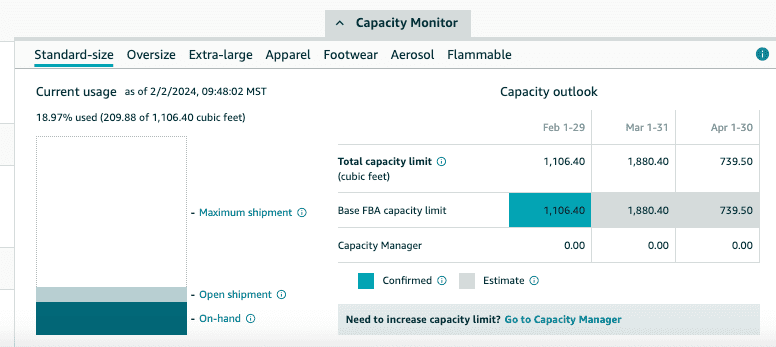
Included in your storage usage are the inventory currently stored at Amazon, inventory en route to Amazon, and any shipments that have been prepared but not yet sent to Amazon.

Screenshot of storage capacity monitor on Amazon Seller Central. Screenshot from Amazon Seller Central, February 2024

The Storage Volume is highly impacted by your IPI (Inventory Performance Index).

We will further discuss how your IPI is calculated later in this article.

IPIScreenshot from Amazon Seller Central, February 2024

Sellers who fall below the minimum criteria can have their storage limited. Operating with such limited storage can significantly undermine your sales forecasts.

We will outline the steps you can take to ensure you have sufficient storage for your high-demand season, maximizing your sales on Seller Central.

We’ll also review what you can do if you fall below Amazon’s set criteria.

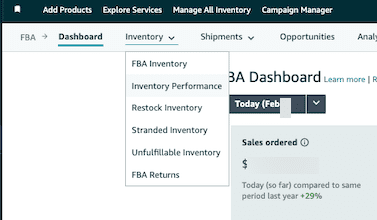
You can find your limit by going to Seller Central, selecting Inventory, navigating to the Inventory Dashboard, and then selecting Inventory Performance under the dropdown for Inventory.

Screenshot of how to navigate to find your storage capacity on Amazon. Screenshot from Amazon, February 2024

Your IPI score will be near the top of the page.

To reach your storage capacity, scroll to the bottom of the page and click on the small gray box labeled Capacity Monitor.

Success on Amazon Means You Have To Manage Your Inventory Levels Proactively

Amazon says that it considers the following criteria for your storage levels:

  • IPI Score and Sales Performance: Higher storage capacities are granted to accounts that consistently achieve a high IPI score.
  • Storage Utilization: In determining storage limits, Amazon considers your current inventory, inbound inventory, and shipments that are prepared but not yet dispatched.
  • Sales Volume: Amazon will also look at sales volume over time.

Improving Your IPI

If you have a low IPI score, know it will take time to improve your score.

IPI is a rolling average. It can take anywhere from 2 to 12 weeks to increase your score on Amazon, so planning ahead of time is essential.

This means if your IPI is below the 400 Amazon requires, you need to start taking aggressive action today.

This article will outline how to avoid having detrimental storage limits, how it happens, and what to do when you’re already below the threshold.

For those interested in Restock Limits, we’ll explore this topic in more detail later in the guide.

What Is The IPI (Inventory Performance Index), And Does It Affect Me?

The IPI will only affect those using Seller Central and FBA warehouses.

It does not affect those using Vendor Central, Kindle Direct Platform, or those selling on Seller Central by Merchant Fulfilling or utilizing Seller Fulfilled Prime for their items.

Inventory Performance Index (IPI)

The Inventory Performance Index (IPI) manages how well you control and manage your inventory at Amazon.

This metric is a 12-week rolling average. It looks at several components over three months.

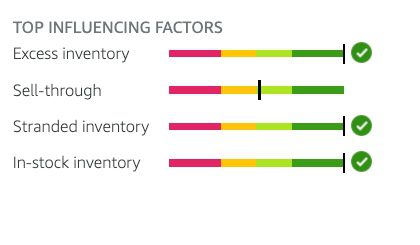
Four components make up the Inventory Performance Index (IPI):

Excess Inventory

This is the most important metric as it measures where your profitability may take a hit due to storage fees and holding costs for slow-moving FBA inventory.

Excess Inventory percentages help sellers plan when to restock more or remove inventory from FBA.

An item is considered to have excess inventory when it has over 90 days of supply based on the forecasted demand. 

Sell Through Rate

This metric is just how it sounds. The formula that Amazon uses to calculate Sell Through rates is:

(Units Shipped In the Last 90 Days)/(Average Units on Hand Over the Last 90 days)

Stranded Inventory

This provides information on products that aren’t selling due to listing issues.

This occurs when your listing doesn’t meet Amazon guidelines.

In these instances, your products become stranded and unable to move while still incurring FBA storage fees.

In-Stock Inventory

Amazon looks at the percentage of time your products have been in stock during the past 30 days, with additional weight given to items that have sold more units over the past 60 days.

If you maintain a high in-stock inventory, it will result in fewer lost sales.

Four components of the Inventory Performance Index.Screenshot from author, February 2024

It is important to highlight that these components are not weighted equally.

Excess Inventory

Excess Inventory and Sell-Through Rate are the parameters that have the most significant impact on IPI, while Stranded Inventory and Restock Rates can play a minor role in the overall score.

This means you will get more movement focusing solely on the first two components rather than spreading your efforts equally across all four elements.

During the height of the pandemic, Amazon changed the minimum IPI to 500. IT has since reduced the minimum IPI back to 400.

However, Amazon can increase or decrease the minimum IPI desired score at any point in time.

For this reason, we advise our clients to aim for a total IPI of 600.

Your minimum goal should be achieving at least 50 points over the current IPI requirement.

Some product mixes make maintaining a high IPI easier than others. For example, if you are a small brand with many products that move consistently, your IPI will generally tend to be higher.

If you are a seller with a large product mix that changes often, it is the most challenging to manage.

Combatting Capacity Limits

If you’re currently experiencing a capacity limit, Amazon can increase your capacity limit for a specific period of time by submitting a request subject to Amazon’s approval.

It is important to remember that if the storage limit increase request gets approved, your account is subject to paying a “reservation fee” for each cubic foot of capacity requested, and it will get charged at the end of the specified period.

Such fee is subject to a credit depending on your sales achieved during the period (performance credits are earned at $0.15 for every dollar of sales you generate using the additional capacity.)

Another alternative is to continue selling items via merchant fulfillment or using other third-party sellers to move your inventory or send small shipments of your fastest, most profitable inventory to Amazon.

Further down in this article, we will highlight what you can do when your inventory performance is low, you are facing potential inventory limits, or if you’re new to Amazon.

Why Would Amazon Do This?

It seems like it would be counterintuitive for a company that is so focused on having as many products on its platform as possible to limit the amount of inventory you could sell.

However, as more sellers joined the platform and with rising FBA and Prime offers, overcrowding at the warehouses started to become a larger problem for Amazon.

Amazon sellers were attracted to FBA because of the low cost of storage rates. Sellers were using the FBA program as a cheap way to warehouse large amounts of inventory.

At first, Amazon tried to increase storage fees. Adding long-term storage fees dramatically increased the storage cost for merchandise aged over six months.

However, even with those changes, Amazon couldn’t curve the overcrowding and demand in its FBA warehouses.

As a result, it started to introduce storage limits in 2019.

From Amazon’s perspective, it wants to ensure customers have favorable shopping experiences and quickly get the products they want.

This means ensuring that the products most likely to sell are available.

Amazon looks at how you have managed inventory in the past and whether customers are purchasing your products to determine how much space is allocated to you.

The better Amazon feels you are at managing your space at Amazon’s FBA warehouses, the more storage space you will be allowed.

What If My IPI Is Below The Current Threshold?

If your IPI is currently below the threshold or within 50 points of the lowest threshold, these are the actions we recommend.

The first step is to check the current threshold. As of the writing of this article, the current threshold for IPI is 400.

However, here’s the direct link to the policy so you can find the current threshold, as Amazon can change this at any time. You can find the current required IPI in Seller Support under the heading FBA Inventory Storage Limits (login required).

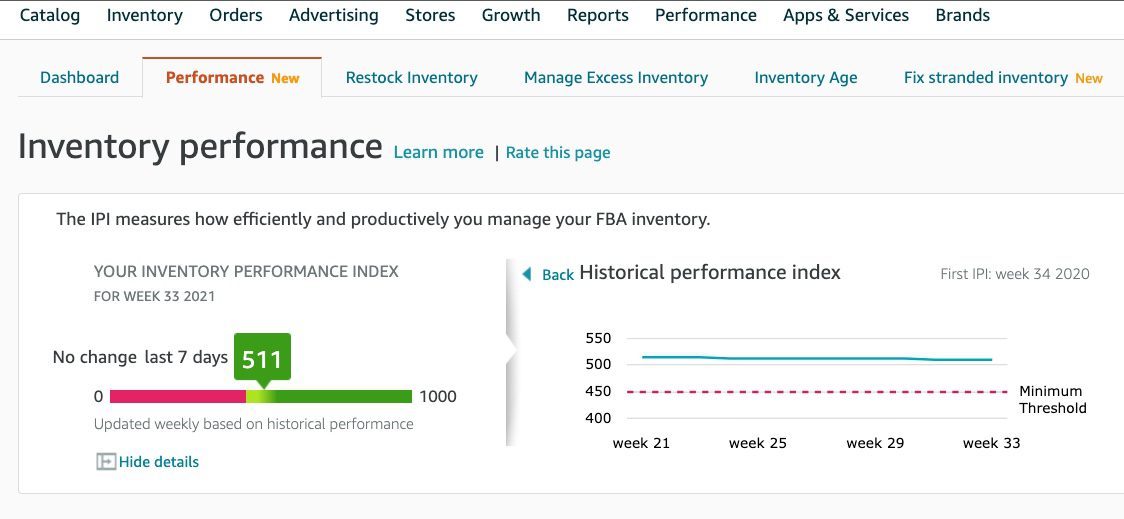
You can review your current IPI score in Seller Central by going to Inventory, Inventory Planning, and then clicking on your IPI score.

IPI score in Seller Central.Screenshot from Amazon Seller Central, February 2024

Even with aggressive tactics, changing the IPI significantly can take 2 to 12 weeks.

Recommended Actions To Improve Inventory Performance Index (IPI)

Excess Inventory – Dump Slow Moving Items

Excess inventory is generally one of the top two reasons your IPI score could be low, since it is the most heavily weighted metric.

The first step to addressing excess inventory is to pull back inventory you don’t expect to sell.

Focus on stock-keeping units (SKUs) that have gone out of fashion or merchandise experiencing a significant demand drop, like seasonal products.

If you don’t expect it to sell within three months, you should pull back the inventory to sell on a different channel by creating a removal order.

You can also start to use the Multi-Channel Fulfillment (MCF) to fulfill your website orders from your Amazon stock.

Sometimes, it makes more sense to discount and/or advertise products to help them sell faster to remove them from your inventory rather than call back inventory from Amazon.

Optimizing a listing that is not moving can also help increase the sell-through rate.

A quick note on having Amazon destroy products – sometimes, the company will liquidate that product instead of destroying it.

If inventory control is an essential factor for your brand, we recommend pulling back the inventory even though it costs more.

While Amazon is great at logistics and moving items through its process, it isn’t great at returning items to sellers.

Often, items arrive damaged or mixed SKUs in multiple boxes, clogging up receiving departments.

If possible, we want to ensure that we’re proactively taking action to avoid pulling back inventory and risk inventory being damaged or unavailable to be sold for a long time.

Sell-Through Rate – Send Fast-Moving Items

Amazon looks at this to identify whether the items you’re selling are things customers want to purchase.

The way that we improve the sell-through rate is to send in small shipments of items that will sell out very quickly.

If you’re currently using LTL or FTL, we recommend that you move to small parcel shipments during this process so that you can send more frequent shipments without going out of stock for long periods.

As you’re restocking items, you want to prioritize those that will move quickly, sending small quantities of items that will sell out as soon as they arrive or shortly after.

This allows your overall sell-through rate to increase dramatically and significantly impact your overall IPI.

It is vital that no matter how fast you think a product will move through, as you send these products in, you’re testing small batches to make sure that things will sell at the pace you anticipate.

Stranded Inventory

Inventory that’s being held in FBA warehouses and not available for sale affects your overall IPI.

Fixing stranded inventory can make a slight difference; however, if you need to move your IPI significantly, this component of the overall metric will only make a slight difference.

It would be best to address stranded inventory weekly or bi-weekly, depending on your general sell-through rate.

In-Stock Inventory

This is probably the most frustrating metric of the IPI because, basically, Amazon is telling you that you can’t restock items because they’re not selling fast enough.

At the same time, it’s trying to encourage you to ensure you stay in stock.

We have found that this metric is very lightly weighted, and you’re better off focusing on the two key metrics of excess inventory and sell-through rate.

There has been some debate about whether deleting previous SKUs can increase this; however, we have not seen that this significantly impacts the total IPI.

General IPI Notes

As you’re working to increase your overall IPI, it is important to remember that it can take several weeks to increase.

The IPI is an average calculated over 12 weeks.

You must give the IPI enough time to move before determining whether your actions are making a difference.

It can be tempting to check your IPI often. However, your IPI score is only recalculated once a week.

If you need to raise your IPI quickly or by a significant amount, you may need to take overly aggressive actions in pruning your inventory and pumping fast-moving items through your account to increase your score to the required amount.

You might have to also bid for a capacity increase.

You should only do this if you have the data to support being able to sell through that higher quantity of items so you do not incur extra charges.

Additional Options To Combat Low IPI and Storage Capacity Issues

Sometimes, this means utilizing third-party sellers to ensure that inventory can be available to customers with a Prime offer.

Some of the brands we work with have focused on selling their fastest-moving SKUs while they improve their overall IPI score and capacity limits.

Then, they utilized third-party sellers to carry their slower-moving items while they worked on increasing their averages.

We have several reliable third-party resellers we refer our clients to if it’s ever an issue.

This means that those accounts saw a faster increase in storage capacity as they were sending in inventory that was selling at a much faster rate and restocking regularly.

If you don’t want to utilize third-party sellers, the alternative is to increase your total number of merchant-fulfilled offerings.

Remember that Merchant Fulfilled offerings generally don’t compete well against FBA offers, so watch your competition to determine feasibility.

While many brands avoid third-party sellers because it may reduce control over their brand, in this instance, it can be an excellent tool to ensure that you don’t lose potential market share to other competing product lines.

Another step you can take is to allocate your FBA warehouse space to items with the highest margin and smallest dimensional size, as they are highly profitable and sell quickly.

Leaving items with lower profitability or moving slower through Merchant Fulfilled (MF).

Tips For New Amazon Sellers

If you’re a new seller coming to Amazon or moving from Vendor Central to Seller Central, start by sending small quantities at first.

You have a grace window of 39 weeks when opening your account.

However, you want to ensure you send in small amounts of inventory. A few cases per product can help you identify the overall sell-through rate.

There is no minimum for sending inventory into Amazon FBA. So, it is possible to test as little as one unit at a time to test products on Amazon.

Sending in small shipments does increase your overall shipping cost and can reduce profitability in the short term.

However, when you’re first investigating the platform, sending in smaller quantities can help you better understand your product’s demand and help avoid additional fees that can be required to call inventory back or pay for storage fees.

Once you have a better idea of your sell-through rate, you can start to increase the total sizes of your inventory.

It is a delicate balance to have enough inventory so that you don’t run out of stock but also that you don’t have excess inventory.

While, in general, you want to aggressively avoid stockouts, the impact of a low IPI score should take priority.

Monitoring Inventory Matters

To succeed on the platform, you must take an active role in your Amazon inventory management.

In prior years, simply avoiding restocks was enough.

However, these new requirements require a greater focus on monitoring your sell-through rate and storage utilization on Amazon.

Prepare now to support your Amazon marketing and sales goals for the coming holiday season.

More Resources:


Featured Image: Piscine26/Shutterstock

7 Ways AI Took My Job [To The Next Level] via @sejournal, @CallRail

With AI-powered call attribution, you can gain valuable insights into which channels are driving the most conversions.

How Call Attribution Works

  • Step 1: Assign – Select unique call tracking numbers to assign to each campaign or listing.
  • Step 2: Track – Potential customers see your ad or listing and call the associated phone number.
  • Step 3: Forward –The calls ring directly into your main business phone, regardless of which number they use.
  • Step 4: Analyze – Because they used one of your tracking numbers, you instantly know which ad or campaign inspired them to call.

With AI-powered call tracking, gone are the days of wondering how your digital marketing efforts are tied to high-value inbound calls.

For agencies, this helps prove the real value of your services and extend the life of your client relationships.

2. AI Can Help You Save Time On Manually Reviewing Calls

Listening to and analyzing phone calls manually can be time-consuming and inefficient for agencies.

However, it’s an important part of understanding the customer experience and sales team performance.

With AI-powered call analysis tools, you get quality, keyword-tagged transcriptions with near-human-level accuracy.

Not only can this technology help you save over 50% of the time spent listening to phone calls, but it can also help you deliver actionable recommendations to clients and drive better results.

Conversation Intelligence, for instance, is trained on over 1.1M hours of voice data and enables real-time analysis for instantaneous results.

This advanced tool provides opportunities for you to improve your strategy through the following granular insights:

  • Spotting disparities in the industry-specific lingo your sales team uses, compared to the lingo your prospects are using to describe their business challenges and goals.
  • Identifying trends or gaps in your service offerings based on what your prospects are asking for.
  • Identifying frequently asked questions and other important topics to address through content marketing.
  • Setting goals for lead qualification — not just the quantity of leads generated for your business.

Conversational AI is perfectly suited to summarize the content of long conversations – however, the call summaries still require a human to read them and determine the main takeaways.

But if you work in a bustling small business, it’s unlikely you’d have the bandwidth for tasks such as call transcription, summaries, keyword spotting, or trend analysis.

Rather than displacing human labor, conversational AI is assisting businesses in taking on tasks that may have been overlooked and leveraging data that would otherwise remain untapped.

3. AI Can Help You Lower Cost Per Lead / Save Money On Tools & Ad Spend

Ever wonder why certain campaigns take off while others fall flat? It’s all in the data!

Even failed campaigns can offer invaluable insights into your client’s audience and messaging.

But if you can’t spot the underperformers quickly enough, you risk wasting your ad budget on ineffective tactics.

The quicker you can identify what’s working and what’s not, the quicker you can pivot and adjust your marketing strategy.

With AI-powered tools, agencies can access instant insights that enable them to reduce wasteful spending and improve overall campaign efficiency.

How To Deliver More Value With AI

  • Make a bigger impact in less time: AI-powered technology creates a force multiplier within your agency, allowing you to make more of an impact with the same level of inputs you’re already using.
  • Unlock actionable insights from call data: AI is revolutionizing the way companies leverage call data by enabling them to gain insights at scale. As a result, businesses can increase their ROI and deliver greater value to their clients by analyzing hundreds of calls efficiently.
  • Foster alignment with data-driven strategies: By analyzing customer conversations with AI, businesses can align their marketing strategy with data-driven recommendations, enhancing overall coherence. Additionally, the ability to create triggers based on specific phrases enables automated analysis and reporting, further streamlining the alignment process.
  • Drive effectiveness with rapid insights: Leveraging Conversation Intelligence enables agencies to deliver better insights faster, increase conversion rates, refine keyword strategies, and develop robust reporting capabilities.

With the right AI-powered tools, you can access the insights you need to ensure maximum ROI for your clients.

4. AI Can Help You Improve Overall Agency Efficiency

Are you spending too much valuable time on tasks that produce minimal results?

Many agencies find themselves bogged down by routine, administrative tasks that don’t contribute much to their bottom line.

But with AI automation, agencies can streamline their operations and redirect their energy towards more strategic endeavors.

From email scheduling and social media posting to data entry and report generation, AI can handle a wide array of tasks with precision and efficiency – giving you time to focus on high-impact activities that drive growth and deliver tangible results.

Ways Your Business Can Benefit From Automation

  1. Automatically transcribe your calls to boost close rates: See how your team is handling difficult objections and ensure that they’re delivering your businessʼ value proposition in an effective manner.
  2. Score calls based on quality and opportunity: Take the time-consuming work out of scoring your calls and determine which campaigns drive the best calls to your business.
  3. Classify calls by your set criteria: Qualify, score, tag, or assign a value to the leads that meet your criteria, automatically.
  4. Automatically redact sensitive information: Protect your customers by removing billing or personal information. Keep your data safe and secure through complete HIPAA compliance.
  5. Monitor your teamsʼ performance: Use Conversation Intelligence as a valuable sales training tool to ensure your team doesn’t miss any key messaging marks.
  6. Know your customersʼ needs: Identify conversation trends in your phone calls and stay privy to evolving customer needs.
  7. Improve your digital marketing strategy: Use AI-powered insights to inform your digital marketing strategy and boost your online presence.

By automating mundane tasks, agencies can optimize workflows, increase productivity, and improve efficiency across the board.

Looking for 5 – 7? Download The Full Guide

Rather than fearing AI, the future belongs to those who embrace it.

By strategically combining human creativity with artificial intelligence, you can unlock capabilities that transcend what either could achieve alone.

Want to discover even more ways to level up your agency with AI?

Get the full guide here.

The Power Of QA: How Not to Ruin Your Campaign…Or Your Day via @sejournal, @jonkagan

When I first got into search marketing (back in 2005), there used to be a Tumblr feed dedicated to poorly set up campaigns that clearly did not have quality assurance (aka QA) checks done.

Dynamic keyword insertion and general broad match were the two fastest ways to end up on that page and one of the quickest ways to ruin your day (possibly even your job or career).

Now, nearly 20 years later, platforms have evolved (or devolved depending on the platform and unit), and the need for proper pre- and post-launch QAs has never been more important.

But with that being said, some operations are still learning the hard way what they did and didn’t remember to check. This goes beyond basic paid search and onto all paid media (search, shopping, PMax, YouTube/video, GDN, and even social and programmatic platforms).

This often leads to competition finding those mistakes (it is a mistake if you don’t QA) and exploiting it for their own gain.

Full transparency: I do it as well. If I find a brand or another agency making a mistake in their work and can exploit it, I absolutely will.

Yes, in the land of digital marketing, especially when it comes to taking down the competition (not as practical to execute, but if possible, so valuable to you), I will wake up and choose violence. Nearly 20 years in digital marketing will do that to a person (especially if six months of the year they have to watch the NY Jets blow it again).

Everyone makes mistakes sometimes in digital marketing, even me. The key is to make sure the person responsible for running the ad campaign knows what is happening, from pre-launch to the live campaign itself.

Let’s delve into some mistakes that have been found, explain how they could’ve been prevented through a standard ongoing QA process, and what you should do in the future to CYA (if you don’t know that acronym, go look it up on Bing).

Some Notable Mistakes

Author Disclaimer: There are literally oodles of different mistakes going on all around us. I will only note the small and large ones I’ve witnessed. For some legal reasons, some brands that were the self-induced victims of these mistakes will be anonymized.

In 2011, I was working for a major holding company ad agency, running media for a credit card company that was trying to sponsor a holiday they created that transpired just after Thanksgiving that encouraged shopping at local, non-large businesses (you can guess who).

My team was short-staffed; Reps for a major search engine with a major video platform (considered the second-largest search engine in the country) offered to assist my team with the video part by running it for us.

We gladly obliged for the help and gave them our targeted keyword and category list for the campaign, and then we gave them the negative keyword and category list. The reps told us they would run it for us, QA it for us, and give us the results.

This was a mistake on our part.

The campaign ran for two weeks, spending around $100,000. But when we got the results from the reps, they were terrible. The video had an incredibly low view rate, a higher-than-normal cost per view, and almost no clicks to the website (we knew it wouldn’t get many, but to get less than 100 from 5+ million impressions was odd).

We got our hands on the data and the settings (it was operated in an account we didn’t initially have access to) and discovered the category target list was missing, the keyword targets had been used as the negative keyword list, and worse, the excluded categories and negative keywords had been used as the targets.

Let’s just say the keywords we pulled from Urban Dictionary around intimacy triggered a concerningly high volume of impressions on a variety of non-brand-safe content.

The rep of that major search engine was informed of the faux pas, and they admitted a minimal prelaunch QA had been done, but not thoroughly – and a post-launch QA was never done.

This resulted in a $150,000 credit (keep in mind we only spent $100,000) back to the credit card company. We never saw or heard from that sales rep again.

In 2019, my agency won some new business for a conglomerate of sports nutrition brands. During the kick-off with the brand, they showed us their YouTube data, which was incredibly impressive in terms of non-skippable video.

We’re talking 45+ second videos, with a view rate exceeding 75% (the industry benchmark was 35%) when they reached the 30-second mark and a cost per view (CPV) of less than $0.04.

They informed us that despite the great metrics, there was little to no evidence of direct or down-funnel sales, and they considered the effort a complete failure. Something didn’t make sense, and they asked me to audit the prior agency’s work.

What I found was concerning.

This brand ran video ads featuring incredibly muscular people wearing next to nothing exercising like they were training for the Hunger Games. The campaign spent around $500,000 over a six-month period.

Upon digging in, I realized there was no content targeting, no age targeting, and absolutely nothing in exclusions.

After writing up an analysis that took an estimated 120 hours to complete, it was determined that 60% of ad spend for these scantily clad adults drinking pre-workout and protein shakes had been shown on children’s content, such as Blues Clues, Coco Melon, Blippi, and any parent’s holy nightmare: Caillou.

The view rate and cost per view were so impressive but generated no sales because the majority of the impressions and views were being served to children ages two to seven.

The prior agency had failed to do a full pre-launch QA, post-launch QA, or even check the data during the flight. This was all taken into consideration, and the brand took the prior agency to court to recover six months of agency fees and media spend (this was settled out of court in the mid-six-figure range).

Ads showed in various YouTube channels focused on nursery rhymes Screenshot from author, April 2024

Don’t show your workout ads to kids!

Also, if you’re doing retargeting of any sort, know where it shows and has negatives!

Remarketing is great when you're prepared for itImage from The San Diego Union-Tribune, April 2024

Remarketing is great when you’re prepared for it. A more recent scenario I ran into (in 2024) is a brand I have never worked with, but after finding the same mistake three times in six weeks, it is time to call it out.

I’m sorry, Darden Foods digital team. I enjoy the breadsticks at Olive Garden, but this is a simple fix that you still haven’t done.

Recently, on a trip home from skiing, my wife saw a sign for Olive Garden and insisted we pull in for lunch, as she hadn’t been to one in 15 years.

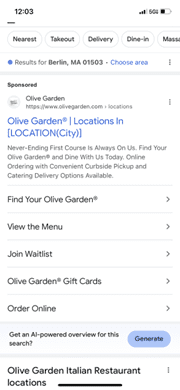
We pulled in, ate, and wondered if there was one near our home for future visits. I pulled out my phone at the table (yes, quite rude, but justified), and searched for [Olive Garden Locations], and got this:

Olive Garden in FebruaryScreenshot of search for [Olive Garden], Google, February 2024

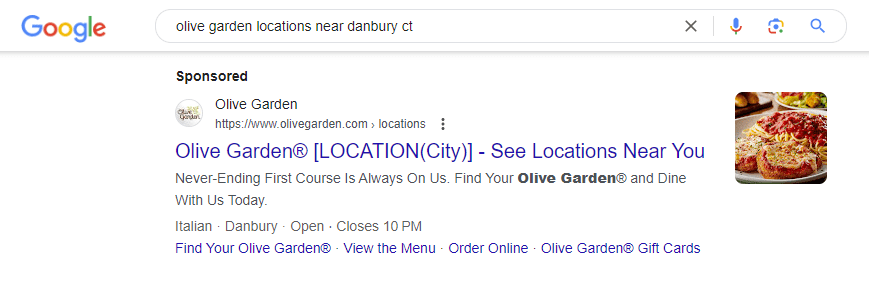
Here again, six weeks later. I mean, come on.

I mean come onScreenshot of search for [Olive Garden], Google, March 2024

Here, we have a dynamic location insertion put into a search ad (which is normally a great thing to have when set up correctly).

But during the setup, instead of using {}, they used [].

Therefore, it cannot trigger the location; it only triggers [Location(City)], delivering the consumer a poor user experience and not indicating whether or not a location is nearby.

I repeated this search multiple times over six weeks to realize the advertiser never discovered it. I suspect this was uploaded through a bulk sheet, as a manual insertion into the UI, or even the editor has an obvious callout if it is implemented correctly.

Easily Overlooked Future Mistakes

A very common mistake that can be prevented pre-launch but can easily be caught post-launch is one that has been around essentially since the beginning of the industry and lives in both Google Adwords and Bing Ads (it’ll be a cold day in hell before I ever call them Google Ads and Microsoft) and even in Facebook/Instagram (refusing to call it Meta): default settings.

When you first create search campaigns in Google and Bing, some settings are automatically presented to you in a certain way, and you, as an advertiser, must proactively change them (any seasoned search marketer knows this, so this issue is more common with SMBs).

These default search settings include but are not limited to:

  • Auto-Apply recommendations on (Google and Bing specific).
  • Dynamic extensions on (Google and Bing specific).
  • Advantage+ on (Facebook/Instagram specific).
  • Display Network/Audience Network on (Google and Facebook/Instagram specific, Bing did away with the ability to opt out of their network a couple of years ago).
  • Search Partner/Search Syndication Networks (Google and Bing specific).
  • Mobile app placement (Google Display Network specific).
  • Broad match keywords (Google and Bing specific when you add keywords without a specified match type).
Google is gonna Google to make that bread off those not paying attentionScreenshot from author, April 2024
Google is gonna Google to make that bread off those not paying attention.

And that is just the tip of the iceberg. Just because you don’t have the ideal or approved assets to put in these places doesn’t mean you won’t be accruing traffic and spend here.

Unless you plan to have them enabled, they need to be changed.

Needless to say, in each of these scenarios, pre-, post, and ongoing QA efforts can prevent some of these catastrophes from happening.

I should note that efforts tied to Performance Max, demand generation, and Advantage+ are a bit harder to QA.

But not QAing them is like telling Jenn Shah of RHOSLC that you trust her customer CRM lists are safe and legitimate.

QA To Save the Day

Now that the fear of digital marketing God is in you, let’s calm you down and discuss how not to have a terrible day with the CMO who has seen your ads live.

This will give them and you more confidence and prevent a conversation more painful than the time I put my head in a snowblower (per editor’s request, a photo of that is not included).

There are 3 phases of a QA plan: pre-launch, post-launch, and ongoing (spoiler, the third phase is ongoing, in perpetuity, but is just part pf your basic optimization strategy).

  • Pre-launch: A standardized checklist that you go through for all settings to make sure elements are set before launch. Includes targeting, exclusions, budgeting, assets, etc.
  • Post-launch: This is very similar to the pre-launch list, but it includes analysis of initial data to look for anything out of place, such as queries you map to, sites you trigger on, networks, disapproved assets, etc. This should be done somewhere between 24 and 72 hours of launch, after accruing data
  • Ongoing: This ties directly to your ongoing optimization but is next to it. Think of it as an ongoing post-launch checklist that is repeated at intervals of once a month. This isn’t a formal optimization document or analysis but an ongoing settings check.

The Takeaway

If you’ve read my articles before, you recognize that this isn’t the first time I’ve written about something like this.

However, I’ve witnessed operations/individuals not follow QA protocols, even the most basic ones. Once a mistake is noticed internally and not rectified, it can go up the chain fast and can be as bad as losing one’s job.

But if the general public catches a mistake and calls you out on it, well, an apology press conference and campaign can cost the operation tens of thousands of dollars.

A simple ongoing checklist for the life of the campaign will save you a lot of pain and suffering later. It is part of any solid optimization strategy, so it’s not like you aren’t already doing it.

If you need inspiration on what one should look like, feel free to reach out to me, and I can get you in the right direction.

More resources:


Featured Image: PKStockphoto/Shutterstock