Using AI For SEO Can Fail Without Real Data (& How Ahrefs Fixes It) via @sejournal, @ahrefs

This post was sponsored by Ahrefs. The opinions expressed in this article are the sponsor’s own.

If you’ve ever run into the limits of solo AI or manual SEO tools, this article is for you.

AI on its own can write and suggest ideas, but without reliable data to anchor those suggestions, it can miss the mark. On the other hand, traditional SEO dashboards are powerful – yet slow and siloed. The emerging sweet spot? Connecting AI to real, live SEO data so you can ask natural language questions and get deep answers fast.

Ahrefs Uses Its Own MCP Server & It Improves SEO Workflows

At its core, MCP stands for Model Context Protocol – an open standard that lets compatible AI assistants (like ChatGPT and Claude) directly access external data sources and tools through a standardized connection. This means you can ask your AI assistant questions like “which keywords my competitor ranks for that I don’t” or “which sites are gaining the most organic traffic this year” – and get answers based on real, up-to-date SEO data instead of guesses.

Imagine you’re planning to launch a new eCommerce product. Instead of manually exporting CSVs from multiple dashboards and painstakingly combining them, you could simply prompt an AI assistant to pull competitive insights, keyword opportunities, and content ideas directly from a connected SEO dataset – all in one place. That’s the power of an MCP integration.

Why AI + Real SEO Data Together Beats Guessing Or Generic Prompts

Most marketers use at least two types of tools: dedicated SEO platforms (for data) and AI assistants (for speed and interpretation). However:

  • AI on its own can hallucinate – it generates plausible-sounding answers, but without live data, those answers may be inaccurate or outdated.
  • SEO dashboards by themselves are often slow – you click around multiple screens, export reports, and manually interpret results.
  • Humans still need to make strategic decisions – but data plus AI frees up your time to focus on strategy, not grunt work.

Connecting AI to a live SEO dataset unites the best of both worlds: the intelligence and language fluency of modern AI with the accuracy and scale of professional SEO metrics.

15 Practical Use Cases & Prompts To Ask Your SEO AI Agent

Below are real prompt ideas and workflows you can incorporate into your planning, competitive research, and SEO execution. These are grouped from simple (fast answers) to advanced (deep analysis) – and all are grounded in actionable insights you can use today.

Level 1: Quick Insights You Can Get in Minutes

These are great for rapid decision-making and daily checks.

1. Identify Sites Growing Organic Traffic

Ask your AI:

Which of these 10 competitors has grown organic search traffic the most over the last 12 months?
This lets you quickly spot who is gaining momentum – and why – without manual reporting.

2. Find Competitor Rankings You Don’t Rank For

Tell me which first-page Google rankings [Competitor A] has that [My Site] doesn’t.
This gives you a direct gap list you can use for content or optimization ideas.

3. Most Linked-To Pages on Any Domain

List the top 10 pages on [domain] by number of backlinks, and show their estimated traffic.
This helps you spot proven content winners and consider similar formats.

4. Identify Organic Competitors

Give me a list of the closest organic search competitors for [My Site].
Great for broadening your competitive set beyond the obvious brands.

5. Combine Keyword Research With Headline Ideas

Help me find keywords people use before buying [product], and suggest related blog post headlines.
This blends keyword discovery with content planning in one step.

Level 2: Intermediate, More Strategic Queries

These involve deeper insights and slightly longer processing time.

6. Find Trending Keywords (and Why)

Show up to 20 trending keywords in my niche that may grow in popularity next year – include explanations.
This is better than a static list – you get context and rationale.

7. Analyze Multiple Domains at Scale

Give me a table of these 20 domains with Domain Rating, Organic Traffic, and number of top-3 rankings.
Great for benchmarking and competitor comparison.

8. Structure an Article With Keyword Insights

Help me build an article outline for [topic] based on keyword research.
This combines research with SEO content planning.

9. Top Ranking Sites for Specific Keyword Set

Among these keyphrases, tell me which sites rank in the highest positions.
Very helpful when exploring emerging niches within broader topics.

10. Find Broken Backlinks for Outreach Opportunities

Identify broken backlinks in this subfolder with high-authority referring domains.
Perfect for targeted link building.

Level 3: Advanced, High-Impact Research

These take more data and processing – but return strategic intelligence you can act on.

11. International SEO Expansion Ideas

Find similar businesses that have expanded into new countries and show where their organic traffic is growing.
A great way to spot untapped markets.

12. Competitor Content Strategy Deep Dive

Analyze top organic competitors and show their content themes, unique angles, and ranking patterns.
This helps refine your content planning with context beyond just keywords.

13. Comprehensive Site SEO Recommendations

You are an SEO expert with access to extensive data – offer recommendations to grow organic traffic for [brand].
This leverages the AI to synthesize data into strategic advice you can execute.

14. In-Depth Industry Ranking Patterns

Provide a list of top keyphrases where a site ranks first-page and includes certain SERP features.
Used for deep pattern discovery in competitive environments.

15. Multi-Domain Backlink Profile Analysis

Show backlink acquisition rates for these five competitors.
Useful for assessing link velocity and authority-building trends.

Tips to Get More Out of Data-Driven AI Prompts

Use these best practices to ensure your AI assistant actually retrieves the correct data:

  • Always specify that you want results from the SEO dataset rather than web search.
  • Include clear context (e.g., competitors, timeframes, regions).
  • Be explicit about limits (e.g., “show only keyword opportunities with volume > X”).
  • Track your usage and data limits via your SEO dashboard so you don’t hit quotas unexpectedly.

Image Credits

Featured Image: Image by Ahrefs. Used with permission.
The Hidden SEO Cost Of A Slow WordPress Site & How It Affects AI Visibility via @sejournal, @wp_rocket

This post was sponsored by WP Media. The opinions expressed in this article are the sponsor’s own.

You’ve built a WordPress site you’re proud of. The design is sharp, the content is solid, and you’re ready to compete. But there’s a hidden cost you might not have considered: a slow site doesn’t just hurt your SEO-it now affects your AI visibility too.

With AI-powered search platforms such as ChatGPT and Google’s AI Overviews and AI Mode reshaping how people discover information, speed has never mattered more. And optimizing for it might be simpler than you think.

The conventional wisdom? “Speed optimization is technical and complicated.” “It requires a developer.” “It’s not that big a deal anyway.” These myths spread because performance optimization is genuinely challenging. But dismissing it because it’s hard? That’s leaving lots of untapped revenue on the table.

Here’s what you need to know about the speed-SEO-AI connection-and how to get your site up to speed without having to reinvent yourself as a performance engineer.

Why Visitors Won’t Wait For Your Site To Load (And What It Costs You)

Let’s start with the basics. When’s the last time you waited patiently for a slow website to load? Exactly.

slow-website

Google’s research shows that as page load time increases from one second to three seconds, the probability of a visitor bouncing increases by 32%. Push that to five seconds, and bounce probability jumps to 90%.

Think about it. You’re spending money on ads, content, and SEO to get people to your site-and then losing nearly half of them before they see anything because your pages load too slowly.

For e-commerce, the stakes are even higher:

  • A site loading in 1 second has a conversion rate 5x higher than one loading in 5 seconds.
  • 79% of shoppers who experience performance issues say they won’t return to buy again.
  • Every 1-second delay reduces customer satisfaction by 16%.

A slow site isn’t just losing one sale. It’s potentially losing you customers for life.

Website Speeds That AI and Visitors Expect

Google stopped being subtle about this in 2020. With the introduction of Core Web Vitals, page speed became an official ranking factor. If your WordPress site meets these benchmarks, you’re signaling quality to Google. If it doesn’t, you’re handing competitors an advantage.

Here’s the challenge: only 50% of WordPress sites currently meet Google’s Core Web Vitals standards.

That means half of WordPress websites have room to improve-and an opportunity to gain ground on competitors who haven’t prioritized performance.

The key metric to watch is Largest Contentful Paint (LCP)-how qhttps://wp-rocket.me/blog/website-load-time-speed-statistics/uickly your main content loads. Google wants this under 2.5 seconds. Hit that target, and you’re in good standing.

What most site owners miss: speed improvements compound. Better Core Web Vitals leads to better rankings, which leads to more traffic, which leads to more conversions. The sites that optimize first capture that momentum.

The AI Visibility Advantage: Why Speed Matters More Than Ever

Here’s where it gets really interesting-and where early movers have an edge.

The rise of AI-powered search tools like ChatGPT, Perplexity, and Google’s AI Overviews is fundamentally changing how people discover information. And here’s what most haven’t realized yet: page speed influences AI visibility too.

A recent study by SE Ranking analyzed 129,000 domains across over 216,000 pages to identify what factors influence ChatGPT citations. The findings on page speed were striking:

  • Fast pages (FCP under 0.4 seconds): averaged 6.7 citations from ChatGPT
  • Slow pages (FCP over 1.13 seconds): averaged just 2.1 citations

That’s a threefold difference in AI visibility based largely on how fast your pages load.

Why does this matter? Because 50% of consumers use AI-powered search today in purchase decisions. Sites that load fast are more likely to be cited, recommended, and discovered by a growing audience that starts their search with AI.

The opportunity: Speed optimization now serves double duty-it boosts your traditional SEO and positions you for visibility in an AI-first search landscape.

How To Improve Page Speed Metrics & Increase AI Citations

Speed, SEO, and AI visibility are now deeply connected.

Every day your site underperforms, you’re missing opportunities.

Your Page Speed Optimization Roadmap

Here’s your action plan:

  1. Audit your current speed.
  2. Identify the bottlenecks.
  3. Implement a comprehensive solution. Rather than patching issues one plugin at a time, use an all-in-one performance tool that addresses caching, code optimization, and media loading together.
  4. Monitor and maintain. Speed isn’t a one-time fix. Track your metrics regularly to ensure you’re maintaining performance as you add content and features.

Step 1: Audit Your Current Website Speed

To best identify where the source of your slow website lies and build a baseline to test against, you must perform a website speed test audit.

  1. Visit Google’s PageSpeed Insights tool.
  2. Compare your Core Web Vitals results scores to your industry’s CWV baseline.
  3. Identify which scores are lowest before moving to step 2.

Step 2: Identify Your Page Speed Bottlenecks

Is it unoptimized images? Render-blocking JavaScript? Too many plugins? Understanding the issue helps you choose the right solution.

In fact, this is where most of your competitors drop the ball, allowing you to pick it up and outperform their websites on SERPs. For business owners focused on running their company, this often falls to the bottom of the priority list.

Why? Because traditional website speed optimization involves a daunting technical website testing checklist that includes, but isn’t limited to:

  • Implementing caching
  • Minifying CSS and JavaScript files
  • Lazy loading images and videos
  • Removing unused CSS
  • Delaying JavaScript execution
  • Optimizing your database
  • Configuring a CDN

Step 3: Implement Fixes & Best Practices

From here, each potential cause of a slow website and low CWV scores can be fixed:

The Easy Way: Use The WP Rocket Performance Plugin

Time To Implement: 3 minutes | Download WP Rocket

Rather than piecing together multiple plugins and manually tweaking settings, you get an all-in-one approach that handles the heavy lifting automatically. This is where purpose-built performance technology can change the game.

The endgame is to remove the complexity from WordPress optimization:

  • Instant results. For example, upon activation, WP Rocket implements 80% of web performance best practices without requiring any configuration. Page caching, GZIP compression, CSS and JS minification, and browser caching are just a few of the many optimizations that run in the background for you.
  • No coding required. Advanced features such as lazy-loading images, removing unused CSS, and delaying JavaScript are available via simple toggles.
  • Built-in compatibility. It’s designed to work with popular themes, plugins, page builders, and WooCommerce.
  • Performance tracking included. Built-in tool lets you monitor your speed improvements and Core Web Vitals scores without leaving your dashboard.

The goal isn’t to become a performance expert. It’s to have a fast website that supports your business objectives. When optimization happens in the background, you’re free to focus on what you actually do best.

For many, shifting tactics can cause confusion and unnecessary complexity. Utilizing the right technology makes implementing them so much easier and ensures you maximize AI visibility and website revenue.

A three-minute fix can make a huge difference to how your WordPress site performs.

Ready to get your site up to speed?

optimize-site-speed-with-wp-rocke

Image Credits

Featured Image: Image by WP Media. Used with permission.
In-Post Images: Image by WP Media. Used with permission.
The Smart Way To Take Back Control Of Google’s Performance Max [A Step-By-Step Guide]

This post was sponsored by Channable. The opinions expressed in this article are the sponsor’s own.

If you’ve ever watched your best-selling product devour your entire ad budget while dozens of promising SKUs sit in the dark, you’re not alone.

Google’s Performance Max (PMax) campaigns have transformed ecommerce advertising since launching in 2021.

For many advertisers, PMax introduced a significant challenge: a lack of transparency in budget allocation. Without clear insights into which placements, audiences, or assets are driving performance, it’s easy to feel like you’re flying blind.

The good news? You don’t have to stay there.

This guide walks you through a practical framework for reclaiming control over your Performance Max campaigns, allowing you to segment products by actual performance and make data-driven decisions rather than hope AI figures it out for you.

The Budget Black Hole: Where Your Performance Max Ad Spend Actually Goes

Most ecommerce brands start by organizing PMax campaigns around categories. Shoes in one campaign. Accessories in another. That seems logical and clean but can completely ignore how products actually perform.

Here’s what typically happens:

  • Top sellers monopolize budget. Google’s algorithm prioritizes products with strong historical performance, which means your star items keep getting the spotlight while everything else struggles for visibility.
  • New arrivals never get traction. Without performance history, fresh products can’t compete, so they never build the data they need to succeed.
  • “Zombie” products stay invisible. Some items might perform well if given the chance, but static segmentation never gives them that opportunity.
  • Manual adjustments eat your time. Every tweak requires you to dig through data, make changes, and hope for the best.

The result? Wasted potential, uneven budget distribution, and marketing teams stuck reacting instead of strategizing. You’re already doing the hard work; this framework helps that effort go further and helps you set and manage your PPC budget efficiently and effectively.

How To Fix It: Segment Campaigns By What’s Actually Working

Instead of organizing campaigns by category, segment by how products actually perform.

This approach creates dynamic groupings that automatically shift as performance data changes with no manual reshuffling.

Step 1: Classify Your Products into Three Groups

Start by categorizing your catalogue based on real performance metrics: ROAS, clicks, conversions, and visibility.

Image created by Channable, January 2026

Star Products

These are your proven winners, with high ROAS, strong click-through rates, and consistent conversions. Your goal with stars is to maximize their potential while protecting margins.

  • Set higher ROAS targets (3x–5x or above based on your margins).
  • Allocate budget confidently.
  • Monitor to ensure profitability stays intact.

Zombie Products

These are the “invisible” items that haven’t had enough exposure to prove themselves. They might be underperformers, or they might be hidden gems waiting for their moment.

  • Set lower ROAS targets (0.5x–2x) to prioritize visibility.
  • Give them a dedicated budget to gather performance data.
  • Review regularly and promote graduates to the star category.

New Arrivals

Fresh products need their own ramp-up period before being judged against established items. Without historical data, they can’t compete fairly in a mixed campaign.

  • Create a separate campaign specifically for new launches.
  • Use dynamic date fields to automatically include recently added items.
  • Set goals focused on awareness and data collection rather than immediate ROAS.

Step 2: Define Your Performance Thresholds

Decide what metrics determine which bucket a product falls into. For example:

  • Stars: ROAS above 3x–5x, strong click volume, goal is maximizing profitability.
  • Zombies: ROAS below 2x or insufficient data, low click volume, goal is testing and learning.
  • New Arrivals: Date-based (for example, added within last 30 days), goal is building visibility.

Your thresholds will depend on your margins, industry, and historical benchmarks. The key is defining clear criteria so products can move between segments automatically as their performance changes.

Step 3: Shorten Your Analysis Window

Many advertisers’ default to 30-day lookback windows for performance analysis. For fast-moving catalogues, that’s too slow.

Consider shifting to a 14-day rolling window for better analysis. You’ll get:

  • Faster reactions to performance shifts
  • More accurate data for seasonal or trending items
  • Less wasted spend on products that peaked two weeks ago

This is especially important for fashion, home goods, and any category where trends move quickly.

Step 4: Apply Segmentation Across All Channels

Your segmentation logic shouldn’t stop at Google. The same star/zombie/new arrival framework can (and should) apply to:

  • Meta Ads
  • Pinterest
  • TikTok
  • Criteo
  • Amazon

Cross-channel consistency compounds your optimization efforts. A product that’s a “zombie” on Google might be a star on TikTok, or vice versa. Unified segmentation helps you connect products to the right audiences on the right channels and distribute budget accordingly.

Step 5: Build Rules That Move Products Automatically

Here’s where the real efficiency gains come in. Instead of manually reviewing every SKU, create rules that automatically shift products between campaigns based on performance.

For example:

  • If ROAS exceeds 3x–5x over your analysis window – Move to Stars campaign
  • If ROAS falls below 2x or clicks drop below your average (for example, 20 clicks in 14 days) – Move to Zombies campaign
  • If product was added within a set time limit (for example, the last 30 days) -Include in New Arrivals campaign

This dynamic automation ensures your campaigns stay optimized without requiring constant manual intervention.

Get Smart: Let Intelligent Automation Do the Heavy Lifting

Image created by Channable, January 2026

The steps above work—but implementing them manually across thousands of SKUs and multiple channels is time-consuming. Product-level performance data lives in different dashboards. Calculating ROAS at the SKU level requires combining data from multiple sources. And building automation rules from scratch takes technical resources most teams don’t have.

This is where the right use of feed management and the right use of PPC automation really helps. For example, it can merge product-level performance data into a single view and let you build rules that automatically segment products based on criteria you define.

To see what this looks like in practice, Canadian fashion retailer La Maison Simons offers a useful reference point. They faced the same challenges-category-based campaigns where top sellers consumed the budget while newer items never gained traction.

After shifting to performance-based segmentation, they saw measurable improvements without increasing ad spend:

  • ROAS nearly doubled over a three-year period
  • Cost-per-click decreased while click-through rates improved
  • Average order value increased by 14%
  • Their dedicated new arrivals campaigns consistently outperformed expectations
  • Perhaps most notably, their previously “invisible” products became some of their strongest performers once they received dedicated visibility

The takeaway isn’t about any single tool, it’s that performance-driven segmentation works. When you stop letting one popular item take all the budget and start giving every product a fair shot based on data, the results tend to follow.

Learn more about the success story and the full details of their approach here.

Quick Principles to Keep in Mind

Image created by Channable, January 2026
  • Segment by performance, not category: Budget flows to what works, not what’s familiar
  • Use 14-day windows for fast-moving catalogues: Capture fresher signals, reduce wasted spend
  • Give new products their own campaign: Build data before judging against established items
  • Automate product movement between segments: Save time and stay responsive without manual work
  • Apply logic across all paid channels: Compounding optimization across Google, Meta, TikTok, and more

Your Next Step

Performance Max doesn’t have to feel like handing Google your wallet and hoping for the best. With the right segmentation strategy, you can restore control, surface overlooked opportunities and make smarter decisions about where your budget goes.

Curious whether your product data is ready for this kind of optimization? A free feed and segmentation audit can help you find gaps and opportunities, no commitment, just clarity.

Because better data leads to better decisions. And better decisions lead to results you can actually control.


Image Credits

Featured Image: Image by Channable Used with permission.

In-Post Images: Images by Channable. Used with permission.

5 Ways To Reduce CPL, Improve Conversion Rates & Capture More Demand In 2026 via @sejournal, @CallRail

The marketers who crack attribution aren’t chasing perfection; they’re layering multiple data sources to get progressively closer to the truth.

What To Do: Identify Which Marketing Efforts Are Actually Working

A starting point: add a simple “How did you hear about us?” field to your intake process, then compare those responses against your digital attribution data.

The gaps you uncover will show you exactly where your current tracking is falling short, and where your brand and word-of-mouth efforts are working harder than you realized.

Learn more about self-reported attribution and how it can transform your reporting →

Improve Conversion Rates By Learning & Implementing What Buyers Ask Before They Convert

There’s a goldmine sitting right under your nose: your customer conversations.

Most marketers hand off call data to sales and never look back. Big mistake.

Avoid This Myth: “Call Insights Are Only For Sales Teams”

Those conversations contain exactly what you need to create more personalized marketing communications and sharpen your strategy.

Literal Keys To Conversion Are Hiding In Your Sales Team’s Call Data

Think about what’s buried in your call recordings:

  • Conversion signals for better targeting. When you understand what makes callers convert, you can build lookalike audiences and refine your ad targeting around those characteristics.
  • Sentiment data for email segmentation. Callers who expressed frustration need different nurture sequences than those who were enthusiastic. Conversation intelligence can automatically score sentiment, letting you segment accordingly.
  • Caller details for personalization. Names, pain points, specific needs—these details can feed directly into personalized follow-up campaigns.
  • Term analysis for more relatable ad creation. What words do your best prospects actually use? Call transcripts reveal the language that resonates, helping you craft offers that speak directly to buyer needs.
  • Keyword clouds for SEO and PPC. The phrases your customers use on calls often differ from the keywords you’re bidding on. Mining conversations for terminology can uncover high-intent search terms you’re missing.

What To Do: Turn Customer Communication (Calls, Chats, Emails) Into Marketing Intelligence

The shift here is mindset.

Stop thinking of call data as a sales asset and start treating it as a marketing intelligence feed. When you analyze trends across hundreds of conversations (not just individual calls) you uncover patterns that can reshape your entire strategy.

Conversation Intelligence can automatically transcribe and analyze calls, surfacing these insights without requiring hours of manual listening. They can even generate aggregated summaries across campaigns, highlighting the questions prospects ask most frequently, the objections that come up repeatedly, and the language that signals buying intent.

The data is there. You just need to start using it.

Give More Attention To SMS Marketing (Open Rates Up To 98%)

Don’t Fall For Myth #4: “Texting Is Irrelevant to Marketers”

Why? Because text messages have a 98% open rate.

Compare that to email’s 20% average, and it’s clear why dismissing SMS as “not a marketing channel” is leaving conversions on the table.

What To Do: Capture More High-Intent Leads With Texting

Giving your buyers choice in how they communicate with you boosts conversion. Period.

Here are two immediate ways to put texting to work:

  1. Click-to-text from your marketing assets. Add trackable click-to-text links in your emails, ads, and website. When a prospect clicks, their native messaging app opens with a pre-populated message to your business. You capture the lead, they get instant communication, and you maintain full attribution visibility.
  2. Local Services Ad (LSA) message leads. If you’re running Google Local Services Ads, you can receive SMS leads directly through the platform. These are high-intent prospects who chose to message instead of call—often because they’re at work, in a waiting room, or simply prefer texting. Missing these leads because you’re not set up for SMS is like leaving the front door locked during business hours.

The key is tracking these text interactions with the same rigor you apply to calls and form fills. When every channel is measured, you can finally see the complete picture of what’s driving results.

The bottom line: your prospects have communication preferences, and those preferences increasingly skew toward texting. Meeting them where they are isn’t just good customer experience; it’s a competitive advantage. The businesses that make it easy to text will capture leads that competitors lose.

Reduce Missed Leads & Lower CPL With AI Voice Assistants

Let’s get personal for a second:  your leads aren’t being answered, and you should care more than anyone.

Stop Thinking “AI Voice Assistants Aren’t for Marketers”

Over 50 million customer calls go unanswered every year.

That’s not just a sales problem-that’s hundreds of millions of dollars in marketing investment generating leads that never convert because nobody picked up the phone.

Think about it.

You spend a significant budget driving calls through paid ads, SEO, and local listings. When 30% of those calls go unanswered (the current average), you’re effectively lighting a third of your budget on fire.

Image created by CallRail, January 2026

What To Do: Ensure Every Inbound Call Converts To A Lead

AI voice assistants solve this by ensuring every call gets answered, 24/7. But they do more than just pick up:

  • Never miss a lead again. Voice assistants answer, capture, and qualify inbound calls around the clock, even when your team is focused on other customers or the office is closed.
  • Drive better outcomes. You can confidently extend ad windows into evenings and weekends, knowing leads will be handled. Early adopters have seen answered calls increase by 44% and client ROI improve by up to 20%.
  • Lower your cost per lead. When every call converts to a captured lead, your CPL drops and your campaign efficiency improves. Plus, consistently answering calls helps your responsiveness scores on platforms like Google’s Local Services Ads.
  • Prioritize follow-up. AI assistants can capture caller intake details, assess intent, and score leads, so your team knows exactly which opportunities to prioritize when they return to the office.

This isn’t about replacing human connection. It’s about plugging the leaks in your funnel so the leads you worked so hard to generate actually have a chance to convert.

The combination of AI voice assistance with call tracking creates a system where every lead is captured, every conversation is logged, and every marketing dollar can be tied back to results.

Explore how Voice Assist transforms missed calls into revenue →

Moving Forward: Market With Confidence

These five myths share a common thread: they take real challenges and use them as excuses to give up.

The marketers who will win in 2026 aren’t the ones who throw their hands up, they’re the smart ones who know how to adapt.

Your 2026 Marketing Action & Attribution Plan

  1. Redefine your MQLs around behaviors that actually predict revenue.
  2. Layer self-reported attribution onto your digital tracking to capture the full buyer journey.
  3. Mine your call data for targeting, personalization, and keyword insights.
  4. Add texting as a tracked communication channel your buyers actually prefer.
  5. Deploy AI voice assistants to ensure no lead goes unanswered.

The tactics aren’t broken.

The execution just needs an upgrade.

Want the complete playbook?

Watch our webinar: 2026 Forecast—5 Expert Marketing Strategies You Need to Refine by Q2 →

2026 Guide To Hiring A Link Building Agency In The AI Search Era via @sejournal, @jmoserr

This post was sponsored by uSERP. The opinions expressed in this article are the sponsor’s own.

Let’s get real. Most link building agencies are selling you an outdated playbook from 2015.

Volume. Guest posting on dead sites. Chasing domain ratings at all costs.

But if you’re a marketing leader in 2026, you know the game has changed.

I’ve spent the last decade completing over 575 link building campaigns and scaling my team at uSERP to 55+ people. I have worked with SaaS giants like monday.com and Robinhood.

I know first hand that the gap between a bad backlinks agency and a great one is no longer just about rankings. It is about revenue.

Here’s what I have learned, and how you can use it to pick a skilled link building agency in the AI era.

Traditional link-building isn’t dead. But the old methods are broken.

For years, SEO agencies focused only on domain authority (DA) or domain rating (DR).

They built backlinks from any site with a high number of backlinks. They ignored readership and content quality.

But that approach is dangerous now.

Because search engines have evolved, links now serve two masters: Google’s algorithm and AI model training data.

Ignoring this means losing search engine rankings (and watching your bottom line suffer).

In fact, uSERP’s 2025 State of Backlinks Report, which surveyed 800 SEO professionals, found that 67.5% believe backlinks influence overall search results (a rise from 2023).

But it’s not just quantity. Quality and brand authority work together, month after month, to drive traffic.

This data forced us to pivot at uSERP. We stopped chasing vanity metrics like DR.

Instead, we started prioritizing traffic and relevance.

It turns out that a single link from a site that appears in a Perplexity answer is worth more than 10 links from high-DR sites with zero readership.

Agencies that fail to adapt are dying, and so are their clients.

So the bottom-line question is:

How can you pick a link building agency that catapults your business in this AI era instead of leaving you stranded?

Green Flags: What Separates Elite Agencies

It’s easy to promise the world on a sales call. It’s harder to deliver natural links that drive revenue.

When vetting partners, look for these specific green flags.

They Focus On AI Visibility, Not Just Rankings

Elite agencies don’t just track Google SERPs.

They track brand mentions in LLMs. They understand that a link is a citation. It validates your expertise to both humans and machines.

Ask them this: “Can you show me examples of clients appearing in AI-generated answers?”

If they stare blankly, walk away.

If they have a proven system, that’s a green flag. It means they know what they’re doing.

For example, we developed proprietary AI visibility tracking tools because we had to. It was the only way to measure impact.

Any agency you hire must discuss citations and how search engines use links to verify facts.

They Lead With Digital PR And Original Research

Content creation is the backbone of modern link acquisition.

You cannot just beg for links anymore. You have to earn them with a content-driven approach.

That is why digital PR was the most effective link-building tactic in 2025, according to our State of Backlinks Report.

The winning strategy is simple. Produce linkable assets, such as original studies, interactive tools, and expert commentary.

These assets generate inbound links naturally. They get cited by AI and compound over time.

For example, a SaaS brand might create a salary calculator. Journalists and publishers love this data.

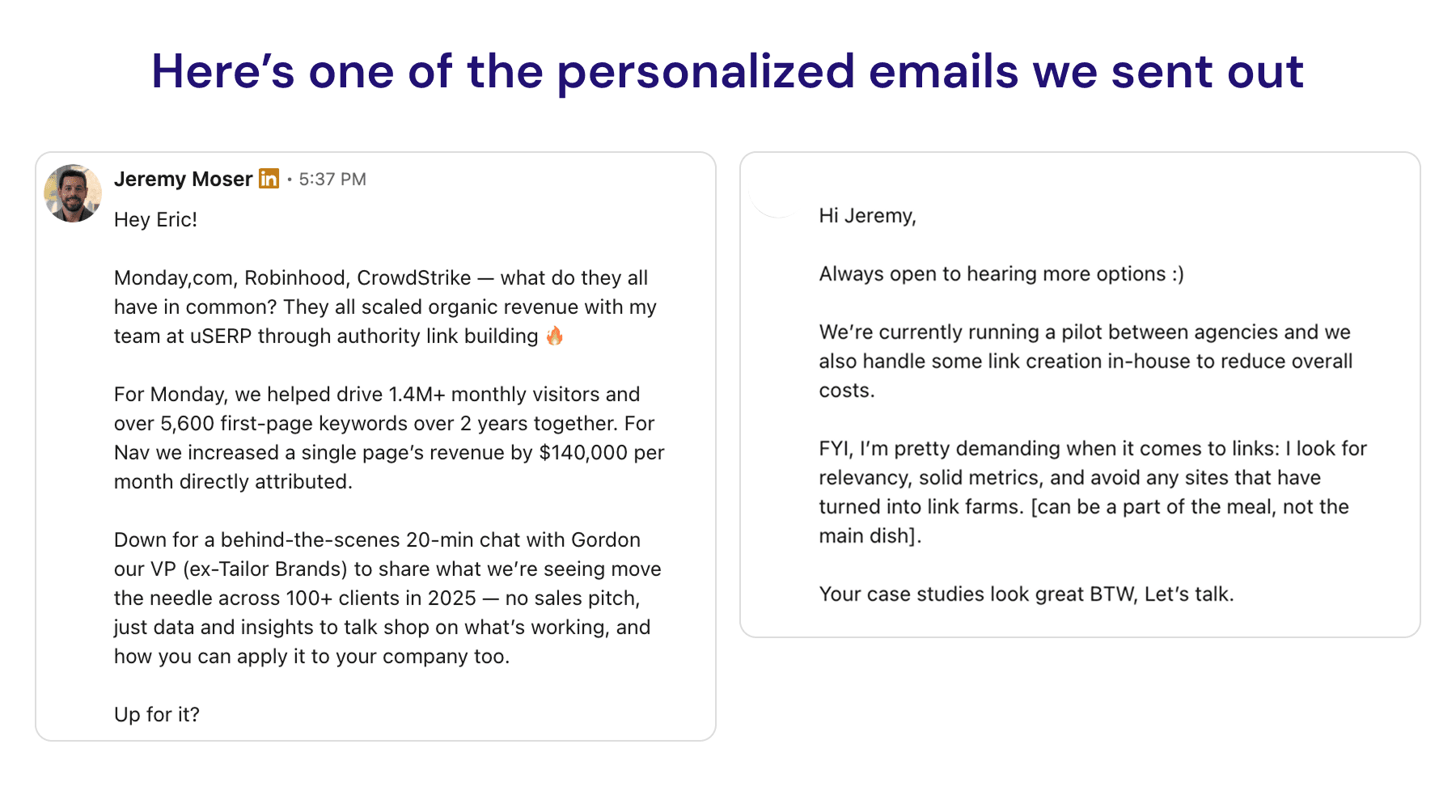
This approach also shifts the dynamic from cold outreach to relationship-based link building. Even if you do cold outreach, you should expect better results because it’s a win-win for both parties, and you’re leading with quality content and data they can’t ignore.

They Are Transparent About Process And Pricing

A skilled backlinks agency has nothing to hide.

Vague promises are red flags. Detailed reporting on publishers, anchor text, and traffic estimates is a green flag.

They are also realistic about costs.

For example, our data show that most SEO professionals spend between $5,000 and $10,000 per month on link building.

If someone offers you 100 links for $500, that’s a liability, not a deal.

They should also provide a dashboard that includes your link inventory, KPIs, and how your content is driving traffic over time.

Transparency builds trust. Secrecy usually hides black hat link building tactics.

Let’s look at red flags you should stay far away from.

Red Flags That Scream “Run Away”

I have worked with 100+ clients who got burned by cheap link building providers. They saw temporary spikes, then got hit by core Google updates.

This is the price of buying temporary tactics. It’s the equivalent of shiny object syndrome that wastes time, money, and reputation for the sake of slightly higher initial traffic that evaporates after a couple of months.

Here are the warning signs.

Promises Of Specific Ranking Positions

“We will get you to #1 in 30 days.”

This is a lie.

No agency controls Google. They can influence probabilities, but they cannot guarantee outcomes.

Ranking factors are very complex. Plus, some are unknown, and agencies can only estimate probabilities based on experience and data.

Anyone guaranteeing a spot is selling snake oil.

PBNs (Private Blog Networks) are poison for your site.

They’re fake “blogs” that exist for one reason: to pass authority. They violate Google’s rules and go against its spam policies.

If your agency is buying links off some “menu” or dropping niche edits on hacked, junk sites, that’s your cue to walk away.

Sure, these backlinks might temporarily boost your domain rating. But sooner or later, your search visibility winds up circling the drain.

Templated Outreach

If they use the same email template for everyone, they are failing.

Journalists receive dozens of these every day and just ignore or delete them. Website owners mark them as spam.

You need a personalized approach.

Sending thousands of generic emails daily reflects poorly on your brand.

This is a silent killer. Ahrefs found that 66.5% of links from 2013 to 2024 are now dead.

Cheap agencies take your money and move on.

You need a partner who monitors their work. They must check for link rot and take steps to fix it to protect your investment and your brand’s organic growth.

The Questions You Must Ask Before Signing

Don’t just trust a Clutch profile. Grill potential partners with these questions.

1. “What Is Your Process For Vetting Publishers?”

They should talk about how they verify traffic and how they check for spammy sites. If they’re not even looking at a site’s keyword rankings, that’s a big red flag.

2. “Can I See Examples Of Client Results In AI Overviews?”

This separates modern agencies from the dinosaurs.

Ask how they measure AI visibility by impact in ChatGPT or Perplexity.

3. “What Is Your Typical Timeline?”

If they say “immediate results,” they are lying.

You could have a severe technical issue that, once fixed, could cause a permanent spike in traffic. But that’s a rare exception.

Real SEO services take time. BuzzStream’s 2025 State of Digital PR Report states that most campaigns deliver results within 3-6 months.

4. “How Do You Measure Success Beyond DR Increases?”

Domain rating is a vanity metric if it doesn’t lead to revenue. They should track growth in organic search traffic and referral traffic.

Ask about backlink gap analysis and see if they share a high-level step-by-step of their link building process.

Given the high rate of link rot, a replacement policy is essential. You need backlink management that protects your investment.

Decide if you want digital PR or traditional link building with AI enhancements. But make sure there’s accountability and a process that actively monitors and replaces rotten links.

What Success Actually Looks Like

Let’s look at a real example. When monday.com reached out to my company, uSERP, they had 100+ internal SEO staff but still needed help with content production and PR.

The competitors were winning in organic search, taking over primary keywords, and gaining market share.

So, we focused on untapped keywords first. We created helpful content and optimized it to land crucial backlinks from publications like Crunchbase and G2.

We focused on quality plus relevance. Then, monday earned volume with the cause-and-effect principle.

The result was a 77.84% increase in traffic to 1.2M+ monthly visitors.

This is the lens you need: relationship-building techniques that demonstrate real authority and value, resulting in ROI. Not just rankings.

Whether in the United States, the United Kingdom, or Canada, quality link building like this takes 60-90 days for early signals and 6-12 months for full impact. But the dividends last for years.

Picking a link building agency in 2026 isn’t about finding the cheapest option. It is about finding partners who understand the AI-first future.

You need transparency, AI visibility results, and digital PR expertise.

Avoid anyone selling the 2015 playbook. The winners focus on citations, AI brand mentions, and revenue growth. Everything else is just noise.

Start asking the hard questions. Look for the green flags and don’t settle for vanity metrics.

For more foundational strategies, check out our complete link building guide.


Image Credits

Featured Image: Image by Shutterstock. Used with permission.

In-Post Images: Images by uSERP. Used with permission.

WordPress Meets Vibe Coding: White-Labeled Platform & API For Search-Ready AI Websites

This post was sponsored by 10Web. The opinions expressed in this article are the sponsor’s own.

Not long ago, building a website meant a discovery call, a proposal, a sitemap, and a few weeks of back and forth. Today, we go from “I need a website” to “Why isn’t it live yet?” People are getting used to typing a short prompt and seeing an entire site structure, design, and a first-draft of their site in minutes. That doesn’t replace all the strategy, UX, or growth work, but it changes expectations about how fast the first version should appear, and how teams work.

This shift puts pressure on everyone who sits between the user and the web: agencies, MSPs, hosting companies, domain registrars, and SaaS platforms. If your users can get an AI-generated site somewhere else in a few clicks, you better catch the wave or be forgotten.

That’s why the real competition is moving to those who control distribution and can embed an AI-native, white-label builder directly into products. WordPress still powers over 43% of all websites globally, and remains the default foundation for many of these distribution players.

Now that AI-native builders, reseller suites, and website builder APIs are available on top of WordPress, who will own that experience and the recurring revenue that comes with it.

AI & Vibe Coding Is Turning Speed-To-Launch Into a Baseline 

AI site builders and vibe coding tools have taught people a new habit: describe what you want, get a working draft of a site almost immediately.

Instead of filling out long briefs and waiting for mockups, users can:

  • Type or paste a business description,
  • Point to a few example sites,
  • Click generate,
  • And see a homepage, key inner pages, and placeholder copy appear in minutes.

For non-technical users, this is magic. For agencies and infrastructure providers, it’s a new kind of pressure. The baseline expectation has become seeing something live quickly and refining it afterward.

This demand is everywhere:

  • Small businesses want a site as soon as they buy a domain or sign up for SaaS.
  • Creators expect their website to follow them seamlessly from the tools they already use.
  • Teams inside larger organizations need landing pages and microsites created on demand, without long internal queues.

If you’re an agency, MSP, hosting provider, domain registrar, or SaaS platform, you’re now measured against that baseline, no matter what your stack was designed for. Bolting on a generic external builder isn’t enough. Users want websites inside the experience they trust and already pay you for, with your branding, your billing, and your support.

AI-native builders that are built directly into your stack are no longer a nice bonus but an essential part of your product.

With Vibe Coding Leveling The Field: What Is Your Differentiator? 

In this environment, the biggest advantage doesn’t belong to whoever ships the flashiest AI demo. It belongs to whoever owns the distribution channels:

  • Agencies and MSPs, the ground level players holding client relationships and trust.
  • Hosting and cloud providers where businesses park their infrastructure.
  • Domain registrars where the online journey starts.
  • SaaS platforms, already owning the critical data needed to reflect and sync with company websites.

These players already control the key moments when someone goes from thinking they need a website to taking action.

  • Buying a domain
  • Using a vertical SaaS product
  • Working with an MSP or agency retainer
  • Adding a new location, service, or product line

If, at those moments, the platform automatically provides an AI-generated, editable site under the same login, billing, and support, the choice of stack is made by default. Users simply stay with the builder that’s already built into the service or product they use.

This is why white-label builders, reseller suites, and website builder APIs matter. They give distribution owners the opportunity to:

  • Brand the website experience as their own
  • Decide on the underlying technology (e.g., AI-native WordPress)
  • Bundle sites with hosting, marketing, or other services
  • Keep the recurring revenue and data inside their ecosystem

In other words, as AI pushes the web toward instant presence, distribution owners who embed website creation into their existing flows become the gatekeepers of which tools, stacks, and platforms win.

How To Connect WordPress Development, SEO & Vibe Coding

For most distribution owners, WordPress is still the safest base to standardize on. It powers a huge share of the web, has a deep plugin and WooCommerce ecosystem, and a large talent pool, which makes it easier to run thousands of sites without being tied to a single vendor. Its open-source nature also allows full rebranding and custom flows, exactly what white-label providers need, while automated provisioning, multisite, and APIs make it a natural infrastructure layer for branded site creation at scale. The missing piece has been a truly AI-native, generation-first builder. The latest AI-powered WordPress tools are closing that gap and expanding what distribution owners can offer out of the box.

Use AI-Native WordPress & White Label Embeddable Solutions

Most of the visible WordPress innovation around AI and websites has happened in standalone AI builders or coding assistants, relying on scattered plugins and lightweight helpers. The CMS is solid, but the first version of a site is still mostly assembled by hand.

AI-native WordPress builders move AI into the core flow: from intent straight to a structured, production-ready WordPress site in one step. In 10Web’s case, Vibe for WordPress is the first to bring Vibe Coding to the market with a React front end and deep integrations with WordPress. As opposed to previous versions of the builder or other website builders working off of generic templates and content, Vibe for WordPress allows the customer to have unlimited freedom during and after website generation via chat based AI and using natural language.

For distribution owners, AI only matters if it is packaged in a way they can sell, support, and scale. At its core, the 10Web’s White Label solution is a fully white-labeled AI website builder and hosting environment that partners brand as their own, spanning the dashboard, onboarding flows, and even the WordPress admin experience.

Instead of sending customers to a third-party tool, partners work in a multi-tenant platform where they can:

  • Brand the entire experience (logo, colors, custom domain).
  • Provision and manage WordPress sites, hosting, and domains at scale.
  • Package plans, track usage and overages, and connect their own billing and SSO.

In practice, a telco, registrar, or SaaS platform can offer AI-built WordPress websites under its own brand without building an editor, a hosting stack, or a management console from scratch.

APIs and White-Label: Quickly Code New Sites Or Allow Your Clients To Feel In Control

There is one fine nuance, yet so important. Speed alone isn’t a deciding factor on who wins the next wave of web creation. Teams that can wire that speed directly into their distribution channels and workflows will be the first to the finish line.

The White label platforms and APIs are two sides of the same strategy. The reseller suite gives partners a turnkey, branded control center; the API lets them take the same capabilities and thread them through domain purchase flows, SaaS onboarding, or MSP client portals.

From there, partners can:

  • Generate sites and WooCommerce stores from prompts or templates.
  • Provision hosting, domains, and SSL, and manage backups and restore points via API.
  • Control plugins, templates, and vertical presets so each tenant or region gets a curated, governed stack.
  • Pull usage metrics, logs, and webhooks into their own analytics and billing layers.

For MSPs and agencies treating websites as a packaged, recurring service, see more predictable revenue and stickier client relationships. They bake “website included” into retainers, care plans, and bundles, using white-label reseller dashboard to keep everything under their own brand.

As for SaaS platform and vertical solutions, instead of just giving partners a branded dashboard, 10Web’s Website Builder API lets them embed AI-powered WordPress site creation and lifecycle management directly into their own products. At a high level, it’s a white-label AI builder you plug in via API so your users can create production-ready WordPress sites and stores in under a minute, without ever leaving your app.

In this model, when someone buys a domain, signs up for a SaaS tool, or comes under an MSP contract, they experience the AI website Builder as a built-in part of the product. And the distribution owner, armed with white-label and API tools, is the one who captures the recurring value of that relationship.

The Next Wave

WordPress remains the foundation distribution owners trust, the layer they know can scale from a single landing page to thousands of client sites. With 10Web’s  AI-native builder, reseller dashboard, and API, it isn’t playing catch-up anymore, but is quickly becoming the engine behind fast, governed, repeatable site creation.

For agencies, MSPs, cloud infrastructure providers, and SaaS platforms, that means they can sell websites as a packaged service. The winners of the next wave are the ones who wire AI-native, white-label WordPress into their distribution and turn “website included” into their default.

Unlock new revenue by selling AI. Websites, Hosting, AI Branding, AI Agents, SMB Tools, and your own services.


Image Credits

Featured Image: Image by 10Web. Used with permission.

AI Overviews Changed Everything: How To Choose Link Building Services For 2026 via @sejournal, @EditorialLink

This post was sponsored by Editorial.Link. The opinions expressed in this article are the sponsor’s own.

“How do you find link-building services? You don’t, they find you,” goes the industry joke. It’s enough to think about backlinks and dozens of pitches that hit your inbox.

However, most of them offer spammy links with little long-term value. Link farms, PBNs, the lot.

This type of saturated market makes it hard to find a reputable link building agency that can navigate the current AI-influenced search landscape.

That’s why we’ve put together this guide.

We’ll share a set of steps that will help you vet link providers so you can find a reliable partner that will set you up for success in organic and AI search.

1. Understand How AI-Driven Search Changes Link Building

Before you can vet an agency, you must understand how the “AI-influenced” landscape is different. Many agencies are still stuck in the old playbook, which includes chasing guest posts, Domain Rating (DR), and raw link volume.

Traditional Backlinks Remain Fundamental

A recent Ahrefs study found that 76.10% of pages cited in AI Overviews also rank in Google’s top 10 results, and 73% of participants in Editorial.Link survey believes they affect visibility in AI search.

However, the signals of authority are evolving:

When vetting a service for AI-driven search, your criteria must shift from “How many links can you get?” to “Can you build discoverable authority that earns citations?”

This means looking for agencies that build your niche authority through tactics like original data studies, digital PR, and expert quotes, not just paid posts.

2. Verify Their Expertise and AI-Search Readiness

The first test is simple: do they practice what they preach?

Check Their Own AI & Search Visibility

Check the agency’s rankings in organic and AI search for major keywords in their sector.

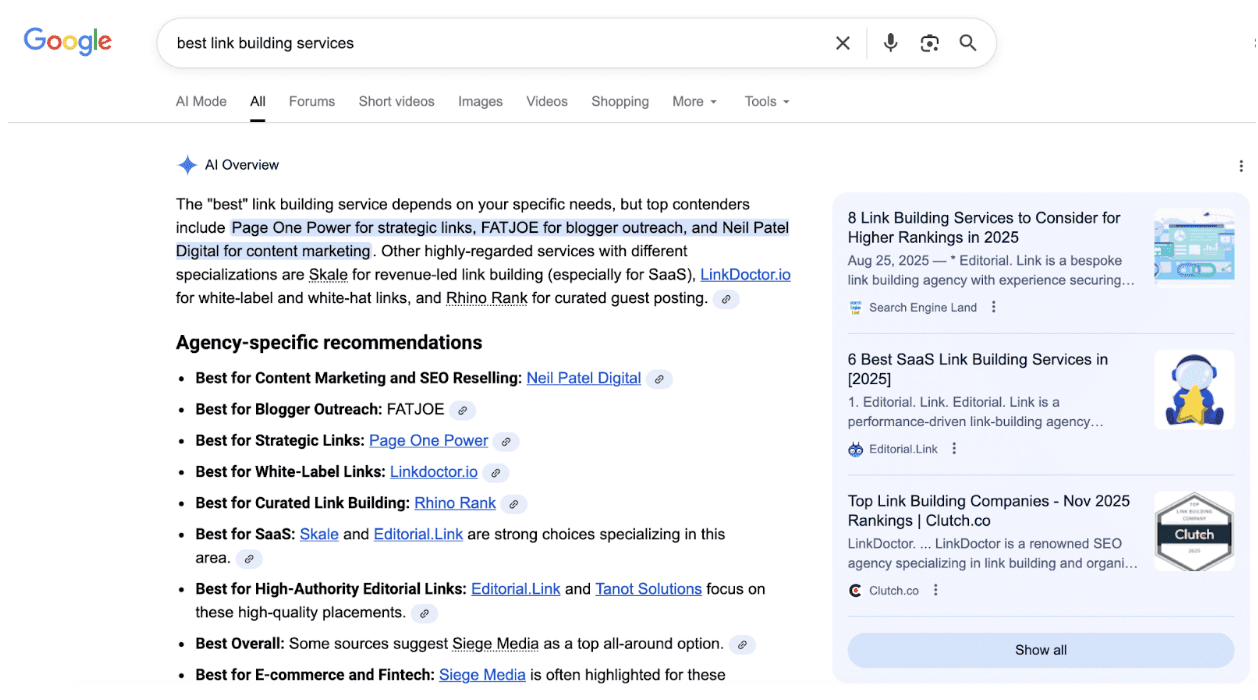
Let’s say you want to vet Editorial.Link. If you search for “best link building services,” you will find it is one of the link providers listed in the AI Overviews.

Screenshot of Google’s AI Overviews, November 2025

It doesn’t mean an agency isn’t worth your time just because it doesn’t rank high, as some services thrive on referrals and don’t focus on their own SEO.

However, if they do rank, that’s a major green flag. SEO is a highly competitive niche; ranking their own website demonstrates the expertise to deliver similar results for you.

Ensure Their Tactics Build Citation-Worthy Authority

A modern agency’s strategy should focus on earning citations.

Ask them these questions to see whether they’ve adapted:

  • Do they talk about AI visibility, citation tracking, or brand mentions?
  • Do they build links through original data studies, digital PR, and expert quotes?
  • Can they show examples of clients featured in AI Overviews, Chat GPT, or Perplexity answers?
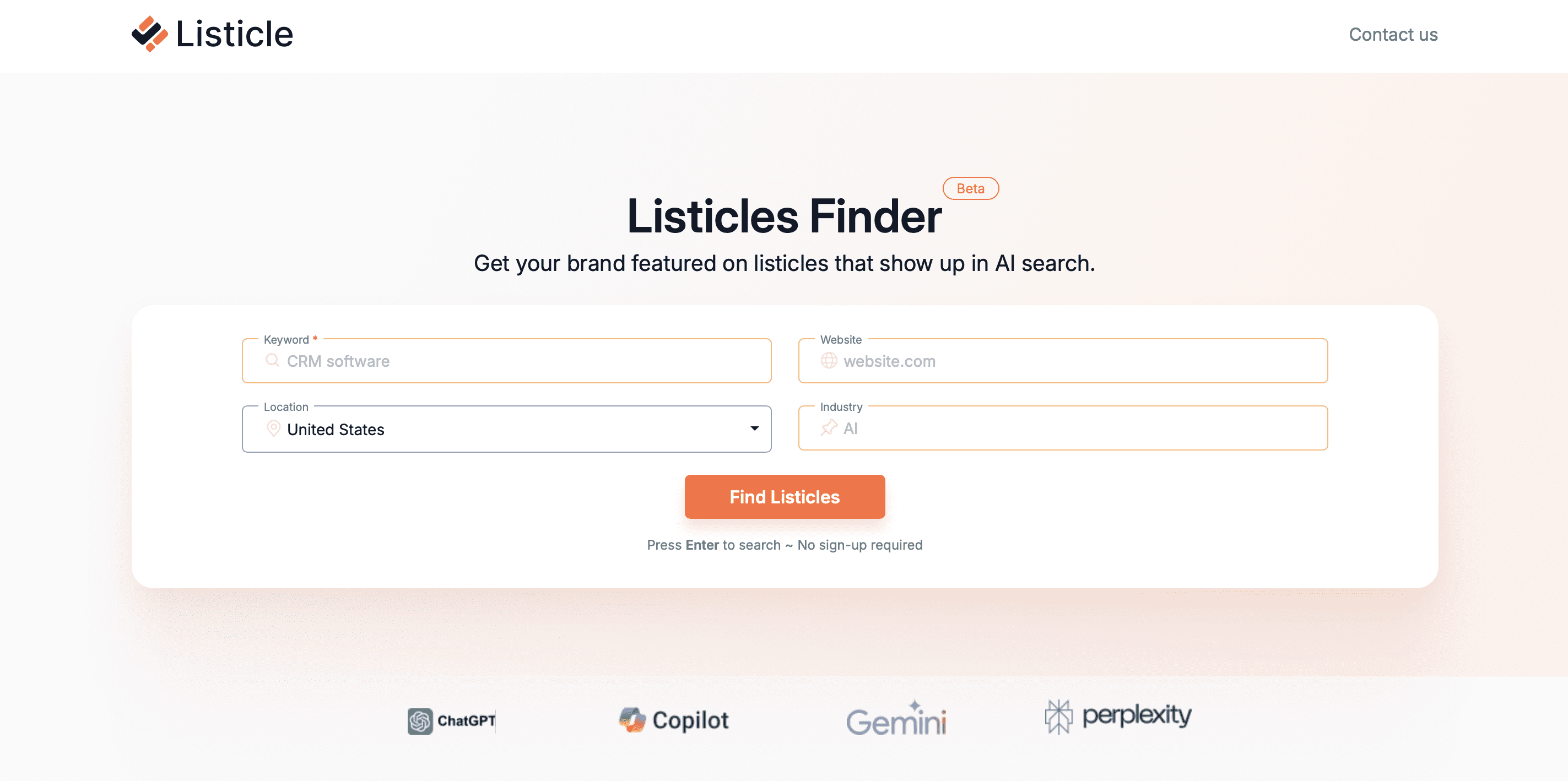
  • Can they help you get a link from top listicles in your niche? Ahrefs’ data shows “Best X” list posts dominated the field. They made up 43,8% of all pages referenced in the responses, and the gap between them and every other format looked huge. You can find relevant listicles in your niche using free services, like listicle.com.
  • Screenshot of Listicle, November 2025

3. Scrutinize Their Track Record Via Reviews, Case Studies & Link Samples

Past performance is a strong indicator of future results.

Analyze Third-Party Reviews

Reviews on independent platforms like Clutch, Trustpilot, or G2 reveal genuine clients’ sentiment better than hand-picked testimonials on a website.

When studying reviews, look for:

  • Mentions of real campaigns or outcomes.
  • Verified client names or company profiles.
  • Recent activity, such as new reviews, shows a steady flow of new business.
  • The total number of reviews (the more, the more representative).
  • Patterns in negative reviews and how the agency responds to them.
Screenshot of Editorial.Link’s profile on Clutch, November 2025

Dig Into Their Case Studies

Case studies and customer stories offer proof of concept and provide insights into their processes, strategies, and industry fit.

While case studies with named clients are ideal, some top-tier agencies are bound by client NDAs for competitive reasons. Be wary if all their examples are anonymous and vague, but don’t dismiss a vendor just for protecting client confidentiality.

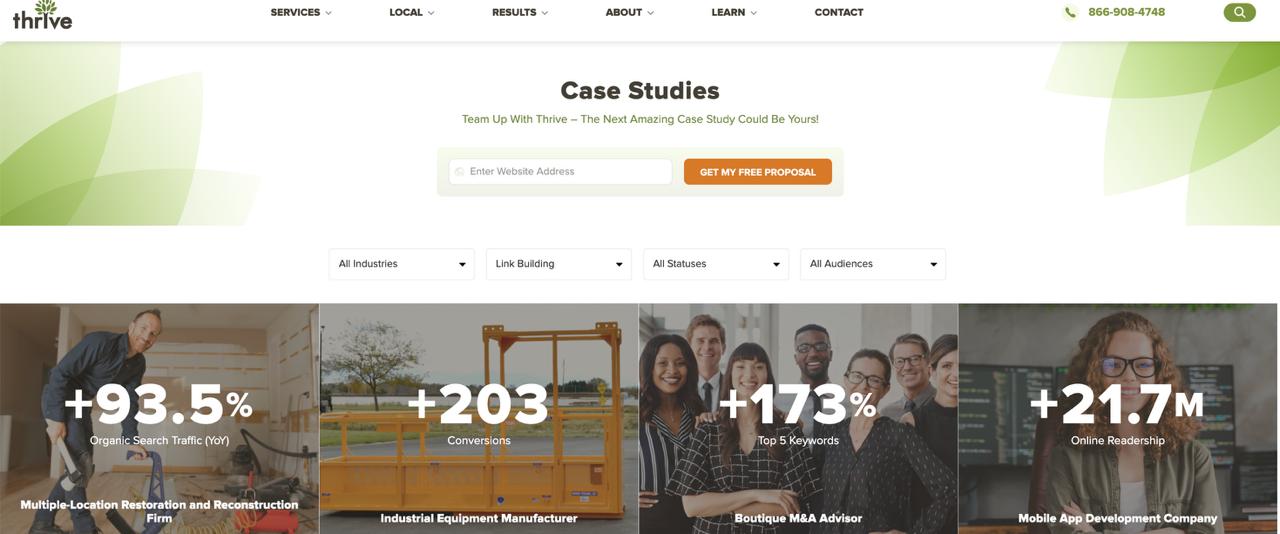
If the clients’ names are provided, don’t take any figures at face value.

Use an SEO tool to examine their link profiles. If you know the campaign’s timeframe, zero in on that period to see how many links they acquired, their quality, and their relevance.

Screenshot of Thrive Internet Marketing, November 2025

Audit Their Link Quality

Inspecting link quality is the ultimate litmus test.

An agency’s theoretical strategy doesn’t matter if its final product is spam. Ask for 3 – 5 examples of links they have built for recent clients.

Once you have the samples, don’t just look at the linking site’s DR. Audit them with this checklist:

  • Editorial relevance: Is the linking page topically relevant to the target page?
  • Site authority & traffic: Does the linking website have real, organic traffic?
  • Placement & context: Is the link placed editorially within the body of an article?
  • AI-citation worthiness: Is this an authoritative site Google AI Overview, ChatGPT, or Perplexity would cite (e.g., a reputable industry publication or a data-driven report)?

4. Evaluate Their Process, Pricing & Guarantees

A reliable link-building service is fully transparent about its process and what you’re paying for.

Look For A Transparent Process

Can you see what you’re paying for? A reliable service will outline its process or share a list of potential prospects before starting outreach.

Ask them for a sample report. Does it include anchor texts, website GEO, URLs, target pages, and publication dates? A vague “built 20 links” report doesn’t cut it.

Finally, check if they offer consulting services.

For example, can they help you choose target pages that will benefit from a link boost most?

Or are they just a link-placing service, as this signals a lack of expertise?

Analyze Their Pricing Model

Price is a direct indicator of quality.

When someone offers links for $100 – $200 a pop, they are typically from PBNs or bulk guest posts, and frequently disappear within months.

Valuable backlinks from trusted sites cost significantly more on average, $508.95, according to the Editorial.Link report.

Prospecting, outreach, content creation, and communication require substantial time and effort.

Reputable agencies work on one of two models:

  • Retainer model: A fixed monthly fee for a consistent flow of links.
  • Custom outreach: Tailored campaigns with flexible volume and pricing.

Scrutinize Their “Guarantees” For Red Flags

This is where unrealistic promises expose low-quality vendors.

A reputable digital PR agency, for example, won’t guarantee the number of earned links. The final result depends on how well a story resonates with journalists.

The same applies to “guaranteed DR or DA.” These metrics don’t directly affect rankings, and it’s impossible to guarantee which websites will pick up a story.

Choosing A Link Building Partner For The AI Search Era

Not all link-building services have the necessary expertise to help you build visibility in the age of AI search.

When choosing your link-building partner, look for a proven track record, transparency, and adaptability.

A service with a strong search presence, demonstrable results, and a focus on AI visibility is a safer bet than one making unsubstantiated claims.

Image Credits

Featured Image: Image by Editorial.Link. Used & modified with permission.

In-Post Images: Image by Editorial.Link. Used with permission.

Google AI Overviews: How To Measure Impressions & Track Visibility

AIO Is Reshaping Click Distribution On SERPs

AI Overviews change how clicks flow through search results. Position 1 organic results that previously captured 30-35% CTR might see rates drop to 15-20% when an AI Overview appears above them.

Industry observations indicate that AI Overviews appear 60-80% of the time for certain query types. For these keywords, traditional CTR models and traffic projections become meaningless. The entire click distribution curve shifts, but we lack the data to model it accurately.

Brands And Agencies Need To Know: How Often AIO Appears For Their Keywords

Knowing how often AI Overviews appear for your keywords can help guide your strategic planning.

Without this data, teams may optimize aimlessly, possibly focusing resources on keywords dominated by AI Overviews or missing chances where traditional SEO can perform better.

Check For Citations As A Metric

Being cited can enhance brand authority even without direct clicks, as people view your domain as a trusted source by Google.

Many domains with average traditional rankings lead in AI Overview citations. However, without citation data, sites may struggle to understand what they’re doing well.

How CTR Shifts When AIO Is Present

The impact on click-through rate can vary depending on the type of query and the format of the AI Overview.

To accurately model CTR, it’s helpful to understand:

  • Whether an AI Overview is present or not for each query.
  • The format of the overview (such as expanded, collapsed, or with sources).
  • Your citation status within the overview.

Unfortunately, Search Console doesn’t provide any of these data points.

Without Visibility, Client Reporting And Strategy Are Based On Guesswork

Currently, reporting relies on assumptions and observed correlations rather than direct measurements. Teams make educated guesses about the impact of AI Overview based on changes in CTR, but they can’t definitively prove cause and effect.

Without solid data, every choice we make is somewhat of a guess, and we miss out on the confidence that clear data can provide.

How To Build Your Own AIO Impressions Dashboard

One Approach: Manual SERP Checking

Since Google Search Console won’t show you AI Overview data, you’ll need to collect it yourself. The most straightforward approach is manual checking. Yes, literally searching each keyword and documenting what you see.

This method requires no technical skills or API access. Anyone with a spreadsheet and a browser can do it. But that accessibility comes with significant time investment and limitations. You’re becoming a human web scraper, manually recording data that should be available through GSC.

Here’s exactly how to track AI Overviews manually:

Step 1: Set Up Your Tracking Infrastructure

  • Create a Google Sheet with columns for: Keyword, Date Checked, Location, Device Type, AI Overview Present (Y/N), AI Overview Expanded (Y/N), Your Site Cited (Y/N), Competitor Citations (list), Screenshot URL.
  • Build a second sheet for historical tracking with the same columns plus Week Number.
  • Create a third sheet for CTR correlation using GSC data exports.

Step 2: Configure Your Browser For Consistent Results

  • Open Chrome in incognito mode.
  • Install a VPN if tracking multiple locations (you’ll need to clear cookies and switch locations between each check).
  • Set up a screenshot tool that captures full page length.
  • Disable any ad blockers or extensions that might alter SERP display.

Step 3: Execute Weekly Checks (Budget 2-3 Minutes Per Keyword)

  • Search your keyword in incognito.
  • Wait for the page to fully load (AI Overviews sometimes load one to two seconds after initial results).
  • Check if AI Overview appears – note that some are collapsed by default.
  • If collapsed, click Show more to expand.
  • Count and document all cited sources.
  • Take a full-page screenshot.
  • Upload a screenshot to cloud storage and add a link to the spreadsheet.
  • Clear all cookies and cache before the next search.

Step 4: Handle Location-specific Searches

  • Close all browser windows.
  • Connect to VPN for target location.
  • Verify IP location using whatismyipaddress.com.
  • Open a new incognito window.
  • Add “&gl=us&hl=en” parameters (adjust country/language codes as needed).
  • Repeat Step 3 for each keyword.
  • Disconnect VPN and repeat for the next location.

Step 5: Process And Analyze Your Data

  • Export last week’s GSC data (wait two to three days for data to be complete).
  • Match keywords between your tracking sheet and GSC export using VLOOKUP.
  • Calculate AI Overview presence rate: COUNT(IF(D:D=”Y”))/COUNTA(D:D)
  • Calculate citation rate: COUNT(IF(F:F=”Y”))/COUNT(IF(D:D=”Y”))
  • Compare the average CTR for keywords with vs. without AI Overviews.
  • Create pivot tables to identify patterns by keyword category.

Step 6: Maintain Data Quality

  • Re-check 10% of keywords to verify consistency.
  • Document any SERP layout changes that might affect tracking.
  • Archive screenshots weekly (they’ll eat up storage quickly).
  • Update your VPN locations if Google starts detecting and blocking them.

For 100 keywords across three locations, this process takes approximately 15 hours per week.

The Easy Way: Pull This Data With An API

If ~15 hours a week of manual SERP checks isn’t realistic, automate it. An API call gives you the same AIO signal in seconds, on a schedule, and without human error. The tradeoff is a little setup and usage costs, but once you’re tracking ~50+ keywords, automation is cheaper than people.

Here’s the flow:

Step 1: Set Up Your API Access

  • Sign up for SerpApi (free tier includes 250 searches/month).
  • Get your API key from the dashboard and store it securely (env var, not in screenshots).
  • Install the client library for your preferred language.

Step 2, Easy Version: Verify It Works (No Code)

Paste this into your browser to pull only the AI Overview for a test query:

https://serpapi.com/search.json?engine=google&q=best+laptop+2026&location=United+States&json_restrictor=ai_overview&api_key=YOUR_API_KEY

If Google returns a page_token instead of the full text, run this second request:

https://serpapi.com/search.json?engine=google_ai_overview&page_token=PAGE_TOKEN&api_key=YOUR_API_KEY
  • Replace YOUR_API_KEY with your key.
  • Replace PAGE_TOKEN with the value from the first response.
  • Replace spaces in queries and locations with +.

Step 2, Low-Code Version

If you don’t want to write code, you can call this from Google Sheets (see the tutorial), Make, or n8n and log three fields per keyword: AIO present (true/false), AIO position, and AIO sources.

No matter which option you choose, the:

  • Total setup time: two to three hours.
  • Ongoing time: five minutes weekly to review results.

What Data Becomes Available

The API returns comprehensive AI Overview data that GSC doesn’t provide:

  • Presence detection: Boolean flag for AI Overview appearance.
  • Content extraction: Full AI-generated text.
  • Citation tracking: All source URLs with titles and snippets.
  • Positioning data: Where the AI Overview appears on page.
  • Interactive elements: Follow-up questions and expandable sections.

This structured data integrates directly into existing SEO workflows. Export to Google Sheets for quick analysis, push to BigQuery for historical tracking, or feed into dashboard tools for client reporting.

Demo Tool: Building An AIO Reporting Tool

Understanding The Data Pipeline

Whether you build your own tracker or use existing tools, the data pipeline follows this pattern:

  • Input: Your keyword list (from GSC, rank trackers, or keyword research).
  • Collection: Retrieve SERP data (manually or via API).
  • Processing: Extract AI Overview information.
  • Storage: Save to database or spreadsheet.
  • Analysis: Calculate metrics and identify patterns.

Let’s walk through implementing this pipeline.

You Need: Your Keyword List

Start with a prioritized keyword set.

Include categorization to identify AI Overview patterns by intent type. Informational queries typically show higher AI Overview rates than navigational ones.

Step 1: Call SerpApi To Detect AIO blocks

For manual tracking, you’d check each SERP:

  • Individually. (This tutorial takes 2 – 3 minutes per manual check.)
  • Instantly. (This returns structured data instantly.)

Step 2: Store Results In Sheets, BigQuery, Or A Database

View the full tutorial for:

Step 3: Report On KPIs

Calculate the following key metrics from your collected data:

  • AI Overview Presence Rate.
  • Citation Success Rate.
  • CTR Impact Analysis.

Combine with GSC data to measure CTR differences between keywords with and without AI Overviews.

These metrics provide the visibility GSC lacks, enabling data-driven optimization decisions.

Clear, transparent ROI reporting for clients

With AI Overview tracking data, you can provide clients with concrete answers about their search performance.

Instead of vague statements, you can present specific metrics, such as: “AI Overviews appear for 47% of your tracked keywords, with your citation rate at 23% compared to your main competitor’s 31%.”

This transparency transforms client relationships. When they ask why impressions increased 40% but clicks only grew 5%, you can show them exactly how many queries now trigger AI Overviews above their organic listings.

More importantly, this data justifies strategic pivots and budget allocations. If AI Overviews dominate your client’s industry, you can make the case for content optimization targeting AI citation.

Early Detection Of AIO Volatility In Your Industry

Google’s AI Overview rollout is uneven, occurring in waves that test different industries and query types at different times.

Without proper tracking, you might not notice these updates for weeks or months, missing crucial optimization opportunities while competitors adapt.

Continuous monitoring of AI Overviews transforms you into an early warning system for your clients or organization.

Data-backed Strategy To Optimize For AIO Citations

By carefully tracking your content, you’ll quickly notice patterns, such as content types that consistently earn citations.

The data also reveals competitive advantages. For example, traditional ranking factors don’t always predict whether a page will be cited in an AI Overview. Sometimes, the fifth-ranked page gets consistently cited, while the top result is overlooked.

Additionally, tracking helps you understand how citations relate to your business metrics. You might find that being cited in AI Overviews improves your brand visibility and direct traffic over time, even if those citations don’t result in immediate clicks.

Stop Waiting For GSC To Provide Visibility – It May Never Arrive

Google has shown no indication of adding AI Overview filtering to Search Console. The API roadmap doesn’t mention it. Waiting for official support means flying blind indefinitely.

Start Testing SerpApi’s Google AI Overview API Today

If manual tracking isn’t sustainable, we offer a free tier with 250 searches/month so you can validate your pipeline. For scale, our published caps are clear: 20% of plan volume per hour on plans under 1M/month, and 100,000 + 1% of plan volume per hour on plans ≥1M/month.

We also support enterprise plans up to 100M searches/month. Same production infrastructure, no setup.

Build Your Own AIO Analytics Dashboard And Give Your Team Or Clients The Insights They Need

Whether you choose manual tracking, build your own scraping solution, or use an existing API, the important thing is to start measuring. Every day without AI Overview visibility is a day of missed optimization opportunities.

The tools and methods exist. The patterns are identifiable. You just need to implement tracking that fills the gap Google won’t address.

Get started here →

For those interested in the automated approach, access SerpApi’s documentation and test the playground to see what data becomes available. For manual trackers, download our spreadsheet template to begin tracking immediately.

From Listings to Loyalty: The New Role of Local Search in Customer Experience

Ask yourself the following:

  • Do you reply to reviews?
  • Do you engage?
  • Do you make the interaction feel personal?
  • Do you follow through on your promises?
  • Do you keep information consistent across every platform?
  • Do you share fresh updates (ex: photos, posts, or promotions) that show you’re active?
  • Do you provide transparent details like pricing, wait times, or insurance accepted?

If you answered no to any of the aforementioned, it’s time to switch to a brand experience mentality. That shift shows up clearly in the data. Six in ten people say they at least sometimes click on Google’s AI-generated overviews, which means discovery is no longer only about traditional rankings. It’s about whether your brand shows up well when search engines pull together information in context.

Reputation follows the same logic. In Rio SEO’s latest study, three out of four consumers said they read at least four reviews before deciding where to go. And it’s not just the rating itself. Many put just as much weight on whether a business responds; silence feels like neglect, while engagement signals you’re listening.

The clock has also sped up. Nearly six in ten customers now expect a reply within 24 hours, a sharp jump from last year. For many, that means a same-day response is the expectation. Fast, human replies aren’t a nice touch anymore; they’re the baseline.

The major search platforms reinforce this reality. Google’s local pack favors businesses that post fresh photos, keep details up to date, and engage with reviews (and not just negative reviews but positive ones too). Apple Maps is becoming harder to ignore as well, Rio SEO’s research reveals about a third of consumers now use it frequently. With Siri, Safari, and iPhones all pulling from Apple Business Connect as the default, accurate profiles there can tip the balance just as much as on Google.

Put it all together, and the picture is clear: search visibility and customer experience are already intertwined. The brands thriving in 2025 treat local search as part of a unified Brand Experience strategy and Rio SEO helps brands stay visible, responsive, and trusted wherever customers are searching.

The BX Advantage: Connecting Signals to Action

Every brand gathers signals. Search clicks, review scores, survey feedback; it all piles up. The trouble is most of it never makes it past a slide deck. Customers don’t feel or see the difference.

That’s where Brand Experience (BX) comes in. BX connects visibility and reputation with actionable insights, so signals don’t just sit in a dashboard.

At Rio SEO, we put BX into motion. Our Local Experience solutions help brands connect discovery with delivery and turn what customers see in search into what they feel in real life. It’s the bridge between data and experience, helping enterprise marketers identify patterns, respond faster, and build trust at every location.

The goal isn’t to watch the numbers. It’s to quickly identify and make changes customers notice, such as faster check-ins, smoother booking, and clearer answers in search; all of which amount to better experiences and outcomes, for customers and employees alike.

Technology helps make this possible. AI platforms now tie search data, reviews, and feedback into one view. With predictive analytics layered in, teams can see trouble before it shows up at the front desk or checkout line. And with Google’s AI Overviews and Bing’s Copilot changing how people discover businesses, brands that prepare for those formats now will have an edge when others are still catching up.

Industry context shapes how this plays out. A retailer might connect “near me” searches to what’s actually on the shelf that week. A bank has to prove reliability every time someone checks a branch profile. A hospital needs to make sure that when a patient searches for “urgent care,” the hours, insurance info, and provider reviews are accurate that very day. Different settings, same principle: close the gap between what people see online and what they experience in real life.

And this isn’t just about dashboards. The real win comes from acting quickly on what the signals show. Think about two retailers with dipping review scores. One shrugs and logs it. The other digs deeper, notices the complaints all mention stockouts in one region, and shifts supply within days. Customers stay loyal because the brand responded, not because it had a prettier chart.

That’s the difference BX is designed to create. Reports tell you what already happened. Acting on those signals shapes what happens next.

The New Mandate for Marketing Leaders

In the experience economy, BX isn’t abstract; it’s actionable. And Rio SEO gives brands the tools, data, and automation to operationalize it, turning every search, review, and update into a moment that builds loyalty and long-term growth.

Today’s marketing leaders aren’t being judged on traffic spikes anymore. What matters now is whether customers stick around, how much value they bring over time, and what it costs to serve them. That shift changes everything about the role of local search and puts Brand Experience (BX) at the center of the conversation.

When search is treated as a checklist—hours updated, pin fixed, job done—brands miss the bigger opportunity. Worse, they give ground to competitors who recognize that discovery is experience, and experience drives revenue.

BX gives CMOs and marketing leaders a framework for connecting visibility, reputation, and responsiveness. It bridges the gap between what people see in search and what they experience when they engage. And that’s where Rio SEO delivers real advantage: by giving brands the unified data, automation, and insights to make BX tangible in every market, every listing, and every moment.

You can see the difference in how leaders approach it across divergent industries:

  • Retail: Linking “near me” searches directly to in-stock inventory so shoppers know what’s available before they walk in.
  • Restaurants: Connecting menu updates and “order online” links directly to local search profiles, so when a customer searches “Thai takeout near me,” they see real-time specials, accurate hours, and an easy path to order.
  • Financial Services: Displaying verified first-party reviews on branch profiles to boost credibility and reassure customers choosing where to bank.
Image by Rio SEO, Nov 2025

The common thread is dependability. Local search is no longer about being visible once. It’s about proving, again and again, that your brand can be trusted in the small but decisive moments when customers are making up their minds. BX provides the vision; Rio SEO provides the infrastructure to bring it to life: connecting discovery with loyalty in a world where customers expect precision, empathy, and instant answers.

The Strategic Case for Local Search

The business case for local search doesn’t sit on the margins anymore. It ties directly to growth, trust, and efficiency. Within a Brand Experience (BX) framework, it links customer intent with measurable business outcomes, and Rio SEO gives brands the precision tools to manage that connection at scale.

Revenue Starts Here

Local search is full of high-intent signals: someone taps “call now,” asks for directions, or books an appointment. These metrics are crucial moments that can lead to sales, often within hours. In fact, most local searchers buy within 48 hours: three-quarters of restaurant seekers and nearly two-thirds of retail shoppers. That urgency makes consistency and accessibility non-negotiable.

Trust is Built in the Details

Reviews have become a kind of reputation currency, and customers spend it carefully. Three out of four people read at least four reviews before making a choice. If the basics are wrong—a missing phone number, the wrong hours—trust evaporates. More than half of consumers say they won’t visit a business if the listing details are off. Rio SEO’s centralized platform keeps data clean and consistent, ensuring that every profile communicates reliability, the foundation of trust in BX.

Efficiency That Pays for Itself

Every time insights from search and feedback flow back into operations, friction disappears before it gets expensive. Accurate listings mean fewer misrouted calls. Quick review responses calm frustration before it snowballs. Clear online paths reduce the burden on service teams.

In healthcare, that can mean shorter call center queues. In financial services, fewer “where do I start?” calls during onboarding. For retailers, avoiding wasted trips when hours are wrong keeps customers coming back instead of leaving disappointed. Each fix trims cost-to-serve while strengthening trust—a rare double win. Rio SEO automates these workflows, saving teams time while enhancing experience quality.

Your Edge Over the Competition

Too many organizations still keep SEO and CX in separate lanes. BX unites them and Rio SEO operationalizes that unity. The ones who bring those signals together see patterns earlier, act faster, and pull ahead of rivals who are still optimizing for clicks instead of experiences.

The Power of Brand Experience

BX blends rigorous data with customer-centric urgency. It gives leaders a way to not only show up in search but to be chosen, trusted, and remembered.

Winning the Experience Economy Starts in Local Search

Search no longer waits for a typed query. With AI Overviews, predictive results, and personalized recommendations, it increasingly anticipates what people want and surfaces the businesses most likely to deliver.

That shift raises the bar. In this new environment, local search isn’t a maintenance task but rather the front line of Brand Experience (BX). Accuracy, responsiveness, and reputation aren’t side jobs anymore; they’re the signals that decide who gets noticed, who gets trusted, and who gets passed over.

The companies setting the pace already treat local presence as a growth engine, not a maintenance task. They link discovery with delivery, reviews with real replies, and feedback with action. Competitors who don’t will find themselves playing catch-up in an economy where expectations reset every day.

The message is clear: customers don’t separate search from experience, and neither can you. Local search is now where growth, trust, and efficiency intersect. Handle it as a checklist, and you’ll fall behind. Treat it as a lever for Brand Experience, and you’ll define the standard others have to meet.

That’s where Rio SEO makes the difference. We help enterprise brands connect the dots between visibility, data, and experience, empowering marketers to act on signals faster, measure impact clearly, and deliver consistency at scale. With Rio SEO, brands don’t just show up in search; they stand out, stay accurate, and turn visibility into measurable growth.

Image by Rio SEO, Nov 2025

Ready to lead in the era of AI-driven discovery?

Partner with Rio SEO to transform your local presence into a connected, data-powered experience that builds trust, drives action, and earns loyalty at every location, on every platform, every day.

Learn more about Rio SEO’s Local Experience solutions today.

Data: Translated Sites See 327% More Visibility in AI Overviews

This post was sponsored by Weglot. The opinions expressed in this article are the sponsor’s own.

When Google’s AI Overviews launched in 2024, dozens of questions quickly surfaced among SEO professionals, one being: if AI now curates and summarizes search results, how do websites earn visibility, especially across languages?

Weglot recently conducted a data-driven study, analyzing 1.3 million citations across Google AI Overviews and ChatGPT to determine if LLMs cite content in one language, would they also cite it in others?

The result: translated websites saw up to 327% more visibility in AI Overviews than untranslated ones, a clear signal that international SEO is becoming inseparable from AI search.

What’s more, websites with another language available were also more likely to be cited in AI Overviews, regardless of the language the search was made.

This shift is redefining the rules of visibility. AI Overviews and large language models (LLMs) now mediate how information is discovered. Instead of ranking pages, they “cite” sources in generated responses.

But with that shift comes a new risk: if your website isn’t available in the user’s search language, does AI simply overlook it, or worse, send users to Google Translate’s proxy page instead?

The risk with Google’s Translate proxy is that while it does the translation work for you, you have no control over the translations of your content. Worse still, you don’t get any of the traffic benefits, as users are not directed to your site.

The Study

Here’s how the research worked. To understand how translation affects AI visibility, Weglot focused the research on Spanish-language websites across two markets: Spain and Mexico.

The study was then split into two phases. Phase one focused on websites that weren’t translated, and therefore only displayed the language intended for their market, in this case, Spanish.

In that phase, Weglot looked at 153 websites without English translations: 98 from Spain and 55 from Mexico. Weglot deliberately selected high-traffic sites because they offered no English versions.

Phase two involved a comparison group of 83 Spanish and Mexican sites with versions in both Spanish and English. This allowed Weglot to directly compare the performance of translated versus untranslated content.

In total, this generated 22,854 queries in phase one and 12,138 in phase two. The methodology converted the top 50 non-branded keywords of each site into queries that users would likely search, and then these were translated between the Spanish and English versions.

In total, 1.3 million citations were analyzed.

The Key Results

Untranslated Sites Have Very Low AI Search Visibility

The findings show that untranslated websites experience a substantial drop in visibility for searches conducted in non-available languages, despite maintaining strong visibility in the current available language.

Diving deeper into this, untranslated sites essentially lose massive visibility. From the study, even when these Spanish websites performed well in Spanish searches, the sites virtually disappeared in English searches.

Looking at this data further within Google AI Overviews:

  • The sample size of 98 untranslated sites from Spain had 17,094 citations for Spanish queries vs 2,810 citations for the equivalent search in English, a 431% gap in visibility.
  • Taking a look at untranslated sites in Mexico, the study identified a similar pattern. 12,038 citations for Spanish queries vs 3,450 citations for English, showing 213% fewer citations when searching English.

Even ChatGPT, though slightly more balanced, still favored translated sites, with Spanish sites receiving 3.5% fewer citations in English and 4.9% fewer with Mexican sites.

Image created by Weglot, November 2025

Translated Sites Have 327% More AI Search Visibility

But what happens when you do translate your site?

Bringing in the comparison group of Spanish websites that also have an English version, we can see that translated sites dramatically close the visibility gap and that having a second language transformed visibility within Google AI Overviews.

Google AI Overviews:

  • Translated sites in Spain saw 10,046 citations vs 8,048 in English, showcasing only a 22% gap.
  • Translated sites in Mexico showed 5,527 citations for Spanish queries and 3,325 citations for English, and a difference of 59%.

Overall, translated sites achieved 327% more visibility than untranslated ones and earned 24% more total citations per query.

When looking at ChatGPT, the bias almost vanished. Translated sites saw near-equal citations in both languages.

Image created by Weglot, November 2025

Next Steps: Translate Your Site To Boost Global Visibility In AI SERPs

Translation does more than boost visibility, it multiplies it.

Not only does having multiple languages across your site ensure your site gets picked up for searches in multiple languages, but it also adds to the overall visibility of your site as a whole.

The study found that translated sites perform better across all metrics. The data shows that translated sites received 24% more citations per prompt than untranslated sites.

Looking at this by language, translation resulted in a 33% increase in English citations and a 16% increase in Spanish citations per query.

Weglot’s findings indicate that translation acts as a signal of authority and reliability for AIOs and ChatGPT, boosting citation performance across all languages, not only the ones content is translated.

Image created by Weglot, November 2025

AI Search Rewards Translated Content as a Visibility Signal

Traditional international SEO has long focused on hreflang tags and localized keywords. But in the age of AI search, translation itself becomes a visibility signal:

  1. Language alignment: AI engines prioritize content matching the query’s language.
  2. Authority building: Translated content attracts engagement across markets, improving perceived reliability.
  3. Traffic control: Proper translations prevent Google Translate proxies from intercepting clicks.
  4. Semantic reach: Multilingual content broadens your surface area for AI training and citation.

Put simply: If your content isn’t in the language of the question, it’s unlikely it will be in the answer either.

The Business Impact

The consequences aren’t theoretical. One case in Weglot’s dataset, a major Spanish book retailer selling English-language titles worldwide without an English version of its site, shows the impact.

When English speakers searched for relevant books:

  • The site appeared 64% less often in Google AI Overviews and ChatGPT.
  • In 36% of the cases where it did appear, the link pointed to Google Translate’s proxy, not the retailer’s own domain.

Despite offering exactly what English users wanted, the business lost visibility, traffic, and ultimately, sales.

The Bigger Picture: AI Search Is Redefining SEO and Translation Is Now a Growth Strategy

The implications reach far beyond Spain or Mexico, or even the Spanish language.

As AI search evolves, the SEO playbook is expanding. Ranking isn’t just about “position one” anymore; it’s about being cited, summarized, and surfaced by machines trained on multilingual web content.

Weglot’s findings point to a future where translation is both an SEO and an AI strategy and not a localization afterthought.

With Google AIOs now live in multiple languages and ChatGPT integrating real-time web data, multilingual visibility has become an equity issue: sites optimized for one language risk being invisible in another.

Image created by Weglot, November 2025

Final Takeaway: Untranslated Sites Are Invisible in AI Search

The evidence is clear: Untranslated = unseen. Website translation is high up there for AIO visibility.

As AI continues to shape how search engines understand relevance, translation isn’t just about accessibility; it’s how your brand gets recognized by algorithms and audiences alike.

For the easiest way to translate a website, start your free trial now!

Plus, enjoy a 15% discount for 12 months on public plans by using the promo code SEARCH15 on a paid plan purchase.

Image Credits

Featured Image: Image by Weglot. Used with permission.

In-Post Images: Image by Weglot. Used with permission.