Adapting for AI’s reasoning era

Anyone who crammed for exams in college knows that an impressive ability to regurgitate information is not synonymous with critical thinking.

The large language models (LLMs) first publicly released in 2022 were impressive but limited—like talented students who excel at multiple-choice exams but stumble when asked to defend their logic. Today’s advanced reasoning models are more akin to seasoned graduate students who can navigate ambiguity and backtrack when necessary, carefully working through problems with a methodical approach.

As AI systems that learn by mimicking the mechanisms of the human brain continue to advance, we’re witnessing an evolution in models from rote regurgitation to genuine reasoning. This capability marks a new chapter in the evolution of AI—and what enterprises can gain from it. But in order to tap into this enormous potential, organizations will need to ensure they have the right infrastructure and computational resources to support the advancing technology.

The reasoning revolution

“Reasoning models are qualitatively different than earlier LLMs,” says Prabhat Ram, partner AI/HPC architect at Microsoft, noting that these models can explore different hypotheses, assess if answers are consistently correct, and adjust their approach accordingly. “They essentially create an internal representation of a decision tree based on the training data they’ve been exposed to, and explore which solution might be the best.”

This adaptive approach to problem-solving isn’t without trade-offs. Earlier LLMs delivered outputs in milliseconds based on statistical pattern-matching and probabilistic analysis. This was—and still is—efficient for many applications, but it doesn’t allow the AI sufficient time to thoroughly evaluate multiple solution paths.

In newer models, extended computation time during inference—seconds, minutes, or even longer—allows the AI to employ more sophisticated internal reinforcement learning. This opens the door for multi-step problem-solving and more nuanced decision-making.

To illustrate future use cases for reasoning-capable AI, Ram offers the example of a NASA rover sent to explore the surface of Mars. “Decisions need to be made at every moment around which path to take, what to explore, and there has to be a risk-reward trade-off. The AI has to be able to assess, ‘Am I about to jump off a cliff? Or, if I study this rock and I have a limited amount of time and budget, is this really the one that’s scientifically more worthwhile?’” Making these assessments successfully could result in groundbreaking scientific discoveries at previously unthinkable speed and scale.

Reasoning capabilities are also a milestone in the proliferation of agentic AI systems: autonomous applications that perform tasks on behalf of users, such as scheduling appointments or booking travel itineraries. “Whether you’re asking AI to make a reservation, provide a literature summary, fold a towel, or pick up a piece of rock, it needs to first be able to understand the environment—what we call perception—comprehend the instructions and then move into a planning and decision-making phase,” Ram explains.

Enterprise applications of reasoning-capable AI systems

The enterprise applications for reasoning-capable AI are far-reaching. In health care, reasoning AI systems could analyze patient data, medical literature, and treatment protocols to support diagnostic or treatment decisions. In scientific research, reasoning models could formulate hypotheses, design experimental protocols, and interpret complex results—potentially accelerating discoveries across fields from materials science to pharmaceuticals. In financial analysis, reasoning AI could help evaluate investment opportunities or market expansion strategies, as well as develop risk profiles or economic forecasts.

Armed with these insights, their own experience, and emotional intelligence, human doctors, researchers, and financial analysts could make more informed decisions, faster. But before setting these systems loose in the wild, safeguards and governance frameworks will need to be ironclad, particularly in high-stakes contexts like health care or autonomous vehicles.

“For a self-driving car, there are real-time decisions that need to be made vis-a-vis whether it turns the steering wheel to the left or the right, whether it hits the gas pedal or the brake—you absolutely do not want to hit a pedestrian or get into an accident,” says Ram. “Being able to reason through situations and make an ‘optimal’ decision is something that reasoning models will have to do going forward.”

The infrastructure underpinning AI reasoning

To operate optimally, reasoning models require significantly more computational resources for inference. This creates distinct scaling challenges. Specifically, because the inference durations of reasoning models can vary widely—from just a few seconds to many minutes—load balancing across these diverse tasks can be challenging.

Overcoming these hurdles requires tight collaboration between infrastructure providers and hardware manufacturers, says Ram, speaking of Microsoft’s collaboration with NVIDIA, which brings its accelerated computing platform to Microsoft products, including Azure AI.

“When we think about Azure, and when we think about deploying systems for AI training and inference, we really have to think about the entire system as a whole,” Ram explains. “What are you going to do differently in the data center? What are you going to do about multiple data centers? How are you going to connect them?” These considerations extend into reliability challenges at all scales: from memory errors at the silicon level, to transmission errors within and across servers, thermal anomalies, and even data center-level issues like power fluctuations—all of which require sophisticated monitoring and rapid response systems.

By creating a holistic system architecture designed to handle fluctuating AI demands, Microsoft and NVIDIA’s collaboration allows companies to harness the power of reasoning models without needing to manage the underlying complexity. In addition to performance benefits, these types of collaborations allow companies to keep pace with a tech landscape evolving at breakneck speed. “Velocity is a unique challenge in this space,” says Ram. “Every three months, there is a new foundation model. The hardware is also evolving very fast—in the last four years, we’ve deployed each generation of NVIDIA GPUs and now NVIDIA GB200NVL72. Leading the field really does require a very close collaboration between Microsoft and NVIDIA to share roadmaps, timelines, and designs on the hardware engineering side, qualifications and validation suites, issues that arise in production, and so on.”

Advancements in AI infrastructure designed specifically for reasoning and agentic models are critical for bringing reasoning-capable AI to a broader range of organizations. Without robust, accessible infrastructure, the benefits of reasoning models will remain relegated to companies with massive computing resources.

Looking ahead, the evolution of reasoning-capable AI systems and the infrastructure that supports them promises even greater gains. For Ram, the frontier extends beyond enterprise applications to scientific discovery and breakthroughs that propel humanity forward: “The day when these agentic systems can power scientific research and propose new hypotheses that can lead to a Nobel Prize, I think that’s the day when we can say that this evolution is complete.”

To learn more, please read Microsoft and NVIDIA accelerate AI development and performance, watch the NVIDIA GTC AI Conference sessions on demand, and explore the topic areas of Azure AI solutions and Azure AI infrastructure.

This content was produced by Insights, the custom content arm of MIT Technology Review. It was not written by MIT Technology Review’s editorial staff.

This content was researched, designed, and written entirely by human writers, editors, analysts, and illustrators. This includes the writing of surveys and collection of data for surveys. AI tools that may have been used were limited to secondary production processes that passed thorough human review.


US office that counters foreign disinformation is being eliminated

The only office within the US State Department that monitors foreign disinformation is to be eliminated, according to US Secretary of State Marco Rubio, confirming reporting by MIT Technology Review.

The Counter Foreign Information Manipulation and Interference (R/FIMI) Hub is a small office in the State Department’s Office of Public Diplomacy that tracks and counters foreign disinformation campaigns. 

In shutting R/FIMI, the department’s controversial acting undersecretary, Darren Beattie, is delivering a major win to conservative critics who have alleged that it censors conservative voices. Created at the end of 2024, it was reorganized from the Global Engagement Center (GEC), a larger office with a similar mission that had long been criticized by conservatives who claimed that, despite its international mission, it was censoring American conservatives. In 2023, Elon Musk called the center the “worst offender in US government censorship [and] media manipulation” and a “threat to our democracy.” 

The culling of the office leaves the State Department without a way to actively counter the increasingly sophisticated disinformation campaigns from foreign governments like those of Russia, Iran, and China.

Shortly after publication, employees at R/FIMI received an email, inviting them to an 11:15AM meeting with Beattie, where employees were told that the office and their jobs have been eliminated. 

Have more information on this story or a tip for something else that we should report? Using a non-work device, reach the reporter on Signal at eileenguo.15 or tips@technologyreview.com.

Then, Secretary of State Marco Rubio confirmed our reporting in a blog post in The Federalist, which had sued GEC last year alleging that it had infringed on its freedom of speech. “It is my pleasure to announce the State Department is taking a crucial step toward keeping the president’s promise to liberate American speech by abolishing forever the body formerly known as the Global Engagement Center (GEC),” he wrote. And he told Mike Benz, a former first-term Trump official who also reportedly has alt right views, during a YouTube interview, “We ended government-sponsored censorship in the United States through the State Department.”  

Censorship claims

For years, conservative voices both in and out of government have accused Big Tech of censoring conservative views—and they often charged GEC with enabling such censorship. 

GEC had its roots as the Center for Strategic Counterterrorism Communications (CSCC), created by an Obama-era executive order, but shifted its mission to fight propaganda and disinformation from foreign governments and terrorist organizations in 2016, becoming the Global Engagement Center. It was always explicitly focused on the international information space, but some of the organizations that it funded also did work in the United States. It shut down last December after a measure to reauthorize its $61 million budget was blocked by Republicans in Congress, who accused it of helping Big Tech censor American conservative voices. 

R/FIMI had a similar goal to fight foreign disinformation, but it was smaller: the newly created office had a $51.9 million budget, and a small staff that, by mid-April, was down to just 40 employees, from 125 at GEC. In a Wednesday morning meeting, those employees were told that they would  be put on administrative leave and terminated within 30 days. 

With the change in administrations, R/FIMI had never really gotten off the ground. Beattie, a controversial pick for undersecretary—he was fired as a speechwriter during the first Trump administration for attending a white nationalism conference, has suggested that the FBI organized the January 6 attack on Congress, and has said that it’s not worth defending Taiwan from China—had instructed the few remaining staff to be “pencils down,” one State Department official told me, meaning to pause in their work. 

The administration’s executive order on “countering censorship and restoring freedom of speech” reads like a summary of conservative accusations against GEC:

“Under the guise of combatting “misinformation,” “disinformation,” and “malinformation,” the Federal Government infringed on the constitutionally protected speech rights of American citizens across the United States in a manner that advanced the Government’s preferred narrative about significant matters of public debate.  Government censorship of speech is intolerable in a free society.”

In 2023, The Daily Wire, founded by conservative media personality Ben Shapiro, joined The Federalist in suing GEC for allegedly infringing on the company’s first amendment rights by funding two non-profit organizations, the London-based Global Disinformation Index and New York-based NewsGuard, that had labeled The Daily Wire as “unreliable,” “risky,” and/or (per GDI), susceptible to foreign disinformation. Those projects were not funded by GEC. The lawsuit alleged that this amounted to censorship by “starving them of advertising revenue and reducing the circulation of their reporting and speech,” the lawsuit continued. 

In 2022, the Republican attorneys general of Missouri and Louisiana named GEC among the federal agencies that, they alleged, were pressuring social networks to censor conservative views. Though the case eventually made its way to the Supreme Court, which found no First Amendment violations, a lower court had already removed GEC’s name from the list of defendants, ruling there was “no evidence” that GEC’s communications with the social media platforms had gone beyond “educating the platforms on ‘tools and techniques used by foreign actors.’”

The stakes

The GEC—and now R/FIMI—was targeted as part of a wider campaign to shut down groups accused of being “weaponized” against conservatives. 

Conservative critics railing against what they have alternatively called a disinformation- or censorship- industrial complex have also taken aim at the Department of Homeland Security’s Cybersecurity and Infrastructure Security Agency (CISA) and the Stanford Internet Observatory, a prominent research group that conducted widely cited research on the flows of disinformation during elections. 

CISA’s former director, Chris Krebs, was personally targeted in an April 9 White House memo, while in response to the criticism and millions of dollars in legal fees, Stanford University shuttered the Stanford Internet Observatory ahead of the 2024 presidential elections.  

But this targeting comes at a time when foreign disinformation campaigns—especially by Russia, China, and Iran—have become increasingly sophisticated. 

According to one estimate, Russia spends $1.5 billion per year on foreign influence campaigns. In 2022, the Islamic Republic of Iran Broadcasting, that country’s primary foreign propaganda arm, had a $1.26 billion budget. And a 2015 estimate suggests that China spent up to $10 billion per year on media targeting non-Chinese foreigners—a figure that has almost certainly grown.

In September 2024, the Justice Department indicted two employees of RT, a Russian state-owned propaganda agency, in a $10 million scheme to create propaganda aimed at influencing US audiences through a media company that has since been identified as the conservative Tenet Media. 

The GEC was one effort to counter such campaigns. Some of its recent projects have included developing AI models to detect memes and deepfakes and exposing Russian propaganda efforts to influence Latin American public opinion against the war in Ukraine. 

By law, the Office of Public Diplomacy has to provide Congress with 15-day advance notice of any intent to reassign any funding allocated by Congress over $1 million. Congress then has time to respond, ask questions, and challenge the decisions—though to judge from its record with other unilateral executive-branch decisions to gut government agencies, it is unlikely to do so. 

We have reached out to the State Department for comment. 

This story was updated at 11:55am to note that R/FIMI employees have confirmed that the office closed.
This story was updated at 12:37am to include confirmation about R/FIMI’s shutdown from Marco Rubio.
This story was updated at 6:10pm to add an identifier for Mike Benz.

Rethink Your Email Sunset Policy

Experienced marketers know an unengaged email list tanks deliverability and clouds campaign data. But what’s often missing is nuance: how to design a sunset policy that works with the brand’s funnel.

This post isn’t a reminder to clean your list with abandon. It’s a framework for doing it smarter, especially when attribution is messy, inbox competition is fierce, and engagement signals are fuzzier than ever.

The alternative, keeping everyone, results in:

  • Declining inbox placement rates,
  • Falling open rates (despite Apple’s Mail Privacy Protection inflating them),
  • Spam traps and increased bounces from low-quality emails.

Yet experienced marketers still hesitate to sunset aggressively — and for good reason. No one wants to cut customers who intend to reorder, especially for long consideration cycles — big-ticket purchases such as furniture or luxury goods — or inconsistent seasonal spikes. That’s why a nuanced, tailored, data-informed sunset policy is essential.

Female looking at a laptop and a smartphone

A nuanced sunset policy recognizes messy attribution and fuzzy engagement signals.

Beyond Open Rates

Post iOS 15, opens are inflated and increasingly unreliable. Relying solely on opens — even on Klaviyo, Iterable, and Braze — means you’re likely retaining ghost contacts, especially if you’re not separating for Apple’s MPP.

Instead, look at subscriber intent across channels, not just inbox activity. Build a sunset policy around blended engagement signals:

  • Clicks,
  • Site visits (via UTMs or pixel-based tracking),
  • Purchase behavior,
  • Session time or scroll depth (via Google Analytics 4 or a customer data platform such as Segment or Klaviyo).

Subscribers Not Equal

Not everyone behaves similarly with a brand. A strategic sunsetting policy considers varied users across the marketing lifecycle. To preserve value, tier your list:

  • High-value, high-recent buyers. Suppress after longer windows (e.g., 180 days) but retarget through paid media or SMS.
  • Repeat but lapsed buyers. Shorter sunset window (90–120 days) with re-engagement flows before suppressing.
  • Non-purchasers with high email interaction. Consider retargeting with educational, customer-driven, or product-led content.
  • Low-value, low-engagement contacts. Flag for suppression or archival.

Tiered Sunset Flow

Step 1. Identify drop-off points by cohort. Map when different subscriber types stop engaging, not just how long they’ve been inactive.

Step 2. Create re-engagement flows by segment. Instead of one-size-fits-all messaging, design two or three touch sequences per tier. For example:

  • A buyer-focused winback campaign with product restock alerts or loyalty perks,
  • A lurker-focused re-engagement with social proof or an updated brand story,
  • A light-touch “Do you still want to hear from us?” campaign for low-engagement users.

Step 3. Offer a soft exit. Before removing, offer preference management, frequency options, or SMS sign-up. This preserves the relationship on subscribers’ terms.

Strategic Suppression

Most email service providers can suppress contacts from campaigns without fully removing them, retaining purchase history and behavioral insights. Add those contacts to exclusion audiences in Meta or Google Ads. Suppress them from flows but reactivate for seasonal sends, “last chance” campaigns, and high-impact sales.

Non-email touchpoints are valuable, too. Customers who no longer open emails might still follow the brand on Instagram or engage via SMS. A full-funnel approach means meeting them where they show up.

Automate with Context

Most marketers have automated sunset flows, but “setting and forgetting” could reduce revenue. A quarterly review is essential to ensure automations:

  • Align with the promo and product calendar,
  • Reflect seasonality spikes and new retention goals,
  • Use personalized content blocks or product feeds for relevancy.

A well-crafted sunset policy respects customers’ time and the brand’s long-term health. A mindset of curation rather than deletion leaves room for customers to re-engage when the time is right.

TikTok Launches Footnotes: Its Answer To X’s Community Notes via @sejournal, @MattGSouthern

TikTok is testing a new feature called “Footnotes” that adds extra information to videos on the platform.

The test will start today in the United States.

What Are TikTok Footnotes?

Footnotes let approved TikTok users add information to videos. This feature aims to make content more trustworthy.

TikTok calls this a “community-based approach” where many users help improve information quality.

Who Can Contribute Footnotes?

TikTok has rules for who can add footnotes. US users can apply now, and TikTok will also invite eligible users.

To qualify, you must:

  • Have used TikTok for more than six months
  • Be at least 18 years old
  • Have a clean record with no recent Community Guidelines violations

TikTok will slowly give more people access over the coming months. Approved users can both add footnotes and rate others’ contributions.

How The System Works

TikTok’s announcement explains that Footnotes uses a special ranking system to help people with different viewpoints find common ground.

The system lets contributors add footnotes and vote on how helpful others’ additions are. Only footnotes that enough people find helpful will be shown to everyone.

As more people write and rate footnotes on different topics, the system will get better at displaying the most valuable information.

Similar to X’s Community Notes

TikTok’s Footnotes is similar to Community Notes on X. TikTok mentions that Footnotes is “inspired by the open-sourced system that other platforms use,” which appears to reference Community Notes.

Both systems:

  • Let users add context to posts
  • Use a rating system where people with different viewpoints need to agree
  • Require contributors to meet specific standards
  • Only show notes that many users find helpful
  • Aim to improve content quality through community input rather than just relying on platform moderators

This approach to content checking is becoming popular across social media as platforms look for better ways to handle misinformation without being accused of bias.

Part of a Broader Industry Shift

TikTok’s Footnotes launch comes amid a trend in social media content moderation. Following X’s Community Notes system, Meta announced in March that it would replace its third-party fact-checking program with its own Community Notes feature.

This shift toward community-based moderation represents a major change in how platforms handle potentially misleading content. Rather than relying on centralized fact-checkers, these platforms now empower users to provide context.

The timing of these changes is notable, as they follow President Trump’s return to office and come amid ongoing regulatory scrutiny. For TikTok specifically, this move comes at a sensitive time. The company faces a June 19 deadline for its parent company, ByteDance, to divest its U.S. operations, following a 75-day extension granted by the Trump administration.

Looking Ahead

TikTok says Footnotes is still in testing. The company will gather feedback from users, contributors, and creators to improve the feature. Marketers should watch how this develops before making big strategy changes.


Featured Image: ShutterStockies/Shutterstock

Google’s New Domain Structure: What’s Next For Hreflang? via @sejournal, @MattGSouthern

Google is making a big change to its domain structure. Soon, all country-specific Google domains will redirect to Google.com.

This change ties into earlier hints that Google may rely less on hreflang markup, showing how Google is changing its approach to international search.

Google Consolidates Domain Structure

Google announced plans to phase out country-specific domains like google.fr (France), google.ca (Canada), and google.co.jp (Japan). All these will eventually redirect to Google.com.

Google says in its announcement:

“Over the years, our ability to provide a local experience has improved. In 2017, we began providing the same experience with local results for everyone using Search, whether they were using google.com or their country’s ccTLD.”

Google explained that country-level domains are no longer needed because they can now deliver locally relevant results no matter which domain you use.

Implementation Timeline

Google will roll out this change slowly over the coming months, giving users time to adjust to the new system.

While the URL in your browser will change, Google says search will still work the same way.

Google stressed that the update “won’t affect the way Search works, nor will it change how we handle obligations under national laws.”

Connection to Hreflang Evolution

This domain change seems to be part of a bigger shift in how Google handles international content.

In July, Google’s Gary Illyes hinted that they might rely less on manual hreflang tags and more on automatic language detection.

Illyes stated in a podcast:

“Ultimately, I would want less and less annotations, site annotations, and more automatically learned things.”

SEO professional Montse Cano pointed out this connection in a social media post, noting that “hreflang might actually change too due to improvements in AI.”

While no changes are confirmed, it’s something to watch for in the future.

Implications For SEO Professionals

This change affects search marketers in several ways, especially those working on international SEO:

  • Your analytics will show different referral patterns as traffic moves from country-specific domains to Google.com.
  • Along with less reliance on hreflang, website managers may have fewer technical tasks for international targeting.
  • Google seems more confident in automatically detecting the right content versions for users.
  • Users should get a more uniform experience across regions while still seeing localized results.

Next Steps

While Google is getting better at automatic detection, SEO pros should still:

  • Keep using hreflang tags until Google officially says otherwise
  • Make sure your site clearly signals language and regional targeting
  • Watch your analytics for traffic pattern changes during the transition
  • Think about how this affects SEO strategies that relied on country-specific domains

Key Takeaway

This change shows Google is more confident in understanding context, language, and user intent without needing explicit signals like separate domains.

Combined with discussions about automatic language detection, Google’s AI seems ready to handle work that once required manual setup.

SEO professionals should see this as part of search technology’s natural evolution. Stay alert to how these changes affect your international search visibility and traffic.


Featured Image: JHVEPhoto/Shutterstock

WordPress 6.8: The highlights you should know about

On April 15th, 2025, ​WordPress 6.8 was released. This release, named Cecil, is aimed at bringing more control when it comes to the design of your website. It also comes with features that improve performance and enhance security for users and developers. Let’s dive into a few of the highlights in this latest release.

The Style Book for Classic themes

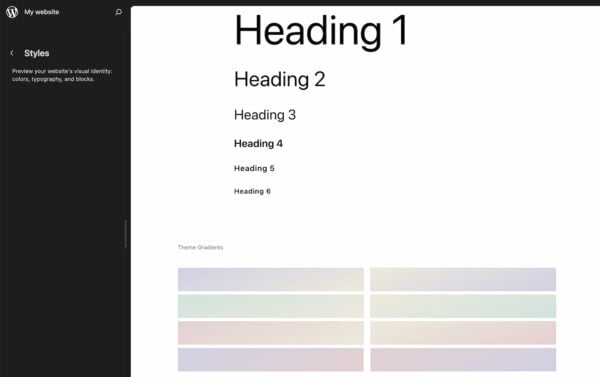
The Style Book, previously exclusive to block-based themes, is now accessible for Classic themes that have editor-styles or a theme.json file. It also comes with a new look and a few new settings to play around with. You can find this feature, or see if you have access to this feature, by going to Appearance > Design > Styles in your vertical navigation bar on the left side.

The Style Book shows the design elements of your site.

This tool gives you an overview of your site’s design elements, including colors, typography, and block styles. Just scroll down to have a look at all the design elements and whether you’re happy with everything design-wise.

Increasing performance with speculative loading

WordPress 6.8 introduces speculative loading, a feature that leverages the Speculation Rules API to prefetch or prerender pages based on user interactions. When someone clicks on a link, this page can now be preloaded. This anticipatory loading results in faster page transitions and a smoother browsing experience.

Of course, WordPress will not load everything as this would compromise performance if it becomes too much. This feature aims to keep a balance between speed and efficiency in choosing which pages to load. Developers can customize this behavior by using a plugin or writing code if they want it to act differently. It’s also good to know that this feature only works in newer browsers.

This feature is part of a longer list of enhancements focused on performance and speed, for both editing and browsing. Without going into too much detail, this update comes with improvements to the block editor, query caching and shorter interactions thanks to the Interactivity API.

WordPress 6.8 brings a few new enhancements to the design and editing experience. We’ll go into a few of them, such as the improved global styles panel, the option to turn image blocks into featured images and new density settings in table layouts.​

Global styles panel

The Global Styles Panel in the full site editor has had an update, making it easier than ever to give your website a cohesive and polished look. Now, users can tweak typography, colors, and layout settings for their entire site — all from one convenient place. Whether you’re adjusting heading sizes, setting your brand colors, or fine-tuning spacing, this central hub helps you manage your site’s design without having to dive into custom CSS or theme files.

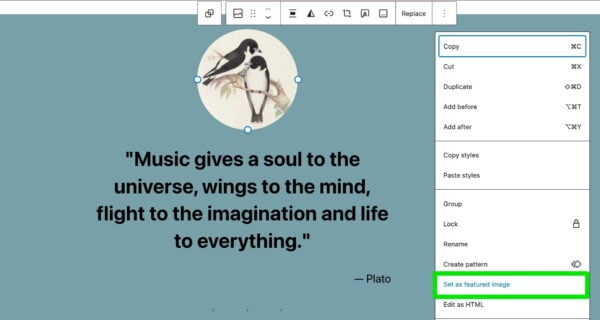
One of the most welcome little updates in WordPress 6.8 is the ability to turn any image block directly into a featured image with a single click. No more uploading the same image twice — once in the content and once for the featured image. If you’ve already added a perfect image to your post, you can now designate it as the featured image straight from the block editor, which simplifies your workflow and saves time.

WordPress 6.8 feature: setting image block as featured image
Simply select any image in your post and click ‘Set as featured image’

Density options for your tables

WordPress 6.8 introduces new density settings for table-based layouts, particularly useful when you’re managing data-heavy content like tables in the admin or Data Views. With these new controls, you can choose how compact or spacious you want your table rows and cells to appear, depending on your personal preference or the type of content you’re handling. Whether you prefer a minimal, airy look or a dense, info-packed table, WordPress now gives you the flexibility to adjust it to suit your needs.

Under-the-hood improvements

Beyond the user-facing features, WordPress 6.8 includes a lot of enhancements under the hood. Let’s check out a few highlights.​

Higher security with bcrypt

Although less visible, this feature is one to get excited about as well. As it brings a significant boost to security. The system is moving away from the MD5-based system for password hashing and transitioning to bcrypt. This change improves overall password security and requires no action from you or your users. It’s automatically implemented and will make it a lot harder to crack passwords.

Efficient block type registration

The new release introduces a new function that makes registering multiple block types much easier for developers. Instead of writing separate code for each block, plugin and theme creators can now register a whole collection of blocks in one go. This not only reduces repetitive code but also helps keep projects organized and easier to maintain, making life simpler for developers and creating fewer opportunities for bugs.

Internationalization improvements

With WordPress powering sites across the globe, internationalization is always a priority. This release ensures that error messages generated by PHPMailer (WordPress’s email handling system) are properly localized, so users see helpful and understandable messages in their language. Additionally, any plugin update notifications sent via email will now respect the site administrator’s selected language, making routine updates more user-friendly for non-English speakers.

Accessibility enhancements

WordPress 6.8 continues the platform’s commitment to making websites more inclusive by improving accessibility across the board. One of the key changes in this release is the removal of redundant title attributes, which were often unnecessary and could cause confusion for users relying on screen readers.

This small but meaningful update helps streamline the browsing experience for people using assistive technology, ensuring that WordPress websites are more welcoming and accessible to all visitors. Other than that, there are over 100+ accessibility fixes and enhancements in this release.

Update your site to WordPress 6.8

Those are a few of the features that you’ll find in this latest release. There’s a lot of focus on enhancing the overall user experience and refining existing functionalities. Whether you’re a developer or website manager, this update is meant to make your life a bit easier and your website more secure and performant. Read the official WordPress release post for more information on this newest version of WordPress. Or, if you’re curious to see these features in action, update to the newest version and try them out yourself!

Read more: Learn how to use WordPress without touching any code »

How Do You Resolve A WordPress Plugin Conflict?

One of the scariest things that can occur with a WordPress user is that you install a plugin, and upon activation, you get a white screen of death.

This screen, where your beautifully crafted website once lived, is now plain white or produces a line or two of unformatted text.

A plugin conflict is when you have two plugins installed, and while they both work fine, running them together breaks the site.

It usually happens when plugins run in tandem, and they both come packaged with the same or similar library functions. There’s a naming conflict, and PHP produces an error.

This article will discuss how to fix them.

Plugin Conflicts Are Becoming More Rare

First of all, plugin conflict: where somebody installs a plugin that conflicts with another plugin, is becoming more rare.

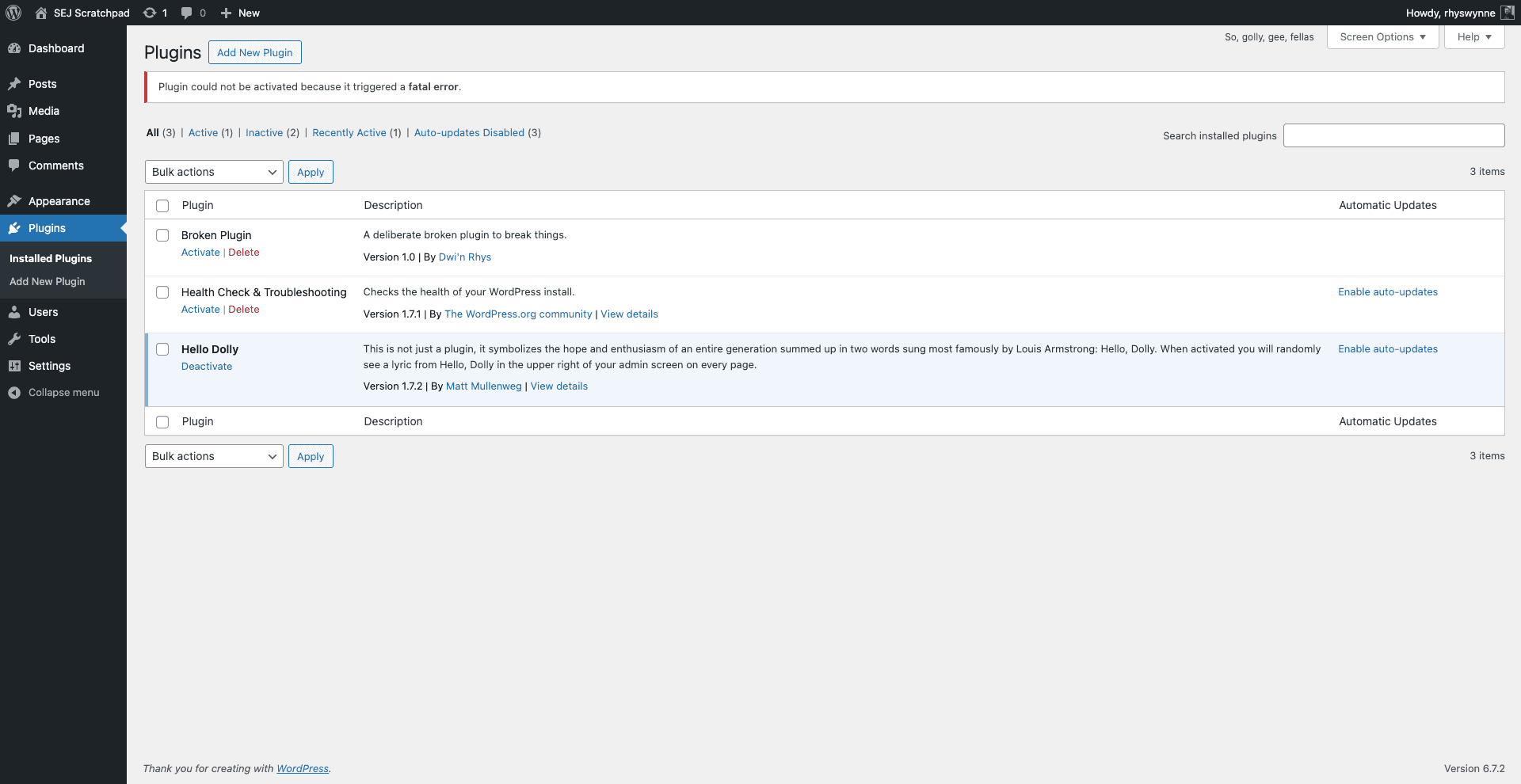
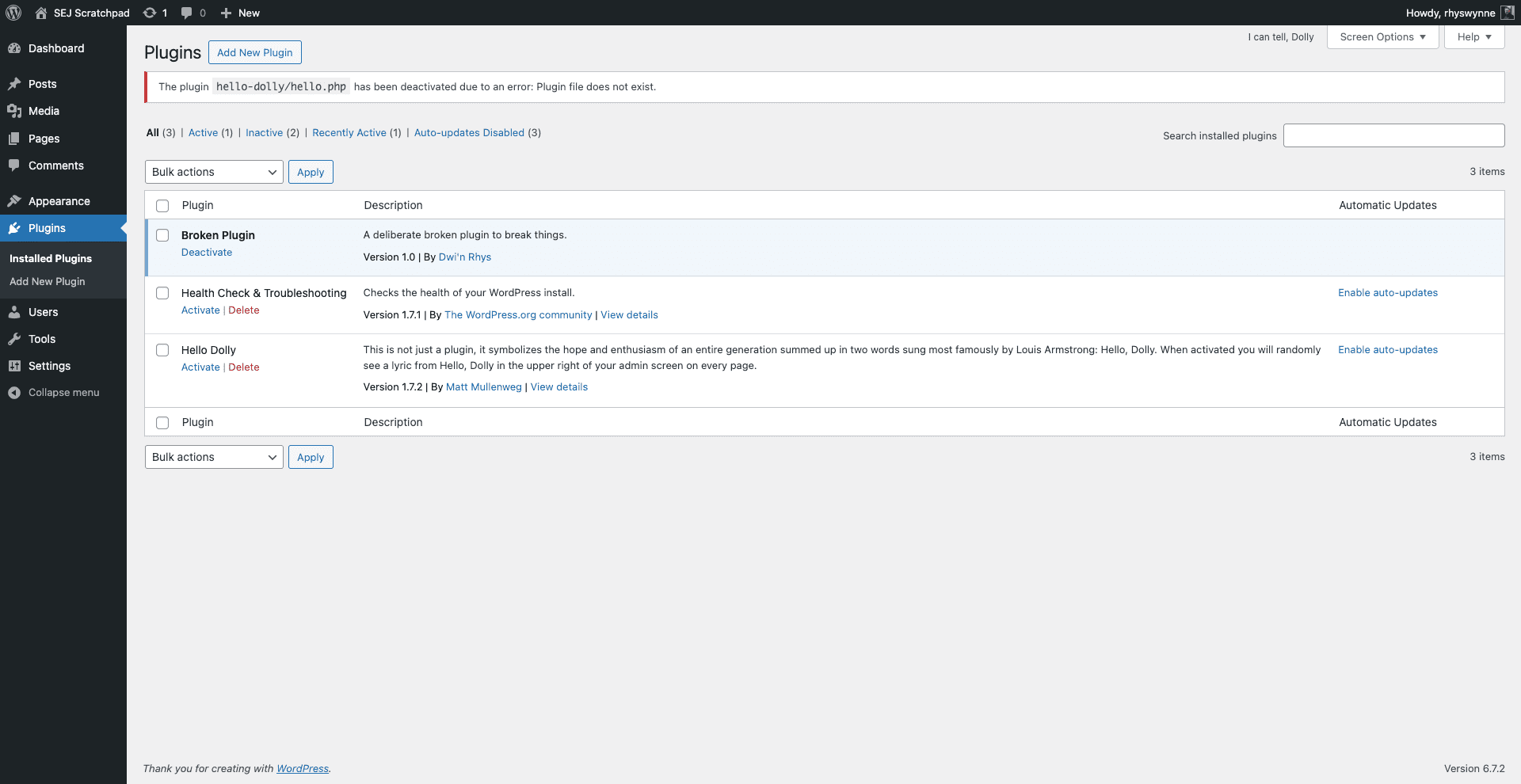
WordPress, in the last few years, has introduced protections in place that means if an error does occur, rather than activate the plugin fully, it’ll backtrack automatically, provide an error, and leave the plugin deactivated.

For the majority of users, this is what they see.

The plugin The plugin “Broken Plugin” is unable to be activated within WordPress as it generates a fatal error. (Image from author, March 2025)

At this point, an investigation should be done in a staging environment with this plugin, but unless it’s a unique plugin, an alternative may need to be found that doesn’t conflict with your setup.

Plugin conflicts tend to occur when you install a Must Use (MU) plugin via a service like FTP, an update to one or more plugins takes place, or you have a custom plugin activated and changes are pushed to the server.

I’ll walk you through my process of resolving plugin conflicts.

Do You Have Access To WordPress?

To begin, the first question you should ask is if you have access to WordPress.

If you do, conventional wisdom dictates that the course of action to take is to deactivate all plugins and switch to a default theme, to try and troubleshoot where the problem occurs.

If you are doing this on a live site, this isn’t ideal, as the site may still have a lot of functionality.

A different approach is to install the Health Check and Troubleshooting plugin. Installing this plugin would allow you to run a version of the site with a default theme, and no plugins installed.

Simply activate each plugin in turn until you identify the one that is causing the issue and then leave that one deactivated.

Make sure the theme is the last thing activated, as custom themes could use functionality in plugins that could bring down the site.

If You Don’t Have Access To WordPress

If you don’t have access to WordPress, then there could be a bit of a process in order to diagnose and fix the problem.

This approach is what I take as best as I can when diagnosing plugin conflicts. It can be done in any order, depending on your knowledge and what you have access to.

Have Access To The Administrative Email? You May Get An Email

If you have access to the administrator email with WordPress (set in Settings > General), you may receive an email.

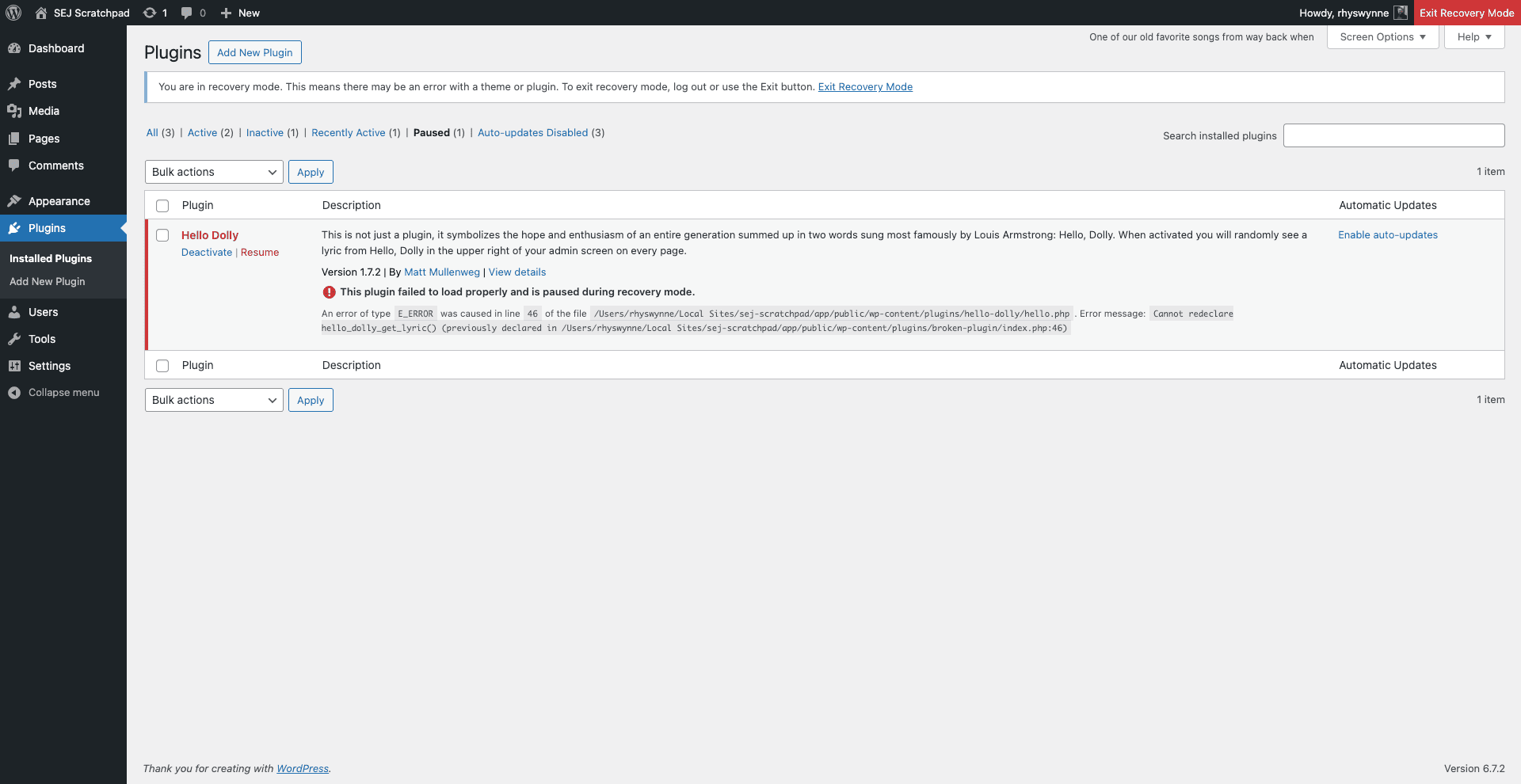
This will allow you to put the site into Recovery Mode. From there, you can log in, and it will identify the plugin that has the issue, and you can deactivate it.

WordPress recovery mode with the plugin conflict highlighting Hello Dolly as where the conflict lies.WordPress recovery mode with the plugin conflict highlighting Hello Dolly, as where the conflict lies. (Image from author, March 2025)

Check The Hosts’ Log File

The first step would be to check the host’s log file.

Depending on the host, it may be easily visible in your host’s dashboard or from within cPanel, but if you only have a file browser, they tend to be put outside of the /public_html/ or /www/ (which are publicly available). Usually, one level up in a file called /logs/ tends to be where it’s located.

Should you find the file (it should have a name like error_log), download it and search for any Fatal Error within the document, maybe towards the bottom.

Within the error message, you should have a couple of file locations that will dictate where the file issues occur.

No Logs? You May Need To Activate Them

If you have FTP/SFTP access to the site but no logs, you may need to activate them.

Within the root directory of WordPress, add the following lines to the wp-config.php file.

define( 'WP_DEBUG', true );
define( 'WP_DEBUG_LOG', true );
define( 'WP_DEBUG_DISPLAY', false );
@ini_set( 'display_errors', 0 );

This will create a file debug.log within the wp-content/ folder. From there, you can see the errors in this file.

Security Tip: The debug.log will be publicly visible, so once you’ve fixed the issue, remove these lines from wp-config.php and delete the debug.log file.

Resolving These Plugin Conflicts

Whichever method you use, your logs should produce lines like this below:-

Fatal error: Cannot redeclare hello_dolly_get_lyric() (previously declared in/wp-content/plugins/broken-plugin/index.php:17) in /wp-content/plugins/hello-dolly/hello.php on line 46

Each element means:

  • “Fatal Error” determines the error. A fatal error in PHP means that the site immediately stops working. You can get other errors or warnings.
  • “Cannot redeclare hello_dolly_get_lyric()” is the fatal error. In this case, there are two PHP functions with the same name (hello_dolly_get_lyric()). This is the basis of the plugin conflict.
  • “/wp-content/plugins/hello-dolly/hello.php on line 46” tells you where this error occurs. While the line number isn’t important (unless you’re coding yourself), it does tell you the plugin where the plugin error occurs – in this case, “hello-dolly”.

The next step is to manually change the plugin.

In your chosen FTP programme or file manager, go to the plugin folder within WordPress – /wp-content/plugins/ in this case – and rename the plugin folder (in this case, change “hello-dolly” to “broken-hello-dolly”). This will deactivate the plugin when you next log into WordPress.

The plugin The plugin “Hello Dolly” has been deactivated due to it not existing. In reality, it’s been renamed so WordPress can’t find it. (Image from author, March 2025)

It’s a good idea not to delete the WordPress plugin if you can prevent it. This will force the deactivation of the plugin in question.

From there, you can investigate the two plugins and identify why the two functions are called twice.

For Developers: Good Practice Can Prevent Plugin Conflicts

If you are a developer building WordPress sites, following good practice can prevent plugin conflicts.

Here are some tips for preventing your plugin or WordPress sites from having plugin conflicts with other plugins out there:

  1. If you are not using PHP Namespaces, then I’d recommend naming your classes or functions with a prefix. Something like plugin_name_function_name can prevent similar functionality from having the same function name. Try to make them unique (so don’t use wp_ as a prefix).
  2. Using function_exists around your functions to prevent your functions from loading if they already exist.
  3. If you are importing functionality, using class_exists can check to see if the class has already been loaded.
  4. Loading your functionality late, so naming your plugin folder with a late alphabet letter is useful. Not every developer follows the same approach as you!
  5. If you are building on one site, make sure your server setup is the same (or as close to being the same) as the live environment.

You’re never going to completely guarantee your plugin or theme doesn’t conflict with the millions of plugins that exist in the WordPress space.

However, by following the above steps, you can minimize conflict as much as possible, and simple changes to your code writing can prevent a world of debugging hell later.

More Resources:


Featured Image: Whiskerz/Shutterstock

PPC Unlocked: Fast Wins For Smarter Ad Strategies via @sejournal, @CallRail

Click fraud in lead generation can drain your marketing budget and corrupt your data, leading to misguided strategic decisions.

While automated detection tools serve as a first line of defense, relying solely on them is not enough.

This guide presents practical, hands-on approaches to identify and combat click fraud in your lead generation campaigns in Google Ads.

Understanding Modern Click Fraud Patterns

Click fraud isn’t just about basic bots anymore. The people running these scams have gotten much smarter, and they’re using tricks that your regular fraud tools might miss.

It’s a big business, and if you think you are not affected, you are wrong.

Here’s what’s really happening to your ad budget: Real people in click farms are getting paid to click on ads all day long.

They use VPNs to hide where they’re really coming from, making them look just like normal customers. And they’re good at it.

The bots have gotten better, too. They now copy exactly how real people use websites: They move the mouse naturally, fill out forms like humans, and even make typing mistakes on purpose.

When these smart bots team up with real people, they become really hard to spot.

The scammers are also messing with your tracking in clever ways. They can trick your website into thinking they’re new visitors every time.

They can make their phones seem like they’re in your target city when they’re actually on the other side of the world.

If you’re counting on basic click fraud protection to catch all this, you’re in trouble. These aren’t the obvious fake clicks from years ago – they’re smart attacks that need smart solutions.

That being said, the good old competitor trying to click 50 times on your ad is also still existent and not going away anytime soon.

Luckily, it is safe to say that Google can spot and detect those obvious fraud clicks in many cases.

Google’s Click Fraud Dilemma: Walking The Revenue Tightrope

Google faces a tricky problem with click fraud.

Every fake click puts money in Google’s pocket right now, but too many fake clicks will drive advertisers away. This creates a conflict of interest.

Google needs to show that it’s fighting click fraud to keep advertisers happy and the ad platform and all of its networks healthy, but it can’t afford to catch every single fake click.

If it did, its ad revenue would drop sharply in the short term because it also runs the risk of blocking valid clicks if it goes in too aggressively.

But if it doesn’t catch enough fraud, advertisers will lose trust and move their budgets elsewhere.

Some advertisers say this explains why Google’s fraud detection isn’t as strict as it could be.

They argue Google has found a sweet spot where it catches just enough fraud to keep advertisers from leaving, but not so much that it seriously hurts its revenue.

This balance gets even harder as fraudsters get better at making fake clicks look real.

This is also why many advertisers don’t fully trust Google’s own click fraud detection and prefer to use third-party tools.

These tools tend to flag more clicks as fraudulent than Google does, suggesting Google might be more conservative in what it considers fraud.

The Over-Blocking Problem Of Third-Party Tools

Third-party click fraud tools have their own business problem: They need to prove they’re worth paying for every month.

This creates pressure to show lots of “blocked fraud” to justify their subscription costs. The result? Many of these tools are too aggressive and often block real customers by mistake.

Other tactics are to show lots of suspicious traffic or activities.

Think about it. If a click fraud tool shows zero fraud for a few weeks, clients might think they don’t need it anymore and cancel.

So, these tools tend to set their detection rules very strict, marking anything slightly suspicious as fraud. This means they might block a real person who:

  • Uses a VPN for privacy.
  • Shares an IP address with others (like in an office).
  • Browses with privacy tools.
  • Has unusual but legitimate clicking patterns.

This over-blocking can actually hurt businesses more than the fraud these tools claim to stop.

It’s like a store security guard who’s so worried about shoplifters that they start turning away honest customers, too.

Why Click Fraud Tools Are Still Valuable

Despite these issues, click fraud tools are still really useful as a first line of defense.

They’re like security cameras for your ad traffic. They might not catch everything perfectly, but they give you a good picture of what’s happening.

Here’s what makes them worth using:

  • They quickly show you patterns in your traffic that humans would take weeks to spot.
  • Even if they’re sometimes wrong about individual clicks, they’re good at finding unusual patterns, like lots of clicks from the same place or at odd hours.
  • They give you data you can use to make your own decisions – you don’t have to block everything they flag as suspicious.

The key is to use these tools as a starting point, not a final answer. Look at their reports, but think about them carefully.

Are the “suspicious” clicks actually hurting your business? Do blocked users fit your customer profile?

Use the tool’s data along with your own knowledge about your customers to make smarter decisions about what’s really fraud and what’s not.

In terms of functionality, most third-party click fraud detection tools are somewhat similar to each other.

A simple Google search on “click fraud tool” shows the market leaders; the only bigger difference is usually pricing and contract duration.

Tackling Click Fraud With Custom Solutions

After getting a first impression with third-party click fraud tools, it’s best to build a collection of custom solutions to tackle your individual scenario.

Every business has a different situation with different software environments, website systems, and monitoring.

For custom solutions, it’s recommended to work closely with your IT department or developer, as many solutions require some modification on your website.

The Basics: Selecting An Identifier

There are a handful of solutions to cover 80% of the basics.

The first way to do something against click fraud is to find a unique identifier to work with.

In most cases, this will be the IP address since you can exclude certain IP addresses from Google Ads, thus making it a good identifier to work with.

Other identifiers like Fingerprints are also possible options. Once an identifier is found, you need to make sure your server logs or internal tracking can monitor users and their identifiers for further analysis.

The Basics: CAPTCHAs

Another basic tool, which is often forgotten, is CAPTCHAs.

CAPTCHAs can detect bots or fraudulent traffic. Google offers a free and simple-to-implement solution with reCAPTCHA.

CAPTCHAs might seem like an easy answer to bot traffic, but they come with serious downsides.

Every time you add a CAPTCHA, you’re basically telling your real users, “Prove you’re human before I trust you.” This creates friction, and friction kills conversions.

Most websites see a drop in form completions after adding CAPTCHAs if they are set too aggressively.

Smart CAPTCHAs can limit the frequency, but not all CAPTCHA providers allow that option, so choose your provider or solution wisely.

The Basics: Honeypot Fields

Honeypot fields are hidden form fields that act as traps for bots.

The trick is simple but effective: Add extra fields to your form that real people can’t see, but bots will try to fill out.

Only bots reading the raw HTML will find these fields; regular users won’t even know they’re there. The key is to make these fields look real to bots.

Use names that bots love to fill in, like “url,” “website,” or “email2.” If any of these hidden fields get filled out, you know it’s probably a bot. Real people won’t see them, so they can’t fill them out.

Pro tip: Don’t just add “honeypot” or “trap” to your field names. Bots are getting smarter and often check for obvious trap names. Instead, use names that look like regular-form fields.

Advanced Validation Methods

Smart Form Validation: Email

Most businesses only check if an email address has an “@” symbol and looks roughly correct.

This basic approach leaves the door wide open for fake leads and spam submissions.

Modern email validation needs to go much deeper. Start by examining the email’s basic structure, but don’t stop there.

Look at the domain itself: Is it real? How long has it existed? Does it have proper mail server records?

These checks can happen in real time while your user fills out the form. It should be noted, however, that smart form validation usually requires some sort of third-party provider to check the details, which means you need to rely on external services.

A common mistake is blocking all free email providers like Gmail or Yahoo. This might seem logical, but it’s a costly error.

Many legitimate business users rely on Gmail for their day-to-day operations, especially small business owners.

Instead of blanket blocks, look for unusual patterns within these email addresses. A Gmail address with a normal name pattern is probably fine; one with a random string of characters should raise red flags.

For enterprise B2B sales, you expect bigger companies to sign up with their company domain email address, so blocking free mail providers might work.

Smart Form Validation: Phone

Phone validation goes far beyond just counting digits. Think about the logic of location first.

When someone enters a phone number with a New York area code but lists their address in California, that’s worth investigating.

But be careful with this approach – people move, they travel, and they keep their old numbers. The key is to use these mismatches as flags for further verification, not as automatic rejections.

The Art Of Smart Data Formatting

Data formatting isn’t just about making your database look neat. It’s about catching mistakes and fraud while making the form easy to complete for legitimate users.

Name fields are a perfect example.

While you want to catch obviously fake names like “asdfgh” or repeated characters, remember that real names come in an incredible variety of formats and styles.

Some cultures use single names, others have very long names, and some include characters that might look unusual to your system.

Modify Your Google Ads Campaign Settings To Tackle Click Fraud

Google offers multiple campaign options to increase reach, on the downside most of those options come along with an increase of click fraud activities.

App Placements

Performance Max campaigns can place your ads across Google’s entire network, including in apps. While this broad reach can be powerful, it also opens the door to potential fraud.

The challenge is that you have limited control over where your ads appear, and some of these automatic placements can lead to wasted ad spend.

Kids’ games are often a major source of accidental and fraudulent clicks. These apps frequently have buttons placed near ad spaces, and children playing games can accidentally tap ads while trying to play.

What looks like engagement in your analytics is actually just frustrated kids trying to hit the “play” button.

Another issue comes from apps that use deceptive design to generate clicks. They might place clickable elements right where ads appear, or design their interface so users naturally tap where ads are located.

This isn’t always intentional fraud. Sometimes, it’s just poor app design, but it costs you money either way.

Unlike traditional campaigns, where you can easily exclude specific placements, Performance Max’s automation makes this more challenging.

The system optimizes for conversions, but it might not recognize that clicks from certain apps never lead to quality leads. By the time you spot the pattern, you’ve already spent money on these low-quality clicks.

Excluding app placements is for almost all advertisers a must have. Very few advertisers benefit from app placements at all.

Partner And Display Network

Lead generation businesses face a unique challenge with Performance Max campaigns that ecommerce stores can largely avoid.

While ecommerce businesses can simply run Shopping-only campaigns and tap into high-intent product searches, lead gen businesses are stuck dealing with the full Performance Max package, including the often problematic Display Network.

The Display Network opens up your ads to a mass of websites, many of which might not be the quality placements you’d want for your business.

While Google tries to filter out bad actors, the display network still includes sites that exist primarily to generate ad clicks.

These sites might look legitimate at first glance, but they’re designed to encourage accidental clicks or attract bot traffic.

Some are specifically designed for server bot farms, as they run on expired domains and have no content besides ads.

Lead generation businesses don’t have this luxury. Their Performance Max campaigns typically run on all networks except shopping. This creates several problems:

  • The quality of clicks varies wildly. Someone might click your medical practice ad while trying to close a pop-up on a gaming site. They’ll never become a patient, but you still pay for that click.
  • Display placements can appear on sites that don’t match your brand’s professional image. Imagine a law firm’s ad showing up on a site full of questionable content – not ideal for building trust with potential clients.
  • Bot traffic and click farms often target display ads because they’re easier to interact with than shopping ads. You might see high click-through rates that look great until you realize none of these clicks are turning into leads.

All those are reasons to question PMax campaigns for lead gen, but that’s a decision every marketer has to make.

Advanced Google Ads Settings To Tackle Click Fraud

If the basics are implemented but there is still a higher amount of suspected click fraud, advanced solutions need to be implemented.

Besides excluding suspicious IP addresses, you can also build negative audiences.

The idea is to have a second success page for your lead generation form and only forward potential bots or fake sign-ups to this page.

To achieve that, your website needs to evaluate potential bots live during the sign-up process.

You can then setup a dedicated “bot pixel” on the second success page in order to send data of this audience to Google.

Once enough data is retrieved, you can exclude this audience from your campaigns. This approach is a little trickier to implement but is worth the effort as those audience signals are of high quality if enough data is supplied.

Make sure to only fire the “bot pixel” on the special success page and only there, otherwise you run the risk of mixing your audiences which would render the system useless.

Filtering Fake Leads With Conditional Triggers

Another tracking-based strategy is to set up condition-based conversion tracking. Combined with hidden form fields, you can modify the conversion trigger not to send data if the hidden field was filled.

In that scenario, you would filter out bots from conversion tracking, sending back only real conversion to your campaign, and therefore, also training the Google algorithm and bidding strategy only on real data.

You eliminate a majority of fake leads and traffic with this setup.

Making Sign-Ups More Challenging To Improve Lead Quality

Another advanced strategy is to make the sign-up process a lot harder.

Tests have shown that much longer forms are not finished by bots because they are usually trained on simpler and shorter forms, which require only mail, name, phone, and address.

Asking specific questions and working with dropdowns can dramatically increase the lead quality. It should be noted, however, that longer forms can also hurt the valid signup rate, which is a risk you want to take if you have to deal with bot and fraud traffic.

A fitting case was a car dealer I worked with. They had a form where people could offer their cars for sale and retrieve a price estimate.

A short form had almost three times the signup rate than before, but it turned out later that a lot of them were spam signups or even very low-qualified leads.

A shorter form leads to more spam because it’s easy to sign up. After switching to a longer form, the signups dropped, but quality increased drastically.

Almost 20 fields long, and potential clients had to upload pictures of their car.

It took a few minutes to finish the signup, but those who did were committed to doing business and open to discussing the sale, which also made it easier for the salespeople to follow up properly.

A Hard Truth About Lead Fraud

Let’s be honest: You can’t completely stop lead fraud. It’s like shoplifting in retail – you can reduce it, you can catch it faster, but you can’t eliminate it entirely.

The fraudsters are always getting smarter, and for every security measure we create, they’ll eventually find a way around it.

But here’s the good news: You don’t need perfect protection. What you need is a balanced approach that catches most of the bad leads while letting good ones through easily.

Think of it like running a store: You want security, but not so much that it scares away real customers.

The key is to layer your defenses. Use click fraud tools as your first line of defense, add smart form validation as your second, and keep a human eye on patterns as your final check.

Will some fake leads still get through? Yes. But if you can stop 90% of the fraud, you’re winning the battle.

Remember: Perfect is the enemy of good. Focus on making fraud expensive and difficult for the bad actors, while keeping your lead generation process smooth and simple for real prospects. That’s how you win in the long run.

More Resources:


Featured Image: BestForBest/Shutterstock

How AI Is Changing The Way We Measure Success In Digital Advertising via @sejournal, @LisaRocksSEM

Success in PPC has historically been measured using performance indicators like click-through rates (CTR), cost per acquisition (CPA), and return on ad spend (ROAS).

However, with the rise of AI, new technologies are having an impact on how we approach and measure performance and success, causing a major change in customer behavior.

From Click-Based Metrics To Predictive Performance Modeling

PPC has relied heavily on click-based metrics, it’s even in the name “pay-per-click.” This has always provided immediate but narrow insights.

AI changes this by integrating predictive performance modeling: Machine learning algorithms analyze historical data to predict which campaigns will drive conversions.

Predictive modeling in AI-powered marketing is revolutionizing how advertisers allocate their precious resources by identifying high-converting audience segments before campaigns even launch.

Instead of reacting to past performance, AI-driven predictive analytics helps businesses forecast:

  • Future customer behaviors based on past interactions.
  • The likelihood of conversion for different audience segments.
  • The optimal bid adjustments for different times of day or geographies.

This allows a more in-depth and detailed budget allocation and performance optimizations beyond simple impressions or clicks.

Quality Score 2.0 – AI-Driven Relevance Metrics

Google’s long-standing Quality Score is based on expected CTR, ad relevance, and landing page experience.

With the current tech advancements, it no longer provides a complete picture of user intent or engagement. AI provides a more advanced approach that some in the industry refer to as “Quality Score 2.0.”

AI-powered relevance metrics now analyze:

  • Deeper contextual signals beyond keywords, including sentiment analysis and user intent.
  • Engagement and behavior patterns to determine the likelihood of conversions.
  • Automated creative testing and adaptive learning to refine ad messaging in real-time.

Google’s AI-driven Performance Max campaigns now use advanced machine learning techniques to optimize ad relevance, suggesting that the traditional Quality Score may soon be obsolete.

Automated Bidding & AI-Driven KPIs

Automated “smart” bidding has changed the way advertisers manage campaign performance.

Manual bid strategies have always required constant monitoring, now AI dynamically adjusts bids based on real-time data signals such as:

  • User device, location, and browsing behavior.
  • Time-of-day performance variations.
  • Probability of conversion based on previous engagement.

Automated bidding strategies like Maximize Conversion Value and Target ROAS are outperforming manual CPC approaches, increasing account efficiencies.

AI-driven key performance indicators (KPIs) are helping advertisers shift to goal-based strategies tied directly to revenue.

Campaigns hitting the revenue goals can be easily scaled, which is a big step in maximizing PPC investments.

The Rise Of New AI-Generated PPC Metrics

Beyond improving existing measurement models, AI is introducing entirely new ways to assess digital ad performance.

These AI-driven PPC metrics offer more holistic insights into customer engagement and lifetime value.

AI Attribution Modeling

Attribution has always been a challenge in PPC.

Traditional models like last-click and linear attribution often miss the full picture by giving all the credit to a single touchpoint, making it hard to understand how different interactions actually contribute to conversions.

AI-powered attribution models solve this by using machine learning to distribute credit across multiple interactions, including clicks, video views, offline actions, and cross-device conversions.

This approach captures the complete customer journey rather than just focusing on the last click interaction.

AI attribution models typically include:

  • Data-Driven Attribution: Measures the true impact of each interaction, whether it’s a click, view, or engagement.
  • Dynamic Adaptation: Continuously adjusts as new data comes in to keep the model accurate and up-to-date.
  • Cross-Channel Integration: Combines online and offline data to reduce gaps and blind spots in tracking.

AI Attribution Modeling is a measurement tool and provides a comprehensive view of how interactions contribute to long-term value.

It is also a strategic approach that connects both Engagement Value Score (EVS) and Customer Lifetime Value (CLV).

EVS measures the depth and quality of interactions rather than just clicks, while CLV focuses on the long-term worth of a customer.

By combining AI attribution with EVS and CLV, marketers gain a deeper understanding of the customer journey and can optimize campaigns for both meaningful engagement and sustainable growth rather than just short-term conversions.

Let’s dive into these two more specific metrics.

Engagement Value Score (EVS)

A growing alternative to CTR, the EVS measures how meaningful an interaction is rather than just if a click occurred.

Unlike CTR, which assumes all clicks are valuable, EVS pinpoints users who genuinely engage with your content.

To measure EVS, combine different engagement signals into one score. Start with your key engagement actions, like:

  • Time Spent on Site: How long users stay on your pages.
  • Multi-Touch Interactions: Video views, chatbot conversations, or content consumption.
  • Behavioral Indicators of Intent: Scroll depth or repeat visits.

After assigning points to each action, create a custom metric in Google Analytics 4 that calculates the total EVS score from these individual actions and integrates into the Google Ads account.

Implementation Steps:

  1. Create Events: Set up custom engagement events with conditions that match high EVS behaviors.
  2. Mark as Key Events: After creating these custom events, mark them as ket events in GA4.
  3. Import to Google Ads: Once the custom conversion is set up in GA4, import it into Google Ads.
  4. Align Bidding Strategies: Use automated bidding strategies that optimize for conversions rather than just clicks.

By using this EVS methodology, Google Ads can optimize campaigns not just for clicks, but for meaningful interactions that drive high value.

Customer Lifetime Value (CLV)

Rather than optimizing for one-time conversions, Customer Lifetime Value (CLV) focuses on the long-term value of a customer.

AI-driven CLV measurement looks beyond quick wins and digs into the total worth of a customer over their entire relationship with your brand.

It’s similar to using EVS in that is focuses on meaningful interactions rather than quick clicks.

To measure CLV accurately, AI models analyze key data points like:

  • Past Purchase Behavior: Predicts future spend based on historical transactions.
  • Churn Risk and Retention Probability: Identifies how likely a customer is to leave or stay.
  • Cross-Channel Interactions: Tracks engagement across social media, email, and customer support.

Just like EVS, CLV requires combining multiple signals into one clear metric. After gathering these data points, create a custom metric in GA4 that calculates the total CLV from individual interactions.

Implementation Steps:

  1. Create Events: Set up custom engagement events for key behaviors (like repeat purchases or social interactions).
  2. Mark as Key Events: Once created, mark these events as key events in GA4.
  3. Import to Google Ads: Bring the custom conversion data into Google Ads to guide bidding strategies.
  4. Optimize with AI: Use automated bidding and predictive analytics to prioritize high-CLV customers.

AI-powered CLV analysis is gaining traction as businesses move toward sustainable, long-term growth strategies rather than chasing short-term conversions.

Take a scientific deep dive into this topic, including risk-adjusted CLV, here.

Challenges And Considerations

While AI-driven measurement is transforming PPC advertising, it is not without its challenges. Decision-makers need to consider the following:

Data Privacy & Compliance

AI’s ability to collect and analyze large amounts of user data raises concerns about privacy and compliance.

General Data Protection Regulation (GDPR) and California Consumer Privacy Act (CCPA) are data privacy laws that regulate how businesses collect, store, and use personal information from consumers.

With these regulations, advertisers must balance data-driven insights with ethical and legal responsibilities. AI-powered models should prioritize anonymized data and ensure transparency in data usage.

AI Accuracy

Machine learning models rely on historical data, which can sometimes lead to inaccuracies.

If an AI model is trained on outdated or incomplete data, it can result in poor decision-making. Human oversight is needed to reduce these risks.

Algorithmic Bias

AI models can sometimes reflect biases present in the data they are trained on.

If left unchecked, this can lead to skewed campaign recommendations that favor certain demographics over others. Businesses must check that AI tools are built with fairness and inclusivity in mind.

Interpreting AI-Generated Insights

AI provides highly complex data outputs, which can be difficult for marketing teams to interpret.

Businesses should invest in AI literacy training for decision-makers and teams to ensure that insights are actionable and interpreted correctly.

Key Takeaways

AI is fundamentally changing how we measure success in PPC and digital advertising.

From predictive performance modeling to AI-driven attribution, CLV, and EVS, these advanced metrics are helping marketers move beyond basic clicks and short-term conversions.

Instead, they focus on deeper insights that drive sustainable growth and long-term value.

However, leveraging AI responsibly requires navigating challenges like data privacy, accuracy, algorithmic bias, and the complexity of interpreting insights.

Marketers must prioritize transparency, fairness, and continuous learning to make the most of these powerful tools.

The future of digital advertising lies in bringing together data insights and thoughtful strategy and sustaining that success over time.

More Resources:


Featured Image: metamorworks/Shutterstock

AI Overviews: We Reverse-Engineered Them So You Don’t Have To [+ What You Need To Do Next]

This post was sponsored by DAC. The opinions expressed in this article are the sponsor’s own. Authors: Dan Lauer & Michael Goodman

Is the classic funnel model (TOFU-MOFU-BOFU) still relevant in an AI-driven SERP?

What kinds of queries trigger Google’s AI Overviews?

How can you structure content so that AI pulls your site into the response?

Do you really need to change your SEO strategy?

For years, SEO teams followed a familiar SEO playbook:

  1. Optimize upper-funnel content to capture awareness,
  2. mid-funnel content to drive consideration,
  3. lower-funnel content to convert.

One page, one keyword, one intent.

But with the rise of ChatGPT, Perplexity, Copilot, Gemini, and now Google’s AI Mode, that linear model is increasingly outdated.

So, how do you move forward and keep your visibility high in modern search engine results pages (SERPs)?

We’ve reverse-engineered AI Overviews, so you don’t have to. Let’s dive in.

What We’ve Discovered Through Reverse Engineering Google’s AI Overviews (AIO)

From what we’re seeing across client industries and in how AI-driven results behave, the traditional funnel model – the idea of users moving cleanly from awareness to consideration to conversion – feels increasingly out of step with how people actually search.

How Today’s Search Users Actually Search

Today’s users jump between channels, devices, and questions.

They skim, abandon, revisit, and decide faster than ever.

AI Overviews don’t follow a tidy funnel because most people don’t either.

They surface multiple types of information at once, not because it’s smarter SEO, but because it’s closer to how real decisions get made.

AIOs & AI Mode Aren’t Just Answering Queries – They’re Expanding Them

Traditionally, SEO strategy followed a structured framework. Take a travel-related topic, for example:

  • Informational (Upper-Funnel) – “How to plan a cruise?”
  • Commercial (Mid-Funnel) – “Best cruise lines for families”
  • Transactional (lower-Funnel) – “Find Best Alaska Cruise Deals”

However, AI Overviews don’t stick to that structure.

Instead, they blend multiple layers of intent into a single, comprehensive response.

How AI Overviews Answer & Expand Search Queries

Let’s stay with the travel theme. A search for “Mediterranean cruise” might return an AI Overview that includes:

  • Best Time to go (Informational).
  • Booking Your Cruise (Commercial).
  • Cruise Lines (Navigational).

AI Mode Example for ‘Mediterranean Cruise’

What’s Happening Here?

In this case, Google isn’t just answering the query.

It anticipates what the user will want to know next, acting more like a digital concierge than a traditional search engine.

The AI Overview Test & Parameters

  • Source: Semrush & Google
  • Tested Data: 200 cruise-related informational queries

We started noticing this behavior showing up more often, so we wanted to see how common it actually is.

To get a clearer picture, we pulled 200 cruise-related informational queries from SEMrush and ran them through our custom-built AI SERP scraper. The goal was to see how often these queries triggered AI Overviews, and what kind of intent those Overviews covered.

The patterns were hard to miss:

  • 88% of those queries triggered an AI Overview
  • More than half didn’t just answer the initial question.
  • 52% mixed in other layers of intent, like brand suggestions, booking options, or comparisons, right alongside the basic information someone might’ve been looking for.

Using a different query related to Mediterranean Cruises, the AIO response acts as a travel agent, guiding the user on topics like:

  • How to fly,
  • Destinations with region,
  • Cruise prices,
  • Cruise lines that sail to that destination.

While it’s an Information non-brand search query,  the AIO response is lower-funnel as well.

Again, less than half of the queries were matched intent.

Here are some examples of queries that were identified as Informational and provided only the top-of-funnel response without driving the user further down the funnel.

The Verdict

Even when someone asks a simple, top-of-funnel question, AI is already steering them toward what to do next, whether that’s comparing prices, picking a provider, or booking a trip.

What Does This Mean for SEO Strategies Moving Forward?

If AI Overviews and AI Mode are blending intent types, content, and SEO strategies need to catch up:

  1. It’s no longer enough to rank for high-volume informational keywords. If your content doesn’t address multiple layers of intent, AI will fill the gaps with someone else’s content.
  2. SEO teams need to analyze how AI handles their most important queries. What related questions is it pulling in? Are those answers coming from your site or your competitors?
  3. Think beyond keyword volume. Long-tail queries may have lower search traffic, but they often align better with AI-cited content. Structure your pages with clear headings, bullets, and concise, helpful language—that’s what AI models prefer to surface.

The Future of SEO in an AI World: Hybrid Intent Optimization

The fundamentals of technical and on-page SEO still matter. But if your content is still built around single keywords and single intent types, you’re likely to lose visibility as AI continues to reshape the SERP.

The brands that adapt to this shift by creating content that mirrors the blended, fast-moving behavior of actual users are the ones that will continue to own key moments across the funnel, even as the funnel itself evolves.

As AI transforms search behavior, its crucial to adapt your SEO strategies accordingly. At DAC, we specialize in aligning your content with the latest search trends to enhance visibility and engagement. Reach out to us today to future-proof your strategy with our award-winning TotalSERP approach and stay ahead in the evolving digital landscape.

https://www.dacgroup.com/” class=”btn-learn-more button-green medium-size”>Optimize Your SEO For AI Search, Now

Image Credits

Featured Image: Image by DAC. Used with permission.

In-Post Image: Images by DAC. Used with permission.