OpenAI released its advanced voice mode to more people. Here’s how to get it.

OpenAI is broadening access to Advanced Voice Mode, a feature of ChatGPT that allows you to speak more naturally with the AI model. It allows you to interrupt its responses midsentence, and it can sense and interpret your emotions from your tone of voice and adjust its responses accordingly. 

These features were teased back in May when OpenAI unveiled GPT-4o, but they were not released until July—and then just to an invite-only group. (At least initially, there seem to have been some safety issues with the model; OpenAI gave several Wired reporters access to the voice mode back in May, but the magazine reported that the company “pulled it the next morning, citing safety concerns.”) Users who’ve been able to try it have largely described the model as an impressively fast, dynamic, and realistic voice assistant—which has made its limited availability particularly frustrating to some other OpenAI users. 

Today is the first time OpenAI has promised to bring the new voice mode to a wide range of users. Here’s what you need to know.

What can it do? 

Though ChatGPT currently offers a standard voice mode to paid users, its interactions can be clunky. In the mobile app, for example, you can’t interrupt the model’s often long-winded responses with your voice, only with a tap on the screen. The new version fixes that, and also promises to modify its responses on the basis of the emotion it’s sensing from your voice. As with other versions of ChatGPT, users can personalize the voice mode by asking the model to remember facts about themselves. The new mode also has improved its pronunciation of words in non-English languages.

AI investor Allie Miller posted a demo of the tool in August, which highlighted a lot of the same strengths of OpenAI’s own release videos: The model is fast and adept at changing its accent, tone, and content to match your needs.

The update also adds new voices. Shortly after the launch of GPT-4o, OpenAI was criticized for the similarity between the female voice in its demo videos, named Sky, and that of Scarlett Johansson, who played an AI love interest in the movie Her. OpenAI then removed the voice. Now it has launched five new voices, named Arbor, Maple, Sol, Spruce, and Vale, which will be available in both the standard and advanced voice modes. MIT Technology Review has not heard them yet, but OpenAI says they were made using professional voice actors from around the world. “We interviewed dozens of actors to find those with the qualities of voices we feel people will enjoy talking to for hours—warm, approachable, inquisitive, with some rich texture and tone,” a company spokesperson says. 

Who can access it and when?

For now, OpenAI is rolling out access to Advanced Voice Mode to Plus users, who pay $20 per month for a premium version, and Team users, who pay $30 per month and have higher message limits. The next group to receive access will be those in the Enterprise and Edu tiers. The exact timing, though, is vague; an OpenAI spokesperson says the company will “gradually roll out access to all Plus and Team users and will roll out to Enterprise and Edu tiers starting next week.” The company hasn’t committed to a firm deadline for when all users in these categories will have access. A message in the ChatGPT app indicates that all Plus users will have access by “the end of fall.”

There are geographic limitations. The new feature is not yet available in the EU, the UK, Switzerland, Iceland, Norway, or Liechtenstein.

There is no immediate plan to release Advanced Voice Mode to free users. (The standard mode remains available to all paid users.)

What steps have been taken to make sure it’s safe?

As the company noted upon the initial release in July and again emphasized this week, Advanced Voice Mode has been safety-tested by external experts “who collectively speak a total of 45 different languages, and represent 29 different geographies.” The GPT-4o system card details how the underlying model handles issues like generating violent or erotic speech, imitating voices without their consent, or generating copyrighted content. 

Still, OpenAI’s models are not open-source. Compared with such models, which are more transparent about their training data and the “model weights” that govern how the AI produces responses, OpenAI’s closed-source models are harder for independent researchers to evaluate from the perspective of safety, bias, and harm.


Ask an Expert: Does Google Index AI Content?

“Ask an Expert” is an occasional feature where we pose questions to seasoned ecommerce practitioners. For this installment, we’ve turned to Ann Smarty, the founder of Smarty Marketing, a search engine optimization firm, and a longtime Practical Ecommerce contributor.

She addresses Google’s policy on content produced by artificial intelligence tools.

Practical Ecommerce: Does Google index and rank AI-generated content?

Ann Smarty: Google published “guidance about AI-generated content” in its Search Central blog in February 2023. The guidelines are vague but worth reading nonetheless.

Ann Smarty

Ann Smarty

To summarize:

    • Google allows “helpful and original” AI-generated content. The post doesn’t offer examples of such content, but it presumably means using AI to repurpose, clarify, or shorten your original article.
    • Google does not allow the use of AI to mass-produce content intended solely to rank for multiple queries. This is against Google’s spam policies.

Google states in the post that it has dealt with automated content for years, such that the AI issue is not new. Google says it can detect content created with automation or AI, and its focus remains on E-E-A-T: expertise, experience, authoritativeness, and trustworthiness.

Per Google, “Our focus on the quality of content, rather than how content is produced, is a useful guide that has helped us deliver reliable, high-quality results to users for years.”

Google Removes Cache: Search Operator Documentation via @sejournal, @martinibuster

Google removed their documentation for the cache: search operator because it no longer works. The Internet Archive’s Wayback Machine shows the documentation was live as of September 17, 2024. The URL now redirects to a changelog notice announcing its removal.

It was announced on March 2024 by Google SearchLiaison via X (formerly Twitter) that the cache: search operator was removed.

He posted about the removal of the cache: search operator:

“Hey, catching up. Yes, it’s been removed. I know, it’s sad. I’m sad too. It’s one of our oldest features. But it was meant for helping people access pages when way back, you often couldn’t depend on a page loading. These days, things have greatly improved. So, it was decided to retire it.

Personally, I hope that maybe we’ll add links to @internetarchive from where we had the cache link before, within About This Result. It’s such an amazing resource. For the information literacy goal of About The Result, I think it would also be a nice fit — allowing people to easily see how a page changed over time. No promises. We have to talk to them, see how it all might go — involves people well beyond me. But I think it would be nice all around.”

Adding links to Internet Archive is exactly what’s happened, it was announced on September 11, 2024 that links to Internet Archive are added to Google search.

A Google spokesperson was quoted at the time:

“We know that many people, including those in the research community, value being able to see previous versions of webpages when available. That’s why we’ve added links to the Internet Archive’s Wayback Machine to our ‘About this page’ feature.”

Google’s documentation changelog noted:

“Removing the cache: search operator documentation
What: Removed the cache: search operator documentation.

Why: The cache: search operator no longer works in Google Search.”

The disappearance of the documentation is a reminder that Google Search is continually changing which means that anyone involved with publishing and search should keep that expectation in mind, particularly for SEO.

Featured Image by Shutterstock/stockfour

SEO Content Strategy: Discovering What Your Audience Wants via @sejournal, @CallRail

In the rapidly evolving world of SEO, staying ahead of the curve is critical.

Traditional SEO focuses on optimizing for keywords and topics directly related to your business.

However, as markets become increasingly saturated, new strategies are needed to stand out and reach a broader audience. That’s where tangential SEO comes in.

Tangential SEO involves creating and optimizing content for topics that are tangentially related to your core business. This allows you to engage with audiences who may not be actively looking for your products or services but who could still find them relevant or useful.

It is a strategy designed to build brand visibility, establish authority, attract a wider audience, and ultimately drive more traffic to your site.

Whether you’re a content marketer seeking to diversify your strategy, a business owner aiming to extend your online reach, or a newcomer to the field eager to learn, this guide is for you.

Not only will I explain what tangential content is at a broader level, but I’ll also show you how we find alternative keywords using untraditional methods.

You’ll have a methodology for finding keywords none of your competitors have even thought about.

Excited?

Let’s begin.

What Is “Tangential Content”?

Quite simply, tangential content is content that is not directly related to your product or service offering.

For example, instead of only focusing on sportswear, Nike might generate content around topics like music playlists for different moods or workout routines, exploring various global music trends.

It could even discuss urban design and its impact on outdoor physical activities. These are topics not directly related to Nike’s products but themes that would likely resonate with its audience.

Let’s give some more examples for context:

  • Starbucks: Beyond coffee, Starbucks could create content discussing books and literature, considering that many people enjoy reading while sipping its coffee. The brand could start a book club, share reviews, and host author interviews.
  • Apple: Apple might deviate from its technology-centered content to explore topics like interior design, highlighting aesthetic and minimalistic arrangements that complement its devices or discussing how different spaces foster productivity and creativity.
  • IKEA: While primarily focused on furniture, IKEA could develop content around topics like urban gardening, offering tips for creating green spaces in small city apartments, or sharing recipes to create using limited kitchen tools.

Why Create Tangential Content?

Creating tangential content can have numerous benefits, particularly when it comes to reaching a wider audience, building brand authority, and improving SEO performance.

As a food lover, I wanted to try and squeeze a food analogy in, so I’m going to do it here. Let’s consider the benefits of creating tangential content as a master chef in the culinary world.

  • Broader audience reach: Just like a versatile chef caters to various palates, tangential content allows your brand to cater to a wider audience – which is especially important for weirder or more abstract niches.
  • Increased engagement: Changing up the menu keeps diners interested, just like a variety of content can keep your audience engaged. By showing that your brand can whip up more than just the standard fare, you’re demonstrating a deeper understanding of your audience’s diverse tastes.
  • Building brand authority: When you create a variety of dishes, you prove your culinary skills beyond your signature dish. Similarly, creating content on a range of topics positions your brand as an authority in your field, enhancing your reputation and influence.
  • Creating more emotional content and aligning with customer lifestyle: Tangential content is akin to designing a themed dining experience that aligns with your customer’s lifestyles and preferences. For instance, if you know your customers are environmentally conscious, you might focus on farm-to-table ingredients or share stories of local farmers. This not only provides content that resonates emotionally but also aligns your brand more closely with your customer’s values and lifestyles.
  • Link building: Just as a unique fusion dish might get rave reviews and recommendations, tangential content often has a higher potential to be shared, earning you backlinks from various domains. These backlinks boost your site’s authority, much like word-of-mouth boosts a restaurant’s reputation.
  • SEO performance: By offering a variety of dishes, you’re catering to more tastes and attracting more diners. Similarly, by covering a range of topics, you’re likely to rank for more keywords, attracting more organic traffic to your website.

While the benefits of publishing tangential content are clear, don’t overlook the value in the research process itself.

The analogy continues like so: consider researching tangential content ideas similar to the time a chef spends experimenting in the kitchen and interacting with their customers.

It’s during this phase that the chef discovers which dishes their customers can’t get enough of, which ones they’re not too fond of, and what cuisine they’re yearning to try next.

In the same way, when you research diverse topics for your tangential content, you’re not only gathering material for your next post – you’re also gaining a broader understanding of your customers’ unmet needs or interests.

This insight is just as valuable, if not more so, as it can guide the development of new products, services, or post-purchase support articles.

So, even before you’ve served up your tangential content to your audience, the research phase itself can help you refine your ‘menu,’ making your brand more attuned to your customers’ tastes and more valuable in their eyes.

Hopefully, the hokey simile made sense, hasn’t made you hungry, and you’re sold on the concept of tangential content.

I’ll now show you how we generate tangential content ideas.

How To Generate Tangential Content Ideas?

To walk through the following process, I’m going to use an example as if I was doing this research for a fictional hair removal company.

Step 1: Establish Buyer Personas

Buyer personas are essentially fictional representations of your ideal customers, often based on real data and market research about your existing customers. They help us understand our customers (and potential customers) better and make it easier for us to “get into their minds.”

These personas can include information such as demographics, behavior patterns, motivations, goals, challenges, values, and fears.

Sometimes your marketing department will already have one of these, but if they don’t, you could ask our new friend, ChatGPT, to produce one.

Step 2: Create A Mind Map

A mind map typically starts with a central idea, placed in the middle of your page. From this central idea, you’ll draw lines that branch out into main topics.

It’s like a tree sprouting branches.

These main branches can further sprout smaller branches, each representing related subtopics or ideas.

In our scenario, we’ll plant the name of the buyer persona as the seed of our mind map. From there, we’ll let branches grow out, each representing key values, aspirations, preferences, and hobbies that we’ve identified for this persona.

Remember, this isn’t the stage for keyword research; there’s no need to think about keyword volume data. This is more about emptying out your mind and exploring potential questions this persona might have.

This process is about trying to see the world through their eyes.

If you find that you’re not the best match for this persona – for example, if the persona is a 28-year-old woman and you’re not a 28-year-old woman (as I am not) – then it could be beneficial to bring in someone who aligns more closely with the persona.

This way, you can ensure you’re covering all bases and not missing any important insights.

In any case, here’s one I started doing for a persona I called “Sarah Thompson.”

Sarah Mind map Keyword insights

Also, it’s wise to create several mind maps to cater to different segments of your target audience.

For instance, when I analyzed a renowned hair removal company’s website data using Similarweb, I discovered a substantial interest from males in hair removal.

As a bald male, I had to confront my own biases that initially made me overlook a significant demographic. To make the most of this exercise, it’s crucial that you don’t let your personal biases cloud your judgment.

In light of my realization, I did create a mind map for the male audience, following the same steps. However, to avoid repetition, I won’t detail that process again.

Always remember: diversity in perspectives can enrich your content strategy!

Step 3: Find The Data To Support Ideas

This is where the fun begins! I simply take all the questions I’ve brainstormed in my mind map and pop them into Google to see what surfaces.

If you take a look at the screenshot below, you’ll see that my initial search query doesn’t have any search volume (highlighted in the red box).

Despite this, Google still fetches a bunch of relevant results. Interestingly, each of these results does rank for a certain number of keywords, as indicated by the green boxes.

So, even without search volume for the initial query, there’s still relevant content out there capturing people’s interest.

Screenshot for search on Google for wax strips queryScreenshot for search for [are wax strips vegan], Google, May 2023

You’re going to want to gather all these keywords. Honestly, this is where I find the Ahrefs toolbar to be a gem.

It allows me to click on each search result and conveniently export the keywords associated with each one. This makes the whole process much more streamlined and efficient.

Of course, you don’t need Ahrefs for this; there are other great tools to get the keywords for each URL. I just find the toolbar incredibly useful here.

Step 4: Rinse And Repeat With Each Of Your Content Ideas

You’ll want to enter each of your ideas into Google and get all the keywords for the articles that rank – even if your original query had no search volume.

keyword insights question image

Step 5: Find Additional Keywords None Of Your Competitors Will Have

At this point, you should have a list of keywords that are tangentially related to your target brand.

These keywords correspond to the questions and pain points of your buyer persona, providing a strong foundation for content that’s relevant and engaging for your target audience.

But because you’ve downloaded these keywords from an SEO tools database, your competitors have them, too.

They may not be your direct competitors, but someone has them (otherwise, we wouldn’t have been able to get them from the SEO tool).

So how do we get the keywords no one has? We need to seek additional sources of inspiration.

I generally turn to forums or late UGC sites. Why? Dynamic forums like Reddit and Quora have a huge user base, all of whom are asking questions that many of them can’t find the answers to elsewhere online.

On forums like Reddit, we can zero in on specific topics and subreddits to surface popular questions that get a lot of engagement.

Reddit home pageScreenshot from Reddit, May 2023

Keep in mind that many individuals resort to forums to seek answers to questions that the internet doesn’t readily provide.

On user-generated content (UGC) sites, the same question can be phrased in countless ways, which means conventional keyword tools might not capture this diversity.

Now, if you find a slew of keywords phrased differently but asking the same question, all registering as “zero volume” yet showing substantial engagement (in the form of likes, upvotes, shares, etc.), can we truly label them as zero volume?

I’d argue most certainly not. There’s clearly an active interest and engagement there, and that’s what truly matters.

Back to our hair removal example. There were also thousands of unanswered questions and ideas on Quora.

Screenshot from Reddit May 2023

Anyway, we want all these “keywords” too.

The easiest and quickest way is to make a little scraper that searches for keywords and pulls all these. There are plenty of Python libraries for the more “well-known” forums, like this one for Quora and this guide for Reddit.

If you’re not inclined towards coding, don’t have the skills, or perhaps the niche you’re exploring doesn’t readily present good ideas on major forums, there’s a solution for you.

Chrome extensions like Scraper are excellent tools for this. You can simply right-click and use it to scrape all the relevant questions.

Screenshot from Quora May 2023

Step 6 (Optional): Use AI To Make The Questions Less “Chatty”

Of course, when people ask questions on forums, they word them in weird, colloquial ways with misspellings and local abbreviations. We can use ChatGPT here again to make all of our scraped questions “less chatty.”

Use the following prompt to make them more readable:

“Reword the following Reddit questions and reword them into a simple question. Please present the results in a table”

ChatGPT table of simplified questionsScreenshot from ChatGPT, May 2023

This particular example isn’t the most exciting I’ve ever encountered, as all the questions sort of made sense in their original state without the AI.

Reflecting back again on the time we did this exercise for the condom brand, the quirks were countless. We had a plethora of strange abbreviations and peculiar phrasings, and the AI’s knack for “translating” these into coherent questions was incredibly beneficial.

Step 7 (Optional): Get All The Related Questions, Too

Once I’ve got all my forum questions, normalized or not (this step still works without using AI to make the questions more “sensical”), I like to get all the related questions too.

Screenshot from People Also Asked May 2023

There are plenty of tools and ways to scrape these for every keyword in your dataset. I personally like to use People Also Asked, as you can bulk upload to it.

Step 8: Get The Search Volumes For All Your New Queries

The keyword data you’ve downloaded from your go-to SEO tools like Ahrefs and Semrush will already include search volumes, so there’s no need to fuss over those.

However, all the fresh queries that you’ve discovered should also be plugged into an SEO tool to check if they hold any search volume.

This batch includes any of the keywords you extracted (and potentially standardized using AI), as well as any related People Also Ask questions that surfaced during your research.

Don’t worry if many of the queries show no volume; in fact, that’s to be expected. As we’ve already touched on, you’ll notice the same question is frequently asked, just worded in a variety of different ways.

Pair that with the fact that many of these questions tend to gather significant engagement on social platforms, and you’ll realize these so-called “zero volume” keywords aren’t truly “zero volume.”

To spot these repeating questions, we need a quick way to group similar queries together.

Step 9: Cluster Your Keywords

Grouping keywords together, or clustering, helps us organize our data. It turns a potentially overwhelming list of keywords into smaller, more manageable groups.

By clustering keywords, we can better understand which pages to create and pinpoint recurring questions within those elusive “zero volume” keywords.

There are many keyword clustering tools out there, but ensure you use one which clusters keywords by the search engine results and not natural language processing.

The former ensures you’re grouping keywords based on how a search engine understands them, not a language model.

Most clustering tools require you to upload a single CSV, meaning you may have to go through and combine all your reports at this stage. If all the columns match up, you could use an online CSV merging tool like this.

Remember to de-duplicate the keywords, too, so that you don’t have double data in there.

If you opt for Keyword Insights as your clustering tool, it offers you the freedom to upload any number of CSVs, regardless of whether the columns align.

The tool will guide you in mapping out the columns. Additionally, it conveniently de-duplicates the keywords for you.

(Disclosure: I am one of the co-founders of Keyword Insights, but there are many other great clustering tools out there).

Keyword ClusteringScreenshot from Keyword Insights, May 2023

Once you have your clustering report ready, you’ll start noticing the trends I mentioned earlier. For instance, observe the number of queries around variations of “Can you recycle razor blades?”

Traditional keyword research might overlook this term because other SEO tools reported it as having only “60 monthly searches.” However, the total sum of all similar questions asked is likely much higher.

Also, keep in mind these “zero volume” queries were selected based on the engagement they garnered (likes, shares, comments, etc.). So, they’re undoubtedly relevant topics to address.

Keyword insights clustering reportScreenshot from Keyword Insights, May 2023

Example Insights

After following the above steps for a hypothetical hair removal company, I found myself with a pool of 12,590 keywords, which could be organized into 975 clusters.

Below are some insights we could potentially highlight, confident in the knowledge that it’s likely our competitors haven’t addressed some, if not most, of these topics.

Pre-Purchase

There were many obvious clusters of questions that hadn’t been answered about what potential users were asking before they waxed or around alternative methods of waxing. For example:

Screenshot from Keywords Insights May 2023

Here’s another example:

what to do before waxing: keyword clusterScreenshot from Keyword Insights, May 2023

Look at how diverse the wording of the same question is. There’s likely a lot more search volume to the query “what to do before waxing” than SEO tools are reporting.

Post-Purchase

It’s quite uncommon to see brands excel in creating “post-purchase” content. “Post-purchase content” refers to valuable materials designed to assist their customers after they’ve already utilized their products (or similar ones).

Creating high-quality post-purchase content is a valuable strategy for any business. It demonstrates a sustained commitment to your customers beyond the point of purchase.

By providing this kind of support, you’re nurturing a relationship that extends beyond the transaction, reinforcing that your brand truly cares about their experience.

Moreover, this approach can potentially decrease the volume of customer service queries as you’re proactively addressing common questions and concerns. This not only streamlines your operations but also enhances the customer’s experience with your brand.

One such large cluster I came across that a hair removal company might wish to cover is this one:

ingrown hair brazilian wax before and after: keyword clusterScreenshot from Keyword Insights, May 2023

Investigating the issue of “ingrown hair after waxing” can bring significant advantages for a hair removal brand.

Let’s explore why.

Firstly, individuals are continuously in search of solutions. The aftermath of waxing isn’t always smooth; dealing with ingrown hairs can be challenging. If your brand can offer relevant and effective advice, it positions you as a trusted expert in the field.

Moreover, consider those online users who are seeking advice for their ingrown hairs. While they may not be actively searching for hair removal products at the moment, if they come across an informative article from your brand, they’ve just made a connection with you.

Essentially, you’ve expanded your reach to prospective customers who were previously unknown.

For your existing customers, providing such value-added content strengthens your relationship. You’re not just a vendor selling them products, but a trusted adviser, enhancing their loyalty to your brand.

From a technical standpoint, producing consistent, quality content increases your visibility to search engines, potentially improving your search rankings. Furthermore, you may gain additional backlinks and social shares, furthering your reach and visibility.

Lastly, offering knowledgeable advice on a topic that is indirectly related to your product underscores your understanding and expertise in the broader field.

You’re not just a product seller; you’re an active participant in the ongoing dialogue, which can enhance your brand’s credibility and influence.

Lifestyle And Advice

The research found a ton of ideas that would resonate with our target audience’s lifestyle needs.

Remember, we’re selling products to real people with real problems. If there’s any content that can help them, even if it’s only “tangentially related” to what we sell, it’s in our best interest to produce it.

Here are some examples:

Screenshot from Keyword Insights, May 2023

Promoting body positivity can offer a strategic advantage for a hair removal brand. From a psychological perspective, it fosters self-acceptance and challenges negative beauty norms, reducing body-related anxiety among consumers. This approach can encourage healthier behaviors, reduce harmful social comparisons, and cultivate resilience against societal pressures, all while promoting inclusivity and a sense of value regardless of physical appearance. The indirect influence on sales could be substantial: by aligning the brand with a cause that resonates with many consumers, it may enhance brand perception and customer loyalty. Consequently, customers may prefer to buy from a brand that genuinely aligns with their values, leading to increased sales and stronger brand loyalty. Nevertheless, the brand’s values must be communicated authentically for the impact to be truly meaningful.

Similar ideas include:

why am i so insecure about my looks: keyword clusterScreenshot from Keyword Insights, May 2023

And:

what to say to a guy who is insecure about his body: keyword clusterScreenshot from Keyword Insights, May 2023

Along with:

Screenshot from Keyword Insights, May 2023

By engaging in this broader conversation about attractiveness, the brand can connect more deeply with its audience and demonstrate an understanding of their concerns, thus building trust and strengthening customer relationships.

New Product Ideas

As I mentioned at the beginning, when you explore various topics for your tangential content, it’s more than just collecting ideas for upcoming posts.

You’re actually delving deeper into your customers’ needs and interests that haven’t been addressed yet. This valuable insight can potentially steer the direction for the creation of new products.

We’ve already seen numerous examples of questions people were asking about societal expectations and beauty standards surrounding body hair. It’s natural, therefore, for men to seek out suitable products for addressing these concerns:

new product idea: manscaping kitScreenshot from Keyword Insights, May 2023

Including:

trimmer for private male areaScreenshot from Keyword Insights, May 2023

Cast your mind back to the buyer persona we created. One of the key values our person has is being “environmentally friendly.”

It’s great, therefore, that our research has surfaced many potential new product ideas that align with this:

eco friendly waxing keyword clusterScreenshot from Keyword Insights, May 2023

Of course, these are just a few samples of what I found. Across the 975 clusters in my research, there were loads of new content and product ideas.

Conclusion

It’s crucial for brands to incorporate tangential keyword research into their strategies in order to stay relevant and connect with a wider audience.

By exploring related topics and keywords, brands can uncover new opportunities, engage diverse audiences, and establish themselves as industry leaders.

Tangential keyword research enables brands to identify emerging trends, understand unique customer needs, and develop innovative content and products that resonate with their target market.

Embracing tangents allows brands to outshine competitors, foster customer loyalty, and achieve long-term success in today’s fast-paced digital landscape.

To discover tangential ideas, follow these steps:

  • Understand your target consumer: Put yourself in their shoes and identify the type of content and questions they may have that are tangentially relevant to your business.
  • Explore existing content: Check if any content already addresses these concerns. Use your preferred SEO tool to extract ranking keywords by entering relevant URLs.
  • Enrich your tangential content ideas: Uncover unique keywords that your competitors may not have discovered. Seek inspiration beyond traditional sources of keyword research on forums or social media platforms where people ask questions that aren’t adequately answered elsewhere online.
  • Cluster your keywords: So that you more easily spot patterns and add “volume” to these technically “zero volume” keywords, the keywords need to be grouped together.
  • Analyze clusters for trends: Categorize your insights into main categories, such as pre-purchase, post-purchase, new product ideas, lifestyle, and advice. This will help you identify interesting trends and capitalize on them effectively.

In the practical example, we gathered a significant portion of our keyword ideas by scraping Reddit and Quora.

It’s important to note that not all niches can benefit from these channels (for instance, a website selling broadband cables is unlikely to find much insight there).

However, rest assured that there is always a forum or social channel available for every niche; the key lies in discovering it.

Happy keyword hunting.

More resources:


Featured Image: REDPIXEL.PL/Shutterstock

WP Engine C&D Alleges “Coercive Threats” By Mullenweg via @sejournal, @martinibuster

WP Engine issued a cease and desist letter to Matt Mullenweg, demanding he stop making ‘false, misleading, and disparaging statements’ and cease using his position at WordPress.org to benefit his for-profit company, Automattic. The letter refutes Mullenweg’s public accusations and outlines his demands for tens of millions of dollars to avoid taking a ‘nuclear approach’ against WP Engine.

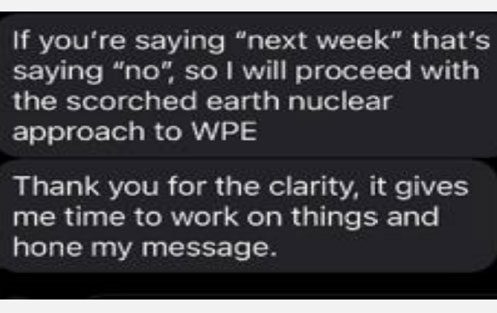
A screenshot of a text message by Mullenweg states:

If you’re saying “next week” that’s saying “no”, so I will proceed with the scorched earth nuclear approach to WPE

Thank you for the clarity, it gives me time to work on things and hone my message.

Screenshot of text message by Mullenweg to WP Engine

WP Engine Cease And Desist

Matt Mullenweg, co-founder of WordPress and CEO of the for-profit Automattic, posted on Reddit and in a Slack channel that WordPress had initiated litigation against WordPress and himself. It was later revealed that WP Engine had in fact filed a Cease and Desist request (C&D).

The C&D document, sent to the Automattic Chief Legal Officer, documents what it says are false factual statements, outlines a timeline of events, and rebuts Mullenweg’s allegations, accusations and statements.

WP Engine makes four key demands:

  1. Cease Making False Factual Statements Regarding WP Engine.
  2. Cease Interfering with WP Engine’s Contractual Relationships With its Employees.
  3. Cease Interfering with WP Engine’s Contractual Relationships With its Customers
  4. Preserve All Potentially Relevant Documents and Data.

Mullenweg Accused Of Serious Misconduct

Automattic is accused of “serious misconduct” toward WP Engine, laying out its version of events including that Mullenweg threatened to take a “scorched earth nuclear approach” against WP Engine if it refused to agree to give Automattic tens of millions of dollars in cash by 4:30 PM.

When the deadline for an agreement was not met, the legal document states that Mullenweg publicly made disparaging remarks against WP Engine in front of a live audience, on YouTube and on blog posts on the non-profit WordPress.org website.

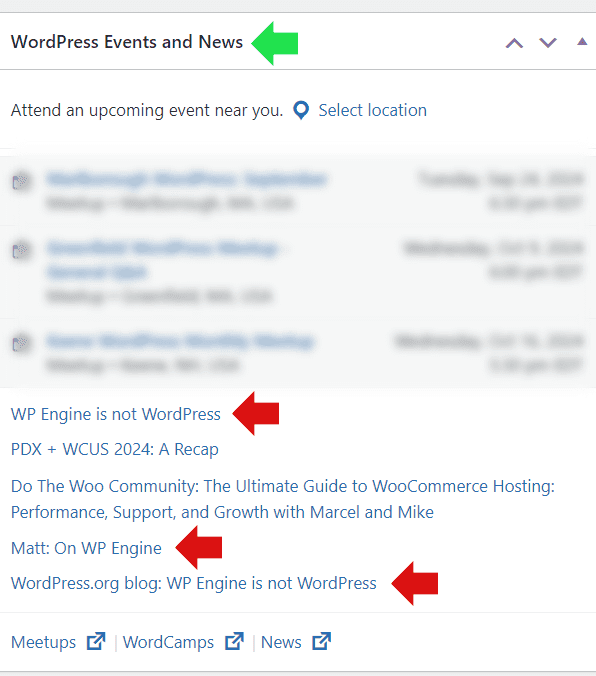
In fact, Mullenweg’s posts were linked from the admin panel of every WordPress site around the world, millions of websites.

Screenshot Of A WordPress Admin Panel

Screenshot showing links from a WordPress admin panel news section to three posts made by Matt Mullenweg about WP Engine

Accused Of Abusing His Privileged Position Of Power

WP Engine’s C&D accuses Mullenweg of abusing his unique position as both the CEO of a competitor (Automattic, Inc.) and as a director at the non-profit WordPress.org which produces the open source WordPress content management system.

The document states:

“Mr. Mullenweg’s statements also reflect a clear abuse of his conflicting roles as both (1) the Director of the non-profit WordPress Foundation, and (2) the CEO of at least two for-profit businesses that compete with WP Engine.

…Mr. Mullenweg’s covert demand that WP Engine hand over tens of millions to his for-profit company Automattic, while publicly masquerading as an altruistic protector of the WordPress community, is disgraceful.”

List Of Disparaging Remarks Against WP Engine

WP Engine’s C&D documents all the remarks Mullenweg made:

  • Encouragement of WordPress users to switch away from WP Engine
  • Suggesting that WP Engine is retaliatory towards its employees
  • Accusing WP Engine of misusing the trademarks
  • Accusing WP Engine investors of not caring about open source
  • Suggesting that WP Engine may be retaliatory against own employees

WP Engine’s C&D rebuts every allegation by Mullenweg, addressing each instance point by point.

Among the rebuttals:

Rebuttal Of Accusation That WP Engine Contributes Little

“Even considering Mr. Mullenweg’s incorrect statement that contribution is only based on hours worked and contributors to Five for the Future, Mr. Mullenweg falsely stated that WP Engine is failing on this metric. In reality, WP Engine is ranked 30 out of 189 in hours contributed and 16 out of 189 in contributors, significantly outpacing multiple other contributors relative to our revenue.”

Rebuttal Of Trademark Misuse

“WP Engine’s use of “WP” is explicitly permitted by WordPress Foundation’s trademark policy:

‘The abbreviation ‘WP’ is not covered by the WordPress trademarks and you are free to use it in any way you see fit.’

Moreover, WP Engine’s use of the WordPress mark is entirely compliant with governing trademark law. For more than a decade, WP Engine has fairly used that term to describe its services, as other members of the WordPress ecosystem do.”

Speculation Of WP Engine Retaliation

“Is not just false and wholly unsubstantiated – it is also absurd.”

What’s Next?

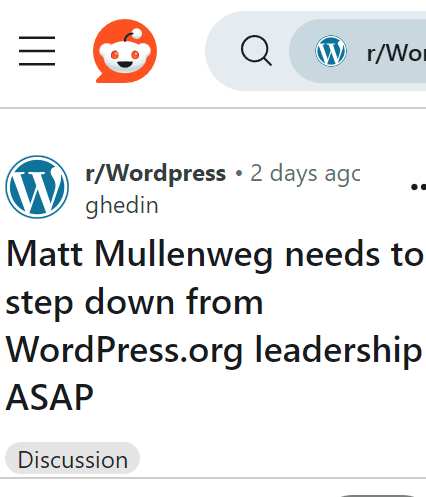
The next move appears to be up to Mullenweg. Many member’s of the WordPress community have already expressed surprise about what Mullenweg did and some on Reddit are calling for Mullenweg to step down.

Screenshot Of Call For Mullenweg To Step Down

Read the official Cease and Desist here (PDF).

AI On Innovation [Part 2]: More Insights From +546,000 AI Overviews via @sejournal, @Kevin_Indig

Following up on my first analysis of +546,000 AI Overviews, I dug deeper into three questions:

  1. How are common crawl data and AI Overviews related?
  2. How does user intent change AI Overviews?
  3. How do the top 20 positions break down for domains that rank in organic search and get cited in AIOs?

How Are Common Crawl Data And AI Overviews Related?

Common crawl inclusion doesn’t affect AIO visibility as much as sheer organic traffic.

Common Crawl, a non-profit that crawls the web and provides the data for free, is the largest data source of generative AI training.

Some sites, like Blogspot, contribute a lot more pages than others, raising the question of whether that gives them an edge in LLM answers.

Result: I wondered whether sites that provide more pages than others would also see more visibility in AI Overviews. That turned out not to be true.

I compared the top 500 domains by page contribution in Common Crawl to the top 30,000 domains in my dataset and found a weak correlation of 0.179.

The reason is that Google probably doesn’t rely on Common Crawl to train and inform AI Overviews but its own index.

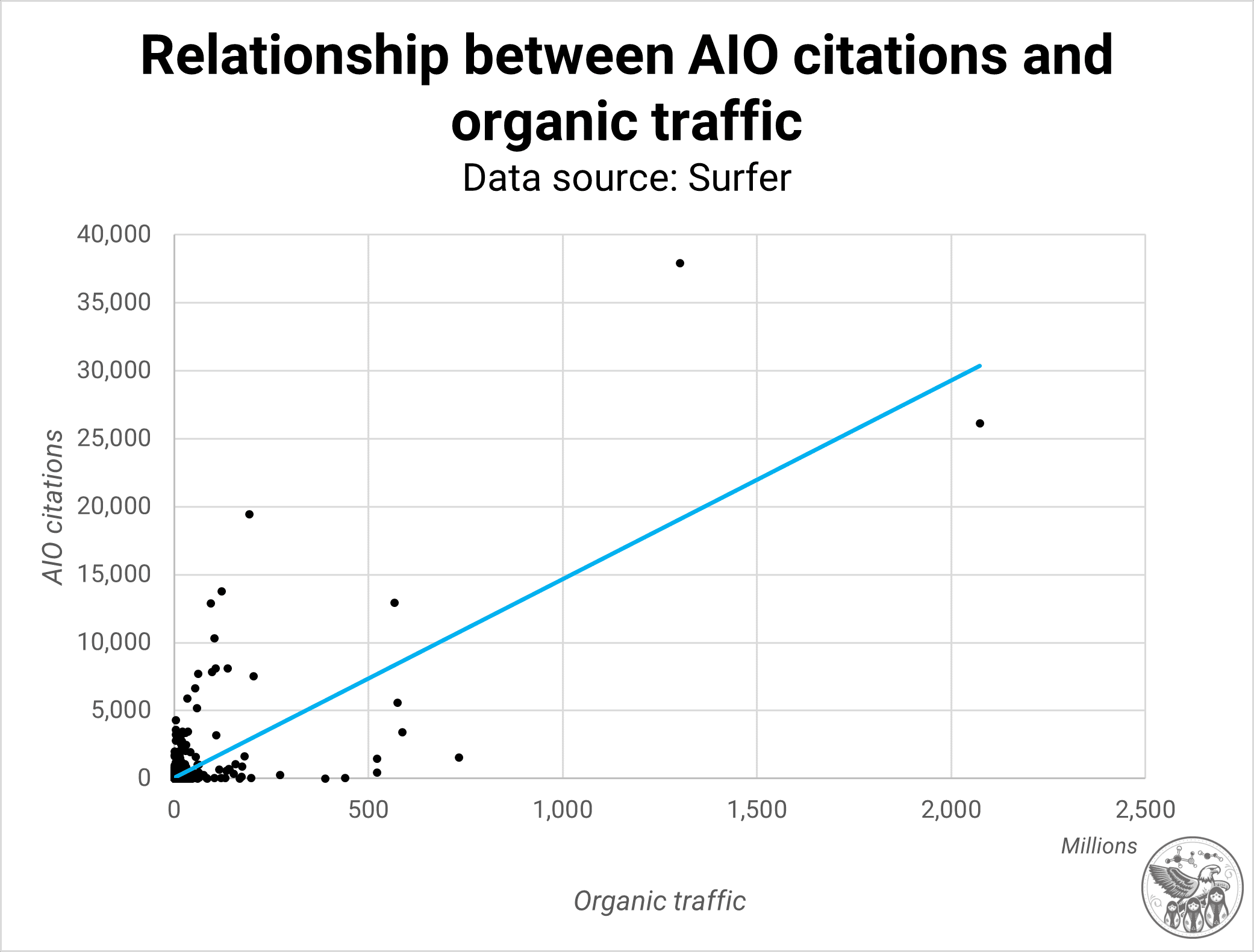
Relationship between AIO citations and organic trafficImage Credit: Kevin Indig

I then analyzed the relationship between the 3,000 top domains by organic traffic from Semrush and the top 30,000 domains in my dataset and found a strong relationship of 0.714.

In other words, domains that get a lot of organic traffic have a high likelihood of being very visible in AI Overviews.

AIO seems to increasingly reward what works in organic search, but some criteria are still very separate.

It’s important to call out that a few sites distort the relationship.

When filtering out Wikipedia and YouTube, the relationship goes down to a correlation of 0.485 – still strong but lower than with the two behemoths.

The correlation doesn’t change when taking out bigger sites, solidifying the point that doing things that work in organic search has a big impact on AI Overviews.

As I wrote in my previous post:

Ranking higher in the search results certainly increases the chances of being visible in AIOs, but it’s by far not the only factor.

As a result, companies can exclude Common Crawl’s bot in robots.txt if they don’t want to appear in public datasets (and gen AI like Chat GPT) and still be very visible in Google’s AI Overviews.

How Does User Intent Change AI Overviews?

User intent shapes the form and content of AIOs.
In my previous analysis, I came to the conclusion that the exact query match barely matters:

The data shows that only 6% of AIOs contain the search query.

That number is slightly higher in SGE, at 7%, and lower in live AIOs, at 5.1%. As a result, meeting user intent in the content is much more important than we might have assumed. This should not come as a surprise since user intent has been a key ranking requirement in SEO for many years, but seeing the data is shocking.

Calculating exact (dominant) user intent for all 546,000 queries would be extremely compute-intense, so I looked at the common abstractions informational, local, and transactional.

Abstractions are less helpful when optimizing content, but they’re fine when looking at aggregate data.

I clustered:

  • Informational queries around question words like “what,” “why,” “when,” etc.
  • Transactional queries around terms like “buy,” “download,” “order,” etc.
  • Local queries around “nearby,” “close,” or “near me.”
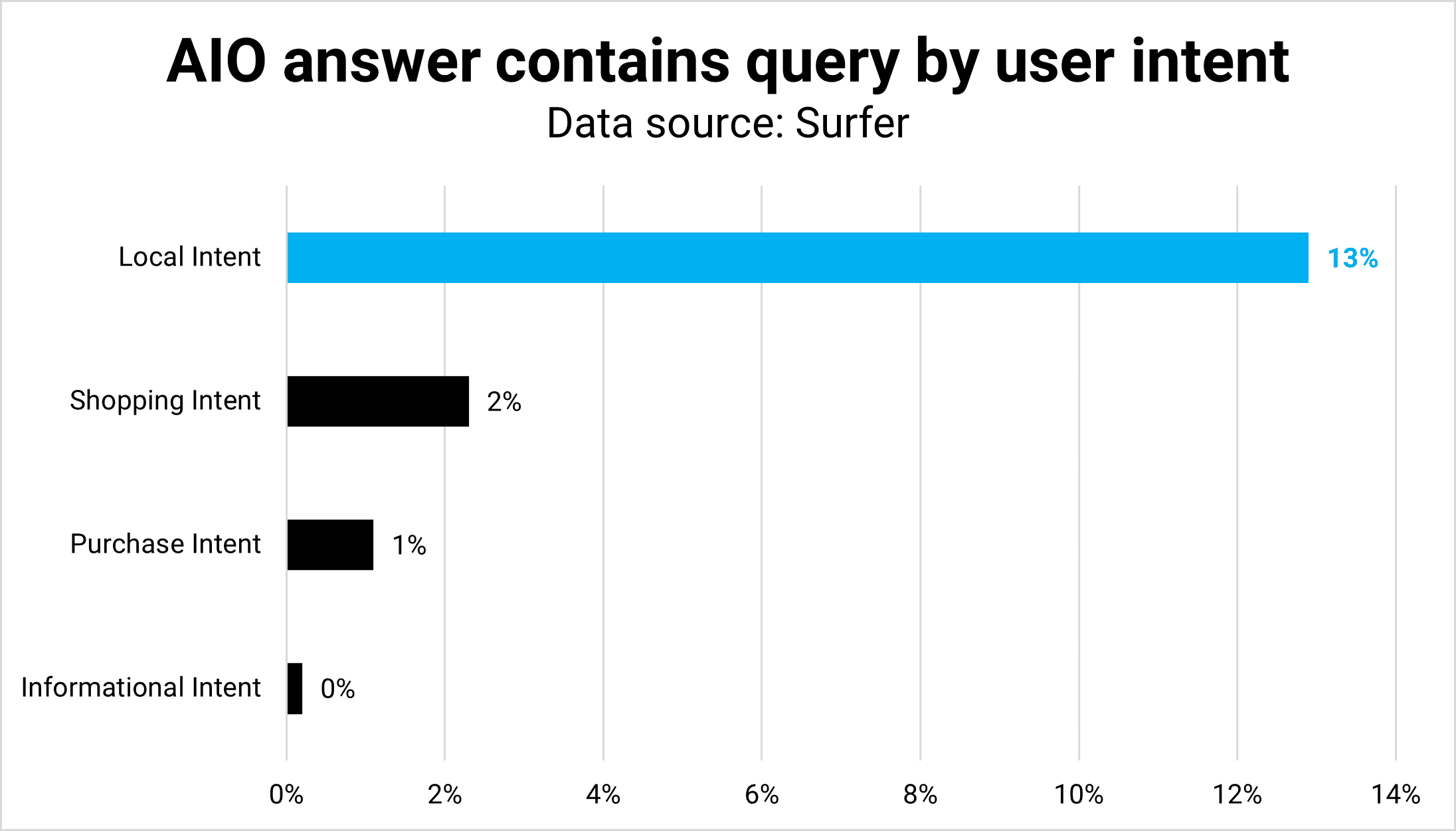
AIO answer contains query by user intentImage Credit: Kevin Indig

Result: User intent differences reflect in form and function. The average length (word count) is almost equal across all intents except for local, which makes sense because users want a list of locations instead of text.

Similarly, shopping AIOs are often lists of products with a bit of context unless they’re shopping-related questions.

Local queries have the highest amount of exact match overlap between query and answer; informational queries have the lowest.

Understanding and satisfying user intent for questions is harder but also more important to be visible in AIOs than, for example, Featured Snippets.

How Do The Top 20 Organic Positions Break Down?

In my last analysis, I found that almost 60% of URLs that appear in AIOs and organic search results rank outside the top 20 positions.

For this Memo, I broke the top 20 further down to understand if AIOs are more likely to cite URLs in higher positions or not.

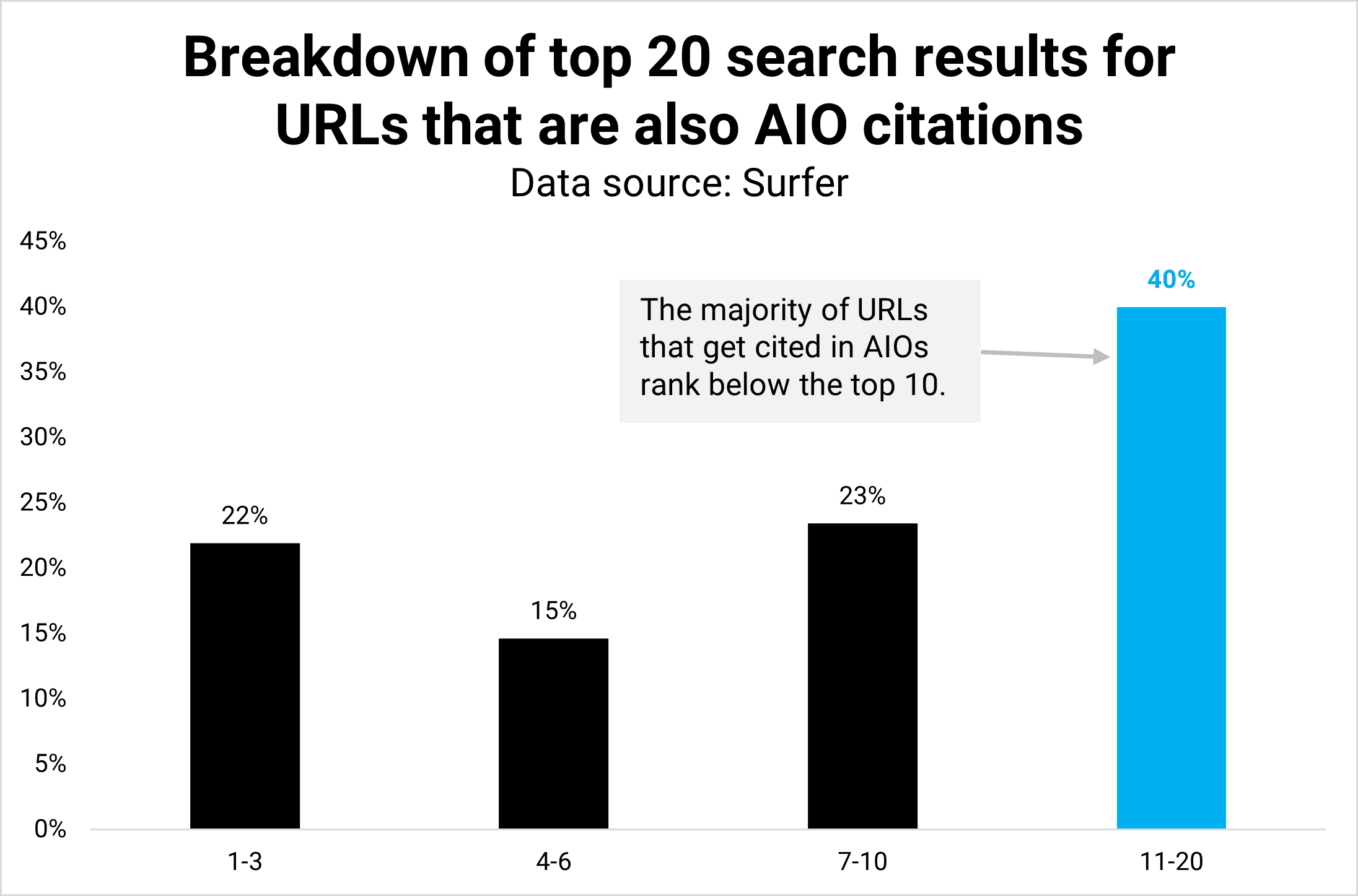
Breakdown of top 20 search results for URLs that are also AIO citationsImage Credit: Kevin Indig

Result: It turns out 40% of URLs in AIOs rank in positions 11-20, and only half (21.9%) rank in the top 3.

The majority, 60% of URLs cited in AIOs, still rank on the first page of organic results, reinforcing the point that a higher organic rank tends to lead to a higher chance of being cited in AIOs.

However, the data also shows that it’s very much impossible to be present in AIOs with a lower organic rank.

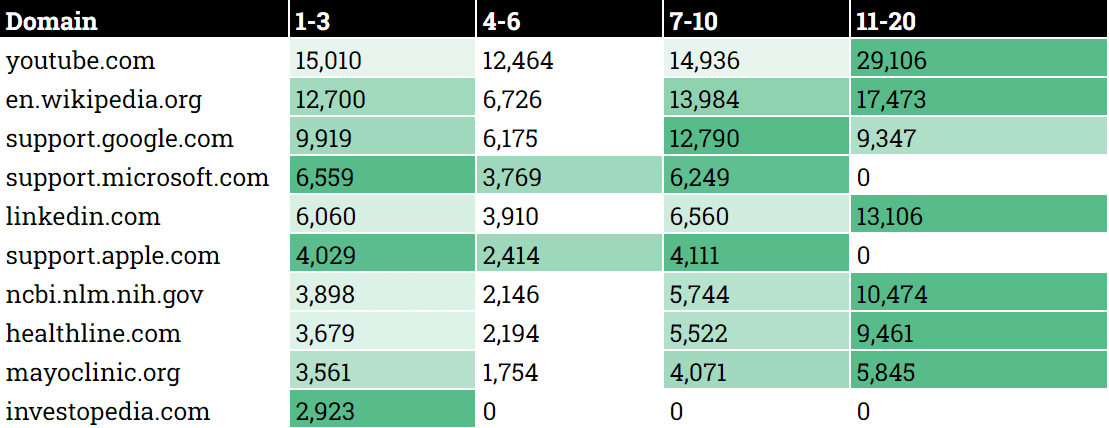
Where the top 20 domains that are visible in AIOs and search results rankWhere the top 20 domains that are visible in AIOs and search results rank (Image Credit: Kevin Indig)

Scenarios

I will work with my clients to match the AIO’s user intent, provide unique insights, and tailor the format. I see options for the progress of AI Overview that I will track and validate with data in the next months and years.

Option 1: AIOs rely more on top-ranking organic results and satisfy more informational intent before users need to click through to websites. The majority of clicks landing on sites would be from users considering or intending to buy.

Option 2: AIOs continue to provide answers from diversified results and leave a small chance that users still click through to top-ranking results, albeit in much smaller amounts.

Which scenario are you betting on?


Featured Image: Paulo Bobita/Search Engine Journal

Preparing For The Feedless Future With Google Merchant Center Next via @sejournal, @gilgildner

For some years now (ever since Google Merchant Center was introduced in 2010), ecommerce advertisers have been working with product feeds.

It’s historically been a complex and often fragile process, but thanks to the introduction of Google Merchant Center Next, we have some new tools at our fingertips.

Here’s a look at how things are changing with Next.

The History Of Google Merchant Center

Back in the very beginning, we remember having to download CSV files from the website with all product information, and embarking on a long process of cleaning up and formatting the data so that it could be manually uploaded into Google Merchant Center (GMC).

In the early days, before policies became more strict, you could even use Merchant Center to advertise anything from repair services to round-the-world gap year vacations!

But in time, GMC became far more sophisticated (and also more restricted). Along with increased restrictions came the ease of use. Uploading data became much easier and more stable.

Eventually, plugins and connectors began doing most of the job for you, then platforms like Shopify got native integrations, and now with the advent of Google Merchant Center Next, you almost don’t need feeds at all!

Common Complaints About GMC

For most of the past 14 years of Merchant Center history, you’ve likely heard a few bits of common wisdom repeated ad nauseam:

Optimize your shopping feeds inside of GMC! Keep your Google categories accurately assigned inside of GMC! Add your metadata inside of GMC! Fill out all the boxes in GMC!

The world is slowly changing, and now, with GMC Next, you don’t have to make these changes within the GMC interface.

The changes need to happen on the website. While feeds won’t totally go away overnight (and neither will the need to optimize products), Google Merchant Center Next is ushering in a new feed-less era.

Announced at Google Marketing Live 2023, Merchant Center Next actually hasn’t taken hold as rapidly as expected. Even over a year after its announcement, most but not all of our client accounts have shifted over.

GMC Next started rolling out for new users first, but Google has stated the full rollout should be completed sometime in 2024. Whether this is the actual date is yet to be seen.

What Is Google Merchant Center Next?

The core differentiator with Merchant Center Next is the simplification of website verification and the automatic population of product feeds from your website. This means that Google will scrape product information, pricing, imagery, and more directly from your site.

Additionally, it has integrated a new feature called Product Studio that allows you to use AI to update or change your product images and offers more comprehensive performance insights.

Screenshot from Google Merchant Center NextScreenshot from Google Merchant Center Next, August 2024

Many marketers had a negative gut reaction to the announcement of Next, but our entire team at Discosloth was actually pretty excited about this development.

Feed management (and especially the involvement of any third-party integrations, connectors, and tools) has always been a bit clunky, so the removal of any friction is a welcome feature.

While you can still use Shopify to upload your product data, many people have found it to be more difficult with some products not being uploaded properly. As it turns out, feeds have technically gone away, but in a way, they have actually just been renamed to Data Sources.

Screenshot from Google Merchant Center NextScreenshot from Google Merchant Center Next, August 2024

It appears that product feeds, as we know them, might be going away.

This doesn’t mean that product data management will become obsolete; rather, it indicates a shift in how this data is handled within the Merchant Center Next ecosystem.

The Mindset Change

I ultimately think that removing feeds is a fantastic approach because it shifts the mindset of marketers. Rather than focusing on incremental metadata optimization on hidden feeds, it will instead encourage advertisers to update & improve the actual listings on the actual site.

Rather than just making sure endless attributes are filled out in the backend, it means that the actual website and associated metadata will need to be correctly optimized. This eliminates double work and conflicting data.

When the website itself is the primary focus, it has positive effects on performance for all channels, like organic or social – not just paid.

While many paid marketers have been focused only on optimizing products and images within the Merchant Center, without paying any attention to the website listings, now may be the time to change that approach.

Thanks to this, the website owners may start seeing a better overall conversion rate for the entire website, across all channels.

This is a great step in the right direction. Contrary to what many naysayers think about the onset of AI and generative automation, I’m a fan of taking away the grunt work from marketing and handing it all to the robots.

A more automated approach to feed management will undoubtedly grant us a lot more bandwidth to make actual strategy and content decisions on the products themselves.

While we’ve been seeing more comprehensive data on product performance appearing in Google Merchant Center over the last few years, now may be the time to dig a little bit deeper.

While GA4 has widely become useless for advanced data analysis, the new GMC Next allows us to see website traffic for both paid and organic traffic from product listings, review competition and visibility, and get better data on the best-selling products and new trends.

Perhaps the feature I like the most: comparing the prices of your stock-keeping units (SKUs) vs. competitors. This is the kind of data that has been classically underused.

Instead of a misguided focus on inserting our favorite keywords into descriptions, we can finally focus on the quality and competitiveness of your products.

Screenshot from Google Merchant Center Next, August 2024

Taking Merchant Center Beyond Optimization

Performance Max and Demand Gen campaign types have given us some new tools and strategies to use in ecommerce advertising, but it’s become harder to see granular data on where your ads are appearing, detailed performance metrics, and perhaps most notably, which keyword terms & specific audiences these campaigns are appearing for.

Many advertisers are afraid that Google Merchant Center Next may be on a similar path of removing even more granular data and making it even harder for advertisers to be specific in our ad targeting.

But so far, most of the early complaints people had when Next was introduced have already been fixed. We got access back to supplemental feeds, we can now make bulk changes (even though it’s not as easy as it used to be) and we can once again appeal any incorrectly disapproved products.

Of course SKUs and product feeds need to be optimized, but this shouldn’t be anything out of the ordinary.

Optimizing this should be an assumed baseline for any ecommerce storefront.

Merchant Center Next, as we’ve found, is most effectively used for tactics far beyond what the old Merchant Center offered. Some of the most important tactics we now use include things like getting insights on specific SKUs to make sure you always hold in inventory, and diving deep into competitive visibility and pricing in order to massively increase sales.

More resources: 


Featured Image: N Universe/Shutterstock

Addressing climate change impacts

The reality of climate change has spurred enormous public and private investment worldwide, funding initiatives to mitigate its effects and to adapt to its impacts. That investment has spawned entire industries and countless new businesses, resulting in the creation of new green jobs and contributions to economic growth. In the United States, this includes the single largest climate-related investment in the country’s history, made in 2022 as part of the Inflation Reduction Act.

For most US businesses, however, the costs imposed by climate change and the future risks it poses will outweigh growth opportunities afforded by the green sector. In a survey of 300 senior US executives conducted by MIT Technology Review, every respondent agrees that climate change is either harming the economy today or will do so in the future. Most expect their organizations to contend with extreme weather, such as severe storms, flooding, and extreme heat, in the near term. Respondents also report their businesses are already incurring costs related to climate change.

This research examines how US businesses view their climate change risk and the steps they are taking to adapt to climate change’s impacts. The results make clear that climate considerations, such as frequency of extreme weather and access to natural resources, are now a prime factor in businesses’ site location decisions. As climate change accelerates, such considerations are certain to grow in importance.

Key findings include the following:

Businesses are weighing relocation due to climate risks. Most executives in the survey (62%) deem their physical infrastructure (some or all of it) exposed to the impacts of climate change, with 20% reporting it is “very exposed.” A full 75% of respondents report their organization has considered relocating due to climate risk, with 6% indicating they have concrete plans to relocate facilities within the next five years due to climate factors. And 24% report they have already relocated physical infrastructure to prepare for climate change impacts.

Companies must lock in the costs of climate change adaptation. Nearly all US businesses have already suffered from the effects of climate change, judging by the survey. Weighing most heavily thus far, and likely in the future, are increases in operational costs (affecting 64%) and insurance premiums (63%), as well as disruption to operations (61%) and damage to infrastructure (55%).

Executives know climate change is here, and many are planning for it. Four-fifths (81%) of survey respondents deem climate planning and preparedness important to their business, and one-third describe it as very important. There is a seeming lag at some companies, however, at translating this perceived importance into actual planning: only 62% have developed a climate change adaptation plan, and 52% have conducted a climate risk assessment.

Climate-planning resources are a key criterion in site location. When judging a potential new business site on its climate mitigation features, 71% of executives highlight the availability of climate-planning resources as among their top criteria. Nearly two-thirds (64%) also cite the importance of a location’s access to critical natural resources.

Though climate change will affect everyone, its risks and impacts vary by region. No US region is immune to climate change: a majority of surveyed businesses in every region have experienced at least some negative climate change impacts. However, respondents believe the risks are lowest in the Midwest, with nearly half of respondents (47%) naming that region as least exposed to climate change risk.

Download the full report.

This content was produced by Insights, the custom content arm of MIT Technology Review. It was not written by MIT Technology Review’s editorial staff.

How to Compare SEO of Competing URLs

Determining why one page outranks another on organic rankings is often impossible. Only Google knows some factors, such as click-throughs, long clicks, site authority, and reputation.

However, public data can be helpful. Examples include keyword usage, content structure, and backlinks.

Here are tools to easily extract public signals and compare them to competitors.

Thruuu

Thruuu offers a free tool to compare two URLs side by side. The comparison includes:

  • Word count,
  • Image count,
  • Publication and “last modified” dates,
  • Number of internal and external links pointing to a page (but not the links themselves),
  • Schema usage,
  • Content headings,
  • Frequent terms and their count, as well as “unique” terms not on the competing page.

The comparisons of headings and unique terms were the most useful for me. Here’s a snapshot of the unique term comparison for the two pages I analyzed. It offers a helpful guide on what to add.

Screenshot of Thruuu's comparison of common, unique terms for two URLs

Thruuu offers a side-by-side comparison of common and unique terms for two URLs. Click image to enlarge.

Seobility

Seobility is another free comparison tool with useful rankings data:

The tool also rates each URL’s on-page optimization. But in my testing, it didn’t correlate with higher rankings. So I wouldn’t focus on those rankings.

Here’s a screenshot of the “image SEO” comparison.

Screenshot of the comparion of images for two URLs

Seobility’s tools include comparisons of image optimization for two URLs. Click image to enlarge.

Moz Link Explorer

Moz’s Link Explorer is one of the easiest ways to compare the backlink strength of two URLs.

The tool compares:

  • Moz’s proprietary domain authority and page authority
  • Spam score (developed by Moz based on a database of sites penalized by Google),
  • Total backlinks,
  • Percentage of total links that are external and followed,
  • External followed links,
  • Internal followed links,
  • External nofollowed links,
  • Internal nofollowed links,
  • Total linking domains,
  • Followed linking domains.

The comparison chart is color-coded with winning metrics in green.

Screenshot of Moz's comparison chart

Moz’s comparison chart is color-coded with winning metrics in green. This example compares Search Engine Land with Digital Marketing Institute. Click image to enlarge.

Semrush

Semrush compares rankings of two or more URLs inside its “Keyword gap” analysis. Paste the URLs, and the “Shared” tab will reveal the keywords the URLs rank for and their positions.

The report includes:

  • Organic positions for all ranking keywords,
  • Search volume of each keyword,
  • Keyword difficulty,
  • Search intent,
  • Cost per click.

Add any of the keywords to your page to target those queries.

Other tabs with useful keyword data include:

  • “Missing.” Keywords a competing page ranks for but not yours.
  • “Weak.” Keywords a competing page ranks much higher than yours
  • “Strong.” Keywords on your page outranking competitors.
Screenshot of keyword gap analysis in Semrush

Semrush’s keyword gap analysis reveals terms that are “Shared,” “Missing,” “Weak,” “Strong,” “Untapped,” and “Unique.” Click image to enlarge.

Free Web Design Tools from Summer 2024

Free resources from the design community can enhance an ecommerce site. Here is a list of new web tools and design elements from summer 2024. There are AI video tools, vector collections, website builders, analytics tools, animation editors, converters, UI components, and more. All of these tools are free or have free plans, though most also offer premium versions.

Free Design Tools

Wisp is a headless content management system that allows users to add blogs to their websites without knowing code. The free plan offers core features; premium plans start at $16 monthly.

Home page of Wisp

Wisp

Seline is a clean and minimalistic analytics tool. The dashboard provides unique visits, page views, marketing-channel performance, funnels, alerts, and user profiles and journeys. Seline is free for up to 3,000 page views per month.

Page UI is a set of landing page components and templates made for React and built on Tailwind CSS. Pick your preferred components and paste them into your codebase. All templates and components are free to use and open source.

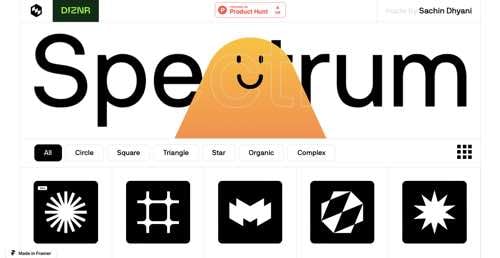
Spectrum provides a free collection of more than 100 vector shapes. New designs are added weekly.

Home page of Spectrum

Spectrum

Trangram is a free web app for creating and animating designs, logos, and more. Morph shapes, round or combine shares, draw trim or motion paths, and more. No installation or sign-in required.

Gluetrail is a Chrome extension for creating personalized videos. From a single screen recording and customer management or spreadsheet data, Gluetrail automatically creates personalized landing pages and videos at scale and includes a screen-camera audio recorder with a shareable link. Premium plans start at $39 per month.

Sidenote is a Chrome extension for live chat or commenting on any page of the internet. After installing the free extension, you can view all available notes on the respective pages. Create an account to add notes and participate in the community.

Photo Flick from DK Web Solutions consolidates royalty-free image sites. Find quality, royalty-free stock photos from Pexels, Pixabay, and Unsplash.

Web page for DK Web Solutions's Photo Flick

DK Web Solutions’s Photo Flick

GlobalSEO uses AI to translate a website into 93 languages. It also indexes a website automatically via reverse proxies. Up to 2,000 words are free. Premium plans start at $3.95 per month.

Videco features AI video tools for cloning and segmentation, interactive forms and surveys for customers, and integrations for email campaigns and customer management. Videco has a 14-day free trial.

Linky Directory is an organization chart for Slack with automatic updates and search. It keeps your org chart up to date through data auto-collection and Slack integration. It is free for fewer than 30 users.

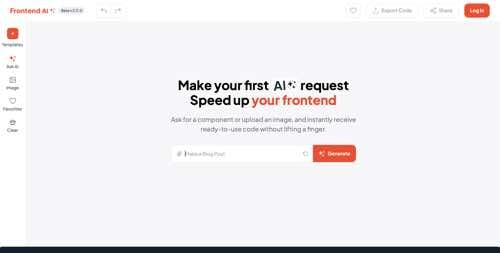
Frontend AI is a free resource for front-end user-interface components. Just write what you want or paste an image, then preview your component and get your code.

Home page of Frontend AI

Frontend AI

TheySaid is a tool for AI conversational surveys. The online tool scans your site and recommends questions based on your product and industry. It engages customers with a single-question rating survey and follows up with a short conversation where AI asks probing questions, providing you with insights into why the user provided her rating. Free for up to 100 responses per month. Premium plans start at $49 per month.

KIT Domains is an operating system that tracks multiple domains. Get detailed information about your domains in one place, without switching between registrars. Track expiration dates, SSL, domain rank, and more. Free for up to five domains. Premium plans start at $10 per month.

Cookie Checker from ComplyDog is a free GDPR-compliance checker. It instantly finds out if a website uses cookies and complies with E.U. cookie law. It’s free, and no email is required.

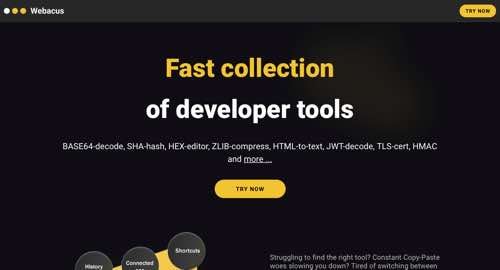
Webacus is a collection of developer tools with a unified experience that chains tools together to streamline the development process. Get tools for formatting, encoding, compression, conversion, and more. Use the integrated AI assistant to create almost any other operation you need. Bring your Open AI key and build your own collection.

Home page of Webacus

Webacus

Intentional is a productivity tool to help you stay focused on the internet. It automatically detects and blocks websites irrelevant to your deep work session.

Thunderbit is a Chrome Extension that automates web tasks. Create a personalized web AI copilot. Build AI app automations by filling out a simple template. Create a new UI for all your apps. Free up to 100 steps per month. Premium plans start at $9.90 per month.

Dev Utilities from Jam is a set of data conversion and utility tools. The collection includes Image Resizer, CSV to JSON, and CSS Inliner for Email. The tools are open-source, free, and ad-free.

Donzo Recorder is a simple screen recorder. Click the button to start recording, choose the tab or window you want to record, and click to stop when you’re finished. You can download to edit or have Donzo edit for you.

Home page of Donzo Recorder

Donzo Recorder