WP Rocket, the WordPress page speed performance plugin, just announced the release of a new version that will help publishers optimize for Largest Contentful Paint (LCP), an important Core Web Vitals metric.
Large Contentful Paint (LCP)
LCP is a page speed metric that’s designed to show how fast it takes for a user to perceive that the page is loaded and read to be interacted with. This metric measures the time it takes for the main content elements has fully loaded. This gives an idea of how usable a webpage is. The faster the LCP the better the user experience will be.
WP Rocket 3.16
WP Rocket is a caching plugin that helps a site perform faster. The way page caching generally works is that the website will store frequently accessed webpages and resources so that when someone visits the page the website doesn’t have to fetch the data from the database, which takes time, but instead will serve the webpage from the cache. This is super important when a website has a lot of site visitors because that can use a lot of server resources to fetch and build the same website over and over for every visitor.
The lastest version of WP Rocket (3.16) now contains Automatic LCP optimization, which means that it will optimize the on-page elements from the main content so that they are served first thereby raising the LCP scores and providing a better user experience.
Because it’s automatic there’s really nothing to fiddle around with or fine tune.
According to WP Rocket:
“Automatic LCP Optimization: Optimizes the Largest Contentful Paint, a critical metric for website speed, automatically enhancing overall PageSpeed scores.
Smart Management of Above-the-Fold Images: Automatically detects and prioritizes critical above-the-fold images, loading them immediately to improve user experience and performance metrics.
All new functionalities operate seamlessly in the background, requiring no direct intervention from the user. Upon installing or upgrading to WP Rocket 3.16, these optimizations are automatically enabled, though customization options remain accessible for those who prefer manual control.”
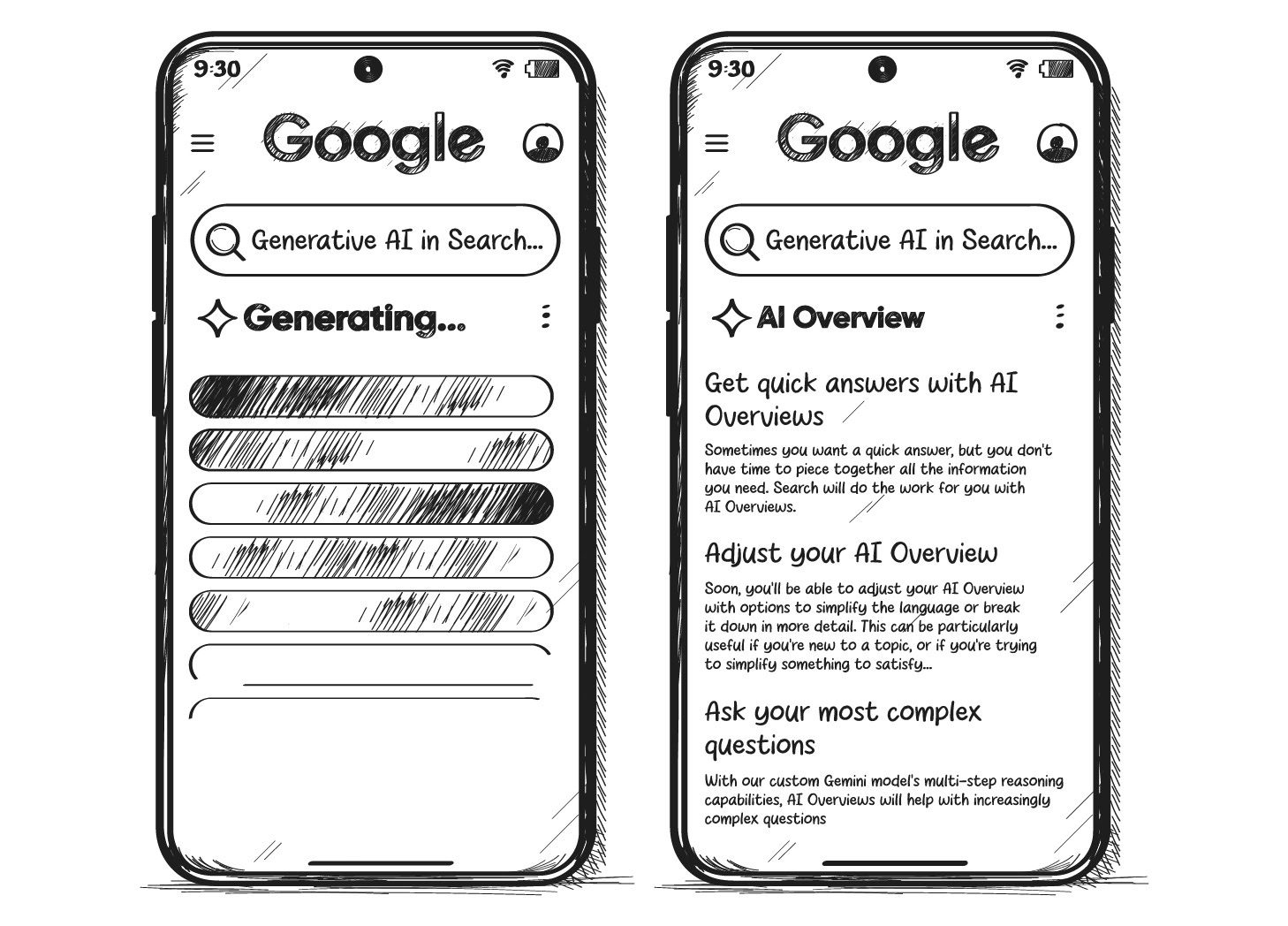
Google I/O 2024 was all about one thing: the launch of AI Overviews (short: AIOs). You might know the Gemini-powered direct answers as AI Snapshots from Google’s public beta environment Search Generative Experience. Now, they’re here, ushering in a new era for Search.
Google’s stunning first quarter and the softening of the ChatGPT hype led me to believe that Google had no reason to launch AIOs. Clearly, I was wrong.
So, why did it launch AIOs? A few possible reasons:
Optics.
Google wants to disrupt itself before someone else does.
AIOs massively improve the experience for long-tail queries.
Higher pressure from Perplexity, ChatGPT & Co. than we thought.
Google might as well give the answer itself, given the low quality of open web content.
AI results allow searchers to do the actual thing instead of reading about how to do it.
Are AIOs the end of Google Search as we know it? Yes. Is that good? Also, yes. Every tech advancement bears threats, but also opportunities.
Image Credit: Lyna ™
Boost your skills with Growth Memo’s weekly expert insights. Subscribe for free!
From Queries To Prompts
We’re entering a new era of Search because AIOs are a new playing field with new rules. They look like 18-year-old Featured Snippets on ‘roids, but they’re not. Classic ranking factors don’t apply.
Instead, Google blurs the line between searching and doing.
Liz Reid, Google’s head of Search, calls the capabilities of AIOs “agentive,” referring to their role as agents who can do things for you. Giving answers to questions is just one task of many.
In their full glory, agentive AIOs expand to what Google calls “AI-organized search results.” Instead of blue links, Gemini composes a personalized feed of local results, short videos, and forums based on your prompt.
Google plays into its competitive advantage of owning Maps, Gmail, YouTube, Chrome, and Android. AI-organized SERPs are rolling out for inspirational queries, but I don’t see why they wouldn’t appear for commercial queries as well.
Instead of giving you answers, AIOs are the gateway to AI in Google Search that does things for you. The future of Search isn’t keywords but prompts.
AIOs show up for complex queries where Google attempts “… to make an algorithmic value judgment behind the scenes as to whether it should serve up AI-generated answers or a conventional blue link to click.”
“Complex queries” sounds much like long-tail queries, where Google’s search experience has traditionally been horrendous despite “using AI for years.”
AIOs and classic search results are powered by different systems. Proof: Sites that were punished by Google penalties can still appear with content and sources in AIOs.
AIOs use multi-step reasoning, which breaks searches (prompts) down into parts, answers each one, and puts the answer back together. This approach sounds a lot like chain-of-thought prompting, where a large language model (LLM) explains each step when giving an answer.
In Search, users might be able to give feedback on single parts of an answer and fine-tune Gemini’s understanding of user intent and personalization capabilities.
New technology introduces costs and benefits. I admit, AIOs improved a lot in SGE just before they launched. I also think AIOs are a better experience for users and a long desired update to how Google works. It’s our job to figure out how they work and how to gain visibility.
Here is the good, the bad, and the ugly of AIOs.
The Good
1. Early data shows that AIOs appear for only 0.48% of desktop and 0.57% of mobile search results.
Early data shows very few AIOs in Search. (Image Credit: Kevin Indig)
Rank trackers measure SERP features based on the logged-out experience, which might be different from personalized user results.
For now, it seems you have a higher chance of getting audited by the IRS than seeing an AIO.
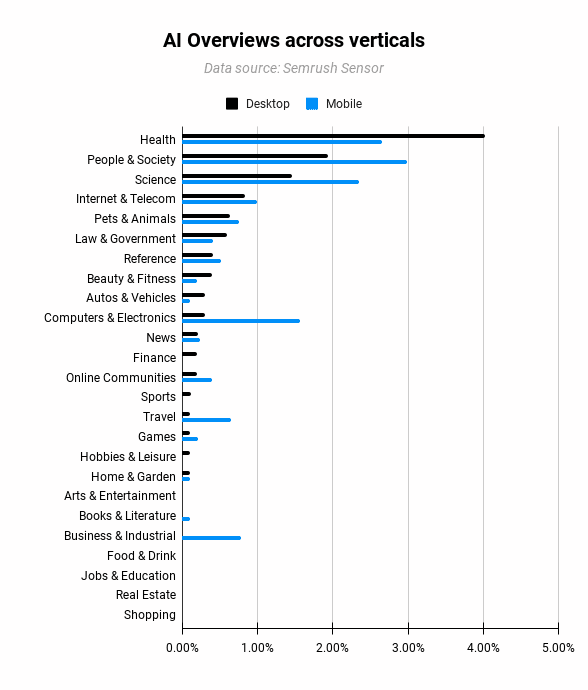
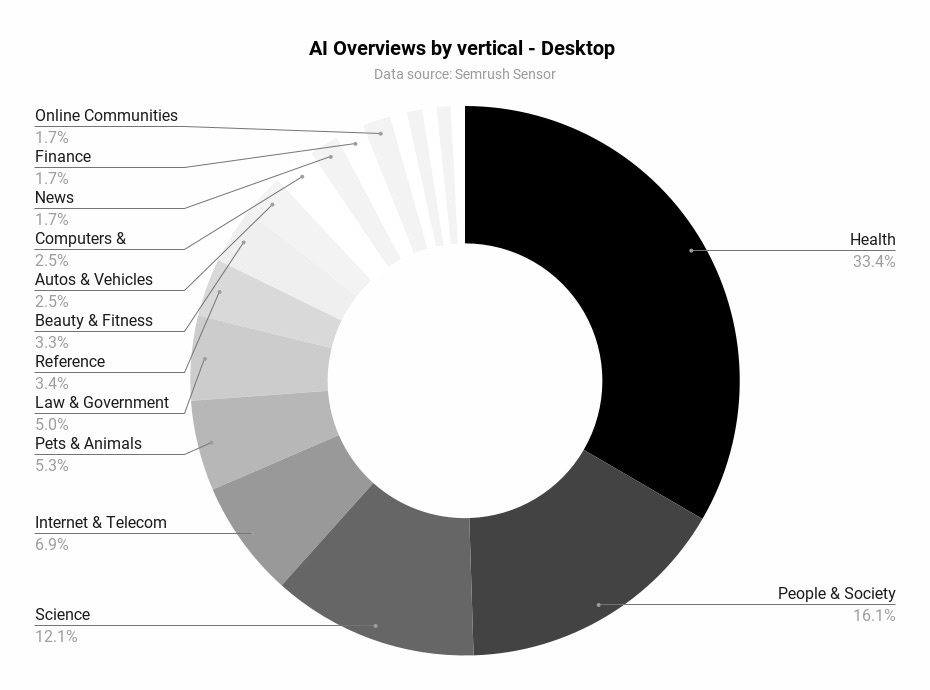
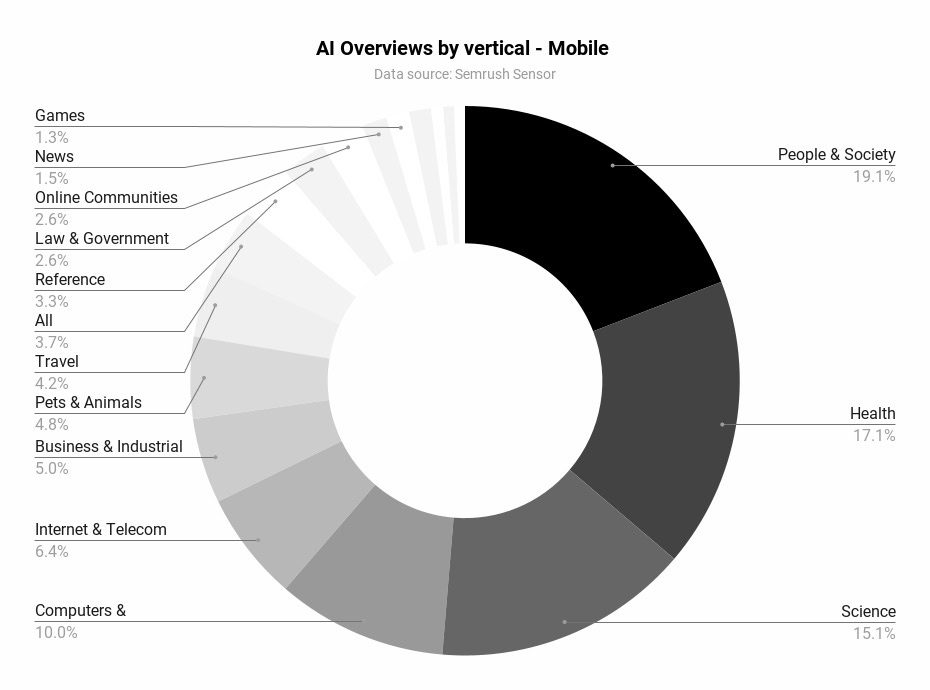
Early data shows that Google doesn’t shy away from giving AI answers in sensitive spaces like health, science, pets, and law. It’s questionable whether that’s a good way to start.
Verticals like people, beauty, and sports would forgive mistakes so much more.
The majority of AI Overviews on desktop show up in health, people & society, and science verticals. (Image Credit: Kevin Indig)
The majority of AI Overviews on mobile show up in people & society, health, and science verticals. (Image Credit: Kevin Indig)
2. What I’m most excited about: AIOs could be a massive opportunity to match searchers with the right site – better and faster.
According to Sundar Pichai, SGE led to longer queries. Assuming engagement with AIOs follow suit, longer queries reveal more about what users really want (intent), similar to how social networks measure behavior.
As a result, AIOs likely shrink organic traffic, but bring more organic conversions – more juice, less squeeze.
3. Lower cost-per-click (CPC).
CPCs are high and getting more expensive. But if AIOs and AI-organized SERPs can connect users with the right company faster, CPCs go down because fewer advertisers compete with each other for the same searcher.
Google could significantly grow monetizable queries in the long-tail queries. Win-win.
The Bad
1. Misinformation.
Examples of AIOs contaminated with misinformation or questionable answers are easy to find. It’s clear that Google tolerates some degree of misinformation or poor results.
Of course, Google needs to fix misinformation as fast as possible, especially in sensitive areas like health or law. But AIOs also magnify an uncomfortable fact: The web has been full of misinformation for a while.
Consensus is easier for some topics than others. I do have hope that AI, in general, makes it easier to identify misinformation.
We’re also facing a denominator trap in the debate about how much wrong information is okay: We don’t know how many AIOs deliver correct vs. factually wrong results. It might just be a tiny fraction, but misinformation sticks out like a sore thumb.
The same is true for good vs. bad experiences with AIOs. There is a chance the absolute majority of experiences are good.
2. Traffic loss.
Travel sites, publishers, and affiliates will suffer from the launch of AIOs, especially AI-organized SERPs cut deep into the flesh or sites that help with creative tasks, information gathering, and product reviews.
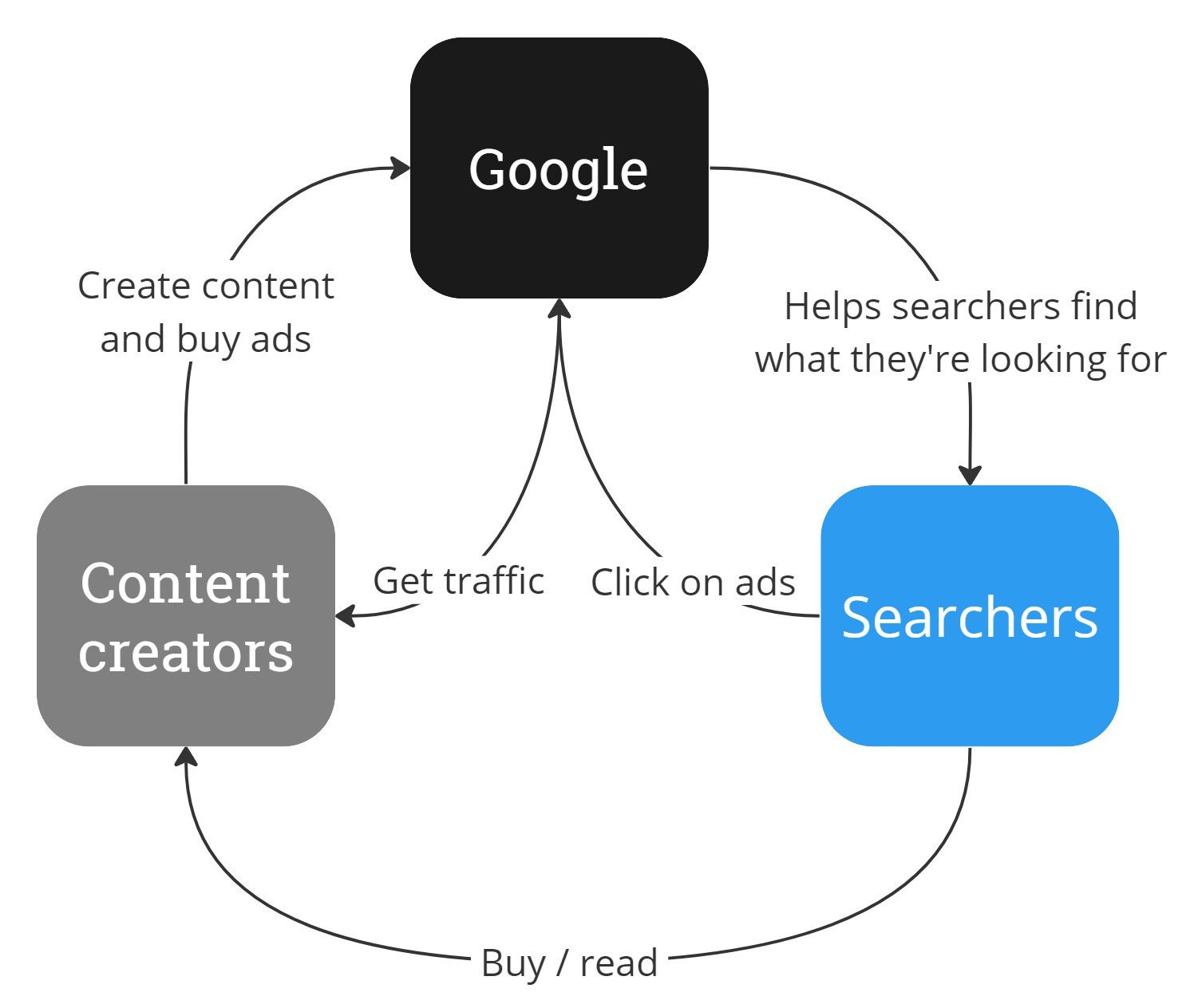
3. AIOs break the old contract between Google, searchers, and content creators.
People and companies created content that Google could run ads against and received traffic in return.
Now that anybody can recreate Wikipedia’s content with basic LLMs, Google might as well give the answer itself and send traffic only when users want to explore more.
The old contract between Google, content creators, and searchers is void. (Image Credit: Kevin Indig)
AIOs still have links, and we’ll soon figure out how much traffic they actually send out. But links in AIOs have another important mission: Create trust with users by showing where the information comes from.
The Ugly
People have already used AI Overviews billions of times through our experiment in Search Labs. They like that they can get both a quick overview of a topic and links to learn more. We’ve found that with AI Overviews, people use Search more, and are more satisfied with their results.
1. Baseless claims.
Google claims that AI Overviews lead to more searches and better satisfaction. Isn’t that a paradox? Shouldn’t a better experience result in fewer searches?
Pichai also mentioned an “increase in engagement.” Again, what does that mean?
With AI Overviews, people are visiting a greater diversity of websites for help with more complex questions. And we see that the links included in AI Overviews get more clicks than if the page had appeared as a traditional web listing for that query.
The announcement sounds like “top results get more traffic,” but what it actually means is that Google shows different sites in AIOs than in classic web search, which get more traffic since they don’t rank well in classic search but now get featured in AIOs.
2. Data loss.
The worst part about AI Overviews is that Google doesn’t provide telemetry to understand their impact. Clicks and impressions for AIOs will not be separable from classic results. I couldn’t imagine an easier way for Pichai & Co. to prove that AIOs are better for the web than letting sites measure referral traffic.
“Google CEO Sundar Pichai suggested that offering granular AI preview traffic data might encourage website owners to manipulate the system.
He believes providing detailed metrics could result in publishers designing their content specifically to game Google’s search engine, which may lead to a worse user experience.”
The future of organic visibility tracking is a combination of first-party data (Google Search Console) enhanced with third-party tools that fill the gaps.
AIOs might surface more personalized results, but we can leverage technology to solve this problem.
AI bots could be trained on human search behavior and emulate personas to search and scrape Google’s logged-in experience to give us an approximation of personalized human search results. Google is not the only one that benefits from advancements in AI.
3. No opt-out.
In classic Google fashion, you can’t really opt out of AIOs. It’s not a great look, given the bad image AI answers already have.
You can use a nosnippet meta tag but cripple yourself in the process because you also lose your description and rich snippets.
Searchers can’t opt out of AIOs either and have to install Chrome extensions to get rid of them.
Moving Forward
We will deal with this change like any other change before: SSL encryption, mobile, SERP features, Helpful Content Update (HCU), etc. Like every other time, we’ll measure, test, learn, and adapt.
Besides ranking algorithms, we now also need to stay on top of Google’s AI models because they define what’s possible for AIOs and AI-organized SERPs.
For example, Gemini 1.5 Pro will have a 2 million-token context window by the end of the year. That’s the equivalent of 2 hours of videos, 22 hours of audio, and 1.4 million words.
Capabilities matter because they impact user behavior. For example, AIOs lead to a lot more long-tail queries (as confirmed by Sundar Pichai) and voice searches.
We need to start paying attention to training tokens, multi-modal capabilities, zero-shot tasks, speed, etc., and talk about new models like new ranking algorithms.
As a result, how we talk about updates, understand them, and approach them also needs to evolve.
It’s also worth highlighting that not all Google updates are designed to be punitive; a number of updates in the past 24-36 months have been aligned with Google’s “core algorithm” and adoption of different technologies.
What Is A Core Update?
As Danny Sullivan (via the SearchLiason X account) defines, a core update is when Google makes a “notable” change to one or more of its core systems.
These updates change how inputs (our content, links, etc.) are processed and weighed.
The systems are continuously running, so once updated, they begin to process and refresh based on the new criteria.
Not all updates are reported on, as, according to Sullivan, it would just be a continuous notification feed and not helpful outside of the current narrative that Search is not a static product and is always updating.
While most confirmed updates take 3 to 4 weeks to complete (the last core update officially took 45 days at the time of writing), significant changes can usually be seen within the first 24-48 hours of rollout.
During the rollout period, you should expect volatility and fluctuations, but from experience, the “danger zone” for the most trafficked and searched-for queries is in the first couple of days.
It’s also key to remember that not all losses in traffic and rankings are related to updates.
As the Google Dance is now a thing of memory and Google processes in real time, changes in your performance could be due to your competitors’ efforts and improvements in their value propositions—such as improving content or benefitting from valuable press coverage.
When this happens, Google tends to perform keyword tests and try different websites in different positions to gain user feedback before establishing a “new” more stable results page.
This can be frustrating, but it further affirms that SEO isn’t a “one and done” activity, and refining and proving value proposition for specific search queries is an ongoing exercise.
Unfortunate Timings With Transformation Projects
As core updates aren’t predictable, many websites undergo a major transformation at the same time an update is announced.
Anecdotally, these tend to be ongoing transformation projects, such as migrations that tend to accidentally coincide with core updates.
Migrations themselves can take time to complete and be processed by Google, so adding the complexity of the unknown change variables makes it harder to discern if performance changes (or lags in returning to previous performance) are caused by the migration processing or the core update.
Recovering From An Update
While it is possible to recover from an update before the next broad core updates are released, most sites tend to see the biggest changes (and recoveries) during subsequent updates – if they have better aligned their content with what Google is looking for:
“Content that was impacted in Search or Discover by one might not recover—assuming improvements have been made—until the next broad core update is released.”
The same Google document also outlines another truth: Making improvements doesn’t guarantee recovery if “more deserving content” exists, as Google will continue to rank it highly within its search results.
Recovering from a Google update typically means improving one (or more) of the following:
Recoveries can look different because there are different types.
Some recoveries are fast, and due to the recovery activities you’ve been implementing, traffic is almost back to pre-update levels, if not higher.
This usually happens when a search engine update revises and amends a variable that was changed in a previous update.
Other recoveries take longer.
This means Google has likely seen positive user data from the variables changed in the previous update, and the impetus is on you to better align your website and content with what Google is looking to reward.
Before getting to phase one, asking questions in this initial “phase zero” can save a lot of time and concerns across business stakeholders:
Where are we seeing the traffic drop?
If via a third-party tool, is this consistent with our proprietary data?
Has the third-party tool updated its own data sets and traffic forecasts?
If in our proprietary data, are all tracking codes implemented and triggering correctly?
Answering these questions first can prevent resource wastage and potentially bring calm back to the situation.
Phase One: Assess The Impact
By identifying which pages have lost traffic you can establish the drop affects only certain pages or the entire site, you narrow down your scope of where to look next in diagnosing the potential causes for your traffic drop.
Data collection: The first step is to collect and pool as much data as possible that is available to you, ideally at the keyword and URL level. This can come from your Google Search Console, Google Analytics, and other analytics platforms and data sources.
Data segmentation: Segment your data by page cluster, keyword cluster, demographic, persona, device, or your own custom categorization to determine which areas have been most affected.
Data comparison: Comparing against historical data is vital to understanding any potential correlations between seasonality and previous traffic/buyer behavior.
Read more:
Phase Two: Review The SERPs
Evaluating what has changed in the search engine results pages (SERPs) for your primary search terms and term clusters is an important next step.
When looking at the SERPs, you need to be objective, remove any biases, and avoid thinking things like “my content is better than that,” as the data currently suggests otherwise. This data collection is your first part in performing a GAP analysis.
How much has Google changed the SERPs?
Is Google now preferring websites targeting a different search intent?
Is Google rewarding websites that are a different source type?
Have your direct competitors been affected in a positive/negative way?
Has Google introduced new SERP features?
Has Google removed SERP features?
Is Google double-listing any domains in the top 10?
Now that you have the data from reviewing the SERPs, you can perform a GAP analysis on your own website.
Over the years, I have found two areas important to examine in depth: evaluating your content’s depth and relevance and how aligned the content is to the search intent and user expectations for the query.
Comprehensive Coverage: Assess whether your content fully addresses the topics at hand. It should provide all the necessary information that a user might be looking for when searching for the query and provide relevant supporting content and logical next steps for the user on their various journey paths.
Data & Information Accuracy: Make sure that the content is up-to-date with the latest information, especially in industries that have high levels of interest or rely heavily on statistics. Updating statistical data tables and examples to the most recent available data helps build the integrity and validity of the content in the eyes of users
Beneficial Purpose Alignment: Each piece of content has a beneficial purpose. There is no right or wrong beneficial purpose, but it should align with user expectations. For example, an informational piece of content titled “the best X software for Y,” which unsubtly positions your company as number one with a review three times the length of the others, doesn’t have a beneficial purpose that aligns with the keyword intent.
Now that you’ve collected and analyzed all your data and understand the differences between your content and what Google is currently rewarding, you can begin to devise a strategy to address these differences.
Defining the strategy first is crucial, as it allows you to communicate expectations around activities and your recovery plan with wider business stakeholders.
From experience, far too many fall into the trap of immediately jumping to tactics (as they differ greatly).
Strategies are designed to provide a broad framework and guide decision-making over the longer term, ensuring that all efforts are aligned with the business’s core objectives.
This aligns your SEO efforts with the business objectives and helps steer conversations away from metrics such as rankings and keywords towards more important business metrics such as leads and revenue.
Google won’t tell you why your rankings drop. Understanding the reasons for a reduction in your traffic or SERP performance requires an objective look at your website.
You must abandon your assumptions about your content and website’s worthiness to be at the top and ask yourself: do my pages deserve to rank?
Once you have a clear assessment, you can move forward. Recovering from a sudden ranking drop takes time, patience, and effort. Good information is your best tool.
Speakers at Google’s Marketing Live event demonstrated how they will utilize user search queries and AI Overviews content to show interactive shopping ads that will push organic search results even lower, stating that Google is “focused on opening up new opportunities for your business.”
Google: We’re Not Building A Better Search Engine
The first speaker, Philipp Schindler, SVP & Chief Business Officer at Google, said out loud what Googlers normally don’t when he said that the purpose of search results is to show advertising.
He made the remark in the context of a new AI video tool that will help YouTube creators make more content.
At the 18:19 minute mark of the event, Schindler boasted:
“We’ve been collaborating with some really talented film makers, musicians and artists, and the results have been simply incredible. Soon we’ll bring video to shorts, opening up a whole new world of creative possibilities for you and your brands. Just imagine every creator with the power of AI in their pocket.
So what does all of this mean for you? More creators creating more quality content attracts more viewers, which means more reach, engagement and ROI for you. We’re not just building a better search engine or a better YouTube. We’re focused on opening up new opportunities for your business.”
The statement that Google is using AI Overviews and Search to build reach and ROI for advertisers is not the only one. The next two speakers made the same point.
Search And Shopping Ads In AI Overviews
The next speaker was Vidhya Srinivasan, VP/GM, Advertising at Google. She begins by describing how search experiences will drive traffic to websites. Then quickly switches gear to show how interactive advertising will push organic search listings literally beyond the view of users who are making the search queries.
At the 30 minute mark of the video, Srinivasan explained:
“AI overviews will appear in search results when they are particularly helpful beyond what search offers today. As we continue to test and evolve the search experience, we are going to stay super focused on sending valuable traffic to publishers and creators. But then, more avenues for user exploration leads to more choice and more choice leads to more opportunities for advertisers.
You may have noticed that we already show ads above and below AI overviews. These ads are matched to the user’s search query. We will now start testing, Search and Shopping ads ads in AI overviews for users in the US.
What is also new with this is we are going to match these ads not just to the query context, but also to the information within the AI Overviews. And, as always, ads will be clearly labeled.”
1. AI Overviews – No Organic Listings
2. Scroll Down For Shopping Ads
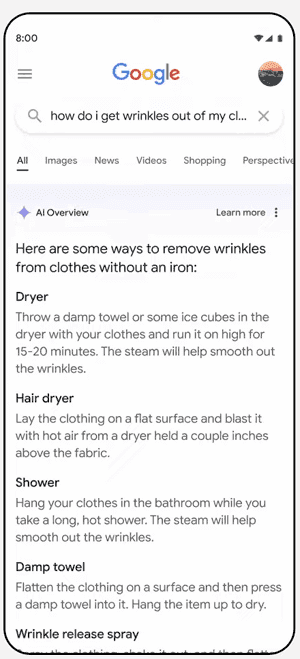
She next went on to describe an example of wrinkled clothes while traveling and turning to Google Search to find ways to prevent the wrinkles. She shows a search activity for travel hacks and shows how organic search results are pushed beneath the AI Overviews feature and new Search and Shopping ads that contain product images and pop out far more than any search results do.
She explained how the new AI Overviews shopping ads will be there to convert searchers:
“With the AI overview, I quickly found some common travel hacks that sounded promising. As I browsed the many options that showed up, I found a really nice fix, a wrinkle release spray that I’d never heard of before. So perfect. I want to try that.
Now, with this feature, I can just click on this ad right away, right there, and buy it.
So as you can see, we’re just making it easier and faster for consumers so that they can take action right away. So this is just one example of how we are using Gen AI. There are many more, and we’re going to start with more applications in search ads.”
3. Targeted Ads Based On AI Overviews
Google Search Is The Bait
Google search engineers are using the most advanced technology and data to create the most useful search results of any time in Google’s history, this is the best it’s ever been. But according to the people who are really in charge at Google, the purpose of Search is not “to organize the world’s information and make it universally accessible and useful” but to build more “reach, engagement and ROI” for advertisers. Sam Altman was right to call what Google is doing dystopian.
SEOs Were Social Engineered
Social engineering is the management of people’s behavior in order to get them to perform a certain way. Google got a huge chunk of the web ecosystem bought into concepts like Core Web Vitals and also Experience, Expertise, Authoritativeness and Trustworthiness in order to satisfy users that Google apparently never intended for them.
It’s not the fault of the Googlers who put their hearts into perfecting search. They do a good job. But it’s clear that Google’s mission is no longer to make information accessible and useful. Perhaps what can only feel like a dystopian horror, Google succeeded in social-engineering the search community and publishers to focus on creating helpful content so that those on the advertising side can use it to build more ROI for advertisers.
It’s not just SEOs and publishers that were used for the benefit of advertisers.
While often overlooked, these HTML tags provide a hierarchical structure to content, enhancing readability and navigation for human visitors.
At the same time, header tags offer semantic signals that help search engines better understand context and key topics.
Google’s guidance reinforces the need to use header tags strategically.
John Mueller, a Google Search Advocate, has stated that header elements are a “really strong signal” that informs Google’s understanding of a page’s topics.
As Google emphasizes rewarding high-quality user experiences, optimizing header tags presents an opportunity to align with best practices for human visitors and search crawlers.
This article outlines how to use header tags, from enhancing content structure and scannability to targeting opportunities for featured snippet displays.
We also explore techniques for incorporating relevant keywords and maintaining consistent formatting.
By implementing these recommendations, websites can provide a better experience while potentially boosting visibility on search engine results pages (SERPs).
What Is A Header Tag?
Header tags are HTML tags that tell a browser what styling it should use to display a piece of text on a webpage.
If we looked up the HTML for the heading above, it’d look something like this:
What is a Header Tag?
Like headings in print content, header tags are used to title or introduce the content below them. HTML header tags follow a hierarchy from
to
.
H1 tags denote the most important text, such as the central theme or title.
H2 and H3 tags are commonly used as subheadings.
H4, H5, and H6 tags provide further structure within those subsections.
Header tags are helpful for users and search engines. For your users, they give them a preview of the content they’re about to read.
For search engines like Google, header tags provide context and a hierarchy for your page. Think of header tags as chapter titles in a book.
Give them a quick scan, and you’ll have a pretty good idea of what it’s about.
How Many Header Tags Are Supported?
HTML supports six levels of header tags, ranging from
to
.
The
tag is typically used for the main heading or title of a page, while
and
tags are commonly employed for subheadings.
The remaining tags,
,
, and
, can provide further structure within subsections.
Header tags help create a logical structure for your content, making it easier for users and search engines to navigate.
Treat your H1 as the main title, H2s as chapters, and H3s to H6s as subsections within each chapter.
When planning your article or landing page, consider the main ideas you want your visitors to take away. These main ideas should form the basis of your header tags and help you create a clear outline.
2. Break Up Blocks Of Text With Subheadings
Break up long blocks of text with relevant subheadings to enhance readability. This makes your content more user-friendly and helps search engines identify covered topics.
A scannable article is positioned to perform well in search engines because Google rewards user-friendly content.
Additionally, scannable articles are commonly shared on social media, which can increase the likelihood of earning natural backlinks.
3. Include Keywords In Your Header Tags
Include your target keywords in header tags where appropriate, but avoid overusing them. Focus on creating informative and engaging headers that accurately reflect the content below them.
While keywords are essential, it’s important not to force them in at the expense of readability.
Google uses header tags to gather context for your page, so incorporate keywords naturally.
Always prioritize creating value and avoid keyword stuffing, which can lead to a poor experience and potential penalties.
4. Optimize For Featured Snippets
Carefully crafted header tags can increase your chances of winning featured snippets.
Here’s how.
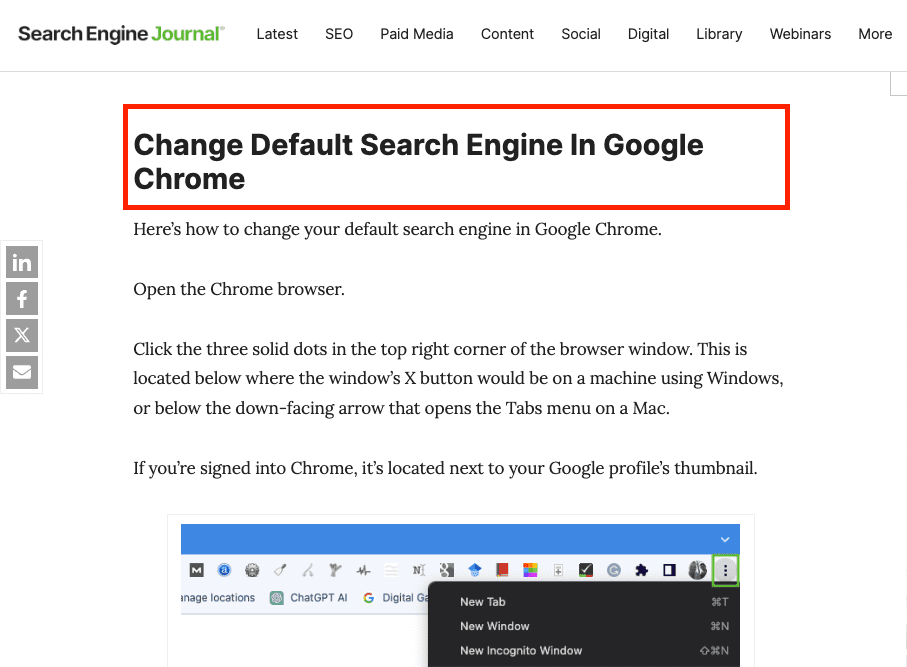
Paragraph Featured Snippets
To optimize for paragraph-featured snippets, identify a relevant long-tail keyword and use it in your H2.
Then, directly below the H2, provide a clear and concise answer to the query, placing the text within
paragraph tags.
This structure helps Google identify and extract the information it needs.
Screenshot from search for [how to remove default search engine in chrome], Google, April 2024
Screenshot from search for [how to remove default search engine in chrome], Google, April 2024
List Featured Snippets
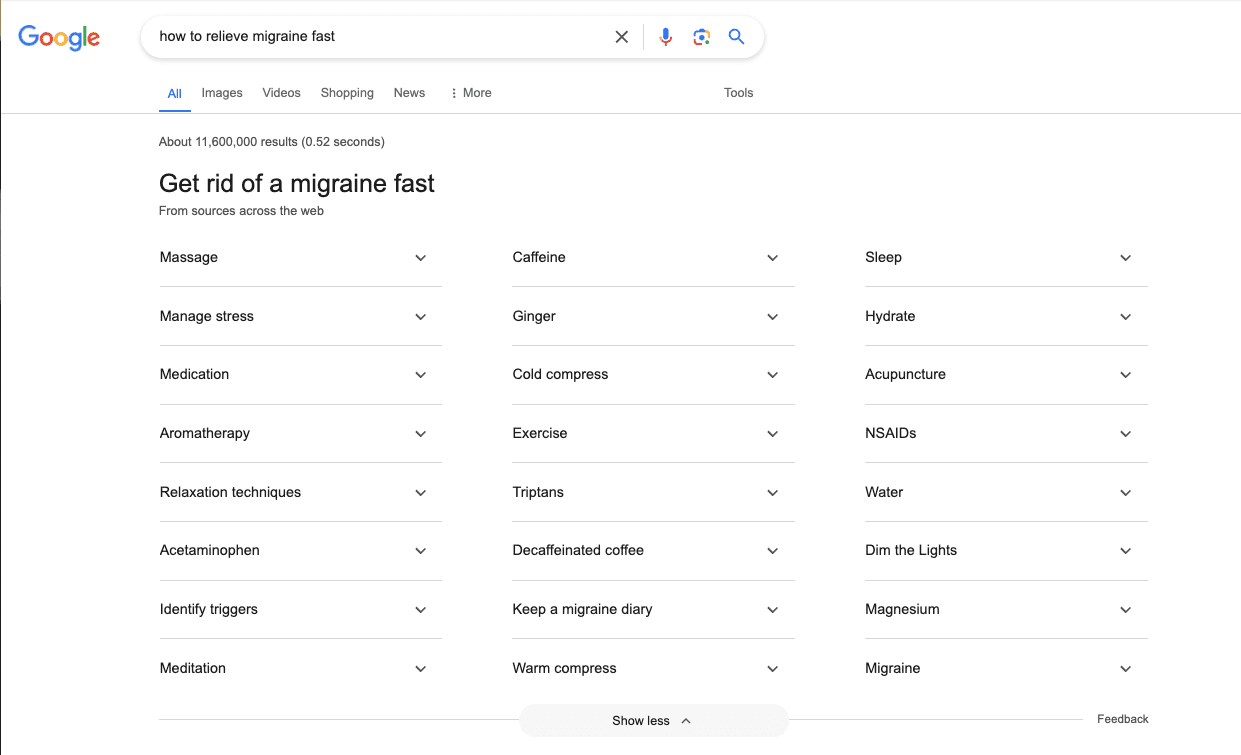
To optimize for list featured snippets, use subheadings (H2 to H6) to outline different items or steps in a process.
Google can pull from these subheadings to create a bulleted or numbered list in the featured snippet, increasing your visibility and driving more traffic to your site.
Here’s an example.
When you search for [how to relieve migraine fast], Google creates a list of answers using the H2s from this WebMD article.
Screenshot from search for [how to relieve migraine fast], Google, April 2024
While multiple H1s are technically allowed, using only one H1 per page is best. This maintains a clear hierarchy and avoids confusion for users and search engines.
Using multiple H1s can make your page appear disorganized. Instead, reserve the H1 tag for your main title and use H2 to H6 tags for subheadings.
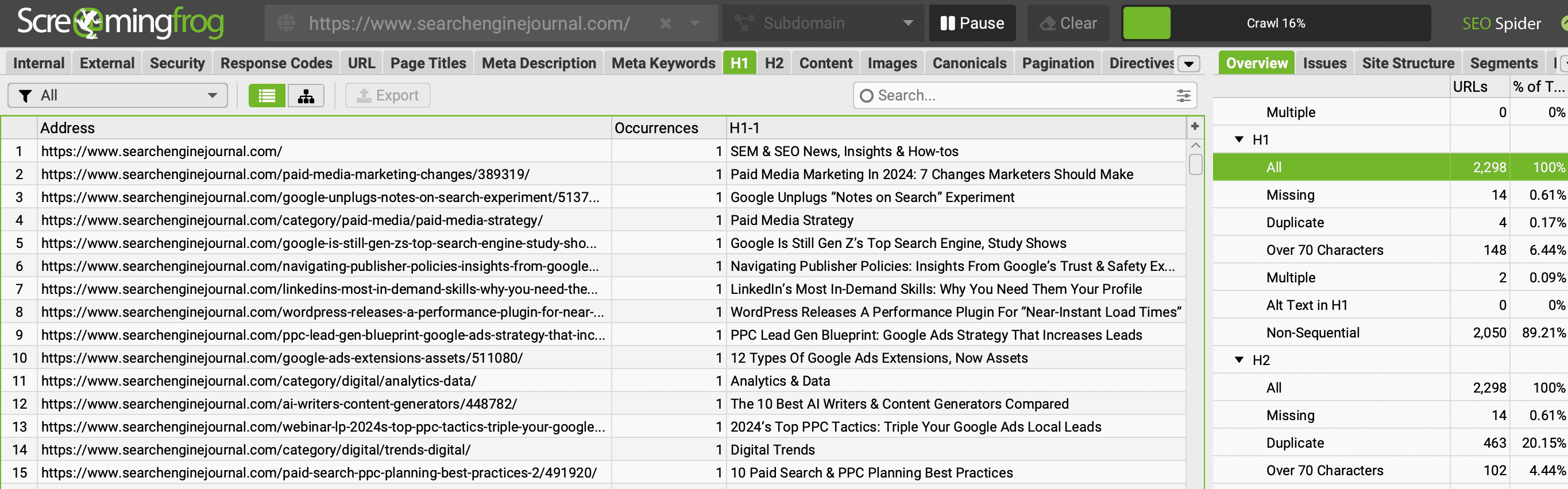
To ensure your site doesn’t have multiple H1s, run your domain through a crawler tool like Screaming Frog and check the H1 tab to identify any pages with missing or numerous H1s.
Screenshot from Screaming Frog, April 2024
The same report is available for H2s.
6. Keep Your Header Tags Consistent
Ensure your header tags follow a consistent style and format throughout your website.
This includes using the same case (title or sentence case), keeping them concise, and limiting their length to around 70 characters.
Consistency in your header tags contributes to a better experience and helps establish a cohesive brand image.
When deciding on a format, consider your target audience and the tone of your content. Once you’ve chosen a style, apply it consistently across all your pages.
In addition to maintaining a consistent format, keep your header tags concise and to the point.
Treat them like mini-titles for the following section of text, and avoid using them to stuff keywords or write lengthy paragraphs.
7. Make Your Header Tags Interesting
Write interesting, engaging header tags that entice readers to continue reading your content.
Pay special attention to your H1, as it can decide whether visitors stay on your page or bounce back to the search results.
A compelling H1 should communicate the main topic of your page and align with the user’s search intent.
Take the time to brainstorm and refine your header tags, ensuring they accurately reflect the content and entice users to keep reading.
Why Header Tags Are Important For SEO
Header tags play a role in SEO by enhancing user experience, providing context to search engines, and increasing the chances of securing featured snippets.
This can potentially lead to better rankings, increased visibility, and higher engagement rates.
Descriptive headings allow readers to skim and jump to relevant sections.
For search crawlers, headers give semantic cues about the context and priority of page content.
Don’t underestimate the SEO power of header tags. Make them a top priority when optimizing your content.
This post was sponsored by DebugBear. The opinions expressed in this article are the sponsor’s own.
Keeping your website fast is important for user experience and SEO.
The Core Web Vitals initiative by Google provides a set of metrics to help you understand the performance of your website.
The three Core Web Vitals metrics are:
This post focuses on the recently introduced INP metric and what you can do to improve it.
How Is Interaction To Next Paint Measured?
INP measures how quickly your website responds to user interactions – for example, a click on a button. More specifically, INP measures the time in milliseconds between the user input and when the browser has finished processing the interaction and is ready to display any visual updates on the page.
Your website needs to complete this process in under 200 milliseconds to get a “Good” score. Values over half a second are considered “Poor”. A poor score in a Core Web Vitals metric can negatively impact your search engine rankings.
Google collects INP data from real visitors on your website as part of the Chrome User Experience Report (CrUX). This CrUX data is what ultimately impacts rankings.
Image created by DebugBear, May 2024
How To Identify & Fix Slow INP Times
The factors causing poor Interaction to Next Paint can often be complex and hard to figure out. Follow this step-by-step guide to understand slow interactions on your website and find potential optimizations.
1. How To Identify A Page With Slow INP Times
Different pages on your website will have different Core Web Vitals scores. So you need to identify a slow page and then investigate what’s causing it to be slow.
By default, page URLs are grouped into URL groups that cover many different pages. Be careful here – not all pages might have the problem that Google is reporting. Instead, click on each URL group to see if URL-specific data is available for some pages and then focus on those.
Screenshot of Google Search Console, May 2024
Using A Real-User Monitoring (RUM) Service
Google won’t report Core Web Vitals data for every page on your website, and it only provides the raw measurements without any details to help you understand and fix the issues. To get that you can use a real-user monitoring tool like DebugBear.
Real-user monitoring works by installing an analytics snippet on your website that measures how fast your website is for your visitors. Once that’s set up you’ll have access to an Interaction to Next Paint dashboard like this:
Screenshot of the DebugBear Interaction to Next Paint dashboard, May 2024
You can identify pages you want to optimize in the list, hover over the URL, and click the funnel icon to look at data for that specific page only.
Image created by DebugBear, May 2024
2. Figure Out What Element Interactions Are Slow
Different visitors on the same page will have different experiences. A lot of that depends on how they interact with the page: if they click on a background image there’s no risk of the page suddenly freezing, but if they click on a button that starts some heavy processing then that’s more likely. And users in that second scenario will experience much higher INP.
To help with that, RUM data provides a breakdown of what page elements users interacted with and how big the interaction delays were.
Screenshot of the DebugBear INP Elements view, May 2024
The screenshot above shows different INP interactions sorted by how frequent these user interactions are. To make optimizations as easy as possible you’ll want to focus on a slow interaction that affects many users.
In DebugBear, you can click on the page element to add it to your filters and continue your investigation.
3. Identify What INP Component Contributes The Most To Slow Interactions
Input Delay: Background code that blocks the interaction from being processed.
Processing Time: The time spent directly handling the interaction.
Presentation Delay: Displaying the visual updates to the screen.
You should focus on which INP component is the biggest contributor to the slow INP time, and ensure you keep that in mind during your investigation.
Screenshot of the DebugBear INP Components, May 2024
In this scenario, Processing Time is the biggest contributor to the slow INP time for the set of pages you’re looking at, but you need to dig deeper to understand why.
High processing time indicates that there is code intercepting the user interaction and running slow performing code. If instead you saw a high input delay, that suggests that there are background tasks blocking the interaction from being processed, for example due to third-party scripts.
4. Check Which Scripts Are Contributing To Slow INP
Sometimes browsers report specific scripts that are contributing to a slow interaction. Your website likely contains both first-party and third-party scripts, both of which can contribute to slow INP times.
A RUM tool like DebugBear can collect and surface this data. The main thing you want to look at is whether you mostly see your own website code or code from third parties.
Screenshot of the INP Primary Script Domain Grouping in DebugBear, May 2024
Tip: When you see a script, or source code function marked as “N/A”, this can indicate that the script comes from a different origin and has additional security restrictions that prevent RUM tools from capturing more detailed information.
This now begins to tell a story: it appears that analytics/third-party scripts are the biggest contributors to the slow INP times.
5. Identify Why Those Scripts Are Running
At this point, you now have a strong suspicion that most of the INP delay, at least on the pages and elements you’re looking at, is due to third-party scripts. But how can you tell whether those are general tracking scripts or if they actually have a role in handling the interaction?
DebugBear offers a breakdown that helps see why the code is running, called the INP Primary Script Invoker breakdown. That’s a bit of a mouthful – multiple different scripts can be involved in slowing down an interaction, and here you just see the biggest contributor. The “Invoker” is just a value that the browser reports about what caused this code to run.
Screenshot of the INP Primary Script Invoker Grouping in DebugBear, May 2024
The following invoker names are examples of page-wide event handlers:
onclick
onmousedown
onpointerup
You can see those a lot in the screenshot above, which tells you that the analytics script is tracking clicks anywhere on the page.
In contrast, if you saw invoker names like these that would indicate event handlers for a specific element on the page:
.load_more.onclick
#logo.onclick
6. Review Specific Page Views
A lot of the data you’ve seen so far is aggregated. It’s now time to look at the individual INP events, to form a definitive conclusion about what’s causing slow INP in this example.
Real user monitoring tools like DebugBear generally offer a way to review specific user experiences. For example, you can see what browser they used, how big their screen is, and what element led to the slowest interaction.
Screenshot of a Page View in DebugBear Real User Monitoring, May 2024
As mentioned before, multiple scripts can contribute to overall slow INP. The INP Scripts section shows you the scripts that were run during the INP interaction:
Screenshot of the DebugBear INP script breakdown, May 2024
You can review each of these scripts in more detail to understand why they run and what’s causing them to take longer to finish.
7. Use The DevTools Profiler For More Information
Real user monitoring tools have access to a lot of data, but for performance and security reasons they can access nowhere near all the available data. That’s why it’s a good idea to also use Chrome DevTools to measure your page performance.
To debug INP in DevTools you can measure how the browser processes one of the slow interactions you’ve identified before. DevTools then shows you exactly how the browser is spending its time handling the interaction.
Screenshot of a performance profile in Chrome DevTools, May 2024
How You Might Resolve This Issue
In this example, you or your development team could resolve this issue by:
Working with the third-party script provider to optimize their script.
Removing the script if it is not essential to the website, or finding an alternative provider.
Adjusting how your own code interacts with the script
How To Investigate High Input Delay
In the previous example most of the INP time was spent running code in response to the interaction. But often the browser is already busy running other code when a user interaction happens. When investigating the INP components you’ll then see a high input delay value.
This can happen for various reasons, for example:
The user interacted with the website while it was still loading.
A scheduled task is running on the page, for example an ongoing animation.
The page is loading and rendering new content.
To understand what’s happening, you can review the invoker name and the INP scripts section of individual user experiences.
Screenshot of the INP Component breakdown within DebugBear, May 2024
In this screenshot, you can see that a timer is running code that coincides with the start of a user interaction.
The script can be opened to reveal the exact code that is run:
Screenshot of INP script details in DebugBear, May 2024
The source code shown in the previous screenshot comes from a third-party user tracking script that is running on the page.
At this stage, you and your development team can continue with the INP workflow presented earlier in this article. For example, debugging with browser DevTools or contacting the third-party provider for support.
How To Investigate High Presentation Delay
Presentation delay tends to be more difficult to debug than input delay or processing time. Often it’s caused by browser behavior rather than a specific script. But as before, you still start by identifying a specific page and a specific interaction.
You can see an example interaction with high presentation delay here:
Screenshot of the an interaction with high presentation delay, May 2024
You see that this happens when the user enters text into a form field. In this example, many visitors pasted large amounts of text that the browser had to process.
Here the fix was to delay the processing, show a “Waiting…” message to the user, and then complete the processing later on. You can see how the INP score improves from May 3:
Screenshot of an Interaction to Next Paint timeline in DebugBear, May 2024
Get The Data You Need To Improve Interaction To Next Paint
Screenshot of the DebugBear Core Web Vitals dashboard, May 2024
Google’s CrUX data is aggregated over a 28-day period, which means that it’ll take a while before you notice a regression. With real-user monitoring you can see the impact of website changes right away and get alerted automatically when there’s a big change.
DebugBear monitors lab data, CrUX data, and real user data. That way you have all the data you need to optimize your Core Web Vitals in one place.
This article has been sponsored by DebugBear, and the views presented herein represent the sponsor’s perspective.
Ready to start optimizing your website? Sign up for DebugBear and get the data you need to deliver great user experiences.
Artificial intelligence has brought a big boost in productivity—to the criminal underworld.
Generative AI provides a new, powerful tool kit that allows malicious actors to work far more efficiently and internationally than ever before, says Vincenzo Ciancaglini, a senior threat researcher at the security company Trend Micro.
Most criminals are “not living in some dark lair and plotting things,” says Ciancaglini. “Most of them are regular folks that carry on regular activities that require productivity as well.”
Last year saw the rise and fall of WormGPT, an AI language model built on top of an open-source model and trained on malware-related data, which was created to assist hackers and had no ethical rules or restrictions. But last summer, its creators announced they were shutting the model down after it started attracting media attention. Since then, cybercriminals have mostly stopped developing their own AI models. Instead, they are opting for tricks with existing tools that work reliably.
That’s because criminals want an easy life and quick gains, Ciancaglini explains. For any new technology to be worth the unknown risks associated with adopting it—for example, a higher risk of getting caught—it has to be better and bring higher rewards than what they’re currently using.
Here are five ways criminals are using AI now.
Phishing
The biggest use case for generative AI among criminals right now is phishing, which involves trying to trick people into revealing sensitive information that can be used for malicious purposes, says Mislav Balunović, an AI security researcher at ETH Zurich. Researchers have found that the rise of ChatGPT has been accompanied by a huge spike in the number of phishing emails.
Spam-generating services, such as GoMail Pro, have ChatGPT integrated into them, which allows criminal users to translate or improve the messages sent to victims, says Ciancaglini. OpenAI’s policies restrict people from using their products for illegal activities, but that is difficult to police in practice, because many innocent-sounding prompts could be used for malicious purposes too, says Ciancaglini.
OpenAI says it uses a mix of human reviewers and automated systems to identify and enforce against misuse of its models, and issues warnings, temporary suspensions and bans if users violate the company’s policies.
“We take the safety of our products seriously and are continually improving our safety measures based on how people use our products,” a spokesperson for OpenAI told us. “We are constantly working to make our models safer and more robust against abuse and jailbreaks, while also maintaining the models’ usefulness and task performance,” they added.
In a report from February, OpenAI said it had closed five accounts associated with state-affiliated malicous actors.
Before, so-called Nigerian prince scams, in which someone promises the victim a large sum of money in exchange for a small up-front payment, were relatively easy to spot because the English in the messages was clumsy and riddled with grammatical errors, Ciancaglini. says. Language models allow scammers to generate messages that sound like something a native speaker would have written.
“English speakers used to be relatively safe from non-English-speaking [criminals] because you could spot their messages,” Ciancaglini says. That’s not the case anymore.
Thanks to better AI translation, different criminal groups around the world can also communicate better with each other. The risk is that they could coordinate large-scale operations that span beyond their nations and target victims in other countries, says Ciancaglini.
Deepfake audio scams
Generative AI has allowed deepfake development to take a big leap forward, with synthetic images, videos, and audio looking and sounding more realistic than ever. This has not gone unnoticed by the criminal underworld.
Earlier this year, an employee in Hong Kong was reportedly scammed out of $25 million after cybercriminals used a deepfake of the company’s chief financial officer to convince the employee to transfer the money to the scammer’s account. “We’ve seen deepfakes finally being marketed in the underground,” says Ciancaglini. His team found people on platforms such as Telegram showing off their “portfolio” of deepfakes and selling their services for as little as $10 per image or $500 per minute of video. One of the most popular people for criminals to deepfake is Elon Musk, says Ciancaglini.
And while deepfake videos remain complicated to make and easier for humans to spot, that is not the case for audio deepfakes. They are cheap to make and require only a couple of seconds of someone’s voice—taken, for example, from social media—to generate something scarily convincing.
In the US, there have been high-profile cases where people have received distressing calls from loved ones saying they’ve been kidnapped and asking for money to be freed, only for the caller to turn out to be a scammer using a deepfake voice recording.
“People need to be aware that now these things are possible, and people need to be aware that now the Nigerian king doesn’t speak in broken English anymore,” says Ciancaglini. “People can call you with another voice, and they can put you in a very stressful situation,” he adds.
There are some for people to protect themselves, he says. Ciancaglini recommends agreeing on a regularly changing secret safe word between loved ones that could help confirm the identity of the person on the other end of the line.
“I password-protected my grandma,” he says.
Bypassing identity checks
Another way criminals are using deepfakes is to bypass “know your customer” verification systems. Banks and cryptocurrency exchanges use these systems to verify that their customers are real people. They require new users to take a photo of themselves holding a physical identification document in front of a camera. But criminals have started selling apps on platforms such as Telegram that allow people to get around the requirement.
They work by offering a fake or stolen ID and imposing a deepfake image on top of a real person’s face to trick the verification system on an Android phone’s camera. Ciancaglini has found examples where people are offering these services for cryptocurrency website Binance for as little as $70.
“They are still fairly basic,” Ciancaglini says. The techniques they use are similar to Instagram filters, where someone else’s face is swapped for your own.
“What we can expect in the future is that [criminals] will use actual deepfakes … so that you can do more complex authentication,” he says.
An example of a stolen ID and a criminal using face swapping technology to bypass identity verification systems.
Jailbreak-as-a-service
If you ask most AI systems how to make a bomb, you won’t get a useful response.
That’s because AI companies have put in place various safeguards to prevent their models from spewing harmful or dangerous information. Instead of building their own AI models without these safeguards, which is expensive, time-consuming, and difficult, cybercriminals have begun to embrace a new trend: jailbreak-as-a-service.
Most models come with rules around how they can be used. Jailbreaking allows users to manipulate the AI system to generate outputs that violate those policies—for example, to write code for ransomware or generate text that could be used in scam emails.
Services such as EscapeGPT and BlackhatGPT offer anonymized access to language-model APIs and jailbreaking prompts that update frequently. To fight back against this growing cottage industry, AI companies such as OpenAI and Google frequently have to plug security holes that could allow their models to be abused.
Jailbreaking services use different tricks to break through safety mechanisms, such as posing hypothetical questions or asking questions in foreign languages. There is a constant cat-and-mouse game between AI companies trying to prevent their models from misbehaving and malicious actors coming up with ever more creative jailbreaking prompts.
These services are hitting the sweet spot for criminals, says Ciancaglini.
“Keeping up with jailbreaks is a tedious activity. You come up with a new one, then you need to test it, then it’s going to work for a couple of weeks, and then Open AI updates their model,” he adds. “Jailbreaking is a super-interesting service for criminals.”
Doxxing and surveillance
AI language models are a perfect tool for not only phishing but for doxxing (revealing private, identifying information about someone online), says Balunović. This is because AI language models are trained on vast amounts of internet data, including personal data, and can deduce where, for example, someone might be located.
As an example of how this works, you could ask a chatbot to pretend to be a private investigator with experience in profiling. Then you could ask it to analyze text the victim has written, and infer personal information from small clues in that text—for example, their age based on when they went to high school, or where they live based on landmarks they mention on their commute. The more information there is about them on the internet, the more vulnerable they are to being identified.
Balunović was part of a team of researchers that found late last year that large language models, such as GPT-4, Llama 2, and Claude, are able to infer sensitive information such as people’s ethnicity, location, and occupation purely from mundane conversations with a chatbot. In theory, anyone with access to these models could use them this way.
Since their paper came out, new services that exploit this feature of language models have emerged.
While the existence of these services doesn’t indicate criminal activity, it points out the new capabilities malicious actors could get their hands on. And if regular people can build surveillance tools like this, state actors probably have far better systems, Balunović says.
“The only way for us to prevent these things is to work on defenses,” he says.
Companies should invest in data protection and security, he adds.
For individuals, increased awareness is key. People should think twice about what they share online and decide whether they are comfortable with having their personal details being used in language models, Balunović says.
This week’s list of new products from companies offering services to ecommerce and omnichannel merchants includes updates on tax compliance, accessibility, inventory, social media management, cross-channel order fulfillment, chargebacks, and direct-to-consumer management for perishable-goods brands.
Got an ecommerce product release? Email releases@practicalecommerce.com.
New Tools for Merchants: May 21
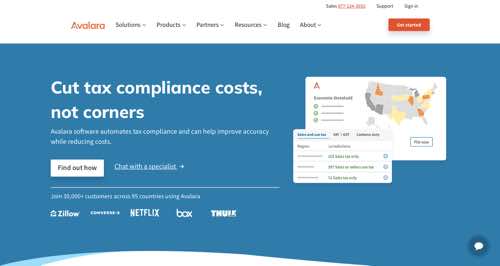
Avalara expands partnership with Shopify to enable global tax compliance for merchants.Avalara, a provider of cloud-based tax compliance automation, has expanded its partnership with Shopify by joining the Shopify Tax Platform. According to Avalara, through the expanded partnership, Shopify merchants of any size can easily manage and automate global tax compliance. By joining the Shopify Tax Partner Platform, Avalara can now serve all Shopify customers with their global tax compliance requirements, including sales tax, value-added tax, exemption certificate management, 1099 and W-9 issuance, property tax, and more.
Avalara
Zoovu releases tools for accessible ecommerce experiences.Zoovu, a developer of AI-powered ecommerce experiences, has released tools to create product discovery that comply with level AA of the Americans with Disabilities Act and the Web Content Accessibility Guidelines 2.1. The features include making it easier to provide live video and audio captions, 4.5-to-1 contrast ratios to ensure text is readable by those with color blindness, up to 200% text resizing, and simpler navigation with consistent menus and buttons.
eBay launches feature to simplify listing resale clothing.eBay has launched a “resell on eBay” feature to simplify the process of listing pre-owned clothing. The feature will be integrated into Certilogo’s Secure by Design digital ID, which can be accessed by scanning a smart label on connected products. eBay plans to extend the resell service to more brands using Certilogo digital ID and make it a default feature of its Secure by Design technology.
Ecommerce startup Purple Dot raises $10 million to reduce unsold inventory. Purple Dot, an ecommerce pre-order and waitlist platform, has announced the closure of a $10 million Series A funding round led by European venture capital firm OpenOcean. Purple Dot’s pre-commerce solution enables brands to sell earlier, helping them reduce inventory risk and store less. Purple Dot states the cash will enable it to continue building the platform and expand its reach to more brands and industries.
Purple Dot
Astound Digital and Shopify partner to boost outcomes for retail brands.Astound Digital, a producer of digital experiences for brands, has announced a strategic partnership with Shopify. The partnership will combine Astound’s knowledge of retail and Shopify’s unified commerce offering aimed at helping retailers break down silos between channels such as D2C, B2B, and point of sale. The partnership includes training and certification on Astound’s capability to support customers beyond online commerce.
Mastercard and Salesforce announce an integration to transform transaction disputes.Mastercard and Salesforce have announced a new integration to speed up the resolution of transaction disputes and reduce associated costs. The partnership will integrate Salesforce’s Financial Services Cloud with Mastercard’s dispute resolution services, providing a powerful one-stop shop for intake, managing disputes, reporting, and preventing chargebacks. Mastercard’s services include Ethoca Alerts, which provides near real-time notifications when a financial institution raises a chargeback, and Ethoca Consumer Clarity, enabling purchase insights to issuer teams.
Highperformr secures $3.5 million to help B2B businesses amplify their social presence.Highperformr, a social AI platform for B2B businesses, has secured $3.5 million in seed funding and launched its product, Highperformr for Teams, designed to help B2B companies streamline their social media workflows. The funding round was led by Venture Highway, with participation from Neon, DeVC, and notable angel investors. The investment will be used to develop Highperformr’s native AI capabilities further and to build a distribution network.
Highperformr
Poshmark launches Promoted Closet marketing tool.Poshmark, a fashion resale marketplace with real-time social experiences, has launched Promoted Closet, a paid marketing tool to help sellers accelerate sales and drive engagement with their listings. Available in the U.S., Promoted Closet leverages machine learning to match shoppers’ search terms with promoted listings, ensuring relevancy and enhancing sellers’ ability to earn on Poshmark. Sellers can set a weekly budget and let it run, unlocking listing-level data reports, including impressions, clicks, and insights.
Gorgias raises $29 million for AI-powered customer experience for ecommerce.Gorgias, a customer experience platform for ecommerce brands, has announced $29 million in additional seed funding, led by SaaStr and Alven, with participation from Horsley Bridge, Amplify, Shopify, Sapphire, CRV, and Transpose Platform. Gorgias will utilize the funding to expand its suite of AI tools, including Automate for customer support. According to Gorgias, ecommerce brands can now exceed customer expectations with instant on-brand answers to customer questions.
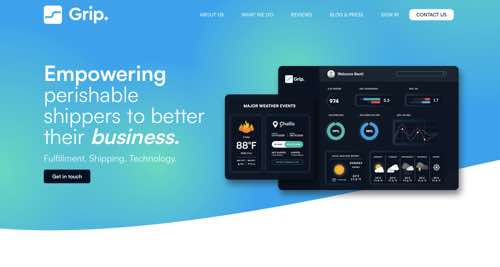
Grip launches Pulse, a next-generation order management system for perishable goods brands.Grip, a provider of perishable supply chain technology and fulfillment, has introduced Pulse, an order management system and multi-directional dashboard for ecommerce brands. Pulse offers features for D2C brands that ship frozen and refrigerated items, including real-time inventory management, batch number traceability, SKU-specific tracking, live carrier tracking data, and multi-directional updates with Shopify and other point-of-sale systems. Bands can monitor daily shipments, refrigerant usage, and inventory movement without custom middleware and spreadsheets.
The announcement comes from Gary Illyes, a member of Google’s Search Relations team, who took to LinkedIn to commend the WordPress developer community for their efforts.
The Lastmod Element: A Key Signal for Crawlers
The lastmod metadata tag indicates the last significant modification date of a webpage, enabling search engine crawlers to prioritize and schedule crawls.
“The lastmod element in sitemaps is a signal that can help crawlers figure out how often to crawl your pages.”
By natively populating the lastmod field, WordPress 6.5 lets websites improve SEO efforts without additional manual configuration.
Illyes emphasizes that a “significant” change refers to updates that might matter to users and, consequently, to the website’s performance.
WordPress Community Collaboration
Lastmod support in WordPress 6.5 is possible due to the collaborative efforts of the developer community, spearheaded by Pascal Birchler.
Illyes acknowledged and praised their contributions, stating,
“If you’re on WordPress, since version 6.5, you have this field natively populated for you thanks to Pascal Birchler and the WordPress developer community.”
While applauding the new feature, Illyes urges website owners to upgrade their WordPress installations to take advantage of the lastmod support.
He adds:
“If you’re holding back on upgrading your WordPress installation, please bite the bullet and just do it (maybe once there are no plugin conflicts).”
As WordPress evolves, this update displays the platform’s commitment to complying with SEO best practices and providing users with needed tools.
FAQ
What is the significance of the lastmod element in sitemaps?
The lastmod metadata tag signifies the most recent modification date of a webpage. This information allows search engine crawlers to prioritize and schedule page crawls efficiently.
By indicating the latest updates, the lastmod tag helps search engines focus on the most current content, potentially improving a site’s visibility in search results.
How does WordPress 6.5 support the lastmod element?
With the release of WordPress 6.5, native support for the lastmod element in sitemaps is now available. This means that WordPress automatically includes this metadata in sitemaps without requiring additional manual configuration by the user.
This enhancement helps website owners improve their SEO efforts seamlessly by ensuring search engines receive accurate and updated information about their webpages.
Why should website owners upgrade to WordPress 6.5?
Website owners are encouraged to upgrade to WordPress 6.5 to use native lastmod support.
Upgrading ensures compatibility with the latest SEO practices and tools, providing users with a more effective and user-friendly platform. However, it is recommended to ensure no plugin conflicts before upgrading.
Job listings for SEO roles dropped 37% in the first quarter of 2024 compared to last year.
Analysis by specialty job board SEOJobs.com compiled data from over 80,000 job listings posted by 4,700 employers in 2023 and early 2024.
The report cites the increasing use of AI in search as a critical factor impacting SEO hiring.
Mid-Level Roles Hardest Hit
While senior SEO positions saw a 3% year-over-year increase in Q1 2024 and entry-level roles rose 1%, mid-level SEO jobs experienced a 6% decline compared to Q1 2023.
Nick LeRoy, owner of SEOJobs.com, attributed this disparity to AI automation handling routine tasks. That suggests companies require experts capable of higher-level work.
He states:
“Tasks historically mapped to an entry-level position are now being done faster and cheaper with AI technology…
… These entry-level SEOs are now expected to have a base-level knowledge of search AND the soft skills to compete against their mid-level peers with 3+ years of experience.
… Companies want to “do more with less,” which means hiring cheap junior resources and paying for proven experience/results via senior SEOs.”
On a more positive note, LeRoy finds that remote SEO opportunities grew in Q1 2024 after dipping late last year.
Lack Of Salary Transparency
The SEO job report also highlighted the industry’s need for salary transparency.
Only 18% of job listings provide pay details, though there may be more wage disclosure as more states legally require it.
Economic Pressures
Alongside AI disruption, broader economic conditions appear to weigh on SEO employment.
According to the United States Bureau of Labor Statistics (BLS), the pullback in listings coincides with a slowing of job growth in the U.S. labor market.
The BLS recently reported that “employment was little changed over the month in major industries,” including professional and business services. SEO roles often fall under this sector.
6 Ways SEO Professionals Can Stay Competitive
As AI’s role in search grows, the most successful SEO professionals will likely be those who can combine technical mastery with strategic thinking, analytical skills, and a lifelong commitment to learning and professional development.
Here are some potential strategies to differentiate yourself in today’s job market:
1. Develop AI Expertise
With AI playing a prominent role in search, understanding and leveraging AI technologies will be critical.
Professionals utilizing AI tools like natural language processing, content generation, and semantic analysis will have a competitive edge.
2. Focus On Strategic SEO
As AI automates many technical and execution-based SEO tasks, employers will likely prioritize hiring SEOs with strategic abilities.
Professionals adept at competitive analysis, audience research, content strategy development, and conversion optimization may be in higher demand.
3. Build Analytics Prowess
With AI’s impact on search rankings and user behavior, the ability to extract insights from data will become even more valuable.
Expertise in analytics platforms, statistical analysis, data visualization, and communicating data-driven recommendations can set you apart from other candidates.
4. Specialization
While some SEO professionals take a generalist approach, increasing specialization within disciplines like local search, e-commerce, enterprise-level SEO, or a particular industry vertical could appeal more to potential employers.
5. Emphasize Soft Skills
As technical duties become automated, soft skills like communication, problem-solving, creativity, and adaptability may carry more weight in the hiring process.
SEO professionals who can collaborate across teams and articulate strategies can separate themselves.
6. Build A Personal Brand
Developing a solid personal brand through blogging, public speaking, publishing authoritative content, and engaging on social media can raise your profile. This increased visibility can lead to new job opportunities.
Parting Thoughts
While the short-term outlook is challenging, the role of the SEO professional is transforming, not disappearing.
Those able to adapt their value proposition and align with new demands can find viable career opportunities.
Featured Image: PeopleImages.com – Yuri A/Shutterstock