Etsy Merchant Eyes Shopify, Dual Brands

Kevlyn Walsh is a Denver-based art teacher turned entrepreneur. She launched Festive Gal, an Etsy shop, in 2019 after her handmade headband was a hit among Christmas party attendees.

Fast forward to 2025, and Festive Gal is thriving, selling custom gifts and party supplies. A new second site, Bake It Fancy, on Shopify, sells cooking accessories.

Amid the growth, Kevlyn manages employees, production, and, yes, Etsy constraints. She addressed those challenges and more in our recent conversation.

Our entire audio is embedded below. The transcript is edited for clarity and length.

Eric Bandholz: Who are you, and what do you do?

Kevlyn Walsh: I run two brands. My first, Festive Gal, grew mainly on Etsy and offers custom gifts and party supplies to make life more fun. My second, Bake It Fancy, is a new brand focused on baking accessories that help people create beautiful cookies.

Bake It Fancy evolved from a best-selling Festive Gal product. It performed so well that I decided it deserved its own identity. Festive Gal celebrates parties and gifting; Bake It Fancy is all about creativity in the kitchen.

Etsy is how I became a business owner. Before opening my shop, I had no idea what a conversion rate was or how to sell online. It all started with an ugly Christmas sweater party. I made an over-the-top holiday headband covered in tinsel, bows, and a tiny elf.

Everyone loved it, so I made more, opened an Etsy shop, and sold out by Christmas. That success inspired me to keep creating new products and following party trends.

At first, I was still teaching full-time, but my Etsy sales eventually surpassed my teacher salary. By 2019, I quit teaching to run my shop full time — and I’ve never looked back.

The original headbands were too labor-intensive to scale, so I simplified them into paper party headbands with customizable phrases. They became Festive Gal’s signature product. I created designs for birthdays, bachelorette parties, and trending themes — like Game of Thrones fans hosting viewing parties. I made headbands with phrases such as “Hold the Door” and “I Drink and I Know Things,” and they sold like crazy.

Back then, I didn’t think much about trademarks and used pop-culture phrases freely. Now that my business is bigger, I avoid those entirely. Using names like “Game of Thrones” could get a shop flagged. It’s frustrating because Etsy is still full of Disney and other IP-based items, yet enforcement feels aimed at successful sellers. I’ve explored licensing, but the costs, reporting, and low margins made it more hassle than it was worth.

Bandholz: How do you manage custom orders on Etsy?

Walsh: Etsy’s basic customization tools aree limited. Each listing includes an input field that customers must complete before adding an item to their cart, to help prevent missed details. However, sellers only get two dropdown menus and one text box. I have to simplify the listing or get creative for buyers to choose multiple options, such as color, font, and size.

That lack of flexibility makes Etsy’s user interface challenging for complex customizations. In contrast, Shopify has apps that allow unlimited dropdowns and far more personalization features. On Etsy, if a buyer forgets to include key details such as the name for a custom item, I have to message her directly. That extra communication can be time-consuming and slow down production.

Bandholz: How does Etsy define “handmade”?

Walsh: It’s ironic that Etsy promotes itself as a handmade platform. Real success there requires efficiency and operations. To scale, you need systems, employees, and streamlined production — but you can’t build that until you have sales. It’s a catch-22. I’ve had products go viral, but there’s a limit to how many we can make before delays frustrate customers. Etsy doesn’t provide the tools sellers need to manage growth efficiently.

For example, there’s no multi-user access. I can’t give a virtual assistant or employee their own login to handle messages or shipping without sharing my banking information. That makes delegation risky.

As for “handmade,” there’s a lot of gray area. Some sellers import mostly finished products — items 90% made in China — and add customization in the U.S. through embroidery or vinyl. Etsy allows some flexibility there, but the rules are vague. The guidelines mention terms such as “made, sourced, or designed by seller,” which are open to interpretation.

In Etsy forums, sellers debate what those definitions mean and worry whether new policies could jeopardize their shops.

Bandholz: What advice would you give someone considering selling on Etsy?

Walsh: First, define your goals. The platform is perfect if you want only to make “fun money” from a craft you love. Enjoy the creative process, make products that delight you, and celebrate each sale.

But if your goal is to replace your full-time income, you have to approach Etsy strategically. Choose a product that can scale efficiently. On Etsy, sales compound. The algorithm rewards momentum, so when a listing sells, it signals that people want that product. Etsy earns a percentage of each sale, and it promotes listings that generate revenue. So the more you sell, the more exposure your products get.

Plan early for operations. Will you hire help? How will you handle shipping? Can you manage rush orders for personalized gifts?

Etsy customers often order last-minute, so reliability is key. I’ve worked through the flu to meet deadlines because I didn’t want to disappoint buyers. Now that I have employees, that stress is lighter, but it took planning and growth.

Bandholz: Is Etsy your main sales channel?

Walsh: Yes, Etsy is still my primary source of sales, and I’ve had great success there. But the platform’s overall traffic has declined. I think part of the issue is quality control — Etsy has allowed too many low-quality sellers. Cheap, mass-produced items clutter search results. It’s lost some of the curated, handmade charm that made it special.

Because of that, I’m working to grow off-platform. Relying solely on Etsy feels risky, especially with how inconsistent their seller support has become. Recently, Etsy deployed AI bots to remove non-handmade listings, but the system often flags legitimate shops.

Many legitimate sellers have had top-performing products or entire shops deactivated with no way to reach a human for help. It’s a tough situation for honest creators trying to run real handmade businesses.

Bandholz: Is the new baking brand on Etsy, too?

Walsh: No, I’m building Bake It Fancy on Shopify and driving traffic through Meta ads and content creation. I even converted part of my warehouse into a “media room” with a fake kitchen and a real oven from Home Depot, so I can film baking videos and tutorials. My goal is to grow this brand independently, without relying on third-party marketplaces.

I’ve learned a lot about ecommerce after years of running Festive Gal on Etsy. Now I’m ready to apply those lessons — using Shopify, ads, and content — to build a brand with full control.

Content creation used to be hard for me. I have a three-year-old and a one-year-old, and my home kitchen isn’t ideal for filming. This new setup makes it easier and more fun. Plus, baking content is naturally engaging. Watching someone decorate cookies is satisfying and creative.

With Festive Gal, I never relied on content since Etsy brought steady traffic. But Bake It Fancy is different. Cooking is so demonstrable and visual that I can easily film with just my hands, and I don’t even need to get camera-ready every time.

Bandholz: Where can folks buy your products and follow you?

Walsh: My Etsy shop is Festive Gal. Festive Gal also has a Shopify website, FestiveGal.com. BakeItFancy.com is ramping up. I’m on Instagram and LinkedIn.

Content maintenance strategy: 6 tips for a cleaner website

If you’ve been working on your website for a couple of years, chances are that your website has become a giant collection of posts and pages. When writing a post, you might find out you’ve already written a similar article (maybe even twice), or you might get a feeling that you’ve written something related that you can’t find anymore. This can become even more complex when you’re not the only one writing for this website. Cleaning up your older content can be overwhelming; that’s why regular content maintenance is key. In this post, we’ll give you some tips to create a good content maintenance strategy!

Table of contents

Key takeaways

  • Regular content maintenance is crucial for managing a vast collection of posts and pages on your website.
  • Reserve dedicated time for content audits and pruning to prevent confusion for site visitors and competition between similar articles.
  • Utilize data from Google Analytics and Search Console to assess content performance and decide what needs updating, merging, or deleting.
  • Focus on monitoring key content that drives conversions or ranks well in search engines, and enhance internal linking to improve visibility.
  • Employ tools like Yoast SEO Premium to streamline the content maintenance process, ensuring your website remains organized and effective.

1. Reserve time for content maintenance

It might be tempting, especially if you love writing, to keep on producing new content and never look back. But if you do this, you might be shooting yourself in the foot. Your articles that are very similar to each other can start competing with each other in the search results. Having too much content that isn’t structured can also confuse site visitors; they might not know where to go on your website. And the more content you get, the more overwhelming cleaning up your content becomes. So, don’t wait too long with the implementation of a proper content maintenance strategy.

It’s a good idea to plan regular SEO audits and reserve some time for content pruning. How often you should do that depends on a few factors, such as the amount of content you already have, how often you publish new articles, and how many people you have on your editorial team.

At Yoast, we try to plan structured sessions with our content team to improve existing content. We create lists or do an audit (more on that later) and start cleaning up. But in addition to these sessions, we also improve and update blog content in our usual publication flow. When we encounter articles that need updates, we add them to our backlog, assign them to a team member, and update or even republish them on our blog.

2. What does the data say?

When you sit down to actually go through your content and tidy up, it’s sensible to base your decisions on data. Apart from looking at the content on the page itself, you should answer the following questions:

  • Does the page get any traffic?
  • Does it have value (meaning that the visitor completed one of your goals during the same session on your site)?
  • How is the engagement?
  • How long do people stay on this page?

This kind of data can all be found in Google Analytics. If you go to Reports > Engagement > Pages and screens in the left-hand menu, you’ll get a nice overview of the traffic on your pages. You can even export this to a spreadsheet to keep track of what you did or decided to do with a page.

If you want to know how your articles perform in the search results, Google Search Console is a great help. Especially the performance tab tells you a lot about how your pages perform in Google. It tells you the average position you hold for a keyword, but also how many impressions and clicks your pages get. Check out our beginner’s guide to Google Search Console.

There are a number of tools that make this process easier by providing a list of your content and how it performs. This makes it easier to compare how certain (related) articles rank and get their traffic. One tool we like to use at Yoast is the content audit template by ahrefs. This gives you insights into which content is still of value to your site and which low-quality content is dragging you down. It will give you advice (leave as is/manually review/redirect or update/delete) per URL. Of course, we wouldn’t recommend blindly following such automated advice, but it gives you a lot of insight and is a great starting point to take a critical look at your content.

3. Always keep an eye on your most important content

While it’s not harmful if some older posts escape your attention while working on new content, there are posts and pages that you always need to keep an eye on. You’re probably already monitoring pages that convert, whether that’s in terms of sales, newsletter subscriptions, or a contact or reservation page. But you might also have pages that do (or could do) really well in the search engines. For instance, some evergreen, complete, and informative posts or pages about topics you’re really an expert on. This is the content you want to keep fresh and relevant, and regularly link to. These are the posts and pages that should end up high in the search results.

In Yoast SEO Premium, you can mark these types of guides as cornerstone content. This will trigger some specific actions in Yoast SEO. For instance, if you haven’t updated a cornerstone post in six months, it gets added to the stale cornerstone content filter. You’ll find that filter in your post overview. It helps you stay on top of your SEO game by telling you whether any important content needs an update. Ideally, your score should be zero there. If you do find some articles in this filter, it’s time to review those. Make sure all the information is still correct, add new insights, and perhaps check competitors’ posts on the same topic to see if you’re not missing anything.

The stale cornerstone content filter in Yoast SEO for WordPress

4. Improve your internal linking

A content maintenance activity that is often highly underrated is working on your internal linking. Why invest time in internal linking? Well, first and foremost, because the content you link to is of interest to your readers and helps you keep them on your site. But these links help search engines, such as Google, crawl your content and determine its importance. An article that gets a lot of links (internally or externally) is deemed important by Google. It also helps Google understand what content is related to each other. Therefore, internal linking is an important part of a cornerstone content strategy. All your pages, but especially the evergreen guides we discussed above, need attention, regular updates, and lots of links!

So it’s good to link to your other posts while writing a new one. The internal linking suggestions tool in Yoast SEO Premium makes this super easy for you. But while it’s quite common to link to existing content from our new articles, don’t forget that those new articles also need links pointing to them. At Yoast, we regularly check whether our new posts have enough links pointing to them, especially if we want them to rank!

Implementing a cornerstone strategy

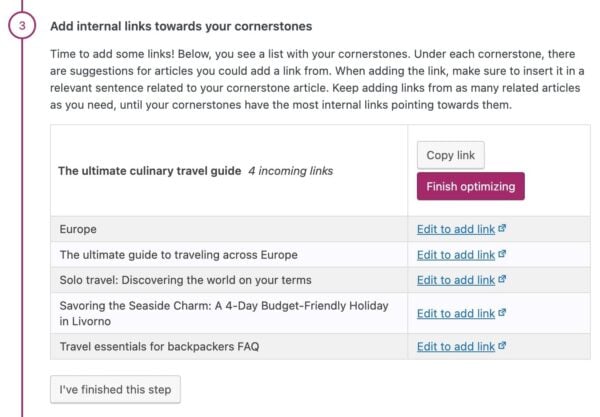
But what about the cornerstone content we discussed above? How do you make sure your most valuable content gets enough links? If you want to focus on these articles, Yoast SEO Premium has just the tool for you: the Cornerstone workout. In a few steps, it lets you select your most important articles and mark them as cornerstones. Then, it shows you how many internal links there are pointing to this post. Do you feel this isn’t in line with the number of links it should have? We’ll give you suggestions on which related posts to link from. And in just a few clicks, you can add the link from the right spot in the related post:

The cornerstone workout in Yoast SEO Premium

As you probably (hopefully!) don’t change your cornerstone strategy every month, it’s not necessary to do this workout every month. If you have a vast amount of content that performs quite well, checking this, let’s say, every 3 or 6 months, you should be fine. However, if you’re starting out, publishing a lot of new content, or making big changes to your site, you should probably do this workout more often. As your site grows, your focal point might change, and this workout will help you make sure you stay focused on the content you really want to rank.

5. Clean up the attic once in a while

We mostly discussed your best and most important content until now. But on the other side of the spectrum, we have your older (and more lonely) content that you haven’t touched in a while. Announcements of events that took place years ago, new product launches from when you just started, and blog posts that simply aren’t relevant anymore. These posts keep filling up your attic, and at one point, you should clean your attic thoroughly. You don’t want people or Google to find low-quality pages or pages showing outdated or irrelevant information and get lost up there.

There are some ways to go about this. You can, of course, go to your blog post archive and clean up while going through your oldest post. Never just delete something, though! Take a closer look at the content and always check whether a post still gets traffic in Google Analytics. In doubt whether you should keep it? Read our blog on updating or deleting old content to help you with that choice. And, if you think a post is irrelevant and you want to delete it, you should either redirect it to a good equivalent URL or have it show a 410 page, indicating that it’s been deleted on purpose. You can read all about properly deleting a post here.

Cleaning up orphaned content

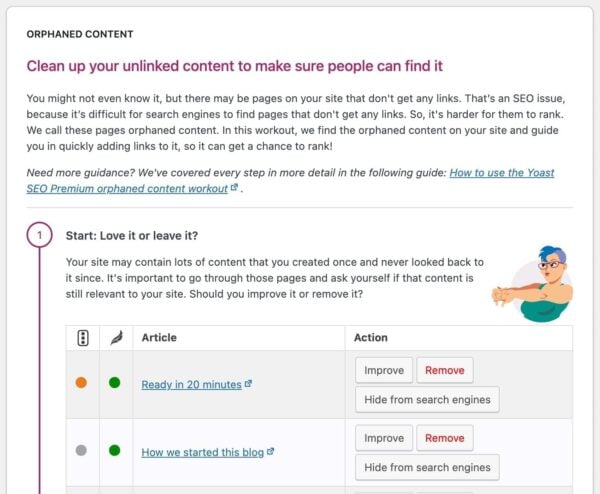
Yoast SEO Premium also has an SEO workout to help you maintain old and forgotten content: the Orphaned content workout. It lists all of your unlinked content for you. Because you never or hardly linked to these pages, we can assume they’re pages you’ve once created but never looked back at. Or, they don’t fit into your current content strategy anymore. That’s why this is a good place to start cleaning up! With the workout, you can go through the posts and pages one by one and consider: is this post not relevant anymore? Then delete and redirect the URL to a better destination in a few clicks! Is it still relevant but outdated? Then update it and start adding links to it from related posts. Did you just forget to link to this post? Then start adding some links! The workout takes you by the hand through all these steps, so it’s easy to keep track of your progress.

The orphaned content workout in Yoast SEO Premium

How often should you do this workout? It’s hard to make a general statement about this because it very much depends on the amount of old content you have, how good your internal linking is, and how much new content you’re creating. If you have a bigger site, it will probably be quite a time investment when you do it for the first time. But if you maintain it and do this workout regularly, on a monthly basis, for instance, you will get it done faster every time!

6. Check your content per topic/tag

When you have a lot of similar articles, they can start competing with each other in the search engines. We call that content or keyword cannibalization. That’s why it’s good to look at all the articles you have on a certain topic from time to time. Do they differ enough? Are they right below each other in Google’s search results on page 2? Then you might have to merge two articles into one to make that one perform better. Depending on the size of your site, you can look at this on a category or tag level or even on smaller subtopics.

In the aforementioned post, we describe in detail how to go about this content maintenance process of fixing keyword cannibalization. In short, you’ll have to create an overview of the posts on that topic. Then look at how all of these articles perform with the help of Google Search Console and Google Analytics. This will help you decide what to keep, merge, or delete!

Content maintenance: you need time and tools!

As you might have already noticed, content maintenance can be quite a task. But if you do it regularly and use the right tools, it gets easier over time. And the easier it gets, the more fun! Who doesn’t want a tidied-up website? It will make you, your site visitors, and Google very happy. So, don’t wait too long to implement a good content maintenance strategy and use the right tools to make your life easier!

Read more: Your website needs SEO maintenance! »

Unlock our SEO workouts with Yoast SEO Premium

Get Yoast SEO Premium and enjoy access to all our best SEO tools, training and SEO workouts!

Keep reading: What is site structure and why is it important? »

25 Years Of Google Ads: Was It Better Then Or Now? via @sejournal, @brookeosmundson

Twenty-five years ago, Google launched a modest advertising product that would evolve into one of the most influential tools in digital marketing.

Back then, it was called Google AdWords; today, it is Google Ads.

Over that quarter-century, the platform has transformed in format, scope, and ambition.

While the technology behind Google Ads has evolved dramatically, one question continues to spark debate among marketers: “Was Google Ads better back then, or now?”

To answer that, let’s first look at the major moments that shaped its evolution.

The Evolution Of Google Ads Through the Years

Few platforms have changed as dramatically as Google Ads.

In the early 2000s, advertisers logged into something simple and intuitive: an interface centered around keywords and bids.

But over time, the product grew alongside shifts in consumer behavior, device adoption, and technology. Here are some of the most defining moments in that evolution, as shared through Google’s own product history.

2000: Google AdWords Launches

Google AdWords officially went live in October 2000 with about 350 advertisers. The platform allows self-serve text ads on search results, based on cost-per-click bids.

2002: The Pay-Per-Click Model Expands

AdWords transitioned fully to a PPC model, giving advertisers the ability to pay only when users click their ads. This shift laid the groundwork for the accountability marketers still expect from digital ads today.

2005: Analytics And Conversion Tracking Arrive

After acquiring Urchin Software, Google launched Google Analytics, bringing much-needed visibility into campaign performance and website behavior. Conversion tracking follows soon after, tightening the connection between clicks and measurable outcomes.

2005: Quality Score Enters The Auction

In July, Google introduced Quality Score and quality-based minimum bids, tying ad eligibility to keyword relevance and performance rather than pure bid amount. In December, landing page quality was added to the algorithm.

2010: Remarketing Makes Its Debut

Advertisers can now reach users who’ve previously visited their site. This marked Google’s entry into behavioral targeting, which would later become the backbone of the Display Network.

2012: Google Shopping Transitions To A Paid Model

In May 2012, Google announced that Google Product Search (originally Froogle) would become Google Shopping, shifting from free product listings to a paid model using Product Listing Ads. The change, completed in the U.S. by October, aims to improve product data quality and merchant participation.

2013: Enhanced Campaigns Unify Devices

Google launched Enhanced Campaigns, consolidating desktop, mobile, and tablet targeting into a single structure. This simplifies management and allows bid adjustments based on device, location, and time.

2018: Rebranding To Google Ads

Google retired the AdWords name and introduced “Google Ads,” reflecting a unified platform for Search, Display, YouTube, Shopping, and app campaigns. Smart Campaigns debut, aimed at helping small businesses use automation effectively.

2021: Performance Max launches

In November, Google unveiled Performance Max, an AI-powered campaign type that reaches audiences across all Google properties from a single goal-based campaign. It represents a major step toward automation and multi-channel integration.

2023-2025: Generative AI And Transparency Updates

Google introduced Gemini-powered tools for creative generation and conversational campaign setup, alongside new transparency features in Performance Max. Advertisers gain asset-level insights and expanded brand controls.

What The Early Years of Google Ads Offered

The early years of Google Ads were simpler. In some ways, that simplicity was its biggest strength.

Advertisers had complete control over their campaigns. You picked your keywords, set bids manually, and saw immediate cause and effect. Every metric was transparent. If performance changed, you knew (almost) exactly why.

The learning curve was also more manageable. Smaller advertisers could compete with minimal budgets and basic knowledge of keyword matching.

Many early adopters built thriving businesses from nothing more than a spreadsheet of bids and a few lines of ad copy. In those days, optimization was a craft defined by hands-on management, not machine learning.

Ad costs were also lower, and competition was thinner. A small business could afford to experiment without being priced out by large brands or aggressive automated bidding strategies.

But simplicity came at a cost. Campaign management was time-consuming, requiring manual bid adjustments and constant monitoring.

There was no formal cross-device attribution (reports didn’t arrive until 2016), no remarketing (until 2010), and no way to scale campaigns beyond a few thousand keywords without significant effort. Reporting was limited, and insights were confined to surface-level performance data.

The early Google Ads environment rewarded technical skill and persistence. It was direct, measurable, and transparent. But, it was also labor-intensive and limited in scale.

What Google Ads Offers Advertisers Today

Today’s Google Ads platform bears little resemblance to its early years.

Campaigns are no longer built around individual keywords or devices, but around audiences, signals, and outcomes. Machine learning drives bidding, creative, and placements in real time, analyzing millions of data points per second.

Advertisers now have access to tools that were once unimaginable.

Smart Bidding strategies like Maximize Conversion Value and Target ROAS use historical and contextual signals to optimize bids automatically.

Performance Max and Demand Gen campaigns reach users across Search, YouTube, Display, Discover, and Maps without manual segmentation.

Creative tools have appeared just as rapidly. Gemini-powered AI features can generate ad copy, images, and videos aligned with brand tone and performance goals. Advertisers spend less time on repetitive tasks and more on strategy, messaging, and measurement.

At the same time, data integration has reached new levels. With Google Analytics 4, enhanced conversions, and first-party data connections, advertisers can measure and optimize complex user journeys while staying compliant with privacy standards.

The trade-off, of course, is control.

As automation grows, transparency into individual performance levers diminishes. You can’t always pinpoint which keyword, audience, or placement drove a conversion.

For some advertisers, that loss of granularity remains frustrating. But for many others, the efficiency and predictive power of automation far outweigh what was lost.

Modern measurement also operates under tighter privacy standards. With the loss of cookies and growing restrictions on user-level tracking, Google Ads has leaned on modeled conversions and consented first-party data to maintain accuracy.

For seasoned advertisers, this has shifted the skillset required for success. It’s gone from purely tactical management to data stewardship and strategy.

Teams that can align CRM data, offline conversions, and privacy-safe remarketing signals now have a competitive edge. It’s no longer just about optimizing for clicks; it’s about understanding the full data pipeline that powers automation.

How Google Is Responding To Advertiser Feedback In Its AI Era

Google’s 25th anniversary message emphasized one clear theme: Advertisers are still at the center of our evolution. That statement reflects an ongoing effort to balance automation with transparency and trust.

Performance Max, initially criticized for its lack of reporting detail, now includes asset-level performance and improved search term visibility.

Advertisers can better understand which creative elements drive results and where their ads appear.

Google also added account-level negative keywords and brand exclusion controls to address long-standing requests for greater oversight.

These updates are also a reflection of how the advertising landscape itself has changed.

Privacy regulations like GDPR and the phase-out of third-party cookies are forcing all ad platforms to rethink data transparency. Advertisers are demanding clearer insight into how machine-learning models use their data, while consumers are insisting on greater privacy.

Google’s move toward more transparent reporting, automated creative controls, and first-party data integrations is as much a response to market pressure as it is to advertiser feedback. The company knows that trust is now a competitive advantage.

When agencies and in-house teams can confidently explain how automation makes decisions, they’re more likely to scale their budgets across Google’s platform. In many ways, Google’s AI transparency efforts are as much about rebuilding confidence as they are about innovation.

The new conversational campaign setup, where marketers describe their goals and creative ideas in natural language, is another potential example of responding to feedback. Many small businesses found campaign setup intimidating; conversational AI simplifies the process without removing human judgment.

Google also continues to reinforce the role of human decision-making.

In its 2025 anniversary blog, Google reiterated that AI’s role is to support advertisers. It emphasizes collaboration between human creativity and automation rather than replacement.

It signals that even as automation deepens, Google recognizes advertisers’ desire to maintain control and understand what the system is doing on their behalf.

The relationship between advertisers and Google Ads has always been one of collaboration, and sometimes tension. But recent changes show a genuine effort to listen, adapt, and make the platform more transparent in an AI-first atmosphere.

“Better” Depends On What You Value

The question of whether Google Ads was better then or now ultimately depends on what you value most as an advertiser.

If you prize simplicity, transparency, and full control, the early years of AdWords were unmatched. Campaigns were manual but predictable. You could see every moving part and trace every click to a decision you made.

If you value scale, efficiency, and advanced targeting, today’s Google Ads is undeniably better. The ability to reach audiences across channels, powered by real-time automation and predictive data, has expanded what’s possible in digital marketing.

What’s clear across both eras is Google’s willingness to evolve alongside advertisers. Every major shift has aimed to improve relevance, performance, and user experience.

While not every change has been universally welcomed, the intent, to balance automation with advertiser trust, has remained consistent.

After 25 years, Google Ads continues to define the standard for paid media. The platform may look different, but its purpose hasn’t changed: helping businesses connect with people in meaningful, measurable ways.

Whether that’s better or worse depends less on the tool itself, and more on how we choose to use and embrace its technology.

More Resources:


Featured Image: Who is Danny/Shutterstock

Google’s Preferred Sources Tool Is Jammed With Spam via @sejournal, @martinibuster

Google’s Preferred Sources tool is meant to let fans of certain websites tell Google they want to see more of their favorite sites in the Top News feature. However, Google is surfacing copycat spam sites, random sites, and parked domains. Some of the sites appearing in the tool are so low quality that only their home pages are indexed. Shouldn’t this tool just show legitimate websites and not spam?

Google Preferred Sources

Google’s Preferred Sources feature gives users control over which news outlets appear more often in Google’s Top Stories feature. Rather than relying on Google’s ranking system alone, users can make their preferred news sources appear more frequently. This change doesn’t block other sites from appearing, it only personalizes what a user sees to reflect their chosen sources. Preferred Sources enablers users to have more control over which news sources appear more often.

Similar Domains In Preferred Sources

What appears to be happening is that people are registering domains that are similar to those of well-known websites. One way they’re doing it is by domain squatting on an exact match to domain name using a different TLD. For example, when a popular domain name is registered with a .com or .net the domain squatters will register the same domain name using a .com.in or .net.in domain name.

Screenshot Of A Random Subdomain Ranking For Automattic

Preferred Sources Errors

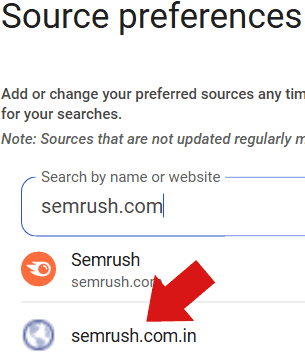
It’s unclear if people are registering domain names and adding them to the Preferred Sources tool or if they are being added in some different manner. A search for a popular SEO tool surfaces the correct domain but also a parked domain in the Indian .com.in ccTLD:

Screenshot Of An Indian Parked Domain

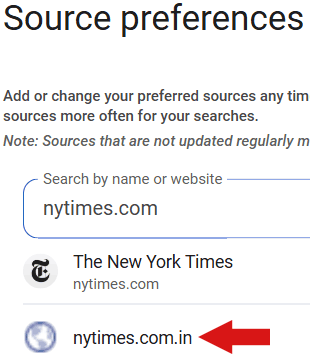
What is known is that people are registering copycat domains but how they’re getting into Google’s Preferred Sources tool is not well known. Preferred Sources is currently available in the USA and in India, which may explain the Indian domains showing up in the tool.

Screenshot Of Indian NYTimes Parked Domain

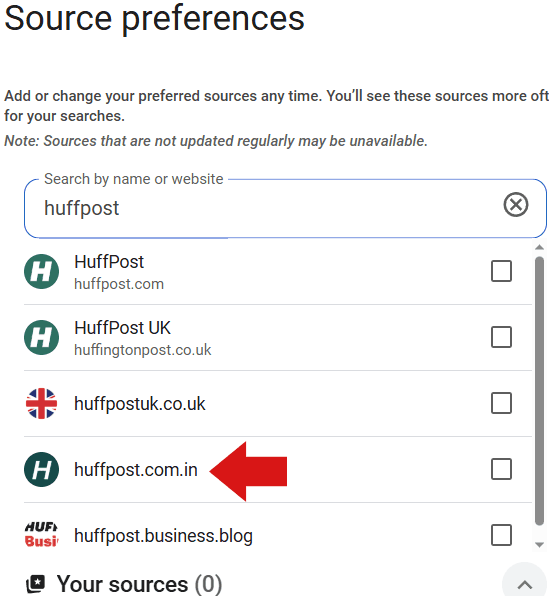
For example, a search within the Preferred Sources tool for Huffpost surfaces a copycat site on an Indian country code level domain.

Screenshot Of HuffPost In Source Preferences

That site Indian Huffpost site features articles (and links) to topics like payday loans, personal injury lawyers, and luxury watches. Not surprisingly, it doesn’t look like Google is indexing more than the home page of that site.

Screenshot Of A Site Search

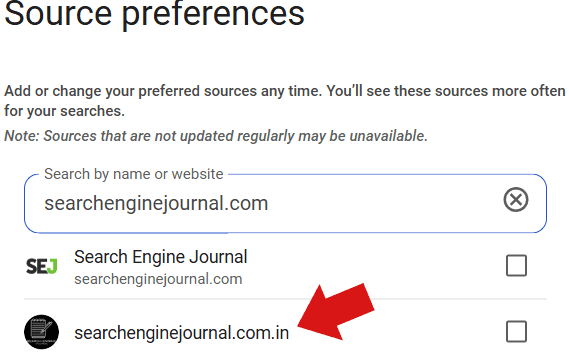
There’s also an Indian site squatting on Search Engine Journal’s domain name.

Screenshot Of SEJ In Source Preferences Tool

What Is Going On?

It’s possible that SEOs are registering copycat domains and then submitting their domains to the Preferred Sources tool. Or it could be that Google picks them up automatically and is just listing whatever is out there.

Stop worrying about your AI footprint. Look at the big picture instead.

Picture it: I’m minding my business at a party, parked by the snack table (of course). A friend of a friend wanders up, and we strike up a conversation. It quickly turns to work, and upon learning that I’m a climate technology reporter, my new acquaintance says something like: “Should I be using AI? I’ve heard it’s awful for the environment.” 

This actually happens pretty often now. Generally, I tell people not to worry—let a chatbot plan your vacation, suggest recipe ideas, or write you a poem if you want. 

That response might surprise some people, but I promise I’m not living under a rock, and I have seen all the concerning projections about how much electricity AI is using. Data centers could consume up to 945 terawatt-hours annually by 2030. (That’s roughly as much as Japan.) 

But I feel strongly about not putting the onus on individuals, partly because AI concerns remind me so much of another question: “What should I do to reduce my carbon footprint?” 

That one gets under my skin because of the context: BP helped popularize the concept of a carbon footprint in a marketing campaign in the early 2000s. That framing effectively shifts the burden of worrying about the environment from fossil-fuel companies to individuals. 

The reality is, no one person can address climate change alone: Our entire society is built around burning fossil fuels. To address climate change, we need political action and public support for researching and scaling up climate technology. We need companies to innovate and take decisive action to reduce greenhouse-gas emissions. Focusing too much on individuals is a distraction from the real solutions on the table. 

I see something similar today with AI. People are asking climate reporters at barbecues whether they should feel guilty about using chatbots too frequently when we need to focus on the bigger picture. 

Big tech companies are playing into this narrative by providing energy-use estimates for their products at the user level. A couple of recent reports put the electricity used to query a chatbot at about 0.3 watt-hours, the same as powering a microwave for about a second. That’s so small as to be virtually insignificant.

But stopping with the energy use of a single query obscures the full truth, which is that this industry is growing quickly, building energy-hungry infrastructure at a nearly incomprehensible scale to satisfy the AI appetites of society as a whole. Meta is currently building a data center in Louisiana with five gigawatts of computational power—about the same demand as the entire state of Maine at the summer peak.  (To learn more, read our Power Hungry series online.)

Increasingly, there’s no getting away from AI, and it’s not as simple as choosing to use or not use the technology. Your favorite search engine likely gives you an AI summary at the top of your search results. Your email provider’s suggested replies? Probably AI. Same for chatting with customer service while you’re shopping online. 

Just as with climate change, we need to look at this as a system rather than a series of individual choices. 

Massive tech companies using AI in their products should be disclosing their total energy and water use and going into detail about how they complete their calculations. Estimating the burden per query is a start, but we also deserve to see how these impacts add up for billions of users, and how that’s changing over time as companies (hopefully) make their products more efficient. Lawmakers should be mandating these disclosures, and we should be asking for them, too. 

That’s not to say there’s absolutely no individual action that you can take. Just as you could meaningfully reduce your individual greenhouse-gas emissions by taking fewer flights and eating less meat, there are some reasonable things that you can do to reduce your AI footprint. Generating videos tends to be especially energy-intensive, as does using reasoning models to engage with long prompts and produce long answers. Asking a chatbot to help plan your day, suggest fun activities to do with your family, or summarize a ridiculously long email has relatively minor impact. 

Ultimately, as long as you aren’t relentlessly churning out AI slop, you shouldn’t be too worried about your individual AI footprint. But we should all be keeping our eye on what this industry will mean for our grid, our society, and our planet. 

This article is from The Spark, MIT Technology Review’s weekly climate newsletter. To receive it in your inbox every Wednesday, sign up here.

The Download: how doctors fight conspiracy theories, and your AI footprint

This is today’s edition of The Download, our weekday newsletter that provides a daily dose of what’s going on in the world of technology.

How conspiracy theories infiltrated the doctor’s office

As anyone who has googled their symptoms and convinced themselves that they’ve got a brain tumor will attest, the internet makes it very easy to self-(mis)diagnose your health problems. And although social media and other digital forums can be a lifeline for some people looking for a diagnosis or community, when that information is wrong, it can put their well-being and even lives in danger.

We spoke to a number of health-care professionals who told us how this modern impulse to “do your own research” is changing their profession. Read the full story.

—Rhiannon Williams

This story is part of MIT Technology Review’s series “The New Conspiracy Age,” on how the present boom in conspiracy theories is reshaping science and technology.

Stop worrying about your AI footprint. Look at the big picture instead.

—Casey Crownhart

As a climate technology reporter, I’m often asked by people whether they should be using AI, given how awful it is for the environment. Generally, I tell them not to worry—let a chatbot plan your vacation, suggest recipe ideas, or write you a poem if you want.

That response might surprise some. I promise I’m not living under a rock, and I have seen all the concerning projections about how much electricity AI is using. But I feel strongly about not putting the onus on individuals. Here’s why.

This article is from The Spark, MIT Technology Review’s weekly climate newsletter. To receive it in your inbox every Wednesday, sign up here.

A new ion-based quantum computer makes error correction simpler

A company called Quantinuum has just unveiled Helios, its third-generation quantum computer, which includes expanded computing power and error correction capability.

Like all other existing quantum computers, Helios is not powerful enough to execute the industry’s dream money-making algorithms, such as those that would be useful for materials discovery or financial modeling.

But Quantinuum’s machines, which use individual ions as qubits, could be easier to scale up than quantum computers that use superconducting circuits as qubits, such as Google’s and IBM’s. Read the full story.

—Sophia Chen

The must-reads

I’ve combed the internet to find you today’s most fun/important/scary/fascinating stories about technology.

1 A new California law could change how all Americans browse online 
It gives web users the chance to opt out of having their personal information sold or shared. (The Markup)

2 The FDA has fast-tracked a pill to treat pancreatic cancer
The experimental drug appears promising, but experts worry corners may be cut. (WP $)
+ Demand for AstraZeneca’s cancer and diabetes drugs is pushing profits up. (Bloomberg $)
+ A new cancer treatment kills cells using localized heat. (Wired $)

3 AI pioneers claim it is already superior to humans in many tasks
But not all tasks are created equal. (FT $)
+ Are we all wandering into an AGI trap? (Vox)
+ How AGI became the most consequential conspiracy theory of our time. (MIT Technology Review)

4 IBM is planning on cutting thousands of jobs
It’s shifting its focus to software and AI consulting, apparently. (Bloomberg $)
+ It’s keen to grow the number of its customers seeking AI advice. (NYT $)

5 Big Tech’s data centers aren’t the job-generators we were promised
The jobs they do create are largely in security and cleaning. (Rest of World)
+ We did the math on AI’s energy footprint. Here’s the story you haven’t heard. (MIT Technology Review)

6 Microsoft let AI shopping agents loose in a fake marketplace 
They were easily manipulated into buying goods, it found. (TechCrunch)
+ When AIs bargain, a less advanced agent could cost you. (MIT Technology Review)

7 Sony has compiled a dataset to test the fairness of computer vision models
And it’s confident it’s been compiled in a fair and ethical way. (The Register)
+ These new tools could make AI vision systems less biased. (MIT Technology Review)

8 The social network is no more
We’re living in an age of anti-social media. (The Atlantic $)
+ Scam ads are rife across platforms, but these former Meta workers have a plan. (Wired $)
+ The ultimate online flex? Having no followers. (New Yorker $)

9 Vibe coding is Collins dictionary’s word of 2025 📖
Beating stiff competition from “clanker.” (The Guardian)
+ What is vibe coding, exactly? (MIT Technology Review)

10 These people found romance with their chatbot companions
The AI may not be real, but the humans’ feelings certainly are. (NYT $)
+ It’s surprisingly easy to stumble into a relationship with an AI chatbot. (MIT Technology Review)

Quote of the day

“The opportunistic side of me is realizing that your average accountant won’t be doing this.”

—Sal Abdulla, founder of accounting-software startup NixSheets, tells the Wall Street Journal he’s using AI tools to gain an edge on his competitors.

One more thing

Ethically sourced “spare” human bodies could revolutionize medicine

Many challenges in medicine stem, in large part, from a common root cause: a severe shortage of ethically-sourced human bodies.

There might be a way to get out of this moral and scientific deadlock. Recent advances in biotechnology now provide a pathway to producing living human bodies without the neural components that allow us to think, be aware, or feel pain.

Many will find this possibility disturbing, but if researchers and policymakers can find a way to pull these technologies together, we may one day be able to create “spare” bodies, both human and nonhuman. Read the full story.

—Carsten T. Charlesworth, Henry T. Greely & Hiromitsu Nakauchi

We can still have nice things

A place for comfort, fun and distraction to brighten up your day. (Got any ideas? Drop me a line or skeet ’em at me.)

+ Make sure to look up so you don’t miss November’s supermoon.
+ If you keep finding yourself mindlessly scrolling (and who doesn’t?), maybe this whopping six-pound phone case could solve your addiction.
+ Life lessons from a 101-year old who has no plans to retire.
+ Are you a fan of movement snacking?

New Ecommerce Tools: November 6, 2025

Every week we handpick a list of new products and services for ecommerce merchants. This installment includes updates on AI-powered marketing, automated ad creation, payments, customer experience management, shipping analytics, ad management, autonomous commerce, live shopping, and loyalty apps.

Got an ecommerce product release? Email updates@practicalecommerce.com.

New Tools for Merchants

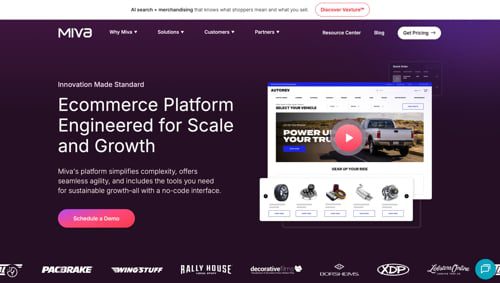
Miva launches payment service for ecommerce transactions. Miva, an ecommerce platform, has launched MivaPay, a native payment processing service in partnership with PayPal. MivaPay is built directly into the Miva platform, allowing merchants to start accepting secure payments and eliminating the need for complex third-party integrations. According to Miva, MivaPay enables merchants to launch payment processing in just a few minutes, manage payments and store operations in one dashboard, offer flexible payment options such as digital wallets, and provide PCI-compliant processing for secure transactions.

Screenshot of MivaPay web page.

Miva

HubSpot to acquire XFunnel for AI-powered marketing. HubSpot, an AI-powered CRM for marketing, sales, and customer service, has agreed to acquire XFunnel, a platform that helps businesses monitor, experiment with, and strengthen their presence across LLMs through Answer Engine Optimization. XFunnel helps marketing teams see how their business appears in AI-generated answers and understand the actions needed to connect with the right audiences. XFunnel will be integrated natively into HubSpot’s marketing products.

payabl. launches payments integration for Shopify merchants. payabl., a U.K.-based financial technology provider, has launched a payments integration with Shopify. Beyond online payments, the integration features refunds, 3D Secure, AI-enabled fraud protection tools, and chargeback management. According to payabl., merchants can go live in as little as 48 hours, supported by the platform’s onboarding team. The integration currently supports major payment methods, including credit and debit cards, with additional payment methods, such as PayPal and Wero, coming soon.

Konecta and CrewAI partner to transform operations with Agentic AI. Konecta, a service provider in customer experience management, has partnered with CrewAI, a multi-agent orchestration platform. CrewAI’s platform enables organizations to coordinate multiple specialized AI agents that work collaboratively to execute complex, end-to-end business processes. According to the companies, this orchestration can transform how organizations operate, allowing them to automate workflows that traditionally required multiple human touchpoints. Built on CrewAI’s Agent Management Platform, it will enable Konecta and its clients to industrialize agentic use cases.

Screenshot of Konecta's homepage.

Konecta

Shippo launches an analytics product to help merchants leverage shipping data. Shippo, a shipping platform for ecommerce businesses, has launched Shippo Intelligence, an analytics product designed to help analyze shipping costs and identify strategies for delivering more orders on time. With Shippo Intelligence, businesses can compare costs (rated versus invoiced) side by side, identify trends, and utilize clear dashboards to adjust volume, rebalance carriers, or refine fulfillment decisions as trends evolve. Shippo Intelligence is built into the API portal, enabling users to make smarter shipping decisions without additional setup.

Xnurta announces Criteo integration to simplify omnichannel ad management. Xnurta, an agentic AI-powered advertising platform, has released Criteo Retail Media API integration, enabling advertisers to seamlessly create, manage, and optimize campaigns across Criteo’s 225 retail networks all in one place. Get reporting across campaign, line item, product, keyword, negative keyword, placement, and search term levels. Utilize enhanced bulk management and rule-based automation. With this expansion, Xnurta offers a central hub for retail media intelligence, connecting Amazon, Walmart, and Criteo within one AI-powered platform.

Kinsta launches bandwidth-based pricing for website owners and developers. Kinsta, a managed hosting provider for WordPress, has introduced bandwidth-based hosting plans in addition to its existing visitor-based plans. The new plans offer customers the flexibility to select a pricing model that aligns with a site’s traffic patterns and usage. Features of the new pricing option include bandwidth-based plans available at every visitor-based tier, easy switching between visits and bandwidth at any time, improved usage notifications, and a lower risk of unexpected overages caused by bots and scrapers.

Kinsta homepage.

Kinsta

Balance introduces MCP Server to manage B2B payments in real time. Balance, an AI-powered financial platform for B2B commerce, has announced its beta release of the Balance Model Context Protocol Server, enabling customers’ AI agents to directly communicate with Balance’s payments, credit, and receivables APIs. According to the company, the Balance MCP Server enables AI agents used by customers to securely retrieve and act on live data using natural language prompts. Merchants can unlock real-time buyer intelligence without leaving their preferred AI chat interface.

ESW launches Agentic Hub to power global commerce. ESW, a direct-to-consumer ecommerce provider, has announced Agentic Hub, an agentic AI platform to power autonomous commerce experiences. Launching in early 2026, the platform will enable brands to build AI agents tailored for international ecommerce to operate and adapt in real-time through self-learning AI systems. As part of the launch, ESW will introduce four new Agentic AI-powered tools: Customer Service, Payment Optimization, Agentic Commerce, and Onboarding & Configuration. Early preview is planned for December 2025.

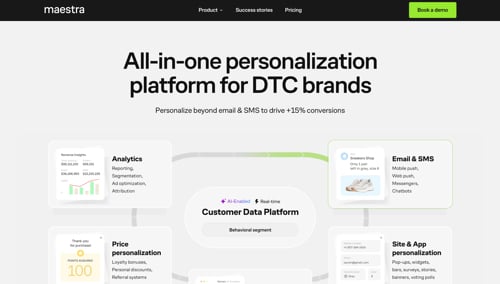
Marketing platform Maestra launches Shopify loyalty app. Maestra.io, an all-in-one marketing platform for direct-to-consumer brands, has launched its Shopify loyalty app, Maestra Companion App, enabling brands to deploy loyalty programs and sync first-party data. The Maestra Companion App enables brands to launch personalized rewards and promotions, showcase challenges to earn points and highlight available offers, and provide loyalty at checkout. According to Maestra, direct-to-consumer brands can personalize customer interaction across email, SMS/MMS/RCS, web, mobile push, and messaging platforms.

Maestra homepage.

Maestra

Crescendo releases Multimodal AI contact center. Crescendo, an AI-native contact center, has launched Multimodal AI, which unifies voice, text, and visual interactions within a single conversation. Customers can simultaneously type, speak, share images, and even connect to devices. Crescendo orchestrates intelligence by using advanced large language models, role-specific prompting, and direct data access through the Model Context Protocol. Additional updated components to Crescendo’s AI Suite include brand-controllable voice models, AI-driven analytics, automated ticket management, and streamlined data access to platforms such as Shopify.

Live shopping platform Whatnot raises $225 million for expansion. Whatnot, a live shopping platform and marketplace, has closed a $225 million Series F round, co-led by DST Global and CapitalG. New investors Sequoia Capital and Alkeon Capital participated, alongside returning backers Greycroft, Andreessen Horowitz, Avra, and Bond. Other investors include Y Combinator, Lightspeed Venture Partners, and Liquid 2 Ventures. The company will use the capital to invest in its platform, roll out new features, develop its policies, and accelerate international expansion.

Cuttable launches in the U.S., giving away AI-made ads. Cuttable, an AI-powered platform that automates ad creation for ecommerce, has launched in the U.S. Cuttable’s platform connects to a Shopify or ecommerce store, analyzes the brand’s products and visual identity, and then generates ready-to-run image and video ads optimized for Meta Ads Manager. As part of the launch, Cuttable is giving away 1,000 ads to every online store in the U.S. for Meta platforms Facebook and Instagram.

Cuttable homepage.

Cuttable

Google Warns Against Relying On SEO Audit Tool Scores via @sejournal, @MattGSouthern

Google warned against relying on tool-generated scores for technical SEO audits.

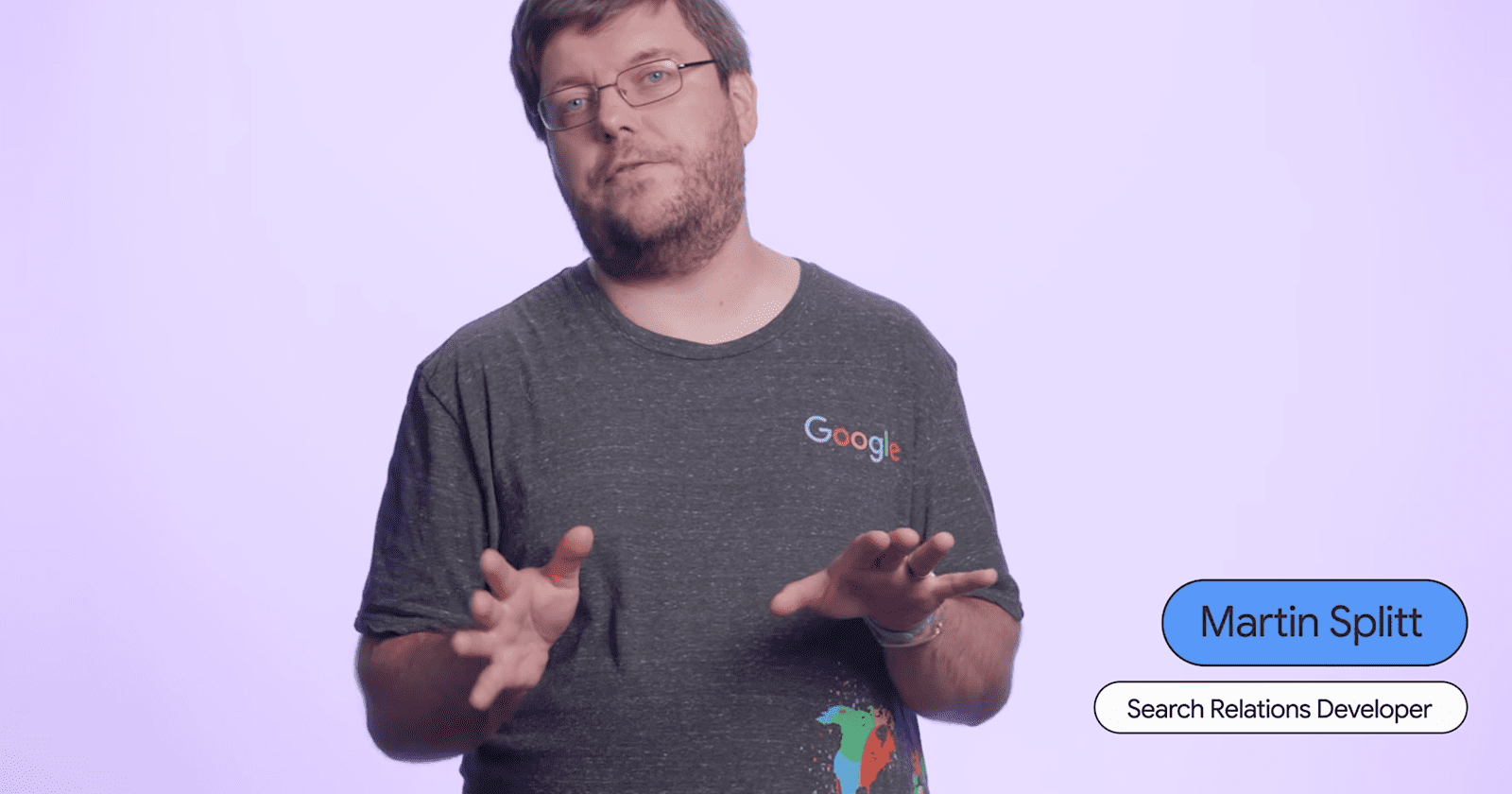
Search Relations team member Martin Splitt outlined a three-step framework in a Search Central Lightning Talk that emphasizes site-specific context over standardized metrics.

The Three-Step Framework

Splitt outlined the core objective in the video:

“A technical audit, in my opinion, should make sure no technical issues prevent or interfere with crawling or indexing. It can use checklists and guidelines to do so, but it needs experience and expertise to adapt these guidelines and checklists to the site you audit.”

His recommended framework has three phases.

First, use tools and guidelines to identify potential issues. Second, create a report tailored to the specific site. Third, make recommendations based on actual site needs.

Understanding site technology comes before running diagnostic tools. Group findings by effort required and potential impact, Splitt said.

When 404s Are Normal

High 404 counts don’t always mean problems.

The red flag is unexplained rises without corresponding website changes.

Splitt explained:

“A high number of 404s, for instance, is expected if you removed a lot of content recently. That’s not a problem. It’s a normal consequence of that. But if you have an unexplained rise in 404 responses, though, that’s something you want to point out and investigate…”

Google Search Console’s Crawl Stats report shows whether 404 patterns match normal site maintenance or indicate technical issues.

Context Over Scores

Tools generate numerical scores that lack site-specific context.

Not everything tools flag carries equal weight. An international site needs hreflang auditing, while a single-language site doesn’t.

Splitt emphasized human judgment over automation:

“Please, please don’t follow your tools blindly. Make sure your findings are meaningful for the website in question and take the time to prioritize them for maximum impact.”

Talk to people who know the site and its technology. They’ll tell you if findings make sense.

Why This Matters

Generic checklists waste time on low-impact fixes while missing critical issues.

Tool scores may flag normal site behavior as problems. They assign priority to issues that don’t affect how search engines crawl your content.

Understanding when metrics reflect normal operations helps you focus audit resources where they matter. This applies whether you’re running internal audits or evaluating agency reports.

Looking Ahead

Audit platforms continue adding automated checks and scoring systems. This widens the gap between generic findings and actionable recommendations.

Google’s guidance reinforces that technical SEO requires expertise beyond tool automation.

Sites with international setups, large content archives, or frequent publishing benefit most from context-driven audits.

Hear Splitt’s full talk in the video below:

Google Finance Gets AI Deep Search & Prediction Market Data via @sejournal, @MattGSouthern

Google Finance is rolling out Deep Search capabilities, prediction markets data, and enhanced earnings tracking features across its AI-powered platform.

The updates expand Google Finance beyond basic market data into multi-step research workflows and crowd-sourced probability forecasting. Google announced the changes today, with features rolling out over the coming weeks, starting with Labs users.

Deep Search For Financial Research

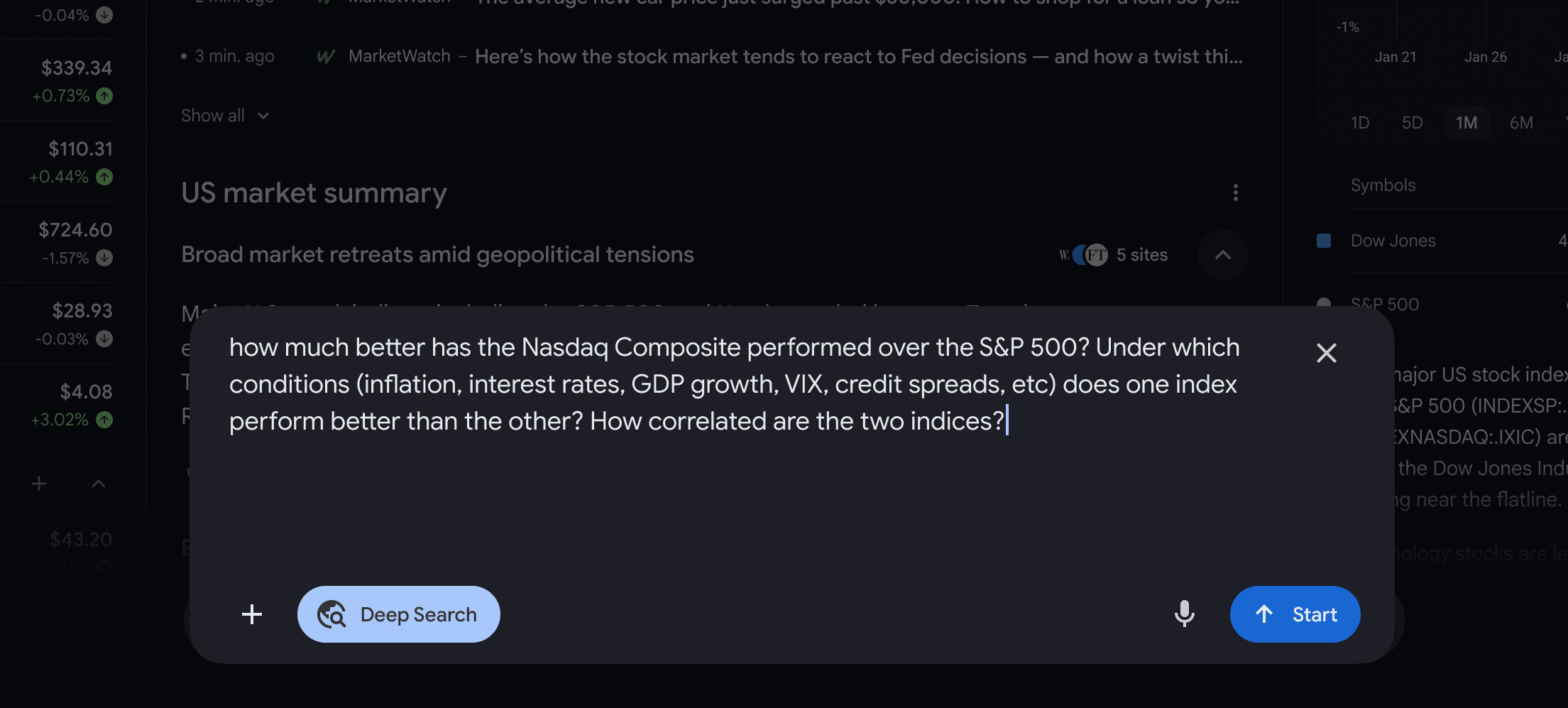
Deep Search handles complex financial queries by issuing up to hundreds of simultaneous searches and synthesizing information across multiple sources.

You can ask detailed questions and select the Deep Search option. Gemini models then generate fully cited comprehensive responses within minutes, displaying the research plan during generation.

Image Credit: Google

Robert Dunnette, Director of Product Management for Google Search, wrote:

“From there, our advanced Gemini models will get to work, issuing up to hundreds of simultaneous searches and reasoning across disparate pieces of information to produce a fully cited, comprehensive response in just a few minutes.”

Deep Search offers higher usage limits for Google AI Pro and AI Ultra subscribers. Users can access it through the Google Finance experiment in Labs.

Prediction Markets Integration

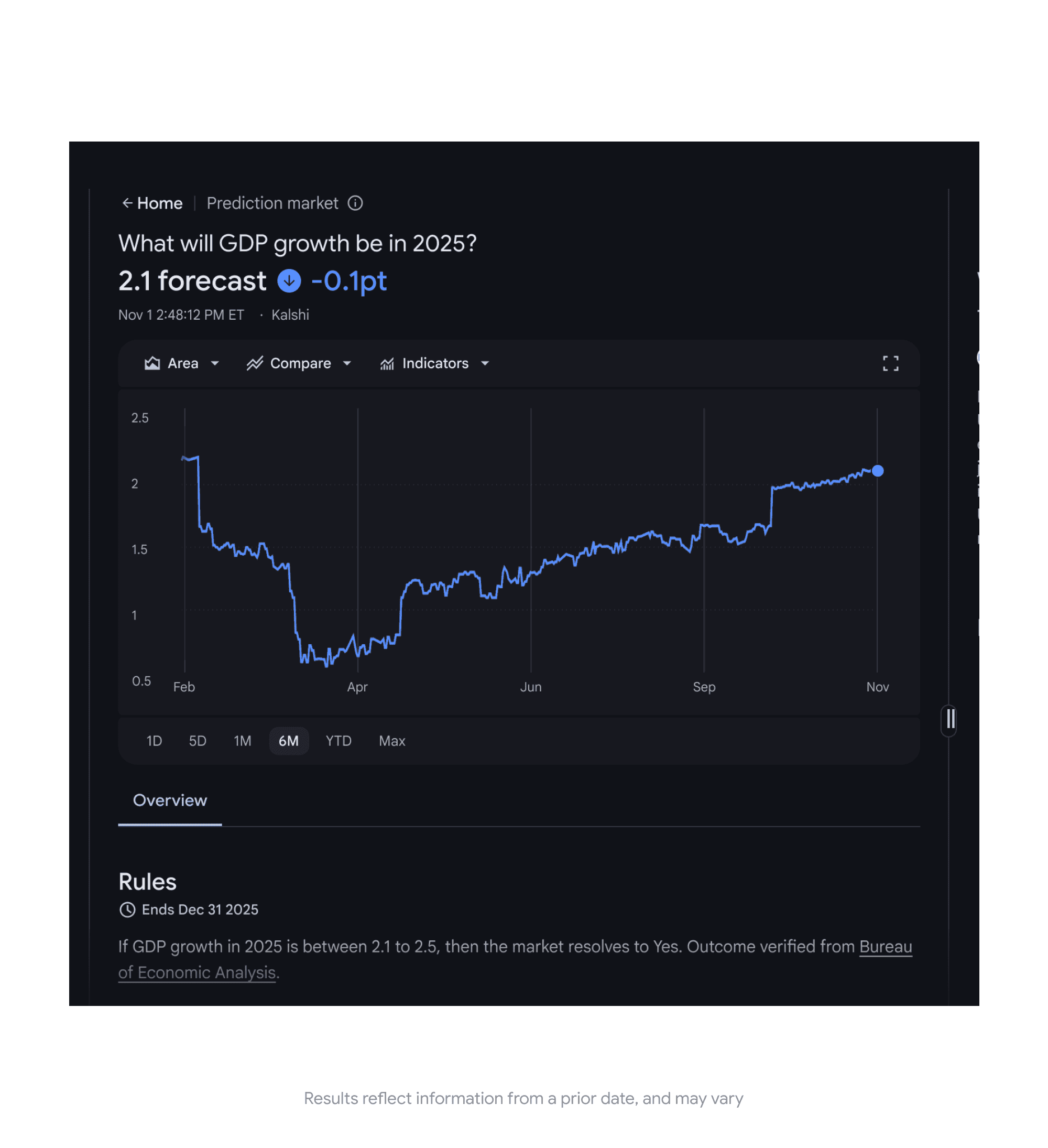
Google Finance is adding support for prediction markets data from Kalshi and Polymarket, with availability rolling out over the coming weeks, starting with Labs users.

You can query future market events directly from the search box to see current probabilities and historical trends.

An example query includes “What will GDP growth be for 2025?”

The feature rolls out this week to Labs users first.

Enhanced Earnings Tracking

Google launched earnings tracking features that provide live audio streams, real-time transcripts, and AI-generated insights during corporate earnings calls.

The Earnings tab shows scheduled calls, streams live audio during calls, and maintains transcripts for later reference. AI-powered insights under “At a glance” update before, during, and after calls with information from news reports and analyst reactions.

You can compare financial data against historical results, view performance versus expectations, and access earnings documents and SEC forms.

India Expansion

Google Finance begins rolling out in India this week with support for English and Hindi.

The India launch initially offers the core Google Finance experience. Deep Search, prediction markets, and earnings features launch first in the U.S. and will expand internationally over time.

Why This Matters

Deep Search reduces the time needed to gather financial data from multiple sources, potentially resulting in fewer webpage visits.

Prediction markets offer crowd-sourced probability estimates that complement analyst forecasts. Live earnings tracking integrates call audio, transcripts, and analyst reactions into a single interface during reporting season.

Looking Ahead

Deep Search and prediction markets roll out over the coming weeks, with Labs users getting early access. Google AI Pro and AI Ultra subscribers receive higher usage limits for Deep Search queries.

The India expansion marks Google Finance’s first international launch beyond the U.S. Access the beta at google.com/finance/beta while signed into a Google account.


Featured Image: Juan Alejandro Bernal/Shutterstock