Why WooCommerce Slows Down (& How to Fix It With the Right Server Stack)

This post was sponsored by Cloudways. The opinions expressed in this article are the sponsor’s own.

Wondering why your rankings may be declining?

Just discovered your WooCommerce site has slow load times?

A slow WooCommerce site doesn’t just cost you conversions. It affects search visibility, backend performance, and customer trust.

Whether you’re a developer running your own stack or an agency managing dozens of client stores, understanding how WooCommerce performance scales under load is now considered table stakes.

Today, many WordPress sites are far more dynamic, meaning many things are happening at the same time:

  • Stores run real-time sales.
  • LMS platforms track user progress.
  • Membership sites deliver highly personalized content.

Every action a user takes, from logging in, updating a cart, or initiating checkout, relies on live data from the server. These requests cannot be cached.

Tools like Varnish or CDNs can help with public pages such as the homepage or product listings. But once someone logs in to their account or interacts with their session, caching no longer helps. Each request must be processed in real time.

This article breaks down why that happens and what kind of server setup is helping stores stay fast, stable, and ready to grow.

Why Do WooCommerce Stores Slow Down?

WooCommerce often performs well on the surface. But as traffic grows and users start interacting with the site, speed issues begin to show. These are the most common reasons why stores slow down under pressure:

1. PHP: It Struggles With High User Activity

WooCommerce depends on PHP to process dynamic actions such as cart updates, coupon logic, and checkout steps. Traditional stacks using Apache for PHP handling are slower and less efficient.

Modern environments use PHP-FPM, which improves execution speed and handles more users at once without delays.

2. A Full Database: It Becomes A Bottleneck

Order creation, cart activity, and user actions generate a high number of database writes. During busy times like flash sales, new merchandise arrivals, or course launches, the database struggles to keep up.

Platforms that support optimized query execution and better indexing handle these spikes more smoothly.

3. Caching Issues: Object Caching Is Missing Or Poorly Configured

Without proper object caching, WooCommerce queries the database repeatedly for the same information. That includes product data, imagery, cart contents, and user sessions.

Solutions that include built-in Redis support help move this data to memory, reducing server load and improving site speed.

4. Concurrency Limits Affect Performance During Spikes

Most hosting stacks today, including Apache-based ones, perform well for a wide range of WordPress and WooCommerce sites. They handle typical traffic reliably and have powered many successful stores.

As traffic increases and more users log in and interact with the site at the same time, the load on the server begins to grow. Architecture starts to play a bigger role at that point.

Stacks built on NGINX with event-driven processing can manage higher concurrency more efficiently, especially during unanticipated traffic spikes.

Rather than replacing what already works, this approach extends the performance ceiling for stores that are becoming more dynamic and need consistent responsiveness under heavier load.

5. Your WordPress Admin Slows Down During Sales Seasons

During busy periods like seasonal sales campaigns or new stock availability, stores can often slow down for the team managing the site, too. The WordPress dashboard takes longer to load, which means publishing products, managing orders, or editing pages also becomes slower.

This slowdown happens because both shoppers and staff are using the site’s resources at the same time, and the server has to handle all those requests at once.

Modern stacks reduce this friction by balancing frontend and backend resources more effectively.

How To Architect A Scalable WordPress Setup For Dynamic Workloads?

WooCommerce stores today are built for more than stable traffic. Customers are logging in, updating their carts, taking actions to manage their subscription profile, and as a result, are interacting with your backend in real time.

The traditional WordPress setup, which is primarily designed for static content, cannot handle that kind of demand.

Here’s how a typical setup compares to one built for performance and scale:

Component Basic Setup         Scalable Setup
Web Server Apache NGINX
PHP Handler mod_php or CGI PHP-FPM
Object Caching None or database transients Redis with Object Cache Pro
Scheduled Tasks WP-Cron System cron job
Caching CDN or full-page caching only Layered caching, including object cache
.htaccess Handling Built-in with Apache Manual rewrite rules in NGINX config
Concurrency Handling Limited Event-based, memory-efficient server

How To Manually Setup A Performance-Ready & Scalable WooCommerce Stack

Don’t have bandwidth? Try the easy way.

If you’re setting up your own server or tuning an existing one, are the most important components to get right:

1) Use NGINX For Static File Performance

NGINX is often used as a high-performance web server for handling static files and managing concurrent requests efficiently. It is well suited for stores expecting high traffic or looking to fine-tune their infrastructure for speed.

Unlike Apache, NGINX does not use .htaccess files. Rewrite rules, such as permalinks, redirects, and trailing slashes, need to be added manually to the server block. For WordPress, these rules are well-documented and only need to be set once during setup.

This approach gives more control at the server level and can be helpful for teams building out their own environment or optimizing for scale.

2) Enable PHP-FPM For Faster Request Handling

PHP-FPM separates PHP processing from the web server. It gives you more control over memory and CPU usage. Tune values like pm.max_children and pm.max_requests based on your server size to prevent overload during high activity.

3) Install Redis With Object Cache Pro

Redis allows WooCommerce to store frequently used data in memory. This includes cart contents, user sessions, and product metadata.

Pair this with Object Cache Pro to compress cache objects, reduce database load, and improve site responsiveness under load.

4) Replace WP-Cron With A System-Level Cron Job

By default, WordPress checks for scheduled tasks whenever someone visits your site. That includes sending emails, clearing inventory, and syncing data. If you have steady traffic, it works. If not, things get delayed.

You can avoid that by turning off WP-Cron. Just add define(‘DISABLE_WP_CRON’, true); to your wp-config.php file. Then, set up a real cron job at the server level to run wp-cron.php every minute. This keeps those tasks running on time without depending on visitors.

5) Add Rewrite Rules Manually For NGINX

NGINX doesn’t use .htaccess. That means you’ll need to define URL rules directly in the server block.

This includes things like permalinks, redirects, and static file handling. It’s a one-time setup, and most of the rules you need are already available from trusted WordPress documentation. Once you add them, everything works just like it would on Apache.

A Few Tradeoffs To Keep In Mind

This kind of setup brings a real speed boost. But there are some technical changes to keep in mind.

  • NGINX won’t read .htaccess. All rewrites and redirects need to be added manually.
  • WordPress Multisite may need extra tweaks, especially if you’re using subdirectory mode.
  • Security settings like IP bans or rate limits should be handled at the server level, not through plugins.

Most developers won’t find these issues difficult to work with. But if you’re using a modern platform, much of it is already taken care of.

You don’t need overly complex infrastructure to make WooCommerce fast; just a stack that aligns with how modern, dynamic stores operate today.

Next, we’ll look at how that kind of stack performs under traffic, with benchmarks that show what actually changes when the server is built for dynamic sites.

What Happens When You Switch To An Optimized Stack?

Not all performance challenges come from code or plugins. As stores grow and user interactions increase, the type of workload becomes more important, especially when handling live sessions from logged-in users.

To better understand how different environments respond to this kind of activity, Koddr.io ran an independent benchmark comparing two common production setups:

  • A hybrid stack using Apache and NGINX.
  • A stack built on NGINX with PHP-FPM, Redis, and object caching.

Both setups were fully optimized and included tuned components like PHP-FPM and Redis. The purpose of the benchmark was to observe how each performs under specific, real-world conditions.

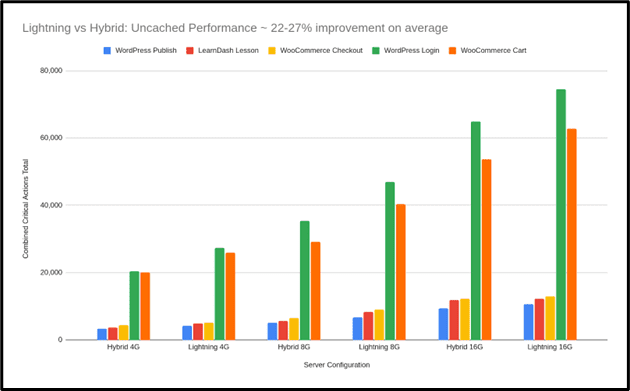
The tests focused on uncached activity from WooCommerce and LearnDash, where logged-in users trigger dynamic server responses.

In these scenarios, the optimized stack showed higher throughput and consistency during peak loads. This highlights the value of having infrastructure tailored for dynamic, high-concurrency traffic, depending on the use case.

WooCommerce Runs Faster Under Load

One test simulated 80 users checking out at the same time. The difference was clear:

Scenario Hybrid Stack Optimized Stack Gain
WooCommerce Checkout 3,035 actions 4,809 actions +58%
Screenshot from Koddr.io, August 2025

LMS Platforms Benefit Even More

For LearnDash course browsing—a write-heavy and uncached task, the optimized stack completed 85% more requests:

Scenario Hybrid Stack Optimized Stack Gain
LearnDash Course List View 13,459 actions 25,031 actions +85%

This shows how optimized stacks handle personalized or dynamic content more efficiently. These types of requests can’t be cached, so the server’s raw efficiency becomes critical.
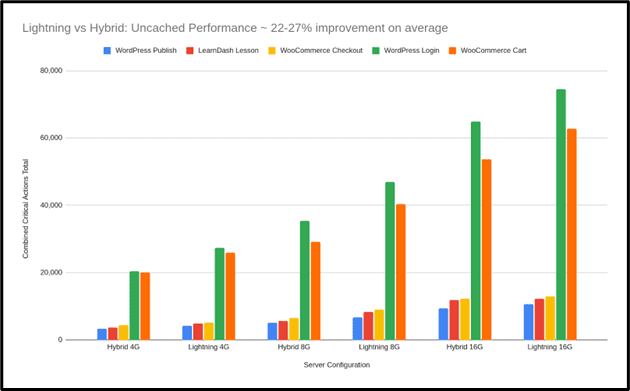
Screenshot from Koddr.io, August 2025

Backend Speed Improves, Too

The optimized stack wasn’t just faster for customers. It also made the WordPress admin area more responsive:

  • WordPress login times improved by up to 31%.
  • Publish actions ran 20% faster, even with high traffic.

This means your team can concurrently manage products, update pages, and respond to sales in real time, without delays or timeouts.

It Handles More Without Relying On Caching

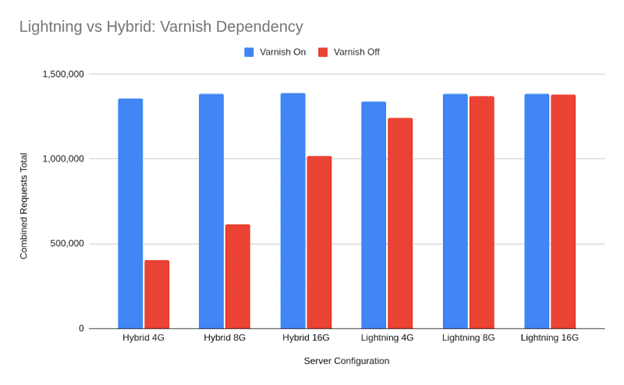
When Koddr turned off Varnish, the hybrid stack experienced a 71% drop in performance. This shows how effectively it handles cached traffic. The optimized stack dropped just 7%, which highlights its ability to maintain speed even during uncached, logged-in sessions.

Both setups have their strengths, but for stores with real-time user activity, reducing reliance on caching can make a measurable difference.

Stack Type With Caching Without Caching Drop
Hybrid Stack 654,000 actions 184,000 actions -7%
Optimized Stack 619,000 actions 572,000 actions -7%
Screenshot from Koddr.io, August 2025

Why This Matters?

Static pages are easy to optimize. But WooCommerce stores deal with real-time traffic. Cart updates, login sessions, and checkouts all require live processing. Caching cannot help once a user has signed in.

The Koddr.io results show how an optimized server stack:

  • Reduces CPU spikes during traffic surges.
  • Keeps the backend responsive for your team.
  • Delivers more stable speed for logged-in users.
  • Helps scale without complex performance workarounds.

These are the kinds of changes that power newer stacks purpose-built for dynamic workloads like Cloudways Lightning, built for real WooCommerce workloads.

Core Web Vitals Aren’t Just About The Frontend

You can optimize every image. Minify every line of code. Switch to a faster theme. But your Core Web Vitals score will still suffer if the server can’t respond quickly.

That’s what happens when logged-in users interact with WooCommerce or LMS sites.

When a customer hits “Add to Cart,” caching is out of the picture. The server has to process the request live. That’s where TTFB (Time to First Byte) becomes a real problem.

Slow server response means Google waits longer to start rendering the page. And that delay directly affects your Largest Contentful Paint and Interaction to Next Paint metrics.

Frontend tuning gets you part of the way. But if the backend is slow, your scores won’t improve. Especially for logged-in experiences.

Real optimization starts at the server.

How Agencies Are Skipping The Manual Work

Every developer has a checklist for WooCommerce performance. Use NGINX. Set up Redis. Replace WP-Cron. Add a WAF. Test under load. Keep tuning.

But not every team has the bandwidth to maintain all of it.

That’s why more agencies are using pre-optimized stacks that include these upgrades by default. Cloudways Lightning, a managed stack based on NGINX + PHP-FPM, designed for dynamic workloads is a good example of that.

It’s not just about speed. It’s also about backend stability during high traffic. Admin logins stay fast. Product updates don’t hang. Orders keep flowing.

Joe Lackner, founder of Celsius LLC, shared what changed for them:

“Moving our WordPress workloads to the new Cloudways stack has been a game-changer. The console admin experience is snappier, page load times have improved by +20%, and once again Cloudways has proven to be way ahead of the game in terms of reliability and cost-to-performance value at this price point.”

This is what agencies are looking for. A way to scale without getting dragged into infrastructure management every time traffic picks up.

Final Takeaway

WooCommerce performance is no longer just about homepage load speed.

Your site handles real-time activity from both customers and your team. Once a user logs in or reaches checkout, caching no longer applies. Each action hits the server directly.

If the infrastructure isn’t optimized, site speed drops, sales suffer, and backend work slows down.

The foundations matter. A stack that’s built for high concurrency and uncached traffic keeps things fast across the board. That includes cart updates, admin changes, and product publishing.

For teams who don’t want to manage server tuning manually, options like Cloudways Lightning deliver a faster, simpler path to performance at scale.

Use promo code “SUMMER305” and get 30% off for 5 months + 15 free migrations. Signup Now!


Image Credits

Featured Image: Image by Cloudways. Used with permission.

In-Post Images: Images by Cloudways. Used with permission.

Google’s still not giving us the full picture on AI energy use

Google just announced that a typical query to its Gemini app uses about 0.24 watt-hours of electricity. That’s about the same as running a microwave for one second—something that, to me, feels virtually insignificant. I run the microwave for so many more seconds than that on most days.

I was excited to see this report come out, and I welcome more openness from major players in AI about their estimated energy use per query. But I’ve noticed that some folks are taking this number and using it to conclude that we don’t need to worry about AI’s energy demand. That’s not the right takeaway here. Let’s dig into why.

1. This one number doesn’t reflect all queries, and it leaves out cases that likely use much more energy.

Google’s new report considers only text queries. Previous analysis, including MIT Technology Review’s reporting, suggests that generating a photo or video will typically use more electricity.

When I spoke with Jeff Dean, Google’s chief scientist, he said the company doesn’t currently have plans to do this sort of analysis for images and videos, but that he wouldn’t rule it out.

The reason the company started with text prompts is that those are something many people out there are using in their daily lives, he says, while image and video generation is something that not as many people are doing. But I’m seeing more AI images and videos all over my social feeds. So there’s a whole world of queries not represented here.

Also, this estimate is the median, meaning it’s just the number in the middle of the range of queries Google is seeing. Longer questions and responses can push up the energy demand, and so can using a reasoning model.  We don’t know anything about how much energy these more complicated queries demand or what the distribution of the range is.

2. We don’t know how many queries Gemini is seeing, so we don’t know the product’s total energy impact.

One of my biggest outstanding questions about Gemini’s energy use is the total number of queries the product is seeing every day. 

This number isn’t included in Google’s report, and the company wouldn’t share it with me. And let me be clear: I absolutely pestered them about this, both in a press call they had about the news and in my interview with Dean. In the press call, the company pointed me to a recent earnings report, which includes only figures about monthly active users (450 million, for what it’s worth).

“We’re not comfortable revealing that for various reasons,” Dean told me on our call. The total number is an abstract measure that changes over time, he says, adding that the company wants users to be thinking about the energy usage per prompt.

But there are people out there all over the world interacting with this technology, not just me—and what we all add up to seems quite relevant.

OpenAI does publicly share its total, sharing recently that it sees 2.5 billion queries to ChatGPT every day. So for the curious, we can use this as an example and take the company’s self-reported average energy use per query (0.34 watt-hours) to get a rough idea of the total for all people prompting ChatGPT.

According to my math, over the course of a year, that would add up to over 300 gigawatt-hours—the same as powering nearly 30,000 US homes annually. When you put it that way, it starts to sound like a lot of seconds in microwaves.

3. AI is everywhere, not just in chatbots, and we’re often not even conscious of it.

AI is touching our lives even when we’re not looking for it. AI summaries appear in web searches, whether you ask for them or not. There are built-in features for email and texting applications that that can draft or summarize messages for you.

Google’s estimate is strictly for Gemini apps and wouldn’t include many of the other ways that even this one company is using AI. So even if you’re trying to think about your own personal energy demand, it’s increasingly difficult to tally up. 

To be clear, I don’t think people should feel guilty for using tools that they find genuinely helpful. And ultimately, I don’t think the most important conversation is about personal responsibility. 

There’s a tendency right now to focus on the small numbers, but we need to keep in mind what this is all adding up to. Over two gigawatts of natural gas will need to come online in Louisiana to power a single Meta data center this decade. Google Cloud is spending $25 billion on AI just in the PJM grid on the US East Coast. By 2028, AI could account for 326 terawatt-hours of electricity demand in the US annually, generating over 100 million metric tons of carbon dioxide.

We need more reporting from major players in AI, and Google’s recent announcement is one of the most transparent accounts yet. But one small number doesn’t negate the ways this technology is affecting communities and changing our power grid. 

This article is from The Spark, MIT Technology Review’s weekly climate newsletter. To receive it in your inbox every Wednesday, sign up here.

From pilot to scale: Making agentic AI work in health care

Over the past 20 years building advanced AI systems—from academic labs to enterprise deployments—I’ve witnessed AI’s waves of success rise and fall. My journey began during the “AI Winter,” when billions were invested in expert systems that ultimately underdelivered. Flash forward to today: large language models (LLMs) represent a quantum leap forward, but their prompt-based adoption is similarly overhyped, as it’s essentially a rule-based approach disguised in natural language.

At Ensemble, the leading revenue cycle management (RCM) company for hospitals, we focus on overcoming model limitations by investing in what we believe is the next step in AI evolution: grounding LLMs in facts and logic through neuro-symbolic AI. Our in-house AI incubator pairs elite AI researchers with health-care experts to develop agentic systems powered by a neuro-symbolic AI framework. This bridges LLMs’ intuitive power with the precision of symbolic representation and reasoning.

Overcoming LLM limitations

LLMs excel at understanding nuanced context, performing instinctive reasoning, and generating human-like interactions, making them ideal for agentic tools to then interpret intricate data and communicate effectively. Yet in a domain like health care where compliance, accuracy, and adherence to regulatory standards are non-negotiable—and where a wealth of structured resources like taxonomies, rules, and clinical guidelines define the landscape—symbolic AI is indispensable.

By fusing LLMs and reinforcement learning with structured knowledge bases and clinical logic, our hybrid architecture delivers more than just intelligent automation—it minimizes hallucinations, expands reasoning capabilities, and ensures every decision is grounded in established guidelines and enforceable guardrails.

Creating a successful agentic AI strategy

Ensemble’s agentic AI approach includes three core pillars:

1. High-fidelity data sets: By managing revenue operations for hundreds of hospitals nationwide, Ensemble has unparallelled access to one of the most robust administrative datasets in health care. The team has decades of data aggregation, cleansing, and harmonization efforts, providing an exceptional environment to develop advanced applications.

To power our agentic systems, we’ve harmonized more than 2 petabytes of longitudinal claims data, 80,000 denial audit letters, and 80 million annual transactions mapped to industry-leading outcomes. This data fuels our end-to-end intelligence engine, EIQ, providing structured, context-rich data pipelines spanning across the 600-plus steps of revenue operations.

2. Collaborative domain expertise: Partnering with revenue cycle domain experts at each step of innovation, our AI scientists benefit from direct collaboration with in-house RCM experts, clinical ontologists, and clinical data labeling teams. Together, they architect nuanced use cases that account for regulatory constraints, evolving payer-specific logic and the complexity of revenue cycle processes. Embedded end users provide post-deployment feedback for continuous improvement cycles, flagging friction points early and enabling rapid iteration.

This trilateral collaboration—AI scientists, health-care experts, and end users—creates unmatched contextual awareness that escalates to human judgement appropriately, resulting in a system mirroring decision-making of experienced operators, and with the speed, scale, and consistency of AI, all with human oversight.

3. Elite AI scientists drive differentiation: Ensemble’s incubator model for research and development is comprised of AI talent typically only found in big tech. Our scientists hold PhD and MS degrees from top AI/NLP institutions like Columbia University and Carnegie Mellon University, and bring decades of experience from FAANG companies [Facebook/Meta, Amazon, Apple, Netflix, Google/Alphabet] and AI startups. At Ensemble, they’re able to pursue cutting-edge research in areas like LLMs, reinforcement learning, and neuro-symbolic AI within a mission-driven environment.

The also have unparalleled access to vast amounts of private and sensitive health-care data they wouldn’t see at tech giants paired with compute and infrastructure that startups simply can’t afford. This unique environment equips our scientists with everything they need to test novel ideas and push the frontiers of AI research—while driving meaningful, real-world impact in health care and improving lives.

Strategy in action: Health-care use cases in production and pilot

By pairing the brightest AI minds with the most powerful health-care resources, we’re successfully building, deploying, and scaling AI models that are delivering tangible results across hundreds of health systems. Here’s how we put it into action:

Supporting clinical reasoning: Ensemble deployed neuro-symbolic AI with fine-tuned LLMs to support clinical reasoning. Clinical guidelines are rewritten into proprietary symbolic language and reviewed by humans for accuracy. When a hospital is denied payment for appropriate clinical care, an LLM-based system parses the patient record to produce the same symbolic language describing the patient’s clinical journey, which is matched deterministically against the guidelines to find the right justification and the proper evidence from the patient’s record. An LLM then generates a denial appeal letter with clinical justification grounded in evidence. AI-enabled clinical appeal letters have already improved denial overturn rates by 15% or more across Ensemble’s clients.

Building on this success, Ensemble is piloting similar clinical reasoning capabilities for utilization management and clinical documentation improvement, by analyzing real-time records, flagging documentation gaps, and suggesting compliance enhancements to reduce denial or downgrade risks.

Accelerating accurate reimbursement: Ensemble is piloting a multi-agent reasoning model to manage the complex process of collecting accurate reimbursement from health insurers. With this approach, a complex and coordinated system of autonomous agents work together to interpret account details, retrieve required data from various systems, decide account-specific next actions, automate resolution, and escalate complex cases to humans.

This will help reduce payment delays and minimize administrative burden for hospitals and ultimately improve the financial experience for patients.

Improving patient engagement: Ensemble’s conversational AI agents handle inbound patient calls naturally, routing to human operators as required. Operator assistant agents deliver call transcriptions, surface relevant data, suggest next-best actions, and streamline follow-up routines. According to Ensemble client performance metrics, the combination of these AI capabilities has reduced patient call duration by 35%, increasing one-call resolution rates and improving patient satisfaction by 15%.

The AI path forward in health care demands rigor, responsibility, and real-world impact. By grounding LLMs in symbolic logic and pairing AI scientists with domain experts, Ensemble is successfully deploying scalable AI to improve the experience for health-care providers and the people they serve.

This content was produced by Ensemble. It was not written by MIT Technology Review’s editorial staff.

The Download: Google’s AI energy use, and the AI Hype Index

This is today’s edition of The Download, our weekday newsletter that provides a daily dose of what’s going on in the world of technology.

Google’s still not giving us the full picture on AI energy use 

—Casey Crownhart

Google just announced that a typical query to its Gemini app uses about 0.24 watt-hours of electricity. That’s about the same as running a microwave for one second—something that feels insignificant. I run the microwave for many more seconds than that most days.

I welcome more openness from major AI players about their estimated energy use per query. But I’ve noticed that some folks are taking this number and using it to conclude that we don’t need to worry about AI’s energy demand. That’s not the right takeaway here. Let’s dig into why.

This article is from The Spark, MIT Technology Review’s weekly climate newsletter. To receive it in your inbox every Wednesday, sign up here.

+ If you’re interested in AI’s energy footprint, earlier this year, MIT Technology Review published Power Hungry: a comprehensive series on AI and energy.

The AI Hype Index: AI-designed antibiotics show promise

Separating AI reality from hyped-up fiction isn’t always easy. That’s why we’ve created the AI Hype Index—a simple, at-a-glance summary of everything you need to know about the state of the industry. Take a look at this month’s edition here.

The must-reads

I’ve combed the internet to find you today’s most fun/important/scary/fascinating stories about technology.

1 The White House has fired the director of the CDC
But Susan Monarez is refusing to go quietly. (WP $)
+ Monarez is said to have clashed with RFK Jr over vaccine policy. (NYT $)
+ She was confirmed by the Senate to the position just last month. (The Guardian)
+ Vaccine consensus is splintering across the US. (Vox)

2 A Chinese hacking campaign hit at least 200 US organizations
Intelligence agencies say the breaches are among the most significant ever. (WP $)
+ AI-generated ransomware is on the rise. (Wired $)

3 Ukraine’s new Flamingo cruise missile took just months to build
Russia’s air defenses are weakening. Can this missile exploit the gaps? (Economist $)
+ 14 people were killed in an overnight bombardment of Kyiv. (BBC)
+ On the ground in Ukraine’s largest Starlink repair shop. (MIT Technology Review)

4 AI infrastructure spending is boosting the US economy
Companies are throwing so much money at AI hardware it’s lifting the real economy, not just the stock market. (NYT $)
+ How to fine-tune AI for prosperity. (MIT Technology Review)

5 OpenAI and Anthropic safety-tested each other’s AI
They found Claude is a lot more cautious than OpenAI’s mini models. (Engadget)
+ Sycophancy was a repeated issue among OpenAI’s models. (TechCrunch)
+ This benchmark used Reddit’s AITA to test how much AI models suck up to us. (MIT Technology Review)

6 Climate change exacerbated Europe’s deadly wildfires
And fires across the Mediterranean are likely to become more frequent and severe. (BBC)
+ What the collapse of a glacier can teach us. (New Yorker $)
+ How AI can help spot wildfires. (MIT Technology Review)

7 911 centers are using AI to answer calls
It’s helping to triage anything that isn’t urgent. (TechCrunch)

8 Wikipedia has compiled a list of AI writing tropes
But their presence still isn’t a dead giveaway a text has been written by AI. (Fast Company $)
+ AI-text detection tools are really easy to fool. (MIT Technology Review)

9 Melania Trump has launched the Presidential AI Challenge 
But it’s not all that clear what the competition actually is. (NY Mag $)

10 Netflix’s algorithm-appeasing movies are bland and boring
But millions of people will watch them anyway. (The Guardian)

Quote of the day

“The more you buy, the more you grow.”

—Nvidia CEO Jensen Huang conveniently sees no end to the AI chip spending boom, Reuters reports.

One more thinghttps://www.technologyreview.com/2025/01/13/1109922/inside-the-strange-limbo-facing-ivf-embryos/?utm_source=the_download&utm_medium=email&utm_campaign=the_download.unpaid.engagement&utm_term=*|SUBCLASS|*&utm_content=*|DATE:m-d-Y|*

Inside the strange limbo facing millions of IVF embryos

Millions of embryos created through IVF sit frozen in time, stored in cryopreservation tanks around the world, and the number is only growing.

At a basic level, an embryo is simply a tiny ball of a hundred or so cells. But unlike other types of body tissue, it holds the potential for life. Many argue that this endows embryos with a special moral status, one that requires special protections.

The problem is that no one can really agree on what that status is. What do these embryos mean to us? And who should be responsible for them? Read the full story.

—Jessica Hamzelou

We can still have nice things

A place for comfort, fun and distraction to brighten up your day. (Got any ideas? Drop me a line or skeet ’em at me.)

+ Wow, that is one seriously orange shark!
+ TikTok is a proven way to introduce younger generations to older music—and now it’s Radiohead’s turn.
+ Why we’re still going bananas for Donkey Kong after all these years
+ This photo perfectly captures the joy of letting loose at a wedding.

New Ecommerce Tools: August 28, 2025

This week’s rundown of new products and services from vendors of ecommerce merchants includes AI-generated product images, fulfillment, social commerce, digital advertising, affiliate marketing, less-than-truckload shipping, autonomous ground deliveries, and more.

Got an ecommerce product release? Email releases@practicalecommerce.com.

New Tools for Merchants

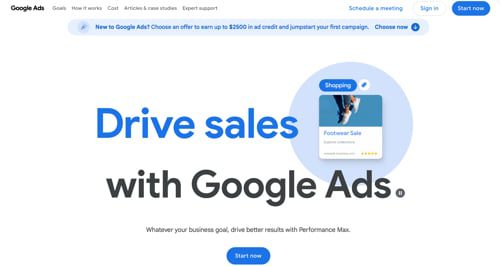
Google Ads launches Asset Studio beta. Google Ads has released, in beta, Asset Studio, a built-in creative hub streamlining how advertisers produce and scale ad assets with AI. Asset Studio appears in Google Ads under “Tools” and provides native creative features directly in the Ads interface. Advertisers can use it to generate images with text prompts, create lifestyle product visuals, edit photos, bulk edit assets at scale, create and trim ad-ready videos, and add voice-overs for video and audio ads.

Home page of Google Ads

Google Ads

Shopify announces built-in fulfillment capabilities. Shopify is launching partnerships with the largest global carriers, introducing bulk order processing, and streamlining shipping workflows, all of which can be managed directly in the Shopify admin. Carrier partnerships include DHL, USPS, UPS, FedEx, Canada Post, Purolator, Royal Mail, Australia Post, and Flexport. For international shipping, merchants can collect duties and taxes at checkout and purchase Delivered Duty Paid labels from DHL Express and DHL eCommerce. New bulk order processing accommodates up to 250 orders simultaneously.

Walmart announces new seller tools and resources at Marketplace Seller Summit. At its Let’s Grow! Seller Summit, Walmart announced a suite of new tools and initiatives. The Seller Advisors Program provides feedback and insights to help foster impactful solutions. An AI-powered listing tool helps with setup for single and bulk items, while Smart Assistant provides support. Sellers who self-fulfill can now automate delivery promises by region. The Brand Portal safeguards sellers and identifies fraudulent activity with a heightened focus on product authenticity.

Wix integrates with Pinterest for social commerce. Wix merchants can now promote and sell their products directly on Pinterest, the visual search and discovery network. By establishing a connection between their Pinterest account and their Wix site, merchants can sync their catalogs and run targeted ads on Pinterest. These ads drive shoppers back to the merchant’s Wix site for a streamlined checkout experience.

Home page of Wix

Wix

Domaine launches AI commerce suite for Shopify. Domaine Worldwide, a Shopify-focused design and development firm, has introduced AI Commerce Suite, combining large language model technology for automated product copy, imagery, and short-form video with adaptive search engine optimization and geo-targeting that respond in real-time to trending keywords and local demand. The new Suite delivers predictive search, personalized recommendations, and dynamic content to convert visitors into customers. Users can boost visibility in emerging search channels, guide shoppers to relevant products, and reduce time from idea to campaign launch, according to Domaine.

TestSquared launches free AffiliateTor directory for affiliate programs. TestSquared, an ecommerce tool developer, has launched AffiliateTor, a free directory to simplify how affiliates discover and connect with opportunities. Brands can showcase their programs to a network of potential partners and reach affiliates searching for programs. The directory is organized by industry niche.

Bandy AI launches to generate ecommerce product imagery with AI models. Bandy AI has launched its platform to help ecommerce stores and apparel brands create photorealistic on-model fashion images. According to Bandy AI, the platform enables brands to generate quality images of clothing and accessories on diverse AI models, with creative control over poses, backgrounds, and camera angles, all rendered within minutes. Bandy AI features a virtual try-on tool that digitally dresses photorealistic AI models with apparel and accessories.

Home page of Bandy AI

Bandy AI

Visa expands Click to Pay across Asia Pacific for enhanced ecommerce checkout. Visa has announced the expansion of Click to Pay across Asia Pacific through strategic partnerships with payment enablers 2C2P, Adyen, AsiaPay, and Worldpay. According to Visa, Click to Pay offers a seamless and secure online checkout experience, with biometric authentication through payment passkeys for enhanced security. By allowing customers to retrieve their saved, tokenized payment details using a mobile number or email alias, Click to Pay eliminates the need to enter card information manually.

BestBuy.com launches marketplace. Best Buy is launching a marketplace for third-party merchants to sell on BestBuy.com and through the app. According to the company, customers can shop from hundreds of brands and from categories such as seasonal décor, automotive tech, office and home, and movies and music. Best Buy says it will soon introduce licensed sports merchandise. Customers can return marketplace products at their local Best Buy store, in addition to shipping them to the seller.

Netcore Cloud integrates with Shopify for real-time ecommerce engagement. Netcore Cloud, a marketing technology company, has launched its plugin on the Shopify platform. Users can (i) access both Shopify and Netcore data in one place for improved segmentation and deeper customer understanding, (ii) leverage Shopify purchase history, product views, and browsing patterns to create campaigns that reflect individual customer interests, (iii) set up event-triggered journeys, from abandoned cart nudges to post-purchase sequences, and (iv) deliver highly contextual outreach across email, SMS, and WhatsApp, all according to Netcore Cloud.

Just Eat Takeaway teams with Rivr to pilot robot food delivery in Europe. Just Eat Takeaway.com, an on-demand delivery service, is partnering with robotics company Rivr to pilot doorstep delivery with autonomous ground robots. The Rivr ground robot combines wheels for efficient travel with legs for climbing stairs and curbs. Functioning with physical AI, the robot avoids obstacles, vehicles, and pedestrians. The Rivr robot will initially deliver food orders in Zurich, with plans to expand to other European cities later this year, and potentially into retail and convenience stores.

Home page of Rivr

Rivr

Pinterest debuts Thrift Shop, targeting Gen Zs. Pinterest has introduced Thrift Shop, a shopping space for thrift lovers, particularly Gen Zs. According to Pinterest, Gen Zs (ages mid-teens to late 20s) now account for more than 50% of Pinterest users; searches for “dream thrift finds” have skyrocketed by 550% amongst that cohort, while searches for “vintage fall aesthetic” are up 1,074%. The Thrift Shop will launch in September, enabling users to browse and shop secondhand finds directly on Pinterest.

DoorDash expands its Commerce Platform to restaurants. DoorDash has expanded its Commerce Platform with tools to help restaurants grow direct sales and deepen customer relationships. Using menu, branding, and images already on DoorDash, restaurants can instantly launch a search-engine-optimized website. Built-in customer management tools allow restaurants to automate, segment, and personalize email and SMS campaigns. The loyalty program rewards guests whether they order from a restaurant’s own app or website, the DoorDash Marketplace, or in-store, according to DoorDash.

TinyFish launches enterprise web agent platform. TinyFish, an enterprise web agent infrastructure provider, has launched with $47 million in funding (led by Iconiq) to transform complex business operations. TinyFish agents execute complete workflows mapped to measurable business outcomes. For ecommerce enterprises, TinyFish’s web agents enable brands to track competitor pricing, monitor inventory shifts, and capture promotional data across thousands of retail sites simultaneously. The company states it will use the funds for continued innovation.

Oway raises $4 million for AI-enabled ride-share freight platform. Oway, a San Francisco-based startup backed by Y Combinator and General Catalyst, has raised $4 million in a seed round to build a decentralized “Uber for freight” delivery platform. Using AI to help find and match cargo with empty trailer space and a convenient destination, along with automating standard shipping and insurance documentation, Oway seeks to reduce shipping costs by 50%. Ride-share cargo is made possible by electronic logging devices installed on long-haul trucks.

How page of Oway

Oway

Research Shows How To Optimize For Google AIO And ChatGPT via @sejournal, @martinibuster

New research from BrightEdge shows that Google AI Overviews, AI Mode, and ChatGPT recommend different brands nearly 62% of the time. BrightEdge concludes that each AI search platform is interpreting the data in different ways, suggesting different ways of thinking about each AI platform.

Methodology And Results

BrightEdge’s analysis was conducted with its AI Catalyst tool, using tens of thousands of the same queries across ChatGPT, Google AI Overviews (AIO), and Google AI Mode. The research documented a 61.9% overall disagreement rate, with only 33.5% of queries showing the exact same brands in all three AI platforms.

Google AI Overviews averaged 6.02 brand mentions per query, compared to ChatGPT’s 2.37. Commercial intent search queries containing phrases like “buy,” “where,” or “deals” generated brand mentions 65% of the time across all platforms, suggesting that these kinds of high-intent keyword phrases continue to be reliable for ecommerce, just like in traditional search engines. Understandably, e-commerce and finance verticals achieved 40% or more brand-mention coverage across all three AI platforms.

Three Platforms Diverge

Not all was agreement between the three AI platforms in the study. Many identical queries led to very different brand recommendations depending on the AI platform.

BrightEdge shares that:

  • ChatGPT cites trusted brands even when it’s not grounding on search data, indicating that it’s relying on LLM training data.
  • Google AI Overviews cites brands 2.5 times more than ChatGPT.
  • Google AI Mode cites brands less often than both ChatGPT and AIO.

The research indicates that ChatGPT favors trusted brands, Google AIO emphasizes breadth of coverage with more brand mentions per query, and Google AI Mode selectively recommends brands.

Next we untangle why these patterns exist.

Differences Exist

BrightEdge asserts that this split across the three platforms is not random. I agree that there are differences, but I disagree that “authority” has anything to do with it and offer an alternate explanation later on.

These are the conclusions that they draw from the data:

  • The Brand Authority Play:
    ChatGPT’s reliance on training data means established brands with strong historical presence can capture mentions without needing fresh citations. This creates an “authority dividend” that many brands don’t realize they’re already earning—or could be earning with the right positioning.
  • The Volume Opportunity:
    Google AI Overview’s hunger for brand mentions means there are 6+ available slots per relevant query, with clear citation paths showing exactly how to earn visibility. While competitors focus on traditional SEO, innovative brands are reverse-engineering these citation networks.
  • The Quality Threshold:
    Google AI Mode’s selectivity means fewer brands make the cut, but those that do benefit from heavy citation backing that reinforces their authority across the web.”

Not Authority – It’s About Training Data

BrightEdge refers to “authority signals” within ChatGPT’s underlying LLM. My opinion differs in regard to an LLM’s generated output, not retrieval-augmented responses that pull in live citations. I don’t think there are any signals in the sense of ranking-related signals. In my opinion, the LLM is simply reaching for the entity (brand) related to a topic.

What looks like “authority” to someone with their SEO glasses on is more likely about frequency, prominence, and contextual embedding strength.

  • Frequency:
    How often the brand appears in the training data.
  • Prominence:
    How central the brand is in those contexts (headline vs. footnote).
  • Contextual Embedding Strength:
    How tightly the brand is associated with certain topics based on the model’s training data.

If a brand appears widely in appropriate contexts within the training data, then, in my opinion, it is more likely to be generated as a brand mention by the LLM, because this reflects patterns in the training data and not authority.

That said, I agree with BrightEdge that being authoritative is important, and that quality shouldn’t be minimized.

Patterns Emerge

The research data suggests that there are unique patterns across all three platforms that can behave as brand citation triggers. One pattern all three share is that keyword phrases with a high commercial intent generate brand mentions in nearly two-thirds of cases. Industries like e-commerce and finance achieve higher brand coverage, which, in my opinion, reflects the ability of all three platforms to accurately understand the strong commercial intents for keywords inherent to those two verticals.

A little sunshine in a partly cloudy publishing environment is the finding that comparison queries for “best” products generate 43% brand citations across all three AI platforms, again reflecting the ability of those platforms to understand user query contexts.

Citation Network Effect

BrightEdge has an interesting insight about creating presence in all three platforms that it calls a citation network effect. BrightEdge asserts that earning citations in one platform could influence visibility in the others.

They share:

“A well-crafted piece… could:
Earn authority mentions on ChatGPT through brand recognition

Generate 6+ competitive mentions on Google AI Overview through comprehensive coverage

Secure selective, heavily-cited placement on Google AI Mode through third-party validation

The citation network effect means that earning mentions on one platform often creates the validation needed for another. “

Optimizing For Traditional Search Remains

Nevertheless, I agree with BrightEdge that there’s a strategic opportunity in creating content that works across all three environments, and I would make it explicit that SEO, optimizing for traditional search, is the keystone upon which the entire strategy is crafted.

Traditional SEO is still the way to build visibility in AI search. BrightEdge’s data indicates that this is directly effective for AIO and has a more indirect effect for AI Mode and ChatGPT.

ChatGPT can cite brand names directly from training data and from live data. It also cites brands directly from the LLM, which suggests that generating strong brand visibility tied to specific products and services may be helpful, as that is what eventually makes it into the AI training data.

BrightEdge’s conclusion about the data leans heavily into the idea that AI is creating opportunities for businesses that build brand awareness in the topics they want to be surfaced in.
They share:

“We’re witnessing the emergence of AI-native brand discovery. With this fundamental shift, brand visibility is determined not by search rankings but by AI recommendation algorithms with distinct personalities and preferences.

The brands winning this transition aren’t necessarily the ones with the biggest SEO budgets or the most content. They’re the ones recognizing that AI disagreement creates more paths to visibility, not fewer.

As AI becomes the primary discovery mechanism across industries, understanding these platform-specific triggers isn’t optional—it’s the difference between capturing comprehensive brand visibility and watching competitors claim the opportunities you didn’t know existed.

The 62% disagreement gap isn’t breaking the system. It’s creating one—and smart brands are already learning to work it.”

BrightEdge’s report:

ChatGPT vs Google AI: 62% Brand Recommendation Disagreement

Featured Image by Shutterstock/MMD Creative

Track, Prioritize & Win In AI Search [Webinar] via @sejournal, @hethr_campbell

AI search is reshaping buyer discovery. 

Every week, 800 million searches happen across ChatGPT, Claude, Perplexity, and other AI engines. 

If your brand isn’t showing up, you’re losing leads and opportunities.

Join Samanyou Garg, Founder of Writesonic, on September 10, 2025, for a webinar designed to help marketers and SEO teams master AI visibility. In this session, you’ll learn practical tactics to measure, prioritize, and optimize your AI footprint.

Here’s what you’ll walk away with

  • AI Visibility Tracking Framework: Measure mentions, citations, sentiment, and share of voice across AI engines
  • Data-Driven Prioritization: Focus on high-impact prompts and competitor gaps for the best ROI
  • 3-Pillar GEO Action Plan: Improve crawler access, craft prompt-specific content, and earn authority-building citations

Why you can’t miss this webinar:

AI-driven search is no longer optional. Your brand’s presence in AI answer engines directly impacts traffic, leads, and revenue. This session will equip you with a step-by-step process to turn AI visibility into real business results.

Save your spot now to learn actionable strategies that top brands are using to dominate AI search.

Can’t attend live? Register anyway, and we’ll send you the full recording.

Yoast SEO free vs Premium: why upgrading is worth it

Do you want to take your site’s SEO to the next level? Yoast SEO Premium can help you out! But there is also a free version of Yoast SEO. So, what exactly is the difference between the free version of Yoast SEO and Yoast SEO Premium? How do these two compare? And is Yoast SEO Premium worth it? Let’s uncover the ten reasons why you should buy Yoast SEO Premium today!

Table of contents

Yoast SEO free vs premium: what is the difference?

Do you want to compare the main differences between Yoast SEO Free and Premium? This table will give you quick insights:

Yoast SEO Free

Find other ways to optimize your website for SEO

No comprehensive SEO solution. You’d need to find other ways to optimize your website, especially if you have a local business, a news website, or if you have a lot of videos.

No AI

You have to manually optimize all your content yourself.

No AI

You have to manually write and optimize all your SEO titles and meta descriptions yourself.

Only 1 keyword per page

Optimize for one keyword per post or page.

No redirect manager

Forgetting to set up a redirect results in visitors hitting a 404 page, which displeases both them and Google.

You need to guess which links would work best

Identify which pages to link to for improved rankings, for both new and existing pages on your site.

No preview of your page on social media

Without a preview of social snippets, you’re left guessing and hoping for the best.

No support

No support
You can help yourself with our extensive knowledge database.

Manually edit robots.txt file

Manually edit your robots.txt file to block AI bots, at the risk of making mistakes.

No free access to the Yoast SEO Google Docs add-on

Transferring draft content from Google Docs to your website for SEO optimization slows your workflow and makes collaboration with internal and external teams more time-consuming.

Yoast SEO Premium vs Yoast SEO Free

Includes Local SEO, Video SEO, and News SEO plugins

Yoast SEO Premium provides everything you need to improve your website’s visibility, whether you’re a business owner, publisher, agency, or content creator.

Find other ways to optimize your website for SEO

No comprehensive SEO solution. You’d need to find other ways to optimize your website, especially if you have a local business, a news website, or if you have a lot of videos.

(Beta) Get AI-powered suggestions to optimize your content

Get optimization suggestions and apply changes instantly with Yoast’s AI features, saving you time and ensuring your content is search engine-friendly. This feature is currently in beta.

No AI

You have to manually optimize all your content yourself.

(Beta) Get high-quality titles and meta descriptions with Yoast AI

Yoast’s AI helps you craft optimized SEO titles and meta descriptions for search and social, boosting your CTR while saving you time.

No AI

You have to manually write and optimize all your SEO titles and meta descriptions yourself.

Optimize for up to five keyword synonyms by adding variants

Include up to four keyword synonyms for a broader reach, and receive a complete SEO analysis for each one.

Only 1 keyword per page

Optimize for one keyword per post or page.

Automatic redirects: so no more dead links or 404 errors

Effortlessly redirect old or renamed pages to maintain satisfaction for both your visitors and Google.

No redirect manager

Forgetting to set up a redirect results in visitors hitting a 404 page, which displeases both them and Google.

Get real-time suggestions for internal links

As you write, you’ll receive suggestions for internal links to other pages, which Google favors and can boost your ranking.

You need to guess which links would work best

Identify which pages to link to for improved rankings, for both new and existing pages on your site.

Preview your page on Facebook and Twitter/X

You have complete control over your page’s social media appearance, ensuring it entices users to click.

No preview of your page on social media

Without a preview of social snippets, you’re left guessing and hoping for the best.

24/7 support

Our helpful and expert support team is ready to assist you with any questions via email or live chat.

No support

No support
You can help yourself with our extensive knowledge database.

Safeguard your content from being used to train AI bots

Easily protect your intellectual property and data privacy by blocking AI bots from scraping your content with a simple toggle.

Manually edit robots.txt file

Manually edit your robots.txt file to block AI bots, at the risk of making mistakes.

Includes 1 free seat to the Yoast SEO Google Docs add-on

Create and optimize your SEO content in Google Docs with Yoast’s guidance, ideal for teamwork with internal and external partners. Enjoy 1 free seat, valued at $5/month.

No free access to the Yoast SEO Google Docs add-on

Transferring draft content from Google Docs to your website for SEO optimization slows your workflow and makes collaboration with internal and external teams more time-consuming.

What are the benefits of Yoast SEO Premium?

For over fifteen years, Yoast SEO has provided small businesses, bloggers, marketers, and online and offline stores with almost everything they need to compete in the search results. Over the years, we made the plugin better and better — following feedback from users, through thorough research and insights from insiders at the search engines. Today, Yoast SEO is run by a team of passionate SEO experts and built by very talented developers.

While the free version of Yoast SEO gives you a lot of tools to help you do well in the search results, Yoast SEO Premium makes many tasks much easier. It saves precious time that you can invest in other ways. Yoast SEO Premium also gives you additional tools, like, for instance, Local SEO, AI features, internal linking suggestions, and the redirect manager. You can use all of these tools to build an impressive site structure. All of this helps make your site a great fit for users and search engines alike. As such, Yoast SEO Premium is a wise investment.

Buy Yoast SEO Premium now!

Unlock powerful features and much more for your WordPress site with the Yoast SEO Premium plugin!

1: Yoast SEO Premium comes with amazing AI features

Yoast SEO Premium now offers AI-powered features that streamline your SEO tasks. With Yoast AI Generate, you can create engaging titles and meta descriptions effortlessly. Choose from multiple options or generate more until you find the perfect fit. Meanwhile, Yoast AI Optimize provides smart suggestions to enhance your existing content, ensuring SEO best practices are met with just a click. These tools integrate smoothly into your workflow, saving you time and effort while keeping your content search-engine friendly. Available for WordPress and Shopify, these features help you maintain control over your content’s final look and feel.

2: Yoast SEO Premium comes with all add-ons

Yoast SEO Premium now includes various separate add-ons, such as News, Video, and Local SEO, in one convenient package. This comprehensive suite enhances your optimization capabilities without needing additional purchases. However, the WooCommerce SEO add-on is not included and is available separately. Enjoy a streamlined experience to boost your site’s performance across different content types and media.

3: Yoast SEO Premium is a time-saver

One of the most important things you need to remember about SEO is that it is never done. There’s always more to do, better content to write, or fixes to make. Luckily, there’s a WordPress SEO plugin that’s glad to be of assistance. As you might know, Yoast SEO is not a set-it-and-forget-it kind of tool. You need to work with it, whether it’s improving your content or building your site structure. In the free version, you still need to do much of the work yourself. Yoast SEO Premium comes with a number of AI tools that can save you lots of time.

4: Use Yoast SEO in Google Docs

The Yoast SEO Google Docs add-on allows you to draft and optimize your SEO content directly within Google Docs. This tool is ideal for seamless collaboration with both internal teams and external partners. You can work on content, refine it, and ensure it aligns with SEO best practices, all without leaving your document. This efficiency streamlines your workflow and enhances team cooperation. Plus, Yoast SEO Premium includes one user seat for this add-on, typically valued at $5 per seat.

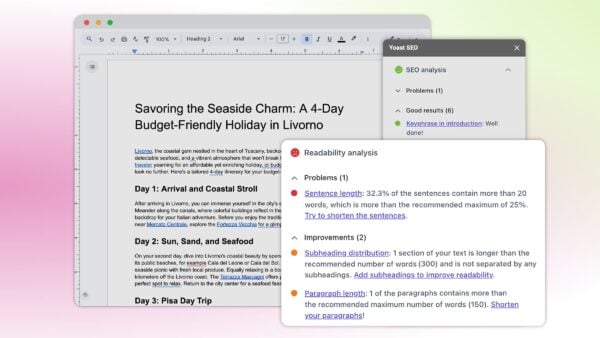
You can enjoy the same Yoast SEO analyses in Google Docs

5: Makes doing site maintenance easier

If working on your site is turning into a day job, you might need some help! Premium makes site maintenance easier. For one, Premium comes with a stale cornerstone content finder that reminds you to update your most important content.

Another tool that helps you work on your pages is the redirect manager. Whenever you make changes to pages or URLs, this tool makes sure to add a redirect for you. All you have to do is say where the new URL needs to lead. With the redirect manager, you can also fix your 404 errors in no time. No developer necessary. It’s so helpful that 58% of Premium users praise the redirect manager as the best feature in Yoast SEO Premium!

Building a solid site structure is one of the quickest routes to success. Making your content easily accessible to users and search engines helps them both make sense of your site. Yoast SEO Premium comes with a number of tools that help you build relevant links that can build a solid foundation for your site structure. Our plugin comes with internal linking blocks, an orphaned content finder and a targeted internal linking suggestion tool.

With the internal linking suggestions, relevant content will automatically be suggested while you’re writing your new content. There’s no need to remember that all those posts are pages!

But don’t just take our word for it, here’s what Andrew Evans from Intellifluence says about the internal linking tool:

While the free Yoast SEO plugin offers many great features, the Premium version takes things to the next level. The internal linking suggestions feature ensures our blog is organized in a cohesive manner. It also ensures that link equity passes to other posts. This feature alone saves a tremendous amount of time as the plugin suggests links as we write. As the site grows, this feature only becomes more valuable! If you’ve ever tried to develop an interlinking strategy for an established blog, you’ll know exactly what I mean…

Andrew Evans

7: An advanced language analysis that makes writing more natural

Yoast SEO is famous for its SEO and readability analyses — a.k.a. the colored traffic lights. The feedback these analyses give you helps you produce a great piece of content that adheres to a range of SEO best practices. This works splendidly, but Premium makes this process a lot more natural and flexible.

Premium has a very smart feature called word forms support. This innovative language analysis looks not only at the exact match of the focus keyphrase you enter but also at all the grammatical forms of that word. If you use, for instance, “decoration”, we will find word forms like “decorated” and “decorates” in your text as well, just like Google does. The words don’t even have to be in the same order when your focus keyphrase consists of more than one word.

Search engines get smarter every day, and context is key in SEO. They use the context in which a keyword appears to determine what a text is about. Synonyms and related terms, therefore, are more important than ever. In the free version of Yoast SEO, you can only add a single focus keyphrase. The plugin uses this to help you optimize your post. Yoast SEO Premium has more tricks up its sleeve, making it a much smarter solution. What is that?

Well, you can add a number of synonyms and related keyphrases to your post. By using these, you can make your content come alive. The Premium analysis makes sure that you use these synonyms and related keyphrases correctly in your post. Awesome, right? You can even use the Semrush integration to gather data and trends about your related keyphrases. Premium users can add the related keyphrases Semrush uncovers for you to their post with a single mouse click.

9: Boost AI visibility while maintaining control

Yoast SEO introduces AI-focused features such as llms.txt and AI bot blockers to protect your site’s content and maintain data privacy. The llms.txt file helps AI tools understand your site’s structure and important content. Meanwhile, the AI bot blocker feature lets you safeguard your intellectual property with a simple toggle, preventing AI bots from scraping your content for training purposes. This ensures that your valuable information remains secure and under your control.

10: 24/7 access to our world-class support team

What if you run into issues with the plugin? It would be good if you could contact a real person to help you figure out what the problem is. Luckily, if you sign up for Yoast SEO Premium, you get just that: Premium support. Our helpful support staff is available around the clock to get you up and running in no time.

An incredible bonus: free access to Yoast SEO Academy

Every Yoast SEO Premium subscription comes with complimentary access to Yoast SEO Academy. This is a big deal. We don’t just provide you with the number one WordPress SEO plugin to help you do well in search engines — we also supply many hours of instructional material. We offer several of our courses free of charge to get you started with the basics. But when you sign up for Yoast SEO Premium, you get access to all our SEO courses! Learn about Yoast SEO, SEO copywriting, keyword research, structured data, ecommerce SEO, and many other topics related to SEO!

Invest in Yoast SEO Premium: it pays off!

You see, there are many good reasons to get a Yoast SEO Premium subscription today. A Premium subscription can save you lots of time and gives you access to incredible tools that make working on your site easier and more fun. Plus, you’ll get unrestricted access to Yoast SEO Academy for hundreds of hours of SEO training. And, of course, you get to contact our support team if you should ever run into a problem.

How much does Yoast SEO Premium cost?

You can buy Yoast SEO Premium for $118.80 excluding VAT per year, or €118.80/£118.80 per year, depending on where you are in the world. For this, you not only get Yoast SEO Premium, all the additional plugins like Local SEO and Video SEO, and its awesome tools, but you also get a year of support, updates, and access to all our Yoast SEO Academy courses. Check out all of our products here.

Get Yoast SEO Premium now!

Convinced? Make sure to grab your copy!

Buy Yoast SEO Premium now!

Unlock powerful features and much more for your WordPress site with the Yoast SEO Premium plugin!

SEO Has Been Tactical For 20 Years. GenAI Forces The Strategy Question via @sejournal, @DuaneForrester

For as long as I’ve been in this industry, there’s been debate about whether SEO is strategic or tactical. Most SEOs would like to believe their work is strategic. Many executives see it as tactical. The truth is somewhere in between, and the arrival of generative AI is forcing a new level of clarity.

This matters because “strategy” and “tactics” are not synonyms. In business, strategy is the plan. Tactics are the moves. Confusing the two doesn’t just muddy language. It leads to wasted resources, stalled initiatives, and misplaced expectations for what SEO can and cannot deliver.

Defining Strategy Vs. Tactics

Image credit: Duane Forrester

Business literature has been clear on this for decades, and voices like Porter, Mintzberg, and Drucker shaped how leaders everywhere talk about strategy. Their framing applies directly when we examine SEO’s role today.

Michael Porter is widely recognized as the father of modern competitive strategy. A professor at Harvard Business School, he framed strategy as “choosing to run a different race, because it’s the one you’ve set yourself up to win.” His book “Competitive Strategy” remains one of the foundational texts in business thinking (his book on Amazon – not an affiliate link).

Henry Mintzberg is one of the most cited academics in management and organizational theory. He is famous for noting, “Strategy is not the consequence of planning, but the opposite: its starting point.” He also developed the 5 Ps framework — Plan, Ploy, Pattern, Position, and Perspective — which captures strategy as both deliberate and emergent (Mintzberg’s “The Strategy Concept I: Five Ps for Strategy”).

Peter Drucker is often called the father of modern management. His work shaped how companies think about leadership and decision-making. He emphasized that “the task of leadership is to create an alignment of strengths so strong that it makes the system’s weaknesses irrelevant.” His book “The Practice of Management” is considered a landmark in defining management’s role in aligning strategy with organizational outcomes (Drucker biography at the Drucker Institute).

Tactics, by contrast, are the practical steps. They’re what frontline teams execute, usually with short-term horizons. A strategy might be to compete on customer trust instead of low prices. The tactics are testimonial campaigns, return policies, and training staff to deliver exceptional service.

Other business functions get this distinction. In sales, strategy is deciding to prioritize enterprise accounts. Tactics are outreach sequences and demo scripts. In PR, strategy is positioning the brand as an industry leader. Tactics are pitching journalists and writing press releases. SEO is no different.

The confusion comes because SEO often has to “do it all.” Practitioners are expected to identify opportunities, set priorities, and then execute the work. That’s where the labels blur.

Strategy And Tactics In Traditional SEO

Looking back at the history of SEO makes the divide easier to see.

  • Early 2000s, PageRank era: Strategy was simple. Invest in being discoverable on Google. Tactics included link building, directory submissions, and keyword-stuffed pages. Companies that treated SEO purely tactically often succeeded short-term but collapsed when penalties arrived. The strategy was clear. Pursue visibility on Google, while the tactics were the link farms, keyword stuffing, and directory submissions that executed it.
  • 2010–2015, Panda and Penguin: Google cracked down on low-quality content and manipulative links. Strategy shifted to “quality and sustainability.” Tactics became pruning thin content, disavowing bad links, and investing in editorial teams. Content farms like Demand Media scaled on tactics, but lacked sustainable strategy, and they were decimated by Panda. Here again, leadership set the strategic shift toward quality, and SEO carried it out through content pruning and link cleanup.
  • 2015–2020, Mobile and Core Web Vitals: Strategy was “meet users where they are.” They were on mobile and wanted fast experiences. Tactics were responsive design, structured data, and site speed audits. Companies that made this strategic shift early (e.g., news outlets investing in AMP) gained advantage. The strategic goal was serving users where they were, while SEO implemented the tactical fixes that delivered on it.
  • 2020s, BERT and passage indexing: Strategy tilted toward semantic relevance, competing not just on keywords but on meaning and intent. Tactics were writing for topics, structuring content for passage-level retrieval, and emphasizing context. Strategy tilted toward meaning; tactics followed in the form of topic clusters and passage-level optimization.

At every stage, leadership set the strategy (“we need growth from search”), and SEO executed the tactics. Advanced SEOs sometimes influenced strategy by warning about risks or opportunities, but the bulk of work remained tactical.

Strategy And Tactics In GenAI Optimization

Generative AI reshapes the landscape. Instead of 10 blue links, users now get synthesized answers. That changes both the strategic questions and the tactical execution.

Strategic choices now include:

  • Deciding whether to compete for visibility across multiple AI engines (ChatGPT, Perplexity, Gemini, Claude, etc.).
  • Prioritizing authority signals so your brand is cited in machine answers.
  • Choosing where to allocate budget: competing for evergreen visibility in broad topics, or dominating narrow niches where AI coverage is weaker.
  • Determining how much to invest in retrievability testing and monitoring as an organizational function.

Tactical execution now includes:

  • Structuring content into retrievable chunks sized for vector search.
  • Running retrieval tests across platforms to measure exposure.
  • Optimizing semantic density so each chunk is information-rich and self-contained.
  • Adding schema and structured data to clarify entities and facts.
  • Tracking machine-validated authority by measuring whether your content is surfaced or cited in AI responses.
  • Query fan-out work to determine opportunities and identify semantic overlap.

These tactics look new, but they build directly on the foundation of traditional SEO. Schema is simply structured markup, refined. Semantic density is the next evolution of topical relevance. Retrieval tests are the modern equivalent of checking indexation. GenAI optimization doesn’t replace SEO; it evolves from it.

GenAI Optimization: Is It A Strategy Or Tactic?

The sudden surge of interest in “GenAI optimization” is a perfect case study in this strategy-versus-tactics debate.

Everyone is talking about chunking, embeddings, and retrievability as if they are strategy. They aren’t. They’re tactics. And treating tactics as strategy is a classic oversimplification, something the industry has been guilty of for decades.

  • At the strategic level: Businesses decide that GenAI visibility is essential. They commit budget to becoming retrievable and authoritative across AI systems. They set goals to be cited in machine answers for their core vertical.
  • At the tactical level: Teams restructure content into chunks, add schema, run retrieval probes in ChatGPT or Perplexity, and measure citation frequency.

Both layers are needed. The risk comes when companies mistake tactical execution for strategy.

The Cost Of Misalignment

When strategy and tactics are misaligned, businesses lose, and the losses are measurable.

  • Missed opportunities: If leadership hasn’t set a strategy for GenAI visibility, tactical work is scattershot. Teams optimize content but don’t know which queries, topics, or surfaces matter. Competitors with clearer strategies win the ground.
  • Lost revenue: Without strategy, companies may secure citations in AI answers that don’t align with customer value. The result is visibility without conversion.
  • Wasted budgets: Chasing every GenAI trend without a clear North Star leads to investment in tools and audits that deliver no meaningful ROI.
  • Eroded trust: When executives believe they’ve funded a strategy but only see tactical outputs, confidence in SEO teams drops. Leadership expected market impact and the team only delivered structural updates.

The lesson is blunt: Businesses don’t usually fail because tactics are poorly executed. They usually fail because tactics aren’t anchored in strategy.

Why SEO Has Been Seen As Tactical

For two decades, SEO has been defined by tactical output. Executives set the strategy (“We need organic growth”), and SEO was tasked with delivering through audits, fixes, optimizations, and publishing.

This framing wasn’t wrong as it reflected the organizational structure. Strategy was set higher up; SEOs carried it out. That’s why SEO often struggled to win budget or a seat in strategic planning meetings. It was seen as execution.

The AI-Driven Shift

Generative AI changes that equation. Machines are absorbing tactical SEO tasks. Today, AI tools can generate meta descriptions, suggest keywords, build internal linking recommendations, even create structured schema markup. Some platforms simulate retrieval patterns directly. What once required specialized SEO execution is increasingly automated.

That doesn’t eliminate SEO. It elevates it. If tactical execution is becoming commoditized, the value shifts to strategy.

This mirrors Microsoft’s research on AI’s occupational impacts, which distinguishes between user goals (strategic intent) and AI actions (tactical execution). Humans set the “why.” AI delivers the “how.”

For SEO, the same shift is underway. The tactical layer is being automated. The strategic opportunity is to lead on visibility, authority, and trust in AI-driven ecosystems.

Drawing The Line With Examples

  • Traditional SEO in financial services: The strategy is to dominate “retirement planning for millennials.” The tactics include create calculators, publish evergreen guides, optimize metadata, and build relevant backlinks.
  • GenAI optimization in sustainable investing: The strategy is to ensure the brand is a trusted citation in AI answers on ESG funds. The tactics include run retrieval checks in Perplexity, embed structured citations, optimize chunks for semantic clarity, and measure citation frequency in ChatGPT and Gemini.

One sets the direction. The other executes the playbook.

Why This Feels Touchy

Many SEOs call their work strategic because they connect content, technical architecture, and authority signals into a broader picture. In many organizations, they’re the only ones framing visibility at all, but that doesn’t make every action strategic.

That deserves credit. But precision matters. Running an audit is not strategy. Updating a robots.txt file is not strategy. These are tactical actions. If we blur the line, we diminish our influence at precisely the moment AI is eroding the value of tactics.

Where The Balance Lies

So, is SEO strategic or tactical? The honest answer is both, but not equally.

  • Historically, SEO has been tactical.
  • Today, SEO carries strategic implications, especially as AI reshapes discovery.
  • The opportunity is to make the leap: from executing optimizations to shaping how organizations appear in machine-driven answers.

The balance is this: Tactics still matter. You can’t ignore schema, chunking, or retrieval testing. But the differentiator is strategy: deciding which battles to fight, which surfaces to win, and how to align SEO with the company’s long-term positioning.

Why This Matters For SEOs

This isn’t a semantic debate. It’s about influence and survival.

  • If SEO is seen as tactical, it’s underfunded, siloed, and brought in too late.
  • If SEO is seen as strategic, it gets budget, resources, and a seat in the boardroom.

The GenAI shift creates a once-in-a-generation opening for SEOs to redefine their value. As AI absorbs more tactical execution, the real opportunity is for SEOs to align with company-level strategy and expand their scope into visibility, trust, and authority. Those who recognize the difference between strategy and tactics will step into leadership. Those who stay focused only on tactical execution risk being automated out.

Closing Thought

For 20 years, SEO has been tactical excellence in service of growth. With GenAI, the tactical layer is shifting to machines. That makes strategy the defining frontier.

Not because SEOs suddenly became strategists, but because the environment demands it. The question now is: will SEOs step into that role, or will someone else claim it?

More Resources:


This post was originally published on Duane Forrester Decodes.


Featured Image: Vitalii Vodolazskyi/Shutterstock